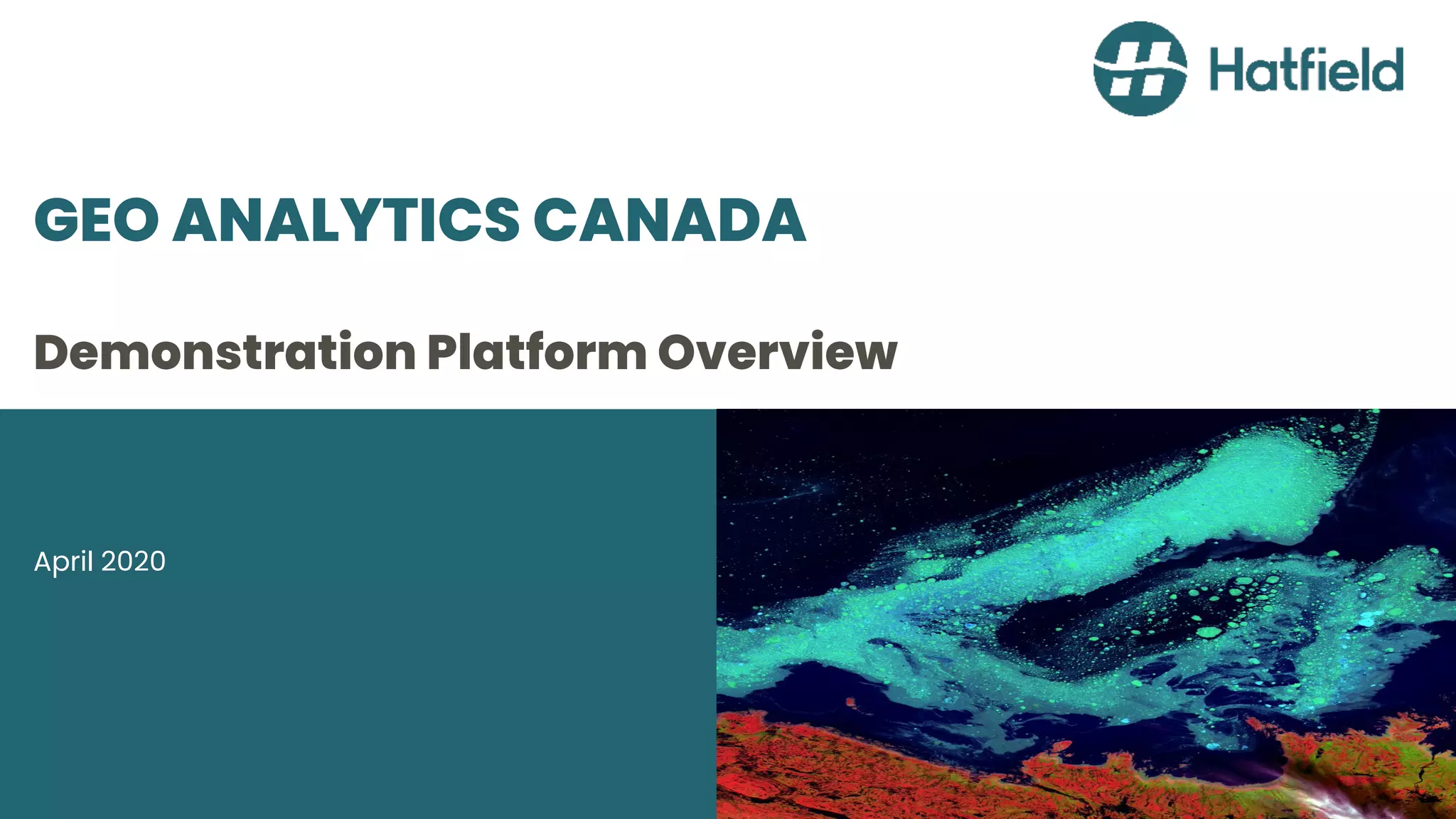
GEO ANALYTICS CANADA
Demonstration Platform Overview
April 2020
THE PROBLEM
• Satellite EO data is now too
big to analyze using
traditional desktop analytic
tools
• Impossible to analyze
satellite EO data over wide
areas and deep timeseries
using traditional tools
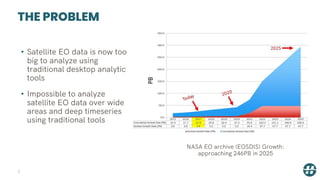
NASA EO archive (EOSDIS) Growth:
approaching 246PB in 2025
2
THE SOLUTION
• Bring your algorithm to the data,
not the other way around
• Embrace big data tools and
systems used in other areas
• Transition away from desktop
analytics to cloud-native analytics
• This new era requires
partnerships between IT and
satellite EO experts
• Demonstration proof of concept
platform: www.geoanalytics.ca
3
www.geoanalytics.ca
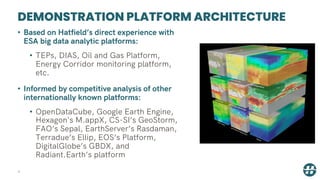
DEMONSTRATION PLATFORM ARCHITECTURE
4
• Based on Hatfield’s direct experience with
ESA big data analytic platforms:
• TEPs, DIAS, Oil and Gas Platform,
Energy Corridor monitoring platform,
etc.
• Informed by competitive analysis of other
internationally known platforms:
• OpenDataCube, Google Earth Engine,
Hexagon's M.appX, CS-SI’s GeoStorm,
FAO’s Sepal, EarthServer’s Rasdaman,
Terradue’s Ellip, EOS’s Platform,
DigitalGlobe’s GBDX, and
Radiant.Earth’s platform
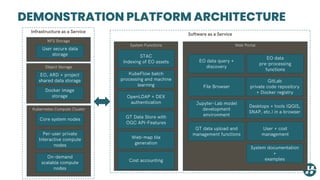
DEMONSTRATION PLATFORM ARCHITECTURE
Object Storage
EO, ARD + project
shared data storage
Kubernetes
On-Demand
Compute
Docker image
storage
System Functions
STAC
Indexing of EO assets
GT Data Store with
OGC API-Features
OpenLDAP + DEX
authentication
KubeFlow batch
processing and machine
learning
Kubernetes Compute Cluster
Core system nodes
Per-user private
Interactive compute
nodes
On-demand
scalable compute
nodes
Web Portal
GitLab
private code repository
+ Docker registry
Jupyter-Lab model
development
environment
System documentation
+
examples
Desktops + tools (QGIS,
SNAP, etc.) in a browser
GT data upload and
management functions
EO data query +
discovery
User + cost
management
Infrastructure as a Service
Software as a Service
Web-map tile
generation
EO data
pre-processing
functions
File Browser
NFS Storage
User secure data
storage
Cost accounting
INFRASTRUCTURE AS A SERVICE
• Scalable storage and compute services
6
INFRASTRUCTURE AS A SERVICE
7
• Key Requirements:
• Providing managed Kubernetes clusters – dynamically scheduled and
scaled containerized workloads
• Availability of pre-emptible nodes –largescale computations done in a
cost-effective manner
• Having a Canadian data center – to comply with Canadian data residency
requirements.
• Selected: Google cloud
• Meets all the above requirements
• Already hosts Landsat 4-8 and Sentintel-2 collections, so no-need to
duplicate
INFRASTRUCTURE AS A SERVICE
8
• Vendor Neutrality:
• GEO Analytics Canada uses technologies available
on all major cloud hosting providers
• APIs and layers of abstraction have been used to
assure neutrality
• Vendor neutrality allows us to pursue multi-cloud
integrations
• For example: distributed machine learning, with
compute done close to pre-existing data stores
COMPUTE INFRASTRUCTURE
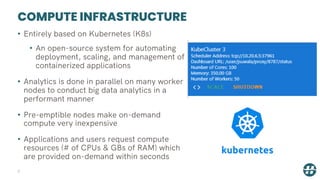
• Entirely based on Kubernetes (K8s)
• An open-source system for automating
deployment, scaling, and management of
containerized applications
• Analytics is done in parallel on many worker
nodes to conduct big data analytics in a
performant manner
• Pre-emptible nodes make on-demand
compute very inexpensive
• Applications and users request compute
resources (# of CPUs & GBs of RAM) which
are provided on-demand within seconds
9
STORAGE INFRASTRUCTURE
10
• Object storage
• Highly durable with built-in
redundancy
• scales to exabytes of data
• Lowest cost
• On the Demonstration Platform, the
following are stored in object storage:
• Raw satellite EO data, including all
downloaded MODIS products
• Analysis ready satellite data (ARD)
• User and project team shared files
• Docker container images
STORAGE INFRASTRUCTURE
11
• NFS storage service
• Compatible with all Linux-based
systems used on the
demonstration platform
• Used to store user personal home
directories
• Secure – only available to a
specific user (cannot be shared)
• Transfer to project team storage
area (on object store) if sharing
required
• Back-end storage is a standard
SATA disk
SOFTWARE AS A SERVICE
12
• Web user interfaces and APIs for big EO data
analytics and processing
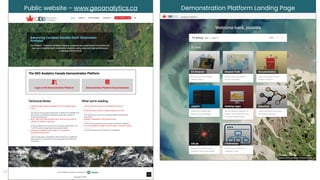
Public website – www.geoanalytics.ca Demonstration Platform Landing Page
13
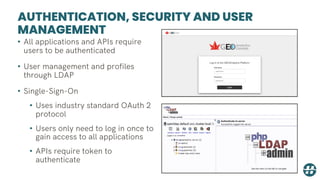
AUTHENTICATION, SECURITY AND USER
MANAGEMENT
• All applications and APIs require
users to be authenticated
• User management and profiles
through LDAP
• Single-Sign-On
• Uses industry standard OAuth 2
protocol
• Users only need to log in once to
gain access to all applications
• APIs require token to
authenticate
EO DATA QUERY AND DISCOVERY
15
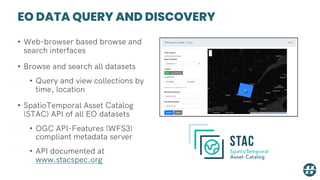
EO DATA QUERY AND DISCOVERY
• Web-browser based browse and
search interfaces
• Browse and search all datasets
• Query and view collections by
time, location
• SpatioTemporal Asset Catalog
(STAC) API of all EO datasets
• OGC API-Features (WFS3)
compliant metadata server
• API documented at
www.stacspec.org
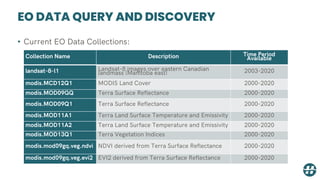
EO DATA QUERY AND DISCOVERY
• Current EO Data Collections:
Collection Name Description Time Period
Available
landsat-8-l1 Landsat-8 images over eastern Canadian
landmass (Manitoba east) 2003-2020
modis.MCD12Q1 MODIS Land Cover 2000-2020
modis.MOD09GQ Terra Surface Reflectance 2000-2020
modis.MOD09Q1 Terra Surface Reflectance 2000-2020
modis.MOD11A1 Terra Land Surface Temperature and Emissivity 2000-2020
modis.MOD11A2 Terra Land Surface Temperature and Emissivity 2000-2020
modis.MOD13Q1 Terra Vegetation Indices 2000-2020
modis.mod09gq.veg.ndvi NDVI derived from Terra Surface Reflectance 2000-2020
modis.mod09gq.veg.evi2 EVI2 derived from Terra Surface Reflectance 2000-2020
EO DATA INGESTION AND PRE-
PROCESSING
18
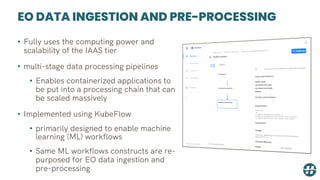
EO DATA INGESTION AND PRE-PROCESSING
• Fully uses the computing power and
scalability of the IAAS tier
• multi-stage data processing pipelines
• Enables containerized applications to
be put into a processing chain that can
be scaled massively
• Implemented using KubeFlow
• primarily designed to enable machine
learning (ML) workflows
• Same ML workflows constructs are re-
purposed for EO data ingestion and
pre-processing
EO DATA INGESTION AND PRE-PROCESSING
• Proof of concept EO data pipelines created:
• Level-2 Sentinel-2 products using Sen2Cor
• Run any set of commands that are available through ESA’s
Sentinel Application Platform (SNAP) software
• Downloads MODIS products to the object store and adds the
product to the EO metadata system
• Adds Landsat-8 images over the Eastern Canadian landmass
(i.e. Manitoba east) to the EO metadata system
• Creates NDVI and EVI2 products from Terra Surface
Reflectance products
• Creates a daily thermal average product from Terra Land
Surface Temperature products
EO DATA INGESTION AND PRE-PROCESSING
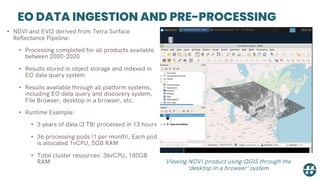
• NDVI and EVI2 derived from Terra Surface
Reflectance Pipeline:
• Processing completed for all products available
between 2000-2020
• Results stored in object storage and indexed in
EO data query system
• Results available through all platform systems,
including EO data query and discovery system,
File Browser, desktop in a browser, etc.
• Runtime Example:
• 3 years of data (3 TB) processed in 13 hours
• 36 processing pods (1 per month), Each pod
is allocated 1vCPU, 5GB RAM
• Total cluster resources: 36vCPU, 180GB
RAM Viewing NDVI product using QGIS through the
‘desktop in a browser’ system
EO DATA INGESTION AND PRE-PROCESSING
22
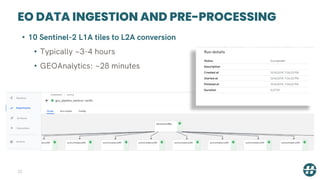
• 10 Sentinel-2 L1A tiles to L2A conversion
• Typically ~3-4 hours
• GEOAnalytics: ~28 minutes
JUPYTER-LAB ANALYTIC ENVIRONMENT
23
JUPYTER-LAB ANALYTIC ENVIRONMENT
24
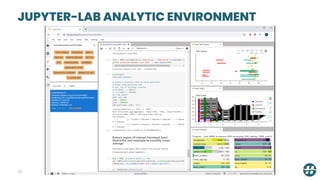
• Python-based scalable data analytics
• Interacts with Kubernetes to provide on-demand scalable compute
• Core software systems:
• Jupyter-Lab – provides the web application framework for
interactive analytics
• Xarray – provides an N-Dimensional Array interface and toolset
• Iris – provides methods for analysing and visualising meteorological
and oceanographic data sets
• Dask – provides flexible parallel computing for analytics
• Zarr – the next generation, cloud-native file format for gridded
datasets
JUPYTER-LAB ANALYTIC ENVIRONMENT
25
JUPYTER-LAB ANALYTIC ENVIRONMENT
26
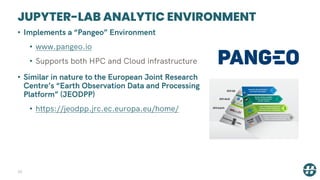
• Implements a “Pangeo” Environment
• www.pangeo.io
• Supports both HPC and Cloud infrastructure
• Similar in nature to the European Joint Research
Centre’s “Earth Observation Data and Processing
Platform” (JEODPP)
• https://jeodpp.jrc.ec.europa.eu/home/
JUPYTER-LAB ANALYTIC ENVIRONMENT
27
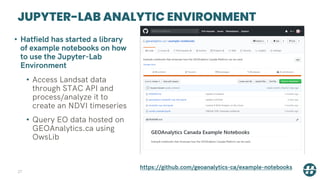
• Hatfield has started a library
of example notebooks on how
to use the Jupyter-Lab
Environment
• Access Landsat data
through STAC API and
process/analyze it to
create an NDVI timeseries
• Query EO data hosted on
GEOAnalytics.ca using
OwsLib
https://github.com/geoanalytics-ca/example-notebooks
JUPYTER-LAB ANALYTIC ENVIRONMENT
28
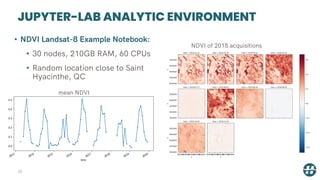
• NDVI Landsat-8 Example Notebook:
• 30 nodes, 210GB RAM, 60 CPUs
• Random location close to Saint
Hyacinthe, QC
NDVI of 2018 acquisitions
mean NDVI
GITLAB PRIVATE CODE REPOSITORY AND
DOCKER REGISTRY
29
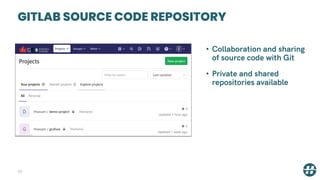
GITLAB SOURCE CODE REPOSITORY
30
• Collaboration and sharing
of source code with Git
• Private and shared
repositories available
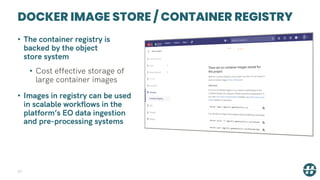
DOCKER IMAGE STORE / CONTAINER REGISTRY
31
• The container registry is
backed by the object
store system
• Cost effective storage of
large container images
• Images in registry can be used
in scalable workflows in the
platform’s EO data ingestion
and pre-processing systems
ON-DEMAND PERSONAL UBUNTU
DESKTOPS IN A BROWSER
32
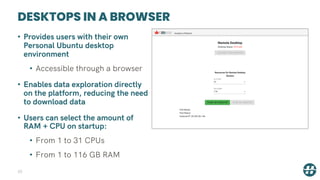
DESKTOPS IN A BROWSER
33
• Provides users with their own
Personal Ubuntu desktop
environment
• Accessible through a browser
• Enables data exploration directly
on the platform, reducing the need
to download data
• Users can select the amount of
RAM + CPU on startup:
• From 1 to 31 CPUs
• From 1 to 116 GB RAM
DESKTOPS IN A BROWSER
34
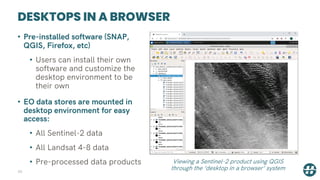
• Pre-installed software (SNAP,
QGIS, Firefox, etc)
• Users can install their own
software and customize the
desktop environment to be
their own
• EO data stores are mounted in
desktop environment for easy
access:
• All Sentinel-2 data
• All Landsat 4-8 data
• Pre-processed data products Viewing a Sentinel-2 product using QGIS
through the ‘desktop in a browser’ system
FILE BROWSER
35
FILE BROWSER
36
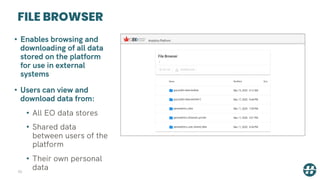
• Enables browsing and
downloading of all data
stored on the platform
for use in external
systems
• Users can view and
download data from:
• All EO data stores
• Shared data
between users of the
platform
• Their own personal
data
GROUND TRUTH DATA MANAGEMENT
37
GROUND TRUTH DATA MANAGEMENT
38
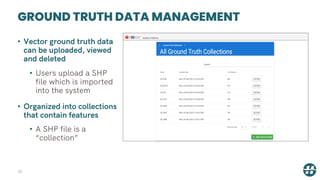
• Vector ground truth data
can be uploaded, viewed
and deleted
• Users upload a SHP
file which is imported
into the system
• Organized into collections
that contain features
• A SHP file is a
“collection”
GROUND TRUTH DATA MANAGEMENT
39
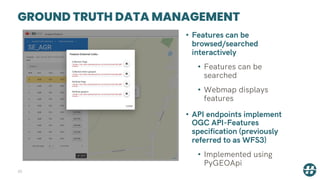
• Features can be
browsed/searched
interactively
• Features can be
searched
• Webmap displays
features
• API endpoints implement
OGC API-Features
specification (previously
referred to as WFS3)
• Implemented using
PyGEOApi
CONCLUSION
40
CONCLUSION
41
• The proof of concept platform demonstrates how [1]:
• Existing stores of satellite EO data can be
analyzed in-place using cloud-computing
resources, rather than requiring download
• New modular and user friendly metadata
protocols, particularly Spatio Temporal Asset
Catalogs (STAC), can be used to provide search
interface for satellite EO dataset discovery
CONCLUSION
42
• The proof of concept platform demonstrates how [2]:
• The new OGC API – Features (WFS 3) standard
can be used manage and make available ground
truth and other in-situ datasets
• Satellite EO analytic programs in Python can be
created interactively, and then scaled to analyze
large areas and deep timeseries using XArray
and Dask libraries
• Ingestion, machine learning, analytical and pre-
processing applications (both binary and python
based) can be linked to form scalable satellite EO
data processing chains
CONCLUSION
43
• Bring your algorithm to the data, not the
other way around
Email contacts:
info@geoanalytics.ca
jsuwala@hatfieldgroup.com

GEO Analytics Canada Overview April 2020

  • 1.
    GEO ANALYTICS CANADA DemonstrationPlatform Overview April 2020
  • 2.
    THE PROBLEM • SatelliteEO data is now too big to analyze using traditional desktop analytic tools • Impossible to analyze satellite EO data over wide areas and deep timeseries using traditional tools NASA EO archive (EOSDIS) Growth: approaching 246PB in 2025 2
  • 3.
    THE SOLUTION • Bringyour algorithm to the data, not the other way around • Embrace big data tools and systems used in other areas • Transition away from desktop analytics to cloud-native analytics • This new era requires partnerships between IT and satellite EO experts • Demonstration proof of concept platform: www.geoanalytics.ca 3 www.geoanalytics.ca
  • 4.
    DEMONSTRATION PLATFORM ARCHITECTURE 4 •Based on Hatfield’s direct experience with ESA big data analytic platforms: • TEPs, DIAS, Oil and Gas Platform, Energy Corridor monitoring platform, etc. • Informed by competitive analysis of other internationally known platforms: • OpenDataCube, Google Earth Engine, Hexagon's M.appX, CS-SI’s GeoStorm, FAO’s Sepal, EarthServer’s Rasdaman, Terradue’s Ellip, EOS’s Platform, DigitalGlobe’s GBDX, and Radiant.Earth’s platform
  • 5.
    DEMONSTRATION PLATFORM ARCHITECTURE ObjectStorage EO, ARD + project shared data storage Kubernetes On-Demand Compute Docker image storage System Functions STAC Indexing of EO assets GT Data Store with OGC API-Features OpenLDAP + DEX authentication KubeFlow batch processing and machine learning Kubernetes Compute Cluster Core system nodes Per-user private Interactive compute nodes On-demand scalable compute nodes Web Portal GitLab private code repository + Docker registry Jupyter-Lab model development environment System documentation + examples Desktops + tools (QGIS, SNAP, etc.) in a browser GT data upload and management functions EO data query + discovery User + cost management Infrastructure as a Service Software as a Service Web-map tile generation EO data pre-processing functions File Browser NFS Storage User secure data storage Cost accounting
  • 6.
    INFRASTRUCTURE AS ASERVICE • Scalable storage and compute services 6
  • 7.
    INFRASTRUCTURE AS ASERVICE 7 • Key Requirements: • Providing managed Kubernetes clusters – dynamically scheduled and scaled containerized workloads • Availability of pre-emptible nodes –largescale computations done in a cost-effective manner • Having a Canadian data center – to comply with Canadian data residency requirements. • Selected: Google cloud • Meets all the above requirements • Already hosts Landsat 4-8 and Sentintel-2 collections, so no-need to duplicate
  • 8.
    INFRASTRUCTURE AS ASERVICE 8 • Vendor Neutrality: • GEO Analytics Canada uses technologies available on all major cloud hosting providers • APIs and layers of abstraction have been used to assure neutrality • Vendor neutrality allows us to pursue multi-cloud integrations • For example: distributed machine learning, with compute done close to pre-existing data stores
  • 9.
    COMPUTE INFRASTRUCTURE • Entirelybased on Kubernetes (K8s) • An open-source system for automating deployment, scaling, and management of containerized applications • Analytics is done in parallel on many worker nodes to conduct big data analytics in a performant manner • Pre-emptible nodes make on-demand compute very inexpensive • Applications and users request compute resources (# of CPUs & GBs of RAM) which are provided on-demand within seconds 9
  • 10.
    STORAGE INFRASTRUCTURE 10 • Objectstorage • Highly durable with built-in redundancy • scales to exabytes of data • Lowest cost • On the Demonstration Platform, the following are stored in object storage: • Raw satellite EO data, including all downloaded MODIS products • Analysis ready satellite data (ARD) • User and project team shared files • Docker container images
  • 11.
    STORAGE INFRASTRUCTURE 11 • NFSstorage service • Compatible with all Linux-based systems used on the demonstration platform • Used to store user personal home directories • Secure – only available to a specific user (cannot be shared) • Transfer to project team storage area (on object store) if sharing required • Back-end storage is a standard SATA disk
  • 12.
    SOFTWARE AS ASERVICE 12 • Web user interfaces and APIs for big EO data analytics and processing
  • 13.
    Public website –www.geoanalytics.ca Demonstration Platform Landing Page 13
  • 14.
    AUTHENTICATION, SECURITY ANDUSER MANAGEMENT • All applications and APIs require users to be authenticated • User management and profiles through LDAP • Single-Sign-On • Uses industry standard OAuth 2 protocol • Users only need to log in once to gain access to all applications • APIs require token to authenticate
  • 15.
    EO DATA QUERYAND DISCOVERY 15
  • 16.
    EO DATA QUERYAND DISCOVERY • Web-browser based browse and search interfaces • Browse and search all datasets • Query and view collections by time, location • SpatioTemporal Asset Catalog (STAC) API of all EO datasets • OGC API-Features (WFS3) compliant metadata server • API documented at www.stacspec.org
  • 17.
    EO DATA QUERYAND DISCOVERY • Current EO Data Collections: Collection Name Description Time Period Available landsat-8-l1 Landsat-8 images over eastern Canadian landmass (Manitoba east) 2003-2020 modis.MCD12Q1 MODIS Land Cover 2000-2020 modis.MOD09GQ Terra Surface Reflectance 2000-2020 modis.MOD09Q1 Terra Surface Reflectance 2000-2020 modis.MOD11A1 Terra Land Surface Temperature and Emissivity 2000-2020 modis.MOD11A2 Terra Land Surface Temperature and Emissivity 2000-2020 modis.MOD13Q1 Terra Vegetation Indices 2000-2020 modis.mod09gq.veg.ndvi NDVI derived from Terra Surface Reflectance 2000-2020 modis.mod09gq.veg.evi2 EVI2 derived from Terra Surface Reflectance 2000-2020
  • 18.
    EO DATA INGESTIONAND PRE- PROCESSING 18
  • 19.
    EO DATA INGESTIONAND PRE-PROCESSING • Fully uses the computing power and scalability of the IAAS tier • multi-stage data processing pipelines • Enables containerized applications to be put into a processing chain that can be scaled massively • Implemented using KubeFlow • primarily designed to enable machine learning (ML) workflows • Same ML workflows constructs are re- purposed for EO data ingestion and pre-processing
  • 20.
    EO DATA INGESTIONAND PRE-PROCESSING • Proof of concept EO data pipelines created: • Level-2 Sentinel-2 products using Sen2Cor • Run any set of commands that are available through ESA’s Sentinel Application Platform (SNAP) software • Downloads MODIS products to the object store and adds the product to the EO metadata system • Adds Landsat-8 images over the Eastern Canadian landmass (i.e. Manitoba east) to the EO metadata system • Creates NDVI and EVI2 products from Terra Surface Reflectance products • Creates a daily thermal average product from Terra Land Surface Temperature products
  • 21.
    EO DATA INGESTIONAND PRE-PROCESSING • NDVI and EVI2 derived from Terra Surface Reflectance Pipeline: • Processing completed for all products available between 2000-2020 • Results stored in object storage and indexed in EO data query system • Results available through all platform systems, including EO data query and discovery system, File Browser, desktop in a browser, etc. • Runtime Example: • 3 years of data (3 TB) processed in 13 hours • 36 processing pods (1 per month), Each pod is allocated 1vCPU, 5GB RAM • Total cluster resources: 36vCPU, 180GB RAM Viewing NDVI product using QGIS through the ‘desktop in a browser’ system
  • 22.
    EO DATA INGESTIONAND PRE-PROCESSING 22 • 10 Sentinel-2 L1A tiles to L2A conversion • Typically ~3-4 hours • GEOAnalytics: ~28 minutes
  • 23.
  • 24.
    JUPYTER-LAB ANALYTIC ENVIRONMENT 24 •Python-based scalable data analytics • Interacts with Kubernetes to provide on-demand scalable compute • Core software systems: • Jupyter-Lab – provides the web application framework for interactive analytics • Xarray – provides an N-Dimensional Array interface and toolset • Iris – provides methods for analysing and visualising meteorological and oceanographic data sets • Dask – provides flexible parallel computing for analytics • Zarr – the next generation, cloud-native file format for gridded datasets
  • 25.
  • 26.
    JUPYTER-LAB ANALYTIC ENVIRONMENT 26 •Implements a “Pangeo” Environment • www.pangeo.io • Supports both HPC and Cloud infrastructure • Similar in nature to the European Joint Research Centre’s “Earth Observation Data and Processing Platform” (JEODPP) • https://jeodpp.jrc.ec.europa.eu/home/
  • 27.
    JUPYTER-LAB ANALYTIC ENVIRONMENT 27 •Hatfield has started a library of example notebooks on how to use the Jupyter-Lab Environment • Access Landsat data through STAC API and process/analyze it to create an NDVI timeseries • Query EO data hosted on GEOAnalytics.ca using OwsLib https://github.com/geoanalytics-ca/example-notebooks
  • 28.
    JUPYTER-LAB ANALYTIC ENVIRONMENT 28 •NDVI Landsat-8 Example Notebook: • 30 nodes, 210GB RAM, 60 CPUs • Random location close to Saint Hyacinthe, QC NDVI of 2018 acquisitions mean NDVI
  • 29.
    GITLAB PRIVATE CODEREPOSITORY AND DOCKER REGISTRY 29
  • 30.
    GITLAB SOURCE CODEREPOSITORY 30 • Collaboration and sharing of source code with Git • Private and shared repositories available
  • 31.
    DOCKER IMAGE STORE/ CONTAINER REGISTRY 31 • The container registry is backed by the object store system • Cost effective storage of large container images • Images in registry can be used in scalable workflows in the platform’s EO data ingestion and pre-processing systems
  • 32.
  • 33.
    DESKTOPS IN ABROWSER 33 • Provides users with their own Personal Ubuntu desktop environment • Accessible through a browser • Enables data exploration directly on the platform, reducing the need to download data • Users can select the amount of RAM + CPU on startup: • From 1 to 31 CPUs • From 1 to 116 GB RAM
  • 34.
    DESKTOPS IN ABROWSER 34 • Pre-installed software (SNAP, QGIS, Firefox, etc) • Users can install their own software and customize the desktop environment to be their own • EO data stores are mounted in desktop environment for easy access: • All Sentinel-2 data • All Landsat 4-8 data • Pre-processed data products Viewing a Sentinel-2 product using QGIS through the ‘desktop in a browser’ system
  • 35.
  • 36.
    FILE BROWSER 36 • Enablesbrowsing and downloading of all data stored on the platform for use in external systems • Users can view and download data from: • All EO data stores • Shared data between users of the platform • Their own personal data
  • 37.
    GROUND TRUTH DATAMANAGEMENT 37
  • 38.
    GROUND TRUTH DATAMANAGEMENT 38 • Vector ground truth data can be uploaded, viewed and deleted • Users upload a SHP file which is imported into the system • Organized into collections that contain features • A SHP file is a “collection”
  • 39.
    GROUND TRUTH DATAMANAGEMENT 39 • Features can be browsed/searched interactively • Features can be searched • Webmap displays features • API endpoints implement OGC API-Features specification (previously referred to as WFS3) • Implemented using PyGEOApi
  • 40.
  • 41.
    CONCLUSION 41 • The proofof concept platform demonstrates how [1]: • Existing stores of satellite EO data can be analyzed in-place using cloud-computing resources, rather than requiring download • New modular and user friendly metadata protocols, particularly Spatio Temporal Asset Catalogs (STAC), can be used to provide search interface for satellite EO dataset discovery
  • 42.
    CONCLUSION 42 • The proofof concept platform demonstrates how [2]: • The new OGC API – Features (WFS 3) standard can be used manage and make available ground truth and other in-situ datasets • Satellite EO analytic programs in Python can be created interactively, and then scaled to analyze large areas and deep timeseries using XArray and Dask libraries • Ingestion, machine learning, analytical and pre- processing applications (both binary and python based) can be linked to form scalable satellite EO data processing chains
  • 43.
    CONCLUSION 43 • Bring youralgorithm to the data, not the other way around Email contacts: info@geoanalytics.ca jsuwala@hatfieldgroup.com