Copyright © 2006, Oracle. All rights reserved.
Generating Revenue
Copyright © 2006, Oracle. All rights reserved.
Objectives
After completing this lesson, you should be able to do the
following:
• Explain fundamental revenue concepts
• Generate revenue and create accounting in Oracle
Subledger Accounting
• Identify the client extensions available for revenue
Copyright © 2006, Oracle. All rights reserved.
Agenda
• Revenue Concepts
• Generating Revenue
• Revenue Adjustments
• Extensions and Profile Options
Copyright © 2006, Oracle. All rights reserved.
Project Revenue Overview
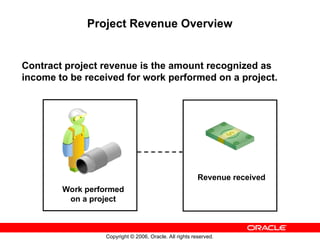
Contract project revenue is the amount recognized as
income to be received for work performed on a project.
Revenue received
Work performed
on a project
Copyright © 2006, Oracle. All rights reserved.
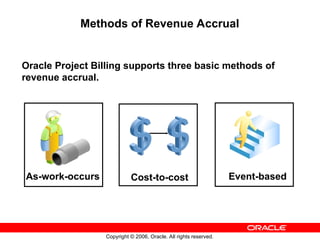
Methods of Revenue Accrual
Oracle Project Billing supports three basic methods of
revenue accrual.
As-work-occurs Cost-to-cost Event-based
Copyright © 2006, Oracle. All rights reserved.
Hard Limit Processing Overview
You specify a hard limit for an agreement to limit revenue
accrual and billing of a project funded by that agreement to
the amount funded.
Hard limits can be set for both revenue and invoice or for
either revenue or invoice. You specify whether to use hard
limits for an agreement in the Agreements form. Funding
cannot be reduced below the accrued revenue if hard limit
for revenue exists.
Copyright © 2006, Oracle. All rights reserved.
Hard Limit Processing
Accrued revenue is the total amount of
revenue accrued under the funding limits.
For projects that hit a hard limit,
Outstanding Revenue to Accrue =
Potential Revenue – Accrued Revenue
You can report the outstanding revenue
amount by project using the Potential
Revenue Summary Report.
Copyright © 2006, Oracle. All rights reserved.
Review of Accounting Dates and Revenue
All revenue transactions are accounted for using these
dates:
GL date: Date accounted
for based on GL periods
PA date: Date accounted
for based on PA periods
Copyright © 2006, Oracle. All rights reserved.
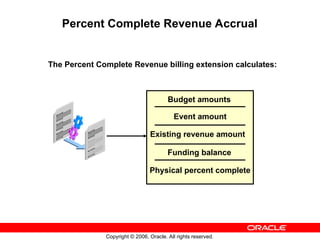
Percent Complete Revenue Accrual
The Percent Complete Revenue billing extension calculates:
Budget amounts
Event amount
Existing revenue amount
Funding balance
Physical percent complete
Copyright © 2006, Oracle. All rights reserved.
Revenue-Based Cost Accrual
Cost accruals are the accounting transactions to account
for expenses in the same accounting period in which
revenue is generated.
In Oracle Projects, cost distribution and revenue
generation are two separate processes. Consequently, it is
possible to account for expenses (costs) and revenue in
different accounting periods. You must determine your
accounting procedures and setup to ensure that you match
expenses to revenue.
Copyright © 2006, Oracle. All rights reserved.
Revenue Events
• You can process revenue for detail transactions using
one of the revenue accrual methods.
• You can also process revenue and invoice amounts
using events.
– Events are revenue and/or billing transactions assigned
to a project or top task that are not directly associated
with detail transactions.
– Event types are defined by the user to categorize
different kinds of standard and nonstandard event
transactions by revenue category.
Copyright © 2006, Oracle. All rights reserved.
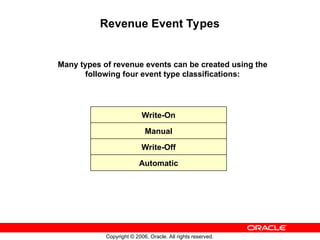
Revenue Event Types
Many types of revenue events can be created using the
following four event type classifications:
Write-On
Manual
Write-Off
Automatic
Copyright © 2006, Oracle. All rights reserved.
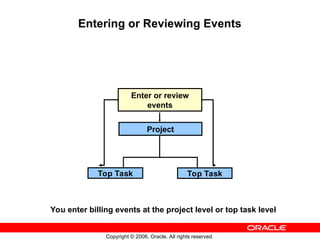
Entering or Reviewing Events
Enter or review
events
Top Task Top Task
Project
You enter billing events at the project level or top task level
Copyright © 2006, Oracle. All rights reserved.
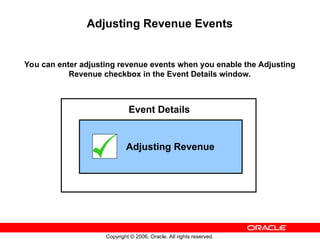
Adjusting Revenue Events
You can enter adjusting revenue events when you enable the Adjusting
Revenue checkbox in the Event Details window.
Adjusting Revenue
Event Details
Copyright © 2006, Oracle. All rights reserved.
Agenda
• Revenue Concepts
• Generating Revenue
• Revenue Adjustments
• Extensions and Profile Options
Copyright © 2006, Oracle. All rights reserved.
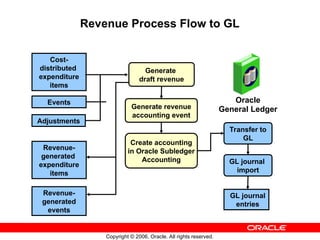
Revenue Process Flow to GL
GL journal
import
Generate revenue
accounting event
Generate
draft revenue
Revenue-
generated
expenditure
items
Revenue-
generated
events
Oracle
General Ledger
GL journal
entries
Cost-
distributed
expenditure
items
Events
Adjustments
Create accounting
in Oracle Subledger
Accounting
Transfer to
GL
Copyright © 2006, Oracle. All rights reserved.
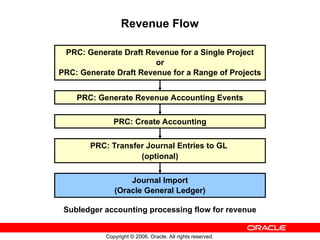
Revenue Flow
PRC: Generate Draft Revenue for a Single Project
or
PRC: Generate Draft Revenue for a Range of Projects
PRC: Generate Revenue Accounting Events
PRC: Create Accounting
PRC: Transfer Journal Entries to GL
(optional)
Journal Import
(Oracle General Ledger)
Subledger accounting processing flow for revenue
Copyright © 2006, Oracle. All rights reserved.
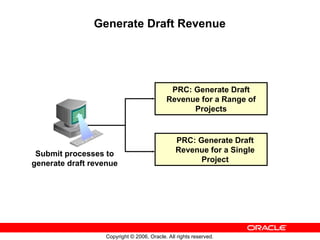
Generate Draft Revenue
PRC: Generate Draft
Revenue for a Single
Project
PRC: Generate Draft
Revenue for a Range of
Projects
Submit processes to
generate draft revenue
Copyright © 2006, Oracle. All rights reserved.
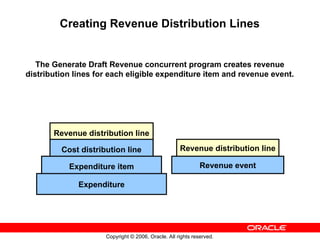
Creating Revenue Distribution Lines
The Generate Draft Revenue concurrent program creates revenue
distribution lines for each eligible expenditure item and revenue event.
Revenue distribution line
Cost distribution line
Expenditure item
Expenditure
Revenue distribution line
Revenue event
Copyright © 2006, Oracle. All rights reserved.
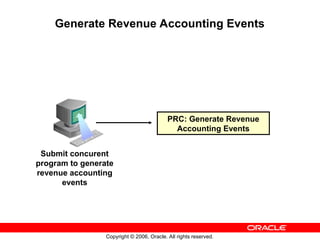
Generate Revenue Accounting Events
PRC: Generate Revenue
Accounting Events
Submit concurent
program to generate
revenue accounting
events
Copyright © 2006, Oracle. All rights reserved.
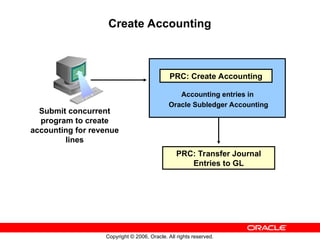
Create Accounting
Submit concurrent
program to create
accounting for revenue
lines
Accounting entries in
Oracle Subledger Accounting
PRC: Create Accounting
PRC: Transfer Journal
Entries to GL
Copyright © 2006, Oracle. All rights reserved.
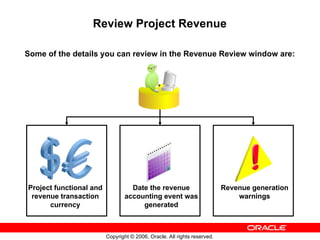
Review Project Revenue
Some of the details you can review in the Revenue Review window are:
Project functional and
revenue transaction
currency
Revenue generation
warnings
Date the revenue
accounting event was
generated
Copyright © 2006, Oracle. All rights reserved.
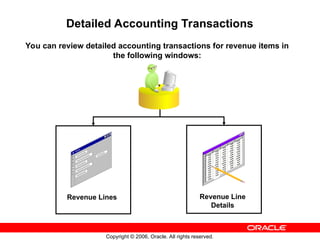
Detailed Accounting Transactions
You can review detailed accounting transactions for revenue items in
the following windows:
Revenue Lines Revenue Line
Details
Copyright © 2006, Oracle. All rights reserved.
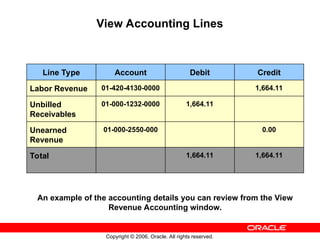
View Accounting Lines
Line Type Account Debit Credit
Labor Revenue 01-420-4130-0000 1,664.11
Unbilled
Receivables
01-000-1232-0000 1,664.11
Unearned
Revenue
01-000-2550-000 0.00
Total 1,664.11 1,664.11
An example of the accounting details you can review from the View
Revenue Accounting window.
Copyright © 2006, Oracle. All rights reserved.
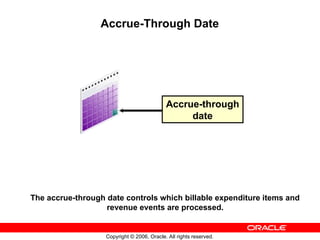
Accrue-Through Date
The accrue-through date controls which billable expenditure items and
revenue events are processed.
Accrue-through
date
Copyright © 2006, Oracle. All rights reserved.
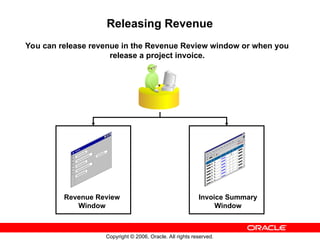
Releasing Revenue
You can release revenue in the Revenue Review window or when you
release a project invoice.
Revenue Review
Window
Invoice Summary
Window
Copyright © 2006, Oracle. All rights reserved.
Deleting Draft Revenue
PRC: Delete Draft
Revenue of a
Single Project
Submit concurrent
program to delete
draft revenue
generated for a
contract project
Copyright © 2006, Oracle. All rights reserved.
Agenda
• Revenue Concepts
• Generating Revenue
• Revenue Adjustments
• Extensions and Profile Options
Copyright © 2006, Oracle. All rights reserved.
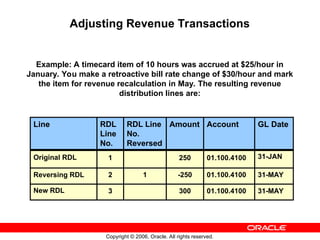
Adjusting Revenue Transactions
Example: A timecard item of 10 hours was accrued at $25/hour in
January. You make a retroactive bill rate change of $30/hour and mark
the item for revenue recalculation in May. The resulting revenue
distribution lines are:
31-MAY
01.100.4100
300
3
New RDL
31-MAY
01.100.4100
-250
1
2
Reversing RDL
31-JAN
01.100.4100
250
1
Original RDL
GL Date
Account
Amount
RDL Line
No.
Reversed
RDL
Line
No.
Line
Copyright © 2006, Oracle. All rights reserved.
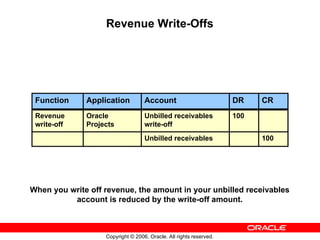
Revenue Write-Offs
When you write off revenue, the amount in your unbilled receivables
account is reduced by the write-off amount.
100
Unbilled receivables
100
Unbilled receivables
write-off
Oracle
Projects
Revenue
write-off
CR
DR
Account
Application
Function
Copyright © 2006, Oracle. All rights reserved.
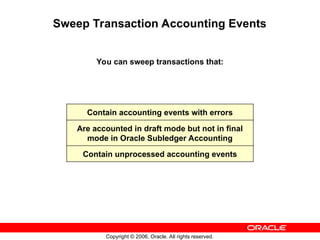
Sweep Transaction Accounting Events
You can sweep transactions that:
Contain accounting events with errors
Are accounted in draft mode but not in final
mode in Oracle Subledger Accounting
Contain unprocessed accounting events
Copyright © 2006, Oracle. All rights reserved.
Agenda
• Revenue Concepts
• Generating Revenue
• Revenue Adjustments
• Extensions and Profile Options
Copyright © 2006, Oracle. All rights reserved.
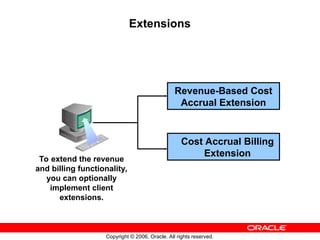
Extensions
Cost Accrual Billing
Extension
Revenue-Based Cost
Accrual Extension
To extend the revenue
and billing functionality,
you can optionally
implement client
extensions.
Copyright © 2006, Oracle. All rights reserved.
Profile Options
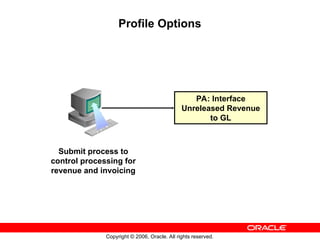
PA: Interface
Unreleased Revenue
to GL
Submit process to
control processing for
revenue and invoicing
Copyright © 2006, Oracle. All rights reserved.
Summary
In this module, you should have learned how to:
• Explain fundamental revenue concepts
• Generate revenue and interface it to Oracle Subledger
Accounting
• Identify the client extensions available for revenue

generating revenue in project billing, lesson 4

  • 1.
    Copyright © 2006,Oracle. All rights reserved. Generating Revenue
  • 2.
    Copyright © 2006,Oracle. All rights reserved. Objectives After completing this lesson, you should be able to do the following: • Explain fundamental revenue concepts • Generate revenue and create accounting in Oracle Subledger Accounting • Identify the client extensions available for revenue
  • 3.
    Copyright © 2006,Oracle. All rights reserved. Agenda • Revenue Concepts • Generating Revenue • Revenue Adjustments • Extensions and Profile Options
  • 4.
    Copyright © 2006,Oracle. All rights reserved. Project Revenue Overview Contract project revenue is the amount recognized as income to be received for work performed on a project. Revenue received Work performed on a project
  • 5.
    Copyright © 2006,Oracle. All rights reserved. Methods of Revenue Accrual Oracle Project Billing supports three basic methods of revenue accrual. As-work-occurs Cost-to-cost Event-based
  • 6.
    Copyright © 2006,Oracle. All rights reserved. Hard Limit Processing Overview You specify a hard limit for an agreement to limit revenue accrual and billing of a project funded by that agreement to the amount funded. Hard limits can be set for both revenue and invoice or for either revenue or invoice. You specify whether to use hard limits for an agreement in the Agreements form. Funding cannot be reduced below the accrued revenue if hard limit for revenue exists.
  • 7.
    Copyright © 2006,Oracle. All rights reserved. Hard Limit Processing Accrued revenue is the total amount of revenue accrued under the funding limits. For projects that hit a hard limit, Outstanding Revenue to Accrue = Potential Revenue – Accrued Revenue You can report the outstanding revenue amount by project using the Potential Revenue Summary Report.
  • 8.
    Copyright © 2006,Oracle. All rights reserved. Review of Accounting Dates and Revenue All revenue transactions are accounted for using these dates: GL date: Date accounted for based on GL periods PA date: Date accounted for based on PA periods
  • 9.
    Copyright © 2006,Oracle. All rights reserved. Percent Complete Revenue Accrual The Percent Complete Revenue billing extension calculates: Budget amounts Event amount Existing revenue amount Funding balance Physical percent complete
  • 10.
    Copyright © 2006,Oracle. All rights reserved. Revenue-Based Cost Accrual Cost accruals are the accounting transactions to account for expenses in the same accounting period in which revenue is generated. In Oracle Projects, cost distribution and revenue generation are two separate processes. Consequently, it is possible to account for expenses (costs) and revenue in different accounting periods. You must determine your accounting procedures and setup to ensure that you match expenses to revenue.
  • 11.
    Copyright © 2006,Oracle. All rights reserved. Revenue Events • You can process revenue for detail transactions using one of the revenue accrual methods. • You can also process revenue and invoice amounts using events. – Events are revenue and/or billing transactions assigned to a project or top task that are not directly associated with detail transactions. – Event types are defined by the user to categorize different kinds of standard and nonstandard event transactions by revenue category.
  • 12.
    Copyright © 2006,Oracle. All rights reserved. Revenue Event Types Many types of revenue events can be created using the following four event type classifications: Write-On Manual Write-Off Automatic
  • 13.
    Copyright © 2006,Oracle. All rights reserved. Entering or Reviewing Events Enter or review events Top Task Top Task Project You enter billing events at the project level or top task level
  • 14.
    Copyright © 2006,Oracle. All rights reserved. Adjusting Revenue Events You can enter adjusting revenue events when you enable the Adjusting Revenue checkbox in the Event Details window. Adjusting Revenue Event Details
  • 15.
    Copyright © 2006,Oracle. All rights reserved. Agenda • Revenue Concepts • Generating Revenue • Revenue Adjustments • Extensions and Profile Options
  • 16.
    Copyright © 2006,Oracle. All rights reserved. Revenue Process Flow to GL GL journal import Generate revenue accounting event Generate draft revenue Revenue- generated expenditure items Revenue- generated events Oracle General Ledger GL journal entries Cost- distributed expenditure items Events Adjustments Create accounting in Oracle Subledger Accounting Transfer to GL
  • 17.
    Copyright © 2006,Oracle. All rights reserved. Revenue Flow PRC: Generate Draft Revenue for a Single Project or PRC: Generate Draft Revenue for a Range of Projects PRC: Generate Revenue Accounting Events PRC: Create Accounting PRC: Transfer Journal Entries to GL (optional) Journal Import (Oracle General Ledger) Subledger accounting processing flow for revenue
  • 18.
    Copyright © 2006,Oracle. All rights reserved. Generate Draft Revenue PRC: Generate Draft Revenue for a Single Project PRC: Generate Draft Revenue for a Range of Projects Submit processes to generate draft revenue
  • 19.
    Copyright © 2006,Oracle. All rights reserved. Creating Revenue Distribution Lines The Generate Draft Revenue concurrent program creates revenue distribution lines for each eligible expenditure item and revenue event. Revenue distribution line Cost distribution line Expenditure item Expenditure Revenue distribution line Revenue event
  • 20.
    Copyright © 2006,Oracle. All rights reserved. Generate Revenue Accounting Events PRC: Generate Revenue Accounting Events Submit concurent program to generate revenue accounting events
  • 21.
    Copyright © 2006,Oracle. All rights reserved. Create Accounting Submit concurrent program to create accounting for revenue lines Accounting entries in Oracle Subledger Accounting PRC: Create Accounting PRC: Transfer Journal Entries to GL
  • 22.
    Copyright © 2006,Oracle. All rights reserved. Review Project Revenue Some of the details you can review in the Revenue Review window are: Project functional and revenue transaction currency Revenue generation warnings Date the revenue accounting event was generated
  • 23.
    Copyright © 2006,Oracle. All rights reserved. Detailed Accounting Transactions You can review detailed accounting transactions for revenue items in the following windows: Revenue Lines Revenue Line Details
  • 24.
    Copyright © 2006,Oracle. All rights reserved. View Accounting Lines Line Type Account Debit Credit Labor Revenue 01-420-4130-0000 1,664.11 Unbilled Receivables 01-000-1232-0000 1,664.11 Unearned Revenue 01-000-2550-000 0.00 Total 1,664.11 1,664.11 An example of the accounting details you can review from the View Revenue Accounting window.
  • 25.
    Copyright © 2006,Oracle. All rights reserved. Accrue-Through Date The accrue-through date controls which billable expenditure items and revenue events are processed. Accrue-through date
  • 26.
    Copyright © 2006,Oracle. All rights reserved. Releasing Revenue You can release revenue in the Revenue Review window or when you release a project invoice. Revenue Review Window Invoice Summary Window
  • 27.
    Copyright © 2006,Oracle. All rights reserved. Deleting Draft Revenue PRC: Delete Draft Revenue of a Single Project Submit concurrent program to delete draft revenue generated for a contract project
  • 28.
    Copyright © 2006,Oracle. All rights reserved. Agenda • Revenue Concepts • Generating Revenue • Revenue Adjustments • Extensions and Profile Options
  • 29.
    Copyright © 2006,Oracle. All rights reserved. Adjusting Revenue Transactions Example: A timecard item of 10 hours was accrued at $25/hour in January. You make a retroactive bill rate change of $30/hour and mark the item for revenue recalculation in May. The resulting revenue distribution lines are: 31-MAY 01.100.4100 300 3 New RDL 31-MAY 01.100.4100 -250 1 2 Reversing RDL 31-JAN 01.100.4100 250 1 Original RDL GL Date Account Amount RDL Line No. Reversed RDL Line No. Line
  • 30.
    Copyright © 2006,Oracle. All rights reserved. Revenue Write-Offs When you write off revenue, the amount in your unbilled receivables account is reduced by the write-off amount. 100 Unbilled receivables 100 Unbilled receivables write-off Oracle Projects Revenue write-off CR DR Account Application Function
  • 31.
    Copyright © 2006,Oracle. All rights reserved. Sweep Transaction Accounting Events You can sweep transactions that: Contain accounting events with errors Are accounted in draft mode but not in final mode in Oracle Subledger Accounting Contain unprocessed accounting events
  • 32.
    Copyright © 2006,Oracle. All rights reserved. Agenda • Revenue Concepts • Generating Revenue • Revenue Adjustments • Extensions and Profile Options
  • 33.
    Copyright © 2006,Oracle. All rights reserved. Extensions Cost Accrual Billing Extension Revenue-Based Cost Accrual Extension To extend the revenue and billing functionality, you can optionally implement client extensions.
  • 34.
    Copyright © 2006,Oracle. All rights reserved. Profile Options PA: Interface Unreleased Revenue to GL Submit process to control processing for revenue and invoicing
  • 35.
    Copyright © 2006,Oracle. All rights reserved. Summary In this module, you should have learned how to: • Explain fundamental revenue concepts • Generate revenue and interface it to Oracle Subledger Accounting • Identify the client extensions available for revenue

Editor's Notes

  • #4 Project Revenue Overview Oracle Project Billing generates revenue based on the transactions that you charge to your projects. You configure your projects to accrue revenue based on your company policies. You can review revenue amounts online, and can also adjust transactions; these transactions are then processed to adjust the revenue amounts for your project. When you generate revenue, Oracle Project Billing calculates revenue, creates revenue events, creates expenditure item revenue details, and maintains funding balances. You run the concurrent program PRC: Generate Revenue Accounting Events to derive GL accounts using AutoAccounting and generate accounting events. You then run the concurrent program PRC: Create Accounting to create accounting in Oracle Subledger Accounting. You transfer the final accounting from Oracle Subledger Accounting to Oracle General Ledger, where you post the journal entries. Project Revenue Revenue recognition can use various methods to calculate project revenue. A project’s billing method can differ from the revenue method. Revenue recognition can be controlled to meet contracting requirements. Revenue can be apportioned to meet intercompany revenue reporting requirements.
  • #5 Methods of Revenue Accrual As-work-occurs Based on bill rates or markups applied to detail transactions: Time and Materials (T&M) when using bill rates, or Cost plus when using burden schedules Cost-to-cost Based on the ratio of the actual costs to budgeted costs and revenue (referred to as percent spent) Event-based Based on the Oracle Project Billing client extensions calculations or direct user input from externally calculated amounts; for example: Automated milestone creation Percent progress complete calculations
  • #6 Hard Limit Processing Overview For projects funded by hard limit agreements, total accrued revenue cannot exceed the total funded amount. The Generate Draft Revenue concurrent program checks the available funding and accrues the allowable amount of revenue. If a hard limit is encountered (more revenue to accrue than available funding), the revenue is accrued up to the hard limit and a warning is created for the draft revenue. Potential revenue is the total amount of revenue that could be accrued if unlimited funding existed. Hard limit processing for expenditure items When there are not enough funds to cover the total potential revenue to accrue, the total allowable revenue is prorated to items processed in that run. The items are marked as partially distributed. Hard limit processing for events Events are processed only if the full revenue amount can be accrued under the funding limit. Example of Partially Distributed Expenditure Items Revenue budget for top task 3.0 is $1,000. Funded by an agreement with Enforce Revenue Limit = Yes Expenditures total potential revenue is $6,940 Revenue Warnings: Revenue has reached the hard limit. Potential Revenue: Amount of additional revenue that would have been generated if there were sufficient revenue budget or no hard limit is $5,940. Partially Revenue Distributed Potential Employee Task Distributed Amount Revenue Revenue Cheng 3.1 Partial 6 hrs 140.63 1080 Cheng 3.2 Partial 6 hrs 140.63 1080 Gray 3.1 Partial 6 hrs 78.13 600 Gray 3.2 Partial 6 hrs 78.13 600 Marlin 3.1 Partial 6 hrs 46.88 290 Marlin 3.2 Partial 6 hrs 46.88 290 Robinson 3.1 Partial 6 hrs 234.38 1500 Robinson 3.2 Partial 6 hrs 234.38 1500 Total Revenue Available 1000.00 6940
  • #8 Review of Accounting Dates and Revenue PA and GL dates are determined depending upon the transaction accounting method: Period-End Date Accounting The PA date is set to the end date of the earliest PA period that includes or follows the revenue accrue through date and has a status of Open or Future. The GL date is set to the end date of the earliest GL period that includes or follows the PA date of the draft revenue and has a status of Open or Future according to the period status in Oracle General Ledger. Expenditure Item Date Accounting The PA date is set to the Revenue Accrue Through Date if that date falls in a PA period with a status of Open or Future. If the revenue accrue through date falls in a closed PA period, then the PA date is set to the start date of the earliest open or future enterable PA period that follows the revenue accrue through date. The GL date is set to the Revenue Accrue Through Date if that date falls in a GL period with a status of Open or Future according to the period status in Oracle Projects. If the revenue accrue through date falls in a closed GL period, then the GL date is set to the start date of the earliest open or future enterable GL period that follows the revenue accrue through date.
  • #9 Percent Complete Revenue Accrual You can generate revenue in Oracle Project Billing based on the financial physical percent complete that you enter for a project. You can enter the physical percent complete for all the levels in the financial breakdown structure. If you want to generate revenue or invoices based on physical percent complete, you must have physical percent complete at the funding level (project or top task). Depending on the type of integration between the workplan and financial structure, Oracle Project Billing can update physical percent complete on the financial structure using the physical percent complete for tasks in the workplan structure. For information on integration between workplan and financial structures, see: Integrating Workplan and Financial Structures, Oracle Projects Fundamentals. Oracle Project Billing rolls up the physical percent complete on the financial breakdown structure based on the physical complete rollup method that you set for the financial structure. For information on updating physical percent complete on the financial structure, see: Deriving Physical Percent Complete for Financial Structures, Oracle Project Management User Guide. Each percent complete has an As Of Date. When you use percent complete as the basis for revenue accrual, the As Of Date is used to determine the current percent complete. Processing Percent Complete Revenue To calculate the physical percent complete revenue, you submit the PRC: Generate Draft Revenue concurrent program. To submit the program for only one project, submit PRC: Generate Draft Revenue for a Single Project. The revenue process performs the following steps: 1. The program calls the Percent Complete Revenue billing extension for each project or top task. The calling procedure specifies whether it is a revenue or invoice calling process and whether the call is made at the project or task level. 2. The billing extension determines the budget amounts, event amount, existing revenue amounts, funding balance, and percent complete. 3. If the percent complete cannot be determined, then the percent complete used by the process is zero, the revenue amount is zero, and no event is created. 4. The program calculates the accrued revenue, using the following formulas: Accrued Revenue = The lesser of A or B A = Remaining funding balance if agreement has a hard limit B = ((Budgeted Revenue - Event Revenue) * Percent Complete at Funding Level/100) - Existing Revenue Event Revenue = Total event revenue accrued other than revenue amount accrued by percent complete events Existing Revenue = Total revenue accrued previously by percent complete events 5. The billing extension creates an event. The description of the event includes the event type and the formula that was used to calculate the revenue or draft invoice amount.
  • #12 Revenue Event Types Write-On: Accrues revenue and bills for the event amount. Example: Bonus. Manual: Revenue amount and invoice amounts are independent. Write-Off: Reduces the amount of unbilled revenue accrued without affecting invoicing amounts. Automatic: Revenue amount and invoice amounts are independent. Can increase or decrease Only used by client billing extensions Note: If project security has been implemented, you can only update projects for which you have permission while you are in project mode event windows. No project security is enforced when you are in all mode event windows.
  • #13 Entering or Reviewing Events Each event is associated with a project. For each project, you can enter events at the project level or at the top task level. You can enter and view events using the Events windows.
  • #14 Adjusting Revenue Events Entering adjusting revenue events allows you to adjust revenue for a project without reopening the project accounting period. Adjusting revenue amounts does not have an effect on invoicing. Therefore, you cannot enter a value in the Bill Amount field for these events. For additional discussion regarding Adjusting Revenue Events, see the section titled “Adjusting Revenue for Closed Projects Periods” later in this lesson. Refer to Guided Demonstration – Define an Event Type for Revenue [LAB3D07Y]
  • #17 Revenue Flow Oracle Project Billing generates revenue based on the transactions that you charge to your projects. You configure your projects to accrue revenue based on your company policies. When you generate revenue, Oracle Project Billing first selects projects, tasks, and their associated events and expenditure items that are eligible for revenue generation. Next, it calculates the potential revenue and then creates revenue events and expenditure items. When you are ready to generate revenue, you run the following concurrent programs: PRC: Generate Draft Revenue for a Single Project or PRC: Generate Draft Revenue for a Range of Projects This process calculates revenue amounts and uses AutoAccounting to determine the default revenue credit account. PRC: Generate Revenue Accounting Events Uses AutoAccounting to determine the default unearned revenue and unbilled receivables accounts. It also calculates the amounts to be distributed to the unearned revenue and unbilled receivables accounts. Finally, the program generates accounting events. PRC: Create Accounting Creates subledger journal entries for accounting events. You can optionally select Revenue as the process category to limit the program to revenue accounting events. You can run the program in either draft or final mode. Optionally, the process can post journal entries in Oracle General Ledger. PRC: Transfer Journal Entries to GL When you run the program PRC: Create Accounting, if you select No for the parameter Transfer to GL, then you run the program PRC: Transfer Journal Entries to GL. Journal Import in Oracle General Ledger Imports the final accounting entries into Oracle General Ledger.
  • #18 Generate Draft Revenue You can generate revenue for a single project, or for a range of projects using the PRC: Generate Draft revenue concurrent program. Oracle Project Billing first creates draft revenue for events, then for expenditure items. After the system calculates potential revenue for expenditure items, it searches for agreements against which to accrue draft revenue, based on the project customer billing contributions and the amount of funding available. This process creates revenue distribution lines for each eligible expenditure item and revenue event. If you select Project Functional Currency and Invoice Transaction Currency as the revenue transaction currency on your multi-currency contract project, the Generate Draft Revenue process calculates revenue in the invoice transaction currency conversion attributes that you define for the customer. If your project has multiple customers, the process generates revenue in the project functional currency for all customers, and calculates revenue in the invoice transaction currency for the customer that you specify. PRC: Generate Draft Revenue for a Range Of Projects Referred to as “mass” revenue generation Generate revenue for all projects in the company on a predefined schedule Can run multiple requests in parallel for different project number ranges Typically a central Information Services or an Accounting function PRC: Generate Draft Revenue for a Single Project Referred to as “on-demand” revenue generation Generate revenue for a single project needing immediate changes to revenue and customer invoices after adjustments are made Run by project administrators or invoicing accountants Refer to Practice – Enter Expenditure Batches [LAB3D08Y]
  • #20 Generate Revenue Accounting Events The generate revenue accounting events program collects revenue distribution lines in Oracle Projects and uses AutoAccounting to determine: The default unearned revenue and unbilled receivables accounts. The amounts to be distributed to the default unearned revenue and unbilled receivables accounts. Oracle Projects calculates these amounts in the revenue transaction currency. Finally, the program creates accounting events in Oracle Subledger Accounting. If the program is able to successfully generate a revenue accounting event, then it updates the status of the revenue distribution line to Accepted. If the process cannot successfully determine an account or is unable to generate an accounting event, then it updates the status of the revenue distribution line to Rejected.
  • #21 Create Accounting After you generate revenue accounting events, you can create accounting in Oracle Subledger Accounting by running the concurrent program PRC: Create Accounting from Oracle Projects. This process creates draft or final accounting entries in Oracle Subledger Accounting for the accounting events created by the generate accounting events process. If you define your own detailed accounting rules in Oracle Subledger Accounting, those accounts override the default accounts or individual segments of accounts that Oracle Projects derives using AutoAccounting. You can run the PRC: Create Accounting concurrent program in draft mode if you want to review the results before you create the final accounting, or you can run the process in final mode. You can optionally choose to transfer the journal entries to Oracle General Ledger, initiate the journal import process, and post the journal entries in Oracle General Ledger. If you choose not to have the process transfer the journal entries to Oracle General Ledger, then you can run the concurrent program PRC: Transfer Journal Entries to GL to transfer the final journal entries from Oracle Subledger Accounting to Oracle General Ledger.
  • #22 Review Project Revenue You can use the Revenue Review window to delete or regenerate a project’s unreleased revenue or to release and unrelease revenue. From this window, you can click the Run Request, Unrelease, Release, Totals, Lines, or Open buttons to: Regenerate or delete revenue for a project Change revenue status from released to unreleased Note: You can unrelease revenue only if you have not performed any of the following actions: released draft invoices for this draft revenue, subsequently generated draft revenue, and summarized draft revenue for the project. Release unreleased revenue View the total revenue amount for the draft revenue displayed based on your search criteria View the revenue lines View all of the revenue information for a single draft revenue line on one screen In addition to the information in the Revenue Summary window, the Revenue window displays the Released Date field and the Warning check box. The Revenue window contains three alternative regions: Interface: Select this to review the status of revenue after you successfully interface it to Oracle General Ledger. Revenue Exceptions: Select this to view exception reasons and warnings encountered while generating draft revenue. Revenue Transaction Currency: Select this to view the revenue amounts in revenue transaction currency. You can control the access to the Revenue Review window using function security and project security. Function security can be used to control the release, unrelease, and run functions in Revenue Review. Project security controls what projects you can view and update.
  • #23 Detailed Accounting Transactions Revenue Lines Window The Revenue Lines window displays the task, revenue source, revenue category, and amount for the revenue lines comprise a draft revenue item. Examples of the information you can review in the Revenue Lines window for a revenue line include: Line Number Task Number and Task Name Revenue Source and Revenue Category Project Functional Revenue Amount Project Currency and Project Functional Currency Project Revenue Amount Revenue Transaction Amount Revenue Transaction Currency Funding Currency Funding Revenue Currency Revenue Line Details Window You use the Revenue Lines Details window to view the details for a selected revenue line. You can customize the window to display the fields you want to view by using the folders feature. Examples of the information you can review in the Revenue Line Details window include: Accrual Rate Default Account Description Default Account Accrued Revenue Borrowed/Lent Quantity Raw Cost Revenue Transaction Amount Revenue Transaction Currency Revenue Transaction Exchange Rate Revenue Transaction Rate Date Revenue Transaction Rate Type For additional information about the Revenue Line window and the Revenue Line Details window, see Reviewing Revenue, Oracle Project Billing User Guide.
  • #24 View Accounting Lines The View Accounting option from the Tools menu enables you to review the accounting entries for revenue transactions for which you created accounting in Oracle Subledger Accounting. If the revenue is not accounted in Oracle Subledger Accounting, then the drilldown does not show any information. To view the accounting lines: 1. Navigate to the Revenue Review window 2. Query a revenue transaction 3. Select View Accounting from the Tools menu, and the View Revenue Accounting window opens. 4. To optionally view the accounting detail for the selected line as T-accounts, choose T-accounts. Note: From an Oracle General Ledger journal, you can select the Drilldown option from the Tools menu to view the subledger journal entry lines associated with that journal. You can optionally view accounting in reporting currencies when you assign reporting currencies to a ledger. To view accounting in a reporting currency, select the Reporting Currency button, choose a ledger in the Choose Reporting Currency window, and select the Change button. Instructor Note The main difference between the previous feature of Multiple Reporting Currencies (MRC) and reporting currencies is reporting currencies are only stored and maintained in the General Ledger or Subledger Accounting data model whereas MRC was stored in all the subledger data models. Note: While defining ledgers, you can define as many reporting currencies as you want for a given primary ledger. Whenever reporting currencies are defined for a primary ledger, all accounting entries made in the primary ledger are automatically transferred to each reporting currency ledger. For more information on reporting currencies, refer to the R12 Oracle General Ledger User Guide.
  • #25 Accrue-Through Date You can specify the accrue-through date for revenue generation to control what items and events are processed for revenue accrual. Billable items with an expenditure item date on or before the accrue-through date are processed. Revenue events with a date on or before the accrue-through date are processed. Example It is June 2, and you want to accrue revenue for the month of May. You specify “31-MAY-XX” as the date through which to accrue revenue.
  • #26 Releasing Revenue You can release revenue using the Revenue Review window. When you release an invoice which is based on revenue details, Oracle Projects automatically releases the associated revenue. You use the Invoice Summary window to release invoices. If you regenerate draft revenue for a single project, the process deletes any draft revenue that is pending, and replaces it with the new amount. Refer to Practice – Generate and Release Revenue [LAB3D09Y] Refer to Practice – Run Accounting Programs [LAB3D0AY]
  • #27 Deleting Draft Revenue You can delete draft revenue or regenerate draft revenue only for revenue having a status of Unreleased or Generation Error. If you regenerate draft revenue for a project that has unreleased draft revenue, Oracle Projects deletes the project’s unreleased draft revenue before it creates new draft revenue.
  • #29 Adjusting Revenue Transactions Revenue is automatically adjusted when you adjust an invoice that contains the associated revenue. You can adjust draft revenue and draft invoices by adjusting expenditure items in the Expenditure Items window. You make revenue adjustments in Oracle Project Billing, not in Oracle General Ledger. If you adjust revenue in Oracle General Ledger, the adjustment will not reconcile to the amounts in Oracle Project Billing. After you adjust revenue, generate revenue accounting events for the adjustments. Next, you run the process to create accounting for the accounting events in Oracle Subledger Accounting. You can also create revenue events to adjust the revenue amount associated with project, independent of the expenditure items charged to the project. Revenue events have a classification of Write-On, Write-Off, Manual, or Automatic. PRC: Generate Draft Revenue The PRC: Generate Draft Revenue concurrent program creates adjusting accounting transactions when you recalculate revenue for items for which the revenue is released. When you run this program, Oracle Project Billing: Reverses original accounting transactions on new crediting draft revenue Creates new accounting transactions Posts all new transactions to the earliest open period Adjusts borrowed and lent transactions Adjusting Revenue for Closed Projects Periods You can enter a manual event to adjust revenue for a project without reopening the project accounting period. Adjusting revenue amounts does not have an effect on invoicing. Therefore, you cannot enter a value in the Bill Amount field for these events. When you create a revenue adjustment event, you need to enable the Adjusting Revenue checkbox in the Event Details window. The Adjusting Revenue checkbox can be enabled only for Manual Event Types. After you have adjusted and regenerated revenue in Oracle Project Billing, generate revenue accounting events and create accounting for the adjustments. You then transfer the journal entries to Oracle General Ledger, where you can run the Journal Import process. Note: The revenue generation process assigns sequential revenue numbers to the draft revenue as it is generated. When adjusting events are entered for a project, a gap in numbering can occur when revenue is deleted and regenerated.
  • #30 Revenue Write-Offs You can write off revenue when you have accrued more revenue than you can bill. Revenue write-off is used to reduce your unbilled receivables amount to accurately reflect your accounting. To write off revenue, you create a Write-Off event type for the amount you want to write off. The Write-Off event will be processed the next time you run the generate revenue concurrent program.
  • #31 Sweep Transaction Accounting Events You can optionally choose to close a period without accounting for all accounting events. The PRC: Sweep Transaction Accounting Events concurrent program enables you to move accounting events that are in a closed GL period, and have errors or are not fully accounted, to the next GL period so you can complete the accounting. This process changes the date on unaccounted transaction accounting events to the first day of the next open GL period without accounting for them. After the process sweeps the accounting events, it also changes the GL date on the cost and revenue distribution lines associated with the accounting events. When budgetary controls is enabled for a project, this process also updates unaccounted project-related commitment transaction accounting events for project-related documents in Oracle Payables and Oracle Purchasing. The process updates the GL date that the system uses when it creates the reversing encumbrance accounting entries.
  • #33 Extensions Cost Accrual Billing Extension You can use the cost accrual billing client extension to apply your company’s business rules to your cost accrual procedures. Oracle Project Billing provides a template package and procedure that you use as the basis of your cost accrual extension procedures. The name of the package is PA_REV_CA. You can base your cost accrual billing extension on the one provided by Oracle Project Billing. You must not change the example billing extension definition or the logic. Also, do not change the parameter types or parameter order in your procedure. After you write a procedure, compile it and store it in the database.
  • #34 Profile Options The PA: Interface Unreleased Revenue to GL profile option indicates whether the PRC: Generate Revenue Accounting Events concurrent program generates accounting events for unreleased draft revenue. Oracle Subledger Accounting uses revenue accounting events to create the final accounting entries that it transfers to Oracle General Ledger. This is an optional profile option. The available values are: Yes: The process PRC: Generate Revenue Accounting Events generates accounting events for unreleased draft revenue. No: The process PRC: Generate Revenue Accounting Events does not generate accounting events for unreleased draft revenue. This is the default value. (No Value): Equivalent to No. The internal name for this profile option is PA_INTERFACE_UNRELEASED REVENUE.