



GA Test Automation
Marc Lihan
3/7/2017
About me
Hometown
Manila
福岡
東京
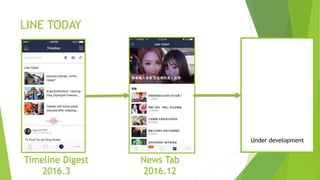
LINE TODAY
Under development
Timeline Digest
2016.3
News Tab
2016.12
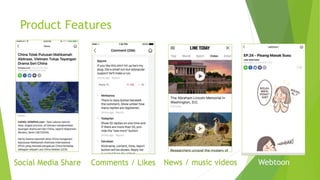
Product Features
Comments / Likes News / music videos WebtoonSocial Media Share
Measure Effectiveness
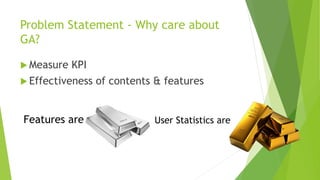
Problem Statement - Why care about
GA?
 Measure KPI
 Effectiveness of contents & features
Features are User Statistics are
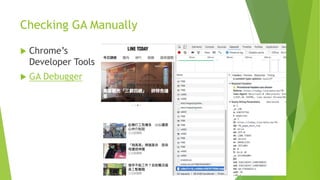
Checking GA Manually
 Chrome’s
Developer Tools
 GA Debugger
Web Tools for Mobile Web
Safari’s Web Inspector
Chrome’s Remote Debugging
Charles Web Debugging Proxy
Problem Statement 2 – Why GA Test
Automation?
New feature -> side effects
Avoid human error
Limited time
Simulate LINE TODAY user in LINE app and
confirm GA events are included in GA reports.
Methodology
 Robotframework
 Appium
 GA Reporting API
Get credentials
Initialize analytics reporting
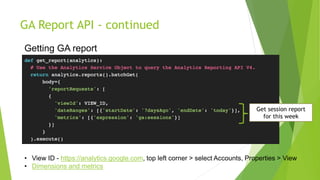
Get GA report
GA Report API
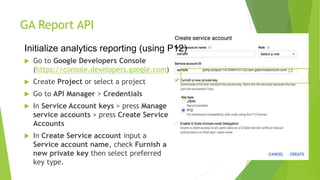
 Go to Google Developers Console
(https://console.developers.google.com)
 Create Project or select a project
 Go to API Manager > Credentials
 In Service Account keys > press Manage
service accounts > press Create Service
Accounts
 In Create Service account input a
Service account name, check Furnish a
new private key then select preferred
key type.
Initialize analytics reporting (using P12)
GA Report API - continued
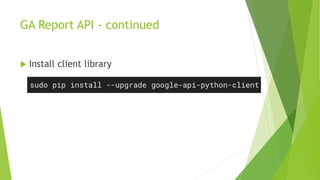
 Install client library
GA Report API - continued
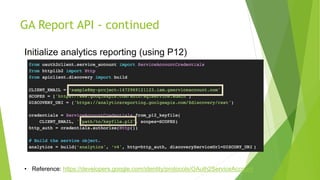
Initialize analytics reporting (using P12)
• Reference: https://developers.google.com/identity/protocols/OAuth2ServiceAccount
GA Report API - continued
• View ID - https://analytics.google.com, top left corner > select Accounts, Properties > View
• Dimensions and metrics
Getting GA report
Get session report
for this week
GA Report API - continued
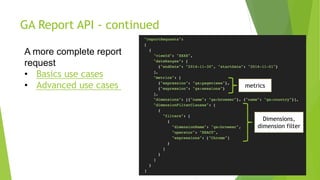
A more complete report
request
• Basics use cases
• Advanced use cases
Dimensions,
dimension filter
metrics
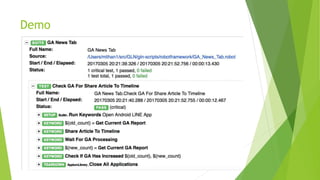
Demo
Conclusion
 User statistics
 Use GA or similar tools
 Remember to check GA
 GA Reporting API
We’re hiring!
 Front End Engineer
 Test Engineer (open to new graduates)
 QA Automation Engineer
 Service QA
 Server-side Developer
Reference
 Reporting API v4
 Quick Start in Python

GA Test Automation

  • 1.
  • 2.
  • 3.
    LINE TODAY Under development TimelineDigest 2016.3 News Tab 2016.12
  • 4.
    Product Features Comments /Likes News / music videos WebtoonSocial Media Share
  • 5.
  • 6.
    Problem Statement -Why care about GA?  Measure KPI  Effectiveness of contents & features Features are User Statistics are
  • 7.
    Checking GA Manually Chrome’s Developer Tools  GA Debugger
  • 8.
    Web Tools forMobile Web Safari’s Web Inspector Chrome’s Remote Debugging Charles Web Debugging Proxy
  • 9.
    Problem Statement 2– Why GA Test Automation? New feature -> side effects Avoid human error Limited time Simulate LINE TODAY user in LINE app and confirm GA events are included in GA reports.
  • 10.
    Methodology  Robotframework  Appium GA Reporting API Get credentials Initialize analytics reporting Get GA report
  • 11.
    GA Report API Go to Google Developers Console (https://console.developers.google.com)  Create Project or select a project  Go to API Manager > Credentials  In Service Account keys > press Manage service accounts > press Create Service Accounts  In Create Service account input a Service account name, check Furnish a new private key then select preferred key type. Initialize analytics reporting (using P12)
  • 12.
    GA Report API- continued  Install client library
  • 13.
    GA Report API- continued Initialize analytics reporting (using P12) • Reference: https://developers.google.com/identity/protocols/OAuth2ServiceAccount
  • 14.
    GA Report API- continued • View ID - https://analytics.google.com, top left corner > select Accounts, Properties > View • Dimensions and metrics Getting GA report Get session report for this week
  • 15.
    GA Report API- continued A more complete report request • Basics use cases • Advanced use cases Dimensions, dimension filter metrics
  • 16.
  • 17.
    Conclusion  User statistics Use GA or similar tools  Remember to check GA  GA Reporting API
  • 18.
    We’re hiring!  FrontEnd Engineer  Test Engineer (open to new graduates)  QA Automation Engineer  Service QA  Server-side Developer
  • 19.
    Reference  Reporting APIv4  Quick Start in Python

Editor's Notes

  • #4 as our user base increases, we have more feature requests
  • #5 We need to measure the effectiveness of these features, how to we measure them?
  • #6 who here uses GA in their projects? who here have checked GA manually? who here have used GA api? how many here uses GA api for test automation?
  • #7 a lot of might think that features are the most important aspect in a project, but for a mid-to-large size project, you need to listen to your users to be even more successful. How do you listen to users? By analyzing their behavior.  Features decided by statistics = user’s voice
  • #8 For PC web browsers, it’s simple just use any browser’s Developer Tools. But what about mobile browsers or in-app web? Anyone has experience in checking mobile web?
  • #18 User statistics is a very important factor in measuring success of a development project GA helps analyze user statistics and their behavior There are lots of tools to check GA in PC/mobile web browsers GA Reporting API is available to further customize reports and improve quality through automation