Fusion Middleware
  How To Series
  Creation Metadata Repository


                               Dirk Nachbar
            http://dirknachbar.blogspot.com
   http://web20technologies.wordpress.com
Metadata Repository

• For several Fusion Middleware
  installations we will need the Metadata
  Repository to store informations about
  the components
• For the creation of the Metadata
  Repository schemas the usage of the
  Repository Creation Utility is necessary
Metadata Repository
• For following Fusion Middleware components
  we need the Metadata Repository
 • Identity Management
 • Enterprise Content Management
 • WebLogic Communication Services
 • SOA and BPM Infrastructure
 • WebCenter Suite
 • Portal and Business Intelligence
Prerequirements for
the metadata Repository
• In order to create the necessary Metadata
  Repository following requirements must
  be fullfilled
 • Oracle Database 11.1.0.7 or higher
 • Depending on the components which
   are used the SGA size should be 1.5 GB
 • Init.ora parameter sessions and
   processes equal 500
Necessary Software
• The Repository Creation Utility (RCU)
  11.1.1.2.0 can be found under http://
  www.oracle.com/technology/software/
  products/middleware/htdocs/
  fmw_11_download.html for Windows and
  Linux Platforms
 • A remote usage for the RCU is possible,
   therefore the target database can be residing
   e.g. on a Solaris server and the RCU can be
   used from a Windows Desktop
Installation of the RCU

• The Installation of the RCU is pretty simple,
  just download the RCU for your platform, copy
  it to any location on your machine and unzip it
  • The RCU contains a full Oracle Client, so that
    no additional software is necessary
  • The documentation for the RCU can be
    found under http://download.oracle.com/
    docs/cd/E15523_01/doc.1111/e14259/
    toc.htm
Run the RCU


• After the extraction of the RCU utility
  change to the directory rcuHome/bin
  and startup the RCU utility either
  with ./rcu (for Linux) or rcu.bat (for
  Windows)
Repository Creation
        Utility


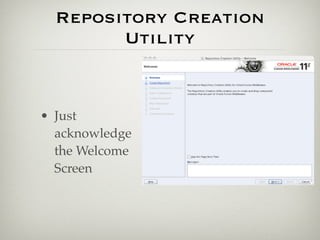
• Just
  acknowledge
  the Welcome
  Screen
Repository Creation
        Utility


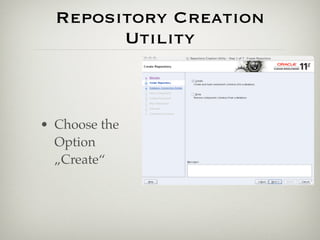
• Choose the
  Option
  „Create“
Repository Creation
        Utility
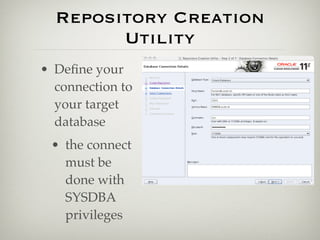
• Define your
  connection to
  your target
  database
 • the connect
   must be
   done with
   SYSDBA
   privileges
Repository Creation
        Utility


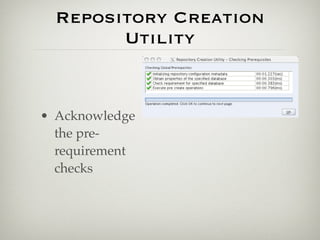
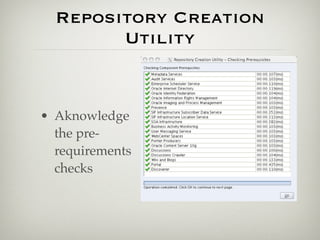
• Acknowledge
  the pre-
  requirement
  checks
Repository Creation
        Utility

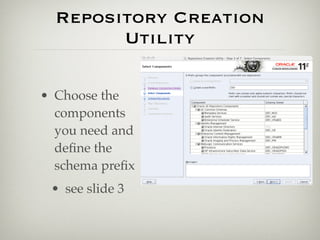
• Choose the
  components
  you need and
  define the
  schema prefix
 • see slide 3
Repository Creation
        Utility


• Aknowledge
  the pre-
  requirements
  checks
Repository Creation
        Utility
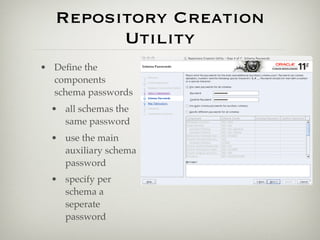
• Define the
  components
  schema passwords
  • all schemas the
    same password
  • use the main
    auxiliary schema
    password
  • specify per
    schema a
    seperate
    password
Repository Creation
        Utility
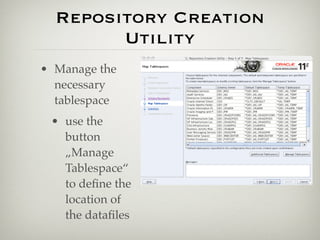
• Manage the
  necessary
  tablespace
 • use the
   button
   „Manage
   Tablespace“
   to define the
   location of
   the datafiles
Repository Creation
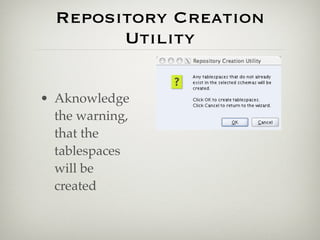
        Utility

• Aknowledge
  the warning,
  that the
  tablespaces
  will be
  created
Repository Creation
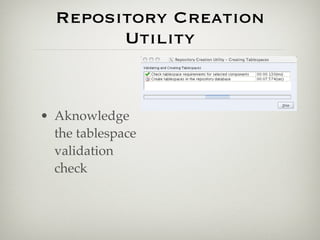
        Utility


• Aknowledge
  the tablespace
  validation
  check
Repository Creation
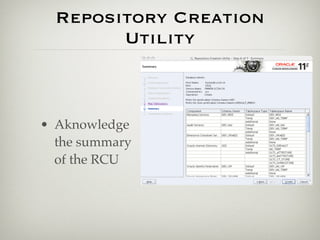
        Utility


• Aknowledge
  the summary
  of the RCU
Repository Creation
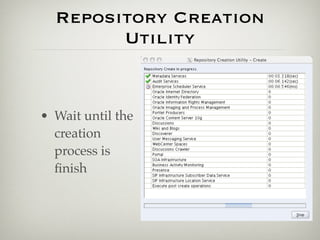
        Utility


• Wait until the
  creation
  process is
  finish
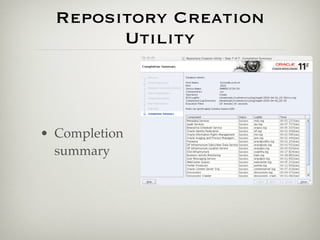
Repository Creation
        Utility


• Completion
  summary
Dirk Nachbar
         http://dirknachbar.blogspot.com
http://web20technologies.wordpress.com

Fusion Middleware 11g How To Part 1

  • 1.
    Fusion Middleware How To Series Creation Metadata Repository Dirk Nachbar http://dirknachbar.blogspot.com http://web20technologies.wordpress.com
  • 2.
    Metadata Repository • Forseveral Fusion Middleware installations we will need the Metadata Repository to store informations about the components • For the creation of the Metadata Repository schemas the usage of the Repository Creation Utility is necessary
  • 3.
    Metadata Repository • Forfollowing Fusion Middleware components we need the Metadata Repository • Identity Management • Enterprise Content Management • WebLogic Communication Services • SOA and BPM Infrastructure • WebCenter Suite • Portal and Business Intelligence
  • 4.
    Prerequirements for the metadataRepository • In order to create the necessary Metadata Repository following requirements must be fullfilled • Oracle Database 11.1.0.7 or higher • Depending on the components which are used the SGA size should be 1.5 GB • Init.ora parameter sessions and processes equal 500
  • 5.
    Necessary Software • TheRepository Creation Utility (RCU) 11.1.1.2.0 can be found under http:// www.oracle.com/technology/software/ products/middleware/htdocs/ fmw_11_download.html for Windows and Linux Platforms • A remote usage for the RCU is possible, therefore the target database can be residing e.g. on a Solaris server and the RCU can be used from a Windows Desktop
  • 6.
    Installation of theRCU • The Installation of the RCU is pretty simple, just download the RCU for your platform, copy it to any location on your machine and unzip it • The RCU contains a full Oracle Client, so that no additional software is necessary • The documentation for the RCU can be found under http://download.oracle.com/ docs/cd/E15523_01/doc.1111/e14259/ toc.htm
  • 7.
    Run the RCU •After the extraction of the RCU utility change to the directory rcuHome/bin and startup the RCU utility either with ./rcu (for Linux) or rcu.bat (for Windows)
  • 8.
    Repository Creation Utility • Just acknowledge the Welcome Screen
  • 9.
    Repository Creation Utility • Choose the Option „Create“
  • 10.
    Repository Creation Utility • Define your connection to your target database • the connect must be done with SYSDBA privileges
  • 11.
    Repository Creation Utility • Acknowledge the pre- requirement checks
  • 12.
    Repository Creation Utility • Choose the components you need and define the schema prefix • see slide 3
  • 13.
    Repository Creation Utility • Aknowledge the pre- requirements checks
  • 14.
    Repository Creation Utility • Define the components schema passwords • all schemas the same password • use the main auxiliary schema password • specify per schema a seperate password
  • 15.
    Repository Creation Utility • Manage the necessary tablespace • use the button „Manage Tablespace“ to define the location of the datafiles
  • 16.
    Repository Creation Utility • Aknowledge the warning, that the tablespaces will be created
  • 17.
    Repository Creation Utility • Aknowledge the tablespace validation check
  • 18.
    Repository Creation Utility • Aknowledge the summary of the RCU
  • 19.
    Repository Creation Utility • Wait until the creation process is finish
  • 20.
    Repository Creation Utility • Completion summary
  • 21.
    Dirk Nachbar http://dirknachbar.blogspot.com http://web20technologies.wordpress.com