Presentation By Karthik Srini.
Fundamentals of Computing And C Programming
Unit - II - Basics of C Language
Presentation By Karthik Srini.
Basics of C Language
Tokens | Rules | Sample Programs
Presentation By Karthik Srini.
Tokens
Tokens are the smallest individual units of a program. Different type of tokens are :
1. Keywords
2. Identifiers
3. Literals (or) Constants
4. Punctuators
5. Operators
Presentation By Karthik Srini.
Keywords
Keywords are the words that convey a special meaning to the
language compiler. They are reserved words.
For example,
void , main , int , double , float , for , while , etc…
Presentation By Karthik Srini.
Identifiers
Identifiers are the fundamental building blocks of a program and are
used in names given to different parts of a program.
For Example,
int number = 10 ; where number is an identifier.
int add ( int a, int b ) where add is an identifier.
Presentation By Karthik Srini.
Rules for variable declaration in C
• Characters Allowed :
Underscore ( _ )
Capital Letters ( A – Z )
Small Letters ( a – z )
Digits ( 0 – 9 )
• Blanks & Commas are not allowed.
• No Special Symbols other than underscore ( _ ) are allowed.
• First Character should be alphabet or Underscore.
• Variable name Should not be a Reserved Word (or) Keyword
Presentation By Karthik Srini.
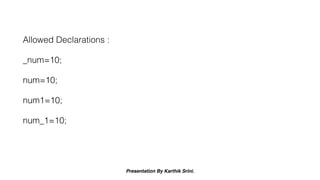
Allowed Declarations :
_num=10;
num=10;
num1=10;
num_1=10;
Presentation By Karthik Srini.
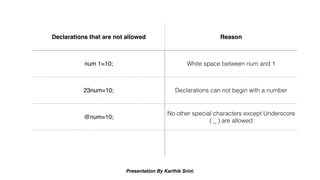
Declarations that are not allowed Reason
num 1=10; White space between num and 1
23num=10; Declarations can not begin with a number
@num=10;
No other special characters except Underscore
( _ ) are allowed
Presentation By Karthik Srini.
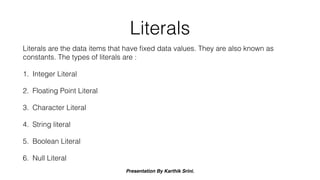
Literals
Literals are the data items that have fixed data values. They are also known as
constants. The types of literals are :
1. Integer Literal
2. Floating Point Literal
3. Character Literal
4. String literal
5. Boolean Literal
6. Null Literal
Presentation By Karthik Srini.
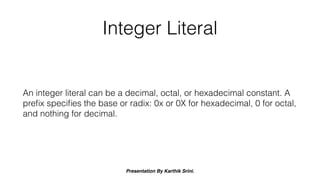
Integer Literal
An integer literal can be a decimal, octal, or hexadecimal constant. A
prefix specifies the base or radix: 0x or 0X for hexadecimal, 0 for octal,
and nothing for decimal.
Presentation By Karthik Srini.
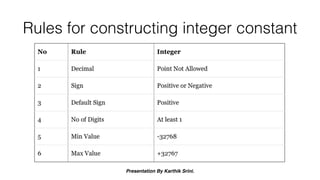
Rules for constructing integer constant
Presentation By Karthik Srini.
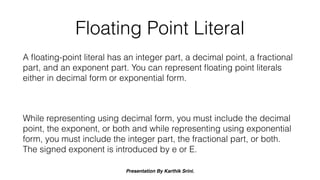
Floating Point Literal
A floating-point literal has an integer part, a decimal point, a fractional
part, and an exponent part. You can represent floating point literals
either in decimal form or exponential form.
While representing using decimal form, you must include the decimal
point, the exponent, or both and while representing using exponential
form, you must include the integer part, the fractional part, or both.
The signed exponent is introduced by e or E.
Presentation By Karthik Srini.
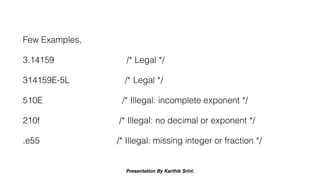
Few Examples,
3.14159 /* Legal */
314159E-5L /* Legal */
510E /* Illegal: incomplete exponent */
210f /* Illegal: no decimal or exponent */
.e55 /* Illegal: missing integer or fraction */
Presentation By Karthik Srini.
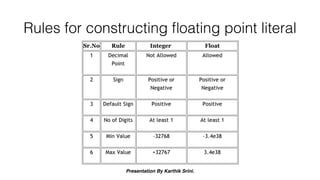
Rules for constructing floating point literal
Presentation By Karthik Srini.
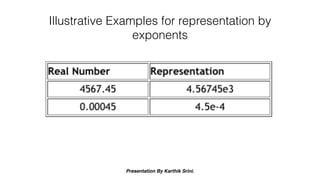
Illustrative Examples for representation by
exponents
Presentation By Karthik Srini.
Character Literal
Any character enclosed within single quotes is called a character
literal.
For example,
char alphabet = ‘ a ’ ;
char num = ‘ 1 ’ ;
Presentation By Karthik Srini.
String Literal
When two or more number of characters are enclosed within double
quotes, it is called a string literal.
For example,
char subject = “ Computer Applications ” ;
Presentation By Karthik Srini.
Boolean Literal
A boolean literal can take only two values as constant, they are 0 or 1
(i.e.) True or false.
For Example,
boolean flag = 1 ;
boolean is a datatype in Java programming language
Presentation By Karthik Srini.
Null Literal
Null literal is normally used to terminate strings.
For example,
‘  0 ’
Presentation By Karthik Srini.
Punctuators
The different punctuations used in the source code of the program are
called Punctuators.
For example,
1. Comma ( , )
2. Semicolon ( ; )
3. Braces - ( ) , { } , [ ] , < >
4. Other Special characters - @ , # , * , & , % , etc…
Presentation By Karthik Srini.
Operators
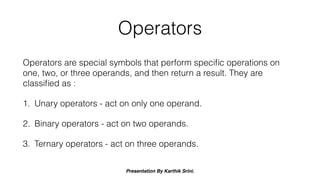
Operators are special symbols that perform specific operations on
one, two, or three operands, and then return a result. They are
classified as :
1. Unary operators - act on only one operand.
2. Binary operators - act on two operands.
3. Ternary operators - act on three operands.
Presentation By Karthik Srini.
Unary Operators
Unary operators act only upon one operand.
Presentation By Karthik Srini.
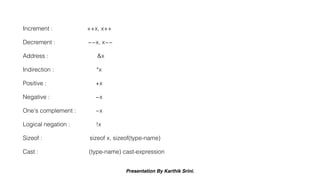
Increment : ++x, x++
Decrement : −−x, x−−
Address : &x
Indirection : *x
Positive : +x
Negative : −x
One's complement : ~x
Logical negation : !x
Sizeof : sizeof x, sizeof(type-name)
Cast : (type-name) cast-expression
Presentation By Karthik Srini.
Binary Operators
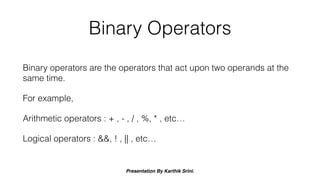
Binary operators are the operators that act upon two operands at the
same time.
For example,
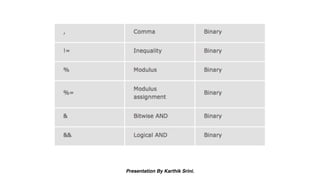
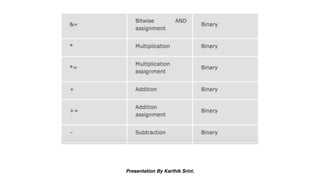
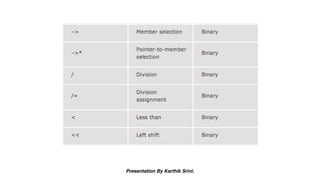
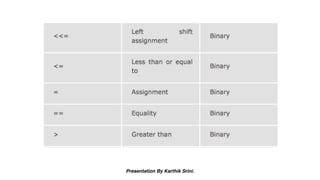
Arithmetic operators : + , - , / , %, * , etc…
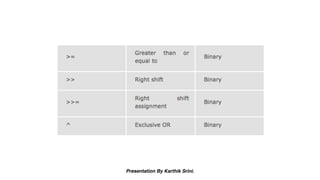
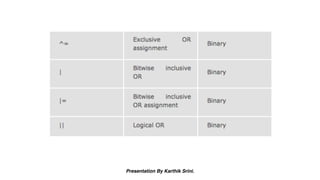
Logical operators : &&, ! , || , etc…
Presentation By Karthik Srini.
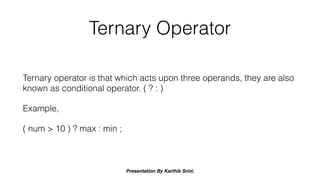
Ternary Operator
Ternary operator is that which acts upon three operands, they are also
known as conditional operator. ( ? : )
Example,
( num > 10 ) ? max : min ;
Presentation By Karthik Srini.
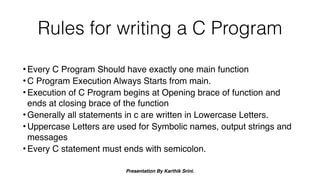
Rules for writing a C Program
• Every C Program Should have exactly one main function
• C Program Execution Always Starts from main.
• Execution of C Program begins at Opening brace of function and
ends at closing brace of the function
• Generally all statements in c are written in Lowercase Letters.
• Uppercase Letters are used for Symbolic names, output strings and
messages
• Every C statement must ends with semicolon.
Presentation By Karthik Srini.
Rules for writing a C Program
•All variables must be declared with respective data types
before using .
•C is free form-Language
•Comments can be inserted anywhere in C Program , but
nested comments are not supported by C .
•Braces are Generally Used for the Grouping of statements
Presentation By Karthik Srini.
Sample Program
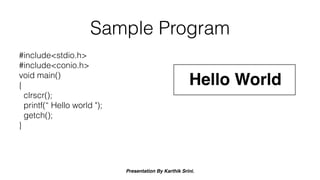
#include<stdio.h>
#include<conio.h>
void main()
{
clrscr();
printf(“ Hello world ");
getch();
}
Hello World

Fundamentals of Computing and C Programming - Part 1

  • 1.
    Presentation By KarthikSrini. Fundamentals of Computing And C Programming Unit - II - Basics of C Language
  • 2.
    Presentation By KarthikSrini. Basics of C Language Tokens | Rules | Sample Programs
  • 3.
    Presentation By KarthikSrini. Tokens Tokens are the smallest individual units of a program. Different type of tokens are : 1. Keywords 2. Identifiers 3. Literals (or) Constants 4. Punctuators 5. Operators
  • 4.
    Presentation By KarthikSrini. Keywords Keywords are the words that convey a special meaning to the language compiler. They are reserved words. For example, void , main , int , double , float , for , while , etc…
  • 5.
    Presentation By KarthikSrini. Identifiers Identifiers are the fundamental building blocks of a program and are used in names given to different parts of a program. For Example, int number = 10 ; where number is an identifier. int add ( int a, int b ) where add is an identifier.
  • 6.
    Presentation By KarthikSrini. Rules for variable declaration in C • Characters Allowed : Underscore ( _ ) Capital Letters ( A – Z ) Small Letters ( a – z ) Digits ( 0 – 9 ) • Blanks & Commas are not allowed. • No Special Symbols other than underscore ( _ ) are allowed. • First Character should be alphabet or Underscore. • Variable name Should not be a Reserved Word (or) Keyword
  • 7.
    Presentation By KarthikSrini. Allowed Declarations : _num=10; num=10; num1=10; num_1=10;
  • 8.
    Presentation By KarthikSrini. Declarations that are not allowed Reason num 1=10; White space between num and 1 23num=10; Declarations can not begin with a number @num=10; No other special characters except Underscore ( _ ) are allowed
  • 9.
    Presentation By KarthikSrini. Literals Literals are the data items that have fixed data values. They are also known as constants. The types of literals are : 1. Integer Literal 2. Floating Point Literal 3. Character Literal 4. String literal 5. Boolean Literal 6. Null Literal
  • 10.
    Presentation By KarthikSrini. Integer Literal An integer literal can be a decimal, octal, or hexadecimal constant. A prefix specifies the base or radix: 0x or 0X for hexadecimal, 0 for octal, and nothing for decimal.
  • 11.
    Presentation By KarthikSrini. Rules for constructing integer constant
  • 12.
    Presentation By KarthikSrini. Floating Point Literal A floating-point literal has an integer part, a decimal point, a fractional part, and an exponent part. You can represent floating point literals either in decimal form or exponential form. While representing using decimal form, you must include the decimal point, the exponent, or both and while representing using exponential form, you must include the integer part, the fractional part, or both. The signed exponent is introduced by e or E.
  • 13.
    Presentation By KarthikSrini. Few Examples, 3.14159 /* Legal */ 314159E-5L /* Legal */ 510E /* Illegal: incomplete exponent */ 210f /* Illegal: no decimal or exponent */ .e55 /* Illegal: missing integer or fraction */
  • 14.
    Presentation By KarthikSrini. Rules for constructing floating point literal
  • 15.
    Presentation By KarthikSrini. Illustrative Examples for representation by exponents
  • 16.
    Presentation By KarthikSrini. Character Literal Any character enclosed within single quotes is called a character literal. For example, char alphabet = ‘ a ’ ; char num = ‘ 1 ’ ;
  • 17.
    Presentation By KarthikSrini. String Literal When two or more number of characters are enclosed within double quotes, it is called a string literal. For example, char subject = “ Computer Applications ” ;
  • 18.
    Presentation By KarthikSrini. Boolean Literal A boolean literal can take only two values as constant, they are 0 or 1 (i.e.) True or false. For Example, boolean flag = 1 ; boolean is a datatype in Java programming language
  • 19.
    Presentation By KarthikSrini. Null Literal Null literal is normally used to terminate strings. For example, ‘ 0 ’
  • 20.
    Presentation By KarthikSrini. Punctuators The different punctuations used in the source code of the program are called Punctuators. For example, 1. Comma ( , ) 2. Semicolon ( ; ) 3. Braces - ( ) , { } , [ ] , < > 4. Other Special characters - @ , # , * , & , % , etc…
  • 21.
    Presentation By KarthikSrini. Operators Operators are special symbols that perform specific operations on one, two, or three operands, and then return a result. They are classified as : 1. Unary operators - act on only one operand. 2. Binary operators - act on two operands. 3. Ternary operators - act on three operands.
  • 22.
    Presentation By KarthikSrini. Unary Operators Unary operators act only upon one operand.
  • 23.
    Presentation By KarthikSrini. Increment : ++x, x++ Decrement : −−x, x−− Address : &x Indirection : *x Positive : +x Negative : −x One's complement : ~x Logical negation : !x Sizeof : sizeof x, sizeof(type-name) Cast : (type-name) cast-expression
  • 24.
    Presentation By KarthikSrini. Binary Operators Binary operators are the operators that act upon two operands at the same time. For example, Arithmetic operators : + , - , / , %, * , etc… Logical operators : &&, ! , || , etc…
  • 25.
  • 26.
  • 27.
  • 28.
  • 29.
  • 30.
  • 31.
    Presentation By KarthikSrini. Ternary Operator Ternary operator is that which acts upon three operands, they are also known as conditional operator. ( ? : ) Example, ( num > 10 ) ? max : min ;
  • 32.
    Presentation By KarthikSrini. Rules for writing a C Program • Every C Program Should have exactly one main function • C Program Execution Always Starts from main. • Execution of C Program begins at Opening brace of function and ends at closing brace of the function • Generally all statements in c are written in Lowercase Letters. • Uppercase Letters are used for Symbolic names, output strings and messages • Every C statement must ends with semicolon.
  • 33.
    Presentation By KarthikSrini. Rules for writing a C Program •All variables must be declared with respective data types before using . •C is free form-Language •Comments can be inserted anywhere in C Program , but nested comments are not supported by C . •Braces are Generally Used for the Grouping of statements
  • 34.
    Presentation By KarthikSrini. Sample Program #include<stdio.h> #include<conio.h> void main() { clrscr(); printf(“ Hello world "); getch(); } Hello World