Product Overview Confidential – Property of Prism Software / Prepared for Océ Prism Software
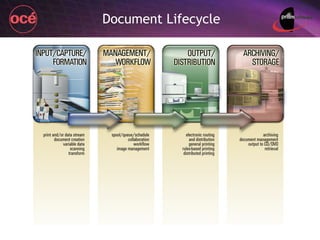
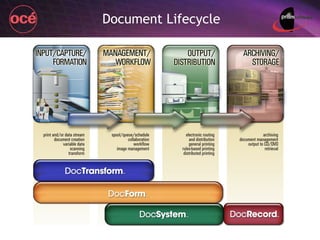
Document Lifecycle
Document Lifecycle
Doc Form Advanced variable data solution – SMB & enterprise Doc Record Advanced & scalable document management Doc System Advanced rules-based distributed print & departmental workflow Doc Transform Print and data stream modification and correction Prism Products
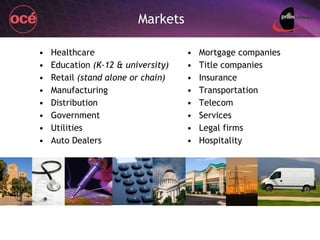
Healthcare Education  (K-12 & university) Retail  (stand alone or chain) Manufacturing Distribution Government Utilities Auto Dealers Mortgage companies Title companies Insurance Transportation Telecom Services Legal firms Hospitality Markets
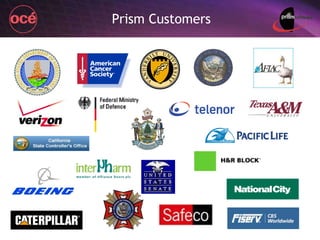
Prism Customers
Prism Value to Océ Prism solutions applicable Major and National accounts / all SMB markets Production Print emphasis Prism is a  safe partner  to get sales team started with because Successful history to date / understand Océ  Easy-to-sell applications, complete sales & tech support, experienced in printer & MFP market One-stop shop solutions or “One throat to choke”
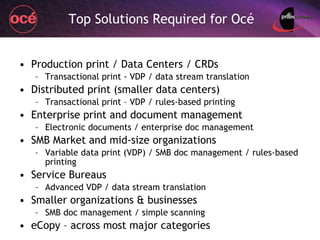
Top Solutions Required for Océ Production print / Data Centers / CRDs Transactional print - VDP / data stream translation Distributed print (smaller data centers) Transactional print – VDP / rules-based printing Enterprise print and document management Electronic documents / enterprise doc management SMB Market and mid-size organizations Variable data print (VDP) / SMB doc management / rules-based printing Service Bureaus Advanced VDP / data stream translation Smaller organizations & businesses SMB doc management / simple scanning eCopy – across most major categories
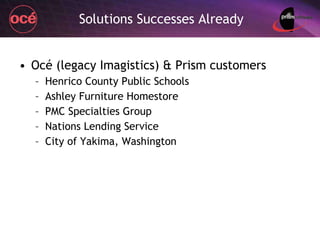
Solutions Successes Already Océ (legacy Imagistics) & Prism customers Henrico County Public Schools Ashley Furniture Homestore PMC Specialties Group Nations Lending Service City of Yakima, Washington
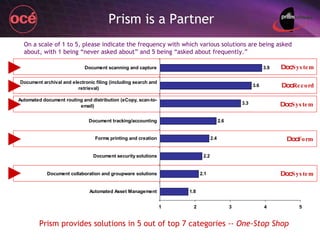
Prism is a Partner Doc Record Doc System Doc Form Doc System Prism provides solutions in 5 out of top 7 categories --  One-Stop Shop ► ► ► ► ► Doc System On a scale of 1 to 5, please indicate the frequency with which various solutions are being asked about, with 1 being “never asked about” and 5 being “asked about frequently.”
Prism Support Training Technical & sales Pre-sale, implementation, and post-sale All lines of end user support No charge for End User literature NFR and end user trial versions End User DocForm CD presentation Event and showroom CD One-stop shop support and solutions
Doc Form
Historically Fragmented Market VDP software packages have historically been “positioned” into  Whether they’re color or mono projects, and Entry, transactional, personalized, promotional, etc. One manufacturer alone offers 3 VDP programs 3 different code bases 3 different development teams 3 different countries Too much to train, too confusing & convoluted DocForm is a  single package  that offers more than all 3 of the above programs combined
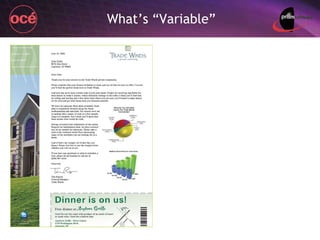
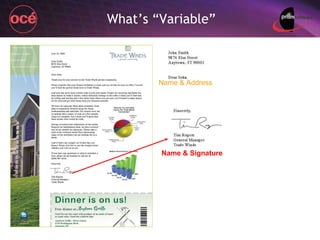
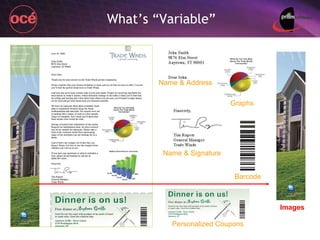
What’s “Variable”
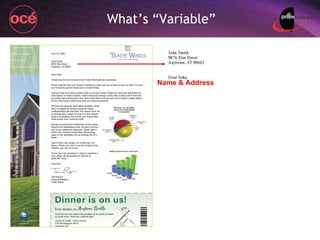
What’s “Variable” Name & Address
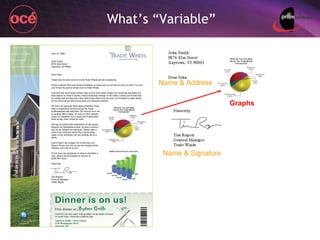
What’s “Variable” Name & Signature Name & Address
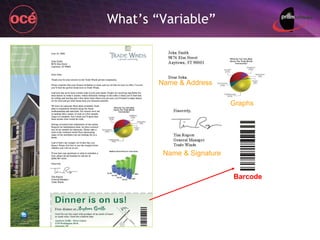
What’s “Variable” Name & Signature Graphs Name & Address
What’s “Variable” Name & Signature Barcode Graphs Name & Address
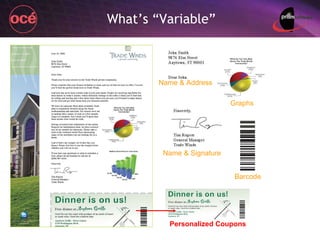
What’s “Variable” Personalized Coupons Name & Signature Barcode Graphs Name & Address
What’s “Variable” Personalized Coupons Name & Signature Barcode Graphs Name & Address Images
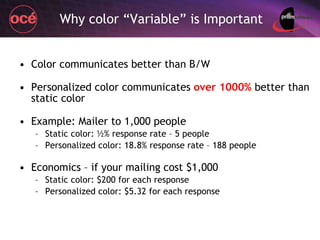
Why color “Variable” is Important Color communicates better than B/W Personalized color communicates  over 1000%  better than static color Example: Mailer to 1,000 people Static color: ½% response rate – 5 people Personalized color: 18.8% response rate – 188 people Economics – if your mailing cost $1,000 Static color: $200 for each response Personalized color: $5.32 for each response
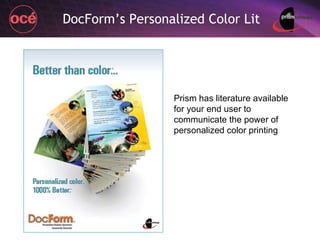
DocForm’s Personalized Color Lit Prism has literature available for your end user to communicate the power of personalized color printing
Features Found Only in  Doc Form
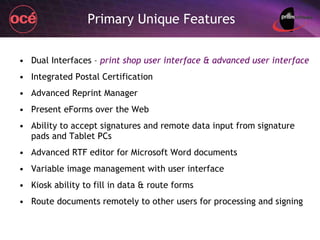
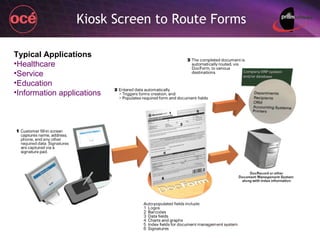
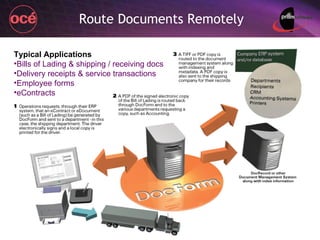
Primary Unique Features Dual Interfaces –  print shop user interface & advanced user interface Integrated Postal Certification Advanced Reprint Manager Present eForms over the Web Ability to accept signatures and remote data input from signature pads and Tablet PCs Advanced RTF editor for Microsoft Word documents Variable image management with user interface Kiosk ability to fill in data & route forms Route documents remotely to other users for processing and signing
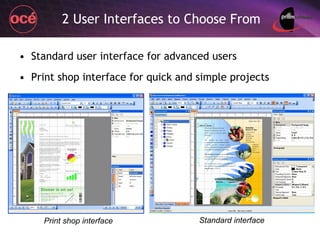
2 User Interfaces to Choose From Standard user interface for advanced users Print shop interface for quick and simple projects Print shop interface Standard interface
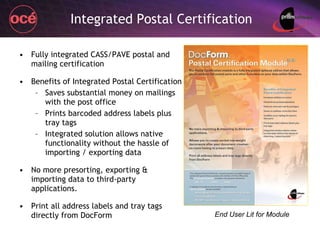
Integrated Postal Certification Fully integrated CASS/PAVE postal and mailing certification Benefits of Integrated Postal Certification Saves substantial money on mailings with the post office Prints barcoded address labels plus tray tags Integrated solution allows native functionality without the hassle of importing / exporting data No more presorting, exporting & importing data to third-party applications. Print all address labels and tray tags directly from DocForm End User Lit for Module
Reprint Manager Advanced Reprint Manager – by job or page Statements and invoices often get ‘mangled’ by the physical letter-to-envelope inserter. Operator can go back and reprint selected documents or the whole job Highly desirable feature within printing environments
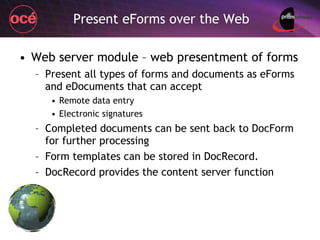
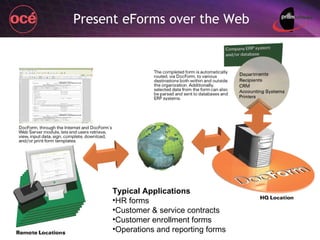
Present eForms over the Web Web server module – web presentment of forms Present all types of forms and documents as eForms and eDocuments that can accept Remote data entry Electronic signatures Completed documents can be sent back to DocForm for further processing Form templates can be stored in DocRecord. DocRecord provides the content server function
Present eForms over the Web Typical Applications HR forms Customer & service contracts Customer enrollment forms Operations and reporting forms
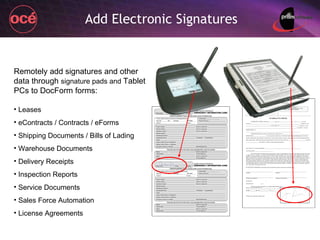
Add Electronic Signatures Remotely add signatures and other data through  signature pads and  Tablet PCs to DocForm forms: Leases eContracts / Contracts / eForms Shipping Documents / Bills of Lading Warehouse Documents Delivery Receipts Inspection Reports Service Documents Sales Force Automation License Agreements
Advanced RTF Editing for MS Word Advanced, integrated and native RTF word processor and Word document import The RTF  (“ rich text format ” – a file type)  word processor in v4 has been fully upgraded within v5 More word processing features and capabilities Great for importing Microsoft Word documents as RTFs to DocForm Full edit capabilities Write variable data to the RTF
Variable Image Management Advanced image-printing management Send variable images to the printer’s hard drive These variable images are ‘called’ as required by instructions in the print stream from DocForm to the printer Significantly speeds printing times with image intensive files Manage the images from within DocForm’s dedicated User Interface
Kiosk Screen to Route Forms Typical Applications Healthcare Service Education Information applications
Route Documents Remotely Typical Applications Bills of Lading & shipping / receiving docs Delivery receipts & service transactions Employee forms eContracts
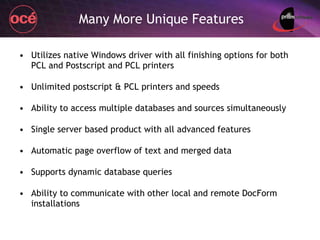
Many More Unique Features Utilizes native Windows driver with all finishing options for both PCL and Postscript and PCL printers Unlimited postscript & PCL printers and speeds Ability to access multiple databases and sources simultaneously Single server based product with all advanced features Automatic page overflow of text and merged data Supports dynamic database queries Ability to communicate with other local and remote DocForm installations
Many More Unique Features Can dynamically write data back to existing databases True and robust search & replace capabilities in data stream Dynamic graphics and text are displayed during design phase – no need to print or preview to see merged data Supports floating text within a page Print multiple, but slightly different, copies of single form – no need to establish multiple forms Add unlimited printers on the fly as determined by the printer address or name in the data stream Integrated single product – not multiple modules to obtain a full product
Doc Record
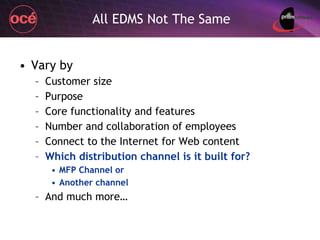
All EDMS Not The Same Vary by Customer size Purpose Core functionality and features Number and collaboration of employees Connect to the Internet for Web content Which distribution channel is it built for? MFP Channel or Another channel And much more…
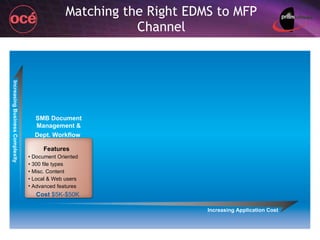
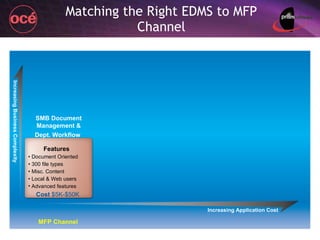
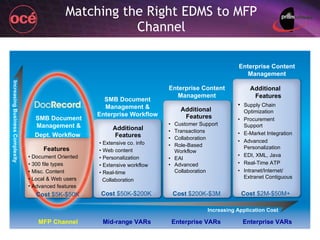
Matching the Right EDMS to MFP Channel Increasing Application Cost Increasing Business Complexity SMB Document Management & Dept. Workflow   Cost  $5K-$50K   Features •  Document Oriented •  300 file types •  Misc. Content •  Local & Web users Advanced features
Matching the Right EDMS to MFP Channel Increasing Application Cost Increasing Business Complexity SMB Document Management & Dept. Workflow   Cost  $5K-$50K   Features •  Document Oriented •  300 file types •  Misc. Content •  Local & Web users Advanced features MFP Channel
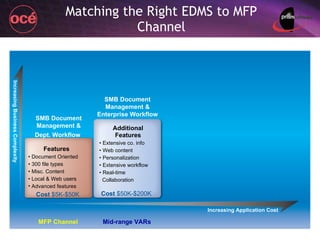
Matching the Right EDMS to MFP Channel Increasing Application Cost Increasing Business Complexity SMB Document Management & Dept. Workflow   SMB Document Management & Enterprise Workflow Additional Features •  Extensive co. info •  Web content •  Personalization •  Extensive workflow •  Real-time  Collaboration Cost  $50K-$200K  Cost  $5K-$50K   Features •  Document Oriented •  300 file types •  Misc. Content •  Local & Web users Advanced features MFP Channel Mid-range VARs
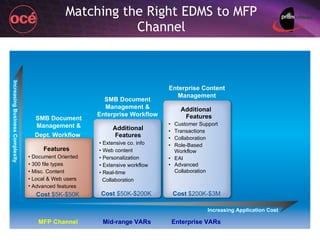
Matching the Right EDMS to MFP Channel Increasing Application Cost Increasing Business Complexity SMB Document Management & Dept. Workflow   SMB Document Management & Enterprise Workflow Enterprise Content Management Additional Features •  Extensive co. info •  Web content •  Personalization •  Extensive workflow •  Real-time  Collaboration Cost  $50K-$200K  Cost  $200K-$3M Cost  $5K-$50K   Features •  Document Oriented •  300 file types •  Misc. Content •  Local & Web users Advanced features Additional Features • Customer Support • Transactions • Collaboration • Role-Based Workflow • EAI • Advanced Collaboration MFP Channel Mid-range VARs Enterprise VARs
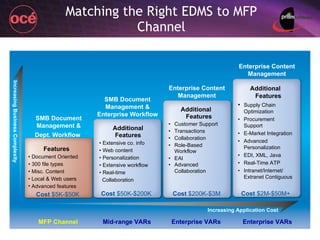
Matching the Right EDMS to MFP Channel Increasing Application Cost Increasing Business Complexity SMB Document Management & Dept. Workflow   SMB Document Management & Enterprise Workflow Enterprise Content Management Additional Features •  Extensive co. info •  Web content •  Personalization •  Extensive workflow •  Real-time  Collaboration Cost  $50K-$200K  Cost  $200K-$3M Cost  $2M-$50M+  Cost  $5K-$50K   Features •  Document Oriented •  300 file types •  Misc. Content •  Local & Web users Advanced features Additional Features • Customer Support • Transactions • Collaboration • Role-Based Workflow • EAI • Advanced Collaboration Additional Features • Supply Chain Optimization • Procurement Support • E-Market Integration  • Advanced Personalization • EDI, XML, Java • Real-Time ATP • Intranet/Internet/ Extranet Contiguous Enterprise Content Management MFP Channel Mid-range VARs Enterprise VARs Enterprise VARs
Documents & the SMB Market
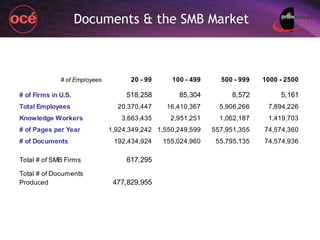
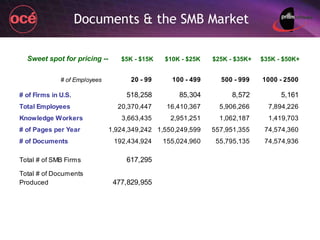
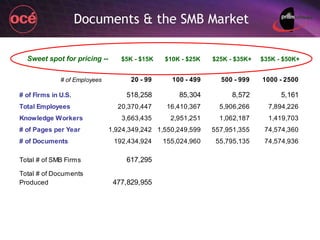
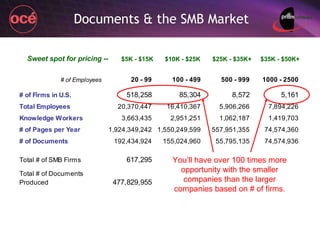
Documents & the SMB Market Sweet spot for pricing -- $5K - $15K $10K - $25K $25K - $35K+ $35K - $50K+
Documents & the SMB Market Sweet spot for pricing -- $5K - $15K $10K - $25K $25K - $35K+ $35K - $50K+ You’ll have over 100 times more opportunity with the smaller companies than the larger companies based on # of firms.
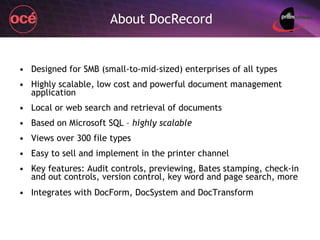
About DocRecord Designed for SMB (small-to-mid-sized) enterprises of all types Highly scalable, low cost and powerful document management application Local or web search and retrieval of documents Based on Microsoft SQL –  highly scalable Views over 300 file types Easy to sell and implement in the printer channel Key features: Audit controls, previewing, Bates stamping, check-in and out controls, version control, key word and page search, more Integrates with DocForm, DocSystem and DocTransform
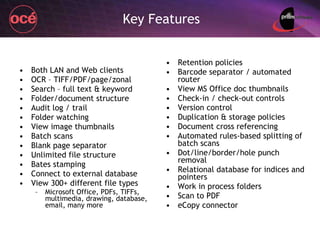
Key Features Both LAN and Web clients OCR – TIFF/PDF/page/zonal Search – full text & keyword Folder/document structure Audit log / trail Folder watching View image thumbnails Batch scans Blank page separator Unlimited file structure Bates stamping Connect to external database View 300+ different file types Microsoft Office, PDFs, TIFFs, multimedia, drawing, database, email, many more Retention policies Barcode separator / automated router View MS Office doc thumbnails Check-in / check-out controls Version control Duplication & storage policies Document cross referencing Automated rules-based splitting of batch scans Dot/line/border/hole punch removal Relational database for indices and pointers Work in process folders Scan to PDF eCopy connector
Easy to Sell 2 low cost base configurations to start with Easy for end users to learn and deploy Easy to scale up in the beginning Easy to scale up and modify as the organization’s needs grow
Configurations Starting configurations Desktop base system -  $3,370 For organizations primarily oriented toward local users 5 Desktop Clients (concurrent users) 1 DocRecord Server ( this is the base DocRecord control ) Web base system -  $4,995 For organizations having both local and web users 1 Web Client (concurrent user) 1 DocRecord Web Server for 10 or less concurrent users 2 Desktop Clients (concurrent users) 1 DocRecord Server ( this is the base DocRecord control )
Easy to Scale Up Number of concurrent  local  users Note :  Concurrent  means the total number of users accessing the DocRecord server at any specific time. Total number of users can be much larger. Number of concurrent  web  users Is automated batch scanning desired? Is automated OCR ( optical character recognition ) and barcoding desired? Note:  OCR transforms a scanned document image (such as a TIFF) into a readable document, such as a PDF or Word doc Scaling up is easily accomplished through license keys
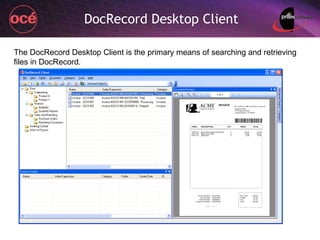
DocRecord Desktop Client The DocRecord Desktop Client is the primary means of searching and retrieving files in DocRecord.
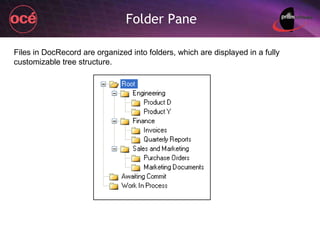
Folder Pane Files in DocRecord are organized into folders, which are displayed in a fully customizable tree structure.
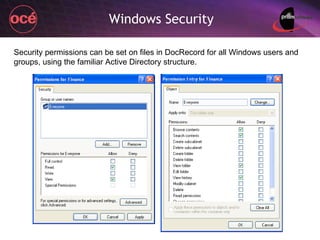
Windows Security Security permissions can be set on files in DocRecord for all Windows users and groups, using the familiar Active Directory structure.
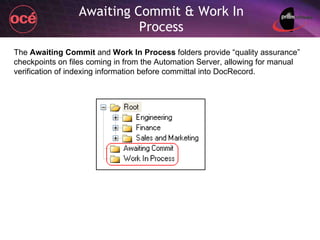
Awaiting Commit & Work In Process The  Awaiting Commit  and  Work In Process  folders provide “quality assurance” checkpoints on files coming in from the Automation Server, allowing for manual verification of indexing information before committal into DocRecord.
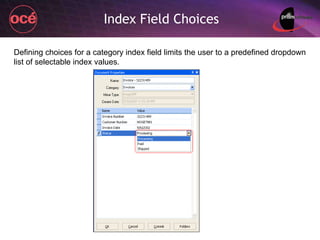
Index Field Choices Defining choices for a category index field limits the user to a predefined dropdown list of selectable index values.
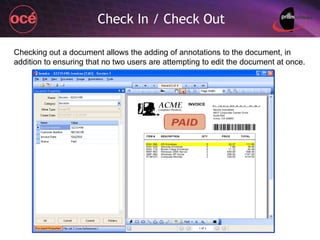
Check In / Check Out Checking out a document allows the adding of annotations to the document, in addition to ensuring that no two users are attempting to edit the document at once.
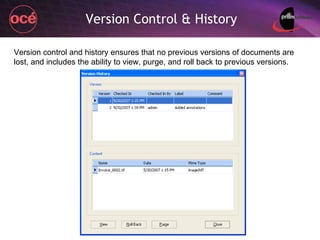
Version Control & History Version control and history ensures that no previous versions of documents are lost, and includes the ability to view, purge, and roll back to previous versions.
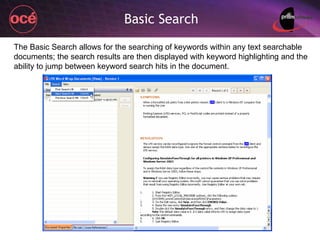
Basic Search The Basic Search allows for the searching of keywords within any text searchable documents; the search results are then displayed with keyword highlighting and the ability to jump between keyword search hits in the document.
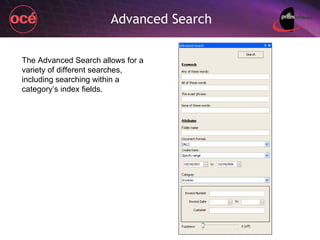
Advanced Search The Advanced Search allows for a variety of different searches, including searching within a category’s index fields.
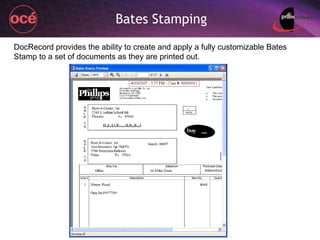
Bates Stamping DocRecord provides the ability to create and apply a fully customizable Bates Stamp to a set of documents as they are printed out.
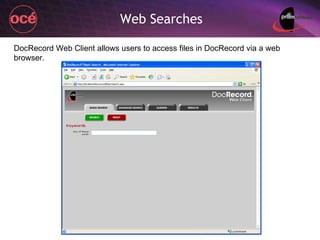
Web Searches DocRecord Web Client allows users to access files in DocRecord via a web browser.
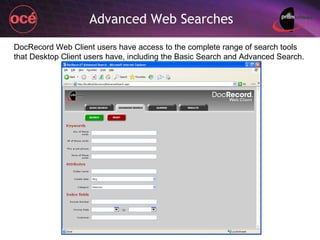
Advanced Web Searches DocRecord Web Client users have access to the complete range of search tools that Desktop Client users have, including the Basic Search and Advanced Search.
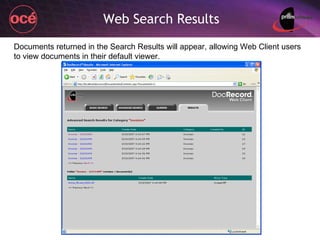
Web Search Results Documents returned in the Search Results will appear, allowing Web Client users to view documents in their default viewer.
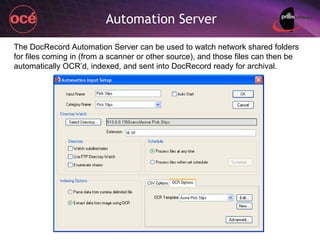
Automation Server The DocRecord Automation Server can be used to watch network shared folders for files coming in (from a scanner or other source), and those files can then be automatically OCR’d, indexed, and sent into DocRecord ready for archival.
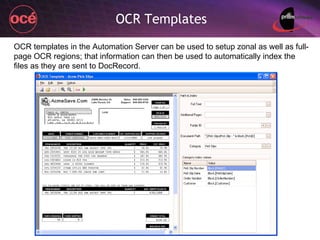
OCR Templates OCR templates in the Automation Server can be used to setup zonal as well as full-page OCR regions; that information can then be used to automatically index the files as they are sent to DocRecord.
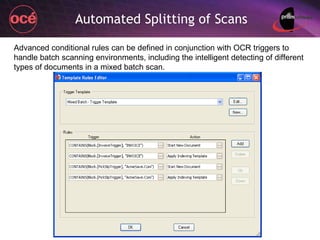
Automated Splitting of Scans Advanced conditional rules can be defined in conjunction with OCR triggers to handle batch scanning environments, including the intelligent detecting of different types of documents in a mixed batch scan.
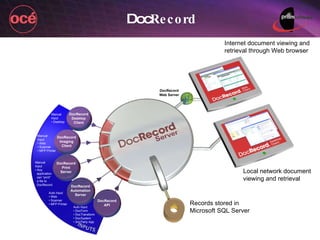
Doc Record DocRecord Web Server DocRecord Desktop Client DocRecord Imaging Client DocRecord Print Server DocRecord Automation Server DocRecord API Manual Input • Desktop Manual Input • Web • Scanner • MFP Printer Manual Input • Any   application   can “print”   a file to   DocRecord Auto Input • Web • Scanner • MFP Printer Auto Input • DocForm • DocTransform • DocSystem • 3rd Party App Records stored in Microsoft SQL Server Local network document viewing and retrieval Internet document viewing and retrieval through Web browser
Doc System
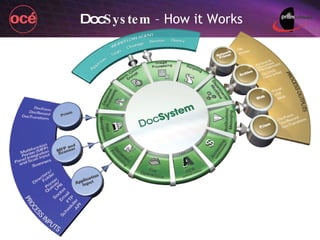
An advanced rules-based distributed print and departmental workflow application Sort and route all types of documents and files based on a wide range of rules Workflow allows for approving, amending and signing documents Doc System
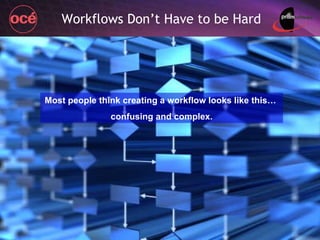
Workflows Don’t Have to be Hard Most people think creating a workflow looks like this…  confusing and complex.
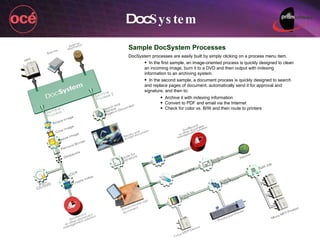
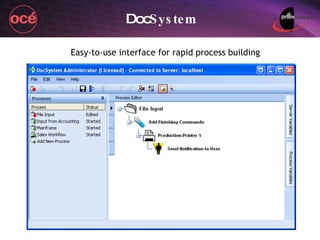
Doc System Sample DocSystem Processes DocSystem processes are easily built by simply clicking on a process menu item.  In the first sample, an image-oriented process is quickly designed to clean an incoming image, burn it to a DVD and then output with indexing information to an archiving system. In the second sample, a document process is quickly designed to search and replace pages of document, automatically send it for approval and signature, and then to: Archive it with indexing information Convert to PDF and email via the Internet Check for color vs. B/W and then route to printers
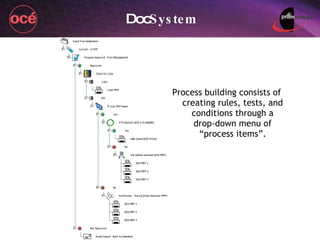
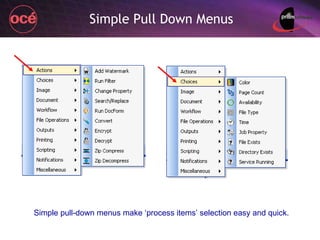
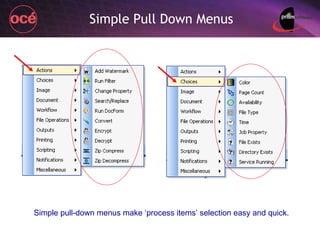
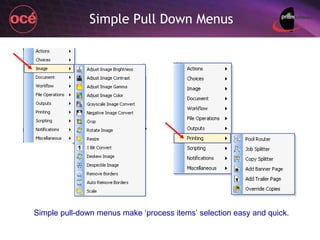
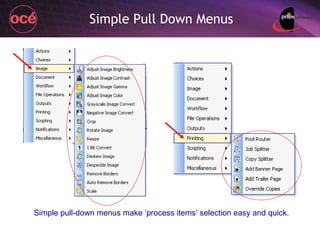
Doc System Process building consists of creating rules, tests, and conditions through a drop-down menu of “process items”.
Doc System Easy-to-use interface for rapid process building
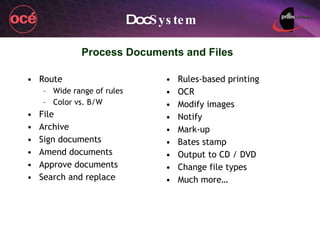
Process Documents and Files Route Wide range of rules Color vs. B/W File Archive Sign documents Amend documents Approve documents Search and replace Rules-based printing OCR Modify images Notify Mark-up Bates stamp Output to CD / DVD Change file types Much more… Doc System
Simple Pull Down Menus Simple pull-down menus make ‘process items’ selection easy and quick.
Doc System 4 Versions DocSystem LE   - $2,900 MSRP Advanced rules-based printing only; 2 processes DocSystem, Workgroup   - $5,200 MSRP Advanced rules-based printing, workflow, imaging, document editing, scripting, and connections to Workflow Agent and OCR module; 5 processes DocSystem, Production   - $9,990 MSRP Same as above; 10 processes DocSystem, Enterprise   - $18,000 MSRP Same as above; 20 processes
Doc System General Sales Segments LE Version Segment 3 - 4 Simple and advanced print rules / no workflow Keep costs low Other Versions Segments 5 – 6 and production Advanced print rules & workflow How many processes they want to establish will determine which version of DS they need
Doc System  – How it Works
Doc Transform
Doc Transform  - Overview Customize, adapt, and enable print data from any host or application Fix Your Print and Data Stream Problems Adapt Your Current Printing Environment to New Printers and MFPs Enables You to Easily Print and Route Documents to Archives for All Your Legacy Data Easily Accomplish Custom Print Requirements to Get Documents to Print Correctly Translate Your Legacy Print Streams such as Metacode, AFP, IPDS, and others
Markets & Industries Printing and data centers in all major industries Print Shops and Service Bureaus Corporate customers with legacy conversion and archiving requirements High volume government printing environments Scalable from small to large organizations
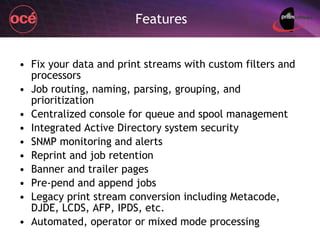
Features Fix your data and print streams with custom filters and processors Job routing, naming, parsing, grouping, and prioritization Centralized console for queue and spool management Integrated Active Directory system security  SNMP monitoring and alerts Reprint and job retention Banner and trailer pages Pre-pend and append jobs Legacy print stream conversion including Metacode, DJDE, LCDS, AFP, IPDS, etc. Automated, operator or mixed mode processing
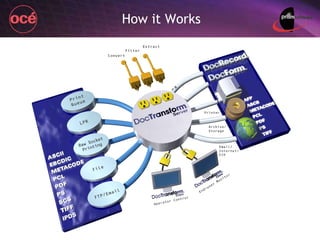
How it Works
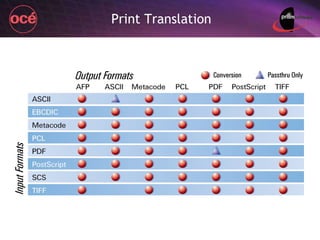
Print Translation
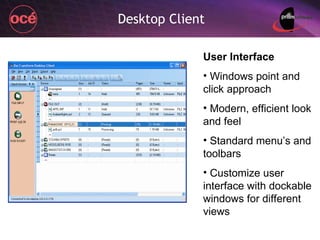
Desktop Client User Interface Windows point and click approach Modern, efficient look and feel Standard menu’s and toolbars Customize user interface with dockable windows for different views
Questions & Discussion

Full Prism Solution Overview

  • 1.
    Product Overview Confidential– Property of Prism Software / Prepared for Océ Prism Software
  • 2.
  • 3.
  • 4.
    Doc Form Advancedvariable data solution – SMB & enterprise Doc Record Advanced & scalable document management Doc System Advanced rules-based distributed print & departmental workflow Doc Transform Print and data stream modification and correction Prism Products
  • 5.
    Healthcare Education (K-12 & university) Retail (stand alone or chain) Manufacturing Distribution Government Utilities Auto Dealers Mortgage companies Title companies Insurance Transportation Telecom Services Legal firms Hospitality Markets
  • 6.
  • 7.
    Prism Value toOcé Prism solutions applicable Major and National accounts / all SMB markets Production Print emphasis Prism is a safe partner to get sales team started with because Successful history to date / understand Océ Easy-to-sell applications, complete sales & tech support, experienced in printer & MFP market One-stop shop solutions or “One throat to choke”
  • 8.
    Top Solutions Requiredfor Océ Production print / Data Centers / CRDs Transactional print - VDP / data stream translation Distributed print (smaller data centers) Transactional print – VDP / rules-based printing Enterprise print and document management Electronic documents / enterprise doc management SMB Market and mid-size organizations Variable data print (VDP) / SMB doc management / rules-based printing Service Bureaus Advanced VDP / data stream translation Smaller organizations & businesses SMB doc management / simple scanning eCopy – across most major categories
  • 9.
    Solutions Successes AlreadyOcé (legacy Imagistics) & Prism customers Henrico County Public Schools Ashley Furniture Homestore PMC Specialties Group Nations Lending Service City of Yakima, Washington
  • 10.
    Prism is aPartner Doc Record Doc System Doc Form Doc System Prism provides solutions in 5 out of top 7 categories -- One-Stop Shop ► ► ► ► ► Doc System On a scale of 1 to 5, please indicate the frequency with which various solutions are being asked about, with 1 being “never asked about” and 5 being “asked about frequently.”
  • 11.
    Prism Support TrainingTechnical & sales Pre-sale, implementation, and post-sale All lines of end user support No charge for End User literature NFR and end user trial versions End User DocForm CD presentation Event and showroom CD One-stop shop support and solutions
  • 12.
  • 13.
    Historically Fragmented MarketVDP software packages have historically been “positioned” into Whether they’re color or mono projects, and Entry, transactional, personalized, promotional, etc. One manufacturer alone offers 3 VDP programs 3 different code bases 3 different development teams 3 different countries Too much to train, too confusing & convoluted DocForm is a single package that offers more than all 3 of the above programs combined
  • 14.
  • 15.
  • 16.
    What’s “Variable” Name& Signature Name & Address
  • 17.
    What’s “Variable” Name& Signature Graphs Name & Address
  • 18.
    What’s “Variable” Name& Signature Barcode Graphs Name & Address
  • 19.
    What’s “Variable” PersonalizedCoupons Name & Signature Barcode Graphs Name & Address
  • 20.
    What’s “Variable” PersonalizedCoupons Name & Signature Barcode Graphs Name & Address Images
  • 21.
    Why color “Variable”is Important Color communicates better than B/W Personalized color communicates over 1000% better than static color Example: Mailer to 1,000 people Static color: ½% response rate – 5 people Personalized color: 18.8% response rate – 188 people Economics – if your mailing cost $1,000 Static color: $200 for each response Personalized color: $5.32 for each response
  • 22.
    DocForm’s Personalized ColorLit Prism has literature available for your end user to communicate the power of personalized color printing
  • 23.
  • 24.
    Primary Unique FeaturesDual Interfaces – print shop user interface & advanced user interface Integrated Postal Certification Advanced Reprint Manager Present eForms over the Web Ability to accept signatures and remote data input from signature pads and Tablet PCs Advanced RTF editor for Microsoft Word documents Variable image management with user interface Kiosk ability to fill in data & route forms Route documents remotely to other users for processing and signing
  • 25.
    2 User Interfacesto Choose From Standard user interface for advanced users Print shop interface for quick and simple projects Print shop interface Standard interface
  • 26.
    Integrated Postal CertificationFully integrated CASS/PAVE postal and mailing certification Benefits of Integrated Postal Certification Saves substantial money on mailings with the post office Prints barcoded address labels plus tray tags Integrated solution allows native functionality without the hassle of importing / exporting data No more presorting, exporting & importing data to third-party applications. Print all address labels and tray tags directly from DocForm End User Lit for Module
  • 27.
    Reprint Manager AdvancedReprint Manager – by job or page Statements and invoices often get ‘mangled’ by the physical letter-to-envelope inserter. Operator can go back and reprint selected documents or the whole job Highly desirable feature within printing environments
  • 28.
    Present eForms overthe Web Web server module – web presentment of forms Present all types of forms and documents as eForms and eDocuments that can accept Remote data entry Electronic signatures Completed documents can be sent back to DocForm for further processing Form templates can be stored in DocRecord. DocRecord provides the content server function
  • 29.
    Present eForms overthe Web Typical Applications HR forms Customer & service contracts Customer enrollment forms Operations and reporting forms
  • 30.
    Add Electronic SignaturesRemotely add signatures and other data through signature pads and Tablet PCs to DocForm forms: Leases eContracts / Contracts / eForms Shipping Documents / Bills of Lading Warehouse Documents Delivery Receipts Inspection Reports Service Documents Sales Force Automation License Agreements
  • 31.
    Advanced RTF Editingfor MS Word Advanced, integrated and native RTF word processor and Word document import The RTF (“ rich text format ” – a file type) word processor in v4 has been fully upgraded within v5 More word processing features and capabilities Great for importing Microsoft Word documents as RTFs to DocForm Full edit capabilities Write variable data to the RTF
  • 32.
    Variable Image ManagementAdvanced image-printing management Send variable images to the printer’s hard drive These variable images are ‘called’ as required by instructions in the print stream from DocForm to the printer Significantly speeds printing times with image intensive files Manage the images from within DocForm’s dedicated User Interface
  • 33.
    Kiosk Screen toRoute Forms Typical Applications Healthcare Service Education Information applications
  • 34.
    Route Documents RemotelyTypical Applications Bills of Lading & shipping / receiving docs Delivery receipts & service transactions Employee forms eContracts
  • 35.
    Many More UniqueFeatures Utilizes native Windows driver with all finishing options for both PCL and Postscript and PCL printers Unlimited postscript & PCL printers and speeds Ability to access multiple databases and sources simultaneously Single server based product with all advanced features Automatic page overflow of text and merged data Supports dynamic database queries Ability to communicate with other local and remote DocForm installations
  • 36.
    Many More UniqueFeatures Can dynamically write data back to existing databases True and robust search & replace capabilities in data stream Dynamic graphics and text are displayed during design phase – no need to print or preview to see merged data Supports floating text within a page Print multiple, but slightly different, copies of single form – no need to establish multiple forms Add unlimited printers on the fly as determined by the printer address or name in the data stream Integrated single product – not multiple modules to obtain a full product
  • 37.
  • 38.
    All EDMS NotThe Same Vary by Customer size Purpose Core functionality and features Number and collaboration of employees Connect to the Internet for Web content Which distribution channel is it built for? MFP Channel or Another channel And much more…
  • 39.
    Matching the RightEDMS to MFP Channel Increasing Application Cost Increasing Business Complexity SMB Document Management & Dept. Workflow Cost $5K-$50K Features • Document Oriented • 300 file types • Misc. Content • Local & Web users Advanced features
  • 40.
    Matching the RightEDMS to MFP Channel Increasing Application Cost Increasing Business Complexity SMB Document Management & Dept. Workflow Cost $5K-$50K Features • Document Oriented • 300 file types • Misc. Content • Local & Web users Advanced features MFP Channel
  • 41.
    Matching the RightEDMS to MFP Channel Increasing Application Cost Increasing Business Complexity SMB Document Management & Dept. Workflow SMB Document Management & Enterprise Workflow Additional Features • Extensive co. info • Web content • Personalization • Extensive workflow • Real-time Collaboration Cost $50K-$200K Cost $5K-$50K Features • Document Oriented • 300 file types • Misc. Content • Local & Web users Advanced features MFP Channel Mid-range VARs
  • 42.
    Matching the RightEDMS to MFP Channel Increasing Application Cost Increasing Business Complexity SMB Document Management & Dept. Workflow SMB Document Management & Enterprise Workflow Enterprise Content Management Additional Features • Extensive co. info • Web content • Personalization • Extensive workflow • Real-time Collaboration Cost $50K-$200K Cost $200K-$3M Cost $5K-$50K Features • Document Oriented • 300 file types • Misc. Content • Local & Web users Advanced features Additional Features • Customer Support • Transactions • Collaboration • Role-Based Workflow • EAI • Advanced Collaboration MFP Channel Mid-range VARs Enterprise VARs
  • 43.
    Matching the RightEDMS to MFP Channel Increasing Application Cost Increasing Business Complexity SMB Document Management & Dept. Workflow SMB Document Management & Enterprise Workflow Enterprise Content Management Additional Features • Extensive co. info • Web content • Personalization • Extensive workflow • Real-time Collaboration Cost $50K-$200K Cost $200K-$3M Cost $2M-$50M+ Cost $5K-$50K Features • Document Oriented • 300 file types • Misc. Content • Local & Web users Advanced features Additional Features • Customer Support • Transactions • Collaboration • Role-Based Workflow • EAI • Advanced Collaboration Additional Features • Supply Chain Optimization • Procurement Support • E-Market Integration • Advanced Personalization • EDI, XML, Java • Real-Time ATP • Intranet/Internet/ Extranet Contiguous Enterprise Content Management MFP Channel Mid-range VARs Enterprise VARs Enterprise VARs
  • 44.
    Matching the RightEDMS to MFP Channel Increasing Application Cost Increasing Business Complexity SMB Document Management & Dept. Workflow SMB Document Management & Enterprise Workflow Enterprise Content Management Additional Features • Extensive co. info • Web content • Personalization • Extensive workflow • Real-time Collaboration Cost $50K-$200K Cost $200K-$3M Cost $2M-$50M+ Cost $5K-$50K Features • Document Oriented • 300 file types • Misc. Content • Local & Web users Advanced features Additional Features • Customer Support • Transactions • Collaboration • Role-Based Workflow • EAI • Advanced Collaboration Additional Features • Supply Chain Optimization • Procurement Support • E-Market Integration • Advanced Personalization • EDI, XML, Java • Real-Time ATP • Intranet/Internet/ Extranet Contiguous Enterprise Content Management MFP Channel Mid-range VARs Enterprise VARs Enterprise VARs
  • 45.
    Documents & theSMB Market
  • 46.
    Documents & theSMB Market Sweet spot for pricing -- $5K - $15K $10K - $25K $25K - $35K+ $35K - $50K+
  • 47.
    Documents & theSMB Market Sweet spot for pricing -- $5K - $15K $10K - $25K $25K - $35K+ $35K - $50K+
  • 48.
    Documents & theSMB Market Sweet spot for pricing -- $5K - $15K $10K - $25K $25K - $35K+ $35K - $50K+ You’ll have over 100 times more opportunity with the smaller companies than the larger companies based on # of firms.
  • 49.
    About DocRecord Designedfor SMB (small-to-mid-sized) enterprises of all types Highly scalable, low cost and powerful document management application Local or web search and retrieval of documents Based on Microsoft SQL – highly scalable Views over 300 file types Easy to sell and implement in the printer channel Key features: Audit controls, previewing, Bates stamping, check-in and out controls, version control, key word and page search, more Integrates with DocForm, DocSystem and DocTransform
  • 50.
    Key Features BothLAN and Web clients OCR – TIFF/PDF/page/zonal Search – full text & keyword Folder/document structure Audit log / trail Folder watching View image thumbnails Batch scans Blank page separator Unlimited file structure Bates stamping Connect to external database View 300+ different file types Microsoft Office, PDFs, TIFFs, multimedia, drawing, database, email, many more Retention policies Barcode separator / automated router View MS Office doc thumbnails Check-in / check-out controls Version control Duplication & storage policies Document cross referencing Automated rules-based splitting of batch scans Dot/line/border/hole punch removal Relational database for indices and pointers Work in process folders Scan to PDF eCopy connector
  • 51.
    Easy to Sell2 low cost base configurations to start with Easy for end users to learn and deploy Easy to scale up in the beginning Easy to scale up and modify as the organization’s needs grow
  • 52.
    Configurations Starting configurationsDesktop base system - $3,370 For organizations primarily oriented toward local users 5 Desktop Clients (concurrent users) 1 DocRecord Server ( this is the base DocRecord control ) Web base system - $4,995 For organizations having both local and web users 1 Web Client (concurrent user) 1 DocRecord Web Server for 10 or less concurrent users 2 Desktop Clients (concurrent users) 1 DocRecord Server ( this is the base DocRecord control )
  • 53.
    Easy to ScaleUp Number of concurrent local users Note : Concurrent means the total number of users accessing the DocRecord server at any specific time. Total number of users can be much larger. Number of concurrent web users Is automated batch scanning desired? Is automated OCR ( optical character recognition ) and barcoding desired? Note: OCR transforms a scanned document image (such as a TIFF) into a readable document, such as a PDF or Word doc Scaling up is easily accomplished through license keys
  • 54.
    DocRecord Desktop ClientThe DocRecord Desktop Client is the primary means of searching and retrieving files in DocRecord.
  • 55.
    Folder Pane Filesin DocRecord are organized into folders, which are displayed in a fully customizable tree structure.
  • 56.
    Windows Security Securitypermissions can be set on files in DocRecord for all Windows users and groups, using the familiar Active Directory structure.
  • 57.
    Awaiting Commit &Work In Process The Awaiting Commit and Work In Process folders provide “quality assurance” checkpoints on files coming in from the Automation Server, allowing for manual verification of indexing information before committal into DocRecord.
  • 58.
    Index Field ChoicesDefining choices for a category index field limits the user to a predefined dropdown list of selectable index values.
  • 59.
    Check In /Check Out Checking out a document allows the adding of annotations to the document, in addition to ensuring that no two users are attempting to edit the document at once.
  • 60.
    Version Control &History Version control and history ensures that no previous versions of documents are lost, and includes the ability to view, purge, and roll back to previous versions.
  • 61.
    Basic Search TheBasic Search allows for the searching of keywords within any text searchable documents; the search results are then displayed with keyword highlighting and the ability to jump between keyword search hits in the document.
  • 62.
    Advanced Search TheAdvanced Search allows for a variety of different searches, including searching within a category’s index fields.
  • 63.
    Bates Stamping DocRecordprovides the ability to create and apply a fully customizable Bates Stamp to a set of documents as they are printed out.
  • 64.
    Web Searches DocRecordWeb Client allows users to access files in DocRecord via a web browser.
  • 65.
    Advanced Web SearchesDocRecord Web Client users have access to the complete range of search tools that Desktop Client users have, including the Basic Search and Advanced Search.
  • 66.
    Web Search ResultsDocuments returned in the Search Results will appear, allowing Web Client users to view documents in their default viewer.
  • 67.
    Automation Server TheDocRecord Automation Server can be used to watch network shared folders for files coming in (from a scanner or other source), and those files can then be automatically OCR’d, indexed, and sent into DocRecord ready for archival.
  • 68.
    OCR Templates OCRtemplates in the Automation Server can be used to setup zonal as well as full-page OCR regions; that information can then be used to automatically index the files as they are sent to DocRecord.
  • 69.
    Automated Splitting ofScans Advanced conditional rules can be defined in conjunction with OCR triggers to handle batch scanning environments, including the intelligent detecting of different types of documents in a mixed batch scan.
  • 70.
    Doc Record DocRecordWeb Server DocRecord Desktop Client DocRecord Imaging Client DocRecord Print Server DocRecord Automation Server DocRecord API Manual Input • Desktop Manual Input • Web • Scanner • MFP Printer Manual Input • Any application can “print” a file to DocRecord Auto Input • Web • Scanner • MFP Printer Auto Input • DocForm • DocTransform • DocSystem • 3rd Party App Records stored in Microsoft SQL Server Local network document viewing and retrieval Internet document viewing and retrieval through Web browser
  • 71.
  • 72.
    An advanced rules-baseddistributed print and departmental workflow application Sort and route all types of documents and files based on a wide range of rules Workflow allows for approving, amending and signing documents Doc System
  • 73.
    Workflows Don’t Haveto be Hard Most people think creating a workflow looks like this… confusing and complex.
  • 74.
    Doc System SampleDocSystem Processes DocSystem processes are easily built by simply clicking on a process menu item. In the first sample, an image-oriented process is quickly designed to clean an incoming image, burn it to a DVD and then output with indexing information to an archiving system. In the second sample, a document process is quickly designed to search and replace pages of document, automatically send it for approval and signature, and then to: Archive it with indexing information Convert to PDF and email via the Internet Check for color vs. B/W and then route to printers
  • 75.
    Doc System Processbuilding consists of creating rules, tests, and conditions through a drop-down menu of “process items”.
  • 76.
    Doc System Easy-to-useinterface for rapid process building
  • 77.
    Process Documents andFiles Route Wide range of rules Color vs. B/W File Archive Sign documents Amend documents Approve documents Search and replace Rules-based printing OCR Modify images Notify Mark-up Bates stamp Output to CD / DVD Change file types Much more… Doc System
  • 78.
    Simple Pull DownMenus Simple pull-down menus make ‘process items’ selection easy and quick.
  • 79.
    Simple Pull DownMenus Simple pull-down menus make ‘process items’ selection easy and quick.
  • 80.
    Simple Pull DownMenus Simple pull-down menus make ‘process items’ selection easy and quick.
  • 81.
    Simple Pull DownMenus Simple pull-down menus make ‘process items’ selection easy and quick.
  • 82.
    Doc System 4Versions DocSystem LE - $2,900 MSRP Advanced rules-based printing only; 2 processes DocSystem, Workgroup - $5,200 MSRP Advanced rules-based printing, workflow, imaging, document editing, scripting, and connections to Workflow Agent and OCR module; 5 processes DocSystem, Production - $9,990 MSRP Same as above; 10 processes DocSystem, Enterprise - $18,000 MSRP Same as above; 20 processes
  • 83.
    Doc System GeneralSales Segments LE Version Segment 3 - 4 Simple and advanced print rules / no workflow Keep costs low Other Versions Segments 5 – 6 and production Advanced print rules & workflow How many processes they want to establish will determine which version of DS they need
  • 84.
    Doc System – How it Works
  • 85.
  • 86.
    Doc Transform - Overview Customize, adapt, and enable print data from any host or application Fix Your Print and Data Stream Problems Adapt Your Current Printing Environment to New Printers and MFPs Enables You to Easily Print and Route Documents to Archives for All Your Legacy Data Easily Accomplish Custom Print Requirements to Get Documents to Print Correctly Translate Your Legacy Print Streams such as Metacode, AFP, IPDS, and others
  • 87.
    Markets & IndustriesPrinting and data centers in all major industries Print Shops and Service Bureaus Corporate customers with legacy conversion and archiving requirements High volume government printing environments Scalable from small to large organizations
  • 88.
    Features Fix yourdata and print streams with custom filters and processors Job routing, naming, parsing, grouping, and prioritization Centralized console for queue and spool management Integrated Active Directory system security SNMP monitoring and alerts Reprint and job retention Banner and trailer pages Pre-pend and append jobs Legacy print stream conversion including Metacode, DJDE, LCDS, AFP, IPDS, etc. Automated, operator or mixed mode processing
  • 89.
  • 90.
  • 91.
    Desktop Client UserInterface Windows point and click approach Modern, efficient look and feel Standard menu’s and toolbars Customize user interface with dockable windows for different views
  • 92.

Editor's Notes

  • #5 Prism’s products are DocForm, DocSystem, DocRecord, and DocTransform.
  • #6 The major markets that Prism’s applications are sold into are…
  • #7 About 1/3 or Prism’s customers are Fortune 1000 customers, government, education, and financial services; and the other 2/3 are regional customers.