Microservices in frontend:
architectures and solutions
Mikhail Kuznetcov, ING
Mikhail Kuznetcov
Dev engineer at ING
Twitter: @legkoletat
Github: github.com/shershen08
Agenda
Agenda
● Microservices
● Modern frontend
● Microservice-oriented frontend solutions
● Challenges and conclusion
Microservices
Microservices
● Single responsibility principle - “granularity”
● Faster developers onboarding
● Faster adding features
● Ease of deployment*
● Freedom to choose technology*
● High scalability
Modern frontend
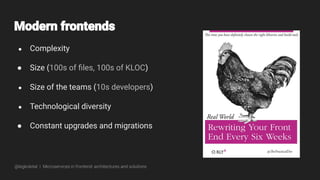
● Complexity
● Size (100s of files, 100s of KLOC)
● Size of the teams (10s developers)
● Technological diversity
● Constant upgrades and migrations
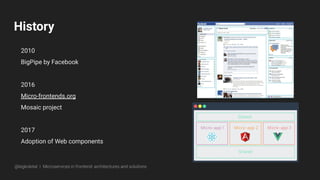
History
2010
BigPipe by Facebook
2016
Micro-frontends.org
Mosaic project
2017
Adoption of Web components
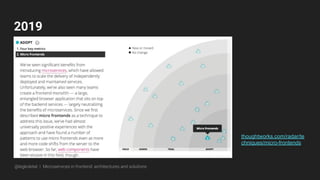
2019
thoughtworks.com/radar/te
chniques/micro-frontends
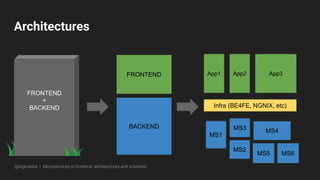
Architectures
FRONTEND
BACKEND
App1 App2 App3
Infra (BE4FE, NGNIX, etc)
MS1
MS2
MS3
MS5
MS4
MS6
FRONTEND
+
BACKEND
Solutions
Solutions overview
● In-browser: single-spa
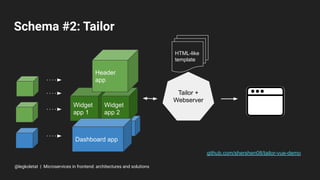
● Server-side: tailor
● iFrames & per-route apps
● Web components as wrapper
In-browser: Single-spa
github.com/CanopyTax/single-spa
● In browser
● Lazy load
● Parts of one page & separate routes
● Share styles, utils, data, events etc.
● Unified lifecycle
@legkoletat | Microservices in frontend: architectures and solutions
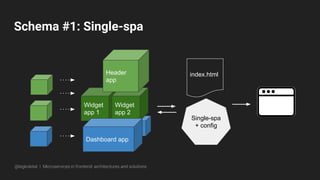
Schema #1: Single-spa
Widget
app 1
Widget
app 2
Dashboard app
Single-spa
+ config
Header
app
index.html
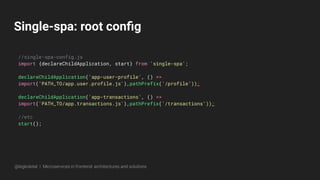
Single-spa: root config
//single-spa-config.js
import {declareChildApplication, start} from 'single-spa';
declareChildApplication('app-user-profile', () =>
import('PATH_TO/app.user.profile.js'),pathPrefix('/profile’));
declareChildApplication('app-transactions', () =>
import('PATH_TO/app.transactions.js'),pathPrefix('/transactions’));
//etc
start();
Single-spa: configure app
// app-user-profile.js
export function bootstrap(props) {
return Promise
.resolve()
.then(() => {
// one-time app initialization code
});
}
//mount callback
//unmount callback
Stitching fragments
github.com/zalando/tailor
● Backend powered (NodeJS)
● Serves parts of one page
● Provides complete toolset - Mosaic
Widget
app 1
Schema #2: Tailor
github.com/shershen08/tailor-vue-demo
Widget
app 2
Dashboard app
Tailor +
Webserver
Header
app
HTML-like
template
@legkoletat | Microservices in frontend: architectures and solutions
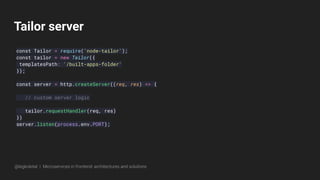
Tailor server
const Tailor = require('node-tailor');
const tailor = new Tailor({
templatesPath: '/built-apps-folder'
});
const server = http.createServer((req, res) => {
// custom server logic
tailor.requestHandler(req, res)
})
server.listen(process.env.PORT);
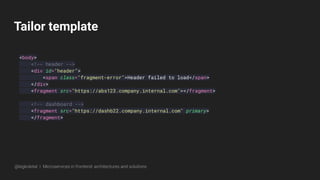
Tailor template
<body>
<!-- header -->
<div id="header">
<span class="fragment-error">Header failed to load</span>
</div>
<fragment src="https://abs123.company.internal.com"></fragment>
<!-- dashboard -->
<fragment src="https://dashb22.company.internal.com" primary>
</fragment>
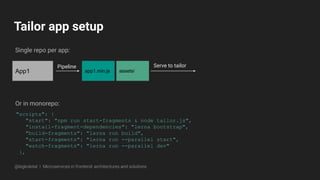
Tailor app setup
"scripts": {
"start": "npm run start-fragments & node tailor.js",
"install-fragment-dependencies": "lerna bootstrap",
"build-fragments": "lerna run build",
"start-fragments": "lerna run --parallel start",
"watch-fragments": "lerna run --parallel dev"
},
App1 app1.min.js assets/
Serve to tailor
Single repo per app:
Or in monorepo:
Pipeline
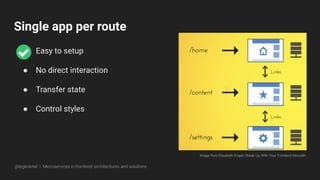
Single app per route
● Easy to setup
● No direct interaction
● Transfer state
● Control styles
Image from Elisabeth Engel: Break Up With Your Frontend Monolith
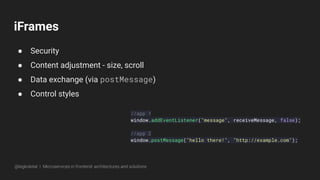
iFrames
● Security
● Content adjustment - size, scroll
● Data exchange (via postMessage)
● Control styles
//app 1
window.addEventListener("message", receiveMessage, false);
//app 2
window.postMessage("hello there!", "http://example.com");
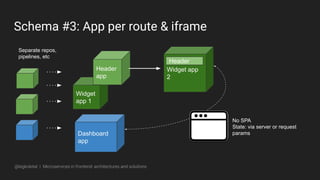
Widget
app 1
Schema #3: App per route & iframe
Widget app
2
Dashboard
app
Header
app
Separate repos,
pipelines, etc
Header
No SPA
State: via server or request
params
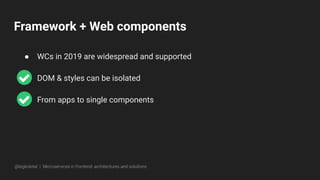
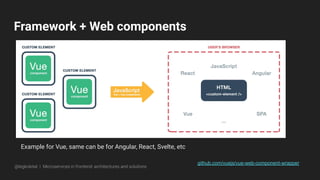
Framework + Web components
● WCs in 2019 are widespread and supported
● DOM & styles can be isolated
● From apps to single components
Framework + Web components
github.com/vuejs/vue-web-component-wrapper
Example for Vue, same can be for Angular, React, Svelte, etc
Glimpse of future: Portals
<portal id="myPortal" src="https://www.example.com/"></portal>
github.com/WICG/
Secure and seamless navigation
Portal can be activated
myPortal.activate({ data: [...] });
Other document (portal) listens to activation, loads data and react
window.addEventListener('portalactivate', e => {
let predecessor = e.adoptPredecessor(document);
//etc
Challenges &
conclusions
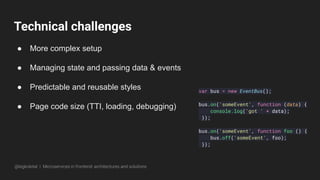
Technical challenges
● More complex setup
● Managing state and passing data & events
● Predictable and reusable styles
● Page code size (TTI, loading, debugging)
var bus = new EventBus();
bus.on('someEvent', function (data) {
console.log('got ' + data);
});
bus.on('someEvent', function foo () {
bus.off('someEvent', foo);
});
Non-technical challenges
● Onboarding new developers
● Team composition
● Knowledge transfer
● More moving parts (compatibility, upgrades)
Pros
Single Responsibility Principle
Fast onboarding and adding features
Ease of testing, deployment
Freedom to choose technology
@legkoletat | Microservices in frontend: architectures and solutions
Do you really need this?
1. Business profile
2. Application usage profile
3. Size of codebase
4. Infrastructure
5. Size, stablity and maturity of team
Thank you! Questions?
Presentation PDF on Slideshare

Front end microservices: architectures and solution

  • 1.
    Microservices in frontend: architecturesand solutions Mikhail Kuznetcov, ING
  • 2.
    Mikhail Kuznetcov Dev engineerat ING Twitter: @legkoletat Github: github.com/shershen08 Agenda
  • 3.
    Agenda ● Microservices ● Modernfrontend ● Microservice-oriented frontend solutions ● Challenges and conclusion
  • 4.
  • 6.
    Microservices ● Single responsibilityprinciple - “granularity” ● Faster developers onboarding ● Faster adding features ● Ease of deployment* ● Freedom to choose technology* ● High scalability
  • 8.
  • 9.
    ● Complexity ● Size(100s of files, 100s of KLOC) ● Size of the teams (10s developers) ● Technological diversity ● Constant upgrades and migrations
  • 11.
  • 12.
  • 13.
    Architectures FRONTEND BACKEND App1 App2 App3 Infra(BE4FE, NGNIX, etc) MS1 MS2 MS3 MS5 MS4 MS6 FRONTEND + BACKEND
  • 14.
  • 15.
    Solutions overview ● In-browser:single-spa ● Server-side: tailor ● iFrames & per-route apps ● Web components as wrapper
  • 16.
    In-browser: Single-spa github.com/CanopyTax/single-spa ● Inbrowser ● Lazy load ● Parts of one page & separate routes ● Share styles, utils, data, events etc. ● Unified lifecycle @legkoletat | Microservices in frontend: architectures and solutions
  • 17.
    Schema #1: Single-spa Widget app1 Widget app 2 Dashboard app Single-spa + config Header app index.html
  • 18.
    Single-spa: root config //single-spa-config.js import{declareChildApplication, start} from 'single-spa'; declareChildApplication('app-user-profile', () => import('PATH_TO/app.user.profile.js'),pathPrefix('/profile’)); declareChildApplication('app-transactions', () => import('PATH_TO/app.transactions.js'),pathPrefix('/transactions’)); //etc start();
  • 19.
    Single-spa: configure app //app-user-profile.js export function bootstrap(props) { return Promise .resolve() .then(() => { // one-time app initialization code }); } //mount callback //unmount callback
  • 20.
    Stitching fragments github.com/zalando/tailor ● Backendpowered (NodeJS) ● Serves parts of one page ● Provides complete toolset - Mosaic
  • 21.
    Widget app 1 Schema #2:Tailor github.com/shershen08/tailor-vue-demo Widget app 2 Dashboard app Tailor + Webserver Header app HTML-like template @legkoletat | Microservices in frontend: architectures and solutions
  • 22.
    Tailor server const Tailor= require('node-tailor'); const tailor = new Tailor({ templatesPath: '/built-apps-folder' }); const server = http.createServer((req, res) => { // custom server logic tailor.requestHandler(req, res) }) server.listen(process.env.PORT);
  • 23.
    Tailor template <body> <!-- header--> <div id="header"> <span class="fragment-error">Header failed to load</span> </div> <fragment src="https://abs123.company.internal.com"></fragment> <!-- dashboard --> <fragment src="https://dashb22.company.internal.com" primary> </fragment>
  • 24.
    Tailor app setup "scripts":{ "start": "npm run start-fragments & node tailor.js", "install-fragment-dependencies": "lerna bootstrap", "build-fragments": "lerna run build", "start-fragments": "lerna run --parallel start", "watch-fragments": "lerna run --parallel dev" }, App1 app1.min.js assets/ Serve to tailor Single repo per app: Or in monorepo: Pipeline
  • 25.
    Single app perroute ● Easy to setup ● No direct interaction ● Transfer state ● Control styles Image from Elisabeth Engel: Break Up With Your Frontend Monolith
  • 26.
    iFrames ● Security ● Contentadjustment - size, scroll ● Data exchange (via postMessage) ● Control styles //app 1 window.addEventListener("message", receiveMessage, false); //app 2 window.postMessage("hello there!", "http://example.com");
  • 27.
    Widget app 1 Schema #3:App per route & iframe Widget app 2 Dashboard app Header app Separate repos, pipelines, etc Header No SPA State: via server or request params
  • 28.
    Framework + Webcomponents ● WCs in 2019 are widespread and supported ● DOM & styles can be isolated ● From apps to single components
  • 29.
    Framework + Webcomponents github.com/vuejs/vue-web-component-wrapper Example for Vue, same can be for Angular, React, Svelte, etc
  • 30.
    Glimpse of future:Portals <portal id="myPortal" src="https://www.example.com/"></portal> github.com/WICG/ Secure and seamless navigation Portal can be activated myPortal.activate({ data: [...] }); Other document (portal) listens to activation, loads data and react window.addEventListener('portalactivate', e => { let predecessor = e.adoptPredecessor(document); //etc
  • 31.
  • 33.
    Technical challenges ● Morecomplex setup ● Managing state and passing data & events ● Predictable and reusable styles ● Page code size (TTI, loading, debugging) var bus = new EventBus(); bus.on('someEvent', function (data) { console.log('got ' + data); }); bus.on('someEvent', function foo () { bus.off('someEvent', foo); });
  • 34.
    Non-technical challenges ● Onboardingnew developers ● Team composition ● Knowledge transfer ● More moving parts (compatibility, upgrades)
  • 35.
    Pros Single Responsibility Principle Fastonboarding and adding features Ease of testing, deployment Freedom to choose technology @legkoletat | Microservices in frontend: architectures and solutions
  • 36.
    Do you reallyneed this? 1. Business profile 2. Application usage profile 3. Size of codebase 4. Infrastructure 5. Size, stablity and maturity of team
  • 37.