© Copyright 2017 Pivotal Software, Inc. All rights Reserved. Version 1.0
Four Steps Toward a Safer
Continuous Delivery Practice
James Ma Mike Villiger
Product Manager Sr. Technical Partner Manager
Pivotal Dynatrace
Jan 23, 2019
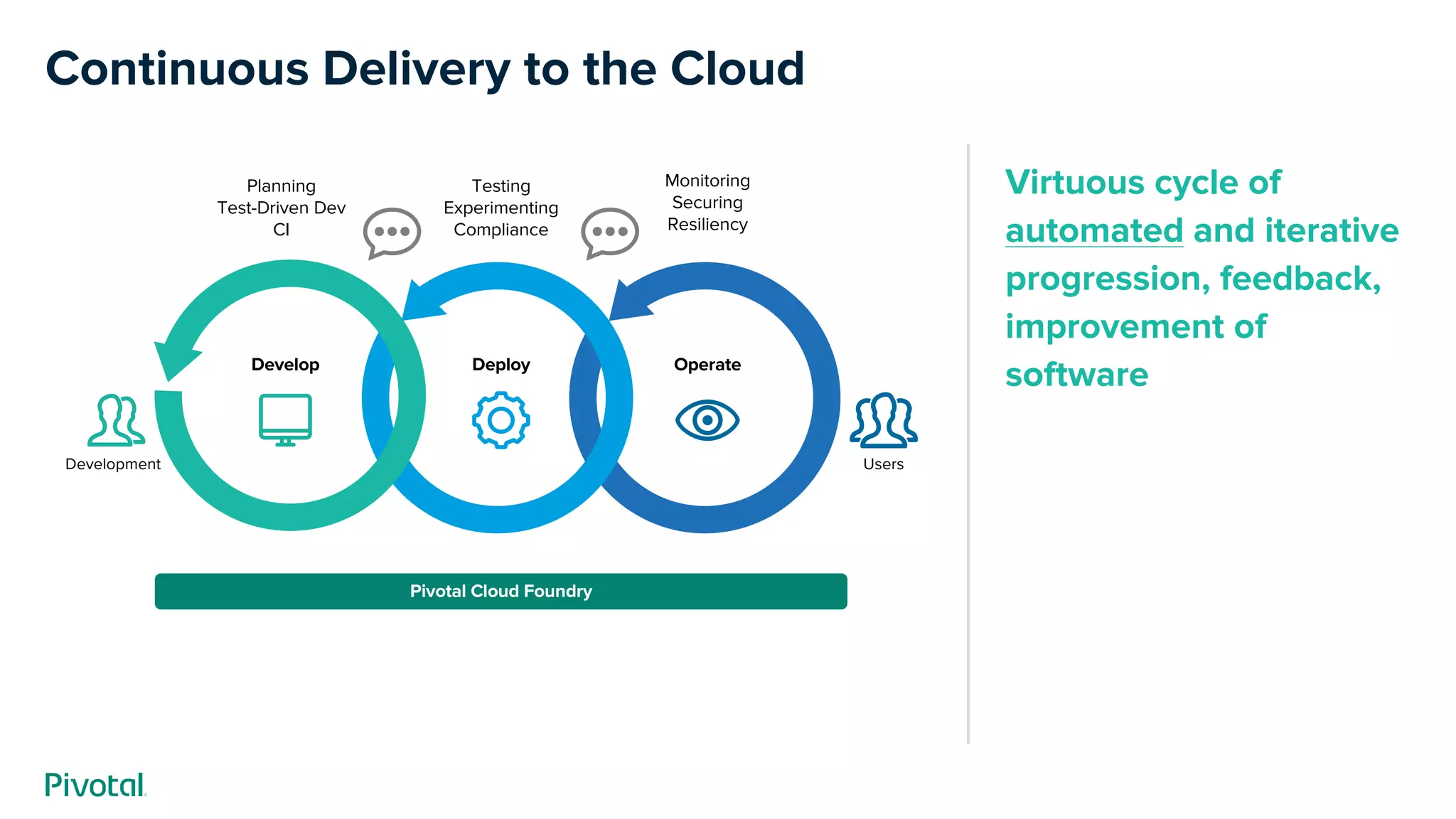
Virtuous cycle of
automated and iterative
progression, feedback,
improvement of
software
Continuous Delivery to the Cloud
Monitoring
Securing
Resiliency
Develop
Testing
Experimenting
Compliance
Pivotal Cloud Foundry
Deploy Operate
Planning
Test-Driven Dev
CI
Development Users
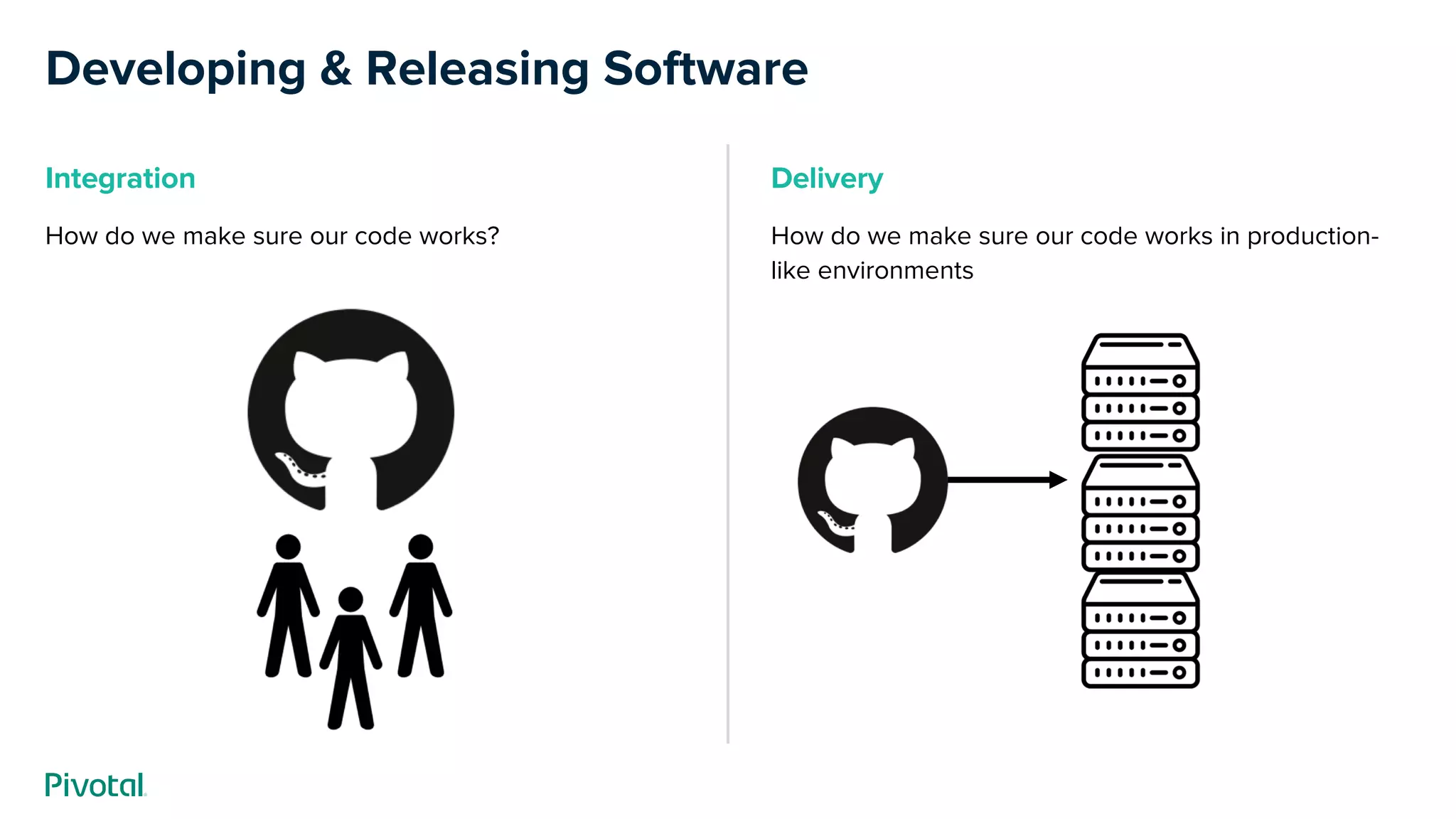
Developing & Releasing Software
Delivery
How do we make sure our code works in production-
like environments
Integration
How do we make sure our code works?
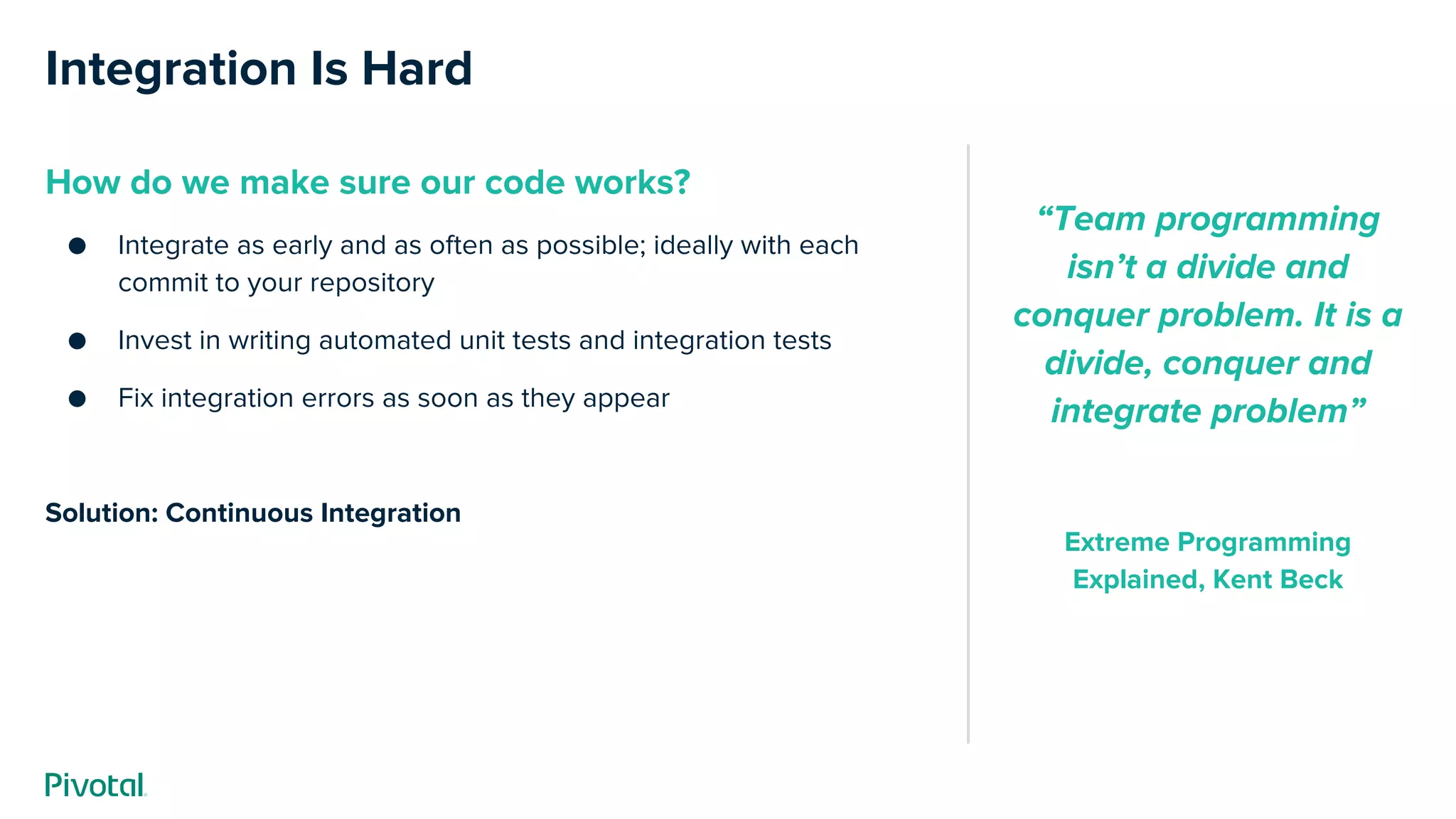
Integration Is Hard
How do we make sure our code works?
● Integrate as early and as often as possible; ideally with each
commit to your repository
● Invest in writing automated unit tests and integration tests
● Fix integration errors as soon as they appear
Solution: Continuous Integration
“Team programming
isn’t a divide and
conquer problem. It is a
divide, conquer and
integrate problem”
Extreme Programming
Explained, Kent Beck
Delivery Is Hard
How do we make sure our code works in
production-like environments?
● Test the code in a production-like environment
● Use automated tests to verify correct business functionality and
integration with other services
● Apply additional checks for security, compliance, etc.
Solution: Continuous Delivery!
“Continuous Delivery
doesn't mean every
change is deployed to
production ASAP. It
means every change is
proven to be deployable
at any time”
Carl Cacum[1]
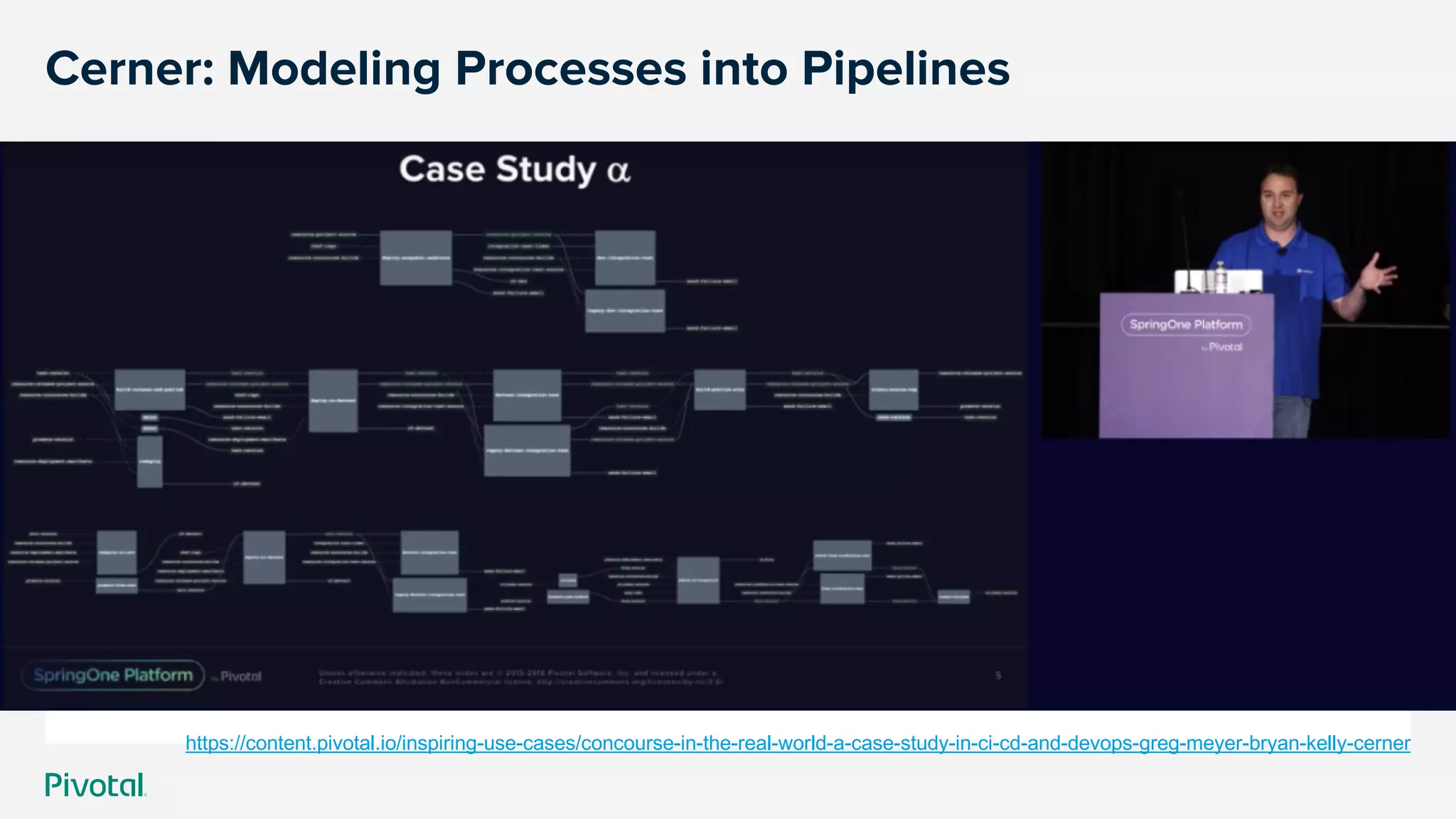
Cerner: Modeling Processes into Pipelines
https://content.pivotal.io/inspiring-use-cases/concourse-in-the-real-world-a-case-study-in-ci-cd-and-devops-greg-meyer-bryan-kelly-cerner
Concourse CI
Concourse CI
Built on the simple mechanics of resources, tasks,
and jobs, Concourse presents a general approach to
automation that makes it great for CI/CD
Cover w/ Image
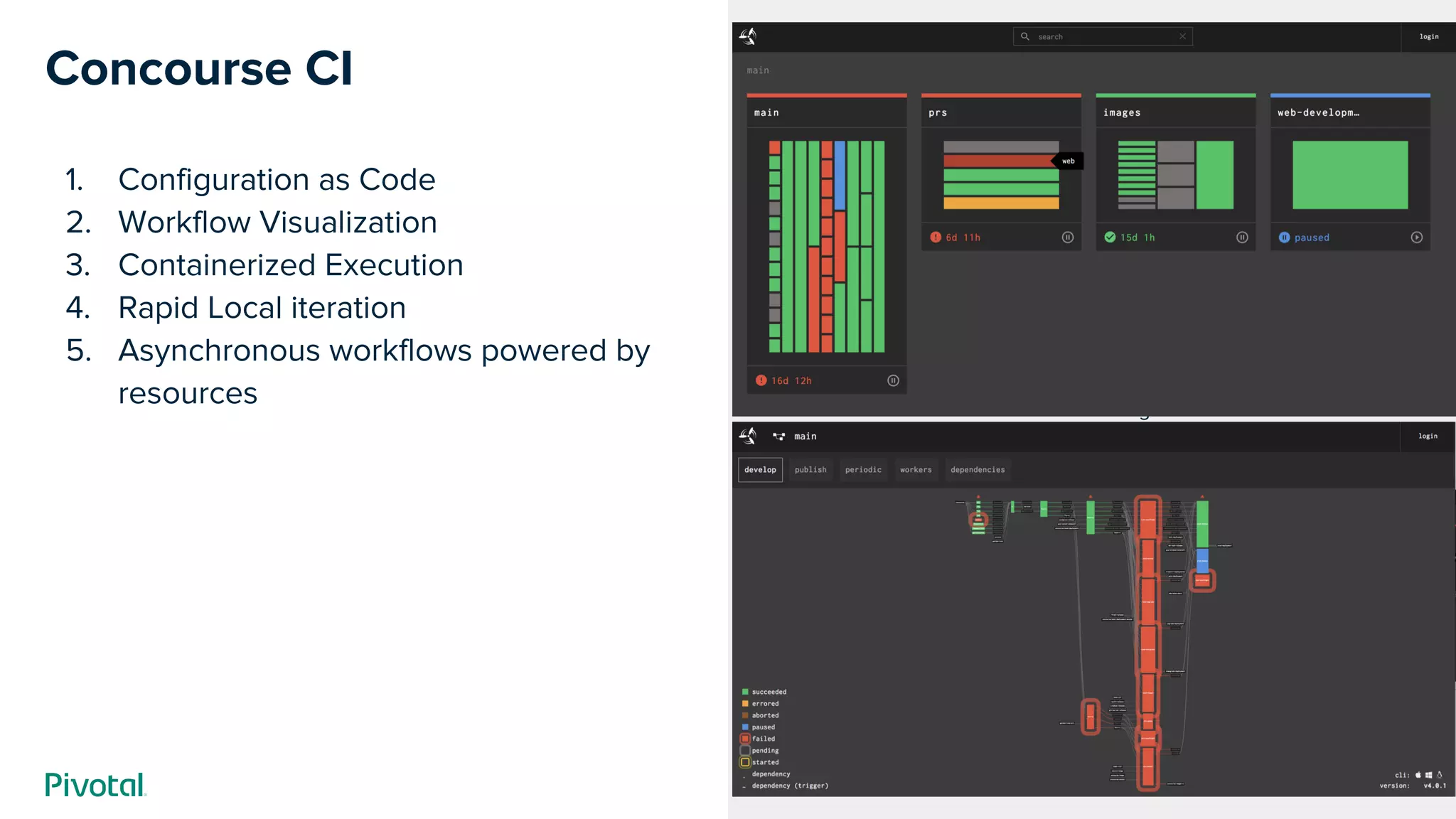
Concourse CI
1. Configuration as Code
2. Workflow Visualization
3. Containerized Execution
4. Rapid Local iteration
5. Asynchronous workflows powered by
resources
Cover w/ Image
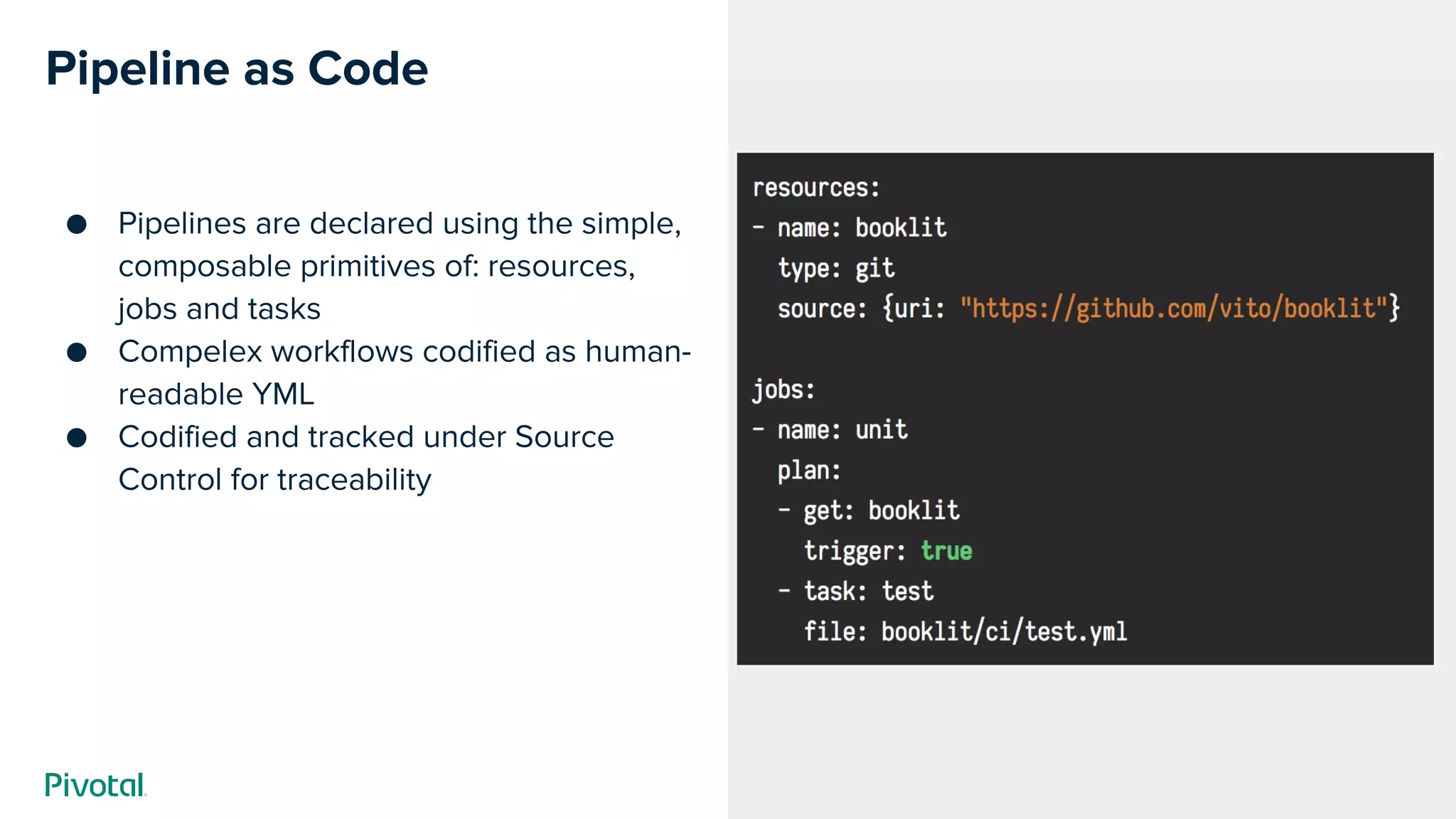
Pipeline as Code
● Pipelines are declared using the simple,
composable primitives of: resources,
jobs and tasks
● Compelex workflows codified as human-
readable YML
● Codified and tracked under Source
Control for traceability
Cover w/ Image
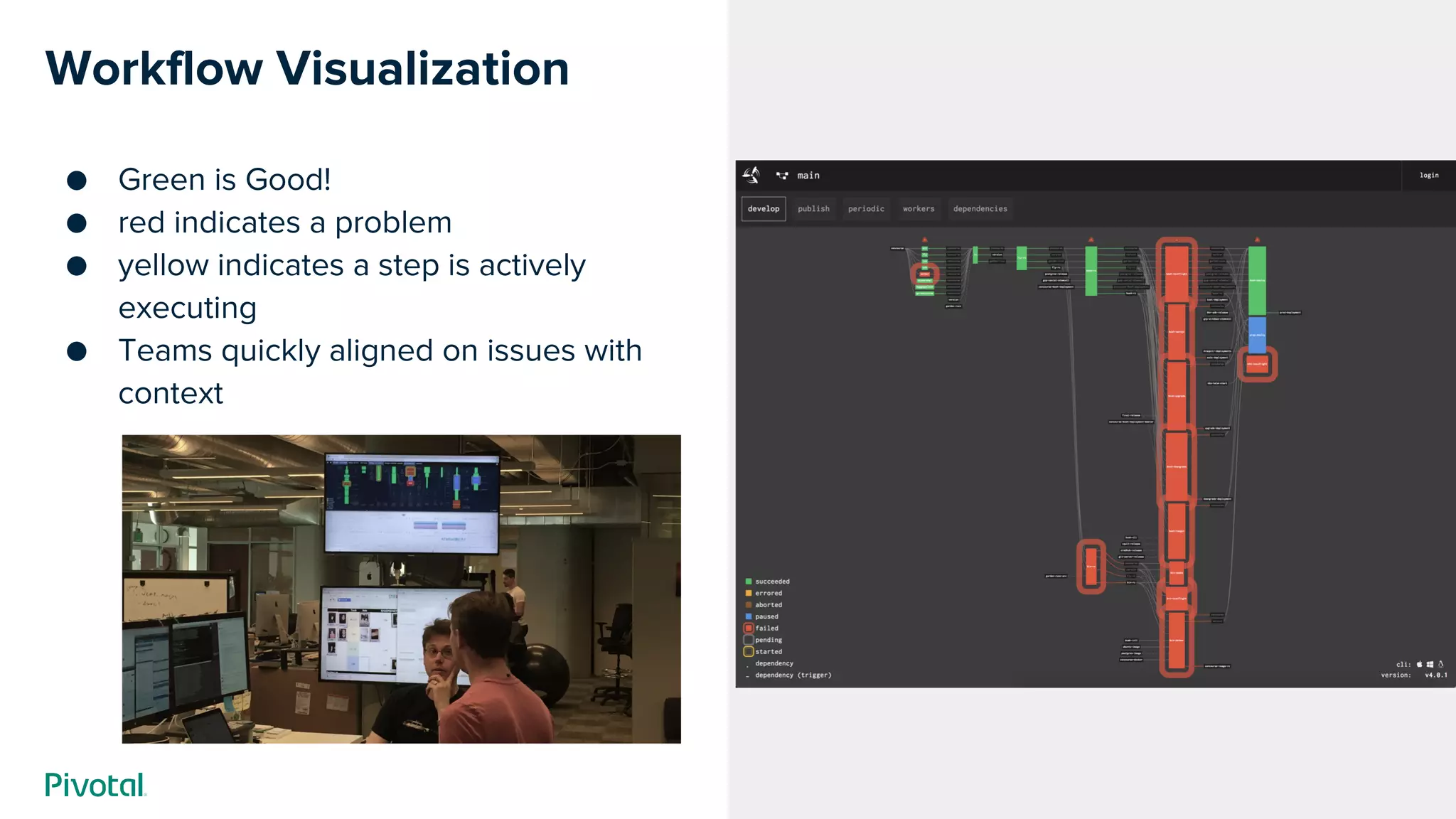
Workflow Visualization
● Green is Good!
● red indicates a problem
● yellow indicates a step is actively
executing
● Teams quickly aligned on issues with
context
Cover w/ Image
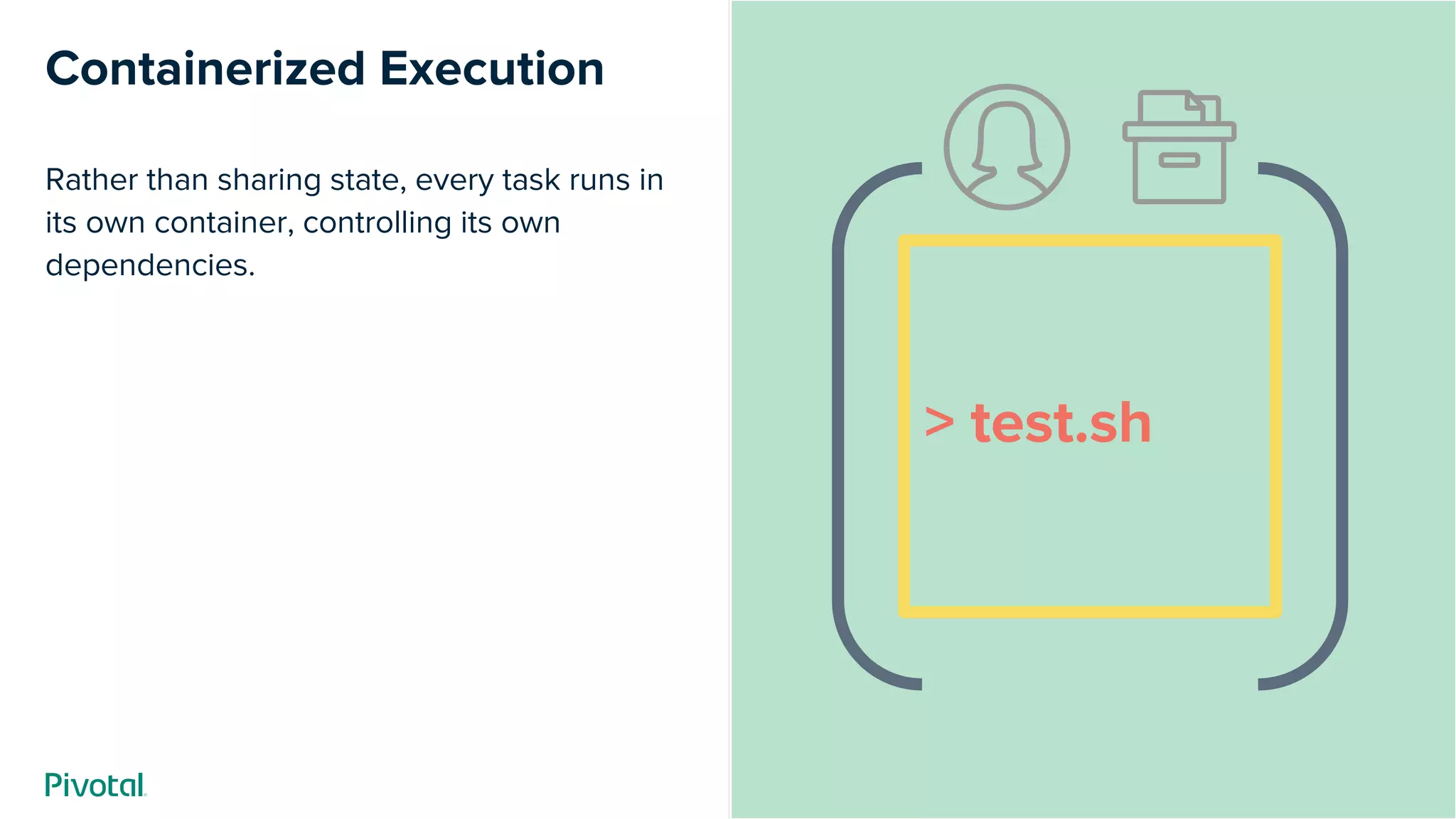
Containerized Execution
Rather than sharing state, every task runs in
its own container, controlling its own
dependencies.
> test.sh
Cover w/ Image
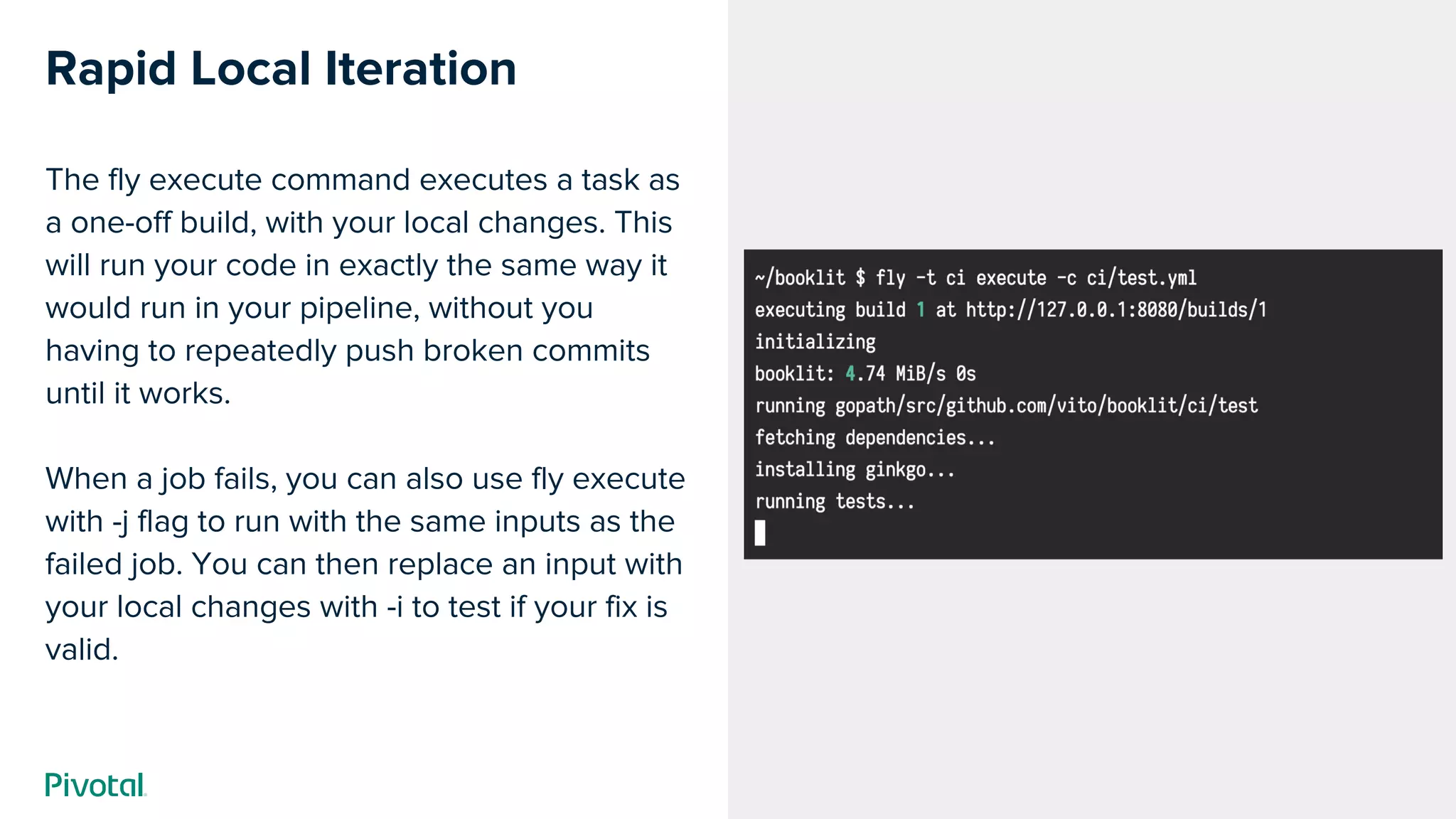
Rapid Local Iteration
The fly execute command executes a task as
a one-off build, with your local changes. This
will run your code in exactly the same way it
would run in your pipeline, without you
having to repeatedly push broken commits
until it works.
When a job fails, you can also use fly execute
with -j flag to run with the same inputs as the
failed job. You can then replace an input with
your local changes with -i to test if your fix is
valid.
Cover w/ Image
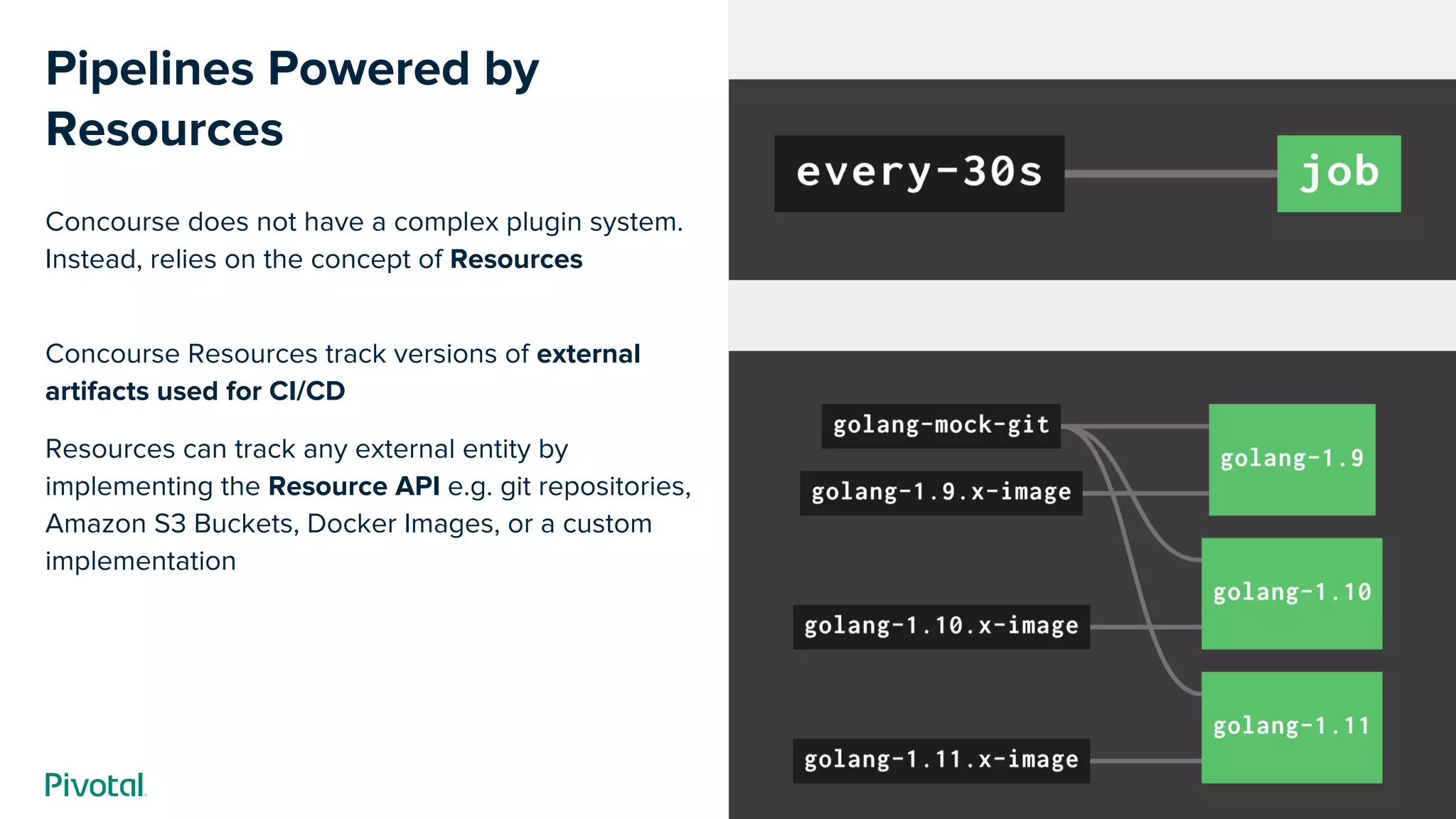
Pipelines Powered by
Resources
Concourse does not have a complex plugin system.
Instead, relies on the concept of Resources
Concourse Resources track versions of external
artifacts used for CI/CD
Resources can track any external entity by
implementing the Resource API e.g. git repositories,
Amazon S3 Buckets, Docker Images, or a custom
implementation
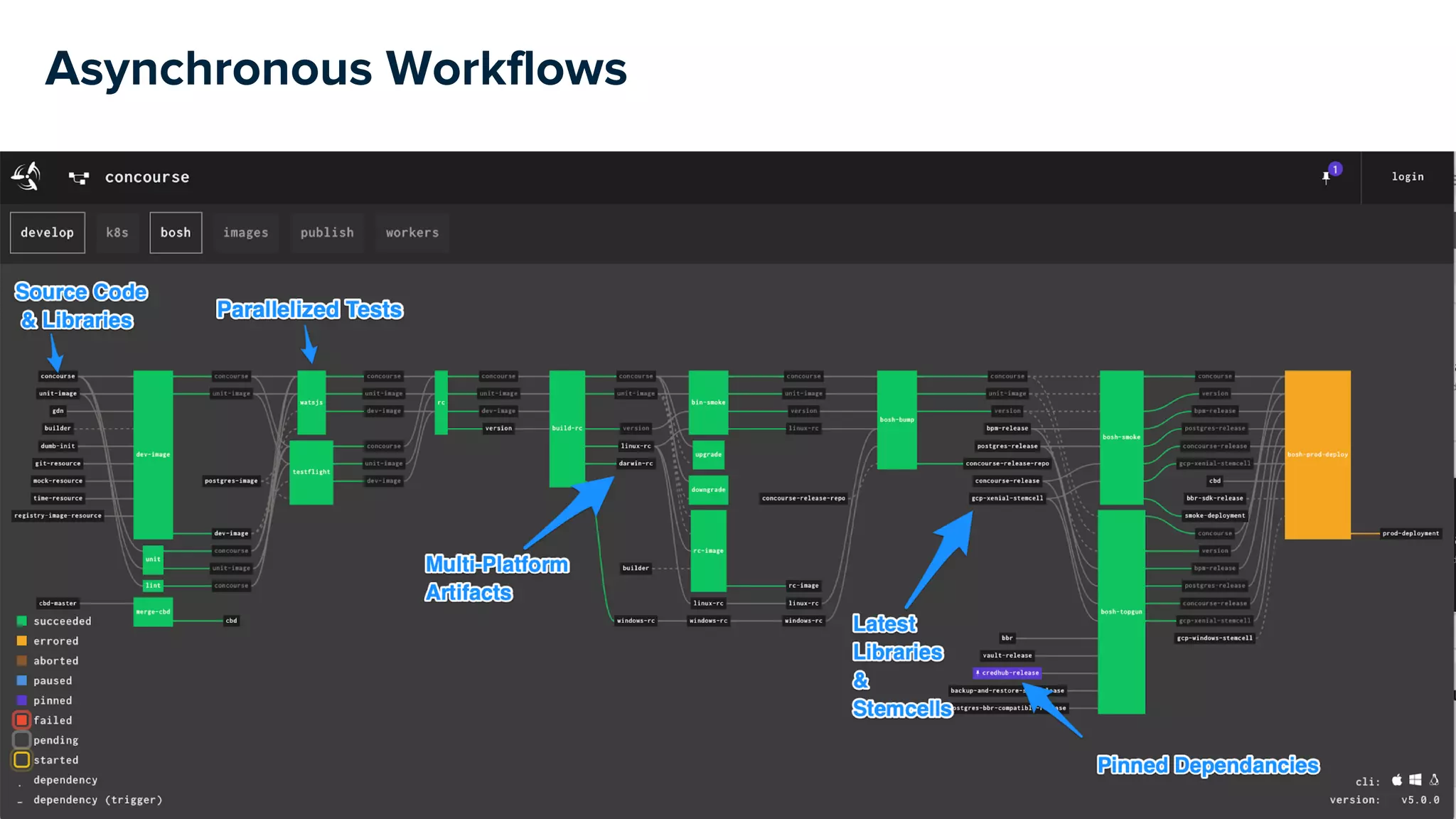
Asynchronous Workflows
Concourse Resources
100+ OSS resources to external systems and tools (Community Resources)
Demo
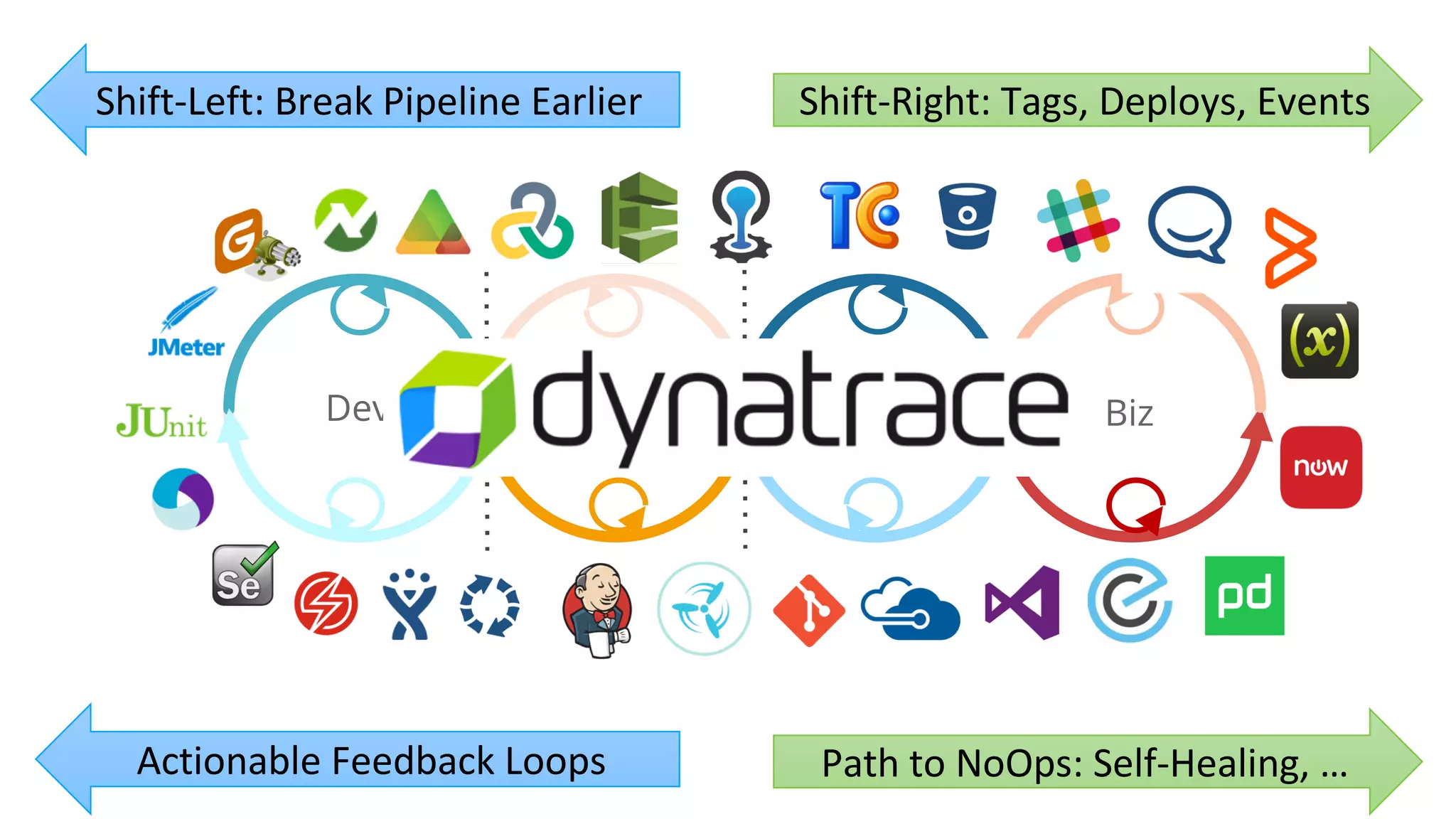
Dev Perf/Test Ops Biz
Shift-Left: Break Pipeline Earlier
Path to NoOps: Self-Healing, …
Shift-Right: Tags, Deploys, Events
Actionable Feedback Loops
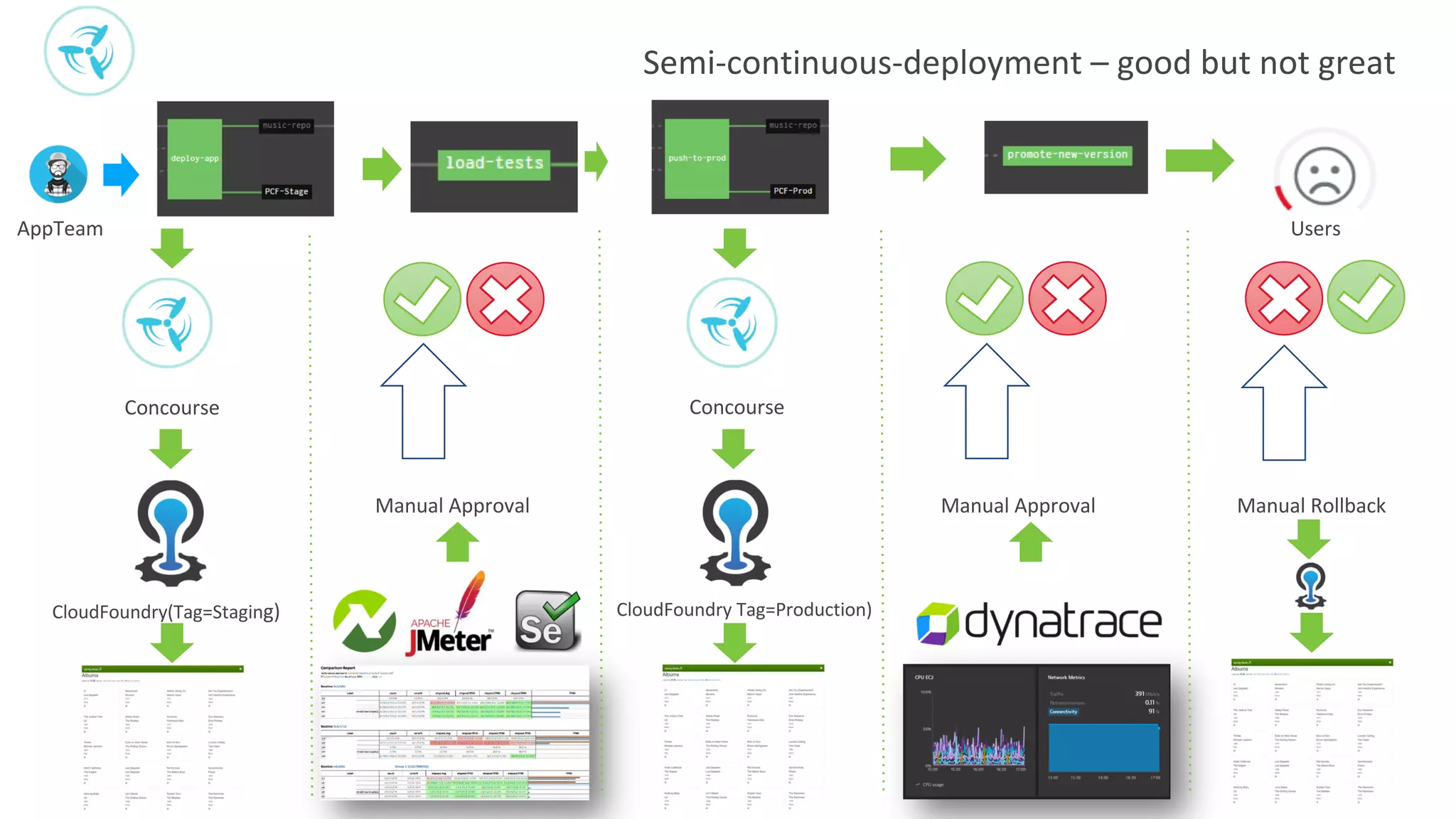
Semi-continuous-deployment – good but not great
Concourse
CloudFoundry(Tag=Staging) CloudFoundry Tag=Production)
AppTeam
Manual RollbackManual ApprovalManual Approval
Users
Concourse
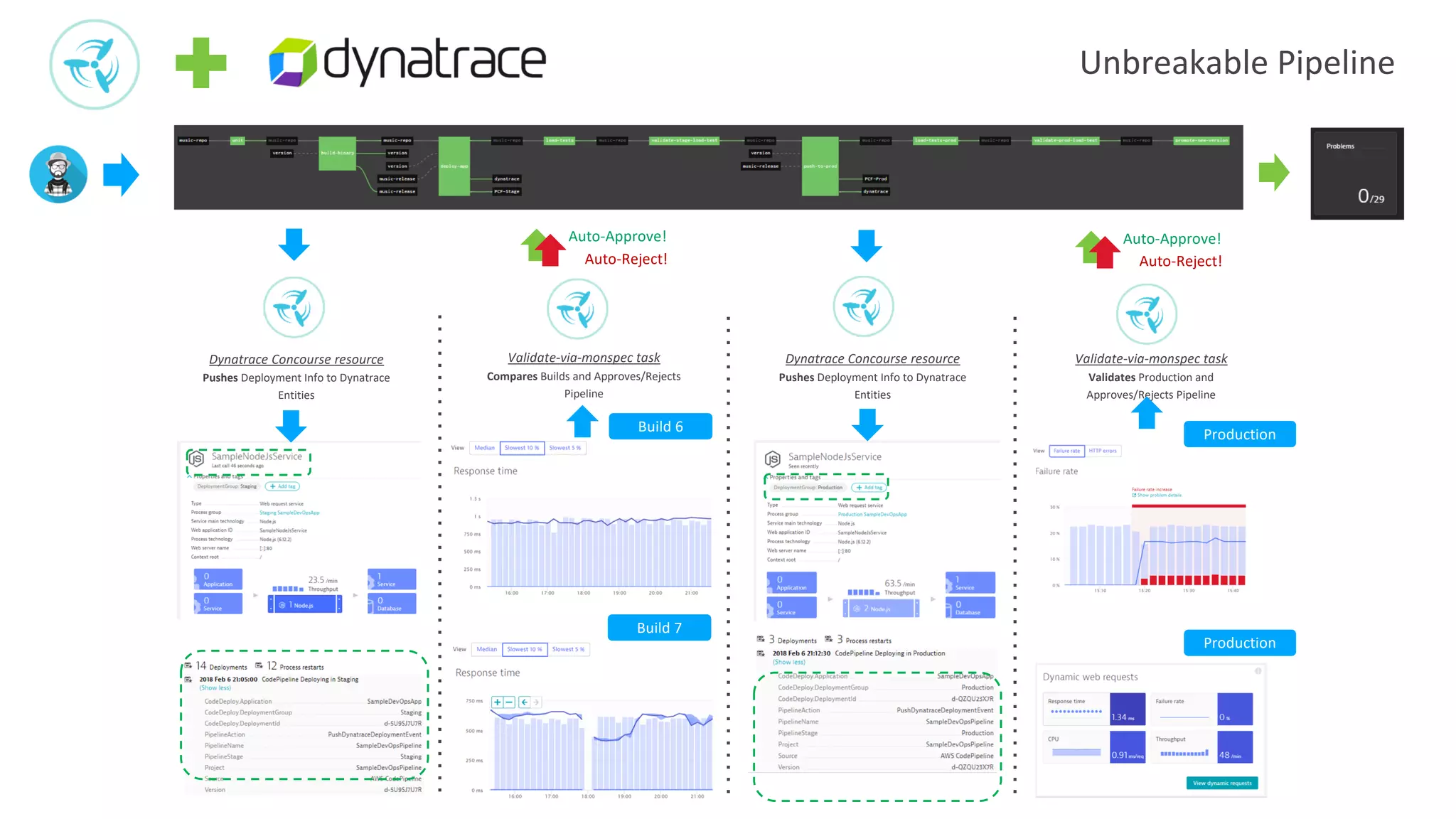
Unbreakable Pipeline
Dynatrace Concourse resource
Pushes Deployment Info to Dynatrace
Entities
Validate-via-monspec task
Compares Builds and Approves/Rejects
Pipeline
Dynatrace Concourse resource
Pushes Deployment Info to Dynatrace
Entities
Validate-via-monspec task
Validates Production and
Approves/Rejects Pipeline
Build 6
Build 7
Production
Production
Auto-Approve!
Auto-Reject!
Auto-Approve!
Auto-Reject!
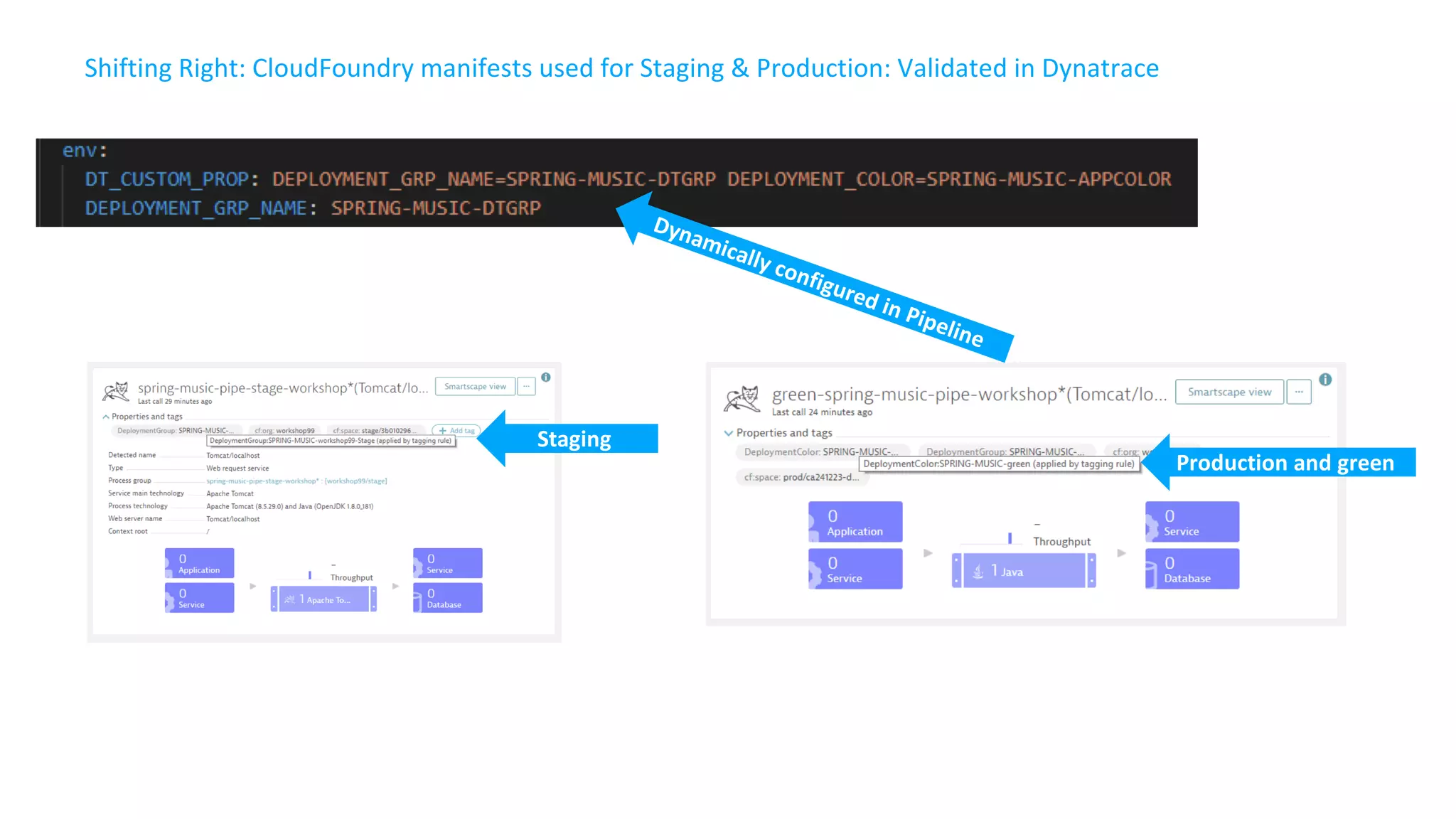
Shifting Right: CloudFoundry manifests used for Staging & Production: Validated in Dynatrace
Staging
Production and green
Dynamically configured in Pipeline
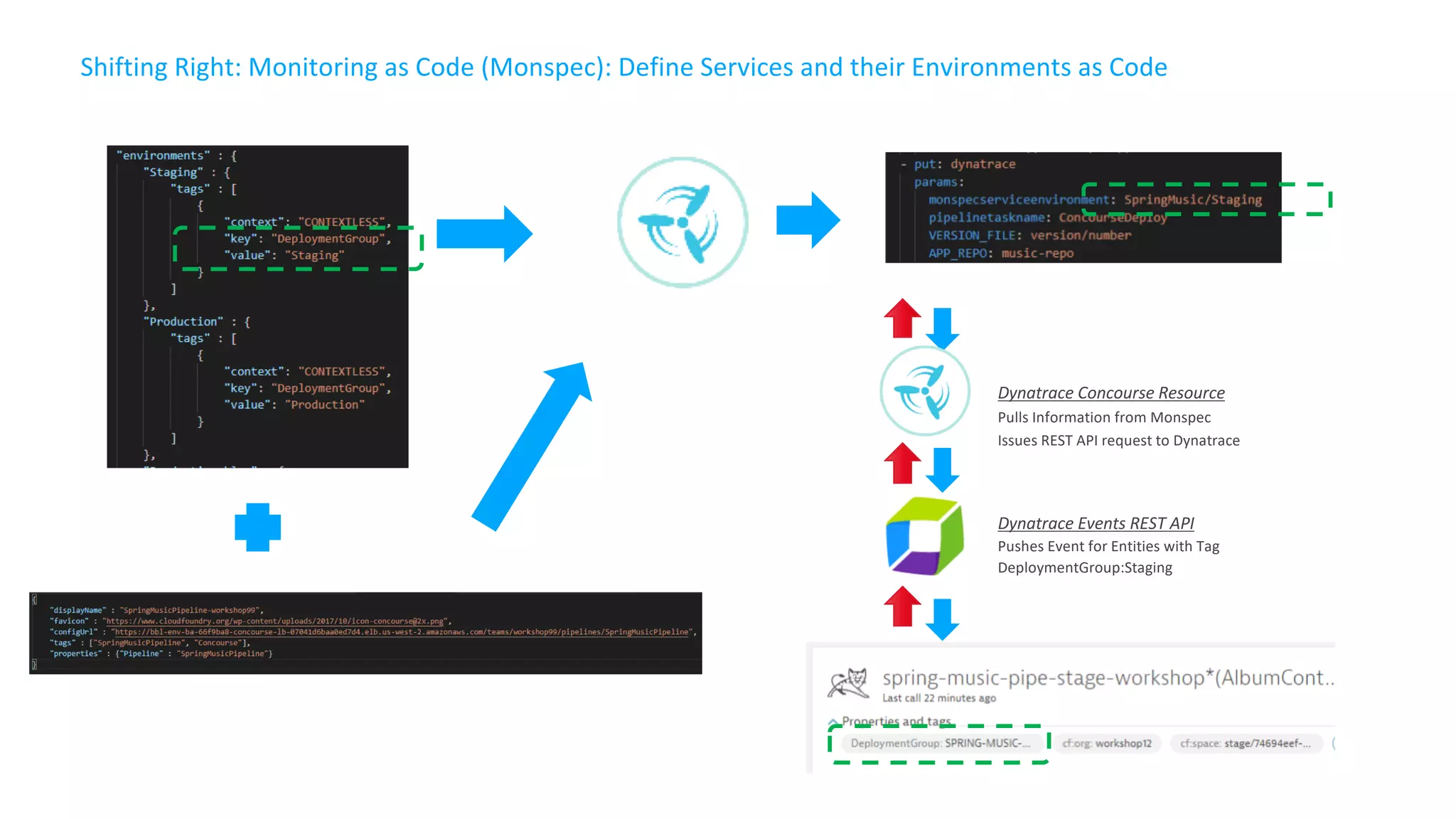
Dynatrace Concourse Resource
Pulls Information from Monspec
Issues REST API request to Dynatrace
Dynatrace Events REST API
Pushes Event for Entities with Tag
DeploymentGroup:Staging
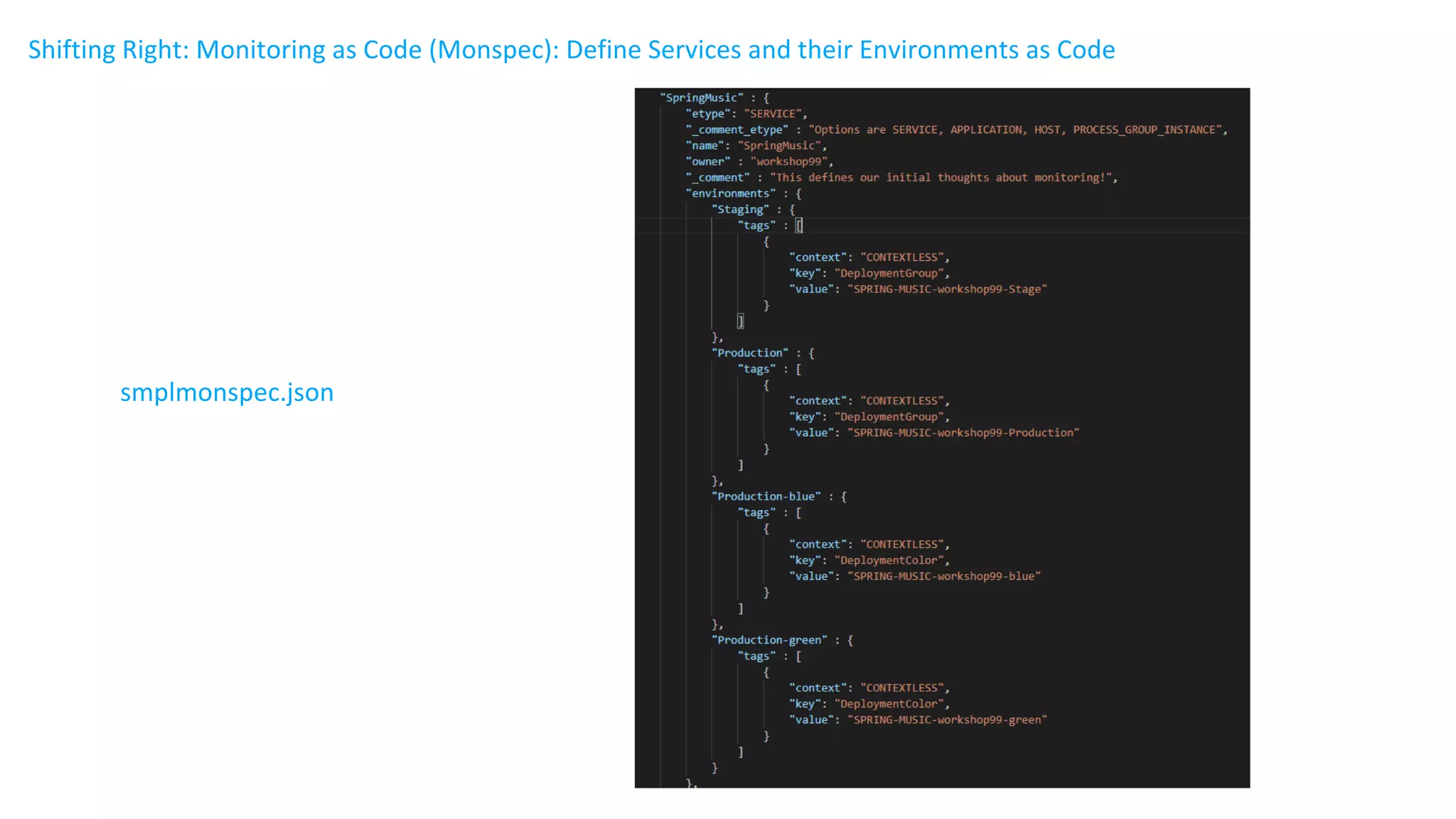
Shifting Right: Monitoring as Code (Monspec): Define Services and their Environments as Code
smplmonspec.json
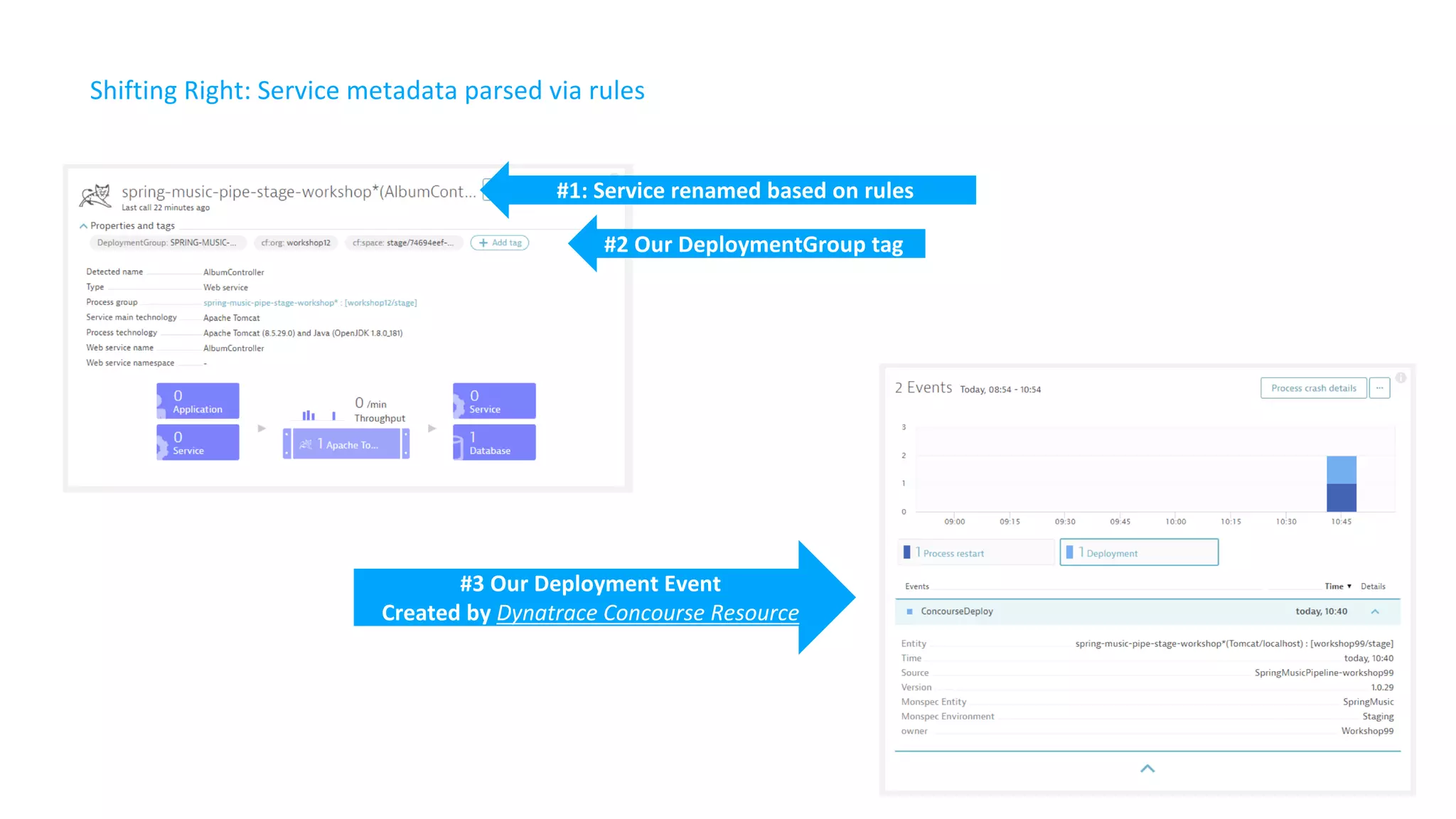
Shifting Right: Service metadata parsed via rules
#1: Service renamed based on rules
#2 Our DeploymentGroup tag
#3 Our Deployment Event
Created by Dynatrace Concourse Resource
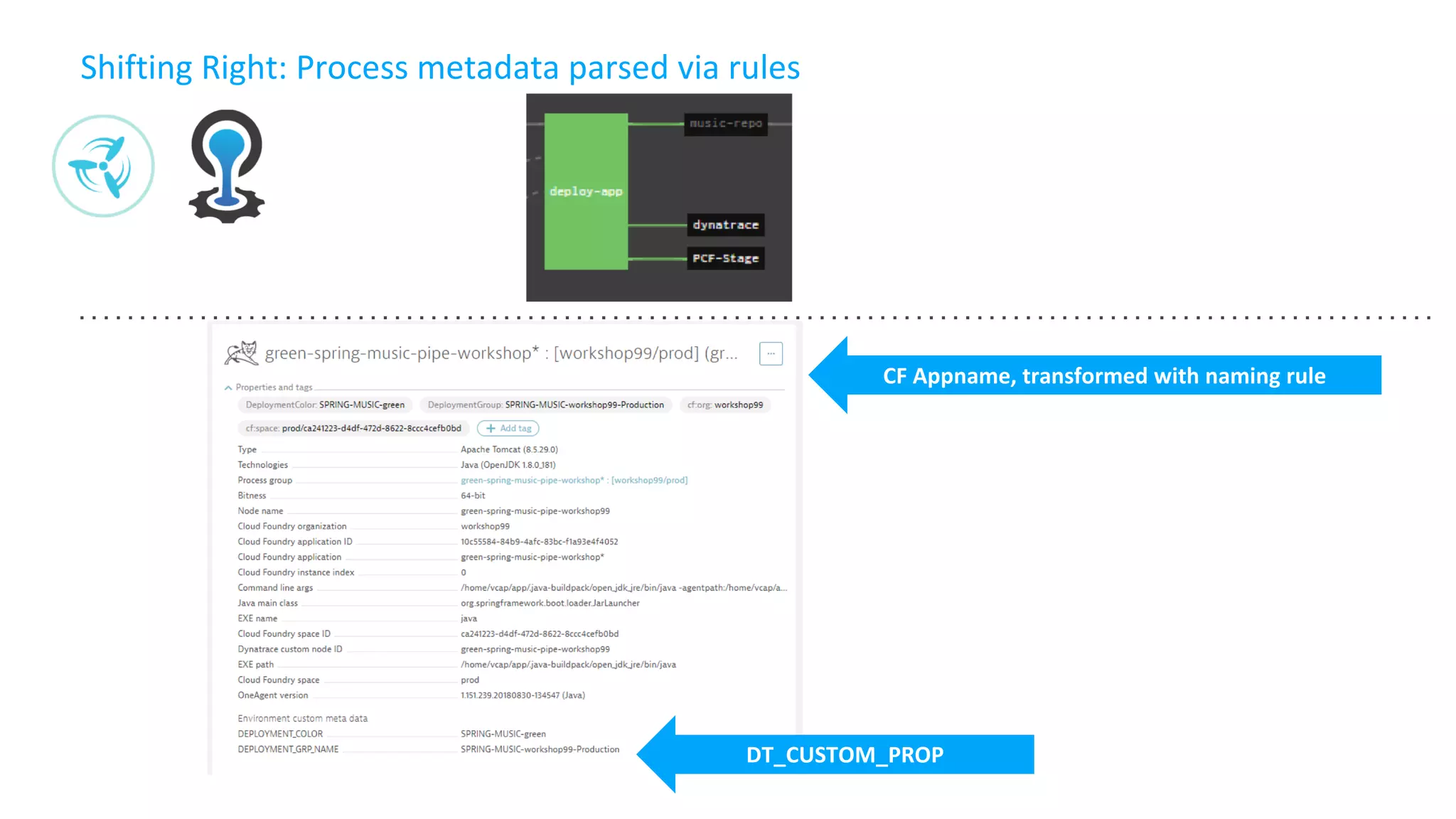
Shifting Right: Process metadata parsed via rules
DT_CUSTOM_PROP
CF Appname, transformed with naming rule
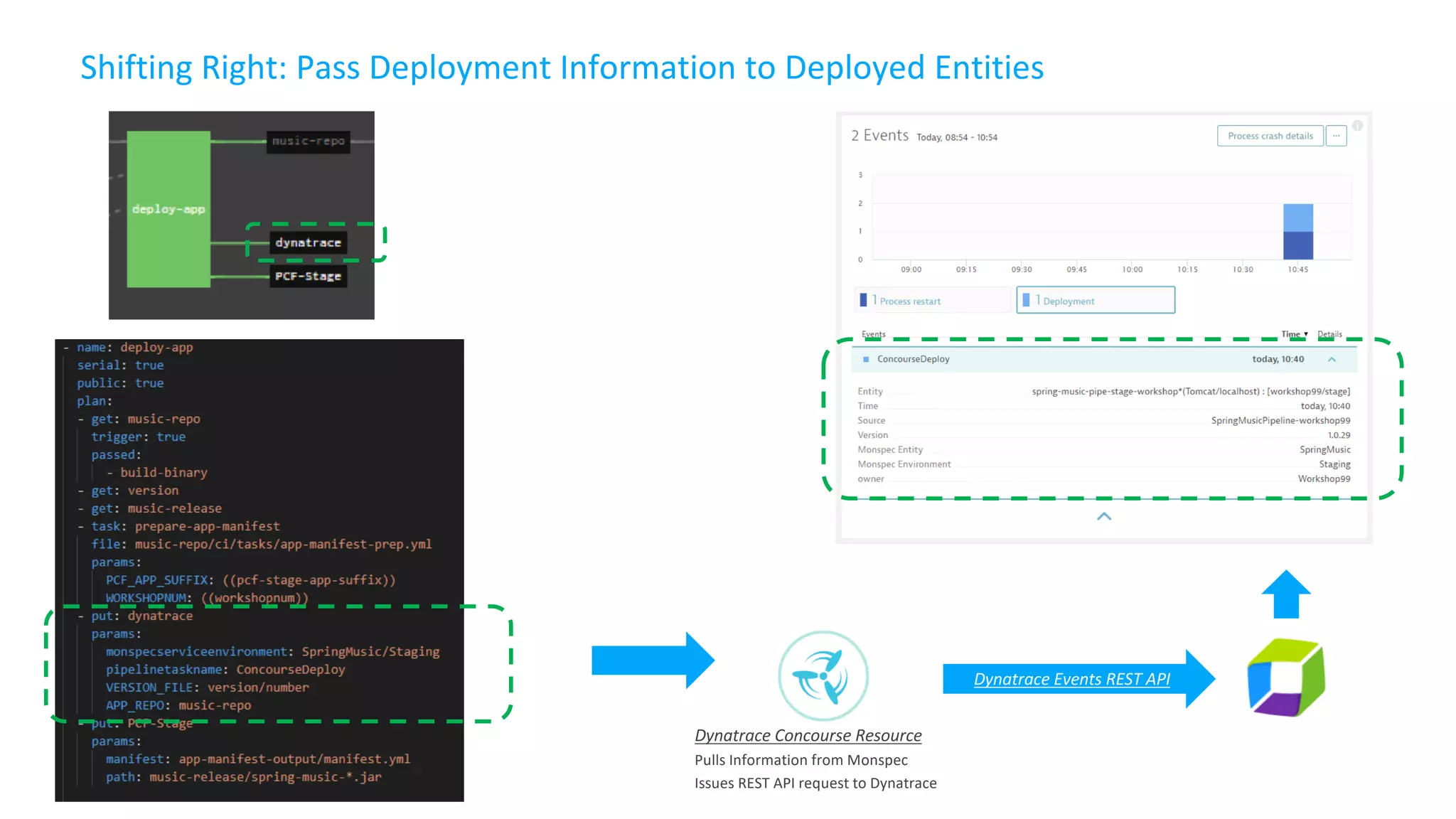
Shifting Right: Pass Deployment Information to Deployed Entities
Dynatrace Events REST API
Dynatrace Concourse Resource
Pulls Information from Monspec
Issues REST API request to Dynatrace
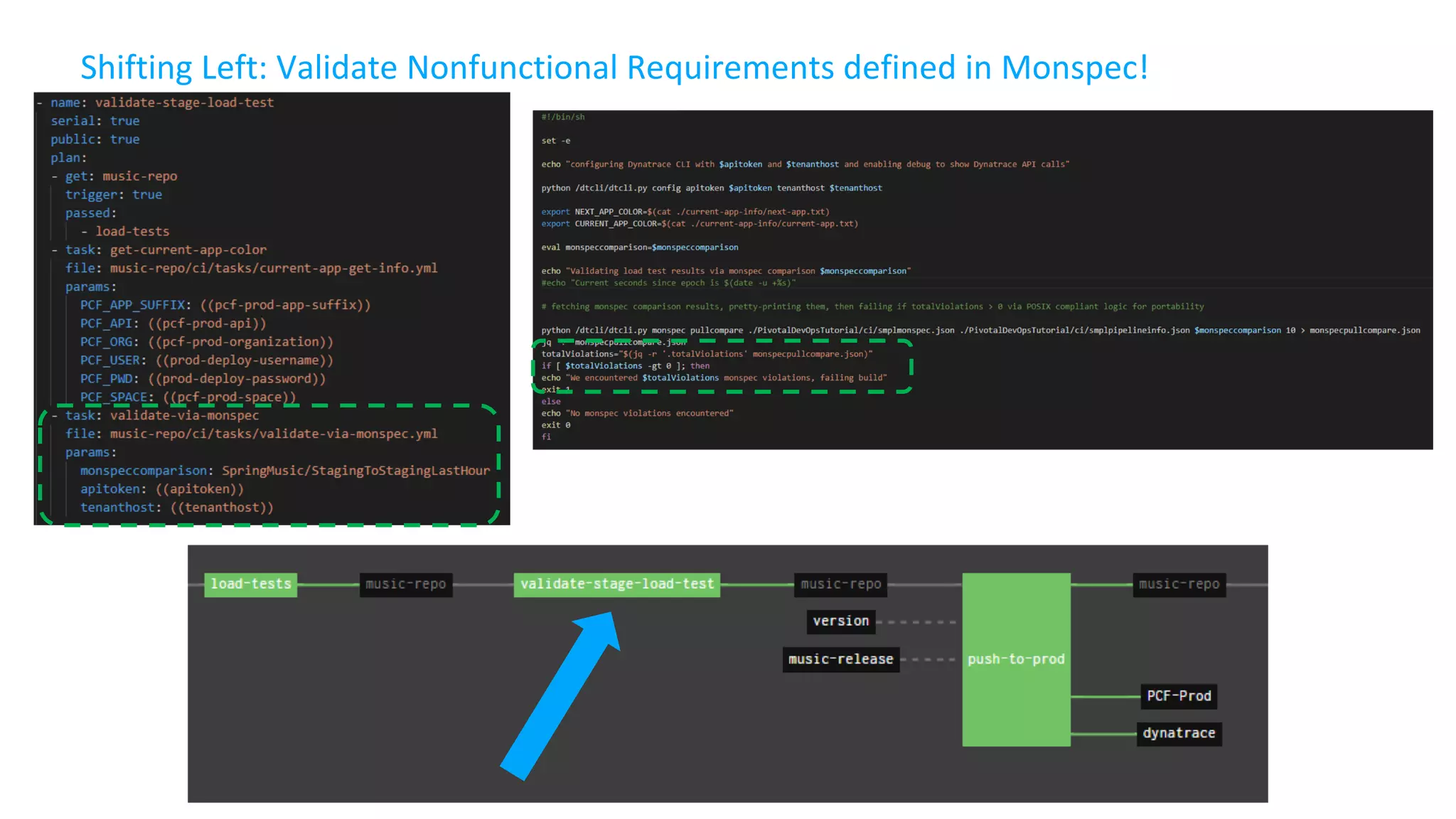
Shifting Left: Validate Nonfunctional Requirements defined in Monspec!
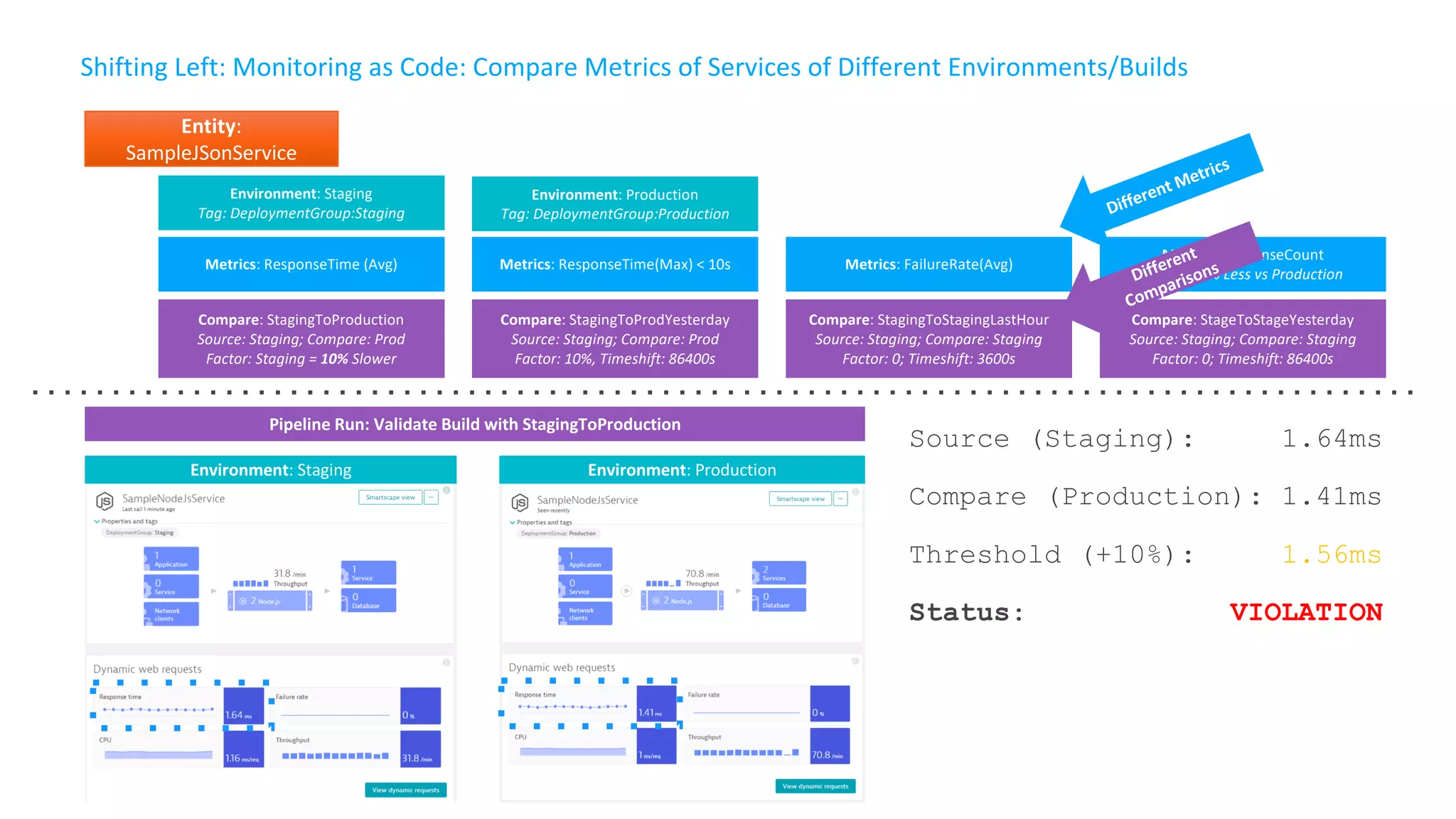
Shifting Left: Monitoring as Code: Compare Metrics of Services of Different Environments/Builds
Entity:
SampleJSonService
Environment: Staging
Tag: DeploymentGroup:Staging
Environment: Production
Tag: DeploymentGroup:Production
Compare: StagingToProduction
Source: Staging; Compare: Prod
Factor: Staging = 10% Slower
Compare: StagingToProdYesterday
Source: Staging; Compare: Prod
Factor: 10%, Timeshift: 86400s
Compare: StagingToStagingLastHour
Source: Staging; Compare: Staging
Factor: 0; Timeshift: 3600s
Compare: StageToStageYesterday
Source: Staging; Compare: Staging
Factor: 0; Timeshift: 86400s
Metrics: ResponseTime (Avg) Metrics: ResponseTime(Max) < 10s Metrics: FailureRate(Avg)
Metrics: ResponseCount
Factor: 90% Less vs Production
Environment: Staging Environment: Production
Source (Staging): 1.64ms
Compare (Production): 1.41ms
Threshold (+10%): 1.56ms
Status: VIOLATION
Pipeline Run: Validate Build with StagingToProduction
Different Metrics
Different
Comparisons
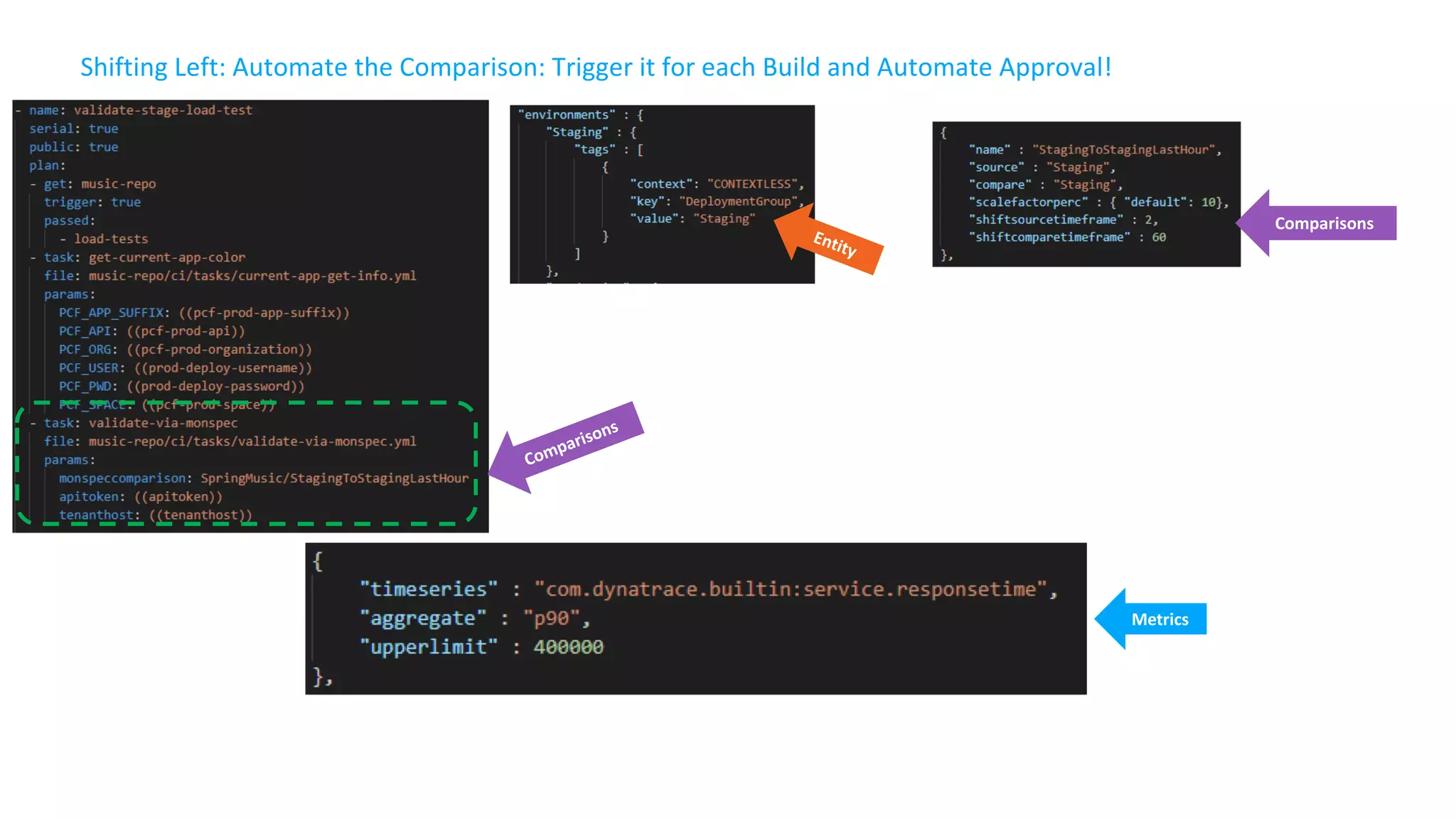
Shifting Left: Automate the Comparison: Trigger it for each Build and Automate Approval!
Metrics
Comparisons
Entity
Comparisons
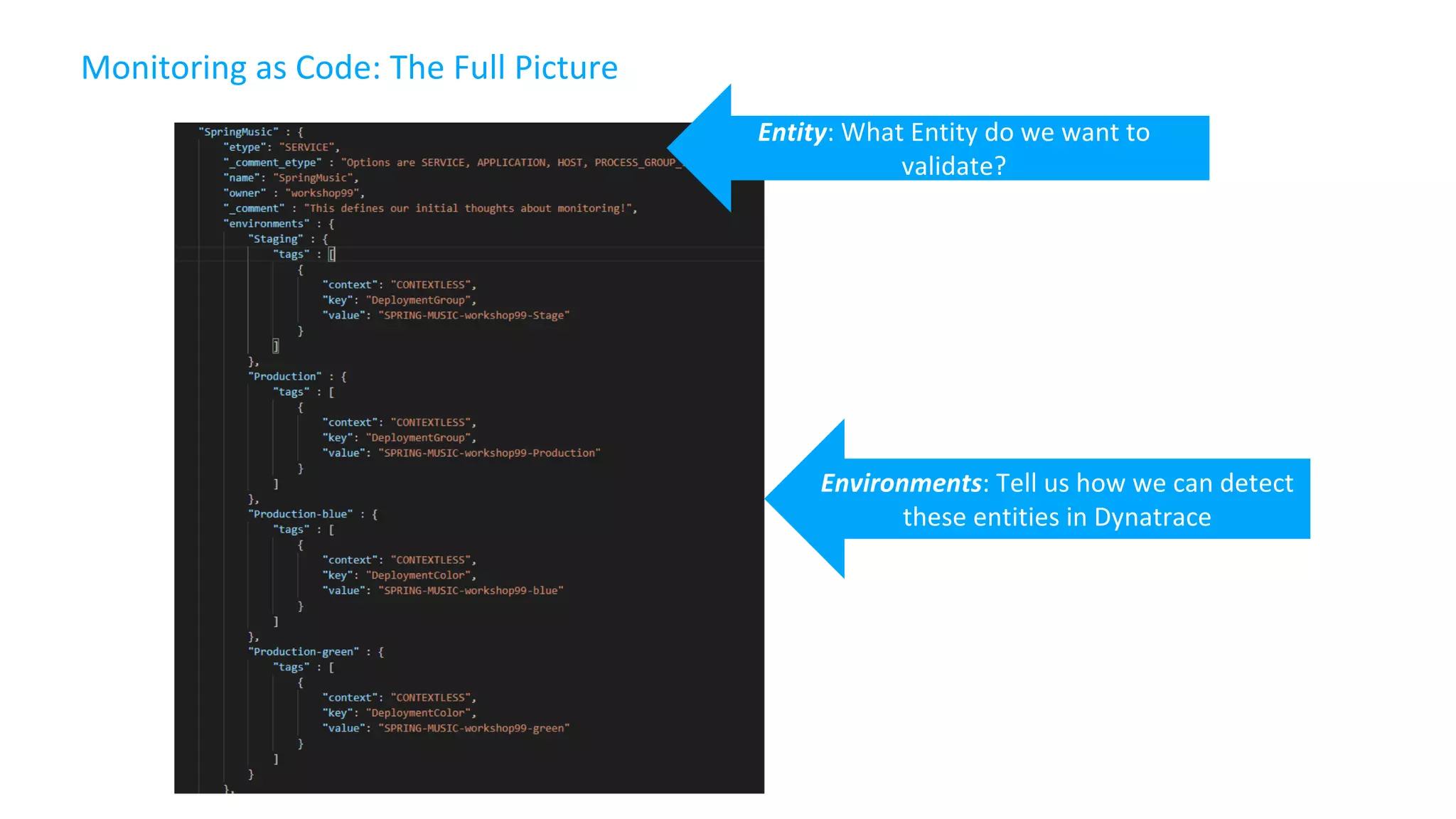
Monitoring as Code: The Full Picture
Environments: Tell us how we can detect
these entities in Dynatrace
Entity: What Entity do we want to
validate?
Monitoring as Code: The Full Picture
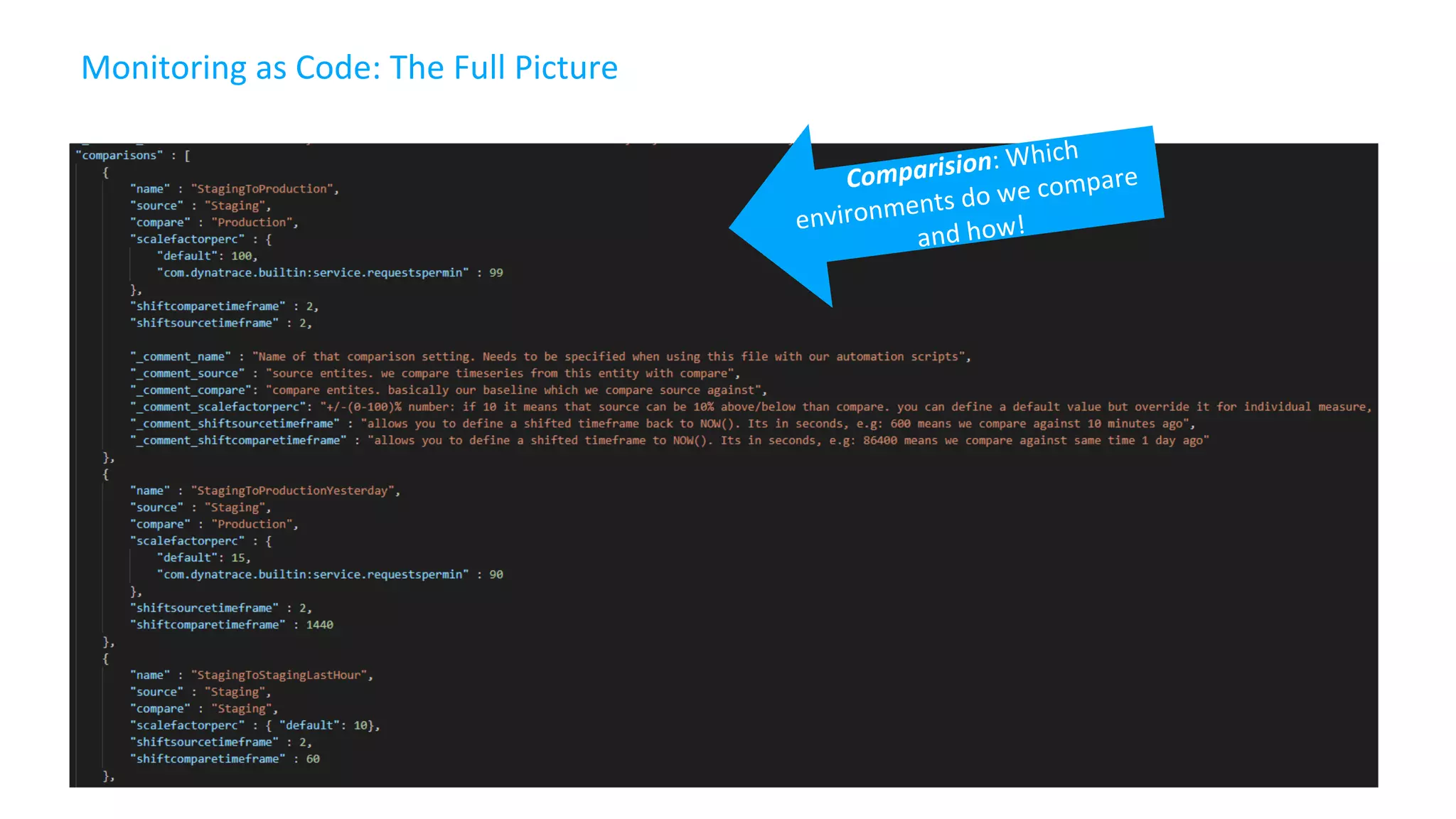
Comparision: Which
environments do we compare
and how!
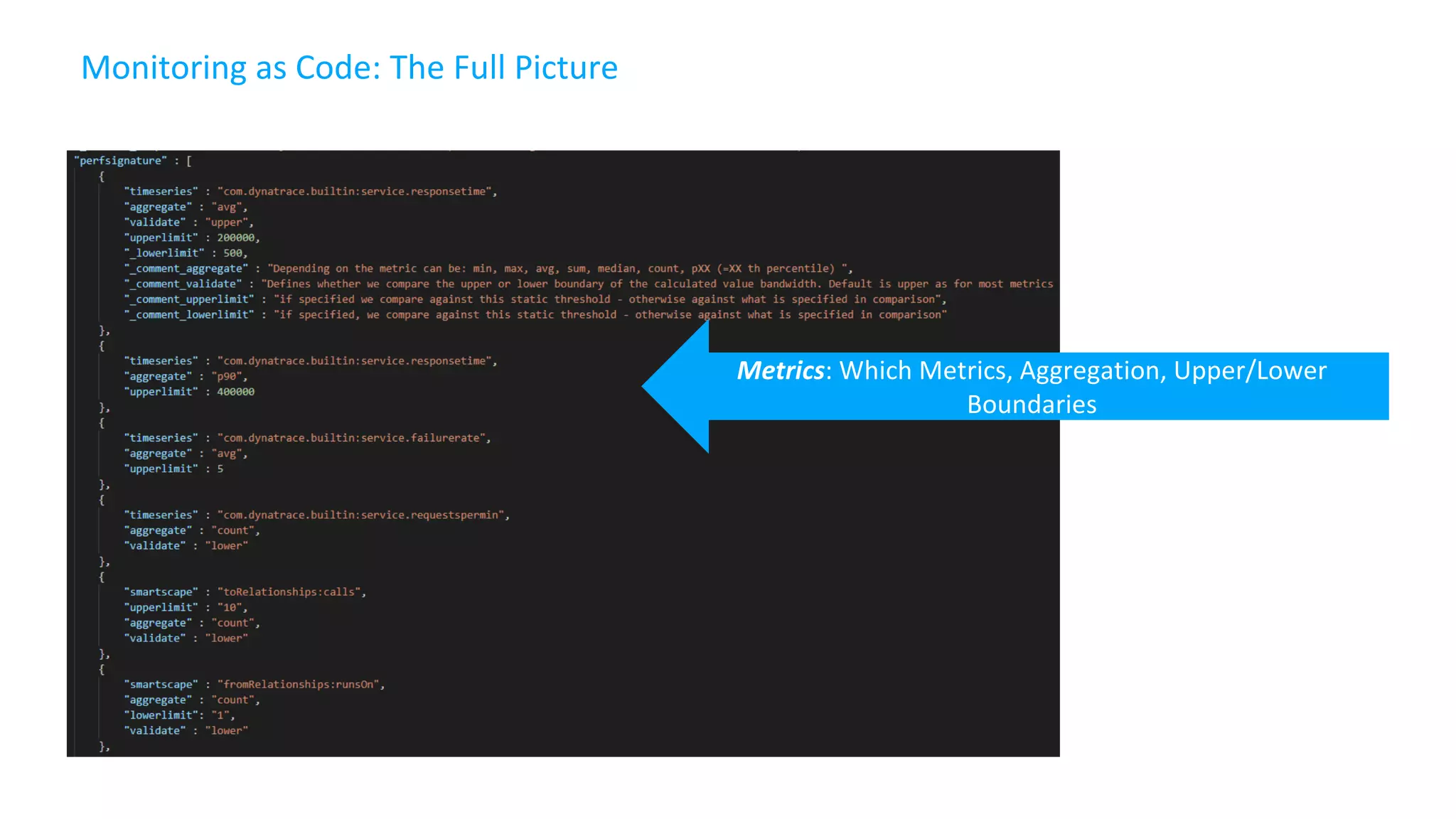
Monitoring as Code: The Full Picture
Metrics: Which Metrics, Aggregation, Upper/Lower
Boundaries
More Resources
Sample Pipelines https://github.com/akirasoft/spring-music
Q&A
Transforming How The World Builds Software
© Copyright 2017 Pivotal Software, Inc. All rights Reserved.

Four Steps Toward a Safer Continuous Delivery Practice (Hint: Add Monitoring)

  • 1.
    © Copyright 2017Pivotal Software, Inc. All rights Reserved. Version 1.0 Four Steps Toward a Safer Continuous Delivery Practice James Ma Mike Villiger Product Manager Sr. Technical Partner Manager Pivotal Dynatrace Jan 23, 2019
  • 2.
    Virtuous cycle of automatedand iterative progression, feedback, improvement of software Continuous Delivery to the Cloud Monitoring Securing Resiliency Develop Testing Experimenting Compliance Pivotal Cloud Foundry Deploy Operate Planning Test-Driven Dev CI Development Users
  • 3.
    Developing & ReleasingSoftware Delivery How do we make sure our code works in production- like environments Integration How do we make sure our code works?
  • 4.
    Integration Is Hard Howdo we make sure our code works? ● Integrate as early and as often as possible; ideally with each commit to your repository ● Invest in writing automated unit tests and integration tests ● Fix integration errors as soon as they appear Solution: Continuous Integration “Team programming isn’t a divide and conquer problem. It is a divide, conquer and integrate problem” Extreme Programming Explained, Kent Beck
  • 5.
    Delivery Is Hard Howdo we make sure our code works in production-like environments? ● Test the code in a production-like environment ● Use automated tests to verify correct business functionality and integration with other services ● Apply additional checks for security, compliance, etc. Solution: Continuous Delivery! “Continuous Delivery doesn't mean every change is deployed to production ASAP. It means every change is proven to be deployable at any time” Carl Cacum[1]
  • 6.
    Cerner: Modeling Processesinto Pipelines https://content.pivotal.io/inspiring-use-cases/concourse-in-the-real-world-a-case-study-in-ci-cd-and-devops-greg-meyer-bryan-kelly-cerner
  • 7.
  • 8.
    Concourse CI Built onthe simple mechanics of resources, tasks, and jobs, Concourse presents a general approach to automation that makes it great for CI/CD
  • 9.
    Cover w/ Image ConcourseCI 1. Configuration as Code 2. Workflow Visualization 3. Containerized Execution 4. Rapid Local iteration 5. Asynchronous workflows powered by resources
  • 10.
    Cover w/ Image Pipelineas Code ● Pipelines are declared using the simple, composable primitives of: resources, jobs and tasks ● Compelex workflows codified as human- readable YML ● Codified and tracked under Source Control for traceability
  • 11.
    Cover w/ Image WorkflowVisualization ● Green is Good! ● red indicates a problem ● yellow indicates a step is actively executing ● Teams quickly aligned on issues with context
  • 12.
    Cover w/ Image ContainerizedExecution Rather than sharing state, every task runs in its own container, controlling its own dependencies. > test.sh
  • 13.
    Cover w/ Image RapidLocal Iteration The fly execute command executes a task as a one-off build, with your local changes. This will run your code in exactly the same way it would run in your pipeline, without you having to repeatedly push broken commits until it works. When a job fails, you can also use fly execute with -j flag to run with the same inputs as the failed job. You can then replace an input with your local changes with -i to test if your fix is valid.
  • 14.
    Cover w/ Image PipelinesPowered by Resources Concourse does not have a complex plugin system. Instead, relies on the concept of Resources Concourse Resources track versions of external artifacts used for CI/CD Resources can track any external entity by implementing the Resource API e.g. git repositories, Amazon S3 Buckets, Docker Images, or a custom implementation
  • 15.
  • 16.
    Concourse Resources 100+ OSSresources to external systems and tools (Community Resources)
  • 17.
  • 18.
    Dev Perf/Test OpsBiz Shift-Left: Break Pipeline Earlier Path to NoOps: Self-Healing, … Shift-Right: Tags, Deploys, Events Actionable Feedback Loops
  • 19.
    Semi-continuous-deployment – goodbut not great Concourse CloudFoundry(Tag=Staging) CloudFoundry Tag=Production) AppTeam Manual RollbackManual ApprovalManual Approval Users Concourse
  • 20.
    Unbreakable Pipeline Dynatrace Concourseresource Pushes Deployment Info to Dynatrace Entities Validate-via-monspec task Compares Builds and Approves/Rejects Pipeline Dynatrace Concourse resource Pushes Deployment Info to Dynatrace Entities Validate-via-monspec task Validates Production and Approves/Rejects Pipeline Build 6 Build 7 Production Production Auto-Approve! Auto-Reject! Auto-Approve! Auto-Reject!
  • 21.
    Shifting Right: CloudFoundrymanifests used for Staging & Production: Validated in Dynatrace Staging Production and green Dynamically configured in Pipeline
  • 22.
    Dynatrace Concourse Resource PullsInformation from Monspec Issues REST API request to Dynatrace Dynatrace Events REST API Pushes Event for Entities with Tag DeploymentGroup:Staging Shifting Right: Monitoring as Code (Monspec): Define Services and their Environments as Code
  • 23.
    Shifting Right: Monitoringas Code (Monspec): Define Services and their Environments as Code smplmonspec.json
  • 24.
    Shifting Right: Servicemetadata parsed via rules #1: Service renamed based on rules #2 Our DeploymentGroup tag #3 Our Deployment Event Created by Dynatrace Concourse Resource
  • 25.
    Shifting Right: Processmetadata parsed via rules DT_CUSTOM_PROP CF Appname, transformed with naming rule
  • 26.
    Shifting Right: PassDeployment Information to Deployed Entities Dynatrace Events REST API Dynatrace Concourse Resource Pulls Information from Monspec Issues REST API request to Dynatrace
  • 27.
    Shifting Left: ValidateNonfunctional Requirements defined in Monspec!
  • 28.
    Shifting Left: Monitoringas Code: Compare Metrics of Services of Different Environments/Builds Entity: SampleJSonService Environment: Staging Tag: DeploymentGroup:Staging Environment: Production Tag: DeploymentGroup:Production Compare: StagingToProduction Source: Staging; Compare: Prod Factor: Staging = 10% Slower Compare: StagingToProdYesterday Source: Staging; Compare: Prod Factor: 10%, Timeshift: 86400s Compare: StagingToStagingLastHour Source: Staging; Compare: Staging Factor: 0; Timeshift: 3600s Compare: StageToStageYesterday Source: Staging; Compare: Staging Factor: 0; Timeshift: 86400s Metrics: ResponseTime (Avg) Metrics: ResponseTime(Max) < 10s Metrics: FailureRate(Avg) Metrics: ResponseCount Factor: 90% Less vs Production Environment: Staging Environment: Production Source (Staging): 1.64ms Compare (Production): 1.41ms Threshold (+10%): 1.56ms Status: VIOLATION Pipeline Run: Validate Build with StagingToProduction Different Metrics Different Comparisons
  • 29.
    Shifting Left: Automatethe Comparison: Trigger it for each Build and Automate Approval! Metrics Comparisons Entity Comparisons
  • 30.
    Monitoring as Code:The Full Picture Environments: Tell us how we can detect these entities in Dynatrace Entity: What Entity do we want to validate?
  • 31.
    Monitoring as Code:The Full Picture Comparision: Which environments do we compare and how!
  • 32.
    Monitoring as Code:The Full Picture Metrics: Which Metrics, Aggregation, Upper/Lower Boundaries
  • 33.
    More Resources Sample Pipelineshttps://github.com/akirasoft/spring-music
  • 34.
  • 35.
    Transforming How TheWorld Builds Software © Copyright 2017 Pivotal Software, Inc. All rights Reserved.