Assignments for Foreign Currency Transactions

You can also make postings in foreign currencies to foreign currency accounts. For example, you
want to post foreign currency cash receipts (for example, DEM, GBP) to a different account from that
to which you post cash receipts in local currency (for example, USD). You achieve this by making the
following entries in the account determination configuration settings:

Account symbol                    Currency                           G/L account
CASH_RECEIPT(1)                   +                                  ++++++++01
CASH_RECEIPT(2)                   DEM                                ++++++++02
CASH_RECEIPT(3)                   GBP                                ++++++++03

If the electronic account statement contains an amount in GBP, the system takes the second entry
from the table (2) in order to determine the account for posting. For amounts in DEM it takes the third
entry (3). For amounts in local currency or currencies for which no separate account has been defined,
the system takes the first entry (1)


      External Transactions
Definition
External transactions (also known as business transaction codes) are bank-specific codes for
business transactions, each of which involves a different type of payment.

Use

The external transaction code is issued by banks in the electronic account statement. The SAP
system requires this code in order to identify the business transaction. It converts the bank-
defined codes into its own system-internal transaction codes (known as posting rules), which
in turn trigger certain specific posting transactions in the system.

Example

Examples of bank-defined external transactions are:

- 020 Transfer order

- 051 Transfer credit memo

- 052 Recurring entry credit memo

- 072 Bill of exchange presentation

- 206 Foreign bank transfer

For more information, see Posting Rules.
Posting Rules
As part of the configuration of the electronic account statement, external transactions must be
assigned to a posting rule. The system uses the posting rules to determine which bank or subledger
accounts to post the transactions to.

Posting rules are represented in the system by a non-bank-specific code (for example, 0001 for debit
memos).

Why do you require an internal code that is related to the posting rule in order to configure the
electronic account statement? Why is each posting rule not directly linked to an external transaction?

Banks have many different transactions, several of which may require just a single posting in your
accounts.

Example:

        Transaction code 004 denotes a direct debit by debit memo

        Transaction code 005 denotes a collection authorization by debit memo

        Transaction code 020 denotes a transfer order by debit memo

These three external transactions all require the same posting in your accounts. They must therefore
all be assigned to the same posting rule (for example, 001 for debit memos). This posting rules tells
the system how to post a debit memo.

Using internal codes (posting rules) when configuring the electronic account statement has the
advantage that you only need to determine how a transaction (for example, debit memo) is posted
once and not three times (as in the example above).

See also Posting Specifications and Account Determination.


  Posting Specifications and Account
Determination
When you define a posting rule, you must specify how each business transaction that is transmitted to
you by electronic account statement (for example, bank transfer) is posted in your system.

When you do this you can specify two sets of posting specifications for each posting rule, one for G/L
account postings (or bank-related postings) and one for subledger postings.

Depending on whether this posting rules only requires a posting to a G/L account (or bank account) or
also requires a subledger posting, you specify posting specifications for either one or both of these
postings.


                For the "check credit memo" transaction you only require posting specifications for the
                G/L accounts, since the customer entry is cleared when the check is deposited.
                However, for a "transfer" transaction, you require posting specifications for both the
G/L accounts and the subledger accounts, in order to be able to clear the customer
                entry.

You enter account symbols rather than the actual account names in posting specifications. You can
define these account symbols to meet your requirements.


                For account 113100 you could define an account symbol BANK.

For information on account symbols, see Account Symbols and Account Assignment.

Posting specifications consist of a posting key and account symbol (and their attendant specifications)
for one or two line items (debit and credit postings). The system uses the account symbol to determine
the G/L account to which to make the posting.


      Account Symbols and Account Assignment
The account symbol is defined by the user during Customizing. It specifies which G/L
account is posted to. You create the prerequisites for this when creating your house banks.
Here you maintain the bank details and the accounts that you have at your house bank. You
must create a G/L account in your system for each of these accounts. You enter a currency
key in the master records of each of these G/L accounts. The currency key must be the same
as the currency in which you run the respective account at your house bank.

Maintain your house banks in Customizing for Bank Accounting under Bank Accounts
  Define House Banks.


When specifying bank account data in the house bank table on your accounts at your house
bank, you must create a G/L account for each account. If you fail to do this, the system cannot
make any postings when it receives the electronic account statement.

How can you be certain that specifying a certain account symbol leads to the G/L account you
specified when maintaining your house bank accounts being posted to? The SAP system
ensures that the correct account is posted to by replacing this account symbol with the
appropriate account at the time of posting.


      Transaction Types
You define transaction types in order to group together banks with the same external
transaction codes (for example, all banks of the same type).

The advantage of this method is that you do not have to assign the external transaction codes
of the banks (business transaction codes) to internal SAP posting rules for every individual
bank but rather can make this assignment just once per transaction type.
After defining transaction types you must assign each of your house banks to a transaction
type.


     Recommended Sequence of Configuration Tasks

You should carry out configuration of the electronic account statement in the following order: In
Customizing for Bank Accounting, choose Business Transactions        Payment Transactions
Electronic Bank Statement     Make Global Settings for the Electronic Bank Statement.

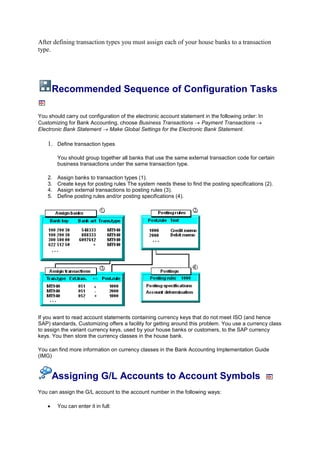
    1. Define transaction types

         You should group together all banks that use the same external transaction code for certain
         business transactions under the same transaction type.

    2.   Assign banks to transaction types (1).
    3.   Create keys for posting rules The system needs these to find the posting specifications (2).
    4.   Assign external transactions to posting rules (3).
    5.   Define posting rules and/or posting specifications (4).


If you want to read account statements containing currency keys that do not meet ISO (and hence
SAP) standards, Customizing offers a facility for getting around this problem. You use a currency class
to assign the variant currency keys, used by your house banks or customers, to the SAP currency
keys. You then store the currency classes in the house bank.

You can find more information on currency classes in the Bank Accounting Implementation Guide
(IMG)


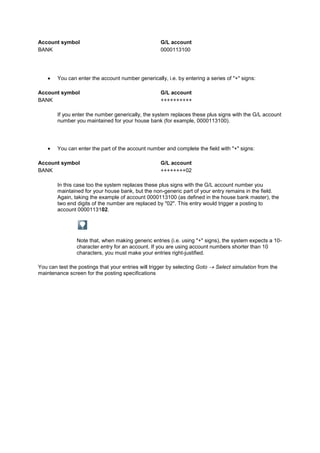
     Assigning G/L Accounts to Account Symbols
You can assign the G/L account to the account number in the following ways:

         You can enter it in full:
Account symbol                                       G/L account
BANK                                                 0000113100


        You can enter the account number generically, i.e. by entering a series of "+" signs:

Account symbol                                       G/L account
BANK                                                 ++++++++++

        If you enter the number generically, the system replaces these plus signs with the G/L account
        number you maintained for your house bank (for example, 0000113100).


        You can enter the part of the account number and complete the field with "+" signs:

Account symbol                                       G/L account
BANK                                                 ++++++++02

        In this case too the system replaces these plus signs with the G/L account number you
        maintained for your house bank, but the non-generic part of your entry remains in the field.
        Again, taking the example of account 0000113100 (as defined in the house bank master), the
        two end digits of the number are replaced by "02". This entry would trigger a posting to
        account 0000113102.


                Note that, when making generic entries (i.e. using "+" signs), the system expects a 10-
                character entry for an account. If you are using account numbers shorter than 10
                characters, you must make your entries right-justified.

You can test the postings that your entries will trigger by selecting Goto   Select simulation from the
maintenance screen for the posting specifications

Foreign currency transactions

  • 1.
    Assignments for ForeignCurrency Transactions You can also make postings in foreign currencies to foreign currency accounts. For example, you want to post foreign currency cash receipts (for example, DEM, GBP) to a different account from that to which you post cash receipts in local currency (for example, USD). You achieve this by making the following entries in the account determination configuration settings: Account symbol Currency G/L account CASH_RECEIPT(1) + ++++++++01 CASH_RECEIPT(2) DEM ++++++++02 CASH_RECEIPT(3) GBP ++++++++03 If the electronic account statement contains an amount in GBP, the system takes the second entry from the table (2) in order to determine the account for posting. For amounts in DEM it takes the third entry (3). For amounts in local currency or currencies for which no separate account has been defined, the system takes the first entry (1) External Transactions Definition External transactions (also known as business transaction codes) are bank-specific codes for business transactions, each of which involves a different type of payment. Use The external transaction code is issued by banks in the electronic account statement. The SAP system requires this code in order to identify the business transaction. It converts the bank- defined codes into its own system-internal transaction codes (known as posting rules), which in turn trigger certain specific posting transactions in the system. Example Examples of bank-defined external transactions are: - 020 Transfer order - 051 Transfer credit memo - 052 Recurring entry credit memo - 072 Bill of exchange presentation - 206 Foreign bank transfer For more information, see Posting Rules.
  • 2.
    Posting Rules As partof the configuration of the electronic account statement, external transactions must be assigned to a posting rule. The system uses the posting rules to determine which bank or subledger accounts to post the transactions to. Posting rules are represented in the system by a non-bank-specific code (for example, 0001 for debit memos). Why do you require an internal code that is related to the posting rule in order to configure the electronic account statement? Why is each posting rule not directly linked to an external transaction? Banks have many different transactions, several of which may require just a single posting in your accounts. Example: Transaction code 004 denotes a direct debit by debit memo Transaction code 005 denotes a collection authorization by debit memo Transaction code 020 denotes a transfer order by debit memo These three external transactions all require the same posting in your accounts. They must therefore all be assigned to the same posting rule (for example, 001 for debit memos). This posting rules tells the system how to post a debit memo. Using internal codes (posting rules) when configuring the electronic account statement has the advantage that you only need to determine how a transaction (for example, debit memo) is posted once and not three times (as in the example above). See also Posting Specifications and Account Determination. Posting Specifications and Account Determination When you define a posting rule, you must specify how each business transaction that is transmitted to you by electronic account statement (for example, bank transfer) is posted in your system. When you do this you can specify two sets of posting specifications for each posting rule, one for G/L account postings (or bank-related postings) and one for subledger postings. Depending on whether this posting rules only requires a posting to a G/L account (or bank account) or also requires a subledger posting, you specify posting specifications for either one or both of these postings. For the "check credit memo" transaction you only require posting specifications for the G/L accounts, since the customer entry is cleared when the check is deposited. However, for a "transfer" transaction, you require posting specifications for both the
  • 3.
    G/L accounts andthe subledger accounts, in order to be able to clear the customer entry. You enter account symbols rather than the actual account names in posting specifications. You can define these account symbols to meet your requirements. For account 113100 you could define an account symbol BANK. For information on account symbols, see Account Symbols and Account Assignment. Posting specifications consist of a posting key and account symbol (and their attendant specifications) for one or two line items (debit and credit postings). The system uses the account symbol to determine the G/L account to which to make the posting. Account Symbols and Account Assignment The account symbol is defined by the user during Customizing. It specifies which G/L account is posted to. You create the prerequisites for this when creating your house banks. Here you maintain the bank details and the accounts that you have at your house bank. You must create a G/L account in your system for each of these accounts. You enter a currency key in the master records of each of these G/L accounts. The currency key must be the same as the currency in which you run the respective account at your house bank. Maintain your house banks in Customizing for Bank Accounting under Bank Accounts Define House Banks. When specifying bank account data in the house bank table on your accounts at your house bank, you must create a G/L account for each account. If you fail to do this, the system cannot make any postings when it receives the electronic account statement. How can you be certain that specifying a certain account symbol leads to the G/L account you specified when maintaining your house bank accounts being posted to? The SAP system ensures that the correct account is posted to by replacing this account symbol with the appropriate account at the time of posting. Transaction Types You define transaction types in order to group together banks with the same external transaction codes (for example, all banks of the same type). The advantage of this method is that you do not have to assign the external transaction codes of the banks (business transaction codes) to internal SAP posting rules for every individual bank but rather can make this assignment just once per transaction type.
  • 4.
    After defining transactiontypes you must assign each of your house banks to a transaction type. Recommended Sequence of Configuration Tasks You should carry out configuration of the electronic account statement in the following order: In Customizing for Bank Accounting, choose Business Transactions Payment Transactions Electronic Bank Statement Make Global Settings for the Electronic Bank Statement. 1. Define transaction types You should group together all banks that use the same external transaction code for certain business transactions under the same transaction type. 2. Assign banks to transaction types (1). 3. Create keys for posting rules The system needs these to find the posting specifications (2). 4. Assign external transactions to posting rules (3). 5. Define posting rules and/or posting specifications (4). If you want to read account statements containing currency keys that do not meet ISO (and hence SAP) standards, Customizing offers a facility for getting around this problem. You use a currency class to assign the variant currency keys, used by your house banks or customers, to the SAP currency keys. You then store the currency classes in the house bank. You can find more information on currency classes in the Bank Accounting Implementation Guide (IMG) Assigning G/L Accounts to Account Symbols You can assign the G/L account to the account number in the following ways: You can enter it in full:
  • 5.
    Account symbol G/L account BANK 0000113100 You can enter the account number generically, i.e. by entering a series of "+" signs: Account symbol G/L account BANK ++++++++++ If you enter the number generically, the system replaces these plus signs with the G/L account number you maintained for your house bank (for example, 0000113100). You can enter the part of the account number and complete the field with "+" signs: Account symbol G/L account BANK ++++++++02 In this case too the system replaces these plus signs with the G/L account number you maintained for your house bank, but the non-generic part of your entry remains in the field. Again, taking the example of account 0000113100 (as defined in the house bank master), the two end digits of the number are replaced by "02". This entry would trigger a posting to account 0000113102. Note that, when making generic entries (i.e. using "+" signs), the system expects a 10- character entry for an account. If you are using account numbers shorter than 10 characters, you must make your entries right-justified. You can test the postings that your entries will trigger by selecting Goto Select simulation from the maintenance screen for the posting specifications