lOMoAR cPSD|18897211
Downloaded by Kuntal Sasmal (sasmalkuntal42@gmail.com)
Flutter general report
Computer Organization (Kannur University)
StuDocu is not sponsored or endorsed by any college or university
lOMoAR cPSD|18897211
Flutter
Downloaded by Kuntal Sasmal (sasmalkuntal42@gmail.com)
1. Introduction
Flutter is an open-source mobile SDK developer can use to build native-looking Android and
iOS applications from the same code base. Flutter has been around since 2015 when Google
introduced it and remained in the beta stage before its official launch in December 2018. Since
then, the buzz around Flutter has been growing stronger. Flutter is now the top 11 software repos
based on GitHub stars. Moreover, we have already seen thousands of Flutter apps being
published on app stores. One of the most notable examples is the Xianyu app created by Alibaba
team, used by over 50 million people.
Android provides a native framework based on Java language and iOS provides a native
framework based on Objective-C / Shift language. However, to develop an application
supporting both the OSs, we need to code in two different languages using two different
frameworks. To help overcome this complexity, there exists mobile frameworks supporting
both OS. These frameworks range from simple HTML based hybrid mobile application
framework (which uses HTML for User Interface and JavaScript for application logic) to
complex language specific framework (which do the heavy lifting of converting code to native
code). Irrespective of their simplicity or complexity, these frameworks always have many
disadvantages, one of the main drawbacks being their slow performance. In this scenario,
Flutter – a simple and high-performance framework based on Dart language, provides high
performance by rendering the UI directly in the operating system’s canvas rather than through
native framework. Flutter also offers many ready to use widgets (UI) to create a modern
application. These widgets are optimized for mobile environment and designing the application
using widgets is as simple as designing HTML. To be specific, Flutter application is itself a
widget. Flutter widgets also supports animations and gestures. The application logic is based
on reactive programming. Widget may optionally have a state. By changing the state of the
widget, Flutter will automatically (reactive programming) compare the widget’s state (old and
new) and render the widget with only the necessary changes instead of re-rendering the whole
widget.
CHINMAYAINSTITUTE OFTECHNOLOGY 1
lOMoAR cPSD|18897211
Flutter
Downloaded by Kuntal Sasmal (sasmalkuntal42@gmail.com)
1.1. Features of Flutter
 Flutter framework offers the following features to developers:
 Modern and reactive framework.
 Uses Dart programming language and it is very easy to learn.
 Fast development.
 Beautiful and fluid user interfaces.
 Huge widget catalogue.
 Runs same UI for multiple platforms.
 High performance application
CHINMAYAINSTITUTE OFTECHNOLOGY 2
lOMoAR cPSD|18897211
Flutter
Downloaded by Kuntal Sasmal (sasmalkuntal42@gmail.com)
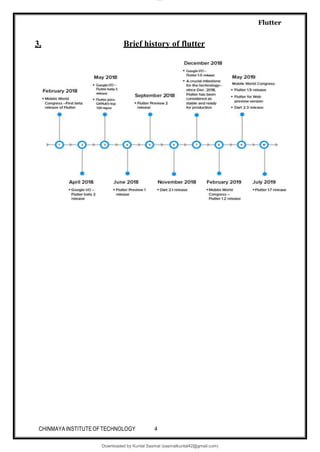
2. History
Flutter was first announced 4 years ago in 2015 at the Dart Developer Summit. It was initially
called “SKY”. I think that would have been cooler. Flutter alpha (V-0.06) was released in May
2017.Later, Google launched the 2nd preview of Flutter back in September 2018.That’s when
the developers around the world started to feel the heat. Even before the Flutter 1.0 was
announced, many Flutter apps came into the stores. Apps like – Alibaba, Google Ads, Tencent,
reflect were proof that Flutter could be so Awesome. Finally, Google launched Flutter 1.0, the
stable version of Flutter on 5th of December 2018.
At this launch, Google released ‘The History of Everything”. A timeline of the world from the
Big Bang to the age of WWW. An app built with Flutter with a single code base that can run
in any Android or IOS device smoothly. This app has smooth animations because Flutter can
run apps with a of 120 Frames Per Second. (Others only can achieve a maximum of 60 FPS).
To build apps with Flutter, you need to know Dart as flutter runs on the Dart virtual machine
and flutter uses Dart as the Programming Language. Dart – A object oriented programming
language developed by Google Dart was first released in 2011 and the latest stable version
(Dart 2.2.0) was released in February 2019.Many sources mentions that Google initially
released Dart as a alternative to Java-Script. But, in the official Dart website, they deny it. For
dart beginners, dart devs say “You probably already know Dart, you just don’t realize it”. Why?
because dart is a lot like java, C# or js. If you know any of those languages, you only need to
study a few syntax changes.
CHINMAYAINSTITUTE OFTECHNOLOGY 3
lOMoAR cPSD|18897211
Flutter
Downloaded by Kuntal Sasmal (sasmalkuntal42@gmail.com)
3. Brief history of flutter
CHINMAYAINSTITUTEOFTECHNOLOGY 4
lOMoAR cPSD|18897211
Flutter
Downloaded by Kuntal Sasmal (sasmalkuntal42@gmail.com)
4. Why use Flutter?
4.1. Fast development
Flutter engineered for high development velocity. Stateful hot reload allows you to change your
code and see it come to life is less than a second without losing the state of the app. Flutter also
ships with a rich set of customizable widgets, all built from modem reactive framework.
4.2. Expressive + Flexible UI
Flutter moves to a widget, rendering, animation and gestures into this framework to give you to
complete control over every pixel on the screen. It means you have the flexibility to build a
custom design.
4.3. Native apps for Android and IOS
Flutter apps follow platform conventions and interface details such as scrolling, navigation,
icons, fonts, etc. That why apps built with Flutter features on both APP STORE and GOOGLE
PLAY STORE.
4.4. Hot Reload
In flutter, very save on the app and just as you do on the web just hit a refresh and your codes
also refresh. Imaging that Facebook SDK it would be so humongous if it would have been
designing android and you hit a recompile. So many things to have recompile and it would take
probably days. Unmistakably, Hot reloading is tech which is kind of necessary when your
applications or product goes like incense crazy like Facebook.
CHINMAYAINSTITUTE OFTECHNOLOGY 5
lOMoAR cPSD|18897211
Flutter
Downloaded by Kuntal Sasmal (sasmalkuntal42@gmail.com)
4.5. High Performance
Flutter doesn’t require a Javascript bridge and the speed is much faster.
4.6. Using Dart as a Programming Language
Dart is an object-oriented programming language that which used for writing mobile application
code for Flutter and which contributes to the efficiency and effectiveness of app development
flow. It is a comfortable language and uses a lot of CSS parts as well. Dart uses for generational
garbage collection which helps in creating frames for short-lived objects. It also helps to
allocate the objects with a single pointer bump to avoid UI jank and shutter.
4.7. Reduce the Third Parties
When using flutter, you can get complete IOS experience or Android Experience. So they are
reducing the Third parties.
4.8. API. The Flutter API is very consistent
AnimationBuilder, FutureBuilder, StreamBuilder,…Once you understand them you have no
limit. Anything is a widget. A button can use as a screen, a full page used as a button with
animation and transformation.
4.9. The customizable kit of Widgets
Flutter has built with a rich and customizable set of widgets for Android, IOS and Material
Design. The collaboration between Flutter and Google’s material design has rendered and easily
create powerful UI experience. This help to create smooth, crisp and refined app experience as
are available with a native app.
CHINMAYAINSTITUTEOFTECHNOLOGY 6
lOMoAR cPSD|18897211
Flutter
Downloaded by Kuntal Sasmal (sasmalkuntal42@gmail.com)
5. The core principle of Flutter
Flutter includes a modern react-style framework, a 2D rendering engine, ready-made widgets,
and development tools. These components work together to help you design, build, test, and
debug apps. Everything is organized around a few core principles.
5.1. Flutter architecture
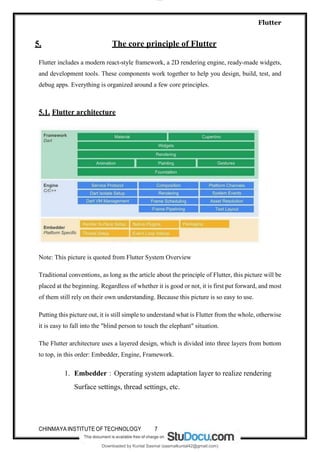
Note: This picture is quoted from Flutter System Overview
Traditional conventions, as long as the article about the principle of Flutter, this picture will be
placed at the beginning. Regardless of whether it is good or not, it is first put forward, and most
of them still rely on their own understanding. Because this picture is so easy to use.
Putting this picture out, it is still simple to understand what is Flutter from the whole, otherwise
it is easy to fall into the "blind person to touch the elephant" situation.
The Flutter architecture uses a layered design, which is divided into three layers from bottom
to top, in this order: Embedder, Engine, Framework.
1. Embedder:Operating system adaptation layer to realize rendering
Surface settings, thread settings, etc.
CHINMAYAINSTITUTE OFTECHNOLOGY 7
lOMoAR cPSD|18897211
Flutter
Downloaded by Kuntal Sasmal (sasmalkuntal42@gmail.com)
2. Engine◦: Realize functions such as FLutter rendering engine, text
layout, event processing, and Dart runtime. Including Skia graphics
drawing library, Dart VM, Text, etc., among which Skia and Text
provide the ability to call the underlying rendering and typesetting for
the upper layer interface.
3. Framework:It is a UI SDK implemented with Dart. From top to
bottom, it includes two major style component libraries, basic
component libraries, graphics drawing, gesture recognition, animation
and other functions.
As for more details, this picture will be better with the source code eating experience. But
because this article is not a source code analysis, this work will not start. Next, I will use the
Flutter drawing process as an example to explain how Flutter works. This can also help you
better understand the source code.
CHINMAYAINSTITUTE OFTECHNOLOGY 8
lOMoAR cPSD|18897211
Flutter
Downloaded by Kuntal Sasmal (sasmalkuntal42@gmail.com)
6. Drawing principle of Flutter
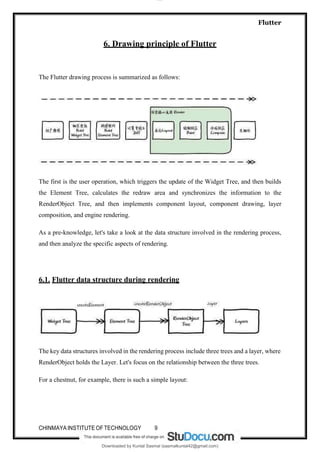
The Flutter drawing process is summarized as follows:
The first is the user operation, which triggers the update of the Widget Tree, and then builds
the Element Tree, calculates the redraw area and synchronizes the information to the
RenderObject Tree, and then implements component layout, component drawing, layer
composition, and engine rendering.
As a pre-knowledge, let's take a look at the data structure involved in the rendering process,
and then analyze the specific aspects of rendering.
6.1. Flutter data structure during rendering
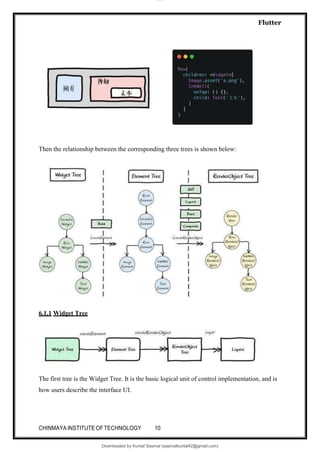
The key data structures involved in the rendering process include three trees and a layer, where
RenderObject holds the Layer. Let's focus on the relationship between the three trees.
For a chestnut, for example, there is such a simple layout:
CHINMAYAINSTITUTE OFTECHNOLOGY 9
lOMoAR cPSD|18897211
Flutter
Downloaded by Kuntal Sasmal (sasmalkuntal42@gmail.com)
Then the relationship between the corresponding three trees is shown below:
6.1.1 Widget Tree
The first tree is the Widget Tree. It is the basic logical unit of control implementation, and is
how users describe the interface UI.
CHINMAYAINSTITUTE OFTECHNOLOGY 10
lOMoAR cPSD|18897211
Flutter
Downloaded by Kuntal Sasmal (sasmalkuntal42@gmail.com)
have to be aware of is, Widget is immutable When the view configuration information
changes, Flutter will rebuild the Widget to update it, and it is simple and efficient to build in a
data-driven UI.
So why is Widget Tree designed to be immutable? Flutter interface development is a kind of
responsive programming, advocating "simple is fast", and re-creating the Widget Tree from
top to bottom to refresh, this idea is relatively simple, without additional relationship data
changes will affect which nodes. In addition, the Widget is just a configuration with a data
structure, the creation is lightweight, and the destruction is optimized, so you don’t have to
worry about the performance problems caused by the entire tree rebuilding.
6.1.2. Element Tree
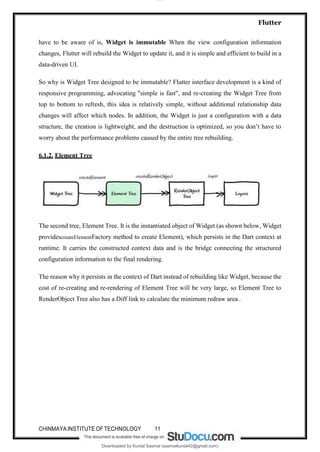
The second tree, Element Tree. It is the instantiated object of Widget (as shown below, Widget
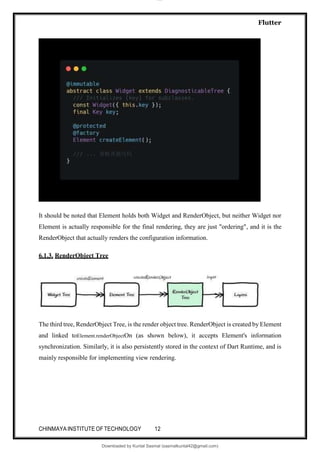
providescreateElementFactory method to create Element), which persists in the Dart context at
runtime. It carries the constructed context data and is the bridge connecting the structured
configuration information to the final rendering.
The reason why it persists in the context of Dart instead of rebuilding like Widget, because the
cost of re-creating and re-rendering of Element Tree will be very large, so Element Tree to
RenderObject Tree also has a Diff link to calculate the minimum redraw area .
CHINMAYAINSTITUTE OFTECHNOLOGY 11
lOMoAR cPSD|18897211
Flutter
Downloaded by Kuntal Sasmal (sasmalkuntal42@gmail.com)
It should be noted that Element holds both Widget and RenderObject, but neither Widget nor
Element is actually responsible for the final rendering, they are just "ordering", and it is the
RenderObject that actually renders the configuration information.
6.1.3. RenderObject Tree
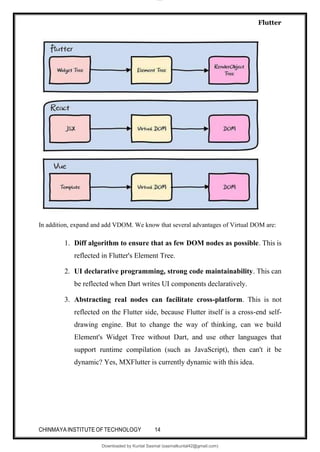
The third tree, RenderObject Tree, is the render object tree. RenderObject is created by Element
and linked toElement.renderObjectOn (as shown below), it accepts Element's information
synchronization. Similarly, it is also persistently stored in the context of Dart Runtime, and is
mainly responsible for implementing view rendering.
CHINMAYAINSTITUTE OFTECHNOLOGY 12
lOMoAR cPSD|18897211
Flutter
Downloaded by Kuntal Sasmal (sasmalkuntal42@gmail.com)
The display process of RenderObject Tree in Flutter is divided into four stages:
1. layout
2. draw
3. synthesis
4. Rendering
Among them, the layout and drawing are done in RenderObject. Flutter uses a depth-first
mechanism to traverse the rendering object tree, determine the position and size of each object
in the tree, and draw them to different layers. After drawing, the task of compositing and
rendering is left to Skia.
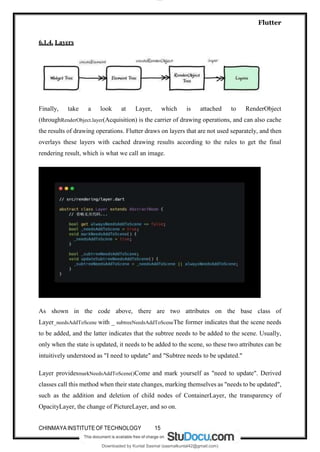
So the question is, why are three trees instead of two? Why do I need the Element Tree in the
middle, is it not possible to construct the RenderObject Tree directly from the Widget Tree?
It is possible in theory, but not practical. Because if you build the RenderObject Tree directly,
it will greatly increase the performance loss caused by rendering. Because Widget Tree is
immutable, but Element is mutable. In fact, the Element layer abstracts the changes of the
Widget tree (similar to React/Vue's VDOM Diff), and only synchronizes the parts that really
need to be modified into the RenderObject Tree, thereby minimizing the redraw area and
improving rendering effectiveness. It can be found that Flutter's ideas are largely based on the
front-end reactive framework React / Vue.
CHINMAYAINSTITUTE OFTECHNOLOGY 13
lOMoAR cPSD|18897211
Flutter
Downloaded by Kuntal Sasmal (sasmalkuntal42@gmail.com)
In addition, expand and add VDOM. We know that several advantages of Virtual DOM are:
1. Diff algorithm to ensure that as few DOM nodes as possible. This is
reflected in Flutter's Element Tree.
2. UI declarative programming, strong code maintainability. This can
be reflected when Dart writes UI components declaratively.
3. Abstracting real nodes can facilitate cross-platform. This is not
reflected on the Flutter side, because Flutter itself is a cross-end self-
drawing engine. But to change the way of thinking, can we build
Element's Widget Tree without Dart, and use other languages that
support runtime compilation (such as JavaScript), then can't it be
dynamic? Yes, MXFlutter is currently dynamic with this idea.
CHINMAYAINSTITUTE OFTECHNOLOGY 14
lOMoAR cPSD|18897211
Flutter
Downloaded by Kuntal Sasmal (sasmalkuntal42@gmail.com)
6.1.4. Layers
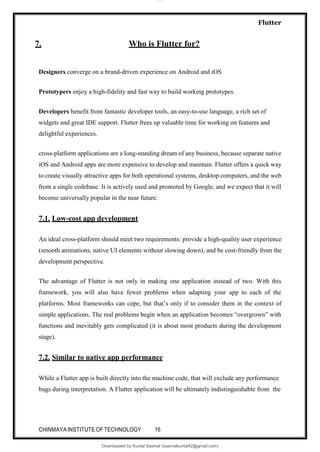
Finally, take a look at Layer, which is attached to RenderObject
(throughRenderObject.layer(Acquisition) is the carrier of drawing operations, and can also cache
the results of drawing operations. Flutter draws on layers that are not used separately, and then
overlays these layers with cached drawing results according to the rules to get the final
rendering result, which is what we call an image.
As shown in the code above, there are two attributes on the base class of
Layer_needsAddToScene with _ subtreeNeedsAddToSceneThe former indicates that the scene needs
to be added, and the latter indicates that the subtree needs to be added to the scene. Usually,
only when the state is updated, it needs to be added to the scene, so these two attributes can be
intuitively understood as "I need to update" and "Subtree needs to be updated."
Layer providesmarkNeedsAddToScene()Come and mark yourself as "need to update". Derived
classes call this method when their state changes, marking themselves as "needs to be updated",
such as the addition and deletion of child nodes of ContainerLayer, the transparency of
OpacityLayer, the change of PictureLayer, and so on.
CHINMAYAINSTITUTE OFTECHNOLOGY 15
lOMoAR cPSD|18897211
Flutter
Downloaded by Kuntal Sasmal (sasmalkuntal42@gmail.com)
7. Who is Flutter for?
Designers converge on a brand-driven experience on Android and iOS
Prototypers enjoy a high-fidelity and fast way to build working prototypes.
Developers benefit from fantastic developer tools, an easy-to-use language, a rich set of
widgets and great IDE support. Flutter frees up valuable time for working on features and
delightful experiences.
cross-platform applications are a long-standing dream of any business, because separate native
iOS and Android apps are more expensive to develop and maintain. Flutter offers a quick way
to create visually attractive apps for both operational systems, desktop computers, and the web
from a single codebase. It is actively used and promoted by Google, and we expect that it will
become universally popular in the near future.
7.1. Low-cost app development
An ideal cross-platform should meet two requirements: provide a high-quality user experience
(smooth animations, native UI elements without slowing down), and be cost-friendly from the
development perspective.
The advantage of Flutter is not only in making one application instead of two. With this
framework, you will also have fewer problems when adapting your app to each of the
platforms. Most frameworks can cope, but that’s only if to consider them in the context of
simple applications. The real problems begin when an application becomes “overgrown” with
functions and inevitably gets complicated (it is about most products during the development
stage).
7.2. Similar to native app performance
While a Flutter app is built directly into the machine code, that will exclude any performance
bugs during interpretation. A Flutter application will be ultimately indistinguishable from the
CHINMAYAINSTITUTE OFTECHNOLOGY 16
lOMoAR cPSD|18897211
Flutter
Downloaded by Kuntal Sasmal (sasmalkuntal42@gmail.com)
native app, since it doesn’t rely on any intermediate code representations or interpretation, in
contrast to most other cross-platform frameworks.
7.3. It goes beyond mobile
As we mentioned, the technology appeared as Flutter 1.0 in December 2018. Since then, Flutter
has demonstrated its ability not only to work as a toolkit for mobile platforms but also for web
and desktop browsers. In May 2019, its development team announced a Flutter preview version
for the web which was first called Hummingbird. However, it was later renamed Flutter Web.
7.4. Own rendering engine
Flutter promises absolute freedom in creating a user interface regardless of the platform. This
is achieved by the fact that the framework uses its own rendering engine to draw widgets.
The problem with many cross-platform solutions is that they look the same on iPhone and
Android. But what about the companies that need to use Material Design for Android and
Human Interface for iOS? For such companies, Flutter is the most suitable solution. It is
equipped with packages that contain a set of custom widgets for both operating systems.
7.5. Simple logic implementation
Flutter provides advanced OS features like GPS coordinates, sensor data collection, permission
handling, Bluetooth, credentials, and other features in ready-to-use plugins that are supported
by Google.
If your app is reliant on an OS-level feature not available as a plugin, Flutter can establish
communication between its Dart programming language and the native code using platform
channels.
7.6. Amazing design
Two powerful things were originally laid in the foundation of Flutter: an excellent
programming language (Dart) and a fast, high-performance rendering engine (Skia). Such a
choice was a well-thought-out solution that saves users from further long searches.
CHINMAYAINSTITUTE OFTECHNOLOGY 17
lOMoAR cPSD|18897211
Flutter
Downloaded by Kuntal Sasmal (sasmalkuntal42@gmail.com)
The result is an excellent platform that helps developers of all skill levels to create applications
using appropriate design patterns and best practices. You can forget about contradictions to the
standards or some technical flaws caused by the imperfections in the programming language.
Flutter provides beautiful and customizable widgets that make Flutter apps look and feel great.
7.7. Flutter uses Firebase as a backend
You can use practically all the advantages of Firebase in Flutter app development, as you would
a native one. Moreover, Flutter allows the creation of reactive apps, and Firebase plugins offer
reactive streams to work with data. That will allow you to quickly integrate certain solutions
into Flutter applications.
7.8. Flutter is based on Dart
In Flutter development, the programming language Dart is utilized. It is also one of the Google
languages created in October 2011 and has improved significantly in recent years. Dart is
statically typed and allows you to write a much more structured code, meaning you can create
more complex applications and hierarchical structures.
The language has a clean and incredibly powerful syntax. That provides the ideal conditions
for creating a clear architecture and design of any application. It is also worth mentioning that
it ensures work consistency among programmers, durability, low maintenance and common
standards. Much more than most other frameworks for cross-platform development can offer.
For those who have already worked with such popular languages as C#, Java, and TypeScript,
it will be easy to switch to Dart and start using it right away.
7.9. Customizable kit of widgets
Widgets are the basic blocks used to build a user interface of a Flutter application. Its layering
makes it easy to create applications of any complexity. You can use ready-made widgets from
Material-UI or implement specific components based on basic widgets.
CHINMAYAINSTITUTE OFTECHNOLOGY 18
lOMoAR cPSD|18897211
Flutter
Downloaded by Kuntal Sasmal (sasmalkuntal42@gmail.com)
8. Efficient Tooling
$ flutter doctor
Checks your environment and displays a report to the terminal window
$ flutter upgrade
Updates both the Flutter SDK and your packages
$ flutter packages get
Checks your environment and displays a report to the terminal window
$ flutter packages upgrade
Will retrieve the highest available version of the package
$ flutter format
Automatically formats your code according to the Flutter-style
$ flutter analyze
Analyzes your code and help you find possible mistakes
$ pubspec.yaml
name: flutter_project
description: An amazing Flutter project using Firebase Auth
dependencies:
flutter:
sdk: flutter
firebase_auth: ">=0.1.2 <0.2.6"
CHINMAYAINSTITUTE OFTECHNOLOGY 19
lOMoAR cPSD|18897211
Flutter
Downloaded by Kuntal Sasmal (sasmalkuntal42@gmail.com)
9. What is Widget?
 In flutter, Widget is a way to declare and construct UI.
 If you are familiar with the Android or iOS development, then you might make the
immediate connection with the views (on Android) or UIViews (oniOS).
 But dear just like view, Widget is not just a piece of UI. Widget is a lot more than just
structural elements like buttons, text, image, list or slider. A widget might display
Something, it might help define design, it might help with layout, it may handle user
interaction, etc.
 For example, Padding is a widget, Margin is a widget, Center is a widget, Layout rows
and columns are also widgets.
 So you can consider that a widget is a blueprint. Flutter uses these blueprints to create
views.
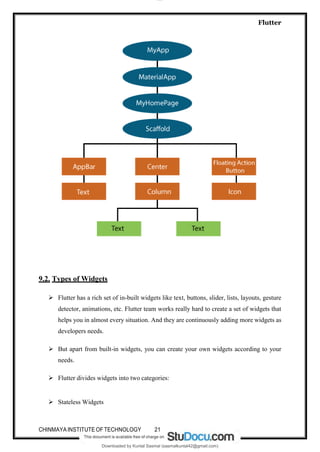
9.1. Widget tree
 If you already have fun with flutter code then you might notice that infinite Parent-
Child tree. Yaa I agree, first time it just scares out any beginner, but dear we all passes
from the same stage in which you are right now. Just give it some time, do a lot of
practice and Just believe, just like others, you can do it as well. �
 Widgets are arranged into a tree of parent and childwidget.
 Widgets are nested inside of each other to form yourapp.
 The Entire widget tree forms a layout that you see on the screen.
CHINMAYAINSTITUTE OFTECHNOLOGY 20
lOMoAR cPSD|18897211
Flutter
Downloaded by Kuntal Sasmal (sasmalkuntal42@gmail.com)
9.2. Types of Widgets
 Flutter has a rich set of in-built widgets like text, buttons, slider, lists, layouts, gesture
detector, animations, etc. Flutter team works really hard to create a set of widgets that
helps you in almost every situation. And they are continuously adding more widgets as
developers needs.
 But apart from built-in widgets, you can create your own widgets according to your
needs.
 Flutter divides widgets into two categories:
 Stateless Widgets
CHINMAYAINSTITUTE OFTECHNOLOGY 21
lOMoAR cPSD|18897211
Flutter
Downloaded by Kuntal Sasmal (sasmalkuntal42@gmail.com)
 Stateful Widgets
9.3. Stateless Widgets
 In simple words, if a widget doesn’t do anything its Stateless Widget. They are static
in nature.
 Stateless widgets don’t store any state. That means they don’t store values that might
change.
 You can also say that stateless widgets are “DATALESS” widgets. As they don’tstore
any real-time data.
 For example, if you have a simple Text widget on the screen, but it doesn’t do anything
then its StatelessWidget.
9.4. Stateful Widgets
 In simple words, if a widget does anything then its StatefulWidget.
 A Stateful widget is dynamic in nature. That means it can keep track of changes and
update the UI based on those changes.
 The user can interact with a stateful widget. For example, If you press a button and it
performs any task it’s a Stateful Widget, If you are moving a slider and it does anything
then its a Stateful Widget, If you swipe item from a list and item gets deleted then that
list a Stateful Widget.
 CheckBox, Radio, Slider, InkWell, Form, and TextField are an example of stateful
widgets.
 If you are in doubt, then always remember this rule. �
 If a widget changes, it’s a Stateful Widget
 If a widget is not changing, it’s a Stateless Widget.
CHINMAYAINSTITUTE OFTECHNOLOGY 22
lOMoAR cPSD|18897211
Flutter
Downloaded by Kuntal Sasmal (sasmalkuntal42@gmail.com)
10. Installation in Windows
Step 1: Go to URL, https://flutter.dev/docs/get-started/install/windows and download the latest
Flutter SDK. As of April 2019, the version is 1.2.1 and the file is flutter_windows_v1.2.1-
stable.zip.
Step 2: Unzip the zip archive in a folder, say C:flutter
Step 3: Update the system path to include flutter bin directory.
Step 4: Flutter provides a tool, flutter doctor to check that all the requirement of flutter
development is met.
$ flutter doctor
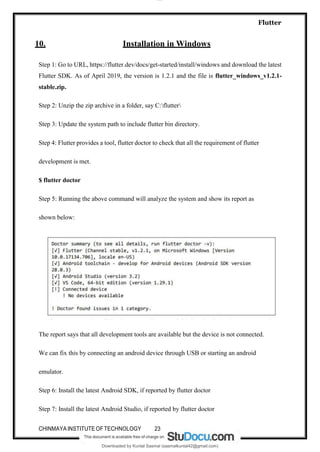
Step 5: Running the above command will analyze the system and show its report as
shown below:
The report says that all development tools are available but the device is not connected.
We can fix this by connecting an android device through USB or starting an android
emulator.
Step 6: Install the latest Android SDK, if reported by flutter doctor
Step 7: Install the latest Android Studio, if reported by flutter doctor
CHINMAYAINSTITUTE OFTECHNOLOGY 23
lOMoAR cPSD|18897211
Flutter
Downloaded by Kuntal Sasmal (sasmalkuntal42@gmail.com)
Step 8: Start an android emulator or connect a real android device to the system.
Step 9: Install Flutter and Dart plugin for Android Studio. It provides start-up template to
create new Flutter application, an option to run and debug Flutter application in the Android
studio itself, etc.,
Flutter plugin – Installation
 Open Android Studio.
 Click File > Settings > Plugins.
 Select the Flutter plugin and click Install.
 Click Yes when prompted to install the Dart plugin.
 Restart Android studio.
CHINMAYAINSTITUTE OFTECHNOLOGY 24
lOMoAR cPSD|18897211
Flutter
Downloaded by Kuntal Sasmal (sasmalkuntal42@gmail.com)
11. Installation in Mac OS
To install Flutter on MacOS, you will have to follow the following steps:
Step 1: Go to URL, https://flutter.dev/docs/get-started/install/macos and download latest
Flutter SDK. As of April 2019, the version is 1.2.1 and the file is flutter_macos_v1.2.1-
stable.zip.
Step 2: Unzip the zip archive in a folder, say /path/to/flutter
Step 3: Update the system path to include flutter bin directory (in ~/.bashrc file).
> export PATH="$PATH:/path/to/flutter/bin"
Step 4: Enable the updated path in the current session using below command and then
verify it as well.
source ~/.bashrc
source $HOME/.bash_profile
echo $PATH
Flutter provides a tool, flutter doctor to check that all the requirement of flutter
development is met. It is similar to the Windows counterpart.
Step 5: Install latest XCode, if reported by flutter doctor
Step 6: Install latest Android SDK, if reported by flutter doctor
Step 7: Install latest Android Studio, if reported by flutter doctor
Step 8: Start an android emulator or connect a real android device to the system to
develop android application.
CHINMAYAINSTITUTE OFTECHNOLOGY 25
lOMoAR cPSD|18897211
Flutter
Downloaded by Kuntal Sasmal (sasmalkuntal42@gmail.com)
Step 9: Open iOS simulator or connect a real iPhone device to the system to develop iOS
application.
Step 10: Install Flutter and Dart plugin for Android Studio. It provides the startup
template to create a new Flutter application, option to run and debug Flutter application
 in the Android studio itself, etc.,
 Open Android Studio.
 Click Preferences > Plugins.
 Select the Flutter plugin and click Install.
 Click Yes when prompted to install the Dart plugin.
 Restart Android studio.
CHINMAYAINSTITUTE OFTECHNOLOGY 26
lOMoAR cPSD|18897211
Flutter
Downloaded by Kuntal Sasmal (sasmalkuntal42@gmail.com)
12. What is Dart?
Google had its first ever release of Flutter 1.0 last December, after having it in beta mode for
over 18 months. Dart is the programming language used to code Flutter apps. Dart is another
product by Google and released version 2.1, before Flutter, in November. As it is starting out,
the Flutter community is not as extensive as React Native, Ionic, or Xamarin.
A while back, I discovered a liking for JavaScript. I was ecstatic to be working on a React
Native mobile app for my internship. I enjoy coding hybrid mobile apps too, so wanted to give
Flutter a try, as I had done Xamarin sometime last year.At my first glance of Flutter (and Dart),
I felt befuddled and couldn’t seem to understand anything. They even had a section on their
docs for developers moving from React Native.Dart looks a bit like C and is an object-oriented
programming language. So, if you prefer the C languages or Java, Dart is the one for you, and
you’ll likely be proficient in it.
Dart is not only used for mobile app development but is a programming language. Approved
as a standard by Ecma (ECMA-408), it’s used to build just about anything on the web, servers,
desktop and of course, mobile applications (Yes, the same people who standardized our
favorites ES5 and ES6.)
Dart, when used in web applications, is transpiled to JavaScript so it runs on all web browsers.
The Dart installation comes with a VM as well to run the .dart files from a command-line
interface. The Dart files used in Flutter apps are compiled and packaged into a binary file (.apk
or .ipa) and uploaded to app stores.
12.1. What does coding in Dart look like?
Like most ALGOL languages (like C# or Java):
1. The entry point of a Dart class is the main() method. This method acts as a starting point
for Flutter apps as well.
2. The default value of most data types is null.
3. Dart classes only support single inheritance. There can be only one superclass for a
particular class but it can have many implementations of Interfaces.
CHINMAYAINSTITUTE OFTECHNOLOGY 27
lOMoAR cPSD|18897211
Flutter
Downloaded by Kuntal Sasmal (sasmalkuntal42@gmail.com)
4. The flow control of certain statements, like if conditions, loops (for, while and do-
while), switch-case, break and continue statements are the same.
5. Abstraction works in a similar manner, allowing abstract classes and interfaces.
12.2. Dart specification
1. Dart has type inference. The data type of a variable need not be explicitly declared, as
Dart will “infer ”what it is. In Java, a variable needs to have its type explicitly given
during declaration. For example, String something;. But in Dart, the keyword is used
instead like so, var something;. The code treats the variable according to whatever it
contains, be it a number, string, bool or object.
2. All data types are objects, including numbers. So, if left uninitialized, their default value
is not a 0 but is instead null.
3. A return type of a method is not required in the method signature.
4. The type num declares any numeric element, both real and integer.
5. The super() method call is only at the end of a subclass’s constructor.
6. The keyword new used before the constructor for object creation is optional.
7. Method signatures can include a default value to the parameters passed. So, if one is
not included in the method call, the method uses the default values instead.
8. It has a new inbuilt data type called Runes, that deal with UTF-32 code points in a
string. For a simple example, see emojis and similar icons.
Dart also has inbuilt libraries installed in the Dart SDK, the most commonly used being:
1. dart:core for core functionality; it is imported in all dart files.
2. dart:async for asynchronous programming.
3. dart:math for mathematical functions and constants.
4. dart:convert for converting between different data representations, like JSON to UTF-
8
CHINMAYAINSTITUTE OFTECHNOLOGY 28
lOMoAR cPSD|18897211
Flutter
Downloaded by Kuntal Sasmal (sasmalkuntal42@gmail.com)
12.3. Using Dart in Flutter
Flutter has more app-specific libraries, more often on user interface elements like:
1. Widget: common app elements, like the Text or ListView.
2. Material: containing elements following Material design, like FloatingActionButton.
3. Cupertino: containing elements following current iOS designs, like CupertinoButton.
CHINMAYAINSTITUTE OFTECHNOLOGY 29
lOMoAR cPSD|18897211
Flutter
Downloaded by Kuntal Sasmal (sasmalkuntal42@gmail.com)
13. Conclusion
Flutter framework does a great job by providing an excellent framework to build mobile
applications in a truly platform independent way. By providing simplicity in the development
process, high performance in the resulting mobile application, rich and relevant user interface
for both Android and iOS platform, Flutter framework will surely enable a lot of new
developers to develop high performance and feature-full mobile application in the near future.
CHINMAYAINSTITUTEOFTECHNOLOGY 30
lOMoAR cPSD|18897211
Flutter
Downloaded by Kuntal Sasmal (sasmalkuntal42@gmail.com)
14. References
Blog: What’s Revolutionary about Flutter by Wm Leler: goo.gl/bZcFR9
Video: Flutter's Rendering Pipeline by Adam Barth: youtu.be/UUfXWzp0-DU
Video: The Mahogany Staircase by Ian Hickson: youtu.be/dkyY9WCGMi0
And of course: github.com/flutter & flutter.io
CHINMAYAINSTITUTE OFTECHNOLOGY 31