© Fluent Inc. 6/22/2005
1-1
Introductory FLUENT Notes
FLUENT v6.2 Mar 2005
Fluent User Services Center
www.fluentusers.com
Fluent Inc.
© Fluent Inc. 6/22/2005
1-2
Introductory FLUENT Notes
FLUENT v6.2 Mar 2005
Fluent User Services Center
www.fluentusers.com
Orientation
‹ Agenda for Week:
‹ Facilities
z Lunches, Bathrooms, Designated Smoking Area, Visitor Parking, Visitor
Badges
‹ Training
z Problem Setup
„ Creating the model: geometry and mesh generation
„ Using the Solver: setup and execution
z Establish contact with support staff
z Begin your own CFD project!
„ We recommend doing all Gambit and relevant Fluent tutorials first.
Monday
Solver-1
Tuesday
Solver-2
Wednesday
Gambit-1
Thursday
Gambit-2
Friday
1:1 Consult
© Fluent Inc. 6/22/2005
1-3
Introductory FLUENT Notes
FLUENT v6.2 Mar 2005
Fluent User Services Center
www.fluentusers.com
Agenda (Day 1)
8:00-8:30 Introduction to Fluent Inc.
8:30-9:00 Introduction to CFD Analysis
9:00-9:30 Demonstration: Overview of the CFD Process
9:30-11:15 Introductory Tutorial
11:15-12:00 Solver Basics
12:00-1:00 Lunch
1:00-2:00 Boundary Conditions
2:00-3:00 Tutorial Session
3:00-4:00 Solver Settings
4:00-5:00 Tutorial Session
© Fluent Inc. 6/22/2005
1-4
Introductory FLUENT Notes
FLUENT v6.2 Mar 2005
Fluent User Services Center
www.fluentusers.com
Agenda (Day 2)
8:00-9:15 Turbulence Modeling
9:15-10:30 Tutorial Session
10:30-11:15 Heat Transfer Modeling
11:15-12:00 User Defined Functions
12:00-1:00 Lunch
1:00-2:00 Multiphase Modeling
2:00-3:00 Reacting Flow Modeling
3:00-4:00 Moving Zone Models
4:00-5:00 Tutorial Session
© Fluent Inc. 6/22/2005
1-5
Introductory FLUENT Notes
FLUENT v6.2 Mar 2005
Fluent User Services Center
www.fluentusers.com
Technical Support
‹ Eleven Business Teams
z Automotive
„ Aero/Thermal
„ Powertrain
z Aerospace
„ Aircraft and Turbomachinery
„ Space and Defense
z Chemicals and Consumer products
z Electronics and Semiconductor
z Glass Plastics and Materials
z Healthcare and Water
z HVAC and Appliances
z Petroleum
z Power Generation
‹ Each team has their own sales and support/consulting engineers
‹ Fluent’s User Services Center (USC) and Online Technical Support (OTS)
portal created to enhance your access to technical support
© Fluent Inc. 6/22/2005
1-6
Introductory FLUENT Notes
FLUENT v6.2 Mar 2005
Fluent User Services Center
www.fluentusers.com
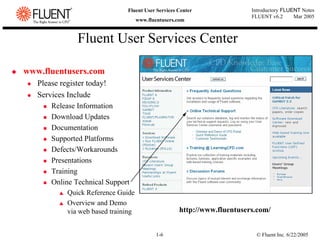
Fluent User Services Center
‹ www.fluentusers.com
z Please register today!
z Services Include
„ Release Information
„ Download Updates
„ Documentation
„ Supported Platforms
„ Defects/Workarounds
„ Presentations
„ Training
„ Online Technical Support
V Quick Reference Guide
V Overview and Demo
via web based training http://www.fluentusers.com/
© Fluent Inc. 6/22/2005
1-7
Introductory FLUENT Notes
FLUENT v6.2 Mar 2005
Fluent User Services Center
www.fluentusers.com
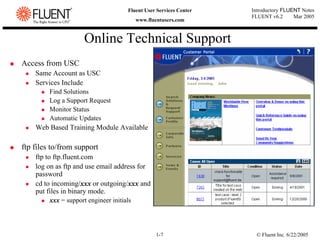
Online Technical Support
‹ Access from USC
z Same Account as USC
z Services Include
„ Find Solutions
„ Log a Support Request
„ Monitor Status
„ Automatic Updates
z Web Based Training Module Available
‹ ftp files to/from support
z ftp to ftp.fluent.com
z log on as ftp and use email address for
password
z cd to incoming/xxx or outgoing/xxx and
put files in binary mode.
„ xxx = support engineer initials
© Fluent Inc. 6/22/2005
1-8
Introductory FLUENT Notes
FLUENT v6.2 Mar 2005
Fluent User Services Center
www.fluentusers.com
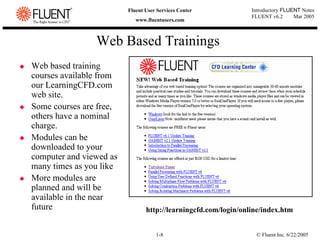
Web Based Trainings
‹ Web based training
courses available from
our LearningCFD.com
web site.
‹ Some courses are free,
others have a nominal
charge.
‹ Modules can be
downloaded to your
computer and viewed as
many times as you like
‹ More modules are
planned and will be
available in the near
future http://learningcfd.com/login/online/index.htm
© Fluent Inc. 6/22/2005
1-9
Introductory FLUENT Notes
FLUENT v6.2 Mar 2005
Fluent User Services Center
www.fluentusers.com
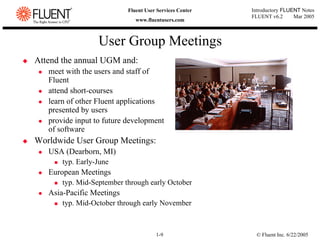
‹ Attend the annual UGM and:
z meet with the users and staff of
Fluent
z attend short-courses
z learn of other Fluent applications
presented by users
z provide input to future development
of software
‹ Worldwide User Group Meetings:
z USA (Dearborn, MI)
„ typ. Early-June
z European Meetings
„ typ. Mid-September through early October
z Asia-Pacific Meetings
„ typ. Mid-October through early November
User Group Meetings
© Fluent Inc. 6/22/2005
1-10
Introductory FLUENT Notes
FLUENT v6.2 Mar 2005
Fluent User Services Center
www.fluentusers.com
FLUENT 6.2
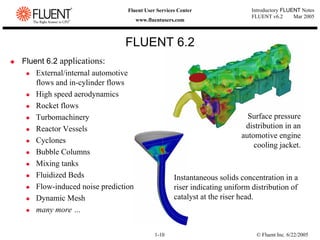
‹ Fluent 6.2 applications:
z External/internal automotive
flows and in-cylinder flows
z High speed aerodynamics
z Rocket flows
z Turbomachinery
z Reactor Vessels
z Cyclones
z Bubble Columns
z Mixing tanks
z Fluidized Beds
z Flow-induced noise prediction
z Dynamic Mesh
z many more …
Surface pressure
distribution in an
automotive engine
cooling jacket.
Instantaneous solids concentration in a
riser indicating uniform distribution of
catalyst at the riser head.
© Fluent Inc. 6/22/2005
1-11
Introductory FLUENT Notes
FLUENT v6.2 Mar 2005
Fluent User Services Center
www.fluentusers.com
FIDAP
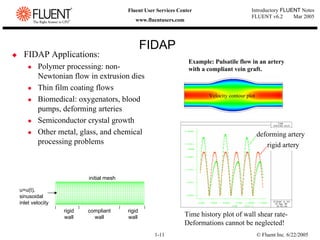
‹ FIDAP Applications:
z Polymer processing: non-
Newtonian flow in extrusion dies
z Thin film coating flows
z Biomedical: oxygenators, blood
pumps, deforming arteries
z Semiconductor crystal growth
z Other metal, glass, and chemical
processing problems
Example: Pulsatile flow in an artery
with a compliant vein graft.
u=u(t),
sinusoidal
inlet velocity
rigid
wall
rigid
wall
compliant
wall
initial mesh
rigid artery
deforming artery
Time history plot of wall shear rate-
Deformations cannot be neglected!
Velocity contour plot
© Fluent Inc. 6/22/2005
1-12
Introductory FLUENT Notes
FLUENT v6.2 Mar 2005
Fluent User Services Center
www.fluentusers.com
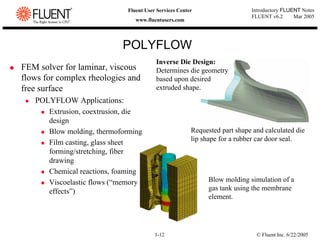
POLYFLOW
‹ FEM solver for laminar, viscous
flows for complex rheologies and
free surface
z POLYFLOW Applications:
„ Extrusion, coextrusion, die
design
„ Blow molding, thermoforming
„ Film casting, glass sheet
forming/stretching, fiber
drawing
„ Chemical reactions, foaming
„ Viscoelastic flows (“memory
effects”)
Inverse Die Design:
Determines die geometry
based upon desired
extruded shape.
Requested part shape and calculated die
lip shape for a rubber car door seal.
Blow molding simulation of a
gas tank using the membrane
element.
© Fluent Inc. 6/22/2005
1-13
Introductory FLUENT Notes
FLUENT v6.2 Mar 2005
Fluent User Services Center
www.fluentusers.com
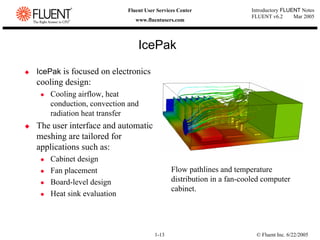
IcePak
‹ IcePak is focused on electronics
cooling design:
z Cooling airflow, heat
conduction, convection and
radiation heat transfer
‹ The user interface and automatic
meshing are tailored for
applications such as:
z Cabinet design
z Fan placement
z Board-level design
z Heat sink evaluation
Flow pathlines and temperature
distribution in a fan-cooled computer
cabinet.
© Fluent Inc. 6/22/2005
1-14
Introductory FLUENT Notes
FLUENT v6.2 Mar 2005
Fluent User Services Center
www.fluentusers.com
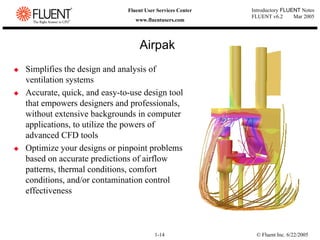
‹ Simplifies the design and analysis of
ventilation systems
‹ Accurate, quick, and easy-to-use design tool
that empowers designers and professionals,
without extensive backgrounds in computer
applications, to utilize the powers of
advanced CFD tools
‹ Optimize your designs or pinpoint problems
based on accurate predictions of airflow
patterns, thermal conditions, comfort
conditions, and/or contamination control
effectiveness
Airpak
© Fluent Inc. 6/22/2005
1-15
Introductory FLUENT Notes
FLUENT v6.2 Mar 2005
Fluent User Services Center
www.fluentusers.com
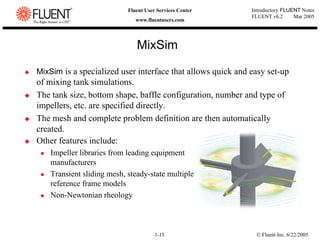
‹ MixSim is a specialized user interface that allows quick and easy set-up
of mixing tank simulations.
‹ The tank size, bottom shape, baffle configuration, number and type of
impellers, etc. are specified directly.
‹ The mesh and complete problem definition are then automatically
created.
MixSim
‹ Other features include:
z Impeller libraries from leading equipment
manufacturers
z Transient sliding mesh, steady-state multiple
reference frame models
z Non-Newtonian rheology
© Fluent Inc. 6/22/2005
1-16
Introductory FLUENT Notes
FLUENT v6.2 Mar 2005
Fluent User Services Center
www.fluentusers.com
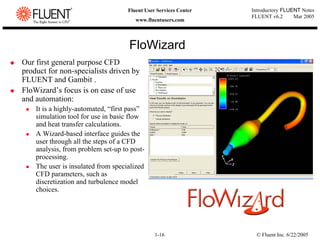
FloWizard
‹ Our first general purpose CFD
product for non-specialists driven by
FLUENT and Gambit .
‹ FloWizard’s focus is on ease of use
and automation:
z It is a highly-automated, “first pass”
simulation tool for use in basic flow
and heat transfer calculations.
z A Wizard-based interface guides the
user through all the steps of a CFD
analysis, from problem set-up to post-
processing.
z The user is insulated from specialized
CFD parameters, such as
discretization and turbulence model
choices.
© Fluent Inc. 6/22/2005
1-17
Introductory FLUENT Notes
FLUENT v6.2 Mar 2005
Fluent User Services Center
www.fluentusers.com
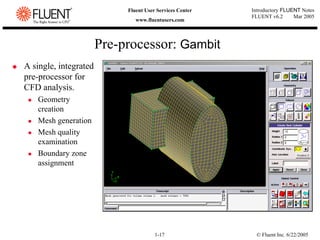
‹ A single, integrated
pre-processor for
CFD analysis.
z Geometry
creation
z Mesh generation
z Mesh quality
examination
z Boundary zone
assignment
Pre-processor: Gambit
© Fluent Inc. 6/22/2005
1-18
Introductory FLUENT Notes
FLUENT v6.2 Mar 2005
Fluent User Services Center
www.fluentusers.com
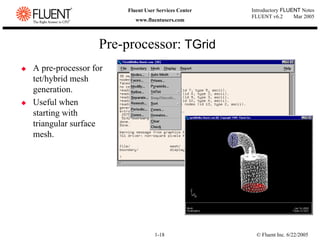
‹ A pre-processor for
tet/hybrid mesh
generation.
‹ Useful when
starting with
triangular surface
mesh.
Pre-processor: TGrid
© Fluent Inc. 6/22/2005
1-19
Introductory FLUENT Notes
FLUENT v6.2 Mar 2005
Fluent User Services Center
www.fluentusers.com
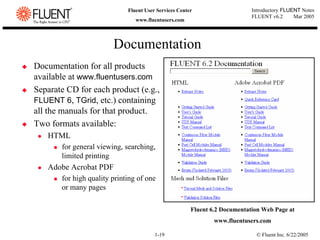
‹ Documentation for all products
available at www.fluentusers.com
‹ Separate CD for each product (e.g.,
FLUENT 6, TGrid, etc.) containing
all the manuals for that product.
‹ Two formats available:
z HTML
„ for general viewing, searching,
limited printing
z Adobe Acrobat PDF
„ for high quality printing of one
or many pages
Documentation
Fluent 6.2 Documentation Web Page at
www.fluentusers.com
© Fluent Inc. 6/22/2005
1-20
Introductory FLUENT Notes
FLUENT v6.2 Mar 2005
Fluent User Services Center
www.fluentusers.com
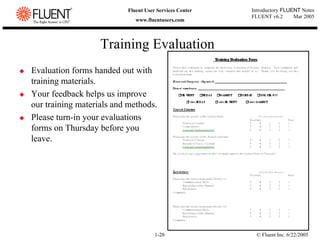
Training Evaluation
‹ Evaluation forms handed out with
training materials.
‹ Your feedback helps us improve
our training materials and methods.
‹ Please turn-in your evaluations
forms on Thursday before you
leave.

Fluent-v6.2.01 - Software CFD.pdf

  • 1.
    © Fluent Inc.6/22/2005 1-1 Introductory FLUENT Notes FLUENT v6.2 Mar 2005 Fluent User Services Center www.fluentusers.com Fluent Inc.
  • 2.
    © Fluent Inc.6/22/2005 1-2 Introductory FLUENT Notes FLUENT v6.2 Mar 2005 Fluent User Services Center www.fluentusers.com Orientation ‹ Agenda for Week: ‹ Facilities z Lunches, Bathrooms, Designated Smoking Area, Visitor Parking, Visitor Badges ‹ Training z Problem Setup „ Creating the model: geometry and mesh generation „ Using the Solver: setup and execution z Establish contact with support staff z Begin your own CFD project! „ We recommend doing all Gambit and relevant Fluent tutorials first. Monday Solver-1 Tuesday Solver-2 Wednesday Gambit-1 Thursday Gambit-2 Friday 1:1 Consult
  • 3.
    © Fluent Inc.6/22/2005 1-3 Introductory FLUENT Notes FLUENT v6.2 Mar 2005 Fluent User Services Center www.fluentusers.com Agenda (Day 1) 8:00-8:30 Introduction to Fluent Inc. 8:30-9:00 Introduction to CFD Analysis 9:00-9:30 Demonstration: Overview of the CFD Process 9:30-11:15 Introductory Tutorial 11:15-12:00 Solver Basics 12:00-1:00 Lunch 1:00-2:00 Boundary Conditions 2:00-3:00 Tutorial Session 3:00-4:00 Solver Settings 4:00-5:00 Tutorial Session
  • 4.
    © Fluent Inc.6/22/2005 1-4 Introductory FLUENT Notes FLUENT v6.2 Mar 2005 Fluent User Services Center www.fluentusers.com Agenda (Day 2) 8:00-9:15 Turbulence Modeling 9:15-10:30 Tutorial Session 10:30-11:15 Heat Transfer Modeling 11:15-12:00 User Defined Functions 12:00-1:00 Lunch 1:00-2:00 Multiphase Modeling 2:00-3:00 Reacting Flow Modeling 3:00-4:00 Moving Zone Models 4:00-5:00 Tutorial Session
  • 5.
    © Fluent Inc.6/22/2005 1-5 Introductory FLUENT Notes FLUENT v6.2 Mar 2005 Fluent User Services Center www.fluentusers.com Technical Support ‹ Eleven Business Teams z Automotive „ Aero/Thermal „ Powertrain z Aerospace „ Aircraft and Turbomachinery „ Space and Defense z Chemicals and Consumer products z Electronics and Semiconductor z Glass Plastics and Materials z Healthcare and Water z HVAC and Appliances z Petroleum z Power Generation ‹ Each team has their own sales and support/consulting engineers ‹ Fluent’s User Services Center (USC) and Online Technical Support (OTS) portal created to enhance your access to technical support
  • 6.
    © Fluent Inc.6/22/2005 1-6 Introductory FLUENT Notes FLUENT v6.2 Mar 2005 Fluent User Services Center www.fluentusers.com Fluent User Services Center ‹ www.fluentusers.com z Please register today! z Services Include „ Release Information „ Download Updates „ Documentation „ Supported Platforms „ Defects/Workarounds „ Presentations „ Training „ Online Technical Support V Quick Reference Guide V Overview and Demo via web based training http://www.fluentusers.com/
  • 7.
    © Fluent Inc.6/22/2005 1-7 Introductory FLUENT Notes FLUENT v6.2 Mar 2005 Fluent User Services Center www.fluentusers.com Online Technical Support ‹ Access from USC z Same Account as USC z Services Include „ Find Solutions „ Log a Support Request „ Monitor Status „ Automatic Updates z Web Based Training Module Available ‹ ftp files to/from support z ftp to ftp.fluent.com z log on as ftp and use email address for password z cd to incoming/xxx or outgoing/xxx and put files in binary mode. „ xxx = support engineer initials
  • 8.
    © Fluent Inc.6/22/2005 1-8 Introductory FLUENT Notes FLUENT v6.2 Mar 2005 Fluent User Services Center www.fluentusers.com Web Based Trainings ‹ Web based training courses available from our LearningCFD.com web site. ‹ Some courses are free, others have a nominal charge. ‹ Modules can be downloaded to your computer and viewed as many times as you like ‹ More modules are planned and will be available in the near future http://learningcfd.com/login/online/index.htm
  • 9.
    © Fluent Inc.6/22/2005 1-9 Introductory FLUENT Notes FLUENT v6.2 Mar 2005 Fluent User Services Center www.fluentusers.com ‹ Attend the annual UGM and: z meet with the users and staff of Fluent z attend short-courses z learn of other Fluent applications presented by users z provide input to future development of software ‹ Worldwide User Group Meetings: z USA (Dearborn, MI) „ typ. Early-June z European Meetings „ typ. Mid-September through early October z Asia-Pacific Meetings „ typ. Mid-October through early November User Group Meetings
  • 10.
    © Fluent Inc.6/22/2005 1-10 Introductory FLUENT Notes FLUENT v6.2 Mar 2005 Fluent User Services Center www.fluentusers.com FLUENT 6.2 ‹ Fluent 6.2 applications: z External/internal automotive flows and in-cylinder flows z High speed aerodynamics z Rocket flows z Turbomachinery z Reactor Vessels z Cyclones z Bubble Columns z Mixing tanks z Fluidized Beds z Flow-induced noise prediction z Dynamic Mesh z many more … Surface pressure distribution in an automotive engine cooling jacket. Instantaneous solids concentration in a riser indicating uniform distribution of catalyst at the riser head.
  • 11.
    © Fluent Inc.6/22/2005 1-11 Introductory FLUENT Notes FLUENT v6.2 Mar 2005 Fluent User Services Center www.fluentusers.com FIDAP ‹ FIDAP Applications: z Polymer processing: non- Newtonian flow in extrusion dies z Thin film coating flows z Biomedical: oxygenators, blood pumps, deforming arteries z Semiconductor crystal growth z Other metal, glass, and chemical processing problems Example: Pulsatile flow in an artery with a compliant vein graft. u=u(t), sinusoidal inlet velocity rigid wall rigid wall compliant wall initial mesh rigid artery deforming artery Time history plot of wall shear rate- Deformations cannot be neglected! Velocity contour plot
  • 12.
    © Fluent Inc.6/22/2005 1-12 Introductory FLUENT Notes FLUENT v6.2 Mar 2005 Fluent User Services Center www.fluentusers.com POLYFLOW ‹ FEM solver for laminar, viscous flows for complex rheologies and free surface z POLYFLOW Applications: „ Extrusion, coextrusion, die design „ Blow molding, thermoforming „ Film casting, glass sheet forming/stretching, fiber drawing „ Chemical reactions, foaming „ Viscoelastic flows (“memory effects”) Inverse Die Design: Determines die geometry based upon desired extruded shape. Requested part shape and calculated die lip shape for a rubber car door seal. Blow molding simulation of a gas tank using the membrane element.
  • 13.
    © Fluent Inc.6/22/2005 1-13 Introductory FLUENT Notes FLUENT v6.2 Mar 2005 Fluent User Services Center www.fluentusers.com IcePak ‹ IcePak is focused on electronics cooling design: z Cooling airflow, heat conduction, convection and radiation heat transfer ‹ The user interface and automatic meshing are tailored for applications such as: z Cabinet design z Fan placement z Board-level design z Heat sink evaluation Flow pathlines and temperature distribution in a fan-cooled computer cabinet.
  • 14.
    © Fluent Inc.6/22/2005 1-14 Introductory FLUENT Notes FLUENT v6.2 Mar 2005 Fluent User Services Center www.fluentusers.com ‹ Simplifies the design and analysis of ventilation systems ‹ Accurate, quick, and easy-to-use design tool that empowers designers and professionals, without extensive backgrounds in computer applications, to utilize the powers of advanced CFD tools ‹ Optimize your designs or pinpoint problems based on accurate predictions of airflow patterns, thermal conditions, comfort conditions, and/or contamination control effectiveness Airpak
  • 15.
    © Fluent Inc.6/22/2005 1-15 Introductory FLUENT Notes FLUENT v6.2 Mar 2005 Fluent User Services Center www.fluentusers.com ‹ MixSim is a specialized user interface that allows quick and easy set-up of mixing tank simulations. ‹ The tank size, bottom shape, baffle configuration, number and type of impellers, etc. are specified directly. ‹ The mesh and complete problem definition are then automatically created. MixSim ‹ Other features include: z Impeller libraries from leading equipment manufacturers z Transient sliding mesh, steady-state multiple reference frame models z Non-Newtonian rheology
  • 16.
    © Fluent Inc.6/22/2005 1-16 Introductory FLUENT Notes FLUENT v6.2 Mar 2005 Fluent User Services Center www.fluentusers.com FloWizard ‹ Our first general purpose CFD product for non-specialists driven by FLUENT and Gambit . ‹ FloWizard’s focus is on ease of use and automation: z It is a highly-automated, “first pass” simulation tool for use in basic flow and heat transfer calculations. z A Wizard-based interface guides the user through all the steps of a CFD analysis, from problem set-up to post- processing. z The user is insulated from specialized CFD parameters, such as discretization and turbulence model choices.
  • 17.
    © Fluent Inc.6/22/2005 1-17 Introductory FLUENT Notes FLUENT v6.2 Mar 2005 Fluent User Services Center www.fluentusers.com ‹ A single, integrated pre-processor for CFD analysis. z Geometry creation z Mesh generation z Mesh quality examination z Boundary zone assignment Pre-processor: Gambit
  • 18.
    © Fluent Inc.6/22/2005 1-18 Introductory FLUENT Notes FLUENT v6.2 Mar 2005 Fluent User Services Center www.fluentusers.com ‹ A pre-processor for tet/hybrid mesh generation. ‹ Useful when starting with triangular surface mesh. Pre-processor: TGrid
  • 19.
    © Fluent Inc.6/22/2005 1-19 Introductory FLUENT Notes FLUENT v6.2 Mar 2005 Fluent User Services Center www.fluentusers.com ‹ Documentation for all products available at www.fluentusers.com ‹ Separate CD for each product (e.g., FLUENT 6, TGrid, etc.) containing all the manuals for that product. ‹ Two formats available: z HTML „ for general viewing, searching, limited printing z Adobe Acrobat PDF „ for high quality printing of one or many pages Documentation Fluent 6.2 Documentation Web Page at www.fluentusers.com
  • 20.
    © Fluent Inc.6/22/2005 1-20 Introductory FLUENT Notes FLUENT v6.2 Mar 2005 Fluent User Services Center www.fluentusers.com Training Evaluation ‹ Evaluation forms handed out with training materials. ‹ Your feedback helps us improve our training materials and methods. ‹ Please turn-in your evaluations forms on Thursday before you leave.