“K” IS FOR KNOW                   “W” IS FOR WANT TO KNOW

   On a post it note, write         On a post it note, write
    down something you                down something you want
    already know about the flip       to know about the flip
    model                             model
   Post it under the “K”            Post it under the W outside
    outside
 The flip model is not       The flip model is not
  universal. It will look      about the videos. The
  different for each           video is just a small
  teacher, grade level,        part of the lesson.
  and subject.                The main aspect of the
 In other words, there is     flip model is how you
  no ONE correct way to        as the teacher utilize
  flip your classroom!         your extra time in class
                               to benefit your
                               students!
   http://knewton.marketing.s3.amazonaws.co
    m/images/infographics/flipped-classroom.jpg
   Opportunity to replay
   Opportunity to see missed lectures or
    assignments
   Opportunity for more involvement
   Opportunity to prep for college
   Opportunity for real world application

   In other words….
   Once it is done, it is done!
   Time to do what you want with the
    curriculum
   Minimizes classroom disruptions because
    students are engaged

   No more of…
   You should see a          Read the article you are
    number on your desk.       given and make a
    Sit with the other         poster with the
    people that have the       following:
    same number.                Summary of the article
                                Your group’s
                                 reflections/thoughts
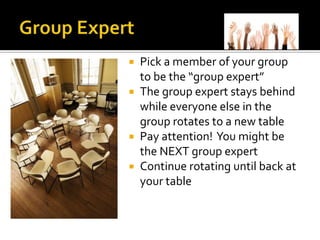
 Pick a member of your group
  to be the “group expert”
 The group expert stays behind
  while everyone else in the
  group rotates to a new table
 Pay attention! You might be
  the NEXT group expert
 Continue rotating until back at
  your table
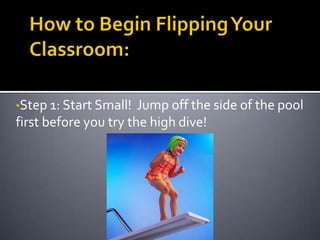
•Step 1: Start Small!  Jump off the side of the pool
first before you try the high dive!
•Involve the students in your decision making
process….Sell it to them!
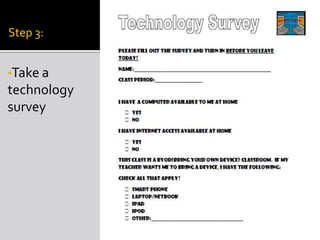
Step 3:


•Take a
technology
survey
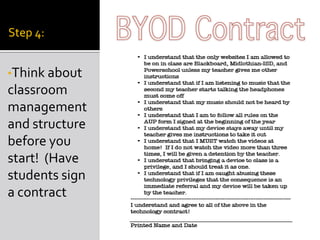
Step 4:


•Think about
classroom
management
and structure
before you
start! (Have
students sign
a contract
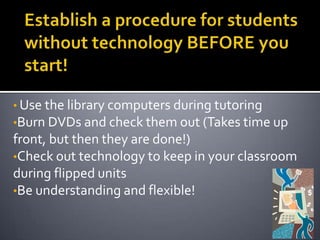
• Use the library computers during tutoring
•Burn DVDs and check them out (Takes time up
front, but then they are done!)
•Check out technology to keep in your classroom
during flipped units
•Be understanding and flexible!
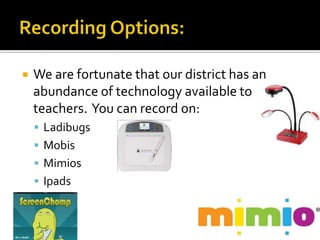
   We are fortunate that our district has an
    abundance of technology available to
    teachers. You can record on:
     Ladibugs
     Mobis
     Mimios
     Ipads
   Let’s finish our KWL chart!

   On a post it note, please write
    something you learned or plan to
    use in your classroom and place it
    under the “L” outside.

   Thank you for coming!!!

Flipped

  • 2.
    “K” IS FORKNOW “W” IS FOR WANT TO KNOW  On a post it note, write  On a post it note, write down something you down something you want already know about the flip to know about the flip model model  Post it under the “K”  Post it under the W outside outside
  • 3.
     The flipmodel is not  The flip model is not universal. It will look about the videos. The different for each video is just a small teacher, grade level, part of the lesson. and subject.  The main aspect of the  In other words, there is flip model is how you no ONE correct way to as the teacher utilize flip your classroom! your extra time in class to benefit your students!
  • 5.
    http://knewton.marketing.s3.amazonaws.co m/images/infographics/flipped-classroom.jpg
  • 7.
    Opportunity to replay  Opportunity to see missed lectures or assignments  Opportunity for more involvement  Opportunity to prep for college  Opportunity for real world application  In other words….
  • 9.
    Once it is done, it is done!  Time to do what you want with the curriculum  Minimizes classroom disruptions because students are engaged  No more of…
  • 12.
    You should see a  Read the article you are number on your desk. given and make a Sit with the other poster with the people that have the following: same number.  Summary of the article  Your group’s reflections/thoughts
  • 13.
     Pick amember of your group to be the “group expert”  The group expert stays behind while everyone else in the group rotates to a new table  Pay attention! You might be the NEXT group expert  Continue rotating until back at your table
  • 14.
    •Step 1: StartSmall! Jump off the side of the pool first before you try the high dive!
  • 15.
    •Involve the studentsin your decision making process….Sell it to them!
  • 16.
  • 17.
    Step 4: •Think about classroom management andstructure before you start! (Have students sign a contract
  • 18.
    • Use thelibrary computers during tutoring •Burn DVDs and check them out (Takes time up front, but then they are done!) •Check out technology to keep in your classroom during flipped units •Be understanding and flexible!
  • 19.
    We are fortunate that our district has an abundance of technology available to teachers. You can record on:  Ladibugs  Mobis  Mimios  Ipads
  • 26.
    Let’s finish our KWL chart!  On a post it note, please write something you learned or plan to use in your classroom and place it under the “L” outside.  Thank you for coming!!!

Editor's Notes

  • #15 Record a lesson while you will be goneStart posting lessons on Blackboard for practiceDo only 1 lesson or 1 unit to start