Adobe FLEX 3.0 Getting Started
Day 1  Agenda What is FLEX? Installing Flex Builder Creating New Projects Understanding Different Types of Projects
What is FLEX? Flex is a highly productive, free open source framework for building and maintaining expressive web applications that deploy consistently on all major browsers, desktops, and operating systems. Adobe Flex takes us to the next level of web application development with the concept of  Rich Internet Applications (RIA) .  Flex provides a programmatic way for developing these RIAs. It offers a much more robust experience for the users where productivity is supported by ease of use, streamlined workflow, and real time interactivity.  Flex is geared towards programmers, rather than designers.
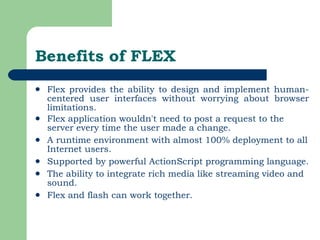
Benefits of FLEX Flex provides the ability to design and implement human-centered user interfaces without worrying about browser limitations.  Flex application wouldn't need to post a request to the server every time the user made a change.  A runtime environment with almost 100% deployment to all Internet users.  Supported by powerful ActionScript programming language.  The ability to integrate rich media like streaming video and sound.  Flex and flash can work together.
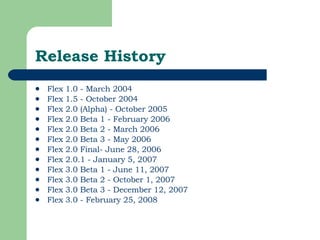
Release History Flex 1.0 - March 2004  Flex 1.5 - October 2004  Flex 2.0 (Alpha) - October 2005  Flex 2.0 Beta 1 - February 2006  Flex 2.0 Beta 2 - March 2006  Flex 2.0 Beta 3 - May 2006  Flex 2.0 Final- June 28, 2006  Flex 2.0.1 - January 5, 2007  Flex 3.0 Beta 1 - June 11, 2007  Flex 3.0 Beta 2 - October 1, 2007  Flex 3.0 Beta 3 - December 12, 2007  Flex 3.0 - February 25, 2008
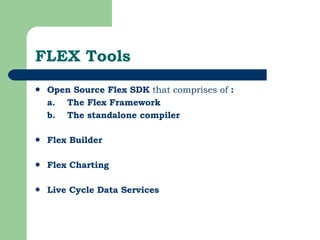
FLEX Tools Open Source Flex SDK  that comprises of  :  a.  The Flex Framework   b.  The standalone compiler Flex Builder   Flex Charting   Live Cycle Data Services
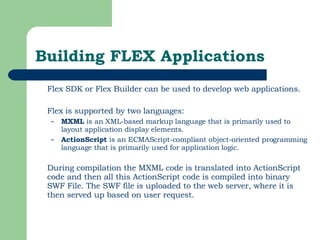
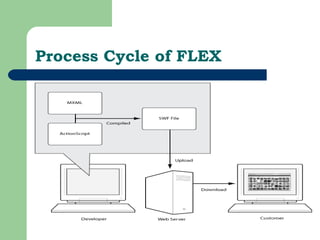
Building FLEX Applications Flex SDK or Flex Builder can be used to develop web applications. Flex is supported by two languages:  MXML  is an XML-based markup language that is primarily used to layout application display elements.  ActionScript  is an ECMAScript-compliant object-oriented programming language that is primarily used for application logic. During compilation the MXML code is translated into ActionScript code and then all this ActionScript code is compiled into binary SWF File. The SWF file is uploaded to the web server, where it is then served up based on user request.
Process Cycle of FLEX
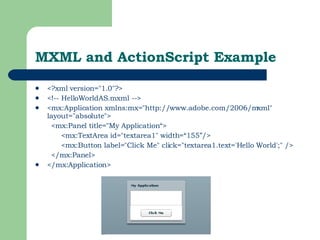
MXML and ActionScript Example <?xml version=&quot;1.0&quot;?>  <!-- HelloWorldAS.mxml -->  <mx:Application xmlns:mx=&quot;http://www.adobe.com/2006/mxml&quot; layout=&quot;absolute&quot;>  <mx:Panel title=&quot;My Application“> <mx:TextArea id=&quot;textarea1&quot; width=“155”/> <mx:Button label=&quot;Click Me&quot; click=&quot;textarea1.text='Hello World';&quot; />  </mx:Panel>  </mx:Application>
Installing FLEX Builder Flex Builder is built on top of Eclipse, an open-source IDE, and provides all the tools you need to develop Flex and ActionScript applications.  It runs on Microsoft Windows, Apple Macintosh OS X, and Linux, and is available in several versions.  Installation configuration options let you install Flex Builder as a set of plug-ins in an existing Eclipse workbench installation or to create an installation that includes the Eclipse workbench.
System Requirement Intel Pentium 4 processor  1GB of RAM recommended  Microsoft Windows XP (with Service Pack 2)  500MB of available hard-disk space to install  Flash Player 9 (9.0.30) or higher.
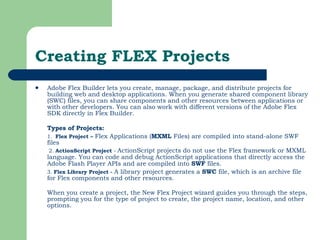
Creating FLEX Projects Adobe Flex Builder lets you create, manage, package, and distribute projects for building web and desktop applications. When you generate shared component library (SWC) files, you can share components and other resources between applications or with other developers. You can also work with different versions of the Adobe Flex SDK directly in Flex Builder. Types of Projects:   1.  Flex Project –  Flex   Applications ( MXML  Files) are compiled into stand-alone SWF files   2.  ActionScript Project  -  ActionScript projects do not use the Flex framework or MXML language.   You can code and debug ActionScript applications that directly access the Adobe Flash Player APIs and are compiled into  SWF  files.   3.  Flex Library Project -  A library project generates a  SWC  file, which is an archive file for Flex components and other resources. When you create a project, the New Flex Project wizard guides you through the steps, prompting you for the type of project to create, the project name, location, and other options.
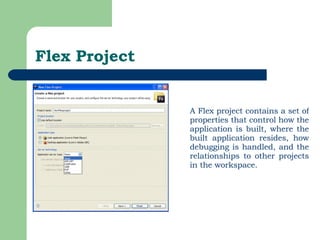
Flex Project A Flex project contains a set of properties that control how the application is built, where the built application resides, how debugging is handled, and the relationships to other projects in the workspace.
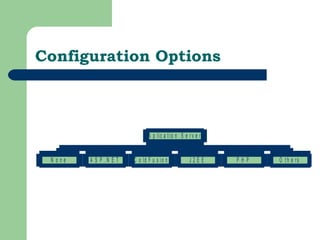
Configuration Options
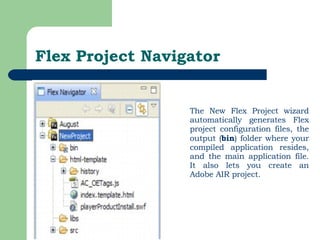
Flex Project Navigator The New Flex Project wizard automatically generates Flex project configuration files, the output ( bin ) folder where your compiled application resides, and the main application file. It also lets you create an Adobe AIR project.
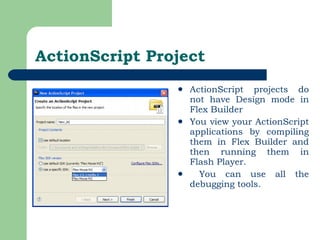
ActionScript Project ActionScript projects do not have Design mode in Flex Builder You view your ActionScript applications by compiling them in Flex Builder and then running them in Flash Player. You can use all the debugging tools.
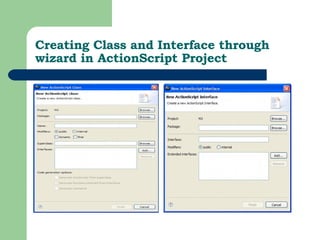
Creating Class and Interface through wizard in ActionScript Project
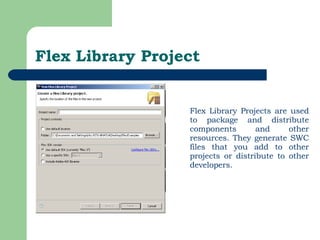
Flex Library Project Flex Library Projects are used to package and distribute components and other resources. They generate SWC files that you add to other projects or distribute to other developers.
Project Resources ActionScript Class .  ActionScript File ActionScript Interface ActionScript Project   CSS File   File  Flex Project   Flex Library Project   Folder   MXML Application MXML Component MXML Module Other
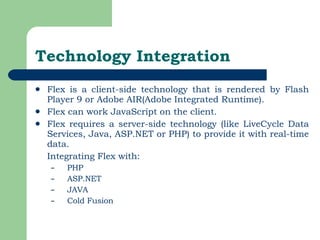
Technology Integration Flex is a client-side technology that is rendered by Flash Player 9 or Adobe AIR(Adobe Integrated Runtime).  Flex can work JavaScript on the client.  Flex requires a server-side technology (like LiveCycle Data Services, Java, ASP.NET or PHP) to provide it with real-time data.  Integrating Flex with: PHP ASP.NET JAVA Cold Fusion
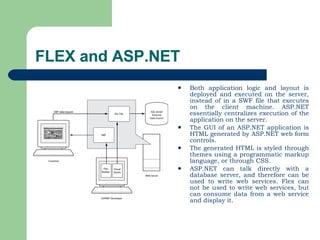
FLEX and ASP.NET Both application logic and layout is deployed and executed on the server, instead of in a SWF file that executes on the client machine. ASP.NET essentially centralizes execution of the application on the server.  The GUI of an ASP.NET application is HTML generated by ASP.NET web form controls.  The generated HTML is styled through themes using a programmatic markup language, or through CSS.  ASP.NET can talk directly with a database server, and therefore can be used to write web services. Flex can not be used to write web services, but can consume data from a web service and display it.
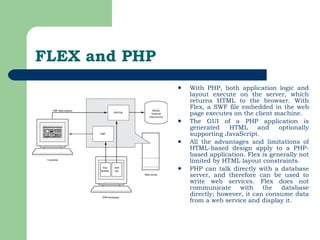
FLEX and PHP With PHP, both application logic and layout execute on the server, which returns HTML to the browser. With Flex, a SWF file embedded in the web page executes on the client machine.  The GUI of a PHP application is generated HTML and optionally supporting JavaScript.  All the advantages and limitations of HTML-based design apply to a PHP-based application. Flex is generally not limited by HTML layout constraints.  PHP can talk directly with a database server, and therefore can be used to write web services. Flex does not communicate with the database directly; however, it can consume data from a web service and display it.
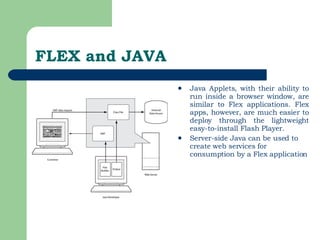
FLEX and JAVA Java Applets, with their ability to run inside a browser window, are similar to Flex applications. Flex apps, however, are much easier to deploy through the lightweight easy-to-install Flash Player.  Server-side Java can be used to create web services for consumption by a Flex application
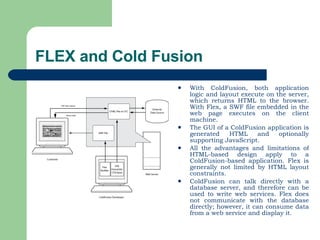
FLEX and Cold Fusion With ColdFusion, both application logic and layout execute on the server, which returns HTML to the browser. With Flex, a SWF file embedded in the web page executes on the client machine.  The GUI of a ColdFusion application is generated HTML and optionally supporting JavaScript.  All the advantages and limitations of HTML-based design apply to a ColdFusion-based application. Flex is generally not limited by HTML layout constraints.  ColdFusion can talk directly with a database server, and therefore can be used to write web services. Flex does not communicate with the database directly; however, it can consume data from a web service and display it.
Questionnaire
Thank You!

Flex_Basic_Training

  • 1.
    Adobe FLEX 3.0Getting Started
  • 2.
    Day 1 Agenda What is FLEX? Installing Flex Builder Creating New Projects Understanding Different Types of Projects
  • 3.
    What is FLEX?Flex is a highly productive, free open source framework for building and maintaining expressive web applications that deploy consistently on all major browsers, desktops, and operating systems. Adobe Flex takes us to the next level of web application development with the concept of Rich Internet Applications (RIA) . Flex provides a programmatic way for developing these RIAs. It offers a much more robust experience for the users where productivity is supported by ease of use, streamlined workflow, and real time interactivity. Flex is geared towards programmers, rather than designers.
  • 4.
    Benefits of FLEXFlex provides the ability to design and implement human-centered user interfaces without worrying about browser limitations. Flex application wouldn't need to post a request to the server every time the user made a change. A runtime environment with almost 100% deployment to all Internet users. Supported by powerful ActionScript programming language. The ability to integrate rich media like streaming video and sound. Flex and flash can work together.
  • 5.
    Release History Flex1.0 - March 2004 Flex 1.5 - October 2004 Flex 2.0 (Alpha) - October 2005 Flex 2.0 Beta 1 - February 2006 Flex 2.0 Beta 2 - March 2006 Flex 2.0 Beta 3 - May 2006 Flex 2.0 Final- June 28, 2006 Flex 2.0.1 - January 5, 2007 Flex 3.0 Beta 1 - June 11, 2007 Flex 3.0 Beta 2 - October 1, 2007 Flex 3.0 Beta 3 - December 12, 2007 Flex 3.0 - February 25, 2008
  • 6.
    FLEX Tools OpenSource Flex SDK that comprises of : a. The Flex Framework b. The standalone compiler Flex Builder Flex Charting Live Cycle Data Services
  • 7.
    Building FLEX ApplicationsFlex SDK or Flex Builder can be used to develop web applications. Flex is supported by two languages: MXML is an XML-based markup language that is primarily used to layout application display elements. ActionScript is an ECMAScript-compliant object-oriented programming language that is primarily used for application logic. During compilation the MXML code is translated into ActionScript code and then all this ActionScript code is compiled into binary SWF File. The SWF file is uploaded to the web server, where it is then served up based on user request.
  • 8.
  • 9.
    MXML and ActionScriptExample <?xml version=&quot;1.0&quot;?> <!-- HelloWorldAS.mxml --> <mx:Application xmlns:mx=&quot;http://www.adobe.com/2006/mxml&quot; layout=&quot;absolute&quot;> <mx:Panel title=&quot;My Application“> <mx:TextArea id=&quot;textarea1&quot; width=“155”/> <mx:Button label=&quot;Click Me&quot; click=&quot;textarea1.text='Hello World';&quot; /> </mx:Panel> </mx:Application>
  • 10.
    Installing FLEX BuilderFlex Builder is built on top of Eclipse, an open-source IDE, and provides all the tools you need to develop Flex and ActionScript applications. It runs on Microsoft Windows, Apple Macintosh OS X, and Linux, and is available in several versions. Installation configuration options let you install Flex Builder as a set of plug-ins in an existing Eclipse workbench installation or to create an installation that includes the Eclipse workbench.
  • 11.
    System Requirement IntelPentium 4 processor 1GB of RAM recommended Microsoft Windows XP (with Service Pack 2) 500MB of available hard-disk space to install Flash Player 9 (9.0.30) or higher.
  • 12.
    Creating FLEX ProjectsAdobe Flex Builder lets you create, manage, package, and distribute projects for building web and desktop applications. When you generate shared component library (SWC) files, you can share components and other resources between applications or with other developers. You can also work with different versions of the Adobe Flex SDK directly in Flex Builder. Types of Projects: 1. Flex Project – Flex Applications ( MXML Files) are compiled into stand-alone SWF files 2. ActionScript Project - ActionScript projects do not use the Flex framework or MXML language. You can code and debug ActionScript applications that directly access the Adobe Flash Player APIs and are compiled into SWF files. 3. Flex Library Project - A library project generates a SWC file, which is an archive file for Flex components and other resources. When you create a project, the New Flex Project wizard guides you through the steps, prompting you for the type of project to create, the project name, location, and other options.
  • 13.
    Flex Project AFlex project contains a set of properties that control how the application is built, where the built application resides, how debugging is handled, and the relationships to other projects in the workspace.
  • 14.
  • 15.
    Flex Project NavigatorThe New Flex Project wizard automatically generates Flex project configuration files, the output ( bin ) folder where your compiled application resides, and the main application file. It also lets you create an Adobe AIR project.
  • 16.
    ActionScript Project ActionScriptprojects do not have Design mode in Flex Builder You view your ActionScript applications by compiling them in Flex Builder and then running them in Flash Player. You can use all the debugging tools.
  • 17.
    Creating Class andInterface through wizard in ActionScript Project
  • 18.
    Flex Library ProjectFlex Library Projects are used to package and distribute components and other resources. They generate SWC files that you add to other projects or distribute to other developers.
  • 19.
    Project Resources ActionScriptClass . ActionScript File ActionScript Interface ActionScript Project CSS File File Flex Project Flex Library Project Folder MXML Application MXML Component MXML Module Other
  • 20.
    Technology Integration Flexis a client-side technology that is rendered by Flash Player 9 or Adobe AIR(Adobe Integrated Runtime). Flex can work JavaScript on the client. Flex requires a server-side technology (like LiveCycle Data Services, Java, ASP.NET or PHP) to provide it with real-time data. Integrating Flex with: PHP ASP.NET JAVA Cold Fusion
  • 21.
    FLEX and ASP.NETBoth application logic and layout is deployed and executed on the server, instead of in a SWF file that executes on the client machine. ASP.NET essentially centralizes execution of the application on the server. The GUI of an ASP.NET application is HTML generated by ASP.NET web form controls. The generated HTML is styled through themes using a programmatic markup language, or through CSS. ASP.NET can talk directly with a database server, and therefore can be used to write web services. Flex can not be used to write web services, but can consume data from a web service and display it.
  • 22.
    FLEX and PHPWith PHP, both application logic and layout execute on the server, which returns HTML to the browser. With Flex, a SWF file embedded in the web page executes on the client machine. The GUI of a PHP application is generated HTML and optionally supporting JavaScript. All the advantages and limitations of HTML-based design apply to a PHP-based application. Flex is generally not limited by HTML layout constraints. PHP can talk directly with a database server, and therefore can be used to write web services. Flex does not communicate with the database directly; however, it can consume data from a web service and display it.
  • 23.
    FLEX and JAVAJava Applets, with their ability to run inside a browser window, are similar to Flex applications. Flex apps, however, are much easier to deploy through the lightweight easy-to-install Flash Player. Server-side Java can be used to create web services for consumption by a Flex application
  • 24.
    FLEX and ColdFusion With ColdFusion, both application logic and layout execute on the server, which returns HTML to the browser. With Flex, a SWF file embedded in the web page executes on the client machine. The GUI of a ColdFusion application is generated HTML and optionally supporting JavaScript. All the advantages and limitations of HTML-based design apply to a ColdFusion-based application. Flex is generally not limited by HTML layout constraints. ColdFusion can talk directly with a database server, and therefore can be used to write web services. Flex does not communicate with the database directly; however, it can consume data from a web service and display it.
  • 25.
  • 26.