In the nameof Allah the most
beneficent the most merciful
“There is no shame in not knowing;
the shame lies in not finding out.”
System Unit Components 1
3
Differentiate amongvarious styles of system units on desktop computers, notebook
computers, and mobile devices
Identify chips, adapter cards, and other components of a motherboard
Describe the control unit and arithmetic logic unit components of a processor, and
explain the four steps in a machine cycle
Identify characteristics of various personal computer processors on the market
today, and describe the ways processors are cooled
Define a bit and describe how a series of bits represents data
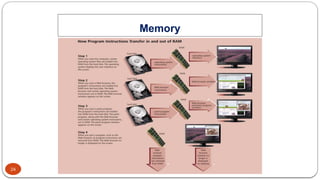
Explain how program instructions transfer in and out of memory
Differentiate among the various types of memory
Today’s Learning Objectives
System Unit Components
4.
4
Describe thepurpose and types of expansion slots and adapter cards, and
differentiate among slots for various removable flash memory devices
Differentiate between a port and a connector, and explain the differences among a
USB port, FireWire port, Bluetooth port, SCSI port, eSATA port, IrDA port, serial port,
and MIDI port
Describe the types of buses in a computer
Explain the purpose of a power supply and describe how it keeps cool
Understand how to clean a system unit on a computer or mobile device
Today’s Learning Objectives
System Unit Components
5.
5
The systemunit is
a case that contains
electronic components of
the computer used to process data
The System Unit
System Unit Components
6.
6
The System Unit
SystemUnit Components
The inside of the system unit on a desktop personal computer
includes:
Drive bay(s)
Power supply
Sound card
Video card
Processor
Memory
7.
7
The System Unit
SystemUnit Components
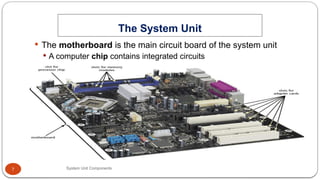
The motherboard is the main circuit board of the system unit
A computer chip contains integrated circuits
8.
8
Processor
System Unit Components
The processor, also called the central processing unit (CPU),
interprets and carries out the basic instructions that operate a
computer
Contain a control unit and an arithmetic logic unit (ALU)
Multi-core processor
Dual-core processor
Quad-core processor
9.
9
Processor
System Unit Components
The control unit is the component of the processor that
directs and coordinates most of the operations in the computer
The arithmetic logic unit (ALU) performs arithmetic,
comparison, and other operations
11
Processor
System Unit Components
Most current personal
computers support
pipelining
Processor begins
fetching a second
instruction before it
completes the machine
cycle for the first
instruction
12.
12
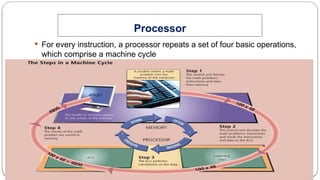
The processorcontains registers, that temporarily hold data and
instructions
The system clock controls the timing of all computer operations
The pace of the system clock is called the clock speed, and is measured
in gigahertz (GHz)
Processor
System Unit Components
13.
13
The leadingmanufacturers of
personal computer
processor chips are Intel
and AMD
Processor
System Unit Components
14.
14
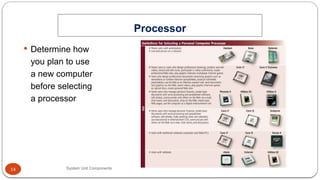
Determine how
youplan to use
a new computer
before selecting
a processor
Processor
System Unit Components
15.
15
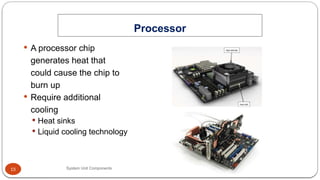
A processorchip
generates heat that
could cause the chip to
burn up
Require additional
cooling
Heat sinks
Liquid cooling technology
Processor
System Unit Components
16.
16
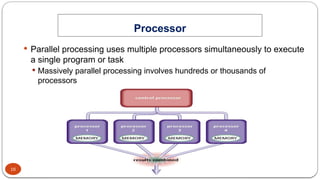
Parallel processinguses multiple processors simultaneously to execute
a single program or task
Massively parallel processing involves hundreds or thousands of
processors
Processor
System Unit Components
17.
17
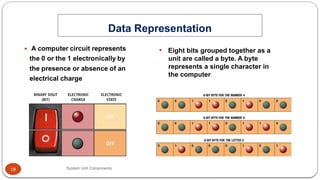
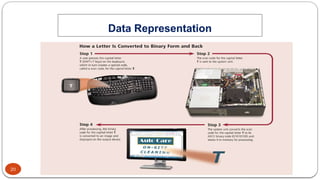
Analog signalsare continuous and vary in strength and quality
Digital signals are in one of two states: on or off
Most computers are digital
The binary system uses two unique digits (0 and 1)
Bits and bytes
Data Representation
System Unit Components
18.
18
Data Representation
System UnitComponents
• Eight bits grouped together as a
unit are called a byte. A byte
represents a single character in
the computer
19.
19
Data Representation
System UnitComponents
ASCII (American
Standard Code for
Information
Interchange) is the most
widely used coding
scheme to represent
data
21
Memory
System Unit Components
Memory consists of electronic components that store instructions
waiting to be executed by the processor, data needed by those
instructions, and the results of processing the data
Stores three basic categories of items:
The operating system and other system software
Application programs
Data being processed and the resulting information
22.
22
Memory
System Unit Components
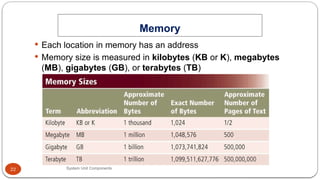
Each location in memory has an address
Memory size is measured in kilobytes (KB or K), megabytes
(MB), gigabytes (GB), or terabytes (TB)
23.
23
Memory
System Unit Components
The system unit contains two types of memory:
Volatile memory
Loses its contents when power is turned off
Example includes RAM
Nonvolatile memory
Does not lose contents when power is removed
Examples include ROM, flash memory, and CMOS
28
Memory
System Unit Components
Memory cache speeds the processes of the computer because it
stores frequently used instructions and data
29.
29
Memory
System Unit Components
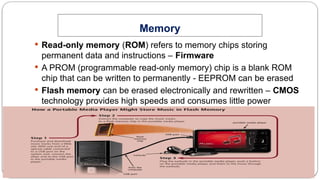
Read-only memory (ROM) refers to memory chips storing
permanent data and instructions – Firmware
A PROM (programmable read-only memory) chip is a blank ROM
chip that can be written to permanently - EEPROM can be erased
Flash memory can be erased electronically and rewritten – CMOS
technology provides high speeds and consumes little power
30.
30
Memory
System Unit Components
Access time is the amount of time it takes the processor to read
from memory – Measured in nanoseconds
31.
31
Expansion Slots andAdapter Cards
System Unit Components
An expansion slot is a socket
on the motherboard that can
hold an adapter card
An adapter card enhances
functions of a component of
the system unit and/or
provides connections to
peripherals
Sound card and video card
32.
32
Expansion Slots andAdapter Cards
System Unit Components
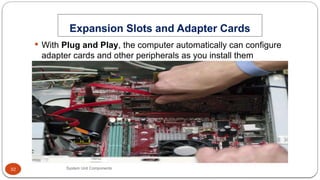
With Plug and Play, the computer automatically can configure
adapter cards and other peripherals as you install them
33.
33
Expansion Slots andAdapter Cards
System Unit Components
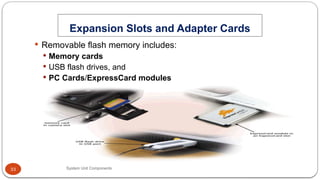
Removable flash memory includes:
Memory cards
USB flash drives, and
PC Cards/ExpressCard modules
34.
34
Ports and Connectors
SystemUnit Components
A port is the point at which a peripheral attaches to or
communicates with a system unit (sometimes referred to as a jack)
A connector joins a cable to a port
38
Ports and Connectors
SystemUnit Components
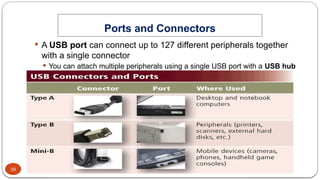
A USB port can connect up to 127 different peripherals together
with a single connector
You can attach multiple peripherals using a single USB port with a USB hub
39.
39
Ports and Connectors
SystemUnit Components
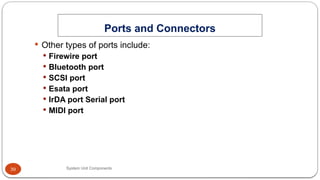
Other types of ports include:
Firewire port
Bluetooth port
SCSI port
Esata port
IrDA port Serial port
MIDI port
40.
40
Ports and Connectors
SystemUnit Components
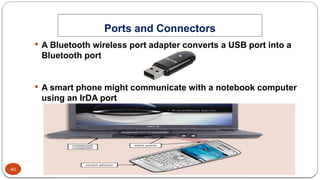
A Bluetooth wireless port adapter converts a USB port into a
Bluetooth port
A smart phone might communicate with a notebook computer
using an IrDA port
41.
41
Ports and Connectors
SystemUnit Components
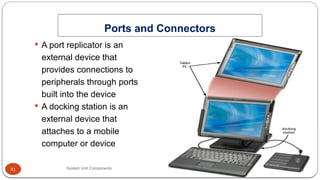
A port replicator is an
external device that
provides connections to
peripherals through ports
built into the device
A docking station is an
external device that
attaches to a mobile
computer or device
42.
42
Buses
System Unit Components
A bus allows the various
devices both inside and
attached to the system
unit to communicate with
each other
Data bus
Address bus
Word size is the number of bits
the processor can interpret and
execute at a given time
43.
43
Buses
System Unit Components
Expansion slots connect to expansion buses
Common types of expansion buses include:
PCI bus
PCI Express bus
Accelerated Graphics Port
USB and FireWire bus
PC Card bus
44.
44
Bays
System Unit Components
A bay is an opening
inside the system unit in
which you can install
additional equipment
A drive bay typically
holds disk drives
45.
45
Power Supply
System UnitComponents
The power supply converts the wall outlet AC power into DC
power
Some external peripherals have an AC adapter, which is an
external power supply
46.
46
Putting It AllTogether
System Unit Components
Home
Intel Core i5 or
Intel Core 2 i3 or
AMD Athlon II or
AMD Sempron
Minimum RAM: 2 GB
Small Office/ Home Office
Intel Core i7 or
Intel Core i7 Extreme or
AMD Phenom II or
AMD Athlon II
Minimum RAM: 4 GB
47.
47
Putting It AllTogether
System Unit Components
Mobile
Intel Core i7 Extreme or
Intel Core i7 or
AMD Phenom II or
AMD Turion II
Minimum RAM: 2 GB
Power
Intel Xeon or
Intel Itanium or
AMD Opteron
Minimum RAM: 8 GB
48.
48
Putting It AllTogether
System Unit Components
Enterprise
Intel Core i7 or
Intel Core i7 Extreme or
AMD Phenom II or
AMD Athlon II
Minimum RAM: 4 GB
49.
49
Keeping Your Computeror Mobile
Device Clean
System Unit Components
Clean your computer or mobile device once or twice a year
Turn off and unplug your computer or mobile device before
cleaning it
Use compressed air to blow away dust
Use an antistatic wipe to clean the exterior of the case and a
cleaning solution and soft cloth to clean the screen
50.
50
Summary
System Unit Components
Components of the system unit
How memory stores data, instructions, and information
Sequence of operations that occur when a computer executes an
instruction
Comparison of various personal computer processors on the
market today
How to clean the exterior and interior of a system unit