Fixing Web Data
in Production
Best practices for bad situations
Aaron Knight, Full Stack Engineer at Voxy
Aaron Knight (@iamaaronknight)
Full Stack Engineer
Voxy.com
I am
A Django web app
8 years old
12 engineers
10+ data stores
Voxy is
Oops.
There’s a problem with the data!
(It was probably my fault)
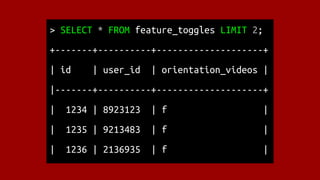
> SELECT * FROM feature_toggles LIMIT 2;
+-------+----------+--------------------+
| id | user_id | orientation_videos |
|-------+----------+--------------------+
| 1234 | 8923123 | f |
| 1235 | 9213483 | f |
| 1236 | 2136935 | f |
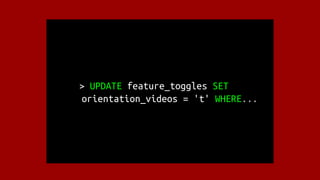
> UPDATE feature_toggles SET
orientation_videos = 't' WHERE...
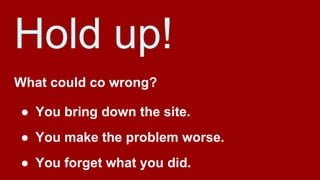
Hold up!
What could co wrong?
● You bring down the site.
● You make the problem worse.
● You forget what you did.
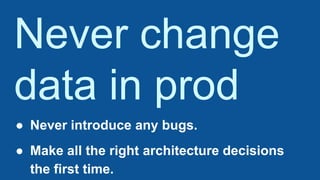
Never change
data in prod
● Never introduce any bugs.
● Make all the right architecture decisions
the first time.
</sarcasm>
Data fixes are code.
● Check them in to source control.
Data fixes are code.
● Check them in to source control.
● Test them.
Data fixes are code.
● Check them in to source control.
● Test them.
● Code review them.
Track execution.
● Log when a script is executed.
Track execution.
● Log when a script is executed.
● Log everything that changed.
Track execution.
● Log when a script is executed.
● Log everything that changed.
● Log what did not change.
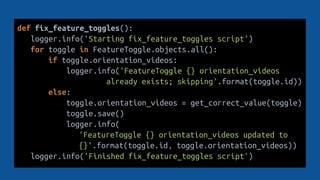
def fix_feature_toggles():
logger.info('Starting fix_feature_toggles script')
for toggle in FeatureToggle.objects.all():
if toggle.orientation_videos:
logger.info('FeatureToggle {} orientation_videos
already exists; skipping'.format(toggle.id))
else:
toggle.orientation_videos = get_correct_value(toggle)
toggle.save()
logger.info(
'FeatureToggle {} orientation_videos updated to
{}'.format(toggle.id, toggle.orientation_videos))
logger.info('Finished fix_feature_toggles script')
Track execution.
● Log when a script is executed.
● Log everything that changed.
● Log what did not change.
● Centralize your logging.
import boto3
firehose = boto3.client('firehose')
def log_to_kinesis(message):
data = OrderedDict([
('script_name', get_filename_of_caller()),
('environment', settings.ENVIRONMENT),
('ts', str(pytz.utc.localize(datetime.datetime.now()))),
('message', message),
])
firehose.put_record(
DeliveryStreamName='backfill-logs',
Record={'Data': (json.dumps(data, sort_keys=False) + 'n')}
)
Track execution.
● Log when a script is executed.
● Log everything that changed.
● Log what did not change.
● Centralize your logging.
● Track the script’s progress.
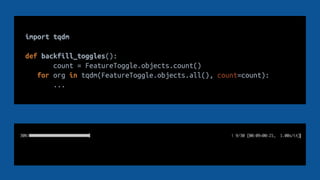
import tqdm
def backfill_toggles():
count = FeatureToggle.objects.count()
for org in tqdm(FeatureToggle.objects.all(), count=count):
...
Be fault-tolerant.
● Think of possible exceptions.
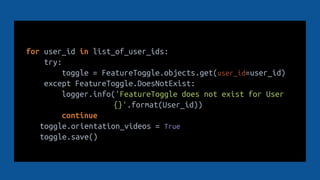
for user_id in list_of_user_ids:
try:
toggle = FeatureToggle.objects.get(user_id=user_id)
except FeatureToggle.DoesNotExist:
logger.info('FeatureToggle does not exist for User
{}'.format(User_id))
continue
toggle.orientation_videos = True
toggle.save()
Be fault-tolerant.
● Think of possible exceptions.
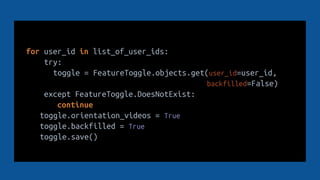
● Make your scripts idempotent, if possible.
for user_id in list_of_user_ids:
try:
toggle = FeatureToggle.objects.get(user_id=user_id,
backfilled=False)
except FeatureToggle.DoesNotExist:
continue
toggle.orientation_videos = True
toggle.backfilled = True
toggle.save()
Be fault-tolerant.
● Think of possible exceptions.
● Make your scripts idempotent, if possible.
● Make your changes reversible, if possible.
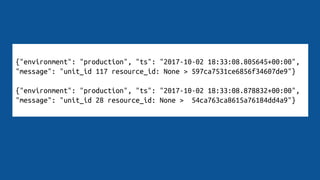
{"environment": "production", "ts": "2017-10-02 18:33:08.805645+00:00",
"message": "unit_id 117 resource_id: None > 597ca7531ce6856f34607de9"}
{"environment": "production", "ts": "2017-10-02 18:33:08.878832+00:00",
"message": "unit_id 28 resource_id: None > 54ca763ca8615a76184dd4a9"}
Know your bottlenecks.
● CPU?
Know your bottlenecks.
● CPU?
● Memory?
Know your bottlenecks.
● CPU?
● Memory?
● Database?
feature_toggles = []
for user_id in user_ids_to_backfill:
feature_toggles.append(FeatureToggle(
user_id=user_id,
orientation_videos=True
)
)
FeatureToggle.objects.bulk_create(feature_toggles)
def backfill_activity_progresses():
conn = psycopg2.connect("some_credentials")
cursor = conn.cursor(cursor_factory=psycopg2.extras.RealDictCursor)
data_to_replicate = []
for index in tqdm(batch_range):
cursor.execute("SELECT user_id, type, correct_answers,
total_answers, is_complete FROM legacy_activity ORDER BY id;")
data_to_replicate.append(cursor.fetchall())
conn.close()
add_to_new_activity_table(data_to_replicate)
Know your bottlenecks.
● CPU?
● Memory?
● Database?
● Developer time?
● Cognitive overhead?
Execute at the right level
of abstraction.
● Use existing functions and the ORM when
you can afford to.
● Use SQL when execution time becomes
significant.
Use database
snapshots.
● Test your script on a backup from
production.
Use database
snapshots.
● Test your script on a backup from
production.
● Take snapshots before you make changes.
Use database
snapshots.
● Test your script on a backup from
production.
● Take snapshots before you make changes.
● Automate your backups.
Aaron Knight (@iamaaronknight)
Full Stack Engineer
Voxy.com
Thanks!

Fixing Web Data in Production

  • 1.
    Fixing Web Data inProduction Best practices for bad situations Aaron Knight, Full Stack Engineer at Voxy
  • 2.
    Aaron Knight (@iamaaronknight) FullStack Engineer Voxy.com I am
  • 3.
    A Django webapp 8 years old 12 engineers 10+ data stores Voxy is
  • 4.
    Oops. There’s a problemwith the data! (It was probably my fault)
  • 6.
    > SELECT *FROM feature_toggles LIMIT 2; +-------+----------+--------------------+ | id | user_id | orientation_videos | |-------+----------+--------------------+ | 1234 | 8923123 | f | | 1235 | 9213483 | f | | 1236 | 2136935 | f |
  • 7.
    > UPDATE feature_togglesSET orientation_videos = 't' WHERE...
  • 8.
    Hold up! What couldco wrong? ● You bring down the site. ● You make the problem worse. ● You forget what you did.
  • 9.
    Never change data inprod ● Never introduce any bugs. ● Make all the right architecture decisions the first time.
  • 10.
  • 11.
    Data fixes arecode. ● Check them in to source control.
  • 12.
    Data fixes arecode. ● Check them in to source control. ● Test them.
  • 13.
    Data fixes arecode. ● Check them in to source control. ● Test them. ● Code review them.
  • 14.
    Track execution. ● Logwhen a script is executed.
  • 15.
    Track execution. ● Logwhen a script is executed. ● Log everything that changed.
  • 16.
    Track execution. ● Logwhen a script is executed. ● Log everything that changed. ● Log what did not change.
  • 17.
    def fix_feature_toggles(): logger.info('Starting fix_feature_togglesscript') for toggle in FeatureToggle.objects.all(): if toggle.orientation_videos: logger.info('FeatureToggle {} orientation_videos already exists; skipping'.format(toggle.id)) else: toggle.orientation_videos = get_correct_value(toggle) toggle.save() logger.info( 'FeatureToggle {} orientation_videos updated to {}'.format(toggle.id, toggle.orientation_videos)) logger.info('Finished fix_feature_toggles script')
  • 18.
    Track execution. ● Logwhen a script is executed. ● Log everything that changed. ● Log what did not change. ● Centralize your logging.
  • 20.
    import boto3 firehose =boto3.client('firehose') def log_to_kinesis(message): data = OrderedDict([ ('script_name', get_filename_of_caller()), ('environment', settings.ENVIRONMENT), ('ts', str(pytz.utc.localize(datetime.datetime.now()))), ('message', message), ]) firehose.put_record( DeliveryStreamName='backfill-logs', Record={'Data': (json.dumps(data, sort_keys=False) + 'n')} )
  • 21.
    Track execution. ● Logwhen a script is executed. ● Log everything that changed. ● Log what did not change. ● Centralize your logging. ● Track the script’s progress.
  • 23.
    import tqdm def backfill_toggles(): count= FeatureToggle.objects.count() for org in tqdm(FeatureToggle.objects.all(), count=count): ...
  • 24.
    Be fault-tolerant. ● Thinkof possible exceptions.
  • 26.
    for user_id inlist_of_user_ids: try: toggle = FeatureToggle.objects.get(user_id=user_id) except FeatureToggle.DoesNotExist: logger.info('FeatureToggle does not exist for User {}'.format(User_id)) continue toggle.orientation_videos = True toggle.save()
  • 27.
    Be fault-tolerant. ● Thinkof possible exceptions. ● Make your scripts idempotent, if possible.
  • 28.
    for user_id inlist_of_user_ids: try: toggle = FeatureToggle.objects.get(user_id=user_id, backfilled=False) except FeatureToggle.DoesNotExist: continue toggle.orientation_videos = True toggle.backfilled = True toggle.save()
  • 29.
    Be fault-tolerant. ● Thinkof possible exceptions. ● Make your scripts idempotent, if possible. ● Make your changes reversible, if possible.
  • 30.
    {"environment": "production", "ts":"2017-10-02 18:33:08.805645+00:00", "message": "unit_id 117 resource_id: None > 597ca7531ce6856f34607de9"} {"environment": "production", "ts": "2017-10-02 18:33:08.878832+00:00", "message": "unit_id 28 resource_id: None > 54ca763ca8615a76184dd4a9"}
  • 31.
  • 32.
  • 33.
    Know your bottlenecks. ●CPU? ● Memory? ● Database?
  • 34.
    feature_toggles = [] foruser_id in user_ids_to_backfill: feature_toggles.append(FeatureToggle( user_id=user_id, orientation_videos=True ) ) FeatureToggle.objects.bulk_create(feature_toggles)
  • 35.
    def backfill_activity_progresses(): conn =psycopg2.connect("some_credentials") cursor = conn.cursor(cursor_factory=psycopg2.extras.RealDictCursor) data_to_replicate = [] for index in tqdm(batch_range): cursor.execute("SELECT user_id, type, correct_answers, total_answers, is_complete FROM legacy_activity ORDER BY id;") data_to_replicate.append(cursor.fetchall()) conn.close() add_to_new_activity_table(data_to_replicate)
  • 36.
    Know your bottlenecks. ●CPU? ● Memory? ● Database? ● Developer time? ● Cognitive overhead?
  • 37.
    Execute at theright level of abstraction. ● Use existing functions and the ORM when you can afford to. ● Use SQL when execution time becomes significant.
  • 38.
    Use database snapshots. ● Testyour script on a backup from production.
  • 39.
    Use database snapshots. ● Testyour script on a backup from production. ● Take snapshots before you make changes.
  • 40.
    Use database snapshots. ● Testyour script on a backup from production. ● Take snapshots before you make changes. ● Automate your backups.
  • 41.
    Aaron Knight (@iamaaronknight) FullStack Engineer Voxy.com Thanks!

Editor's Notes

  • #2 0
  • #5 3. This is a talk about how to deal with problems that arise with your data in production.
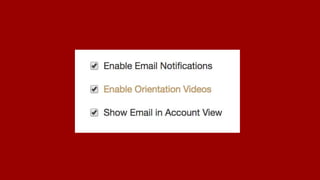
  • #6 Imagine that you’re working on a web application. It has an admin interface where admins can toggle different features on and off for different users.
  • #7 Somehow, those feature toggles got messed up. Now the orientation_videos flag is set to False for a large number of users.
  • #8 Fortunately, you have a way to recover which users are supposed to have that feature enabled so you can go into your database and fix the problem.
  • #9 If that is your response to updating production data in your web application, I’m going to suggest that you stop and think about the variety of ways in which such an operation can go wrong.
  • #10 5. The right approach is to never, ever change production data.
  • #11 But of course that’s not how things work in the real world.
  • #12 6. So instead, let’s talk about some realistic ways to fix your data safely. The first bit of advice should be obvious: don’t just start executing SQL queries or shell commands off the cuff. Treat these changes as code. That means checking them in...
  • #13 7. Testing them. This might seem like a waste of time since you’re probably going to throw this code away after you run it. But better to waste a little time writing a test than a lot of time trying to reverse a catastrophic mistake to your data.
  • #14 Whatever process your team has for code review, do that.
  • #15 10. Secondly, when you execute one of these scripts, the last thing that you want is code that runs silently for an indeterminate period of time, and may or may not have had the desired effect. So be very generous with your logging.
  • #16 Secondly, when you execute one of these scripts, the last thing that you want is code that runs silently for an indeterminate period of time, and may or may not have had the desired effect. So be very generous with your logging.
  • #17 Secondly, when you execute one of these scripts, the last thing that you want is code that runs silently for an indeterminate period of time, and may or may not have had the desired effect. So be very generous with your logging.
  • #18 Here’s an example script. Note that we’re logging at the beginning of the function, at the end, and for every code path in between.
  • #19 Another consideration is that you should centralize your logging. These logs need to be accessible to anyone on your team who may need to look back and see what happened.
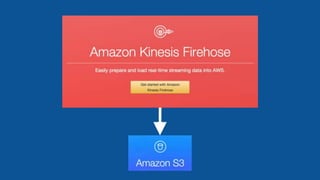
  • #20 Any tool that works for you is fine, but what we use is Amazon Kinesis Firehose. We use it to write logs from our scripts to Amazon S3. What’s great about this service is the simplicity of using it.
  • #21 You set up a firehose in AWS, and then writing a log to an S3 bucket is just as simple as this. Note that I have a cute little function that gets the filename of the script that’s calling this function.
  • #22 Since I imagine that you’ll still be running these scripts manually, it’s pretty important to know how far along you are.
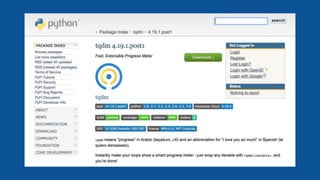
  • #23 For that, we use tqdm
  • #24 You pass an iterable in the “tqdm” function, passing it a count if your iterable is expensive to get the length of, and it gives you a little progress bar which shows time estimates.
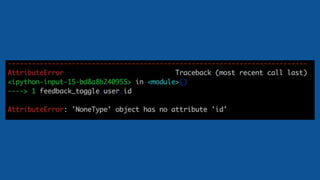
  • #25 15. Speaking of time, your script might take a long time to run. And won’t it be annoying if it runs for 3 hours and then fails halfway through?
  • #26 It’s always easy to forget to handle error conditions.
  • #27 So it’s a good idea to practice defensive programming in this case. Think about possible exceptions and catch them, making sure to log.
  • #28 Another thing to think about is, when your script does break 2 hours in, can you safely run it again and get the desired results?
  • #29 This might not always be possible or necessary, but in some extreme cases we have resorted to adding a new field to a model to track which items have been backfilled.
  • #30 Another nice feature is reversibility. If you screwed something up, is it possible to figure out what the previous state of the data was?
  • #31 This is where really detailed logging comes into play. If your logs contain all of the necessary information, you could conceivably parse them to get the original state of your data and reverse the damage.
  • #32 20. If you’re dealing with a lot of data that needs to be fixed, you’re going to start needing to do some actual engineering. You’re going to need to think about what bottlenecks you might encounter. Maybe you’re doing something computationally intensive, in which case you might need to think about how to parallelize the job.
  • #33 Or maybe the naive version of your script is going to load several GB of data into memory. In that case, you might need to rewrite to use a generator or something.
  • #34 More likely, the database is going to be your big issue.
  • #35 In that case, it’s time to explore some of the features of your ORM. For example, here’s a construct in the Django ORM that I’ve used to bulk create objects instead of creating them one by one. That can be a huge time saver.
  • #36 If you’re still running too slow, you might want to drop down directly to the SQL level and skip Object instantiation and so on. You can get huge performance gains this way.
  • #37 But please, please don’t do these things if you don’t need to. I’ve gotten into PR debates with coworkers who wanted to over-optimize a script that takes 15 minutes to run. Don’t get fancy.
  • #38 So my general rule of thumb is to use the ORM when you can, and use SQL or the equivalent when you need to.
  • #39 24. Let’s talk about other issue which should be obvious but needs to be said. Backups are your friend. First of all, if it’s at all feasible, set up a snapshot of your data and run your script against that before running it against the real thing.
  • #40 If you’re going to be doing something risky, please back up your data before you execute your script. Right before.
  • #41 If you’re going to be doing significant changes rather often, consider automating your database backups so that you snapshot right before your scripts run.
  • #42 There are lots of other considerations, but those are some of the big ones.