Fixing the program my computer learned:
         End-user debugging of
        machine-learned programs

              Dr Simone Stumpf
            City University London
         Simone.Stumpf.1@city.ac.uk
Bio
1996             BSc, Comp Sci w/ Cog Sci, UCL
2001             PhD Comp Sci, UCL
2001 - 2004      Research Fellow, UCL
2004 - 2007      Research Manager, Oregon State (OSU)
2007 - 2009      UX Architect, White Horse
2008 - present   Asst Professor (Senior Research), OSU
2009 - present   Lecturer, City University London


                                                         2
What are machine-learned programs?
•! Systems that “predict”
   –! Spam filters, “smart desktops”, web page recommendations
•! Learn from and adapt to user after deployment
•! Probabilistic machine learning algorithms
•! Resulting behaviour is a program

 How do you debug a program that was written by a machine
  instead of a person? Especially when you don’t know much
    about programming and are working with a program you
                       can’t even see?


                                                                 3
A quick machine learning detour…
“Simple” algorithm like Naïve Bayes
   –! Have input (features) and outputs (labels or classes)
   –! From training data they learn a function: weight*input = class
   –! As they further learn weights are changed

   eg. spam filters (bag-of-words approach)

   –! take all words appearing in the training data as features
   –! throw out stop words (a, the, ?)
   –! do stemming (walking, walked = walk)
   –! learn how prevalent certain words are in spam messages
   –! use that function to predict whether new email message is spam


                                                                       4
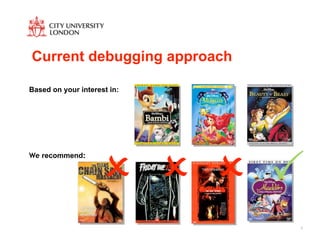
Current debugging approach

Based on your interest in:


                     ! ! ! "
We recommend:


                             5
Problems and opportunities for end users
•! Are not machine learning experts or programmers
•! Only they can fix if incorrect behaviour occurs
   –! Cannot inspect source code
   –! Can only observe results at run-time
   –! Can usually only give more training examples to influence future
      behaviour
   –! Need to provide lots of training data to change behaviour
•! Much richer knowledge could be exploited
•! Could increase usability and trust

 How can the program communicate its reasoning to the end
           user? How could the user talk back?

                                                                         6
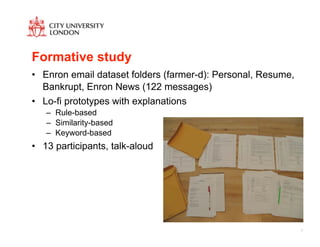
Formative study
•! Enron email dataset folders (farmer-d): Personal, Resume,
   Bankrupt, Enron News (122 messages)
•! Lo-fi prototypes with explanations
   –! Rule-based
   –! Similarity-based
   –! Keyword-based
•! 13 participants, talk-aloud


                                                               7
Explanations by ML program
                    Simplified yet faithful
                         Concrete


•! Rule-based best understood but no clear overall preference
•! Serious understandability problems with Similarity-based
•! Negative keyword list with keyword-based problematic
   (negative weights)

    Matters if they they think reasoning is sound and it is
        communicated clearly, word choices important

                                                                8
What does the user tell the program?
•! Select different features (53%)
   –! It should put email in ‘Enron News’ if it has the keywords “changes”
      and “policy”.
•! Adjust weights (12%)
   –! The second set of words should be given more importance.
•! Parse/extract in different way (10%)
   –! I think that it should look for typos in the punctuation for indicators
      toward ‘Personal’.
•! Employ feature combinations (5%)
   –! I think it would be better if it recognized a last and a first name
      together.
•! Use relational features (4%)
   –! This message should be in ‘EnronNews’ since it is from the
      chairman of the company.
                                                                                9
What knowledge do they use?
•! Commonsense (36%)
   –! “Qualifications” would seem like a really good Resume word, I
      wonder why that’s not down here.
•! English (30%)
   –! Does the computer know the difference between “resumé” and
      “resume”?
•! Domain (15%)
   –! Different words could have been found in common like … “Ken
      Lay”.


                                                                      10
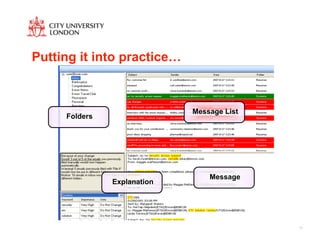
Putting it into practice…


                             Message List
     Folders


                                 Message
               Explanation


                                            11
Usability of prototype
•! System doesn’t heed user, learning too much or too little

•! “Unlearning” important

•! Users take care in selecting feedback but lack support to
   make good choices


                                                               12
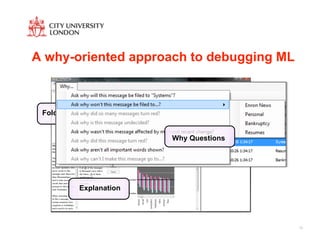
A why-oriented approach to debugging ML


 Folders                 Message List              Message


                                   Why Questions


           Explanation


                                                             13
Barriers for end users
•! All encountered barriers, Selection and Coordination most
   prevalent

•! Some users get “stuck” within a Selection barrier loop


 Systems need to support where to debug and the effects of
                         debugging


                                                               14
What helps end users debug?
•! What information regarding logic of a learned program is
   particularly useful

•! Machine-learning saliency
   –! exposure of useful and accurate pieces of information about the
      logic of a machine-learned program


                                                                        15
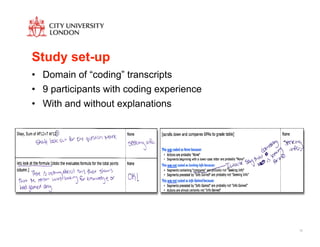
Study set-up
•! Domain of “coding” transcripts
•! 9 participants with coding experience
•! With and without explanations


                                           16
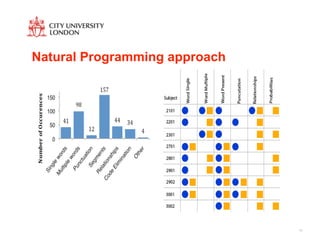
Natural Programming approach


                               17
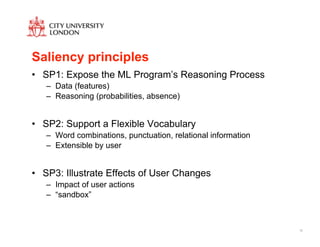
Saliency principles
•! SP1: Expose the ML Program’s Reasoning Process
   –! Data (features)
   –! Reasoning (probabilities, absence)


•! SP2: Support a Flexible Vocabulary
   –! Word combinations, punctuation, relational information
   –! Extensible by user


•! SP3: Illustrate Effects of User Changes
   –! Impact of user actions
   –! “sandbox”


                                                               18
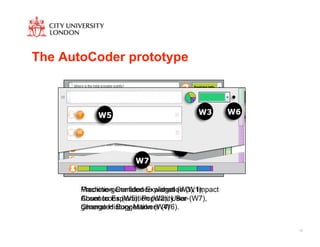
The AutoCoder prototype


       Prediction Confidence widget (W3), Impact
       Machine-generated Explanation (W1),
       Count Icons (W5), Popularity Bar
       Absence Explanation (W2), User- (W7),
       Change History Markers (W6).
       generated Suggestion (W4)


                                                   19
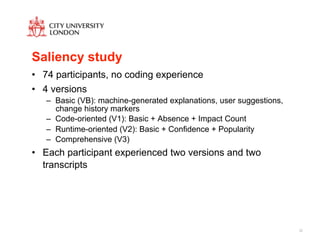
Saliency study
•! 74 participants, no coding experience
•! 4 versions
   –! Basic (VB): machine-generated explanations, user suggestions,
      change history markers
   –! Code-oriented (V1): Basic + Absence + Impact Count
   –! Runtime-oriented (V2): Basic + Confidence + Popularity
   –! Comprehensive (V3)
•! Each participant experienced two versions and two
   transcripts


                                                                      20
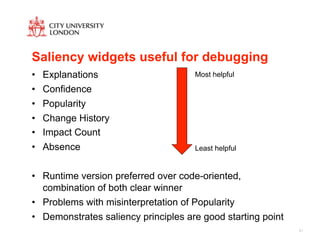
Saliency widgets useful for debugging
•!   Explanations                     Most helpful

•!   Confidence
•!   Popularity
•!   Change History
•!   Impact Count
•!   Absence                          Least helpful


•! Runtime version preferred over code-oriented,
   combination of both clear winner
•! Problems with misinterpretation of Popularity
•! Demonstrates saliency principles are good starting point
                                                              21
Getting feedback from users….Great!

WHAT DO WE DO WITH IT?


                                      22
Changing the machine’s reasoning
•! Simplest way: adjust feature weights

•! Constraint-based
   –! No substantial improvements in accuracy
   –! Hardness of constraints difficult to set


•! User co-training (new)
   –! Exploits unlabeled data
   –! Substantial improvements for some users, especially if no user
      feedback approach resulted in low accuracy
   –! Some losses for others


    Quality of feedback matters otherwise there is “noise”
                                                                       23
End-user feature engineering
•! Process of designing features for use by a ML algorithm
   –! What to attend to/what counts as input

•! Critical for performance


•! Typically done by a machine learning expert with a domain
   expert before deployment


                                                               24
Impact
•! Option 1: Add user-defined features to algorithm (+1%)
•! Option 2: Add them and weight them more heavily (-2.5%)


•! Higher increases for individuals with weighted approach
   (+27%) but canceled out by individual decreases (-30%)

         Need to spot unpredictive features (“noise”)


                                                             25
Identifying unpredictive features
•! Characteristic 1: Poor test data agreement
   –! # of test segments with feature F and class label C divided by # of
      test segments with feature F

•! Characteristic 2: Under-representation of a user-defined
   feature in its assigned class in test data
   –! # of test segments with feature F and class label C divided by # of
      test segments with class label C


                                                                            26
Evaluation and implications
•! Filtering features based on these characteristics
   –! 94% of the 100 worst user-defined features can be filtered (but 64%
      of 100 best user-defined features are removed)
   –! 5% macro-F1 increase overall, 32.2% best individual increase for
      Option 2


•! Can compute approximations in absence of much test data

•! Build user interface approaches to help identify when
   unpredictive features are added

 How much do we trust the user feedback? How much does
              the ML algorithm trust itself?
                                                                            27
Future Work
•! New explanations, new interfaces for new algorithms
   –! Other approaches (recommender systems, neural nets etc)

•! Debugging strategies and debugging support
   –!   User competence models
   –!   ML Confidence models
   –!   User languages to change data and reasoning
   –!   Unlearning
   –!   Cost/Benefit

•! Learn from other users or “common sense”


                                                                28
Conclusion
•! New, exciting research area combining HCI and AI

•! Can make ML systems much smarter and quicker by
   harnessing knowledge of end users

•! Increase usability of these systems for end users


                                                       29
Publications
•!   S. Stumpf, V. Rajaram, L. Li, W. Wong, M. Burnett, T. Dietterich, E. Sullivan, and J. Herlocker,

     "Interacting meaningfully with machine learning systems: Three experiments," Int. J. Hum.-Comput.

     Stud., vol. 67, 2009, pp. 639-662.

•!   T. Kulesza, W. Wong, S. Stumpf, S. Perona, R. White, M.M. Burnett, I. Oberst, and A.J. Ko, "Fixing

     the program my computer learned: barriers for end users, challenges for the machine," Proceedings of

     the 14th international conference on Intelligent user interfaces, Sanibel Island, Florida, USA: ACM,

     2009, pp. 187-196.

•!   S. Stumpf, E. Sullivan, E. Fitzhenry, I. Oberst, W. Wong, and M. Burnett, "Integrating rich user

     feedback into intelligent user interfaces," Proceedings of the 13th international conference on

     Intelligent user interfaces, Gran Canaria, Spain: ACM, 2008, pp. 50-59.

•!   S. Stumpf, V. Rajaram, L. Li, M. Burnett, T. Dietterich, E. Sullivan, R. Drummond, and J. Herlocker,

     "Toward harnessing user feedback for machine learning," Proceedings of the 12th international

     conference on Intelligent user interfaces, Honolulu, Hawaii, USA: ACM, 2007, pp. 82-91.
                                                                                                            30

Fixing the program my computer learned: End-user debugging of machine-learned programs

  • 1.
    Fixing the programmy computer learned: End-user debugging of machine-learned programs Dr Simone Stumpf City University London Simone.Stumpf.1@city.ac.uk
  • 2.
    Bio 1996 BSc, Comp Sci w/ Cog Sci, UCL 2001 PhD Comp Sci, UCL 2001 - 2004 Research Fellow, UCL 2004 - 2007 Research Manager, Oregon State (OSU) 2007 - 2009 UX Architect, White Horse 2008 - present Asst Professor (Senior Research), OSU 2009 - present Lecturer, City University London 2
  • 3.
    What are machine-learnedprograms? •! Systems that “predict” –! Spam filters, “smart desktops”, web page recommendations •! Learn from and adapt to user after deployment •! Probabilistic machine learning algorithms •! Resulting behaviour is a program How do you debug a program that was written by a machine instead of a person? Especially when you don’t know much about programming and are working with a program you can’t even see? 3
  • 4.
    A quick machinelearning detour… “Simple” algorithm like Naïve Bayes –! Have input (features) and outputs (labels or classes) –! From training data they learn a function: weight*input = class –! As they further learn weights are changed eg. spam filters (bag-of-words approach) –! take all words appearing in the training data as features –! throw out stop words (a, the, ?) –! do stemming (walking, walked = walk) –! learn how prevalent certain words are in spam messages –! use that function to predict whether new email message is spam 4
  • 5.
    Current debugging approach Basedon your interest in: ! ! ! " We recommend: 5
  • 6.
    Problems and opportunitiesfor end users •! Are not machine learning experts or programmers •! Only they can fix if incorrect behaviour occurs –! Cannot inspect source code –! Can only observe results at run-time –! Can usually only give more training examples to influence future behaviour –! Need to provide lots of training data to change behaviour •! Much richer knowledge could be exploited •! Could increase usability and trust How can the program communicate its reasoning to the end user? How could the user talk back? 6
  • 7.
    Formative study •! Enronemail dataset folders (farmer-d): Personal, Resume, Bankrupt, Enron News (122 messages) •! Lo-fi prototypes with explanations –! Rule-based –! Similarity-based –! Keyword-based •! 13 participants, talk-aloud 7
  • 8.
    Explanations by MLprogram Simplified yet faithful Concrete •! Rule-based best understood but no clear overall preference •! Serious understandability problems with Similarity-based •! Negative keyword list with keyword-based problematic (negative weights) Matters if they they think reasoning is sound and it is communicated clearly, word choices important 8
  • 9.
    What does theuser tell the program? •! Select different features (53%) –! It should put email in ‘Enron News’ if it has the keywords “changes” and “policy”. •! Adjust weights (12%) –! The second set of words should be given more importance. •! Parse/extract in different way (10%) –! I think that it should look for typos in the punctuation for indicators toward ‘Personal’. •! Employ feature combinations (5%) –! I think it would be better if it recognized a last and a first name together. •! Use relational features (4%) –! This message should be in ‘EnronNews’ since it is from the chairman of the company. 9
  • 10.
    What knowledge dothey use? •! Commonsense (36%) –! “Qualifications” would seem like a really good Resume word, I wonder why that’s not down here. •! English (30%) –! Does the computer know the difference between “resumé” and “resume”? •! Domain (15%) –! Different words could have been found in common like … “Ken Lay”. 10
  • 11.
    Putting it intopractice… Message List Folders Message Explanation 11
  • 12.
    Usability of prototype •!System doesn’t heed user, learning too much or too little •! “Unlearning” important •! Users take care in selecting feedback but lack support to make good choices 12
  • 13.
    A why-oriented approachto debugging ML Folders Message List Message Why Questions Explanation 13
  • 14.
    Barriers for endusers •! All encountered barriers, Selection and Coordination most prevalent •! Some users get “stuck” within a Selection barrier loop Systems need to support where to debug and the effects of debugging 14
  • 15.
    What helps endusers debug? •! What information regarding logic of a learned program is particularly useful •! Machine-learning saliency –! exposure of useful and accurate pieces of information about the logic of a machine-learned program 15
  • 16.
    Study set-up •! Domainof “coding” transcripts •! 9 participants with coding experience •! With and without explanations 16
  • 17.
  • 18.
    Saliency principles •! SP1:Expose the ML Program’s Reasoning Process –! Data (features) –! Reasoning (probabilities, absence) •! SP2: Support a Flexible Vocabulary –! Word combinations, punctuation, relational information –! Extensible by user •! SP3: Illustrate Effects of User Changes –! Impact of user actions –! “sandbox” 18
  • 19.
    The AutoCoder prototype Prediction Confidence widget (W3), Impact Machine-generated Explanation (W1), Count Icons (W5), Popularity Bar Absence Explanation (W2), User- (W7), Change History Markers (W6). generated Suggestion (W4) 19
  • 20.
    Saliency study •! 74participants, no coding experience •! 4 versions –! Basic (VB): machine-generated explanations, user suggestions, change history markers –! Code-oriented (V1): Basic + Absence + Impact Count –! Runtime-oriented (V2): Basic + Confidence + Popularity –! Comprehensive (V3) •! Each participant experienced two versions and two transcripts 20
  • 21.
    Saliency widgets usefulfor debugging •! Explanations Most helpful •! Confidence •! Popularity •! Change History •! Impact Count •! Absence Least helpful •! Runtime version preferred over code-oriented, combination of both clear winner •! Problems with misinterpretation of Popularity •! Demonstrates saliency principles are good starting point 21
  • 22.
    Getting feedback fromusers….Great! WHAT DO WE DO WITH IT? 22
  • 23.
    Changing the machine’sreasoning •! Simplest way: adjust feature weights •! Constraint-based –! No substantial improvements in accuracy –! Hardness of constraints difficult to set •! User co-training (new) –! Exploits unlabeled data –! Substantial improvements for some users, especially if no user feedback approach resulted in low accuracy –! Some losses for others Quality of feedback matters otherwise there is “noise” 23
  • 24.
    End-user feature engineering •!Process of designing features for use by a ML algorithm –! What to attend to/what counts as input •! Critical for performance •! Typically done by a machine learning expert with a domain expert before deployment 24
  • 25.
    Impact •! Option 1:Add user-defined features to algorithm (+1%) •! Option 2: Add them and weight them more heavily (-2.5%) •! Higher increases for individuals with weighted approach (+27%) but canceled out by individual decreases (-30%) Need to spot unpredictive features (“noise”) 25
  • 26.
    Identifying unpredictive features •!Characteristic 1: Poor test data agreement –! # of test segments with feature F and class label C divided by # of test segments with feature F •! Characteristic 2: Under-representation of a user-defined feature in its assigned class in test data –! # of test segments with feature F and class label C divided by # of test segments with class label C 26
  • 27.
    Evaluation and implications •!Filtering features based on these characteristics –! 94% of the 100 worst user-defined features can be filtered (but 64% of 100 best user-defined features are removed) –! 5% macro-F1 increase overall, 32.2% best individual increase for Option 2 •! Can compute approximations in absence of much test data •! Build user interface approaches to help identify when unpredictive features are added How much do we trust the user feedback? How much does the ML algorithm trust itself? 27
  • 28.
    Future Work •! Newexplanations, new interfaces for new algorithms –! Other approaches (recommender systems, neural nets etc) •! Debugging strategies and debugging support –! User competence models –! ML Confidence models –! User languages to change data and reasoning –! Unlearning –! Cost/Benefit •! Learn from other users or “common sense” 28
  • 29.
    Conclusion •! New, excitingresearch area combining HCI and AI •! Can make ML systems much smarter and quicker by harnessing knowledge of end users •! Increase usability of these systems for end users 29
  • 30.
    Publications •! S. Stumpf, V. Rajaram, L. Li, W. Wong, M. Burnett, T. Dietterich, E. Sullivan, and J. Herlocker, "Interacting meaningfully with machine learning systems: Three experiments," Int. J. Hum.-Comput. Stud., vol. 67, 2009, pp. 639-662. •! T. Kulesza, W. Wong, S. Stumpf, S. Perona, R. White, M.M. Burnett, I. Oberst, and A.J. Ko, "Fixing the program my computer learned: barriers for end users, challenges for the machine," Proceedings of the 14th international conference on Intelligent user interfaces, Sanibel Island, Florida, USA: ACM, 2009, pp. 187-196. •! S. Stumpf, E. Sullivan, E. Fitzhenry, I. Oberst, W. Wong, and M. Burnett, "Integrating rich user feedback into intelligent user interfaces," Proceedings of the 13th international conference on Intelligent user interfaces, Gran Canaria, Spain: ACM, 2008, pp. 50-59. •! S. Stumpf, V. Rajaram, L. Li, M. Burnett, T. Dietterich, E. Sullivan, R. Drummond, and J. Herlocker, "Toward harnessing user feedback for machine learning," Proceedings of the 12th international conference on Intelligent user interfaces, Honolulu, Hawaii, USA: ACM, 2007, pp. 82-91. 30