Selenium
What is Selenium
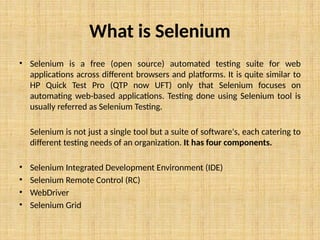
• Selenium is a free (open source) automated testing suite for web
applications across different browsers and platforms. It is quite similar to
HP Quick Test Pro (QTP now UFT) only that Selenium focuses on
automating web-based applications. Testing done using Selenium tool is
usually referred as Selenium Testing.
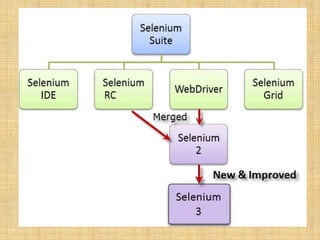
Selenium is not just a single tool but a suite of software's, each catering to
different testing needs of an organization. It has four components.
• Selenium Integrated Development Environment (IDE)
• Selenium Remote Control (RC)
• WebDriver
• Selenium Grid
Who developed Selenium?
• Since Selenium is a collection of different tools, it had different
developers as well. Below are the key persons who made notable
contributions to the Selenium Project
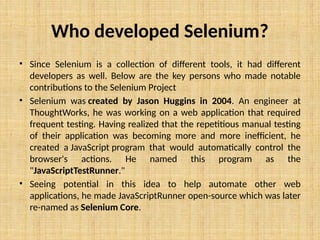
• Selenium was created by Jason Huggins in 2004. An engineer at
ThoughtWorks, he was working on a web application that required
frequent testing. Having realized that the repetitious manual testing
of their application was becoming more and more inefficient, he
created a JavaScript program that would automatically control the
browser's actions. He named this program as the
"JavaScriptTestRunner."
• Seeing potential in this idea to help automate other web
applications, he made JavaScriptRunner open-source which was later
re-named as Selenium Core.
Brief Introduction Selenium IDE
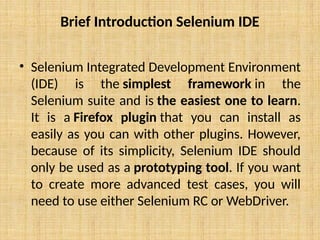
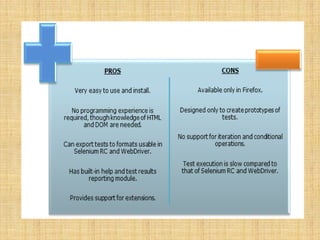
• Selenium Integrated Development Environment
(IDE) is the simplest framework in the
Selenium suite and is the easiest one to learn.
It is a Firefox plugin that you can install as
easily as you can with other plugins. However,
because of its simplicity, Selenium IDE should
only be used as a prototyping tool. If you want
to create more advanced test cases, you will
need to use either Selenium RC or WebDriver.
Brief Introduction Selenium Remote Control
(Selenium RC)
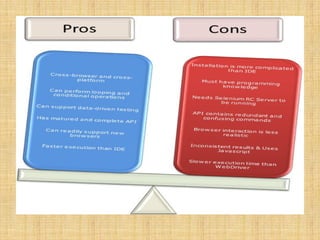
• Selenium RC was the flagship testing framework of the whole
Selenium project for a long time. This is the first automated
web testing tool that allowed users to use a programming
language they prefer. As of version 2.25.0, RC can support the
following programming languages:
• Java
• C#
• PHP
• Python
• Perl
• Ruby
Brief Introduction WebDriver
• The WebDriver proves itself to be better than both Selenium IDE and
Selenium RC in many aspects. It implements a more modern and
stable approach in automating the browser's actions. WebDriver,
unlike Selenium RC, does not rely on JavaScript for Automation. It
controls the browser by directly communicating with it.
• The supported languages are the same as those in Selenium RC.
• Java
• C#
• PHP
• Python
• Perl
• Ruby
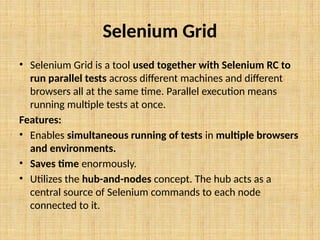
Selenium Grid
• Selenium Grid is a tool used together with Selenium RC to
run parallel tests across different machines and different
browsers all at the same time. Parallel execution means
running multiple tests at once.
Features:
• Enables simultaneous running of tests in multiple browsers
and environments.
• Saves time enormously.
• Utilizes the hub-and-nodes concept. The hub acts as a
central source of Selenium commands to each node
connected to it.
Summary
• The entire Selenium Tool Suite is comprised of four components:
• Selenium IDE, a Firefox add-on that you can only use in creating relatively simple
test cases and test suites.
• Selenium Remote Control, also known as Selenium 1, which is the first Selenium
tool that allowed users to use programming languages in creating complex tests.
• WebDriver, the newer breakthrough that allows your test scripts to
communicate directly to the browser, thereby controlling it from the OS level.
• Selenium Grid is also a tool that is used with Selenium RC to execute parallel
tests across different browsers and operating systems.
• Selenium RC and WebDriver was merged to form Selenium 2.
• Selenium is more advantageous than QTP in terms of costs and flexibility. It also
allows you to run tests in parallel, unlike in QTP where you are only allowed to
run tests sequentially.
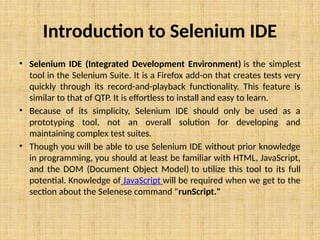
Introduction to Selenium IDE
• Selenium IDE (Integrated Development Environment) is the simplest
tool in the Selenium Suite. It is a Firefox add-on that creates tests very
quickly through its record-and-playback functionality. This feature is
similar to that of QTP. It is effortless to install and easy to learn.
• Because of its simplicity, Selenium IDE should only be used as a
prototyping tool, not an overall solution for developing and
maintaining complex test suites.
• Though you will be able to use Selenium IDE without prior knowledge
in programming, you should at least be familiar with HTML, JavaScript,
and the DOM (Document Object Model) to utilize this tool to its full
potential. Knowledge of JavaScript will be required when we get to the
section about the Selenese command "runScript."
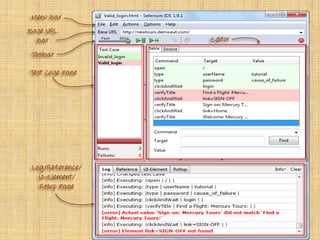
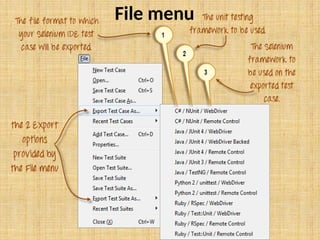
File menu
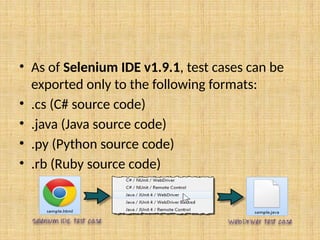
• As of Selenium IDE v1.9.1, test cases can be
exported only to the following formats:
• .cs (C# source code)
• .java (Java source code)
• .py (Python source code)
• .rb (Ruby source code)
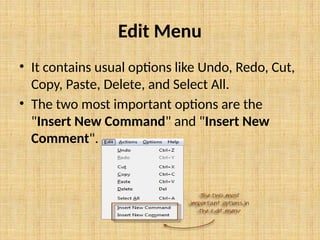
Edit Menu
• It contains usual options like Undo, Redo, Cut,
Copy, Paste, Delete, and Select All.
• The two most important options are the
"Insert New Command" and "Insert New
Comment".
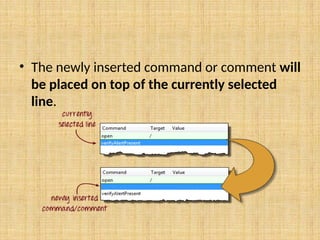
• The newly inserted command or comment will
be placed on top of the currently selected
line.
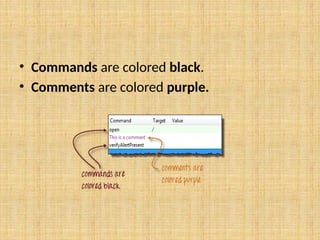
• Commands are colored black.
• Comments are colored purple.
Exercise - 1

Selenium.pptxgsjdxhasdjhckcjjkdcbdcbvdciosdc

  • 1.
  • 2.
    What is Selenium •Selenium is a free (open source) automated testing suite for web applications across different browsers and platforms. It is quite similar to HP Quick Test Pro (QTP now UFT) only that Selenium focuses on automating web-based applications. Testing done using Selenium tool is usually referred as Selenium Testing. Selenium is not just a single tool but a suite of software's, each catering to different testing needs of an organization. It has four components. • Selenium Integrated Development Environment (IDE) • Selenium Remote Control (RC) • WebDriver • Selenium Grid
  • 4.
    Who developed Selenium? •Since Selenium is a collection of different tools, it had different developers as well. Below are the key persons who made notable contributions to the Selenium Project • Selenium was created by Jason Huggins in 2004. An engineer at ThoughtWorks, he was working on a web application that required frequent testing. Having realized that the repetitious manual testing of their application was becoming more and more inefficient, he created a JavaScript program that would automatically control the browser's actions. He named this program as the "JavaScriptTestRunner." • Seeing potential in this idea to help automate other web applications, he made JavaScriptRunner open-source which was later re-named as Selenium Core.
  • 5.
    Brief Introduction SeleniumIDE • Selenium Integrated Development Environment (IDE) is the simplest framework in the Selenium suite and is the easiest one to learn. It is a Firefox plugin that you can install as easily as you can with other plugins. However, because of its simplicity, Selenium IDE should only be used as a prototyping tool. If you want to create more advanced test cases, you will need to use either Selenium RC or WebDriver.
  • 7.
    Brief Introduction SeleniumRemote Control (Selenium RC) • Selenium RC was the flagship testing framework of the whole Selenium project for a long time. This is the first automated web testing tool that allowed users to use a programming language they prefer. As of version 2.25.0, RC can support the following programming languages: • Java • C# • PHP • Python • Perl • Ruby
  • 9.
    Brief Introduction WebDriver •The WebDriver proves itself to be better than both Selenium IDE and Selenium RC in many aspects. It implements a more modern and stable approach in automating the browser's actions. WebDriver, unlike Selenium RC, does not rely on JavaScript for Automation. It controls the browser by directly communicating with it. • The supported languages are the same as those in Selenium RC. • Java • C# • PHP • Python • Perl • Ruby
  • 11.
    Selenium Grid • SeleniumGrid is a tool used together with Selenium RC to run parallel tests across different machines and different browsers all at the same time. Parallel execution means running multiple tests at once. Features: • Enables simultaneous running of tests in multiple browsers and environments. • Saves time enormously. • Utilizes the hub-and-nodes concept. The hub acts as a central source of Selenium commands to each node connected to it.
  • 12.
    Summary • The entireSelenium Tool Suite is comprised of four components: • Selenium IDE, a Firefox add-on that you can only use in creating relatively simple test cases and test suites. • Selenium Remote Control, also known as Selenium 1, which is the first Selenium tool that allowed users to use programming languages in creating complex tests. • WebDriver, the newer breakthrough that allows your test scripts to communicate directly to the browser, thereby controlling it from the OS level. • Selenium Grid is also a tool that is used with Selenium RC to execute parallel tests across different browsers and operating systems. • Selenium RC and WebDriver was merged to form Selenium 2. • Selenium is more advantageous than QTP in terms of costs and flexibility. It also allows you to run tests in parallel, unlike in QTP where you are only allowed to run tests sequentially.
  • 13.
    Introduction to SeleniumIDE • Selenium IDE (Integrated Development Environment) is the simplest tool in the Selenium Suite. It is a Firefox add-on that creates tests very quickly through its record-and-playback functionality. This feature is similar to that of QTP. It is effortless to install and easy to learn. • Because of its simplicity, Selenium IDE should only be used as a prototyping tool, not an overall solution for developing and maintaining complex test suites. • Though you will be able to use Selenium IDE without prior knowledge in programming, you should at least be familiar with HTML, JavaScript, and the DOM (Document Object Model) to utilize this tool to its full potential. Knowledge of JavaScript will be required when we get to the section about the Selenese command "runScript."
  • 15.
  • 16.
    • As ofSelenium IDE v1.9.1, test cases can be exported only to the following formats: • .cs (C# source code) • .java (Java source code) • .py (Python source code) • .rb (Ruby source code)
  • 17.
    Edit Menu • Itcontains usual options like Undo, Redo, Cut, Copy, Paste, Delete, and Select All. • The two most important options are the "Insert New Command" and "Insert New Comment".
  • 18.
    • The newlyinserted command or comment will be placed on top of the currently selected line.
  • 19.
    • Commands arecolored black. • Comments are colored purple.
  • 20.