Rest.li
Development Workflow Overview
Joe Betz, April 2014
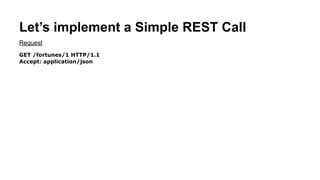
Let’s implement a Simple REST request
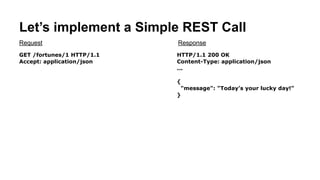
GET /fortunes/1 HTTP/1.1
Accept: application/json
Request
Let’s implement a Simple REST request
GET /fortunes/1 HTTP/1.1
Accept: application/json
HTTP/1.1 200 OK
Content-Type: application/json
Content-Length: …
!
{
"message": "Today’s your lucky day!"
}
Request Response
Step 1. Write a Data Schema
Fortune.pdsc
{
"name" : "Fortune",
"namespace" : "com.example",
"type" : "record",
"fields" : [
{ "name" : "message", "type" : "string" }
]
}
Step 1. Write a Data Schema
Fortune.pdsc
{
"name" : "Fortune",
"namespace" : "com.example",
"type" : "record",
"fields" : [
{ "name" : "message", "type" : "string" }
]
}
This schema defines a Fortune record. It has
a single message field of type string. Rest.li
schemas are based on avro schemas, and
supports maps, lists, optional fields, unions and
other useful data modeling constructs.
Step 1. Write a Data Schema
Fortune.pdsc
{
"name" : "Fortune",
"namespace" : "com.example",
"type" : "record",
"fields" : [
{ "name" : "message", "type" : "string" }
]
}
Rest.li schemas are designed for JSON. Here’s
what a Fortune looks like in JSON:
{
“message”: “Today is your lucky day!”
}
Step 1. Write a Data Schema
Fortune.pdsc
{
"name" : "Fortune",
"namespace" : "com.example",
"type" : "record",
"fields" : [
{ "name" : "message", "type" : "string" }
]
}
Rest.li’s automatically generates a binding class from our data schema:
Step 1. Write a Data Schema
Fortune.pdsc
{
"name" : "Fortune",
"namespace" : "com.example",
"type" : "record",
"fields" : [
{ "name" : "message", "type" : "string" }
]
}
Fortune.java
public class Fortune extends
RecordTemplate {
String getMessage();
void setMessage(String);
}
Rest.li’s automatically generates a binding class from our data schema:
Generated
Code
Step 1. Write a Data Schema
Fortune.pdsc
{
"name" : "Fortune",
"namespace" : "com.example",
"type" : "record",
"fields" : [
{ "name" : "message", "type" : "string" }
]
}
Fortune.java
public class Fortune extends
RecordTemplate {
String getMessage();
void setMessage(String);
}
Rest.li’s automatically generates a binding class from our data schema:
Generated
Code
This class is important, we’ll use it in a minute.
Step 2. Write a REST Resource
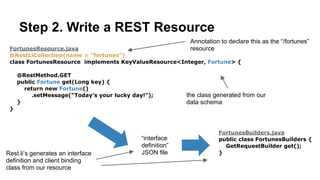
FortunesResource.java
@RestLiCollection(name = "fortunes")
class FortunesResource implements KeyValueResource<Long, Fortune> {
!
@RestMethod.GET
public Fortune get(Long key) {
return new Fortune()
.setMessage("Today’s your lucky day!");
}
}
Step 2. Write a REST Resource
FortunesResource.java
@RestLiCollection(name = "fortunes")
class FortunesResource implements KeyValueResource<Long, Fortune> {
!
@RestMethod.GET
public Fortune get(Long key) {
return new Fortune()
.setMessage("Today’s your lucky day!");
}
}
Step 2. Write a REST Resource
Rest.li annotation declares this class as our
implementation of the /fortunes resource.
FortunesResource.java
@RestLiCollection(name = "fortunes")
class FortunesResource implements KeyValueResource<Long, Fortune> {
!
@RestMethod.GET
public Fortune get(Long key) {
return new Fortune()
.setMessage("Today’s your lucky day!");
}
}
Step 2. Write a REST Resource
Our collection contains
Fortune entities, keyed by
Long.
FortunesResource.java
@RestLiCollection(name = "fortunes")
class FortunesResource implements KeyValueResource<Long, Fortune> {
!
@RestMethod.GET
public Fortune get(Long key) {
return new Fortune()
.setMessage("Today’s your lucky day!");
}
}
Step 2. Write a REST Resource
Our collection contains
Fortune entities, keyed by
Long.
Notice how we use the
generated Fortune class
here so everything is strongly
typed.
FortunesResource.java
@RestLiCollection(name = "fortunes")
class FortunesResource implements KeyValueResource<Long, Fortune> {
!
@RestMethod.GET
public Fortune get(Long key) {
return new Fortune()
.setMessage("Today’s your lucky day!");
}
}
Step 2. Write a REST Resource
Here we implement HTTP GET
FortunesResource.java
@RestLiCollection(name = "fortunes")
class FortunesResource implements KeyValueResource<Long, Fortune> {
!
@RestMethod.GET
public Fortune get(Long key) {
return new Fortune()
.setMessage("Today’s your lucky day!");
}
}
Step 2. Write a REST Resource
From our resource implementation,
Rest.li’s automatically generates an interface definition,
FortunesResource.java
@RestLiCollection(name = "fortunes")
class FortunesResource implements KeyValueResource<Long, Fortune> {
!
@RestMethod.GET
public Fortune get(Long key) {
return new Fortune()
.setMessage("Today’s your lucky day!");
}
}
Step 2. Write a REST Resource
fortunes.restspec.json
{
“path”: “/fortunes”,
“supports”: [ “get” ],
…
}
From our resource implementation,
Rest.li’s automatically generates an interface definition,
Generated
Code
FortunesResource.java
@RestLiCollection(name = "fortunes")
class FortunesResource implements KeyValueResource<Long, Fortune> {
!
@RestMethod.GET
public Fortune get(Long key) {
return new Fortune()
.setMessage("Today’s your lucky day!");
}
}
Step 2. Write a REST Resource
fortunes.restspec.json
{
“path”: “/fortunes”,
“supports”: [ “get” ],
…
}
From our resource implementation,
Rest.li’s automatically generates an interface definition, and client bindings.
Generated
Code
FortunesResource.java
@RestLiCollection(name = "fortunes")
class FortunesResource implements KeyValueResource<Long, Fortune> {
!
@RestMethod.GET
public Fortune get(Long key) {
return new Fortune()
.setMessage("Today’s your lucky day!");
}
}
Step 2. Write a REST Resource
FortunesBuilders.java
public class FortunesBuilders {
GetRequestBuilder get();
}
fortunes.restspec.json
{
“path”: “/fortunes”,
“supports”: [ “get” ],
…
}
From our resource implementation,
Rest.li’s automatically generates an interface definition, and client bindings.
Generated
Code Generated
Code
FortunesResource.java
@RestLiCollection(name = "fortunes")
class FortunesResource implements KeyValueResource<Long, Fortune> {
!
@RestMethod.GET
public Fortune get(Long key) {
return new Fortune()
.setMessage("Today’s your lucky day!");
}
}
Step 2. Write a REST Resource
FortunesBuilders.java
public class FortunesBuilders {
GetRequestBuilder get();
}
fortunes.restspec.json
{
“path”: “/fortunes”,
“supports”: [ “get” ],
…
}
From our resource implementation,
Rest.li’s automatically generates an interface definition, and client bindings.
Generated
Code Generated
Code
We’ll use these to build our client.
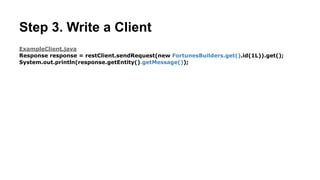
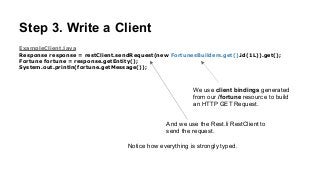
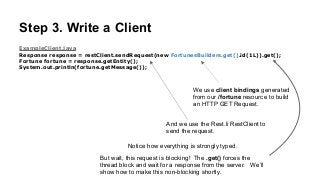
Step 3. Write a Client
ExampleClient.java
Response response = restClient.sendRequest(new FortunesBuilders.get().id(1L)).get();
Fortune fortune = response.getEntity();
System.out.println(fortune.getMessage());
Step 3. Write a Client
ExampleClient.java
Response response = restClient.sendRequest(new FortunesBuilders.get().id(1L)).get();
Fortune fortune = response.getEntity();
System.out.println(fortune.getMessage());
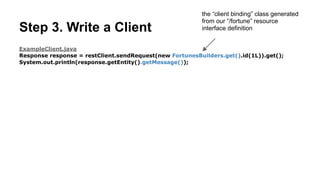
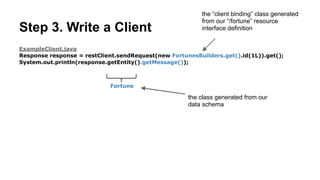
We use client bindings generated
from our /fortune resource to build
an HTTP GET Request.
Step 3. Write a Client
ExampleClient.java
Response response = restClient.sendRequest(new FortunesBuilders.get().id(1L)).get();
Fortune fortune = response.getEntity();
System.out.println(fortune.getMessage());
We use client bindings generated
from our /fortune resource to build
an HTTP GET Request.
And we use the Rest.li RestClient to
send the request.
Step 3. Write a Client
ExampleClient.java
Response response = restClient.sendRequest(new FortunesBuilders.get().id(1L)).get();
Fortune fortune = response.getEntity();
System.out.println(fortune.getMessage());
We use client bindings generated
from our /fortune resource to build
an HTTP GET Request.
And we use the Rest.li RestClient to
send the request.
Notice how everything is strongly typed.
Step 3. Write a Client
ExampleClient.java
Response response = restClient.sendRequest(new FortunesBuilders.get().id(1L)).get();
Fortune fortune = response.getEntity();
System.out.println(fortune.getMessage());
We use client bindings generated
from our /fortune resource to build
an HTTP GET Request.
And we use the Rest.li RestClient to
send the request.
Notice how everything is strongly typed.
But wait, this request is blocking! The .get() forces the
thread block and wait for a response from the server. We’ll
show how to make this non-blocking shortly.
Step 4. Run it!
Step 4. Run it!
“Today’s your lucky day!”
Step 4. Run it!
“Today’s your lucky day!”
Great! but all our code is synchronous and blocking. What about non-blocking?
Importance of async, non-blocking request
handling
Importance of async, non-blocking request
handling
Async processing is ideal for making multiple requests to backend systems in parallel and then
composing the results of those parallel requests into a single response. For modern internet
architectures, where many backend systems are involved in handling each request from a consumer,
making calls in parallel to these backend systems dramatically reduces the overall time to response
back to the consumer.
Importance of async, non-blocking request
handling
Async processing is ideal for making multiple requests to backend systems in parallel and then
composing the results of those parallel requests into a single response. For modern internet
architectures, where many backend systems are involved in handling each request from a consumer,
making calls in parallel to these backend systems dramatically reduces the overall time to response
back to the consumer.
Servers running async code scale better because they can handle very large numbers of
concurrent requests. This is because, when you write async code, no threads are blocked waiting
for something to complete. If you don’t write async code and you need to handle large numbers of
concurrent requests, you’ll need one thread per concurrent request. Each thread takes up
considerable memory, and when you run out of memory (or max out a thread pool), the server is
unable to take on more requests, resulting in timed out requests and in cases of many complex
architectures, cascading failure.
Async in Rest.li
Async in Rest.li
Rest.li integrates with ParSeq for both client and server side
async.
Async in Rest.li
Rest.li integrates with ParSeq for both client and server side
async.
Using ParSeq, we will write Tasks. Tasks can be composed
together in parallel (par) or sequence (seq) into larger tasks.
Tasks are executed asynchronously by the ParSeq engine.
Async in Rest.li
Rest.li integrates with ParSeq for both client and server side
async.
Using ParSeq, we will write Tasks. Tasks can be composed
together in parallel (par) or sequence (seq) into larger tasks.
Tasks are executed asynchronously by the ParSeq engine.
Let’s modify our Resource Implementation and Client to use
ParSeq.
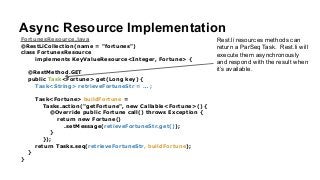
Async Resource Implementation
FortunesResource.java
@RestLiCollection(name = "fortunes")
class FortunesResource
implements KeyValueResource<Integer, Fortune> {
!
@RestMethod.GET
public Task<Fortune> get(Long key) {
Task<String> retrieveFortuneStr = … ;
!
Task<Fortune> buildFortune =
Tasks.action("getFortune", new Callable<Fortune>() {
@Override public Fortune call() throws Exception {
return new Fortune()
.setMessage(retieveFortuneStr.get());
}
});
return Tasks.seq(retrieveFortuneStr, buildFortune);
}
}
Async Resource Implementation
FortunesResource.java
@RestLiCollection(name = "fortunes")
class FortunesResource
implements KeyValueResource<Integer, Fortune> {
!
@RestMethod.GET
public Task<Fortune> get(Long key) {
Task<String> retrieveFortuneStr = … ;
!
Task<Fortune> buildFortune =
Tasks.action("getFortune", new Callable<Fortune>() {
@Override public Fortune call() throws Exception {
return new Fortune()
.setMessage(retieveFortuneStr.get());
}
});
return Tasks.seq(retrieveFortuneStr, buildFortune);
}
}
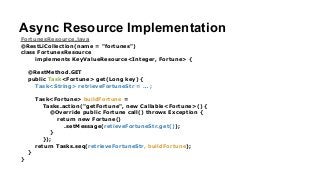
Rest.li resources methods can
return a ParSeq Task. Rest.li will
execute them asynchronously
and respond with the result when
it’s available.
Async Resource Implementation
FortunesResource.java
@RestLiCollection(name = "fortunes")
class FortunesResource
implements KeyValueResource<Integer, Fortune> {
!
@RestMethod.GET
public Task<Fortune> get(Long key) {
Task<String> retrieveFortuneStr = … ;
!
Task<Fortune> buildFortune =
Tasks.action("getFortune", new Callable<Fortune>() {
@Override public Fortune call() throws Exception {
return new Fortune()
.setMessage(retieveFortuneStr.get());
}
});
return Tasks.seq(retrieveFortuneStr, buildFortune);
}
}
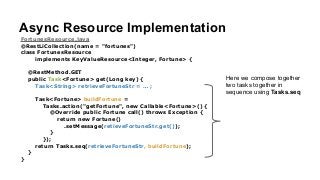
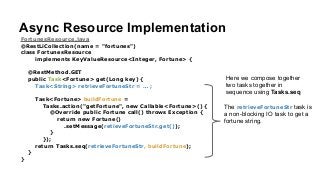
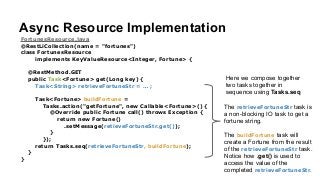
Here we compose together
two tasks together in
sequence using Tasks.seq
Async Resource Implementation
FortunesResource.java
@RestLiCollection(name = "fortunes")
class FortunesResource
implements KeyValueResource<Integer, Fortune> {
!
@RestMethod.GET
public Task<Fortune> get(Long key) {
Task<String> retrieveFortuneStr = … ;
!
Task<Fortune> buildFortune =
Tasks.action("getFortune", new Callable<Fortune>() {
@Override public Fortune call() throws Exception {
return new Fortune()
.setMessage(retieveFortuneStr.get());
}
});
return Tasks.seq(retrieveFortuneStr, buildFortune);
}
}
Here we compose together
two tasks together in
sequence using Tasks.seq
The retrieveFortuneStr task is
a non-blocking IO task to get a
fortune string.
Async Resource Implementation
FortunesResource.java
@RestLiCollection(name = "fortunes")
class FortunesResource
implements KeyValueResource<Integer, Fortune> {
!
@RestMethod.GET
public Task<Fortune> get(Long key) {
Task<String> retrieveFortuneStr = … ;
!
Task<Fortune> buildFortune =
Tasks.action("getFortune", new Callable<Fortune>() {
@Override public Fortune call() throws Exception {
return new Fortune()
.setMessage(retieveFortuneStr.get());
}
});
return Tasks.seq(retrieveFortuneStr, buildFortune);
}
}
Here we compose together
two tasks together in
sequence using Tasks.seq
The retrieveFortuneStr task is
a non-blocking IO task to get a
fortune string.
The buildFortune task will
create a Fortune from the result
of the retrieveFortuneStr task.
Notice how .get() is used to
access the value of the
completed retrieveFortuneStr.
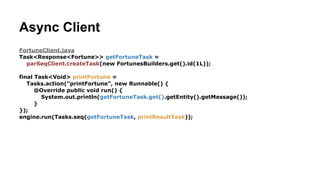
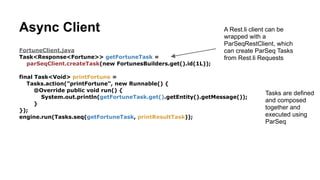
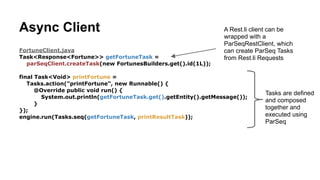
Async Client
FortuneClient.java
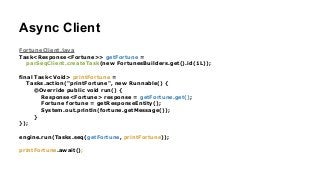
Task<Response<Fortune>> getFortune =
parSeqClient.createTask(new FortunesBuilders.get().id(1L));
!
final Task<Void> printFortune =
Tasks.action("printFortune", new Runnable() {
@Override public void run() {
Response<Fortune> response = getFortune.get();
Fortune fortune = getResponseEntity();
System.out.println(fortune.getMessage());
}
});
!
engine.run(Tasks.seq(getFortune, printFortune));
!
printFortune.await();
Async Client
FortuneClient.java
Task<Response<Fortune>> getFortune =
parSeqClient.createTask(new FortunesBuilders.get().id(1L));
!
final Task<Void> printFortune =
Tasks.action("printFortune", new Runnable() {
@Override public void run() {
Response<Fortune> response = getFortune.get();
Fortune fortune = getResponseEntity();
System.out.println(fortune.getMessage());
}
});
!
engine.run(Tasks.seq(getFortune, printFortune));
!
printFortune.await();
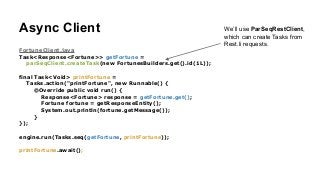
We’ll use ParSeqRestClient,
which can create Tasks from
Rest.li requests.
Async Client
FortuneClient.java
Task<Response<Fortune>> getFortune =
parSeqClient.createTask(new FortunesBuilders.get().id(1L));
!
final Task<Void> printFortune =
Tasks.action("printFortune", new Runnable() {
@Override public void run() {
Response<Fortune> response = getFortune.get();
Fortune fortune = getResponseEntity();
System.out.println(fortune.getMessage());
}
});
!
engine.run(Tasks.seq(getFortune, printFortune));
!
printFortune.await();
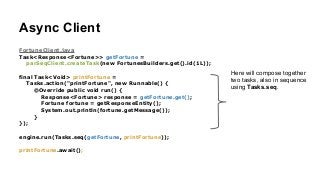
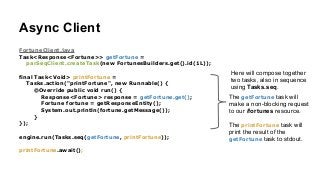
Here will compose together
two tasks, also in sequence
using Tasks.seq.
Async Client
FortuneClient.java
Task<Response<Fortune>> getFortune =
parSeqClient.createTask(new FortunesBuilders.get().id(1L));
!
final Task<Void> printFortune =
Tasks.action("printFortune", new Runnable() {
@Override public void run() {
Response<Fortune> response = getFortune.get();
Fortune fortune = getResponseEntity();
System.out.println(fortune.getMessage());
}
});
!
engine.run(Tasks.seq(getFortune, printFortune));
!
printFortune.await();
Here will compose together
two tasks, also in sequence
using Tasks.seq.
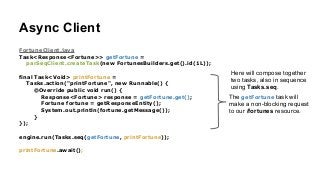
The getFortune task will
make a non-blocking request
to our /fortunes resource.
Async Client
FortuneClient.java
Task<Response<Fortune>> getFortune =
parSeqClient.createTask(new FortunesBuilders.get().id(1L));
!
final Task<Void> printFortune =
Tasks.action("printFortune", new Runnable() {
@Override public void run() {
Response<Fortune> response = getFortune.get();
Fortune fortune = getResponseEntity();
System.out.println(fortune.getMessage());
}
});
!
engine.run(Tasks.seq(getFortune, printFortune));
!
printFortune.await();
Here will compose together
two tasks, also in sequence
using Tasks.seq.
The getFortune task will
make a non-blocking request
to our /fortunes resource.
The printFortune task will
print the result of the
getFortune task to stdout.
Async Client
FortuneClient.java
Task<Response<Fortune>> getFortune =
parSeqClient.createTask(new FortunesBuilders.get().id(1L));
!
final Task<Void> printFortune =
Tasks.action("printFortune", new Runnable() {
@Override public void run() {
Response<Fortune> response = getFortune.get();
Fortune fortune = getResponseEntity();
System.out.println(fortune.getMessage());
}
});
!
engine.run(Tasks.seq(getFortune, printFortune));
!
printFortune.await();
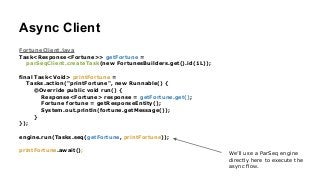
We’ll use a ParSeq engine
directly here to execute the
async flow.
Async Client
FortuneClient.java
Task<Response<Fortune>> getFortune =
parSeqClient.createTask(new FortunesBuilders.get().id(1L));
!
final Task<Void> printFortune =
Tasks.action("printFortune", new Runnable() {
@Override public void run() {
Response<Fortune> response = getFortune.get();
Fortune fortune = getResponseEntity();
System.out.println(fortune.getMessage());
}
});
!
engine.run(Tasks.seq(getFortune, printFortune));
!
printFortune.await();
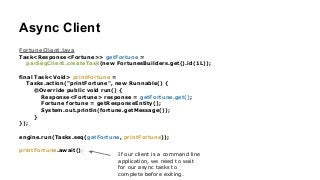
If our client is a command line
application, we need to wait
for our async tasks to
complete before exiting.
Run it again!
Run it again!
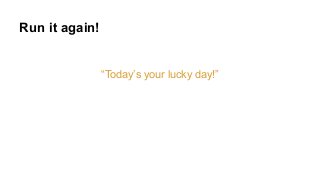
“Today’s your lucky day!”
Run it again!
“Today’s your lucky day!”
Much better. Now we can scale.
Next Steps
To learn more, try the
Rest.li Quickstart Tutorial
!
!
For more details on ParSeq,
see the ParSeq Wiki

Introduction to rest.li

  • 1.
  • 2.
    Let’s implement aSimple REST request
  • 3.
    Let’s implement aSimple REST request GET /fortunes/1 HTTP/1.1 Accept: application/json Request
  • 4.
    Let’s implement aSimple REST request GET /fortunes/1 HTTP/1.1 Accept: application/json HTTP/1.1 200 OK Content-Type: application/json Content-Length: … ! { "message": "Today’s your lucky day!" } Request Response
  • 5.
    Step 1. Writea Data Schema
  • 6.
    Step 1. Writea Data Schema Fortune.pdsc { "name" : "Fortune", "namespace" : "com.example", "type" : "record", "fields" : [ { "name" : "message", "type" : "string" } ] }
  • 7.
    Step 1. Writea Data Schema Fortune.pdsc { "name" : "Fortune", "namespace" : "com.example", "type" : "record", "fields" : [ { "name" : "message", "type" : "string" } ] } This schema defines a Fortune record. It has a single message field of type string. Rest.li schemas are based on avro schemas, and supports maps, lists, optional fields, unions and other useful data modeling constructs.
  • 8.
    Step 1. Writea Data Schema Fortune.pdsc { "name" : "Fortune", "namespace" : "com.example", "type" : "record", "fields" : [ { "name" : "message", "type" : "string" } ] } Rest.li schemas are designed for JSON. Here’s what a Fortune looks like in JSON: { “message”: “Today is your lucky day!” }
  • 9.
    Step 1. Writea Data Schema Fortune.pdsc { "name" : "Fortune", "namespace" : "com.example", "type" : "record", "fields" : [ { "name" : "message", "type" : "string" } ] } Rest.li’s automatically generates a binding class from our data schema:
  • 10.
    Step 1. Writea Data Schema Fortune.pdsc { "name" : "Fortune", "namespace" : "com.example", "type" : "record", "fields" : [ { "name" : "message", "type" : "string" } ] } Fortune.java public class Fortune extends RecordTemplate { String getMessage(); void setMessage(String); } Rest.li’s automatically generates a binding class from our data schema: Generated Code
  • 11.
    Step 1. Writea Data Schema Fortune.pdsc { "name" : "Fortune", "namespace" : "com.example", "type" : "record", "fields" : [ { "name" : "message", "type" : "string" } ] } Fortune.java public class Fortune extends RecordTemplate { String getMessage(); void setMessage(String); } Rest.li’s automatically generates a binding class from our data schema: Generated Code This class is important, we’ll use it in a minute.
  • 12.
    Step 2. Writea REST Resource
  • 13.
    FortunesResource.java @RestLiCollection(name = "fortunes") classFortunesResource implements KeyValueResource<Long, Fortune> { ! @RestMethod.GET public Fortune get(Long key) { return new Fortune() .setMessage("Today’s your lucky day!"); } } Step 2. Write a REST Resource
  • 14.
    FortunesResource.java @RestLiCollection(name = "fortunes") classFortunesResource implements KeyValueResource<Long, Fortune> { ! @RestMethod.GET public Fortune get(Long key) { return new Fortune() .setMessage("Today’s your lucky day!"); } } Step 2. Write a REST Resource Rest.li annotation declares this class as our implementation of the /fortunes resource.
  • 15.
    FortunesResource.java @RestLiCollection(name = "fortunes") classFortunesResource implements KeyValueResource<Long, Fortune> { ! @RestMethod.GET public Fortune get(Long key) { return new Fortune() .setMessage("Today’s your lucky day!"); } } Step 2. Write a REST Resource Our collection contains Fortune entities, keyed by Long.
  • 16.
    FortunesResource.java @RestLiCollection(name = "fortunes") classFortunesResource implements KeyValueResource<Long, Fortune> { ! @RestMethod.GET public Fortune get(Long key) { return new Fortune() .setMessage("Today’s your lucky day!"); } } Step 2. Write a REST Resource Our collection contains Fortune entities, keyed by Long. Notice how we use the generated Fortune class here so everything is strongly typed.
  • 17.
    FortunesResource.java @RestLiCollection(name = "fortunes") classFortunesResource implements KeyValueResource<Long, Fortune> { ! @RestMethod.GET public Fortune get(Long key) { return new Fortune() .setMessage("Today’s your lucky day!"); } } Step 2. Write a REST Resource Here we implement HTTP GET
  • 18.
    FortunesResource.java @RestLiCollection(name = "fortunes") classFortunesResource implements KeyValueResource<Long, Fortune> { ! @RestMethod.GET public Fortune get(Long key) { return new Fortune() .setMessage("Today’s your lucky day!"); } } Step 2. Write a REST Resource From our resource implementation, Rest.li’s automatically generates an interface definition,
  • 19.
    FortunesResource.java @RestLiCollection(name = "fortunes") classFortunesResource implements KeyValueResource<Long, Fortune> { ! @RestMethod.GET public Fortune get(Long key) { return new Fortune() .setMessage("Today’s your lucky day!"); } } Step 2. Write a REST Resource fortunes.restspec.json { “path”: “/fortunes”, “supports”: [ “get” ], … } From our resource implementation, Rest.li’s automatically generates an interface definition, Generated Code
  • 20.
    FortunesResource.java @RestLiCollection(name = "fortunes") classFortunesResource implements KeyValueResource<Long, Fortune> { ! @RestMethod.GET public Fortune get(Long key) { return new Fortune() .setMessage("Today’s your lucky day!"); } } Step 2. Write a REST Resource fortunes.restspec.json { “path”: “/fortunes”, “supports”: [ “get” ], … } From our resource implementation, Rest.li’s automatically generates an interface definition, and client bindings. Generated Code
  • 21.
    FortunesResource.java @RestLiCollection(name = "fortunes") classFortunesResource implements KeyValueResource<Long, Fortune> { ! @RestMethod.GET public Fortune get(Long key) { return new Fortune() .setMessage("Today’s your lucky day!"); } } Step 2. Write a REST Resource FortunesBuilders.java public class FortunesBuilders { GetRequestBuilder get(); } fortunes.restspec.json { “path”: “/fortunes”, “supports”: [ “get” ], … } From our resource implementation, Rest.li’s automatically generates an interface definition, and client bindings. Generated Code Generated Code
  • 22.
    FortunesResource.java @RestLiCollection(name = "fortunes") classFortunesResource implements KeyValueResource<Long, Fortune> { ! @RestMethod.GET public Fortune get(Long key) { return new Fortune() .setMessage("Today’s your lucky day!"); } } Step 2. Write a REST Resource FortunesBuilders.java public class FortunesBuilders { GetRequestBuilder get(); } fortunes.restspec.json { “path”: “/fortunes”, “supports”: [ “get” ], … } From our resource implementation, Rest.li’s automatically generates an interface definition, and client bindings. Generated Code Generated Code We’ll use these to build our client.
  • 23.
    Step 3. Writea Client
  • 24.
    Step 3. Writea Client ExampleClient.java Response response = restClient.sendRequest(new FortunesBuilders.get().id(1L)).get(); Fortune fortune = response.getEntity(); System.out.println(fortune.getMessage());
  • 25.
    Step 3. Writea Client ExampleClient.java Response response = restClient.sendRequest(new FortunesBuilders.get().id(1L)).get(); Fortune fortune = response.getEntity(); System.out.println(fortune.getMessage()); We use client bindings generated from our /fortune resource to build an HTTP GET Request.
  • 26.
    Step 3. Writea Client ExampleClient.java Response response = restClient.sendRequest(new FortunesBuilders.get().id(1L)).get(); Fortune fortune = response.getEntity(); System.out.println(fortune.getMessage()); We use client bindings generated from our /fortune resource to build an HTTP GET Request. And we use the Rest.li RestClient to send the request.
  • 27.
    Step 3. Writea Client ExampleClient.java Response response = restClient.sendRequest(new FortunesBuilders.get().id(1L)).get(); Fortune fortune = response.getEntity(); System.out.println(fortune.getMessage()); We use client bindings generated from our /fortune resource to build an HTTP GET Request. And we use the Rest.li RestClient to send the request. Notice how everything is strongly typed.
  • 28.
    Step 3. Writea Client ExampleClient.java Response response = restClient.sendRequest(new FortunesBuilders.get().id(1L)).get(); Fortune fortune = response.getEntity(); System.out.println(fortune.getMessage()); We use client bindings generated from our /fortune resource to build an HTTP GET Request. And we use the Rest.li RestClient to send the request. Notice how everything is strongly typed. But wait, this request is blocking! The .get() forces the thread block and wait for a response from the server. We’ll show how to make this non-blocking shortly.
  • 29.
  • 30.
    Step 4. Runit! “Today’s your lucky day!”
  • 31.
    Step 4. Runit! “Today’s your lucky day!” Great! but all our code is synchronous and blocking. What about non-blocking?
  • 32.
    Importance of async,non-blocking request handling
  • 33.
    Importance of async,non-blocking request handling Async processing is ideal for making multiple requests to backend systems in parallel and then composing the results of those parallel requests into a single response. For modern internet architectures, where many backend systems are involved in handling each request from a consumer, making calls in parallel to these backend systems dramatically reduces the overall time to response back to the consumer.
  • 34.
    Importance of async,non-blocking request handling Async processing is ideal for making multiple requests to backend systems in parallel and then composing the results of those parallel requests into a single response. For modern internet architectures, where many backend systems are involved in handling each request from a consumer, making calls in parallel to these backend systems dramatically reduces the overall time to response back to the consumer. Servers running async code scale better because they can handle very large numbers of concurrent requests. This is because, when you write async code, no threads are blocked waiting for something to complete. If you don’t write async code and you need to handle large numbers of concurrent requests, you’ll need one thread per concurrent request. Each thread takes up considerable memory, and when you run out of memory (or max out a thread pool), the server is unable to take on more requests, resulting in timed out requests and in cases of many complex architectures, cascading failure.
  • 35.
  • 36.
    Async in Rest.li Rest.liintegrates with ParSeq for both client and server side async.
  • 37.
    Async in Rest.li Rest.liintegrates with ParSeq for both client and server side async. Using ParSeq, we will write Tasks. Tasks can be composed together in parallel (par) or sequence (seq) into larger tasks. Tasks are executed asynchronously by the ParSeq engine.
  • 38.
    Async in Rest.li Rest.liintegrates with ParSeq for both client and server side async. Using ParSeq, we will write Tasks. Tasks can be composed together in parallel (par) or sequence (seq) into larger tasks. Tasks are executed asynchronously by the ParSeq engine. Let’s modify our Resource Implementation and Client to use ParSeq.
  • 39.
  • 40.
    Async Resource Implementation FortunesResource.java @RestLiCollection(name= "fortunes") class FortunesResource implements KeyValueResource<Integer, Fortune> { ! @RestMethod.GET public Task<Fortune> get(Long key) { Task<String> retrieveFortuneStr = … ; ! Task<Fortune> buildFortune = Tasks.action("getFortune", new Callable<Fortune>() { @Override public Fortune call() throws Exception { return new Fortune() .setMessage(retieveFortuneStr.get()); } }); return Tasks.seq(retrieveFortuneStr, buildFortune); } }
  • 41.
    Async Resource Implementation FortunesResource.java @RestLiCollection(name= "fortunes") class FortunesResource implements KeyValueResource<Integer, Fortune> { ! @RestMethod.GET public Task<Fortune> get(Long key) { Task<String> retrieveFortuneStr = … ; ! Task<Fortune> buildFortune = Tasks.action("getFortune", new Callable<Fortune>() { @Override public Fortune call() throws Exception { return new Fortune() .setMessage(retieveFortuneStr.get()); } }); return Tasks.seq(retrieveFortuneStr, buildFortune); } } Rest.li resources methods can return a ParSeq Task. Rest.li will execute them asynchronously and respond with the result when it’s available.
  • 42.
    Async Resource Implementation FortunesResource.java @RestLiCollection(name= "fortunes") class FortunesResource implements KeyValueResource<Integer, Fortune> { ! @RestMethod.GET public Task<Fortune> get(Long key) { Task<String> retrieveFortuneStr = … ; ! Task<Fortune> buildFortune = Tasks.action("getFortune", new Callable<Fortune>() { @Override public Fortune call() throws Exception { return new Fortune() .setMessage(retieveFortuneStr.get()); } }); return Tasks.seq(retrieveFortuneStr, buildFortune); } } Here we compose together two tasks together in sequence using Tasks.seq
  • 43.
    Async Resource Implementation FortunesResource.java @RestLiCollection(name= "fortunes") class FortunesResource implements KeyValueResource<Integer, Fortune> { ! @RestMethod.GET public Task<Fortune> get(Long key) { Task<String> retrieveFortuneStr = … ; ! Task<Fortune> buildFortune = Tasks.action("getFortune", new Callable<Fortune>() { @Override public Fortune call() throws Exception { return new Fortune() .setMessage(retieveFortuneStr.get()); } }); return Tasks.seq(retrieveFortuneStr, buildFortune); } } Here we compose together two tasks together in sequence using Tasks.seq The retrieveFortuneStr task is a non-blocking IO task to get a fortune string.
  • 44.
    Async Resource Implementation FortunesResource.java @RestLiCollection(name= "fortunes") class FortunesResource implements KeyValueResource<Integer, Fortune> { ! @RestMethod.GET public Task<Fortune> get(Long key) { Task<String> retrieveFortuneStr = … ; ! Task<Fortune> buildFortune = Tasks.action("getFortune", new Callable<Fortune>() { @Override public Fortune call() throws Exception { return new Fortune() .setMessage(retieveFortuneStr.get()); } }); return Tasks.seq(retrieveFortuneStr, buildFortune); } } Here we compose together two tasks together in sequence using Tasks.seq The retrieveFortuneStr task is a non-blocking IO task to get a fortune string. The buildFortune task will create a Fortune from the result of the retrieveFortuneStr task. Notice how .get() is used to access the value of the completed retrieveFortuneStr.
  • 45.
    Async Client FortuneClient.java Task<Response<Fortune>> getFortune= parSeqClient.createTask(new FortunesBuilders.get().id(1L)); ! final Task<Void> printFortune = Tasks.action("printFortune", new Runnable() { @Override public void run() { Response<Fortune> response = getFortune.get(); Fortune fortune = getResponseEntity(); System.out.println(fortune.getMessage()); } }); ! engine.run(Tasks.seq(getFortune, printFortune)); ! printFortune.await();
  • 46.
    Async Client FortuneClient.java Task<Response<Fortune>> getFortune= parSeqClient.createTask(new FortunesBuilders.get().id(1L)); ! final Task<Void> printFortune = Tasks.action("printFortune", new Runnable() { @Override public void run() { Response<Fortune> response = getFortune.get(); Fortune fortune = getResponseEntity(); System.out.println(fortune.getMessage()); } }); ! engine.run(Tasks.seq(getFortune, printFortune)); ! printFortune.await(); We’ll use ParSeqRestClient, which can create Tasks from Rest.li requests.
  • 47.
    Async Client FortuneClient.java Task<Response<Fortune>> getFortune= parSeqClient.createTask(new FortunesBuilders.get().id(1L)); ! final Task<Void> printFortune = Tasks.action("printFortune", new Runnable() { @Override public void run() { Response<Fortune> response = getFortune.get(); Fortune fortune = getResponseEntity(); System.out.println(fortune.getMessage()); } }); ! engine.run(Tasks.seq(getFortune, printFortune)); ! printFortune.await(); Here will compose together two tasks, also in sequence using Tasks.seq.
  • 48.
    Async Client FortuneClient.java Task<Response<Fortune>> getFortune= parSeqClient.createTask(new FortunesBuilders.get().id(1L)); ! final Task<Void> printFortune = Tasks.action("printFortune", new Runnable() { @Override public void run() { Response<Fortune> response = getFortune.get(); Fortune fortune = getResponseEntity(); System.out.println(fortune.getMessage()); } }); ! engine.run(Tasks.seq(getFortune, printFortune)); ! printFortune.await(); Here will compose together two tasks, also in sequence using Tasks.seq. The getFortune task will make a non-blocking request to our /fortunes resource.
  • 49.
    Async Client FortuneClient.java Task<Response<Fortune>> getFortune= parSeqClient.createTask(new FortunesBuilders.get().id(1L)); ! final Task<Void> printFortune = Tasks.action("printFortune", new Runnable() { @Override public void run() { Response<Fortune> response = getFortune.get(); Fortune fortune = getResponseEntity(); System.out.println(fortune.getMessage()); } }); ! engine.run(Tasks.seq(getFortune, printFortune)); ! printFortune.await(); Here will compose together two tasks, also in sequence using Tasks.seq. The getFortune task will make a non-blocking request to our /fortunes resource. The printFortune task will print the result of the getFortune task to stdout.
  • 50.
    Async Client FortuneClient.java Task<Response<Fortune>> getFortune= parSeqClient.createTask(new FortunesBuilders.get().id(1L)); ! final Task<Void> printFortune = Tasks.action("printFortune", new Runnable() { @Override public void run() { Response<Fortune> response = getFortune.get(); Fortune fortune = getResponseEntity(); System.out.println(fortune.getMessage()); } }); ! engine.run(Tasks.seq(getFortune, printFortune)); ! printFortune.await(); We’ll use a ParSeq engine directly here to execute the async flow.
  • 51.
    Async Client FortuneClient.java Task<Response<Fortune>> getFortune= parSeqClient.createTask(new FortunesBuilders.get().id(1L)); ! final Task<Void> printFortune = Tasks.action("printFortune", new Runnable() { @Override public void run() { Response<Fortune> response = getFortune.get(); Fortune fortune = getResponseEntity(); System.out.println(fortune.getMessage()); } }); ! engine.run(Tasks.seq(getFortune, printFortune)); ! printFortune.await(); If our client is a command line application, we need to wait for our async tasks to complete before exiting.
  • 52.
  • 53.
    Run it again! “Today’syour lucky day!”
  • 54.
    Run it again! “Today’syour lucky day!” Much better. Now we can scale.
  • 55.
    Next Steps To learnmore, try the Rest.li Quickstart Tutorial ! ! For more details on ParSeq, see the ParSeq Wiki