

5 Reasons Why Job Seekers 
Abandon Your Application
This deck was originally presented during Findly’s live 
webinar, “5 Reasons Why Job Seekers Abandon Your 
Application” 
To view the full webinar replay, please visit: 
https://www.brighttalk.com/webcast/12037/133453
About Findly 
Recruiting Re-imagined 
Findly's enterprise cloud solutions uniquely incorporate lightweight and fully 
integrated applications that simplify and accelerate talent acquisition. 
Our suite of integrated and mobile-optimized tools support all areas of 
recruiting – talent attraction and acquisition, candidate engagement and 
enrichment, and hiring and onboarding. 
Learn more at www.findly.com
Jeff Kreutz 
SVP Products 
• More than 20 Years Developing 
Successful Market-Leading Software 
Products and Services 
• Directs Product Strategy, Product 
Management and Product Marketing 
Findly.com 
facebook.com/getFindly 
@getFindly 
About Today’s Speaker 
@
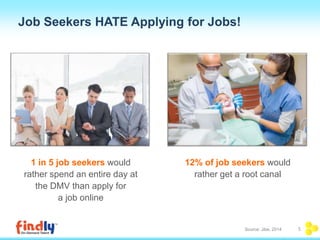
Job Seekers HATE Applying for Jobs! 
12% of job seekers would 
rather get a root canal 
1 in 5 job seekers would 
rather spend an entire day at 
the DMV than apply for 
a job online 
Source: Jibe, 2014 5
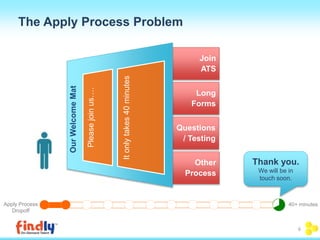
Join 
ATS 
Long 
Forms 
Questions 
/ Testing 
Other 
Process 
Please join us…. 
It only takes 40 minutes 
Our Welcome Mat 
Apply Process 
Dropoff 
40+ minutes 
The Apply Process Problem 
Thank you. 
We will be in 
touch soon. 
6
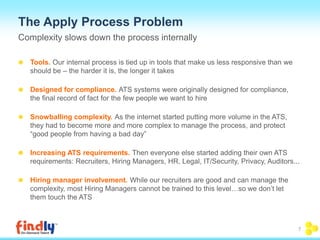
The Apply Process Problem 
Complexity slows down the process internally 
Tools. Our internal process is tied up in tools that make us less responsive than we 
should be – the harder it is, the longer it takes 
Designed for compliance. ATS systems were originally designed for compliance, 
the final record of fact for the few people we want to hire 
Snowballing complexity. As the internet started putting more volume in the ATS, 
they had to become more and more complex to manage the process, and protect 
“good people from having a bad day” 
Increasing ATS requirements. Then everyone else started adding their own ATS 
requirements: Recruiters, Hiring Managers, HR, Legal, IT/Security, Privacy, Auditors... 
Hiring manager involvement. While our recruiters are good and can manage the 
complexity, most Hiring Managers cannot be trained to this level…so we don’t let 
them touch the ATS 
7
8 
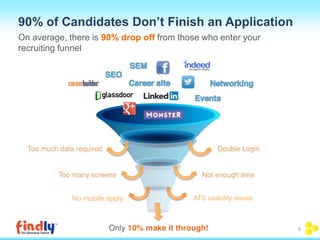
90% of Candidates Don’t Finish an Application 
On average, there is 90% drop off from those who enter your 
recruiting funnel 
No mobile apply ATS usability issues
#1 
5 Reasons Why Job Seekers Abandon Your Application: 
Too Many Screens (or Too Few?)
10 
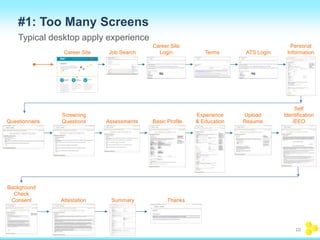
#1: Too Many Screens 
Typical desktop apply experience 
Career Site Job Search 
Screening 
Questionnaire Questions 
Career Site 
Login Terms ATS Login 
Personal 
Information 
Assessments Basic Profile 
Experience 
& Education 
Upload 
Resume 
Self 
Identification 
/EEO 
Background 
Check 
Consent Attestation Summary Thanks
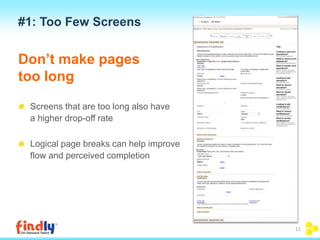
#1: Too Few Screens 
Don’t make pages 
too long 
Screens that are too long also have 
a higher drop-off rate 
Logical page breaks can help improve 
flow and perceived completion 
11
#2 
5 Reasons Why Job Seekers Abandon Your Application: 
The Dreaded Double Login
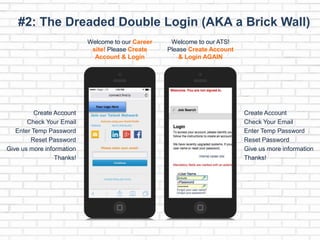
#2: The Dreaded Double Login (AKA a Brick Wall) 
Welcome to our Career 
site! Please Create 
Account & Login 
Your Logo Here 
Create Account 
Check Your Email 
Enter Temp Password 
Reset Password 
Give us more information 
Thanks! 
Welcome to our ATS! 
Please Create Account 
& Login AGAIN 
Create Account 
Check Your Email 
Enter Temp Password 
Reset Password 
Give us more information 
Thanks!
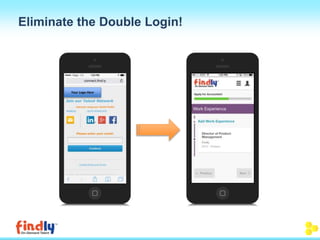
Eliminate the Double Login! 
Your Logo Here
#3 
5 Reasons Why Job Seekers Abandon Your Application: 
Too Much Data Required
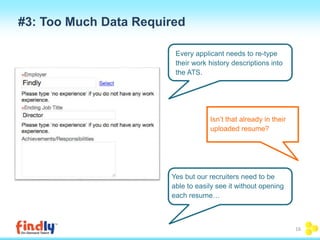
#3: Too Much Data Required 
Every applicant needs to re-type 
their work history descriptions into 
the ATS. 
Isn’t that already in their 
uploaded resume? 
Yes but our recruiters need to be 
able to easily see it without opening 
each resume… 
16
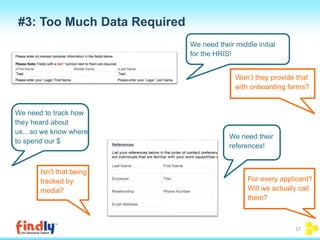
We need their middle initial 
for the HRIS! 
Won’t they provide that 
with onboarding forms? 
We need their 
references! 
We need to track how 
they heard about 
us…so we know where 
to spend our $ 
Isn’t that being 
tracked by 
media? 
For every applicant? 
Will we actually call 
them? 
#3: Too Much Data Required 
17
#4 
5 Reasons Why Job Seekers Abandon Your Application: 
No Mobile Apply
#4: No Mobile Apply 
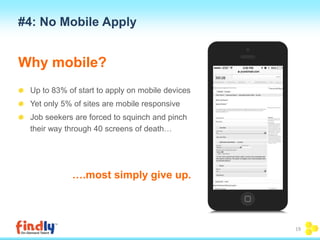
Why mobile? 
Up to 83% of start to apply on mobile devices 
Yet only 5% of sites are mobile responsive 
Job seekers are forced to squinch and pinch 
their way through 40 screens of death… 
….most simply give up. 
19
Source: Glassdoor, 2014 20 
#4: No Mobile Apply 
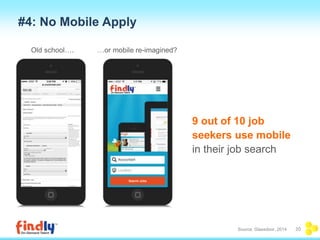
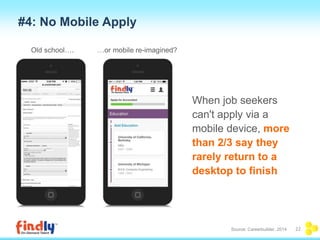
9 out of 10 job 
seekers use mobile 
in their job search 
Old school…. …or mobile re-imagined?
#4: No Mobile Apply 
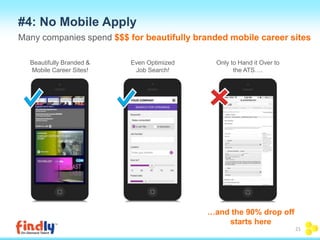
Many companies spend $$$ for beautifully branded mobile career sites 
Beautifully Branded & 
Mobile Career Sites! 
Even Optimized 
Job Search! 
Only to Hand it Over to 
the ATS…. 
…and the 90% drop off 
starts here 
21
When job seekers 
can't apply via a 
mobile device, more 
than 2/3 say they 
rarely return to a 
desktop to finish 
Source: Careerbuilder, 2014 22 
#4: No Mobile Apply 
Old school…. …or mobile re-imagined?
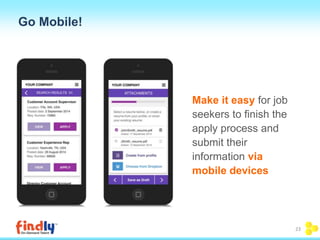
Go Mobile! 
23 
Make it easy for job 
seekers to finish the 
apply process and 
submit their 
information via 
mobile devices
#5 
5 Reasons Why Job Seekers Abandon Your Application: 
Poor Design (Even If Mobile)
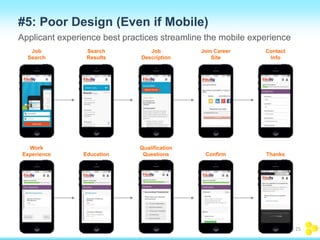
#5: Poor Design (Even if Mobile) 
Applicant experience best practices streamline the mobile experience 
Job 
Search 
Search 
Results 
Job 
Description 
Join Career 
Site 
Contact 
Info 
Work 
Experience Education 
Qualification 
Questions Confirm Thanks 
25
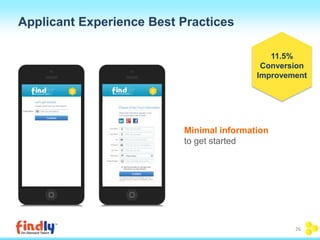
Applicant Experience Best Practices 
Minimal information 
to get started 
11.5% 
Conversion 
Improvement 
26
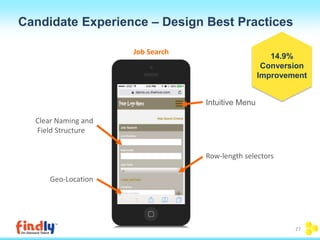
Candidate Experience – Design Best Practices 
Intuitive Menu 
Clear Naming and 
Field Structure 
Geo-Location 
Row-length selectors 
Job Search 
14.9% 
Conversion 
Improvement 
27
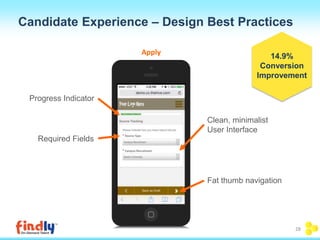
Candidate Experience – Design Best Practices 
Progress Indicator 
Required Fields 
Clean, minimalist 
User Interface 
Fat thumb navigation 
Apply 
14.9% 
Conversion 
Improvement 
28
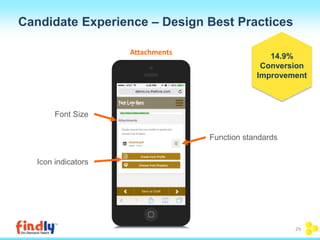
Candidate Experience – Design Best Practices 
Font Size 
Icon indicators 
Function standards 
Attachments 
14.9% 
Conversion 
Improvement 
29
#6 
5 Reasons Why Job Seekers Abandon Your Application: 
No Bifurcation (what does 
that mean?)
#6: Bifurcate the Apply Process Between 
the CRM and ATS 
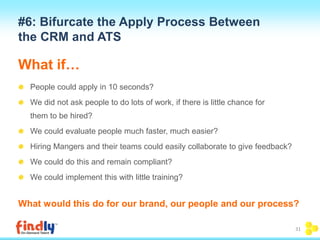
What if… 
People could apply in 10 seconds? 
We did not ask people to do lots of work, if there is little chance for 
them to be hired? 
We could evaluate people much faster, much easier? 
Hiring Mangers and their teams could easily collaborate to give feedback? 
We could do this and remain compliant? 
We could implement this with little training? 
What would this do for our brand, our people and our process? 
31
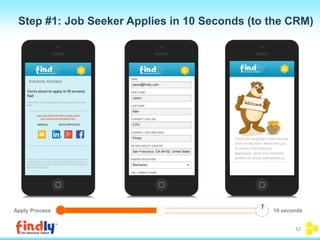
Step #1: Job Seeker Applies in 10 Seconds (to the CRM) 
Apply Process 10 seconds 
32
33 
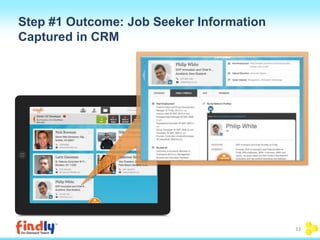
Step #1 Outcome: Job Seeker Information 
Captured in CRM
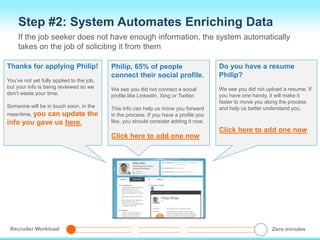
Step #2: System Automates Enriching Data 
If the job seeker does not have enough information, the system automatically 
takes on the job of soliciting it from them 
Thanks for applying Philip! 
You’ve not yet fully applied to the job, 
but your info is being reviewed so we 
don’t waste your time. 
Someone will be in touch soon, in the 
meantime, you can update the 
info you gave us here. 
Philip, 65% of people 
connect their social profile. 
We see you did not connect a social 
profile like LinkedIn, Xing or Twitter. 
This info can help us move you forward 
in the process. If you have a profile you 
like, you should consider adding it now. 
Click here to add one now 
Do you have a resume 
Philip? 
We see you did not upload a resume. If 
you have one handy, it will make it 
faster to move you along the process 
and help us better understand you. 
Click here to add one now 
Recruiter Workload Zero minutes
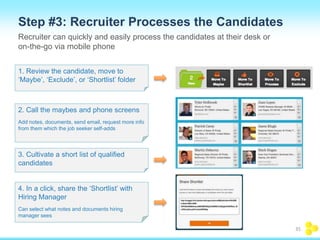
Step #3: Recruiter Processes the Candidates 
Recruiter can quickly and easily process the candidates at their desk or 
on-the-go via mobile phone 
1. Review the candidate, move to 
‘Maybe’, ‘Exclude’, or ‘Shortlist’ folder 
2. Call the maybes and phone screens 
Add notes, documents, send email, request more info 
from them which the job seeker self-adds 
3. Cultivate a short list of qualified 
candidates 
4. In a click, share the ‘Shortlist’ with 
Hiring Manager 
Can select what notes and documents hiring 
manager sees 
35
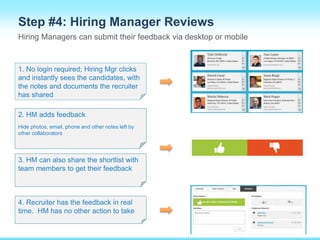
Step #4: Hiring Manager Reviews 
Hiring Managers can submit their feedback via desktop or mobile 
1. No login required; Hiring Mgr clicks 
and instantly sees the candidates, with 
the notes and documents the recruiter 
has shared 
2. HM adds feedback 
Hide photos, email, phone and other notes left by 
other collaborators 
3. HM can also share the shortlist with 
team members to get their feedback 
4. Recruiter has the feedback in real 
time. HM has no other action to take
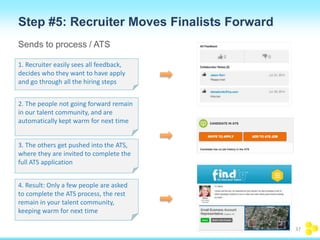
Step #5: Recruiter Moves Finalists Forward 
Sends to process / ATS 
1. Recruiter easily sees all feedback, 
decides who they want to have apply 
and go through all the hiring steps 
2. The people not going forward remain 
in our talent community, and are 
automatically kept warm for next time 
3. The others get pushed into the ATS, 
where they are invited to complete the 
full ATS application 
4. Result: Only a few people are asked 
to complete the ATS process, the rest 
remain in your talent community, 
keeping warm for next time 
37
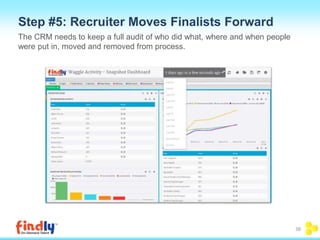
Step #5: Recruiter Moves Finalists Forward 
The CRM needs to keep a full audit of who did what, where and when people 
were put in, moved and removed from process. 
38
39 
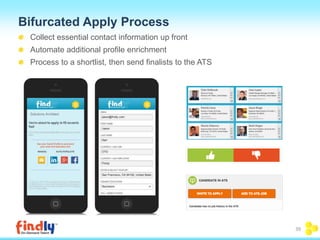
Bifurcated Apply Process 
Collect essential contact information up front 
Automate additional profile enrichment 
Process to a shortlist, then send finalists to the ATS
THANK YOU! 
@ Findly.com 
@getFindly 
facebook.com/getFindly 
sales@findly.com
Q&A

Webinar Deck: 5 Reasons Why Job Seekers Abandon Your Application

  • 1.
    5 Reasons WhyJob Seekers Abandon Your Application
  • 2.
    This deck wasoriginally presented during Findly’s live webinar, “5 Reasons Why Job Seekers Abandon Your Application” To view the full webinar replay, please visit: https://www.brighttalk.com/webcast/12037/133453
  • 3.
    About Findly RecruitingRe-imagined Findly's enterprise cloud solutions uniquely incorporate lightweight and fully integrated applications that simplify and accelerate talent acquisition. Our suite of integrated and mobile-optimized tools support all areas of recruiting – talent attraction and acquisition, candidate engagement and enrichment, and hiring and onboarding. Learn more at www.findly.com
  • 4.
    Jeff Kreutz SVPProducts • More than 20 Years Developing Successful Market-Leading Software Products and Services • Directs Product Strategy, Product Management and Product Marketing Findly.com facebook.com/getFindly @getFindly About Today’s Speaker @
  • 5.
    Job Seekers HATEApplying for Jobs! 12% of job seekers would rather get a root canal 1 in 5 job seekers would rather spend an entire day at the DMV than apply for a job online Source: Jibe, 2014 5
  • 6.
    Join ATS Long Forms Questions / Testing Other Process Please join us…. It only takes 40 minutes Our Welcome Mat Apply Process Dropoff 40+ minutes The Apply Process Problem Thank you. We will be in touch soon. 6
  • 7.
    The Apply ProcessProblem Complexity slows down the process internally Tools. Our internal process is tied up in tools that make us less responsive than we should be – the harder it is, the longer it takes Designed for compliance. ATS systems were originally designed for compliance, the final record of fact for the few people we want to hire Snowballing complexity. As the internet started putting more volume in the ATS, they had to become more and more complex to manage the process, and protect “good people from having a bad day” Increasing ATS requirements. Then everyone else started adding their own ATS requirements: Recruiters, Hiring Managers, HR, Legal, IT/Security, Privacy, Auditors... Hiring manager involvement. While our recruiters are good and can manage the complexity, most Hiring Managers cannot be trained to this level…so we don’t let them touch the ATS 7
  • 8.
    8 90% ofCandidates Don’t Finish an Application On average, there is 90% drop off from those who enter your recruiting funnel No mobile apply ATS usability issues
  • 9.
    #1 5 ReasonsWhy Job Seekers Abandon Your Application: Too Many Screens (or Too Few?)
  • 10.
    10 #1: TooMany Screens Typical desktop apply experience Career Site Job Search Screening Questionnaire Questions Career Site Login Terms ATS Login Personal Information Assessments Basic Profile Experience & Education Upload Resume Self Identification /EEO Background Check Consent Attestation Summary Thanks
  • 11.
    #1: Too FewScreens Don’t make pages too long Screens that are too long also have a higher drop-off rate Logical page breaks can help improve flow and perceived completion 11
  • 12.
    #2 5 ReasonsWhy Job Seekers Abandon Your Application: The Dreaded Double Login
  • 13.
    #2: The DreadedDouble Login (AKA a Brick Wall) Welcome to our Career site! Please Create Account & Login Your Logo Here Create Account Check Your Email Enter Temp Password Reset Password Give us more information Thanks! Welcome to our ATS! Please Create Account & Login AGAIN Create Account Check Your Email Enter Temp Password Reset Password Give us more information Thanks!
  • 14.
    Eliminate the DoubleLogin! Your Logo Here
  • 15.
    #3 5 ReasonsWhy Job Seekers Abandon Your Application: Too Much Data Required
  • 16.
    #3: Too MuchData Required Every applicant needs to re-type their work history descriptions into the ATS. Isn’t that already in their uploaded resume? Yes but our recruiters need to be able to easily see it without opening each resume… 16
  • 17.
    We need theirmiddle initial for the HRIS! Won’t they provide that with onboarding forms? We need their references! We need to track how they heard about us…so we know where to spend our $ Isn’t that being tracked by media? For every applicant? Will we actually call them? #3: Too Much Data Required 17
  • 18.
    #4 5 ReasonsWhy Job Seekers Abandon Your Application: No Mobile Apply
  • 19.
    #4: No MobileApply Why mobile? Up to 83% of start to apply on mobile devices Yet only 5% of sites are mobile responsive Job seekers are forced to squinch and pinch their way through 40 screens of death… ….most simply give up. 19
  • 20.
    Source: Glassdoor, 201420 #4: No Mobile Apply 9 out of 10 job seekers use mobile in their job search Old school…. …or mobile re-imagined?
  • 21.
    #4: No MobileApply Many companies spend $$$ for beautifully branded mobile career sites Beautifully Branded & Mobile Career Sites! Even Optimized Job Search! Only to Hand it Over to the ATS…. …and the 90% drop off starts here 21
  • 22.
    When job seekers can't apply via a mobile device, more than 2/3 say they rarely return to a desktop to finish Source: Careerbuilder, 2014 22 #4: No Mobile Apply Old school…. …or mobile re-imagined?
  • 23.
    Go Mobile! 23 Make it easy for job seekers to finish the apply process and submit their information via mobile devices
  • 24.
    #5 5 ReasonsWhy Job Seekers Abandon Your Application: Poor Design (Even If Mobile)
  • 25.
    #5: Poor Design(Even if Mobile) Applicant experience best practices streamline the mobile experience Job Search Search Results Job Description Join Career Site Contact Info Work Experience Education Qualification Questions Confirm Thanks 25
  • 26.
    Applicant Experience BestPractices Minimal information to get started 11.5% Conversion Improvement 26
  • 27.
    Candidate Experience –Design Best Practices Intuitive Menu Clear Naming and Field Structure Geo-Location Row-length selectors Job Search 14.9% Conversion Improvement 27
  • 28.
    Candidate Experience –Design Best Practices Progress Indicator Required Fields Clean, minimalist User Interface Fat thumb navigation Apply 14.9% Conversion Improvement 28
  • 29.
    Candidate Experience –Design Best Practices Font Size Icon indicators Function standards Attachments 14.9% Conversion Improvement 29
  • 30.
    #6 5 ReasonsWhy Job Seekers Abandon Your Application: No Bifurcation (what does that mean?)
  • 31.
    #6: Bifurcate theApply Process Between the CRM and ATS What if… People could apply in 10 seconds? We did not ask people to do lots of work, if there is little chance for them to be hired? We could evaluate people much faster, much easier? Hiring Mangers and their teams could easily collaborate to give feedback? We could do this and remain compliant? We could implement this with little training? What would this do for our brand, our people and our process? 31
  • 32.
    Step #1: JobSeeker Applies in 10 Seconds (to the CRM) Apply Process 10 seconds 32
  • 33.
    33 Step #1Outcome: Job Seeker Information Captured in CRM
  • 34.
    Step #2: SystemAutomates Enriching Data If the job seeker does not have enough information, the system automatically takes on the job of soliciting it from them Thanks for applying Philip! You’ve not yet fully applied to the job, but your info is being reviewed so we don’t waste your time. Someone will be in touch soon, in the meantime, you can update the info you gave us here. Philip, 65% of people connect their social profile. We see you did not connect a social profile like LinkedIn, Xing or Twitter. This info can help us move you forward in the process. If you have a profile you like, you should consider adding it now. Click here to add one now Do you have a resume Philip? We see you did not upload a resume. If you have one handy, it will make it faster to move you along the process and help us better understand you. Click here to add one now Recruiter Workload Zero minutes
  • 35.
    Step #3: RecruiterProcesses the Candidates Recruiter can quickly and easily process the candidates at their desk or on-the-go via mobile phone 1. Review the candidate, move to ‘Maybe’, ‘Exclude’, or ‘Shortlist’ folder 2. Call the maybes and phone screens Add notes, documents, send email, request more info from them which the job seeker self-adds 3. Cultivate a short list of qualified candidates 4. In a click, share the ‘Shortlist’ with Hiring Manager Can select what notes and documents hiring manager sees 35
  • 36.
    Step #4: HiringManager Reviews Hiring Managers can submit their feedback via desktop or mobile 1. No login required; Hiring Mgr clicks and instantly sees the candidates, with the notes and documents the recruiter has shared 2. HM adds feedback Hide photos, email, phone and other notes left by other collaborators 3. HM can also share the shortlist with team members to get their feedback 4. Recruiter has the feedback in real time. HM has no other action to take
  • 37.
    Step #5: RecruiterMoves Finalists Forward Sends to process / ATS 1. Recruiter easily sees all feedback, decides who they want to have apply and go through all the hiring steps 2. The people not going forward remain in our talent community, and are automatically kept warm for next time 3. The others get pushed into the ATS, where they are invited to complete the full ATS application 4. Result: Only a few people are asked to complete the ATS process, the rest remain in your talent community, keeping warm for next time 37
  • 38.
    Step #5: RecruiterMoves Finalists Forward The CRM needs to keep a full audit of who did what, where and when people were put in, moved and removed from process. 38
  • 39.
    39 Bifurcated ApplyProcess Collect essential contact information up front Automate additional profile enrichment Process to a shortlist, then send finalists to the ATS
  • 40.
    THANK YOU! @Findly.com @getFindly facebook.com/getFindly sales@findly.com
  • 41.

Editor's Notes

  • #6 Another option is: 3 in 10 job seekers would rather go on a blind date