An Android Based Smart And Carrier Robot
Presented By:
Sayed Ahamed Istiaque
ID: 15102010
Supervised By:
Mr. Amran Haroon
Assistant Professor
School of Science And Engineering
Chittagong Independent University, Bangladesh
Outline
Introduction
Objectives
Hardware Requirements
App Design Process
Mobile Application
Block Diagram
Circuit Diagram
Flow Charts
Project Overview
Future Scopes
Conclusion
Video
Introduction
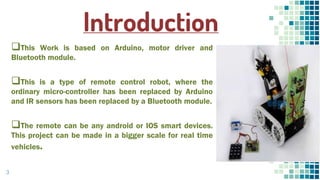
This Work is based on Arduino, motor driver and
Bluetooth module.
This is a type of remote control robot, where the
ordinary micro-controller has been replaced by Arduino
and IR sensors has been replaced by a Bluetooth module.
The remote can be any android or IOS smart devices.
This project can be made in a bigger scale for real time
vehicles.
3
Objectives
 To develop a robot that can move on a given command
through Smart devices application or voice command.
 To incorporate capabilities that can help avoid obstacles
and cliff/edge in the path of the robot.
 To develop a robotic grip that can carry object from one
place to another.
 To be able to wirelessly control the activities of the robot.
Hardware Requirements
▪ Arduino
▪ Smart Device
▪ HC-05 Bluetooth module
▪ DC motor
▪ Motor driver IC (L293D)
▪ Ultrasonic sensor
▪ Servo motor
▪ Robotic chassis
▪ Wheels
▪ Power source
▪ Breadboard
▪ Connecting wires
5
Continued…
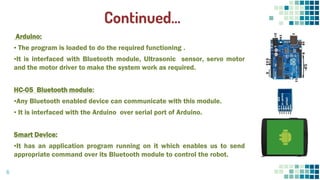
Arduino:
▪ The program is loaded to do the required functioning .
▪It is interfaced with Bluetooth module, Ultrasonic sensor, servo motor
and the motor driver to make the system work as required.
HC-05 Bluetooth module:
▪Any Bluetooth enabled device can communicate with this module.
▪ It is interfaced with the Arduino over serial port of Arduino.
Smart Device:
▪It has an application program running on it which enables us to send
appropriate command over its Bluetooth module to control the robot.
6
DC Motor: This motor is controlled with DC voltages and can move in
forward, backward, left and right direction according to the polarity
of the voltage applied.
Motor driver IC (L293D): Arduino can’t supply the current required by
DC motor to run. So to fulfill this requirement these motor driver ICs
are used.
Continued…
7
Continued…
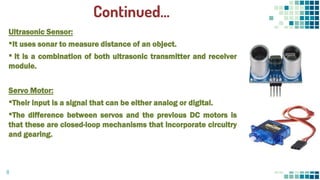
Ultrasonic Sensor:
▪It uses sonar to measure distance of an object.
▪ It is a combination of both ultrasonic transmitter and receiver
module.
Servo Motor:
▪Their input is a signal that can be either analog or digital.
▪The difference between servos and the previous DC motors is
that these are closed-loop mechanisms that incorporate circuitry
and gearing.
8
App Design Process
 App Inventor is an EASY way to introduce programming to young
students. Google created this language, and M.I.T. improved it.
9
Continued…
Mobile Application
11
Programming Process
▪The IDE (Integrated Development Environment) is based on programming language
- “Processing”.
▪The code is written and uploaded to arduino using the IDE.
12
Block Diagram
13
Circuit Diagram
.
14
Work Flow of Android Application
15
Flow
Chart
16
Project Overview
17
Future Goals
 Range of connectivity can be increased by using Wi-Fi. As of now we are
using Bluetooth module which can be replaced by Wi-Fi module and can
extend range by installing routers on short distances.
 Movements and features of robot can be increased, by rotating it, and
providing it diagonal movements.
 Camera can be attached and robot can be utilized in order to be used
like a spy. More type of information and data can be transferred, head
count in a room can be established, face recognition can be made.
18
Conclusion
This project has the following features:
 The robot is controlled wirelessly by a mobile application.
 It has an autonomous function which can detect obstacles or edges.
 The robot can move in forward, backward, right and left directions and
also can carry objects from one place to another.
 The robot can be controlled by voice command.
This is a prototype project which can be very much useful for
handicapped people. Also, this project can have many more use cases.
19
👤👦👧👨👩👪💃🏃💑😂😉😋😒😭👶
😸🐟🍒🍔💣📌📖🔨🎃🎈🎨🏈🏰🌏🔌
🔑Video
20
THANKS!
21

final.ppt

  • 1.
    An Android BasedSmart And Carrier Robot Presented By: Sayed Ahamed Istiaque ID: 15102010 Supervised By: Mr. Amran Haroon Assistant Professor School of Science And Engineering Chittagong Independent University, Bangladesh
  • 2.
    Outline Introduction Objectives Hardware Requirements App DesignProcess Mobile Application Block Diagram Circuit Diagram Flow Charts Project Overview Future Scopes Conclusion Video
  • 3.
    Introduction This Work isbased on Arduino, motor driver and Bluetooth module. This is a type of remote control robot, where the ordinary micro-controller has been replaced by Arduino and IR sensors has been replaced by a Bluetooth module. The remote can be any android or IOS smart devices. This project can be made in a bigger scale for real time vehicles. 3
  • 4.
    Objectives  To developa robot that can move on a given command through Smart devices application or voice command.  To incorporate capabilities that can help avoid obstacles and cliff/edge in the path of the robot.  To develop a robotic grip that can carry object from one place to another.  To be able to wirelessly control the activities of the robot.
  • 5.
    Hardware Requirements ▪ Arduino ▪Smart Device ▪ HC-05 Bluetooth module ▪ DC motor ▪ Motor driver IC (L293D) ▪ Ultrasonic sensor ▪ Servo motor ▪ Robotic chassis ▪ Wheels ▪ Power source ▪ Breadboard ▪ Connecting wires 5
  • 6.
    Continued… Arduino: ▪ The programis loaded to do the required functioning . ▪It is interfaced with Bluetooth module, Ultrasonic sensor, servo motor and the motor driver to make the system work as required. HC-05 Bluetooth module: ▪Any Bluetooth enabled device can communicate with this module. ▪ It is interfaced with the Arduino over serial port of Arduino. Smart Device: ▪It has an application program running on it which enables us to send appropriate command over its Bluetooth module to control the robot. 6
  • 7.
    DC Motor: Thismotor is controlled with DC voltages and can move in forward, backward, left and right direction according to the polarity of the voltage applied. Motor driver IC (L293D): Arduino can’t supply the current required by DC motor to run. So to fulfill this requirement these motor driver ICs are used. Continued… 7
  • 8.
    Continued… Ultrasonic Sensor: ▪It usessonar to measure distance of an object. ▪ It is a combination of both ultrasonic transmitter and receiver module. Servo Motor: ▪Their input is a signal that can be either analog or digital. ▪The difference between servos and the previous DC motors is that these are closed-loop mechanisms that incorporate circuitry and gearing. 8
  • 9.
    App Design Process App Inventor is an EASY way to introduce programming to young students. Google created this language, and M.I.T. improved it. 9
  • 10.
  • 11.
  • 12.
    Programming Process ▪The IDE(Integrated Development Environment) is based on programming language - “Processing”. ▪The code is written and uploaded to arduino using the IDE. 12
  • 13.
  • 14.
  • 15.
    Work Flow ofAndroid Application 15
  • 16.
  • 17.
  • 18.
    Future Goals  Rangeof connectivity can be increased by using Wi-Fi. As of now we are using Bluetooth module which can be replaced by Wi-Fi module and can extend range by installing routers on short distances.  Movements and features of robot can be increased, by rotating it, and providing it diagonal movements.  Camera can be attached and robot can be utilized in order to be used like a spy. More type of information and data can be transferred, head count in a room can be established, face recognition can be made. 18
  • 19.
    Conclusion This project hasthe following features:  The robot is controlled wirelessly by a mobile application.  It has an autonomous function which can detect obstacles or edges.  The robot can move in forward, backward, right and left directions and also can carry objects from one place to another.  The robot can be controlled by voice command. This is a prototype project which can be very much useful for handicapped people. Also, this project can have many more use cases. 19
  • 20.
  • 21.