Forest variations in the limits of an
island
Rain and Dry Forests in Puerto Rico
By:
Paola Caballero
Alejandra M. De Jesús
Valerie Flores
Jessica Rodríguez
Introduction…
What is a forest?
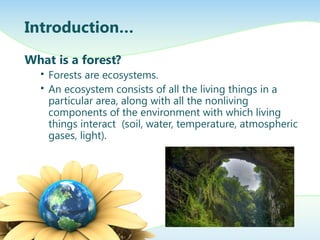
 Forests are ecosystems.
 An ecosystem consists of all the living things in a
particular area, along with all the nonliving
components of the environment with which living
things interact (soil, water, temperature, atmospheric
gases, light).
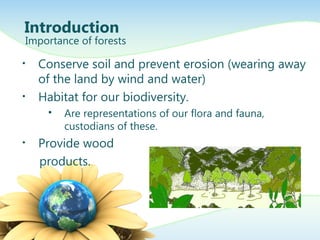
• Conserve soil and prevent erosion (wearing away
of the land by wind and water)
• Habitat for our biodiversity.
 Are representations of our flora and fauna,
custodians of these.
• Provide wood
products.
Introduction
Importance of forests
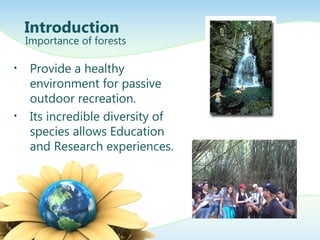
• Provide a healthy
environment for passive
outdoor recreation.
• Its incredible diversity of
species allows Education
and Research experiences.
Introduction
Importance of forests
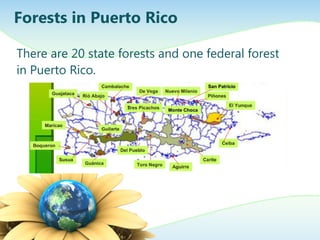
There are 20 state forests and one federal forest
in Puerto Rico.
Forests in Puerto Rico
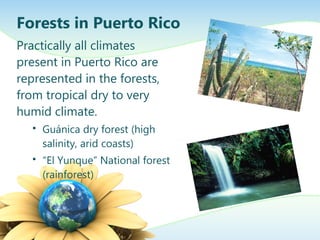
Practically all climates
present in Puerto Rico are
represented in the forests,
from tropical dry to very
humid climate.
 Guánica dry forest (high
salinity, arid coasts)
 “El Yunque” National forest
(rainforest)
Forests in Puerto Rico
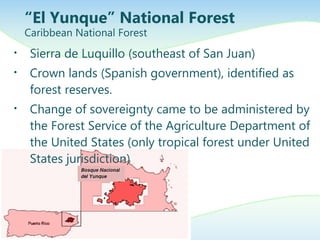
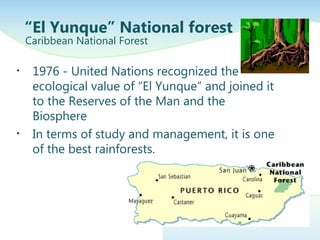
• Sierra de Luquillo (southeast of San Juan)
• Crown lands (Spanish government), identified as
forest reserves.
• Change of sovereignty came to be administered by
the Forest Service of the Agriculture Department of
the United States (only tropical forest under United
States jurisdiction)
“El Yunque” National Forest
Caribbean National Forest
• 1976 - United Nations recognized the
ecological value of “El Yunque” and joined it
to the Reserves of the Man and the
Biosphere
• In terms of study and management, it is one
of the best rainforests.
“El Yunque” National forest
Caribbean National Forest
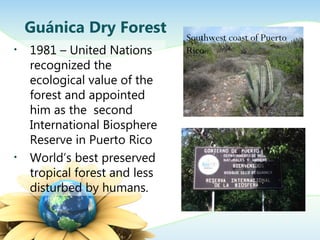
• 1981 – United Nations
recognized the
ecological value of the
forest and appointed
him as the second
International Biosphere
Reserve in Puerto Rico
• World’s best preserved
tropical forest and less
disturbed by humans.
Guánica Dry Forest Southwest coast of Puerto
Rico
•El Yunque
• 500 inches of rain in a
year in the highest
peaks.
• Daily temperatures are
25.5 ˚C.
•Guánica Dry Forest
• The annual
precipitation is
between 25 to 30
inches.
• Temperatures ranging
between 75˚F in cold
months and 95˚F in
hot months.
Precipitation and Temperature
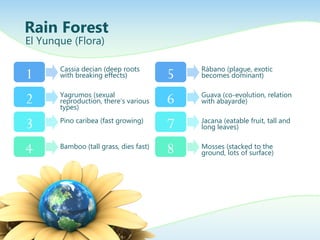
Rain Forest
El Yunque (Flora)
1
2
3
4
Cassia decian (deep roots
with breaking effects)
Yagrumos (sexual
reproduction, there’s various
types)
Pino caribea (fast growing)
Bamboo (tall grass, dies fast)
5
6
7
8
Rábano (plague, exotic
becomes dominant)
Guava (co-evolution, relation
with abayarde)
Jacana (eatable fruit, tall and
long leaves)
Mosses (stacked to the
ground, lots of surface)
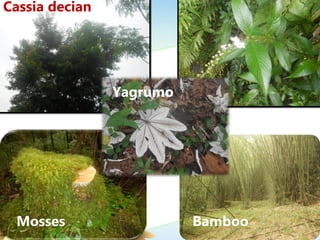
Cassia decian
Mosses
Yagrumo
Bamboo
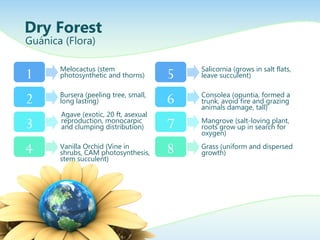
Dry Forest
Guánica (Flora)
1
2
3
4
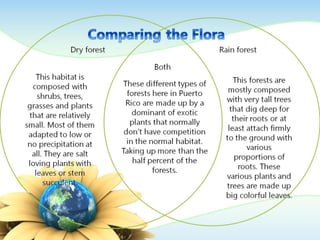
Melocactus (stem
photosynthetic and thorns)
Bursera (peeling tree, small,
long lasting)
Agave (exotic, 20 ft, asexual
reproduction, monocarpic
and clumping distribution)
Vanilla Orchid (Vine in
shrubs, CAM photosynthesis,
stem succulent)
5
6
7
8
Salicornia (grows in salt flats,
leave succulent)
Consolea (opuntia, formed a
trunk, avoid fire and grazing
animals damage, tall)
Mangrove (salt-loving plant,
roots grow up in search for
oxygen)
Grass (uniform and dispersed
growth)
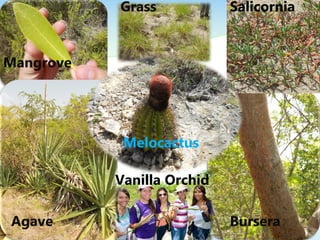
Agave
Melocactus
Bursera
Vanilla Orchid
Grass Salicornia
Mangrove
Here is the description of the chart.
You may change or delete this text
as you wish.
This chart is compatible with
PowerPoint 97 to 2007.
Here is a placeholder for more text
and description of the chart.
Changing this text will not interfere
with the formatting of this
template.
Bar Graph Page Layout
A Second Line of text may go here
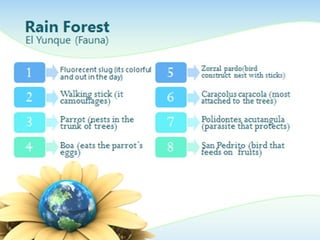
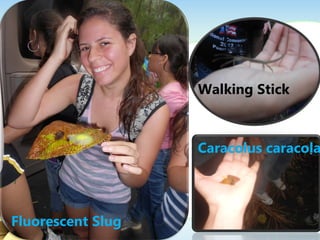
Fluorescent Slug
Walking Stick
Caracolus caracola
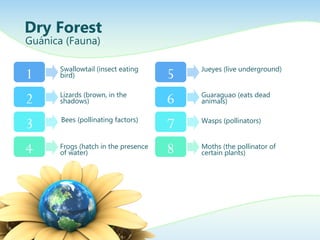
Dry Forest
Guánica (Fauna)
1
2
3
4
Swallowtail (insect eating
bird)
Lizards (brown, in the
shadows)
Bees (pollinating factors)
Frogs (hatch in the presence
of water)
5
6
7
8
Jueyes (live underground)
Guaraguao (eats dead
animals)
Wasps (pollinators)
Moths (the pollinator of
certain plants)
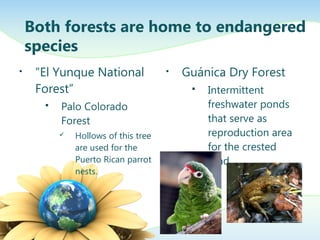
• “El Yunque National
Forest”
 Palo Colorado
Forest
 Hollows of this tree
are used for the
Puerto Rican parrot
nests.
• Guánica Dry Forest
 Intermittent
freshwater ponds
that serve as
reproduction area
for the crested
toad
Both forests are home to endangered
species
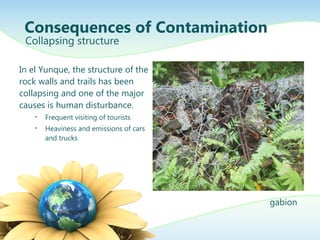
In el Yunque, the structure of the
rock walls and trails has been
collapsing and one of the major
causes is human disturbance.
• Frequent visiting of tourists
• Heaviness and emissions of cars
and trucks
Consequences of Contamination
Collapsing structure
gabion
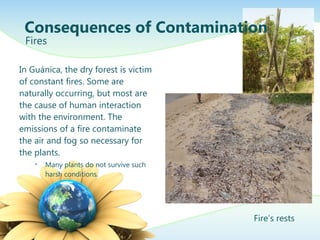
In Guánica, the dry forest is victim
of constant fires. Some are
naturally occurring, but most are
the cause of human interaction
with the environment. The
emissions of a fire contaminate
the air and fog so necessary for
the plants.
• Many plants do not survive such
harsh conditions.
Consequences of Contamination
Fires
Fire’s rests
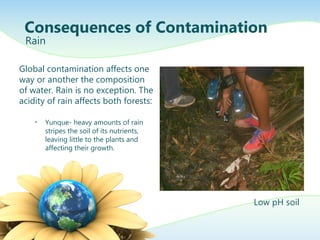
Global contamination affects one
way or another the composition
of water. Rain is no exception. The
acidity of rain affects both forests:
• Yunque- heavy amounts of rain
stripes the soil of its nutrients,
leaving little to the plants and
affecting their growth.
Consequences of Contamination
Rain
Low pH soil
Global contamination affects one
way or another the composition
of water. Rain is no exception. The
acidity of rain affects both forests:
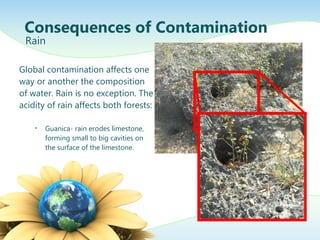
• Guanica- rain erodes limestone,
forming small to big cavities on
the surface of the limestone.
Consequences of Contamination
Rain
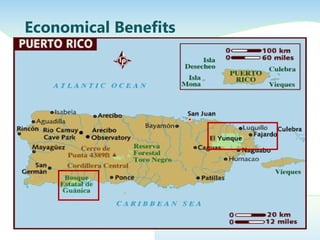
Economical Benefits
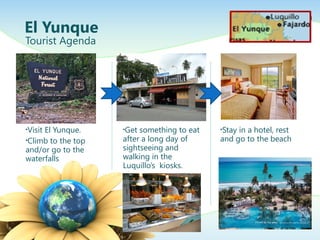
El Yunque
Tourist Agenda
•Visit El Yunque.
•Climb to the top
and/or go to the
waterfalls
•Get something to eat
after a long day of
sightseeing and
walking in the
Luquillo’s kiosks.
•Stay in a hotel, rest
and go to the beach
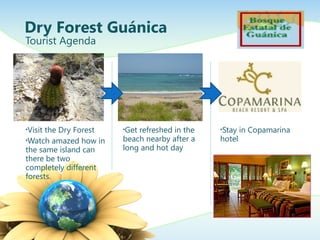
Dry Forest Guánica
Tourist Agenda
•Visit the Dry Forest
•Watch amazed how in
the same island can
there be two
completely different
forests.
•Get refreshed in the
beach nearby after a
long and hot day
•Stay in Copamarina
hotel
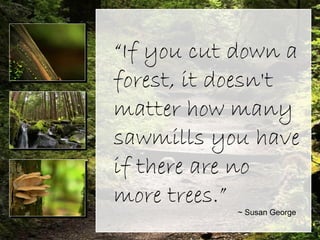
“If you cut down a
forest, it doesn't
matter how many
sawmills you have
if there are no more
trees.”
~ Susan George
“If you cut down a
forest, it doesn't
matter how many
sawmills you have
if there are no
more trees.”
~ Susan George

Final presentation (rain and dry forest)

  • 1.
    Forest variations inthe limits of an island Rain and Dry Forests in Puerto Rico By: Paola Caballero Alejandra M. De Jesús Valerie Flores Jessica Rodríguez
  • 2.
    Introduction… What is aforest?  Forests are ecosystems.  An ecosystem consists of all the living things in a particular area, along with all the nonliving components of the environment with which living things interact (soil, water, temperature, atmospheric gases, light).
  • 3.
    • Conserve soiland prevent erosion (wearing away of the land by wind and water) • Habitat for our biodiversity.  Are representations of our flora and fauna, custodians of these. • Provide wood products. Introduction Importance of forests
  • 4.
    • Provide ahealthy environment for passive outdoor recreation. • Its incredible diversity of species allows Education and Research experiences. Introduction Importance of forests
  • 5.
    There are 20state forests and one federal forest in Puerto Rico. Forests in Puerto Rico
  • 6.
    Practically all climates presentin Puerto Rico are represented in the forests, from tropical dry to very humid climate.  Guánica dry forest (high salinity, arid coasts)  “El Yunque” National forest (rainforest) Forests in Puerto Rico
  • 7.
    • Sierra deLuquillo (southeast of San Juan) • Crown lands (Spanish government), identified as forest reserves. • Change of sovereignty came to be administered by the Forest Service of the Agriculture Department of the United States (only tropical forest under United States jurisdiction) “El Yunque” National Forest Caribbean National Forest
  • 8.
    • 1976 -United Nations recognized the ecological value of “El Yunque” and joined it to the Reserves of the Man and the Biosphere • In terms of study and management, it is one of the best rainforests. “El Yunque” National forest Caribbean National Forest
  • 9.
    • 1981 –United Nations recognized the ecological value of the forest and appointed him as the second International Biosphere Reserve in Puerto Rico • World’s best preserved tropical forest and less disturbed by humans. Guánica Dry Forest Southwest coast of Puerto Rico
  • 10.
    •El Yunque • 500inches of rain in a year in the highest peaks. • Daily temperatures are 25.5 ˚C. •Guánica Dry Forest • The annual precipitation is between 25 to 30 inches. • Temperatures ranging between 75˚F in cold months and 95˚F in hot months. Precipitation and Temperature
  • 11.
    Rain Forest El Yunque(Flora) 1 2 3 4 Cassia decian (deep roots with breaking effects) Yagrumos (sexual reproduction, there’s various types) Pino caribea (fast growing) Bamboo (tall grass, dies fast) 5 6 7 8 Rábano (plague, exotic becomes dominant) Guava (co-evolution, relation with abayarde) Jacana (eatable fruit, tall and long leaves) Mosses (stacked to the ground, lots of surface)
  • 12.
  • 13.
    Dry Forest Guánica (Flora) 1 2 3 4 Melocactus(stem photosynthetic and thorns) Bursera (peeling tree, small, long lasting) Agave (exotic, 20 ft, asexual reproduction, monocarpic and clumping distribution) Vanilla Orchid (Vine in shrubs, CAM photosynthesis, stem succulent) 5 6 7 8 Salicornia (grows in salt flats, leave succulent) Consolea (opuntia, formed a trunk, avoid fire and grazing animals damage, tall) Mangrove (salt-loving plant, roots grow up in search for oxygen) Grass (uniform and dispersed growth)
  • 14.
  • 16.
    Here is thedescription of the chart. You may change or delete this text as you wish. This chart is compatible with PowerPoint 97 to 2007. Here is a placeholder for more text and description of the chart. Changing this text will not interfere with the formatting of this template. Bar Graph Page Layout A Second Line of text may go here
  • 17.
  • 18.
    Dry Forest Guánica (Fauna) 1 2 3 4 Swallowtail(insect eating bird) Lizards (brown, in the shadows) Bees (pollinating factors) Frogs (hatch in the presence of water) 5 6 7 8 Jueyes (live underground) Guaraguao (eats dead animals) Wasps (pollinators) Moths (the pollinator of certain plants)
  • 21.
    • “El YunqueNational Forest”  Palo Colorado Forest  Hollows of this tree are used for the Puerto Rican parrot nests. • Guánica Dry Forest  Intermittent freshwater ponds that serve as reproduction area for the crested toad Both forests are home to endangered species
  • 22.
    In el Yunque,the structure of the rock walls and trails has been collapsing and one of the major causes is human disturbance. • Frequent visiting of tourists • Heaviness and emissions of cars and trucks Consequences of Contamination Collapsing structure gabion
  • 23.
    In Guánica, thedry forest is victim of constant fires. Some are naturally occurring, but most are the cause of human interaction with the environment. The emissions of a fire contaminate the air and fog so necessary for the plants. • Many plants do not survive such harsh conditions. Consequences of Contamination Fires Fire’s rests
  • 24.
    Global contamination affectsone way or another the composition of water. Rain is no exception. The acidity of rain affects both forests: • Yunque- heavy amounts of rain stripes the soil of its nutrients, leaving little to the plants and affecting their growth. Consequences of Contamination Rain Low pH soil
  • 25.
    Global contamination affectsone way or another the composition of water. Rain is no exception. The acidity of rain affects both forests: • Guanica- rain erodes limestone, forming small to big cavities on the surface of the limestone. Consequences of Contamination Rain
  • 26.
  • 27.
    El Yunque Tourist Agenda •VisitEl Yunque. •Climb to the top and/or go to the waterfalls •Get something to eat after a long day of sightseeing and walking in the Luquillo’s kiosks. •Stay in a hotel, rest and go to the beach
  • 28.
    Dry Forest Guánica TouristAgenda •Visit the Dry Forest •Watch amazed how in the same island can there be two completely different forests. •Get refreshed in the beach nearby after a long and hot day •Stay in Copamarina hotel
  • 29.
    “If you cutdown a forest, it doesn't matter how many sawmills you have if there are no more trees.” ~ Susan George “If you cut down a forest, it doesn't matter how many sawmills you have if there are no more trees.” ~ Susan George

Editor's Notes

  • #28 Atraer turistas (tres pies de matas de secas) Gastan chavos en guaguas y aguas…se van pa la playa o algo Gobierno has money Terreno dificil de construir y sacarle provecho No puede sacarle provecho construyendo casas o manteniendo y tampoco pueden sembrar por las condiciones extremas del suelo, lo convierten en un parque. Diagrama de cositas cerca de cada bosque (beneficios economicos)
  • #30 The Forest (Intermediate)   To reproduce the background effects on this slide, do the following: On the Design tab, in the bottom right corner of the Background group, click the arrow to launch the Format Background dialog box. In the Format Background dialog box, click Fill in the left pane, under Fill in the right pane select Picture or Texture Fill . Then under Insert From click File. In the left pane of the Insert Picture dialog box, click the drive or library that contains the picture. In the right pane of the dialog box, click the picture ( Forest Path ) that you want and then click Insert . Close the Format Background dialog box.   To reproduce the video effects on this slide, do the following: On the Home tab, in the Slides group, click Layout , and then click Blank . On the Insert tab, in the Media group, click Video , and then click Video from File . In the left pane of the Insert Video dialog box, click the drive or library that contains the video. In the right pane of the dialog box, click the first video that you want and then click Insert . Under Video Tools , on the Format tab in the Size group, click the arrow at the bottom right corner to launch the Format Video dialog box. Select Size in the left pane. Under Scale in the right pane, clear the Lock aspect ratio box, then under Size and Rotate in the right pane, set Height to 1.77” and Width to 2.36” . Also in the Format Video dialog box, select Position in the left pane. Under Position in the right pane, do the following: In the Horizontal box, enter 0.3” From Top Left Corner . In the Vertical box, enter 0.75” From Top Left Corner . Also in the Format Video dialog box, select Border Color in the left pane, and then in the Border Color pane select Solid Line . Click the arrow to the right of Color and under Theme Colors select White, Background 1 (first row, first option). Also in the Format Video dialog box, select Border Style in the left pane, under Border Style in the right pane, in the Width box, enter 0.75” . Also in the Format Video dialog box, select Shadow in the left pane, under Shadow in the right pane do the following: Click the arrow to the right of Color , and under Theme Colors select Black, Text 1 (first row, second option). In the Transparency box, enter 0% . In the Size box, enter 100% . In the Blur box, enter 16 pt . In the Angle box, enter 45 degrees . In the Distance box, enter 6 pt . Close the Format Video dialog box. On the Insert tab, in the Media group, click Video , and then click Video from File . In the left pane of the Insert Video dialog box, click the drive or library that contains the video. In the right pane of the dialog box, click the second video that you want and then click Insert . Under Video Tools , on the Format tab in the Size group, click the arrow at the bottom right corner to launch the Format Video dialog box. Select Size in the left pane. Under Scale in the right pane, clear the Lock aspect ratio box, then under Size and Rotate in the right pane, set Height to 1.77” and Width to 2.36” . Also in the Format Video dialog box, select Position in the left pane, and then in the Position pane, do the following: In the Horizontal box, enter 0.3” From Top Left Corner . In the Vertical box, enter 2.87” From Top Left Corner . Also in the Format Video dialog box, select Border Color in the left pane, and then in the Border Color pane select Solid Line . Click the arrow to the right of Color and under Theme Colors select White, Background 1 (first row, first option). Also in the Format Video dialog box, select Border Style in the left pane. Under Border Style in the right pane, set Width to 0.75” . Also in the Format Video dialog box, select Shadow in the left pane. In the right pane, under Shadow , do the following: Click the arrow to the right of Color and under Theme Colors select Black, Text 1 (first row, second option). In the Transparency box, enter 0% . In the Size box, enter 100% . In the Blur box, enter 16 pt . In the Angle box, enter 45 degrees . In the Distance box, enter 6 pt . Close the Format Video dialog box. On the Insert tab, in the Media group, click Video , and then click Video from File . In the left pane of the Insert Video dialog box, click the drive or library that contains the video. In the right pane of the dialog box, click the third video that you want and then click Insert . Under Video Tools , on the Format tab in the Size group, click the arrow at the bottom right corner to launch the Format Video dialog box. Select Size in the left pane. Under Scale in the right pane, clear the Lock aspect ratio box, then under Size and Rotate in the right pane, set Height to 1.77” and Width to 2.36” . Also in the Format Video dialog box, select Position in the left pane. Under Position in the right pane, do the following: In the Horizontal box, enter 0.3” From Top Left Corner . In the Vertical box, enter 4.99” From Top Left Corner . Also in the Format Video dialog box, select Border Color in the left pane, and then in the Border Color pane, select Solid Line . Click the arrow to the right of Color and under Theme Colors select White, Background 1 (first row, first option). Also in the Format Video dialog box, select Border Style in the left pane. In the right pane, under Border Style , set Width to 0.75” . Also in the Format Video dialog box, select Shadow in the left pane. Under Shadow the right pane, do the following: Click the arrow to the right of Color , and under Theme Colors select Black, Text 1 (first row, second option). In the Transparency box, enter 0% . In the Size box, enter 100% . In the Blur box, enter 16 pt . In the Angle box, enter 45 degrees . In the Distance box, enter 6 pt . Close the Format Video dialog box. Press and hold CTRL and select all three videos. On the Animations tab, in the Timing group , click the arrow to the right of Start and select With Previous .   To reproduce the text on this slide, do the following: On the Insert tab, in the Illustrations group, click the arrow under Shapes , and then under Rectangles , select Rectangle (first row, first option). On the slide, drag to draw a rectangle. Under Drawing Tools , on the Format tab , in the Size group, click the arrow at the bottom right corner to launch the Format Shape dialog box. Select Size in the left pane. In the right pane, under Size , do the following: In the Height box, enter 6.96” . In the Width box, enter 6.72” . Also in the Format Shape dialog box, select Position in the left pane, under Position in the right pane do the following: In the Horizontal box, enter 3” From Top Left Corner . In the Vertical box, enter 0.27” From Top Left Corner . Also in the Format Shape dialog box, select Fill in the left pane, under Fill in the right pane, select Solid fill and then do the following: Click the arrow to the right of Color . Under Theme Colors , select White, Background 1 (first row, first option). In the Transparency box, enter 20% . Also in the Format Shape dialog box, select Line Color in the left pane. Under Line Color in the right pane, select Solid line and then do the following: Click the arrow to the right of Color . Under Theme Colors , select White, Background 1 (first row, first option). Also in the Format Shape dialog box, select Line Style in the left pane. Under Line Style in the right pane, set Width to 1.5 pt . Close Format Shape dialog box. On the Insert tab, in the Text group, click Text Box , and then on the slide drag to draw your text box. Type text in the text box, and then select the text. On the Home tab, in the Font group, select Brush Script Std from the Font list, and then select 54 pt from the Font Size list. With the text box selected, under Drawing Tools , on the Format tab, in the Size group, click the arrow at the bottom right corner to launch the Format Shape dialog box. Select Size in the left pane, under Size and Rotate in the right pane, set Height to 5.55” and Width to 6.04” . Select Position in the left pane, and under Position on the right pane, set Horizontal to 3.46” and Vertical to 0.97” . On the Insert tab, in the Text group, click Text Box , and then on the slide drag to draw your text box. Type “~ Susan George” in the text box. On the Home tab, in the Font group, select Calibri from the Font list, and then select 18 pt from the Font Size list. In the Format Shape dialog box select Size in the left pane. Under Size and Rotate in the right pane, set Height to 0.4” and Width to 2.5” . Select Position in the left pane, and under Position on the right pane, set Horizontal to 6.86” and Vertical to 6.42”. Close the Format Shape dialog box.