Silberschatz, Galvin and Gagne ©2009
Operating System Concepts – 8th
Edition
Chapter 10:
File-System Interface
10.2 Silberschatz, Galvin and Gagne ©2009
Operating System Concepts – 8th
Edition
Chapter 10: File-System Interface
 File Concept
 Access Methods
 Directory Structure
 File-System Mounting
 File Sharing
 Protection
10.3 Silberschatz, Galvin and Gagne ©2009
Operating System Concepts – 8th
Edition
Objectives
 To explain the function of file systems
 To describe the interfaces to file systems
 To discuss file-system design tradeoffs, including access methods, file
sharing, file locking, and directory structures
 To explore file-system protection
10.4 Silberschatz, Galvin and Gagne ©2009
Operating System Concepts – 8th
Edition
File Concept
 Contiguous logical address space
 Types:
 Data
 numeric
 character
 binary
 Program
10.5 Silberschatz, Galvin and Gagne ©2009
Operating System Concepts – 8th
Edition
File Structure
 None - sequence of words, bytes
 Simple record structure
 Lines
 Fixed length
 Variable length
 Complex Structures
 Formatted document
 Relocatable load file
 Can simulate last two with first method by inserting appropriate control
characters
 Who decides:
 Operating system
 Program
10.6 Silberschatz, Galvin and Gagne ©2009
Operating System Concepts – 8th
Edition
File Attributes
 Name – only information kept in human-readable form
 Identifier – unique tag (number) identifies file within file system
 Type – needed for systems that support different types
 Location – pointer to file location on device
 Size – current file size
 Protection – controls who can do reading, writing, executing
 Time, date, and user identification – data for protection, security, and
usage monitoring
 Information about files are kept in the directory structure, which is
maintained on the disk
10.7 Silberschatz, Galvin and Gagne ©2009
Operating System Concepts – 8th
Edition
File Operations
 File is an abstract data type
 Create
 Write
 Read
 Reposition within file
 Delete
 Truncate
 Open(Fi) – search the directory structure on disk for entry Fi, and move
the content of entry to memory
 Close (Fi) – move the content of entry Fi in memory to directory
structure on disk
10.8 Silberschatz, Galvin and Gagne ©2009
Operating System Concepts – 8th
Edition
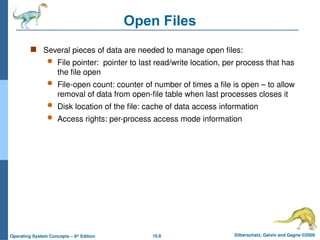
Open Files
 Several pieces of data are needed to manage open files:
 File pointer: pointer to last read/write location, per process that has
the file open
 File-open count: counter of number of times a file is open – to allow
removal of data from open-file table when last processes closes it
 Disk location of the file: cache of data access information
 Access rights: per-process access mode information
10.9 Silberschatz, Galvin and Gagne ©2009
Operating System Concepts – 8th
Edition
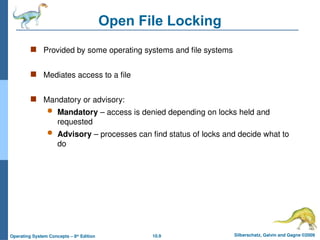
Open File Locking
 Provided by some operating systems and file systems
 Mediates access to a file
 Mandatory or advisory:
 Mandatory – access is denied depending on locks held and
requested
 Advisory – processes can find status of locks and decide what to
do
10.10 Silberschatz, Galvin and Gagne ©2009
Operating System Concepts – 8th
Edition
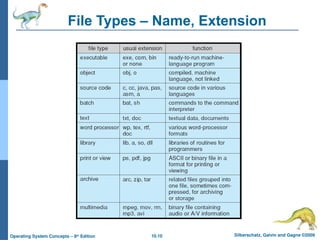
File Types – Name, Extension
10.11 Silberschatz, Galvin and Gagne ©2009
Operating System Concepts – 8th
Edition
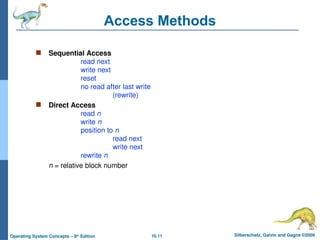
Access Methods
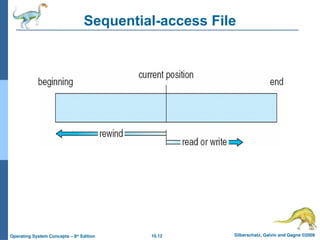
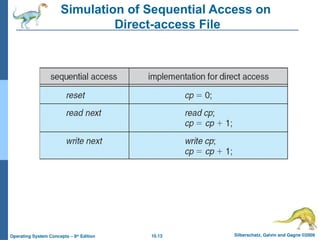
 Sequential Access
read next
write next
reset
no read after last write
(rewrite)
 Direct Access
read n
write n
position to n
read next
write next
rewrite n
n = relative block number
10.12 Silberschatz, Galvin and Gagne ©2009
Operating System Concepts – 8th
Edition
Sequential-access File
10.13 Silberschatz, Galvin and Gagne ©2009
Operating System Concepts – 8th
Edition
Simulation of Sequential Access on
Direct-access File
10.14 Silberschatz, Galvin and Gagne ©2009
Operating System Concepts – 8th
Edition
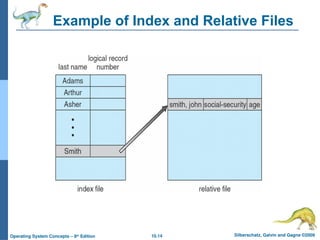
Example of Index and Relative Files
10.15 Silberschatz, Galvin and Gagne ©2009
Operating System Concepts – 8th
Edition
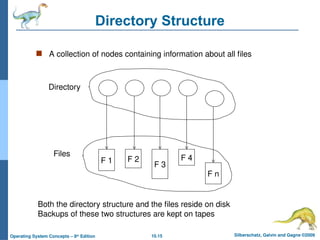
Directory Structure
 A collection of nodes containing information about all files
F 1 F 2
F 3
F 4
F n
Directory
Files
Both the directory structure and the files reside on disk
Backups of these two structures are kept on tapes
10.16 Silberschatz, Galvin and Gagne ©2009
Operating System Concepts – 8th
Edition
Disk Structure
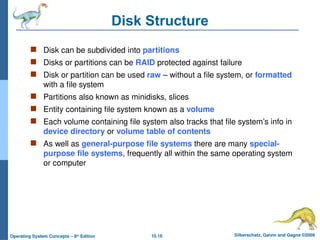
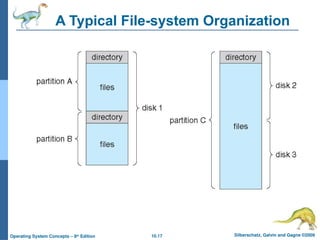
 Disk can be subdivided into partitions
 Disks or partitions can be RAID protected against failure
 Disk or partition can be used raw – without a file system, or formatted
with a file system
 Partitions also known as minidisks, slices
 Entity containing file system known as a volume
 Each volume containing file system also tracks that file system’s info in
device directory or volume table of contents
 As well as general-purpose file systems there are many special-
purpose file systems, frequently all within the same operating system
or computer
10.17 Silberschatz, Galvin and Gagne ©2009
Operating System Concepts – 8th
Edition
A Typical File-system Organization
10.18 Silberschatz, Galvin and Gagne ©2009
Operating System Concepts – 8th
Edition
Operations Performed on Directory
 Search for a file
 Create a file
 Delete a file
 List a directory
 Rename a file
 Traverse the file system
10.19 Silberschatz, Galvin and Gagne ©2009
Operating System Concepts – 8th
Edition
Organize the Directory
(Logically) to Obtain
 Efficiency – locating a file quickly
 Naming – convenient to users
 Two users can have same name for different files
 The same file can have several different names
 Grouping – logical grouping of files by properties, (e.g., all Java
programs, all games, …)
10.20 Silberschatz, Galvin and Gagne ©2009
Operating System Concepts – 8th
Edition
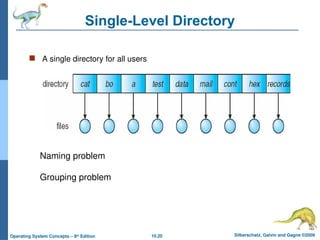
Single-Level Directory
 A single directory for all users
Naming problem
Grouping problem
10.21 Silberschatz, Galvin and Gagne ©2009
Operating System Concepts – 8th
Edition
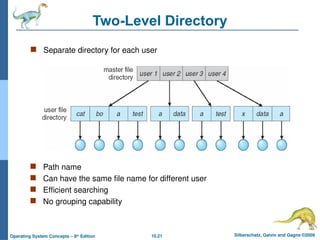
Two-Level Directory
 Separate directory for each user
 Path name
 Can have the same file name for different user
 Efficient searching
 No grouping capability
10.22 Silberschatz, Galvin and Gagne ©2009
Operating System Concepts – 8th
Edition
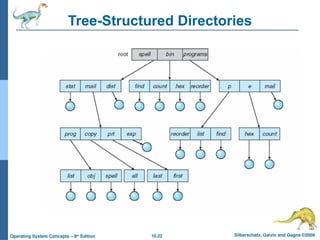
Tree-Structured Directories
10.23 Silberschatz, Galvin and Gagne ©2009
Operating System Concepts – 8th
Edition
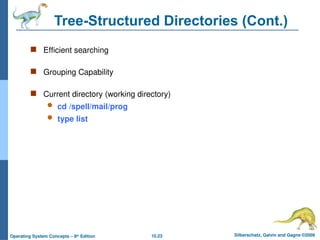
Tree-Structured Directories (Cont.)
 Efficient searching
 Grouping Capability
 Current directory (working directory)
 cd /spell/mail/prog
 type list
10.24 Silberschatz, Galvin and Gagne ©2009
Operating System Concepts – 8th
Edition
Tree-Structured Directories (Cont)
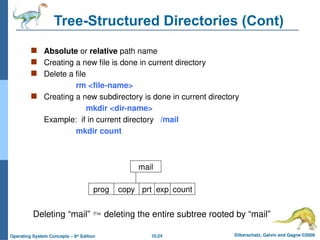
 Absolute or relative path name
 Creating a new file is done in current directory
 Delete a file
rm <file-name>
 Creating a new subdirectory is done in current directory
mkdir <dir-name>
Example: if in current directory /mail
mkdir count
mail
prog copy prt exp count
Deleting “mail”  deleting the entire subtree rooted by “mail”
10.25 Silberschatz, Galvin and Gagne ©2009
Operating System Concepts – 8th
Edition
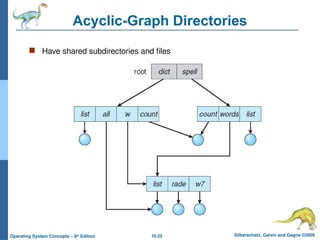
Acyclic-Graph Directories
 Have shared subdirectories and files
10.26 Silberschatz, Galvin and Gagne ©2009
Operating System Concepts – 8th
Edition
Acyclic-Graph Directories (Cont.)
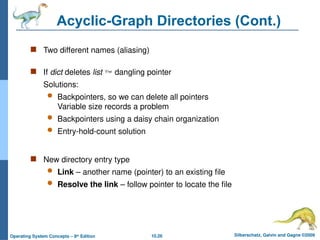
 Two different names (aliasing)
 If dict deletes list  dangling pointer
Solutions:
 Backpointers, so we can delete all pointers
Variable size records a problem
 Backpointers using a daisy chain organization
 Entry-hold-count solution
 New directory entry type
 Link – another name (pointer) to an existing file
 Resolve the link – follow pointer to locate the file
10.27 Silberschatz, Galvin and Gagne ©2009
Operating System Concepts – 8th
Edition
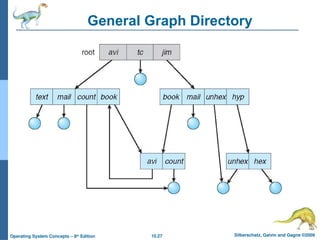
General Graph Directory
10.28 Silberschatz, Galvin and Gagne ©2009
Operating System Concepts – 8th
Edition
General Graph Directory (Cont.)
 How do we guarantee no cycles?
 Allow only links to file not subdirectories
 Garbage collection
 Every time a new link is added use a cycle detection algorithm to
determine whether it is OK
10.29 Silberschatz, Galvin and Gagne ©2009
Operating System Concepts – 8th
Edition
File System Mounting
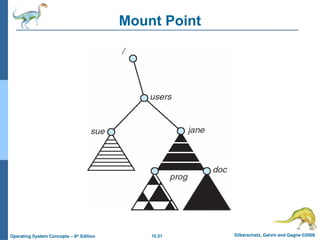
 A file system must be mounted before it can be accessed
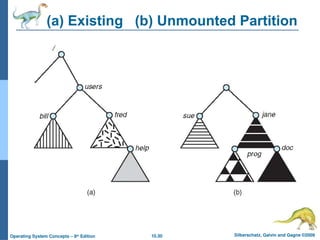
 A unmounted file system (i.e., Fig. 11-11(b)) is mounted at a
mount point
10.30 Silberschatz, Galvin and Gagne ©2009
Operating System Concepts – 8th
Edition
(a) Existing (b) Unmounted Partition
10.31 Silberschatz, Galvin and Gagne ©2009
Operating System Concepts – 8th
Edition
Mount Point
10.32 Silberschatz, Galvin and Gagne ©2009
Operating System Concepts – 8th
Edition
File Sharing
 Sharing of files on multi-user systems is desirable
 Sharing may be done through a protection scheme
 On distributed systems, files may be shared across a network
 Network File System (NFS) is a common distributed file-sharing method
10.33 Silberschatz, Galvin and Gagne ©2009
Operating System Concepts – 8th
Edition
File Sharing – Multiple Users
 User IDs identify users, allowing permissions and protections to be
per-user
 Group IDs allow users to be in groups, permitting group access
rights
10.34 Silberschatz, Galvin and Gagne ©2009
Operating System Concepts – 8th
Edition
File Sharing – Remote File Systems
 Uses networking to allow file system access between systems
 Manually via programs like FTP
 Automatically, seamlessly using distributed file systems
 Semi automatically via the world wide web
 Client-server model allows clients to mount remote file systems from
servers
 Server can serve multiple clients
 Client and user-on-client identification is insecure or complicated
 NFS is standard UNIX client-server file sharing protocol
 CIFS is standard Windows protocol
 Standard operating system file calls are translated into remote calls
 Distributed Information Systems (distributed naming services) such
as LDAP, DNS, NIS, Active Directory implement unified access to
information needed for remote computing
10.35 Silberschatz, Galvin and Gagne ©2009
Operating System Concepts – 8th
Edition
File Sharing – Failure Modes
 Remote file systems add new failure modes, due to network failure,
server failure
 Recovery from failure can involve state information about status of
each remote request
 Stateless protocols such as NFS include all information in each
request, allowing easy recovery but less security
10.36 Silberschatz, Galvin and Gagne ©2009
Operating System Concepts – 8th
Edition
File Sharing – Consistency Semantics
 Consistency semantics specify how multiple users are to access a
shared file simultaneously
 Similar to Ch 7 process synchronization algorithms
 Tend to be less complex due to disk I/O and network latency
(for remote file systems
 Andrew File System (AFS) implemented complex remote file
sharing semantics
 Unix file system (UFS) implements:
 Writes to an open file visible immediately to other users of the
same open file
 Sharing file pointer to allow multiple users to read and write
concurrently
 AFS has session semantics
 Writes only visible to sessions starting after the file is closed
10.37 Silberschatz, Galvin and Gagne ©2009
Operating System Concepts – 8th
Edition
Protection
 File owner/creator should be able to control:
 what can be done
 by whom
 Types of access
 Read
 Write
 Execute
 Append
 Delete
 List
10.38 Silberschatz, Galvin and Gagne ©2009
Operating System Concepts – 8th
Edition
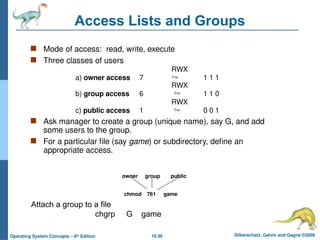
Access Lists and Groups
 Mode of access: read, write, execute
 Three classes of users
RWX
a) owner access 7  1 1 1
RWX
b) group access 6  1 1 0
RWX
c) public access 1  0 0 1
 Ask manager to create a group (unique name), say G, and add
some users to the group.
 For a particular file (say game) or subdirectory, define an
appropriate access.
owner group public
chmod 761 game
Attach a group to a file
chgrp G game
10.39 Silberschatz, Galvin and Gagne ©2009
Operating System Concepts – 8th
Edition
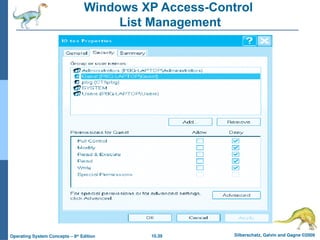
Windows XP Access-Control
List Management
10.40 Silberschatz, Galvin and Gagne ©2009
Operating System Concepts – 8th
Edition
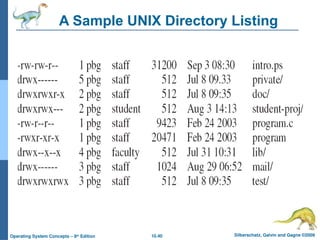
A Sample UNIX Directory Listing
Silberschatz, Galvin and Gagne ©2009
Operating System Concepts – 8th
Edition
End of Chapter 10

File system interface ppt chapter 10 Operating systems

  • 1.
    Silberschatz, Galvin andGagne ©2009 Operating System Concepts – 8th Edition Chapter 10: File-System Interface
  • 2.
    10.2 Silberschatz, Galvinand Gagne ©2009 Operating System Concepts – 8th Edition Chapter 10: File-System Interface  File Concept  Access Methods  Directory Structure  File-System Mounting  File Sharing  Protection
  • 3.
    10.3 Silberschatz, Galvinand Gagne ©2009 Operating System Concepts – 8th Edition Objectives  To explain the function of file systems  To describe the interfaces to file systems  To discuss file-system design tradeoffs, including access methods, file sharing, file locking, and directory structures  To explore file-system protection
  • 4.
    10.4 Silberschatz, Galvinand Gagne ©2009 Operating System Concepts – 8th Edition File Concept  Contiguous logical address space  Types:  Data  numeric  character  binary  Program
  • 5.
    10.5 Silberschatz, Galvinand Gagne ©2009 Operating System Concepts – 8th Edition File Structure  None - sequence of words, bytes  Simple record structure  Lines  Fixed length  Variable length  Complex Structures  Formatted document  Relocatable load file  Can simulate last two with first method by inserting appropriate control characters  Who decides:  Operating system  Program
  • 6.
    10.6 Silberschatz, Galvinand Gagne ©2009 Operating System Concepts – 8th Edition File Attributes  Name – only information kept in human-readable form  Identifier – unique tag (number) identifies file within file system  Type – needed for systems that support different types  Location – pointer to file location on device  Size – current file size  Protection – controls who can do reading, writing, executing  Time, date, and user identification – data for protection, security, and usage monitoring  Information about files are kept in the directory structure, which is maintained on the disk
  • 7.
    10.7 Silberschatz, Galvinand Gagne ©2009 Operating System Concepts – 8th Edition File Operations  File is an abstract data type  Create  Write  Read  Reposition within file  Delete  Truncate  Open(Fi) – search the directory structure on disk for entry Fi, and move the content of entry to memory  Close (Fi) – move the content of entry Fi in memory to directory structure on disk
  • 8.
    10.8 Silberschatz, Galvinand Gagne ©2009 Operating System Concepts – 8th Edition Open Files  Several pieces of data are needed to manage open files:  File pointer: pointer to last read/write location, per process that has the file open  File-open count: counter of number of times a file is open – to allow removal of data from open-file table when last processes closes it  Disk location of the file: cache of data access information  Access rights: per-process access mode information
  • 9.
    10.9 Silberschatz, Galvinand Gagne ©2009 Operating System Concepts – 8th Edition Open File Locking  Provided by some operating systems and file systems  Mediates access to a file  Mandatory or advisory:  Mandatory – access is denied depending on locks held and requested  Advisory – processes can find status of locks and decide what to do
  • 10.
    10.10 Silberschatz, Galvinand Gagne ©2009 Operating System Concepts – 8th Edition File Types – Name, Extension
  • 11.
    10.11 Silberschatz, Galvinand Gagne ©2009 Operating System Concepts – 8th Edition Access Methods  Sequential Access read next write next reset no read after last write (rewrite)  Direct Access read n write n position to n read next write next rewrite n n = relative block number
  • 12.
    10.12 Silberschatz, Galvinand Gagne ©2009 Operating System Concepts – 8th Edition Sequential-access File
  • 13.
    10.13 Silberschatz, Galvinand Gagne ©2009 Operating System Concepts – 8th Edition Simulation of Sequential Access on Direct-access File
  • 14.
    10.14 Silberschatz, Galvinand Gagne ©2009 Operating System Concepts – 8th Edition Example of Index and Relative Files
  • 15.
    10.15 Silberschatz, Galvinand Gagne ©2009 Operating System Concepts – 8th Edition Directory Structure  A collection of nodes containing information about all files F 1 F 2 F 3 F 4 F n Directory Files Both the directory structure and the files reside on disk Backups of these two structures are kept on tapes
  • 16.
    10.16 Silberschatz, Galvinand Gagne ©2009 Operating System Concepts – 8th Edition Disk Structure  Disk can be subdivided into partitions  Disks or partitions can be RAID protected against failure  Disk or partition can be used raw – without a file system, or formatted with a file system  Partitions also known as minidisks, slices  Entity containing file system known as a volume  Each volume containing file system also tracks that file system’s info in device directory or volume table of contents  As well as general-purpose file systems there are many special- purpose file systems, frequently all within the same operating system or computer
  • 17.
    10.17 Silberschatz, Galvinand Gagne ©2009 Operating System Concepts – 8th Edition A Typical File-system Organization
  • 18.
    10.18 Silberschatz, Galvinand Gagne ©2009 Operating System Concepts – 8th Edition Operations Performed on Directory  Search for a file  Create a file  Delete a file  List a directory  Rename a file  Traverse the file system
  • 19.
    10.19 Silberschatz, Galvinand Gagne ©2009 Operating System Concepts – 8th Edition Organize the Directory (Logically) to Obtain  Efficiency – locating a file quickly  Naming – convenient to users  Two users can have same name for different files  The same file can have several different names  Grouping – logical grouping of files by properties, (e.g., all Java programs, all games, …)
  • 20.
    10.20 Silberschatz, Galvinand Gagne ©2009 Operating System Concepts – 8th Edition Single-Level Directory  A single directory for all users Naming problem Grouping problem
  • 21.
    10.21 Silberschatz, Galvinand Gagne ©2009 Operating System Concepts – 8th Edition Two-Level Directory  Separate directory for each user  Path name  Can have the same file name for different user  Efficient searching  No grouping capability
  • 22.
    10.22 Silberschatz, Galvinand Gagne ©2009 Operating System Concepts – 8th Edition Tree-Structured Directories
  • 23.
    10.23 Silberschatz, Galvinand Gagne ©2009 Operating System Concepts – 8th Edition Tree-Structured Directories (Cont.)  Efficient searching  Grouping Capability  Current directory (working directory)  cd /spell/mail/prog  type list
  • 24.
    10.24 Silberschatz, Galvinand Gagne ©2009 Operating System Concepts – 8th Edition Tree-Structured Directories (Cont)  Absolute or relative path name  Creating a new file is done in current directory  Delete a file rm <file-name>  Creating a new subdirectory is done in current directory mkdir <dir-name> Example: if in current directory /mail mkdir count mail prog copy prt exp count Deleting “mail”  deleting the entire subtree rooted by “mail”
  • 25.
    10.25 Silberschatz, Galvinand Gagne ©2009 Operating System Concepts – 8th Edition Acyclic-Graph Directories  Have shared subdirectories and files
  • 26.
    10.26 Silberschatz, Galvinand Gagne ©2009 Operating System Concepts – 8th Edition Acyclic-Graph Directories (Cont.)  Two different names (aliasing)  If dict deletes list  dangling pointer Solutions:  Backpointers, so we can delete all pointers Variable size records a problem  Backpointers using a daisy chain organization  Entry-hold-count solution  New directory entry type  Link – another name (pointer) to an existing file  Resolve the link – follow pointer to locate the file
  • 27.
    10.27 Silberschatz, Galvinand Gagne ©2009 Operating System Concepts – 8th Edition General Graph Directory
  • 28.
    10.28 Silberschatz, Galvinand Gagne ©2009 Operating System Concepts – 8th Edition General Graph Directory (Cont.)  How do we guarantee no cycles?  Allow only links to file not subdirectories  Garbage collection  Every time a new link is added use a cycle detection algorithm to determine whether it is OK
  • 29.
    10.29 Silberschatz, Galvinand Gagne ©2009 Operating System Concepts – 8th Edition File System Mounting  A file system must be mounted before it can be accessed  A unmounted file system (i.e., Fig. 11-11(b)) is mounted at a mount point
  • 30.
    10.30 Silberschatz, Galvinand Gagne ©2009 Operating System Concepts – 8th Edition (a) Existing (b) Unmounted Partition
  • 31.
    10.31 Silberschatz, Galvinand Gagne ©2009 Operating System Concepts – 8th Edition Mount Point
  • 32.
    10.32 Silberschatz, Galvinand Gagne ©2009 Operating System Concepts – 8th Edition File Sharing  Sharing of files on multi-user systems is desirable  Sharing may be done through a protection scheme  On distributed systems, files may be shared across a network  Network File System (NFS) is a common distributed file-sharing method
  • 33.
    10.33 Silberschatz, Galvinand Gagne ©2009 Operating System Concepts – 8th Edition File Sharing – Multiple Users  User IDs identify users, allowing permissions and protections to be per-user  Group IDs allow users to be in groups, permitting group access rights
  • 34.
    10.34 Silberschatz, Galvinand Gagne ©2009 Operating System Concepts – 8th Edition File Sharing – Remote File Systems  Uses networking to allow file system access between systems  Manually via programs like FTP  Automatically, seamlessly using distributed file systems  Semi automatically via the world wide web  Client-server model allows clients to mount remote file systems from servers  Server can serve multiple clients  Client and user-on-client identification is insecure or complicated  NFS is standard UNIX client-server file sharing protocol  CIFS is standard Windows protocol  Standard operating system file calls are translated into remote calls  Distributed Information Systems (distributed naming services) such as LDAP, DNS, NIS, Active Directory implement unified access to information needed for remote computing
  • 35.
    10.35 Silberschatz, Galvinand Gagne ©2009 Operating System Concepts – 8th Edition File Sharing – Failure Modes  Remote file systems add new failure modes, due to network failure, server failure  Recovery from failure can involve state information about status of each remote request  Stateless protocols such as NFS include all information in each request, allowing easy recovery but less security
  • 36.
    10.36 Silberschatz, Galvinand Gagne ©2009 Operating System Concepts – 8th Edition File Sharing – Consistency Semantics  Consistency semantics specify how multiple users are to access a shared file simultaneously  Similar to Ch 7 process synchronization algorithms  Tend to be less complex due to disk I/O and network latency (for remote file systems  Andrew File System (AFS) implemented complex remote file sharing semantics  Unix file system (UFS) implements:  Writes to an open file visible immediately to other users of the same open file  Sharing file pointer to allow multiple users to read and write concurrently  AFS has session semantics  Writes only visible to sessions starting after the file is closed
  • 37.
    10.37 Silberschatz, Galvinand Gagne ©2009 Operating System Concepts – 8th Edition Protection  File owner/creator should be able to control:  what can be done  by whom  Types of access  Read  Write  Execute  Append  Delete  List
  • 38.
    10.38 Silberschatz, Galvinand Gagne ©2009 Operating System Concepts – 8th Edition Access Lists and Groups  Mode of access: read, write, execute  Three classes of users RWX a) owner access 7  1 1 1 RWX b) group access 6  1 1 0 RWX c) public access 1  0 0 1  Ask manager to create a group (unique name), say G, and add some users to the group.  For a particular file (say game) or subdirectory, define an appropriate access. owner group public chmod 761 game Attach a group to a file chgrp G game
  • 39.
    10.39 Silberschatz, Galvinand Gagne ©2009 Operating System Concepts – 8th Edition Windows XP Access-Control List Management
  • 40.
    10.40 Silberschatz, Galvinand Gagne ©2009 Operating System Concepts – 8th Edition A Sample UNIX Directory Listing
  • 41.
    Silberschatz, Galvin andGagne ©2009 Operating System Concepts – 8th Edition End of Chapter 10