Silberschatz, Galvin and Gagne ©2018
Operating System Concepts – 10h Edition
Chapter 13:
File-System Interface
13.2 Silberschatz, Galvin and Gagne ©2018
Operating System Concepts – 10th Edition
Outline
 File Concept
 Access Methods
 Disk and Directory Structure
 Protection
 Memory-Mapped Files
13.3 Silberschatz, Galvin and Gagne ©2018
Operating System Concepts – 10th Edition
Objectives
 To explain the function of file systems
 To describe the interfaces to file systems
 To discuss file-system design tradeoffs, including access
methods, file sharing, file locking, and directory structures
 To explore file-system protection
13.4 Silberschatz, Galvin and Gagne ©2018
Operating System Concepts – 10th Edition
File Concept
 Contiguous logical address space
 Types:
• Data
 Numeric
 Character
 Binary
• Program
 Contents defined by file’s creator
• Many types
 text file,
 source file,
 executable file
13.5 Silberschatz, Galvin and Gagne ©2018
Operating System Concepts – 10th Edition
File Attributes
 Name – only information kept in human-readable form
 Identifier – unique tag (number) identifies file within file system
 Type – needed for systems that support different types
 Location – pointer to file location on device
 Size – current file size
 Protection – controls who can do reading, writing, executing
 Time, date, and user identification – data for protection, security, and
usage monitoring
 Information about files are kept in the directory structure, which is
maintained on the disk
 Many variations, including extended file attributes such as file checksum
 Information kept in the directory structure
13.6 Silberschatz, Galvin and Gagne ©2018
Operating System Concepts – 10th Edition
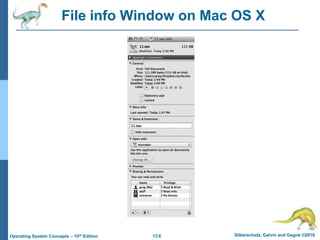
File info Window on Mac OS X
13.7 Silberschatz, Galvin and Gagne ©2018
Operating System Concepts – 10th Edition
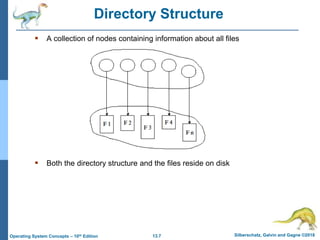
Directory Structure
 A collection of nodes containing information about all files
 Both the directory structure and the files reside on disk
13.8 Silberschatz, Galvin and Gagne ©2018
Operating System Concepts – 10th Edition
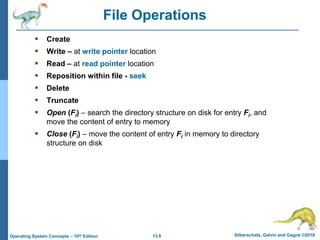
File Operations
 Create
 Write – at write pointer location
 Read – at read pointer location
 Reposition within file - seek
 Delete
 Truncate
 Open (Fi) – search the directory structure on disk for entry Fi, and
move the content of entry to memory
 Close (Fi) – move the content of entry Fi in memory to directory
structure on disk
13.9 Silberschatz, Galvin and Gagne ©2018
Operating System Concepts – 10th Edition
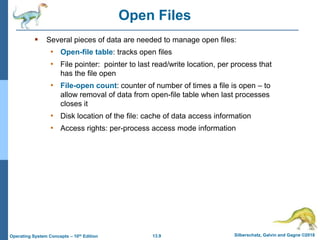
Open Files
 Several pieces of data are needed to manage open files:
• Open-file table: tracks open files
• File pointer: pointer to last read/write location, per process that
has the file open
• File-open count: counter of number of times a file is open – to
allow removal of data from open-file table when last processes
closes it
• Disk location of the file: cache of data access information
• Access rights: per-process access mode information
13.10 Silberschatz, Galvin and Gagne ©2018
Operating System Concepts – 10th Edition
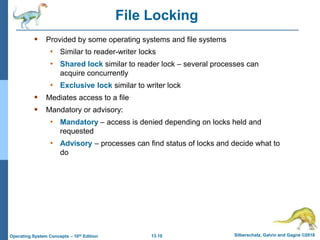
File Locking
 Provided by some operating systems and file systems
• Similar to reader-writer locks
• Shared lock similar to reader lock – several processes can
acquire concurrently
• Exclusive lock similar to writer lock
 Mediates access to a file
 Mandatory or advisory:
• Mandatory – access is denied depending on locks held and
requested
• Advisory – processes can find status of locks and decide what to
do
13.11 Silberschatz, Galvin and Gagne ©2018
Operating System Concepts – 10th Edition
File Locking Example – Java API
import java.io.*;
import java.nio.channels.*;
public class LockingExample {
public static final boolean EXCLUSIVE = false;
public static final boolean SHARED = true;
public static void main(String arsg[]) throws IOException {
FileLock sharedLock = null;
FileLock exclusiveLock = null;
try {
RandomAccessFile raf = new RandomAccessFile("file.txt", "rw");
// get the channel for the file
FileChannel ch = raf.getChannel();
// this locks the first half of the file - exclusive
exclusiveLock = ch.lock(0, raf.length()/2, EXCLUSIVE);
/** Now modify the data . . . */
// release the lock
exclusiveLock.release();
13.12 Silberschatz, Galvin and Gagne ©2018
Operating System Concepts – 10th Edition
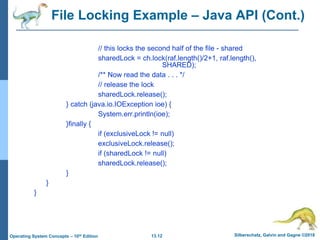
File Locking Example – Java API (Cont.)
// this locks the second half of the file - shared
sharedLock = ch.lock(raf.length()/2+1, raf.length(),
SHARED);
/** Now read the data . . . */
// release the lock
sharedLock.release();
} catch (java.io.IOException ioe) {
System.err.println(ioe);
}finally {
if (exclusiveLock != null)
exclusiveLock.release();
if (sharedLock != null)
sharedLock.release();
}
}
}
13.13 Silberschatz, Galvin and Gagne ©2018
Operating System Concepts – 10th Edition
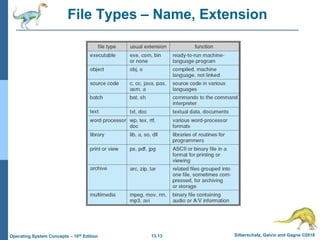
File Types – Name, Extension
13.14 Silberschatz, Galvin and Gagne ©2018
Operating System Concepts – 10th Edition
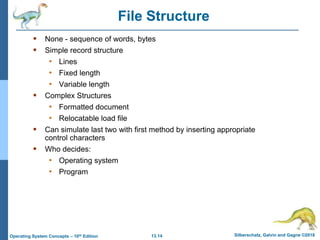
File Structure
 None - sequence of words, bytes
 Simple record structure
• Lines
• Fixed length
• Variable length
 Complex Structures
• Formatted document
• Relocatable load file
 Can simulate last two with first method by inserting appropriate
control characters
 Who decides:
• Operating system
• Program
13.15 Silberschatz, Galvin and Gagne ©2018
Operating System Concepts – 10th Edition
Access Methods
 A file is fixed length logical records
 Sequential Access
 Direct Access
 Other Access Methods
13.16 Silberschatz, Galvin and Gagne ©2018
Operating System Concepts – 10th Edition
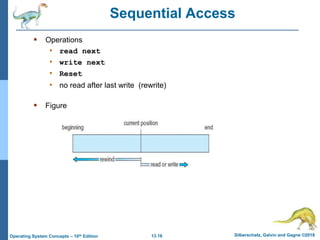
Sequential Access
 Operations
• read next
• write next
• Reset
• no read after last write (rewrite)
 Figure
13.17 Silberschatz, Galvin and Gagne ©2018
Operating System Concepts – 10th Edition
Direct Access
 Operations
• read n
• write n
• position to n
 read next
 write next
 rewrite n
n = relative block number
 Relative block numbers allow OS to decide where
file should be placed
13.18 Silberschatz, Galvin and Gagne ©2018
Operating System Concepts – 10th Edition
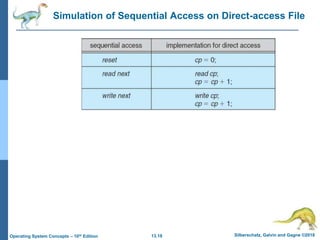
Simulation of Sequential Access on Direct-access File
13.19 Silberschatz, Galvin and Gagne ©2018
Operating System Concepts – 10th Edition
Other Access Methods
 Can be other access methods built on top of base methods
 General involve creation of an index for the file
 Keep index in memory for fast determination of location of
data to be operated on (consider Universal Produce Code
(UPC code) plus record of data about that item)
 If the index is too large, create an in-memory index, which
an index of a disk index
 IBM indexed sequential-access method (ISAM)
• Small master index, points to disk blocks of secondary
index
• File kept sorted on a defined key
• All done by the OS
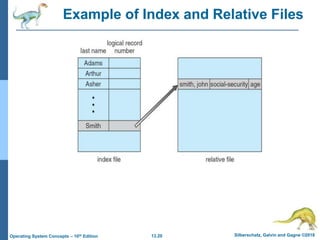
 VMS operating system provides index and relative files as
another example (see next slide)
13.20 Silberschatz, Galvin and Gagne ©2018
Operating System Concepts – 10th Edition
Example of Index and Relative Files
13.21 Silberschatz, Galvin and Gagne ©2018
Operating System Concepts – 10th Edition
Disk Structure
 Disk can be subdivided into partitions
 Disks or partitions can be RAID protected against failure
 Disk or partition can be used raw – without a file system, or
formatted with a file system
 Partitions also known as minidisks, slices
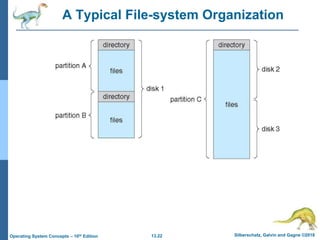
 Entity containing file system is known as a volume
 Each volume containing a file system also tracks that file system’s
info in device directory or volume table of contents
 In addition to general-purpose file systems there are many
special-purpose file systems, frequently all within the same
operating system or computer
13.22 Silberschatz, Galvin and Gagne ©2018
Operating System Concepts – 10th Edition
A Typical File-system Organization
13.23 Silberschatz, Galvin and Gagne ©2018
Operating System Concepts – 10th Edition
Types of File Systems
 We mostly talk of general-purpose file systems
 But systems frequently have may file systems, some general- and some
special- purpose
 Consider Solaris has
• tmpfs – memory-based volatile FS for fast, temporary I/O
• objfs – interface into kernel memory to get kernel symbols for
debugging
• ctfs – contract file system for managing daemons
• lofs – loopback file system allows one FS to be accessed in place of
another
• procfs – kernel interface to process structures
• ufs, zfs – general purpose file systems
13.24 Silberschatz, Galvin and Gagne ©2018
Operating System Concepts – 10th Edition
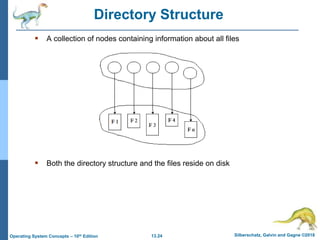
Directory Structure
 A collection of nodes containing information about all files
 Both the directory structure and the files reside on disk
13.25 Silberschatz, Galvin and Gagne ©2018
Operating System Concepts – 10th Edition
Operations Performed on Directory
 Search for a file
 Create a file
 Delete a file
 List a directory
 Rename a file
 Traverse the file system
13.26 Silberschatz, Galvin and Gagne ©2018
Operating System Concepts – 10th Edition
Directory Organization
 Efficiency – locating a file quickly
 Naming – convenient to users
• Two users can have same name for different files
• The same file can have several different names
 Grouping – logical grouping of files by properties, (e.g., all
Java programs, all games, …)
The directory is organized logically to obtain
13.27 Silberschatz, Galvin and Gagne ©2018
Operating System Concepts – 10th Edition
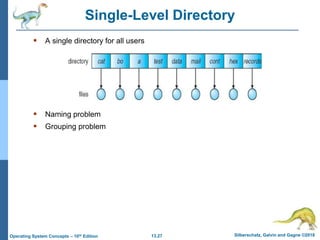
Single-Level Directory
 A single directory for all users
 Naming problem
 Grouping problem
13.28 Silberschatz, Galvin and Gagne ©2018
Operating System Concepts – 10th Edition
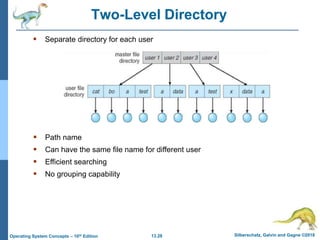
Two-Level Directory
 Separate directory for each user
 Path name
 Can have the same file name for different user
 Efficient searching
 No grouping capability
13.29 Silberschatz, Galvin and Gagne ©2018
Operating System Concepts – 10th Edition
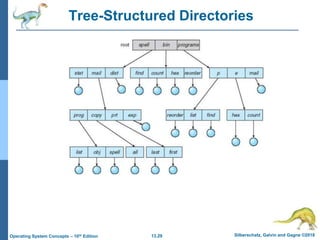
Tree-Structured Directories
13.30 Silberschatz, Galvin and Gagne ©2018
Operating System Concepts – 10th Edition
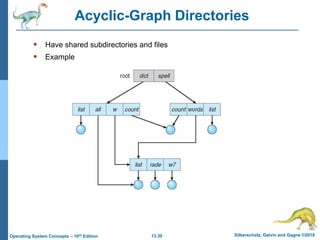
Acyclic-Graph Directories
 Have shared subdirectories and files
 Example
13.31 Silberschatz, Galvin and Gagne ©2018
Operating System Concepts – 10th Edition
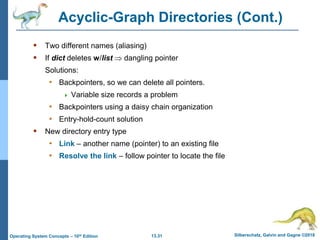
Acyclic-Graph Directories (Cont.)
 Two different names (aliasing)
 If dict deletes w/list  dangling pointer
Solutions:
• Backpointers, so we can delete all pointers.
 Variable size records a problem
• Backpointers using a daisy chain organization
• Entry-hold-count solution
 New directory entry type
• Link – another name (pointer) to an existing file
• Resolve the link – follow pointer to locate the file
13.32 Silberschatz, Galvin and Gagne ©2018
Operating System Concepts – 10th Edition
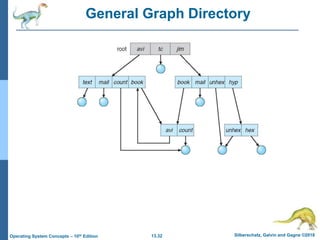
General Graph Directory
13.33 Silberschatz, Galvin and Gagne ©2018
Operating System Concepts – 10th Edition
General Graph Directory (Cont.)
 How do we guarantee no cycles?
• Allow only links to files not subdirectories
• Garbage collection
• Every time a new link is added use a cycle detection algorithm to
determine whether it is OK
13.34 Silberschatz, Galvin and Gagne ©2018
Operating System Concepts – 10th Edition
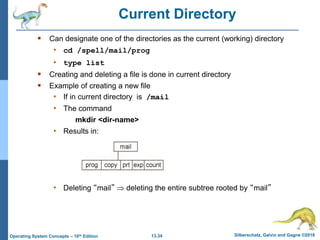
Current Directory
 Can designate one of the directories as the current (working) directory
• cd /spell/mail/prog
• type list
 Creating and deleting a file is done in current directory
 Example of creating a new file
• If in current directory is /mail
• The command
mkdir <dir-name>
• Results in:
• Deleting “mail”  deleting the entire subtree rooted by “mail”
13.35 Silberschatz, Galvin and Gagne ©2018
Operating System Concepts – 10th Edition
Protection
 File owner/creator should be able to control:
• What can be done
• By whom
 Types of access
• Read
• Write
• Execute
• Append
• Delete
• List
13.36 Silberschatz, Galvin and Gagne ©2018
Operating System Concepts – 10th Edition
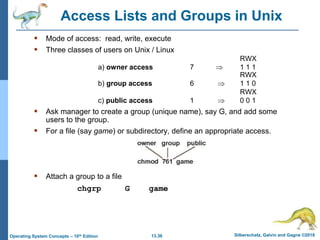
Access Lists and Groups in Unix
 Mode of access: read, write, execute
 Three classes of users on Unix / Linux
RWX
a) owner access 7  1 1 1
RWX
b) group access 6  1 1 0
RWX
c) public access 1  0 0 1
 Ask manager to create a group (unique name), say G, and add some
users to the group.
 For a file (say game) or subdirectory, define an appropriate access.
 Attach a group to a file
chgrp G game
13.37 Silberschatz, Galvin and Gagne ©2018
Operating System Concepts – 10th Edition
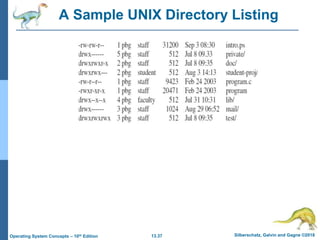
A Sample UNIX Directory Listing
13.38 Silberschatz, Galvin and Gagne ©2018
Operating System Concepts – 10th Edition
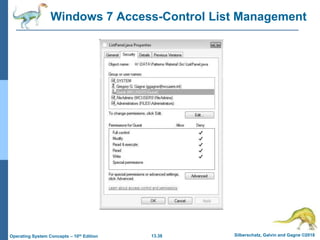
Windows 7 Access-Control List Management
13.39 Silberschatz, Galvin and Gagne ©2018
Operating System Concepts – 10th Edition
Memory-Mapped Files
Silberschatz, Galvin and Gagne ©2018
Operating System Concepts – 10h Edition
End of Chapter 13

file-system interface.pptx

  • 1.
    Silberschatz, Galvin andGagne ©2018 Operating System Concepts – 10h Edition Chapter 13: File-System Interface
  • 2.
    13.2 Silberschatz, Galvinand Gagne ©2018 Operating System Concepts – 10th Edition Outline  File Concept  Access Methods  Disk and Directory Structure  Protection  Memory-Mapped Files
  • 3.
    13.3 Silberschatz, Galvinand Gagne ©2018 Operating System Concepts – 10th Edition Objectives  To explain the function of file systems  To describe the interfaces to file systems  To discuss file-system design tradeoffs, including access methods, file sharing, file locking, and directory structures  To explore file-system protection
  • 4.
    13.4 Silberschatz, Galvinand Gagne ©2018 Operating System Concepts – 10th Edition File Concept  Contiguous logical address space  Types: • Data  Numeric  Character  Binary • Program  Contents defined by file’s creator • Many types  text file,  source file,  executable file
  • 5.
    13.5 Silberschatz, Galvinand Gagne ©2018 Operating System Concepts – 10th Edition File Attributes  Name – only information kept in human-readable form  Identifier – unique tag (number) identifies file within file system  Type – needed for systems that support different types  Location – pointer to file location on device  Size – current file size  Protection – controls who can do reading, writing, executing  Time, date, and user identification – data for protection, security, and usage monitoring  Information about files are kept in the directory structure, which is maintained on the disk  Many variations, including extended file attributes such as file checksum  Information kept in the directory structure
  • 6.
    13.6 Silberschatz, Galvinand Gagne ©2018 Operating System Concepts – 10th Edition File info Window on Mac OS X
  • 7.
    13.7 Silberschatz, Galvinand Gagne ©2018 Operating System Concepts – 10th Edition Directory Structure  A collection of nodes containing information about all files  Both the directory structure and the files reside on disk
  • 8.
    13.8 Silberschatz, Galvinand Gagne ©2018 Operating System Concepts – 10th Edition File Operations  Create  Write – at write pointer location  Read – at read pointer location  Reposition within file - seek  Delete  Truncate  Open (Fi) – search the directory structure on disk for entry Fi, and move the content of entry to memory  Close (Fi) – move the content of entry Fi in memory to directory structure on disk
  • 9.
    13.9 Silberschatz, Galvinand Gagne ©2018 Operating System Concepts – 10th Edition Open Files  Several pieces of data are needed to manage open files: • Open-file table: tracks open files • File pointer: pointer to last read/write location, per process that has the file open • File-open count: counter of number of times a file is open – to allow removal of data from open-file table when last processes closes it • Disk location of the file: cache of data access information • Access rights: per-process access mode information
  • 10.
    13.10 Silberschatz, Galvinand Gagne ©2018 Operating System Concepts – 10th Edition File Locking  Provided by some operating systems and file systems • Similar to reader-writer locks • Shared lock similar to reader lock – several processes can acquire concurrently • Exclusive lock similar to writer lock  Mediates access to a file  Mandatory or advisory: • Mandatory – access is denied depending on locks held and requested • Advisory – processes can find status of locks and decide what to do
  • 11.
    13.11 Silberschatz, Galvinand Gagne ©2018 Operating System Concepts – 10th Edition File Locking Example – Java API import java.io.*; import java.nio.channels.*; public class LockingExample { public static final boolean EXCLUSIVE = false; public static final boolean SHARED = true; public static void main(String arsg[]) throws IOException { FileLock sharedLock = null; FileLock exclusiveLock = null; try { RandomAccessFile raf = new RandomAccessFile("file.txt", "rw"); // get the channel for the file FileChannel ch = raf.getChannel(); // this locks the first half of the file - exclusive exclusiveLock = ch.lock(0, raf.length()/2, EXCLUSIVE); /** Now modify the data . . . */ // release the lock exclusiveLock.release();
  • 12.
    13.12 Silberschatz, Galvinand Gagne ©2018 Operating System Concepts – 10th Edition File Locking Example – Java API (Cont.) // this locks the second half of the file - shared sharedLock = ch.lock(raf.length()/2+1, raf.length(), SHARED); /** Now read the data . . . */ // release the lock sharedLock.release(); } catch (java.io.IOException ioe) { System.err.println(ioe); }finally { if (exclusiveLock != null) exclusiveLock.release(); if (sharedLock != null) sharedLock.release(); } } }
  • 13.
    13.13 Silberschatz, Galvinand Gagne ©2018 Operating System Concepts – 10th Edition File Types – Name, Extension
  • 14.
    13.14 Silberschatz, Galvinand Gagne ©2018 Operating System Concepts – 10th Edition File Structure  None - sequence of words, bytes  Simple record structure • Lines • Fixed length • Variable length  Complex Structures • Formatted document • Relocatable load file  Can simulate last two with first method by inserting appropriate control characters  Who decides: • Operating system • Program
  • 15.
    13.15 Silberschatz, Galvinand Gagne ©2018 Operating System Concepts – 10th Edition Access Methods  A file is fixed length logical records  Sequential Access  Direct Access  Other Access Methods
  • 16.
    13.16 Silberschatz, Galvinand Gagne ©2018 Operating System Concepts – 10th Edition Sequential Access  Operations • read next • write next • Reset • no read after last write (rewrite)  Figure
  • 17.
    13.17 Silberschatz, Galvinand Gagne ©2018 Operating System Concepts – 10th Edition Direct Access  Operations • read n • write n • position to n  read next  write next  rewrite n n = relative block number  Relative block numbers allow OS to decide where file should be placed
  • 18.
    13.18 Silberschatz, Galvinand Gagne ©2018 Operating System Concepts – 10th Edition Simulation of Sequential Access on Direct-access File
  • 19.
    13.19 Silberschatz, Galvinand Gagne ©2018 Operating System Concepts – 10th Edition Other Access Methods  Can be other access methods built on top of base methods  General involve creation of an index for the file  Keep index in memory for fast determination of location of data to be operated on (consider Universal Produce Code (UPC code) plus record of data about that item)  If the index is too large, create an in-memory index, which an index of a disk index  IBM indexed sequential-access method (ISAM) • Small master index, points to disk blocks of secondary index • File kept sorted on a defined key • All done by the OS  VMS operating system provides index and relative files as another example (see next slide)
  • 20.
    13.20 Silberschatz, Galvinand Gagne ©2018 Operating System Concepts – 10th Edition Example of Index and Relative Files
  • 21.
    13.21 Silberschatz, Galvinand Gagne ©2018 Operating System Concepts – 10th Edition Disk Structure  Disk can be subdivided into partitions  Disks or partitions can be RAID protected against failure  Disk or partition can be used raw – without a file system, or formatted with a file system  Partitions also known as minidisks, slices  Entity containing file system is known as a volume  Each volume containing a file system also tracks that file system’s info in device directory or volume table of contents  In addition to general-purpose file systems there are many special-purpose file systems, frequently all within the same operating system or computer
  • 22.
    13.22 Silberschatz, Galvinand Gagne ©2018 Operating System Concepts – 10th Edition A Typical File-system Organization
  • 23.
    13.23 Silberschatz, Galvinand Gagne ©2018 Operating System Concepts – 10th Edition Types of File Systems  We mostly talk of general-purpose file systems  But systems frequently have may file systems, some general- and some special- purpose  Consider Solaris has • tmpfs – memory-based volatile FS for fast, temporary I/O • objfs – interface into kernel memory to get kernel symbols for debugging • ctfs – contract file system for managing daemons • lofs – loopback file system allows one FS to be accessed in place of another • procfs – kernel interface to process structures • ufs, zfs – general purpose file systems
  • 24.
    13.24 Silberschatz, Galvinand Gagne ©2018 Operating System Concepts – 10th Edition Directory Structure  A collection of nodes containing information about all files  Both the directory structure and the files reside on disk
  • 25.
    13.25 Silberschatz, Galvinand Gagne ©2018 Operating System Concepts – 10th Edition Operations Performed on Directory  Search for a file  Create a file  Delete a file  List a directory  Rename a file  Traverse the file system
  • 26.
    13.26 Silberschatz, Galvinand Gagne ©2018 Operating System Concepts – 10th Edition Directory Organization  Efficiency – locating a file quickly  Naming – convenient to users • Two users can have same name for different files • The same file can have several different names  Grouping – logical grouping of files by properties, (e.g., all Java programs, all games, …) The directory is organized logically to obtain
  • 27.
    13.27 Silberschatz, Galvinand Gagne ©2018 Operating System Concepts – 10th Edition Single-Level Directory  A single directory for all users  Naming problem  Grouping problem
  • 28.
    13.28 Silberschatz, Galvinand Gagne ©2018 Operating System Concepts – 10th Edition Two-Level Directory  Separate directory for each user  Path name  Can have the same file name for different user  Efficient searching  No grouping capability
  • 29.
    13.29 Silberschatz, Galvinand Gagne ©2018 Operating System Concepts – 10th Edition Tree-Structured Directories
  • 30.
    13.30 Silberschatz, Galvinand Gagne ©2018 Operating System Concepts – 10th Edition Acyclic-Graph Directories  Have shared subdirectories and files  Example
  • 31.
    13.31 Silberschatz, Galvinand Gagne ©2018 Operating System Concepts – 10th Edition Acyclic-Graph Directories (Cont.)  Two different names (aliasing)  If dict deletes w/list  dangling pointer Solutions: • Backpointers, so we can delete all pointers.  Variable size records a problem • Backpointers using a daisy chain organization • Entry-hold-count solution  New directory entry type • Link – another name (pointer) to an existing file • Resolve the link – follow pointer to locate the file
  • 32.
    13.32 Silberschatz, Galvinand Gagne ©2018 Operating System Concepts – 10th Edition General Graph Directory
  • 33.
    13.33 Silberschatz, Galvinand Gagne ©2018 Operating System Concepts – 10th Edition General Graph Directory (Cont.)  How do we guarantee no cycles? • Allow only links to files not subdirectories • Garbage collection • Every time a new link is added use a cycle detection algorithm to determine whether it is OK
  • 34.
    13.34 Silberschatz, Galvinand Gagne ©2018 Operating System Concepts – 10th Edition Current Directory  Can designate one of the directories as the current (working) directory • cd /spell/mail/prog • type list  Creating and deleting a file is done in current directory  Example of creating a new file • If in current directory is /mail • The command mkdir <dir-name> • Results in: • Deleting “mail”  deleting the entire subtree rooted by “mail”
  • 35.
    13.35 Silberschatz, Galvinand Gagne ©2018 Operating System Concepts – 10th Edition Protection  File owner/creator should be able to control: • What can be done • By whom  Types of access • Read • Write • Execute • Append • Delete • List
  • 36.
    13.36 Silberschatz, Galvinand Gagne ©2018 Operating System Concepts – 10th Edition Access Lists and Groups in Unix  Mode of access: read, write, execute  Three classes of users on Unix / Linux RWX a) owner access 7  1 1 1 RWX b) group access 6  1 1 0 RWX c) public access 1  0 0 1  Ask manager to create a group (unique name), say G, and add some users to the group.  For a file (say game) or subdirectory, define an appropriate access.  Attach a group to a file chgrp G game
  • 37.
    13.37 Silberschatz, Galvinand Gagne ©2018 Operating System Concepts – 10th Edition A Sample UNIX Directory Listing
  • 38.
    13.38 Silberschatz, Galvinand Gagne ©2018 Operating System Concepts – 10th Edition Windows 7 Access-Control List Management
  • 39.
    13.39 Silberschatz, Galvinand Gagne ©2018 Operating System Concepts – 10th Edition Memory-Mapped Files
  • 40.
    Silberschatz, Galvin andGagne ©2018 Operating System Concepts – 10h Edition End of Chapter 13