DATE:- 26/05/16
Presented By: Nitin Kumar Upadhyay
K.V. Ramgarh Cantt
Region:- Ranchi
What is File and what is the purpose of using a
File?
A file can be defined as bunch of bytes stored
on some storage media.
Files are used to store data permanently in C++.
What is Stream and how I/O Operations takes
place in a file?
A stream is a sequence of bytes or flow of data.
Stream is needed to perform input and output
operations in a file.
What are different types of File Streams?
There are two types of streams.
ofstream :- It is used to write data to a file.
Variable output stream File
ifstream :- It is used to read data from a file.
File input stream variable
To learn Merge and Search operations first we
have to understand file opening modes used for
above said purpose.
Q. What is file opening mode
Ans. File opening Mode defines type of
operations
which we can perform with the file.
For Merge and Search operation following
modes
are used.
ios::out:- It creates a new file for writing.
ios::in :- It opens an existing file for
reading.
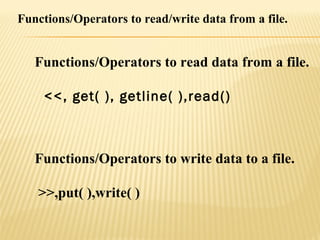
Functions/Operators to read/write data from a file.
Functions/Operators to read data from a file.
<<, get( ), getline( ),read()
Functions/Operators to write data to a file.
>>,put( ),write( )
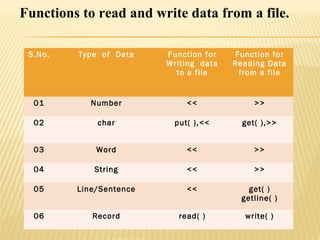
Functions to read and write data from a file.
S.No. Type of Data Function for
Writing data
to a file
Function for
Reading Data
from a file
01 Number << >>
02 char put( ),<< get( ),>>
03 Word << >>
04 String << >>
05 Line/Sentence << get( )
getline( )
06 Record read( ) write( )
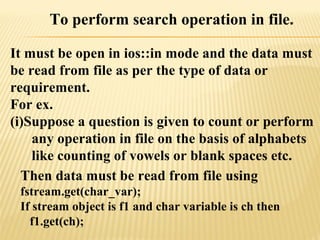
To perform search operation in file.
It must be open in ios::in mode and the data must
be read from file as per the type of data or
requirement.
For ex.
(i)Suppose a question is given to count or perform
any operation in file on the basis of alphabets
like counting of vowels or blank spaces etc.
Then data must be read from file using
fstream.get(char_var);
If stream object is f1 and char variable is ch then
f1.get(ch);
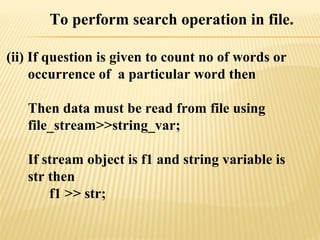
To perform search operation in file.
(ii) If question is given to count no of words or
occurrence of a particular word then
Then data must be read from file using
file_stream>>string_var;
If stream object is f1 and string variable is
str then
f1 >> str;
To perform search operation in file.
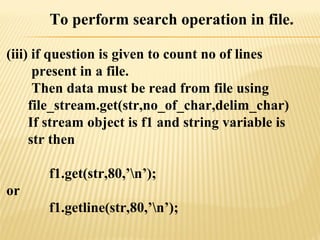
(iii) if question is given to count no of lines
present in a file.
Then data must be read from file using
file_stream.get(str,no_of_char,delim_char)
If stream object is f1 and string variable is
str then
f1.get(str,80,’n’);
or
f1.getline(str,80,’n’);
To perform search operation in file.
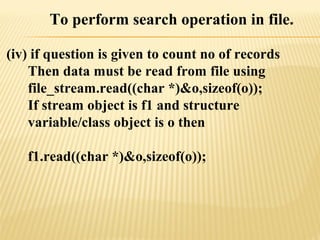
(iv) if question is given to count no of records
Then data must be read from file using
file_stream.read((char *)&o,sizeof(o));
If stream object is f1 and structure
variable/class object is o then
f1.read((char *)&o,sizeof(o));
To perform search operation in a file
implemeted using structure.
For example suppose stu is a structure with
following definition and student.dat is a file
which contains details of students as given
structure.
strcut stu
{ int rollno;
char name[30];
float per;
}s;
then to search record of a student having
name sumit.
void search( )
{ fstream f1;char str[40];
f1.open(“student.dat”,ios::in|ios::binary);
while(!f1.eof( ))
{ f1.read((char *)&s,sizeof(s));
if(strcmp(s.name,”sumit”)==0)
cout<<s.rollno<<s.percentage
}
f1.close( );
}
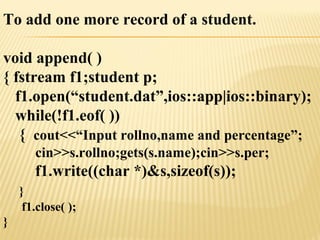
To add one more record of a student.
void append( )
{ fstream f1;student p;
f1.open(“student.dat”,ios::app|ios::binary);
while(!f1.eof( ))
{ cout<<“Input rollno,name and percentage”;
cin>>s.rollno;gets(s.name);cin>>s.per;
f1.write((char *)&s,sizeof(s));
}
f1.close( );
}
 #include<fstream.h>
 #include <conio.h>
 #include<stdio.h>
 void main( )
 {
 char ch;
 char str[20];
 fstream f1,f2,f3;
 f1.open("abc1.txt",ios::out);
 cout<<"input str";
 gets(str);
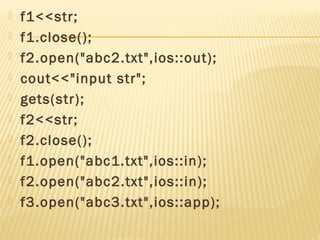
 f1<<str;
 f1.close();
 f2.open("abc2.txt",ios::out);
 cout<<"input str";
 gets(str);
 f2<<str;
 f2.close();
 f1.open("abc1.txt",ios::in);
 f2.open("abc2.txt",ios::in);
 f3.open("abc3.txt",ios::app);
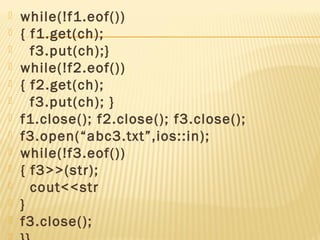
 while(!f1.eof())
 { f1.get(ch);
 f3.put(ch);}
 while(!f2.eof())
 { f2.get(ch);
 f3.put(ch); }
 f1.close(); f2.close(); f3.close();
 f3.open(“abc3.txt”,ios::in);
 while(!f3.eof())
 { f3>>(str);
 cout<<str
 }
 f3.close();
File Handling - N K Upadhyay

File Handling - N K Upadhyay

  • 1.
    DATE:- 26/05/16 Presented By:Nitin Kumar Upadhyay K.V. Ramgarh Cantt Region:- Ranchi
  • 2.
    What is Fileand what is the purpose of using a File? A file can be defined as bunch of bytes stored on some storage media. Files are used to store data permanently in C++.
  • 3.
    What is Streamand how I/O Operations takes place in a file? A stream is a sequence of bytes or flow of data. Stream is needed to perform input and output operations in a file.
  • 4.
    What are differenttypes of File Streams? There are two types of streams. ofstream :- It is used to write data to a file. Variable output stream File ifstream :- It is used to read data from a file. File input stream variable
  • 5.
    To learn Mergeand Search operations first we have to understand file opening modes used for above said purpose. Q. What is file opening mode Ans. File opening Mode defines type of operations which we can perform with the file. For Merge and Search operation following modes are used. ios::out:- It creates a new file for writing. ios::in :- It opens an existing file for reading.
  • 6.
    Functions/Operators to read/writedata from a file. Functions/Operators to read data from a file. <<, get( ), getline( ),read() Functions/Operators to write data to a file. >>,put( ),write( )
  • 7.
    Functions to readand write data from a file. S.No. Type of Data Function for Writing data to a file Function for Reading Data from a file 01 Number << >> 02 char put( ),<< get( ),>> 03 Word << >> 04 String << >> 05 Line/Sentence << get( ) getline( ) 06 Record read( ) write( )
  • 8.
    To perform searchoperation in file. It must be open in ios::in mode and the data must be read from file as per the type of data or requirement. For ex. (i)Suppose a question is given to count or perform any operation in file on the basis of alphabets like counting of vowels or blank spaces etc. Then data must be read from file using fstream.get(char_var); If stream object is f1 and char variable is ch then f1.get(ch);
  • 9.
    To perform searchoperation in file. (ii) If question is given to count no of words or occurrence of a particular word then Then data must be read from file using file_stream>>string_var; If stream object is f1 and string variable is str then f1 >> str;
  • 10.
    To perform searchoperation in file. (iii) if question is given to count no of lines present in a file. Then data must be read from file using file_stream.get(str,no_of_char,delim_char) If stream object is f1 and string variable is str then f1.get(str,80,’n’); or f1.getline(str,80,’n’);
  • 11.
    To perform searchoperation in file. (iv) if question is given to count no of records Then data must be read from file using file_stream.read((char *)&o,sizeof(o)); If stream object is f1 and structure variable/class object is o then f1.read((char *)&o,sizeof(o));
  • 12.
    To perform searchoperation in a file implemeted using structure. For example suppose stu is a structure with following definition and student.dat is a file which contains details of students as given structure. strcut stu { int rollno; char name[30]; float per; }s;
  • 13.
    then to searchrecord of a student having name sumit. void search( ) { fstream f1;char str[40]; f1.open(“student.dat”,ios::in|ios::binary); while(!f1.eof( )) { f1.read((char *)&s,sizeof(s)); if(strcmp(s.name,”sumit”)==0) cout<<s.rollno<<s.percentage } f1.close( ); }
  • 14.
    To add onemore record of a student. void append( ) { fstream f1;student p; f1.open(“student.dat”,ios::app|ios::binary); while(!f1.eof( )) { cout<<“Input rollno,name and percentage”; cin>>s.rollno;gets(s.name);cin>>s.per; f1.write((char *)&s,sizeof(s)); } f1.close( ); }
  • 15.
     #include<fstream.h>  #include<conio.h>  #include<stdio.h>  void main( )  {  char ch;  char str[20];  fstream f1,f2,f3;  f1.open("abc1.txt",ios::out);  cout<<"input str";  gets(str);
  • 16.
     f1<<str;  f1.close(); f2.open("abc2.txt",ios::out);  cout<<"input str";  gets(str);  f2<<str;  f2.close();  f1.open("abc1.txt",ios::in);  f2.open("abc2.txt",ios::in);  f3.open("abc3.txt",ios::app);
  • 17.
     while(!f1.eof())  {f1.get(ch);  f3.put(ch);}  while(!f2.eof())  { f2.get(ch);  f3.put(ch); }  f1.close(); f2.close(); f3.close();  f3.open(“abc3.txt”,ios::in);  while(!f3.eof())  { f3>>(str);  cout<<str  }  f3.close();