Random Access Files
For many applications, sequential access is inefficient. These applications, known as real-
time applications, require that a record be accessed immediately while a client is waiting.
A program in which the user makes direct requests is an interactive program.
For example, if a customer telephones a department store with a question about a
monthly bill, the customer service representative does not need or want to access every
customer account in sequence. With tens of thousands of account records to read, it
would take too long to access the customer’s record.
Instead, customer service representatives require random access files, files in which
records can be located in any order.
Files in which records must be accessed immediately are also called instant access files
Because they enable you to locate a particular record directly (without reading all of the
preceding records), random access files are also called direct access files. You can declare
a random access file with a statement similar to the following:
RandomFile customerFile
You also can use read, write, and close operations with a random access file
Similarly to the way you use them with sequential files. However, with
random access files you have the additional capability to find a record
directly. For example, you might be able to use a statement similar to
the following to find customer number 712 on a random access file:
• seek record 712
This feature is particularly useful in random access processing. Consider a business
with 20,000 customer accounts. When the customer who has the 14,607th record
in the file acquires a new telephone number, it is convenient to directly access the
14,607th record and write the new telephone number to the fi le in the location in
which the old number was previously stored.
Understanding the Need for Sorting Records
• When you store data records, they exist in some type of order; that is, one record is first,
another second, and so on. When records are in sequential order, they are arranged one
after another on the basis of the value in a particular field. Examples include employee
records
• stored in numeric order by Social Security number or department number, or in alphabetic
order by last name or department name.
• When you sort data, you can sort either in ascending order, arranging records from lowest
to highest value within a field, or descending order, arranging records from highest to
lowest value. Here are some examples of occasions when you would need to sort records
• A department store maintains customer records in ascending order by customer number,
but at the end of a billing period, the credit manager wants to contact customers whose
balances are 90 or more days overdue. Th e manager wants to list these overdue
customers in descending order by the amount owed, so the customers with the largest
debt can be contacted first.
Understanding How to Swap Two Values
• Computer professionals have developed many sorting techniques, and
swapping two values is a concept that is central to most of them.
• When you swap values stored in two variables, you exchange their values;
you set the first variable equal to the value of the second, and the second
variable equal to the value of the first. However, there is a trick to
swapping any two values. Assume you have declared two variables as
follows
• num score1 = 90
• num score2 = 85
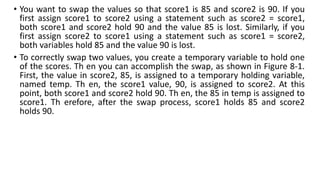
• You want to swap the values so that score1 is 85 and score2 is 90. If you
first assign score1 to score2 using a statement such as score2 = score1,
both score1 and score2 hold 90 and the value 85 is lost. Similarly, if you
first assign score2 to score1 using a statement such as score1 = score2,
both variables hold 85 and the value 90 is lost.
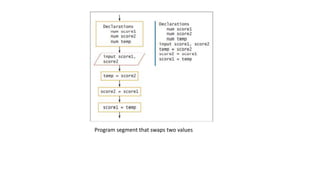
• To correctly swap two values, you create a temporary variable to hold one
of the scores. Th en you can accomplish the swap, as shown in Figure 8-1.
First, the value in score2, 85, is assigned to a temporary holding variable,
named temp. Th en, the score1 value, 90, is assigned to score2. At this
point, both score1 and score2 hold 90. Th en, the 85 in temp is assigned to
score1. Th erefore, after the swap process, score1 holds 85 and score2
holds 90.
Program segment that swaps two values
Using multidimensional arrays
• An array is a series or list of values in computer memory, all of which have
the same name and data type but are differentiated with special numbers
called subscripts. Usually, all the values in an array have something in
common; for example,
• they might represent a list of employee ID numbers or a list of prices for
items sold in a store. A subscript, also called an index, is a number that
indicates the position of a particular item within an array.
• An array whose elements you can access using a single subscript is a one-
dimensional array or single-dimensional array. Th e array has only one
dimension because its data can be stored in a table that has just one
dimension—height.
• If you know the vertical position of a one-dimensional array’s element,
you can find its value.For example, suppose you own an apartment
building and charge five different rent amounts for apartments on
different floors (including floor 0,the basement), as shown in Table
You could declare the following array to hold the rent values:
num RENT_BY_FLOOR[5] = 350, 400, 475, 600, 1000
The location of any rent value in Table depends on only a single variable—the floor of the building. So, when you
create a single dimensional array to hold rent values, you need just one subscript to identify the row
• Sometimes, however, locating a value in an array depends on more than
one variable. If you must represent values in a table or grid that contains
rows and columns instead of a single list, then you might want to use a
two-dimensional array. A two-dimensional array contains two
dimensions: height and width. That is, the location of any element
depends on two factors. For example, if an apartment’s rent depends on
two variables—both the floor of the building and the number of
bedrooms—then you want to create a two-dimensional array.
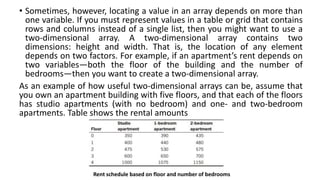
As an example of how useful two-dimensional arrays can be, assume that
you own an apartment building with five floors, and that each of the floors
has studio apartments (with no bedroom) and one- and two-bedroom
apartments. Table shows the rental amounts
Rent schedule based on floor and number of bedrooms
• To determine a tenant’s rent, you need to know two pieces of information: the floor
on which the tenant rents an apartment and the number of bedrooms in the
apartment. Each element in a two dimensional array requires two subscripts to
reference it—one subscript to determine the row and a second to determine the
column. Thus, the 15 separate rent values for a two-dimensional array based on the
rent table in Table would be arranged in five rows and three columns and defined as
follows:
• num RENT_BY_FLOOR_AND_BDRMS[5][3]=
{350, 390, 435},
{400, 440, 480},
{475, 530, 575},
{600, 650, 700},
{1000, 1075, 1150}
• When you declare a one-dimensional array, you type a set of square brackets
after the array type and name. To declare a two-dimensional array, many
languages require you to type two sets of brackets after the array type and name.
For each element in the array, the first square bracket holds the number of rows,
and the second one holds the number of columns. In other words, the two
dimensions represent the array’s height and its width.
• Besides one- and two-dimensional arrays, many programming languages also
support three-dimensional arrays. For example, if you own an apartment building
with a number of floors and different numbers of bedrooms available in
apartments on each floor, you can use a two-dimensional array to store the rental
fees, but if you own several apartment buildings, you might want to employ a
third dimension to store the building number. For example, if a three-dimensional
array is stored on paper, you might need to know an element's row, column, and
page to access it.

File Handling and Applications.pptx

  • 1.
    Random Access Files Formany applications, sequential access is inefficient. These applications, known as real- time applications, require that a record be accessed immediately while a client is waiting. A program in which the user makes direct requests is an interactive program. For example, if a customer telephones a department store with a question about a monthly bill, the customer service representative does not need or want to access every customer account in sequence. With tens of thousands of account records to read, it would take too long to access the customer’s record. Instead, customer service representatives require random access files, files in which records can be located in any order. Files in which records must be accessed immediately are also called instant access files Because they enable you to locate a particular record directly (without reading all of the preceding records), random access files are also called direct access files. You can declare a random access file with a statement similar to the following: RandomFile customerFile
  • 2.
    You also canuse read, write, and close operations with a random access file Similarly to the way you use them with sequential files. However, with random access files you have the additional capability to find a record directly. For example, you might be able to use a statement similar to the following to find customer number 712 on a random access file: • seek record 712 This feature is particularly useful in random access processing. Consider a business with 20,000 customer accounts. When the customer who has the 14,607th record in the file acquires a new telephone number, it is convenient to directly access the 14,607th record and write the new telephone number to the fi le in the location in which the old number was previously stored.
  • 3.
    Understanding the Needfor Sorting Records • When you store data records, they exist in some type of order; that is, one record is first, another second, and so on. When records are in sequential order, they are arranged one after another on the basis of the value in a particular field. Examples include employee records • stored in numeric order by Social Security number or department number, or in alphabetic order by last name or department name. • When you sort data, you can sort either in ascending order, arranging records from lowest to highest value within a field, or descending order, arranging records from highest to lowest value. Here are some examples of occasions when you would need to sort records • A department store maintains customer records in ascending order by customer number, but at the end of a billing period, the credit manager wants to contact customers whose balances are 90 or more days overdue. Th e manager wants to list these overdue customers in descending order by the amount owed, so the customers with the largest debt can be contacted first.
  • 4.
    Understanding How toSwap Two Values • Computer professionals have developed many sorting techniques, and swapping two values is a concept that is central to most of them. • When you swap values stored in two variables, you exchange their values; you set the first variable equal to the value of the second, and the second variable equal to the value of the first. However, there is a trick to swapping any two values. Assume you have declared two variables as follows • num score1 = 90 • num score2 = 85
  • 5.
    • You wantto swap the values so that score1 is 85 and score2 is 90. If you first assign score1 to score2 using a statement such as score2 = score1, both score1 and score2 hold 90 and the value 85 is lost. Similarly, if you first assign score2 to score1 using a statement such as score1 = score2, both variables hold 85 and the value 90 is lost. • To correctly swap two values, you create a temporary variable to hold one of the scores. Th en you can accomplish the swap, as shown in Figure 8-1. First, the value in score2, 85, is assigned to a temporary holding variable, named temp. Th en, the score1 value, 90, is assigned to score2. At this point, both score1 and score2 hold 90. Th en, the 85 in temp is assigned to score1. Th erefore, after the swap process, score1 holds 85 and score2 holds 90.
  • 6.
    Program segment thatswaps two values
  • 7.
    Using multidimensional arrays •An array is a series or list of values in computer memory, all of which have the same name and data type but are differentiated with special numbers called subscripts. Usually, all the values in an array have something in common; for example, • they might represent a list of employee ID numbers or a list of prices for items sold in a store. A subscript, also called an index, is a number that indicates the position of a particular item within an array. • An array whose elements you can access using a single subscript is a one- dimensional array or single-dimensional array. Th e array has only one dimension because its data can be stored in a table that has just one dimension—height.
  • 8.
    • If youknow the vertical position of a one-dimensional array’s element, you can find its value.For example, suppose you own an apartment building and charge five different rent amounts for apartments on different floors (including floor 0,the basement), as shown in Table You could declare the following array to hold the rent values: num RENT_BY_FLOOR[5] = 350, 400, 475, 600, 1000 The location of any rent value in Table depends on only a single variable—the floor of the building. So, when you create a single dimensional array to hold rent values, you need just one subscript to identify the row
  • 9.
    • Sometimes, however,locating a value in an array depends on more than one variable. If you must represent values in a table or grid that contains rows and columns instead of a single list, then you might want to use a two-dimensional array. A two-dimensional array contains two dimensions: height and width. That is, the location of any element depends on two factors. For example, if an apartment’s rent depends on two variables—both the floor of the building and the number of bedrooms—then you want to create a two-dimensional array. As an example of how useful two-dimensional arrays can be, assume that you own an apartment building with five floors, and that each of the floors has studio apartments (with no bedroom) and one- and two-bedroom apartments. Table shows the rental amounts Rent schedule based on floor and number of bedrooms
  • 10.
    • To determinea tenant’s rent, you need to know two pieces of information: the floor on which the tenant rents an apartment and the number of bedrooms in the apartment. Each element in a two dimensional array requires two subscripts to reference it—one subscript to determine the row and a second to determine the column. Thus, the 15 separate rent values for a two-dimensional array based on the rent table in Table would be arranged in five rows and three columns and defined as follows: • num RENT_BY_FLOOR_AND_BDRMS[5][3]= {350, 390, 435}, {400, 440, 480}, {475, 530, 575}, {600, 650, 700}, {1000, 1075, 1150}
  • 11.
    • When youdeclare a one-dimensional array, you type a set of square brackets after the array type and name. To declare a two-dimensional array, many languages require you to type two sets of brackets after the array type and name. For each element in the array, the first square bracket holds the number of rows, and the second one holds the number of columns. In other words, the two dimensions represent the array’s height and its width. • Besides one- and two-dimensional arrays, many programming languages also support three-dimensional arrays. For example, if you own an apartment building with a number of floors and different numbers of bedrooms available in apartments on each floor, you can use a two-dimensional array to store the rental fees, but if you own several apartment buildings, you might want to employ a third dimension to store the building number. For example, if a three-dimensional array is stored on paper, you might need to know an element's row, column, and page to access it.