Facebook for Parents and Teens  Copyright @2009 Thought Labs, LLC.  Contact us at info@thoughtlabs.com
About Thought Labs We help companies create and implement social media strategies that: Make connections with their customers Engage those customers to get real-time feedback Interpret that feedback into concrete actions Copyright @2009 Thought Labs, LLC.  Contact us at info@thoughtlabs.com
Our book on building Facebook Applications is due out in October, 2009. Copyright @2009 Thought Labs, LLC.  Contact us at info@thoughtlabs.com
Today’s Agenda Brief Overview of Facebook How Information Travels Privacy Parent/Teen Relationships Questions Copyright @2009 Thought Labs, LLC.  Contact us at info@thoughtlabs.com
Facebook is BIG! Copyright ©2009 buzzpoint.com Copyright @2009 Thought Labs, LLC.  Contact us at info@thoughtlabs.com
It now has over 250 million users. More than two-thirds of Facebook users are outside of college. The fastest growing demographic is those 35 years old and older. The average user has 120 friends on the site. More than 5 billion minutes are spent on Facebook each day (worldwide). More than 30 million users update their statuses at least once each day. #1 Social Network  Copyright @2009 Thought Labs, LLC.  Contact us at info@thoughtlabs.com
Why are people on Facebook? Light, simple social interactions People want to stay in the loop People HAVE to stay in the loop Planning and events Sharing what is important
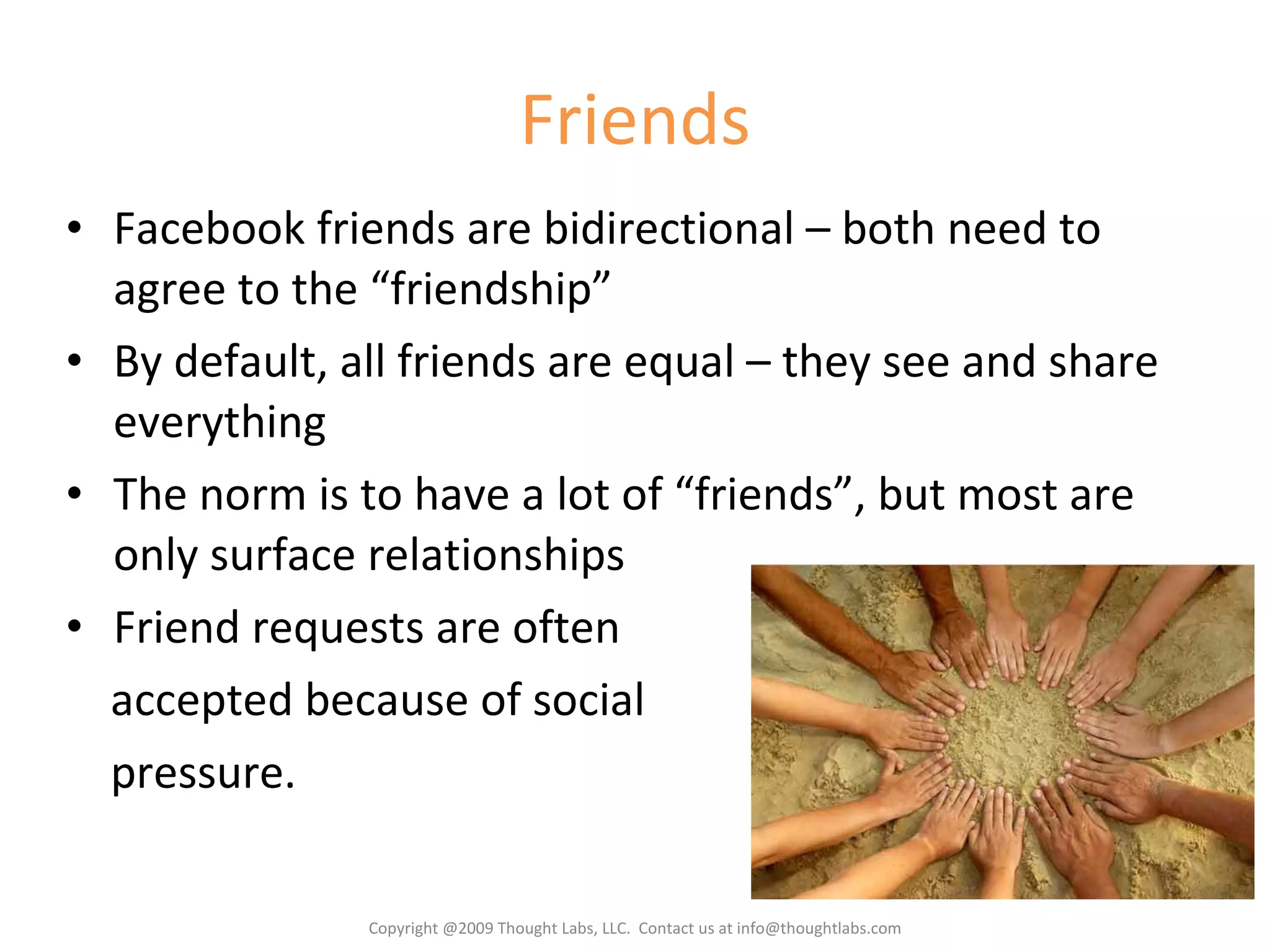
Friends Facebook friends are bidirectional – both need to agree to the “friendship” By default, all friends are equal – they see and share everything The norm is to have a lot of “friends”, but most are only surface relationships Friend requests are often accepted because of social pressure. Copyright @2009 Thought Labs, LLC.  Contact us at info@thoughtlabs.com
Friend Lists Friend lists allow you to put your friends into groups. Friends can be in more than one list. Friend lists can be used as a filter on the Home page for news stories Friend lists can also be used for better privacy settings. Recommendation   Create two friend lists: Inner Circle  – people you trust and would share anything with Limited  – people you want to see as little as possible about you Copyright @2009 Thought Labs, LLC.  Contact us at info@thoughtlabs.com
The Home Page Filters Profile Requests Suggested Friends The Publisher  Events Pokes Copyright @2009 Thought Labs, LLC.  Contact us at info@thoughtlabs.com
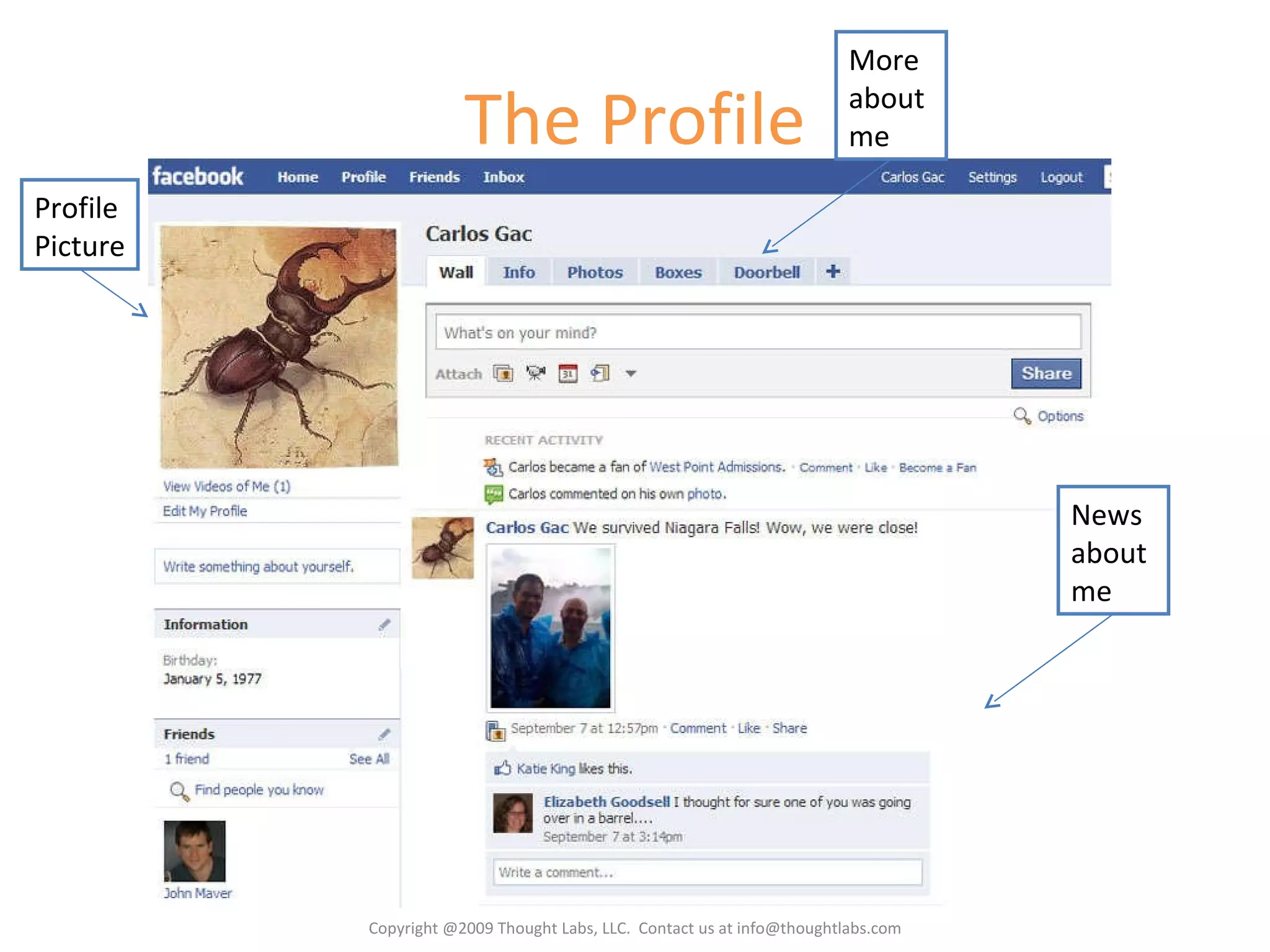
The Profile Profile Picture More about me News about me Copyright @2009 Thought Labs, LLC.  Contact us at info@thoughtlabs.com
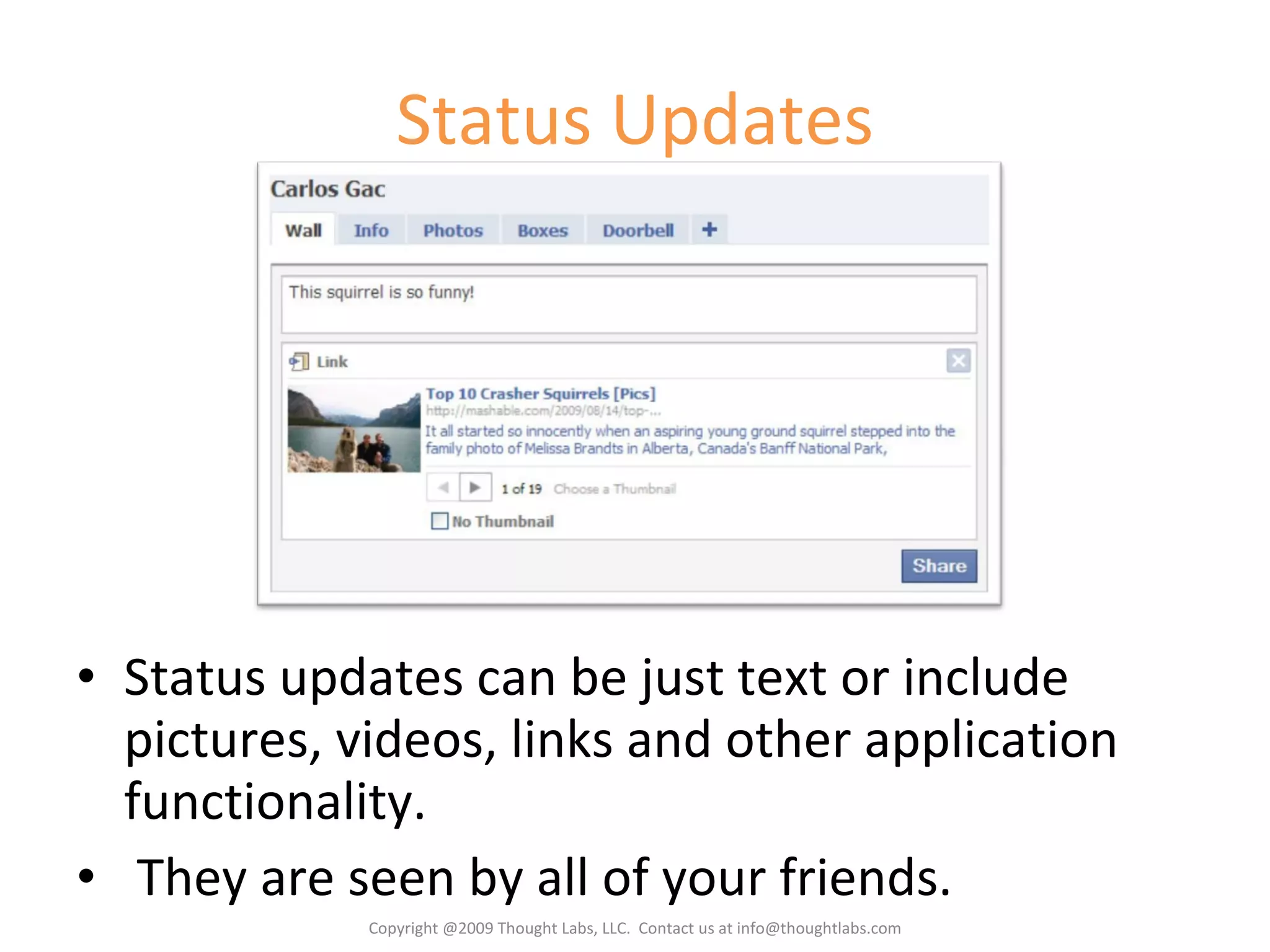
Status Updates Status updates can be just text or include pictures, videos, links and other application functionality. They are seen by all of your friends. Copyright @2009 Thought Labs, LLC.  Contact us at info@thoughtlabs.com
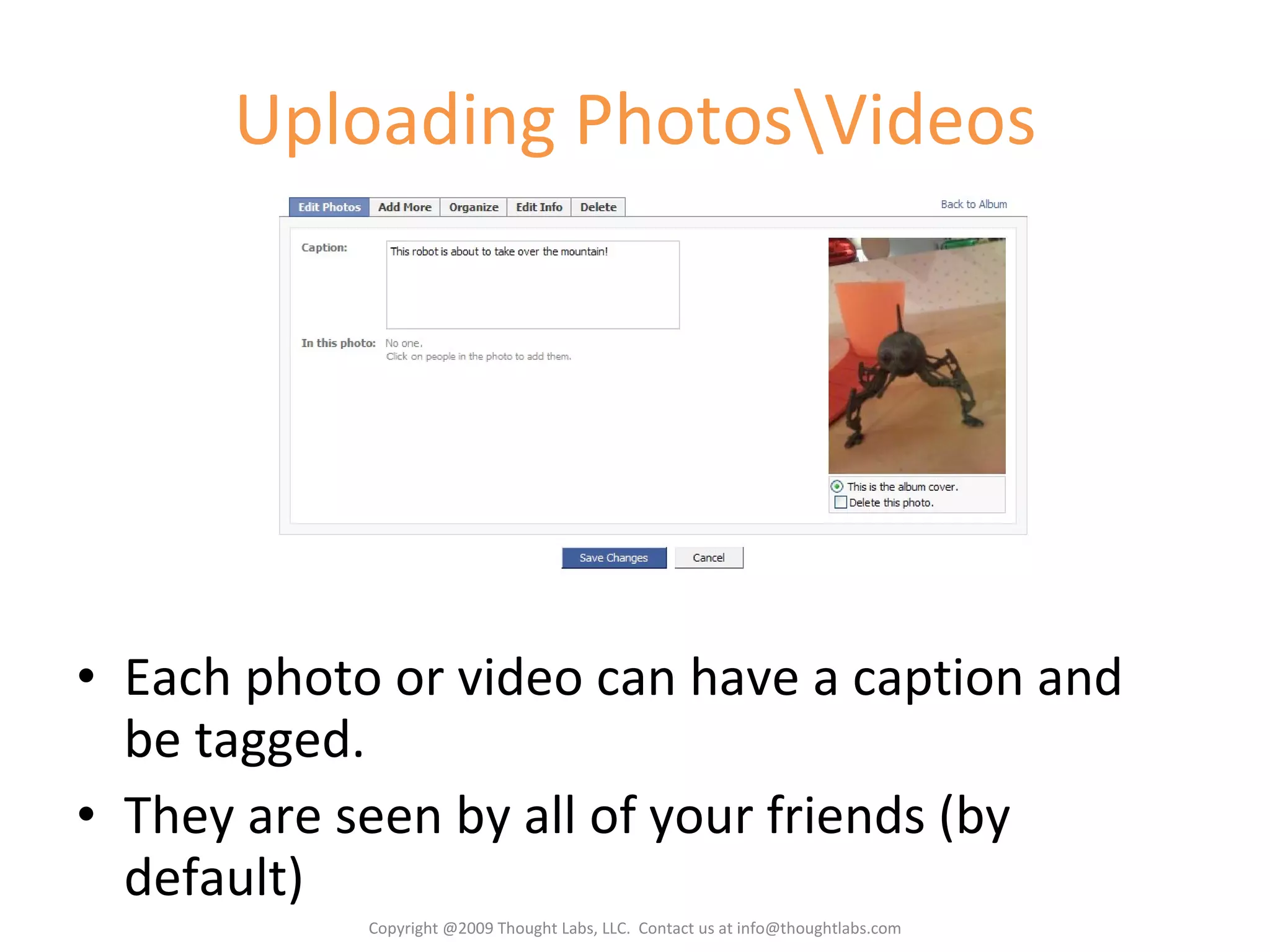
Uploading Photos\Videos Each photo or video can have a caption and be tagged. They are seen by all of your friends (by default) Copyright @2009 Thought Labs, LLC.  Contact us at info@thoughtlabs.com
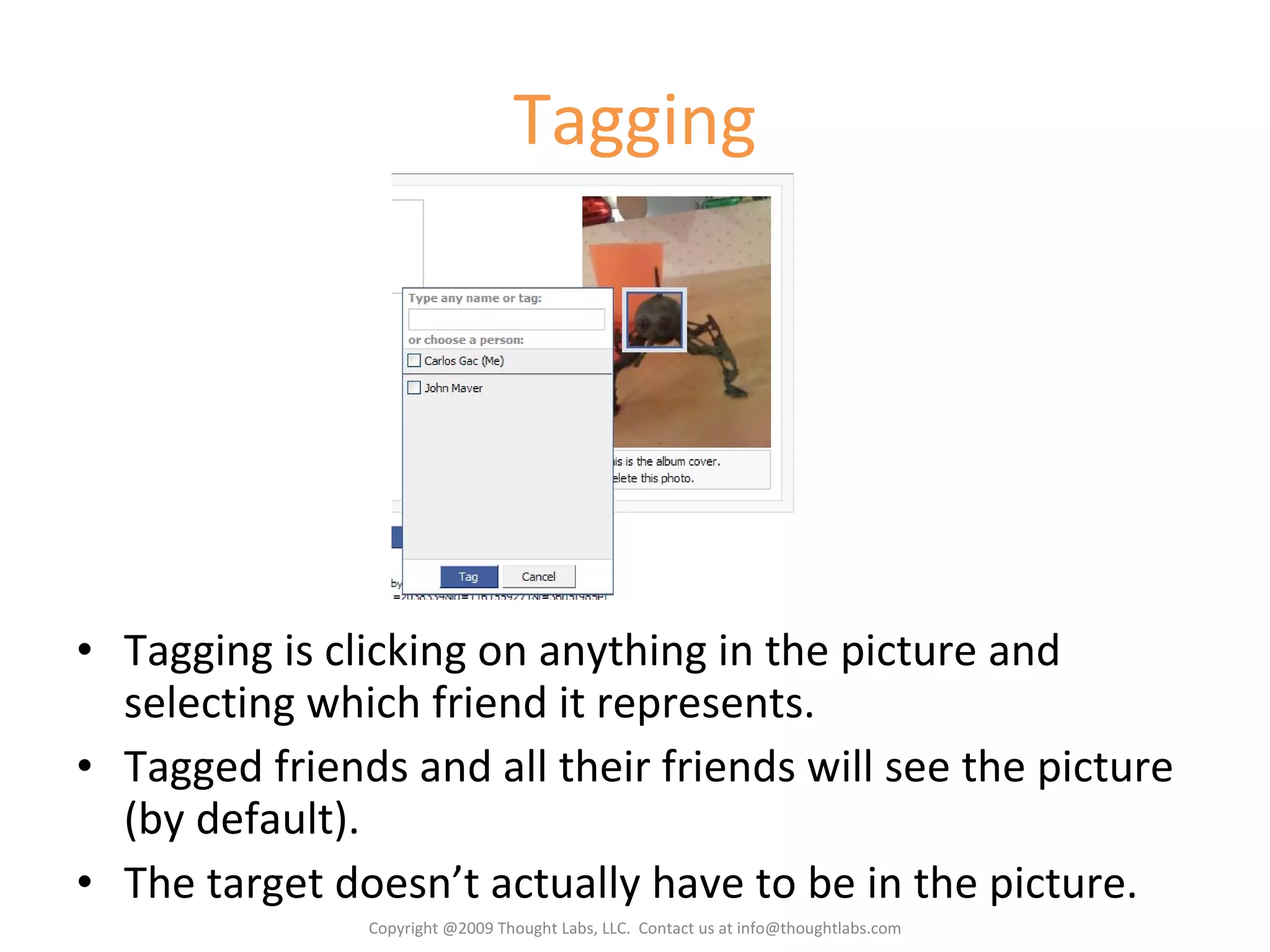
Tagging Tagging is clicking on anything in the picture and selecting which friend it represents. Tagged friends and all their friends will see the picture (by default). The target doesn’t actually have to be in the picture. Copyright @2009 Thought Labs, LLC.  Contact us at info@thoughtlabs.com
Commenting Anyone who can see a news story can comment. Comments are seen by the original poster and friends The original poster and the commenter can delete the comment. Copyright @2009 Thought Labs, LLC.  Contact us at info@thoughtlabs.com
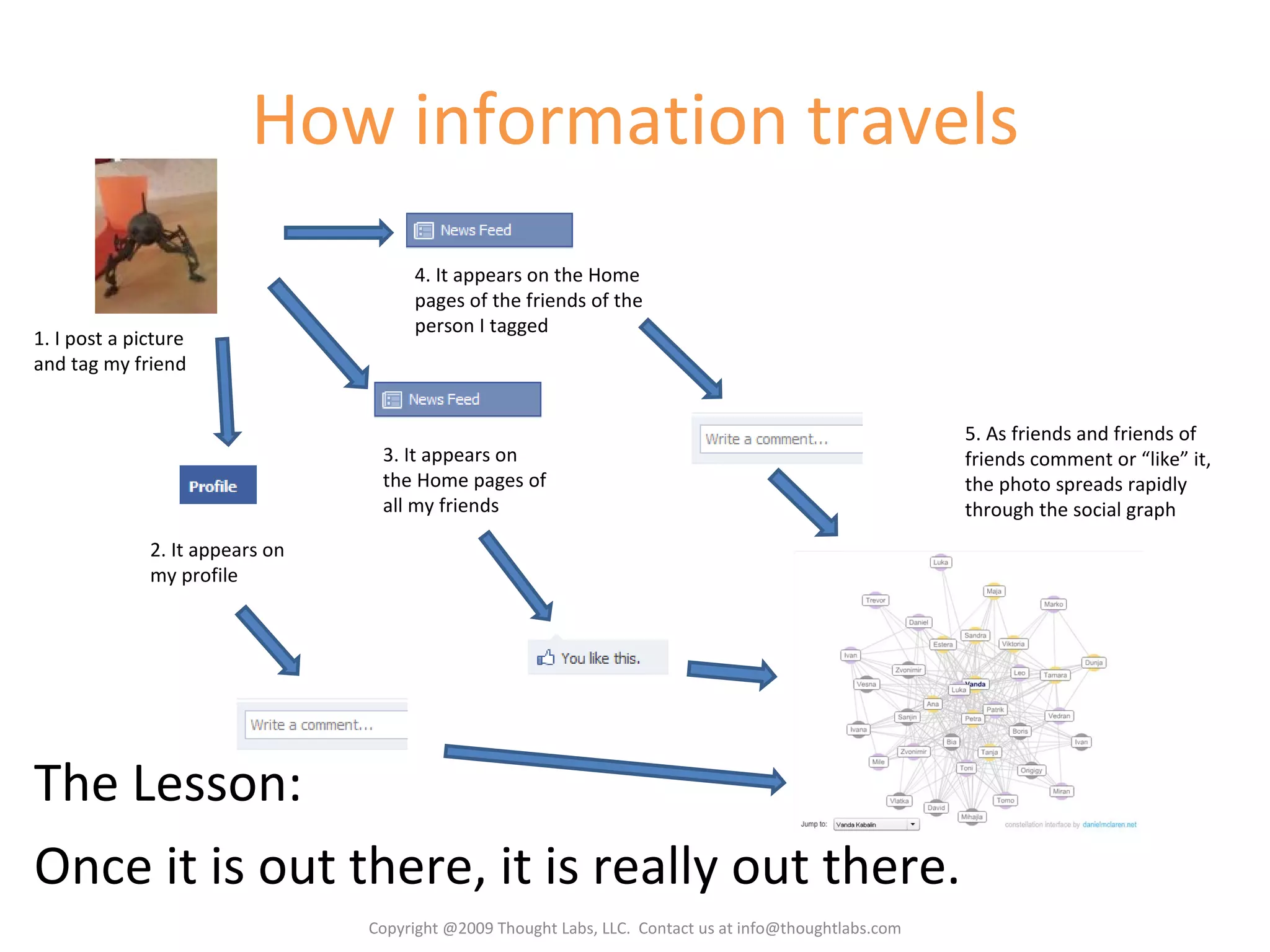
How information travels The Lesson:  Once it is out there, it is really out there. 1. I post a picture and tag my friend 2. It appears on my profile 3. It appears on the Home pages of all my friends 4. It appears on the Home pages of the friends of the person I tagged 5. As friends and friends of friends comment or “like” it, the photo spreads rapidly through the social graph Copyright @2009 Thought Labs, LLC.  Contact us at info@thoughtlabs.com
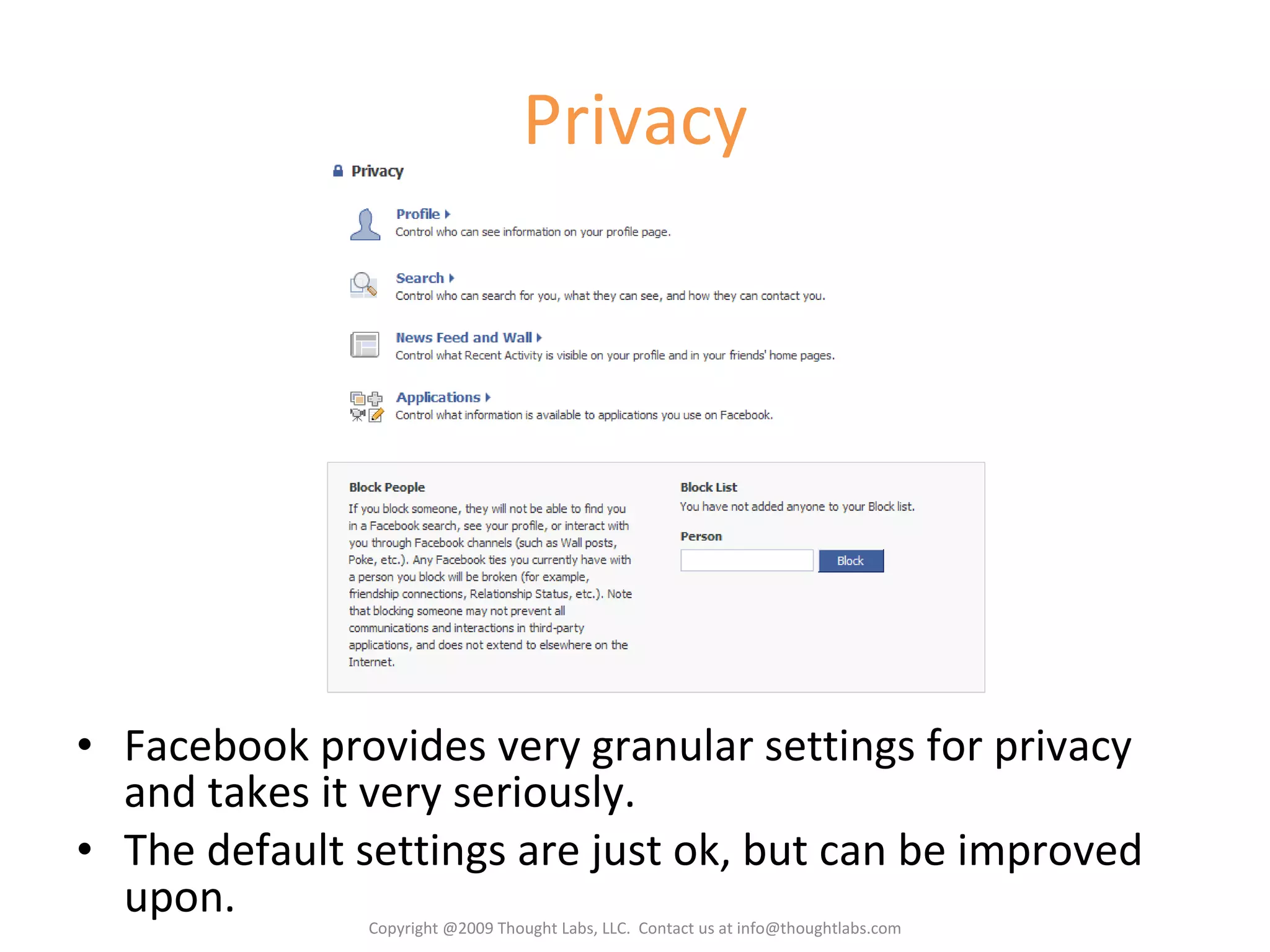
Privacy Facebook provides very granular settings for privacy and takes it very seriously. The default settings are just ok, but can be improved upon. Copyright @2009 Thought Labs, LLC.  Contact us at info@thoughtlabs.com
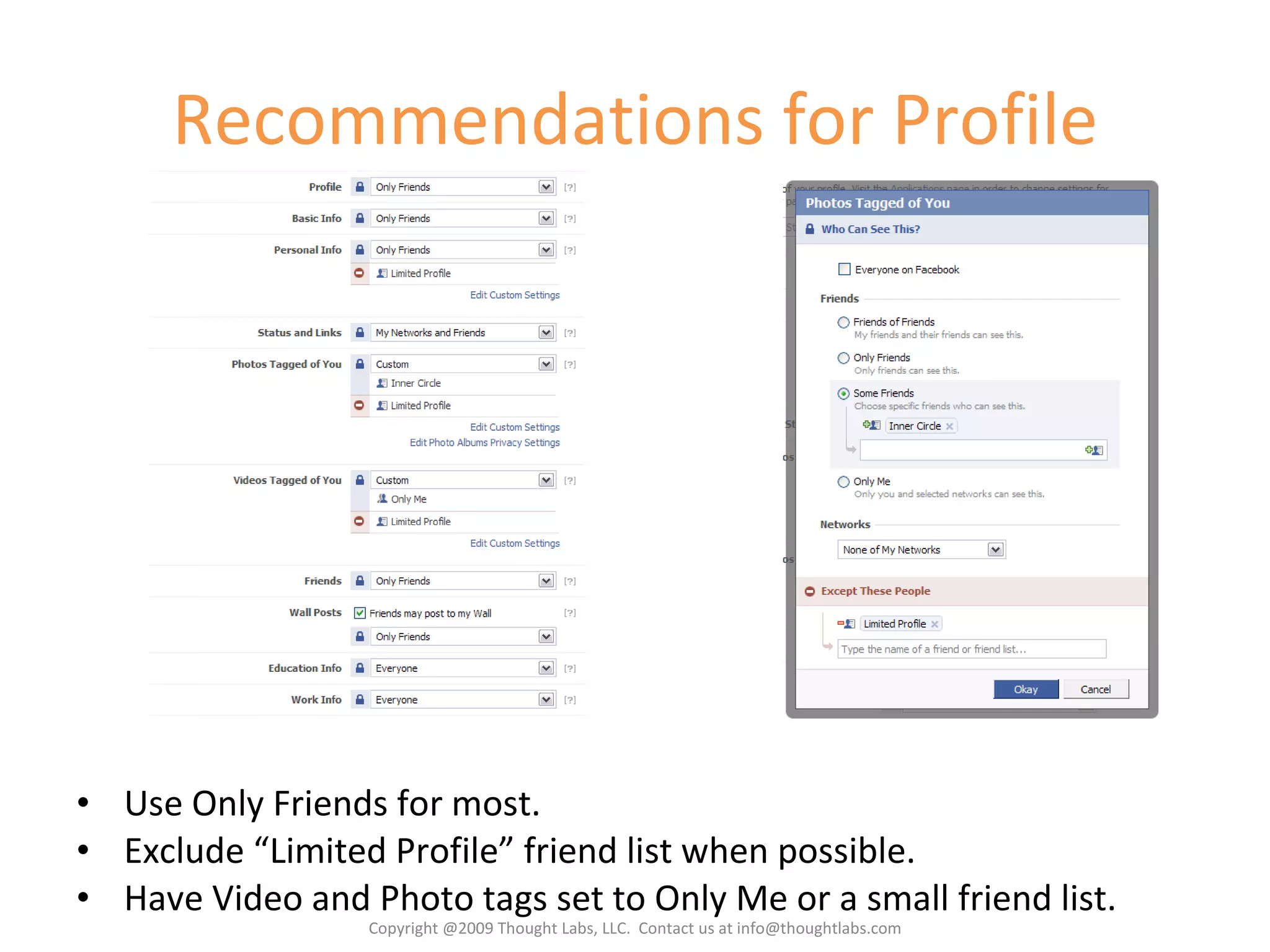
Defaults for Profile Most settings default to Network and Friends, which means all of Boston can see them. Copyright @2009 Thought Labs, LLC.  Contact us at info@thoughtlabs.com
Recommendations for Profile Use Only Friends for most. Exclude “Limited Profile” friend list when possible. Have Video and Photo tags set to Only Me or a small friend list. Copyright @2009 Thought Labs, LLC.  Contact us at info@thoughtlabs.com
Defaults for Search You can hide yourself completely from search both on and off Facebook. Copyright @2009 Thought Labs, LLC.  Contact us at info@thoughtlabs.com
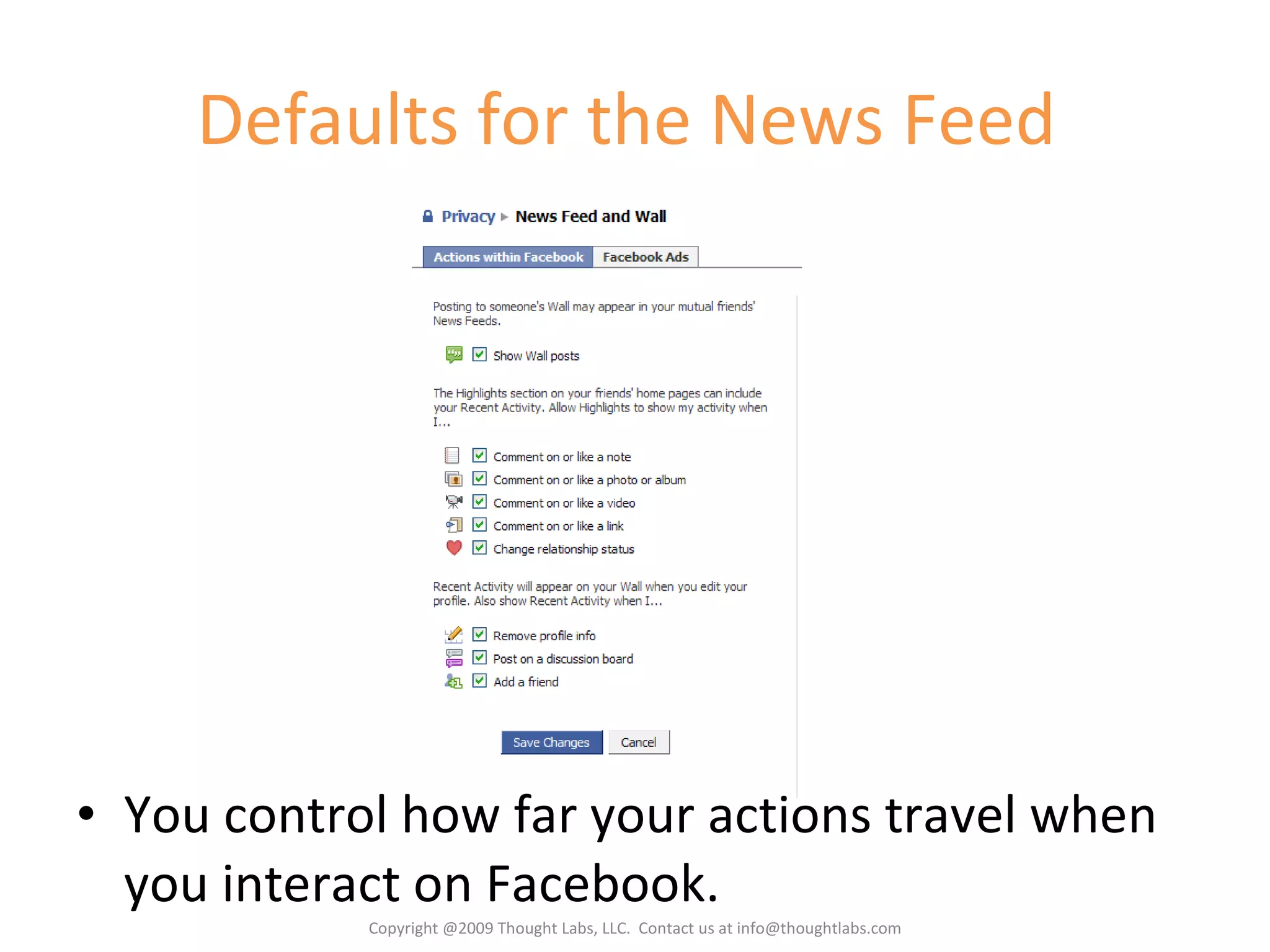
Defaults for the News Feed  You control how far your actions travel when you interact on Facebook. Copyright @2009 Thought Labs, LLC.  Contact us at info@thoughtlabs.com
Information Lives Forever Using the privacy settings, you control who can see the content you post. Facebook also allows you to delete your content and it should automatically get removed from all over the site. However, there is nothing to prevent anyone who has access to that content from copying it and reposting it on or off Facebook, or emailing it around. In general, if you publish it anywhere, it is public . Copyright @2009 Thought Labs, LLC.  Contact us at info@thoughtlabs.com
Online Etiquette Unlike a lot of the Internet, Facebook isn’t anonymous, so all of your actions are associated with you. It is your reputation you are managing. Since all your friends are on there, what you say and do is likely to be known to everyone. Be careful about what you say – it is hard to take it back. Excluding people is harder online. You can have private events, but they might see the pictures later. Request that offensive or hurtful content be removed by the owner or report it. There are ways to do this anonymously. There is no reason to allow yourself to be bullied or humiliated. What goes around comes around, so be sure to hold yourself to the standards you want others to use for you. Copyright @2009 Thought Labs, LLC.  Contact us at info@thoughtlabs.com
Parent/Teen relationships Set some rules up front – how much time, acceptable content, profile checks, posting on each other’s profiles, etc. Beware of TMI – Too Much Information. Do you really want to know what they are thinking and doing? Parents and teens can be friends, but don’t have to be. The Limited friend list can help. “ Going on to Facebook and checking out your children's profile is really not much different than going into your kid's room or looking through your kid's things.“ - Jenifer Lippincott Copyright @2009 Thought Labs, LLC.  Contact us at info@thoughtlabs.com
Don’t Mess With The   Law Facebook complies with the Children’s Online Privacy Protection Act (COPPA) by not allowing children under 13 to have accounts. Anyone under 13 is violating the Facebook Statement of Rights and Responsibilities. Posting illegal content or videos or photos of crimes can get you arrested. There are many documented cases of this. Don’t incriminate yourself.  Harassing or bullying people online has the same repercussions as doing it face to face, except there is a written record. While not illegal, posting inappropriate content can still get you in trouble; not only at school, but also with universities, future employers, etc. Use good judgment and good privacy settings. Copyright @2009 Thought Labs, LLC.  Contact us at info@thoughtlabs.com
Questions? Copyright @2009 Thought Labs, LLC.  Contact us at info@thoughtlabs.com

Facebook For Parents And Teens

  • 1.
    Facebook for Parentsand Teens Copyright @2009 Thought Labs, LLC. Contact us at info@thoughtlabs.com
  • 2.
    About Thought LabsWe help companies create and implement social media strategies that: Make connections with their customers Engage those customers to get real-time feedback Interpret that feedback into concrete actions Copyright @2009 Thought Labs, LLC. Contact us at info@thoughtlabs.com
  • 3.
    Our book onbuilding Facebook Applications is due out in October, 2009. Copyright @2009 Thought Labs, LLC. Contact us at info@thoughtlabs.com
  • 4.
    Today’s Agenda BriefOverview of Facebook How Information Travels Privacy Parent/Teen Relationships Questions Copyright @2009 Thought Labs, LLC. Contact us at info@thoughtlabs.com
  • 5.
    Facebook is BIG!Copyright ©2009 buzzpoint.com Copyright @2009 Thought Labs, LLC. Contact us at info@thoughtlabs.com
  • 6.
    It now hasover 250 million users. More than two-thirds of Facebook users are outside of college. The fastest growing demographic is those 35 years old and older. The average user has 120 friends on the site. More than 5 billion minutes are spent on Facebook each day (worldwide). More than 30 million users update their statuses at least once each day. #1 Social Network Copyright @2009 Thought Labs, LLC. Contact us at info@thoughtlabs.com
  • 7.
    Why are peopleon Facebook? Light, simple social interactions People want to stay in the loop People HAVE to stay in the loop Planning and events Sharing what is important
  • 8.
    Friends Facebook friendsare bidirectional – both need to agree to the “friendship” By default, all friends are equal – they see and share everything The norm is to have a lot of “friends”, but most are only surface relationships Friend requests are often accepted because of social pressure. Copyright @2009 Thought Labs, LLC. Contact us at info@thoughtlabs.com
  • 9.
    Friend Lists Friendlists allow you to put your friends into groups. Friends can be in more than one list. Friend lists can be used as a filter on the Home page for news stories Friend lists can also be used for better privacy settings. Recommendation Create two friend lists: Inner Circle – people you trust and would share anything with Limited – people you want to see as little as possible about you Copyright @2009 Thought Labs, LLC. Contact us at info@thoughtlabs.com
  • 10.
    The Home PageFilters Profile Requests Suggested Friends The Publisher Events Pokes Copyright @2009 Thought Labs, LLC. Contact us at info@thoughtlabs.com
  • 11.
    The Profile ProfilePicture More about me News about me Copyright @2009 Thought Labs, LLC. Contact us at info@thoughtlabs.com
  • 12.
    Status Updates Statusupdates can be just text or include pictures, videos, links and other application functionality. They are seen by all of your friends. Copyright @2009 Thought Labs, LLC. Contact us at info@thoughtlabs.com
  • 13.
    Uploading Photos\Videos Eachphoto or video can have a caption and be tagged. They are seen by all of your friends (by default) Copyright @2009 Thought Labs, LLC. Contact us at info@thoughtlabs.com
  • 14.
    Tagging Tagging isclicking on anything in the picture and selecting which friend it represents. Tagged friends and all their friends will see the picture (by default). The target doesn’t actually have to be in the picture. Copyright @2009 Thought Labs, LLC. Contact us at info@thoughtlabs.com
  • 15.
    Commenting Anyone whocan see a news story can comment. Comments are seen by the original poster and friends The original poster and the commenter can delete the comment. Copyright @2009 Thought Labs, LLC. Contact us at info@thoughtlabs.com
  • 16.
    How information travelsThe Lesson: Once it is out there, it is really out there. 1. I post a picture and tag my friend 2. It appears on my profile 3. It appears on the Home pages of all my friends 4. It appears on the Home pages of the friends of the person I tagged 5. As friends and friends of friends comment or “like” it, the photo spreads rapidly through the social graph Copyright @2009 Thought Labs, LLC. Contact us at info@thoughtlabs.com
  • 17.
    Privacy Facebook providesvery granular settings for privacy and takes it very seriously. The default settings are just ok, but can be improved upon. Copyright @2009 Thought Labs, LLC. Contact us at info@thoughtlabs.com
  • 18.
    Defaults for ProfileMost settings default to Network and Friends, which means all of Boston can see them. Copyright @2009 Thought Labs, LLC. Contact us at info@thoughtlabs.com
  • 19.
    Recommendations for ProfileUse Only Friends for most. Exclude “Limited Profile” friend list when possible. Have Video and Photo tags set to Only Me or a small friend list. Copyright @2009 Thought Labs, LLC. Contact us at info@thoughtlabs.com
  • 20.
    Defaults for SearchYou can hide yourself completely from search both on and off Facebook. Copyright @2009 Thought Labs, LLC. Contact us at info@thoughtlabs.com
  • 21.
    Defaults for theNews Feed You control how far your actions travel when you interact on Facebook. Copyright @2009 Thought Labs, LLC. Contact us at info@thoughtlabs.com
  • 22.
    Information Lives ForeverUsing the privacy settings, you control who can see the content you post. Facebook also allows you to delete your content and it should automatically get removed from all over the site. However, there is nothing to prevent anyone who has access to that content from copying it and reposting it on or off Facebook, or emailing it around. In general, if you publish it anywhere, it is public . Copyright @2009 Thought Labs, LLC. Contact us at info@thoughtlabs.com
  • 23.
    Online Etiquette Unlikea lot of the Internet, Facebook isn’t anonymous, so all of your actions are associated with you. It is your reputation you are managing. Since all your friends are on there, what you say and do is likely to be known to everyone. Be careful about what you say – it is hard to take it back. Excluding people is harder online. You can have private events, but they might see the pictures later. Request that offensive or hurtful content be removed by the owner or report it. There are ways to do this anonymously. There is no reason to allow yourself to be bullied or humiliated. What goes around comes around, so be sure to hold yourself to the standards you want others to use for you. Copyright @2009 Thought Labs, LLC. Contact us at info@thoughtlabs.com
  • 24.
    Parent/Teen relationships Setsome rules up front – how much time, acceptable content, profile checks, posting on each other’s profiles, etc. Beware of TMI – Too Much Information. Do you really want to know what they are thinking and doing? Parents and teens can be friends, but don’t have to be. The Limited friend list can help. “ Going on to Facebook and checking out your children's profile is really not much different than going into your kid's room or looking through your kid's things.“ - Jenifer Lippincott Copyright @2009 Thought Labs, LLC. Contact us at info@thoughtlabs.com
  • 25.
    Don’t Mess WithThe Law Facebook complies with the Children’s Online Privacy Protection Act (COPPA) by not allowing children under 13 to have accounts. Anyone under 13 is violating the Facebook Statement of Rights and Responsibilities. Posting illegal content or videos or photos of crimes can get you arrested. There are many documented cases of this. Don’t incriminate yourself. Harassing or bullying people online has the same repercussions as doing it face to face, except there is a written record. While not illegal, posting inappropriate content can still get you in trouble; not only at school, but also with universities, future employers, etc. Use good judgment and good privacy settings. Copyright @2009 Thought Labs, LLC. Contact us at info@thoughtlabs.com
  • 26.
    Questions? Copyright @2009Thought Labs, LLC. Contact us at info@thoughtlabs.com

Editor's Notes

  • #9 Most friends aren’t “real” friends. There is a lot of pressure to accept any connection request. The conversations you have are also very surface level.
  • #11 The Home Page is where everybody goes when they visit Facebook. It contains the latest news stories about your friends, highlights of the most important stories, upcoming events, requests and pokes, and suggestions for new friends.
  • #12 The profile is like what you wear – it is an identity, and all the parts and the information you share goes with that identity.
  • #24 The Internet is your Permanent Record