PROFESSIONAL TEACHING
IN A DIGITAL WORLD
UNIT 3

EDUC W200 Week 11
WEEK 11 - PROFESSIONAL USE OF TECHNOLOGY

EDUC W200 Week 11
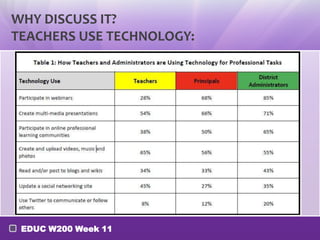
WHY DISCUSS IT?
TEACHERS USE TECHNOLOGY:

EDUC W200 Week 11
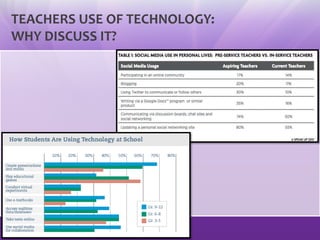
TEACHERS USE OF TECHNOLOGY:
WHY DISCUSS IT?

EDUC W200 Week 11
PERSONAL LEARNING NETWORKS
(PLN)
PART I:

WHAT IS A PLN? WHY SHOULD I CARE?
EDUC W200 Week 11
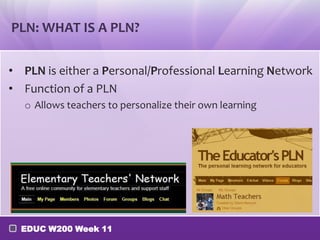
PLN: WHAT IS A PLN?
• PLN is either a Personal/Professional Learning Network
• Function of a PLN
o Allows teachers to personalize their own learning

EDUC W200 Week 11
WHAT CAN TEACHERS USE PLN’S FOR?
• Gather resources for your classroom
• Locate free resources for your classroom
• Websites | Software | Grants
• Lesson plan ideas from master teachers

• Learn new information
• Connect with content-area experts

• Keep up-to-date and current
• Learn about new technology and how to integrate it into your teaching
• Find interesting links to education news
• What are the best practices for your classroom?
EDUC W200 Week 11
PERSONAL LEARNING NETWORKS
(PLN)
PART II:
FIVE TYPES OF PLNs
EDUC W200 Week 11
FIVE TYPES OF PLNs
•
•
•
•
•

Casts (Podcasts, Screencasts/ Vidcasts)
Social Networks
Blogs
Microblogs
Social Bookmarking

EDUC W200 Week 11
CASTS
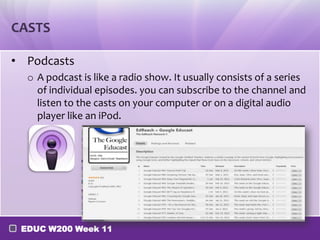
• Podcasts
o A podcast is like a radio show. It usually consists of a series
of individual episodes. you can subscribe to the channel and
listen to the casts on your computer or on a digital audio
player like an iPod.

EDUC W200 Week 11
PODCAST EXAMPLES
o Examples of educators using podcasts for professional
growth includes:
ESL Podcasts
K12 Science in Michigan
SmartBoard Lessons Podcast
Moving at the Speed of Creativity
Learning Matters Podcast

[Tips] Aside from these sources, go to iTunes-podcasts and
choose "Education", you will find tons of educational podcasts
there.
EDUC W200 Week 11
VIDCASTS AND SCREENCASTS ARE ANOTHER METHOD
FOR PARTICIPATING OR ADDING TO TEACHERS PLNS
•
•
•
•
•

K12 Online Conference
School Tube
TEDxNYED
YouTube
Various Webinars
o
o
o
o

Blackboard Collaborate
PBS Teachers Online
Classroom 2.0
ISTE Webinars

EDUC W200 Week 11
SOCIAL NETWORKS
• Social networks are popular for teachers' PLNs. In
addition to Facebook or Pinterest, educators are also
connecting through using the NING platform or
joining online teacher communities:

EDUC W200 Week 11
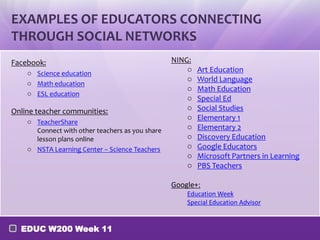
EXAMPLES OF EDUCATORS CONNECTING
THROUGH SOCIAL NETWORKS
Facebook:
o Science education
o Math education
o ESL education

Online teacher communities:
o TeacherShare
Connect with other teachers as you share
lesson plans online
o NSTA Learning Center – Science Teachers

NING:
o
o
o
o
o
o
o
o
o
o
o

Art Education
World Language
Math Education
Special Ed
Social Studies
Elementary 1
Elementary 2
Discovery Education
Google Educators
Microsoft Partners in Learning
PBS Teachers

Google+:
Education Week
Special Education Advisor

EDUC W200 Week 11
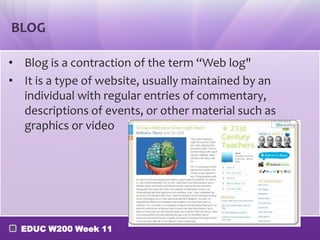
BLOG
• Blog is a contraction of the term “Web log"
• It is a type of website, usually maintained by an
individual with regular entries of commentary,
descriptions of events, or other material such as
graphics or video

EDUC W200 Week 11
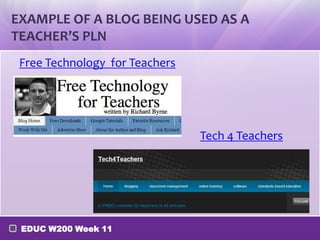
EXAMPLE OF A BLOG BEING USED AS A
TEACHER’S PLN
Free Technology for Teachers

Tech 4 Teachers

EDUC W200 Week 11
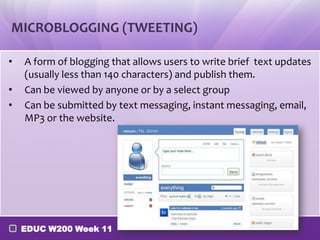
MICROBLOGGING (TWEETING)
•
•
•

A form of blogging that allows users to write brief text updates
(usually less than 140 characters) and publish them.
Can be viewed by anyone or by a select group
Can be submitted by text messaging, instant messaging, email,
MP3 or the website.

EDUC W200 Week 11
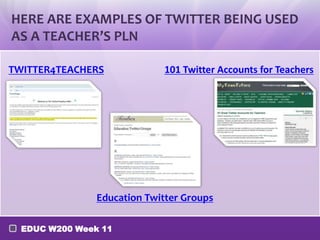
HERE ARE EXAMPLES OF TWITTER BEING USED
AS A TEACHER’S PLN
TWITTER4TEACHERS

101 Twitter Accounts for Teachers

Education Twitter Groups
EDUC W200 Week 11
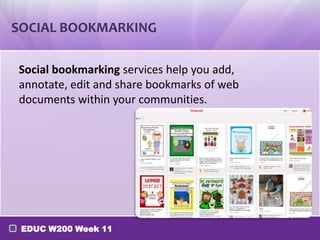
SOCIAL BOOKMARKING
Social bookmarking services help you add,
annotate, edit and share bookmarks of web
documents within your communities.

EDUC W200 Week 11
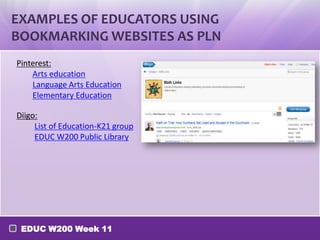
EXAMPLES OF EDUCATORS USING
BOOKMARKING WEBSITES AS PLN
Pinterest:
Arts education
Language Arts Education
Elementary Education
Diigo:
List of Education-K21 group
EDUC W200 Public Library

EDUC W200 Week 11
PERSONAL LEARNING NETWORKS
(PLN)
PART III:
AGGREGATOR
EDUC W200 Week 11
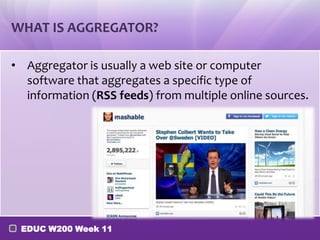
WHAT IS AGGREGATOR?
• Aggregator is usually a web site or computer
software that aggregates a specific type of
information (RSS feeds) from multiple online sources.

EDUC W200 Week 11
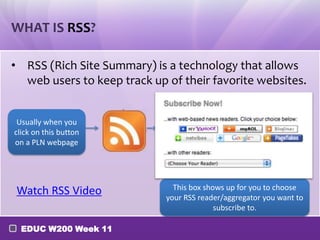
WHAT IS RSS?
• RSS (Rich Site Summary) is a technology that allows
web users to keep track up of their favorite websites.
Usually when you
click on this button
on a PLN webpage

Watch RSS Video
EDUC W200 Week 11

This box shows up for you to choose
your RSS reader/aggregator you want to
subscribe to.
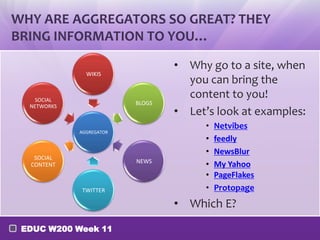
WHY ARE AGGREGATORS SO GREAT? THEY
BRING INFORMATION TO YOU…
WIKIS

SOCIAL
NETWORKS

BLOGS

AGGREGATOR

SOCIAL
CONTENT

NEWS

TWITTER

• Why go to a site, when
you can bring the
content to you!
• Let’s look at examples:
•
•
•
•
•
•

Netvibes
feedly
NewsBlur
My Yahoo
PageFlakes
Protopage

• Which E?
EDUC W200 Week 11
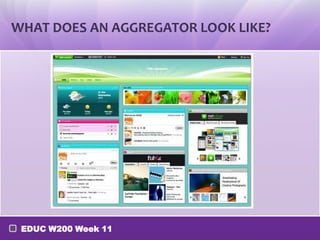
WHAT DOES AN AGGREGATOR LOOK LIKE?

EDUC W200 Week 11
EDUC W200 Week 11
TIP #11: Create your own PLN

EDUC W200 Week 11
TIP #11: CREATE YOUR OWN PLN

INSTRUCTIONS:
Create your own PLN that helps you aggregate
useful information of your profession and

network with other professionals in your area.

EDUC W200 Week 11
TIP #11: CREATE YOUR OWN PLN
• Choose on of the following four PLN tools that you
are currently using or most familiar with.
• Follow the instruction and complete the TIP#11.
o
o
o
o

Facebook (http://falloney83.wix.com/pln-for-educators#!facebook/c1yoa)
Twitter (http://falloney83.wix.com/pln-for-educators#!twitter/cnjq)
Pinterest (http://falloney83.wix.com/pln-for-educators#!pinterest/c7ip)
Netvibes (http://falloney83.wix.com/pln-for-educators#!netvibes/c1ann)

• Please post screenshots of your PLN and hyperlink it
on your e-Portfolio >> Professional Development
page
EDUC W200 Week 11

Fa13 w200-week 11-pln

  • 1.
    PROFESSIONAL TEACHING IN ADIGITAL WORLD UNIT 3 EDUC W200 Week 11
  • 2.
    WEEK 11 -PROFESSIONAL USE OF TECHNOLOGY EDUC W200 Week 11
  • 3.
    WHY DISCUSS IT? TEACHERSUSE TECHNOLOGY: EDUC W200 Week 11
  • 4.
    TEACHERS USE OFTECHNOLOGY: WHY DISCUSS IT? EDUC W200 Week 11
  • 5.
    PERSONAL LEARNING NETWORKS (PLN) PARTI: WHAT IS A PLN? WHY SHOULD I CARE? EDUC W200 Week 11
  • 6.
    PLN: WHAT ISA PLN? • PLN is either a Personal/Professional Learning Network • Function of a PLN o Allows teachers to personalize their own learning EDUC W200 Week 11
  • 7.
    WHAT CAN TEACHERSUSE PLN’S FOR? • Gather resources for your classroom • Locate free resources for your classroom • Websites | Software | Grants • Lesson plan ideas from master teachers • Learn new information • Connect with content-area experts • Keep up-to-date and current • Learn about new technology and how to integrate it into your teaching • Find interesting links to education news • What are the best practices for your classroom? EDUC W200 Week 11
  • 8.
    PERSONAL LEARNING NETWORKS (PLN) PARTII: FIVE TYPES OF PLNs EDUC W200 Week 11
  • 9.
    FIVE TYPES OFPLNs • • • • • Casts (Podcasts, Screencasts/ Vidcasts) Social Networks Blogs Microblogs Social Bookmarking EDUC W200 Week 11
  • 10.
    CASTS • Podcasts o Apodcast is like a radio show. It usually consists of a series of individual episodes. you can subscribe to the channel and listen to the casts on your computer or on a digital audio player like an iPod. EDUC W200 Week 11
  • 11.
    PODCAST EXAMPLES o Examplesof educators using podcasts for professional growth includes: ESL Podcasts K12 Science in Michigan SmartBoard Lessons Podcast Moving at the Speed of Creativity Learning Matters Podcast [Tips] Aside from these sources, go to iTunes-podcasts and choose "Education", you will find tons of educational podcasts there. EDUC W200 Week 11
  • 12.
    VIDCASTS AND SCREENCASTSARE ANOTHER METHOD FOR PARTICIPATING OR ADDING TO TEACHERS PLNS • • • • • K12 Online Conference School Tube TEDxNYED YouTube Various Webinars o o o o Blackboard Collaborate PBS Teachers Online Classroom 2.0 ISTE Webinars EDUC W200 Week 11
  • 13.
    SOCIAL NETWORKS • Socialnetworks are popular for teachers' PLNs. In addition to Facebook or Pinterest, educators are also connecting through using the NING platform or joining online teacher communities: EDUC W200 Week 11
  • 14.
    EXAMPLES OF EDUCATORSCONNECTING THROUGH SOCIAL NETWORKS Facebook: o Science education o Math education o ESL education Online teacher communities: o TeacherShare Connect with other teachers as you share lesson plans online o NSTA Learning Center – Science Teachers NING: o o o o o o o o o o o Art Education World Language Math Education Special Ed Social Studies Elementary 1 Elementary 2 Discovery Education Google Educators Microsoft Partners in Learning PBS Teachers Google+: Education Week Special Education Advisor EDUC W200 Week 11
  • 15.
    BLOG • Blog isa contraction of the term “Web log" • It is a type of website, usually maintained by an individual with regular entries of commentary, descriptions of events, or other material such as graphics or video EDUC W200 Week 11
  • 16.
    EXAMPLE OF ABLOG BEING USED AS A TEACHER’S PLN Free Technology for Teachers Tech 4 Teachers EDUC W200 Week 11
  • 17.
    MICROBLOGGING (TWEETING) • • • A formof blogging that allows users to write brief text updates (usually less than 140 characters) and publish them. Can be viewed by anyone or by a select group Can be submitted by text messaging, instant messaging, email, MP3 or the website. EDUC W200 Week 11
  • 18.
    HERE ARE EXAMPLESOF TWITTER BEING USED AS A TEACHER’S PLN TWITTER4TEACHERS 101 Twitter Accounts for Teachers Education Twitter Groups EDUC W200 Week 11
  • 19.
    SOCIAL BOOKMARKING Social bookmarkingservices help you add, annotate, edit and share bookmarks of web documents within your communities. EDUC W200 Week 11
  • 20.
    EXAMPLES OF EDUCATORSUSING BOOKMARKING WEBSITES AS PLN Pinterest: Arts education Language Arts Education Elementary Education Diigo: List of Education-K21 group EDUC W200 Public Library EDUC W200 Week 11
  • 21.
    PERSONAL LEARNING NETWORKS (PLN) PARTIII: AGGREGATOR EDUC W200 Week 11
  • 22.
    WHAT IS AGGREGATOR? •Aggregator is usually a web site or computer software that aggregates a specific type of information (RSS feeds) from multiple online sources. EDUC W200 Week 11
  • 23.
    WHAT IS RSS? •RSS (Rich Site Summary) is a technology that allows web users to keep track up of their favorite websites. Usually when you click on this button on a PLN webpage Watch RSS Video EDUC W200 Week 11 This box shows up for you to choose your RSS reader/aggregator you want to subscribe to.
  • 24.
    WHY ARE AGGREGATORSSO GREAT? THEY BRING INFORMATION TO YOU… WIKIS SOCIAL NETWORKS BLOGS AGGREGATOR SOCIAL CONTENT NEWS TWITTER • Why go to a site, when you can bring the content to you! • Let’s look at examples: • • • • • • Netvibes feedly NewsBlur My Yahoo PageFlakes Protopage • Which E? EDUC W200 Week 11
  • 25.
    WHAT DOES ANAGGREGATOR LOOK LIKE? EDUC W200 Week 11
  • 26.
  • 27.
    TIP #11: Createyour own PLN EDUC W200 Week 11
  • 28.
    TIP #11: CREATEYOUR OWN PLN INSTRUCTIONS: Create your own PLN that helps you aggregate useful information of your profession and network with other professionals in your area. EDUC W200 Week 11
  • 29.
    TIP #11: CREATEYOUR OWN PLN • Choose on of the following four PLN tools that you are currently using or most familiar with. • Follow the instruction and complete the TIP#11. o o o o Facebook (http://falloney83.wix.com/pln-for-educators#!facebook/c1yoa) Twitter (http://falloney83.wix.com/pln-for-educators#!twitter/cnjq) Pinterest (http://falloney83.wix.com/pln-for-educators#!pinterest/c7ip) Netvibes (http://falloney83.wix.com/pln-for-educators#!netvibes/c1ann) • Please post screenshots of your PLN and hyperlink it on your e-Portfolio >> Professional Development page EDUC W200 Week 11

Editor's Notes

  • #4 From Personalizing the Classroom Experience – K-12 Teachers, Librarians and Administrators Connect the Dots with Digital Learning 2012 Congressional Briefing Release of Speak Up 2011 National Data for Teachers, Librarians and Administrators May 23, 2012
  • #5 Source 1:http://images.email.blackboard.com/Web/BlackboardInc/%7B44fe5cc3-3c7d-4ec0-824b-489b25ca8062%7D_ProjectTomorrow2013_Teacher_Report_Draft.pdfSource 2: Speak Up 2011 National Research Project. In fall 2011, over 416,000 online surveys from K-12 students, parents and educators representing over 5600 schoolsnationwide were submitted through the Speak Up Project. Speak Up is a annual research initiative of Project Tomorrow, a national education nonprot organization andis supported by these innovative companies: Blackboard, Inc., DreamBox Learning, Hewlett-Packard, K-12, Inc., Qualcomm Wirelss Reach Initiative, Schoolwiresand SMART Technologies.
  • #13 PBS Teacher online's high quality, standards-based graduate-level courses offer teachers the professional development opportunities they need in an accessible online format that makes learning fun, flexible and collaborative. You can earn graduate credit, PDPs, or CEUs while gaining strategies and resources to bring directly to your classroom.Classroom 2.0 is a free, community-supported network. ISTE webinars offer just-in-time PD that you can participate in live with a group, or on your own at a time that's convenient for you. 
  • #17 Instance of Mobile Blogging: ODIOGO
  • #23 https://www.rebelmouse.com/
  • #25 Another powerful reason: simplifies the process of acquiring information from a wide variety of sources
  • #29 You can ask the students to brainstorm for formats and then put them on the smartboard.Hint: Consider using MS templates, Glogster, ToonDoo, Xtranormal etc.