






Bringing External Users Into Your 
Connections 5 World 
Gabriella Davis! 
Technical Director! 
The Turtle Partnership 
September 2014
01 
Let’s talk about 
me for a minute 
✤ Admin of all things and 
especially quite complicated 
things where the fun is! 
✤ Working with security , healthchecks, 
single sign on, design and deployment 
of Domino, ST, Connections and things 
that they talk to! 
✤ Stubborn and relentless problem 
solver! 
✤ Lives in London about half of the 
time
What’s This All About?
How Does It 
Work - The 
Brief Version
What Can An External Person Do? 
✤ Be a full member of a Community that allows external users! 
✤ Share Files with others as well as Download files shared with 
you ! 
✤ See Activity Streams that they are invited into! 
✤ Edit Their Profile! 
✤ View business cards of anyone who has shared content with 
them
What Can’t An External Person Do? 
✤ See Any Public Content! 
✤ Create a community! 
✤ Follow people! 
✤ See or search the company directory! 
✤ Use type-ahead to find people! 
✤ See recommended content or people! 
✤ Access the Profiles menu! 
✤ Access other user profiles! 
✤ See @Mentions for them
✤ An existing Community can’t become a Community 
that allows external users! 
✤ Once created as either internal or allowing external 
user access - a Community cannot be changed! 
✤ Only internal users with a specific role can invite and 
share with external users! 
✤ Communites with external users must be restricted
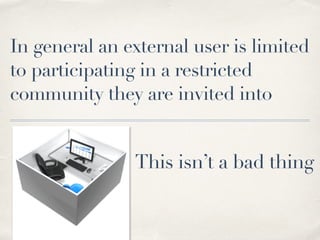
In general an external user is limited 
to participating in a restricted 
community they are invited into 
This isn’t a bad thing
Let’s set things up or 
… here comes the technical bit
01 
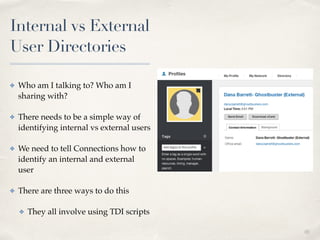
Internal vs External 
User Directories 
✤ Who am I talking to? Who am I 
sharing with?! 
✤ There needs to be a simple way of 
identifying internal vs external users! 
✤ We need to tell Connections how to 
identify an internal and external 
user! 
✤ There are three ways to do this! 
✤ They all involve using TDI scripts
A Quick Catch Up On TDI 
✤ To enable external users, the Profile DB must be used as a Directory! 
✤ TDISOL found in the Connections install directory! 
✤ Updated on Fix Central! 
✤ Files we change for External users! 
✤ profiles_tdi.properties! 
✤ map_dbrepos_from_source.properties! 
✤ sync_all_dns
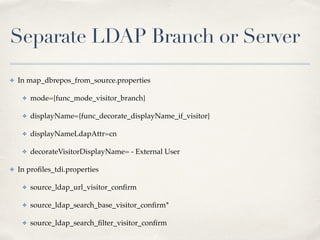
Separate LDAP Branch or Server 
✤ In map_dbrepos_from_source.properties! 
✤ mode={func_mode_visitor_branch}! 
✤ displayName={func_decorate_displayName_if_visitor}! 
✤ displayNameLdapAttr=cn! 
✤ decorateVisitorDisplayName= - External User! 
✤ In profiles_tdi.properties! ! ! 
✤ source_ldap_url_visitor_confirm! 
✤ source_ldap_search_base_visitor_confirm*! 
✤ source_ldap_search_filter_visitor_confirm
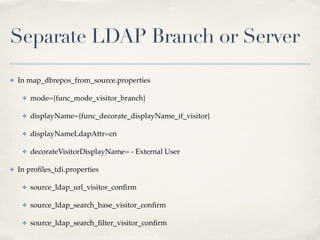
Separate LDAP Branch or Server 
✤ In map_dbrepos_from_source.properties! 
✤ mode={func_mode_visitor_branch}! 
✤ displayName={func_decorate_displayName_if_visitor}! 
✤ displayNameLdapAttr=cn! 
✤ decorateVisitorDisplayName= - External User! 
✤ In profiles_tdi.properties! ! ! 
✤ source_ldap_url_visitor_confirm! 
✤ source_ldap_search_base_visitor_confirm! 
✤ source_ldap_search_filter_visitor_confirm
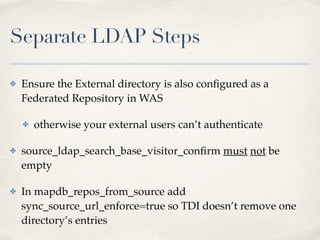
Separate LDAP Steps 
✤ Ensure the External directory is also configured as a 
Federated Repository in WAS! 
✤ otherwise your external users can’t authenticate! 
✤ source_ldap_search_base_visitor_confirm must not be 
empty! 
✤ In mapdb_repos_from_source add 
sync_source_url_enforce=true so TDI doesn’t remove one 
directory’s entries
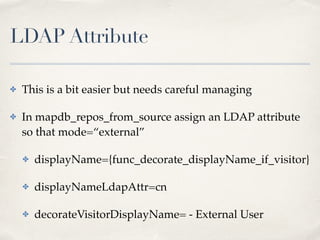
LDAP Attribute 
✤ This is a bit easier but needs careful managing! 
✤ In mapdb_repos_from_source assign an LDAP attribute 
so that mode=“external”! 
✤ displayName={func_decorate_displayName_if_visitor}! 
✤ displayNameLdapAttr=cn! 
✤ decorateVisitorDisplayName= - External User
LDAP Attribute As A Function 
✤ Instead of mapping an LDAP attribute containing 
“external” to the mode= entry you can use a 
javascript function! 
✤ The function must compute to the word ‘external’ 
for external users! 
✤ It must be placed in profiles_functions.js file
Whatever Method You Choose 
! 
sync_all_dns.bat when done 
.. on failure check the logs ibmdi.log and SyncUpdates.log
Exployee-Extended Role 
✤ Not all internal users / employees can invite external 
users - they must have the special Connections role! 
✤ “Employee-Extended! 
✤ The only way to get this role is to be assigned it via 
wsadmin
Assigning Roles 
✤ From /profiles/dmgr01/bin directory! 
✤ wsadmin.bat/sh -lang jython -username <wasadmin> 
-password <password>! 
✤ execfile(“profilesAdmin.py”)! 
✤ ProfilesService.setRole(“gabriella@turtlepartnership.c 
om, EMPLOYEE_EXTENDED)
Securing the Perimeter
Directory Decisions 
✤ How will external users register! 
✤ Who will have rights to invite external users! 
✤ Password quality
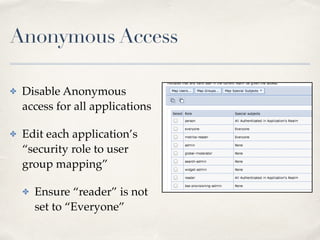
Anonymous Access 
✤ Disable Anonymous 
access for all applications! 
✤ Edit each application’s 
“security role to user 
group mapping” ! 
✤ Ensure “reader” is not 
set to “Everyone”
Public Files 
✤ External users can’t see public files! 
✤ or can they?! 
✤ If you use a caching proxy then the public cache will 
contain information external users shouldn’t see! 
✤ Disable public caching in LotusConnections-config.mxl 
using 
<genericProperty name="publicCacheEnabled">false</ 
genericProperty>
Working with Libraries 
✤ With CCM installed the URL /dm can provide access 
to any public Libraries! 
✤ External users shouldn’t see public ANYTHING! 
✤ Ensure the /dm URL is blocked from public interfaces
Desktop Plugin 
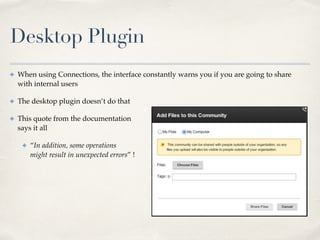
✤ When using Connections, the interface constantly warns you if you are going to share 
with internal users! 
✤ The desktop plugin doesn’t do that! 
✤ This quote from the documentation 
says it all! 
✤ “In addition, some operations 
might result in unexpected errors” !
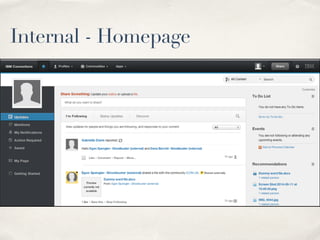
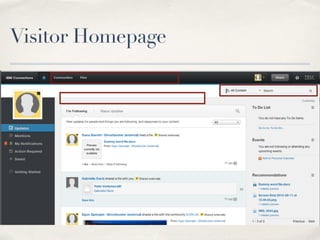
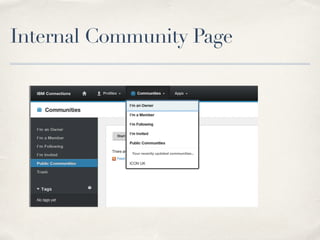
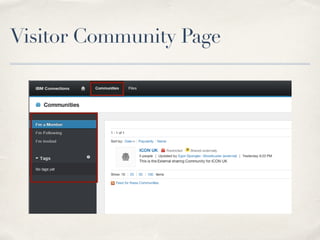
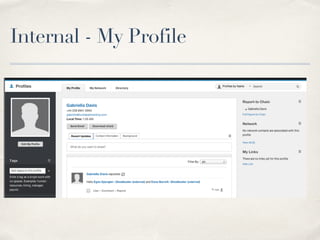
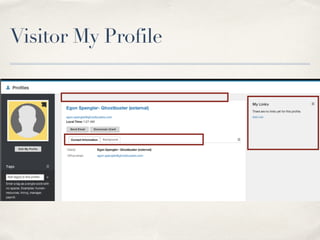
Internal and External (Visitor) Views 
or.. Spot What’s Missing
Internal - Homepage
Visitor Homepage
Internal Community Page
Visitor Community Page
Internal - My Profile
Visitor My Profile
✤ As A Visitor…! 
✤ You can add tags but not see existing tag lists! 
✤ You can view partial business cards but not full 
profiles! 
✤ You can search for content but that only finds things 
that are shared with you! 
✤ You can share files but only with the Communities 
you are part of, not with people directly
✤ All of this is good - it keeps your environment secure! 
✤ It protects your users from accidentally sharing 
something unintended! 
✤ It doesn’t give up any information the external user 
doesn’t already know! 
! 
! 
✤ Some things are a bit buggy but hopefully being fixed
01 
Questions? 
✤ Gab Davis - Technical Director! 
✤ The Turtle Partnership! 
✤ gabriella@turtlepartnership.com! 
✤ GabriellaDavis on Skype! 
✤ gabturtle on twitter

External users

  • 1.
    Bringing External UsersInto Your Connections 5 World Gabriella Davis! Technical Director! The Turtle Partnership September 2014
  • 2.
    01 Let’s talkabout me for a minute ✤ Admin of all things and especially quite complicated things where the fun is! ✤ Working with security , healthchecks, single sign on, design and deployment of Domino, ST, Connections and things that they talk to! ✤ Stubborn and relentless problem solver! ✤ Lives in London about half of the time
  • 3.
  • 5.
    How Does It Work - The Brief Version
  • 6.
    What Can AnExternal Person Do? ✤ Be a full member of a Community that allows external users! ✤ Share Files with others as well as Download files shared with you ! ✤ See Activity Streams that they are invited into! ✤ Edit Their Profile! ✤ View business cards of anyone who has shared content with them
  • 7.
    What Can’t AnExternal Person Do? ✤ See Any Public Content! ✤ Create a community! ✤ Follow people! ✤ See or search the company directory! ✤ Use type-ahead to find people! ✤ See recommended content or people! ✤ Access the Profiles menu! ✤ Access other user profiles! ✤ See @Mentions for them
  • 8.
    ✤ An existingCommunity can’t become a Community that allows external users! ✤ Once created as either internal or allowing external user access - a Community cannot be changed! ✤ Only internal users with a specific role can invite and share with external users! ✤ Communites with external users must be restricted
  • 9.
    In general anexternal user is limited to participating in a restricted community they are invited into This isn’t a bad thing
  • 10.
    Let’s set thingsup or … here comes the technical bit
  • 11.
    01 Internal vsExternal User Directories ✤ Who am I talking to? Who am I sharing with?! ✤ There needs to be a simple way of identifying internal vs external users! ✤ We need to tell Connections how to identify an internal and external user! ✤ There are three ways to do this! ✤ They all involve using TDI scripts
  • 12.
    A Quick CatchUp On TDI ✤ To enable external users, the Profile DB must be used as a Directory! ✤ TDISOL found in the Connections install directory! ✤ Updated on Fix Central! ✤ Files we change for External users! ✤ profiles_tdi.properties! ✤ map_dbrepos_from_source.properties! ✤ sync_all_dns
  • 13.
    Separate LDAP Branchor Server ✤ In map_dbrepos_from_source.properties! ✤ mode={func_mode_visitor_branch}! ✤ displayName={func_decorate_displayName_if_visitor}! ✤ displayNameLdapAttr=cn! ✤ decorateVisitorDisplayName= - External User! ✤ In profiles_tdi.properties! ! ! ✤ source_ldap_url_visitor_confirm! ✤ source_ldap_search_base_visitor_confirm*! ✤ source_ldap_search_filter_visitor_confirm
  • 14.
    Separate LDAP Branchor Server ✤ In map_dbrepos_from_source.properties! ✤ mode={func_mode_visitor_branch}! ✤ displayName={func_decorate_displayName_if_visitor}! ✤ displayNameLdapAttr=cn! ✤ decorateVisitorDisplayName= - External User! ✤ In profiles_tdi.properties! ! ! ✤ source_ldap_url_visitor_confirm! ✤ source_ldap_search_base_visitor_confirm! ✤ source_ldap_search_filter_visitor_confirm
  • 15.
    Separate LDAP Steps ✤ Ensure the External directory is also configured as a Federated Repository in WAS! ✤ otherwise your external users can’t authenticate! ✤ source_ldap_search_base_visitor_confirm must not be empty! ✤ In mapdb_repos_from_source add sync_source_url_enforce=true so TDI doesn’t remove one directory’s entries
  • 16.
    LDAP Attribute ✤This is a bit easier but needs careful managing! ✤ In mapdb_repos_from_source assign an LDAP attribute so that mode=“external”! ✤ displayName={func_decorate_displayName_if_visitor}! ✤ displayNameLdapAttr=cn! ✤ decorateVisitorDisplayName= - External User
  • 17.
    LDAP Attribute AsA Function ✤ Instead of mapping an LDAP attribute containing “external” to the mode= entry you can use a javascript function! ✤ The function must compute to the word ‘external’ for external users! ✤ It must be placed in profiles_functions.js file
  • 18.
    Whatever Method YouChoose ! sync_all_dns.bat when done .. on failure check the logs ibmdi.log and SyncUpdates.log
  • 19.
    Exployee-Extended Role ✤Not all internal users / employees can invite external users - they must have the special Connections role! ✤ “Employee-Extended! ✤ The only way to get this role is to be assigned it via wsadmin
  • 20.
    Assigning Roles ✤From /profiles/dmgr01/bin directory! ✤ wsadmin.bat/sh -lang jython -username <wasadmin> -password <password>! ✤ execfile(“profilesAdmin.py”)! ✤ ProfilesService.setRole(“gabriella@turtlepartnership.c om, EMPLOYEE_EXTENDED)
  • 21.
  • 22.
    Directory Decisions ✤How will external users register! ✤ Who will have rights to invite external users! ✤ Password quality
  • 23.
    Anonymous Access ✤Disable Anonymous access for all applications! ✤ Edit each application’s “security role to user group mapping” ! ✤ Ensure “reader” is not set to “Everyone”
  • 24.
    Public Files ✤External users can’t see public files! ✤ or can they?! ✤ If you use a caching proxy then the public cache will contain information external users shouldn’t see! ✤ Disable public caching in LotusConnections-config.mxl using <genericProperty name="publicCacheEnabled">false</ genericProperty>
  • 25.
    Working with Libraries ✤ With CCM installed the URL /dm can provide access to any public Libraries! ✤ External users shouldn’t see public ANYTHING! ✤ Ensure the /dm URL is blocked from public interfaces
  • 26.
    Desktop Plugin ✤When using Connections, the interface constantly warns you if you are going to share with internal users! ✤ The desktop plugin doesn’t do that! ✤ This quote from the documentation says it all! ✤ “In addition, some operations might result in unexpected errors” !
  • 27.
    Internal and External(Visitor) Views or.. Spot What’s Missing
  • 28.
  • 29.
  • 30.
  • 31.
  • 32.
  • 33.
  • 34.
    ✤ As AVisitor…! ✤ You can add tags but not see existing tag lists! ✤ You can view partial business cards but not full profiles! ✤ You can search for content but that only finds things that are shared with you! ✤ You can share files but only with the Communities you are part of, not with people directly
  • 35.
    ✤ All ofthis is good - it keeps your environment secure! ✤ It protects your users from accidentally sharing something unintended! ✤ It doesn’t give up any information the external user doesn’t already know! ! ! ✤ Some things are a bit buggy but hopefully being fixed
  • 36.
    01 Questions? ✤Gab Davis - Technical Director! ✤ The Turtle Partnership! ✤ gabriella@turtlepartnership.com! ✤ GabriellaDavis on Skype! ✤ gabturtle on twitter