CHOOSE A LETTER &
.
IF YOU’RE RIGHT, YOU
CAN
FOR POINTS!
I WILL SHOW YOU A .
+4 POINTS
+4
POINTS
+2 POINTS
+2
POINTS
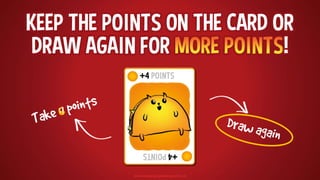
KEEP THE POINTS ON THE CARD OR
DRAW AGAIN FOR !
+4 POINTS
+4
POINTS
BOMB!
BOMB!
! IF YOU FIND A , YOU
GET & THE GAME IS OVER.
+2 POINTS
+2
POINTS
+1 POINT
+1
POINT
+2 POINTS
+2
POINTS
+3 POINTS
+3
POINTS
+4 POINTS
+4
POINTS
+5 POINTS
+5
POINTS
BOMB!
BOMB!
NUCLEAR!
NUCLEAR!
LOSE ALL POINTS!
LSOE
ALL
POINTS!
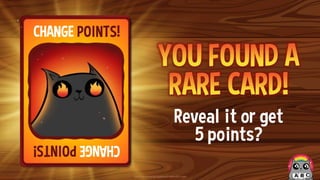
CHANGE POINTS!
CHANGE
POINTS!
DECK CARDS
RARE CARDS
(not in deck)
CHOOSE A LETTER
T U
B C D E
X
F G H I J K L
Y
M N O P Q R S
Z
V W
A
Arrange the angle of ∆𝐶𝐻𝐸 𝑖𝑛 𝑖𝑛𝑐𝑟𝑒𝑎𝑠𝑖𝑛𝑔 𝑜𝑟𝑑𝑒𝑟
∠H > ∠C > ∠E
CH = 12, HE = 10, CE = 8
Arrange the angle of ∆𝐶𝐻𝐸 𝑖𝑛 𝑖𝑛𝑐𝑟𝑒𝑎𝑠𝑖𝑛𝑔 𝑜𝑟𝑑𝑒𝑟
∠E > ∠H > ∠C
CH = 26; HE = 35; CE = 30
IDENTIFICATION
Corresponding Parts of Congruent Triangles are Congruent.
What does CPCTC mean?
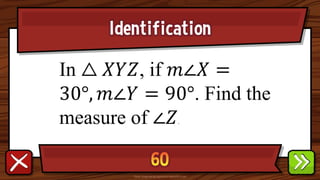
Identification
𝐷𝐸
Given △ 𝐴𝐵𝐶 ≅ △ 𝐷𝐸𝐹,
which segment is
congruent to 𝐴𝐵?
Identification
In △ 𝑋𝑌𝑍, if 𝑚∠𝑋 =
30°, 𝑚∠𝑌 = 90°. Find the
measure of ∠𝑍.
Identification
In △ 𝑋𝑌𝑍, if 𝑚∠𝑋 = 58°, 𝑚∠𝑌 =
69°. Find the measure of ∠𝑍.
Identification
If the side of a polygon is extended, the angle
formed outside the polygon is the exterior angle.
The measure of an exterior angle of a triangle is
always
Identification
What do you call a triangle that has any
two sides equal in length and angles
opposite to equal sides are equal in
measure?
Identification
What do you call a triangle
that has any no equal sides?
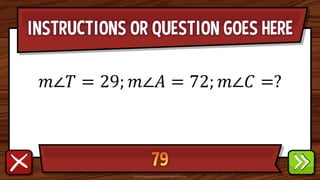
INSTRUCTIONS OR QUESTION GOES HERE
𝑚∠𝑇 = 29; 𝑚∠𝐴 = 72; 𝑚∠𝐶 =?
INSTRUCTIONS OR QUESTION GOES HERE
𝑚∠𝑇 = 43; 𝑚∠𝐴 = 56; 𝑚∠𝐶 =?
INSTRUCTIONS OR QUESTION GOES HERE
𝑚∠𝑆 = 125; 𝑚∠𝑁 = 25; 𝑚∠𝐺 =?
Identification
What are the different
kinds of postulates?
Yes or No
28, 41, 13
Yes or No
15, 12, 9
Yes or No
47, 28, 70
Yes or No
6, 9, 16
In △ 𝑴𝑵𝑶, 𝑴𝑵 = 8𝑐𝑚, 𝑵𝑶 = 9𝑐𝑚 and 𝑶𝑴 = 10𝑐𝑚.
𝑀𝑁, 𝑁𝑂, 𝑂𝑀
In △ 𝑴𝑵𝑶, 𝑴𝑵 = 8𝑐𝑚, 𝑵𝑶 = 9𝑐𝑚 and
𝑶𝑴 = 10𝑐𝑚.
Arrange the sides of △ 𝑀𝑁𝑂 in
ascending order.
Bonus
Yes or NO
20, 10, 9
Identification
△ 𝑈𝑇𝑆
congruent to △ 𝑄𝑃𝑂, given △
𝑆𝑇𝑈 ≅ △ 𝑂𝑃𝑄?
Identification
An equilateral triangle has
three__ angles
Identification
Statements that are accepted
after it has been proven using
the definitions, postulates
Identification
Statements which the
validity or truth are
assumed even without
proof
IDENTIFICATION
A statement that gives clear
explanation on the meaning of
a word or phrase
BONUS
BOMB!
BOMB!
+1 POINT
+1
POINT
+4 POINTS
+4
POINTS
+3 POINTS
+3
POINTS
Total Points:
NUCLEAR!
NUCLEAR!
+2 POINTS
+2
POINTS
+1 POINT
+1
POINT
+1 POINT
+1
POINT
+3 POINTS
+3
POINTS
Total Points:
BOMB!
BOMB!
+2 POINTS
+2
POINTS
+3 POINTS
+3
POINTS
Total Points:
CHANGE POINTS!
CHANGE
POINTS!
Reveal it or get
5 points?
BOMB!
BOMB!
+1 POINT
+1
POINT
+2 POINTS
+2
POINTS
+1 POINT
+1
POINT
+5 POINTS
+5
POINTS
+1 POINT
+1
POINT
Total Points:
NUCLEAR!
NUCLEAR!
+3 POINTS
+3
POINTS
+2 POINTS
+2
POINTS
+5 POINTS
+5
POINTS
+2 POINTS
+2
POINTS
Total Points:
BOMB!
BOMB!
+3 POINTS
+3
POINTS
+2 POINTS
+2
POINTS
+1 POINT
+1
POINT
+2 POINTS
+2
POINTS
+2 POINTS
+2
POINTS
+2 POINTS
+2
POINTS
Total Points:
BOMB!
BOMB!
+4 POINTS
+4
POINTS
Total Points:
LOSE ALL POINTS!
LSOE
ALL
POINTS!
Reveal it or get
5 points?
BOMB!
BOMB!
+3 POINTS
+3
POINTS
+4 POINTS
+4
POINTS
+3 POINTS
+3
POINTS
Total Points:
BOMB!
BOMB!
+2 POINTS
+2
POINTS
+4 POINTS
+4
POINTS
+3 POINTS
+3
POINTS
Total Points:
CHANGE POINTS!
CHANGE
POINTS!
Reveal it or get
5 points?
NUCLEAR!
NUCLEAR!
+3 POINTS
+3
POINTS
+3 POINTS
+3
POINTS
+2 POINTS
+2
POINTS
+1 POINT
+1
POINT
+4 POINTS
+4
POINTS
+2 POINTS
+2
POINTS
Total Points:
BOMB!
BOMB!
+5 POINTS
+5
POINTS
Total Points:
BOMB!
BOMB!
+4 POINTS
+4
POINTS
+5 POINTS
+5
POINTS
+2 POINTS
+2
POINTS
+1 POINT
+1
POINT
Total Points:
LOSE ALL POINTS!
LSOE
ALL
POINTS!
Reveal it or get
5 points?
LOSE ALL POINTS!
LSOE
ALL
POINTS!
Reveal it or get
5 points?
BOMB!
BOMB!
+2 POINTS
+2
POINTS
+2 POINTS
+2
POINTS
Total Points:
NUCLEAR!
NUCLEAR!
+1 POINT
+1
POINT
+3 POINTS
+3
POINTS
+4 POINTS
+4
POINTS
+2 POINTS
+2
POINTS
+5 POINTS
+5
POINTS
Total Points:
BOMB!
BOMB!
+1 POINT
+1
POINT
+1 POINT
+1
POINT
+1 POINT
+1
POINT
Total Points:
BOMB!
BOMB!
+5 POINTS
+5
POINTS
+1 POINT
+1
POINT
+3 POINTS
+3
POINTS
+3 POINTS
+3
POINTS
+2 POINTS
+2
POINTS
+2 POINTS
+2
POINTS
Total Points:
CHANGE POINTS!
CHANGE
POINTS!
Reveal it or get
5 points?
NUCLEAR!
NUCLEAR!
+3 POINTS
+3
POINTS
+5 POINTS
+5
POINTS
+5 POINTS
+5
POINTS
Total Points:
BOMB!
BOMB!
+1 POINT
+1
POINT
+1 POINT
+1
POINT
+5 POINTS
+5
POINTS
+1 POINT
+1
POINT
+1 POINT
+1
POINT
+4 POINTS
+4
POINTS
+2 POINTS
+2
POINTS
+2 POINTS
+2
POINTS
+3 POINTS
+3
POINTS
Total Points:
LOSE ALL POINTS!
LSOE
ALL
POINTS!
Reveal it or get
5 points?
BOMB!
BOMB!
+3 POINTS
+3
POINTS
+2 POINTS
+2
POINTS
+5 POINTS
+5
POINTS
Total Points:

Exploding Kittens - The Review Game.pptx

Editor's Notes

  • #2 This template is for educational, non-commercial purposes only. For more free game templates like this one, visit https://www.taysteachingtoolkit.com
  • #7 game over = their turn is over and they get no points for their turn
  • #8 “Rare cards” cannot be found in the decks where students accumulate points. They’re a separate reward event (see reward slides for details).
  • #9 A student/team chooses a letter. Click the letter they choose to go to the corresponding question slide.
  • #10 Click the spacebar to make the ANSWER appear. The blank space in the middle is for any extra text/images you need. Click the green button to go to the reward slide. Click the red button to go back to the question-choosing slide. Background wood texture by vector.satrian on https://www.vecteezy.com
  • #11 Click the spacebar to make the ANSWER appear. The blank space in the middle is for any extra text/images you need. Click the green button to go to the reward slide. Click the red button to go back to the question-choosing slide. Background wood texture by vector.satrian on https://www.vecteezy.com
  • #12 Click the spacebar to make the ANSWER appear. The blank space in the middle is for any extra text/images you need. Click the green button to go to the reward slide. Click the red button to go back to the question-choosing slide. Background wood texture by vector.satrian on https://www.vecteezy.com
  • #13 Click the spacebar to make the ANSWER appear. The blank space in the middle is for any extra text/images you need. Click the green button to go to the reward slide. Click the red button to go back to the question-choosing slide. Background wood texture by vector.satrian on https://www.vecteezy.com
  • #14 Click the spacebar to make the ANSWER appear. The blank space in the middle is for any extra text/images you need. Click the green button to go to the reward slide. Click the red button to go back to the question-choosing slide. Background wood texture by vector.satrian on https://www.vecteezy.com
  • #15 Click the spacebar to make the ANSWER appear. The blank space in the middle is for any extra text/images you need. Click the green button to go to the reward slide. Click the red button to go back to the question-choosing slide. Background wood texture by vector.satrian on https://www.vecteezy.com
  • #16 Click the spacebar to make the ANSWER appear. The blank space in the middle is for any extra text/images you need. Click the green button to go to the reward slide. Click the red button to go back to the question-choosing slide. Background wood texture by vector.satrian on https://www.vecteezy.com
  • #17 Click the spacebar to make the ANSWER appear. The blank space in the middle is for any extra text/images you need. Click the green button to go to the reward slide. Click the red button to go back to the question-choosing slide. Background wood texture by vector.satrian on https://www.vecteezy.com
  • #18 Click the spacebar to make the ANSWER appear. The blank space in the middle is for any extra text/images you need. Click the green button to go to the reward slide. Click the red button to go back to the question-choosing slide. Background wood texture by vector.satrian on https://www.vecteezy.com
  • #19 Click the spacebar to make the ANSWER appear. The blank space in the middle is for any extra text/images you need. Click the green button to go to the reward slide. Click the red button to go back to the question-choosing slide. Background wood texture by vector.satrian on https://www.vecteezy.com
  • #20 Click the spacebar to make the ANSWER appear. The blank space in the middle is for any extra text/images you need. Click the green button to go to the reward slide. Click the red button to go back to the question-choosing slide. Background wood texture by vector.satrian on https://www.vecteezy.com
  • #21 Click the spacebar to make the ANSWER appear. The blank space in the middle is for any extra text/images you need. Click the green button to go to the reward slide. Click the red button to go back to the question-choosing slide. Background wood texture by vector.satrian on https://www.vecteezy.com
  • #22 Click the spacebar to make the ANSWER appear. The blank space in the middle is for any extra text/images you need. Click the green button to go to the reward slide. Click the red button to go back to the question-choosing slide. Background wood texture by vector.satrian on https://www.vecteezy.com
  • #23 Click the spacebar to make the ANSWER appear. The blank space in the middle is for any extra text/images you need. Click the green button to go to the reward slide. Click the red button to go back to the question-choosing slide. Background wood texture by vector.satrian on https://www.vecteezy.com
  • #24 Click the spacebar to make the ANSWER appear. The blank space in the middle is for any extra text/images you need. Click the green button to go to the reward slide. Click the red button to go back to the question-choosing slide. Background wood texture by vector.satrian on https://www.vecteezy.com
  • #25 Click the spacebar to make the ANSWER appear. The blank space in the middle is for any extra text/images you need. Click the green button to go to the reward slide. Click the red button to go back to the question-choosing slide. Background wood texture by vector.satrian on https://www.vecteezy.com
  • #26 Click the spacebar to make the ANSWER appear. The blank space in the middle is for any extra text/images you need. Click the green button to go to the reward slide. Click the red button to go back to the question-choosing slide. Background wood texture by vector.satrian on https://www.vecteezy.com
  • #27 Click the spacebar to make the ANSWER appear. The blank space in the middle is for any extra text/images you need. Click the green button to go to the reward slide. Click the red button to go back to the question-choosing slide. Background wood texture by vector.satrian on https://www.vecteezy.com
  • #28 Click the spacebar to make the ANSWER appear. The blank space in the middle is for any extra text/images you need. Click the green button to go to the reward slide. Click the red button to go back to the question-choosing slide. Background wood texture by vector.satrian on https://www.vecteezy.com
  • #29 Click the spacebar to make the ANSWER appear. The blank space in the middle is for any extra text/images you need. Click the green button to go to the reward slide. Click the red button to go back to the question-choosing slide. Background wood texture by vector.satrian on https://www.vecteezy.com
  • #30 Click the spacebar to make the ANSWER appear. The blank space in the middle is for any extra text/images you need. Click the green button to go to the reward slide. Click the red button to go back to the question-choosing slide. Background wood texture by vector.satrian on https://www.vecteezy.com
  • #31 Click the spacebar to make the ANSWER appear. The blank space in the middle is for any extra text/images you need. Click the green button to go to the reward slide. Click the red button to go back to the question-choosing slide. Background wood texture by vector.satrian on https://www.vecteezy.com
  • #32 Click the spacebar to make the ANSWER appear. The blank space in the middle is for any extra text/images you need. Click the green button to go to the reward slide. Click the red button to go back to the question-choosing slide. Background wood texture by vector.satrian on https://www.vecteezy.com
  • #33 Click the spacebar to make the ANSWER appear. The blank space in the middle is for any extra text/images you need. Click the green button to go to the reward slide. Click the red button to go back to the question-choosing slide. Background wood texture by vector.satrian on https://www.vecteezy.com
  • #34 Click the spacebar to make the ANSWER appear. The blank space in the middle is for any extra text/images you need. Click the green button to go to the reward slide. Click the red button to go back to the question-choosing slide. Background wood texture by vector.satrian on https://www.vecteezy.com
  • #35 Click the spacebar to make the ANSWER appear. The blank space in the middle is for any extra text/images you need. Click the green button to go to the reward slide. Click the red button to go back to the question-choosing slide. Background wood texture by vector.satrian on https://www.vecteezy.com
  • #36 Press the spacebar to reveal the first card. Ask the student/team if they want to take the total points they have so far or draw again to possibly add more points. I usually have my students say “keep going” (draw again) or “stop” (take the points they’ve accumulated). Repeat this process until they either decide to take their accumulated points or reach a Bomb or Nuclear card. Click the ABC Cat icon in the right-hand corner to go back the question-choosing slide. Background wood texture by vector.satrian on https://www.vecteezy.com
  • #37 Press the spacebar to reveal the first card. Ask the student/team if they want to take the total points they have so far or draw again to possibly add more points. I usually have my students say “keep going” (draw again) or “stop” (take the points they’ve accumulated). Repeat this process until they either decide to take their accumulated points or reach a Bomb or Nuclear card. Click the ABC Cat icon in the right-hand corner to go back the question-choosing slide. Background wood texture by vector.satrian on https://www.vecteezy.com
  • #38 Press the spacebar to reveal the first card. Ask the student/team if they want to take the total points they have so far or draw again to possibly add more points. I usually have my students say “keep going” (draw again) or “stop” (take the points they’ve accumulated). Repeat this process until they either decide to take their accumulated points or reach a Bomb or Nuclear card. Click the ABC Cat icon in the right-hand corner to go back the question-choosing slide. Background wood texture by vector.satrian on https://www.vecteezy.com
  • #39 The student/team has a choice: They can either get 5 points or take a chance and reveal the rare card, from which they will either lose all their points or get to change points with another team. Press the spacebar to reveal the card, if they choose that option. Click the ABC Cat icon in the right-hand corner to go back the question-choosing slide. Background wood texture by vector.satrian on https://www.vecteezy.com
  • #40 Press the spacebar to reveal the first card. Ask the student/team if they want to take the total points they have so far or draw again to possibly add more points. I usually have my students say “keep going” (draw again) or “stop” (take the points they’ve accumulated). Repeat this process until they either decide to take their accumulated points or reach a Bomb or Nuclear card. Click the ABC Cat icon in the right-hand corner to go back the question-choosing slide. Background wood texture by vector.satrian on https://www.vecteezy.com
  • #41 Press the spacebar to reveal the first card. Ask the student/team if they want to take the total points they have so far or draw again to possibly add more points. I usually have my students say “keep going” (draw again) or “stop” (take the points they’ve accumulated). Repeat this process until they either decide to take their accumulated points or reach a Bomb or Nuclear card. Click the ABC Cat icon in the right-hand corner to go back the question-choosing slide. Background wood texture by vector.satrian on https://www.vecteezy.com
  • #42 Press the spacebar to reveal the first card. Ask the student/team if they want to take the total points they have so far or draw again to possibly add more points. I usually have my students say “keep going” (draw again) or “stop” (take the points they’ve accumulated). Repeat this process until they either decide to take their accumulated points or reach a Bomb or Nuclear card. Click the ABC Cat icon in the right-hand corner to go back the question-choosing slide. Background wood texture by vector.satrian on https://www.vecteezy.com
  • #43 Press the spacebar to reveal the first card. Ask the student/team if they want to take the total points they have so far or draw again to possibly add more points. I usually have my students say “keep going” (draw again) or “stop” (take the points they’ve accumulated). Repeat this process until they either decide to take their accumulated points or reach a Bomb or Nuclear card. Click the ABC Cat icon in the right-hand corner to go back the question-choosing slide. Background wood texture by vector.satrian on https://www.vecteezy.com
  • #44 The student/team has a choice: They can either get 5 points or take a chance and reveal the rare card, from which they will either lose all their points or get to change points with another team. Press the spacebar to reveal the card, if they choose that option. Click the ABC Cat icon in the right-hand corner to go back the question-choosing slide. Background wood texture by vector.satrian on https://www.vecteezy.com
  • #45 Press the spacebar to reveal the first card. Ask the student/team if they want to take the total points they have so far or draw again to possibly add more points. I usually have my students say “keep going” (draw again) or “stop” (take the points they’ve accumulated). Repeat this process until they either decide to take their accumulated points or reach a Bomb or Nuclear card. Click the ABC Cat icon in the right-hand corner to go back the question-choosing slide. Background wood texture by vector.satrian on https://www.vecteezy.com
  • #46 Press the spacebar to reveal the first card. Ask the student/team if they want to take the total points they have so far or draw again to possibly add more points. I usually have my students say “keep going” (draw again) or “stop” (take the points they’ve accumulated). Repeat this process until they either decide to take their accumulated points or reach a Bomb or Nuclear card. Click the ABC Cat icon in the right-hand corner to go back the question-choosing slide. Background wood texture by vector.satrian on https://www.vecteezy.com
  • #47 The student/team has a choice: They can either get 5 points or take a chance and reveal the rare card, from which they will either lose all their points or get to change points with another team. Press the spacebar to reveal the card, if they choose that option. Click the ABC Cat icon in the right-hand corner to go back the question-choosing slide. Background wood texture by vector.satrian on https://www.vecteezy.com
  • #48 Press the spacebar to reveal the first card. Ask the student/team if they want to take the total points they have so far or draw again to possibly add more points. I usually have my students say “keep going” (draw again) or “stop” (take the points they’ve accumulated). Repeat this process until they either decide to take their accumulated points or reach a Bomb or Nuclear card. Click the ABC Cat icon in the right-hand corner to go back the question-choosing slide. Background wood texture by vector.satrian on https://www.vecteezy.com
  • #49 Press the spacebar to reveal the first card. Ask the student/team if they want to take the total points they have so far or draw again to possibly add more points. I usually have my students say “keep going” (draw again) or “stop” (take the points they’ve accumulated). Repeat this process until they either decide to take their accumulated points or reach a Bomb or Nuclear card. Click the ABC Cat icon in the right-hand corner to go back the question-choosing slide. Background wood texture by vector.satrian on https://www.vecteezy.com
  • #50 Press the spacebar to reveal the first card. Ask the student/team if they want to take the total points they have so far or draw again to possibly add more points. I usually have my students say “keep going” (draw again) or “stop” (take the points they’ve accumulated). Repeat this process until they either decide to take their accumulated points or reach a Bomb or Nuclear card. Click the ABC Cat icon in the right-hand corner to go back the question-choosing slide. Background wood texture by vector.satrian on https://www.vecteezy.com
  • #51 The student/team has a choice: They can either get 5 points or take a chance and reveal the rare card, from which they will either lose all their points or get to change points with another team. Press the spacebar to reveal the card, if they choose that option. Click the ABC Cat icon in the right-hand corner to go back the question-choosing slide. Background wood texture by vector.satrian on https://www.vecteezy.com
  • #52 The student/team has a choice: They can either get 5 points or take a chance and reveal the rare card, from which they will either lose all their points or get to change points with another team. Press the spacebar to reveal the card, if they choose that option. Click the ABC Cat icon in the right-hand corner to go back the question-choosing slide. Background wood texture by vector.satrian on https://www.vecteezy.com
  • #53 Press the spacebar to reveal the first card. Ask the student/team if they want to take the total points they have so far or draw again to possibly add more points. I usually have my students say “keep going” (draw again) or “stop” (take the points they’ve accumulated). Repeat this process until they either decide to take their accumulated points or reach a Bomb or Nuclear card. Click the ABC Cat icon in the right-hand corner to go back the question-choosing slide. Background wood texture by vector.satrian on https://www.vecteezy.com
  • #54 Press the spacebar to reveal the first card. Ask the student/team if they want to take the total points they have so far or draw again to possibly add more points. I usually have my students say “keep going” (draw again) or “stop” (take the points they’ve accumulated). Repeat this process until they either decide to take their accumulated points or reach a Bomb or Nuclear card. Click the ABC Cat icon in the right-hand corner to go back the question-choosing slide. Background wood texture by vector.satrian on https://www.vecteezy.com
  • #55 Press the spacebar to reveal the first card. Ask the student/team if they want to take the total points they have so far or draw again to possibly add more points. I usually have my students say “keep going” (draw again) or “stop” (take the points they’ve accumulated). Repeat this process until they either decide to take their accumulated points or reach a Bomb or Nuclear card. Click the ABC Cat icon in the right-hand corner to go back the question-choosing slide. Background wood texture by vector.satrian on https://www.vecteezy.com
  • #56 Press the spacebar to reveal the first card. Ask the student/team if they want to take the total points they have so far or draw again to possibly add more points. I usually have my students say “keep going” (draw again) or “stop” (take the points they’ve accumulated). Repeat this process until they either decide to take their accumulated points or reach a Bomb or Nuclear card. Click the ABC Cat icon in the right-hand corner to go back the question-choosing slide. Background wood texture by vector.satrian on https://www.vecteezy.com
  • #57 The student/team has a choice: They can either get 5 points or take a chance and reveal the rare card, from which they will either lose all their points or get to change points with another team. Press the spacebar to reveal the card, if they choose that option. Click the ABC Cat icon in the right-hand corner to go back the question-choosing slide. Background wood texture by vector.satrian on https://www.vecteezy.com
  • #58 Press the spacebar to reveal the first card. Ask the student/team if they want to take the total points they have so far or draw again to possibly add more points. I usually have my students say “keep going” (draw again) or “stop” (take the points they’ve accumulated). Repeat this process until they either decide to take their accumulated points or reach a Bomb or Nuclear card. Click the ABC Cat icon in the right-hand corner to go back the question-choosing slide. Background wood texture by vector.satrian on https://www.vecteezy.com
  • #59 Press the spacebar to reveal the first card. Ask the student/team if they want to take the total points they have so far or draw again to possibly add more points. I usually have my students say “keep going” (draw again) or “stop” (take the points they’ve accumulated). Repeat this process until they either decide to take their accumulated points or reach a Bomb or Nuclear card. Click the ABC Cat icon in the right-hand corner to go back the question-choosing slide. Background wood texture by vector.satrian on https://www.vecteezy.com
  • #60 The student/team has a choice: They can either get 5 points or take a chance and reveal the rare card, from which they will either lose all their points or get to change points with another team. Press the spacebar to reveal the card, if they choose that option. Click the ABC Cat icon in the right-hand corner to go back the question-choosing slide. Background wood texture by vector.satrian on https://www.vecteezy.com
  • #61 Press the spacebar to reveal the first card. Ask the student/team if they want to take the total points they have so far or draw again to possibly add more points. I usually have my students say “keep going” (draw again) or “stop” (take the points they’ve accumulated). Repeat this process until they either decide to take their accumulated points or reach a Bomb or Nuclear card. Click the ABC Cat icon in the right-hand corner to go back the question-choosing slide. Background wood texture by vector.satrian on https://www.vecteezy.com