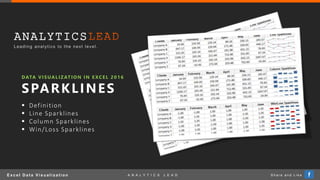
DATA VISUALIZATION IN E XCEL 2016
SPARKLINES
 Definition
 Line Sparklines
 Column Sparklines
 Win/Loss Sparklines
E x c e l D a t a V i s u a l i z a t i o n S h a r e a n d L i k eA N A L Y T I C S L E A D f
ANALYTICS
Leading analytics to the next level.
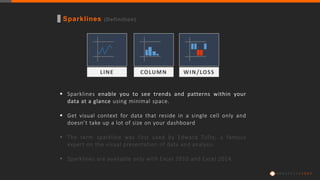
Sparklines (Definition)
 Sparklines enable you to see trends and patterns within your
data at a glance using minimal space.
 Get visual context for data that reside in a single cell only and
doesn’t take up a lot of size on your dashboard
 The term sparkline was first used by Edward Tufte, a famous
expert on the visual presentation of data and analysis.
 Sparklines are available only with Excel 2010 and Excel 2014.
LINE COLUMN WIN/LOSS
A N A L Y T I C S
Create Sparklines (Line, Column, Win/Loss)
1. Create Sparkline, Select Insert > Sparklines Group (Select Line, Column or Win / Loss)
2. Highlight Data: Select Data Range and Location Range
A N A L Y T I C S
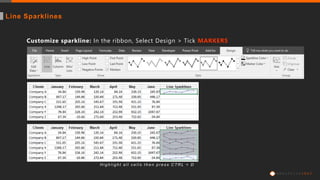
Customize sparkline: In the ribbon, Select Design > Tick MARKERS
H i g h l i g h t a l l c e l l s t h e n p r e s s C T R L + D
Line Sparklines
A N A L Y T I C S
Customize sparkline: In the ribbon, Select Design > Tick HIGH POINT
H i g h l i g h t a l l c e l l s t h e n p r e s s C T R L + D
Column Sparklines
A N A L Y T I C S
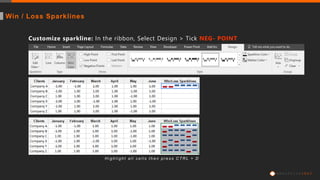
Customize sparkline: In the ribbon, Select Design > Tick NEG- POINT
H i g h l i g h t a l l c e l l s t h e n p r e s s C T R L + D
Win / Loss Sparklines
A N A L Y T I C S
ANALYTICS
Leading analytics to the next level.

Excel Data Visualization - Sparklines

  • 1.
    DATA VISUALIZATION INE XCEL 2016 SPARKLINES  Definition  Line Sparklines  Column Sparklines  Win/Loss Sparklines E x c e l D a t a V i s u a l i z a t i o n S h a r e a n d L i k eA N A L Y T I C S L E A D f ANALYTICS Leading analytics to the next level.
  • 2.
    Sparklines (Definition)  Sparklinesenable you to see trends and patterns within your data at a glance using minimal space.  Get visual context for data that reside in a single cell only and doesn’t take up a lot of size on your dashboard  The term sparkline was first used by Edward Tufte, a famous expert on the visual presentation of data and analysis.  Sparklines are available only with Excel 2010 and Excel 2014. LINE COLUMN WIN/LOSS A N A L Y T I C S
  • 3.
    Create Sparklines (Line,Column, Win/Loss) 1. Create Sparkline, Select Insert > Sparklines Group (Select Line, Column or Win / Loss) 2. Highlight Data: Select Data Range and Location Range A N A L Y T I C S
  • 4.
    Customize sparkline: Inthe ribbon, Select Design > Tick MARKERS H i g h l i g h t a l l c e l l s t h e n p r e s s C T R L + D Line Sparklines A N A L Y T I C S
  • 5.
    Customize sparkline: Inthe ribbon, Select Design > Tick HIGH POINT H i g h l i g h t a l l c e l l s t h e n p r e s s C T R L + D Column Sparklines A N A L Y T I C S
  • 6.
    Customize sparkline: Inthe ribbon, Select Design > Tick NEG- POINT H i g h l i g h t a l l c e l l s t h e n p r e s s C T R L + D Win / Loss Sparklines A N A L Y T I C S
  • 7.