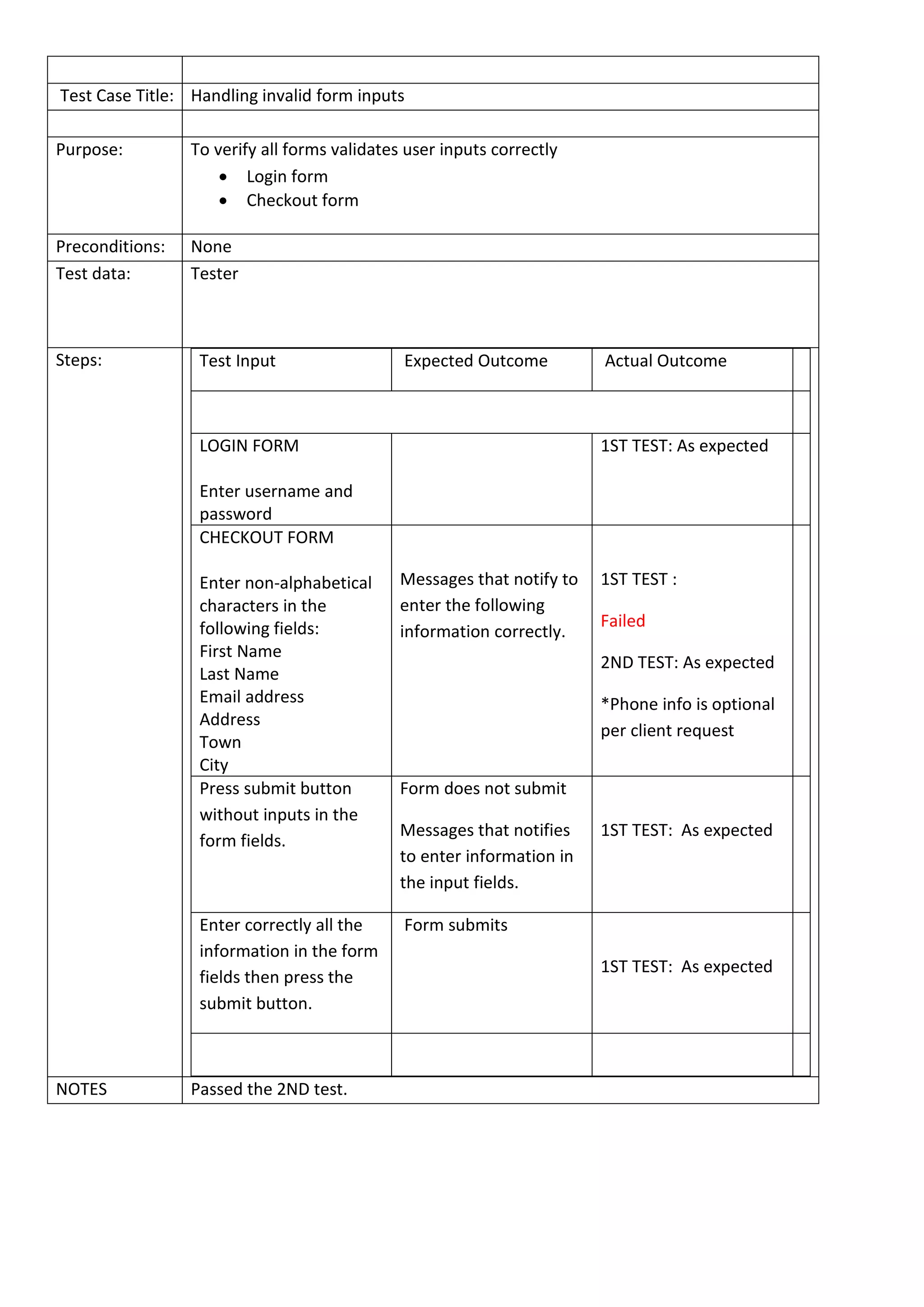
Test Case Title: Handling invalid form inputs
Purpose: To verify all forms validates user inputs correctly
 Login form
 Checkout form
Preconditions: None
Test data: Tester
Steps: Test Input Expected Outcome Actual Outcome
LOGIN FORM
Enter username and
password
1ST TEST: As expected
CHECKOUT FORM
Enter non-alphabetical
characters in the
following fields:
First Name
Last Name
Email address
Address
Town
City
Messages that notify to
enter the following
information correctly.
1ST TEST :
Failed
2ND TEST: As expected
*Phone info is optional
per client request
Press submit button
without inputs in the
form fields.
Form does not submit
Messages that notifies
to enter information in
the input fields.
1ST TEST: As expected
Enter correctly all the
information in the form
fields then press the
submit button.
Form submits
1ST TEST: As expected
NOTES Passed the 2ND test.
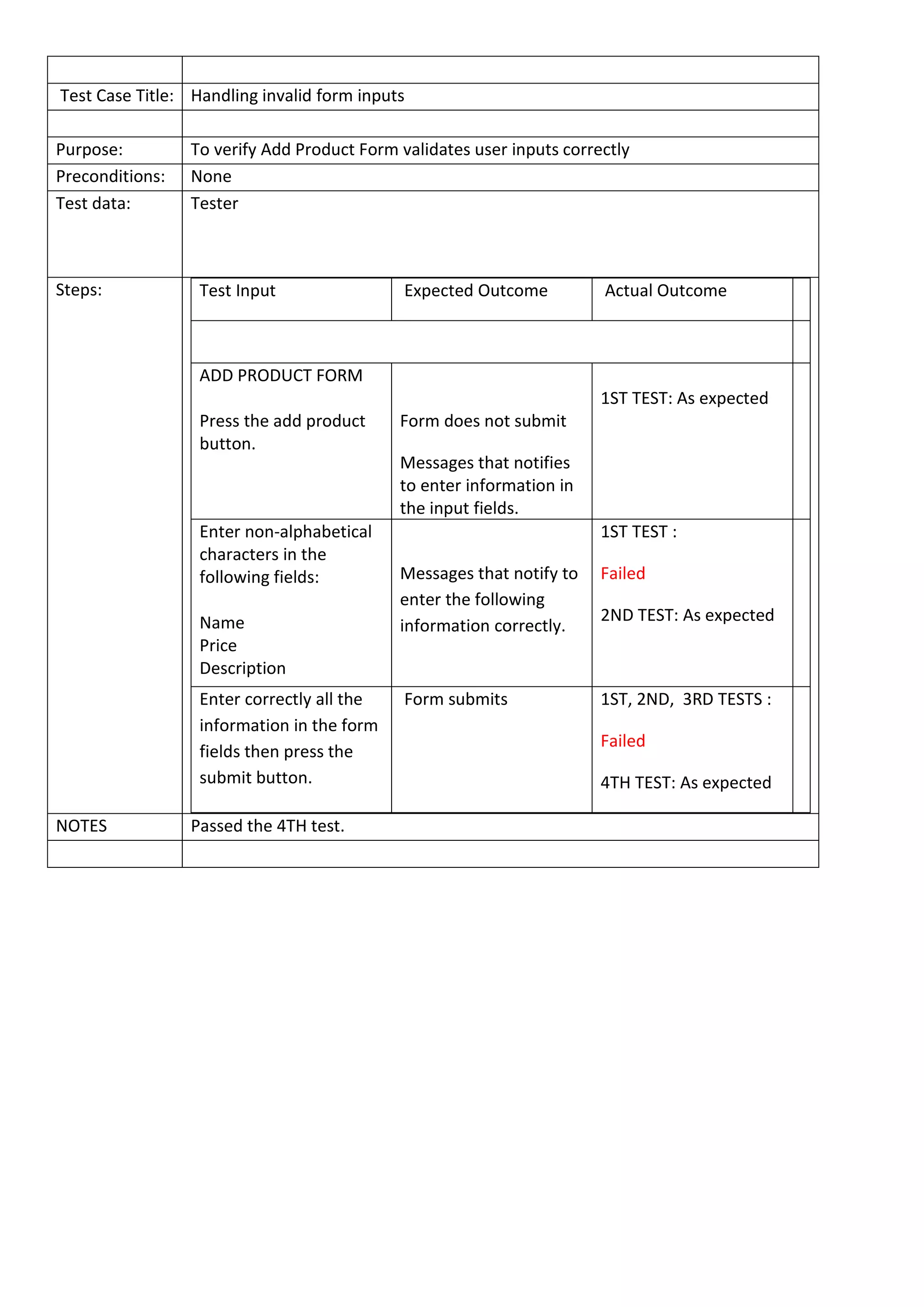
Test Case Title: Handling invalid form inputs
Purpose: To verify Add Product Form validates user inputs correctly
Preconditions: None
Test data: Tester
Steps: Test Input Expected Outcome Actual Outcome
ADD PRODUCT FORM
Press the add product
button.
Form does not submit
Messages that notifies
to enter information in
the input fields.
1ST TEST: As expected
Enter non-alphabetical
characters in the
following fields:
Name
Price
Description
Messages that notify to
enter the following
information correctly.
1ST TEST :
Failed
2ND TEST: As expected
Enter correctly all the
information in the form
fields then press the
submit button.
Form submits 1ST, 2ND, 3RD TESTS :
Failed
4TH TEST: As expected
NOTES Passed the 4TH test.
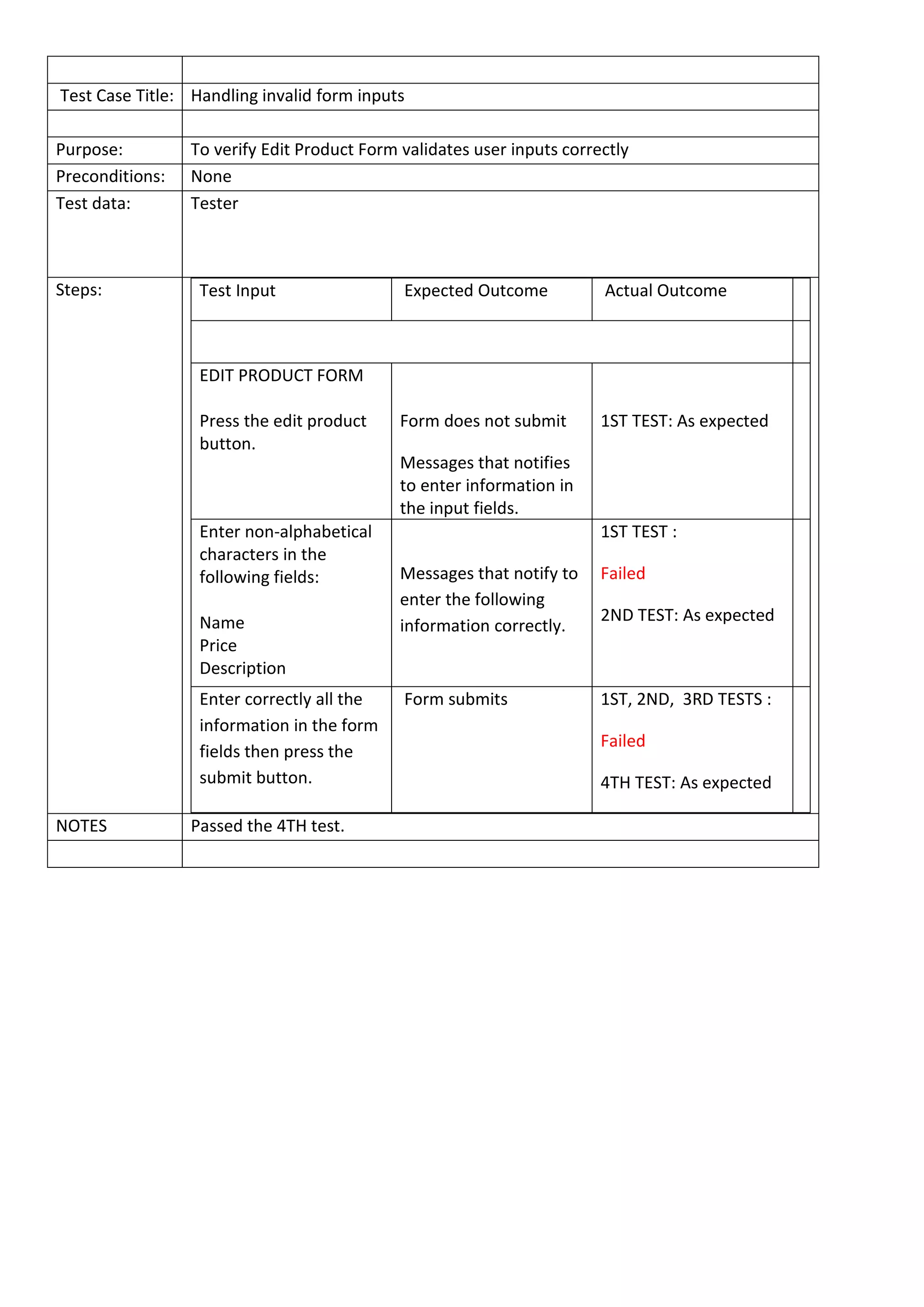
Test Case Title: Handling invalid form inputs
Purpose: To verify Edit Product Form validates user inputs correctly
Preconditions: None
Test data: Tester
Steps: Test Input Expected Outcome Actual Outcome
EDIT PRODUCT FORM
Press the edit product
button.
Form does not submit
Messages that notifies
to enter information in
the input fields.
1ST TEST: As expected
Enter non-alphabetical
characters in the
following fields:
Name
Price
Description
Messages that notify to
enter the following
information correctly.
1ST TEST :
Failed
2ND TEST: As expected
Enter correctly all the
information in the form
fields then press the
submit button.
Form submits 1ST, 2ND, 3RD TESTS :
Failed
4TH TEST: As expected
NOTES Passed the 4TH test.
Test Case Title: SHOPPING BAG
Purpose: To verify that the Basket module is working as expected
Preconditions: None
Test data: Tester
Steps: Test Expected Outcome Actual Outcome
Press the my bag link in the
nav bar
A message that notifies
that there is no items in
the shopping bag.
1ST TEST: As expected
Select items from the
product list
(index.php?page=catalogue),
then press the Add to my
bag button. Press the My
shopping bag button to go
to the basket page.
Items must reflect in
the shopping bag.
1ST TEST :
Failed
2ND TEST: As expected
In the shopping bag, select
new quantity of the ordered
item then press the update
button.
Quantity must be
updated.
Total price must show
the new amount.
Subtotal must reflect
the new amount.
1ST TEST, 2ND
TEST :
Failed
3RD TEST: As expected
Press Continue shopping
button or the My shopping
bag button.
These links should
redirect to the proper
pages.
1ST TEST: As expected
Press the purchase button. Checkout form should
appear.
1ST TEST: As expected
NOTES Passed the 2ND test.

Example of Test cases

  • 1.
    Test Case Title:Handling invalid form inputs Purpose: To verify all forms validates user inputs correctly  Login form  Checkout form Preconditions: None Test data: Tester Steps: Test Input Expected Outcome Actual Outcome LOGIN FORM Enter username and password 1ST TEST: As expected CHECKOUT FORM Enter non-alphabetical characters in the following fields: First Name Last Name Email address Address Town City Messages that notify to enter the following information correctly. 1ST TEST : Failed 2ND TEST: As expected *Phone info is optional per client request Press submit button without inputs in the form fields. Form does not submit Messages that notifies to enter information in the input fields. 1ST TEST: As expected Enter correctly all the information in the form fields then press the submit button. Form submits 1ST TEST: As expected NOTES Passed the 2ND test.
  • 2.
    Test Case Title:Handling invalid form inputs Purpose: To verify Add Product Form validates user inputs correctly Preconditions: None Test data: Tester Steps: Test Input Expected Outcome Actual Outcome ADD PRODUCT FORM Press the add product button. Form does not submit Messages that notifies to enter information in the input fields. 1ST TEST: As expected Enter non-alphabetical characters in the following fields: Name Price Description Messages that notify to enter the following information correctly. 1ST TEST : Failed 2ND TEST: As expected Enter correctly all the information in the form fields then press the submit button. Form submits 1ST, 2ND, 3RD TESTS : Failed 4TH TEST: As expected NOTES Passed the 4TH test.
  • 3.
    Test Case Title:Handling invalid form inputs Purpose: To verify Edit Product Form validates user inputs correctly Preconditions: None Test data: Tester Steps: Test Input Expected Outcome Actual Outcome EDIT PRODUCT FORM Press the edit product button. Form does not submit Messages that notifies to enter information in the input fields. 1ST TEST: As expected Enter non-alphabetical characters in the following fields: Name Price Description Messages that notify to enter the following information correctly. 1ST TEST : Failed 2ND TEST: As expected Enter correctly all the information in the form fields then press the submit button. Form submits 1ST, 2ND, 3RD TESTS : Failed 4TH TEST: As expected NOTES Passed the 4TH test.
  • 4.
    Test Case Title:SHOPPING BAG Purpose: To verify that the Basket module is working as expected Preconditions: None Test data: Tester Steps: Test Expected Outcome Actual Outcome Press the my bag link in the nav bar A message that notifies that there is no items in the shopping bag. 1ST TEST: As expected Select items from the product list (index.php?page=catalogue), then press the Add to my bag button. Press the My shopping bag button to go to the basket page. Items must reflect in the shopping bag. 1ST TEST : Failed 2ND TEST: As expected In the shopping bag, select new quantity of the ordered item then press the update button. Quantity must be updated. Total price must show the new amount. Subtotal must reflect the new amount. 1ST TEST, 2ND TEST : Failed 3RD TEST: As expected Press Continue shopping button or the My shopping bag button. These links should redirect to the proper pages. 1ST TEST: As expected Press the purchase button. Checkout form should appear. 1ST TEST: As expected NOTES Passed the 2ND test.