EWM110
Basic Customizing in SAP Extended
Warehouse Management
.
.
PARTICIPANT HANDBOOK
INSTRUCTOR-LED TRAINING
.
Course Version: 26
Course Duration: 5 Day(s)
Material Number: 50165414
Librería ERP — Sample | libreriaerp.com/us | info@libreriaerp.com
SAP Copyrights, Trademarks and
Disclaimers
© 2024 SAP SE or an SAP affiliate company. All rights reserved.
No part of this publication may be reproduced or transmitted in any form or for any
purpose without the express permission of SAP SE or an SAP affiliate company.
SAP and other SAP products and services mentioned herein as well as their
respective logos are trademarks or registered trademarks of SAP SE (or an SAP
affiliate company) in Germany and other countries. Please see https://
www.sap.com/corporate/en/legal/copyright.html for additional trademark
information and notices.
Some software products marketed by SAP SE and its distributors contain proprietary
software components of other software vendors.
National product specifications may vary.
These materials may have been machine translated and may contain grammatical
errors or inaccuracies.
These materials are provided by SAP SE or an SAP affiliate company for
informational purposes only, without representation or warranty of any kind, and SAP
SE or its affiliated companies shall not be liable for errors or omissions with respect
to the materials. The only warranties for SAP SE or SAP affiliate company products
and services are those that are set forth in the express warranty statements
accompanying such products and services, if any. Nothing herein should be
construed as constituting an additional warranty.
In particular, SAP SE or its affiliated companies have no obligation to pursue any
course of business outlined in this document or any related presentation, or to
develop or release any functionality mentioned therein. This document, or any related
presentation, and SAP SE’s or its affiliated companies’ strategy and possible future
developments, products, and/or platform directions and functionality are all subject
to change and may be changed by SAP SE or its affiliated companies at any time for
any reason without notice. The information in this document is not a commitment,
promise, or legal obligation to deliver any material, code, or functionality. All forward-
looking statements are subject to various risks and uncertainties that could cause
actual results to differ materially from expectations. Readers are cautioned not to
place undue reliance on these forward-looking statements, which speak only as of
their dates, and they should not be relied upon in making purchasing decisions.
Librería ERP — Sample | libreriaerp.com/us | info@libreriaerp.com
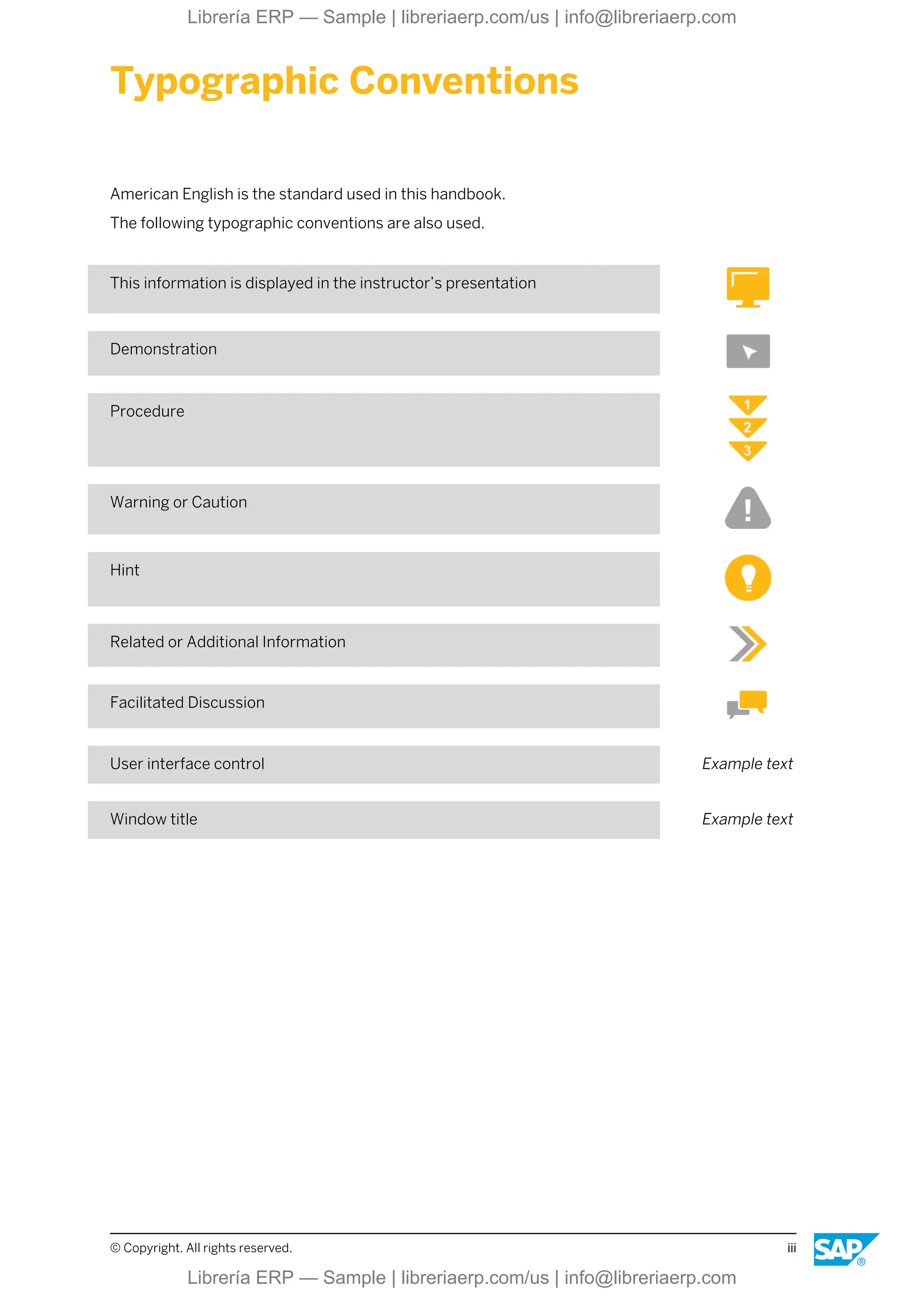
Typographic Conventions
American English is the standard used in this handbook.
The following typographic conventions are also used.
This information is displayed in the instructor’s presentation
Demonstration
Procedure
Warning or Caution
Hint
Related or Additional Information
Facilitated Discussion
User interface control Example text
Window title Example text
© Copyright. All rights reserved. iii
Librería ERP — Sample | libreriaerp.com/us | info@libreriaerp.com
iv © Copyright. All rights reserved.
Librería ERP — Sample | libreriaerp.com/us | info@libreriaerp.com
Contents
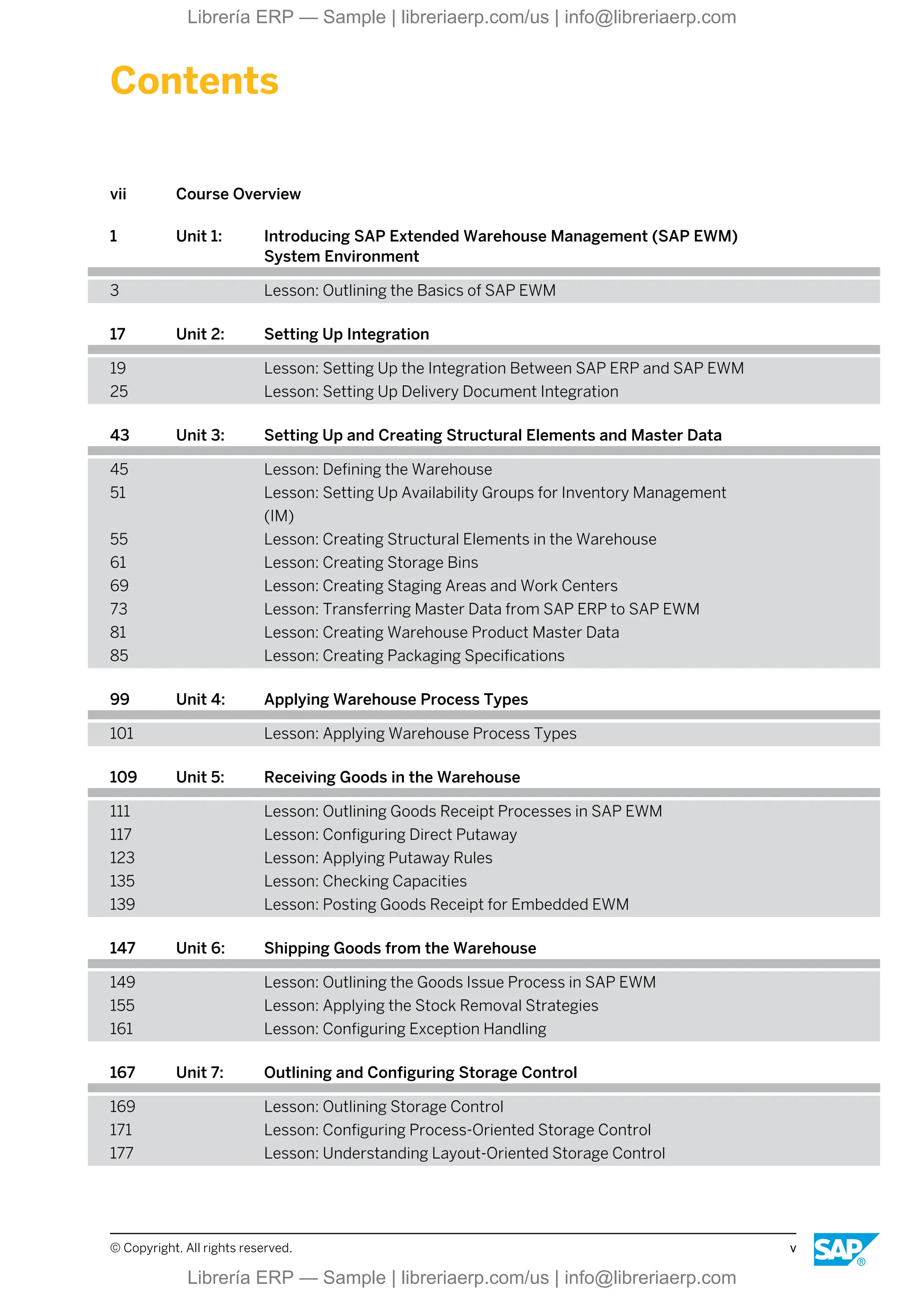
vii Course Overview
1 Unit 1: Introducing SAP Extended Warehouse Management (SAP EWM)
System Environment
3 Lesson: Outlining the Basics of SAP EWM
17 Unit 2: Setting Up Integration
19 Lesson: Setting Up the Integration Between SAP ERP and SAP EWM
25 Lesson: Setting Up Delivery Document Integration
43 Unit 3: Setting Up and Creating Structural Elements and Master Data
45 Lesson: Defining the Warehouse
51 Lesson: Setting Up Availability Groups for Inventory Management
(IM)
55 Lesson: Creating Structural Elements in the Warehouse
61 Lesson: Creating Storage Bins
69 Lesson: Creating Staging Areas and Work Centers
73 Lesson: Transferring Master Data from SAP ERP to SAP EWM
81 Lesson: Creating Warehouse Product Master Data
85 Lesson: Creating Packaging Specifications
99 Unit 4: Applying Warehouse Process Types
101 Lesson: Applying Warehouse Process Types
109 Unit 5: Receiving Goods in the Warehouse
111 Lesson: Outlining Goods Receipt Processes in SAP EWM
117 Lesson: Configuring Direct Putaway
123 Lesson: Applying Putaway Rules
135 Lesson: Checking Capacities
139 Lesson: Posting Goods Receipt for Embedded EWM
147 Unit 6: Shipping Goods from the Warehouse
149 Lesson: Outlining the Goods Issue Process in SAP EWM
155 Lesson: Applying the Stock Removal Strategies
161 Lesson: Configuring Exception Handling
167 Unit 7: Outlining and Configuring Storage Control
169 Lesson: Outlining Storage Control
171 Lesson: Configuring Process-Oriented Storage Control
177 Lesson: Understanding Layout-Oriented Storage Control
© Copyright. All rights reserved. v
Librería ERP — Sample | libreriaerp.com/us | info@libreriaerp.com
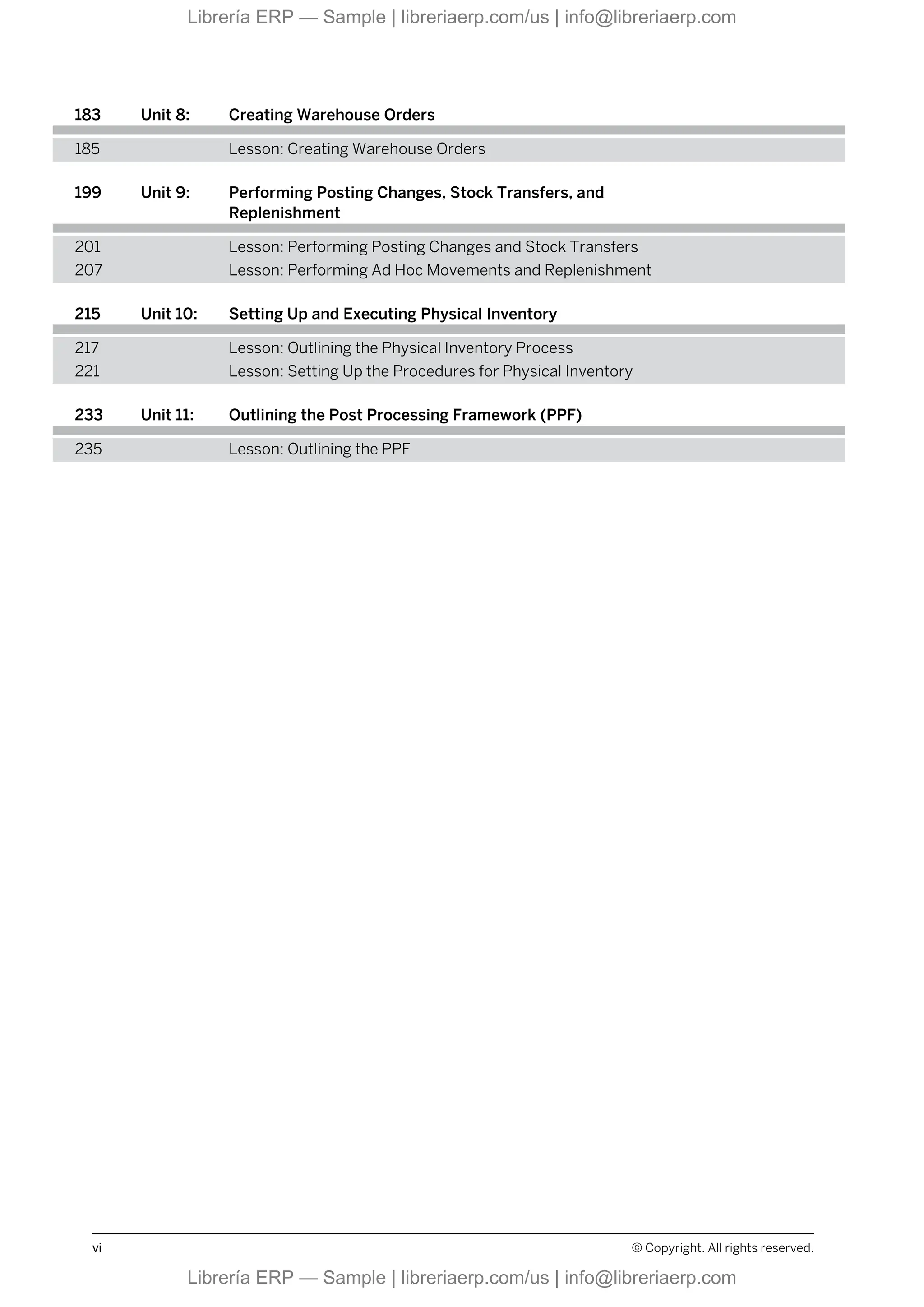
183 Unit 8: Creating Warehouse Orders
185 Lesson: Creating Warehouse Orders
199 Unit 9: Performing Posting Changes, Stock Transfers, and
Replenishment
201 Lesson: Performing Posting Changes and Stock Transfers
207 Lesson: Performing Ad Hoc Movements and Replenishment
215 Unit 10: Setting Up and Executing Physical Inventory
217 Lesson: Outlining the Physical Inventory Process
221 Lesson: Setting Up the Procedures for Physical Inventory
233 Unit 11: Outlining the Post Processing Framework (PPF)
235 Lesson: Outlining the PPF
vi © Copyright. All rights reserved.
Librería ERP — Sample | libreriaerp.com/us | info@libreriaerp.com
Course Overview
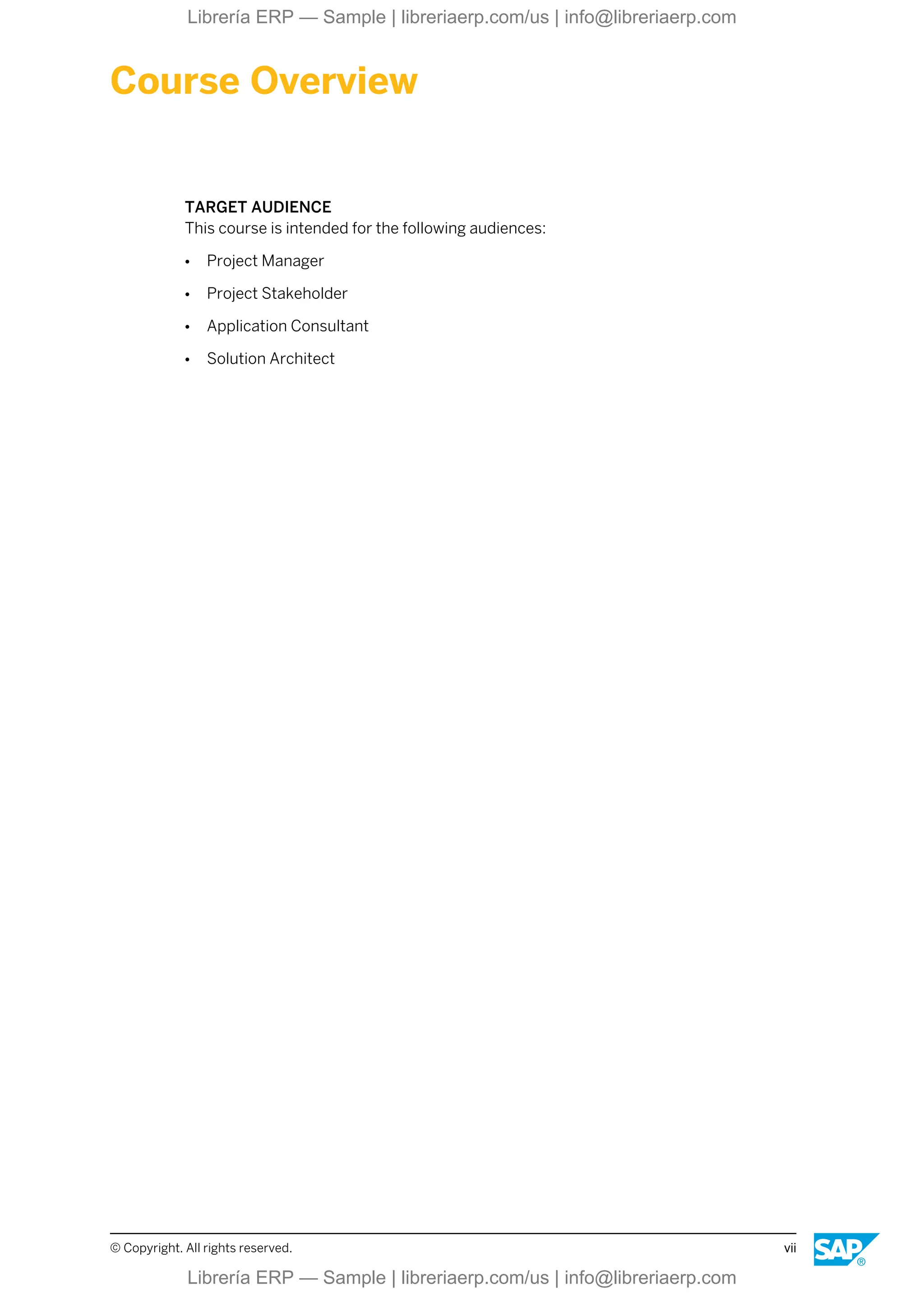
TARGET AUDIENCE
This course is intended for the following audiences:
● Project Manager
● Project Stakeholder
● Application Consultant
● Solution Architect
© Copyright. All rights reserved. vii
Librería ERP — Sample | libreriaerp.com/us | info@libreriaerp.com
viii © Copyright. All rights reserved.
Librería ERP — Sample | libreriaerp.com/us | info@libreriaerp.com
UNIT 1 Introducing SAP Extended
Warehouse Management (SAP
EWM) System Environment
Lesson 1
Outlining the Basics of SAP EWM 3
UNIT OBJECTIVES
● Describe the basics of SAP EWM
© Copyright. All rights reserved. 1
Librería ERP — Sample | libreriaerp.com/us | info@libreriaerp.com
Unit 1: Introducing SAP Extended Warehouse Management (SAP EWM) System Environment
2 © Copyright. All rights reserved.
Librería ERP — Sample | libreriaerp.com/us | info@libreriaerp.com
Unit 1
Lesson 1
Outlining the Basics of SAP EWM
LESSON OVERVIEW
SAP Extended Warehouse Management (SAP EWM) can be used as decentralized or
embedded system, so it is important to understand the basic environment in which SAP EWM
can be deployed. In this unit, you also learn about the key SAP EWM functions supported by
the application and the various delivery documents used to transfer data between the SAP
Enterprise Resource Planning (SAP ERP) system and the SAP EWM system.
Business Example
To prepare for the implementation and configuration of the SAP EWM system in your
company, as a member of the implementation team, you have been asked to research and
report on the basic SAP EWM deployment options available, the major functions supported by
SAP EWM, and the delivery documents your company could use to transfer data between the
SAP ERP system and the SAP EWM system.
LESSON OBJECTIVES
After completing this lesson, you will be able to:
● Describe the basics of SAP EWM
SAP ERP/SAP EWM System Landscape
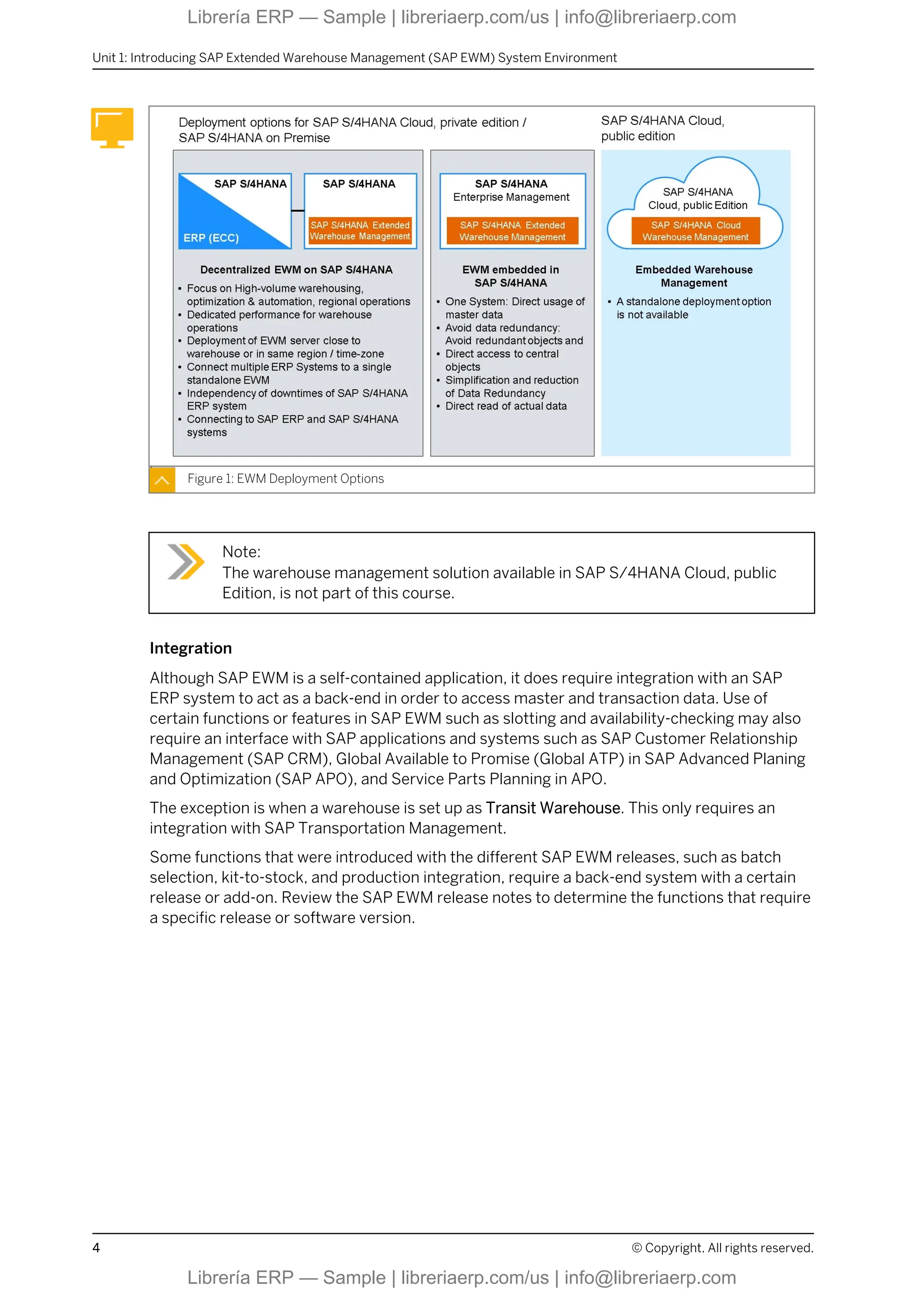
SAP Extended Warehouse Management (SAP EWM) was originally designed to run as a
decentralized system and based on an SAP SCM platform. With the integration in the 1610
release of SAP S/4HANA, it is possible to use it as embedded EWM, which means not
decentralized. With the release of SAP S/4HANA 1809 FP02, it is possible to use an SAP S/
4HANA system as a decentralized EWM instance. This is the planned architecture for all
future SAP EWM releases, embedded or decentralized.
© Copyright. All rights reserved. 3
Librería ERP — Sample | libreriaerp.com/us | info@libreriaerp.com
Figure 1: EWM Deployment Options
Note:
The warehouse management solution available in SAP S/4HANA Cloud, public
Edition, is not part of this course.
Integration
Although SAP EWM is a self-contained application, it does require integration with an SAP
ERP system to act as a back-end in order to access master and transaction data. Use of
certain functions or features in SAP EWM such as slotting and availability-checking may also
require an interface with SAP applications and systems such as SAP Customer Relationship
Management (SAP CRM), Global Available to Promise (Global ATP) in SAP Advanced Planing
and Optimization (SAP APO), and Service Parts Planning in APO.
The exception is when a warehouse is set up as Transit Warehouse. This only requires an
integration with SAP Transportation Management.
Some functions that were introduced with the different SAP EWM releases, such as batch
selection, kit-to-stock, and production integration, require a back-end system with a certain
release or add-on. Review the SAP EWM release notes to determine the functions that require
a specific release or software version.
Unit 1: Introducing SAP Extended Warehouse Management (SAP EWM) System Environment
4 © Copyright. All rights reserved.
Librería ERP — Sample | libreriaerp.com/us | info@libreriaerp.com
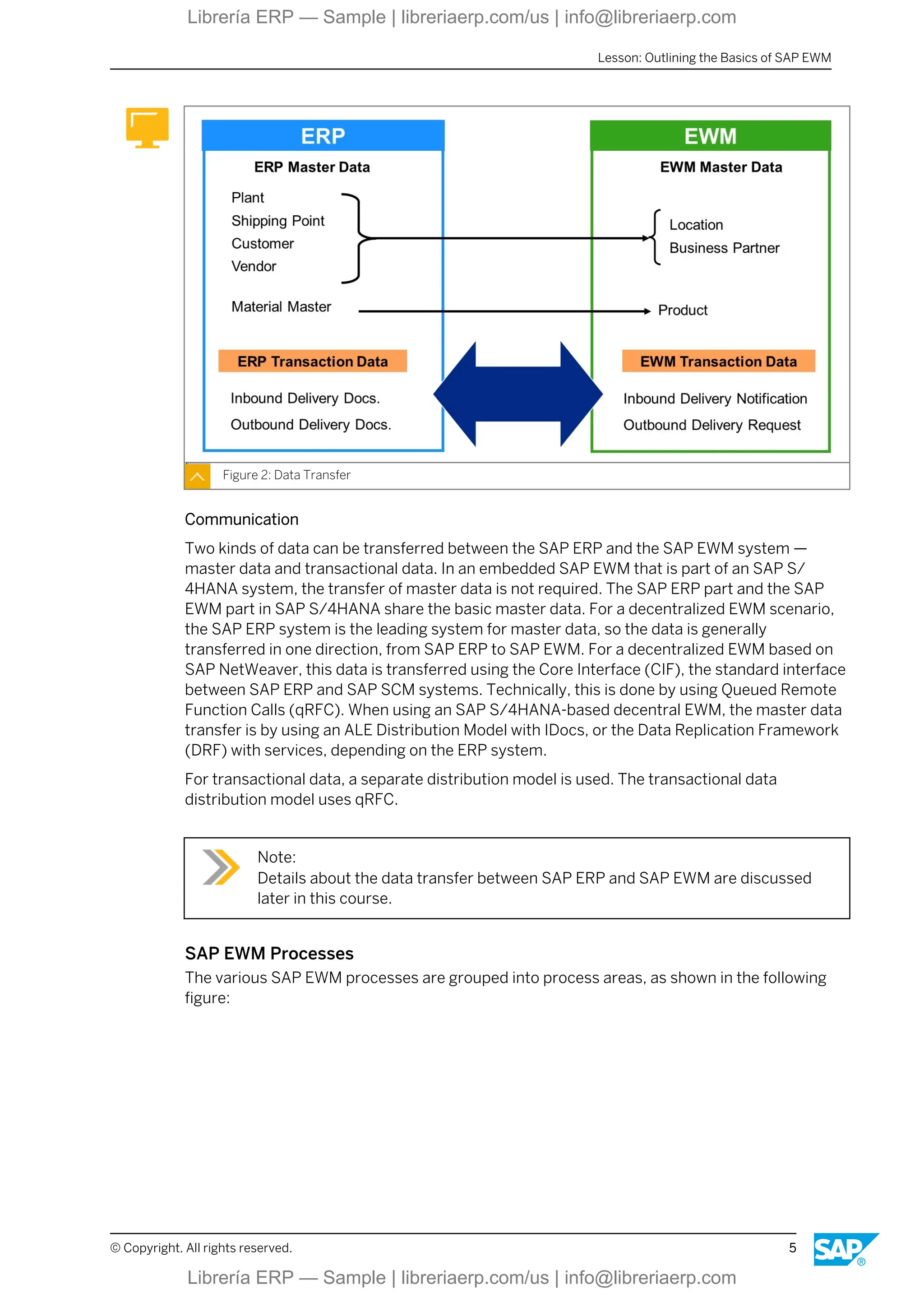
Figure 2: Data Transfer
Communication
Two kinds of data can be transferred between the SAP ERP and the SAP EWM system —
master data and transactional data. In an embedded SAP EWM that is part of an SAP S/
4HANA system, the transfer of master data is not required. The SAP ERP part and the SAP
EWM part in SAP S/4HANA share the basic master data. For a decentralized EWM scenario,
the SAP ERP system is the leading system for master data, so the data is generally
transferred in one direction, from SAP ERP to SAP EWM. For a decentralized EWM based on
SAP NetWeaver, this data is transferred using the Core Interface (CIF), the standard interface
between SAP ERP and SAP SCM systems. Technically, this is done by using Queued Remote
Function Calls (qRFC). When using an SAP S/4HANA-based decentral EWM, the master data
transfer is by using an ALE Distribution Model with IDocs, or the Data Replication Framework
(DRF) with services, depending on the ERP system.
For transactional data, a separate distribution model is used. The transactional data
distribution model uses qRFC.
Note:
Details about the data transfer between SAP ERP and SAP EWM are discussed
later in this course.
SAP EWM Processes
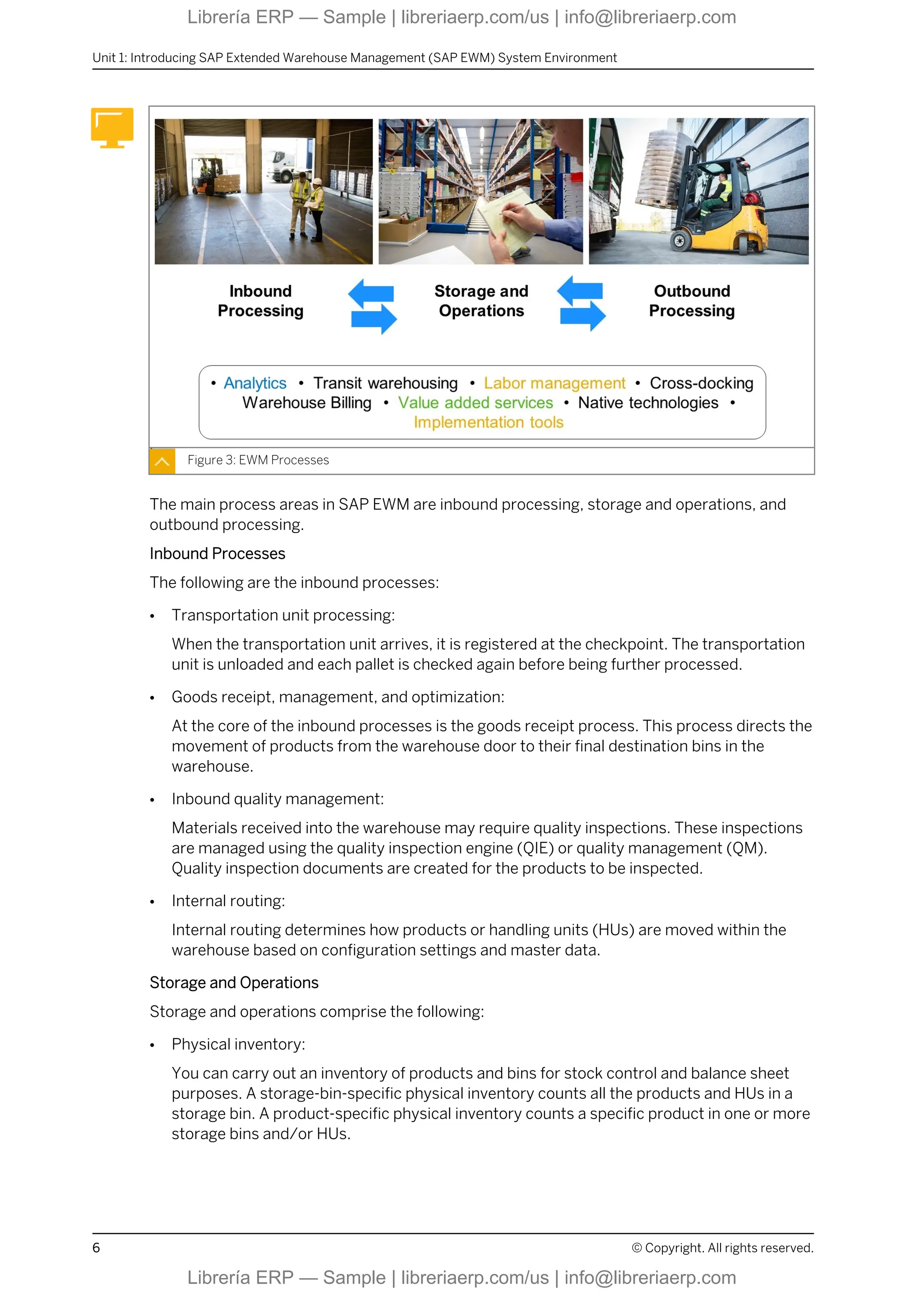
The various SAP EWM processes are grouped into process areas, as shown in the following
figure:
Lesson: Outlining the Basics of SAP EWM
© Copyright. All rights reserved. 5
Librería ERP — Sample | libreriaerp.com/us | info@libreriaerp.com
Figure 3: EWM Processes
The main process areas in SAP EWM are inbound processing, storage and operations, and
outbound processing.
Inbound Processes
The following are the inbound processes:
● Transportation unit processing:
When the transportation unit arrives, it is registered at the checkpoint. The transportation
unit is unloaded and each pallet is checked again before being further processed.
● Goods receipt, management, and optimization:
At the core of the inbound processes is the goods receipt process. This process directs the
movement of products from the warehouse door to their final destination bins in the
warehouse.
● Inbound quality management:
Materials received into the warehouse may require quality inspections. These inspections
are managed using the quality inspection engine (QIE) or quality management (QM).
Quality inspection documents are created for the products to be inspected.
● Internal routing:
Internal routing determines how products or handling units (HUs) are moved within the
warehouse based on configuration settings and master data.
Storage and Operations
Storage and operations comprise the following:
● Physical inventory:
You can carry out an inventory of products and bins for stock control and balance sheet
purposes. A storage-bin-specific physical inventory counts all the products and HUs in a
storage bin. A product-specific physical inventory counts a specific product in one or more
storage bins and/or HUs.
Unit 1: Introducing SAP Extended Warehouse Management (SAP EWM) System Environment
6 © Copyright. All rights reserved.
Librería ERP — Sample | libreriaerp.com/us | info@libreriaerp.com
● Replenishment/Rearrangement:
You use replenishment control to restock a picking area depending on the demand for
products in that picking area. Replenishment strategies are based on slotting or open
warehouse requests. You use rearrangement processes to optimize the arrangement of
your products in the warehouse by moving stock such as fast-moving items to the relevant
storage bin as determined by the slotting process.
● Kit-to-stock management:
You use the kit-to-stock process to create kits and then transfer them to stock. A kit is a
list of products that are always delivered together. Kit-to-stock management provides you
with a simple, streamlined kit-creation process that is executed and documented in the
warehouse. You can either trigger kit creation manually in the SAP ERP system based on a
production order, or in the SAP EWM system directly, using a value-added service order
(VAS order).
Outbound Processes
The following are the outbound processes:
● Outbound planning (route, wave, bin):
In outbound planning, the system determines the route and bin based on the settings in
customizing. You can combine or split items from warehouse requests for outbound
deliveries in waves. These waves can be picked or processed at the same or different
times. Waves are created manually or automatically in SAP EWM.
● Picking optimization, packing, staging, and load management:
The goods issue process represents the pick, pack, staging, and loading of products from
the warehouse. Picking directs the removal of a product from a source location where the
product is stored to an optimized destination location. Packing generally involves
removing stock from a storage bin and placing it into a pick handling unit. Depending on
your packing requirements, the pick HU may be taken to a packing work center where the
products in the pick HU are packed further into other HUs for shipping.
General Processes
The following processes occur throughout all process stages:
● Resource and labor management:
The resource management function links warehouse resources, people, and material
handling equipment to the Radio Frequency (RF) environment to ensure that the proper
resources are assigned to a warehouse order. Labor management provides a series of
functions that are used to do the following:
- Plan labor times and resources in your warehouse, making your warehouse more
productive.
- Measure, plan, simulate, and visualize the activities in your warehouse.
- Compare and evaluate the performance of warehouse employees. Incentives are
triggered in a connected HR system for bonus payments.
With measurement services, you can define the performance parameters and key
performance indicators (KPIs) to be calculated. This information is used to evaluate
planned versus actual performance and individual employee performance.
● Cross docking:
Lesson: Outlining the Basics of SAP EWM
© Copyright. All rights reserved. 7
Librería ERP — Sample | libreriaerp.com/us | info@libreriaerp.com
With cross docking, you transport the products or handling units (HUs) directly from
goods receipt to goods issue without storing them. With unplanned processes, such as
push deployment (PD) and pick from goods receipt (PFGR), you start by using a standard
goods receipt process.
Transportation cross-docking (TCD), a planned cross docking process, transports HUs
across different distribution centers or warehouses to the final destination. If the final
destination is a customer site, TCD is based on a sales order in SAP ERP or SAP CRM. If
the HUs are moved between warehouses, TCD is based on a stock transfer order.
● Yard management:
Yard management is used to monitor and manage transportation units (TUs) that arrive to
deliver or pickup goods to or from the warehouse.
● Import/Export of products, compliance. and handling of hazardous materials:
SAP Environmental, Health, and Safety Management (SAP EHS Management) functions
provide support for the proper handling and storage of hazardous substances in the
warehouse, and ensure that they are transported in accordance with the various
governmental regulations. You obtain the hazardous substances data used in the EH&S
services function by integrating the EH&S application in the SAP ERP system. For import
and export control and handling, you use SAP Global Trade Services (SAP GTS) together
with SAP EWM.
● Native technologies (RF, RFID, Pick by Voice, Material Flow System):
Mobile data entry using mobile radio frequency (RF) terminals and radio frequency
identification (RFID) tags are used for all warehouse processes. You can use RFID tags
with the SAP AutoID Infrastructure (AII) component for inbound, outbound, and internal
product movements. For warehouses that have automated storage/retrieval systems
(AS/RS), SAP EWM provides the Material Flow System (MFS) and Warehouse Control Unit
(WCU) to interface with these systems.
SAP EWM Documents
With minor exceptions, all process-related data is communicated between the SAP ERP and
SAP EWM systems in delivery documents. A delivery document contains all the data required
to document and control a business process.
Note:
Basically the scenarios described below are the same, no matter if the ERP part
is an SAP Business Suite ERP or an SAP S/4HANA system, connected with a
decentralized EWM, or if the EWM part is an SAP S/4HANA embedded SAP
EWM. The delivery is created in SAP ERP and sent to SAP EWM.
Exceptions from this process flow are:
● Advanced Production Integration: When using the advanced production integration, a
production material request (PMR) is directly created in the EWM system when material
staging is requested from the manufacturing order. The PMR technically is like other
delivery documents in EWM, but there is no corresponding delivery document in ERP.
● Direct outbound deliveries: When you create a direct outbound delivery the process is
started in EWM and the delivery is then copied to ERP.
Unit 1: Introducing SAP Extended Warehouse Management (SAP EWM) System Environment
8 © Copyright. All rights reserved.
Librería ERP — Sample | libreriaerp.com/us | info@libreriaerp.com
● Kit-to-Stock: When the kit-to-stock process is started in EWM, an inbound delivery and an
outbound delivery order is first created in EWM and then copied to ERP.
● From S/4HANA 2020 on it is possible to work in embedded EWM without inbound
deliveries for goods receipts posted with transaction MIGO (in the initial release for
manufacturing orders, since FPS01 also for purchase orders).
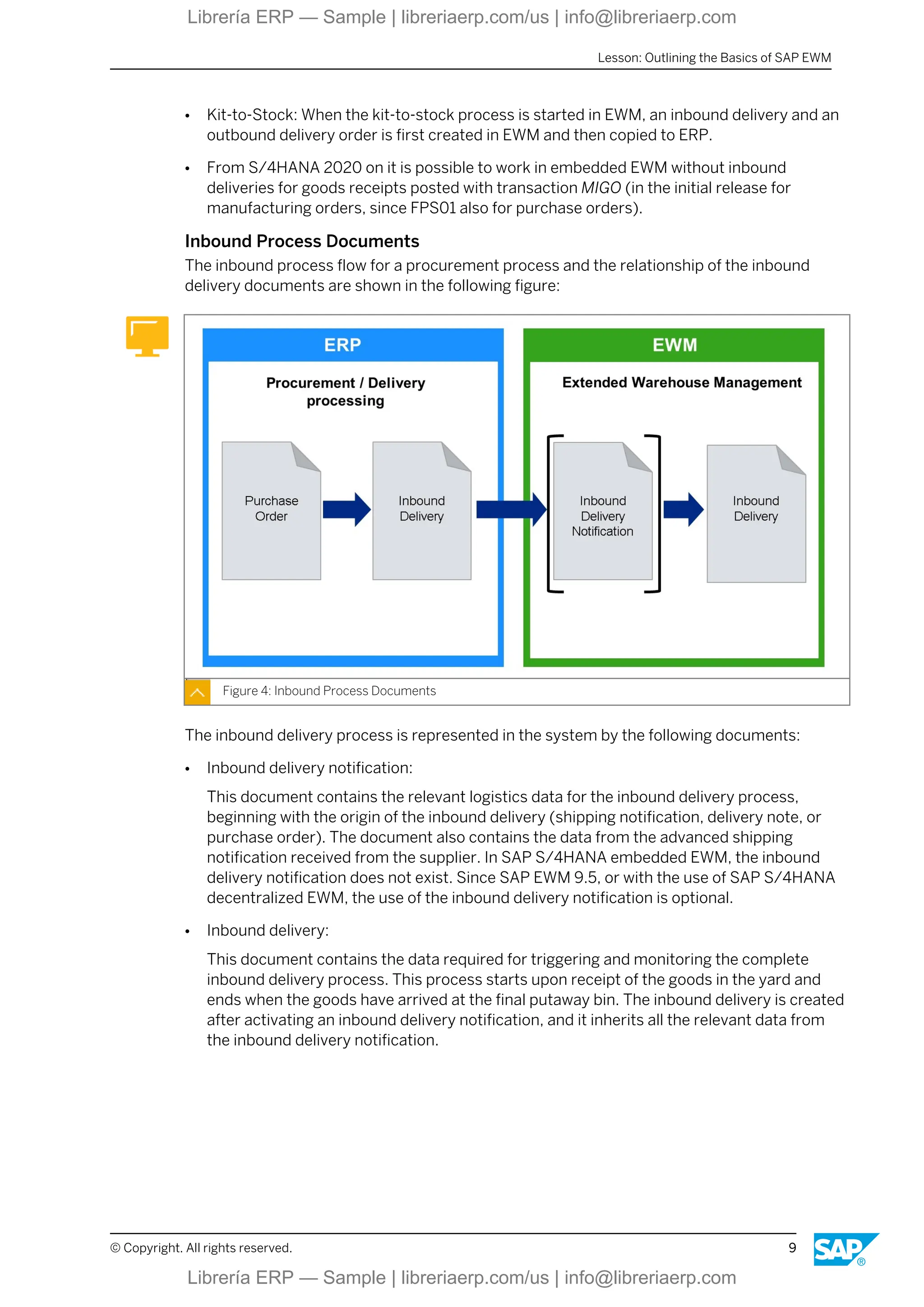
Inbound Process Documents
The inbound process flow for a procurement process and the relationship of the inbound
delivery documents are shown in the following figure:
Figure 4: Inbound Process Documents
The inbound delivery process is represented in the system by the following documents:
● Inbound delivery notification:
This document contains the relevant logistics data for the inbound delivery process,
beginning with the origin of the inbound delivery (shipping notification, delivery note, or
purchase order). The document also contains the data from the advanced shipping
notification received from the supplier. In SAP S/4HANA embedded EWM, the inbound
delivery notification does not exist. Since SAP EWM 9.5, or with the use of SAP S/4HANA
decentralized EWM, the use of the inbound delivery notification is optional.
● Inbound delivery:
This document contains the data required for triggering and monitoring the complete
inbound delivery process. This process starts upon receipt of the goods in the yard and
ends when the goods have arrived at the final putaway bin. The inbound delivery is created
after activating an inbound delivery notification, and it inherits all the relevant data from
the inbound delivery notification.
Lesson: Outlining the Basics of SAP EWM
© Copyright. All rights reserved. 9
Librería ERP — Sample | libreriaerp.com/us | info@libreriaerp.com
Note:
When using SAP S/4HANA with embedded EWM, it is possible to post goods
receipt without inbound deliveries. This process is explained more detailed in a
later unit.
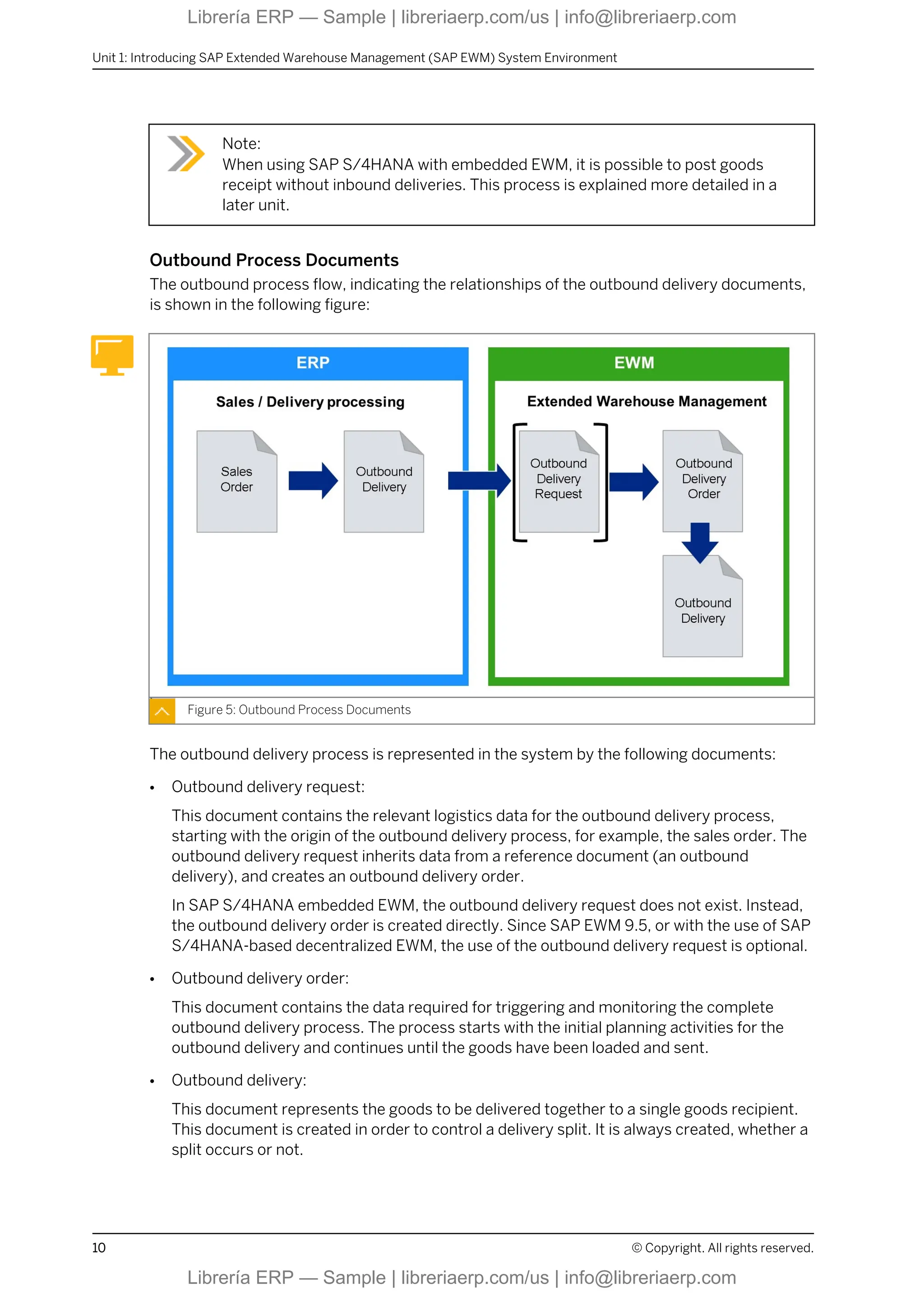
Outbound Process Documents
The outbound process flow, indicating the relationships of the outbound delivery documents,
is shown in the following figure:
Figure 5: Outbound Process Documents
The outbound delivery process is represented in the system by the following documents:
● Outbound delivery request:
This document contains the relevant logistics data for the outbound delivery process,
starting with the origin of the outbound delivery process, for example, the sales order. The
outbound delivery request inherits data from a reference document (an outbound
delivery), and creates an outbound delivery order.
In SAP S/4HANA embedded EWM, the outbound delivery request does not exist. Instead,
the outbound delivery order is created directly. Since SAP EWM 9.5, or with the use of SAP
S/4HANA-based decentralized EWM, the use of the outbound delivery request is optional.
● Outbound delivery order:
This document contains the data required for triggering and monitoring the complete
outbound delivery process. The process starts with the initial planning activities for the
outbound delivery and continues until the goods have been loaded and sent.
● Outbound delivery:
This document represents the goods to be delivered together to a single goods recipient.
This document is created in order to control a delivery split. It is always created, whether a
split occurs or not.
Unit 1: Introducing SAP Extended Warehouse Management (SAP EWM) System Environment
10 © Copyright. All rights reserved.
Librería ERP — Sample | libreriaerp.com/us | info@libreriaerp.com
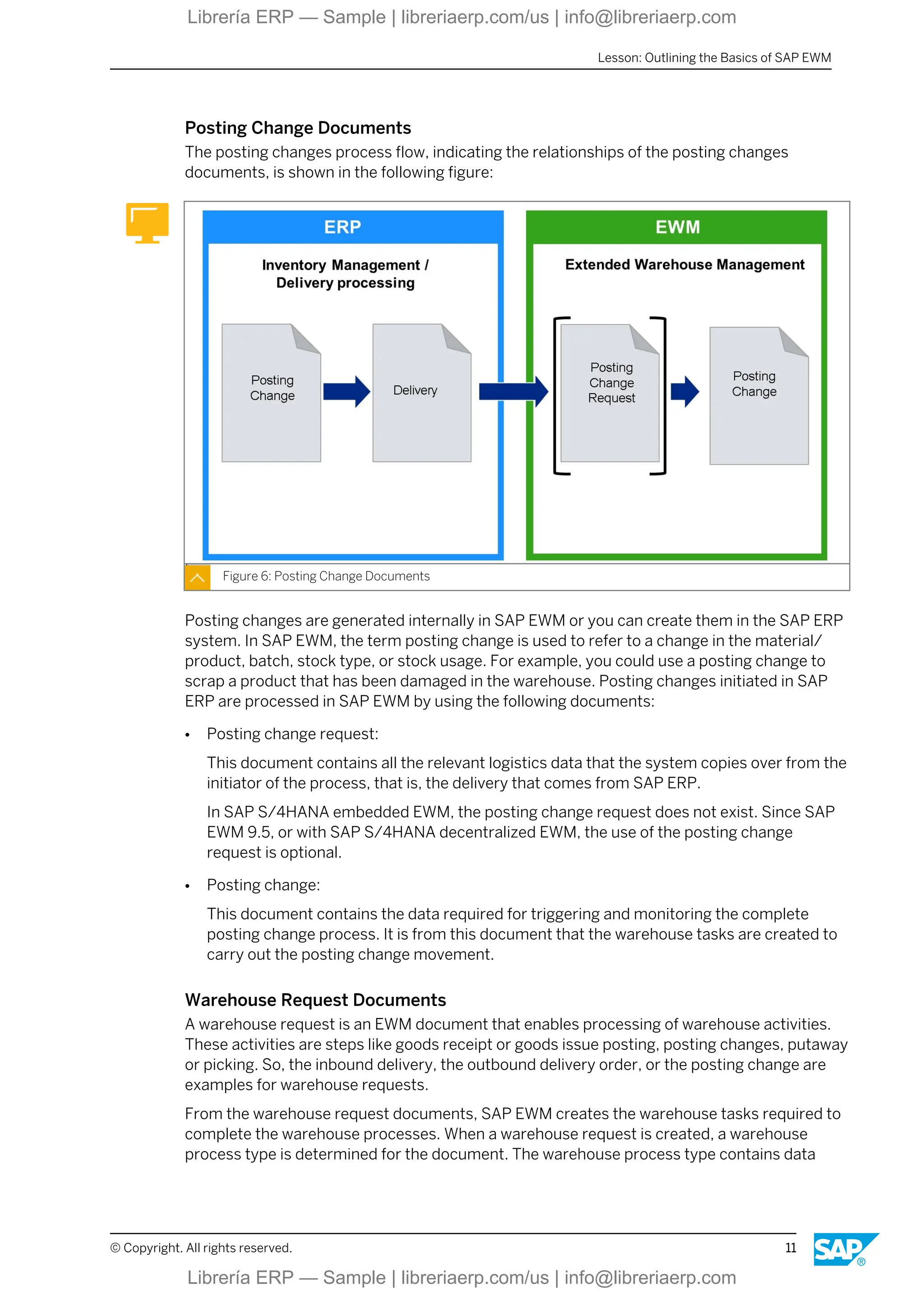
Posting Change Documents
The posting changes process flow, indicating the relationships of the posting changes
documents, is shown in the following figure:
Figure 6: Posting Change Documents
Posting changes are generated internally in SAP EWM or you can create them in the SAP ERP
system. In SAP EWM, the term posting change is used to refer to a change in the material/
product, batch, stock type, or stock usage. For example, you could use a posting change to
scrap a product that has been damaged in the warehouse. Posting changes initiated in SAP
ERP are processed in SAP EWM by using the following documents:
● Posting change request:
This document contains all the relevant logistics data that the system copies over from the
initiator of the process, that is, the delivery that comes from SAP ERP.
In SAP S/4HANA embedded EWM, the posting change request does not exist. Since SAP
EWM 9.5, or with SAP S/4HANA decentralized EWM, the use of the posting change
request is optional.
● Posting change:
This document contains the data required for triggering and monitoring the complete
posting change process. It is from this document that the warehouse tasks are created to
carry out the posting change movement.
Warehouse Request Documents
A warehouse request is an EWM document that enables processing of warehouse activities.
These activities are steps like goods receipt or goods issue posting, posting changes, putaway
or picking. So, the inbound delivery, the outbound delivery order, or the posting change are
examples for warehouse requests.
From the warehouse request documents, SAP EWM creates the warehouse tasks required to
complete the warehouse processes. When a warehouse request is created, a warehouse
process type is determined for the document. The warehouse process type contains data
Lesson: Outlining the Basics of SAP EWM
© Copyright. All rights reserved. 11
Librería ERP — Sample | libreriaerp.com/us | info@libreriaerp.com
related to the direction of the movement (putaway, picking), location information (default
source or destination), and process-related settings.
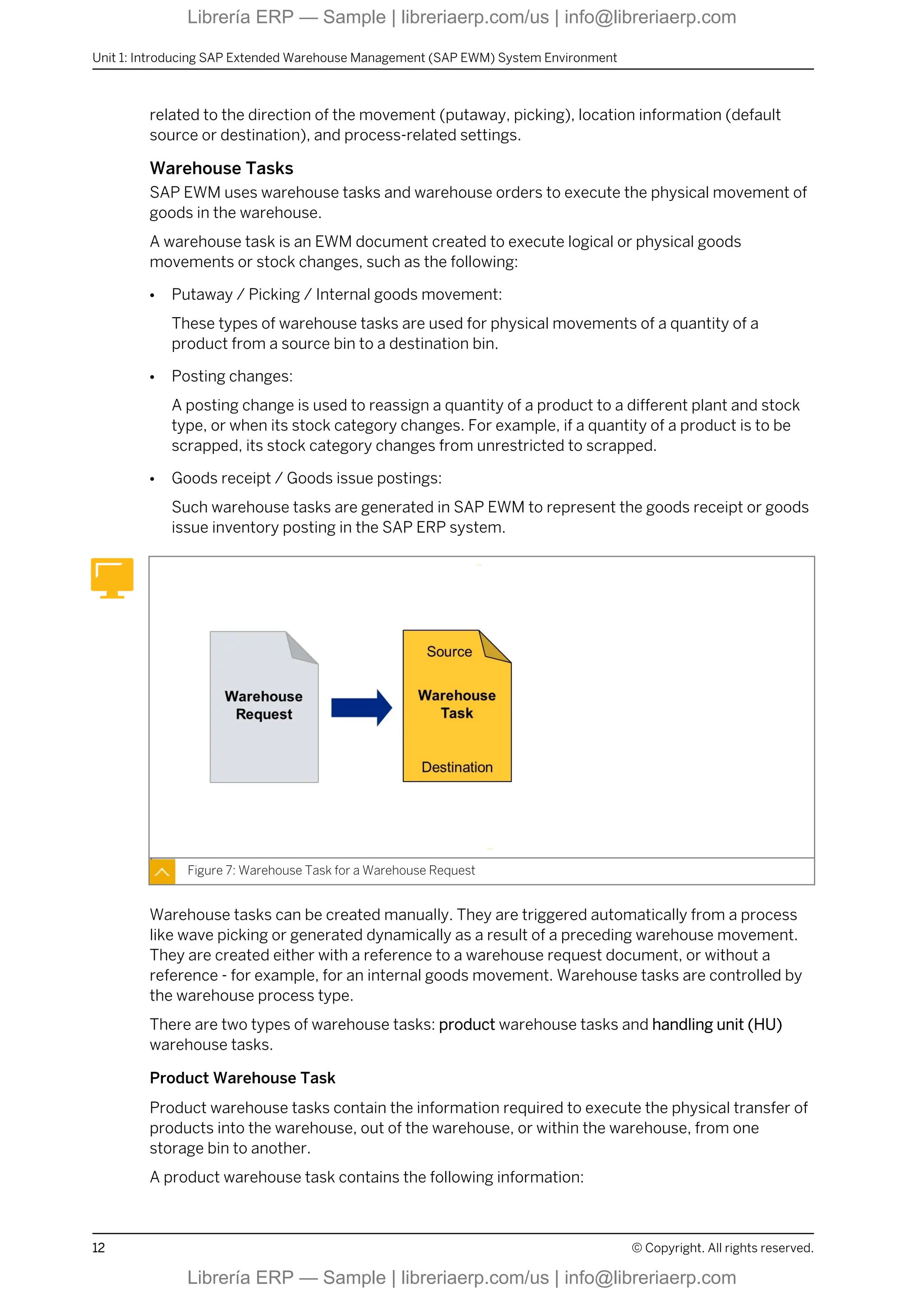
Warehouse Tasks
SAP EWM uses warehouse tasks and warehouse orders to execute the physical movement of
goods in the warehouse.
A warehouse task is an EWM document created to execute logical or physical goods
movements or stock changes, such as the following:
● Putaway / Picking / Internal goods movement:
These types of warehouse tasks are used for physical movements of a quantity of a
product from a source bin to a destination bin.
● Posting changes:
A posting change is used to reassign a quantity of a product to a different plant and stock
type, or when its stock category changes. For example, if a quantity of a product is to be
scrapped, its stock category changes from unrestricted to scrapped.
● Goods receipt / Goods issue postings:
Such warehouse tasks are generated in SAP EWM to represent the goods receipt or goods
issue inventory posting in the SAP ERP system.
Figure 7: Warehouse Task for a Warehouse Request
Warehouse tasks can be created manually. They are triggered automatically from a process
like wave picking or generated dynamically as a result of a preceding warehouse movement.
They are created either with a reference to a warehouse request document, or without a
reference - for example, for an internal goods movement. Warehouse tasks are controlled by
the warehouse process type.
There are two types of warehouse tasks: product warehouse tasks and handling unit (HU)
warehouse tasks.
Product Warehouse Task
Product warehouse tasks contain the information required to execute the physical transfer of
products into the warehouse, out of the warehouse, or within the warehouse, from one
storage bin to another.
A product warehouse task contains the following information:
Unit 1: Introducing SAP Extended Warehouse Management (SAP EWM) System Environment
12 © Copyright. All rights reserved.
Librería ERP — Sample | libreriaerp.com/us | info@libreriaerp.com

Basic Customizing in SAP Extended Warehouse Management

  • 1.
    EWM110 Basic Customizing inSAP Extended Warehouse Management . . PARTICIPANT HANDBOOK INSTRUCTOR-LED TRAINING . Course Version: 26 Course Duration: 5 Day(s) Material Number: 50165414 Librería ERP — Sample | libreriaerp.com/us | info@libreriaerp.com Librería ERP — Sample | libreriaerp.com/us | info@libreriaerp.com
  • 2.
    SAP Copyrights, Trademarksand Disclaimers © 2024 SAP SE or an SAP affiliate company. All rights reserved. No part of this publication may be reproduced or transmitted in any form or for any purpose without the express permission of SAP SE or an SAP affiliate company. SAP and other SAP products and services mentioned herein as well as their respective logos are trademarks or registered trademarks of SAP SE (or an SAP affiliate company) in Germany and other countries. Please see https:// www.sap.com/corporate/en/legal/copyright.html for additional trademark information and notices. Some software products marketed by SAP SE and its distributors contain proprietary software components of other software vendors. National product specifications may vary. These materials may have been machine translated and may contain grammatical errors or inaccuracies. These materials are provided by SAP SE or an SAP affiliate company for informational purposes only, without representation or warranty of any kind, and SAP SE or its affiliated companies shall not be liable for errors or omissions with respect to the materials. The only warranties for SAP SE or SAP affiliate company products and services are those that are set forth in the express warranty statements accompanying such products and services, if any. Nothing herein should be construed as constituting an additional warranty. In particular, SAP SE or its affiliated companies have no obligation to pursue any course of business outlined in this document or any related presentation, or to develop or release any functionality mentioned therein. This document, or any related presentation, and SAP SE’s or its affiliated companies’ strategy and possible future developments, products, and/or platform directions and functionality are all subject to change and may be changed by SAP SE or its affiliated companies at any time for any reason without notice. The information in this document is not a commitment, promise, or legal obligation to deliver any material, code, or functionality. All forward- looking statements are subject to various risks and uncertainties that could cause actual results to differ materially from expectations. Readers are cautioned not to place undue reliance on these forward-looking statements, which speak only as of their dates, and they should not be relied upon in making purchasing decisions. Librería ERP — Sample | libreriaerp.com/us | info@libreriaerp.com Librería ERP — Sample | libreriaerp.com/us | info@libreriaerp.com
  • 3.
    Typographic Conventions American Englishis the standard used in this handbook. The following typographic conventions are also used. This information is displayed in the instructor’s presentation Demonstration Procedure Warning or Caution Hint Related or Additional Information Facilitated Discussion User interface control Example text Window title Example text © Copyright. All rights reserved. iii Librería ERP — Sample | libreriaerp.com/us | info@libreriaerp.com Librería ERP — Sample | libreriaerp.com/us | info@libreriaerp.com
  • 4.
    iv © Copyright.All rights reserved. Librería ERP — Sample | libreriaerp.com/us | info@libreriaerp.com Librería ERP — Sample | libreriaerp.com/us | info@libreriaerp.com
  • 5.
    Contents vii Course Overview 1Unit 1: Introducing SAP Extended Warehouse Management (SAP EWM) System Environment 3 Lesson: Outlining the Basics of SAP EWM 17 Unit 2: Setting Up Integration 19 Lesson: Setting Up the Integration Between SAP ERP and SAP EWM 25 Lesson: Setting Up Delivery Document Integration 43 Unit 3: Setting Up and Creating Structural Elements and Master Data 45 Lesson: Defining the Warehouse 51 Lesson: Setting Up Availability Groups for Inventory Management (IM) 55 Lesson: Creating Structural Elements in the Warehouse 61 Lesson: Creating Storage Bins 69 Lesson: Creating Staging Areas and Work Centers 73 Lesson: Transferring Master Data from SAP ERP to SAP EWM 81 Lesson: Creating Warehouse Product Master Data 85 Lesson: Creating Packaging Specifications 99 Unit 4: Applying Warehouse Process Types 101 Lesson: Applying Warehouse Process Types 109 Unit 5: Receiving Goods in the Warehouse 111 Lesson: Outlining Goods Receipt Processes in SAP EWM 117 Lesson: Configuring Direct Putaway 123 Lesson: Applying Putaway Rules 135 Lesson: Checking Capacities 139 Lesson: Posting Goods Receipt for Embedded EWM 147 Unit 6: Shipping Goods from the Warehouse 149 Lesson: Outlining the Goods Issue Process in SAP EWM 155 Lesson: Applying the Stock Removal Strategies 161 Lesson: Configuring Exception Handling 167 Unit 7: Outlining and Configuring Storage Control 169 Lesson: Outlining Storage Control 171 Lesson: Configuring Process-Oriented Storage Control 177 Lesson: Understanding Layout-Oriented Storage Control © Copyright. All rights reserved. v Librería ERP — Sample | libreriaerp.com/us | info@libreriaerp.com Librería ERP — Sample | libreriaerp.com/us | info@libreriaerp.com
  • 6.
    183 Unit 8:Creating Warehouse Orders 185 Lesson: Creating Warehouse Orders 199 Unit 9: Performing Posting Changes, Stock Transfers, and Replenishment 201 Lesson: Performing Posting Changes and Stock Transfers 207 Lesson: Performing Ad Hoc Movements and Replenishment 215 Unit 10: Setting Up and Executing Physical Inventory 217 Lesson: Outlining the Physical Inventory Process 221 Lesson: Setting Up the Procedures for Physical Inventory 233 Unit 11: Outlining the Post Processing Framework (PPF) 235 Lesson: Outlining the PPF vi © Copyright. All rights reserved. Librería ERP — Sample | libreriaerp.com/us | info@libreriaerp.com Librería ERP — Sample | libreriaerp.com/us | info@libreriaerp.com
  • 7.
    Course Overview TARGET AUDIENCE Thiscourse is intended for the following audiences: ● Project Manager ● Project Stakeholder ● Application Consultant ● Solution Architect © Copyright. All rights reserved. vii Librería ERP — Sample | libreriaerp.com/us | info@libreriaerp.com Librería ERP — Sample | libreriaerp.com/us | info@libreriaerp.com
  • 8.
    viii © Copyright.All rights reserved. Librería ERP — Sample | libreriaerp.com/us | info@libreriaerp.com Librería ERP — Sample | libreriaerp.com/us | info@libreriaerp.com
  • 9.
    UNIT 1 IntroducingSAP Extended Warehouse Management (SAP EWM) System Environment Lesson 1 Outlining the Basics of SAP EWM 3 UNIT OBJECTIVES ● Describe the basics of SAP EWM © Copyright. All rights reserved. 1 Librería ERP — Sample | libreriaerp.com/us | info@libreriaerp.com Librería ERP — Sample | libreriaerp.com/us | info@libreriaerp.com
  • 10.
    Unit 1: IntroducingSAP Extended Warehouse Management (SAP EWM) System Environment 2 © Copyright. All rights reserved. Librería ERP — Sample | libreriaerp.com/us | info@libreriaerp.com Librería ERP — Sample | libreriaerp.com/us | info@libreriaerp.com
  • 11.
    Unit 1 Lesson 1 Outliningthe Basics of SAP EWM LESSON OVERVIEW SAP Extended Warehouse Management (SAP EWM) can be used as decentralized or embedded system, so it is important to understand the basic environment in which SAP EWM can be deployed. In this unit, you also learn about the key SAP EWM functions supported by the application and the various delivery documents used to transfer data between the SAP Enterprise Resource Planning (SAP ERP) system and the SAP EWM system. Business Example To prepare for the implementation and configuration of the SAP EWM system in your company, as a member of the implementation team, you have been asked to research and report on the basic SAP EWM deployment options available, the major functions supported by SAP EWM, and the delivery documents your company could use to transfer data between the SAP ERP system and the SAP EWM system. LESSON OBJECTIVES After completing this lesson, you will be able to: ● Describe the basics of SAP EWM SAP ERP/SAP EWM System Landscape SAP Extended Warehouse Management (SAP EWM) was originally designed to run as a decentralized system and based on an SAP SCM platform. With the integration in the 1610 release of SAP S/4HANA, it is possible to use it as embedded EWM, which means not decentralized. With the release of SAP S/4HANA 1809 FP02, it is possible to use an SAP S/ 4HANA system as a decentralized EWM instance. This is the planned architecture for all future SAP EWM releases, embedded or decentralized. © Copyright. All rights reserved. 3 Librería ERP — Sample | libreriaerp.com/us | info@libreriaerp.com Librería ERP — Sample | libreriaerp.com/us | info@libreriaerp.com
  • 12.
    Figure 1: EWMDeployment Options Note: The warehouse management solution available in SAP S/4HANA Cloud, public Edition, is not part of this course. Integration Although SAP EWM is a self-contained application, it does require integration with an SAP ERP system to act as a back-end in order to access master and transaction data. Use of certain functions or features in SAP EWM such as slotting and availability-checking may also require an interface with SAP applications and systems such as SAP Customer Relationship Management (SAP CRM), Global Available to Promise (Global ATP) in SAP Advanced Planing and Optimization (SAP APO), and Service Parts Planning in APO. The exception is when a warehouse is set up as Transit Warehouse. This only requires an integration with SAP Transportation Management. Some functions that were introduced with the different SAP EWM releases, such as batch selection, kit-to-stock, and production integration, require a back-end system with a certain release or add-on. Review the SAP EWM release notes to determine the functions that require a specific release or software version. Unit 1: Introducing SAP Extended Warehouse Management (SAP EWM) System Environment 4 © Copyright. All rights reserved. Librería ERP — Sample | libreriaerp.com/us | info@libreriaerp.com Librería ERP — Sample | libreriaerp.com/us | info@libreriaerp.com
  • 13.
    Figure 2: DataTransfer Communication Two kinds of data can be transferred between the SAP ERP and the SAP EWM system — master data and transactional data. In an embedded SAP EWM that is part of an SAP S/ 4HANA system, the transfer of master data is not required. The SAP ERP part and the SAP EWM part in SAP S/4HANA share the basic master data. For a decentralized EWM scenario, the SAP ERP system is the leading system for master data, so the data is generally transferred in one direction, from SAP ERP to SAP EWM. For a decentralized EWM based on SAP NetWeaver, this data is transferred using the Core Interface (CIF), the standard interface between SAP ERP and SAP SCM systems. Technically, this is done by using Queued Remote Function Calls (qRFC). When using an SAP S/4HANA-based decentral EWM, the master data transfer is by using an ALE Distribution Model with IDocs, or the Data Replication Framework (DRF) with services, depending on the ERP system. For transactional data, a separate distribution model is used. The transactional data distribution model uses qRFC. Note: Details about the data transfer between SAP ERP and SAP EWM are discussed later in this course. SAP EWM Processes The various SAP EWM processes are grouped into process areas, as shown in the following figure: Lesson: Outlining the Basics of SAP EWM © Copyright. All rights reserved. 5 Librería ERP — Sample | libreriaerp.com/us | info@libreriaerp.com Librería ERP — Sample | libreriaerp.com/us | info@libreriaerp.com
  • 14.
    Figure 3: EWMProcesses The main process areas in SAP EWM are inbound processing, storage and operations, and outbound processing. Inbound Processes The following are the inbound processes: ● Transportation unit processing: When the transportation unit arrives, it is registered at the checkpoint. The transportation unit is unloaded and each pallet is checked again before being further processed. ● Goods receipt, management, and optimization: At the core of the inbound processes is the goods receipt process. This process directs the movement of products from the warehouse door to their final destination bins in the warehouse. ● Inbound quality management: Materials received into the warehouse may require quality inspections. These inspections are managed using the quality inspection engine (QIE) or quality management (QM). Quality inspection documents are created for the products to be inspected. ● Internal routing: Internal routing determines how products or handling units (HUs) are moved within the warehouse based on configuration settings and master data. Storage and Operations Storage and operations comprise the following: ● Physical inventory: You can carry out an inventory of products and bins for stock control and balance sheet purposes. A storage-bin-specific physical inventory counts all the products and HUs in a storage bin. A product-specific physical inventory counts a specific product in one or more storage bins and/or HUs. Unit 1: Introducing SAP Extended Warehouse Management (SAP EWM) System Environment 6 © Copyright. All rights reserved. Librería ERP — Sample | libreriaerp.com/us | info@libreriaerp.com Librería ERP — Sample | libreriaerp.com/us | info@libreriaerp.com
  • 15.
    ● Replenishment/Rearrangement: You usereplenishment control to restock a picking area depending on the demand for products in that picking area. Replenishment strategies are based on slotting or open warehouse requests. You use rearrangement processes to optimize the arrangement of your products in the warehouse by moving stock such as fast-moving items to the relevant storage bin as determined by the slotting process. ● Kit-to-stock management: You use the kit-to-stock process to create kits and then transfer them to stock. A kit is a list of products that are always delivered together. Kit-to-stock management provides you with a simple, streamlined kit-creation process that is executed and documented in the warehouse. You can either trigger kit creation manually in the SAP ERP system based on a production order, or in the SAP EWM system directly, using a value-added service order (VAS order). Outbound Processes The following are the outbound processes: ● Outbound planning (route, wave, bin): In outbound planning, the system determines the route and bin based on the settings in customizing. You can combine or split items from warehouse requests for outbound deliveries in waves. These waves can be picked or processed at the same or different times. Waves are created manually or automatically in SAP EWM. ● Picking optimization, packing, staging, and load management: The goods issue process represents the pick, pack, staging, and loading of products from the warehouse. Picking directs the removal of a product from a source location where the product is stored to an optimized destination location. Packing generally involves removing stock from a storage bin and placing it into a pick handling unit. Depending on your packing requirements, the pick HU may be taken to a packing work center where the products in the pick HU are packed further into other HUs for shipping. General Processes The following processes occur throughout all process stages: ● Resource and labor management: The resource management function links warehouse resources, people, and material handling equipment to the Radio Frequency (RF) environment to ensure that the proper resources are assigned to a warehouse order. Labor management provides a series of functions that are used to do the following: - Plan labor times and resources in your warehouse, making your warehouse more productive. - Measure, plan, simulate, and visualize the activities in your warehouse. - Compare and evaluate the performance of warehouse employees. Incentives are triggered in a connected HR system for bonus payments. With measurement services, you can define the performance parameters and key performance indicators (KPIs) to be calculated. This information is used to evaluate planned versus actual performance and individual employee performance. ● Cross docking: Lesson: Outlining the Basics of SAP EWM © Copyright. All rights reserved. 7 Librería ERP — Sample | libreriaerp.com/us | info@libreriaerp.com Librería ERP — Sample | libreriaerp.com/us | info@libreriaerp.com
  • 16.
    With cross docking,you transport the products or handling units (HUs) directly from goods receipt to goods issue without storing them. With unplanned processes, such as push deployment (PD) and pick from goods receipt (PFGR), you start by using a standard goods receipt process. Transportation cross-docking (TCD), a planned cross docking process, transports HUs across different distribution centers or warehouses to the final destination. If the final destination is a customer site, TCD is based on a sales order in SAP ERP or SAP CRM. If the HUs are moved between warehouses, TCD is based on a stock transfer order. ● Yard management: Yard management is used to monitor and manage transportation units (TUs) that arrive to deliver or pickup goods to or from the warehouse. ● Import/Export of products, compliance. and handling of hazardous materials: SAP Environmental, Health, and Safety Management (SAP EHS Management) functions provide support for the proper handling and storage of hazardous substances in the warehouse, and ensure that they are transported in accordance with the various governmental regulations. You obtain the hazardous substances data used in the EH&S services function by integrating the EH&S application in the SAP ERP system. For import and export control and handling, you use SAP Global Trade Services (SAP GTS) together with SAP EWM. ● Native technologies (RF, RFID, Pick by Voice, Material Flow System): Mobile data entry using mobile radio frequency (RF) terminals and radio frequency identification (RFID) tags are used for all warehouse processes. You can use RFID tags with the SAP AutoID Infrastructure (AII) component for inbound, outbound, and internal product movements. For warehouses that have automated storage/retrieval systems (AS/RS), SAP EWM provides the Material Flow System (MFS) and Warehouse Control Unit (WCU) to interface with these systems. SAP EWM Documents With minor exceptions, all process-related data is communicated between the SAP ERP and SAP EWM systems in delivery documents. A delivery document contains all the data required to document and control a business process. Note: Basically the scenarios described below are the same, no matter if the ERP part is an SAP Business Suite ERP or an SAP S/4HANA system, connected with a decentralized EWM, or if the EWM part is an SAP S/4HANA embedded SAP EWM. The delivery is created in SAP ERP and sent to SAP EWM. Exceptions from this process flow are: ● Advanced Production Integration: When using the advanced production integration, a production material request (PMR) is directly created in the EWM system when material staging is requested from the manufacturing order. The PMR technically is like other delivery documents in EWM, but there is no corresponding delivery document in ERP. ● Direct outbound deliveries: When you create a direct outbound delivery the process is started in EWM and the delivery is then copied to ERP. Unit 1: Introducing SAP Extended Warehouse Management (SAP EWM) System Environment 8 © Copyright. All rights reserved. Librería ERP — Sample | libreriaerp.com/us | info@libreriaerp.com Librería ERP — Sample | libreriaerp.com/us | info@libreriaerp.com
  • 17.
    ● Kit-to-Stock: Whenthe kit-to-stock process is started in EWM, an inbound delivery and an outbound delivery order is first created in EWM and then copied to ERP. ● From S/4HANA 2020 on it is possible to work in embedded EWM without inbound deliveries for goods receipts posted with transaction MIGO (in the initial release for manufacturing orders, since FPS01 also for purchase orders). Inbound Process Documents The inbound process flow for a procurement process and the relationship of the inbound delivery documents are shown in the following figure: Figure 4: Inbound Process Documents The inbound delivery process is represented in the system by the following documents: ● Inbound delivery notification: This document contains the relevant logistics data for the inbound delivery process, beginning with the origin of the inbound delivery (shipping notification, delivery note, or purchase order). The document also contains the data from the advanced shipping notification received from the supplier. In SAP S/4HANA embedded EWM, the inbound delivery notification does not exist. Since SAP EWM 9.5, or with the use of SAP S/4HANA decentralized EWM, the use of the inbound delivery notification is optional. ● Inbound delivery: This document contains the data required for triggering and monitoring the complete inbound delivery process. This process starts upon receipt of the goods in the yard and ends when the goods have arrived at the final putaway bin. The inbound delivery is created after activating an inbound delivery notification, and it inherits all the relevant data from the inbound delivery notification. Lesson: Outlining the Basics of SAP EWM © Copyright. All rights reserved. 9 Librería ERP — Sample | libreriaerp.com/us | info@libreriaerp.com Librería ERP — Sample | libreriaerp.com/us | info@libreriaerp.com
  • 18.
    Note: When using SAPS/4HANA with embedded EWM, it is possible to post goods receipt without inbound deliveries. This process is explained more detailed in a later unit. Outbound Process Documents The outbound process flow, indicating the relationships of the outbound delivery documents, is shown in the following figure: Figure 5: Outbound Process Documents The outbound delivery process is represented in the system by the following documents: ● Outbound delivery request: This document contains the relevant logistics data for the outbound delivery process, starting with the origin of the outbound delivery process, for example, the sales order. The outbound delivery request inherits data from a reference document (an outbound delivery), and creates an outbound delivery order. In SAP S/4HANA embedded EWM, the outbound delivery request does not exist. Instead, the outbound delivery order is created directly. Since SAP EWM 9.5, or with the use of SAP S/4HANA-based decentralized EWM, the use of the outbound delivery request is optional. ● Outbound delivery order: This document contains the data required for triggering and monitoring the complete outbound delivery process. The process starts with the initial planning activities for the outbound delivery and continues until the goods have been loaded and sent. ● Outbound delivery: This document represents the goods to be delivered together to a single goods recipient. This document is created in order to control a delivery split. It is always created, whether a split occurs or not. Unit 1: Introducing SAP Extended Warehouse Management (SAP EWM) System Environment 10 © Copyright. All rights reserved. Librería ERP — Sample | libreriaerp.com/us | info@libreriaerp.com Librería ERP — Sample | libreriaerp.com/us | info@libreriaerp.com
  • 19.
    Posting Change Documents Theposting changes process flow, indicating the relationships of the posting changes documents, is shown in the following figure: Figure 6: Posting Change Documents Posting changes are generated internally in SAP EWM or you can create them in the SAP ERP system. In SAP EWM, the term posting change is used to refer to a change in the material/ product, batch, stock type, or stock usage. For example, you could use a posting change to scrap a product that has been damaged in the warehouse. Posting changes initiated in SAP ERP are processed in SAP EWM by using the following documents: ● Posting change request: This document contains all the relevant logistics data that the system copies over from the initiator of the process, that is, the delivery that comes from SAP ERP. In SAP S/4HANA embedded EWM, the posting change request does not exist. Since SAP EWM 9.5, or with SAP S/4HANA decentralized EWM, the use of the posting change request is optional. ● Posting change: This document contains the data required for triggering and monitoring the complete posting change process. It is from this document that the warehouse tasks are created to carry out the posting change movement. Warehouse Request Documents A warehouse request is an EWM document that enables processing of warehouse activities. These activities are steps like goods receipt or goods issue posting, posting changes, putaway or picking. So, the inbound delivery, the outbound delivery order, or the posting change are examples for warehouse requests. From the warehouse request documents, SAP EWM creates the warehouse tasks required to complete the warehouse processes. When a warehouse request is created, a warehouse process type is determined for the document. The warehouse process type contains data Lesson: Outlining the Basics of SAP EWM © Copyright. All rights reserved. 11 Librería ERP — Sample | libreriaerp.com/us | info@libreriaerp.com Librería ERP — Sample | libreriaerp.com/us | info@libreriaerp.com
  • 20.
    related to thedirection of the movement (putaway, picking), location information (default source or destination), and process-related settings. Warehouse Tasks SAP EWM uses warehouse tasks and warehouse orders to execute the physical movement of goods in the warehouse. A warehouse task is an EWM document created to execute logical or physical goods movements or stock changes, such as the following: ● Putaway / Picking / Internal goods movement: These types of warehouse tasks are used for physical movements of a quantity of a product from a source bin to a destination bin. ● Posting changes: A posting change is used to reassign a quantity of a product to a different plant and stock type, or when its stock category changes. For example, if a quantity of a product is to be scrapped, its stock category changes from unrestricted to scrapped. ● Goods receipt / Goods issue postings: Such warehouse tasks are generated in SAP EWM to represent the goods receipt or goods issue inventory posting in the SAP ERP system. Figure 7: Warehouse Task for a Warehouse Request Warehouse tasks can be created manually. They are triggered automatically from a process like wave picking or generated dynamically as a result of a preceding warehouse movement. They are created either with a reference to a warehouse request document, or without a reference - for example, for an internal goods movement. Warehouse tasks are controlled by the warehouse process type. There are two types of warehouse tasks: product warehouse tasks and handling unit (HU) warehouse tasks. Product Warehouse Task Product warehouse tasks contain the information required to execute the physical transfer of products into the warehouse, out of the warehouse, or within the warehouse, from one storage bin to another. A product warehouse task contains the following information: Unit 1: Introducing SAP Extended Warehouse Management (SAP EWM) System Environment 12 © Copyright. All rights reserved. Librería ERP — Sample | libreriaerp.com/us | info@libreriaerp.com Librería ERP — Sample | libreriaerp.com/us | info@libreriaerp.com