Event Driven Systems
Tech Talks
29th February, 2020
Shatabda
Mohit
Manish
What is it ?
● It is a software architecture and model for application design.
● When a service performs a work that other services might be interested in, it
produces an event—a record of the performed action. Other services consume
those events so that they can perform any of their own tasks needed as a
result of the event.
● What is an Event?
○ An event is any significant occurrence or change in state for system
hardware or software.
○ Events can be generated from a user, like a mouse click or keystroke, an
external source, such as a sensor output, or come from the system, like
loading a program.
Example
What is the problem ?
● In traditional synchronous programming, when the client sends a
message to the server it waits until the server has responded before
continuing with further processing.
● If the user is on a mobile device in a low signal area they could be
waiting for a long period for a server response, which they might
interpret as a laggy user interface which puts them off using your
application.
● For the levels of concurrency required in modern applications, a
blocking approach just doesn’t scale. The application becomes slow
and needs lot of threads to handle the requests.
What can happen ?
Why do we need event-driven systems ?
● Asynchronous – event-based architectures are asynchronous without blocking. This
allows resources to move freely to the next task.
● Loose Coupling – services don’t need knowledge of other services including their
implementation details.
● Easy Scaling – Since the services are decoupled and as services typically perform only
one task, tracking down bottlenecks to a specific service, and scaling that service
becomes easy.
● Recovery support – An event-driven architecture with a queue can recover lost work by
“replaying” events from the past.
● User experience – The client doesn’t need to wait and allows the user to continue his
work.
What is Asynchronous messaging ?
● A communication method where a service can send a message and
continue with its tasks.This is known as fire-and-forget information
exchange.
● There are two kinds of asynchronous messaging communication:
○ Single receiver message-based communication
○ Multiple receivers message-based communication
Single-receiver
Multiple-receivers
Technologies
● Kafka:
○ Fast, scalable, fault-tolerant, publish-subscribe messaging system.
○ Kafka Topic : Kafka stores and organizes messages across its system.
○ Partition : Every topic is divided into partitions. Each partition has a leader
○ Following APIs are available in Kafka:
■ Kafka Producer API, Kafka Consumer API
■ Kafka Streams API, Kafka Connector API
○ Kafka Broker : It manages the storage of messages in the topic(s). If Kafka
has more than one broker, that is what we call a Kafka cluster.
○ Kafka Zookeeper : It offers the brokers with metadata about the processes
running in the system and facilitates health checking and broker leadership
election.
● Akka:
○ A toolkit for highly concurrent, fault-tolerant, and distributed applications. The
thread management is completely handled by Akka.
○ Actor: Primitive entity of concurrent computation. Each actor has a state and can
communicate with other actors by sending them messages asynchronously. The
messages received are stored in a Mailbox and are processed one-by-one.
○ Actions performed by an Actor:
■ Update its state.
■ Perform computation based on message received.
■ Send message to another actor.
■ Create a new actor
○ Dispatcher - Actors pick a thread from the thread pool, process the message,
and release the thread back to the thread pool.
○ While creating an actor, it is always added as a child into an already existing tree.
● Vert.x:
○ Event-driven and non-blocking toolkit for developing reactive applications.
○ Handles a lot of concurrencies using a small number of kernel threads.
○ Verticles - Encapsulate our code and can be run completely independently of
each other. They communicate with each other by sending messages on the
event bus.
○ Types of verticles:
■ Standard : Executed using an Event loop thread.
■ Worker : Executed using a single thread from the worker pool.
■ Multi-threaded Worker: Executed using a multiple threads.
○ Event Loop - It continuously checks for new events, and quickly dispatch it to
a verticle.
○ Event Bus - The event bus is the nervous system of Vert.x. There is a single
event bus instance for every Vert.x instance.
Vert.x
● A “toolkit for building reactive applications on the JVM”
● Runs on top of jvm so it does not mean it has to be developed in Java
● A polyglot which means Vert.x applications can be developed using
Java, Groovy, Ruby, Javascript, Scala, Kotlin.
Understanding Buzz Words !
● Toolkit
○ Vert.x is not an application server, neither a container not a framework.
○ It’s a plain old jar file. Starting the application is simple and can be done
with simple public static void main.
○ No specific IDE or plugin is required to use Vert.x.
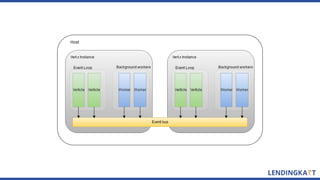
Vert.x event loop flow representation
Asynchronous & Non blocking
● Traditional System : When we query from database we wait for the result and
completion of the task we do other work.
● In Vert.x we execute non blocking A then continue to work on B & C and we can slo
get a free time.
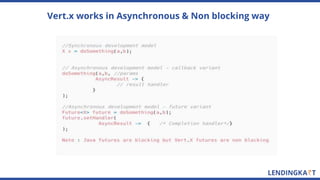
Vert.x works in Asynchronous & Non blocking way
Vert.x Event Bus
Event Bus is the nervous system of Vert.x
● Allows different components to communicate regardless of implementation
language and their location in cluster.
● Address : Messages are sent to an address.
● Handler : The sent messages are received by handlers.
● Messages can be simple objects,strings,csv,JSON etc.
Event Bus : Point to Point communication
Event Bus : Request/Response Communication
Event Bus : Publish Subscribe Communication
Managing Failures
Distributed communication may fail so our system have to be smart enough to
handle the failures and recover.
Managing failures via Circuit Breaker
Circuit Breaker Vertx Example
Vert.x Verticles
● A unit of deployment in Vert.x applications.
● Encapsulate your code for different needs such as exposing an HTTP API, responding to
requests, providing repository interface on top of database or issuing request to third party
systems.
● They communicate each other by sending messages on the event bus.
Managing failures by adding timeouts
Load Balancing - Built in Round Robin
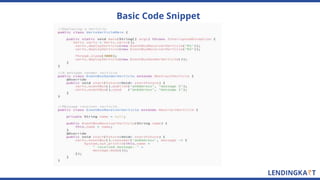
Basic Code Snippet
Raven & Notifications
Powered by Vertx
Problems?
● Growing number of mobile users and thence the data.
● Processing huge amount of data which is getting generated. At peak times, the
server should be able to handle the requests and should easily scale up and
scale down specific components without deploying another instance.
○ How to handle a significantly large number of concurrent requests.
○ How to make the best use of the available resources like CPU cores.
● Capability to write code and use case specific language.
○ Should support language independent coding.
● Capability of the server to establish communication between different users or
among a group of users without bringing in another third party dependency.
How do we establish a Real time controlled and secured communication
between different apps?
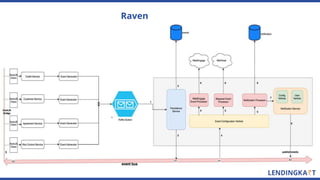
Raven
Vertx Sock-JS
● Client side JavaScript library
● Websocket-like interface
● Provides an abstraction of web socket
● Distributed event bus spanning multiple Vert.x instances on
the server side, including client side JavaScript running in
browsers.
● Secure and restricted communication
○ Inbound and Outbound permissions
○ Authorised messaging
Browser BrowserBrowser
sockJS sockJS sockJS
Notifications - login flow
Notification data flow
Sock-js sample code
Client-side code snippet
Server-side code snippet
Screenshots
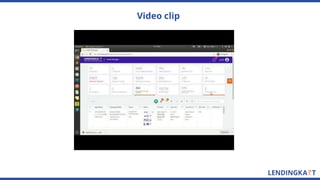
Video clip
Stats
● Number of verticles - 17 (number of instances - 28)
● Avg response time <~ 2 secs
● Total number of events generated so far(since Dec, 2018)
~= 50M ~= 120K per day.
Fraud Detection
Powered by Vertx
Problem Statement?
● 50k + active mobile users and increasing exponentially
● Location is captured frequently.
● Challenge is to handle the volume and do analytics on top of that.
● Non blocking and event driven approach.
● Handled using minimum resource utilization.
Solution using Vertx
Data Sources
● Collection of lat/lng of users.
● Store the data into MongoDB for further analysis.
Rules Flow
● Registered Address : Toshiba Software India Private Limted, 3A
"EssaeVaishnavi Solitaire" 3rd Block, near Krupanidhi College, Koramangala
● Reverse Address : 3A "EssaeVaishnavi Solitaire" 3rd Block, near Krupanidhi
College, Koramangala, Bengaluru, Karnataka 560034
● Following are the current configuration:
Evaluation Radius: 2 kms , Minimum Radius: 500 m,
Location Expiry: 90 days
● Following are the current rules:
○ (addressFuzzyMatch >= 0.6)
○ (locationsCount >= 5)
○ (perLocsInEvalRadius >= 0.6), (locsInMinRadius >= 1)
○ (locsSpreadInDays >= 2)
Thank you

Event driven systems

  • 1.
    Event Driven Systems TechTalks 29th February, 2020 Shatabda Mohit Manish
  • 3.
    What is it? ● It is a software architecture and model for application design. ● When a service performs a work that other services might be interested in, it produces an event—a record of the performed action. Other services consume those events so that they can perform any of their own tasks needed as a result of the event. ● What is an Event? ○ An event is any significant occurrence or change in state for system hardware or software. ○ Events can be generated from a user, like a mouse click or keystroke, an external source, such as a sensor output, or come from the system, like loading a program.
  • 4.
  • 5.
    What is theproblem ? ● In traditional synchronous programming, when the client sends a message to the server it waits until the server has responded before continuing with further processing. ● If the user is on a mobile device in a low signal area they could be waiting for a long period for a server response, which they might interpret as a laggy user interface which puts them off using your application. ● For the levels of concurrency required in modern applications, a blocking approach just doesn’t scale. The application becomes slow and needs lot of threads to handle the requests.
  • 6.
  • 7.
    Why do weneed event-driven systems ? ● Asynchronous – event-based architectures are asynchronous without blocking. This allows resources to move freely to the next task. ● Loose Coupling – services don’t need knowledge of other services including their implementation details. ● Easy Scaling – Since the services are decoupled and as services typically perform only one task, tracking down bottlenecks to a specific service, and scaling that service becomes easy. ● Recovery support – An event-driven architecture with a queue can recover lost work by “replaying” events from the past. ● User experience – The client doesn’t need to wait and allows the user to continue his work.
  • 8.
    What is Asynchronousmessaging ? ● A communication method where a service can send a message and continue with its tasks.This is known as fire-and-forget information exchange. ● There are two kinds of asynchronous messaging communication: ○ Single receiver message-based communication ○ Multiple receivers message-based communication
  • 9.
  • 10.
  • 11.
    Technologies ● Kafka: ○ Fast,scalable, fault-tolerant, publish-subscribe messaging system. ○ Kafka Topic : Kafka stores and organizes messages across its system. ○ Partition : Every topic is divided into partitions. Each partition has a leader ○ Following APIs are available in Kafka: ■ Kafka Producer API, Kafka Consumer API ■ Kafka Streams API, Kafka Connector API ○ Kafka Broker : It manages the storage of messages in the topic(s). If Kafka has more than one broker, that is what we call a Kafka cluster. ○ Kafka Zookeeper : It offers the brokers with metadata about the processes running in the system and facilitates health checking and broker leadership election.
  • 13.
    ● Akka: ○ Atoolkit for highly concurrent, fault-tolerant, and distributed applications. The thread management is completely handled by Akka. ○ Actor: Primitive entity of concurrent computation. Each actor has a state and can communicate with other actors by sending them messages asynchronously. The messages received are stored in a Mailbox and are processed one-by-one. ○ Actions performed by an Actor: ■ Update its state. ■ Perform computation based on message received. ■ Send message to another actor. ■ Create a new actor ○ Dispatcher - Actors pick a thread from the thread pool, process the message, and release the thread back to the thread pool. ○ While creating an actor, it is always added as a child into an already existing tree.
  • 15.
    ● Vert.x: ○ Event-drivenand non-blocking toolkit for developing reactive applications. ○ Handles a lot of concurrencies using a small number of kernel threads. ○ Verticles - Encapsulate our code and can be run completely independently of each other. They communicate with each other by sending messages on the event bus. ○ Types of verticles: ■ Standard : Executed using an Event loop thread. ■ Worker : Executed using a single thread from the worker pool. ■ Multi-threaded Worker: Executed using a multiple threads. ○ Event Loop - It continuously checks for new events, and quickly dispatch it to a verticle. ○ Event Bus - The event bus is the nervous system of Vert.x. There is a single event bus instance for every Vert.x instance.
  • 17.
    Vert.x ● A “toolkitfor building reactive applications on the JVM” ● Runs on top of jvm so it does not mean it has to be developed in Java ● A polyglot which means Vert.x applications can be developed using Java, Groovy, Ruby, Javascript, Scala, Kotlin.
  • 18.
    Understanding Buzz Words! ● Toolkit ○ Vert.x is not an application server, neither a container not a framework. ○ It’s a plain old jar file. Starting the application is simple and can be done with simple public static void main. ○ No specific IDE or plugin is required to use Vert.x.
  • 19.
    Vert.x event loopflow representation
  • 20.
    Asynchronous & Nonblocking ● Traditional System : When we query from database we wait for the result and completion of the task we do other work. ● In Vert.x we execute non blocking A then continue to work on B & C and we can slo get a free time.
  • 21.
    Vert.x works inAsynchronous & Non blocking way
  • 22.
    Vert.x Event Bus EventBus is the nervous system of Vert.x ● Allows different components to communicate regardless of implementation language and their location in cluster. ● Address : Messages are sent to an address. ● Handler : The sent messages are received by handlers. ● Messages can be simple objects,strings,csv,JSON etc.
  • 23.
    Event Bus :Point to Point communication
  • 24.
    Event Bus :Request/Response Communication
  • 25.
    Event Bus :Publish Subscribe Communication
  • 26.
    Managing Failures Distributed communicationmay fail so our system have to be smart enough to handle the failures and recover.
  • 27.
    Managing failures viaCircuit Breaker
  • 28.
  • 29.
    Vert.x Verticles ● Aunit of deployment in Vert.x applications. ● Encapsulate your code for different needs such as exposing an HTTP API, responding to requests, providing repository interface on top of database or issuing request to third party systems. ● They communicate each other by sending messages on the event bus.
  • 30.
    Managing failures byadding timeouts
  • 31.
    Load Balancing -Built in Round Robin
  • 32.
  • 33.
  • 34.
    Problems? ● Growing numberof mobile users and thence the data. ● Processing huge amount of data which is getting generated. At peak times, the server should be able to handle the requests and should easily scale up and scale down specific components without deploying another instance. ○ How to handle a significantly large number of concurrent requests. ○ How to make the best use of the available resources like CPU cores. ● Capability to write code and use case specific language. ○ Should support language independent coding. ● Capability of the server to establish communication between different users or among a group of users without bringing in another third party dependency. How do we establish a Real time controlled and secured communication between different apps?
  • 35.
  • 36.
    Vertx Sock-JS ● Clientside JavaScript library ● Websocket-like interface ● Provides an abstraction of web socket ● Distributed event bus spanning multiple Vert.x instances on the server side, including client side JavaScript running in browsers. ● Secure and restricted communication ○ Inbound and Outbound permissions ○ Authorised messaging
  • 37.
  • 38.
  • 39.
  • 40.
  • 41.
  • 42.
  • 43.
  • 45.
  • 46.
    Stats ● Number ofverticles - 17 (number of instances - 28) ● Avg response time <~ 2 secs ● Total number of events generated so far(since Dec, 2018) ~= 50M ~= 120K per day.
  • 47.
  • 48.
    Problem Statement? ● 50k+ active mobile users and increasing exponentially ● Location is captured frequently. ● Challenge is to handle the volume and do analytics on top of that.
  • 49.
    ● Non blockingand event driven approach. ● Handled using minimum resource utilization. Solution using Vertx
  • 50.
    Data Sources ● Collectionof lat/lng of users. ● Store the data into MongoDB for further analysis.
  • 52.
    Rules Flow ● RegisteredAddress : Toshiba Software India Private Limted, 3A "EssaeVaishnavi Solitaire" 3rd Block, near Krupanidhi College, Koramangala ● Reverse Address : 3A "EssaeVaishnavi Solitaire" 3rd Block, near Krupanidhi College, Koramangala, Bengaluru, Karnataka 560034 ● Following are the current configuration: Evaluation Radius: 2 kms , Minimum Radius: 500 m, Location Expiry: 90 days ● Following are the current rules: ○ (addressFuzzyMatch >= 0.6) ○ (locationsCount >= 5) ○ (perLocsInEvalRadius >= 0.6), (locsInMinRadius >= 1) ○ (locsSpreadInDays >= 2)
  • 53.

Editor's Notes

  • #28 The half-open state When the circuit is "open", calls to the circuit breaker fail immediately, without any attempt to execute the real operation. After a suitable amount of time (configured from setResetTimeout, the circuit breaker decides that the operation has a chance of succeeding, so it goes into the half-open state. In this state, the next call to the circuit breaker is allowed to execute the dangerous operation. Should the call succeed, the circuit breaker resets and returns to the closed state, ready for more routine operation. If this trial call fails, however, the circuit breaker returns to the open state until another timeout elapses.