Canon 1100D
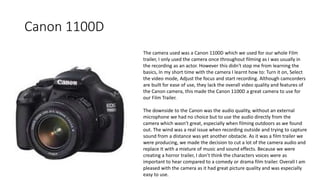
The camera used was a Canon 1100D which we used for our whole Film
trailer, I only used the camera once throughout filming as I was usually in
the recording as an actor. However this didn't stop me from learning the
basics, In my short time with the camera I learnt how to: Turn it on, Select
the video mode, Adjust the focus and start recording. Although camcorders
are built for ease of use, they lack the overall video quality and features of
the Canon camera, this made the Canon 1100D a great camera to use for
our Film Trailer.
The downside to the Canon was the audio quality, without an external
microphone we had no choice but to use the audio directly from the
camera which wasn't great, especially when filming outdoors as we found
out. The wind was a real issue when recording outside and trying to capture
sound from a distance was yet another obstacle. As it was a film trailer we
were producing, we made the decision to cut a lot of the camera audio and
replace It with a mixture of music and sound effects. Because we were
creating a horror trailer, I don’t think the characters voices were as
important to hear compared to a comedy or drama film trailer. Overall I am
pleased with the camera as it had great picture quality and was especially
easy to use.
Sony Movie Studio Platinum 12
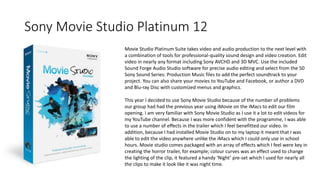
Movie Studio Platinum Suite takes video and audio production to the next level with
a combination of tools for professional-quality sound design and video creation. Edit
video in nearly any format including Sony AVCHD and 3D MVC. Use the included
Sound Forge Audio Studio software for precise audio editing and select from the 50
Sony Sound Series: Production Music files to add the perfect soundtrack to your
project. You can also share your movies to YouTube and Facebook, or author a DVD
and Blu-ray Disc with customized menus and graphics.
This year I decided to use Sony Movie Studio because of the number of problems
our group had had the previous year using iMovie on the iMacs to edit our film
opening. I am very familiar with Sony Movie Studio as I use it a lot to edit videos for
my YouTube channel. Because I was more confident with the programme, I was able
to use a number of effects in the trailer which I feel benefitted our video. In
addition, because I had installed Movie Studio on to my laptop it meant that I was
able to edit the video anywhere unlike the iMacs which I could only use in school
hours. Movie studio comes packaged with an array of effects which I feel were key in
creating the horror trailer, for example; colour curves was an effect used to change
the lighting of the clip, it featured a handy ‘Night’ pre-set which I used for nearly all
the clips to make it look like it was night time.
Blogger
Blogger is Google’s free tool for creating blogs. One of the
main advantages to using Blogger is that Blogger is
completely free. We used Blogger to post all of our
coursework for the planning and development of our film
trailer. It helped us organise our coursework pieces in to one
tidy page. Another advantage of using Blogger is that
because it is based online, I can access my work from home.
Tripod
The tripod we had was incredibly useful as it allowed our whole group to
be involved in the acting side of the film trailer whilst the camera stays in
the set position. The use of the tripod also meant that our shots were
steady when filming and not shaky if we hadn't used one, also it gave us
the option to record high-angle and low angle shots which would further
the effects of the trailer.
iPhone 5C
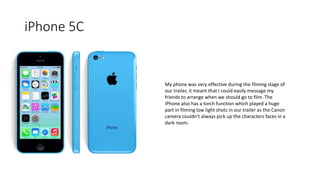
My phone was very effective during the filming stage of
our trailer, it meant that I could easily message my
friends to arrange when we should go to film. The
iPhone also has a torch function which played a huge
part in filming low light shots in our trailer as the Canon
camera couldn’t always pick up the characters faces in a
dark room.
Google Maps
Google maps was used to find the exact location for our Film
Trailer shoot. Although we had a rough idea of where the
building was, we were not sure how far along the road we would
have to go until we reached it. We used the satellite view for this
so we could see a birds eye view of the building and the road.
Odeon Cinema
Throughout the planning and filming stage of the film trailer,
I would go to the Odeon cinema usually once a week.
Before the film is displayed, they will show films relating to
the one you are about to watch. Whenever I watch a horror
film at the cinema, I would see other horror film trailers and
would pick up on techniques used to make the trailer
interesting and keep the audience on edge.
Dafont.com
Dafont was a useful tool used for the creation of our film
title. Dafont holds a huge collection of fonts, far more
than the amount available on Photoshop. The fonts can
be downloaded for free and used for what you like. For
us, I needed a sharp looking logo for our horror trailer
title, after failing to find any suitable fonts on Photoshop I
looked on Dafont.com and narrowed my search down to
horror to make it easier to find the font I was looking for. I
also used Dafont to help me create the Rating certificate
card as I needed a font which was as close to the actual
font used as possible.
Facebook Messenger
Messenger was used to communicate to the other actors taking
part in the filming of the trailer. We would most commonly
discuss ideas we have had for the trailer and what dates everyone
is free to film. Without using messenger we would have struggled
to communicate to each other because so of the actors have very
poor mobile signal in their village and so it would be difficult to
get hold of them.
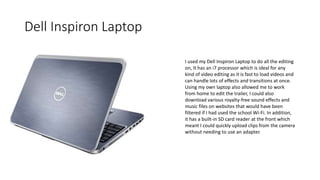
Dell Inspiron Laptop
I used my Dell Inspiron Laptop to do all the editing
on, It has an i7 processor which is ideal for any
kind of video editing as it is fast to load videos and
can handle lots of effects and transitions at once.
Using my own laptop also allowed me to work
from home to edit the trailer, I could also
download various royalty-free sound effects and
music files on websites that would have been
filtered if I had used the school Wi-Fi. In addition,
it has a built-in SD card reader at the front which
meant I could quickly upload clips from the camera
without needing to use an adapter.
Adobe Photoshop
I used Adobe Photoshop for both the ancillary tasks.
Photoshop is a very powerful photo editing software
which allows the user to create almost anything they
can imagine. I had minimal experience using
Photoshop so it took some time and a lot of
experimenting to build confidence on the software.
When I felt confident, making the ancillary tasks was
very straight forward and I was able to create a poster
and magazine cover that looked professional and
promoted the film well. A huge amount of tools were
used in the process; Lasso, Colour thresholds,
Contrast, Brightness, Outer glow and Clone to name a
few.
YouTube
Our film trailer was uploaded to YouTube because it allows
anyone to view our trailer and make comments on what
they liked/disliked. YouTube was also used a lot to view
existing film trailers from production companies and also
other Media Studies students. This allowed me to search for
a film trailer that best matched our film. In addition, looking
at previous media students work was very useful as it
showed us what can be produced on a minimal budget.

Evaluation Part 4

  • 2.
    Canon 1100D The cameraused was a Canon 1100D which we used for our whole Film trailer, I only used the camera once throughout filming as I was usually in the recording as an actor. However this didn't stop me from learning the basics, In my short time with the camera I learnt how to: Turn it on, Select the video mode, Adjust the focus and start recording. Although camcorders are built for ease of use, they lack the overall video quality and features of the Canon camera, this made the Canon 1100D a great camera to use for our Film Trailer. The downside to the Canon was the audio quality, without an external microphone we had no choice but to use the audio directly from the camera which wasn't great, especially when filming outdoors as we found out. The wind was a real issue when recording outside and trying to capture sound from a distance was yet another obstacle. As it was a film trailer we were producing, we made the decision to cut a lot of the camera audio and replace It with a mixture of music and sound effects. Because we were creating a horror trailer, I don’t think the characters voices were as important to hear compared to a comedy or drama film trailer. Overall I am pleased with the camera as it had great picture quality and was especially easy to use.
  • 3.
    Sony Movie StudioPlatinum 12 Movie Studio Platinum Suite takes video and audio production to the next level with a combination of tools for professional-quality sound design and video creation. Edit video in nearly any format including Sony AVCHD and 3D MVC. Use the included Sound Forge Audio Studio software for precise audio editing and select from the 50 Sony Sound Series: Production Music files to add the perfect soundtrack to your project. You can also share your movies to YouTube and Facebook, or author a DVD and Blu-ray Disc with customized menus and graphics. This year I decided to use Sony Movie Studio because of the number of problems our group had had the previous year using iMovie on the iMacs to edit our film opening. I am very familiar with Sony Movie Studio as I use it a lot to edit videos for my YouTube channel. Because I was more confident with the programme, I was able to use a number of effects in the trailer which I feel benefitted our video. In addition, because I had installed Movie Studio on to my laptop it meant that I was able to edit the video anywhere unlike the iMacs which I could only use in school hours. Movie studio comes packaged with an array of effects which I feel were key in creating the horror trailer, for example; colour curves was an effect used to change the lighting of the clip, it featured a handy ‘Night’ pre-set which I used for nearly all the clips to make it look like it was night time.
  • 4.
    Blogger Blogger is Google’sfree tool for creating blogs. One of the main advantages to using Blogger is that Blogger is completely free. We used Blogger to post all of our coursework for the planning and development of our film trailer. It helped us organise our coursework pieces in to one tidy page. Another advantage of using Blogger is that because it is based online, I can access my work from home.
  • 5.
    Tripod The tripod wehad was incredibly useful as it allowed our whole group to be involved in the acting side of the film trailer whilst the camera stays in the set position. The use of the tripod also meant that our shots were steady when filming and not shaky if we hadn't used one, also it gave us the option to record high-angle and low angle shots which would further the effects of the trailer.
  • 6.
    iPhone 5C My phonewas very effective during the filming stage of our trailer, it meant that I could easily message my friends to arrange when we should go to film. The iPhone also has a torch function which played a huge part in filming low light shots in our trailer as the Canon camera couldn’t always pick up the characters faces in a dark room.
  • 7.
    Google Maps Google mapswas used to find the exact location for our Film Trailer shoot. Although we had a rough idea of where the building was, we were not sure how far along the road we would have to go until we reached it. We used the satellite view for this so we could see a birds eye view of the building and the road.
  • 8.
    Odeon Cinema Throughout theplanning and filming stage of the film trailer, I would go to the Odeon cinema usually once a week. Before the film is displayed, they will show films relating to the one you are about to watch. Whenever I watch a horror film at the cinema, I would see other horror film trailers and would pick up on techniques used to make the trailer interesting and keep the audience on edge.
  • 9.
    Dafont.com Dafont was auseful tool used for the creation of our film title. Dafont holds a huge collection of fonts, far more than the amount available on Photoshop. The fonts can be downloaded for free and used for what you like. For us, I needed a sharp looking logo for our horror trailer title, after failing to find any suitable fonts on Photoshop I looked on Dafont.com and narrowed my search down to horror to make it easier to find the font I was looking for. I also used Dafont to help me create the Rating certificate card as I needed a font which was as close to the actual font used as possible.
  • 10.
    Facebook Messenger Messenger wasused to communicate to the other actors taking part in the filming of the trailer. We would most commonly discuss ideas we have had for the trailer and what dates everyone is free to film. Without using messenger we would have struggled to communicate to each other because so of the actors have very poor mobile signal in their village and so it would be difficult to get hold of them.
  • 11.
    Dell Inspiron Laptop Iused my Dell Inspiron Laptop to do all the editing on, It has an i7 processor which is ideal for any kind of video editing as it is fast to load videos and can handle lots of effects and transitions at once. Using my own laptop also allowed me to work from home to edit the trailer, I could also download various royalty-free sound effects and music files on websites that would have been filtered if I had used the school Wi-Fi. In addition, it has a built-in SD card reader at the front which meant I could quickly upload clips from the camera without needing to use an adapter.
  • 12.
    Adobe Photoshop I usedAdobe Photoshop for both the ancillary tasks. Photoshop is a very powerful photo editing software which allows the user to create almost anything they can imagine. I had minimal experience using Photoshop so it took some time and a lot of experimenting to build confidence on the software. When I felt confident, making the ancillary tasks was very straight forward and I was able to create a poster and magazine cover that looked professional and promoted the film well. A huge amount of tools were used in the process; Lasso, Colour thresholds, Contrast, Brightness, Outer glow and Clone to name a few.
  • 13.
    YouTube Our film trailerwas uploaded to YouTube because it allows anyone to view our trailer and make comments on what they liked/disliked. YouTube was also used a lot to view existing film trailers from production companies and also other Media Studies students. This allowed me to search for a film trailer that best matched our film. In addition, looking at previous media students work was very useful as it showed us what can be produced on a minimal budget.

Editor's Notes

  • #4 Sony Movie Studio Platinum 12