Evaluation 7
Preliminary Task vs Opening Sequence
The Different Films
Firstly, have a look at the two products:
Preliminary Task: https://vimeo.com/146633145
Opening Sequence: https://vimeo.com/158098595
Titles
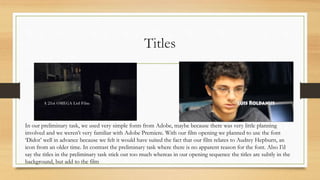
In our preliminary task, we used very simple fonts from Adobe, maybe because there was very little planning
involved and we weren’t very familiar with Adobe Premiere. With our film opening we planned to use the font
‘Didot’ well in advance because we felt it would have suited the fact that our film relates to Audrey Hepburn, an
icon from an older time. In contrast the preliminary task where there is no apparent reason for the font. Also I’d
say the titles in the preliminary task stick out too much whereas in our opening sequence the titles are subtly in the
background, but add to the film
The Camera Work
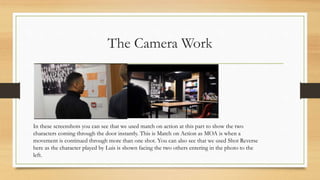
In these screenshots you can see that we used match on action at this part to show the two
characters coming through the door instantly. This is Match on Action as MOA is when a
movement is continued through more than one shot. You can also see that we used Shot Reverse
here as the character played by Luis is shown facing the two others entering in the photo to the
left.
The 180 Degree Rule
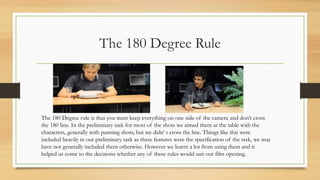
The 180 Degree rule is that you must keep everything on one side of the camera and don’t cross
the 180 line. In the preliminary task for most of the shots we aimed them at the table with the
characters, generally with panning shots, but we didn’ t cross the line. Things like this were
included heavily in our preliminary task as these features were the specification of the task, we may
have not generally included them otherwise. However we learnt a lot from using them and it
helped us come to the decisions whether any of these rules would suit our film opening.
Our film opening
We did not use any of these rules apart from subtly using the 180 rule, but it
was almost not done on purpose, as we wanted each shot to have its own
significant and memorable meaning. Also it is a slow opening and I feel as if
something like match on action is used in fast paced openings to show fast
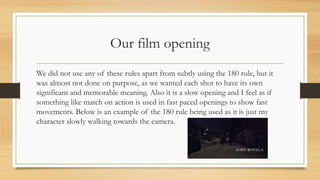
movements. Below is an example of the 180 rule being used as it is just my
character slowly walking towards the camera.
The Editing
Lastly the biggest difference is the fact that we used different softwares for the
editing. We edited the preliminary task at school meaning we had only Adobe
Premiere to use. I personally didn’t feel confident with it, so knowing we had
more freedom with the film opening we took it upon ourselves to use Final Cut
Pro at home to edit the film opening. This made the editing a lot easier as Final
Cut is laid out simply and makes it a lot more understandable. I feel like this
allowed our film opening to come out a lot better and professional looking as
we could edit it to the best of our abilities, everything from titles to transitions,
all the way to just the brightness and saturation of the shots.

Evaluation 7

  • 1.
    Evaluation 7 Preliminary Taskvs Opening Sequence
  • 2.
    The Different Films Firstly,have a look at the two products: Preliminary Task: https://vimeo.com/146633145 Opening Sequence: https://vimeo.com/158098595
  • 3.
    Titles In our preliminarytask, we used very simple fonts from Adobe, maybe because there was very little planning involved and we weren’t very familiar with Adobe Premiere. With our film opening we planned to use the font ‘Didot’ well in advance because we felt it would have suited the fact that our film relates to Audrey Hepburn, an icon from an older time. In contrast the preliminary task where there is no apparent reason for the font. Also I’d say the titles in the preliminary task stick out too much whereas in our opening sequence the titles are subtly in the background, but add to the film
  • 4.
    The Camera Work Inthese screenshots you can see that we used match on action at this part to show the two characters coming through the door instantly. This is Match on Action as MOA is when a movement is continued through more than one shot. You can also see that we used Shot Reverse here as the character played by Luis is shown facing the two others entering in the photo to the left.
  • 5.
    The 180 DegreeRule The 180 Degree rule is that you must keep everything on one side of the camera and don’t cross the 180 line. In the preliminary task for most of the shots we aimed them at the table with the characters, generally with panning shots, but we didn’ t cross the line. Things like this were included heavily in our preliminary task as these features were the specification of the task, we may have not generally included them otherwise. However we learnt a lot from using them and it helped us come to the decisions whether any of these rules would suit our film opening.
  • 6.
    Our film opening Wedid not use any of these rules apart from subtly using the 180 rule, but it was almost not done on purpose, as we wanted each shot to have its own significant and memorable meaning. Also it is a slow opening and I feel as if something like match on action is used in fast paced openings to show fast movements. Below is an example of the 180 rule being used as it is just my character slowly walking towards the camera.
  • 7.
    The Editing Lastly thebiggest difference is the fact that we used different softwares for the editing. We edited the preliminary task at school meaning we had only Adobe Premiere to use. I personally didn’t feel confident with it, so knowing we had more freedom with the film opening we took it upon ourselves to use Final Cut Pro at home to edit the film opening. This made the editing a lot easier as Final Cut is laid out simply and makes it a lot more understandable. I feel like this allowed our film opening to come out a lot better and professional looking as we could edit it to the best of our abilities, everything from titles to transitions, all the way to just the brightness and saturation of the shots.