Empowerment
Technologies
Imaging and Design for the Online Environment
Topic 3 Imaging and Design for the
Online Environment
Imaging and Design for the Online Environment
Lesson 1 Evaluate Existing Websites And Online
What You Need to Know
Before we can produce a high-quality design project whether designing a
website, designing a tarpaulin, or creating banners or logos, we need to
know and
follow the basic principles and elements of design. You may ask why? Well,
because
people care about the way things look. Take a look at the picture on the next
slide.
Lesson 1 Evaluate Existing Websites And Online
Imaging and Design for the Online Environment
The picture above shows a
good web design website. It
uses the different elements
on its design properly. Not
only that, the website
designer also follows the
rules in organizing and
placing the different
elements in making website
design.
Imaging and Design for the Online Environment
Basic Principles of Graphics and Layout
The elements and principles of design are the building blocks of a
successful beautiful design. The elements of design are the things or tools
that make up a design while the Principles of design are what we do to
those elements.
The Elements of Design These are the materials
or tools to make different designs or Arts.
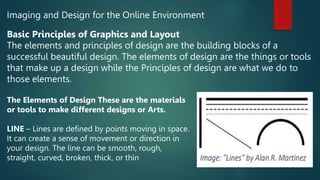
LINE – Lines are defined by points moving in space.
It can create a sense of movement or direction in
your design. The line can be smooth, rough,
straight, curved, broken, thick, or thin
Imaging and Design for the Online Environment
The Elements of Design These are the materials
or tools to make different designs or Arts.
SHAPE – A shape is an enclosed space, the
boundaries of which are defined by other elements
of art like lines, colors, values, or textures. Shapes
can be used to create patterns and draw the viewer’s
attention.
DIRECTION – Applying motion to create the visual
illusion of movement. Use horizontal direction for
calmness, stability, and tranquility while vertical
direction for emotions of balance, formality, and
alertness.
Imaging and Design for the Online Environment
The Elements of Design These are the materials
or tools to make different designs or Arts.
SIZE (SCALE) – Size is basically the relationship of
the area occupied by one shape to another. Large
elements means more significant than small ones.
TEXTURE – Texture refers to the surface appearance
of an object given by the dimensions, form,
thickness, arrangement, and amount of its basic
parts.
Imaging and Design for the Online Environment
The Elements of Design These are the materials
or tools to make different designs or Arts.
COLOR – Color is light redirected off
objects. It is used to create curiosity
and emotions in the viewers. It has
three main characteristics: hue (these
are red, green, blue, etc.), value
(lightness/ darkness), intensity
(saturation, or amount of pigment),
and temperature (warm and cool).
Imaging and Design for the Online Environment
The Principles of Design
These are the rules that help you organize and place
the materials to make art or designs.
1. BALANCE – Balance in design is the state of
equal relationship. It means equal distribution of
visual weight in a design. It can be achieved by
adjusting the visual weight of each element, in
terms of size, color, textures, shapes, or contrast.
Balance in graphic design provides stability and
structure to a design.
Imaging and Design for the Online Environment
There are different kinds of balance:
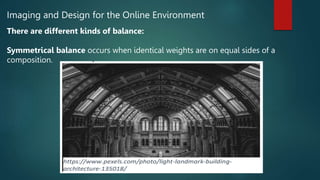
Symmetrical balance occurs when identical weights are on equal sides of a
composition.
Imaging and Design for the Online Environment
There are different kinds of balance:
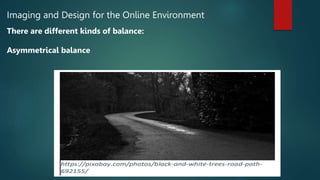
Asymmetrical balance
Imaging and Design for the Online Environment
There are different kinds of balance:
Radial balance occurs when the design elements swirl out from a central axis
(emanating from a central point)
Imaging and Design for the Online Environment
The Principles of Design
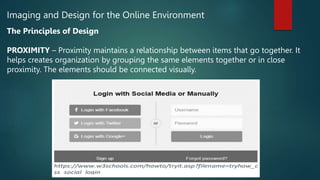
PROXIMITY – Proximity maintains a relationship between items that go together. It
helps creates organization by grouping the same elements together or in close
proximity. The elements should be connected visually.
Imaging and Design for the Online Environment
The Principles of Design
ALIGNMENT – Alignment refers to lining up the elements of a design along the top,
bottom, center, or sides of the elements. It allows us to create order and organization
in our design. The whole point of the alignment is that nothing in your design should
look as if it were placed there randomly.
Imaging and Design for the Online Environment
The Principles of Design
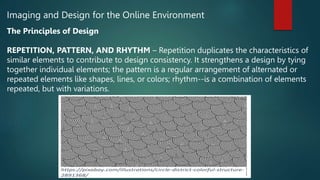
REPETITION, PATTERN, AND RHYTHM – Repetition duplicates the characteristics of
similar elements to contribute to design consistency. It strengthens a design by tying
together individual elements; the pattern is a regular arrangement of alternated or
repeated elements like shapes, lines, or colors; rhythm--is a combination of elements
repeated, but with variations.
Imaging and Design for the Online Environment
The Principles of Design
CONTRAST – Contrast refers to the use of conflicting elements or colors while still
remaining harmonious and unified when the artwork is viewed as a whole. It allows
you to give emphasis to key elements in your design.
Imaging and Design for the Online Environment
The Principles of Design
SPACE – It refers to the area that an object occupies. Both positive and negative space
should be considered in graphic design. White space gives your design breathing
room.
Imaging and Design for the Online Environment
Activity 2 – Different Principles of Design and Elements of Design Used. Based on the
given picture below, identify what Principles of Design and Elements of Design are
being used.
Imaging and Design for the Online Environment
What is Infographic?
The term Information graphic or Infographic
is a photographic presentation of data and
information that uses the different elements
of design to make data easily understandable
at a glance. Infographics make complex
messages become more visually appealing to
the viewers.
Visual Message Design can help with the
effectiveness of the delivery of a message. It
can lend assistance in presenting your ideas
clearly.
Imaging and Design for the Online Environment
Some Tools For Creating Infographics
1. Biteable https://biteable.com/infographic/
2. BeFunky https://www.befunky.com/features/infographic-maker/
3. Visme https://www.visme.co/make-infographics/
4. Cacoo https://cacoo.com/
5. Snappa https://snappa.com/create/infographics
6. Canva Infographic Maker https://www.canva.com/create/infographics/
7. Google Chart https://developers.google.com/chart/
8. Piktochart http://piktochart.com/
9. Infogram http://infogr.am/
10. Mind the Graph https://mindthegraph.com/
Imaging and Design for the Online Environment
Principles of Visual Message Design Using Infographics
1. Be unique
Being creative is one of the most important aspects of designing an effective infographic.
2. Keep it simple
Make a design easy to understand. Straight to the point and focus more on the message.
3. Less is more
Focus on what matters.
Keeping your text minimal will most likely produce more impact than a page full of words.
4. Sharing
Share it with your friends. It is the most important and effective thing to do in making an infographic.
Imaging and Design for the Online Environment
Tutorials and training in Creating
Infographics using Piktochart
1. Visit the YouTube website. Open your
favorite browser and type in
www.youtube.com in the address bar.
2. Search Infographic Tutorials.
Type in piktochart infographic tutorials in the
search bar.
3. Watch Tutorials. Select a video and start
watching tutorials.
Imaging and Design for the Online Environment
Activity 1 – Evaluate the design of Arngren website.
Photo Credit: http://arngren.net/
In creating any design, we
should always remember
the different types of
elements to be used and
how to use them properly.
Given the picture below,
what can you say about the
design of the website? Do
you like the design of the
Arngren website? Why? Why
not?
Imaging and Design for the Online Environment
Activity 2 – Different Principles of Design and Elements of Design Used. Based on the
given picture below, identify what Principles of Design and Elements of Design are
being used.
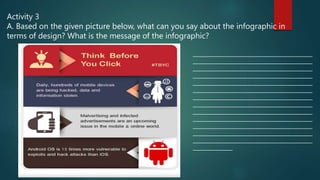
Activity 3
A. Based on the given picture below, what can you say about the infographic in
terms of design? What is the message of the infographic?
________________________________________________
________________________________________________
________________________________________________
________________________________________________
________________________________________________
________________________________________________
________________________________________________
________________________________________________
________________________________________________
________________________________________________
________________________________________________
________________________________________________
________________________________________________
________________
Activity 3
B. Synthesizing Your Learning Answer the following questions based on your
learning. Be brief and concise. From your own understanding, make a list of:
1. What makes a good design?
___________________________________________________________________
___________________________________________________________________
___________________________________________________________________
___________________________________________________________________
2. What makes a good infographic?
___________________________________________________________________
___________________________________________________________________
___________________________________________________________________
___________________________________________________________________

ET_lESSON_6.pptx

  • 1.
  • 2.
    Imaging and Designfor the Online Environment Topic 3 Imaging and Design for the Online Environment
  • 3.
    Imaging and Designfor the Online Environment Lesson 1 Evaluate Existing Websites And Online What You Need to Know Before we can produce a high-quality design project whether designing a website, designing a tarpaulin, or creating banners or logos, we need to know and follow the basic principles and elements of design. You may ask why? Well, because people care about the way things look. Take a look at the picture on the next slide.
  • 4.
    Lesson 1 EvaluateExisting Websites And Online
  • 5.
    Imaging and Designfor the Online Environment The picture above shows a good web design website. It uses the different elements on its design properly. Not only that, the website designer also follows the rules in organizing and placing the different elements in making website design.
  • 6.
    Imaging and Designfor the Online Environment Basic Principles of Graphics and Layout The elements and principles of design are the building blocks of a successful beautiful design. The elements of design are the things or tools that make up a design while the Principles of design are what we do to those elements. The Elements of Design These are the materials or tools to make different designs or Arts. LINE – Lines are defined by points moving in space. It can create a sense of movement or direction in your design. The line can be smooth, rough, straight, curved, broken, thick, or thin
  • 7.
    Imaging and Designfor the Online Environment The Elements of Design These are the materials or tools to make different designs or Arts. SHAPE – A shape is an enclosed space, the boundaries of which are defined by other elements of art like lines, colors, values, or textures. Shapes can be used to create patterns and draw the viewer’s attention. DIRECTION – Applying motion to create the visual illusion of movement. Use horizontal direction for calmness, stability, and tranquility while vertical direction for emotions of balance, formality, and alertness.
  • 8.
    Imaging and Designfor the Online Environment The Elements of Design These are the materials or tools to make different designs or Arts. SIZE (SCALE) – Size is basically the relationship of the area occupied by one shape to another. Large elements means more significant than small ones. TEXTURE – Texture refers to the surface appearance of an object given by the dimensions, form, thickness, arrangement, and amount of its basic parts.
  • 9.
    Imaging and Designfor the Online Environment The Elements of Design These are the materials or tools to make different designs or Arts. COLOR – Color is light redirected off objects. It is used to create curiosity and emotions in the viewers. It has three main characteristics: hue (these are red, green, blue, etc.), value (lightness/ darkness), intensity (saturation, or amount of pigment), and temperature (warm and cool).
  • 10.
    Imaging and Designfor the Online Environment The Principles of Design These are the rules that help you organize and place the materials to make art or designs. 1. BALANCE – Balance in design is the state of equal relationship. It means equal distribution of visual weight in a design. It can be achieved by adjusting the visual weight of each element, in terms of size, color, textures, shapes, or contrast. Balance in graphic design provides stability and structure to a design.
  • 11.
    Imaging and Designfor the Online Environment There are different kinds of balance: Symmetrical balance occurs when identical weights are on equal sides of a composition.
  • 12.
    Imaging and Designfor the Online Environment There are different kinds of balance: Asymmetrical balance
  • 13.
    Imaging and Designfor the Online Environment There are different kinds of balance: Radial balance occurs when the design elements swirl out from a central axis (emanating from a central point)
  • 14.
    Imaging and Designfor the Online Environment The Principles of Design PROXIMITY – Proximity maintains a relationship between items that go together. It helps creates organization by grouping the same elements together or in close proximity. The elements should be connected visually.
  • 15.
    Imaging and Designfor the Online Environment The Principles of Design ALIGNMENT – Alignment refers to lining up the elements of a design along the top, bottom, center, or sides of the elements. It allows us to create order and organization in our design. The whole point of the alignment is that nothing in your design should look as if it were placed there randomly.
  • 16.
    Imaging and Designfor the Online Environment The Principles of Design REPETITION, PATTERN, AND RHYTHM – Repetition duplicates the characteristics of similar elements to contribute to design consistency. It strengthens a design by tying together individual elements; the pattern is a regular arrangement of alternated or repeated elements like shapes, lines, or colors; rhythm--is a combination of elements repeated, but with variations.
  • 17.
    Imaging and Designfor the Online Environment The Principles of Design CONTRAST – Contrast refers to the use of conflicting elements or colors while still remaining harmonious and unified when the artwork is viewed as a whole. It allows you to give emphasis to key elements in your design.
  • 18.
    Imaging and Designfor the Online Environment The Principles of Design SPACE – It refers to the area that an object occupies. Both positive and negative space should be considered in graphic design. White space gives your design breathing room.
  • 19.
    Imaging and Designfor the Online Environment Activity 2 – Different Principles of Design and Elements of Design Used. Based on the given picture below, identify what Principles of Design and Elements of Design are being used.
  • 20.
    Imaging and Designfor the Online Environment What is Infographic? The term Information graphic or Infographic is a photographic presentation of data and information that uses the different elements of design to make data easily understandable at a glance. Infographics make complex messages become more visually appealing to the viewers. Visual Message Design can help with the effectiveness of the delivery of a message. It can lend assistance in presenting your ideas clearly.
  • 21.
    Imaging and Designfor the Online Environment Some Tools For Creating Infographics 1. Biteable https://biteable.com/infographic/ 2. BeFunky https://www.befunky.com/features/infographic-maker/ 3. Visme https://www.visme.co/make-infographics/ 4. Cacoo https://cacoo.com/ 5. Snappa https://snappa.com/create/infographics 6. Canva Infographic Maker https://www.canva.com/create/infographics/ 7. Google Chart https://developers.google.com/chart/ 8. Piktochart http://piktochart.com/ 9. Infogram http://infogr.am/ 10. Mind the Graph https://mindthegraph.com/
  • 22.
    Imaging and Designfor the Online Environment Principles of Visual Message Design Using Infographics 1. Be unique Being creative is one of the most important aspects of designing an effective infographic. 2. Keep it simple Make a design easy to understand. Straight to the point and focus more on the message. 3. Less is more Focus on what matters. Keeping your text minimal will most likely produce more impact than a page full of words. 4. Sharing Share it with your friends. It is the most important and effective thing to do in making an infographic.
  • 23.
    Imaging and Designfor the Online Environment Tutorials and training in Creating Infographics using Piktochart 1. Visit the YouTube website. Open your favorite browser and type in www.youtube.com in the address bar. 2. Search Infographic Tutorials. Type in piktochart infographic tutorials in the search bar. 3. Watch Tutorials. Select a video and start watching tutorials.
  • 24.
    Imaging and Designfor the Online Environment Activity 1 – Evaluate the design of Arngren website. Photo Credit: http://arngren.net/ In creating any design, we should always remember the different types of elements to be used and how to use them properly. Given the picture below, what can you say about the design of the website? Do you like the design of the Arngren website? Why? Why not?
  • 25.
    Imaging and Designfor the Online Environment Activity 2 – Different Principles of Design and Elements of Design Used. Based on the given picture below, identify what Principles of Design and Elements of Design are being used.
  • 26.
    Activity 3 A. Basedon the given picture below, what can you say about the infographic in terms of design? What is the message of the infographic? ________________________________________________ ________________________________________________ ________________________________________________ ________________________________________________ ________________________________________________ ________________________________________________ ________________________________________________ ________________________________________________ ________________________________________________ ________________________________________________ ________________________________________________ ________________________________________________ ________________________________________________ ________________
  • 27.
    Activity 3 B. SynthesizingYour Learning Answer the following questions based on your learning. Be brief and concise. From your own understanding, make a list of: 1. What makes a good design? ___________________________________________________________________ ___________________________________________________________________ ___________________________________________________________________ ___________________________________________________________________ 2. What makes a good infographic? ___________________________________________________________________ ___________________________________________________________________ ___________________________________________________________________ ___________________________________________________________________