ESS


Fahmeeda
31-10-2011
INTRODUCTION

• Employee Self-Service (ESS) enables employees to
  create, display, and change their own data in the
  internet or intranet used at their enterprise. By
  enabling employees to access their own data, HR
  processes are standardized and simplified. As a
  result, employees in the Human Resources
  Department can concentrate on other tasks of
  greater strategic importance.
ADVANTAGES OF PORTAL

• The Enterprise Portal Provides a central point of
  access for all applications and all systems.
• Only one portal is required for all applications and
  users.
• Provides more than just access to all systems.
1. Incorporates screen areas from many different systems into
   one page
2. Content management (store internal documents)
3. Set up topic based collabration rooms for work groups
ADVANTAGES OF PORTAL

• A current problem in many enterprises is that the
  end user is confronted with an abundance of
  contrasting interfaces for various applications that
  all function in a different manner.
• SAP Enterprise Portal provides a solution to this
  problem by integrating these applications into one
  single interface.
• The user needs to log onto the EP once only.
ADVANTAGES OF PORTAL

• The Enterprise portal is run for use in an Internet
  browser.
• You can use Microsoft Internet Explorer or Netscape
  Navigator.
• You use an Internet Address, that is URL, to call the
  EP server.
LOGIN PAGE

• As soon as you have connected to the server, it
asks for your username and password. After you
have entered this information, you are logged
onto the Enterprise portal.
USER INTERFACE
• You can personalize the portal in different
  ways
  •  The portal administrator defines which content is
     assigned to the various roles in the portal.
  • When the user logs on the portal determines the
   language that has been set in the Web browser, How ever
   the user can override this setting.
  • The User can also select a portal design that dictates
   properties such as the font size, color, and background
   graphics. In this way they can create a user friendly, role
   based navigation structure and incorporate the company's
   corporate identity.
The Personnel Development without ESS

• Heavy work load
• Enterprise processes are carried out using paper or
  informally
• Data is entered more than once and is processed by
   • Employees
   • Managers
   • Computer personnel
• Result:
•   Poor Data quality and data redundancy
•   Inefficiency
•   Overworked human resources department
APPLICATIONS OF ESS
• SAP Employee Self-service encompasses a number of easy-to-
  use Web Applications that all employees can use in a web
  browser to display, create, and edit data in the R/3 system.

•   SAP ESS covers the following areas

       Overview
       Employee Search
       Benefits and Payment
       Working time
       Personal Data
       Career and Job
       Work Environment
       Travel Management
SAP ESS – The Philosophy

“Let them do it themselves!”

•   Employees Maintain their own data

• Employees are responsible for some of their personal data

• Information is made available to all employees

• Simple and intuitive to use
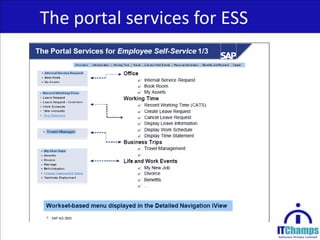
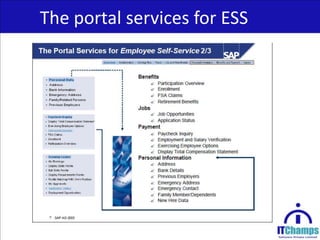
The portal services for ESS
ESS HOMEPAGE
HOME PAGE

• The Homepage or area group page provides the
  employee with an overview of the SAP Employee
  Self-Service application

• A short description of each of the available areas in
  SAP ESS is displayed

• The employee can also access frequently used ESS
  services and status information (such as the status of
  the open trips)by means of Quick links
ESS AREA PAGE


The area pages are divided into two areas: The Left-hand side of
the page provides employees with more information about the
applications and a link with which they can call the individual
applications directly. On the right, customers can display company
specific information, such as links to Hand
books, guidelines, vacation regulations, and so on.
CAREER AND JOB
CAREER AND JOB
SKILLS:

• Employee enter their skills in SAP ESS by selecting the relevant
  skills and maintaining the associated proficiency level.

• Managers can utilize the database to identify the employees
  with appropriate skills for project placement or job posting.

• The skills profile can also be used determine if an employee
  needs additional training.
CAREER AND JOB

• Display/Edit skills profile:
  These services permit the employee to display or maintain his or
  her skills . Each skill can be evaluated.
• Display requirements profile:
  This service allows the employee to display the requirements for his
  or her position. Each requirement can be evaluated.
• Profile match of with own position:
  This service permits employees to compare their skills profile with
  requirements profile for their position. The service detects missing
  skills and suggests suitable training. A link takes you to the
  appropriate events.
APPRAISAL

• Once the employee clicks his /her Appraisal Document Name
  the below screen shot appears shows you the Appraisal
  document of the employee and here the Employee shall plan
  his/her Objective by clicking the option in the left corner.
OBJECTIVE SETTING

• Here under the Tab Objective setting the employee shall fill
  his/her individual Objectives.
DEVELOPMENT PLAN

• The below screen shows the employee can fill his /her
  Individual Development Plans under the Tab Development
  Plan
QUALIFICATION

• The below screen shows the employee fill his/her
  qualification based on his Competency.
MANDATORY COURSE

• In the below screen employee can select the Mandatory
  course for which he can attend training through E-learning or
  Class room training.
BUSINESS ETHICS

• Once the employee selected the Language course the course
  will display as shown in the below screen. Here the Course
  Business Ethics is shown as Example.
FINAL COMMENTS
The Below screen shows the employee fill his/her final
comments once he fill all the Objectives, Development Plan
and training needs. This Final Comment is the last stage where
employee will evaluate himself.
Once the employee fills the Appraisal he can save and exit the
document.
MANAGER SELF-SERVICE

• Once the manager select the Manager self-service, the
  manager selects the appraisal document of the employee
  based on the status and appraises the appraisee.
TRAINING

• The employee can access the Employee Self-Service
  applications of Training and Event Management in the ESS
  navigation menu under Training.
LIST OF EVENTS
• Employee can view the company’s training offer on corporate
  intranet with the employee self-service application List Of
  Events
BOOK ATTENDANCE

• With the Employee self-service application Book Attendance
  , employees can enroll themselves for training courses
  featured in the event catalog or prebook themselves for
  event types.
ESS VIEW ATTENDANCE

• With the Employee Self-Service View Attendance, employees
  can inform themselves about the status of their bookings.
• They can display detailed information about the events by
  clicking the info icons.
CANCEL ATTENDANCE
• With the Employee Self-Service application Cancel
  Attendance, employees can cancel their own event bookings.
  The user selects the booking to be canceled from the list of
  bookings displayed.
• To cancel attendance the user simply clicks the relevant icon
  and confirms the prompt.
Thank you

Ess

  • 1.
  • 2.
    INTRODUCTION • Employee Self-Service(ESS) enables employees to create, display, and change their own data in the internet or intranet used at their enterprise. By enabling employees to access their own data, HR processes are standardized and simplified. As a result, employees in the Human Resources Department can concentrate on other tasks of greater strategic importance.
  • 3.
    ADVANTAGES OF PORTAL •The Enterprise Portal Provides a central point of access for all applications and all systems. • Only one portal is required for all applications and users. • Provides more than just access to all systems. 1. Incorporates screen areas from many different systems into one page 2. Content management (store internal documents) 3. Set up topic based collabration rooms for work groups
  • 4.
    ADVANTAGES OF PORTAL •A current problem in many enterprises is that the end user is confronted with an abundance of contrasting interfaces for various applications that all function in a different manner. • SAP Enterprise Portal provides a solution to this problem by integrating these applications into one single interface. • The user needs to log onto the EP once only.
  • 5.
    ADVANTAGES OF PORTAL •The Enterprise portal is run for use in an Internet browser. • You can use Microsoft Internet Explorer or Netscape Navigator. • You use an Internet Address, that is URL, to call the EP server.
  • 6.
    LOGIN PAGE • Assoon as you have connected to the server, it asks for your username and password. After you have entered this information, you are logged onto the Enterprise portal.
  • 7.
    USER INTERFACE • Youcan personalize the portal in different ways • The portal administrator defines which content is assigned to the various roles in the portal. • When the user logs on the portal determines the language that has been set in the Web browser, How ever the user can override this setting. • The User can also select a portal design that dictates properties such as the font size, color, and background graphics. In this way they can create a user friendly, role based navigation structure and incorporate the company's corporate identity.
  • 8.
    The Personnel Developmentwithout ESS • Heavy work load • Enterprise processes are carried out using paper or informally • Data is entered more than once and is processed by • Employees • Managers • Computer personnel • Result: • Poor Data quality and data redundancy • Inefficiency • Overworked human resources department
  • 9.
    APPLICATIONS OF ESS •SAP Employee Self-service encompasses a number of easy-to- use Web Applications that all employees can use in a web browser to display, create, and edit data in the R/3 system. • SAP ESS covers the following areas  Overview  Employee Search  Benefits and Payment  Working time  Personal Data  Career and Job  Work Environment  Travel Management
  • 10.
    SAP ESS –The Philosophy “Let them do it themselves!” • Employees Maintain their own data • Employees are responsible for some of their personal data • Information is made available to all employees • Simple and intuitive to use
  • 11.
  • 12.
  • 13.
  • 14.
    HOME PAGE • TheHomepage or area group page provides the employee with an overview of the SAP Employee Self-Service application • A short description of each of the available areas in SAP ESS is displayed • The employee can also access frequently used ESS services and status information (such as the status of the open trips)by means of Quick links
  • 15.
    ESS AREA PAGE Thearea pages are divided into two areas: The Left-hand side of the page provides employees with more information about the applications and a link with which they can call the individual applications directly. On the right, customers can display company specific information, such as links to Hand books, guidelines, vacation regulations, and so on.
  • 16.
  • 17.
    CAREER AND JOB SKILLS: •Employee enter their skills in SAP ESS by selecting the relevant skills and maintaining the associated proficiency level. • Managers can utilize the database to identify the employees with appropriate skills for project placement or job posting. • The skills profile can also be used determine if an employee needs additional training.
  • 18.
    CAREER AND JOB •Display/Edit skills profile: These services permit the employee to display or maintain his or her skills . Each skill can be evaluated. • Display requirements profile: This service allows the employee to display the requirements for his or her position. Each requirement can be evaluated. • Profile match of with own position: This service permits employees to compare their skills profile with requirements profile for their position. The service detects missing skills and suggests suitable training. A link takes you to the appropriate events.
  • 19.
    APPRAISAL • Once theemployee clicks his /her Appraisal Document Name the below screen shot appears shows you the Appraisal document of the employee and here the Employee shall plan his/her Objective by clicking the option in the left corner.
  • 20.
    OBJECTIVE SETTING • Hereunder the Tab Objective setting the employee shall fill his/her individual Objectives.
  • 21.
    DEVELOPMENT PLAN • Thebelow screen shows the employee can fill his /her Individual Development Plans under the Tab Development Plan
  • 22.
    QUALIFICATION • The belowscreen shows the employee fill his/her qualification based on his Competency.
  • 23.
    MANDATORY COURSE • Inthe below screen employee can select the Mandatory course for which he can attend training through E-learning or Class room training.
  • 24.
    BUSINESS ETHICS • Oncethe employee selected the Language course the course will display as shown in the below screen. Here the Course Business Ethics is shown as Example.
  • 25.
    FINAL COMMENTS The Belowscreen shows the employee fill his/her final comments once he fill all the Objectives, Development Plan and training needs. This Final Comment is the last stage where employee will evaluate himself. Once the employee fills the Appraisal he can save and exit the document.
  • 26.
    MANAGER SELF-SERVICE • Oncethe manager select the Manager self-service, the manager selects the appraisal document of the employee based on the status and appraises the appraisee.
  • 27.
    TRAINING • The employeecan access the Employee Self-Service applications of Training and Event Management in the ESS navigation menu under Training.
  • 28.
    LIST OF EVENTS •Employee can view the company’s training offer on corporate intranet with the employee self-service application List Of Events
  • 29.
    BOOK ATTENDANCE • Withthe Employee self-service application Book Attendance , employees can enroll themselves for training courses featured in the event catalog or prebook themselves for event types.
  • 30.
    ESS VIEW ATTENDANCE •With the Employee Self-Service View Attendance, employees can inform themselves about the status of their bookings. • They can display detailed information about the events by clicking the info icons.
  • 31.
    CANCEL ATTENDANCE • Withthe Employee Self-Service application Cancel Attendance, employees can cancel their own event bookings. The user selects the booking to be canceled from the list of bookings displayed. • To cancel attendance the user simply clicks the relevant icon and confirms the prompt.
  • 32.