Three sessions about Erlang


         Session 2

       Mohamed Samy
       February 2010
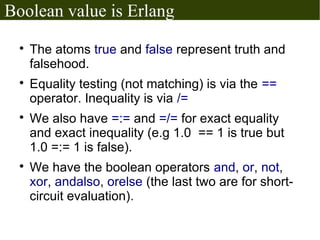
Boolean value is Erlang
  
      The atoms true and false represent truth and
      falsehood.
  
      Equality testing (not matching) is via the ==
      operator. Inequality is via /=
  
      We also have =:= and =/= for exact equality
      and exact inequality (e.g 1.0 == 1 is true but
      1.0 =:= 1 is false).
  
      We have the boolean operators and, or, not,
      xor, andalso, orelse (the last two are for short-
      circuit evaluation).
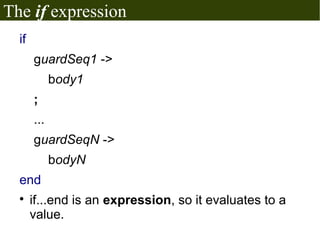
The if expression
  if
       guardSeq1 ->
             body1
       ;
       ...
       guardSeqN ->
             bodyN
  end
  
       if...end is an expression, so it evaluates to a
       value.
The if expression
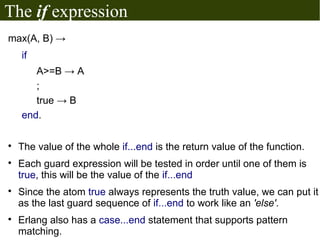
max(A, B) →
    if
       A>=B → A
       ;
       true → B
    end.


    The value of the whole if...end is the return value of the function.

    Each guard expression will be tested in order until one of them is
    true, this will be the value of the if...end

    Since the atom true always represents the truth value, we can put it
    as the last guard sequence of if...end to work like an 'else'.

    Erlang also has a case...end statement that supports pattern
    matching.
Anonymous functions
 
     In Erlang (and other languages) the programmer can write expressions that
     evaluate to functions. Erlang calls them "fun expressions".
 
     The syntax is:
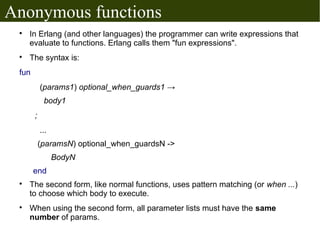
 fun
           (params1) optional_when_guards1 →
            body1
       ;
           ...
           (paramsN) optional_when_guardsN ->
                 BodyN
       end
 
     The second form, like normal functions, uses pattern matching (or when ...)
     to choose which body to execute.
 
     When using the second form, all parameter lists must have the same
     number of params.
Anonymous functions
 
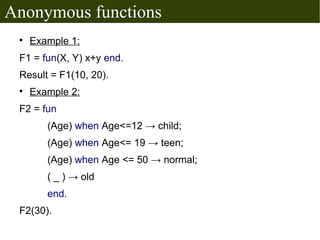
     Example 1:
 F1 = fun(X, Y) x+y end.
 Result = F1(10, 20).
 
     Example 2:
 F2 = fun
        (Age) when Age<=12 → child;
        (Age) when Age<= 19 → teen;
        (Age) when Age <= 50 → normal;
        ( _ ) → old
        end.
 F2(30).
Higher order functions
  
      These are functions that take functions as
      parameters or return functions as results.
  
      Some built-in HOFs:
      
          lists:any(testFunc, list)
           Even = fun (X)
                      (X rem 2) == 0
                    end.
           lists:any(Even,[1, 2 ,3, 4]).

           −   This will test if any member of the given list even (which
               is true).
      
          Also lists:all, lists:foldl, lists:foldr, lists:mapfoldl
  
      And many other functions!
Actors
 
     Concurrency has many hard-to-debug problems.
 
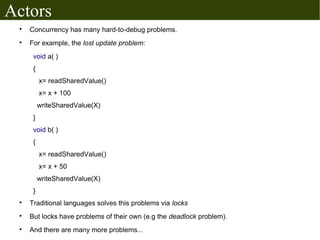
     For example, the lost update problem:
      void a( )
      {
          x= readSharedValue()
          x= x + 100
          writeSharedValue(X)
      }
      void b( )
      {
          x= readSharedValue()
          x= x + 50
          writeSharedValue(X)
      }
 
     Traditional languages solves this problems via locks
 
     But locks have problems of their own (e.g the deadlock problem).
 
     And there are many more problems...
Actors
 
     An actor is a computational entity which has a
     mailbox and behavior.
 
     Actors can send messages to each other;
     messages sent to an actor are buffered in its
     mailbox.
 
     Upon receiving a message an actor 's behavior
     is executed, now it can:
     
         Send messages to other actors;
     
         Create new actors;
     
         Designate new behavior for the next message it
         receives.
 
     There is no assumed sequence to the above
     actions and they could be carried out in parallel.
Actors vs. function calls
  
      A function A that calls B will (normally) wait for
      B to return, but sending message is inherently
      asynchronous.
  
      A called function must return to its caller, but an
      actor that receives a message can...
      
          Respond to the caller
      
          Respond by sending a message to another actor
          that it knows.
      
          Respond by sending to an actor specified in the
          message.
      
          Not send anything
      
          ...etc ...etc
Actors in Erlang
  
      Actors in Erlang are called processes.
  
      Erlang is designed for massive concurrency,
      Erlang processes are:
      
          Light-weight (grow and shrink dynamically).
      
          Have small memory footprint
      
          Are fast to create and terminate
      
          Their scheduling overhead is low.
  
      A program can have thousands of concurrent
      processes running with no problem.
Actors in Erlang

  
      Processes have 4 main operations in Erlang:
      
          spawn(...) creates a new process and returns its
          PID.
      
          ! is the message send operator
      
          receive...end is used to specify how to respond to
          messages
      
          register(...) is used to give names to a process,
          other parts of the program can then access that
          process via the name.
Creating new processes
  
      spawn(Module, Function, [ arg1, arg2...] )
      
          Creates a new process which starts by running
          function with the specified arguments.
      
          The caller of spawn resumes working normally and
          doesn't wait for the process to end.
      
          Returns a data of type Process ID (PID), which is
          used to access the process.
      
          There exist a number of other spawn(...) BIFs, for
          example spawn/4 for spawning a process at
          another node.
Message send

    receiver ! message
    
        The receiver is an expression whose value is one of:
        −  A PID
         − A registered process name (using register(...) )
         − A tuple {Name, Node} , both atoms.
    
        The message is any Erlang term.
    
        Notes:
        −   Message sending is asynchronous.
        −   The message is guaranteed to eventually reach the
            recipient, provided that the recipient exists.
        −   Sending to a non-existent node doesn't produce an
            error.
        −   The value of the expression a ! b is the same as b
receiving messages
receive
    Pattern1 [when GuardSeq1] ->
          Body1;
    ...
    PatternN [when GuardSeqN] ->
          BodyN
end

    Receives messages sent with `!` to the current process's
    mailbox.

    The [when guard_sequence] part is optional.

    When receiving a message, it is matched with each of the
    patterns (and guard sequences). When the first match
    happens, it's body is executed.
receiving messages

    Messages do not have to be received in the order
    they were sent.

    If the mailbox is empty or has no valid messages;
    execution is suspended (possibly indefinitely) until a
    suitable message arrives.

    The return value of the body is the return value of
    the whole receive expression.

    A receive can have a timeout:
              receive
                ....
                ....
               after timeout_expr ->
                    Body
              end
register ( )

    register(Name, Pid)
    
        Name is an atom, used to access the process later.
    
        Pid is....a PID
    
        Remember, the receiver in a message send operation
        like a ! b can be a registered process name.
    
        It is allowed (but not required) to give the same name for
        a process and function.
Example actor: Hi, Bye!
-module(hi_bye).
-export(run/0).
run ( )->
 receive
    hi →
    io:format("bye!~n", [ ]),
    run( ),
  end.


after compiling the module:
erlang> PID = spawn(hi_bye, run, [ ]).
erlang> PID ! hi.
Example actor: a counter

(Interactive)
Ping! Pong!
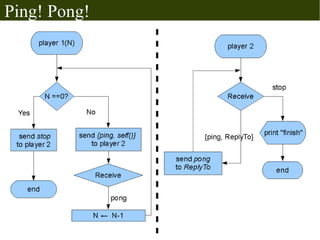
We have 2 processes: player1 & player2
  
      player2 goes in a loop where it can receive one of 2 messages:
       −   {ping, ReplyToPID} makes player2 respond by sending the message
           pong to the process denoted by ReplyToPID
       −   stop makes player2 print “finish” on the screen and exit the loop
  
      player1 takes a parameter N and does the following:
       −   repeat N times:
             
               send the tuple {ping, self( )} to player2
             
               receive the atom pong from player2
       −   send stop to player2
       −   print "finish" and exit.
  
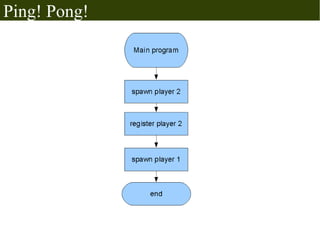
      player2 will have a name created using register( ), all messages
      to player2 will use the registered name.
  
      Note: self( ) is a built-in function that returns the ID of the
      process which called it.
Ping! Pong!
Ping! Pong!
Distributed Erlang
  
      Each Erlang system running on a computer is
      called an Erlang node.
  
      A node can have a name, either a short name
      or a long name.
  
      The name allows other nodes to access it.
  
      For two Erlang nodes to communicate, they
      must have the same secret cookie. (for security
      reasons).
Distributed Erlang
  
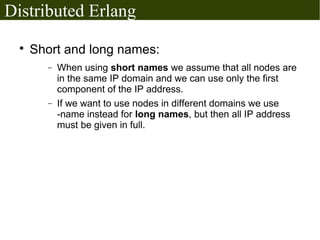
      Short and long names:
        −   When using short names we assume that all nodes are
            in the same IP domain and we can use only the first
            component of the IP address.
        −   If we want to use nodes in different domains we use
            -name instead for long names, but then all IP address
            must be given in full.
Names and cookies
 
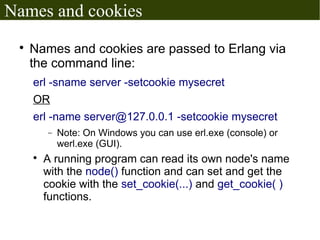
     Names and cookies are passed to Erlang via
     the command line:
     erl -sname server -setcookie mysecret
     OR
     erl -name server@127.0.0.1 -setcookie mysecret
         −   Note: On Windows you can use erl.exe (console) or
             werl.exe (GUI).
     
         A running program can read its own node's name
         with the node() function and can set and get the
         cookie with the set_cookie(...) and get_cookie( )
         functions.
Distributed Erlang
  
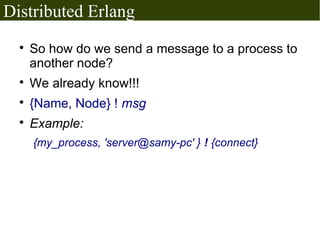
      So how do we send a message to a process to
      another node?
  
      We already know!!!
  
      {Name, Node} ! msg
  
      Example:
      {my_process, 'server@samy-pc' } ! {connect}
Final example
 
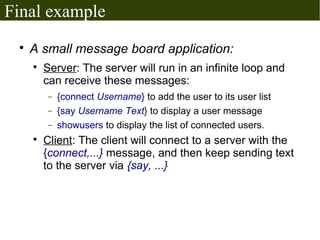
     A small message board application:
     
         Server: The server will run in an infinite loop and
         can receive these messages:
         −   {connect Username} to add the user to its user list
         −   {say Username Text} to display a user message
         −   showusers to display the list of connected users.
     
         Client: The client will connect to a server with the
         {connect,...} message, and then keep sending text
         to the server via {say, ...}
Help: Erlang command line on Windows

 
     Go to start menu → Run
 
     Write: cmd.exe and press enter
 
     From the command line:
     c:> cd "c:Program fileserl5.7.4bin" <enter>
     c:...> werl.exe -sname node1 -setcookie mysecret
 
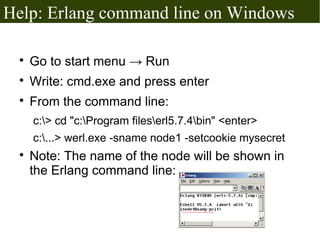
     Note: The name of the node will be shown in
     the Erlang command line:
Let's take a breath
More stuff in Erlang...
  
      Error handling using workers, supervisors
      and supervision trees.
  
      Bit syntax and bit operations
  
      The built-in Mnesia database (and others)
  
      List comprehensions:
      L = [ {X, Y} || X<- [1,2,3,4], Y <-[1,2,3,4], X+Y==5]
      L = [ {1, 4}, {2, 3}, {3, 2}, {4,1} ]
  
      Web applications, GUI applications,
      Networking, OpenGL, other databases...
  
      ....etc
The end!

Erlang session2

  • 1.
    Three sessions aboutErlang Session 2 Mohamed Samy February 2010
  • 2.
    Boolean value isErlang  The atoms true and false represent truth and falsehood.  Equality testing (not matching) is via the == operator. Inequality is via /=  We also have =:= and =/= for exact equality and exact inequality (e.g 1.0 == 1 is true but 1.0 =:= 1 is false).  We have the boolean operators and, or, not, xor, andalso, orelse (the last two are for short- circuit evaluation).
  • 3.
    The if expression if guardSeq1 -> body1 ; ... guardSeqN -> bodyN end  if...end is an expression, so it evaluates to a value.
  • 4.
    The if expression max(A,B) → if A>=B → A ; true → B end.  The value of the whole if...end is the return value of the function.  Each guard expression will be tested in order until one of them is true, this will be the value of the if...end  Since the atom true always represents the truth value, we can put it as the last guard sequence of if...end to work like an 'else'.  Erlang also has a case...end statement that supports pattern matching.
  • 5.
    Anonymous functions  In Erlang (and other languages) the programmer can write expressions that evaluate to functions. Erlang calls them "fun expressions".  The syntax is: fun (params1) optional_when_guards1 → body1 ; ... (paramsN) optional_when_guardsN -> BodyN end  The second form, like normal functions, uses pattern matching (or when ...) to choose which body to execute.  When using the second form, all parameter lists must have the same number of params.
  • 6.
    Anonymous functions  Example 1: F1 = fun(X, Y) x+y end. Result = F1(10, 20).  Example 2: F2 = fun (Age) when Age<=12 → child; (Age) when Age<= 19 → teen; (Age) when Age <= 50 → normal; ( _ ) → old end. F2(30).
  • 7.
    Higher order functions  These are functions that take functions as parameters or return functions as results.  Some built-in HOFs:  lists:any(testFunc, list) Even = fun (X) (X rem 2) == 0 end. lists:any(Even,[1, 2 ,3, 4]). − This will test if any member of the given list even (which is true).  Also lists:all, lists:foldl, lists:foldr, lists:mapfoldl  And many other functions!
  • 8.
    Actors  Concurrency has many hard-to-debug problems.  For example, the lost update problem: void a( ) { x= readSharedValue() x= x + 100 writeSharedValue(X) } void b( ) { x= readSharedValue() x= x + 50 writeSharedValue(X) }  Traditional languages solves this problems via locks  But locks have problems of their own (e.g the deadlock problem).  And there are many more problems...
  • 9.
    Actors  An actor is a computational entity which has a mailbox and behavior.  Actors can send messages to each other; messages sent to an actor are buffered in its mailbox.  Upon receiving a message an actor 's behavior is executed, now it can:  Send messages to other actors;  Create new actors;  Designate new behavior for the next message it receives.  There is no assumed sequence to the above actions and they could be carried out in parallel.
  • 10.
    Actors vs. functioncalls  A function A that calls B will (normally) wait for B to return, but sending message is inherently asynchronous.  A called function must return to its caller, but an actor that receives a message can...  Respond to the caller  Respond by sending a message to another actor that it knows.  Respond by sending to an actor specified in the message.  Not send anything  ...etc ...etc
  • 11.
    Actors in Erlang  Actors in Erlang are called processes.  Erlang is designed for massive concurrency, Erlang processes are:  Light-weight (grow and shrink dynamically).  Have small memory footprint  Are fast to create and terminate  Their scheduling overhead is low.  A program can have thousands of concurrent processes running with no problem.
  • 12.
    Actors in Erlang  Processes have 4 main operations in Erlang:  spawn(...) creates a new process and returns its PID.  ! is the message send operator  receive...end is used to specify how to respond to messages  register(...) is used to give names to a process, other parts of the program can then access that process via the name.
  • 13.
    Creating new processes  spawn(Module, Function, [ arg1, arg2...] )  Creates a new process which starts by running function with the specified arguments.  The caller of spawn resumes working normally and doesn't wait for the process to end.  Returns a data of type Process ID (PID), which is used to access the process.  There exist a number of other spawn(...) BIFs, for example spawn/4 for spawning a process at another node.
  • 14.
    Message send  receiver ! message  The receiver is an expression whose value is one of: − A PID − A registered process name (using register(...) ) − A tuple {Name, Node} , both atoms.  The message is any Erlang term.  Notes: − Message sending is asynchronous. − The message is guaranteed to eventually reach the recipient, provided that the recipient exists. − Sending to a non-existent node doesn't produce an error. − The value of the expression a ! b is the same as b
  • 15.
    receiving messages receive Pattern1 [when GuardSeq1] -> Body1; ... PatternN [when GuardSeqN] -> BodyN end  Receives messages sent with `!` to the current process's mailbox.  The [when guard_sequence] part is optional.  When receiving a message, it is matched with each of the patterns (and guard sequences). When the first match happens, it's body is executed.
  • 16.
    receiving messages  Messages do not have to be received in the order they were sent.  If the mailbox is empty or has no valid messages; execution is suspended (possibly indefinitely) until a suitable message arrives.  The return value of the body is the return value of the whole receive expression.  A receive can have a timeout: receive .... .... after timeout_expr -> Body end
  • 17.
    register ( )  register(Name, Pid)  Name is an atom, used to access the process later.  Pid is....a PID  Remember, the receiver in a message send operation like a ! b can be a registered process name.  It is allowed (but not required) to give the same name for a process and function.
  • 18.
    Example actor: Hi,Bye! -module(hi_bye). -export(run/0). run ( )-> receive hi → io:format("bye!~n", [ ]), run( ), end. after compiling the module: erlang> PID = spawn(hi_bye, run, [ ]). erlang> PID ! hi.
  • 19.
    Example actor: acounter (Interactive)
  • 20.
    Ping! Pong! We have2 processes: player1 & player2  player2 goes in a loop where it can receive one of 2 messages: − {ping, ReplyToPID} makes player2 respond by sending the message pong to the process denoted by ReplyToPID − stop makes player2 print “finish” on the screen and exit the loop  player1 takes a parameter N and does the following: − repeat N times:  send the tuple {ping, self( )} to player2  receive the atom pong from player2 − send stop to player2 − print "finish" and exit.  player2 will have a name created using register( ), all messages to player2 will use the registered name.  Note: self( ) is a built-in function that returns the ID of the process which called it.
  • 21.
  • 22.
  • 23.
    Distributed Erlang  Each Erlang system running on a computer is called an Erlang node.  A node can have a name, either a short name or a long name.  The name allows other nodes to access it.  For two Erlang nodes to communicate, they must have the same secret cookie. (for security reasons).
  • 24.
    Distributed Erlang  Short and long names: − When using short names we assume that all nodes are in the same IP domain and we can use only the first component of the IP address. − If we want to use nodes in different domains we use -name instead for long names, but then all IP address must be given in full.
  • 25.
    Names and cookies  Names and cookies are passed to Erlang via the command line: erl -sname server -setcookie mysecret OR erl -name server@127.0.0.1 -setcookie mysecret − Note: On Windows you can use erl.exe (console) or werl.exe (GUI).  A running program can read its own node's name with the node() function and can set and get the cookie with the set_cookie(...) and get_cookie( ) functions.
  • 26.
    Distributed Erlang  So how do we send a message to a process to another node?  We already know!!!  {Name, Node} ! msg  Example: {my_process, 'server@samy-pc' } ! {connect}
  • 27.
    Final example  A small message board application:  Server: The server will run in an infinite loop and can receive these messages: − {connect Username} to add the user to its user list − {say Username Text} to display a user message − showusers to display the list of connected users.  Client: The client will connect to a server with the {connect,...} message, and then keep sending text to the server via {say, ...}
  • 28.
    Help: Erlang commandline on Windows  Go to start menu → Run  Write: cmd.exe and press enter  From the command line: c:> cd "c:Program fileserl5.7.4bin" <enter> c:...> werl.exe -sname node1 -setcookie mysecret  Note: The name of the node will be shown in the Erlang command line:
  • 29.
  • 30.
    More stuff inErlang...  Error handling using workers, supervisors and supervision trees.  Bit syntax and bit operations  The built-in Mnesia database (and others)  List comprehensions: L = [ {X, Y} || X<- [1,2,3,4], Y <-[1,2,3,4], X+Y==5] L = [ {1, 4}, {2, 3}, {3, 2}, {4,1} ]  Web applications, GUI applications, Networking, OpenGL, other databases...  ....etc
  • 31.