Erlang Intro
Balaji G
History
● Joe Armstrong Invented Erlang (he is no more with us)
● Created in 1986 for ericsson telecom systems ,
● Open-sourced in 1998 by ericsson
● Achieved uptime 99.9% in telecom systems
5 Reasons to Learn Erlang By Author Joe
Here are five reasons why you should learn Erlang:
• You want to write programs that run faster when you run them on a multicore
computer.
• You want to write fault-tolerant applications that can be modified without taking them
out of service.
• You’ve heard about “functional programming” and you’re wondering whether the
techniques really work.
• You want to use a language that has been battle tested in real large-scale industrial
products that has great libraries and an active user community.
• You don’t want to wear your fingers out by typing lots of lines of code.
WHY ERLANG?
❖ There are so many programming Languages c, c++, java, python, ruby,
haskell, java, scala etc
❖ Scalability
❖ High Performance
❖ Fault Tolerance
❖ Concurrency
Things Created in Erlang
➔ Whatsapp
➔ RabbitMQ (Message Broker)
➔ Mnesia
➔ RIAK Database (No SQL, Key- value data store)
➔ Ejabberd
Installation
sudo apt-get install erlang
Starting Erlang Shell
bala@bala:~$ erl
Erlang/OTP 21 [erts-10.2.4] [source] [64-bit] [smp:4:4] [ds:4:4:10] [async-threads:1]
Eshell V10.2.4 (abort with ^G)
1>
q(). % to quit erl shell
Cntl + G to abort shell
i interrupt current shel
j list current shell details
Lets See Some Arithmetic
Operations
1> 5/3.
1.66667
2> 4/2.
2.00000
3> 5 div 3.
1
4> 5 rem 3.
2
5> 4 div 2.
2
Basic Operations
6> Pi = 3.14159.
3.14159
7>R = 5.
5
8> Pi * R * R.
78.5397
Variables
1. Should be Start with UPPER CASE Letter
2. Once assigned Value that can’t be changed .
3. (e.x) X = 10 , you can’t change the value of X into something else
4. Erlang Strictly follows Mathematics L.H.S = R.H.S
5. X = 6.
6. X = 4+ 2.
7. X = 10.
** exception error: no match of right hand side value 10
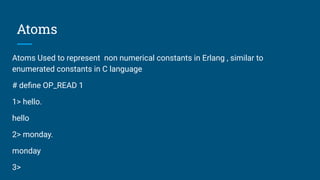
Atoms
Atoms Used to represent non numerical constants in Erlang , similar to
enumerated constants in C language
# define OP_READ 1
1> hello.
hello
2> monday.
monday
3>
Tuples
● Group fixed number of items in to a single entity , it is similar to struct in c
● In C Struct Point {
Int x,
Int y;
} P;
● P = {10, 45} % it denotes the Point X, Y
● In Erlang , the is no type declarations .
1>Person ={person, {name, bala}, {height, 5.4}, {eyecolor, brown}}.
{person,{name,bala},{height,5.4},{eyecolor,brown}}
Extracting Values from Tuples
Point = {point, 10, 45}.
{point, X, Y} = Point.
3> X.
10
4> Y.
45
Pattern Matching in detail
Eshell V10.2.4 (abort with ^G)
1> Person ={person, {name, bala}, {height, 5.4}, {eyecolor, brown}}.
{person,{name,bala},{height,5.4},{eyecolor,brown}}
2> {_,{_, Who}, _, _} = Person.
{person,{name,bala},{height,5.4},{eyecolor,brown}}
3> Who.
bala
hyphen(_) is called “Anonymous variable” in Erlang . It’s like a placeholder we are
not interested in it or don’t want the values of those.
Lists
1>L = [1,2,3,4,5].
● First element of the list is called “Head”
● Rest of the elements in list called “Tail” (This always should be list)
● Reading Head in O(1) , it’s always efficient in Erlang
● In Erlang we always pick head , and do operation
● [Head, Tail] = L.
● Head.
1
● Tail.
[2,3,4,5]
List Inbuilt Operations
4> L = [1,3,4,5].
[1,3,4,5]
5> lists:sum(L).
13
6> lists:max(L).
5
7> lists:min(L).
1
List Comprehensions
1> [2*N || N <- [1,2,3,4]].
[2,4,6,8]
2> [X || X <- [1,2,3,4,5,6,7,8,9,10], X rem 2 =:= 0].
[2,4,6,8,10]
3> [X+Y || X <- [1,2], Y <- [3,4]].
[4,5,5,6]
Strings
● String are enclosed in double quotes in Erlang (“) , Note in other
programming string can be single or double quotes but in erlang only double
quotes.
● > Name = “Balaji”.
“Balaji”
● Literally there are no strings in erlang it’s just a numbers in erlang
● To know which integer represents which character use dollar syntax
● 1> $a.
97
Does That Mean Erlang is Poor in String
Processing?
● Don’t lose hope , Erlang factory is an organisation has
created an “Artifical Intelligence “ for Robots in Erlang .
●
Hello World In Erlang
-module(hello).
-export([hello/0]).
hello() -> io:fwrite("Hello World!").
Compiling and Running Erlang Code
bala@bala:~/erlcodes/codes/othercodes$ erl
Erlang/OTP 21 [erts-10.2.4] [source] [64-bit] [smp:4:4]
[ds:4:4:10] [async-threads:1]
Eshell V10.2.4 (abort with ^G)
1> c(hello).
{ok,hello}
2> hello:hello().
Hello World!ok
Factorial Program in Erlang
-module(fac).
-export([fac/1]).
fac(0) -> 1;
fac(N) -> N*fac(N-1).
1> c(fac).
{ok, fac}
2> fac:fac(5).
120
Books to Learn Erlang
● Programming Erlang By “Joe Armstrong” (Creator of
Erlang)
● Learn You Some Erlang By “Fred Hebret”
● Erlang and OTP in Action by “Martin Logan”
Questions ?
Thanks !!!

Erlang

  • 1.
  • 2.
    History ● Joe ArmstrongInvented Erlang (he is no more with us) ● Created in 1986 for ericsson telecom systems , ● Open-sourced in 1998 by ericsson ● Achieved uptime 99.9% in telecom systems
  • 3.
    5 Reasons toLearn Erlang By Author Joe Here are five reasons why you should learn Erlang: • You want to write programs that run faster when you run them on a multicore computer. • You want to write fault-tolerant applications that can be modified without taking them out of service. • You’ve heard about “functional programming” and you’re wondering whether the techniques really work. • You want to use a language that has been battle tested in real large-scale industrial products that has great libraries and an active user community. • You don’t want to wear your fingers out by typing lots of lines of code.
  • 4.
    WHY ERLANG? ❖ Thereare so many programming Languages c, c++, java, python, ruby, haskell, java, scala etc ❖ Scalability ❖ High Performance ❖ Fault Tolerance ❖ Concurrency
  • 5.
    Things Created inErlang ➔ Whatsapp ➔ RabbitMQ (Message Broker) ➔ Mnesia ➔ RIAK Database (No SQL, Key- value data store) ➔ Ejabberd
  • 6.
  • 7.
    Starting Erlang Shell bala@bala:~$erl Erlang/OTP 21 [erts-10.2.4] [source] [64-bit] [smp:4:4] [ds:4:4:10] [async-threads:1] Eshell V10.2.4 (abort with ^G) 1> q(). % to quit erl shell Cntl + G to abort shell i interrupt current shel j list current shell details
  • 8.
    Lets See SomeArithmetic Operations
  • 9.
    1> 5/3. 1.66667 2> 4/2. 2.00000 3>5 div 3. 1 4> 5 rem 3. 2 5> 4 div 2. 2 Basic Operations 6> Pi = 3.14159. 3.14159 7>R = 5. 5 8> Pi * R * R. 78.5397
  • 10.
    Variables 1. Should beStart with UPPER CASE Letter 2. Once assigned Value that can’t be changed . 3. (e.x) X = 10 , you can’t change the value of X into something else 4. Erlang Strictly follows Mathematics L.H.S = R.H.S 5. X = 6. 6. X = 4+ 2. 7. X = 10. ** exception error: no match of right hand side value 10
  • 11.
    Atoms Atoms Used torepresent non numerical constants in Erlang , similar to enumerated constants in C language # define OP_READ 1 1> hello. hello 2> monday. monday 3>
  • 12.
    Tuples ● Group fixednumber of items in to a single entity , it is similar to struct in c ● In C Struct Point { Int x, Int y; } P; ● P = {10, 45} % it denotes the Point X, Y ● In Erlang , the is no type declarations . 1>Person ={person, {name, bala}, {height, 5.4}, {eyecolor, brown}}. {person,{name,bala},{height,5.4},{eyecolor,brown}}
  • 13.
    Extracting Values fromTuples Point = {point, 10, 45}. {point, X, Y} = Point. 3> X. 10 4> Y. 45
  • 14.
    Pattern Matching indetail Eshell V10.2.4 (abort with ^G) 1> Person ={person, {name, bala}, {height, 5.4}, {eyecolor, brown}}. {person,{name,bala},{height,5.4},{eyecolor,brown}} 2> {_,{_, Who}, _, _} = Person. {person,{name,bala},{height,5.4},{eyecolor,brown}} 3> Who. bala hyphen(_) is called “Anonymous variable” in Erlang . It’s like a placeholder we are not interested in it or don’t want the values of those.
  • 15.
    Lists 1>L = [1,2,3,4,5]. ●First element of the list is called “Head” ● Rest of the elements in list called “Tail” (This always should be list) ● Reading Head in O(1) , it’s always efficient in Erlang ● In Erlang we always pick head , and do operation ● [Head, Tail] = L. ● Head. 1 ● Tail. [2,3,4,5]
  • 16.
    List Inbuilt Operations 4>L = [1,3,4,5]. [1,3,4,5] 5> lists:sum(L). 13 6> lists:max(L). 5 7> lists:min(L). 1
  • 17.
    List Comprehensions 1> [2*N|| N <- [1,2,3,4]]. [2,4,6,8] 2> [X || X <- [1,2,3,4,5,6,7,8,9,10], X rem 2 =:= 0]. [2,4,6,8,10] 3> [X+Y || X <- [1,2], Y <- [3,4]]. [4,5,5,6]
  • 18.
    Strings ● String areenclosed in double quotes in Erlang (“) , Note in other programming string can be single or double quotes but in erlang only double quotes. ● > Name = “Balaji”. “Balaji” ● Literally there are no strings in erlang it’s just a numbers in erlang ● To know which integer represents which character use dollar syntax ● 1> $a. 97
  • 19.
    Does That MeanErlang is Poor in String Processing? ● Don’t lose hope , Erlang factory is an organisation has created an “Artifical Intelligence “ for Robots in Erlang . ●
  • 20.
    Hello World InErlang -module(hello). -export([hello/0]). hello() -> io:fwrite("Hello World!").
  • 21.
    Compiling and RunningErlang Code bala@bala:~/erlcodes/codes/othercodes$ erl Erlang/OTP 21 [erts-10.2.4] [source] [64-bit] [smp:4:4] [ds:4:4:10] [async-threads:1] Eshell V10.2.4 (abort with ^G) 1> c(hello). {ok,hello} 2> hello:hello(). Hello World!ok
  • 22.
    Factorial Program inErlang -module(fac). -export([fac/1]). fac(0) -> 1; fac(N) -> N*fac(N-1). 1> c(fac). {ok, fac} 2> fac:fac(5). 120
  • 23.
    Books to LearnErlang ● Programming Erlang By “Joe Armstrong” (Creator of Erlang) ● Learn You Some Erlang By “Fred Hebret” ● Erlang and OTP in Action by “Martin Logan”
  • 24.
  • 25.