TECHNOLOGIES
FOR ONLINE
TEACHING AND
LEARNING :
INSTRUCTION
Topics
Video
Conferencing
Menu
Technologies
Google
Meet
Google
Classroom
Activity
Takeaways
Topics
Video
Conferencing
Menu
Technologies
Google
Meet
Google
Classroom
Activity
Takeaways
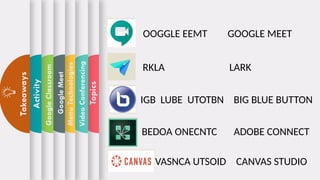
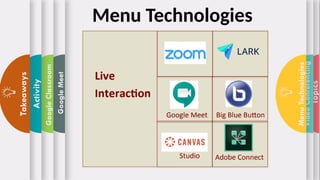
OOGGLE EEMT GOOGLE MEET
RKLA LARK
IGB LUBE UTOTBN BIG BLUE BUTTON
BEDOA ONECNTC ADOBE CONNECT
VASNCA UTSOID CANVAS STUDIO
Topics
Video
Conferencing
Menu
Technologies
Google
Meet
Google
Classroom
Activity
Takeaways
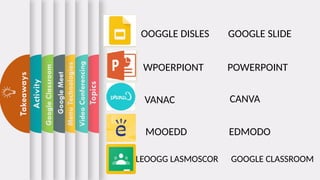
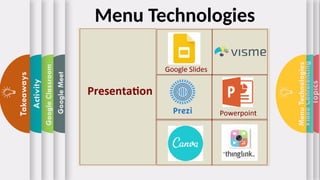
OOGGLE DISLES GOOGLE SLIDE
WPOERPIONT POWERPOINT
VANAC
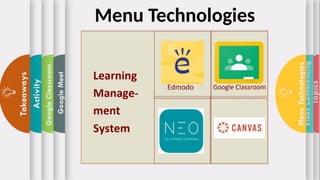
MOOEDD
CANVA
EDMODO
LEOOGG LASMOSCOR GOOGLE CLASSROOM
Topics
Video
Conferencing
Menu
Technologies
Google
Meet
Google
Classroom
Activity
Takeaways
Basic Steps in
Using Google
Classroom
Basic Steps in
using Google
meet
Menu
Technologies
Video
Conferencing
Topics
Video
Conferencing
Menu
Technologies
Google
Meet
Google
Classroom
Activity
Takeaways
Video
Conferencing
Basic Steps in
Using Google
Classroom
Basic Steps in
using Google
meet
Menu
Technologies
Video
Conferencing
Topics
Video
Conferencing
Menu
Technologies
Google
Meet
Google
Classroom
Activity
Takeaways
Video
Conferencing
Menu
Technologies
Basic Steps in
Using Google
Classroom
Basic Steps in
using Google
meet
Menu
Technologies
Topics
Video
Conferencing
Menu
Technologies
Google
Meet
Google
Classroom
Activity
Takeaways
Video
Conferencing
Basic Steps in
Using Google
Meet
Menu
Technologies
Basic Steps in
Using Google
Classroom
Basic Steps in
using Google
meet
Menu
Technologies
Topics
Video
Conferencing
Menu
Technologies
Google
Meet
Google
Classroom
Activity
Takeaways
Video
Conferencing
Using Google
Meet
Using
Google
Classroom
Menu
Technologies
Topics
Video
Conferencing
Menu
Technologies
Google
Meet
Google
Classroom
Activity
Takeaways
Topics
Video
Conferencing
Menu
Technologies
Google
Meet
Google
Classroom
Activity
Takeaways
Topics
Video
Conferencing
Menu
Technologies
Google
Meet
Google
Classroom
Activity
Takeaways
Topics
Video
Conferencing
Menu
Technologies
Google
Meet
Google
Classroom
Activity
Takeaways
Topics
Video
Conferencing
Menu
Technologies
Google
Meet
Google
Classroom
Activity
Takeaways
Steps in Video Conferencing
Video conferencing and video training are powerful and cost-effective
methods for delivering the education your team needs without bearing the
exorbitant cost of travel. But for video conferencing or training to work well, there
are steps you should take to ensure the quality of the experience.
Step One: Test everything
There is nothing worse than having a group of people set time aside for a
video conference only to have the conference leader experience technical
difficulties. Test the equipment with colleagues prior to your conference.
 Make sure you understand the software well enough to confidently
manage the meeting
 Ensure the hardware is all functional:
o Video displays properly
o Sound quality and volume is sufficient
o Internet speed is fast enough to handle the video
 Ancillary equipment, such as headphones and microphones, function
 Practice with screen sharing software if you’re going to be delivering your
screen to your attendees so that everything runs smoothly
Topics
Video
Conferencing
Menu
Technologies
Google
Meet
Google
Classroom
Activity
Takeaways
Step Two: Prepare the conference room
An unanticipated issue with video conferencing is having the proper
lighting. You’re not a TV studio, but you can mimic one by choosing an
interior room that doesn’t have windows. Sunlight can cause
unexpected issues with your on-camera visibility that can be
distracting. Diffused light is better than direct light for video quality. The
size of the conference room or meeting will determine the type of
microphone you use. For larger rooms with several participants, ceiling
mics are preferable; for smaller groups or individuals, a desk
microphone or headphones with a microphone work very well.
Steps in Video Conferencing
Topics
Video
Conferencing
Menu
Technologies
Google
Meet
Google
Classroom
Activity
Takeaways
Step Three: Control what will be captured on camera
Will the people watching your video be distracted by the motivational
poster behind you that makes it look like a surfer is rising out of the top
of your head? Bare walls, painted a subdued color make the best
backgrounds for video conferences and video training.
.
Steps in Video Conferencing
Topics
Video
Conferencing
Menu
Technologies
Google
Meet
Google
Classroom
Activity
Takeaways
Step Four: Dress the part
Whether you’re dialing in from home, the beach, or the corporate
headquarters, a video conference requires you to be dressed
professionally. It can be tempting to dress casually or only dress
professionally for the part of you that is visible, but it’s worth the effort.
Steps in Video Conferencing
Topics
Video
Conferencing
Menu
Technologies
Google
Meet
Google
Classroom
Activity
Takeaways
Step Five: During the Call, Follow Proper Communication
Etiquette
Allow time for introductions so that everyone knows who is connected.
Mute your mic when you’re not speaking to eliminate distracting
background noise from the call.
Avoid tapping pens, shuffling papers, and making other noise that
might be amplified by the mic.
Look into your camera when you’re speaking so that the others feel
you’re communicating to them and not your computer monitor.
If conference participants are in multiple locations, identify yourself and
your location prior to speaking.
Steps in Video Conferencing
Topics
Video
Conferencing
Menu
Technologies
Google
Meet
Google
Classroom
Activity
Takeaways
Step Six: Speak clearly
Even with the best equipment, it can be difficult for some people to
understand what you’re saying across the miles, so be sure to speak
clearly. If your equipment is working properly, you will not have to shout
into your microphone. Be patient when beginning to speak to make
sure you won’t be speaking over another, and if there is anyone
participating in the conference who is not on video, be sure to introduce
yourself each time you speak as a courtesy.
Steps in Video Conferencing
Topics
Video
Conferencing
Menu
Technologies
Google
Meet
Google
Classroom
Activity
Takeaways
Step Seven: Be organized
As with any gathering of busy people, be prepared. Have an agenda
and clear talking points. Know the purpose of your video conference
and what you’re trying to accomplish. Don’t waste your attendees’ time
by veering off course or traveling down a tangent.
Steps in Video Conferencing
Topics
Video
Conferencing
Menu
Technologies
Google
Meet
Google
Classroom
Activity
Takeaways
Step Eight: Have a backup plan
You can plan everything and still have the electricity go out. So have a
backup plan, whether it’s to reschedule, hop on an old-fashioned phone
conference using your cell phones, or simply send out a recorded video
at a later time.
Steps in Video Conferencing
Topics
Video
Conferencing
Menu
Technologies
Google
Meet
Google
Classroom
Activity
Takeaways Menu Technologies
Topics
Video
Conferencing
Menu
Technologies
Google
Meet
Google
Classroom
Activity
Takeaways Menu Technologies
Topics
Video
Conferencing
Menu
Technologies
Google
Meet
Google
Classroom
Activity
Takeaways Menu Technologies
Topics
Video
Conferencing
Menu
Technologies
Google
Meet
Google
Classroom
Activity
Takeaways
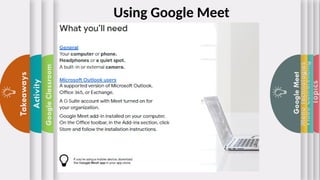
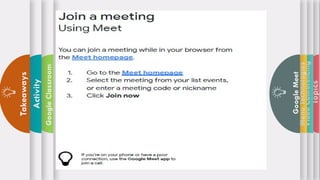
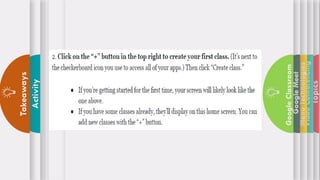
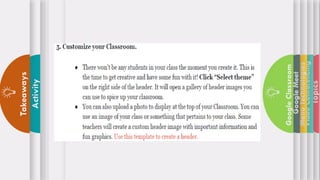
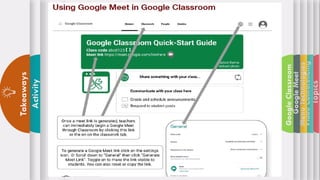
Using Google Meet
Topics
Video
Conferencing
Menu
Technologies
Google
Meet
Google
Classroom
Activity
Takeaways
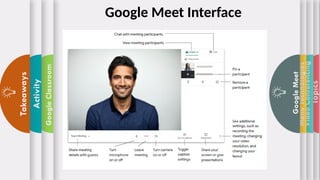
Google Meet Interface
Topics
Video
Conferencing
Menu
Technologies
Google
Meet
Google
Classroom
Activity
Takeaways
Topics
Video
Conferencing
Menu
Technologies
Google
Meet
Google
Classroom
Activity
Takeaways
Topics
Video
Conferencing
Menu
Technologies
Google
Meet
Google
Classroom
Activity
Takeaways
Topics
Video
Conferencing
Menu
Technologies
Google
Meet
Google
Classroom
Activity
Takeaways
Topics
Video
Conferencing
Menu
Technologies
Google
Meet
Google
Classroom
Activity
Takeaways
Topics
Video
Conferencing
Menu
Technologies
Google
Meet
Google
Classroom
Activity
Takeaways
Topics
Video
Conferencing
Menu
Technologies
Google
Meet
Google
Classroom
Activity
Takeaways
Topics
Video
Conferencing
Menu
Technologies
Google
Meet
Google
Classroom
Activity
Takeaways
Topics
Video
Conferencing
Menu
Technologies
Google
Meet
Google
Classroom
Activity
Takeaways
Topics
Video
Conferencing
Menu
Technologies
Google
Meet
Google
Classroom
Activity
Takeaways
Topics
Video
Conferencing
Menu
Technologies
Google
Meet
Google
Classroom
Activity
Takeaways
Topics
Video
Conferencing
Menu
Technologies
Google
Meet
Google
Classroom
Activity
Takeaways
Topics
Video
Conferencing
Menu
Technologies
Google
Meet
Google
Classroom
Activity
Takeaways
Topics
Video
Conferencing
Menu
Technologies
Google
Meet
Google
Classroom
Activity
Takeaways
Topics
Video
Conferencing
Menu
Technologies
Google
Meet
Google
Classroom
Activity
Takeaways
Topics
Video
Conferencing
Menu
Technologies
Google
Meet
Google
Classroom
Activity
Takeaways
Topics
Video
Conferencing
Menu
Technologies
Google
Meet
Google
Classroom
Activity
Takeaways
Topics
Video
Conferencing
Menu
Technologies
Google
Meet
Google
Classroom
Activity
Takeaways
Group Activity
Group 1 and 2- work on Google Meet
Group 3 and 4- work on Google Classroom
Topics
Principles
Guidelines
Technological
Tools
Menu
Technologies
Activity
Takeaways

EPP-TLE Presentation.pptx Technologies for Online Teaching and Learning Instruction