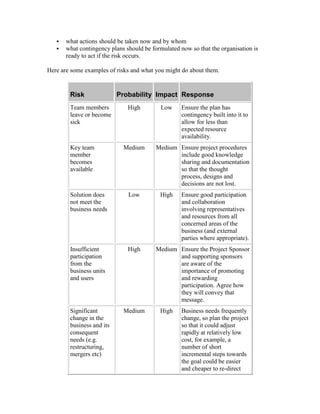
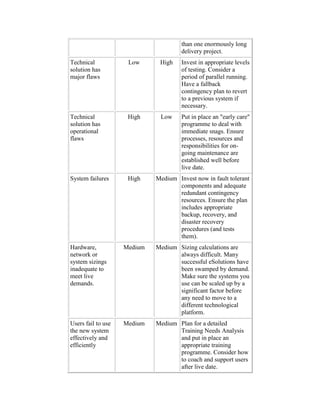
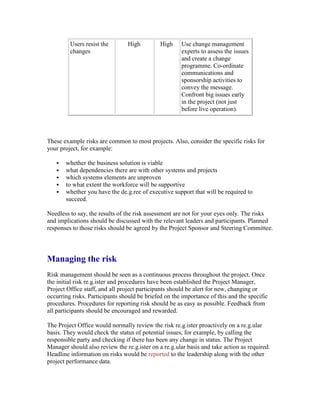
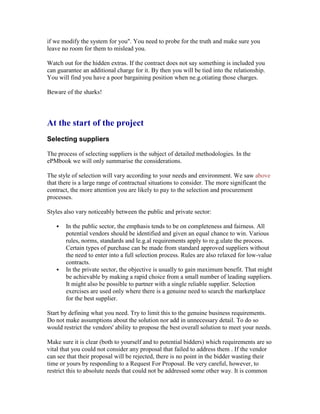
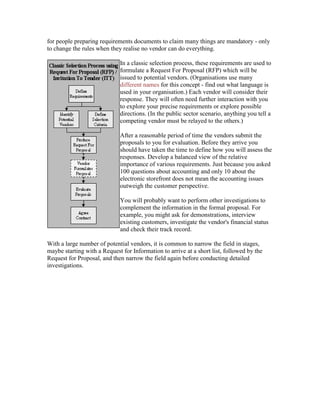
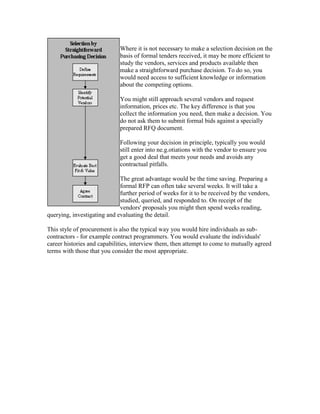
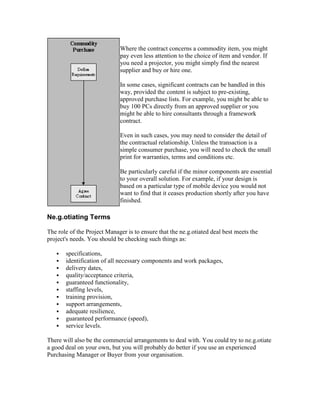
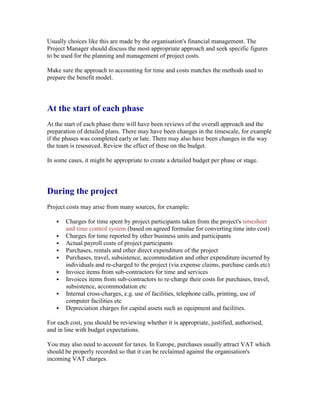
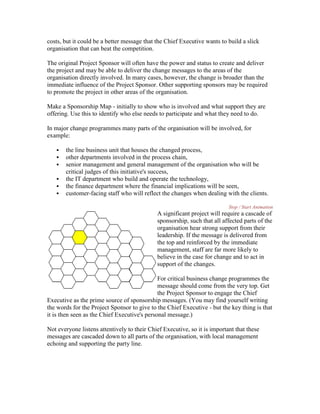
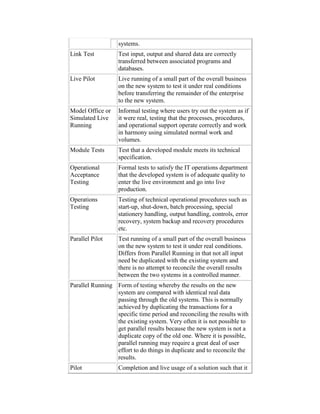
Introduction
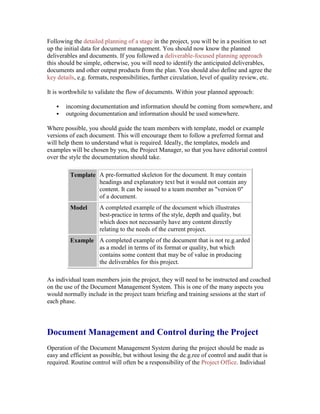
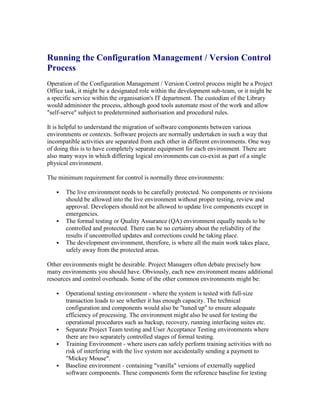
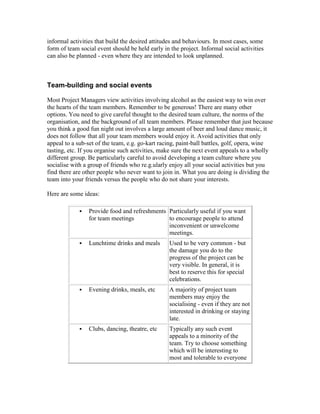
The ePMbook is double-e'd. It is an ebook about eProject Management as well as
conventional Programme and Project Management. Its aim is to examine issues, needs
and approaches in a variety of situations and environments. It should give you the ability
to understand what is needed and why, plus how you can best address those needs.
It is not intended to provide a methodology nor to replace the need for methodology.
Each organisation or individual manager will need to identify appropriate methodology
and tools for their own situation. There is no one approach that works best in all
circumstances. Many organisations have their own defined approach to project
management. Certain approaches are published by institutions or public sector bodies for
use in a large number of organisations. There is no one universal standard - nor should
there be, for different projects in different organisations in different environments have
different needs.
There are two main types of content in the ePMbook:
 the Project Manager's Day Job - structured examination of the various concerns
and activities of a Project Manager
 the Project Manager's Night School - thoughts, issues, concepts, drivers and
considerations which a good Project Manager should understand and should help
the Project Manager choose the appropriate approach to take to the "day job"
What is an ebook?
The ePMbook is intended to be read through the web using a browser. Its organisation
and hypertext linking allows the reader to navigate the content in any sequence. You may
prefer to look at overviews or drill down into depth. You may take excursions to look at
related information; you may prefer to skip entire areas.
Since the ePMbook is published through the web, it can be updated instantly, either to
include new ideas and concepts, or to improve the breadth or depth of its coverage. It will
be worth re-visiting from time to time. You can find out what has changed on the "what's
new in this edition" page.
Project Management - Overview
Common misconceptions about Project Management
Here are some questions we hear frequently that demonstrate a misunderstanding of
project management:
 What does the project manager do?
 Why doesn't the project manager do some of the work?
 Why don't we make our top specialist the project manager?
 Why does the project manager need a support team?
 Isn't this all an unnecessary overhead for the project?
Project management is a specialist discipline. In a well run project, there is a constant
array of management issues to deal with, as well as a challenging routine of project
management processes.
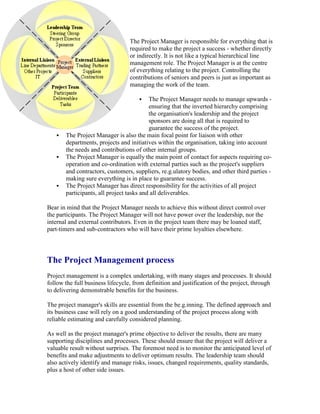
360o
Responsibility of the Project Manager
The Project Manager is responsible for everything that is
required to make the project a success - whether directly
or indirectly. It is not like a typical hierarchical line
management role. The Project Manager is at the centre
of everything relating to the project. Controlling the
contributions of seniors and peers is just as important as
managing the work of the team.
 The Project Manager needs to manage upwards -
ensuring that the inverted hierarchy comprising
the organisation's leadership and the project
sponsors are doing all that is required to
guarantee the success of the project.
 The Project Manager is also the main focal point for liaison with other
departments, projects and initiatives within the organisation, taking into account
the needs and contributions of other internal groups.
 The Project Manager is equally the main point of contact for aspects requiring co-
operation and co-ordination with external parties such as the project's suppliers
and contractors, customers, suppliers, re.g.ulatory bodies, and other third parties -
making sure everything is in place to guarantee success.
 The Project Manager has direct responsibility for the activities of all project
participants, all project tasks and all deliverables.
Bear in mind that the Project Manager needs to achieve this without direct control over
the participants. The Project Manager will not have power over the leadership, nor the
internal and external contributors. Even in the project team there may be loaned staff,
part-timers and sub-contractors who will have their prime loyalties elsewhere.
The Project Management process
Project management is a complex undertaking, with many stages and processes. It should
follow the full business lifecycle, from definition and justification of the project, through
to delivering demonstrable benefits for the business.
The project manager's skills are essential from the be.g.inning. The defined approach and
its business case will rely on a good understanding of the project process along with
reliable estimating and carefully considered planning.
As well as the project manager's prime objective to deliver the results, there are many
supporting disciplines and processes. These should ensure that the project will deliver a
valuable result without surprises. The foremost need is to monitor the anticipated level of
benefits and make adjustments to deliver optimum results. The leadership team should
also actively identify and manage risks, issues, changed requirements, quality standards,
plus a host of other side issues.
Not all these processes follow the traditional development lifecycle. In particular, it is
wrong to consider the project has finished when the new system goes live. That way you
will never know whether it delivered the planned benefits and you will probably not
achieve them! Management attention must be retained to deliver the benefits - through to
the Post-Implementation Review (PIR) and beyond. Some of the project management
processes will migrate into continuing line management processes to be used throughout
the life of the solution.
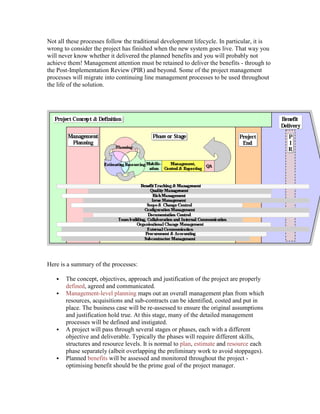
Here is a summary of the processes:
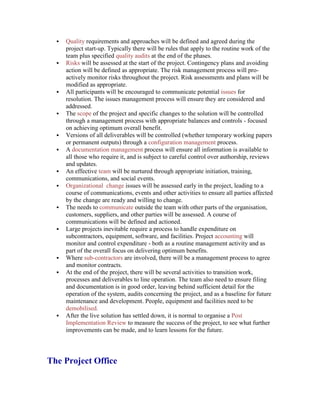
 The concept, objectives, approach and justification of the project are properly
defined, agreed and communicated.
 Management-level planning maps out an overall management plan from which
resources, acquisitions and sub-contracts can be identified, costed and put in
place. The business case will be re-assessed to ensure the original assumptions
and justification hold true. At this stage, many of the detailed management
processes will be defined and instigated.
 A project will pass through several stages or phases, each with a different
objective and deliverable. Typically the phases will require different skills,
structures and resource levels. It is normal to plan, estimate and resource each
phase separately (albeit overlapping the preliminary work to avoid stoppages).
 Planned benefits will be assessed and monitored throughout the project -
optimising benefit should be the prime goal of the project manager.
 Quality requirements and approaches will be defined and agreed during the
project start-up. Typically there will be rules that apply to the routine work of the
team plus specified quality audits at the end of the phases.
 Risks will be assessed at the start of the project. Contingency plans and avoiding
action will be defined as appropriate. The risk management process will pro-
actively monitor risks throughout the project. Risk assessments and plans will be
modified as appropriate.
 All participants will be encouraged to communicate potential issues for
resolution. The issues management process will ensure they are considered and
addressed.
 The scope of the project and specific changes to the solution will be controlled
through a management process with appropriate balances and controls - focused
on achieving optimum overall benefit.
 Versions of all deliverables will be controlled (whether temporary working papers
or permanent outputs) through a configuration management process.
 A documentation management process will ensure all information is available to
all those who require it, and is subject to careful control over authorship, reviews
and updates.
 An effective team will be nurtured through appropriate initiation, training,
communications, and social events.
 Organizational change issues will be assessed early in the project, leading to a
course of communications, events and other activities to ensure all parties affected
by the change are ready and willing to change.
 The needs to communicate outside the team with other parts of the organisation,
customers, suppliers, and other parties will be assessed. A course of
communications will be defined and actioned.
 Large projects inevitable require a process to handle expenditure on
subcontractors, equipment, software, and facilities. Project accounting will
monitor and control expenditure - both as a routine management activity and as
part of the overall focus on delivering optimum benefits.
 Where sub-contractors are involved, there will be a management process to agree
and monitor contracts.
 At the end of the project, there will be several activities to transition work,
processes and deliverables to line operation. The team also need to ensure filing
and documentation is in good order, leaving behind sufficient detail for the
operation of the system, audits concerning the project, and as a baseline for future
maintenance and development. People, equipment and facilities need to be
demobilised.
 After the live solution has settled down, it is normal to organise a Post
Implementation Review to measure the success of the project, to see what further
improvements can be made, and to learn lessons for the future.
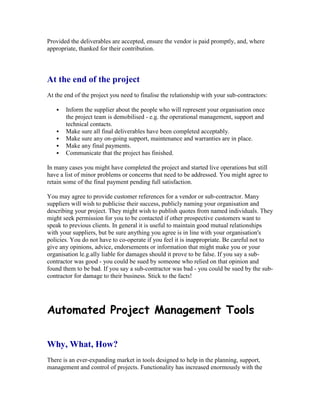
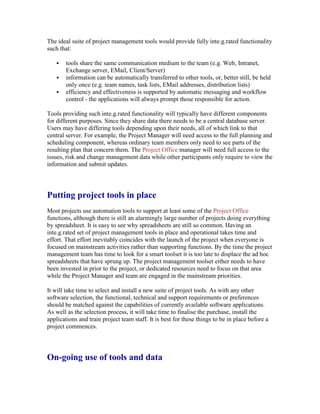
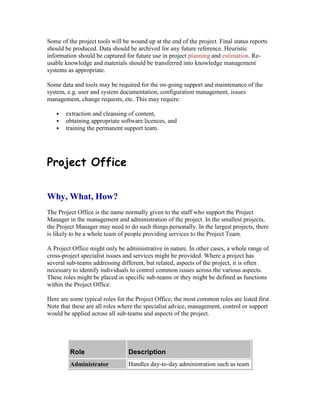
The Project Office
In a well-run project there is a lot going on. The routine project management processes
require a combination of special skills and administrative resource. Rarely is it enough
just to appoint a project manager. To do the job properly requires time and resources.
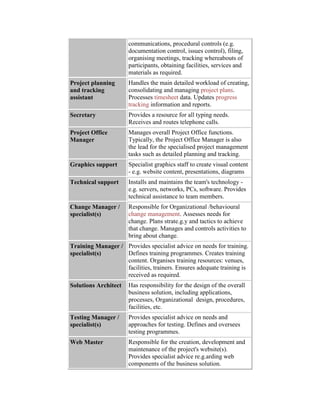
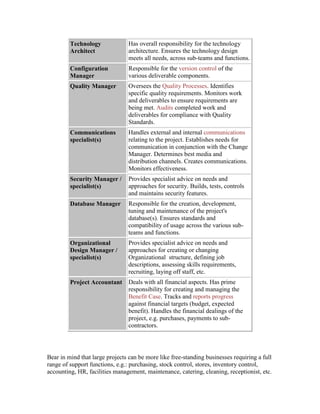
It is common to put in place a small project office team to deal with the administrative
tasks of the project, freeing up the project leadership and project resources to get on with
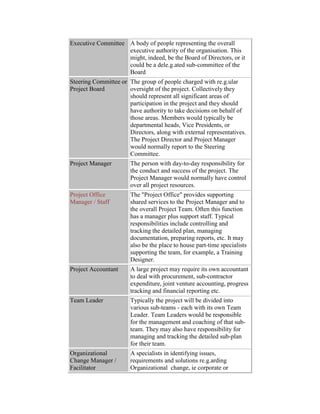
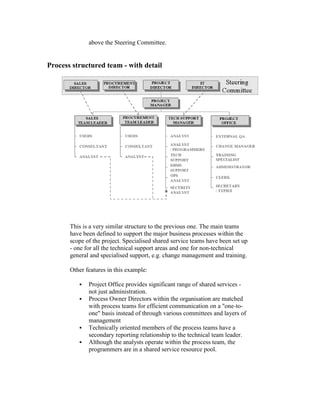
their jobs. A project office team might comprise roles such as project manager, project
planner, progress tracker, financial controller, process administrator (change control,
risks, issues, configuration, documentation management), quality controller,
communications manager, Organizational change manager, and administrative support.
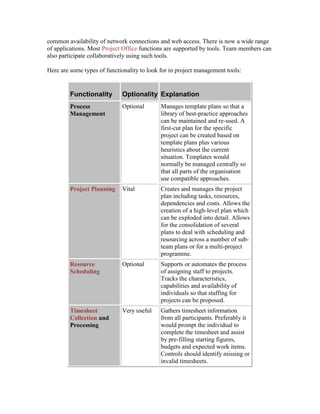
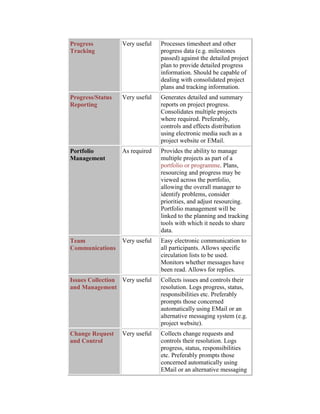
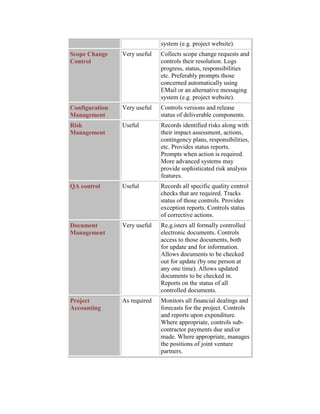
It may be beneficial to use an inte.g.rated set of support tools. Project information can be
shared among the team members from a single data source. Modern tools enable effective
communication of project information through existing user interfaces such as web
browsers and eMail. Typical uses would be to:
 make the detailed calculations concerning scheduling, costs and progress etc,
 publish progress information,
 publish individuals' task details,
 manage the workflow for submitting and handling changes, risks, and issues,
 enforce controls, for example in the "checking in" and "checking out" of
documentation.
Put in place the project management people, processes and
technology
Few organisations get the most out of their programmes and projects. Intelligently
adapting a company's current approach to adopt the features of best-practice management
approaches can lead to considerable benefits. It will ensure your objectives are realistic
and will produce optimum benefit. It will seek to deliver the goals with no surprise. It
will ensure everything is done to optimise the overall benefit to the organisation, despite
changes to the business, changes in the economy and the inevitable snags along the way.
In these uncertain times you need to be able to answer the following questions with
assurance.
 Do I have confidence in the timescales, costs and net benefits?
 Do I understand all the risks to achieving that?
 Am I certain this is the best investment we can make with our limited resources?
Each project should have a proper definition, for example: objectives, budget,
performance measures, accountabilities and timescale. It should follow well-defined
project management processes, designed to ensure it stays on track to deliver optimum
benefit. To have any de.g.ree of confidence in the outcome of a project you need to put in
place the right people with the right combination of skills. They should work with the
best practice processes and tools to make sure the project is properly defined and run.
This needs to be in place before the work starts.
To have any de.g.ree of confidence in the outcome of a project you need to put in place
the right people with the right combination of skills. They should work with the best
practice processes and tools to make sure the project is properly defined and run. This
needs to be in place before the work starts.
ePMbook Help
Web browser The ePMbook is designed to be used on graphical web
browsers which use "frames". It should be compatible
with Microsoft Internet Explorer and Netscape
Navigator from version 4 onwards.
It is assumed that the reader has an understanding of
the browser, in particular:
 scrolling using the browser's standard scroll
bars,
 use of the "Back" button.
Screen size Preferred screen size is 1024x768 but it should be
possible to use the ePMbook on smaller screens or
windows. Small screen formats may give rise to
occasional formatting difficulties. In most cases it will
be possible to scroll to see all the information. Please
report back any specific problems.
If you find it difficult to read the ePMbook using a
small screen, you can use the magnify button at the
bottom left of the screen. This will open the current text
page in a separate window which can therefore use the
full screen. You may close this extra window when you
no longer need it.
You can also try running without "frames" by clicking
here. The ePMbook is not designed to work in this way
so some of the results may be unsatisfactory.
Text size The main text size is based on the default setting for
your browser. You may prefer to change the default or
adjust the size while viewing the ePMbook.
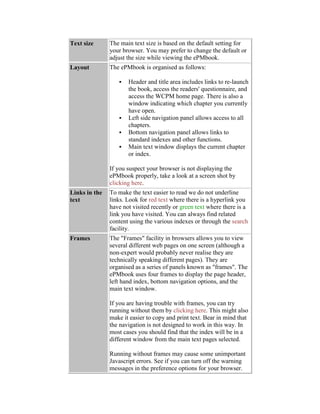
Layout The ePMbook is organised as follows:
 Header and title area includes links to re-launch
the book, access the readers' questionnaire, and
access the WCPM home page. There is also a
window indicating which chapter you currently
have open.
 Left side navigation panel allows access to all
chapters.
 Bottom navigation panel allows links to
standard indexes and other functions.
 Main text window displays the current chapter
or index.
If you suspect your browser is not displaying the
ePMbook properly, take a look at a screen shot by
clicking here.
Links in the
text
To make the text easier to read we do not underline
links. Look for red text where there is a hyperlink you
have not visited recently or green text where there is a
link you have visited. You can always find related
content using the various indexes or through the search
facility.
Frames The "Frames" facility in browsers allows you to view
several different web pages on one screen (although a
non-expert would probably never realise they are
technically speaking different pages). They are
organised as a series of panels known as "frames". The
ePMbook uses four frames to display the page header,
left hand index, bottom navigation options, and the
main text window.
If you are having trouble with frames, you can try
running without them by clicking here. This might also
make it easier to copy and print text. Bear in mind that
the navigation is not designed to work in this way. In
most cases you should find that the index will be in a
different window from the main text pages selected.
Running without frames may cause some unimportant
Javascript errors. See if you can turn off the warning
messages in the preference options for your browser.
Printing Printing using the browser's print facility can be a
problem as the screen is divided into "frames".
With most browsers, the ePMbook's print button (in the
bottom navigation panel) will select the correct frame
for printing.
If you are printing using the browser's print facility,
first select something in the main text window. Choose
the option to print the selected frame only (unless you
want the full ePMbook layout).
Navigation
Shortcuts
Index to major sections of the book should appear in
the left panel. If you do not see the expanding index
(Java support required) click on the ePMbook Index
title and a text index will appear.
Various standard links should appear across the bottom
of the screen.
The browser's standard "Back" button is the easiest
way to return from an excursion.
The main content summaries are:
 PM's day job - structured content matrix
 PM's night school - other topics of interest
 Alphabetical Index
 Index Diagram
Clicking on the ePMbook cover will take
you to the start screen of the ePMbook and
re-set the screen frames.
Search The ePMbook has a search facility using an external
indexing service. You can search for text anywhere in
the ePMbook. If you select a page that is not intended
to be shown in the ePMbook's text window you might
get some strange results. Remember - you can click on
the ePMbook cover to reset the book.
Copyright &
copying
The ePMbook, including all contents of the various
linked documents that collectively form the ePMbook,
is the copyright of Simon Wallace.
The ePMbook serves to share knowledge. The
concepts, opinions, commentaries and approaches may
be freely used in private, commercial, public sector or
academic work. Specific text, diagrams and other
content may be copied and/or reused to a limited extent
where it would be useful to the reader. Such copying or
reuse should never exceed 1000 words in any one
document or context.
Any requests for more substantial reproduction should
be referred to Simon Wallace
Versions &
updates
Since the ePMbook is published through the web, it can
be updated instantly, either to include new ideas and
concepts, or to improve the breadth or depth of its
coverage. It will be worth re-visiting from time to time.
You can find out what has changed on the "what's new
in this edition" page.
Resources
and
downloadable
files
Several of the diagrams and other resources are
available for download as PowerPoint slides or other
documents. Look for the links and "mouse-over" text
messages. There is also an index of downloadable files.
What happens when you click on one of these links
will depend on how your web browser is set up and
which plug-ins and applications you have linked to it.
You may find that the file is displayed in the web
browser window, either interpreted by the application it
is written in or by a viewer plug-in. Should you wish to
download the file instead of displaying it, try right-
clicking on the link. This should give you the option to
download the file by selecting an option to "Save
Target As" or "Save Link As" or similar option. If the
web browser is not set up to display the file, you will
get a download menu instead.
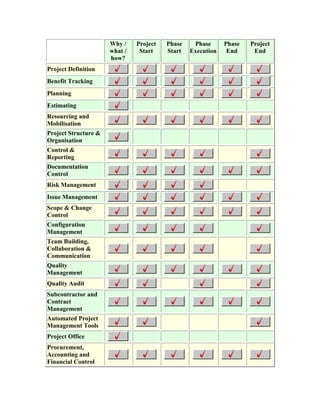
Why /
what /
how?
Project
Start
Phase
Start
Phase
Execution
Phase
End
Project
End
Project Definition
Benefit Tracking
Planning
Estimating
Resourcing and
Mobilisation
Project Structure &
Organisation
Control &
Reporting
Documentation
Control
Risk Management
Issue Management
Scope & Change
Control
Configuration
Management
Team Building,
Collaboration &
Communication
Quality
Management
Quality Audit
Subcontractor and
Contract
Management
Automated Project
Management Tools
Project Office
Procurement,
Accounting and
Financial Control
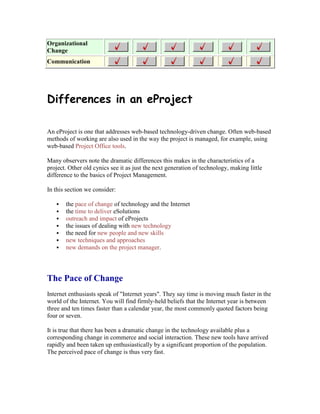
Organizational
Change
Communication
Differences in an eProject
An eProject is one that addresses web-based technology-driven change. Often web-based
methods of working are also used in the way the project is managed, for example, using
web-based Project Office tools.
Many observers note the dramatic differences this makes in the characteristics of a
project. Other old cynics see it as just the next generation of technology, making little
difference to the basics of Project Management.
In this section we consider:
 the pace of change of technology and the Internet
 the time to deliver eSolutions
 outreach and impact of eProjects
 the issues of dealing with new technology
 the need for new people and new skills
 new techniques and approaches
 new demands on the project manager.
The Pace of Change
Internet enthusiasts speak of "Internet years". They say time is moving much faster in the
world of the Internet. You will find firmly-held beliefs that the Internet year is between
three and ten times faster than a calendar year, the most commonly quoted factors being
four or seven.
It is true that there has been a dramatic change in the technology available plus a
corresponding change in commerce and social interaction. These new tools have arrived
rapidly and been taken up enthusiastically by a significant proportion of the population.
The perceived pace of change is thus very fast.
Do not confuse this pace of change with speed of development. The pace has been
brought about by the volume of enthusiasm, attention and effort. Individual products have
taken time and effort to produce. Often, the first version of an Internet product has been
through much further refinement before achieving industrial strength.
The Time to Deliver
People expect eProjects to be much faster than conventional technology projects. There is
an expectation that things can be done faster. Technology has been improving
continuously since the industrial revolution - so there is some truth that today's
technology leads to faster, more-efficient solutions.
The most valuable accelerator is always the existence of working software that does the
job without significant new development. This trend started in the 1970s with basic
packaged software such as General Ledgers and Payroll. Nowadays, you can get an entire
working on-line bank or e-tailing operation.
Less convincing is the argument that original development is substantially faster. IT
developers have been seeking faster techniques and ways to cut corners since the
be.g.inning of computers. This led to techniques such as prototyping, iterative
development and rapid application development. Although many techniques have
improved, there are still some basic facts of life to observe.
Over the years many important lessons have been learned, for example:
 make sure there will be a benefit
 make sure you understand what is needed
 cater for every required aspect and function of the solution
 put in place corresponding changes to processes and procedures
 ensure the workforce is adequately trained and motivated
 test everything that could go wrong
 check the quality of the data
 make sure the solution is operationally sound - robust, secure,
fast enough, etc
In the initial race for Internet supremacy, time to market was essential. Very often,
commercial pressures meant that the best business decision was to achieve an "80%"
solution fast. Many early eCommerce business-to-consumer solutions looked great to the
customer but involved staff re-keying data into the sales order systems or manually
processing credit card transactions. Even now, relatively few eCommerce solutions are
fully inte.g.rated.
Now that the marketplace is stabilising, the emphasis should be on the right level of
quality. In many cases, this will mean a return to the discipline of IT development. For
example, it is not possible to test a complex, multi-functional, customer-facing solution
without considerable time and effort. More worryingly, it might not be possible to fix
those "20%" gaps in functionality without re-designing the entire solution.
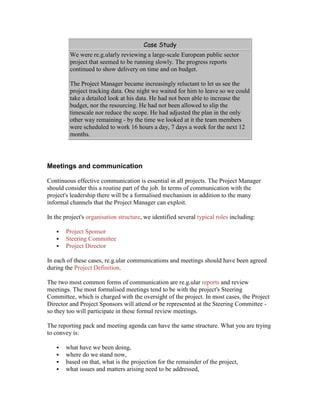
Case Study
An on-line CD vendor was early to market, but suffered from some
shortcomings in their systems and operations. For example, they
frequently showed items were in stock but after the customer
completed the purchase they announced that the CDs were on back
order. In many cases, the buyer would have made a different
purchasing decision if the truth had been known.
The vendor then discovered customers' account details and credit card
numbers had been stolen by hackers. This had to be communicated to
the customers. Want to see what it feels like?
Net result - customers do not want to do business with an organisation
that provides poor service, misleads them and subjects them to the
threat of financial fraud.
Outreach and Impact
The Internet has led to some new forms of business but many new ways of conducting
existing business. There are very few examples of a product or service that is only
provided using the Internet. The best examples are ones that directly support eCommerce,
for example authentication services. Most eBusiness ventures sell things or provide
services that the marketplace has always found a way to buy - books, cars, food,
insurance, banking etc. Likewise, internal eSolutions are usually only better ways to do
something, for example knowledge sharing, communications, eHR and eFinance.
In most cases, the change has been to the accessibility of the product to the marketplace -
and the accessibility of the marketplace to the vendor. For example, the public has always
been able to deal in stocks and shares, but web-based services have made this service area
easy to use and competitively priced.
A key differentiator for an eProject is its outreach. A conventional system such as sales
order entry might have been seen by a hundred people. The web-based equivalent might
be seen by a hundred million. The designer needs to be concerned about a huge variety of
interests, backgrounds and capabilities. In the past we might have talked to the hundred
sales entry clerks but it will be a difficult challenge to consult with the world population
of Internet users. There may also be practical issues such as language, currency, taxation
and local re.g.ulations.
As well as the numerical impact of an eBusiness solution, there is also the impact due to
its visibility - particularly with people outside the organisation. Whereas in the past
organisations often coped well with poorly designed internal systems, an eBusiness
solution might be seen and experienced by a large number of potential customers,
suppliers and business partners. It has to look good, do what the user wants, be easy to
use, give accurate results and respond efficiently.
Logically, therefore, an eSolution merits greater de.g.rees of design, construction and
testing. Unlike conventional solutions, it is not practical to train the user population or
expect them to stick with it whether or not they like it. Quality and fitness for purpose
must be paramount.
New Technology
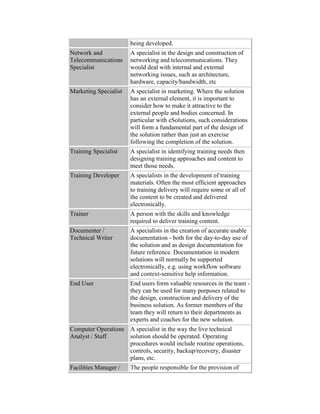
There is a vast array of new technologies in use, e.g. hardware, networking, portals,
exchanges, software packages, development languages, tools, standards, etc. Many
applications need to be multi-channel, ie there are multiple ways in which a person might
communicate with the application, e.g. web-browser, iTV, mobile phone, wireless device,
through a call centre, at a kiosk, over the counter.
The connection of business-to-business, business-to-consumer and business-to-employee
requires compatibility and standards. Many initiatives are seeking to bring about seamless
co-working. In some cases, competitive forces mean that vendors are competing rather
than collaborating. It can be a difficult to choose which architecture and suppliers best
meet the project's needs. Get it wrong, and you might be left with an obsolete solution.
New People - New Skills
New technologies require new skills, but not necessarily new people. Throughout the
evolution of computing, technologies have evolved. Current staff usually prove to be the
easiest to re-train. Whether you re-train, hire new people or buy in expertise, the bottom
line is that you will need access to resources who are able to work with the new
technologies.
As well as the technological changes, there are also new disciplines required. Maybe they
are not new to the organisation, but they are often a new factor in technology projects.
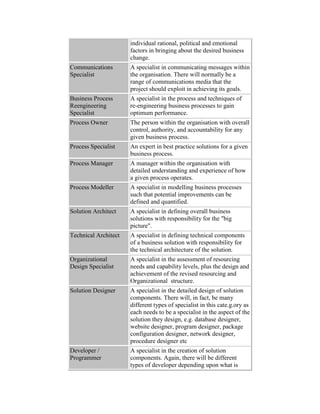
The impact and outreach of eSolutions requires specialists in such things as:
 creative design,
 graphical design,
 user-experience analysts / designers,
 marketing.
New Techniques and Approaches
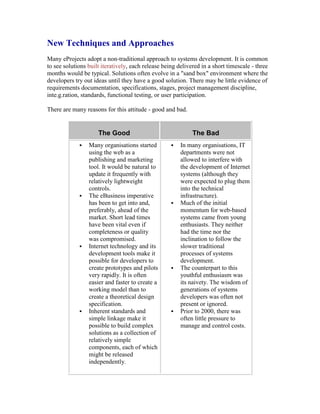
Many eProjects adopt a non-traditional approach to systems development. It is common
to see solutions built iteratively, each release being delivered in a short timescale - three
months would be typical. Solutions often evolve in a "sand box" environment where the
developers try out ideas until they have a good solution. There may be little evidence of
requirements documentation, specifications, stages, project management discipline,
inte.g.ration, standards, functional testing, or user participation.
There are many reasons for this attitude - good and bad.
The Good The Bad
 Many organisations started
using the web as a
publishing and marketing
tool. It would be natural to
update it frequently with
relatively lightweight
controls.
 The eBusiness imperative
has been to get into and,
preferably, ahead of the
market. Short lead times
have been vital even if
completeness or quality
was compromised.
 Internet technology and its
development tools make it
possible for developers to
create prototypes and pilots
very rapidly. It is often
easier and faster to create a
working model than to
create a theoretical design
specification.
 Inherent standards and
simple linkage make it
 In many organisations, IT
departments were not
allowed to interfere with
the development of Internet
systems (although they
were expected to plug them
into the technical
infrastructure).
 Much of the initial
momentum for web-based
systems came from young
enthusiasts. They neither
had the time nor the
inclination to follow the
slower traditional
processes of systems
development.
 The counterpart to this
youthful enthusiasm was
its naivety. The wisdom of
generations of systems
developers was often not
present or ignored.
 Prior to 2000, there was
often little pressure to
possible to build complex
solutions as a collection of
relatively simple
components, each of which
might be released
independently.
manage and control costs.
Case Study
Java, the main development language used on the web, had no formal
specification. Only recently has a specification been retro-fitted.
The world of eSolutions has been maturing fast. Maybe there is truth in the "Internet
years" concept - at four Internet years to the calendar year, the industry is now middle
aged. Many organisations now realise that:
 web initiatives can be long-term programmes requiring end-to-end programme
management
 there needs to be a sound business case for a defined initiative
 however the knowledge is captured, it is important to spend time understanding
and agreeing the business requirements
 incomplete or unsatisfactory solutions can damage the business
 quick solutions often need complete replacement by something of industrial
strength, particularly if they were not designed and documented with a view to
further development
 there is much more to a successful business initiative than a good technology
solution
 if you do not test the solution rigorously it will not work, probably on the day you
launch it in a blaze of publicity
 it will never be easy nor quick to deliver a high de.g.ree of complexity,
re.g.ardless of the capabilities of the technology and developers
 all projects need the discipline of project management with its focus on such
things as planning, control, risk management, quality etc.
New Demands on the Project Manager
Today's challenge for the eProject Manager, is to harness the benefits of Internet
development attitudes with the wisdom and discipline of conventional project
management. It would be wonderful to achieve the best in both camps, but it cannot be
done. The discipline required to manage a project's benefit, quality and risk will
inevitably act as a brake on progress and enthusiasm.
It is important that you adopt a project management style and re.g.ime that suits the
environment. For example:
 do not adopt a bureaucratic heavyweight project management methodology
 do not use a methodology that is designed for controlled lifecycle stages if you are
using an iterative approach
 do use ePM tools - make good project management discipline easy and fun to use
 make sure the participants understand the value and importance of the project
management processes.
Benefit Tracking
Why, What, How?
It is not enough for a Project Manager to be satisfied that the project has been well
managed and delivered on time, on budget. Many, if not most, Project Managers wrongly
believe that is the sole measure of their success.
A project is not successful unless it delivers positive benefit to the
organisation.
It is not fully successful unless it delivers optimum benefit.
What is benefit?
How do we define it?
How do we measure it?
The Financial Perspective
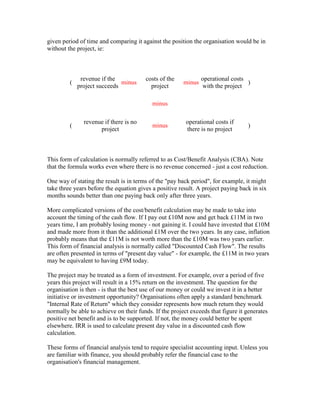
There is a tradition, particularly with finance managers and accountants, that benefit is
simply a question of projecting the effect on profit (ie revenue minus expenditure) over a
given period of time and comparing it against the position the organisation would be in
without the project, ie:
(
revenue if the
project succeeds
minus
costs of the
project
minus
operational costs
with the project
)
minus
(
revenue if there is no
project
minus
operational costs if
there is no project
)
This form of calculation is normally referred to as Cost/Benefit Analysis (CBA). Note
that the formula works even where there is no revenue concerned - just a cost reduction.
One way of stating the result is in terms of the "pay back period", for example, it might
take three years before the equation gives a positive result. A project paying back in six
months sounds better than one paying back only after three years.
More complicated versions of the cost/benefit calculation may be made to take into
account the timing of the cash flow. If I pay out £10M now and get back £11M in two
years time, I am probably losing money - not gaining it. I could have invested that £10M
and made more from it than the additional £1M over the two years. In any case, inflation
probably means that the £11M is not worth more than the £10M was two years earlier.
This form of financial analysis is normally called "Discounted Cash Flow". The results
are often presented in terms of "present day value" - for example, the £11M in two years
may be equivalent to having £9M today.
The project may be treated as a form of investment. For example, over a period of five
years this project will result in a 15% return on the investment. The question for the
organisation is then - is that the best use of our money or could we invest it in a better
initiative or investment opportunity? Organisations often apply a standard benchmark
"Internal Rate of Return" which they consider represents how much return they would
normally be able to achieve on their funds. If the project exceeds that figure it generates
positive net benefit and is to be supported. If not, the money could better be spent
elsewhere. IRR is used to calculate present day value in a discounted cash flow
calculation.
These forms of financial analysis tend to require specialist accounting input. Unless you
are familiar with finance, you should probably refer the financial case to the
organisation's financial management.
How do I put a price on everything?
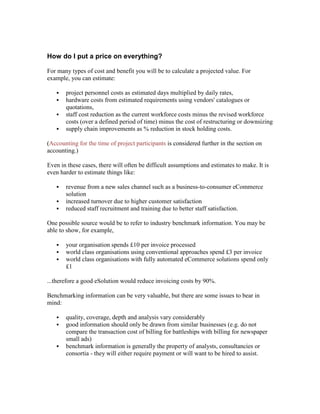
For many types of cost and benefit you will be to calculate a projected value. For
example, you can estimate:
 project personnel costs as estimated days multiplied by daily rates,
 hardware costs from estimated requirements using vendors' catalogues or
quotations,
 staff cost reduction as the current workforce costs minus the revised workforce
costs (over a defined period of time) minus the cost of restructuring or downsizing
 supply chain improvements as % reduction in stock holding costs.
(Accounting for the time of project participants is considered further in the section on
accounting.)
Even in these cases, there will often be difficult assumptions and estimates to make. It is
even harder to estimate things like:
 revenue from a new sales channel such as a business-to-consumer eCommerce
solution
 increased turnover due to higher customer satisfaction
 reduced staff recruitment and training due to better staff satisfaction.
One possible source would be to refer to industry benchmark information. You may be
able to show, for example,
 your organisation spends £10 per invoice processed
 world class organisations using conventional approaches spend £3 per invoice
 world class organisations with fully automated eCommerce solutions spend only
£1
...therefore a good eSolution would reduce invoicing costs by 90%.
Benchmarking information can be very valuable, but there are some issues to bear in
mind:
 quality, coverage, depth and analysis vary considerably
 good information should only be drawn from similar businesses (e.g. do not
compare the transaction cost of billing for battleships with billing for newspaper
small ads)
 benchmark information is generally the property of analysts, consultancies or
consortia - they will either require payment or will want to be hired to assist.
The biggest drawback in taking a purely financial perspective is that it can be impossible
to put a firm value on many components of the value. A classic example is the benefit of
"better management information" which is stated as a benefit in most project proposals.
Here is an all too common cost justification approach:
Cost of project £10M
Direct cost savings from project £2M
Better Management Information leading
to a 1% improvement in revenue and cost
control £9M
Net Benefit £2M + £9M - £10M = £1M
The real problem is often that you cannot cost justify the project unless you put a price on
such things. Who said there would be a 1% improvement and how did they know? The
usual answer is that their guess was as good as anybody's so no one could challenge the
analysis. The reality is that creative accounting can justify almost any initiative - if there
is the will to do so.
One technique for putting a value on things which have no direct valuation is to ask the
business leaders how much they would be willing to pay to achieve the non-financial
benefit. If you can get the executive to say that they would be willing to pay £9M to have
good management information, that would be another way of putting a price on its value.
eProjects
Finding the financial justification for eProjects at this time can be even harder. Many
eCommerce solutions, particularly business-to-consumer eSolutions, are not aimed at
immediate financial gain rather than establishing market share in the belief that market
share now will lead to profits in the future. Such speculation is very hard to capture in a
purely financial business case. The benefit of the eProject is more properly stated in
terms of its true intentions such as lower overhead costs, improved customer service,
wider catalogue, opening up new markets, etc.
An even harder benefit to define for an eProject, is the belief that a business has to enter
the eCommerce arena if it wishes to survive at a time when significant market share is
being diverted into eCommerce channels. What price do you place on survival? If we
take the net value of the organisation as a factor in the cost justification we can probably
justify almost anything!
A balanced view of benefits
A purely financial perspective of benefits has its limitations:
 We have shown that the numbers may not be as accurate an indicator of benefit as
they might at first seem.
 It is also clear that bottom-line financial benefit is often not what a project is
actually about.
 There is also a timing problem with financial benefit - the financial benefit often
occurs a long time after the project is completed.
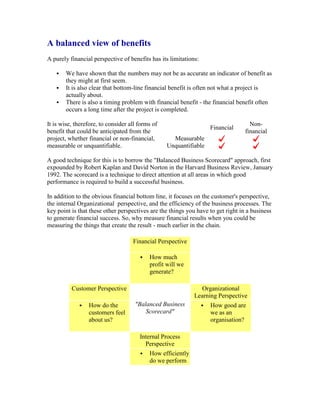
It is wise, therefore, to consider all forms of
benefit that could be anticipated from the
project, whether financial or non-financial,
measurable or unquantifiable.
Financial
Non-
financial
Measurable
Unquantifiable
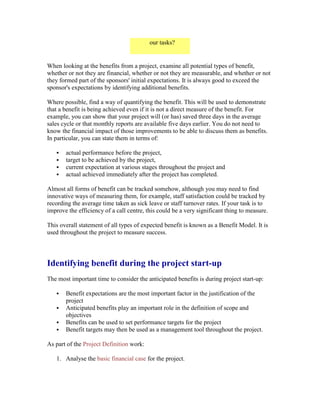
A good technique for this is to borrow the "Balanced Business Scorecard" approach, first
expounded by Robert Kaplan and David Norton in the Harvard Business Review, January
1992. The scorecard is a technique to direct attention at all areas in which good
performance is required to build a successful business.
In addition to the obvious financial bottom line, it focuses on the customer's perspective,
the internal Organizational perspective, and the efficiency of the business processes. The
key point is that these other perspectives are the things you have to get right in a business
to generate financial success. So, why measure financial results when you could be
measuring the things that create the result - much earlier in the chain.
Financial Perspective
 How much
profit will we
generate?
Customer Perspective
"Balanced Business
Scorecard"
Organizational
Learning Perspective
 How do the
customers feel
about us?
 How good are
we as an
organisation?
Internal Process
Perspective
 How efficiently
do we perform
our tasks?
When looking at the benefits from a project, examine all potential types of benefit,
whether or not they are financial, whether or not they are measurable, and whether or not
they formed part of the sponsors' initial expectations. It is always good to exceed the
sponsor's expectations by identifying additional benefits.
Where possible, find a way of quantifying the benefit. This will be used to demonstrate
that a benefit is being achieved even if it is not a direct measure of the benefit. For
example, you can show that your project will (or has) saved three days in the average
sales cycle or that monthly reports are available five days earlier. You do not need to
know the financial impact of those improvements to be able to discuss them as benefits.
In particular, you can state them in terms of:
 actual performance before the project,
 target to be achieved by the project,
 current expectation at various stages throughout the project and
 actual achieved immediately after the project has completed.
Almost all forms of benefit can be tracked somehow, although you may need to find
innovative ways of measuring them, for example, staff satisfaction could be tracked by
recording the average time taken as sick leave or staff turnover rates. If your task is to
improve the efficiency of a call centre, this could be a very significant thing to measure.
This overall statement of all types of expected benefit is known as a Benefit Model. It is
used throughout the project to measure success.
Identifying benefit during the project start-up
The most important time to consider the anticipated benefits is during project start-up:
 Benefit expectations are the most important factor in the justification of the
project
 Anticipated benefits play an important role in the definition of scope and
objectives
 Benefits can be used to set performance targets for the project
 Benefit targets may then be used as a management tool throughout the project.
As part of the Project Definition work:
1. Analyse the basic financial case for the project.
2. Identify all other anticipated benefits. Take a balanced view of the types of benefit
that the organisation should be seeking from the project.
3. Find ways of quantifying these wherever possible.
4. State what the expectation or target is for each benefit.
5. Define ways in which performance can be reported against these targets (prior to
the project, as targets for the project, during the project, and during subsequent
live operation).
These definitions of anticipated benefits form an important management tool for
assessing the success of the project (and, therefore, the success of the Project Manager).
They must be fully understood and agreed by the project sponsors and other relevant
parties. In particular, the targets must be achievable and agreed if they are to be used as
performance measures for the project or for the Project Manager and other participants. It
should be made clear whether targets represent anticipated performance or are "stretch
targets" - ie goals to be striven for but which probably surpass reasonable expectations.
Information from the benefit model, particularly the projected costs, will be used to set up
the project's detailed budget.
In those cases where the project is to be undertaken by a third party organisation under
commercial terms, benefit targets often form part of the contract and can be the subject of
stage payments, contingency/performance-related payments and/or penalty clauses.
Clearly, great attention needs to be paid in these cases and appropriate specialist le.g.al
advice should be taken.
Identifying benefit during each phase start-up
Benefit tracking should be a frequent or continuous process during the project. The
Project Manager's prime goal should be to deliver optimum benefit. As each new phase
of work commences:
 re-validate the anticipated benefits and the extent to which they are being
achieved,
 where appropriate, adjust the detailed planning for the phase to optimise the
expected benefits,
 ensure that new participants are fully aware of what they are expected to deliver -
that they understand the value they are generating.
Using benefit tracking as a management tool during the
project
There are three main uses for benefit tracking during the project:
1. as a performance monitoring and enhancing tool,
2. as a basis for decisions, and
3. to report status.
The basic principal behind performance measurement is that you get what you measure.
If you tell someone that they are being measured on specified results they will understand
that those things are important and they will attempt to excel for their own personal
rewards (whether tangible or just in terms of personal satisfaction). One word of caution,
some people excel against measured criteria at the expensive of unmeasured ones. Be
careful how you state any targets. For example, if you say speed is the key benefit, do not
be surprised if the designers remove all the control processes.
Benefit measurements can also be used in decision making - particularly for change
requests. An obvious factor in accepting a change is whether doing so will increase the
overall anticipated benefit. Conversely, the impact of an issue may have been considered
in terms of its ne.g.ative effect on benefits. Any significant change in the anticipated
benefits will need to be reported and discussed at the relevant management level.
Project Managers can use the current benefit predictions as one form of executive
reporting. It is possible to construct simple "dashboard" style indicators to show current
status or the trend to date. For example, you could construct the current cost/benefit
calculation once a month, based on the latest completion and resourcing estimates, to
show graphically how expectations have been improving - or not. Where the Project
Manager is calculating and reporting "earned value" and "estimates to complete" using
automated project management tools, it should be reasonably simple to prepare re.g.ular
update reports on the project's projected financial benefit.
You might also show non-financial benefits as a trend, for example, how the projected
time to fulfil a customer order has changed during the lifetime of the project and against
the original target. Clearly, though, the project manager would need access to detailed
information about the designs and developments that the project team are doing to be able
to calculate and report such things. But then, isn't it the Project Manager's job to know
what's happening and how well the project will match up to expectations???
Reviewing benefit during the phase end
Ideally, benefit tracking should be a continuous management process. In the real world,
many project managers cannot afford the time for frequent checking and reporting of all
types of benefit. Indeed, in many projects the Project Manager has much more pressing
tasks to perform and would not be thanked for spending time analysing and reporting
when there were fires to put out.
One time that it always makes sense to review the anticipated benefit is at phase end
when we assess the success of the work to date and make plans for the next steps. In an
extreme case, it might be apparent that the project in its current form is not going to
produce optimum benefit. With the rapid pace of technology, any slow project runs the
risk of being out of date before it is halfway through. It is always wise to repeat those
sanity checks from the Project Definition. Will this project deliver benefit? Will it deliver
optimum benefit?
Identifying benefit at project end - and beyond
Without doubt, the project's sponsors and management team should review the
anticipated benefits achieved at the end of the project. Lessons can be learnt. Further
improvements can be planned and instigated.
Projects are usually defined to finish shortly after the live implementation of the business
solution. At that time the realised benefit equation is looking at its worst - all the costs
have been incurred and none of the benefit has been realised. It should be possible to
review the anticipated benefits - but not the actual ones.
Once the live solution has settled down, it is best practice to hold a Post-Implementation
Review (PIR). Its purpose is:
 to ascertain the de.g.ree of success from the project, in particular, the extent to
which it met its objectives, delivered planned levels of benefit, and addressed the
specific requirements as originally defined
 to examine the efficacy of all elements of the working business solution to see if
further improvements can be made to optimise the benefit delivered
 to learn lessons from this project, lessons which can be used by the team members
and by the organisation to improve future project work and solutions.
The benefits that were identified, itemised and quantified for the project should be visible
throughout the operation of the live business solution. If they were considered important
benefits for the project they probably also form important performance criteria for the
management of that live operation. The line management should be encouraged to
continue monitoring performance against the benefit targets. The continuing focus on
delivering the benefit may be used:
 to promote good operational performance
 to identify areas where further improvements to the processes or systems would
be beneficial
 so that the organisation can learn from its successes and failures.
Planning
Why, What, How?
Planning a project is where the Project Manager must bring together the complete
understanding of the project's requirements with a deep understanding of all the elements
that are required to conduct a successful project. In many ways, it is the centrepiece for
the Project Manager's skills. Of course, it all counts for nothing unless it leads to a
successful project!
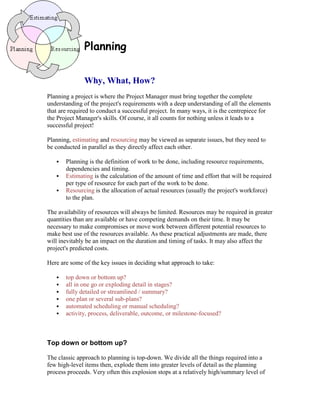
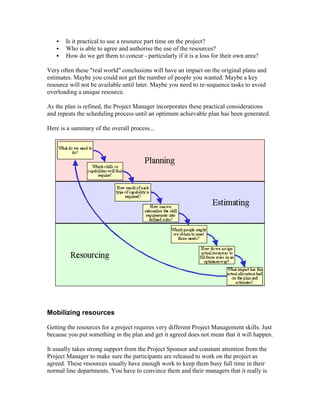
Planning, estimating and resourcing may be viewed as separate issues, but they need to
be conducted in parallel as they directly affect each other.
 Planning is the definition of work to be done, including resource requirements,
dependencies and timing.
 Estimating is the calculation of the amount of time and effort that will be required
per type of resource for each part of the work to be done.
 Resourcing is the allocation of actual resources (usually the project's workforce)
to the plan.
The availability of resources will always be limited. Resources may be required in greater
quantities than are available or have competing demands on their time. It may be
necessary to make compromises or move work between different potential resources to
make best use of the resources available. As these practical adjustments are made, there
will inevitably be an impact on the duration and timing of tasks. It may also affect the
project's predicted costs.
Here are some of the key issues in deciding what approach to take:
 top down or bottom up?
 all in one go or exploding detail in stages?
 fully detailed or streamlined / summary?
 one plan or several sub-plans?
 automated scheduling or manual scheduling?
 activity, process, deliverable, outcome, or milestone-focused?
Top down or bottom up?
The classic approach to planning is top-down. We divide all the things required into a
few high-level items then, explode them into greater levels of detail as the planning
process proceeds. Very often this explosion stops at a relatively high/summary level of
detail for the initial planning and is only expanded into full detail shortly before each new
phase of work.
Top-down is the most logical way of thinking about a project and is usually the best
approach to new endeavours. It provides an early high-level plan, including initial costs
and timings, which can be used in the project's definition and benefit case.
Bottom-up planning makes sense where we already have a good example of a successful
similar project plan to base the new project on. A majority of projects will be similar to
something that has been done before and it makes sense to use that as a starting point
(assuming it was of good quality). As well as saving time in the planning process, this
allows us to learn lessons from the previous experiences. In particular, estimates can
often be extrapolated from the previous projects.
In bottom-up planning we start with the full detail of a previous plan and adjust the
precise details, estimates and dependencies to be correct for the new project. From the
be.g.inning, we have a fully detailed plan. This usually means that where top-down plans
need to be exploded, bottom-up plans need to be summarised so that they can also be
used at a summary level for things like the project definition, benefit case, and reporting.
All in one go or exploding detail in stages?
Where you have started from a detailed plan and worked bottom-up, you already have the
full detail - but remember to review that detail as you progress through the project as
things will inevitably change. You may choose to review the detail in stages in a similar
manner to the way you would deal with a top-down plan.
If you started with a top-down plan, the question is - when should you explode it into full
detail? If it is a relatively simple project, with short timescales and a manageable number
of resources, you may easily be able to generate a sufficiently detailed plan at the
be.g.inning of the project and stick with it (bearing in mind that the Project Manager has
a continuous duty to make sure the plan is realistic).
In larger projects, best practice is to explode the detail in stages. Here are some of the
reasons why:
 No one needs to know precise details so far in advance that it is of no
consequence.
 Giving precise detail too far in advance inevitably means it will be wrong - some
of the people reading the plan will not realise that and those that do may think you
are stupid for being so accurate.
 You have more important things to be doing with your time during the definition
and launch of a project than worrying about the precise timing of events in the
distant future.
Clearly, you need that detail far enough in advance to make decisions about the allocation
of individual people to tasks and to mobilise the resources required. You should also plan
out the detail for logically complete elements of the project together so that all related
issues are examined together.
Very often this means that detailed plans are best prepared per phase during the project.
The first phase of work would be planned immediately following the project definition.
Further planning for following phases would be done towards the end of each phase to
give a reliable base for the starting dates and any variations in the originally planned
activities. It must, however, be done early enough that the required resources can be
identified and mobilised in time for work to commence.
Fully detailed or streamlined / summary?
Here lies maybe the biggest area of disagreement between those involved in project
management. Arguments range from the senior executive's view of a plan - must fit on
one page of a flipchart - to those managers who wish to consider the full detail of every
task conducted by every person. To put that into numbers, should the plan have ten lines
or ten thousand?
Do not confuse the level of detail you need for project definition and status reporting with
the level you need to use to assign individual people to individual tasks and track their
progress. The full detail is rarely appropriate for anyone except the Project Manager and
the Project Office team. The project sponsors and other concerned parties will only want
to see key summary information such as milestones and overall costs. Project Team
members only need to see the full detail where it is related to their own activities.
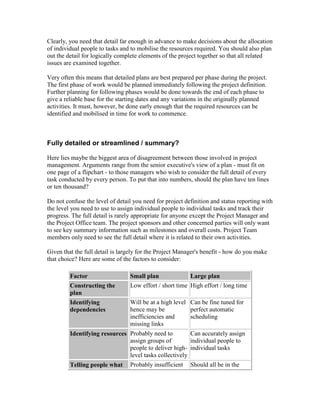
Given that the full detail is largely for the Project Manager's benefit - how do you make
that choice? Here are some of the factors to consider:
Factor Small plan Large plan
Constructing the
plan
Low effort / short time High effort / long time
Identifying
dependencies
Will be at a high level
hence may be
inefficiencies and
missing links
Can be fine tuned for
perfect automatic
scheduling
Identifying resources Probably need to
assign groups of
people to deliver high-
level tasks collectively
Can accurately assign
individual people to
individual tasks
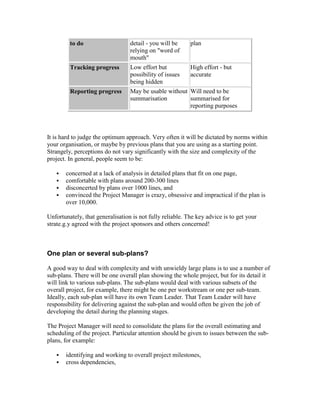
Telling people what Probably insufficient Should all be in the
to do detail - you will be
relying on "word of
mouth"
plan
Tracking progress Low effort but
possibility of issues
being hidden
High effort - but
accurate
Reporting progress May be usable without
summarisation
Will need to be
summarised for
reporting purposes
It is hard to judge the optimum approach. Very often it will be dictated by norms within
your organisation, or maybe by previous plans that you are using as a starting point.
Strangely, perceptions do not vary significantly with the size and complexity of the
project. In general, people seem to be:
 concerned at a lack of analysis in detailed plans that fit on one page,
 comfortable with plans around 200-300 lines
 disconcerted by plans over 1000 lines, and
 convinced the Project Manager is crazy, obsessive and impractical if the plan is
over 10,000.
Unfortunately, that generalisation is not fully reliable. The key advice is to get your
strate.g.y agreed with the project sponsors and others concerned!
One plan or several sub-plans?
A good way to deal with complexity and with unwieldy large plans is to use a number of
sub-plans. There will be one overall plan showing the whole project, but for its detail it
will link to various sub-plans. The sub-plans would deal with various subsets of the
overall project, for example, there might be one per workstream or one per sub-team.
Ideally, each sub-plan will have its own Team Leader. That Team Leader will have
responsibility for delivering against the sub-plan and would often be given the job of
developing the detail during the planning stages.
The Project Manager will need to consolidate the plans for the overall estimating and
scheduling of the project. Particular attention should be given to issues between the sub-
plans, for example:
 identifying and working to overall project milestones,
 cross dependencies,
 scheduling and contention when the same resources are used in more than one
sub-plan,
 ensuring compatibility and standards.
The ease with which the project can be handled as a number of sub-plans often depends
on the choice of automated project planning tools. The best (ie most expensive) tools will
have no trouble consolidating and scheduling multiple plans. Some of the more basic
software tools have limitations that might lead the Project Manager to prefer to represent
the sub-plans as separate sections within a single physical plan.
Automated scheduling or manual scheduling?
Almost all project planning tools provide automated scheduling - so why would you not
want to use it? There are two main issues that you need to consider:
 To obtain good results from automated scheduling, your planning information
needs to be mathematically and logically perfect. All dependencies must be
correctly stated. All resources need to be identified along with accurate effort
estimates. Detailed allocation of people to tasks cannot be assumed - the plan will
need the full detail. Resource availability needs to be correctly held. Working
days need to be defined (e.g. let's not schedule people for public holidays).
 The capability of project planning tools to provide good results varies noticeably
between different tools. Some tools provide limited support to spread team
members' work to keep them fully occupied and to make optimum progress. For
example, if the plan says the Project Manager is required one hour a week for
"Progress Meetings" and full time for five days on "Project Definition", some
tools may conclude that "Project Definition" cannot start for 12 months until all
the scheduled "Progress Meetings" have been completed since there is no time
before that when the Project Manager is available full time. Tools are often poor
at things like repeating, periodic tasks or scheduling tasks on a day-by-day basis
to use up all available effort - particularly if it means there could be gaps within
the task when no work is done.
Given the limitations and idiosyncrasies of the various tools coupled with the logical
complexity of Critical Path Analysis and resource optimisation, the Project Manager will
normally have to put considerable effort into teasing the plan until the automated
scheduling gives good results. It would be wonderful if the tool could do "what-if"
analysis and try all the tricks in the trade to suggest a good resolution like "did you think
of getting an extra programmer - that would halve the length of the project", or maybe
"the optimum number of programmers is 3.6 FTE".
The sort of information the Project Manager may need to adjust is:
 adding or changing dependencies (often with no logical justification but simply
because the plan works better in that sequence)
 adding in arbitrary timing lags (or ne.g.ative lags) so that areas of the project start
'around the right time'
 priorities per task
 whether tasks not on the critical path should be done as soon as possible or as late
as possible.
Try to avoid manipulating the plan by locking in specific dates - unless they genuinely
are fixed dates. You will almost always have problems when re-scheduling the plan if
some of the dates are considered immovable.
Simple tests of good scheduling are:
 resources are occupied full time on almost all days,
 there is no major gap in a path or workstream unless, and
 of course, the earliest achievable end date.
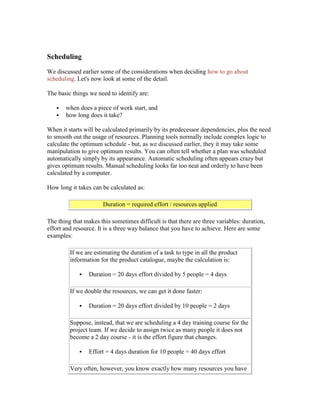
Automated scheduling can be seen as an investment. It can take a huge effort to get the
plan fine-tuned to the extent that you can rely on it, but, once it is done, the plan can be
re-scheduled as often as desired with very little effort. As well as adjusting the plan
during the project, this allows you to perform "what-if" analysis during the planning
stages (e.g. "what is the quickest we could do this with unlimited resources?", "how much
quicker would it be with one additional programmer?", "how many programmers do I
need to meet the required completion date?").
The problem with automated scheduling is the time and effort that needs to be invested to
get a good model. Not surprisingly, many Project Managers feel they cannot afford that
time. Others try it and find things are not working out - so they give up and lock in
manual dates instead.
Manual scheduling is probably the more common approach in reality. It can be justified
on the basis that progress is more important than accuracy and optimum performance. If
you intend to schedule the plan manually, remember these things:
 check that you have allowed for the real dependencies within the project (e.g. we
cannot train the users until there is a working system available)
 check resources are not unrealistically loaded (team members rarely work more
than 24 hours in one day)
We discuss scheduling the detailed plan below.
Activity, process, deliverable, outcome, or milestone-focused?
Here is an esoteric debate for Project Managers to discuss over beers in the evening. The
question is - how do we define the 'things' in the plan - what are they? Let's take a look at
several philosophies: activity, process, deliverable, outcome, and milestone.
The classic and common understanding is that a plan tells you what things to do. It
describes the various activities that are required. These would typically be broken down
and structured into cate.g.ories for ease of understanding. This is a basic concept in
Project Management - the Work Breakdown Structure (WBS).
Here is a very typical example structure of an activity-focused plan:
Logical Structure Example
Phase 1 Phase 1 - Define the Project
Activity 1 Define Project Scope
Task A Define Scope
Task B Agree Scope
Activity 2 Prepare Benefit Case
Task C Construct Benefit Case
Task D Agree Benefit Case
Note that because we are talking about activities and tasks we are using verbs - action
expressions. In fact the typical construction is in the form verb + noun ie "do the thing".
A variation of this is to use a process focus for the structure of the plan, but, probably,
leave the low-level tasks and deliverables at the same level. Process focus is following
the evolution in thinking that occurred in analysing business processes - except here
applied to the processes of a project. The intention is to tell the story of each process
within the project rather than present it in a disjointed way divided up into phases. For
example, one section of the plan would describe the story of testing. It would start with
the early definition of the project's approach to testing, through the detailed planning,
testing preparation, conducting tests and gaining business acceptance. As well as telling
the story in a way that is easier to understand, the process focus generally fits in with the
idea that projects can be organised into various workstreams, each dealing with a layer
of the overall business solution.
Here is a very typical example structure of a process-focused plan:
Logical Structure Example
Process 1 Delivering the project's objectives
Sub-process 1 Managing scope
Task A Define Scope
Task B [all further tasks dealing
with scope]
Sub-process 2 Delivering optimum benefit
Task C Construct Benefit Case
Task D [all further tasks dealing
with benefit]
The problem with a process focus is that it offends those Project Managers and Project
Sponsors who expect the plan to be organised in distinct stages. For example, the testing
process will start early in the project when the overall approach to testing is agreed; test
planning and preparation will occur in the middle; test execution and sign-off occur
towards the end. To place all these together might tell a good story - but it challenges the
common belief that project plans should be organised to show logical and/or time
progression. Within each process, such staging may be apparent, but in a single view it is
hard to present both the staging across processes and the story of each process.
You will probably hear some "rules of thumb" about how tasks should be defined, for
example, tasks should not be so long that progress cannot be tracked re.g.ularly or so
short that they are trivial - some people would suggest five days is a good length. The
problem here is that some very important things such as a "sign off" might be very short
in duration but vital to the good conduct of the project and others like "track progress"
might be very long tasks with no merit in sub-dividing them or measuring interim
progress.
One common recommendation about defining tasks is that all tasks should have a
measurable output that clearly evidences the task is successfully completed and which
represents the main purpose of the task. For example, "Define Scope" might produce a
deliverable called "Scope Definition".
This leads some Project Managers to suggest that the entire approach might be better if
everyone focused not on doing tasks but on delivering the results - hence the project plan
could be expressed as deliverables and sub-deliverables.
For example, in a deliverable-focused plan the previous examples might look like this:
Logical Structure Example
Phase 1 Phase 1 - Project Definition
Major
Deliverable 1
Project Scope
Deliverable
A
Scope Definition
Deliverable
B
Scope sign off document
Major
Deliverable 2
Benefit Case
Deliverable
C
Benefit Case
Deliverable
D
Benefit Case sign off
document
Because the plan is now expressed in terms of its deliverables, the expressions have now
become nouns - they are the names of the main deliverables being produced.
We can see in this example a strange possible consequence - the focus is now on
producing something called a "sign off" document. One thing a deliverable focus can do
for you is to generate a large number of small, new, highly-important documents which
serve as visible deliverables for something that is harder to see, for example, agreement.
Alternatively, some Project Mangers would happily have referred to that final output as
the "Agreed Benefit Case". This too can work, but it poses the problem that something
which is logically the same thing can have a different name because its status has
changed. As well as the philosophical and semantic debates, this can lead to practical
difficulties when tracking deliverable flow and particularly when using an automated
document management system.
Maybe the biggest problem with deliverables focus is more one of usage than intent.
Project Managers tend to look for some form of visible document that shows they have
completed the deliverable. For example, which of these outcomes do you think a Project
Manager is more likely to describe as a deliverable:
 a trained workforce capable of operating the new system, or
 a training manual?
Unfortunately, deliverable focus in practice often emphasizes the reports and documents
that are to be created and diverts attention from the true desired outcome of the work. The
project might appear successful because training materials were produced ignoring
whether or not that training had the desired effect on the workforce.
So, to take the argument to its conclusion, the thing most worthy of the Project Manager's
attention is not the work done, nor the reports produced, but achieving the desired
outcome in the most beneficial manner. There is no doubt that this is a good ambition for
the Project Manager. The question is - should the plan be expressed in those terms so that
everyone is focused on the outcomes?
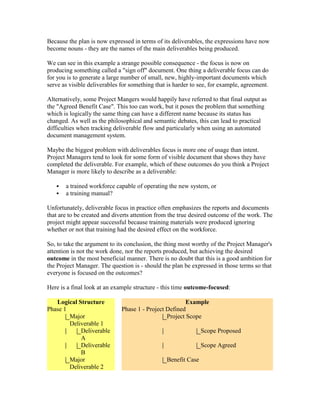
Here is a final look at an example structure - this time outcome-focused:
Logical Structure Example
Phase 1 Phase 1 - Project Defined
Major
Deliverable 1
Project Scope
Deliverable
A
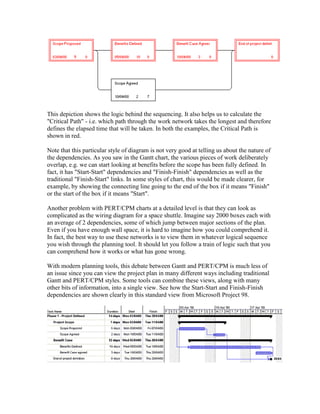
Scope Proposed
Deliverable
B
Scope Agreed
Major
Deliverable 2
Benefit Case
Deliverable
C
Benefits Defined
Deliverable
D
Benefit Case Agreed
Now the work is described as outcomes. These might be expressed as statements like
"Benefits Case Understood and Agreed by All Parties" - except you could shorten that to
"Benefit Case Agreed" for the sake of brevity on the plan.
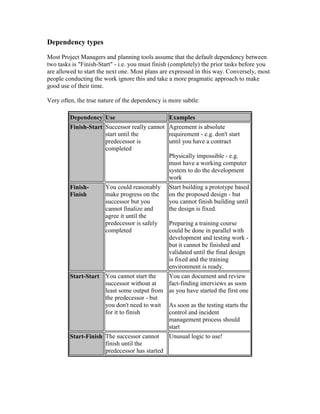
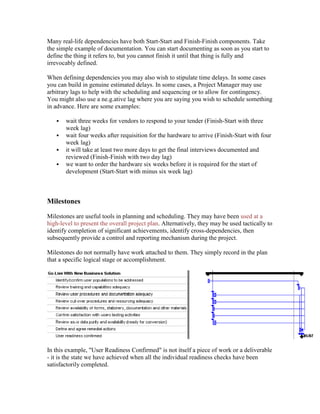
In any of these approaches, or instead of these approaches, you may identify critical
checkpoints indicating the completion of a significant achievement, deliverable, stage of
work etc. These "milestones" are inserted into the plan as control points for management
and reporting. They often represent important review points or interdependencies in the
plan. In high-level planning, it may be appropriate to start from a network plan only
showing milestones and their dependencies. Where this works well, it is usually because
the milestones in fact represent deliverables or outcomes - so maybe a deliverable or
outcome view would have worked better.
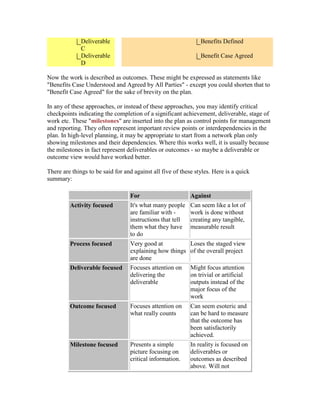
There are things to be said for and against all five of these styles. Here is a quick
summary:
For Against
Activity focused It's what many people
are familiar with -
instructions that tell
them what they have
to do
Can seem like a lot of
work is done without
creating any tangible,
measurable result
Process focused Very good at
explaining how things
are done
Loses the staged view
of the overall project
Deliverable focused Focuses attention on
delivering the
deliverable
Might focus attention
on trivial or artificial
outputs instead of the
major focus of the
work
Outcome focused Focuses attention on
what really counts
Can seem esoteric and
can be hard to measure
that the outcome has
been satisfactorily
achieved.
Milestone focused Presents a simple
picture focusing on
critical information.
In reality is focused on
deliverables or
outcomes as described
above. Will not
normally focus
attention on the path or
effort to attain each
milestones.
An ideal approach would be to hold all these differing views and criteria in a multi-
dimensional model of the project whereby the Project Manager can view and present the
plan in any of these manners. Unfortunately the workload to create and manage plans
would be high if not prohibitive and the software tools do not exist to make it possible. A
good plan will, nevertheless, be organised so that the major activities, workstreams,
deliverables and outcomes are all apparent to the reader whichever main structure has
been chosen.
Initial planning during Project Start
The earliest planning overlaps with Project Definition. It is necessary to have some view
about the project's approach, timescales, work effort and costs to be able to perform the
initial Cost Benefit Analysis and justification.
Following that, the project would normally be planned at a summary or management
level of detail. This management-level plan defines all major work for the duration of the
project. By this stage, the structure of the work will need to be clear. Phases, major
deliverables, activities, workstreams and significant milestones will be defined.
The "shape" of the project
Projects can have any number of different shapes. By shape we mean the way the
different elements are structured and how they relate to each other. An IT strate.g.y
project does not look like an eCommerce project, which, in turn, does not look like an
ERP package implementation. It is more than just a question of what we are trying to
achieve - it is also a question of how we will go about it. How do you explain the shape
of a project?
Where you plan to use a predetermined methodology for the work, the shape will be
defined by that methodology. For example:
 Does it do it in three phases, four phases, five, six seven, eight?
 What is the size of each phase?
 Does it have waterfall phases, overlapping phases or iterative phases?
Alternatively, you may find you are free to make these choices for yourself. Here are
some of the issues:
Waterfall?
The waterfall style is the classic approach to projects and is still very popular -
particularly in the public sector. In a waterfall, each phase forms a major se.g.ment of the
work which finishes and is approved before the next one starts. It is called a waterfall
because it looks like a waterfall.
It is easy to see the problem with the waterfall - it tends to make poor use of time.
Typically each phase comes to a halt, then there are some time-consuming review
processes, then people start working again. Consider too the way that work naturally
takes time to build up at the be.g.inning and how the final few issues take time to resolve.
Altogether, this leads to poor use of resources.
Project Managers often use a simple approach to detailed dependencies. They apply
waterfall logic to detailed activities and tasks as well as to the major phases. The same
inefficiencies will apply, albeit on a smaller scale.
Overlapping phases?
To avoid the inefficiencies of waterfall logic, you can seek le.g.itimate ways to overlap
the phases. By le.g.itimate, we mean it must not significantly increase risk (although the
deliberate acceptance of risk to achieve faster or cheaper results can be a le.g.itimate
business decision if properly assessed and agreed).
The reason for those review points in the waterfall is that it is generally unsafe to proceed
to the next stage of work, building upon the previous one, if we are uncertain that the
starting point is valid.
Case Study
A third party software house was building new systems for their client.
Pressurised by obligations to meet time and cost targets, the software
house had pressed on with the programming of the new system and
were nearly finished. At the same time, the design documentation was
still held up at the sign-off stage. It had not yet been finalised and
agreed.
Our review of the project found the reason why. The design was not
what the client organisation wanted. It was not a question of minor
corrections - it was the wrong solution. All the development work had
been wasted.
There are ways you can plan to overlap phases, activities and tasks in a safer way to make
best use of the projects resources. In general you need to have secured firm commitment
to various issues before the "phase end" signoff process. For example, you might agree
the hardware architecture during the conceptual design work - so you could acquire and
install the equipment needed for development immediately to avoid delays. Here are a
few other examples:
 If you are using packaged software, most architectural and technical details will
be predetermined by that choice of software. This means you can normally work
on different aspects of the overall business solution as separate streams of work.
 Design and development components may be reviewed and agreed initially as
free-standing aspects of the overall solution, provided that the overall solution
itself is thought through in advance and reviewed at the end.
 Team members should have more than one aspect to work on, so progress could
continue while any specific component is being reviewed.
 Documentation can be drafted in parallel with design and development tasks -
provided it is not finalised until the detail has been fixed and agreed.
 Training materials can be prepared based on partly complete design information
provided they will be reviewed and completed based on the actual final design.
Iteration
Many rapid approaches to applications development rely on an iterative approach. Parts
of the project plan will repeat until the overall job is completed. this allows progress to be
made in easy stages. There are two main forms of iteration:
 repeating design, prototype construction and review so that the solution "homes
in" towards the best solution for the business needs,
 releasing components for live usage without waiting for the full solution to be
completed.
Iterative approaches are particularly appropriate for eProjects due to:
 the imperative to deliver rapid benefit,
 the rapidly changing technology and business drivers, and
 the difficulty of defining requirements accurately without building prototypes.
Here is a high-level example of iteration at work:
The iteration may have multiple layers. In effect, the example above has two levels of
iteration - multiple releases comprised of repeating prototyping loops building up to each
release. In simple cases the prototyping could be seen as a continuous process. It is only
where it needs to go through baseline stages that the planning becomes complex.
Project Managers find it difficult to plan for iterative or replicated processes. Just how
many loops are there going to be? Do we assume a certain number of design loops and
delivery stages? Here is the Project Manager's nightmare scenario:
 Project delivers major areas of functionality in separate stages
 Stages are rolled out into separate locations
 Each stage contains separate business process streams dealing with major
components of the business solution
 Iterative design prototyping is organized in cycles
 Each cycle addresses various sub-streams or collections of design topics
Replication within replication within replication within replication within replication...
Explaining the shape of a project
Probably the easiest way to explain the shape of your project is using a graphical
presentation. Let's start by looking at an example. Study this carefully and see if you can
deduce all the messages it is trying to communicate before looking at the explanations.
Here's what we were trying to say:
 There are seven logical, overlapping phases (it is not a waterfall)
 There are three main stages - agreeing the conceptual design, building the
solution, and operating that solution.
 key reviews would be held to decide whether to proceed
 The first stage delivers a conceptual design
 Early focus is on defining and agreeing the vision for this undertaking. These
thoughts continue to evolve up to the finalisation of the conceptual design.
 Once the initial vision is substantially in place, attention then moves to defining
how the project should achieve it.
 In turn, as this becomes clear, work increasingly focuses on producing the overall
conceptual design.
 The second major stage delivers the working solution. It is a much larger amount
of work and a longer timescale.
 An iterative prototyping approach will be used, so design work and development
work are interlocked
 Around "live date" the final formal testing and acceptance will take place.
 At the same time, the project team and user community is preparing intensively
for implementation and live running.
 We are also building up for routine operation, maintenance, support and
enhancement.
Here are some of the graphical techniques we use:
Meaning Graphic
Small phase
Big phase
Overlapping phases
Interlocked phases
Increasing focus
Initial major focus which then
diminishes
Phase which builds up then
tails off
Iteration
Detailed planning for the phase
Before the start of each phase, the initial high-level planning needs to be expanded into
fully detailed plans with the chosen depth of detail. Unless you chose the bottom-up "big
bang" approach to planning and started with a fully detailed plan, there will be
considerable effort involved. Even where the original plan was created at a detailed level,
it should now be reviewed and revised to take account of the current starting position and
any changed circumstances.
As we noted in general, planning is always linked to estimating and resourcing. All these
details must be combined to calculate a detailed schedule of work. With good planning
tools, a well thought-out Work Breakdown Structure (WBS), milestones, careful
recording of dependencies, effort and resource allocation you should be able to calculate
the detailed schedule automatically.
Gantt charts and CPM or PERT charts
The two main formats for preparing a plan are the Gantt chart and CPM or PERT chart.
Gantt charts are the most popular as they present a simple picture of the work and make it
easy to see when things start, how long they are and how they are sequenced. They are
particularly helpful in communicating the plan to people unfamiliar with Project
Management. The Gantt chart represents each piece of work as a bar on a chart with a
horizontal scale to show dates.
Some Project Managers believe that a PERT (Project Evaluation and Review Technique)
chart or CPM (Critical Path Method) network is a more scientific way to think about a
project. The PERT chart makes you think in detail about the logic and dependencies of a
project. The logic and mathematics behind PERT and CPM are not subjects for the
ePMbook. The good news for the practical Project Manager, as opposed to the academic,
is that you can leave the detailed calculation to your planning tool. In these forms of
analysis, the plan is normally depicted as a network of boxes for work items with their
dependencies shown as links.
This depiction shows the logic behind the sequencing. It also helps us to calculate the
"Critical Path" - i.e. which path through the work network takes the longest and therefore
defines the elapsed time that will be taken. In both the examples, the Critical Path is
shown in red.
Note that this particular style of diagram is not very good at telling us about the nature of
the dependencies. As you saw in the Gantt chart, the various pieces of work deliberately
overlap, e.g. we can start looking at benefits before the scope has been fully defined. In
fact, it has "Start-Start" dependencies and "Finish-Finish" dependencies as well as the
traditional "Finish-Start" links. In some styles of chart, this would be made clearer, for
example, by showing the connecting line going to the end of the box if it means "Finish"
or the start of the box if it means "Start".
Another problem with PERT/CPM charts at a detailed level is that they can look as
complicated as the wiring diagram for a space shuttle. Imagine say 2000 boxes each with
an average of 2 dependencies, some of which jump between major sections of the plan.
Even if you have enough wall space, it is hard to imagine how you could comprehend it.
In fact, the best way to use these networks is to view them in whatever logical sequence
you wish through the planning tool. It should let you follow a train of logic such that you
can comprehend how it works or what has gone wrong.
With modern planning tools, this debate between Gantt and PERT/CPM is much less of
an issue since you can view the project plan in many different ways including traditional
Gantt and PERT/CPM styles. Some tools can combine these views, along with many
other bits of information, into a single view. See how the Start-Start and Finish-Finish
dependencies are shown clearly in this standard view from Microsoft Project 98.
Dependency types
Most Project Managers and planning tools assume that the default dependency between
two tasks is "Finish-Start" - i.e. you must finish (completely) the prior tasks before you
are allowed to start the next one. Most plans are expressed in this way. Conversely, most
people conducting the work ignore this and take a more pragmatic approach to make
good use of their time.
Very often, the true nature of the dependency is more subtle:
Dependency Use Examples
Finish-Start Successor really cannot
start until the
predecessor is
completed
Agreement is absolute
requirement - e.g. don't start
until you have a contract
Physically impossible - e.g.
must have a working computer
system to do the development
work
Finish-
Finish
You could reasonably
make progress on the
successor but you
cannot finalize and
agree it until the
predecessor is safely
completed
Start building a prototype based
on the proposed design - but
you cannot finish building until
the design is fixed.
Preparing a training course
could be done in parallel with
development and testing work -
but it cannot be finished and
validated until the final design
is fixed and the training
environment is ready.
Start-Start You cannot start the
successor without at
least some output from
the predecessor - but
you don't need to wait
for it to finish
You can document and review
fact-finding interviews as soon
as you have started the first one
As soon as the testing starts the
control and incident
management process should
start
Start-Finish The successor cannot
finish until the
predecessor has started
Unusual logic to use!
Many real-life dependencies have both Start-Start and Finish-Finish components. Take
the simple example of documentation. You can start documenting as soon as you start to
define the thing it refers to, but you cannot finish it until that thing is fully and
irrevocably defined.
When defining dependencies you may also wish to stipulate time delays. In some cases
you can build in genuine estimated delays. In some cases, a Project Manager may use
arbitrary lags to help with the scheduling and sequencing or to allow for contingency.
You might also use a ne.g.ative lag where you are saying you wish to schedule something
in advance. Here are some examples:
 wait three weeks for vendors to respond to your tender (Finish-Start with three
week lag)
 wait four weeks after requisition for the hardware to arrive (Finish-Start with four
week lag)
 it will take at least two more days to get the final interviews documented and
reviewed (Finish-Finish with two day lag)
 we want to order the hardware six weeks before it is required for the start of
development (Start-Start with minus six week lag)
Milestones
Milestones are useful tools in planning and scheduling. They may have been used at a
high-level to present the overall project plan. Alternatively, they may be used tactically to
identify completion of significant achievements, identify cross-dependencies, then
subsequently provide a control and reporting mechanism during the project.
Milestones do not normally have work attached to them. They simply record in the plan
that a specific logical stage or accomplishment.
In this example, "User Readiness Confirmed" is not itself a piece of work or a deliverable
- it is the state we have achieved when all the individual readiness checks have been
satisfactorily completed.
Scheduling
We discussed earlier some of the considerations when deciding how to go about
scheduling. Let's now look at some of the detail.
The basic things we need to identify are:
 when does a piece of work start, and
 how long does it take?
When it starts will be calculated primarily by its predecessor dependencies, plus the need
to smooth out the usage of resources. Planning tools normally include complex logic to
calculate the optimum schedule - but, as we discussed earlier, they it may take some
manipulation to give optimum results. You can often tell whether a plan was scheduled
automatically simply by its appearance. Automatic scheduling often appears crazy but
gives optimum results. Manual scheduling looks far too neat and orderly to have been
calculated by a computer.
How long it takes can be calculated as:
Duration = required effort / resources applied
The thing that makes this sometimes difficult is that there are three variables: duration,
effort and resource. It is a three way balance that you have to achieve. Here are some
examples:
If we are estimating the duration of a task to type in all the product
information for the product catalogue, maybe the calculation is:
 Duration = 20 days effort divided by 5 people = 4 days
If we double the resources, we can get it done faster:
 Duration = 20 days effort divided by 10 people = 2 days
Suppose, instead, that we are scheduling a 4 day training course for the
project team. If we decide to assign twice as many people it does not
become a 2 day course - it is the effort figure that changes.
 Effort = 4 days duration for 10 people = 40 days effort
Very often, however, you know exactly how many resources you have
- so that remains a constant. I only have 4 of this type of resource
available, so if the job takes 20 days effort - it will last 5 days
 Duration = 20 days effort divided by 4 people = 5 days
In each calculation, we tend to lock one of the variables, input something that is variable,
and thus re-calculate the third variable - otherwise a formula in the form D=E/P would
have infinite solutions.
Bear in mind that this simple arithmetic tends to ignore other complications. Consider
whether it is valid in these cases:
 What if we assigned 160 people to the task - could they have that catalogue ready
in 1 hour?
 Assuming we have eight months before the catalogue is needed, would it make
sense to assign the same task to one person for just one hour a day?
 If the 20 days effort were spent on a "Conference Room Pilot", where people
discuss design options and try them out, would 10 people in the room instead of 5
make it twice as quick or twice as slow - or even worse than twice as slow? Take
a look at the discussion on "complexity" if you are not sure.
This arithmetic and logic is more complicated where multiple resources are assigned to
multiple tasks, potentially at the same time (but that will depend on the detailed
scheduling), in differing proportions. For example:
Project Tracking
 Duration = 100 days
 Effort = 60 days comprising...
 Project Manager 10 days effort ==> resource level of 10%
 Project Administrator 50 days effort ==> resource level of 50%
So, the Project Manager needs to be available one tenth of the time on average and the
Project Administrator needs to spend half time on this work. The duration of the work
will be defined by whichever resource takes the longest to do their proportion. In this
case, we would want to balance their effort and availability figures so that they both work
at the tracking task for the full duration of the project. In other cases, it may be one
specific resource that is holding up completion.
Bear in mind also the pitfalls you might discover, particularly with automated scheduling,
and the various tricks you might need to play to avoid them (as described earlier). What
do you think would happen to this Project Tracking task if the Project Manager had to
work full time on a different task for a period of 10 days in the middle of the project?
There are several complications in the "real
world". In the estimating section, we examine
the way complexity does not grow linearly with
scope. Let's take a look at another complication
and see how the complexity factor also affects
that.
The common view is that the more resource
you make available the faster you can complete
the project. It is important to understand that
infinite resources do not lead to zero time.
Adding in more resources helps you approach
the fastest possible timescale - but there is a
limit to how fast that could ever be. Applying
Putman's Software Lifecycle Management
theory" we see that a "limit of possibility" is approached - but never reached. We can also
see that applying very high levels of resource or accepting very long timescales does not
look like good value for money. The parameters you might adjust as a Project Manager
would tend to be in the middle of the curve where putting in extra resource gives you a
good return on investment.
Barry Boehm in the "Constructive Cost Model" (COCOMO) allows for a series of cost
drivers that recognize the differing levels of complexity in the various aspects of the
project. Allowing for the complexity factor we can see that you do indeed approach the
fastest possible time - but, once you reach it, putting in more resources will slow the
project down.
A further thought on that from Brooks - adding manpower to a late software project
makes it later (1995).
Forget the arithmetic you learnt at school:
If one person can dig a hole in four hours, two people might dig it in
two hours, but four people would fight to get their spades into the same
space, and 100 people would probably never be able to get started.
Dealing with complex dependencies
Planning complex projects with many streams and cross-
dependencies is never easy. The learning from the
complexity factor discussion suggests that complex
undertakings should be broken down into separate less-
complex elements wherever possible - provided you do not
generate a new level of complexity in terms of the relationships between the sub-divided
elements.
Often the best approach is to identify separate streams of work which form semi-
autonomous layers of the overall business solution. Most of the dependencies will run
along these streams. With good management, only a few key dependencies will cross
over between the streams. You should identify these key synchronization points. This
logic is particularly useful if you are managing a project as a set of sub-projects each with
its own leader and sub-plan.
A typical pattern with work streams is to find there are points where many elements of
the project need to be handled in unison, and other times when the work can safely
progress as separate streams. Key milestones should be identified to show where the
work has to come together and where it can split.
Try to adopt a logical, structured approach to dependencies, for example:
 track input information or documentation back to where it was produced
 link phases to phases
 link activities to activities
 link tasks to tasks
 minimize dependencies between sub-plans; only use these where they are major
sync points or major review points
 likewise, minimize dependencies between streams of work or sub-teams
 but - break any of these rules if you need to in order to state the correct logic or
significantly optimize the scheduling.
Detailed planning work during the phase
It is not good practice to keep changing the plan every time there is some divergence
from the original expectations (although it can be a useful way of hiding problems). From
a practical point of view, it does make sense to recalculate the plan if there has been any
significant change. The new plan would be based on the current circumstances - to
manage expectations and to schedule dates realistically.
When you do need to issue updated schedules, you should retain the original version of
the plan as a baseline. This allows you to analyze progress and achievements against the
original targets.
The planning work at phase end
Phase end is always a good time to review progress, check that objectives have been met,
tasks have been completed, deliverables have been delivered, quality targets have been
achieved etc. You should take a good look at the project's achievements against your
plan:
 What can we learn?
 What did we get right?
 Why were there variances - bad planning, the impact of good or bad Project
Management, good or bad team, or unforeseen circumstances?
 If we re-use this plan - what should we change for next time?
At this time or earlier you should also be preparing for the next phase of work. In
particular, you will be developing the detailed plan for the follow stage of work.
Wrapping up the planning work at the end of the project
At the end of the project, its outcomes should be reviewed and analyzed in much the
same way as at the end of a phase. Here are a few specific points about the end of the
project:
This is when the project's accounting will be finalized, reviewed and reported.
The success of the Project Manager will probably be measured partly in terms of actual
performance against the plan.
Planning and tracking information should be brought up to date and stored for future
reference.
Past experience is the single most valuable guide for future planning
and estimating - do not lose that knowledge!
Estimating
Why, What, How?
There is a belief that Project Managers of business solution and IT projects are not very
good at estimating, unlike their counterparts in construction projects. There is an error in
this belief - according to several construction Project Managers, they are not particularly
accurate either.
There are many theories and approaches but no fully reliable way for predicting the time
and effort it will take to deliver a business solution. When you bear in mind the
complexity of any business solution and the dramatic variance in individual productivity,
you can understand why it cannot be an exact science. Some IT developers seem to be
able to create systems as fluently as they speak their mother tongue. Others, maybe sitting
at the next desk, struggle to deliver. There can be a factor of 10 to 1 in personal
productivity between the best and the worst. These are just a few of many factors. We
will take a look at several key issues then summarize the drivers of effort.
There are many methods for estimating. If your organization has adopted standard
practices you should probably stick to them - but apply a little of your own understanding
to the results. Many approaches are geared to the delivery of a working IT system. Fewer
approaches have been formulated to estimate the overall demands of delivering a
successful business solution - i.e.
 the IT system, plus
 the process changes and detailed procedures, plus
 The capability and motivation of the workforce to use it.
Estimating techniques always involve assumptions and guesses. We can, of course, just
guess the result. Somehow, though, it seems more scientific to guess the input data then
perform some impressive process to generate a mathematical result.
What we keep returning to is the value of past experience. Experienced Project Managers
will be able to estimate time and effort on the basis of past experience - both their own
and the corporate experience of their colleagues. Some of the more reliable forms of
estimation are where this knowledge has been captured and structured so that it can be
share and re-used by any Project Manager. To do this successfully you need a way of
capturing the factors that affect the effort - we will return to those after examining some
concepts and techniques.
Approaches to estimating
In the ePMbook, we will not study any specific techniques in detail - you should go to the
appropriate sources if you wish to know more. Here are a few of the concepts that are
used:
Approach Commentary
We did it before Undoubted
ly the most
reliable
informatio
n -
provided
you have
previously
undertaken
a similar
project.
Estimates are based on the actual results from a
similar previous project. (Make sure you use the
actual results and not the original plan.) In some
situations it is common to repeat projects, e.g. roll-out
programmers, or working for software vendors who
routinely implement the solution for their clients.
Guess
(estimation by
analogy)
Well, an educated guess based on past experience of
the Project Manager, and, hopefully, also based on
the collective experience and knowledge of several
Project Managers drawn from the results of may
specific projects. Here you are looking for analogous
experiences from which you can make direct
estimates, or from which you can extrapolate an
estimate bearing in mind what specific differences
there are in your proposed project.
Structured
knowledgebase
of past
experience
This uses the concept of estimation by analogy but
builds a structured knowledgebase that is used to
accumulate experience from many projects and
Project Managers. The key to its success is an
intelligent way of classifying and quantifying the
many variables that affect the time and effort.
How many lines
of code
This is an IT Project Manager's view of the world.
Depending on the programming techniques and
languages to be used, you can use average
productivity rates to calculate how much effort will
be required. There are two significant flaws in this
approach:
 How did you estimate the number of lines of
code that is the input to the calculation?
 Delivering a business solution is a much wider
challenge than creating a working computer
system. It is not valid to extrapolate the other
work from the IT development effort. Some
systems are easy to build but relatively hard to
implement (particularly, for example, package
or component-based solutions) and some
solutions are complex in development terms
but not difficult to introduce into the business.
Beware of statements like "testing effort
should be 25% of development".
Take a look at Putman's SLIM (Software Lifecycle
Management) for an example of this logic.
How much
functionality
Again, more of an IT perspective, but, this time,
giving a more scientific way of identifying the input
criteria - i.e., how much functionality needs to be
delivered. Functionality can be identified from the
scope and initial high-level design of the solution. It
can be classified and quantified so that tables based
on past experience can be used to convert a given set
of functionality into realistic estimates.
Take a look at Albrecht's Function Point Analysis
method to see this at work.
Top Down A subsidiary
technique. Once you
have established a
good overall estimate
for the project, you
sub-divide it down
through the layers of the work breakdown structure,
for example, development will be 50% of the total,
testing will be 25% etc; then sub-divide development
and testing into their components etc.
Bottom Up Each individual piece of work is estimated on its own
merit. These are then summed together to find the
estimated efforts for the various summary level
activities and overall project. One disadvantage with
this approach is the tendency for overall effort to
grow in line with the amount of detail put into the
plan.
Top-down
meets bottom-
up
An overall estimate is calculated for the project.
Individual estimates are then calculated, or drawn
from previous plans, to represent the relative weights
of the tasks. The overall estimate is then apportioned
across the various summary and detailed level tasks
using the bottom-up figures as weights.
Factors affecting effort in major business change projects
The effort to develop an IT system is often the easiest part of the project to plan and
estimate - particularly for those Project Managers from an IT background. If, however,
you are considering the overall success of a business solution there will be many other
factors to consider.
Here's one viewpoint that is targeted largely at the effort to gain acceptance of the
business requirements and design of the solution.
Effort is proportional to:
Scope
times
Flexibility
times
Organizational Complexity
To understand this logic, ask yourself:
 How many things do I have to do?
 How many choices do I have available in the proposed
solution?
 With how many people do I have to discuss each choice for
each thing I have to do?
If you have just one function to deliver, with a mostly pre-defined technical solution and
there is only one department affected, that adds up to small x small x small - or small
cubed - which is incredibly small. You just sit down with the departmental manager and
see which of the few options to pick.
If you have multiple, inte.g.rated business processes to re-engineer, using very flexible or
loosely defined technical solutions, crossing over several departmental boundaries in
many different subsidiaries around the world - that adds up to big x big x big - or big
cubed - and that is impossibly big. You will
need to discuss a huge amount of issues
with a large number of people scattered all
over the world. They are unlikely to see
things the same way as each other. You
will discover no end of irreconcilable
differences in their requirements. Best
recommendations in one area of the
solution will clash with considerations in
multiple other areas. You will constantly
have to re-visit the issues and the
participants to deal with the problems that
emerged. Look for a new job now!
The Complexity Factor
Many people believe there is a direct linear relationship between the amount of things
you have to achieve and the time it will take to do them - if I do twice as much it will take
twice as long. That is a dangerous mistake; the front pages of business newspapers often
feature people who thought like that.
Here is something about "things" to think about. We're not going to say what the things
are.
 If you have one thing - that is it; there is just the one thing to deal with.
 If you have two things you have the two things, plus you have the way they
interact, interfere, overlap, and deal with each other - that is three aspects to deal
with.
 If you have three things, you have those three things, you have three different sets
of interaction between pairs of the three things, and you have the way all three
things combine - that is seven aspects.
 Four things is, er, 15 aspects.
 And nine things is 511.
Granted, effort and duration are also not proportional to the number of aspects in a
problem either - but you could argue that:
Doing something 10 times as big is 1000 times more complex!
...or 1023 to be exact - the formula is:
Areas generated = 2n
-1 where n is the number of "things".
So what are these things we have been discussing? Maybe:
 number of systems to be replaced,
 number of inte.g.rated components,
 number of business processes to be re-engineered,
 number of departments involved,
 number of locations,
 Number of people in a discussion.
Take an easy example: put students in a sub-group to work on a study question.
 One person alone would take a long time to do all the work.
 Two people are faster and produce a better result - but they are not twice as fast as
there is a lot of interaction between them.
 Three people are even faster and produce even better results - but, had it been a
work assignment, was there enough time saved and sufficient added value to pay
for the third person?
 Four people are usually - slower. Adding the extra person has increased the
amount of discussion and contention to the extent that the group takes longer than
the three-person group.
 Add more people and, clearly, they
get even slower. Interestingly, with
around six people or more you will
usually observe them split into sub-
groups - instinct or learnt behavior?
Balancing effort/cost against
benefit/quality and risk
By now, you may have gathered enough ideas
and information to form a recommendation
about the estimated time and effort for the
project, but is your client organization
interested in bartering or gambling?
The effort you put in can be balanced against the benefit you expect and the level of risk
you are willing to accept. You would probably put much more effort into defining,
building and testing an algorithm to calculate the fuel required for a manned mission to
Mars than you would for the fuel required to drive to the next city and back.
Suppose you could deliver 80% of the overall benefit for only 20% of the effort - but
with twice the risk of failure. Would your client organization accept that? This is a
particularly important consideration with eProjects where the imperative is to deliver
rapid benefits. It is common to address the 80% of normal customer needs that can be
met in a simple manner and ignore the 20% of difficult situations that would take much
more effort. Often, you might ignore non-standard orders, error handling, cancellations,
etc and leave those processes for manual intervention.
Drivers of effort
There are many other factors that will influence the effort it takes to deliver a successful
business solution. Let's finish up with an inventory:
People Process Technology
 Strength of
sponsorship
 Availability of good
resources for the
project team
 Organizational
resistance to change
 Organizational
complexity
 Organizational
culture
 Morale
 Local cultures
 Ease of
communication
 Number of locations
involved
 Number of
departments to be
restructured
 Number of staff
affected
 Amount of re-
training required
 Impact on external
people or bodies
(e.g. customers,
suppliers,
re.g.ulators)
 Number and
complexity of
processes to be re-
engineered
 Extent to which
processes are
intertwined
 Extent to which the
process is within the
control of the Project
Sponsor (e.g.
dependence on
action from external
supplier)
 De.g.ree of
improvement
required (e.g. 10%
faster is easy; 90%
faster will be more of
a challenge)
 Quality of support
for these processes
from commercially
available software
products
 Availability of best
practice knowledge
concerning the
processes within this
industry
 Functionality of IT
system
 Complexity of the
technology to be used
 Development
techniques and
languages to be used
 Use of packaged
software or
component based
technology
 Amount and
complexity of
inte.g.ration and
interfacing with
le.g.acy systems
 Familiarity of
development staff
with the technology to
be used
 Productivity of
development staff
 Desired quality of
solution
 Acceptable risk levels
- e.g. depth of testing
required
 Level of
documentation
required
Resourcing and Resource
Mobilisation
Why, What, How?
Resourcing means assigning actual resources (a rather cold expression which normally
means people) to the project. There are two very different aspects to this:
 deciding which resources to apply to which work items in the project plan, and
 Actually getting the resources to work for the project.
Resource planning and scheduling
The allocation of resources to the project plan is part of the overall process of planning,
estimating and resourcing the project. Each time the plan is reviewed and revised,
resourcing will be addressed.
The initial planning will have identified the work to be done. Estimates will have been
formed, not just for the overall effort but normally showing effort per resource type.
Initially, the Project Manager will have identified resource requirements theoretically.
For example, you may have decided that project tracking requires:
 10 days effort from a Project Office Manager,
 20 days from a Project Administrator, and
 5 days from the Project Manager.
Now you need to consider the real world.
 Do you have people like that?
 If not, would you be able to get them?
 What is their availability / when can you get them?
 What else will the Project Administrator and Project Office Manager be doing - is
there enough work altogether to justify two people - or could one person handle
both roles?
 Is it practical to use a resource part time on the project?
 Who is able to agree and authorise the use of the resources?
 How do we get them to concur - particularly if it is a loss for their own area?
Very often these "real world" conclusions will have an impact on the original plans and
estimates. Maybe you could not get the number of people you wanted. Maybe a key
resource will not be available until later. Maybe you need to re-sequence tasks to avoid
overloading a unique resource.
As the plan is refined, the Project Manager incorporates these practical considerations
and repeats the scheduling process until an optimum achievable plan has been generated.
Here is a summary of the overall process...
Mobilizing resources
Getting the resources for a project requires very different Project Management skills. Just
because you put something in the plan and get it agreed does not mean that it will happen.
It usually takes strong support from the Project Sponsor and constant attention from the
Project Manager to make sure the participants are released to work on the project as
agreed. These resources usually have enough work to keep them busy full time in their
normal line departments. You have to convince them and their managers that it really is
essential to make them available - even though it causes pain in their own departments.
Getting the right level of input is particularly difficult where resources are only planned
to be working part time on the project. Try to get them physically away from their line
job and working from the project team's own accommodation otherwise they will
constantly be diverted back to the irregular job.
Here is an example from a real project that shows the potential difficulty and impact of
resource mobilisation. We produced these charts to show the Project Sponsor that the
promised input from the business was not materialising. Only the external consultants
were matching our expectations. We thought it was a strong message, but his response
was - "it shows you can get resources if you pay high fees for them". Nevertheless, our
point was taken.
Resourcing at the start of the project
During the Project Definition and initial planning of the project, resourcing is generally
considered at a summary level. You will need to identify roles or classes of resource and
their general capability, availability and costs etc. This is also the time to start the
campaign to persuade line management that they need to participate and release resources
for the project.
You might start by building a matrix of the resources you need - one dimension showing
the type of capability, knowledge or skill they provide and another dimension showing
the level of their authority and/or ability. To deliver a business solution you will need to
include all the participants required for the complete solution including those from the
business and external resources.
Resourcing needs will vary throughout the project. Typically, the early stages require
intensive participation from the organisation's leadership and management normally
supported by specialists in the industry, the processes, the technology, Human Resources
and Organizational change. These tend to be senior people. For the detailed design, the
balance will shift towards more analysts and designers working alongside the "architects"
from the earlier work. As the solution is constructed, typically you will require a much
larger number of more junior staff to do the actual work. When the solution is ready for
testing, you will again require participation from the organisation's management plus a
significant number of users.
For the initial high-level project plan you will not necessarily identify individual
resources - unless those individuals play a significant individual role. For example,
 you need to say that the Finance Director has to participate in formulating the
vision for transforming the finance function within the organisation - and you
need to check availability, commitment, etc, but
 you do not need to name the third programmer in the MIS reporting team.
It is enough that you can identify the types of resource, the general availability of that
resource type and the approximate cost. Based on this information, the initial plan,
timing, costs and benefit model can be reviewed and, if necessary, revised. Bear in mind,
however, that obtaining the desired individual resources can take time, so move on as
quickly as possible to the identification of individual resources - particularly those
required for the initial phase of work.
Detailed resourcing per phase
As you determine the detailed plan, typically prior to the start of each phase, you will
need to consider the resourcing in detail such that individual resources can be assigned to
specific tasks. By this stage all individuals should be identified - assigning actual names
to the roles identified earlier. As part of that process, practical considerations and
rationalisation may mean you need to fine-tune the plan and estimates.
Now that you have a detailed view of the project's participants, you should also consider
how best to organise them into teams and sub-teams.
It often takes time to get the identified resources from their current work duties into the
project team. You will need to make plans sufficiently in advance that the resources can
hand over their current duties and be released for the team. Before making any decisions
or assumptions about resourcing, you will need to have agreed the details with the
relevant line management. Use the Project Sponsor to apply pressure where necessary.
As well as getting the people onto the team, remember to ensure they have the
accommodation and infrastructure they will need. Typically, team members may need to
have:
 car parking,
 security clearance and physical access to the work areas,
 desk,
 telephone,
 PC with network connection,
 accounts on relevant computer systems (e.g. the target technology, the project's
documentation and knowledge repositories, the EMail system, the organisation's
Intranet, the external Internet, external hubs / storefronts etc),
 access to office facilities such as photocopiers, stationery, etc
 somewhere to eat, get coffee, go to the toilet etc.
If they are working away from home, you may also have to deal with their
accommodation and travel arrangements. They may also require initial training in the
technology or coaching on the project's working methods. In general, it is good practice
to devote some time to welcoming team members and coaching them about the project.
Further considerations about Mobilizing the team can be found in the Team Building
section.
Managing resources during the project
During the course of the project, it is unlikely that you will make any major changes in
the resourcing. Of course, circumstances may change - plans may need review, progress
may slip, people may resign, individuals may perform poorly etc. In these cases the
resourcing issues may need re-examination.
Resourcing issues at phase end
At each phase end there are two choices for each resource, either:
 they stay on the project for the next phase, or
 they need to return from the team.
Ideally, this choice should be clear well in advance so they have sufficient warning and
details can be agreed. Detailed planning and resourcing for the following phase should be
performed well in advance. Where team members will be leaving, their next role or
assignment should be identified.
Resourcing issues at the end of the project
At the end of the project there are two choices for each team member, either:
 become part of the continuing benefit realisation team, providing such things as
coaching, support, maintenance, enhancements, and upgrades, or
 leave the team.
A good Project Manager cares about the well being of the project team. Where possible,
you should ensure your team members have a clear, valuable role to return to. Their
capabilities and experience should be rewarded and exploited in their line positions. Very
often, former team members make excellent coaches, team leaders, and managers back in
their line roles since they return with an excellent understanding of the new business
solution. If the team member is returning to a pool of resources, e.g. an
analyst/programmer in the organisation's IT department, make sure the resource
managers for that pool know the details in advance so they can re-allocate the resource in
a valuable way.
The Project Manager will often have a formal duty to assess or appraise the performance
of project staff. Even where there is no formal process, it is appropriate to provide useful
feedback to the participant.
Project Structure and Organisation
Why, What, How?
The way a project team is structured can play a major role in how it functions. Different
styles of team will have different characteristics. For example, do we wish to encourage
discussion with the business representatives or to keep them at arm's length so the
developers can make good progress? Careful consideration of team composition and
reporting relationships can make a big difference to the results.
The various roles in the team will depend on the nature of the project. As well as the
main team roles, consider the other participants and how they fit into the picture.
Project roles and resources will have been identified as part of the
planning, estimating and resourcing process. Note that the resources
and optimum way of working will normally change during the
project. Often an initial high-powered team will define the business
solution, followed by a much broader team to deliver it, and then a
line management and operational team to operate it. The will be a
core team who remain fully involved throughout the project, but
others will need to be brought in as required.
Team structure will probably be adjusted at each stage to meet the
evolving nature of the project. The right structure for a small, high-
powered, business-design team is unlikely to work for a large applications development
team.
Styles of team
There are two main structural dimensions to the project team:
 what type of resource?
 what are they delivering?
For example, a website designer might be working with business managers and network
specialists to create a storefront whilst another website designer is working with different
business managers but maybe the same network specialist on an Intranet application for
presenting internal management information on sales - both as part of the same project.
So, does it make sense to have a team of developers, a team of managers and a team of
network specialists, or should we have a team for the storefront and a team for the
management information system?
Rather than seeing this as
an "either or" choice, we
could think of the project
team as a matrix.
Members of the various
resource type teams will
need to work together to
share knowledge and
ensure a consistent
solution. People working
together on the various
processes or functional
aspects of the solution
will equally need to work
together.
Each of these sub-teams,
whether horizontal or
vertical, will need a
recognised leader. Team
members will need to
understand their
individual roles.
The question then
becomes how to structure
this in terms of reporting
and control.
Here are some basic rules that may help you decide how to structure the teams:
 People working together in a team usually see their teammates as "being on their
side". They will normally work together and help each other to achieve their
collective goals.
 Placing people in the same team generates collaboration, knowledge sharing and
skills transfer - for example, between the specialists in a software package and the
key future users of that package.
 Building a good, effective team is vital - team structure will influence the way the
team behaves. Aim to create a collaborative team, where individuals share
knowledge, co-operate, support each other and are motivated to achieve the team's
goals.
 Interaction between team members is the best way to get a balanced view of all
perspectives, e.g. business needs, practicality, technical feasibility, efficiency,
performance.
 The understanding, knowledge, and capabilities of people working in other teams
are rarely exploited to the full.
 People working in other teams are often viewed as a nuisance - they interfere with
our team's progress.
 According to the complexity theory, putting a large number of people into a single
team creates more interplay than progress.
We will take a look at some example team structures below. First, let's consider the roles
within those teams.
Roles
There are many different roles in addressing a full business solution. Some of these will
probably form the core full-time project team. Others may be part-time specialists, and
others might be representatives of various groups interested in the project. As well as
identifying the type of person, it is often necessary to give thought to the level of
capability or power. If we need someone who can take a business decision we must
identify the right person. If we need someone to do routine work, we should not waste the
time of a more expensive resource.
Core team roles will normally depend on what you are doing. For example, you might
need sales managers, website designers and Java programmers, or you might need
accountants, systems analysts and COBOL programmers. Other roles may depend less on
the specific solution; for example, you almost always need a Project Manager.
Here are some common project roles along with a brief explanation:
Role Explanation
Project Sponsor The person who saw a need for change and had
the authority to make something happen. There
may be several sponsors who collectively have
this role. It may be that even higher authority
and support is required such that others should
also be drawn into this role.
Supporting Sponsors To succeed in all aspects of the project in all
parts of the organisation it may be necessary to
establish many supporting sponsors at different
levels and in different Organizational units.
Project Director The person with genuine executive authority
over the project. The Project Director has full
accountability and responsibility for the
project's success, and has the power to make all
decisions, subject to oversight by the executive
bodies.
Executive Committee A body of people representing the overall
executive authority of the organisation. This
might, indeed, be the Board of Directors, or it
could be a dele.g.ated sub-committee of the
Board
Steering Committee or
Project Board
The group of people charged with re.g.ular
oversight of the project. Collectively they
should represent all significant areas of
participation in the project and they should
have authority to take decisions on behalf of
those areas. Members would typically be
departmental heads, Vice Presidents, or
Directors, along with external representatives.
The Project Director and Project Manager
would normally report to the Steering
Committee.
Project Manager The person with day-to-day responsibility for
the conduct and success of the project. The
Project Manager would normally have control
over all project resources.
Project Office
Manager / Staff
The "Project Office" provides supporting
shared services to the Project Manager and to
the overall Project Team. Often this function
has a manager plus support staff. Typical
responsibilities include controlling and
tracking the detailed plan, managing
documentation, preparing reports, etc. It may
also be the place to house part-time specialists
supporting the team, for example, a Training
Designer.
Project Accountant A large project may require its own accountant
to deal with procurement, sub-contractor
expenditure, joint venture accounting, progress
tracking and financial reporting etc.
Team Leader Typically the project will be divided into
various sub-teams - each with its own Team
Leader. Team Leaders would be responsible
for the management and coaching of that sub-
team. They may also have responsibility for
managing and tracking the detailed sub-plan
for their team.
Organizational
Change Manager /
Facilitator
A specialists in identifying issues,
requirements and solutions re.g.arding
Organizational change, ie corporate or
individual rational, political and emotional
factors in bringing about the desired business
change.
Communications
Specialist
A specialist in communicating messages within
the organisation. There will normally be a
range of communications media that the
project should exploit in achieving its goals.
Business Process
Reengineering
Specialist
A specialist in the process and techniques of
re-engineering business processes to gain
optimum performance.
Process Owner The person within the organisation with overall
control, authority, and accountability for any
given business process.
Process Specialist An expert in best practice solutions for a given
business process.
Process Manager A manager within the organisation with
detailed understanding and experience of how
a given process operates.
Process Modeller A specialist in modelling business processes
such that potential improvements can be
defined and quantified.
Solution Architect A specialist in defining overall business
solutions with responsibility for the "big
picture".
Technical Architect A specialist in defining technical components
of a business solution with responsibility for
the technical architecture of the solution.
Organizational
Design Specialist
A specialist in the assessment of resourcing
needs and capability levels, plus the design and
achievement of the revised resourcing and
Organizational structure.
Solution Designer A specialist in the detailed design of solution
components. There will, in fact, be many
different types of specialist in this cate.g.ory as
each needs to be a specialist in the aspect of the
solution they design, e.g. database designer,
website designer, program designer, package
configuration designer, network designer,
procedure designer etc
Developer /
Programmer
A specialist in the creation of solution
components. Again, there will be different
types of developer depending upon what is
being developed.
Network and
Telecommunications
Specialist
A specialist in the design and construction of
networking and telecommunications. They
would deal with internal and external
networking issues, such as architecture,
hardware, capacity/bandwidth, etc
Marketing Specialist A specialist in marketing. Where the solution
has an external element, it is important to
consider how to make it attractive to the
external people and bodies concerned. In
particular with eSolutions, such considerations
will form a fundamental part of the design of
the solution rather than just an exercise
following the completion of the solution.
Training Specialist A specialist in identifying training needs then
designing training approaches and content to
meet those needs.
Training Developer A specialists in the development of training
materials. Often the most efficient approaches
to training delivery will require some or all of
the content to be created and delivered
electronically.
Trainer A person with the skills and knowledge
required to deliver training content.
Documenter /
Technical Writer
A specialists in the creation of accurate usable
documentation - both for the day-to-day use of
the solution and as design documentation for
future reference. Documentation in modern
solutions will normally be supported
electronically, e.g. using workflow software
and context-sensitive help information.
End User End users form valuable resources in the team -
they can be used for many purposes related to
the design, construction and delivery of the
business solution. As former members of the
team they will return to their departments as
experts and coaches for the new solution.
Computer Operations
Analyst / Staff
A specialist in the way the live technical
solution should be operated. Operating
procedures would include routine operations,
controls, security, backup/recovery, disaster
plans, etc.
Facilities Manager / The people responsible for the provision of
Staff appropriate accommodation for the revised
organisation to perform the new processes.
This may be simply some adjustment of
existing facilities or it might amount to the
acquisition and construction of entire new
facilities.
Lawyer / Le.g.al
Adviser
A le.g.al specialist who would deal with
various contractual matters such as detailed
contracts for the provision of equipment or
services.
External Auditor The external accountants who are responsible
for the audit of the organisation. They may
need to review the plans, designs and
completed solution to ensure it meets an
adequate standard from an audit perspective.
Internal Auditor An employee of the organisation charged with
responsibility within the organisation for
maintaining standards and procedures.
External Re.g.ulator Many industries and organisations are subject
to various forms of re.g.ulation by external
re.g.ulators. There may be a need to co-operate
with these re.g.ulators or to maintain specific
records or information to meet their
requirements.
Quality Manager A person responsible for processes and
procedures that ensure required levels of
quality are achieved.
Quality Auditor A person responsible for the Quality Audit - ie
checklist adherence to declared procedures and
deliverables.
Case Study
A local health authority finance manager who was about to implement
new accounting systems was attending a briefing about implementation
projects. We explained all the different roles that might be needed to
deliver a complete solution.
He said " but I can only spare a half day a week and there's just one
technician who handles all our IT."
We did not have an acceptable answer for him.
Example team structures
There are many ways to organise the team. Take a look at these examples. Think about
why these teams might have been structured in these ways. Then take a look at the
commentary about them.
Process or functionally structured team
In this structure the major functional areas have been addressed by
teams focused on that area. The team would have a mix of people so
that all the necessary skills, knowledge and understanding are
collectively within that team, subject to any further specialised support
that is needed.
The technical elements of the overall solution have been recognised as
requiring a team of specialists, so, in fact, we have part of the team
structure fully process-structured and another part in a resource pool
form.
Other features in this example:
 Project Manager is supported by a Project Office.
 Project Director is on the same level as the Steering Committee
(and would probably be seen as a full member of the
committee).
 Project Manager reports to the Steering Committee.
 There is an ultimate decision making body at an executive level
above the Steering Committee.
Process structured team - with detail
This is a very similar structure to the previous one. The main teams
have been defined to support the major business processes within the
scope of the project. Specialised shared service teams have been set up
- one for all the technical support areas and one for non-technical
general and specialised support, e.g. change management and training.
Other features in this example:
 Project Office provides significant range of shared services -
not just administration.
 Process Owner Directors within the organisation are matched
with process teams for efficient communication on a "one-to-
one" basis instead of through various committees and layers of
management
 Technically oriented members of the process teams have a
secondary reporting relationship to the technical team leader.
 Although the analysts operate within the process team, the
programmers are in a shared service resource pool.
Resource Pool structure
This structure is based on the traditional resource pool concept. Teams
are constructed from similar types of resource. People often feel more
comfortable in teams like this, but they do not necessarily combine
together so effectively to produce solutions. For any given issue, a
combination from different teams will need to communicate and
collaborate. For example, design by prototyping would be conducted
by members of the user team and the applications team.
In some IT environments, the staff believe separation from the business
and users is an advantage. They find the "interference" from users
slows their progress. This may well be true - but close collaboration
with the business will normally improve the quality of the solution and
prevent the risk of delivering a solution that is not valued by the user
community.
Usually teams are constructed to promote collaboration, knowledge
sharing and skills transfer. One particular, and unusual, use for this
structure is where you wish to minimise skills transfer. This has been
considered valuable in a few cases where there is a significant shortage
of a particular skill in the marketplace. Why? Because if you transfer
skills to the line staff they all resign to double their salary as
consultants - see the case study below.
Other features in this example:
 BPR and Change Facilitators are, in effect, also a resource pool;
however, they occupy a special position in the structure -
facilitating change through the user team and the process
owners.
Case Study
A large multi-divisional body were implementing multiple SAP
systems at a time when there was a great shortage of SAP R/3
experience available in the marketplace. By the end of the programme,
every member of staff assigned to the project had resigned to take up a
better-paid job.
Control and Reporting
Why, What, How?
The Project Manager and team leaders need to be able to control the work of the team
members. They will need access to detailed information on such things as:
 what people are doing,
 how much time, resources and budget are being consumed,
 how efficiently work is being completed and resources are being utilised,
 which inter-dependencies and timing issues will impact upon progress,
 what are the future projections for the timetable and for resourcing requirements.
The senior leadership team, people such as the Steering Committee, Project Director,
Project Sponsors etc, need to understand how the project is progressing. They need:
 to be able to take executive action if problems are building up,
 to adjust resource and investment levels where necessary,
 to know when and where their support and sponsorship need to be applied to drive
progress forward,
 to ensure that the timetable and demands of this project are compatible with their
overall programme of projects and other activities,
 to understand what benefits will be delivered and when.
To address these needs, the project must establish effective methods for:
 control
 collation of information, and
 communication.
A key issue always is - how much control and reporting do we need?
How much control and reporting do we need?
The Project Manager can be in a "no-win" scenario. A Project Manager is expected to be
completely in touch with all aspects of progress, performance, expectations, issues, etc.
At the same time, the senior leadership will not wish to see the Project Manager or team
members seemingly wasting time doing administrative tasks. Equally, the team members
will often consider that such administrative tasks distract them from their work.
To make a success of the project control process, the Project Manager needs to achieve
two objectives:
 to balance the needs for information against the time, effort, and emotional costs
of collecting and collating the data so as to achieve optimum benefit from the
process, and
 to communicate clearly and effectively to all participants why this information is
vital to the success of the project and, therefore, why the participants' time is well
spent in contributing accurate, valuable data.
The complexity of the project is often a major factor in this decision. A small team based
in a single location can sometimes be managed with no specific process or procedures
simply by the Project Manager taking a continuous interest in what the participants are
doing and what they have achieved. Unless there is a requirement for audit information,
for example where a third party is billing for time or deliverables, the project could be
managed without documenting the individual participants' work and progress.
Best practice, however, is normally to require some form of documentation and
submission from the individuals. It will encourage them to think about what they are
supposed to be achieving, and whether they are expected to be doing better. It also
provides the basic information required to monitor progress, to demonstrate to the senior
leadership or any interested third parties that the job is being properly managed, and to
justify any financial costs, payments or joint venture reporting.
In terms of reporting, again it makes sense to provide some level of formalised feedback
to the senior leadership and other interested parties. The level of detail should match the
needs to provide optimum benefit.
Do I have to submit a timesheet?
"Do I have to submit a timesheet?" This is one of the most common questions from the
participants - particularly those not from an IT background. It seems strange that so many
people find it such an imposition to spend a few minutes thinking about what they have
achieved.
Getting input from the core team should not present a major problem provided that they
understand its value and that project control procedures check the information has been
gathered in a timely fashion. More of a challenge can be to promote a similar discipline
with part-time participants and those outside the direct control of the Project Manager.
Again, the trick is to ensure these people understand the importance and value of the
information; but, would you tell the Sales Director to submit a timesheet because he spent
some time attending workshops and reviewing documentation? You may well find that
with certain resources it is more practical to get the Project Office staff to find out what
input has been made and to make the entries without requesting the participant to access
the system and complete the timesheet submission forms.
One thing is for certain - either people complete timesheets or they do not. There is no
point in having partial information with gaps in the data. The Project Manager and/or
Project Office staff should make sure the agreed policy and procedures are maintained.
Defining the control and reporting processes
As part of the Project Definition, there should be agreement on the needs for control and
reporting along with the overall approach to be adopted. Careful consideration should be
given to the appropriate balance between the various influencing factors, e.g. cost, effort,
time, risk, benefit. If possible, a sample reporting pack and control procedures should be
presented and agreed with the project's Steering Committee, sponsors and other interested
parties.
Instigating the control and reporting processes at the start
of a phase
Before the team is assembled, the approach will need to be developed into well-defined
procedures and set up on the project support system if appropriate. This might involve a
considerable amount of preparation if specific project web sites and systems tools need to
be installed, configured and the data loaded.
The key to success with the project control process is for all participants to understand
precisely what is required of them and why it is important and valuable to comply.
Needless to say, the control mechanism needs to be ready from the start of the work. If
you de-prioritise it while you have more urgent matters to attend to at the start of the
project, you will find it becomes increasingly difficult to catch up with the data and to
persuade the participants to co-operate.
As the team assembles for each phase, it is useful to hold a team briefing or training
session. This would explain the overall project - its rationale, its approach, the timeline,
procedures, team structures, responsibilities, techniques, review processes etc. One
element of this would be the control and reporting process. For those participants not
assembling at the start of the phase, similar information should be documented for self-
study and reference.
Control and reporting during the project
The project control and reporting process should run throughout the project. The main
routine aspects are:
 timesheets
 collation of information
 reporting
 meetings and communication.
Timesheets
Timesheets are the normal way of collecting source data about progress from the
individual participants. In most projects nowadays, you will be able to use automated
tools for the collection and analysis of such data. Various tools exist which can take the
detailed project plan and tracking data to create electronic forms through an Intranet web
page or client/server systems. This removes much of the pain from the physical process.
It also means that standing data, previous totals and expected work items can be pre-
completed on the form.
The information you need to collect will depend partly on your approach to planning the
project, and partly on the investment you have decided to make in the collection and
analysis of progress information. Here is a classic timesheet which could be implemented
as a paper-based system, through the EMailing of spreadsheet forms or in a fully
automated Project Tracking tool.
(View the big version of this example) (Get the Excel 97 version of this example)
Let's run through the data we are trying to capture:
Data Purpose / commentary
Name / Team Who is supplying the data / for which part of the
project
Date Period the data cover. Consider whether weekly is the
optimum period for reporting. Very rapid eProjects
might benefit from real-time reporting on a daily basis.
Long projects with relatively few tasks might not
benefit from the administrative burden of such
frequent reporting.
Reference &
description
Which work item is being reported on. This would
normally match the detail in the project plan. If the
plan was expressed as phases, activities and tasks, so
too will the timesheet item. If it was expressed as
deliverables, these will show the work against those
deliverables.
Hours per day How much time on the specified item was spent on a
particular day. Consider whether you need this
information broken down by day - what are you trying
to achieve? If this is the main way to control the
working hours of individuals it might be valuable. If
you only need to know the overall time expended on
the work item it might be a waste of effort.
Weekly total Here it is expressed in hours in one column then
converted into days. Hours tends to be the most
convenient way of measuring effort per day (try to
avoid minutes). Over a longer period people prefer to
think in terms of days (or even years) of effort. One
common debate with this logic is whether 12 hours
worked on one day counts as a day or a day and a half!
Brought
forward
Previous effort expended on this work item. This
information would normally be automated unless a
fully manual system were being used. It is useful to
make it visible on the form so that the team member
fully understands how well they are performing
against the planned effort.
Effort to date Adding together this period with the previous brought
forward figure gives us the total effort for this work
item
Estimated
work
remaining
The estimate of how much more effort is required to
complete the work item. Here we are seeking added
value from the participants by getting their prediction
on the remaining effort. (Beware of team members
who think this number should always be the
"politically correct" number rather than a genuine
estimate. Be suspicious if this number added to the
effort to date comes exactly to the budgeted figure -
unless it is early in the task and the team member has
no better guideline. Equally, be suspicious of estimates
to complete that remain static with a small percentage
remaining.)
Estimated
total work
Adding the effort expended to the estimate to
complete, we have a revised estimate for the overall
effort from this participant for this work item.
Budget We can state the budget from the baseline plan. This is
useful both to calculate the variance and as a visual
reminder of the participant's target.
Variance Showing the extent to which the estimated total work
is less or more than the planned amount.
Status It is not always obvious from the data whether a work
item is completed. This entry allows the participant to
indicate that they consider the work to be complete.
Estimated
completion
date
This entry collects the participant's view on when the
work item will be completed. Effort figures do not
give us an accurate view on the elapsed time. To do so
would require very detailed control and analysis of the
participants' availability, priorities and the way they
divide their time between work items.
Planned
completion
date
This makes visible the planned date from the baseline
plan.
Variance Comparing the estimated completion date with the
originally planned date allows us to identify the
de.g.ree of variance. Variances are particularly
important in the routine control of the project as they
may well affect other work items through their various
inter-dependencies. A slippage might hold up other
work. Finishing early might mean resources could be
rescheduled or re-deployed.
Deliverables
reference and
title
This timesheet allows us to collect information about
key deliverables as well as information about the
effort and timing of work items. If the work items had
been expressed to focus on the deliverables, this
information would be redundant and there would be
no purpose in including these fields.
Status Indicates whether the deliverable is delivered. You
might use this for more specific status such as draft,
frozen, final, signed-off, published etc.
Estimated
completion
date
The participant's view on the expected completion date
for the deliverable
Planned
completion
date
The originally scheduled date for the deliverable
Variance The variance. As with work items, the variance in
delivery dates is a particularly important issue to
review and manage.
Issues This timesheet also collects information about issues.
The logic is that if each participant is viewing the
timesheet on a re.g.ular basis, adding input fields such
as this encourages them to consider whether they have
information or thoughts to contribute. They may well
have not bothered to do so through the re.g.ular issues
management system. Other key information might be
requested and collected in this way. Timesheet forms
or screens can also be used to output messages to the
participants - it is an excellent example of push
technology as the target audience all view the
timesheet and have to respond to it.
Collation of information
In all but the smallest projects, you will need to set up reliable, re.g.ular methods to
collect information from the various participants. Often it is the job of the Project Office
to manage this process and to make sure that all required submissions have been received
and processed.
The process will normally involve electronic methods of communication such as:
 placing data onto a shared server,
 using EMail
 using a project support toolset operating through the network,
 having a project-specific web site and tools.
Various tools to support projects are commercially available, but will not be reviewed in
the ePMbook as it is a constantly changing marketplace. The level of investment in
supporting tools should match the size of the requirement and reflect the potential benefit.
Complex projects inevitably need good infrastructure to support reporting and control
needs. This is particularly the case where participants do not work together in a single
team and single location.
It is important to consider who needs to submit information for the effective management
of the project. Important participants often lie outside the direct control of the Project
Manager, yet their input could be highly valuable. Probably the single biggest issue with
such people is - "do I have to submit a timesheet?"
Whether or not you will be using automated project support tools, there should be a well-
defined process and formats in which the information is captured. Where possible, the
forms should be in the form of turnaround documents where standing data and previous
information are visible to the participant and do not to be re-entered, for example, name,
assigned work items, previous totals to date etc. The support and tracking tools should be
able to create such formats automatically.
Reporting
There will be a vast amount of data available about the progress of the
project. The challenge is to turn this into useful information.
Different participants will have differing needs for information. The
Steering Committee is unlikely to want to see detailed data unless it relates
to a specific area for concern. They will prefer to see overviews, "bottom-
line" projections and key milestone dates. Conversely, the team leaders and
Project Manager will probably need to review the status information in great
detail to look for any specific issues that require attention.
Here are some of the types of information that may help the leadership team
understand the status of the project:
 work done / estimated work to complete
 deliverables delivered / projected dates for remaining deliverables
 milestones achieved / projected dates for future milestones
 spend against budget
 value earned
 projected benefit
 analysis of significant risks
 issues raised / issues dealt with
 significant changes made / changes requiring approval.
Most project planning and tracking tools will be able to prepare a variety of
progress reports automatically - provided you have fed in all the data they need
to plot progress. You will normally need to prepare various summary reports
for reporting to the senior leadership.
You may find you need to construct some of these manually to
provide the key facts in a simple manner. For example, you
might present some of the aspects with a simple "traffic light"
graphic - ie a traffic light set to green for OK, amber for danger,
and red for a "show-stopping" problem.
Other graphics might be in the form of
dials or simple graphs. Where the
Project Definition has established
balanced benefit model targets which is
being tracked and managed, the current
projected benefit against the various
measurable targets may presented.
Various simple devices such as this can
present the key facts to the project's
sponsor and executive leadership. You
might present them in the form of an
overall project control "dashboard".
Summary Gantt chart
One of the easiest ways to show progress
graphically is to use a summary Gantt
chart . Most project management tools will have reporting formats to do this. In this
example, we can see whether tasks are started or finished by the colour coding, and we
can see their percentage complete by the progress bars within the main bars.
This format can provide a good summary of progress. When more detailed information is
presented in this way, it can become difficult to relate the many indicators of progress in
different areas of the plan or programme. Other reporting techniques may help to present
progress and key issues.
Milestone Progress
One popular way of displaying progress is by reporting the de.g.ree to which planned
milestones or deliverables have been achieved. The are many ways in which you might
use this for a management report.
In this example we are tracking the project's achievements against the planned milestones
simply as a numeric count.
We can get an impression from this chart that the project is a little behind schedule. It is
not easy to see exactly how far behind, how much effort is required to catch up, or what
the implications are - but clearly there is a need for management attention.
You might also analyse the dates for each
milestone to present a table of variances and
projections for key milestones, plus an overall
average variance.
Similar reports could be produced for the
delivery of deliverables, completion of tasks,
accomplishment of outcomes etc.
But what are the implications?
There are many ways of presenting project progress information. In itself, it gives a
picture of the current status. Equally important will be the implications and
recommendations. In this simplified picture we are running behind schedule. Ask
yourself what you would assume will happen over the remainder of the project - would
you expect to end up at point A, B or C?
If the Project Manager is not managing the situation, the planning projection will
probably be point B. From the current stage of progress, future work will retain the same
estimates as before, and, therefore, be projected at the same rate of progress as in the
original plan.
If the Project Manager has reacted to the lateness of the project, work may have been re-
scheduled to make up for lost time with the intention of meeting the original target - point
A. But, was that a realistic expectation or just dumb way of avoiding trouble in the short
term?
The cynical observer, however, would probably note that performance has been
consistently slower than planned; either the team performs badly or the estimates were
wrong. There is every reason to believe this unsatisfactory rate of progress would
continue unless specific action were taken - hence, the realistic projection might be point
C.
The point here is that you, the Project Manager, need to consider carefully what the
detailed project progress information is telling you. You will need to look at the
consequences of the current status, for example, the impact on dependencies, resourcing
and dates. You then need to consider what forms of management action (if any) are
appropriate. When you report progress to the project's senior leadership you would also
present your projections and key concerns along with whatever options and
recommendations you consider appropriate.
Case Study
We were re.g.ularly reviewing a large-scale European public sector
project that seemed to be running slowly. The progress reports
continued to show delivery on time and on budget.
The Project Manager became increasingly reluctant to let us see the
project tracking data. One night we waited for him to leave so we could
take a detailed look at his data. He had not been able to increase the
budget, nor the resourcing. He had not been allowed to slip the
timescale nor reduce the scope. He had adjusted the plan in the only
other way remaining - by the time we looked at it the team members
were scheduled to work 16 hours a day, 7 days a week for the next 12
months.
Meetings and communication
Continuous effective communication is essential in all projects. The Project Manager
should consider this a routine part of the job. In terms of communication with the
project's leadership there will be a formalised mechanism in addition to the many
informal channels that the Project Manager can exploit.
In the project's organisation structure, we identified several typical roles including:
 Project Sponsor
 Steering Committee
 Project Director
In each of these cases, re.g.ular communications and meetings should have been agreed
during the Project Definition.
The two most common forms of communication are re.g.ular reports and review
meetings. The most formalised meetings tend to be with the project's Steering
Committee, which is charged with the oversight of the project. In most cases, the Project
Director and Project Sponsors will attend or be represented at the Steering Committee -
so they too will participate in these formal review meetings.
The reporting pack and meeting agenda can have the same structure. What you are trying
to convey is:
 what have we been doing,
 where do we stand now,
 based on that, what is the projection for the remainder of the project,
 what issues and matters arising need to be addressed,
 what are your recommendations.
Make sure you convey this at the appropriate level of detail - too much means your
communication will not be heeded, too little means they will not have an adequate
understanding of the issues. It is your job as Project Manager to understand and consider
the full detail of the project. The Steering Committee will rely on your ability to present
the key information to them.
Here are some of the things you need to communicate in the reports and discuss in the
meetings...
Activity in the
preceding period
Summary of key work items started, in
progress and completed:
 major deliverables completed
 major milestones achieved
 summary of effort expended
 quality management and quality audit
results
 key decisions or changes made
Current status Progress to date against the plan:
 milestones,
 % complete,
 deliverables,
 resources consumed,
 earned value,
 project costs,
 current financial position against
budget
Projections Projected:
 key dates
 resourcing requirements & costs
 project costs
 projected benefit
Issues Significant:
 issues,
 risks,
 change requests
 scope changes
 resourcing requirements
 contractual disputes
Recommended actions Recommendations as appropriate, e.g.:
 deadline changes,
 scope changes,
 resourcing changes,
 application of pressure from sponsors
and leadership team,
 contract re-ne.g.otiation
All formal meetings should follow best-practice, for example:
 agreed scope, objectives, membership, responsibilities, powers etc
 scheduled dates, times and venues (agreed well in advance to ensure people can
attend)
 requirement to attend or send empowered deputy
 designated senior member chairs the meeting
 standardised agenda - any special items or changes communicated in advance
 reports and materials for review issued sufficiently in advance for the attendees to
have time to read them
 agreed decision making process (for example, can "the boss" overrule everyone
else?)
 formal minutes (ie notes summarising key points, decisions and agreed actions)
 minutes and other communications circulated promptly after the meeting
 process for reviewing and/or challenging the minutes.
Meetings should be scheduled to provide the best balance between the costs of senior
staff time and the need to drive the project efficiently with a view to optimum business
benefit. Timing and frequency will depend on the type of project, how rapidly it
progresses, what stage it is at, how much oversight and sponsorship it requires, etc. It is
common to find a Steering Committee meeting once a month. That might be a good
average, but there will be times when more interaction is required, and periods when
there is relatively little to be discussed. Meetings could be scheduled to reflect the
varying needs of the project and to tie in with its projected timing. With the rapid
iterative approach of many eProjects, the leadership will need to be involved frequently
and be ready to make rapid decisions.
Housekeeping at the end of the Phase or Project
There will normally be a need to report the final position to the senior leadership and
other interested parties. As well as the routine reports, various overall summaries and
final reports may add value. It might also be appropriate to prepare more general
information for wider distribution, for example, as part of the communications and
change programme. Remember to tell everyone that you have finished!
Progress information from completed work is a valuable source for estimating future
projects of a similar nature. Make sure the final figures have been collated and made
available for future reference.
Documentation Management and Control
Why, What, How?
All projects involve the production and control of documentation. There will be many
types of document with varying purposes, natures, and lifecycles. Of course, most
information and documentation these days will not be on paper and its format may not
even look like a conventional document. There is every reason to use state-of-the-art
ideas and technology to share and convey information as efficiently as possible.
The concept of document management sounds very authoritarian and bureaucratic. It
should not be seen that way nor presented in such terms. It should provide an efficient
way of sharing knowledge, information and thinking among the project's participants. All
participants should find it easy to consult the project's documentation repository to find
all content that is relevant to their interests. It should equally be easy for them to lodge in
the repository any documented information that they feel is of value to the team.
Documentation Management and Control is closely related to Configuration
Management. In some projects they will be treated as part of the same overall process and
toolset. More typically, separate management procedures are applied to documentation
and technical components.
In terms of the lifespan and usage of project information, there are four main scenarios:
Permanent Temporary
External
Deliverable
Permanent documentation
as a deliverable from the
Temporary documentation
that is an external
project (e.g. "Help"
information, User
Manuals, Training
Materials, Forms, etc)
deliverable from the
project but has no value
once the project has been
completed (e.g. discussion
papers, draft documents,
interim progress reports,
etc)
Used by
Project
Team
Permanent documentation
to support the maintenance
and enhancement of the
system (e.g. Design
Specifications, Database
Definitions, source code,
process diagrams, etc)
Temporary documentation
which is only for internal
communication (e.g. ideas,
issues, control, working
papers etc)
Consider how these factors affect the requirements for quality, review and update. For
example:
 external deliverables need to be of high quality, whereas internal documents may
be informal and incomplete,
 permanent documentation will need to be updated as circumstances change, but
temporary documentation will usually be left unchanged.
As technical solutions improve, and particularly with eSolutions, it is increasingly
sensible to make components self-documenting, ie there is not a separate document to be
created, stored, accessed and read - the information is directly within the component
itself. This is absolutely crucial with business-to-consumer eSolutions - when did you see
a customer stopping to download the user manual when ordering from a web storefront?
It is equally valuable in terms of other documentation and information, for example:
 analysis, design and development tools should be self-documenting,
 development standards for source code should generally ensure it can be easily
understood and followed by others,
 user procedures can be presented through a workflow system,
 user manuals and help information can be provided incorporated as context-
sensitive, on-line information,
 training materials can be designed for electronic self-study.
The traditional IT view of documentation was one-dimensional - there was a document to
reflect each major stage in the evolution of the project. A better view of the project's
knowledge, information and documentation is that it forms a matrix reflecting different
types of information, at different stages, for different issues within the overall business
solution. There are at least two dimensions in the matrix - the type of information or
document and the aspect of the project to which it relates.
Many participants will take an interest in specific aspects of the solution. They will want
to follow the story of a particular topic such as the web storefront or the billing process.
Conversely, they do not want to receive and review the entire design documentation for
the whole project. At any given time, they are probably only interested in a few cells in
the matrix. If the documentation has been constructed as a structured knowledge
repository, with adequate indexing and controls, this should be easy to achieve. If you
have followed a conventional route and produced a single, enormous document to
describe the entire design - the participants will be swamped with unnecessary
information.
A further advantage of compartmentalising the information and documentation is that
items can be released for review, finalisation, approval or action without waiting for other
non-dependant elements to be completed. The net result is:
 participants only deal with the content that is relevant to them,
 they receive it in manageably sized pieces,
 they do not have to wait for unrelated content to be ready,
 by restricting circulation of any given information to those people with a relevant
interest in the specific content, the complexity factor is reduced,
 the various elements will arrive at differing times, reducing peaks and troughs in
the workload.
Document Management and Control at Project Start
At the start of the project, you will only have a high-level view of the required
deliverables, so it will not be appropriate to catalogue them comprehensively in detail.
What you do need to do is to consider and define how you will manage and control
documentation during the project.
In most cases you will set up some form of system to control the documents. In a short
simple project, it might be as simple as a spreadsheet in which you track the main
documents. You might personally take control of the documents and transport them using
EMail or a shared server.
You can take a look at a simple template Excel spreadsheet by clicking
here. There are two worksheets. The first is the basic descriptions of
topics. It would be prepared and agreed during the project start. The
second is intended to track the status of each controlled document.
In larger projects it will be worth selecting a Document Management toolset. There are
many Document Management systems available. As it is a constantly changing and
improving marketplace, we will not attempt to analyse the merits of specific products.
Instead, let's consider what functionality we are looking for.
Here are some of the functions to look for in a Documentation Management system:
Documentation Management Systems
Catalogue of all controlled documents and deliverables
Re.g.istration of key information per document, e.g.:
 description
 purpose / objective
 form and format
 responsibilities for production
 responsibilities and rights for review
 responsibilities for approval
 further circulation - for information only
 retention and usage (e.g. temporary or permanent, internal or
project deliverable)
 requirements for update (usually, permanent documentation
needs to be updated if something changes after it has been
finalised, whereas temporary documentation may be left as a
historic record even though something has subsequently been
changed)
 required protocols for review and quality assurance
Tracking of progress and status information per document, e.g.:
 planned date of completion
 current status and effective date
 persons currently updating or reviewing the document
 current projected date of completion
Ability to incorporate further documents as required throughout the
project
Ability to store and issue a template version of each document as a
starting point where appropriate
Ability to access model examples and other illustrative examples to
provide team members with a guide to the content that is required
Management of multiple versions
Secure storage of documents
"Checking out" a copy of a document for update to an authorised team
member, ie applying appropriate controls and delivering the document
to the team member for update
"Checking in" an updated version of a document, ie receiving and
storing an updated document with appropriate controls and audit trail
Controlling and capturing document status changes - what, who, when,
why
Providing management views and reports of the status of each
document
Providing team members search access and viewing access to
information (subject to authorisation controls)
Ability to consult previous historic versions where relevant
Ability to identify changes and the reasons for those changes
Ability to support a distributed team through Internet, Intranet or WAN
networks
Analysis of document flow
Document Management and Control at Phase Start
Following the detailed planning of a stage in the project, you will be in a position to set
up the initial data for document management. You should now know the planned
deliverables and documents. If you followed a deliverable-focused planning approach
this should be simple, otherwise, you will need to identify the anticipated deliverables,
documents and other output products from the plan. You should also define and agree the
key details, e.g. formats, responsibilities, further circulation, level of quality review, etc.
It is worthwhile to validate the flow of documents. Within your planned approach:
 incoming documentation and information should be coming from somewhere, and
 outgoing documentation and information should be used somewhere.
Where possible, you should guide the team members with template, model or example
versions of each document. This will encourage them to follow a preferred format and
will help them to understand what is required. Ideally, the templates, models and
examples will be chosen by you, the Project Manager, so that you have editorial control
over the style the documentation should take.
Template A pre-formatted skeleton for the document. It may contain
headings and explanatory text but it would not contain any
content. It can be issued to a team member as "version 0"
of a document.
Model A completed example of the document which illustrates
best-practice in terms of the style, depth and quality, but
which does not necessarily have any content directly
relating to the needs of the current project.
Example A completed example of the document that is not re.g.arded
as a model in terms of its format or quality, but which
contains some content that may be of value in producing
the deliverables for this project.
As individual team members join the project, they will need to be instructed and coached
on the use of the Document Management System. This is one of the many aspects you
would normally include in the project team briefing and training sessions at the start of
each phase.
Document Management and Control during the Project
Operation of the Document Management System during the project should be made as
easy and efficient as possible, but without losing the de.g.ree of control and audit that is
required. Routine control will often be a responsibility of the Project Office. Individual
participants should be able to access, "check out", update, and "check in" the contents,
subject to the defined rules concerning responsibilities, authorities and controls.
The Project Manager and/or Project Office will keep track of document status, looking
particularly at:
 documents that are not at their planned stage of completion,
 documents that are unnecessarily checked out,
 completed work where the documents have not been finalised,
 competing demands for a document,
 participants not working on the correct, controlled version of a document,
 adequacy of review, control, quality and audit information.
The Project Manager will monitor the overall status of the repository and deal with issues
as they arise.
At the End of a Phase
At the end of a phase or stage of the project, all planned deliverables should have been
completed, finalised, approved and distributed. Internal documents should also have been
completed, subjected to the defined reviews and finalised.
The Project Manager and/or Project Office would review the status of all items in the
repository. The Quality Audit process would normally ensure that all planned items had
been produced in accordance with the defined controls and procedures.
Bear in mind that the information and documentation should be flowing out - either into
the project's future work or as final external deliverables. Make sure that all outputs have
been directed to the right places and will be picked up and used in those contexts.
At the End of the Project
Items in the project's documentation repository will be dealt with according to their
nature:
 temporary items will be normally be archived (just in case),
 permanent items will be retained for future use - e.g. in maintenance and support,
and
 external deliverables will have been distributed and must be maintained.
There needs to be a continuing process to manage the permanent documentation. Before
the project is complete, the Project Manager will have established and agreed who will be
responsible for which items. It may be that the project's repository will be tidied up,
temporary items archived, and that it will then be retained as a permanent facility for the
support of the solution.
Where valuable materials from the project might be re-used on other projects (subject to
any ownership or confidentiality issues), the Project Manager should ensure that they
have been captured and retained - ideally in a shared knowledge repository.
Risk Management
Why, What, How?
Risk is inevitable in everything we do. There may be commonplace risks that are almost
inevitable, for example, the risk that a member of the team is sick for part of the project.
There may be some unlikely but high impact risks, for example, the risk that the solution
could cause the destruction of the organisation (see the case studies below).
The good Project Manager will constantly assess the risks and take action as needed.
There are three possible outcomes for each risk:
 take action now to avoid the risk, to reduce its likelihood, or to reduce its impact,
 make contingency plans so that the team is ready to deal with the impact and
mitigate the risk should it occur,
 agree that it is an acceptable business risk to take no action and hope that the risk
does not occur.
The process for managing risks is:
 identify all realistic risks
 analyse their probability and potential impact
 decide whether action should be taken now to avoid or reduce the risk and to
reduce the impact if it does occur
 where appropriate, make plans now so that the organisation is prepared to deal
with the risk should it occur
 constantly monitor the situation to watch for risks occurring, new risks emerging,
or changes in the assessment of existing risks.
Why is it hard to believe you could personally destroy the
organisation?
Case Study
A European retail and wholesale bank replaced its core operational
systems following their "Rapid Implementation Plan" (RIP). Their
previous systems were obsolete and inadequate. As they needed the
space for the new hardware when it was ready, they physically
removed and scrapped the old hardware to switch over immediately to
the new system.
Very soon, major problems were found with the new system. It did not
correctly calculate interest and consequently was misstating customers'
balances. Very large amounts of money were vanishing in the
accounts. There was no possibility of reverting to the previous system.
Our review identified the problems and external teams were brought in
to fix the system and to correct the accounts. The one thing we could
not fix was their reputation. The bank was no longer a viable profit-
making entity, but, thanks to our work, it was able to cease retail
trading in an orderly fashion.
Case Study
A global telecomms service provider had built new customer and
billing systems. To save time and cost, no one had bothered to
document the system. Some time later they realised that this was
causing operational difficulties in running the system.
Our work was to retro-document the systems. As no one knew any of
the detail we did this by examining the code and deciphering what it
did. One element of the billing algorithm was particularly strange.
When we explained it to the Finance Director he said "no it can't work
like that - if it did we'd be bankrupt". It did, they were.
Assessing risks
Statisticians love to play with the mathematics of risk. The basic formula is simple:
probability of the
risk
times
costs if it
happens
equals
expected cost from
this risk
Equally simple is the rationale to apply when considering avoiding actions: if the cost of
the avoiding action is less than the reduction in the expected cost of the risk then it is
worthwhile.
Quantifying Risks and Justifying Avoidance Actions
Probability .5
x Financial impact £10,000 x
= Expectation of losses £5,000 £5,000
Cost of avoidance or risk reduction £2,000 £2,000 -
Probability after effect of avoidance
/ reduction actions
.1
x Financial impact after effect of
avoidance / reduction actions
£10,000 x
= Revised expectation of losses £1,000 £1,000 -
Net benefit from actions £2,000
Note that you can reduce the expected cost of a risk either by reducing its probability, or
by reducing its impact.
This guidance is mathematically sound, but there are several practical problems with
relying solely upon such logic, for example:
 The expected cost of a risk is, in effect, an average cost over a large number of
projects, but in any one project a given risk either occurs or it does not. You either
lose £10,000 or nothing - you never lose the "expected" £5,000.
 How much value do we place upon such things as survival of the business, visible
quality of the solution, and the reputation of the organisation?
 How do we value human life and suffering (some of you will be building systems
that keep aircraft in the sky, or patients alive)?
 What if the risk does not affect you but affects someone else such as a third party
contractor?
 How do we deal with very big and very small numbers?
Suppose you tell the Project Sponsor that there is a 1 in 10,000 chance that you might
destroy the organisation. Assuming you are not fired immediately, how much would it be
worth to reduce that risk to 1 in a million? How much would they pay to reduce it to zero
(assuming that could ever be possible)?
Suppose that the risk would not damage the project or its planned benefits but it would
damage your third party contractors. This is not uncommon where a fixed price contract
has been agreed. The risk might be that the availability of departmental resources fails to
meet the planned level. When the contractor runs late and has to put in more resources - it
is probably the organisation's fault but it may be the contractor's risk and to the
contractor's cost.
Suppose there is a minute risk of with an enormous consequence. Think about this bizarre
example:
How does the chance of the Project
Sponsor being run over by a bus
compare with the chance of their
being killed by an asteroid strike?
Bus accidents happen every day, so
you would assume that was the
more common risk even though they usually only harm one person at a
time. Asteroid strikes are extremely unusual, say one case in every
500,000 years, but when they occur they might kill say a quarter of the
world's 6 billion people. If you work out the statistics, the chance of
being killed by an asteroid strike is only 25,000 to 1. Some claim that
is more probable than a bus accident. It is in the same ballpark as dying
in an aircraft accident and it is much more likely than winning the top
prize in a lottery
Now trying telling your boss that you have calculated it is worth spending £1.5 billion on
asteroid risk avoidance and see what the response is. You would be crazy unless, maybe,
your boss is the President of the United States.
There is no easy answer to any of these difficulties. The bottom line is that the Project
Manager needs to discuss and agree the appropriate response to all significant risks that
have been identified.
Assessing risks at the start of the project
During the Project Definition, the headline risks should be considered as part of the
overall benefit model. At this stage, you will not be dealing with a full catalogue of risks,
consequences and actions. You will focus on the main areas that affect either the
justification of the project or the manner in which it will be carried out.
It is unwise to rely solely on your own judgement. You would normally include some
questions about risk when talking to the various participants about the project's scope and
objectives. You might also instigate some specific activities to examine risk, for example
additional interviews, workshops and brainstorming sessions. Where there is a specialist
area involved, you should consult with an appropriate expert, e.g. web-server sizing,
change management, etc.
A good technique for presenting these issues is to use a risk matrix showing the
probability of different headline risks in comparison with their relative impact on the
project's goals.
This focuses attention on the areas where the project plan will need to address key issues
and where specific actions and techniques may be required. Note how this example
suggests that the biggest area of concern tends to be with the "people issues". The human
element of a solution is often the most overlooked aspect.
The other thing you should do early on is to decide upon the procedures and technology
for managing risk. In most cases you will use some form of technology, preferably as part
of a set of inte.g.rated Project Office tools. The procedures should make it easy for all
participants to submit their thoughts and concerns. Always capture the thought. You may
dismiss it later if appropriate, but you should always consider and assess the input.
Assessing risks at the start of each phase
When you prepare in detail for each phase of work you should look at the risks in detail.
Try to identify all realistic risks that should be considered. In most cases, it will be worth
capturing the information electronically in a risk re.g.ister. It should show:
 a description of the risk
 the probability of the risk occurring
 a description of the potential impact of the risk
 the likely cost to the project or organisation if that risk occurs
 what actions should be taken now and by whom
 what contingency plans should be formulated now so that the organisation is
ready to act if the risk occurs.
Here are some examples of risks and what you might do about them.
Risk Probability Impact Response
Team members
leave or become
sick
High Low Ensure the plan has
contingency built into it to
allow for less than
expected resource
availability.
Key team
member
becomes
available
Medium Medium Ensure project procedures
include good knowledge
sharing and documentation
so that the thought
process, designs and
decisions are not lost.
Solution does
not meet the
business needs
Low High Ensure good participation
and collaboration
involving representatives
and resources from all
concerned areas of the
business (and external
parties where appropriate).
Insufficient
participation
from the
business units
and users
High Medium Ensure the Project Sponsor
and supporting sponsors
are aware of the
importance of promoting
and rewarding
participation. Agree how
they will convey that
message.
Significant
change in the
business and its
consequent
needs (e.g.
restructuring,
mergers etc)
Medium High Business needs frequently
change, so plan the project
so that it could adjust
rapidly at relatively low
cost, for example, a
number of short
incremental steps towards
the goal could be easier
and cheaper to re-direct
than one enormously long
delivery project.
Technical
solution has
major flaws
Low High Invest in appropriate levels
of testing. Consider a
period of parallel running.
Have a fallback
contingency plan to revert
to a previous system if
necessary.
Technical
solution has
operational
flaws
High Low Put in place an "early care"
programme to deal with
immediate snags. Ensure
processes, resources and
responsibilities for on-
going maintenance are
established well before
live date.
System failures High Medium Invest now in fault tolerant
components and adequate
redundant contingency
resources. Ensure the plan
includes appropriate
backup, recovery, and
disaster recovery
procedures (and tests
them).
Hardware,
network or
system sizings
inadequate to
meet live
demands.
Medium Medium Sizing calculations are
always difficult. Many
successful eSolutions have
been swamped by demand.
Make sure the systems you
use can be scaled up by a
significant factor before
any need to move to a
different technological
platform.
Users fail to use
the new system
effectively and
efficiently
Medium Medium Plan for a detailed
Training Needs Analysis
and put in place an
appropriate training
programme. Consider how
to coach and support users
after live date.
Users resist the
changes
High High Use change management
experts to assess the issues
and create a change
programme. Co-ordinate
communications and
sponsorship activities to
convey the message.
Confront big issues early
in the project (not just
before live operation).
These example risks are common to most projects. Also, consider the specific risks for
your project, for example:
 whether the business solution is viable
 what dependencies there are with other systems and projects
 which systems elements are unproven
 to what extent the workforce will be supportive
 whether you have the de.g.ree of executive support that will be required to
succeed.
Needless to say, the results of the risk assessment are not for your eyes only. The risks
and implications should be discussed with the relevant leaders and participants. Planned
responses to those risks should be agreed by the Project Sponsor and Steering Committee.
Managing the risk
Risk management should be seen as a continuous process throughout the project. Once
the initial risk re.g.ister and procedures have been established the Project Manager,
Project Office staff, and all project participants should be alert for new, changing or
occurring risks. Participants should be briefed on the importance of this and the specific
procedures. Procedures for reporting risk should be as easy as possible. Feedback from
all participants should be encouraged and rewarded.
The Project Office would normally review the risk re.g.ister proactively on a re.g.ular
basis. They would check the status of potential issues, for example, by calling the
responsible party and checking if there has been any change in status. The Project
Manager should also review the re.g.ister on a re.g.ular basis and take action as required.
Headline information on risks would be reported to the leadership along with the other
project performance data.
As risks actually occur they need to be managed. Where a contingency plan had already
been formulated, the Project Manager should be able to take immediate action to mitigate
the impact.
Case Study
During the construction
of the spectacular
Oresund bridge and
tunnel, which connects
Sweden to Denmark,
risk analysis showed
that the project was
unlikely to meet its
planned opening date
upon which its financial
viability was calculated.
Mitigating actions and
alternative scenarios
were considered leading
to significant changes in
approach. After the mitigating actions were applied, the risk analysis
showed high confidence that Oresund could be opened three months
early - which it was. Early opening easily paid for the specialist risk
management work.
Issue Management
Why, What, How?
Issues will arise throughout a project and beyond. There is a temptation to try to avoid
trouble by discouraging people from raising their concerns. Of course, the opposite is the
best policy. Any potential problem should be surfaced as early as possible and dealt with
efficiently.
Anyone concerned with the project may spot potential problems. The participants should
be encouraged and rewarded for bringing these to the attention of the project leadership.
Once an issue is raised, the Project Manager should ensure that it is proactively pursued
and dealt with to the satisfaction of all concerned parties. It should be easy for the
participants to submit their concerns. It is a good idea to stimulate the submission of
issues, possibly by requesting input as part of the participants' re.g.ular progress
reporting. One way this might be done is by including an "issues" section on the project
timesheet.
A distinction is sometimes made between different types of issue, for example:
 software errors or "bugs" in the developed technical solution,
 more general problems that concern the project team,
 issues that represent a requested change to the system, and
 problems or "bugs" that need to be reported to an external supplier.
In some projects, different processes will be defined. Alternatively, a single mechanism
would present a less confusing interface for the participants, but would need to support
variations in how the issue is dealt with.
There certainly are some different considerations with issues reported to external
suppliers. Very often that supplier will have its own specific procedures, tracking system,
reference numbers, liaison points etc. It is good practice to channel external links through
a single point of contact - either a member of the Project Office, a specialist within the
project team, or a designated person in the wider organisation.
Note that the project team will also need to set up a permanent operational mechanism for
the resolution of problems reported by users during the live running of the system. It may
be based on the approach used during the project, or it may be that the organisation has a
good standard procedure in place.
There are also some specific stages in a project that might warrant their own issue
management process and system, for example:
 evaluating loosely defined solutions options as part of the conceptual design
thought process,
 evaluating and selecting external service suppliers and systems components, and
 testing the solution components.
Although these are more part of the project work than part of the project management, it
may be appropriate to use some of the same techniques and tools but without the de.g.ree
of administration and control that should be found in the project's main issue
management process.
Issue Management at the Start of the Project
Relatively little attention to Issue Management is required as part of the Project
Definition work. It would be normal to agree the overall approach and its importance
with the Project Sponsor and senior leadership.
The main activity at this time would be to establish the mechanism that will be used,
particularly if it involves a system that needs to be selected, acquired and implemented.
The issue management system would normally be part of the same overall set of
procedures and tools that will be used to support the other project management activities.
A number of commercial software tools are available. It would also be straightforward to
set up your own local system using client server or web technology. In relatively simple
projects, the needs could be met by standard tools such as EMail and spreadsheets.
Starting up the Issue Management Process
The issue management process will normally involve a combination of procedures,
responsibilities and systems. The key to success is to have a well-controlled but easy and
efficient process. Define and agree:
 who does what,
 the detailed procedures, forms, tools etc,
 protocols for levels of authority, e.g. what type of corrective action can be
undertaken without reference to the project's senior leadership,
 linkage to other management procedures, e.g. the scope change management
process, configuration management,
 linkage to external supplier's procedures,
 which tools will be used to support and manage the process,
 how to communicate and promote the process and its importance to all
participants.
Here is a basic process for dealing with issues:
The first priority is to identify and capture the issue. It would
then be examined by an appropriate member of the project
team to decide how best to deal with it. Specific actions
would be proposed, possibly alternative courses of action to be compared and agreed.
Where the issue or action has a significant impact upon the project's benefit model it
would normally need to be referred to the overall project leadership, probably using the
project's scope change mechanism. In any event, the impact would be reported to the
steering committee. The agreed actions are then assigned and carried out, subject to
monitoring by the Project Office followed by a final review and sign off.
Running the Issue Management Process
The Issue Management process will run throughout the project, and potentially beyond
that into live running. Team members and other participants will be encouraged to submit
issues. The Project Office team and the Project Manager will administer and control the
process.
It is normal to create standard forms for the submission of issues. Although this could be
paper based, it is more common to use EMail, client/server or web-based approaches.
Issue Submission Form
Here is an example of a web-based Issue Submission Form. Take a look at it as a web
page.
From a control point of view, it is important to record the participants involved, the dates
and the status. The Project Office team will monitor and chase progress. The Project
Manager will review the status and take further action as required.
Where necessary, the issue's resolution will be referred to other bodies such as the
Steering Committee, external suppliers, other specialist departments etc. It may also be
necessary to invoke other management processes such as Scope Change Control and
Configuration Management.
To support the process a variety of enquiries, reports and control documents may be
generated. The ideal model is a knowledge sharing database accessible by all participants.
Issue Control Log
The most important control tool is a log summarising the issues, their current status and
who is currently responsible for them, again this may take a variety of technical forms
from paper to a fully inte.g.rated database.
This version is a simple Excel file.
(Click here for the Excel version.)
Issue Management at Phase End
Although the project team will be striving to resolve issues in the most beneficial way,
some may remain unresolved at the end of a phase. The Project Manager will need to
review the status of the outstanding issues and consider what impact they may have. The
phase-end reporting should include any significant outstanding issues and will summarise
the overall impact on the benefit model. Any consequences should be agreed with the
Project Sponsor and Steering Committee.
Outstanding issues will form an input into the detailed planning process for the following
phase of work.
Completing the Issue Management Process
The Project Manager and Project Office staff will be reviewing the outstanding issues on
a re.g.ular basis and proactively chasing them to conclusion. By the end of the project
there should be no outstanding issue left to resolve. This does not mean that every issue
can be dealt with during the project. It may be that some concerns cannot be dealt with
and appropriate responses should be made to those concerned. Other issues may be
deferred to be addressed either as part of the live maintenance of the system or in a future
project. Bear in mind that perfection may be expensive if not unachievable. It is normal
to accept a reasonable level of imperfection where that represents the best value between
cost, benefit, risk and time. With the amazing pace of eSolutions, a rapid workable
solution is often better than a high-quality one.
The final status of the issues should normally be reported and reviewed with the Project
Sponsor and project leadership as part of the finalisation of the work. Unsatisfactory
conclusions will normally have an impact on the final benefit model. Specific actions or
requests for future work would be passed into the relevant management processes.
Dealing with the project's issues and their resolution will have generated new wisdom
and understanding. The individuals concerned should have benefited from the experience.
It is probably worthwhile spending some time recapping the lessons that were learnt. The
wisdom should be shared where possible through whatever formal and informal
mechanisms are available for knowledge sharing.
Scope & Change Control
Why, What, How?
Definitions & Semantics - changing what?
The word "change" leads to many misunderstandings. It is used in
different contexts depending upon what is being changed. In Project
Management, there tend to be differing understandings of expressions
like "Change Management" and "Change Control". The problems are
compounded where participants are unfamiliar with project work and
do not recognise the implicit context.
Here are some of the more common usages:
Scope Change Where a request is considered to change the agreed
scope and objectives of the project to accommodate
a need not originally defined to be part of the
project.
Change Control
(sometimes
referred to as
"Change
Management")
The management process for requesting reviewing,
approving, carrying out and controlling changes to
the project's deliverables. Change Control is usually
applied once the first version of a deliverable has
been completed and agreed.
Configuration
Management or
Version Control
(sometimes also
called "Change
Control")
Technical and administrative control of the multiple
versions or editions of a specific deliverable,
particularly where the component has been changed
after it was initially completed. Most typically this
applies to objects, modules, data definitions and
documentation.
Change
Management
Normally used to mean the achievement of change
in human behaviour as part of an overall business
solution.
Change
Programme
Usually used to mean a large, multi-faceted business
solution (not just the human behavioural element).
In the ePMbook, we will try to use these definitions consistently. Remember that other
people may be using them differently and that your team participants may be unfamiliar
with the meanings. Try to make the context clear when you speak of "change".
Change is inevitable. During a project there will be many good reasons
why things need to change. There will also be a few bad reasons - bad,
but unavoidable.
Let's consider some of those reasons...
Change
Driver
Comment
The business
needs have
changed
Business needs are changing ever more rapidly,
particularly as competitors explore the new
business models of eCommerce. All businesses
must be willing to change if they are to remain
competitive.
The organisation
has changed
It is surprisingly common to find that the
organisation undergoes some form of restructuring
during the life of a project. This could involve
mergers, acquisitions, being taken over, new
departments, new business leaders, new products,
new accounting structures, new locations etc.
Exploit
technology
improvements
The available technology improves constantly. All
the time your Project Team are trying to exploit the
various technology components, each of those
components has a large team of people working to
create a better version - and thus to make your
version obsolete.
The
organisation's
priorities have
changed
Although the scope and objectives of your project
remain valid, the organisation may decide that
there are other business needs that have high
priority and should be addressed.
New business
partners and
channels
Organisations are responding to the rapidly
changing marketplace by forming new business
partnerships and alliances. New business channels
are becoming available through those relationships,
e.g. using industry hub portals and intermediaries.
New le.g.islation
and re.g.ulations
There may be unavoidable external requirements
over which you have no control, such as new
re.g.ulations for data privacy, changed re.g.ulatory
reporting requirements etc.
Globalisation,
standards etc
The organisation is making progress in presenting
and managing itself as a global entity and, hence,
there are new or revised standards for such things
as website design, database definitions, corporate
knowledge sharing, data warehouses etc.
Affect of other
projects and
initiatives
Other initiatives within the organisation result in
revised needs for this project, e.g. there is a new
accounting system so the interface from our new
system will have to be changed.
We messed up Or, to put it more discreetly, elements of the
project's design and deliverables do not fully meet
the defined need and will need to be re-worked.
Scope Change Control
Why is there a distinction between scope change and other changes? In general, Project
Managers should pay a great deal of attention to managing scope. Allowing the project's
scope to change mid-course usually means added costs, greater risks and longer duration.
Many projects fail due to poor scope management. Very often it is a large number of
small scope changes that do the damage, rather than the big, obvious ones. The successful
Project Manager has learned that rigorous scope control is essential to deliver projects on
time and on budget.
The world-class Project Manager would not express this imperative in the same terms.
The prime focus for the Project Manager should not be to deliver the agreed scope on
time and on budget, but to optimise the benefit that is generated by the project. If that
means allowing the scope to change then that scope change is a good thing, not a bad
thing. It is wrong to resist all scope change. Where a scope change generates improved
benefit, it should be proposed to the project's decision making body. Make clear the
positive and ne.g.ative impacts of allowing the change. Make sure the impact is fully
reflected in the project's definition and performance criteria.
Watch out for the use of "scope change" as a defensive behaviour. In many cases, people
will discuss scope changes in the context that a scope change is not the project's fault and
must therefore be the business's fault. This is particularly important if the work is being
performed by a different organisation under contract.
Watch out for the use of "scope change" as an aggressive behaviour. Sub-contractors may
intentionally try to expand the size of their contract by establishing scope changes that
lead them to do additional work outside the original agreement. Some contractors under-
bid the cost of the work to gain the contract, in the belief that they will be able to make
their profit out of scope changes.
Change Control vs Issue Management
There are many similarities and much overlap between Issue Management and Change
Control. A large percentage of "issues" will directly or indirectly being asking for
something to change. Conversely, most changes reflect and generate issues.
Some Project Management approaches combine these into a single process, which can
scare people away from communicating issues. Some others treat them as separate
processes, which can cause practical difficulties, inefficiency and misunderstandings.
Clearly there needs to be some linkage. The best scenario is to present Issues
Management as separate but related processes whereby an issue can evolve into a change
request where appropriate.
Basis of decision
The decision whether to accept or reject a change would be based on a
number of rules. The fundamental logic should be:
Is the change unavoidable (e.g. le.g.islative changes, mergers, etc)?
or
Does the change increase the overall benefit to the organisation (taking
into account any impact on the costs, benefits, timescales and risks)?
and
Is the Project Team able to make such a change?
and
Is the change best done now, or would it be more beneficial to defer it
until the current work is complete?
Scope Management at Project Start
Scope should be clearly defined as part of the Project Definition. Much of the work at
that time is directed at agreeing the optimum definition of the project - both in terms of
its deliverables and in terms of how it will operate. This scope definition will form the
baseline against which potential changes are assessed and against which the project's
performance is measured.
In defining how the project will operate, the Project Manager should try to influence
those factors that could lead to subsequent scope change. The importance of a sound
Project Definition should be emphasised. Make clear the dangers and potential costs of
subsequent changes of direction, but, equally, encourage the leadership to allow change
where that would be beneficial. In the dynamic world of eBusiness, rapid change is the
norm.
All participants should understand that the later in the project that a change is addressed,
the greater the likely impact in terms of costs, risks, and timescale. It is wise to surface
potential changes as early as possible. The change control process should make it easy to
do so.
An efficient Scope & Change Control process should be defined. There needs to be a
balance between flexibility and control. If the process is too onerous, either valuable
changes will be lost or the participants will ignore the rules - leading to uncontrolled
scope and configuration. If the process is too easy, then many changes may be applied
with insufficient thought given to their merits and consequences.
It is common to define various responsibilities and authority levels so that routine
changes can be dealt with efficiently but significant changes receive due management
attention. Where a proposed change affects the scope of the project it should be seen as a
business decision requiring approval from the business owners of the project (e.g. Project
Sponsor, senior leadership, Steering Committee). Where scope is not affected, it may be
agreed that the Project Manager has the power to approve the change within certain
authority limits. In some projects, Change Control Boards are defined and convened to
consider and approve change requests on a re.g.ular basis, say every two to four weeks.
Different panels might be appropriate for handling different types of change request. For
example, a technical panel might look at technology issues, departmental leaders might
look at the business processes, and the HR managers might examine Organizational
issues. Above a certain level of impact, the request would normally be referred to the
overall Steering Committee.
The basis of decision for Change Requests should be agreed as part of the Project
Definition work. It should define how the Project Manager is allowed to exercise the
power to approve minor changes, and should provide guidance for the decisions of the
Change Control Board(s) and Steering Committee.
Particular considerations occur where the change impacts the relationship with an
external sub-contractor. Each time the work content increases the contractor might
reasonably demand further time, resources and fees. If the change is due to the
contractor's own fault, then, arguably, there should be no allowance made.
Case Study
A European public sector organisation had sub-contracted the
development of a major new system to a software house. Progress was
slow and both sides were raising many concerns. We were asked to
investigate various problems that had been building up.
One area of concern was raised by the sub-contracting software house:
Changes - we have been inundated with changes. We've had to make
thousands of changes to the design and it's almost impossible to get the
client organisation to recognise them or to allow for them in the
planning and performance criteria.
The client organisation had a different view:
Changes - yes, there's been one change so far; and we're working on a
second. It's not really a problem at all.
To the client organisation, a change meant, in effect, a formal re-
ne.g.otiation of the contract - subject to the same extensive procedures
as the original procurement contract. It would take months to approve a
change request. To the software house, a change meant every instance
where they were forced to change any completed element of the work
due to some unavoidable problem with the original specifications.
Given the enormous weight of the formal change approval process, it
would be unrealistic to wait for formal approval except in the largest
cases. What is worse, they probably would not get paid for those
thousands of minor but essential changes.
Although it is not required for the Project Definition, this is a good time to establish the
mechanism that will be used, particularly if it involves a system that needs to be selected,
acquired and implemented. The Change Control system would normally be part of the
same overall set of procedures and tools that will be used to support the other project
management activities. A number of commercial software tools are available. It would
also be straightforward to set up your own local system using client server or web
technology. In relatively simple projects, the needs could be met by standard tools such
as EMail and spreadsheets.
Starting up the Change Control Process
The Change Control process will involve a combination of procedures, responsibilities
and systems. The key to success is to have a well-controlled but efficient process. Define
and agree:
 on what basis changes should be approved,
 who does what,
 the membership of the Change Control Board(s),
 the detailed procedures, forms, etc,
 protocols for levels of authority, e.g. what types of change can be approved
without reference to the project's business owners,
 linkage to other management procedures, e.g. the issue management process,
configuration management,
 which tools will be used to support and manage the process,
 how to communicate and promote the process and its importance to all
participants.
Here is an example process for dealing with issues:
Example Scope and Change Control Process
Any participant or other concerned party may raise Change Requests. The Project Office
team and Project Manager will ensure they are captured and proactively manage them to
conclusion.
An initial review should be made to examine the need for the change, how it could be
achieved and what the consequences would be. The most appropriate member of the
Project Team would normally perform this review. Based on those conclusions, the
recommended action would be proposed.
In this example, there are three possible courses for the approval of the change:
 Minor changes within scope can be approved by the Project Manager.
 Any change affecting an external sub-contractor would need to be reviewed with
that contractor who would agree any necessary contract revisions or payments etc.
 Changes of scope and contract revisions would require the approval of the
Steering Committee (or it might have been a Change Control Board).
In making the decision, the Project Manager, Change Control Board or Steering
Committee would be guided by the pre-established principles for making change
decisions.
After the action is agreed the work is assigned for action by
the Project Team and/or the external sub-contractor. When
complete, the action would be reviewed and the Change
Request closed. It is possible that the agreed action could
have more than one stage. For example, it might be better to
introduce a temporary solution so that the overall benefit
from the project can be delivered, and then build a
permanent solution after the system is live.
Managing Scope and Change Requests
during the Project
Not all changes follow the approved process. Often team
members will be persuaded to make a change without using
the approved procedure where it seems necessary but minor.
Although this can seem practical to those concerned, it
represents a risk to the project. The Project Manager and
Project Office team should be alert for uncontrolled changes.
Where necessary, changes should be painlessly re-directed
into the correct procedure.
The Change Control process will run continuously during the project, and potentially
beyond that into live running. The Project Office team and the Project Manager will
administer and control the process.
Here is an example Change Request Form. Take a look at it as a web page.
In many ways it is similar to the Issue Submission Form. The difference is that the
Change Request addresses specific changes to be reviewed, authorised and made,
whereas the Issue Submission Form captures less-well-defined information. In the
Change Request there is more attention to the exact nature of the changes, whether they
are scope changes, where they lie in the project lifecycle, which specific document or
deliverable references need attention, etc.
Specific attention is paid to the cost and implications, identifying where work will be
required and what its impact will be in terms of cost, risk and timescale. In particular, a
benefit case will be prepared to summarise why the change should be made.
The Project Manager, Change Control Board or Steering Committee will use this Benefit
Case in making a decision, in line with the pre-established guiding principles.
The status of the Change Request and its approval level should be tracked. In addition to
the database of Change Requests, there would be logs and various management reports to
allow the project leadership to track and control the changes. The Technical and
administrative tracking of the actual changes would normally be made using the
Configuration Management process.
At the End of the Phase
The Change Control process continues throughout the project, so no specific action is
necessarily required at the end of each phase. Nevertheless, phase end is a good time to
review the status of Change Requests, ensuring requests have been actioned in a timely
fashion within the phase, and, in particular, allowing for their impact in the detailed
planning for the following phase.
At the End of the Project
Some Change Requests may have been deferred for processing after the project is
complete. This can be an easier option than disrupting the interrelated development and
testing during the initial project. It might also be non-beneficial to delay the entire project
to accommodate a change that could wait until benefit from the main functionality has
been generated. At the end of the project, it is important that any outstanding actions are
reviewed and the appropriate procedure is initiated to get them addressed. (It is easy to
forget those promises after the project has finished.)
The Project Office should ensure all changes have been properly finalised. All Change
Requests should either have been completed or passed onwards for subsequent
processing. The permanent documentation and other deliverables (e.g. training) should
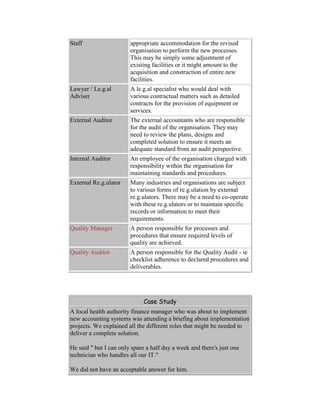
have been updated to reflect the changes.
Change Requests may often reflect lessons to be learned for future projects. It is always
worthwhile reviewing what can be learned and submitting any new knowledge or wisdom
into the various knowledge repositories. Note, in particular, any situations where existing
approaches or sample plans should be updated.
Configurat
ion
Management
Why, What, How?
"Configuration Management", or "Version Control", describes the technical and
administrative control of the deliverable components. It applies particularly where
components need to operate together to provide the overall solution. There will be
thousands of components in the overall solution - each one must fit.
Configuration Management may be applied to all version-controlled deliverables, for
example:
 objects, code modules etc,
 specification documents,
 configuration settings,
 client operating system builds,
 user procedures and documentation.
More typically, it is thought of in respect of the various software components of the
technical solution. Corresponding but less technical procedures would be used for
Documentation Control.
All deliverables may have different versions as they pass through various stages of
development and revision. Software components often have multiple "latest" versions.
For example, different versions of a given item might be in use in the current live system,
also be under test as part of an update project, be under revision by a programmer in the
development environment, and be having updates from its external supplier applied to the
baseline version. Each of those four versions could have variations in the way it connects
with other related components.
As well as the tracking the status and nature of multiple versions, there needs to be
control over their access and usage. It is a common error to find two people have
separately updated the same thing. Whoever finishes last gets the changes applied. The
other changes vanish.
Another common mistake is to assume wrongly that you already have the latest version to
work from.
It is easy to make mistakes due to poor version control. What is worse, because the
developers did not think they were affecting the "lost" content, they might not realise that
it needs to be re-validated in the testing. Errors can easily be released into the live system.
The main rule is, therefore, only one person should have the ability to update a controlled
item at any one time. The library system should "check out" an item for update, and
"check in" the item when the work has been completed, checked and approved for
update. Various access and authorisation rules will be applied to ensure people follow the
procedures. You should make sure the controls are enforced physically with password
systems, discrete environments, etc - but remember to allow for those operational
emergencies when the library's owners are unavailable in the middle of the night.
The precise mechanism will vary. Tools are often specific to a particular software
environment. You might find you need more than one tool where the project involves a
combination of technologies.
At the Start of the Project
Configuration Management does not form a major part of the Project Definition work.
You would probably agree that suitable procedures and tools must be used.
If the project uses an existing software environment, the organisation should have
suitable procedures and tools in place. If not, you should evaluate your needs and acquire
appropriate Configuration Management tools.
At the Start of the Development Work
Configuration Management tools will not normally be required until the Project Team
starts working with the software. Early development work may not require version
control where individuals have discrete parts of the system to work on. When the
different components be.g.in to be fitted together it is generally helpful to have them
subject to version control.
By the time that components are ready for formal, controlled testing, an appropriate set of
procedures and tools must be in place. Formal testing has to take place in a controlled
environment, otherwise there is no proof that the components being tested have not been
subsequently changed - which would invalidate the testing.
At the start of the work, Project Team members need to be briefed on the system and its
importance.
Running the Configuration Management / Version Control
Process
Operation of the Configuration Management / Version Control process might be a Project
Office task, it might be a designated role within the development sub-team, or it might be
a specific service within the organisation's IT department. The custodian of the Library
would administer the process, although good tools automate most of the work and allow
"self-serve" subject to predetermined authorisation and procedural rules.
It is helpful to understand the migration of software components between various
environments or contexts. Software projects are normally undertaken in such a way that
incompatible activities are separated from each other in different environments. One way
of doing this is to have completely separate equipment for each environment. There are
also many ways in which differing logical environments can co-exist as part of a single
physical environment.
The minimum requirement for control is normally three environments:
 The live environment needs to be carefully protected. No components or revisions
should be allowed into the live environment without proper testing, review and
approval. Developers should not be allowed to update live components except in
emergencies.
 The formal testing or Quality Assurance (QA) environment equally needs to be
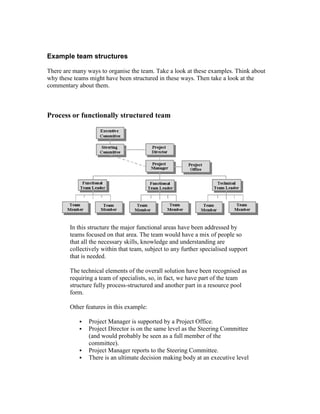
controlled and protected. There can be no certainty about the reliability of the
results if uncontrolled updates and corrections could be taking place.
 The development environment, therefore, is where all the main work takes place,
safely away from the protected areas.
Other environments might be desirable. Project Managers often debate precisely how
many environments you should have. Obviously, each new environment means additional
resources and control overheads. Some of the other common environments might be:
 Operational testing environment - where the system is tested with full-size
transaction loads to see whether it has enough capacity. The technical
configuration and components would also be "tuned up" to ensure adequate
efficiency of processing. The environment might also be used for testing the
operational procedures such as backup, recovery, running interfacing suites etc.
 Separate Project Team testing and User Acceptance Testing environments where
there are two separately controlled stages of formal testing.
 Training Environment - where users can safely perform training activities with no
risk of interfering with the live system nor accidentally sending a payment to
"Mickey Mouse".
 Baseline environment - containing "vanilla" versions of externally supplied
software components. These components form the reference baseline for testing
whether an error was caused by the supplied code (or was introduced later by the
Project Team), and for applying updates from the external supplier.
This diagram shows a typical flow of released components. The Configuration
Management system would control the migration. Note how the development team might
need to work on components that are currently released for testing or already live. They
would check out the live or test version of the component but would not be able to check
it directly back into the live environment without passing through appropriate testing.
At the End of the Project
Configuration Management is a continuing process that will be required for the full
operational life of the system. The procedures, information and tools would be handed
over to whoever has on-going operational responsibility for the support, maintenance and
enhancement of the system.
Team Building, Collaboration and
Communication
Why, What, How?
Building a good team is the single most important thing a
Project Manager can do to achieve a successful project.
With the right attitude, a team will overcome almost any
difficulty to succeed in its goals. In most projects there
will be times when only the determination of the team can
overcome the difficulties and carry the initiative through
to success. Even when there is no pressure, the team's
spirit and enthusiasm will be reflected in the quality of the
solution and the extent to which other people buy-in to it.
There is a whole area of academic study and practical experience about building good
teams. Business psychologists present many theories concerning the way in which people
interact. A world-class Project Manager needs to be an amateur psychologist and a
manipulator of human behaviour. Here are some of the factors which generally lead to a
good team:
 shared belief in the value and achievability of the team's goals,
 awareness of the value of the individual's own role and contribution,
 recognition of the value of other team members (whether they are key specialists
or just non-specialist, junior assistants),
 desire to work collaboratively, sharing thoughts, ideas, concerns, etc,
 friendship - enjoying working together with a common purpose,
 supporting each other in recognition that the team's success requires all members
to be successful,
 coaching junior members rather than bossing them,
 listening to ideas and advice from other team members,
 making time to communicate with other team members,
 celebrating successes,
 rewarding good team behaviour in financial and non-financial ways.
To achieve this collaborative team style, the Project Manager usually needs to behave as
one of the team - collaborative, supportive, friendly, etc. The Project Manager should be
the best of friends with each team member to the extent that each participant would go to
great lengths to help the project succeed.
It is interesting to compare this project management style with the traditional view of the
Project Manager. Often the best recognised Project Managers are those who make a lot of
noise, bang the table, make snap
judgements, are tough with their
people, "crack the whip" and generally drive people to perform through the exercise
of power. These behaviours are very visible and it is common to find managers with
this personal style do get recognised and promoted.
A re.g.ime of terror can only succeed so far and for so long. There comes a point where
the participants give up trying and no amount of pressure can persuade them to increase
their contribution. Beyond that point, people will leave and the project will fail.
Conversely, in a collaborative team the participants feel that the team's success is their
own personal mission. They will respond ever more determinedly as the pressure rises.
The Project Manager who has created an excellent team will find the team performing
optimally with very little intervention. Herein lies the dilemma for a career-minded
Project Manager. In good projects the Project Manager does not need to (and should not)
exhibit dramatic, powerful, personal characteristics, but the organisation's leadership may
be more likely to recognise the talents of a manager who creates a lot of noise.
The reality is that a sensible balance achieves the best results:
reward vs punishment
pleasure vs pain
opportunity vs threat
encouragement vs coercion
The classic analogy is the donkey, motivated by the promise of a carrot and the threat of a
beating with the stick. Most psychologists believe that the positive experience of the
carrot is much more successful than the ne.g.ative threat of the stick. They would argue
that the stick should be applied only on rare occasions with good cause - or, maybe, never
at all. The carrot should be offered as a constant reward for performance.
A similar balance should be achieved between the stimulus generated by the availability
of opportunities versus the instinctive survival reaction to threats.
The best compromise can sometimes be achieved by people taking on different "good
guy" and "bad guy" roles. Think about the "headteacher sanction". In a school class,
children should be exposed for most of their time to a friendly, helpful, collaborative
teacher. If they behave badly, it is unwise to damage the teacher-student relationship so
the threat of pain and punishment takes the form of a trip to the headteacher. If you apply
this logic to a hierarchical structure, the conclusion is that each person more than one
level from the bottom needs to be a friendly, collaborative, supportive mentor to their
immediate subordinates, but a tough, demanding figure in the eyes of those below. Each
manager needs to be able to play both roles.
Human behaviour is driven by a
combination of many factors - some
controllable, some not. The inherent
nature of each individual is something
the Project Manager can do little about.
The way participants are assigned to
roles and sub-teams can be controlled. In
an extreme case, the Project Manager
might choose not to use a given
individual if their character would not fit
in. Look for a good balance of
personalities as well as skills when building the sub-teams and the working relationships
within the Project Team. This is an area where considerable psychological research has
been performed - many publications and training programmes are available.
Building a collaborative team
But who said teams need to be hierarchical? Within a team you will find a mixture of
different people with different assignments - but that does not necessarily require a
hierarchy. The best team cultures develop where team members recognise that everyone
else also has important value to contribute.
For each issue someone needs to be the recognised leader; someone has to believe it is
their responsibility to drive an issue otherwise it may become forgotten. For each issue
there will be a sub-set of people most appropriate to make contributions. "Appropriate",
here, means a combination of capability, resource scheduling/availability, and the need to
build a good team.
The team structure that develops (either formally or informally) will be flexible such that
the right people work together for any given topic. It also means that a leader for one
issue might be only a contributor for another - and vice versa. A can be B's "boss" in
some aspects of the teamwork, but B might be A's boss in others.
In this example, see how the Applications Development Team Leader is an important
contributor to the Solutions Architecture Team and also to the overall project leadership
team. In fact, all the leaders can be a leader in one context but a contributor in others.
If we expand this thinking, it is
possible to generate a highly
collaborative team where every
member has at least one issue to lead
upon. In this table, we see how the
Project Manager has assigned staff to
the various issues. Even the most
junior team member, Pat Sapphire,
has a team leader role to play - Pat is
responsible for organising the team's
social events.
Notice how Jude Jade, the Change
Management leader, works for Jo
Green as part of the Solutions
Architecture Team, but Jo defers to
Jude when dealing with Change
Management issues. By respecting the specialist skills, roles and responsibilities of other
team members, a strong, collaborative team spirit can be created - each person
recognising the value of others and the value of working as a team.
It is a good idea to give everyone responsibility for some aspect, major or minor, of the
overall success of the project.
Planning for a first-class team
You might be able to build a good, effective team based on your own instinct and
personality. If, however, you apply your wisdom you will realise you need to plan your
approach in advance of building the team. Team-building considerations will impact your
decisions on such things as:
 budget,
 team structure,
 reward mechanisms (bonuses, payments, other incentives)
 assignments and usage of specific individuals,
 mobilisation of resources,
 communications strate.g.y,
 planned activities - events and re.g.ular meetings.
The project's sponsors should also understand the importance of building a good team.
Make sure they support the measures and approaches you plan. For example, if you feel it
would help to allow the team to wear jeans, work from home and have free drinks every
Friday - you could get in a lot of trouble unless the senior leadership understand and
agree.
Routine activities and special events should be included in the overall high-level planning
for the project and in the detailed plan for each phase.
Mobilizing the team
You should be.g.in to build an effective team culture as (or even before) the individuals
join the project. This is a combination of attitude and specific actions. All people in
leadership roles should make each individual feel a valued part of a team with a clear and
important mission.
Key message to convey to all team members are:
 the objective of the project
 what the end result should look like
 why it is of value to the organisation
 what approach the project will take (focus areas, workstreams, timing,
technology, techniques, etc)
 the style and culture the project team is expected to adopt
 why each individual's co-operation is vital and of great value.
There will also be a large number of specific things the team members need to
understand, e.g.:
 where they work, eat, get coffee, go to the toilet, park the car, run to when there is
a fire, etc
 who they report to and how,
 what they have to do,
 where they find information, documentation, advice etc
 how they fill in timesheets,
 how they report issues, problems, bugs etc,
 what behavioural norms are expected (e.g. clothes, language, timekeeping,
personal use of telephone, internet and other equipment or technology, etc)
 how to use specific software, hardware and other equipment.
Some of this can be conveyed to individuals personally as they arrive. To handle the bulk
of the information you should prepare:
 welcome packs containing information about the project and its modus operandi,
 team briefing sessions for batches of team members as they arrive,
 training sessions for any specific technologies being used - both for the project
work or for the administration and control of the project.
Remember that the emphasis is to build a good team. The right attitude can be promoted
throughout all these activities. In addition, you should plan appropriate formal and
informal activities that build the desired attitudes and behaviours. In most cases, some
form of team social event should be held early in the project. Informal social activities
can also be planned - even where they are intended to look unplanned.
Team-building and social events
Most Project Managers view activities involving alcohol as the easiest way to win over
the hearts of the team members. Remember to be generous! There are many other
options. You need to give careful thought to the desired team culture, the norms of the
organisation, and the background of all team members. Please remember that just because
you think a good fun night out involves a large amount of beer and loud dance music, it
does not follow that all your team members would enjoy it. Avoid activities that only
appeal to a sub-set of the team, e.g. go-kart racing, paint-ball battles, golf, opera, wine
tasting, etc. If you organise such activities, make sure the next event appeals to a wholly
different group. Be particularly careful to avoid developing a team culture where you
socialise with a group of friends who re.g.ularly enjoy all your social activities but you
find there are other people who never want to join in. What you are doing is dividing the
team into your friends versus the people who do not share your interests.
Here are some ideas:
 Provide food and refreshments
for team meetings
Particularly useful if you want
to encourage people to attend
inconvenient or unwelcome
meetings.
 Lunchtime drinks and meals Used to be very common - but
the damage you do to the
progress of the project can be
very visible. In general, it is
best to reserve this for special
celebrations.
 Evening drinks, meals, etc A majority of project team
members may enjoy the
socialising - even if they are not
interested in drinking or staying
late.
 Clubs, dancing, theatre, etc Typically any such event
appeals to a minority of the
team. Try to choose something
which will be interesting to
most and tolerable to everyone
 Day trips Often most effective if
achieving a serious business
goal as well as being fun. For
example, take the team to an
"away-day" at a pleasant
location to hold an event such
as a briefing, training,
symposium, think-tank, etc.
 "Macho" pursuits - e.g. go-
karts, paint ball, abseiling,
climbing, racing cars, driving
off-road vehicles, parachuting,
bungy jumping, etc
These activities are often the
most popular, but there is a
major risk that a significant part
of the team will not enjoy such
activities and feel annoyed that
their interests are not being
considered. Make sure there is
appropriate insurance cover.
 "Off the wall" fun - ie strange
things you never thought you
would do as an adult, e.g.
murder mystery, quiz
competitions, karaoke, trivial
pursuits, ten pin bowling,
badminton, sports day, pony
trekking, etc
These work well provided the
style changes with each event.
People will enjoy most novel
activities once (and once only).
Look for activities that anyone
could enjoy - previous
experience not required.
 Community charity - e.g.
clean up a canal, paint the Boy
Scout hut, coach at the local
school, etc
Usually excellent team-building
activities that do good as well.
Somehow, the messier you get
the better they seem to work.
 Charity events Again, good team builders
provided a large number of
people participate.
 Training courses Training can be fun as well as
serving a more serious purpose.
Investment in training also
emphasises the importance and
value you place on the team
members. It works particularly
well if several team members
attend the training together.
 Training days Gather together the team or
sub-teams as appropriate for
re.g.ular training or briefing
sessions - say once a month.
These are opportunities to
convey general information and
specific knowledge. They also
provide an excellent
opportunity for team building.
IMPORTANT WARNINGS
Any activity that costs money or detracts from normal working time
must be agreed by the project's sponsor and senior leadership. Observe
any le.g.al or cultural restrictions. What some nations, industries and
organisations see as normal, desirable business behaviour can be seen
by others as immoral, ille.g.al or devious.
Any activity outside normal working practices and/or locations may
require special insurance.
Case Study
A senior public sector IT manager was given a free place on a training
course that was relevant to his work. He was dismissed for accepting
the supplier's hospitality.
Team building, meetings and communication during the
project
Events
Team-building should continue throughout the project. As with the events during
mobilisation, these would normally be a mixture of directly work-related activities, and
other social, team building.
Building good team spirit is not just a matter of organising entertainment for the team. As
well as the special events, the routine work of a project typically gives rise to many
opportunities for human interaction - meetings, informal discussions, chance encounters,
written messages, etc. Each of these is an opportunity to enhance the effectiveness of the
team by displaying the right attitude and saying the right things.
MBWA
MBWA is a famous management theory - it means "Management By Walking About".
What it means is that a good manager operates, at least in part, by getting out to see what
the team is doing whether or not there is a specific reason to do so.
It is very easy for a busy Project Manager to shut the door and concentrate on
consolidating the plan or reviewing the deliverables. You must reserve enough time for
direct interaction with the team. It should be a two-way, collaborative process. Here are
some of the things you should be aiming to achieve:
 motivate individuals and sub-teams
 promote the right attitudes and behaviours: team spirit, collaboration, sharing
knowledge, focus, etc
 gain an improved understanding of the project: requirements, designs, quality,
issues, progress, etc
 provide better guidance: steer thinking, suggest ways forward, intercept potential
problems, coach individuals, etc.
Brownie points
It may be possible to promote good team behaviour using recognition and reward
mechanisms. In most organisations there will be some form of formal performance
assessment and reward process. This would normally address the major objectives of the
individual. The current project might, or might not, be one a significant factor in those
objectives and/or the performance assessment. It may also be possible to introduce
additional incentives directly relating to the project, for example, bonuses paid for
beating deadlines.
Formal reward processes usually focus on the individual's prime objectives. They are
rarely able to promote good behaviour across all aspects of the work - to do so would
require complex analysis of all desirable behaviours and a carefully constructed
performance measurement system to balance the competing goals. The Project Manager
may be able to find other ways to recognise, promote and reward good behaviour,
particularly where it lies outside the individuals' main reward system.
Recognition itself is very valuable in promoting good behaviour. Remembering to say
"thank you" is the cheapest and easiest way to improve team performance. Make sure it
sounds (and preferably is) genuine: "thank you, that was really useful".
In the right situations, secondary recognition mechanisms can be administered by the
Project Team. Where there are significant financial rewards involved, this must be done
properly with the agreement of the project's sponsor and the overall organisation. It will
normally be subject to tax and le.g.al requirements. It is also important to ensure that it is
acceptable in the overall organisation and environment; for example, do people not
working on the Project Team consider it unfair?
One potential solution is to use rewards
and recognition with no direct financial
value. There does need to be some belief
that the reward or recognition has value -
but value can be established in many
ways.
For example:
 the Project Manager guarantees to
communicate positive feedback to
the individual's line management
 fun fantasy league table of sub-
team or individual Brownie Point
performance
 token gifts or treats (subject to
whatever financial limits are
appropriate in the environment)
e.g. bottle of Champagne,
shopping voucher, airline ticket
 bonus payments
Definitions
Brownie a junior Girl Scout
Brownie
Point
English colloquial expression:
A recognition of merit which
could seemingly be added to the
individual's overall merit score,
but which, in fact, has no real
value so collecting them is
equally pointless.
A "Brownie Point" system, if it is to be taken seriously, needs to be administered by the
Project Office. Members of the team at any level can nominate a colleague as deserving a
number of Brownie Points for doing something special which contributed towards the
success of the project. It could relate to the quality of the work, getting things done on
time, the social life of the team, relationships with external parties, etc. You might also
set up tariffs for specific actions you wish to encourage, for example, the submission of
issues or completing timesheets on time. The nomination or submissions would be
scrutinised by the Project Office to make sure it is genuine and appropriate. Individual
scores feed into whichever for of reward mechanism is in operation.
Meetings
Two common complaints from project teams are: "too many meetings" and "not enough
communication". Senior management often react to the latter of these by organising more
meetings.
Let's distinguish between formal meetings and the gatherings of work groups. Some rules
about formal meetings can be found in the Control and Reporting section.
The gathering together of people for the practicalities of working together is bound to
involve a large number and wide range of meetings over the life of a project. In some
cases, re.g.ular scheduling makes sense in order to overcome natural reluctance to
communicate, to share knowledge, and, in particular, to admit to failings. Some people
inevitably feel that any disturbance from their main task is unwelcome and/or unhelpful.
Group members frequently dislike interaction with others outside that group.
Here is a typical pattern of recurring Project Team meetings...
Attendance Purpose Frequency
Full Project Team Briefing, plenary
session, and team-
building social event
Approximately once a
month, preferably
coinciding with major
milestones
Project leadership
(PM plus team
leaders)
Progress, issues,
actions
Weekly
Team leader plus
sub-team
Specific tasks,
progress, problems,
estimates, help
wanted
Daily
In other cases, meetings will be arranged around specific activities or issues and will
involve only the people concerned. If you take another look at the picture of the
collaborative project team, you will see that there will be many different workgroup
relationships and consequent needs to gather together the right people. Here is the ideal
(but unachievable) mental picture of how the collaborative team works:
At any instant I can share my thinking with precisely the right group of
people - those who can help and those who benefit from understanding.
The fundamental rule should be to get optimum value from people's time. Do not have
meetings where the presence of certain attendees adds no value for a majority of the time
- maybe separate meetings or approaches would work better. Do not waste time on
routine matters that could effectively be conveyed in a more efficient way. Avoid the
tendency to involve every possible person in every discussion - you will make more
progress with a small number of the right people.
It is not just a waste of time, resources and money. Wasting time at meetings often leads
to cynicism, demotivation and a lack of confidence in the leaders.
Videoconferencing
Much productive time can be lost travelling to meetings. Face-to-face meetings usually
provide the best channel for discussion, information exchange and relationship building.
These benefits should be balanced against the lost productive time. In general a mixture
of physical and virtual meetings provides the best compromise.
Arranging telephone conferences should be simple. Most major organisations already
have facilities available. Alternatively, the telephone service provider should be able to
make the arrangements.
There are two main styles of Videoconferencing: using specialist videoconference
facilities or using desktop software from your PC. The ideal scenario is to be able to hook
up with other participants through the network at any time without leaving your desk.
Although this is technically feasible, relatively few organisations have the bandwidth and
controls to operate it efficiently.
The alternative is for attendees to gather at their nearest video conference suite (internally
or externally - e.g. conference centres, press agencies). Two-way links are just dialled
directly. Multiple link ups can be achieved through "bridges" - everyone connects to the
bridge which combines and controls the multiple video and audio links.
Here is a project meeting with participants
at five locations in four different countries.
Videoconference links are combined
through a "bridge" provided by the external
telecomms provider.
Further participants are connected to the
bridge through audio channels (ie normal
telephone dial in).
As well as the videoconferencing, the
participants are connected through the
organisation's global network. They are able
to:
 view presentations
 share applications
 share text messages, diagrams etc
Non-verbal communication
There will be a range of channels available for communication within the project team
and with external participants. The objective is to share information, knowledge,
thoughts, concerns, feelings, etc in the most efficient way. Remember that people often
feel they have insufficient time to read all the written material that is sent to them - at
least with face-to-face communication you can see that they can hear you (but not
necessarily whether they are listening).
Some of the uses and channels of communication would normally have been considered
and agreed as part of a Communications Plan and, generally, as part of the Change
Management process. This is particularly the case where communications are made to
people outside the Project Team.
Here are some tips...
Channel Commentary
EMail Undoubtedly the conveyor of most ad-hoc written
messages. Not everyone reads all their mail, so
make sure its content and importance is clear in the
title. For those people who like to scan message
previews, make sure the most important facts
appear in the first few words (don't waste the first
two lines with "Dear Fred" and a blank line). For
important communications, track that recipients
have read and/or responded as required.
PC / web chat
services
Real-time brief text messages exchanged between
two or more participants. Can be very useful for
brief exchanges. Provides instant check that the
other person has read the message and responded.
This works best if team members have access to a
directory of chat addresses for all project
participants. If something important or relevant to
others comes up, copy and paste the text into an
EMail or document.
Circulars There will be frequent needs to communicate
messages to sub-sets of the Project Team - whether
by paper, by EMail or by other methods. The
Project Office would normally maintain circulation
lists and other contact information. Make sure you
communicate valuable information to people who
need to know, otherwise your messages become
resource-wasting junk mail.
Team newsletter Can be motivating, fun, informative, etc. The two
main uses are to build team spirit and to
communicate general information about the project.
There is a danger that they achieve neither of these
goals and become a waste of resources. Encourage
people to read them with useful, valuable content -
e.g. social calendar, bonus dates, competitions.
Project
newsletter
This is primarily aimed at participants outside the
team. The objective will be to raise awareness and
support for the project. In the latter stages of the
project, more specific information, instructions and
schedules will be conveyed. The use of external
communications should be agreed as part of the
Change Management planning.
Project Website Many projects create a web site to hold a wide
range of information that participants may wish to
access. On the front page will be headline
messages. Reference information would be
accessible through indexes. Communication
through this channel will be particularly effective if
participants have to visit it - for example, if the
(compulsory) timesheets are entered through the
same portal.
Documentation All projects generate great volumes of
documentation, hopefully in a sharable electronic
format. Easy, controlled access to the project
documentation is the best way to enable
communication of detailed information. Where
there is something new or amended that particular
team members need to be aware of, a process
should be in place to draw their attention to it.
Formalised
communication
Certain forms of communication are controlled
through specific processes and media, for example
timesheets, progress reports, change requests,
issues, etc. See the specific guidance for these.
Phase-end and project-end activities
Celebrating the completion of major phases of work or the overall project is an important
element of team building. In some cases it might be argued that it is too late to affect
outcome, but there are still good reasons to celebrate.
A key element of building an effective team is to focus the group on their goal. The
importance of the goal is reinforced by the idea that it is a cause for celebration and a
time to applaud the team's achievements. This understanding will help to motivate and
focus the group. It is an implicit promise that completion will be celebrated and a wise
manager will not break a promise even if there is no reason to believe the same people
will work together again in the future.
Project celebrations are also a valuable tool in spreading the message of the project's
success. To achieve a successful business solution, the organisation, senior leadership,
end users, management and interested third parties all need to believe in its achievements,
importance and relevance.
As with any other team-building event, ensure that the plans and expenditure are
appropriate and agreed.
Quality Management
Why, What, How?
Quality Management vs Quality Audit
In the ePMbook, we will make a distinction between Quality Management and Quality
Audit.
 By Quality Management, we mean all the activities that are intended to bring
about the desired level of quality.
 By Quality Audit we mean the procedural controls that ensure participants are
adequately following the required procedures.
These concepts are related, but should not be confused. In particular, Quality Audit
relates to the approach to quality that is laid down in quality standards such as the ISO-
900x standards.
The abbreviation "QA" has been generally avoided in the ePMbook as it can mean
different things - e.g. "Quality Assurance", "Quality Audit", testing, external reviews, etc.
In this section, we discuss how to achieve quality.
Quality is not an absolute requirement
It is wrong to assume that maximum quality is desirable. Should every car be built to the
same quality as a Rolls Royce? Should every computer system be held back until there is
not one single flaw remaining?
Required quality should be considered as part of the overall Project Definition work. It
will impact upon such things as the estimates and benefit case. Such things are business
decisions. They can only be taken by the Project Sponsor and senior management team of
the organisation.
Quality decisions are not just a matter of the reliability of the end product - they can also
affect the scope and project approach. This is particularly an issue with e-solutions:
 Do you want something magnificent, or do you want something fast before your
competitors get ahead?
 Do you want a complete solution, or will you settle for a partial solution and come
back to finish it at a later date?
You need to make it clear that these are mutually exclusive alternatives - you cannot do
magnificent, complete and fast.
Very often, commercial pressures mean that the best business decision is to achieve an
"80%" solution fast. Many early e-commerce business-to-consumer solutions looked
great to the customer but involved staff re-keying data into the sales order systems or
manually processing credit card transactions.
Case Study
A company decided to achieve a rapid deployment by focusing on 80%
solutions and breaking their requirements into five phases of
development and deployment.
A project reviewer asked if they had considered how functional the end
result would be. Would it be 80% x 80% x 80% x 80% x 80%? That
would be 33% - one third what you need.
Aspects of Quality Management
Here is a summary of the various aspects of Quality Management. Different organisations
will use different expressions for these concepts and may package them into other
activities. This description follows the logical requirements.
Aspect Summary
Quality Plan Define and agree the needs for quality and the
specific approaches to meet them.
Phase Quality
Requirements
For each phase, what specific things will be done
and what specific deliverables will be produced
Apply Quality
Methods
Throughout the work the defined approach to quality
will be followed. Work or deliverables falling short
of the standards will need to be re-worked to achieve
an acceptable standard.
Phase Quality
Review
Before each phase can be closed, a review is
performed to ensure that acceptable quality
standards have been achieved.
Project Quality
Review
Before the project can be completed, the overall
conformance to Quality Methods and requirements
should be assessed and approved.
Responsibilities for quality
The Project Manager will, of course, have overall responsibility for the quality of the
project. It is equally true that all participants have a role to play in delivering good
results. Developing a quality culture amongst the team will normally generate greater
value and satisfaction. Encourage the belief that the right level of quality is more
important than getting things done fast. If there is a choice to be made between quality
and progress it should be a matter for the Steering Committee to decide
Other managers will also be involved in the Quality Management process. In larger
projects there may be a Quality Manager and Quality Team. Team Leaders and other
senior staff will also be involved in the processes. In some environments, certain Quality
Management functions may be performed by independent reviewers from outside the
Project Team.
Responsibilities for quality should be agreed and communicated to all participants.
The Quality Plan
The Quality Plan is a broad concept covering many aspects of achieving quality. In many
projects these might be covered in an array of different deliverables. In particular,
procedures and standards might be documented separately from quality goals and
controls.
Many organisations will have pre-existing standards and procedures which should be
applied. Check that they are appropriate to the current project - you do not want to
develop a web site using standards that were written for custom development of
mainframe applications.
Here are some types of thing you should consider.
Type of
content
Description Examples
Objectives What are the objectives
of Quality
Management? To what
extent is quality a
requirement in
preference to
timescales, costs,
functionality etc?
 Acceptable levels of
functionality to
achieve
 Acceptable levels of
security, bugs etc
 Investment in testing
Requirements What specific
requirements are to be
addressed
 Review and sign-off
of specific
deliverables or work
by specified people
 Types and depth of
testing required
 Availability of
specified functions
Quality
Methods
What approaches and
methods
 Iterative development
in specified stages
 Methodology to be
followed
 Peer review of all
deliverables
Standards What format and detail
should deliverables be
in
 web page layout &
navigation standards
 coding standards
 documentation
standards
Procedures Specified procedures
for project tasks
 check-in and check-
out of code
 documentation control
procedure
 issues management
procedure
The Quality Plan is often an evolving document. As the project progresses it will need to
adapt to changes and decisions. For example, detailed website design and navigation is
unlikely to be defined at the start of the project unless you are adding to an existing
solution.
Preparing for Quality Management at the start of each
phase
When the detailed plan for each phase is completed it will be possible to identify the
specific Quality Methods and controls that should be applied - and what they should be
applied to. One basic approach is to create two lists:
 all the work that should be done (including the methods, techniques and
procedures to be used)
 all the deliverables that should be produced (including the formats and standards
that should be applied)
This provides a guide for the people conducting the work and a checklist for the phase-
end review.
It is good project management practice, as well as a Quality Management process, to
identify in advance all the anticipated deliverables. For each one, you should identify:
 nature, description and purpose of the deliverable,
 quality standard (e.g. discussion draft, final quality, reviewed or tested for
external publication)
 dependencies (what must be completed prior and what further deliverables depend
upon this one)
 date required,
 author/creator,
 people who have to review it,
 people who have to approve it,
 people who should receive it for information or use (but who do not get the
opportunity to review or approve)
 other distribution (e.g. third parties, auditors, publishing, filing)
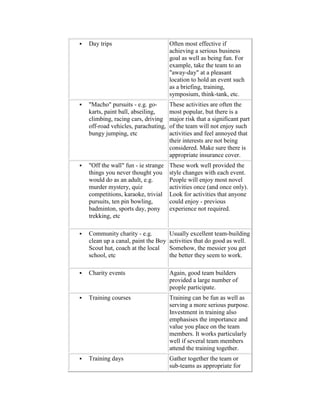
 security/secrecy requirements - ie who can not see or use it
 currency information (e.g. must be maintained, updateable, one-off, temporary,
final project deliverable)
Bringing about quality during the work
The best Quality Methods will depend on the type of project - the team, application,
language, technology, participants, environment, etc. They will also be affected by
strate.g.ic decisions about the investment in quality.
Here are some examples:
 all requirements should be prototyped iteratively in collaboration with the
responsible user manager
 designers are expected to consider any reasonable alternative approaches and
discuss them with the responsible user manager before creating a detailed design
 any anticipated impact on timescales, resourcing, deliverables, or benefits should
be communicated to the project manager as soon as possible and before any
revised action is taken
 all documents should include control information such as version numbers, issue
dates, status, authors, reviewers etc
 all designs should be reviewed by someone from a different sub-team and by the
overall solution architect
 any aspect of a deliverable which could impact upon another deliverable should
be noted in the issues management system
 only one person can have update access to a document or system component at
any one time - access will be controlled through the configuration management
and/or documentation control procedures
 all completed work will be signed off by the responsible user manager
 once a deliverable is completed, signed off and closed it can only be re-opened by
following the change control procedure
 developers are not allowed to test their own work
 appropriate end users must be involved in all systems tests - each test must be
signed off by the responsible user manager
 where any correction is applied to a deliverable, all other deliverables which
could be affected must be re-examined and/or re-tested
 all components should be sized and tested for absolute peak usage
 developers cannot access live components directly - they need to check them out
using the configuration management and/or documentation control procedures.
There will also be a number of rules, standards and procedures, e.g.:
 format of documents
 techniques to use (e.g. estimating technique, modelling technique)
 language(s) to use
 naming conventions
 documentation standards
 procedures to follow (e.g. documentation control, configuration management,
issues management, bug reports, testing).
It will be easier to manage quality if the application of Quality Methods and controls is
tracked continuously through the project, rather than relying solely on reviews at the end
of each phase. The status of work and deliverables can be tracked against the lists
prepared for the Phase. The tracking information should show the stage of progress (e.g.
not started, in progress, completed, signed off), and the status of specific controls,
reviews, signatures etc. In particular, completion should be logged and a check made to
ensure that the correct methods, controls and approvals were completed.
One final thing to note about these Quality Methods: they are all rules for people to
follow. In fact, most people do not respond well to being given rules. The most
significant thing the Project Manager and Team Leaders can do to ensure appropriate
quality is to take a personal interest in the quality of work being done, providing coaching
and feedback as appropriate.
Reviewing quality at the end of a phase
There should be little to do at the end of the phase - if there are significant problems it is
too late to do anything without an adverse impact on costs and timescales. The Quality
Methods you have applied throughout the phase should have ensured that there is no
surprise at the end of the phase.
Before the phase can truly be considered to be complete, you should review that you
have:
 done everything you said you would do in the way you said you would do it, and
 produced everything you said you would produce to an acceptable standard.
There will, of course, be deviations. In each case it should be clear whether:
 the change was agreed and its impact has been dealt with
 the shortcoming was not desirable but is acceptable in terms of delivering the
overall benefit from the project
 the failure will be remedied at a later (defined) stage
 the fault must be remedied now before the phase can be completed.
The phase-end Quality Review should be agreed and signed off by the Project Sponsor
and/or senior leadership representing the organisation.
Reviewing quality at the end of the project
Similar considerations apply at the end of the project. The senior leadership will consider
the extent to which the project has adequately completed the planned work and
deliverables (subject to agreed changes during its course). As well as the Quality
Management aspect of such a review, there will also be many other reasons to examine
the success of the project, for example, learning lessons, planning further improvements,
improving estimating techniques, paying contractors and suppliers etc.
Case Study
An airline ran its new financial system in live operation for six months
- but from the QA environment, not with the other live systems in the
live environment. Only when all outstanding concerns were fully
addressed did they risk promoting the system to run alongside their
mission-critical reservations and scheduling systems.
The system's supplier was not pleased with this outcome and
underwent a lot of pressure to perfect the implementation. The contract
said the large final payment was due when the system was live. But...
"what is the meaning of live"?
Quality Audit
Why, What, How?
Quality Management vs Quality Audit
In the ePMbook, we will make a distinction between Quality Management and Quality
Audit.
 By Quality Management, we mean all the activities that are intended to bring
about the desired level of quality.
 By Quality Audit we mean the procedural controls that ensure participants are
adequately following the required procedures.
These concepts are related, but should not be confused. In particular, Quality Audit
relates to the approach to quality that is laid down in quality standards such as the ISO-
900x standards.
The abbreviation "QA" has been generally avoided in the ePMbook as it can mean
different things - e.g. "Quality Assurance", "Quality Audit", testing, external reviews, etc.
In this section, we discuss Quality Audit.
The principle behind Quality Audit
The principles of Quality Audit, in the sense we mean it here, are based on the style of
quality standards used in several formal national and international standards such as the
ISO-900x international quality standards. These standards do not in themselves create
quality. The logic is as follows.
Every organisation should define comprehensive procedures by which their products or
services can be delivered consistently to the desired level of quality. As was discussed in
the section on Quality Management, maximum quality is rarely the desired objective
since it can cost too much and take too long. The average product or service provides a
sensible compromise between quality and cost. There is also a le.g.itimate market for
products that are low cost and low quality.
Standards authorities do not seek to make that business judgement and enforce it upon
businesses, except where certain minimum standards must be met (e.g. all cars must have
seat belts that meet minimum safety standards, but there is no attempt to define how
ele.g.ant or comfortable they are).
The principle is that each organisation should create thorough, controlled procedures for
each of its processes. Those procedures should deliver the quality that is sought. The
Quality Audit, therefore, only needs to ensure that procedures have been defined,
controlled, communicated and used. Processes will be put in place to deal with corrective
actions when deviations occur. This principle can be applied to continuous business
process operations or recurring project work. It would not be normal to establish a set of
quality controlled procedures for a one-off situation since the emphasis is consistency.
This principle may be applied whether or not the organisation seeks to establish or
maintain an externally recognised quality certification such as ISO-900x. To achieve a
certification, the procedures will be subjected to internal and external scrutiny.
Preparing for Quality Audit
Thorough procedures need to be defined, controlled, communicated and used.
Thorough Procedures should cover all aspects of work where
conformity and standards are required to achieved
desired quality levels. For example, one might decide
to control formal program testing, but leave the
preliminary testing of a prototype to the
programmer's discretion.
Procedures Any recurring aspect of work could merit
re.g.ulation. The style and depth of the description
will vary according to needs and preferences,
provided it is sufficiently clear to be followed.
Defined A major tenet is that the defined procedures are good
and will lead to the desired levels of quality.
Considerable thought, consultation and trialing
should be applied in order to define appropriate
procedures. Procedures will often also require
defined forms or software tools.
Controlled As with any good quality management, the
procedures should be properly controlled in terms of
accessibility, version control, update authorities etc.
Communicated All participants need to know about the defined
procedures - that they exist, where to find them, what
they cover. Quality reviewers are likely to check that
team members understand about the procedures.
Used The defined procedures should be followed. Checks
will be made to ensure this is the case. A corrective
action procedure will be applied to deal with
shortcomings. Typically the corrective action would
either be to learn the lesson for next time, or to re-
work the item if it is sufficiently important.
There is no reason why these Quality Audit techniques should conflict with the project's
Quality Management processes. Where project work is recurring, the aim should be for
the Quality Methods and other procedures to be defined once for both purposes.
Problems may occur where the current project has significant differences from earlier
ones. Quality standards may have been set in stone as part of a quality certification. In
extreme situations this can lead to wholly inappropriate procedures being forced upon the
team, for example, using traditional structured analysis and design in a waterfall style
approach for what would be handled best using iterative prototyping. The Project
Manager may need to re-ne.g.otiate quality standards with the organisation's Quality
Manager.
Operating Quality Audit
A Quality Audit approach affects the entire work lifecycle:
 Pre-defined standards will impact the way the project is planned
 Quality requirements for specific work packages and deliverables will be
identified in advance
 Specific procedures will be followed at all stages
 Quality Methods must be defined and followed
 Completed work and deliverables should be reviewed for compliance.
This should be seen as an underlying framework and set of rules to apply in the project's
Quality Management processes.
Quality Audit reviews
Although the impact of Quality Audit will be across all parts of the lifecycle, specific
Quality Audit activities tend to be applied as retrospective reviews that the Project Team
correctly followed its defined procedures. Such reviews are most likely to be applied at
phase end and project completion. Of course, the major drawback of such a review is that
it is normally too late to affect the outcome of the work. The emphasis is often on
learning lessons and fixing administrative items. In many ways, the purpose of the review
is to encourage conformity by the threat of a subsequent bad experience with the quality
police.
Case Study
A famous Programme Management guru joined a major consultancy.
He was invited to review the firm's methodology. His first
pronouncement was...
..."you should have a version number and date on the bottom of every
page".
Sub-contractor and Contract
Management
Why, What, How?
Many projects rely on the supply of hardware, software, facilities and services by various
vendors or sub-contractors. The Project Manager may need to:
 select the best suppliers,
 ne.g.otiate terms and conditions,
 agree contracts,
 ensure the goods or services supplied are acceptable,
 deal with disputes,
 ne.g.otiate changes where the client requires new or changed deliverables from
the vendor,
 ensure the vendor or sub-contractor is paid in accordance with the agreement,
 manage the relationship to maintain a good working relationship.
The Project Manager has an important part to play - but remember what you are not...
 You are not the right person to enter into contractual relationships on behalf of the
organisation. It will usually be a senior manager who is most appropriate and is
authorised to agree the terms and sign the contract.
 You are not a lawyer. Although it is in your interest to see that the deal meets
your needs, use lawyers or other specialists to determine the precise wording of
the contract.
There are many different situations requiring contracts. Your approach may vary
considerably. In terms of scale, take a look at these examples:
 complete outsourcing of facilities and business functions,
 outsourcing the development of a new IT system,
 sub-contracting the development of a specific component of
your new system,
 purchase of packaged software and on-going support,
 using consultants from a major consultancy firm,
 hiring a freelance programmer working as a contractor,
 additional licences for standard desktop software.
Most people and businesses are reasonably honest. They need satisfied customers to build
their reputation and gain future work. But some of them will bend the truth a bit if they
feel it is le.g.itimate. We call such people "salesmen".
For example, in a selection exercise if you ask the question "is your system user
friendly", you can guarantee they will say "yes". It was not worth asking the question.
Worse than that, some vendors will use the word "yes" to mean "yes - it could be done ...
if we modify the system for you". You need to probe for the truth and make sure you
leave no room for them to mislead you.
Watch out for the hidden extras. If the contract does not say something is included you
can guarantee an additional charge for it. By then you will be tied into the relationship.
You will find you have a poor bargaining position when ne.g.otiating those charges.
Beware of the sharks!
At the start of the project
Selecting suppliers
The process of selecting suppliers is the subject of detailed methodologies. In the
ePMbook we will only summarise the considerations.
The style of selection will vary according to your needs and environment. We saw above
that there is a large range of contractual situations to consider. The more significant the
contract, the more attention you are likely to pay to the selection and procurement
processes.
Styles also vary noticeably between the public and private sector:
 In the public sector, the emphasis tends to be on completeness and fairness. All
potential vendors should be identified and given an equal chance to win. Various
rules, norms, standards and le.g.al requirements apply to re.g.ulate the process.
Certain types of purchase can be made from standard approved suppliers without
the need to enter into a full selection process. Rules are also relaxed for low-value
contracts.
 In the private sector, the objective is usually to gain maximum benefit. That might
be achievable by making a rapid choice from a small number of leading suppliers.
It might also be possible to partner with a single reliable supplier. Selection
exercises are used only where there is a genuine need to search the marketplace
for the best supplier.
Start by defining what you need. Try to limit this to the genuine business requirements.
Do not make assumptions about the solution nor add in unnecessary detail. To do so
would restrict the vendors' ability to propose the best overall solution to meet your needs.
Make sure it is clear (both to yourself and to potential bidders) which requirements are so
vital that you could not consider any proposal that failed to address them . If the vendor
can see that their proposal will be rejected, there is no point in the bidder wasting their
time or yours by responding to a Request For Proposal. Be very careful, however, to
restrict this to absolute needs that could not be addressed some other way. It is common
for people preparing requirements documents to claim many things are mandatory - only
to change the rules when they realise no vendor can do everything.
In a classic selection process, these requirements are used to
formulate a Request For Proposal (RFP) which will be
issued to potential vendors. (Organisations use many
different names for this concept - find out what language is
used in your organisation.) Each vendor will consider their
response. They will often need further interaction with you
to explore your precise requirements or explore possible
directions. (In the public sector scenario, anything you tell a
competing vendor must be relayed to the others.)
After a reasonable period of time the vendors submit the
proposals to you for evaluation. Before they arrive you
should have taken the time to define how you will assess the
responses. Develop a balanced view of the relative
importance of various requirements. Just because you asked
100 questions about accounting and only 10 about the
electronic storefront does not mean the accounting issues
outweigh the customer perspective.
You will probably want to perform other investigations to
complement the information in the formal proposal. For
example, you might ask for demonstrations, interview
existing customers, investigate the vendor's financial status
and check their track record.
With a large number of potential vendors, it is common to narrow the field in stages,
maybe starting with a Request for Information to arrive at a short list, followed by the
Request for Proposal, and then narrow the field again before conducting detailed
investigations.
Where it is not necessary to make a selection decision on the
basis of formal tenders received, it may be more efficient to
study the vendors, services and products available then
make a straightforward purchase decision. To do so, you
would need access to sufficient knowledge or information
about the competing options.
You might still approach several vendors and request
information, prices etc. The key difference is that you
collect the information you need, then make a decision. You
do not ask them to submit formal bids against a specially
prepared RFQ document.
Following your decision in principle, typically you would
still enter into ne.g.otiations with the vendor to ensure you
get a good deal that meets your needs and avoids any
contractual pitfalls.
The great advantage would be the time saving. Preparing a
formal RFP can often take several weeks. It will take a
further period of weeks for it to be received by the vendors,
studied, queried, and responded to. On receipt of the
vendors' proposals you might then spend weeks reading,
querying, investigating and evaluating the detail.
This style of procurement is also the typical way you would hire individuals as sub-
contractors - for example contract programmers. You would evaluate the individuals'
career histories and capabilities, interview them, then attempt to come to mutually agreed
terms with those that you consider the most appropriate.
Where the contract concerns a commodity item, you might
pay even less attention to the choice of item and vendor. If
you need a projector, you might simply find the nearest
supplier and buy or hire one.
In some cases, significant contracts can be handled in this
way, provided the content is subject to pre-existing,
approved purchase lists. For example, you might be able to
buy 100 PCs directly from an approved supplier or you
might be able to hire consultants through a framework
contract.
Even in such cases, you may need to consider the detail of
the contractual relationship. Unless the transaction is a
simple consumer purchase, you will need to check the small
print for warranties, terms and conditions etc.
Be particularly careful if the minor components are essential
to your overall solution. For example, if your design is
based on a particular type of mobile device you would not
want to find that it ceases production shortly after you have
finished.
Ne.g.otiating Terms
The role of the Project Manager is to ensure that the ne.g.otiated deal best meets the
project's needs. You should be checking such things as:
 specifications,
 identification of all necessary components and work packages,
 delivery dates,
 quality/acceptance criteria,
 guaranteed functionality,
 staffing levels,
 training provision,
 support arrangements,
 adequate resilience,
 guaranteed performance (speed),
 service levels.
There will also be the commercial arrangements to deal with. You could try to ne.g.otiate
a good deal on your own, but you will probably do better if you use an experienced
Purchasing Manager or Buyer from your organisation.
Case Study
"There are two types of customer - those who pay the full price and
those who know they can ask for a discount. If they don't ask, we don't
mention it."
- IT salesman
In commercial deals it is common to agree a discount against the vendor's standard price.
Strangely, not all purchasers realise they can ask. There are some vendors who never
discount prices - but their salesmen will not think it strange of you to ask. Often, the
vendor will have a target price to achieve, a standard price that is say 25% higher, but be
willing to discount say 25% lower to get the sale. That means you might get 40% off the
price you were originally told. The larger your organisation and the larger your potential
contract, the more bargaining power you have. Even the strongest suppliers are willing to
barter if the deal is big enough.
The flexibility to discount will depend on what is being sold. If it is software (excluding
support and maintenance) the marginal cost to the vendor might be the cost of a CD.
Their pricing will be designed to achieve a reasonable return on their original investment
overall, but a sale at any price will increase their profit. If they are selling services, they
could discount down to the cost of service for their employees' time. If they are selling
hardware or selling on someone else's product, they cannot go below cost price.
When discussing discounts, check what the discount applies to. A good discount may be
offered to the basic price, but that same level of discounting might not be applied to other
charges such as training, consultancy, or maintenance. The non-discounted elements
might well be far more significant over a period of time. Watch out for such other
charges being expressed as a percentage of the basic price. If annual maintenance is a
percentage of the standard purchase price it will cost you the full amount even if the
seller gives you a big discount off the price.
It may be unwise to ne.g.otiate too low a price. If the vendor is not getting value from the
relationship you might not get good service and priority. If you are competing for
optional resources (e.g. a change in the specification or additional consultancy advice),
you might find that the vendor prefers to deploy resources on other more-profitable
customers.
You should anticipate the need to ne.g.otiate with your suppliers at future points in the
lifecycle. Where a key element of your solution is involved you may find that your
bargaining power becomes progressively weaker the harder it would be to change
suppliers. Try to anticipate these needs and agree favourable terms in advance - when
your power is at its greatest.
Bargaining Power - Buyer vs Supplier
Contract Terms and Conditions
You should ensure that appropriate specialists deal with the detailed terms and
conditions. You should either be using contract lawyers or a specialist unit within the
organisation. They should have experience of the type of relationship you are dealing
with - for example, not all lawyers will be familiar with the pitfalls in contracting for
packaged software.
Buyers and sellers usually have differing views on what makes a good deal.
The buyer's dream
deal?
The seller's dream
deal?
The supplier will provide
everything the customer wants
or needs, whether or not they
thought of it or subsequently
change their minds. The
supplier will ensure all things
work perfectly, whether or not
they were provided by the
The supplier undertakes to
make some effort to meet the
customer's needs but cannot
commit to anything. Items
supplied are not necessarily
fit for purpose or of
merchantable quality. The
customer accepts that an
supplier, and that the overall
solution will do everything the
customer wants or needs both
now and for an indefinite
period into the future. All
employees of the supplier are
available 24 hours a day to
provide assistance and advice
on any matter at no additional
charge. Unlimited training
will be available from the
supplier for an indefinite
period. The supplier hereby
assigns full ownership and
intellectual property rights in
all items provided during the
course of this relationship.
The customer may make
copies of all materials
supplied and provide these to
anyone as they see fit. Any
initial limits on usage cease to
apply after the contract is
signed. The customer need
only pay what they want to at
whatever time they feel is
appropriate, and only when
every element of the contract
has been accomplished to
perfection.
undefined number of faults
will inevitably be contained in
the delivered items, and that
the supplier can in no way
accept responsibility for
these. The supplier is not
obliged to remedy any faults
nor provide any compensation
for anything whatsoever.
Prices charged for the initial
items delivered may be
increased at any time. Any
discount offered only applies
to the initial items delivered.
Further purchases and
recurring charges for
licences, services and
maintenance etc will be
charged at the full list price at
the date of renewal. Charges
for any item the customer
forgot to specify or requires
in the future which cannot be
obtained anywhere else will
be charged at a special
surcharge above standard list
price. The customer is hereby
deemed to be happy and will
be featured in marketing and
publicity materials.
The detailed ne.g.otiation of contractual terms can be unexpectedly frustrating and time
consuming. It is easy to underestimate the time and resources required. With significant
contracts it is important to get it right. You might take a softer view for minor contracts,
e.g. hiring a contract programmer for three months, but, even then, you need to make sure
the contract is sound. Would you want that contractor to claim that he owns the software
he wrote?
Vendors often have standard contracts. If you wish to ne.g.otiate different terms it often
involves lawyers from both sides. Your organisation may have standard purchase
contracts. This can be the recipe for the most frustrating and time-consuming le.g.al
ne.g.otiation.
The list below illustrates some of the types of issue which should be considered when
ne.g.otiating contracts for the supply of computer hardware, software and services. It is
not intended to be a definitive or complete list. Parties ne.g.otiating contracts should
always consider the terms and conditions in depth and obtain appropriate le.g.al advice.
No liability whatsoever can be accepted for any errors or omissions in this list nor for any
adverse consequences of using it.
(Download in Word format)
Contract Checklist
Contract Attachments - various pre-contractual documents and
statements may be explicitly or implicitly included in the contract
(make sure their status is clear)
 Vendor correspondence
 Vendor literature and advertising
 Notes of meetings between vendor and client
 Materials from vendor demonstrations, such as output reports
 Systems specifications
 The vendor’s financial statements
 All responses and other materials completed from the
Request for Proposal (RFP), including the completed system
requirements
 An Implementation Plan identifying the tasks to be
completed, the assigned responsibilities and the scheduled
completion dates
 Stated usage of named sub-contractors and specific named
employees
 Other vendor representations
Terms of Agreement
 Initial terms
 Optional terms
 Renewal terms
 Relationship with vendor's sub-contractors
 Terms and conditions for transfer of personnel (e.g. with
outsourcing contract)
Deliverables
 Design
 Hardware
 Networking provision, connectivity, ISP, portal connectivity
 Access to servers and facilities not owned by the client
 Software / programs
 Source code
 Programming and data standards (e.g. language, database,
XML)
 Modifications
 Custom programming
 Application / transaction / business process outsourcing /
facilities management services
 Supply of data and information
 Consultancy
 Support services
 Introduction of trading partners, suppliers, customers etc
 Documentation
 Training
 Enhancements and updates
 Initial support and maintenance
 Continuing support and maintenance
 Backup, recovery and disaster recovery provision
 Access to information and electronic support services
Delivery
 Timetable
 Delays (constituting contract default)
 Price reduction or penalty for delays (liquidated damages)
 Actual-cost damages for defaults (and any limit applied thereto)
 Trial period
Acceptance Criteria
 Thorough test data
 Functional tests
 User Acceptance Tests and criteria
 Inte.g.ration tests and compatibility with connected systems
including those of other partner organisations, customers and
suppliers
 Performance tests
 Reliability tests
 Throughput / transaction times
 Run time
 Computer resources required
 Efficiency
 Standards of continuing performance
 Acceptance period
 Terms for operation where there are outstanding problems and
no user final acceptance
Use and Ownership of Software, Hardware and Services
 Unlimited use
 Use by or extension to associated companies in same group,
outsourcers, sub-contractors, customers, suppliers, other third
parties
 Use and ownership of software on transfer of the business to
new owners
 Ability to assign rental, maintenance and service contracts to
new owners
 Continuing use of systems and provision of services if the
business is placed into administration due to insolvency
 Upgrades and portability of software for client's future use
 Ownership of software customised to client's specifications
 Client's right to modify software package
 Effect of refusal of future modifications if unacceptable
Source Programs
 Access by client and sub-contractors to source programs
 Undertaking to maintain open source
 Source code and program documentation in escrow
Installation and Training
 Timeframe of installation
 Amount of disruption to client's operations
 Minimum hardware and software configuration to be provided
by client for vendor's hardware and software to operate upon or
in conjunction with
 All appropriate education required by client to successfully
implement and operate system
 Period of time that training will be available
 Training location
 Training costs
 Training curriculum
 Facilities required to provide training
Support and Maintenance
 Amount and nature of implementation support at no additional
cost
 Cost of annual maintenance
 Guaranteed prices and nature for specified period
 Starting time for maintenance (e.g. after warranty period)
 Support the vendor can provide in the event of a disaster
Warranties of Vendor
 Commencement event of warranty period (installation,
acceptance, etc.)
 Suitability of software for client's requirements
 Compliance with le.g.islation and re.g.ulatory requirements
(e.g. accounting standards, employment le.g.islation, data
privacy / protection, use by the disabled, access to data by
authorised public bodies)
 Capacity to handle stated volume of transactions
 Ownership of software and hardware
 Vendor's right to license software
 Assurances re.g.arding infringement
 Period of time vendor will keep software operational
 Correction of malfunctions
 Willingness to allow changes in the specifications or deliver
additional items (subject to agreed terms and charges)
 Equipment configuration required for software
 Vendor's commitment to software and/or hardware maintenance
 Guarantee of support availability
 Service levels
 Call out times
 Escalation procedures
 Items explicitly or implicitly included or excluded from
warranties (does itemisation of included items imply exclusion
of anything else - "reverse limitation")
 Definition of basis for compensation and limits applied (e.g.
contract price, actual damages, liquidated damages, capped
limits, fault / no-fault, force majeure, opportunity to cure, time
and notice requirements)
 Definition of limits of accountability where parts of the overall
solution are provided by the client or by other parties
Client's Rights and Safe.g.uards
 Right to reproduce or otherwise make available reference
documentation
 Right to disclose software to others
 Right to rescind agreement at any time prior to acceptance of
system
 Right to terminate agreement, optionally with agreed notice
period or at defined break points
 Right to transfer software with sale of computer
 Right to modify software
 Right to merge software into other program material
 Right of assignment
 Right to outsource
 Product liability insurance
 Performance bond
Confidentiality
 Client data
 Client's business methods and trade secrets
 Vendor-related information that is subject to non-disclosure
Infringement Provisions
 Vendor defends any suit brought against client
 Vendor pays costs and damages
 Vendor replaces infringing software
 Vendor indemnifies client for loss
Events Constituting Default
 Failure to deliver
 Failure of software or hardware to perform according to
specifications
 Unreliability of software or hardware
 Failure of vendor to correct malfunctions within an agreed-on
time period
 Failure of vendor to provide support services
 Bankruptcy of vendor
Default and Malfunction Remedies
 Termination of agreement
 Recovery of damages for costs incurred
 Liquidation of damages
 Refund of money paid and costs incurred
 Replacement of software or hardware by vendor
 Repair of software or hardware by vendor
 Payment by vendor for cost of repairing or replacing software
or hardware by others
 Downtime credits
 Backup facility in the event of malfunction
 Time to correct malfunctions, which extends the warranty
period
Price
 Fixed cost
 Time and material costs
 Rental basis
 Pricing basis and parameters e.g. per "seat" / by processor size /
per transaction or event
 Optional and call off-charges (e.g. consultancy advice per day)
 Pricing of subsequent variations to the contracted specification
and other additional work
 Renewal costs
 Other charges
 Quantity discounts (e.g. multiple or subsequent installations,
reduced day rates after given number of days)
 Agreed discounts apply to which prices and charges (e.g. all
elements discounted by agreed amount, or only the basic price
is discounted with other charges based on full standard price)
 Price protection for future enhancements and support
 Pass through of future price reductions
 Pricing for upgrades or trade-in's
 Lease payments applied to purchase
 Charges or penalties for early termination (in the absence of
default)
Payments
 Fixed dates
 Progress payments based on defined acceptance criteria
 Credit for delays
 Refund of money if agreed-on situation occurs
 Holdback
 Periodic payments and royalties
 Maintenance fees
Taxes
 Liability for taxes
 Place of contract - country / state taxes that apply
 Tax credits
Client-Vendor Relationship
 Vendor's status (e.g. independent contractor, not employee of
client)
 Risk and reward sharing
 Vendor and/or third-party funding of capital requirements
 Creation of new le.g.al entities to manage joint-venture
relationships and partnerships
 Prohibition against assignment by vendor
 Prohibition against sub-contracting by vendor without client's
consent
 Continuity during dispute
 Personnel recruitment policy - anti-poaching agreement
 Use of client's resources by vendor - e.g. office facilities, access
to site, computers, software
Other Considerations
 Free trials or demonstrations
 Compensation for assisting vendor in developing or testing
software
 Intellectual Property Rights - who owns anything created for
the client (e.g. source code, text, images, information)
 Publicity and endorsements, e.g. right to refer to other party's
name or situation in published materials
 Confidentiality during disputes / commitment not to make
derogatory public statements
 Arbitration
 Termination procedures
 Terms and conditions for subsequent transfer or return of
outsourced systems, personnel and services on termination of
contract
 Inclusion of all side agreements in contract
How do le.g.al contracts (and checklists) get to be so complicated? Every time someone
trips over a new problem they write a new condition to make sure it will not go wrong
next time. If you have any other contractual issues to add - please send us your feedback.
At the start of each phase
Sub-contracted work and the delivery of specific components often relate to specific
phases of the project. At the start of each phase, check the relevant components and
contracts are in place and will meet your impending needs.
The detailed planning for the phase may be impacted by the specific choices you have
made. Ensure that the plan reflects the final decisions about purchased components, sub-
contractors and contracts.
External sub-contractors need to be mobilised in much the same way as the internal
project staff:
 make sure they are lined up to arrive as required
 provide appropriate briefings and induction
 make sure they feel part of the team and share your enthusiasm for success.
Where external components are being delivered, make sure your internal resources are
prepared to receive them in a timely manner.
During the project
During the project, the team needs to monitor the compliance of vendors and sub-
contractors. They must ensure the goods or services supplied are acceptable. This needs
to feed into the controls in the procurement process. Where sub-contracted project
personnel are involved, conduct a re.g.ular review of performance and compliance. With
supplied items, conduct the appropriate de.g.ree of testing and check that they meet the
agreed specifications.
Changes in the project's needs are inevitable. The Project Manager will often need to
ne.g.otiate changes when the organisation requires new or changed deliverables from the
vendor. This may be the situation the vendor has been hoping for. They might make up
for a low initial bid price by charging large amounts for changes to the specified
deliverables at a time when you have little alternative but to agree. Hopefully, you will
have anticipated this and agreed appropriate terms and charges in the original contract.
Throughout the project you should maintain a good working relationship with your
suppliers and sub-contractors. Your success will depend on their continuing co-operation.
A vendor or sub-contractor will expect to be paid in accordance with the agreement.
Ensure that they are paid promptly, provided they have performed in accordance with the
agreement.
In almost all relationships there will be disputes & wrangles. The Project Manager should
have developed a good relationship with the management of major suppliers so that
problems can be settled rapidly without becoming contractual disputes. There is a natural
tension between you, the customer, wishing to get the most benefit from the deal and the
supplier who will wish to maximise profits. Normally you can agree a reasonable
compromise before calling the lawyers.
Some relationships deteriorate into a "cash-back" mentality. The parties focus on faults
and contractual compensation payments instead of the well-being of the business
solution. Ideally, all parties should make the success of the solution their top priority.
If the dispute does need to be escalated, you would normally look to your senior
management raising the issue with the senior management of the vendor. Most vendors
will have an escalation process - try to accelerate your priority in it. Only as a last resort
should you threaten a le.g.al dispute. It usually costs far more than it is worth, can cause
huge delays, may lead to the withdrawal of key elements of your solution, and may lead
to sour relationships during subsequent operation and enhancements of the system.
There may sometimes be a problem identifying who is to blame for a problem. Where
several parties and components are involved it is common to find each vendor points the
blame at the others. If, for example, data on a customer's screen was wrong, was that our
data, our software, our hardware, the operating system we bought, our communications
network, the purchased communications management software, the Internet Service
Provider (ISP), the public telecommunications system, the user's ISP, the user's modem,
their PC or their software? Where possible, try to route sub-contracted elements through a
prime contractor so that it is clear (from your perspective) that the problem is their
problem.
At the end of a phase
The project's quality management processes should ensure that sub-contracted work and
deliverables meet the agreed standards. These controls should be tied into the contractual
payment terms.
The contract should have defined the procedures and terms for any remedial work that is
required in the event of non-compliance.
Provided the deliverables are accepted, ensure the vendor is paid promptly, and, where
appropriate, thanked for their contribution.
At the end of the project
At the end of the project you need to finalise the relationship with your sub-contractors:
 Inform the supplier about the people who will represent your organisation once
the project team is demobilised - e.g. the operational management, support and
technical contacts.
 Make sure all final deliverables have been completed acceptably.
 Make sure any on-going support, maintenance and warranties are in place.
 Make any final payments.
 Communicate that the project has finished.
In many cases you might have completed the project and started live operations but still
have a list of minor problems or concerns that need to be addressed. You might agree to
retain some of the final payment pending full satisfaction.
You may agree to provide customer references for a vendor or sub-contractor. Many
suppliers will wish to publicise their success, publicly naming your organisation and
describing your project. They might wish to publish quotes from named individuals. They
might seek permission for you to be contacted if other prospective customers want to
speak to previous clients. In general it is useful to maintain good mutual relationships
with your suppliers, but be sure anything you agree is in line with your organisation's
policies. You do not have to co-operate if you feel it is inappropriate. Be careful not to
give any opinions, advice, endorsements or information that might make you or your
organisation le.g.ally liable for damages should it prove to be false. If you say a sub-
contractor was good - you could be sued by someone who relied on that opinion and
found them to be bad. If you say a sub-contractor was bad - you could be sued by the sub-
contractor for damage to their business. Stick to the facts!
Automated Project Management Tools
Why, What, How?
There is an ever-expanding market in tools designed to help in the planning, support,
management and control of projects. Functionality has increased enormously with the
common availability of network connections and web access. There is now a wide range
of applications. Most Project Office functions are supported by tools. Team members can
also participate collaboratively using such tools.
Here are some types of functionality to look for in project management tools:
Functionality Optionality Explanation
Process
Management
Optional Manages template plans so that a
library of best-practice approaches
can be maintained and re-used. A
first-cut plan for the specific
project can be created based on
template plans plus various
heuristics about the current
situation. Templates would
normally be managed centrally so
that all parts of the organisation
use compatible approaches.
Project Planning Vital Creates and manages the project
plan including tasks, resources,
dependencies and costs. Allows the
creation of a high-level plan which
can be exploded into detail. Allows
for the consolidation of several
plans to deal with scheduling and
resourcing across a number of sub-
team plans or for a multi-project
programme.
Resource
Scheduling
Optional Supports or automates the process
of assigning staff to projects.
Tracks the characteristics,
capabilities and availability of
individuals so that staffing for
projects can be proposed.
Timesheet
Collection and
Processing
Very useful Gathers timesheet information
from all participants. Preferably it
would prompt the individual to
complete the timesheet and assist
by pre-filling starting figures,
budgets and expected work items.
Controls should identify missing or
invalid timesheets.
Progress
Tracking
Very useful Processes timesheet and other
progress data (e.g. milestones
passed) against the detailed project
plan to provide detailed progress
information. Should be capable of
dealing with consolidated project
plans and tracking information.
Progress/Status
Reporting
Very useful Generates detailed and summary
reports on project progress.
Consolidates multiple projects
where required. Preferably,
controls and effects distribution
using electronic media such as a
project website or EMail.
Portfolio
Management
As required Provides the ability to manage
multiple projects as part of a
portfolio or programme. Plans,
resourcing and progress may be
viewed across the portfolio,
allowing the overall manager to
identify problems, consider
priorities, and adjust resourcing.
Portfolio management will be
linked to the planning and tracking
tools with which it needs to share
data.
Team
Communications
Very useful Easy electronic communication to
all participants. Allows specific
circulation lists to be used.
Monitors whether messages have
been read. Allows for replies.
Issues Collection
and Management
Very useful Collects issues and controls their
resolution. Logs progress, status,
responsibilities etc. Preferably
prompts those concerned
automatically using EMail or an
alternative messaging system (e.g.
project website).
Change Request
and Control
Very useful Collects change requests and
controls their resolution. Logs
progress, status, responsibilities
etc. Preferably prompts those
concerned automatically using
EMail or an alternative messaging
system (e.g. project website).
Scope Change
Control
Very useful Collects scope change requests and
controls their resolution. Logs
progress, status, responsibilities
etc. Preferably prompts those
concerned automatically using
EMail or an alternative messaging
system (e.g. project website).
Configuration
Management
Very useful Controls versions and release
status of deliverable components.
Risk
Management
Useful Records identified risks along with
their impact assessment, actions,
contingency plans, responsibilities,
etc. Provides status reports.
Prompts when action is required.
More advanced systems may
provide sophisticated risk analysis
features.
QA control Useful Records all specific quality control
checks that are required. Tracks
status of those controls. Provides
exception reports. Controls status
of corrective actions.
Document
Management
Very useful Re.g.isters all formally controlled
electronic documents. Controls
access to those documents, both
for update and for information.
Allows documents to be checked
out for update (by one person at
any one time). Allows updated
documents to be checked in.
Reports on the status of all
controlled documents.
Project
Accounting
As required Monitors all financial dealings and
forecasts for the project. Controls
and reports upon expenditure.
Where appropriate, controls sub-
contractor payments due and/or
made. Where appropriate, manages
the positions of joint venture
partners.
The ideal suite of project management tools would provide fully inte.g.rated functionality
such that:
 tools share the same communication medium to the team (e.g. Web, Intranet,
Exchange server, EMail, Client/Server)
 information can be automatically transferred to other tools, or, better still, be held
only once (e.g. team names, task lists, EMail addresses, distribution lists)
 efficiency and effectiveness is supported by automatic messaging and workflow
control - the applications will always prompt those responsible for action.
Tools providing such inte.g.rated functionality will typically have different components
for different purposes. Since they share data there needs to be a central database server.
Users may have differing tools depending upon their needs, all of which link to that
central server. For example, the Project Manager will need access to the full planning and
scheduling component, whereas ordinary team members only need to see parts of the
resulting plan that concern them. The Project Office manager will need full access to the
issues, risk and change management data while other participants only require to view the
information and submit updates.
Putting project tools in place
Most projects use automation tools to support at least some of the Project Office
functions, although there is still an alarmingly large number of projects doing everything
by spreadsheet. It is easy to see why spreadsheets are still so common. Having an
inte.g.rated set of project management tools in place and operational takes time and
effort. That effort inevitably coincides with the launch of the project when everyone is
focused on mainstream activities rather than supporting functions. By the time the project
management team has time to look for a smart toolset it is too late to displace the ad hoc
spreadsheets that have sprung up. The project management toolset either needs to have
been invested in prior to the project, or dedicated resources need to focus on that area
while the Project Manager and team are engaged in the mainstream priorities.
It will take time to select and install a new suite of project tools. As with any other
software selection, the functional, technical and support requirements or preferences
should be matched against the capabilities of currently available software applications.
As well as the selection process, it will take time to finalise the purchase, install the
applications and train project team staff. It is best for these things to be in place before a
project commences.
On-going use of tools and data
Some of the project tools will be wound up at the end of the project. Final status reports
should be produced. Data should be archived for any future reference. Heuristic
information should be captured for future use in project planning and estimation. Re-
usable knowledge and materials should be transferred into knowledge management
systems as appropriate.
Some data and tools may be required for the on-going support and maintenance of the
system, e.g. user and system documentation, configuration management, issues
management, change requests, etc. This may require:
 extraction and cleansing of content,
 obtaining appropriate software licences, and
 training the permanent support team.
Project Office
Why, What, How?
The Project Office is the name normally given to the staff who support the Project
Manager in the management and administration of the project. In the smallest projects,
the Project Manager may need to do such things personally. In the largest projects, there
is likely to be a whole team of people providing services to the Project Team.
A Project Office might only be administrative in nature. In other cases, a whole range of
cross-project specialist issues and services might be provided. Where a project has
several sub-teams addressing different, but related, aspects of the project, it is often
necessary to identify individuals to control common issues across the various aspects.
These roles might be placed in specific sub-teams or they might be defined as functions
within the Project Office.
Here are some typical roles for the Project Office; the most common roles are listed first.
Note that these are all roles where the specialist advice, management, control or support
would be applied across all sub-teams and aspects of the project.
Role Description
Administrator Handles day-to-day administration such as team
communications, procedural controls (e.g.
documentation control, issues control), filing,
organising meetings, tracking whereabouts of
participants, obtaining facilities, services and
materials as required.
Project planning
and tracking
assistant
Handles the main detailed workload of creating,
consolidating and managing project plans.
Processes timesheet data. Updates progress
tracking information and reports.
Secretary Provides a resource for all typing needs.
Receives and routes telephone calls.
Project Office
Manager
Manages overall Project Office functions.
Typically, the Project Office Manager is also
the lead for the specialised project management
tasks such as detailed planning and tracking.
Graphics support Specialist graphics staff to create visual content
- e.g. website content, presentations, diagrams
Technical support Installs and maintains the team's technology -
e.g. servers, networks, PCs, software. Provides
technical assistance to team members.
Change Manager /
specialist(s)
Responsible for Organizational /behavioural
change management. Assesses needs for
change. Plans strate.g.y and tactics to achieve
that change. Manages and controls activities to
bring about change.
Training Manager /
specialist(s)
Provides specialist advice on needs for training.
Defines training programmes. Creates training
content. Organises training resources: venues,
facilities, trainers. Ensures adequate training is
received as required.
Solutions Architect Has responsibility for the design of the overall
business solution, including applications,
processes, Organizational design, procedures,
facilities, etc.
Testing Manager /
specialist(s)
Provides specialist advice on needs and
approaches for testing. Defines and oversees
testing programmes.
Web Master Responsible for the creation, development and
maintenance of the project's website(s).
Provides specialist advice re.g.arding web
components of the business solution.
Technology
Architect
Has overall responsibility for the technology
architecture. Ensures the technology design
meets all needs, across sub-teams and functions.
Configuration
Manager
Responsible for the version control of the
various deliverable components.
Quality Manager Oversees the Quality Processes. Identifies
specific quality requirements. Monitors work
and deliverables to ensure requirements are
being met. Audits completed work and
deliverables for compliance with Quality
Standards.
Communications
specialist(s)
Handles external and internal communications
relating to the project. Establishes needs for
communication in conjunction with the Change
Manager. Determines best media and
distribution channels. Creates communications.
Monitors effectiveness.
Security Manager /
specialist(s)
Provides specialist advice on needs and
approaches for security. Builds, tests, controls
and maintains security features.
Database Manager Responsible for the creation, development,
tuning and maintenance of the project's
database(s). Ensures standards and
compatibility of usage across the various sub-
teams and functions.
Organizational
Design Manager /
specialist(s)
Provides specialist advice on needs and
approaches for creating or changing
Organizational structure, defining job
descriptions, assessing skills requirements,
recruiting, laying off staff, etc.
Project Accountant Deals with all financial aspects. Has prime
responsibility for creating and managing the
Benefit Case. Tracks and reports progress
against financial targets (budget, expected
benefit). Handles the financial dealings of the
project, e.g. purchases, payments to sub-
contractors.
Bear in mind that large projects can be more like free-standing businesses requiring a full
range of support functions, e.g.: purchasing, stock control, stores, inventory control,
accounting, HR, facilities management, maintenance, catering, cleaning, receptionist, etc.
A set of tools will normally have been chosen to assist in the administration of the
project. Several of these will require some level of specialist knowledge. Project Office
staff will need to be trained as appropriate.
Procurement, Accounting & Financial
Control
Why, What, How?
Most smaller projects get by without paying any special attention to accounting. It is
common to work through the procurement and accounting section of the host department
or the organisation's main financial function. In these cases, the Project Manager usually
maintains basic financial information as part of the project's control and reporting
activities.
Larger projects may need their own finance capability. Large, complex or joint-venture
projects might even need a professional accountant and team to deal with the volume of
work. Some joint ventures are run as entirely separate businesses requiring their own
le.g.al, financial and Organizational structure. You might also use accounting software to
manage the project's finances independently of the organisation's overall accounting
(although appropriate data would be consolidated into the parent organisations' figures).
The main financial activities of a project are:
 formulating and controlling the budget,
 purchasing, payment and accounting for products, services, facilities, contracts,
etc,
 tracking and reporting financial progress.
At the start of the project
Project Budget
The project's budget will evolve from the project definition and benefit model work. For
project management purposes, you will probably need to analyse it in further detail and
with greater structure to support subsequent control and reporting.
Budgets are usually set and managed for the duration of the project. In some cases you
might prefer to work with a budget per stage or phase.
One common problem with project budgets and accounting is that the project's duration is
unlikely to match the organisation's financial year. Most organisations control budgets on
an annual basis. The project needs to manage its budget over its full duration but the
organisation needs to manage budgets on a cyclical basis - so you might need to manage
and reconcile two sets of figures based over different time periods. In some cases it may
require special processes to deal with a budget that needs to be carried over more than
one financial year.
The original project budget might simply itemise the costs. For management purposes
you need to know when these will occur. A typical project budget would show the
various types of expenditure and which time period they are planned to fall into. This will
subsequently allow you to track costs against the plan.
Budget Worksheet
Most commonly, the project management team will prepare a budget in a spreadsheet
format.
In this example we can see:
 cate.g.ories of cost,
 specific types of cost,
 which month elements of each cost type fall into,
 total costs per cate.g.ory and type,
 total spend per month,
 overall project cost.
The costs of the project may include the cost of participants' time. There are many ways
to account for time spent on the project. It can have a dramatic effect on the apparent cost
of the project.
Accounting For Time
Basis Description and Comments
No charge Some organisations view their employees' time as a
sunk cost. They manage the use of that time rather
than the cost of the time. Such logic might be applied
to some or all of the project's internal resources. It is
more common to see "no charge" for contributions
from business unit participants than from IT staff
and other project specialists.
This can significantly distort the apparent cost of the
project leading to poor benefit management. Where
there is no charge, it often means you will struggle to
get the promised amount of time from those
resources. Conversely, if you are paying a cross-
charge to their business unit, their management are
more likely to make their time available.
Fee rates per
hour
A rate per hour is agreed for different resource types
or individual participants. Setting a rate is easier than
trying to identify all the specific costs relating to
each individual. In many cases, the project manager
will not be given access to individuals' pay details
and might not be allowed information about average
payroll costs per type of employee.
The rate is likely to be derived from one of the
choices below.
Pay costs How much the individual is paid for the given time
period. This tends to understate the actual costs of
that person's time.
Cost of service Fully loaded cost of employing the individual
including such things as pensions contributions,
provision of office space, apportioned HR costs, etc.
The actual rates are likely to be calculated by
standard uplifts on salary rather than by individually
calculating all such factors.
Opportunity
costs
How much on average would a person like this be
able to contribute to the business if they were not
diverted onto the project.
Cost to external
customer
How much would be charged to an external
customer if they were to hire this employee from us.
Usually choices like this are made by the organisation's financial management. The
Project Manager should discuss the most appropriate approach and seek specific figures
to be used for the planning and management of project costs.
Make sure the approach to accounting for time and costs matches the methods used to
prepare the benefit model.
At the start of each phase
At the start of each phase there will have been reviews of the overall approach and the
preparation of detailed plans. There may have been changes in the timescale, for example
if the phases was completed early or late. There may also have been changes in the way
the team is resourced. Review the effect of these on the budget.
In some cases, it might be appropriate to create a detailed budget per phase or stage.
During the project
Project costs may arise from many sources, for example:
 Charges for time spent by project participants taken from the project's timesheet
and time control system (based on agreed formulae for converting time into cost)
 Charges for time reported by other business units and participants
 Actual payroll costs of project participants
 Purchases, rentals and other direct expenditure of the project
 Purchases, travel, subsistence, accommodation and other expenditure incurred by
individuals and re-charged to the project (via expense claims, purchase cards etc)
 Invoice items from sub-contractors for time and services
 Invoices items from sub-contractors to re-charge their costs for purchases, travel,
subsistence, accommodation etc
 Internal cross-charges, e.g. use of facilities, telephone calls, printing, use of
computer facilities etc
 Depreciation charges for capital assets such as equipment and facilities.
For each cost, you should be reviewing whether it is appropriate, justified, authorised,
and in line with budget expectations.
You may also need to account for taxes. In Europe, purchases usually attract VAT which
should be properly recorded so that it can be reclaimed against the organisation's
incoming VAT charges.
Procurement process
During the life of the project you will need to procure various products, services and
facilities. This may involve a selection process as discussed in the section on Sub-
contractor and Contract Management.
Purchase and Payment Process
Even conventional purchases need procedures and controls. Below is an example of a
basic purchase process. Note the controls:
 must be a valid thing to buy
 requester must be authorised to make such a request (possibly subject to spending
limits, restrictions on the type or method of expenditure, dual authorisation
requirements etc)
 budget must be available (a running total of commitments is kept to identify the
remaining budget available)
 delivery of the product or service is validated
 payment is only made if there is a three-way match between what was ordered,
what was delivered, and what was billed.
There tends to be a different attitude to budgetary control between the public and private
sectors. In the public sector, the budget is usually an absolute limit on expenditure as if it
was an actual sum of money to be spent from your bank account. In the private sector,
budgets are usually performance targets which can be overspent.
(Click here to view larger version)
Tracking and Reporting Financial Progress
Financial data should be part of the routine project tracking and control reporting
information. The project management team and project sponsors should re.g.ularly
review financial progress. Costs and projected benefit should be monitored. The project
should be managed actively to achieve optimum overall benefit.
The basic requirement is to track and report spend against budget. Expenditure to date is
compared with the project budget, typically showing such things as:
 expenditure this period
 budget this period
 variance this period
 expenditure to date
 budget to date
 variance to date
 current forecast
 forecasted variance against overall project budget.
It is not useful to report financial data without an explanation. Where there is any
significant discrepancy, the project management team should identify why it has
occurred, whether it is a real problem, and what action should be taken. This information
should be included in the financial reports.
Management are usually over-burdened with information. It might be better to report
financial information on an exception-reporting basis, ie only inform management of
things significantly different to the budget or plan. Nevertheless, trend information can
often illustrate the overall position. A graph showing trends will be much more useful
than tables of numbers.
This type of analysis is time based. It makes no allowance for the project running early or
late. If the project is early it may be that we are spending money earlier than planned - so
the spend against budget might look bad even though we are doing well. Conversely, if
we are running late we might not have incurred some expenses by the planned date - so
the spend against budget could look good even though things are going badly.
One solution is to re-cast the budget from time to time as appropriate. We might show the
spend against the latest budget projection as well as the comparison to the original
budget. Another solution is to use "Earned Value".
Earned Value
"Earned Value" is a concept used to express the progress of a task or of the overall
project in terms of financial value. It can give a more accurate view of the project.
If I have completed half of a project worth £1,000,000 I could say I have earned
£500,000. In fact, the real current value may be nothing since no benefit can be generated
from a half finished system, but I could say I have earned £500,000 of its ultimate value.
You can apply this logic to track the expected net benefit. More commonly, Earned Value
calculations are used to track and manage the project's progress and costs.
Consider this example:
It is about half way through the project. Today we were supposed to have completed
exactly half the deliverables. In fact we have only completed 40%. We were supposed to
have spent £525,000 by now, but we've spent £675,000. The Project Manager might
report an adverse progress variance of 10% and an adverse budget variance of £150,000.
Our lack of progress to date means that there is more work remaining than the financial
budget allowed for. In terms of being behind schedule, we can calculate that we are
behind schedule by £125,000 worth of work. It has cost £275,000 more to get to where
we are than it should have done. So, that budget variance of £150,000 was dangerously
misleading.
Take a look at that as a graph showing cost against deliverables completed (rather than
the more usual plot of cost against time)...
The real cost overrun
might be worse than the
current Cost Variance.
Remember this question
from the section on
Control and Reporting -
what happens next - A, B
or C? Our Earned Value
example assumed that the
estimate to complete for
remaining work remained
unchanged. The fact that
we have been overrunning
to date might suggest we should re-evaluate the Estimate To Complete, which would give
us a different Variance At Completion.
Earned value concepts may be applied to the overall project, to individual tasks, or to any
other sub-component of the project - for example, a workstream, a milestone, a phase etc.
In practice, detailed planning and tracking information is held at the detailed level - by
resource per task. Earned value calculations are normally made at this detailed level and
consolidated upwards to produce the overall information for the project.
Work done is usually calculated using the percentage complete information for each task.
Multiply the actual percentage complete by the budget to calculate the budgeted cost of
work performed. Multiply the planned percentage by the budget for the budgeted cost of
work scheduled. This precision may not be necessary. Good information can be derived
by making earned value calculations only for completed work or deliverables - provided
they are small enough that you need not worry about intermediate progress.
If you are only using Earned Value to track progress you might not need to worry about
other costs - simply calculate the time cost elements. If you are trying to produce an
accurate picture of the project's financial progress you should also add in the non-time
costs.
Earned Value Terminology
There are variations in the precise way practitioners apply Earned
Value and in the language they use. This table summarises some
common usages.
Abbreviation Name Comments
ACWA Actual Cost of Similar to ACWP but only
Work
Accomplished
counting work where a planned
task, deliverable or milestone has
been completed
ACWP Actual Cost of
Work Performed
Actual cost of work done to date
ACWR Actual Cost of
Work Remaining
Currently forecast or scheduled
cost of remaining work for a task
or for the overall project
APC Actual Percentage
Complete
Actual percentage of work
completed for a given task
(multiply by the planned task cost
to calculate BCWP)
BAC Budgeted At
Completion
The planned overall cost of a task
or of the overall project (Baseline
Cost)
BCWA Budgeted Cost of
Work
Accomplished
Similar to BCWP but only
counting work where a planned
task, deliverable or milestone has
been completed
BCWP Budgeted Cost of
Work Performed
How much the actual work done
should have cost according to the
original plan
BCWR Budgeted Cost of
Work Remaining
Originally planned cost of
remaining work for a task or for
the overall project
BCWS Budgeted Cost of
Work Scheduled
How much the work scheduled to
date should have cost
BPC Budgeted
Percentage
Complete
Percentage of work which should
have been completed to date for a
given task (multiply by the planned
task cost to calculate BCWS)
CPI Cost Performance
Index
BCWP / ACWP Cost efficiency of
work done compared with its
planned cost
CV Earned Value Cost
Variance
BCWP – ACWP Difference
between the planned cost of work
done to the actual cost of doing it
EAC Estimate At
Completion
See FAC
ETC Estimate To See ACWR
Complete
EVCV Earned Value Cost
Variance
See CV
EVSV Earned Value
Schedule Variance
See SV
FAC Forecast At
Completion
Current expected overall cost of a
task or of the overall project based
on progress to date
SPI Schedule
Performance Index
BCWP / BCWS Schedule
efficiency of work done compared
with work planned to date
SV Earned Value
Schedule Variance
BCWP – BCWS Difference in
value between work done and work
planned to be done to date
VAC Variance At
Completion
Difference between the budgeted
cost (BAC) and the forecast cost
(FAC)
Most project managers do not use Earned Value methods - probably because it seems too
complicated to understand. Another barrier is the effort. It requires detailed and accurate
recording of time and other costs. These need to be analysed to create the information.
Managers viewing the Earned Value reports need to be educated in their meaning.
With larger projects it is probably worth the effort of using Earned Value. In some
situations it is compulsory, for example, with large US Government contracts.
At the end of a phase
At the end of each phase, prepare the latest financial reports and projections. These will
be used in the re-appraisal of the project's approach and the planning of the next stage.
There will probably be a fair amount of work to do at this time. Contractual payments
may be due. Participants may be leaving the team (make sure you have their final time
information).
You will also need to reconcile all the figures and controls. Check, for example, whether :
 payments have been made and completed
 the available budget correctly reflects the commitments and payments made
 whether commitments match to payments
 whether there are any "unused" commitments that can be cancelled.
At the end of the project
At the end of the project you need to finalise the project's financial position. Make sure
the final invoices have been received and paid. Make sure any re.g.ular payments or
charges have been terminated or transferred to operational ownership (e.g. office space,
telephone, etc). Agree what to do about underspent or overspent budget - it may be
appropriate to transfer it to the operational budget.
You may need to account for the transfer of ownership of capital assets and other
property or facilities.
In some cases, typically with joint ventures, the project may have been run as a
financially independent business. In these cases, the winding up of the business is a major
task requiring specialist accountancy and le.g.al professionals.
Prepare the final financial reports. Some of this information may be needed by the
organisation's finance department and by any joint-venture partners. Make sure all
appropriate financial information is properly archived in case of future disputes and for
the calculation of taxes.
Organizational Change Management
Why, What, How?
Almost all people are nervous about change. Many will resist it - consciously or
subconsciously. Sometimes those fears are well founded - the change really will have a
ne.g.ative impact for them. In many cases, however, the target population for the change
will come to realise that the change was for the better.
The pace of change is ever increasing - particularly with the advent of the Internet and the
rapid deployment of new technologies, new ways of doing business and new ways of
conducting one's life. Organizational Change Management seeks to understand the
sentiments of the target population and work with them to promote efficient delivery of
the change and enthusiastic support for its results.
There are two related aspects of Organizational change that are often confused. In
Organizational Change Management we are concerned with winning the hearts and
minds of the participants and the target population to bring about changed behaviour and
culture. The key skills required are founded in business psychology and require "people"
people.
Contrast this to
Organizational Design
where the roles, skills,
job descriptions and
structure of the
workforce may be re-
designed. Typically that
is a more analytical and
directive activity, suited
to tough-skinned HR
professionals. It is not a
topic for the ePMbook.
Organizational Design may be a specific objective of the project, for example where
there is to be a reduction in the workforce, or it may just be a consequence of the changed
business processes and technology.
Organizational Change Management issues are often under-estimated or ignored
entirely. In fact, people issues collectively account for the majority of project failures.
What Caused The Project To Fail?
This survey looked at
disastrous projects. One of
the questions asked for the
prime cause of the failure.
Although the result did not
spell out "people" as the
cause, it is interesting to
note that many of the causes
were to do with the
behaviour and skills of the
participants. Arguably all
but the "technical issues" were related to the capabilities, attitudes and behaviour of
people.
Why were the Benefits Not Delivered?
A different study
examined whether
package
implementation
projects' benefits had
been achieved. Where
they had not been
delivered, the question
"why?" was asked.
Top of the list was
"Organizational
resistance to change".
Again, several other causes were related to people, their skills and their behaviour. "Lack
of business ownership" is a major responsibility of the Organizational Change
Management work. Such things as "unstable requirements", "not meeting expectations",
and "poor project management" would also be partly due to behaviours and skills.
Organizational Change Management is a vital aspect of almost any project. It should be
seen as a discrete and specialised workstream. Why then, you might ask, do we discuss it
as part of the Project Management work. Unfortunately, it is common to find that the
human component of the project is not recognised as a separate element of the work. The
project management team frequently have to do their best to ensure that a technological
change is successfully implanted into the business. In the worst-case scenario, the project
leadership do not see this as part of their responsibility either and blame the
organisation's line management when their superb new technical solution is not fully
successful when put to use.
Organizational Change Management at project start-up
Many Organizational Change Management issues need to be clear at the start of the
project so that appropriate activities can be included in the plans, and so that appropriate
roles and responsibilities can be established. Here are some of the key issues:
 Is there a compelling "Case for Change" that all participants will buy in to?
 Who are the owners and sponsors of this change? Will they actively promote the
change and apply pressure as needed?
 What are the populations involved, e.g. the overall leadership of the organisation,
project participants, sub-contractors, end-users, other departmental managers,
other members of the workforce, suppliers, customers etc? For each population
(or subset by role, function, etc) what will their attitude be? Will they resist the
change? How can we encourage them to act in a way which will support the
project's objectives?
 What style of participation will work best? Should we involve a broad section of
the target population or keep everything secret until the change is forced upon
them?
 How can we communicate these messages to the target population?
The Case for Change
As part of the project definition, there should be a compelling "Case for Change" which
can convince all participants and, in due course, the target population. If everyone agrees
that the project has good and necessary objectives, they should be far more supportive of
the changes.
This is not the same as the project's main business benefit case. The business case is
likely to be founded on business strate.g.y and financial results - often not a compelling
argument for the individuals in the workforce.
In a "Case for Change", it should be clear that there are better ways of doing things -
better for the organisation, better for the workforce, better for customers and (maybe)
better for suppliers.
Sponsorship
The Project Sponsor is usually the person who saw a need for change and had the
authority to make something happen. There may be several sponsors who collectively
have this role.
The precise ownership of the project is more a matter for the Project Definition work.
What counts from an Organizational Change Management perspective is not the actual
ownership and rationale for the project so much as the perceived sponsorship and
purpose. For example, the project might exist because the Finance Director wants to cut
costs, but it could be a better message that the Chief Executive wants to build a slick
organisation that can beat the competition.
The original Project Sponsor will often have the power and status to create and deliver
the project and may be able to deliver the change messages to the areas of the
organisation directly involved. In many cases, however, the change is broader than the
immediate influence of the Project Sponsor. Other supporting sponsors may be required
to promote the project in other areas of the organisation.
Make a Sponsorship Map - initially to show who is involved and what support they are
offering. Use this to identify who else needs to participate and what they need to do.
In major change programmes many parts of the organisation will be involved, for
example:
 the line business unit that houses the changed process,
 other departments involved in the process chain,
 senior management and general management of the organisation who will be
critical judges of this initiative's success,
 the IT department who build and operate the technology,
 the finance department where the financial implications will be seen,
 customer-facing staff who will reflect the changes when dealing with the clients.
Stop / Start Animation
A significant project will require a cascade of
sponsorship, such that all affected parts of the
organisation hear strong support from their
leadership. If the message is delivered from
the top and reinforced by the immediate
management, staff are far more likely to
believe in the case for change and to act in
support of the changes.
For critical business change programmes the
message should come from the very top. Get
the Project Sponsor to engage the Chief
Executive as the prime source of sponsorship messages. (You may find yourself writing
the words for the Project Sponsor to give to the Chief Executive - but the key thing is that
it is then seen as the Chief Executive's personal message.)
Not everyone listens attentively to their Chief Executive, so it is important that these
messages are cascaded down to all parts of the organisation, with local management
echoing and supporting the party line.
Case Study
A large, multi-divisional professional services firm was changing its
timesheet system - affecting every member of the organisation. They
recognised the need for acceptance and compliance from everyone so
they built an all-encompassing sponsorship cascade.
When the team was finalised it was apparent that the sponsorship team
was considerably larger than the project team building the new system.
Resistance to change
By definition, people are affected by change. A few will comfortably accommodate any
de.g.ree of change, but most people have a change journey to undertake.
Part of the art of Organizational Change Management is to:
 understand what journey you want which populations to take (it may not be the
same for everyone),
 assess what their attitude is likely to be, and
 use that knowledge to guide them in the right direction.
Many people will hide their ne.g.ative feelings. It is not wise to be openly critical of your
bosses and their new ideas. Some people will not even be aware of their own resistance
which, nevertheless, affects their behaviour sub-consciously. Understanding their
position requires more than listening to what they say. Organizational Change
Management specialists use an array of diagnostic tools to uncover the true
characteristics and attitudes of the target populations.
The most common response to impending change is a ne.g.ative response where, initially
at least, the target population sees the change as a bad or threatening thing. Psychologists
have researched these "bad news" responses and found that there is a common emotional
response. This chart shows how the individuals oscillate between inactivity and high
emotion. Assuming the final outcome can represent a good thing from their perspective,
the goal is to leave them in favour of the change and highly motivated to make it work.
The "Bad News" Curve
Here are some
thoughts that might
be expressed by
someone passing
through the "bad
news" curve:
 Oh no!
 It can't be
true!
 You cannot
be serious!!!
 Can we sort this out some other way?
 That's it - after 20 years of service they want me to...
 Am I going to be part of this?
 Yes, I can live with this - it's not bad really.
The "Good News" Curve
A different
emotional curve
may occur where
individuals are
initially in favour
of the change. In
the "good news"
curve, the risk is
that they will be
disappointed by the
reality of the
change or the effort
it will take to
achieve it.
In these cases, you
should recognise
the likelihood of disappointment during the change process. Be ready to lift them out of
the trough in time to benefit from their enthusiasm.
Resistance to change is normal. The Project Manager should expect to encounter it and
deal with it. The worst time to encounter resistance is during the cutover to the new
solution. Transition is usually a busy, critical, high-risk period when the last thing you
need is a lack of co-operation from the target population.
Try to surface issues and resistance earlier in the project so that there is time to get the
target population engaged before any damage is caused. Some Organizational Change
Management experts suggest that you should deliberately upset the target population
early in the project so that you can guide them through the emotional curve and change
their attitude. That may be taking the principle too far - but, if there is going to be
resistance, try to deal with it early.
Using the right change style
The design of the project's approach should take into account the optimum style of
addressing Organizational change issues. In general, the target population will be more
supportive of the changes if they have been part of the change process. The cynical view
is that you should make them feel part of the process even if you prefer to ignore what
they have to say. In fact, their active participation is likely to add to the quality of the
solution - it should be taken seriously. Conversely, if they feel their views were sought
then ignored they are likely to become more resistant.
Working with a broad selection of the target population adds time and cost to the project.
The de.g.ree to which you involve them will depend on the magnitude of the change. A
straightforward non-controversial change may require no previous contact. If, for
example, you are simply introducing a new set of expense codes you can publish the
message "with effect from 1st April, new codes must be used as per the attached book".
Conversely, if you are making huge changes to the job and lifestyle of the target
population you will need to work with them to gain their co-operation, for example, if
you wish them to re-locate voluntarily and re-train for substantially altered jobs.
Here are some change styles that may be appropriate:
 Collaborative - The target population are engaged in the change process,
typically through cascading workshops or meetings. They will be kept up to date
on the issues. Their views will be actively sought and acted upon. Feedback will
demonstrate how their input has been acted upon.
 Consultative - The target population is informed about the changes and their
views are sought.
 Directive - The workforce is informed about the changes and why those changes
are important.
 Coercive - The workforce is told that they must obey the new instructions.
Case Study
A computer hardware and services supplier needed to restructure the
workforce to achieve dramatic cost savings. They decided upon a fully
collaborative approach where all employees were invited to a series of
workshops to examine the case for change, analyse the problems and
define solutions.
By the end of the process, not only were the employees fully backing
the restructuring, but individuals were even recognising that they
themselves would be redundant and volunteering to leave.
Case Study
An Organizational Change Management expert was addressing an
audience at a conference. After some time, a senior member of the
armed forces was feeling highly frustrated. He stood up and asked for
an explanation. "I don't see the point of all this", he said. "I give an
order and my people carry it out."
Who was right? Why should the workforce not just do as they are told?
Communication
One of the main tools for promoting change is communication. Early in the project an
initial approach to communication will be formulated. It has two main purposes:
 to convey important information that the audience needs to know, and
 to promote Organizational change.
Messages supporting the project's change objectives should be carefully constructed. The
best media should be identified to convey the right messages to the right people at the
right time. During the project, these messages and methods will be refined based upon
achievements, feedback and the changing circumstances of the project.
Organizational Change Management at phase start
For each phase the change management plan will be prepared in detail. Input and
feedback from previous phases will inevitably lead to modifications to the overall
approach.
Update the Sponsorship Map to show who is involved at this stage and what is required
of them. As part of the launch activities for the new phase, sponsors should be informed,
briefed and reanimated. Their continuing support should be ensured.
Often a new phase means new team members and new participants from the business.
Make sure there is a good process to capture their support and enthusiasm.
Organizational Change Management during the project
Organizational Change Management techniques fall into two main types:
 input - analysing the problem, and
 output - inducing Organizational change.
It may also be appropriate to couple these Organizational issues and needs with the
mainstream design work of the project, so that certain issues could be solved by the way
the solution is designed. It may be easier to make the solution fit the people rather than
the people fit the solution.
The input activities are essentially forms of fact-finding and analysis. Organizational
Change Management experts have many specialised tools to:
 identify a population,
 assess that population's capabilities, attitude, behaviour, culture,
 define the change goals, and
 determine what is required to bring about that change.
In the absence of an expert you would fall back on basic fact finding and analysis,
coupled with common sense and experience.
Output activities tend to be various forms of communication, for example:
 communicating messages
 coaching
 setting up sponsorship cascades
 collaborative workshops.
Although the change management analysis, design and planning may be specialist tasks,
much of the change output can be applied by other project team members. All team
members will have opportunities to spread the right message. In many cases, the way
they approach a given activity might have a significant affect on the target population -
increasing or decreasing resistance.
Non-specialist team members should be given the basic skills and understanding to
promote Organizational change. They should also be guided by the specialists (if any)
and by the project's change management approach and planning.
Case Study
A Project Management expert was hired to coach the IT project
managers of telecommunications service provider. In a "collaborative"
style, he led a conversation about the relationship with the business,
trying to draw out a consensus that the business and its end users were
essential players in building a successful IT solution.
But the project managers were unanimous. One summed it up - "what
we need is a big brick wall to keep the users away from us".
That is a problem with a collaborative approach - what do you do when
the population turns in the wrong direction?
Organizational Change Management at phase end
The end of a phase is always a good time to review progress. Many Organizational
change activities are imprecise in their effect. It can be hard to measure whether the target
population has now become sufficiently supportive for the project to succeed.
Take a fresh look at the Organizational issues:
 did we really understand the barriers?
 how effective were the actions taken?
 what more do we need to achieve?
The conclusions will be fed into the planning for the next phase of work.
Organizational Change Management at project end
The test of change management is whether the new business solution can be launched
successfully in as efficient and pain-free a manner as possible. The lead up to the
transition is often the most intense period. In many cases it is the first time the affected
populations really become aware of the changes (although, as you saw above, it is not
wise to tackle change issues late in the project). Now they are confronted with changed
jobs, new procedures, new skill requirements, training courses, and maybe even physical
re-location.
In some projects not all the current workforce will be required for the new solution.
Dealing with the painful process of redundancy is normally left to the HR and line
management functions. There are, however, two big issues for the Project Manager:
 The redundant staff will be required to operate the current systems and processes
until the new solution is ready - and maybe for some period of parallel running.
Since it is a le.g.al or contractual requirement in most countries to announce
potential redundancies well in advance and to give individuals notice before their
departure date, the question is how to ensure they give good service and do no
damage to the organisation or the new systems.
 There may also be implications for the survivors - those people who you are
relying upon to deliver the new solution. They may be affected by the bad news
concerning their colleagues. They may even go through a period of uncertainty
when they do not know whether or not they themselves will be retained. What
needs to be done to maintain their support and enthusiasm? Bear in mind that the
same issues could confront project team members as well as the target population.
By this stage in a major change, there needs to be a substantial support mechanism for the
target population. As the key messages are communicated, the project team needs to be
ready to help and prepared for the inevitable issues. By this time, the sponsorship cascade
should be complete and solid - often extending down to local champions carefully placed
in the users' teams. Support mechanisms will ease the users' troubles, for example with
appropriate training at the right time, desk-side coaching, good help desk / call centre
support.
Organizational Change Management should not stop with the end of the project. During
the Benefit Realisation stage of the lifecycle, continuing emphasis will be needed to
encourage the community to adapt to the new ways of working and get the most from the
change.
Communication
Why, What, How?
Communication addresses two main needs:
 providing important information to those who need to know it, and
 conveying change messages to affect the attitude and behaviour of various
populations concerned.
There are three main audiences:
 the project team and other project participants (much of this type of
communication is dealt with in the section on team building, collaboration and
communication),
 the remainder of the organisation's management and workforce (including end-
users and other affected members of the workforce), and
 external audiences such as customers, suppliers, partners, re.g.ulatory bodies, etc.
Within each audience, there will be many subsets with differing needs.
Communication at the start of the project
Early in the project you should consider what communication needs there will be. Prepare
a Communications Plan which cate.g.orises the expected messages and information
requirements along with the audiences which require those messages. Then consider what
the most effective channel or media will be for each message. Finally consider the
optimum timing. It is not wise to deliver every message as soon as it is ready. Messages
should be timed for maximum impact and effectiveness.
Sources of messages may include:
 Project Office administration,
 Organizational Change Management work,
 detailed process and procedure design work,
 technology development workstreams,
 Organizational Design work,
 training programme,
 user departments working with the project,
 project sponsors.
It is probably easiest to organise the Communications Plan as a matrix. Here is an
example showing some possible types of message and audiences.
(Download the Excel version)
Communication at the start of each phase
For each phase, the general approach to communication and the Communications Plan
should be reviewed. Detailed plans, actions and responsibilities should be defined and
agreed.
It is inevitable that communications needs will have changed since the original
Communications Plan for the project. You will need to revise the plan and add detail.
Some of the factors are as follows:
 Many new messages and information requirements will have become clear as the
project team have generate more detail about the solution.
 Consider the detailed project plan for the phase to see where specific requirements
arise.
 Discuss needs with the various team leaders and other sources.
 Review the success of communication to date to see if further reinforcement is
required.
Communication during the project
Communication should be managed proactively throughout the project. Refer to the
Communications Plan. Update it with progress and the changing needs for
communication.
Every organisation is likely to have its own preferred methods of communication. Make
sure you have identified these. You may be able to discuss your needs with the
organisation's communications team. There will also be le.g.al or practical requirements
concerning such things as discrimination, data privacy/protection, access for the disabled,
languages, employment law, union ne.g.otiations etc.
Here are some examples of channels and methods you might use.
Method Comments
Face-to-Face
 Word of Mouth Ordinary conversation can be a very
effective way of conveying a message -
particularly if it is not seen as a "company
message". Good rumours spread quickly
in an organisation.
With more specific communications,
talking directly with the people concerned
will be the best way to get the message
across and gauge the reaction. Walk
round to see them or get on the phone.
 Meetings Meetings need a purpose and should
make good use of time. Plan which
messages could be conveyed during
which meetings.
 Workshops A workshop format implies free exchange
of ideas. It is a very good way of working
in a collaborative style.
 Training Courses For the detailed presentation of
information to audiences with specific
needs, use a training course. Good
training has an interactive nature which
will allow you to gauge the de.g.ree of
success.
 Events To reach a mass audience, hold special
events at which the change messages can
be presented by senior sponsors.
 Social Events Social events are good at developing team
spirit and buy-in. They can also be used to
spread the right messages.
Electronic
 EMail EMail is often the easiest way to
communicate. Set up circulation lists for
the various populations that need to
receive targeted messages.
A problem with EMail is that many
people do not have the time to read
everything and will ignore non-urgent or
impersonal messages. Try to get
important messages sent out by a senior
sponsor. Everyone will read a message
from their Chief Executive.
 Web Site Using the organisation's internal website
or creating a micro-site for the project is a
good way to provide detailed information
for those who wish to know more.
Naturally, the rules of good website
design should be applied to encourage its
take up and make it easy to use. Look for
some form of inducement for people to
visit the site, for example link it to the
front page, have competitions, place it
with vital company information.
As well as straightforward information,
you might wish to encourage participation
by providing interactive features like
discussion fora and feedback screens.
 Within the new IT
systems
The most useful place for detailed
information is within the computer
application to which it relates - either as
"help" information or as an electronic
knowledge base. This is the most natural
place for a user to look when seeking
further information. Good design of these
facilities should be baked into the system
when it is developed.
 Videos Videos can be very dramatic. When the
Chief Executive addresses the entire
organisation from a well-made video it
will create a strong impact. The main
problems with videos are the time and
costs to produce a good quality show, and
the difficulty in getting everyone to watch
them.
 CDs CDs can be created to be played on
individuals' PCs. They might include
video messages, demonstrations, self-
instruction using computer-based training
(CBT), and background information.
Distribution and usage of CDs may be an
issue. You will need to check that your
target audience has access to
appropriately configured PCs. CD
production can be expensive and time-
consuming.
 Streamed Video Streamed video (a video available through
the organisation's intranet which can be
viewed from a PC), has similar
characteristics to a normal video except
that the practicalities of getting people to
view it are simplified. Check out the
technical issues. Many organisations do
not have the bandwidth in their
communications networks to allow
everyone to download video streams, and
there might not be appropriate software
available on all PCs.
Hard Copy
 Company
newspaper /
newsletter
General messages can be placed in the
organisation's re.g.ular news media.
Typically this is used for general
awareness and promoting a good image. It
is not a good vehicle for detailed
information unless they are relevant to all
readers.
Company publications can also be useful
for recognition, either for the team or for
specific individuals as an incentive
reward or a well-deserved thank-you.
 External press,
specialist
magazines, press
releases
There may be a need to publicise the
changes to customers, suppliers,
investors, or the general public. Any
external communication should be
constructed with the organisation's
marketing or communications
department.
 Project newsletter It may be useful to create a project
newsletter that can be circulated to all
interested parties. It would provide
general background, who's who,
achievements, information about what is
happening now, future plans, and specific
information that people need. It could also
be provided in an electronic format
through EMail or a web site.
 Notices / posters Some change messages might be suitable
for notices, for example, "New time
clocks are in operation from today".
 Promotional Gifts Various types of "gift" can be used to
promote the project and/or to convey
specific information. For example, all
users might be given attractive new
mouse mats which remind them how to
use the new system. More genuine gifts
might be appropriate, e.g. T-shirts when
you complete the training, pens for all the
managers in related departments, coasters,
hats, etc.
 Letters Writing to each individual (particularly if
you can do it at their home address) is the
way most likely to gain their attention -
partly because hard-copy, written
business messages are so rare these days.
The effect is strongest if the letter is
signed by a senior sponsor. Note that
internal memos have significantly less
impact than letters on headed stationery.
Only use letters for highly important
messages otherwise they will rapidly
become devalued and the target
population may be annoyed.
 Manuals, procedure
documentation etc
Detailed manuals, user guides, code lists
etc may be a necessity with most systems.
Expect them to become dusty - few
people bother to refer to hard-copy
documentation. Where possible, make
them available electronically and linked
to the new applications.
Communication at the end of a phase
Always review the success of your communications. You may be surprised how little of
your messages has been digested. Consider what remedial activity is required. It might be
something to address immediately or it could be dealt with in the Communication Plan
for the next phase.
Communication at the end of the project
Typically, communication reaches a peak at the end of a project. There is a great need for
detailed instructions and information. It is also the time when the Organizational Change
Management efforts are at their peak.
Case Study
A new inte.g.rated accounting and logistics system went live. It was a
masterpiece. Against all the odds it was on time and on budget. Huge
efforts had been put in to remedy its performance in time for the
launch. The team and sponsors were celebrating with Champagne.
Around the world long queues formed at every cash office. Thousands
of employees were asking the same question: "what new expense
codes?"
Communication will be required beyond the go-live date and possibly beyond the life of
the project. During the early days of live running there will be needs to:
 reinforce the change messages,
 remind users about the new processes and how to use the technology,
 identify and remedy gaps in the information that was disseminated,
 publicise and celebrate the success, and
 recognise and applaud the contributions of all concerned.
Project Manager's Night School (other
topics of interest)
Here are some other topics that a Project Manager should be aware of:
 Differences in an eProject
 Project Portfolio Appraisal - criteria for prioritising, scheduling or trimming
projects
 Programmes and Programme Management - index of contents and materials
concerning programme management and business change programmes
 Testing
 Benefit Realisation - getting the actual benefit once the project is finished
 Post-Implementation Review (PIR)
 How to know how much project management to do
 Dealing with people
 Effective ne.g.otiation
 Recruiting
 Getting signoffs signed off
 Specific delivery methodologies: objectives, approach, vocabulary, phases/stages,
pros and cons
 Workstreams
 Multi-layered business solutions
 Knowledge transfer
 Knowledge management
 Housekeeping
 Data protection & data privacy - le.g.al requirements and good practices
 Watching out for le.g.islation and re.g.ulation, e.g. European directives, transport
of data across international boundaries, working hours, health and safety,
re.g.ulatory and investigative powers of public authorities, audit requirements,
accessibility for people with disabilities
 Licence management
 Bug management
 Project bookkeeping / requisitions / purchases / invoices - see Procurement,
Accounting and Financial Control
 Tendering and procurement processes - see Sub-contractor & Contract
Management
 Feasibility studies
Commentary on these will be available in later editions of the ePMbook. Why not use the
Feedback Form to let us know which topics you would like to see?
Differences in an eProject
An eProject is one that addresses web-based technology-driven change. Often web-based
methods of working are also used in the way the project is managed, for example, using
web-based Project Office tools.
Many observers note the dramatic differences this makes in the characteristics of a
project. Other old cynics see it as just the next generation of technology, making little
difference to the basics of Project Management.
In this section we consider:
 the pace of change of technology and the Internet
 the time to deliver eSolutions
 outreach and impact of eProjects
 the issues of dealing with new technology
 the need for new people and new skills
 new techniques and approaches
 new demands on the project manager.
The Pace of Change
Internet enthusiasts speak of "Internet years". They say time is moving much faster in the
world of the Internet. You will find firmly-held beliefs that the Internet year is between
three and ten times faster than a calendar year, the most commonly quoted factors being
four or seven.
It is true that there has been a dramatic change in the technology available plus a
corresponding change in commerce and social interaction. These new tools have arrived
rapidly and been taken up enthusiastically by a significant proportion of the population.
The perceived pace of change is thus very fast.
Do not confuse this pace of change with speed of development. The pace has been
brought about by the volume of enthusiasm, attention and effort. Individual products have
taken time and effort to produce. Often, the first version of an Internet product has been
through much further refinement before achieving industrial strength.
The Time to Deliver
People expect eProjects to be much faster than conventional technology projects. There is
an expectation that things can be done faster. Technology has been improving
continuously since the industrial revolution - so there is some truth that today's
technology leads to faster, more-efficient solutions.
The most valuable accelerator is always the existence of working software that does the
job without significant new development. This trend started in the 1970s with basic
packaged software such as General Ledgers and Payroll. Nowadays, you can get an entire
working on-line bank or e-tailing operation.
Less convincing is the argument that original development is substantially faster. IT
developers have been seeking faster techniques and ways to cut corners since the
be.g.inning of computers. This led to techniques such as prototyping, iterative
development and rapid application development. Although many techniques have
improved, there are still some basic facts of life to observe.
Over the years many important lessons have been learned, for example:
 make sure there will be a benefit
 make sure you understand what is needed
 cater for every required aspect and function of the solution
 put in place corresponding changes to processes and procedures
 ensure the workforce is adequately trained and motivated
 test everything that could go wrong
 check the quality of the data
 make sure the solution is operationally sound - robust, secure,
fast enough, etc
In the initial race for Internet supremacy, time to market was essential. Very often,
commercial pressures meant that the best business decision was to achieve an "80%"
solution fast. Many early eCommerce business-to-consumer solutions looked great to the
customer but involved staff re-keying data into the sales order systems or manually
processing credit card transactions. Even now, relatively few eCommerce solutions are
fully inte.g.rated.
Now that the marketplace is stabilising, the emphasis should be on the right level of
quality. In many cases, this will mean a return to the discipline of IT development. For
example, it is not possible to test a complex, multi-functional, customer-facing solution
without considerable time and effort. More worryingly, it might not be possible to fix
those "20%" gaps in functionality without re-designing the entire solution.
Case Study
An on-line CD vendor was early to market, but suffered from some
shortcomings in their systems and operations. For example, they
frequently showed items were in stock but after the customer
completed the purchase they announced that the CDs were on back
order. In many cases, the buyer would have made a different
purchasing decision if the truth had been known.
The vendor then discovered customers' account details and credit card
numbers had been stolen by hackers. This had to be communicated to
the customers. Want to see what it feels like?
Net result - customers do not want to do business with an organisation
that provides poor service, misleads them and subjects them to the
threat of financial fraud.
Outreach and Impact
The Internet has led to some new forms of business but many new ways of conducting
existing business. There are very few examples of a product or service that is only
provided using the Internet. The best examples are ones that directly support eCommerce,
for example authentication services. Most eBusiness ventures sell things or provide
services that the marketplace has always found a way to buy - books, cars, food,
insurance, banking etc. Likewise, internal eSolutions are usually only better ways to do
something, for example knowledge sharing, communications, eHR and eFinance.
In most cases, the change has been to the accessibility of the product to the marketplace -
and the accessibility of the marketplace to the vendor. For example, the public has always
been able to deal in stocks and shares, but web-based services have made this service area
easy to use and competitively priced.
A key differentiator for an eProject is its outreach. A conventional system such as sales
order entry might have been seen by a hundred people. The web-based equivalent might
be seen by a hundred million. The designer needs to be concerned about a huge variety of
interests, backgrounds and capabilities. In the past we might have talked to the hundred
sales entry clerks but it will be a difficult challenge to consult with the world population
of Internet users. There may also be practical issues such as language, currency, taxation
and local re.g.ulations.
As well as the numerical impact of an eBusiness solution, there is also the impact due to
its visibility - particularly with people outside the organisation. Whereas in the past
organisations often coped well with poorly designed internal systems, an eBusiness
solution might be seen and experienced by a large number of potential customers,
suppliers and business partners. It has to look good, do what the user wants, be easy to
use, give accurate results and respond efficiently.
Logically, therefore, an eSolution merits greater de.g.rees of design, construction and
testing. Unlike conventional solutions, it is not practical to train the user population or
expect them to stick with it whether or not they like it. Quality and fitness for purpose
must be paramount.
New Technology
There is a vast array of new technologies in use, e.g. hardware, networking, portals,
exchanges, software packages, development languages, tools, standards, etc. Many
applications need to be multi-channel, ie there are multiple ways in which a person might
communicate with the application, e.g. web-browser, iTV, mobile phone, wireless device,
through a call centre, at a kiosk, over the counter.
The connection of business-to-business, business-to-consumer and business-to-employee
requires compatibility and standards. Many initiatives are seeking to bring about seamless
co-working. In some cases, competitive forces mean that vendors are competing rather
than collaborating. It can be a difficult to choose which architecture and suppliers best
meet the project's needs. Get it wrong, and you might be left with an obsolete solution.
New People - New Skills
New technologies require new skills, but not necessarily new people. Throughout the
evolution of computing, technologies have evolved. Current staff usually prove to be the
easiest to re-train. Whether you re-train, hire new people or buy in expertise, the bottom
line is that you will need access to resources who are able to work with the new
technologies.
As well as the technological changes, there are also new disciplines required. Maybe they
are not new to the organisation, but they are often a new factor in technology projects.
The impact and outreach of eSolutions requires specialists in such things as:
 creative design,
 graphical design,
 user-experience analysts / designers,
 marketing.
New Techniques and Approaches
Many eProjects adopt a non-traditional approach to systems development. It is common
to see solutions built iteratively, each release being delivered in a short timescale - three
months would be typical. Solutions often evolve in a "sand box" environment where the
developers try out ideas until they have a good solution. There may be little evidence of
requirements documentation, specifications, stages, project management discipline,
inte.g.ration, standards, functional testing, or user participation.
There are many reasons for this attitude - good and bad.
The Good The Bad
 Many organisations started
using the web as a
publishing and marketing
tool. It would be natural to
update it frequently with
relatively lightweight
controls.
 The eBusiness imperative
has been to get into and,
preferably, ahead of the
market. Short lead times
have been vital even if
completeness or quality
was compromised.
 Internet technology and its
development tools make it
possible for developers to
create prototypes and pilots
very rapidly. It is often
easier and faster to create a
working model than to
create a theoretical design
specification.
 Inherent standards and
simple linkage make it
possible to build complex
solutions as a collection of
relatively simple
components, each of which
might be released
independently.
 In many organisations, IT
departments were not
allowed to interfere with
the development of Internet
systems (although they
were expected to plug them
into the technical
infrastructure).
 Much of the initial
momentum for web-based
systems came from young
enthusiasts. They neither
had the time nor the
inclination to follow the
slower traditional
processes of systems
development.
 The counterpart to this
youthful enthusiasm was
its naivety. The wisdom of
generations of systems
developers was often not
present or ignored.
 Prior to 2000, there was
often little pressure to
manage and control costs.
Case Study
Java, the main development language used on the web, had no formal
specification. Only recently has a specification been retro-fitted.
The world of eSolutions has been maturing fast. Maybe there is truth in the "Internet
years" concept - at four Internet years to the calendar year, the industry is now middle
aged. Many organisations now realise that:
 web initiatives can be long-term programmes requiring end-to-end programme
management
 there needs to be a sound business case for a defined initiative
 however the knowledge is captured, it is important to spend time understanding
and agreeing the business requirements
 incomplete or unsatisfactory solutions can damage the business
 quick solutions often need complete replacement by something of industrial
strength, particularly if they were not designed and documented with a view to
further development
 there is much more to a successful business initiative than a good technology
solution
 if you do not test the solution rigorously it will not work, probably on the day you
launch it in a blaze of publicity
 it will never be easy nor quick to deliver a high de.g.ree of complexity,
re.g.ardless of the capabilities of the technology and developers
 all projects need the discipline of project management with its focus on such
things as planning, control, risk management, quality etc.
New Demands on the Project Manager
Today's challenge for the eProject Manager, is to harness the benefits of Internet
development attitudes with the wisdom and discipline of conventional project
management. It would be wonderful to achieve the best in both camps, but it cannot be
done. The discipline required to manage a project's benefit, quality and risk will
inevitably act as a brake on progress and enthusiasm.
It is important that you adopt a project management style and re.g.ime that suits the
environment. For example:
 do not adopt a bureaucratic heavyweight project management methodology
 do not use a methodology that is designed for controlled lifecycle stages if you are
using an iterative approach
 do use ePM tools - make good project management discipline easy and fun to use
 make sure the participants understand the value and importance of the project
management processes.
Programme Management
Programme Management is covered in these sections:
 Overview of Programme Management
 Programme Management animated slide show - will open in a separate window
(Flash plug-in is required to view this)
 Relationship between Programmes and Projects
 Business Change Programmes
 Business Change Programme animated slide show - will open in a separate
window (Flash plug-in is required to view this)
Testing
Testing is not considered to be part of the Project Management approach. More often, it
is defined within the methodology being used or in a specific testing methodology.
However, most Project Managers have to deal with technology development and all
should wish to test their solutions before moving into live operations.
In this section we examine testing:
 what do we test?
 faults are inevitable
 building a solid, scientific proof that the solution is fit for purpose
 three main types of testing
 test data
 baseline to test against
 automated test tools
 re.g.ression testing
 User Acceptance Testing (UAT)
 testing process
 specific types of testing.
What do we test?
It is common to think of testing as a technical issue - something that is done for
technology developments. It is good practice, however, to test all elements of all
solutions, whether or not technology is involved. Maybe "test" is not a good word to use.
We need to be confident that every element of the solution is ready for operational use.
Here are some examples, starting with some common technical issues but moving onto
critical business issues:
 Does the computer application work acceptably?
 Can the network cope with the volumes of transactions and data?
 Do we have adequate provisions for backup, recovery, and disaster recovery of
the systems?
 Will the disaster recovery process work, e.g. staff awareness, instructions,
facilities, re-routing telephone numbers, availability of office equipment,
stationery, downtime, loss of transactions in progress, etc?
 Can the workforce cope with additional workloads during cutover and early live
operation?
 Do the staff have sufficient knowledge and capability to operate the new
processes?
 Are the new processes documented accurately in a usable manner and accessible
to the staff?
 Have our customers understood the changes that will affect them?
 Will the new product and service offerings be a commercial success?
All these aspects can, and probably should, be tested. In some cases it is possible to test
multiple aspects in a single process. For example, if I test the new computer system,
using trained end-users, who are following the procedural documentation provided, I am
validating the processes, documentation, and effectiveness of the training as well as the
correct operation of the system. Trial runs or operational pilots can also test the overall
solution.
Case Study
A surprise operational test of disaster recovery procedures failed when
it was discovered that copies of the procedures were only available
back in the office.
Faults are Inevitable
There is a naive view that if you do the
right amount of testing the end-product
will be correct.
There is a scientific / mathematical view that you can logically define a test process
which will cover every designed aspect of a solution and thus create a complete proof of
the solution. It is a good theory but it is hard to find practical examples.
There is a practical view that the more testing you do, the closer you get to finding all the
errors - but to reach a perfect result would require infinite effort. You would choose,
therefore, how much effort was justified to achieve an acceptable compromise between
effort and quality.
There is a realistic view, as demonstrated by Myers, that you will not approach zero
errors, but, instead, approach the limit of faults that would ever be uncovered by a
formalised testing process. (The Art of Software Testing by Glenford J. Myers, 1979)
There is a chaos-theory view that once you reach the limit, the disruption caused by
further dabbling with the solution will generate more problems than are solved.
What is certain is that there is a balance between testing effort and the de.g.ree of quality.
The choice should be a business decision, based on optimising benefit. There is no right
answer. The manufacturers of a quality product will want to invest more time in testing
than the suppliers of a cheap commodity product. A life-critical system, such as an
aircraft, will warrant greater confidence levels than a non-critical application such as a
typing tutor program.
It is interesting to compare theory with
reality. The onboard flight software for
the Space Shuttle is a mission-critical,
life-critical, national-pride-critical
software application. It is hard to
imagine any system that would merit
greater de.g.rees of testing and quality.
This chart shows the errors found in the
code in the period 1988 to 1993:
 errors that got into released
versions
 failures that occurred
 failures that occurred during
flight (just one in 1988).
The pattern of reducing errors does bear
an interesting resemblance to the
theoretical norms. At first there is a
relatively high number of faults, steadily
reducing but never reaching zero.
Case Study
A company's pension fund bought a software package to manage their
pensions. Years later, when that system was being replaced, parallel
running showed a consistent discrepancy in the results from the new
system. After investigation it was discovered that the new system was
correct but the old system had been overpaying on every transaction.
Several millions of pounds were unrecoverable.
A very simple error was found in the specification - a plus where there
should have been a minus. The supplier's testing had not found it
because the results matched their incorrect specification. The pension
administrators demanded compensation. The software suppliers asked:
"Didn't you test it?" "Didn't you check even one transaction?"
There followed a le.g.al dispute. The software supplier's main defence
was that you had to be very stupid not to test a computer application.
They eventually settled 50:50 out of court.
Building a Solid, Scientific Proof
The main goal of formal testing is to produce a sound, logically valid proof that the
results meet desired levels of confidence. Testing must be conducted in a carefully
controlled manner to achieve this. It must methodically address every component of the
solution.
A great deal of testing is normally conducted as part of the development process - testing
components of the solution as they are built to ensure they meet their specifications. This
is a valuable and valid process, but it does not form part of the formal proof of the
solution. Until development is completed there is no guarantee that components have
been stabilised. There is also no independent verification that they met the overall needs
in the context of the overall solution.
As well as providing a reasonable de.g.ree of confidence prior to formal testing, the
informal tests can provide useful material and preparation for the subsequent formal tests.
They lay a foundation that is the staring point for formal testing.
Testing a complex solution cannot usually be achieved in a single step. Normally the
work is broken down into manageable pieces. For example, you might:
 Start by testing the various functions of the solution in isolation. Validate in full
detail everything they are supposed to do. Check plausible alternative scenarios as
well as the normal situations, for example, a sale might be cancelled, a payment
might be rejected, an item might be out of stock. Do not check the implausible,
for example, a ne.g.ative quantity if it is impossible to enter it as a ne.g.ative value
(that is more a job for the developers to consider during their unit testing).
 When all the functions in a particular process have been validated in detail, test
them together. This time you are looking for the correct passage of information
and transactions throughout the entire end-to-end process. You do not need to
repeat the detailed tests you did before. You are only looking at issues that
involve the combinations of separate functions.
 When all the processes have
been validated you can test
the full system. Again, you do not repeat earlier tests. Only focus on issues that
involve the overall operation of the system.
 Finally, when you have confidence in the new system, test how it behaves when
connected to other systems and external parties.
Three Main Types of Testing
At the end of this section we list many specific types of testing and some variants in the
terminology people use. For now, we will simply recognise the three main uses...
Unit Testing
Unit testing validates in detail each component that was developed. It is typically the
developer's point of view - does it conform to the specification. It ignores whether that
component works in the context of the completed system.
User Testing
User testing, or business testing, looks at the results from a business / user perspective.
Does the final product do the things we want it to do? Do all the individual features work
properly? Is it fit for purpose?
Technical Testing and Tuning
Technical testing and tuning examines the capability of the solution to be operated safely,
efficiently and dependably at normal and peak levels of usage. It is concerned with the
inner operational workings and procedures. It does not concern itself with whether it
meets the users' functional needs, but it is concerned about the demands they will place
upon it.
Test Data
There is an art to creating good test data. Having a
complete, fictitious world in which to follow
realistic storylines is a good way to test out the
various business scenarios. Remember that all the
sub-plots of the story have to co-exist. You will
need to follow normal transactions alongside all the
abnormal situations - amendments, cancellations,
failures, mis-matches. You will also want to
simulate the passage of time. Follow the scenarios
throughout their natural lifecycle and beyond into
consequences such as management reporting and
accounting.
Good test data requires good preparation. The
scenarios should be planned in advance. They
should be constructed to explore every aspect of
the business solution in a logical manner. Expected
results should be predicted alongside the test
scenarios so that you are not dependent on the
judgement of the tester.
 Paint the
backdrops
 Tell a story
 Divide the story
into acts and
scenes
 Any good story
has twists and
turns
 Many
misadventures
will befall our
hero
 But the hero
will always find
a way to escape
and recover
 And there will
be a happy
ending?
Baseline
The test data is intended to validate the correct functionality of the solution. But where is
that correct baseline defined? Consider these possibilities...
Baseline Comments
Original Project
Description
Shows the original intentions but is unlikely to
contain enough detail and will probably not have
been kept up to date as ideas changed.
Requirements
Definition or
Functional
Specification
In theory these are definitive statements of what the
business needs. Again, they may not contain
sufficient detail and may not have been kept up to
date. In some contractual procurement scenarios,
these may have been defined to be the sole
definition of the requirements that the developers
must meet.
Systems or
Technical
Specification
Typically these have been developed to a high
de.g.ree of detail and have been maintained. One
drawback is that they may be the developer's
interpretation of the business needs. Testing against
these will not detect errors in that interpretation
(see the pensions Case Study above).
Business users'
current
interpretation of
their needs
Sometimes tests are defined independently of the
original specifications to represent the current
business needs. This may be a good test of the
suitability of the end-result, but it is unlikely to
match the precise details of the developed solution.
Maintained and
agreed definition
of requirements
Ideally, there will be a definitive statement of
currently agreed requirements. As understanding of
the business needs evolved and detailed designs
were produced, this source will have been updated
to show precisely what the solution should do.
Disadvantages may be that it has been a moving
target and there may be no comparison to what was
originally requested.
Test Tools
Many test tools are available these days. They offer control, speed, and repeatability of
tests. They are particularly useful for testing scenarios that require high volumes of
transactions such as peak-volume network loading. Repeatability is useful for running re-
tests after problems have been solved and re.g.ression testing where a component of the
solution has been changed and it is necessary to validate that other functionality has not
been affected.
The disadvantages of test tools are the time and cost. Preparation of test data has to be
exhaustive and correct (although in some cases you might be able to capture scripts from
the initial manual testing). The tools themselves can represent a significant cost.
Re.g.ression Testing
Re.g.ression means going back. With testing processes we mean that you need to repeat
previously successful tests any time there is a chance that subsequent changes could have
affected an aspect of the solution.
The testing process involved building a sequence of tests, many of which stood upon the
successful results of earlier tests. If a component of the solution has been changed, all
other components which relied upon it might have been affected. Similarly, all tests that
relied on an earlier test might no long be valid. Consider carefully which solution and
testing components need to be re-validated.
One consequence of this issue is that changes during the testing process are bad news.
There will always be errors and changes during the testing, but it might be better to defer
the correction of some minor problems to make better overall progress. A seemingly
innocuous example with a big hidden catch is when a software supplier suggests that a
problem you are experiencing would be solved by moving to their next software release
in which the problem has been fixed. Moving to a new release probably means that every
test you did to date is now invalidated and will have to be repeated.
User Acceptance Testing
User Acceptance Testing (UAT) is a common name for the type of testing that forms the
basis for the business accepting the solution from its developers (whether internal or
external). It is a common requirement in many organisations and in many contracts.
There are two drawbacks - it might not be very reliable and it might be a waste of effort.
In fact, you might get a better solution, faster and cheaper if you do not do it...
The developers will need to conduct exhaustive methodical tests re.g.ardless of the need
for independent User Acceptance Tests. Best quality will be achieved if they include the
business and users in these tests to make sure they have not misunderstood the business
needs. If, therefore, the developers' formal testing is done with full participation of the
business and with the responsible user managers having prime authority over the content,
review and sign-off of the tests, the requirement for user acceptance can be met in a
single phase of testing instead of two different phases.
Conversely, where the business is left to define and conduct its own independent testing,
it is common to find that they do not have the methodical, comprehensive approach of the
developers. The reliability of the tests is often questionable.
A single, combined phase of systems testing and User Acceptance Tests can produce the
best results in the shortest time. Consider whether it is appropriate and permissible in
your circumstances.
Testing Process
There are many detailed approaches to testing. See if there is a specific approach to be
used in your case. If not, here is a basic process that you might follow.
Test Objectives
First, define a comprehensive set of
tests to build the solid testing "wall".
Every requirement and plausible
scenario should be covered - with no
gaps and, preferably, with no overlaps
or duplication.
Each test may be described initially in
terms of its objective, for example, an
objective might be "to test that a cancelled order reverses all transaction data, works
orders, stock positions and financial postings".
Identify who is responsible for conducting this test and name the relevant user
manager who is to approve the definition, review and sign-off of the test.
At a later stage, you might add scheduling and sequencing information.
Test Definition
When the list of test objectives has
been reviewed and agreed, detail the
test scenario and steps, for example:
1. note stock level for item XYZ
2. note credit available for
customer CUS01
3. create order #1234 for quantity
1 of item XYZ at price £100
for customer CUS01
4. check stock level for item XYZ
5. check credit available for customer CUS01
6. cancel order #1234
7. check stock level for item XYZ
8. check credit available for customer CUS01
9. etc
Alongside these steps, write the expected results - ie how the tester will know that it
worked as expected. For example:
1. 100
2. £1000
3. Order confirmation message confirms quantity 1 of item XYZ at price £100
for customer CUS01
4. 99
5. £900
6. Order cancellation message confirms quantity 1 of item XYZ at price £100
for customer CUS01
7. 100
8. £1000
9. etc
The remainder of this form is used as a checklist for running the test. For each step
the tester either ticks the step to note that it worked or creates an test incident control
record. In this approach, we do not allow any other action. In other approaches a
variety of other actions might be taken in an attempt to avoid noting the failure.
Although this might seem desirable, the lack of control can be dangerous and
counter-productive. Encourage the expectation and belief that the purpose of a tester
is to find discrepancies and that re.g.istering them is a good thing. In fact, you will
find a majority of the problems are faults in the test scripts rather than the actual
solution.
Test Control Log
Progress will be tracked in a test
control log. At any point in the process
it should be clear what the status is for
each test, along with the various
incidents that were reported.
Test Incident Control
For each discrepancy in the testing a test incident
control form notes the details and tracks any
remedial action.
Test Incident Control Log
Test incidents are logged and tracked
to completion.
Test Signoff
When a test is completed, it should be reviewed and
formally signed-off by the test leader, the
responsible user manager and anyone else who is
been identified as an authoritative reviewer.
In some cases you might note that a test was not
entirely satisfactory although the problems were not
sufficiently severe that you would wish to delay
completing the tests or releasing the system. You
should record what future action is required to
remedy this problem. Ensure that appropriate
remedial actions are defined and agreed for action at
an appropriate time.
Specific Types of Testing
Here is a non-exhaustive list showing several types of testing. Consider which of these
would be appropriate in your circumstances.
Note also that these types may have different characteristics when applied to different
aspects of the overall solution. For example, you could pilot a new computer system, a
training course or a new workgroup structure.
Specific methodologies will use their own terminology. You should note that several
expressions can mean more than one thing. The best example here is "Conference Room
Pilot" where we list five different usages we have heard, each at a different stage in the
lifecycle.
Type Comments
Conference
Room Pilot
1 Trying out possible software solutions as part of the
selection process. The name comes from the
concept that the interested parties shut themselves
into a single room to simulate the conduct of
business operations.
2 Testing possible systems solutions by simulating
business operations. This is essentially a form of
design.
3 Testing developed solutions by simulating live
operations.
4 Demonstrating operations and ascertaining business
/ user acceptability by simulating live usage of the
completed system.
5 Live running of a small part of the overall business
on the new system to test it under real conditions
before transferring the remainder of the enterprise
to the new system.
Configuration
Testing
Testing that the configuration of packaged software
meets the business needs prior to formal testing.
Data Load / Data
Conversion Tests
Tests that data prepared for the new system is
acceptable, for example, controls, comparisons with
pre-converted data, inte.g.rity checking of linked
records, validation of standard fields. Data may
have been converted or loaded manually.
Data Purification
/ Inte.g.rity /
Quality
Review by the end-user departments that the
operational data they hold is complete and correct.
This exercise will often be conducted over a period
of several months prior to data conversion for the
new system. The data review might be supported by
computer systems that highlight incomplete data
and inconsistencies.
Disaster
Recovery
Testing
1 Test the ability to re-instate the systems using off-
site data and resources.
2 Test the overall disaster recovery procedures and
facilities from a business perspective.
Fallback Testing Test the contingency plan for reverting to the old
system or to an alternative emergency solution (e.g.
manual operation) in the event of a failure of the
new system.
Informal tests 1 Trying out ideas as a design aid.
2 Checking that a developed component is fit to be
released for formal testing.
Inte.g.ration
Testing
1 Test of the sharing or transfer of transactions and
data between the technical solution and all related
systems.
2 Overall testing of the business solution in
conjunction with all other related operations and
systems.
Link Test Test input, output and shared data are correctly
transferred between associated programs and
databases.
Live Pilot Live running of a small part of the overall business
on the new system to test it under real conditions
before transferring the remainder of the enterprise
to the new system.
Model Office or
Simulated Live
Running
Informal testing where users try out the system as if
it were real, testing that the processes, procedures,
and operational support operate correctly and work
in harmony using simulated normal work and
volumes.
Module Tests Test that a developed module meets its technical
specification.
Operational
Acceptance
Testing
Formal tests to satisfy the IT operations department
that the developed system is of adequate quality to
enter the live environment and go into live
production.
Operations
Testing
Testing of technical operational procedures such as
start-up, shut-down, batch processing, special
stationery handling, output handling, controls, error
recovery, system backup and recovery procedures
etc.
Parallel Pilot Test running of a small part of the overall business
on the new system to test it under real conditions.
Differs from Parallel Running in that not all input
need be duplicated with the existing system and
there is no attempt to reconcile the overall results
between the two systems in a controlled manner.
Parallel Running Form of testing whereby the results on the new
system are compared with identical real data
passing through the old systems. This is normally
achieved by duplicating the transactions for a
specific time period and reconciling the results with
the existing system. Very often it is not possible to
get parallel results because the new system is not a
duplicate copy of the old one. Where it is possible,
parallel running may require a great deal of user
effort to do things in duplicate and to reconcile the
results.
Pilot Completion and live usage of a solution such that it
can be tried out in a limited part of the organisation
or marketplace. It is intended as a proof of concept.
The eventual solution will probably be developed
further or modified to take advantage of the lessons
learned.
Program Tests Test that a developed program meets its technical
specification.
Prototyping 1 Development of a limited technical model of a
component that can be used as a design tool to
validate the concept. A prototype may use
technology or techniques that are of no use beyond
the prototyping work (e.g. screens simulated using
PowerPoint).
2 Development of the technical solution in stages
such that each de.g.ree of refinement can be
validated before moving to the next stage.
3 The configuration of packaged software to apply the
organisation's requirements and validate that they
are properly addressed. When completed, the
configured version will be the complete version
ready for testing.
Re.g.ression
testing
1 Returning to earlier tests after a change has been
made, both to check that the change was correct and
to ensure no unforeseen impact has occurred. This
is vital to maintain the inte.g.rity of prior testing
during formalised, controlled testing. During formal
testing, the environment should be designed to
allow reversion and repeats. Timescales should
assume a number of repeat cycles will be required.
2 Re-testing a system following changes such as bug
fixes or upgrades. Ideally, the original tests will
have been preserved and be relatively easy to repeat
and reconcile.
Security
Testing
1 Test overall protection from unauthorised access or
usage. It should include physical access, access
through external network links, firewalls, improper
access by internal users, encryption, trusted third-
parties, electronic emissions of physical and
wireless networks, etc.
2 Testing the mapping of individual users' access to
specific functions, data and authorisation levels.
System 1 Main formal test of the overall technical solution.
Testing 2 Main formal test of the functionality of an overall
solution.
Tiger Team
Attack
Attempt to break through security measures by
specialist external team.
Unit Testing Formal Tests applied to each "unit" of functionality
within the system.
User Acceptance
Testing
Testing of the full solution by the business / users to
validate that it operates correctly and meets
requirements. The implication is that this is the
point at which the business agrees to take the
solution as produced by the developers (whether
internal or external).
Volume Testing /
Load Testing
Creating sufficient hit rates, network loading,
transactions and data volumes to simulate normal
and peak loads thus verifying that response times
and processing times will be satisfactory and that
file sizes are sufficiently large. This also gives a
firm basis for effective scheduling, operational
capacity and tuning requirements.
Benefit Realisation
The deployment of a new business solution is only the start of the journey. The whole
point of the project was to generate value for years to come. Strange, then, that so many
project leadership teams lose interest in the results shortly after live date. Neither do line
management see it as their job to preserve the enthusiasm and focus of the project. In the
majority of cases, no one even bothers to confirm that benefits have actually been
delivered.
The project manager should have actively tracked and managed the expected benefits
throughout the project. To lay the foundation for those benefits, several things can be
done in preparation for the live solution. Management attention should remain on
delivering those benefits - particularly during early live running.
Post-Implementation Management
Well before handover of the new systems, it should be clear how the systems will be
managed, maintained and operated. Who is responsible and accountable? Here are some
examples:
 Who owns the system?
 Who schedules and initiates intermittent processes?
 Who controls interfaces and their inte.g.rity?
 Who do people contact for help?
 Who makes sure the controls are OK?
 Who makes sure user/data errors are corrected?
 Who fixes errors in the system?
 Who writes new reports?
 Who decides which upgrades to apply & when?
 Who does the upgrades?
 Who controls access security?
 Who pays for all these things?
Upping the Benefit
In the days immediately before and after the deployment of a new system there is likely
to be a high de.g.ree of attention given to the business changes. This will soon fall away
unless management actively keep up the pressure to realise the benefits.
One particular point at which benefit should be assessed is in the Post-Implementation
Review (PIR). But this should not be the only time. There should be a continuous focus
on benefit throughout the life of the solution.
Here are some ideas for promoting better take up and usage of the new system:
 Continuing support and encouragement from sponsors, line management,
supervisors, coaches and colleagues
 Continuing publicity and communications
 Deskside coaching
 Departmental champions
 Easy access to safe training/testing areas where users can continue to familiarise
themselves with the features of the system
 Prompt attention and action for all issues raised
 Performance measurement with rewards
 Continuing training provision (as refreshers and for new joiners)
 Continuous Improvement Programme
Business Benefits Assessment
Management should always monitor that adequate support and benefit is available from
their systems. Periodically a more considered review should be made - often when there
is a feeling that things could be better.
Over time, systems increasingly fail to meet the business needs. It is not that they wear
out - they still do what they were originally designed to do. The point is that the business
changes; the environment changes; competitors leapfrog; new ways of working become
the norm; new technology opens up new possibilities. The assessment would evaluate
whether an optimum level of support for the business is provided by the current systems,
processes, procedures and staffing.
Check up time - what needs doing?
An off-duty dentist explained how a
check up works:
"You poke the probe into a tooth.
If it sticks in you need a filling.
If it doesn't stick in you need a sharper
probe."
Here are some typical actions that might be identified by a business benefit assessment:
 Further education and training
 Re-publicising the system
 Revised staffing levels, skillsets, and organisation structure
 New reports, enquiries and management tools
 Upgrades
 Additional functionality
 New links to other systems
 Combining user interfaces with other systems
 Business process improvements
 Re-implementation
 Replacement system
 Business Process Re-engineering
A review of business benefits might lead to some fine tuning, or it might indicate the
need for a complete replacement. The end of the application lifecycle is often the
be.g.inning.
Post-Implementation Review (PIR)
What?
A Post-Implementation Review (PIR) is an assessment and review of the completed
working solution. It will be performed after a period of live running, some time after the
project is completed.
Why?
There are three purposes for a Post-Implementation Review:
 To ascertain the de.g.ree of success from the project, in particular, the extent to
which it met its objectives, delivered planned levels of benefit, and addressed the
specific requirements as originally defined.
 To examine the efficacy of all elements of the working business solution to see if
further improvements can be made to optimise the benefit delivered.
 To learn lessons from this project, lessons which can be used by the team
members and by the organisation to improve future project work and solutions.
In some cases, the first of these objectives can be a contractual issue. Where that is the
case, it may be safer to run separate reviews - one focused on contractual compliance and
the other seeking to derive further benefit from a no-blame review.
When?
A Post-Implementation Review should
be scheduled some time after the
solution has been deployed. Typical
periods range from 6 weeks to 6
months, depending on the type of
solution and its environment.
The PIR is intended to be an
assessment and review of the final
working solution. There should have
been at least one full processing and
reporting cycle completed.
It should not be performed while the initial snags are still being dealt with or while users
are still being trained, coached and generally getting used to its operation.
The PIR should be timed to allow the
final improvements to be made in
order to generate optimum benefit
from the solution. There is no point in
waiting too long as the results are
intended to generate that final benefit
for the organisation and team.
Who?
There is often a difference of opinion as to who should perform the Post-Implementation
Review. Usually, members of the project team will want to complete the review as a
natural extension of their responsibility to deliver optimum benefit from the solution.
They understand what was required, what was changed, how it was achieved, how things
are supposed to work, how to fix problems, etc.
There is a converse argument that the review should be performed by an independent
team. This reduces the risk that any errors or omissions of the project team might equally
be overlooked in their review.
A solution is to do both. An independent audit team, working in consultation with the
business users and project team, could examine whether the results are satisfactory. The
project team might then reconvene to consider that input and also to examine how to
generate further value from the solution.
How?
A list of points should be drawn up to cover all elements of the operational solution. They
should include such things as:
Current situation
 Is the required functionality available?
 Are the procedures properly documented, published and known
about?
 Have users received adequate training and coaching to take
advantage of the new facilities?
 Are staffing levels and skillsets appropriate for the actual
workloads?
 Are staff displaying appropriate attitudes to get the best out of
the system (confidence in its capabilities, belief in its purpose,
willingness to make it work, etc)?
 How busy, usable, useful and adequate are support services
such as the systems support function and help desk?
 Are third parties such as customers and suppliers satisfied with
the service?
 Is the level and nature of identified faults acceptable?
 Are faults handled at an acceptable speed and with satisfactory
results?
 Is data inte.g.rity being maintained within the system and in
relation to other inte.g.rated or interfaced systems?
 Are systems controls being applied correctly?
 Are business, procedural and financial controls being applied
correctly?
 Does the system and its usage meet current le.g.al and
re.g.ulatory requirements?
 Is the system able to process transactions at an adequate speed?
 Does the system have the capacity to deal with the actual peak
loadings as encountered and foreseen?
 Are staff following operational procedures including backup,
recovery, security and disaster recovery?
 Has the project been properly demobilised, e.g. documentation
filed, team members appraised and reassigned, equipment and
facilities returned, final accounting and reporting completed,
success and completion communicated?
Benefits
 What were the final costs of the project?
 What is the actual operating cost of the new solution?
 What is the actual benefit being delivered by the new solution?
 How does that compare to the original project definition?
Future improvements
 Could further training or coaching improve the de.g.ree of
benefit being generated?
 Are there further functional improvements or changes that
would deliver greater benefit?
 Are specific improvements required in procedures,
documentation, support, etc?
 What learning points are there for future projects?
These questions will be investigated through a combination of investigative techniques
including interviews, examination of documentation, performance statistics, hands-on
tests and checks, etc. Implications and potential remedial options would then be assessed
and evaluated. The findings and recommended actions would be prepared, normally in
the form of a report or presentation.
Next Steps
The findings and recommendations will be presented to:
 the solution's business owners,
 the leading participants in the project, and
 other parties who may be concerned with the results.
Specific actions should be proposed to address any further work that is recommended.
This might be handled in several different ways, for example:
 as routine support and maintenance,
 as remedial work to be performed by the original project team,
 for line management to address through user education and procedures etc,
 as further phases of development involving new projects.
Programme Management: Overview
Organisations often fail to recognise the importance of managing a business change
programme as an overall strate.g.ic initiative. It is common to apply project management
discipline to specific components of the change - particularly the IT systems. Even
greater focus and rigour should be applied to achieving the overall business objective.
By definition, a programme will involve several parts of an organisation. Participants
need to be shepherded together to deliver the results. This means that every strate.g.ic
change programme should be directly owned and controlled from board level.
Programmes also deserve and require full-time attention from a senior manager -
someone who can command action from all parts of the business.
What is Programme Management?
A programme is a set of related
projects which collectively deliver an
overall change for the business. Most
significant changes involve many
aspects of the business.
It is a common misunderstanding to
think of change programmes as a
technology issue. Certainly,
technology is normally involved in the
change and the IT staff have well-
developed methods and skills for
managing technology projects.
Technology is, however, only one of
many aspects of the overall change.
There will be two levels of
management focus. At the programme
level, the programme management team are focused on driving change across all relevant
parts of the organisation. Below that, each individual initiative will have its own
leadership, focused on delivering a specific component of the solution.
The characteristics of these two levels can be strikingly different. Programme managers
often need to be politically astute ambassadors, ne.g.otiating with the leadership team in
different parts of the business to bring about the overall corporate goal. They will often
be dealing with imprecise, evolving concepts. They will need to establish the business
case and persuade others of its merit. They will be visionaries who understand that there
should be a better way of conducting business.
Contrast this to the character of a project manger. The project manager will doggedly
strive to deliver a specified overall deliverable for the business. They will focus intensely
on their target, getting involved in the detailed issues. They deliver the goods - but rarely
step back to consider the bigger picture.
Some aspects of programme management are similar to the management of projects,
albeit conducted at a higher, more strate.g.ic level. For example, a programme manager
will address risks and issues - but focusing on impacts for the overall initiative and the
best interests of the organisation as a whole. A project manager performing the same
tasks would, in contrast, address risks and issues to delivering the specific defined
deliverables.
Managing a programme
Initially a programme will be ill defined - just a set of ideas that merit exploration and
testing. The concept will evolve until a change programme can be defined, along with its
associated business case and blueprint for the overall change.
Before work starts on individual deliverables, the key components need to be defined and
agreed: things such as the vision, objectives, scope, architecture, approach, resourcing,
responsibilities and dependencies. Attention should be given to the human change aspects
of the change - usually a major consideration in strate.g.ic change programmes. These
building blocks form the framework within which individual projects can be conducted.
Of course, programme management does not stop with the launch of the individual
projects. The programme will inevitably evolve over time - even within the timeframe of
the scheduled projects. The programme management team will continuously focus on
delivering optimum benefit for the organisation - always ready to make further
improvements or change direction to meet the best interests of the business.
Programme management also provides oversight of the individual projects:
 to ensure they stay on track
 to identify and manage inter-dependencies between the projects
 to monitor, report and influence the net benefit to the business.
Put the right team in place
Programme management is a specialist discipline in its own right. It is not a routine line
management task, nor is it a task for an IT project manager. It merits top-level direction
and an experienced programme management team.
Recognising the required skills and sponsorship is essential. The team must have the
ability, positioning, sponsorship and support to drive the overall business change. They
will require sound business competence, diplomatic skills, the ability to comprehend a
wide range of disciplines and functions within the organisation, and a deep understanding
of programme management techniques.
The relationship between Programmes
and Projects
What is a Programme?
In the Programme Management overview, we defined a programme as follows:
A programme is a set of related projects which collectively deliver an
overall change for the business.
It can be hard (and often pointless) to identify whether a given undertaking is a large
project or a small programme. Perhaps the most useful test is to look for the two levels of
management - a strate.g.ic management team guiding the overall change programme
overseeing project management teams charged with delivering the specific changes.
Here are some more guidelines contrasting the characteristics:
Programmes: Projects:
Address the entire business change Deliver a specific change
component
Focus on strate.g.ic goals Focus on tactical delivery
May have imprecise definition Have a precise objective
May have uncertain timing Are defined with a specific
timeline and budget
Evolve over a period of time to
derive optimum benefit for the
organisation
Try to avoid change to the defined
scope in order to ensure delivery
Require much senior management
attention, often including
strate.g.ic and political debate
across Organizational boundaries
Require management
communication primarily at an
operational level concerning
operational details
Produce an overall improvement
in the business that may be multi-
faceted and not fully defined at the
outset of the programme
Produce specific pre-defined
deliverables
Require a manager who is high-
powered, high-level, visionary,
strate.g.ic, political, sales-oriented,
and works with people at the top
and across the organisation
Require a manager who pays
attention to detail, has good team
leadership, plans in detail, follows
a disciplined approach, and
delivers the goods.
Programme lifecycle
The lifecyle of a programme is not as distinct as that of a project. The key ingredients
often happen before any identifiable programme has commenced. Much of the early
thinking will be more in the nature of senior management discussions about business
strate.g.y. At some time, those ideas will condense to the extent that a change programme
can be defined.
The Programme Definition will
identify:
 the overall vision and
objectives,
 the scope (e.g. geography,
departments, products,
functions, market se.g.ments)
 the business case,
 the business architecture of the
solution in terms of a blueprint
for the various aspects of
business change, e.g. people,
organisation structure,
technology, processes, etc (see
diagram),
 the overall approach to achieve
that target business
architecture,
 proposed budgets and timelines,
 senior-level ownership, sponsorship, and accountabilities,
 other initiatives within the organisation which are connected (e.g. dependencies,
overlaps, conflicts),
 projects that will be required to deliver the change.
Although the main definition work will happen at the start of the programme, the
business will evolve over time and circumstances will change. Those parts of the
programme definition that define either the overall business solution or how it will be
achieved should be viewed as an evolving model that should be managed actively during
the programme in order to achieve optimum overall benefit.
Programmes deliver through projects
Only the strate.g.ic leadership of the initiative is normally conducted directly by the
programme management. Specific changes are usually achieved by the definition of a
number of projects which collectively deliver the overall goal. These are defined and
instigated by the programme team, but will have their own project management teams.
Once started, the programme manager should not intervene directly, but will need a
de.g.ree of feedback and control. The Programme Manager is concerned with project-
level information where it has a potential impact on the overall programme, e.g. progress,
issues, risks, costs, projected benefits, dependencies, etc. It is unwise to feed all such data
to the Programme Manager. It is only those items affecting the overall change
programme that need to be communicated. Certain lifecycle events in the projects will
raise flags for the attention of the programme management team.
Business Change Programmes
Business change can be a complex, multi-faceted undertaking. It can be deceptively hard
to achieve. Many, if not most, change programmes fall short of their expectations and
objectives.
Organisations form complex, interacting ecosystems, often resistant to attack and self-
healing. There is a growing realisation that many business changes cannot be
accomplished solely through structured, planned, logical activities. Their nature may be
explained by the tenets of chaos and complexity theories as much as the laws of logic.
However clear the vision and strate.g.y of the organisation, the desired change may
remain incomplete, even formless and vague. Change is increasingly being seen as a
continuous process. In some cases it may be achieved in definable stages. In others, it
may be an endless pursuit of the organisation's evolving goals.
In this section we examine how to deliver those business change programmes where
structure can be applied. We start with some definitions then build up to an overall model
for business change:
 what is a business change programme and how to distinguish it from similar
concepts such as portfolios and projects
 how business change affects multiple aspects of the business
 the change journey from concept to delivering the benefits
 the many aspects of business change
 the complexity of real-world change programmes.
In the second part we summarise the approach and some of the techniques:
 who should participate
 the activities in a typical business change programme
 the importance of programme management.
What is a Business Change Programme?
Programme vs Project vs Portfolio
The terms "programme", "portfolio" and "project" are often confused. They do share
similarities and many project management concepts apply to all three. There are also
important distinctions to be made.
Type of Endeavour
Project
A project is an undertaking for a limited duration
which is not part of routine operations. A project team
will be temporarily assigned, reporting to a single
Project Manager. A project has a defined objective and
scope. The overall deliverable will be of value, but
does not necessarily generate benefit on its own.
Portfolio
A portfolio is a group of projects with no common
objective other than the overall well-being of the
organisation. It is often convenient and efficient to
manage unrelated groups of projects, for example, to
balance priorities, to manage resources, to apply
common standards, and to achieve economies of scale.
Programme
A programme is a group of projects (or related
initiatives) which collectively achieve a beneficial
objective. The projects may address different aspects
of the overall change and may follow different
timelines. Programmes often have a long duration such
that some future activities are only aspirational ideas
when the programme is first defined. There will be a
management team guiding the overall programme in
addition to the project managers for each individual
project.
Further commentary can be found in the section dealing with the relationship between
Programmes and Projects.
Business Change vs IT Change
Further confusion arises between IT activities, business change, and other forms of
change initiative. For example, when you talk to an IT Project Manager about operational
readiness the emphasis will be on whether the technology works correctly. If you talk to a
business manager you will have a much broader conversation - for example does the
workforce have the required competency, are the customers aware of the changes, how
accurate is our information?
Type of Change
IT Change
IT initiatives primarily address technological change.
They deliver components such as new systems and
technical infrastructure. Contact with other parts of the
organisation is typically limited to establishing
requirements, acceptance testing, end-user training and
operational support.
Business
Change
Business change initiatives usually address all the
aspects required to make a change in the way the
business works. Even in a technology-driven change,
there will be many non-IT aspects, for example, initial
evaluation of the case for change, securing the funding,
commercial deals, introducing new business processes,
Organizational change, recruitment, facilities, internal
communication (stakeholders, management, workforce)
and external communication (customers, suppliers,
partners, third parties).
Other
Project and programme management is applied to many
other forms of change, for example, construction,
engineering, product development, and social change.
All combinations of these concepts exist. Here are some examples:
Type IT Business
Project
Replace the General Ledger
application
Investigate whether
there is a market for a
new product
Portfolio
All projects reporting to the
IT Development Manager
All initiatives handled
by the Marketing
Director
Programme
Inte.g.rate the CRM system
with various customer facing
systems
Set up an eCommerce
channel to market
Business Change
While you are following this section you might like to page through the Flash animation
or take a look the PowerPoint presentation "Business Change Programmes".
There can be many drivers of business change and many targets for the change. Drivers
are those compelling reasons to undertake the change, for example:
 increase market size, e.g. awareness, market share, product lines, geographical
coverage
 develop new products and services
 sustain better margins and volume
 achieve faster time to market
 deliver in shorter lead times
 operate more efficiently
 make better use of human capital
 innovate to keep ahead of the market
 increase profitability and stakeholder value.
The targets for the change are the various aspects of the organisation - its nature,
structure, modus operandi, product lines, technology etc.
Here are seven common targets for business change. In
each case, changing that aspect might be a prime
objective of the business change programme - or it
might just be an inevitable consequence.
 People: the skills, competencies, knowledge
and behaviours of the workforce that equip
them to conduct business in the most effective
manner
 Strate.g.y: the organisation's strate.g.y - its
mission, vision, goals, objectives, key
performance indicators and modus operandi
 Product: products or services offered
 Process: the method by which business operations are conducted
 Culture: the beliefs, attitudes and behaviours of the leadership and workforce that
give this organisation a unique character
 Structure: Organizational structures, divisions, departments, roles,
responsibilities, job descriptions
 Technology: IT applications, systems, hardware, technical infrastructure,
transaction processing, information management, automation, equipment,
machinery
Even in technology-driven projects, the technological change is not usually the central
issue. To build a business-to-consumer eCommerce system we can use well-established
concepts and many off-the-shelf software components. That change may be easy in
comparison to shifting the organisation's market strate.g.y, building new call-centre
capabilities, hiring new staff, establishing new roles, introducing new administrative
processes, setting up fulfilment through partner agreements, marketing the new channel
to the public, and achieving a profitable new business model.
The heart of the business is usually its people. It is the leadership and workforce who are
behind every aspect of every change. The imperative is to harness their support,
enthusiasm, and effort. They will make the change a success.
Business change is rarely confined to one area of the
business. Any significant change is likely to target
several aspects of the business and have implications for
even more. A movement in one aspect will distort the
others. If I change one part of the model I must make
changes in them all if it is to continue to fit.
When you change the shape and nature of one aspect,
you will probably need to make adjustments to other
aspects. When contemplating and planning a change
programme you should think through the desired
changes and consequences across the organisation.
There is no point changing the strate.g.y unless it affects the things the organisation does
such as its products and services. New products or services may mean new processes.
Different ways of doing things also means new processes. Processes are performed by
people. The way the people operate is managed through Organizational structure. The
way people behave is driven by culture. Processes are enabled by technology.
When a change is transformational (ie there is a
fundamental difference that will be observed
by everyone), aspects of the business may be
changed out of all recognition. There is every
chance that the organisation will no longer fit
together - unless action is taken to address all
impacts of the change.
Readjustment is inevitable. You need to re-
shape all aspects of the business to achieve a
new and better organisation. It may be difficult to
re-build something as ele.g.ant and comfortable. In a world of continuous change,
organisations might never have the time to settle down before the next re-shaping.
Indeed, a good change objective might be to achieve a culture where change is welcomed
and encouraged.
More radically, you
might seek to
transform the
overall business
into an entirely new
shape - new
strate.g.y, markets,
channels, modus
operandi, etc. Re-
shaping the whole
operation could be
a more valuable
and sometimes easier proposition than making
dramatic but incremental changes.
Of course, the realities of the real-world organisation cannot be mapped as a simple two-
dimensional picture. Your organisation's complexities will present a challenge only you
can address.
The Change Journey
Business change is a difficult journey into the unknown. However well we imagine the
destination and however well we plan the trip, we can be sure that things will work out
differently. The further we are into the journey, the less likely it is that we will have held
to our original plans and expectations. We can usually see what is immediately ahead, but
we must climb to the next ridge before we know what the next stage will look like.
By the time we reach the destination it might well look very different to our expectations.
Maybe it is not even the destination we intended and, maybe, we do not want to or cannot
stop travelling when we get there.
Business Change Journey
Case For Change
The first step in a business change is to realise that change is required. No methodology
can explain how the leadership of an organisation comes to such a conclusion (although
many try). Typically, the idea is tentatively raised by an individual with the inspiration to
realise that the organisation could be more successful if changes were made. There
follows a period during which various loosely knit ideas are proposed and evaluated until
there is a persuasive argument in favour of a definable change. This is refined until there
is sufficient detail to present the board with a compelling case for change.
Conceptual Design & Business Case
Before we start work on the change, we need a reliable view on how to achieve that
change and what its true resource requirements, timing, costs and benefits will be. A
conceptual design should be made for every aspect of the change. It is common to speak
of conceptual design in terms of technology components, but we should also be looking
at things such as changes to roles, Organizational structures, competencies, culture,
processes, etc. We should also be considering how to achieve those changes - not just the
desired end-state.
Detailed Design
Using the conceptual design as our framework, we can then start the real work. We
design the detail for each aspect of the business change. For example, we should design
people and process solutions just as we do technology changes - albeit using different
methods, tools and techniques. We should also design the specific approaches and
activities that are required to achieve those goals.
Bear in mind that not all business change can be defined or designed in a formalised
manner. In some cases, for example a cultural change, the desired change might remain a
loosely-defined concept and the steps to be taken would encourage movement in the
desired direction rather than follow firm designs. Even so, you should be able to specify
many of the actions to be taken, whether or not you can design the desired end-state.
Development
The detailed designs are used as specifications for the development of content for the
change, for example:
 the new organisation chart
 new job descriptions
 plans and preparation for workforce transition
activities (hiring, job changes, lay offs)
 internal and external communication
messages and media
 training courses
 transition timetable
 IT components.
Deployment
Completed components are tested and validated,
ready to be deployed. Deployment is rarely an
instantaneous activity. Many components are required
in advance of the main change, for example training,
Organizational change, equipment, publicity, etc. As
well as the time taken to achieve the immediate
transition, any significant change is likely to require continuing promotion and support to
achieve optimum business benefit. Deployment work should evolve into continuous, pro-
active management of the business area, always with a view to achieving optimum
benefit.
We take a more detailed look at this change journey below.
Aspects of Business Change
We looked before at seven core aspects of business change. These are the areas that are
most commonly addressed by business change programmes. There are, however, many
other aspects which might be a focus of change or affected by a change elsewhere. Here
is a more complete list:
 People: the skills, competencies, knowledge and behaviours of the workforce that
equip them to conduct business in the most effective manner
 Strate.g.y: the organisation's strate.g.y - its mission, vision, goals, objectives, key
performance indicators and modus operandi
 Product: products or services offered
 Process: the method by which business operations are conducted
 Culture: the beliefs, attitudes and behaviours of the leadership and workforce that
give this organisation a unique character
 Structure: Organizational structures, divisions, departments, roles,
responsibilities, job descriptions
 Technology: IT applications, systems, hardware, technical infrastructure,
transaction processing, information management, automation, equipment,
machinery
 Market: Marketplaces for the organisation's products and services, their
characteristics, their value and how best to approach them
 Customers: customers the organisation seeks to transact with, for which products
or services, using which methods
 Channels to Market: how the organisation communicates and transacts with its
customers
 Re.g.ulation: le.g.al requirements and other re.g.ulations the organisation is
obliged to follow in its various spheres of business and locations
 Suppliers: providers of products and services to the organisation, using what
processes and technology, and under what terms
 Geography: geographical areas in which the organisation operates
 Facilities: locations, premises, equipment, infrastructure, service providers,
support and maintenance
 Partners: collaborative ventures with other organisations
 Knowledge: knowledge and information the organisation has access to, how it is
harnessed, how it is exploited
 Research & Development: activities to develop leading-edge products, services
and methods of operation
 Funding: sources, methods and terms of investment funding for the business
change or ongoing operations
 Ownership: how the organisation (or part of the organisation) is owned and
controlled - its le.g.al form, stakeholders, relationships with associated
organisations, executive structure
When we speak of the aspects of a business change we might mean any or all of these.
Moreover, we often find several significant aspects within one of these headline aspects.
For example:
 there might be different major areas of technology development required (e.g.
web store-front, call centre, supply chain inte.g.ration, inte.g.ration with financial
systems)
 there might be different new facilities required (re-siting warehouses, building a
global call centre)
 there might be different marketplace, cultural and re.g.ulatory considerations in
different countries
 we might need to distinguish between things done at different times in the overall
change programme.
We need to recognise each significant aspect and guide its progress through the change
journey. Each will take its own course, but form an essential part of the overall transition.
Real-World Complexity
Let us take a look at what is going on inside the various workstreams of the change
journey. You might imagine there is a continuous stream of activity, following the overall
lifecycle, delivering each aspect of the change. Real-world programmes are rarely so
simple.
In the real world you will probably find:
 many projects contribute to various aspects of the change
 some projects start and finish at different times
 several projects progressively build the overall change
 the various projects will follow their own lifecycle within the overall change
programme
 not all aspects of the change are delivered through structured projects
 not all projects are fully aligned with the overall goals.
In a world without programme management there may be much worse to observe. Even
with clearly stated corporate objectives, there is likely to be chaos in the individual
initiatives and projects undertaken by the many managers concerned. However good the
individual managers, they are unlikely to create changes that fully align to the strate.g.y,
fit together without gaps or overlaps, deliver the change in an efficient manner, and stay
on course to deliver the desired collective change.
The natural tendency is towards chaos. The imperative is to guide individual efforts
towards the organisation's goals. It is unlikely that any complex change could be
managed with such rigidity that the results of each project fit perfectly. The art of
programme management is to create harmony, order and direction from chaos.
You will need the support of the executive and sponsors. Establish a re.g.ime such that:
 projects are defined to address all aspects of the desired business change
 all projects and related initiatives are defined and mandated as part of the one
change programme
 all projects should be under the direction of the programme management team
(but preferably with localised project management)
 relationships between projects are examined, e.g. boundaries, conflicts, gaps,
overlaps, dependencies, sequencing, resource utilisation, cross-impact
 no investment funding nor approval is granted for any project unless it supports
the change programme's objectives
 unrelated projects and proposals are tested for compatibility with the change
programme
 non-compliance is unacceptable.
Bear in mind that corporate objectives and the organisation's environment will inevitably
vary over the lifespan of the change programme. In the illustration above, there has been
a noticeable change of direction. Some projects were able to take up the new direction
from the be.g.inning, some had to make mid-life changes, and others required
supplemental projects to complete the change.
Strong programme management is required from start to finish - not to rule with a rigid
stick but to define, instigate, promote, guide and co-ordinate the many initiatives
throughout the change journey.
Participation in Business Change Programmes
Much of the work in a business change programme is best done by the organisation’s
own people, guided and facilitated by specialists. There are four clear advantages.
Participation of the management and workforce:
 promotes ownership and buy-in
 exploits business experience and knowledge
 retains knowledge within the organisation, and
 reduces costs.
Conversely, there is benefit in bringing in people from outside. For example:
 a specialist business change programme management team who understand the
approaches, complexity, issues and best-practice management techniques
 change management specialists who can assess the issues and guide the
Organizational change
 industry specialists who are aware of trends and state-of-the-art approaches
 specialist facilitators who can guide the participants through the change journey
 business process analysts and modellers to create clear, structured results from
business-focused workshops, discussions and interviews
 specialist architects and advisors for specific technological components.
There are many valuable sources of knowledge, ideas and guidance that should be
exploited throughout the change journey. For example:
Corporate strate.g.y
 input and guidance concerning overall corporate goals
Other divisions and specialist functions
 incorporate and amplify current thinking from related activities,
e.g. marketing, HR, etc
Workforce
 source of knowledge and new ideas
 their participation and support are vital to deliver the change
Customers
 what do our customers want?
 what can they tell us about best practice they have seen
elsewhere?
Suppliers
 how can we best work with our suppliers?
 what can they tell us about best practice they have seen
elsewhere?
Competitors
 what can we learn from our competitors’ solutions?
Other industries
 what can we learn from parallels in non-competitive industries?
Business Change Activities
Case for
Change
Conceptual
Design
Detailed
Design
Development Deployment
Programme
Charter
Vision
Key
Performance
Indicators
Focus Areas
Stretch Targets
Case for Change
Current Position
Best Practices
Options
Future Solution
Quick Wins
Transition
Strate.g.y
Business Case
Pilots &
Prototypes
Detailed Process
Descriptions
Organizational
Design
Technology
Design
Training Design
Change
Management
Plan
Technology
Acquisition,
Development
and Installation
Process
Documentation
Training
Development
Change
Communication
Organizational
Transition
Deployment
Training
Readiness
Checks
User
Acceptance
Solution Rollout
Continuous
Improvement
Process
Plan
The detailed approach to business change programmes is a subject for specific
methodologies and will vary depending upon circumstance. Here is a summary of typical
activities.
Business Change Activities
Case for Change
Programme
Charter
In the earliest stages of a business change
initiative there is unlikely to be a formalised
definition or structure for the work. When the
change is sufficiently well understood, a change
programme should be defined. The definition will
include initial descriptions of:
 objective and description of the change
 scope - Organizational boundaries,
products, processes, systems etc
 organisation, responsibilities, participation,
sponsorship
 tentative timeline and plan
 indicative or aspirational benefit case and
mandate for initial funding.
Vision The work may involve reviewing the vision for the
overall organisation. If the corporate vision is
already clearly defined and understood, the vision
for the change programme (within the defined
scope) might be derived from the organisation's
overall goals.
Key Performance
Indicators
Key Performance Indicators identify specific
measures of corporate performance. These may be
used in two ways:
 in conventional performance management,
the measurement, tracking and publication
of these encourages management and
workforce to improve performance in line
with the organisation's strate.g.ic
objectives
 in a change programme they identify
important targets for change and may be
used to measure the success of the
programme.
Focus Areas The initial definition of the desired change is often
very broad. Not every aspect of change will
deliver the same de.g.ree of benefit. Which
specific areas are worth focusing on?
Stretch Targets If dramatic change is desired, there is no point
setting easily achievable targets. Stretch targets
identify how good performance would be in an
ideal world. Although it should be understood that
the team is unlikely to achieve perfection,
everyone should strive as far as possible in that
direction. For example, do not say our target is to
improve lead times by 50% - maybe the ideal
target would be zero lead time. Then see what you
could possibly do to come close to that.
Case For Change By now you should have enough understanding to
define a compelling case for change. The case
should explain:
 why there is a need to change
 what the change will be
 how it will support the organisation's
vision, strate.g.y and objectives
 the initial benefit case showing in broad
terms how much financial, non-financial
and intangible benefit should result.
Conceptual Design
Current Position It is usually important to understand the current
position re.g.arding each aspect of the change.
This would include such things as:
 organisation structure, responsibilities,
capabilities and competencies
 processes
 technology - applications, functionality,
infrastructure.
The rationale is that:
 the analysis defines the starting position
for things that will be changed
 some current components may remain in
the eventual solution
 some current components may be
temporary elements of the solution if it is
to be phased in stages
 it allows measurement of the planned and
achieved de.g.ree of change and benefit.
If the current "as-is" analysis does not contribute
to one of these needs, it is probably not worth
doing. Similarly, the amount of analysis
performed should not exceed that which is
valuable.
Best Practices For each aspect, define what is current best
practice. Call upon internal and external sources of
knowledge. Seek benchmarks and "world-class"
solutions. Look for the latest industry and subject
matter wisdom. Investigate what further
developments are likely during the course of the
programme.
Options Using the results from the fact-finding, formulate
options for how the change might best be
achieved. Analyse the pros and cons of these
options such that the best options may be
proposed. Agree the preferred choices with
leadership and sponsors. Seek and obtain buy-in
from other parties involved.
Future Solution For each aspect of change, define the target
solution and how it would be achieved. Use
sufficient detail such that:
 the future solution is unambiguously
described, and
 the work packages, resources and timing
can be accurately estimated.
Do not create unnecessary detail - this might
restrict the freedom of the solution designers to
create the optimum solution.
Quick Wins Although it might not be part of the main change
journey, it is possible that the analysis has
uncovered improvements that could be achieved
rapidly, without waiting for the main change
programme to produce its results. Suppose, for
example, that daily stock reports were desired. It
might be the case that the IT department could run
the existing report daily instead of monthly with
no development effort whatsoever.
Transition
Strate.g.y
Change programmes are often long, complex
processes. Change is rarely achieved in a single
step. Consider now the best path to achieve the
overall change.
Business Case You will identify costs and benefits at several
stages. By now you will have reliable definitions
of the work, timing, costs and benefits. A formal
business case should be created, presented and
agreed. It will form the prime basis for measuring
the success of the programme.
Detailed Design
Pilots and
Prototypes
Designs can be created theoretically on the
drawing board, or they can evolve from trying
things out. Pilots and prototypes may be valuable
design tools when feasible.
 A prototyping style may also be used in
rapid applications development techniques
- particularly with eSolutions. A
component is completed then tried out.
Feedback from that experience is used to
refine its next version.
 Prototyping is normal practice with
package software where the full
functionality is provided immediately, but
needs to be configured and parameterised
to define the precise way in which it will
work.
 Processes can be prototyped manually or
using modelling tools.
 It may be possible to set up small sections
of the overall business to try out potential
solutions, for example, experimenting with
different layouts of retail premises, trialing
new machinery, and test-marketing
products.
Detailed Process The new business processes will be mapped and
Descriptions described in complete detail. These descriptions
may form the basis for procedural development,
IT systems design, training materials,
communications etc.
Organizational
Design
Changes to Organizational structures, roles,
responsibilities, capabilities, competencies, job
descriptions and resource levels will be defined.
Transition strate.g.ies and plans will also be
formulated. Timing is usually important. People
cannot be changed, educated, moved, hired or
terminated overnight. Where significant changes
are being made to job descriptions and contracts,
there may be le.g.al requirements for notice
periods and consultation. There will be
Organizational change management consequences
affecting willingness to change, loyalty,
motivation, etc. These should be a major input to
the change management planning (see below).
Technology
Design
Technological aspects will be designed in detail.
These may include:
 applications and functionality
 infrastructure such as hardware, networks,
operating software, services, and support
 other equipment and machinery
 operational procedures, for example
schedules, controls, backup, recovery,
contingency plans, etc.
Training Design Identify all populations that need to be educated
and what skills or knowledge they need to acquire.
Establish the best timing for the education and
assess the practicalities of that timing. Consider
the best format, styles, media, locations, and
personnel for the training. Design the contents for
each training component.
Change
Management Plan
Organizational change management (ie changing
behaviours and attitudes) is an important aspect
throughout the programme. By this stage you will
have established what change is required and what
resistance is expected. Formulate the plan for
overcoming the barriers and delivering the change.
Development
Technology
Acquisition,
Development and
Installation
Based on the detailed designs, the various
technology components will be constructed. For
some components it will simply be a case of
selecting, acquiring, installing and configuring
standard components. In other cases, it may
involve a long, complex process of software
development.
Process
Documentation
New business processes should be supported by
good user documentation. These days, it is
unlikely to mean huge volumes of text. It is more
likely to be contained directly within the computer
applications, or specific workflow and knowledge
management systems.
Training
Development
Content for the training modules should be
developed. Note the need to have reliable input.
Subject matter needs to be described and
incorporated in its final format - for example,
computer applications, procedural documentation,
and forms. This will affect the timing of the
training development work.
Change
Communication
Communication is an important tool throughout
the change programme. It is used in building the
case for change, establishing commitment,
encouraging participation, and ensuring the
designs are right. Typically, however, it becomes a
weapon rather than a tool when the Organizational
and behavioural change is brought about. During
this period the major change communications will
be prepared and broadcast. There are two main
types of message:
 to support the Organizational change
management plan
 to issue detailed instructions and
information.
Organizational
Transition
Many of the Organizational changes will need to
be in place before the deployment of the new
business solution. The process may need to
commence months earlier. The transition will also
continue into the deployment stage.
Deployment Plan The Deployment Plan provides the final tactical
details for switching over to the new business
solution.
Deployment
Training Training is delivered in accordance with the
Training Plan. A management process should be
in place to ensure all individuals achieve the
required competency and knowledge. It is
inevitable that some people will miss planned
sessions or fail to achieve required levels.
Adjustments to schedules and remedial training
may be required.
Readiness Checks Before deciding to proceed with the change, the
readiness of all aspects should be checked. It is not
just a question of testing the IT systems. It is
equally important that all aspects of change are
ready, for example:
 the workforce is ready, willing and able
 customers have been informed
 new equipment, stationery and supplies are
available.
User Acceptance User acceptance is the formal acceptance by the
organisation that the solution is sufficiently fit for
purpose. Bear in mind that no complex solution is
ever perfect. Criteria will have been set in advance
to define what type and de.g.ree of non-
conformity might be tolerated for the sake of
achieving live operation. User Acceptance should
always be conducted in a planned, structured and
scientific manner to ensure reliable results.
Solution Rollout The business change is made, for example, new IT
systems and processes become operational. This
might be an instantaneous event or it might be a
phased change over, possibly involving the
simultaneous operation of old and new re.g.imes
for a limited period.
Continuous
Improvement
The work of the change programme does not
finish with live operations. After deployment there
will be a need for high levels of encouragement,
guidance and support. Beyond that, there should
be a permanent focus on delivering optimum
benefit.
Programme Management
Business change programmes involve
activities across an organisation,
addressing different aspects of the
business, following a complex timetable.
These activities are blended by the
programme management team to deliver
the overall collective benefit.
The programme management team needs
to act as visionaries, entrepreneurs,
politicians, ambassadors, coaches and
planners, as well as controlling the
individual project managers. Programme
managers concern themselves with every
matter that collectively adds to the success
of the business change initiative. They will
act with direct power from the board,
cutting across Organizational divisions.
Programme management is a highly specialised skill. It requires great experience to
derive optimum benefit from a change programme. Given a choice, look for the manager
who knows how to deal with transformational business change rather than one who is
only specialised in one aspect such as the industry or technology.
Alphabetical Index
Alphabetical Index
Find topic in the pull-
down list
19 Aspects of Business Change
Or pick from the list below:
19 Aspects of Business Change
7 Core Aspects of Business Change
Accounting
Accounting - Reports
Accounting for Time
Activity-focused Plan
ACWP
Application Lifecycle
Aspects of Business Change
Assessing Risk
Automated Project Management Tools
Automated vs Manual Scheduling
Balanced Scorecard
BCWP
BCWS
Benefit Assessment
Benefit Delivery
Benefit Model
Benefit Realisation
Benefit Tracking and Management
Boehm
Brownie Points
Budget
Budget Worksheet
Business Benefit Assessment
Business Change Programme Activities
Business Change Programmes
Business Transformation
Case For Change
Celebration
Change Control
Change Control Process
Change Decision (basis of)
Change Journey
Change Management
Change Programmes
Change Request Form
Change Styles
Collaborative Teams
Communication
Communication (within team)
Communication Channels and Methods
Communications Plan
Complexity
Configuration Management
Contract Checklist
Contract Management
Contract Ne.g.otiation
Contract Terms and Conditions
Control and Reporting
Core Aspects of Business Change
Cost/Benefit Analysis
CPM Network
Deliverable-focused Plan
Dependencies
Diagram of Project Management
Differences in an eProject
Disputes
Distressed Cost Reduction
Document Management Systems
Documentation Management and Control
Earned Value
Earned Value Terminology
Effort - drivers of effort
Effort - factors affecting effort
Environments
eProjects
Estimating
Feedback
Financial Control
Financial Progress Reporting
Gantt Charts
Help!
Introduction
ISO-900x
Issue Control Log
Issue Management
Issue Management Process
Issue Submission Form
Iteration
Knowledge Repository
Level of Detail in Plans
MBWA
Meetings
Meetings - Project Team
Migration
Migration Diagram
Milestone Progress Chart
Milestone-focused plan
Milestones
Mobilisation
Ne.g.otiating Contract Terms
Nineteen Aspects of Business Change
Oresund Bridge
Organisation
Organizational Change Management
Organizational Design
Outcome-focused Plan
Overview of Project Management
Participation in Business Change
Party
PERT Charts
Planning
Portfolio
Portfolio Appraisal
Post-Implementation Management
Post-Implementation Review
Process Management Tools
Process-focused Plan
Procurement
Procurement Process
Programme Definition
Programme Lifecycle
Programme Management Animation
Programme Management Overview
Programme vs Project
Progress Reporting
Project Definition
Project Knowledge Repository
Project Management Diagram
Project Management Overview
Project Management Tools
Project Office
Project Portfolio Appraisal
Project Sponsor
Project vs Programme
Purchasing Process
Putman
Quality Audit
Quality Management
Quality Methods
Quality Plan
Quality Processes
Questionnaire
Readers Questionnaire
Redundancy
Re.g.ression Testing
Reporting
Resistance to Change
Resourcing
Risk Assessment
Risk Management
Risk Matrix
Roles
Scheduling the Plan
Scope and Change Control
Scope Change
Selection of Suppliers / Vendors
Selection Process
Seven Core Aspects of Business Change
Shape of a Project
Social Events
Space Shuttle - software errors
Spend Against Budget
Sponsor
Sponsorship
Sponsorship Cascade
Sponsorship Map
Steering Committee
Structure
Structured Content Matrix
Sub-contractor Management
Sub-plans
Suppliers
Team Building
Teams - example structures
Teams - styles of team
Test Data
Testing
Testing Process
Time - Accounting
Timesheets
Tools for Project Management
Top Down or Bottom Up
Transformational Change
Unstructured Issues Index
User Acceptance Testing
Vendors
Version Control
Videoconferencing
Wallace's Wheel
Waterfall Approach
What's New in this Edition

ePMBook.doc

  • 1.
    Introduction The ePMbook isdouble-e'd. It is an ebook about eProject Management as well as conventional Programme and Project Management. Its aim is to examine issues, needs and approaches in a variety of situations and environments. It should give you the ability to understand what is needed and why, plus how you can best address those needs. It is not intended to provide a methodology nor to replace the need for methodology. Each organisation or individual manager will need to identify appropriate methodology and tools for their own situation. There is no one approach that works best in all circumstances. Many organisations have their own defined approach to project management. Certain approaches are published by institutions or public sector bodies for use in a large number of organisations. There is no one universal standard - nor should there be, for different projects in different organisations in different environments have different needs. There are two main types of content in the ePMbook:  the Project Manager's Day Job - structured examination of the various concerns and activities of a Project Manager
  • 2.
     the ProjectManager's Night School - thoughts, issues, concepts, drivers and considerations which a good Project Manager should understand and should help the Project Manager choose the appropriate approach to take to the "day job" What is an ebook? The ePMbook is intended to be read through the web using a browser. Its organisation and hypertext linking allows the reader to navigate the content in any sequence. You may prefer to look at overviews or drill down into depth. You may take excursions to look at related information; you may prefer to skip entire areas. Since the ePMbook is published through the web, it can be updated instantly, either to include new ideas and concepts, or to improve the breadth or depth of its coverage. It will be worth re-visiting from time to time. You can find out what has changed on the "what's new in this edition" page. Project Management - Overview Common misconceptions about Project Management Here are some questions we hear frequently that demonstrate a misunderstanding of project management:  What does the project manager do?  Why doesn't the project manager do some of the work?  Why don't we make our top specialist the project manager?  Why does the project manager need a support team?  Isn't this all an unnecessary overhead for the project? Project management is a specialist discipline. In a well run project, there is a constant array of management issues to deal with, as well as a challenging routine of project management processes. 360o Responsibility of the Project Manager
  • 3.
    The Project Manageris responsible for everything that is required to make the project a success - whether directly or indirectly. It is not like a typical hierarchical line management role. The Project Manager is at the centre of everything relating to the project. Controlling the contributions of seniors and peers is just as important as managing the work of the team.  The Project Manager needs to manage upwards - ensuring that the inverted hierarchy comprising the organisation's leadership and the project sponsors are doing all that is required to guarantee the success of the project.  The Project Manager is also the main focal point for liaison with other departments, projects and initiatives within the organisation, taking into account the needs and contributions of other internal groups.  The Project Manager is equally the main point of contact for aspects requiring co- operation and co-ordination with external parties such as the project's suppliers and contractors, customers, suppliers, re.g.ulatory bodies, and other third parties - making sure everything is in place to guarantee success.  The Project Manager has direct responsibility for the activities of all project participants, all project tasks and all deliverables. Bear in mind that the Project Manager needs to achieve this without direct control over the participants. The Project Manager will not have power over the leadership, nor the internal and external contributors. Even in the project team there may be loaned staff, part-timers and sub-contractors who will have their prime loyalties elsewhere. The Project Management process Project management is a complex undertaking, with many stages and processes. It should follow the full business lifecycle, from definition and justification of the project, through to delivering demonstrable benefits for the business. The project manager's skills are essential from the be.g.inning. The defined approach and its business case will rely on a good understanding of the project process along with reliable estimating and carefully considered planning. As well as the project manager's prime objective to deliver the results, there are many supporting disciplines and processes. These should ensure that the project will deliver a valuable result without surprises. The foremost need is to monitor the anticipated level of benefits and make adjustments to deliver optimum results. The leadership team should also actively identify and manage risks, issues, changed requirements, quality standards, plus a host of other side issues.
  • 4.
    Not all theseprocesses follow the traditional development lifecycle. In particular, it is wrong to consider the project has finished when the new system goes live. That way you will never know whether it delivered the planned benefits and you will probably not achieve them! Management attention must be retained to deliver the benefits - through to the Post-Implementation Review (PIR) and beyond. Some of the project management processes will migrate into continuing line management processes to be used throughout the life of the solution. Here is a summary of the processes:  The concept, objectives, approach and justification of the project are properly defined, agreed and communicated.  Management-level planning maps out an overall management plan from which resources, acquisitions and sub-contracts can be identified, costed and put in place. The business case will be re-assessed to ensure the original assumptions and justification hold true. At this stage, many of the detailed management processes will be defined and instigated.  A project will pass through several stages or phases, each with a different objective and deliverable. Typically the phases will require different skills, structures and resource levels. It is normal to plan, estimate and resource each phase separately (albeit overlapping the preliminary work to avoid stoppages).  Planned benefits will be assessed and monitored throughout the project - optimising benefit should be the prime goal of the project manager.
  • 5.
     Quality requirementsand approaches will be defined and agreed during the project start-up. Typically there will be rules that apply to the routine work of the team plus specified quality audits at the end of the phases.  Risks will be assessed at the start of the project. Contingency plans and avoiding action will be defined as appropriate. The risk management process will pro- actively monitor risks throughout the project. Risk assessments and plans will be modified as appropriate.  All participants will be encouraged to communicate potential issues for resolution. The issues management process will ensure they are considered and addressed.  The scope of the project and specific changes to the solution will be controlled through a management process with appropriate balances and controls - focused on achieving optimum overall benefit.  Versions of all deliverables will be controlled (whether temporary working papers or permanent outputs) through a configuration management process.  A documentation management process will ensure all information is available to all those who require it, and is subject to careful control over authorship, reviews and updates.  An effective team will be nurtured through appropriate initiation, training, communications, and social events.  Organizational change issues will be assessed early in the project, leading to a course of communications, events and other activities to ensure all parties affected by the change are ready and willing to change.  The needs to communicate outside the team with other parts of the organisation, customers, suppliers, and other parties will be assessed. A course of communications will be defined and actioned.  Large projects inevitable require a process to handle expenditure on subcontractors, equipment, software, and facilities. Project accounting will monitor and control expenditure - both as a routine management activity and as part of the overall focus on delivering optimum benefits.  Where sub-contractors are involved, there will be a management process to agree and monitor contracts.  At the end of the project, there will be several activities to transition work, processes and deliverables to line operation. The team also need to ensure filing and documentation is in good order, leaving behind sufficient detail for the operation of the system, audits concerning the project, and as a baseline for future maintenance and development. People, equipment and facilities need to be demobilised.  After the live solution has settled down, it is normal to organise a Post Implementation Review to measure the success of the project, to see what further improvements can be made, and to learn lessons for the future. The Project Office
  • 6.
    In a well-runproject there is a lot going on. The routine project management processes require a combination of special skills and administrative resource. Rarely is it enough just to appoint a project manager. To do the job properly requires time and resources. It is common to put in place a small project office team to deal with the administrative tasks of the project, freeing up the project leadership and project resources to get on with their jobs. A project office team might comprise roles such as project manager, project planner, progress tracker, financial controller, process administrator (change control, risks, issues, configuration, documentation management), quality controller, communications manager, Organizational change manager, and administrative support. It may be beneficial to use an inte.g.rated set of support tools. Project information can be shared among the team members from a single data source. Modern tools enable effective communication of project information through existing user interfaces such as web browsers and eMail. Typical uses would be to:  make the detailed calculations concerning scheduling, costs and progress etc,  publish progress information,  publish individuals' task details,  manage the workflow for submitting and handling changes, risks, and issues,  enforce controls, for example in the "checking in" and "checking out" of documentation. Put in place the project management people, processes and technology Few organisations get the most out of their programmes and projects. Intelligently adapting a company's current approach to adopt the features of best-practice management approaches can lead to considerable benefits. It will ensure your objectives are realistic and will produce optimum benefit. It will seek to deliver the goals with no surprise. It will ensure everything is done to optimise the overall benefit to the organisation, despite changes to the business, changes in the economy and the inevitable snags along the way. In these uncertain times you need to be able to answer the following questions with assurance.  Do I have confidence in the timescales, costs and net benefits?  Do I understand all the risks to achieving that?  Am I certain this is the best investment we can make with our limited resources? Each project should have a proper definition, for example: objectives, budget, performance measures, accountabilities and timescale. It should follow well-defined project management processes, designed to ensure it stays on track to deliver optimum benefit. To have any de.g.ree of confidence in the outcome of a project you need to put in place the right people with the right combination of skills. They should work with the
  • 7.
    best practice processesand tools to make sure the project is properly defined and run. This needs to be in place before the work starts. To have any de.g.ree of confidence in the outcome of a project you need to put in place the right people with the right combination of skills. They should work with the best practice processes and tools to make sure the project is properly defined and run. This needs to be in place before the work starts. ePMbook Help Web browser The ePMbook is designed to be used on graphical web browsers which use "frames". It should be compatible with Microsoft Internet Explorer and Netscape Navigator from version 4 onwards. It is assumed that the reader has an understanding of the browser, in particular:  scrolling using the browser's standard scroll bars,  use of the "Back" button. Screen size Preferred screen size is 1024x768 but it should be possible to use the ePMbook on smaller screens or windows. Small screen formats may give rise to occasional formatting difficulties. In most cases it will be possible to scroll to see all the information. Please report back any specific problems. If you find it difficult to read the ePMbook using a small screen, you can use the magnify button at the bottom left of the screen. This will open the current text page in a separate window which can therefore use the full screen. You may close this extra window when you no longer need it. You can also try running without "frames" by clicking here. The ePMbook is not designed to work in this way so some of the results may be unsatisfactory.
  • 8.
    Text size Themain text size is based on the default setting for your browser. You may prefer to change the default or adjust the size while viewing the ePMbook. Layout The ePMbook is organised as follows:  Header and title area includes links to re-launch the book, access the readers' questionnaire, and access the WCPM home page. There is also a window indicating which chapter you currently have open.  Left side navigation panel allows access to all chapters.  Bottom navigation panel allows links to standard indexes and other functions.  Main text window displays the current chapter or index. If you suspect your browser is not displaying the ePMbook properly, take a look at a screen shot by clicking here. Links in the text To make the text easier to read we do not underline links. Look for red text where there is a hyperlink you have not visited recently or green text where there is a link you have visited. You can always find related content using the various indexes or through the search facility. Frames The "Frames" facility in browsers allows you to view several different web pages on one screen (although a non-expert would probably never realise they are technically speaking different pages). They are organised as a series of panels known as "frames". The ePMbook uses four frames to display the page header, left hand index, bottom navigation options, and the main text window. If you are having trouble with frames, you can try running without them by clicking here. This might also make it easier to copy and print text. Bear in mind that the navigation is not designed to work in this way. In most cases you should find that the index will be in a different window from the main text pages selected. Running without frames may cause some unimportant Javascript errors. See if you can turn off the warning messages in the preference options for your browser.
  • 9.
    Printing Printing usingthe browser's print facility can be a problem as the screen is divided into "frames". With most browsers, the ePMbook's print button (in the bottom navigation panel) will select the correct frame for printing. If you are printing using the browser's print facility, first select something in the main text window. Choose the option to print the selected frame only (unless you want the full ePMbook layout). Navigation Shortcuts Index to major sections of the book should appear in the left panel. If you do not see the expanding index (Java support required) click on the ePMbook Index title and a text index will appear. Various standard links should appear across the bottom of the screen. The browser's standard "Back" button is the easiest way to return from an excursion. The main content summaries are:  PM's day job - structured content matrix  PM's night school - other topics of interest  Alphabetical Index  Index Diagram Clicking on the ePMbook cover will take you to the start screen of the ePMbook and re-set the screen frames. Search The ePMbook has a search facility using an external indexing service. You can search for text anywhere in the ePMbook. If you select a page that is not intended to be shown in the ePMbook's text window you might get some strange results. Remember - you can click on the ePMbook cover to reset the book. Copyright & copying The ePMbook, including all contents of the various linked documents that collectively form the ePMbook, is the copyright of Simon Wallace. The ePMbook serves to share knowledge. The
  • 10.
    concepts, opinions, commentariesand approaches may be freely used in private, commercial, public sector or academic work. Specific text, diagrams and other content may be copied and/or reused to a limited extent where it would be useful to the reader. Such copying or reuse should never exceed 1000 words in any one document or context. Any requests for more substantial reproduction should be referred to Simon Wallace Versions & updates Since the ePMbook is published through the web, it can be updated instantly, either to include new ideas and concepts, or to improve the breadth or depth of its coverage. It will be worth re-visiting from time to time. You can find out what has changed on the "what's new in this edition" page. Resources and downloadable files Several of the diagrams and other resources are available for download as PowerPoint slides or other documents. Look for the links and "mouse-over" text messages. There is also an index of downloadable files. What happens when you click on one of these links will depend on how your web browser is set up and which plug-ins and applications you have linked to it. You may find that the file is displayed in the web browser window, either interpreted by the application it is written in or by a viewer plug-in. Should you wish to download the file instead of displaying it, try right- clicking on the link. This should give you the option to download the file by selecting an option to "Save Target As" or "Save Link As" or similar option. If the web browser is not set up to display the file, you will get a download menu instead.
  • 11.
    Why / what / how? Project Start Phase Start Phase Execution Phase End Project End ProjectDefinition Benefit Tracking Planning Estimating Resourcing and Mobilisation Project Structure & Organisation Control & Reporting Documentation Control Risk Management Issue Management Scope & Change Control Configuration Management Team Building, Collaboration & Communication Quality Management Quality Audit Subcontractor and Contract Management Automated Project Management Tools Project Office Procurement, Accounting and Financial Control
  • 12.
    Organizational Change Communication Differences in aneProject An eProject is one that addresses web-based technology-driven change. Often web-based methods of working are also used in the way the project is managed, for example, using web-based Project Office tools. Many observers note the dramatic differences this makes in the characteristics of a project. Other old cynics see it as just the next generation of technology, making little difference to the basics of Project Management. In this section we consider:  the pace of change of technology and the Internet  the time to deliver eSolutions  outreach and impact of eProjects  the issues of dealing with new technology  the need for new people and new skills  new techniques and approaches  new demands on the project manager. The Pace of Change Internet enthusiasts speak of "Internet years". They say time is moving much faster in the world of the Internet. You will find firmly-held beliefs that the Internet year is between three and ten times faster than a calendar year, the most commonly quoted factors being four or seven. It is true that there has been a dramatic change in the technology available plus a corresponding change in commerce and social interaction. These new tools have arrived rapidly and been taken up enthusiastically by a significant proportion of the population. The perceived pace of change is thus very fast.
  • 13.
    Do not confusethis pace of change with speed of development. The pace has been brought about by the volume of enthusiasm, attention and effort. Individual products have taken time and effort to produce. Often, the first version of an Internet product has been through much further refinement before achieving industrial strength. The Time to Deliver People expect eProjects to be much faster than conventional technology projects. There is an expectation that things can be done faster. Technology has been improving continuously since the industrial revolution - so there is some truth that today's technology leads to faster, more-efficient solutions. The most valuable accelerator is always the existence of working software that does the job without significant new development. This trend started in the 1970s with basic packaged software such as General Ledgers and Payroll. Nowadays, you can get an entire working on-line bank or e-tailing operation. Less convincing is the argument that original development is substantially faster. IT developers have been seeking faster techniques and ways to cut corners since the be.g.inning of computers. This led to techniques such as prototyping, iterative development and rapid application development. Although many techniques have improved, there are still some basic facts of life to observe. Over the years many important lessons have been learned, for example:  make sure there will be a benefit  make sure you understand what is needed  cater for every required aspect and function of the solution  put in place corresponding changes to processes and procedures  ensure the workforce is adequately trained and motivated  test everything that could go wrong  check the quality of the data  make sure the solution is operationally sound - robust, secure, fast enough, etc In the initial race for Internet supremacy, time to market was essential. Very often, commercial pressures meant that the best business decision was to achieve an "80%" solution fast. Many early eCommerce business-to-consumer solutions looked great to the customer but involved staff re-keying data into the sales order systems or manually processing credit card transactions. Even now, relatively few eCommerce solutions are fully inte.g.rated.
  • 14.
    Now that themarketplace is stabilising, the emphasis should be on the right level of quality. In many cases, this will mean a return to the discipline of IT development. For example, it is not possible to test a complex, multi-functional, customer-facing solution without considerable time and effort. More worryingly, it might not be possible to fix those "20%" gaps in functionality without re-designing the entire solution. Case Study An on-line CD vendor was early to market, but suffered from some shortcomings in their systems and operations. For example, they frequently showed items were in stock but after the customer completed the purchase they announced that the CDs were on back order. In many cases, the buyer would have made a different purchasing decision if the truth had been known. The vendor then discovered customers' account details and credit card numbers had been stolen by hackers. This had to be communicated to the customers. Want to see what it feels like? Net result - customers do not want to do business with an organisation that provides poor service, misleads them and subjects them to the threat of financial fraud. Outreach and Impact The Internet has led to some new forms of business but many new ways of conducting existing business. There are very few examples of a product or service that is only provided using the Internet. The best examples are ones that directly support eCommerce, for example authentication services. Most eBusiness ventures sell things or provide services that the marketplace has always found a way to buy - books, cars, food, insurance, banking etc. Likewise, internal eSolutions are usually only better ways to do something, for example knowledge sharing, communications, eHR and eFinance. In most cases, the change has been to the accessibility of the product to the marketplace - and the accessibility of the marketplace to the vendor. For example, the public has always been able to deal in stocks and shares, but web-based services have made this service area easy to use and competitively priced. A key differentiator for an eProject is its outreach. A conventional system such as sales order entry might have been seen by a hundred people. The web-based equivalent might be seen by a hundred million. The designer needs to be concerned about a huge variety of interests, backgrounds and capabilities. In the past we might have talked to the hundred
  • 15.
    sales entry clerksbut it will be a difficult challenge to consult with the world population of Internet users. There may also be practical issues such as language, currency, taxation and local re.g.ulations. As well as the numerical impact of an eBusiness solution, there is also the impact due to its visibility - particularly with people outside the organisation. Whereas in the past organisations often coped well with poorly designed internal systems, an eBusiness solution might be seen and experienced by a large number of potential customers, suppliers and business partners. It has to look good, do what the user wants, be easy to use, give accurate results and respond efficiently. Logically, therefore, an eSolution merits greater de.g.rees of design, construction and testing. Unlike conventional solutions, it is not practical to train the user population or expect them to stick with it whether or not they like it. Quality and fitness for purpose must be paramount. New Technology There is a vast array of new technologies in use, e.g. hardware, networking, portals, exchanges, software packages, development languages, tools, standards, etc. Many applications need to be multi-channel, ie there are multiple ways in which a person might communicate with the application, e.g. web-browser, iTV, mobile phone, wireless device, through a call centre, at a kiosk, over the counter. The connection of business-to-business, business-to-consumer and business-to-employee requires compatibility and standards. Many initiatives are seeking to bring about seamless co-working. In some cases, competitive forces mean that vendors are competing rather than collaborating. It can be a difficult to choose which architecture and suppliers best meet the project's needs. Get it wrong, and you might be left with an obsolete solution. New People - New Skills New technologies require new skills, but not necessarily new people. Throughout the evolution of computing, technologies have evolved. Current staff usually prove to be the easiest to re-train. Whether you re-train, hire new people or buy in expertise, the bottom line is that you will need access to resources who are able to work with the new technologies. As well as the technological changes, there are also new disciplines required. Maybe they are not new to the organisation, but they are often a new factor in technology projects. The impact and outreach of eSolutions requires specialists in such things as:
  • 16.
     creative design, graphical design,  user-experience analysts / designers,  marketing. New Techniques and Approaches Many eProjects adopt a non-traditional approach to systems development. It is common to see solutions built iteratively, each release being delivered in a short timescale - three months would be typical. Solutions often evolve in a "sand box" environment where the developers try out ideas until they have a good solution. There may be little evidence of requirements documentation, specifications, stages, project management discipline, inte.g.ration, standards, functional testing, or user participation. There are many reasons for this attitude - good and bad. The Good The Bad  Many organisations started using the web as a publishing and marketing tool. It would be natural to update it frequently with relatively lightweight controls.  The eBusiness imperative has been to get into and, preferably, ahead of the market. Short lead times have been vital even if completeness or quality was compromised.  Internet technology and its development tools make it possible for developers to create prototypes and pilots very rapidly. It is often easier and faster to create a working model than to create a theoretical design specification.  Inherent standards and simple linkage make it  In many organisations, IT departments were not allowed to interfere with the development of Internet systems (although they were expected to plug them into the technical infrastructure).  Much of the initial momentum for web-based systems came from young enthusiasts. They neither had the time nor the inclination to follow the slower traditional processes of systems development.  The counterpart to this youthful enthusiasm was its naivety. The wisdom of generations of systems developers was often not present or ignored.  Prior to 2000, there was often little pressure to
  • 17.
    possible to buildcomplex solutions as a collection of relatively simple components, each of which might be released independently. manage and control costs. Case Study Java, the main development language used on the web, had no formal specification. Only recently has a specification been retro-fitted. The world of eSolutions has been maturing fast. Maybe there is truth in the "Internet years" concept - at four Internet years to the calendar year, the industry is now middle aged. Many organisations now realise that:  web initiatives can be long-term programmes requiring end-to-end programme management  there needs to be a sound business case for a defined initiative  however the knowledge is captured, it is important to spend time understanding and agreeing the business requirements  incomplete or unsatisfactory solutions can damage the business  quick solutions often need complete replacement by something of industrial strength, particularly if they were not designed and documented with a view to further development  there is much more to a successful business initiative than a good technology solution  if you do not test the solution rigorously it will not work, probably on the day you launch it in a blaze of publicity  it will never be easy nor quick to deliver a high de.g.ree of complexity, re.g.ardless of the capabilities of the technology and developers  all projects need the discipline of project management with its focus on such things as planning, control, risk management, quality etc. New Demands on the Project Manager Today's challenge for the eProject Manager, is to harness the benefits of Internet development attitudes with the wisdom and discipline of conventional project
  • 18.
    management. It wouldbe wonderful to achieve the best in both camps, but it cannot be done. The discipline required to manage a project's benefit, quality and risk will inevitably act as a brake on progress and enthusiasm. It is important that you adopt a project management style and re.g.ime that suits the environment. For example:  do not adopt a bureaucratic heavyweight project management methodology  do not use a methodology that is designed for controlled lifecycle stages if you are using an iterative approach  do use ePM tools - make good project management discipline easy and fun to use  make sure the participants understand the value and importance of the project management processes. Benefit Tracking Why, What, How? It is not enough for a Project Manager to be satisfied that the project has been well managed and delivered on time, on budget. Many, if not most, Project Managers wrongly believe that is the sole measure of their success. A project is not successful unless it delivers positive benefit to the organisation. It is not fully successful unless it delivers optimum benefit. What is benefit? How do we define it? How do we measure it? The Financial Perspective There is a tradition, particularly with finance managers and accountants, that benefit is simply a question of projecting the effect on profit (ie revenue minus expenditure) over a
  • 19.
    given period oftime and comparing it against the position the organisation would be in without the project, ie: ( revenue if the project succeeds minus costs of the project minus operational costs with the project ) minus ( revenue if there is no project minus operational costs if there is no project ) This form of calculation is normally referred to as Cost/Benefit Analysis (CBA). Note that the formula works even where there is no revenue concerned - just a cost reduction. One way of stating the result is in terms of the "pay back period", for example, it might take three years before the equation gives a positive result. A project paying back in six months sounds better than one paying back only after three years. More complicated versions of the cost/benefit calculation may be made to take into account the timing of the cash flow. If I pay out £10M now and get back £11M in two years time, I am probably losing money - not gaining it. I could have invested that £10M and made more from it than the additional £1M over the two years. In any case, inflation probably means that the £11M is not worth more than the £10M was two years earlier. This form of financial analysis is normally called "Discounted Cash Flow". The results are often presented in terms of "present day value" - for example, the £11M in two years may be equivalent to having £9M today. The project may be treated as a form of investment. For example, over a period of five years this project will result in a 15% return on the investment. The question for the organisation is then - is that the best use of our money or could we invest it in a better initiative or investment opportunity? Organisations often apply a standard benchmark "Internal Rate of Return" which they consider represents how much return they would normally be able to achieve on their funds. If the project exceeds that figure it generates positive net benefit and is to be supported. If not, the money could better be spent elsewhere. IRR is used to calculate present day value in a discounted cash flow calculation. These forms of financial analysis tend to require specialist accounting input. Unless you are familiar with finance, you should probably refer the financial case to the organisation's financial management.
  • 20.
    How do Iput a price on everything? For many types of cost and benefit you will be to calculate a projected value. For example, you can estimate:  project personnel costs as estimated days multiplied by daily rates,  hardware costs from estimated requirements using vendors' catalogues or quotations,  staff cost reduction as the current workforce costs minus the revised workforce costs (over a defined period of time) minus the cost of restructuring or downsizing  supply chain improvements as % reduction in stock holding costs. (Accounting for the time of project participants is considered further in the section on accounting.) Even in these cases, there will often be difficult assumptions and estimates to make. It is even harder to estimate things like:  revenue from a new sales channel such as a business-to-consumer eCommerce solution  increased turnover due to higher customer satisfaction  reduced staff recruitment and training due to better staff satisfaction. One possible source would be to refer to industry benchmark information. You may be able to show, for example,  your organisation spends £10 per invoice processed  world class organisations using conventional approaches spend £3 per invoice  world class organisations with fully automated eCommerce solutions spend only £1 ...therefore a good eSolution would reduce invoicing costs by 90%. Benchmarking information can be very valuable, but there are some issues to bear in mind:  quality, coverage, depth and analysis vary considerably  good information should only be drawn from similar businesses (e.g. do not compare the transaction cost of billing for battleships with billing for newspaper small ads)  benchmark information is generally the property of analysts, consultancies or consortia - they will either require payment or will want to be hired to assist.
  • 21.
    The biggest drawbackin taking a purely financial perspective is that it can be impossible to put a firm value on many components of the value. A classic example is the benefit of "better management information" which is stated as a benefit in most project proposals. Here is an all too common cost justification approach: Cost of project £10M Direct cost savings from project £2M Better Management Information leading to a 1% improvement in revenue and cost control £9M Net Benefit £2M + £9M - £10M = £1M The real problem is often that you cannot cost justify the project unless you put a price on such things. Who said there would be a 1% improvement and how did they know? The usual answer is that their guess was as good as anybody's so no one could challenge the analysis. The reality is that creative accounting can justify almost any initiative - if there is the will to do so. One technique for putting a value on things which have no direct valuation is to ask the business leaders how much they would be willing to pay to achieve the non-financial benefit. If you can get the executive to say that they would be willing to pay £9M to have good management information, that would be another way of putting a price on its value. eProjects Finding the financial justification for eProjects at this time can be even harder. Many eCommerce solutions, particularly business-to-consumer eSolutions, are not aimed at immediate financial gain rather than establishing market share in the belief that market share now will lead to profits in the future. Such speculation is very hard to capture in a purely financial business case. The benefit of the eProject is more properly stated in terms of its true intentions such as lower overhead costs, improved customer service, wider catalogue, opening up new markets, etc. An even harder benefit to define for an eProject, is the belief that a business has to enter the eCommerce arena if it wishes to survive at a time when significant market share is being diverted into eCommerce channels. What price do you place on survival? If we take the net value of the organisation as a factor in the cost justification we can probably justify almost anything!
  • 22.
    A balanced viewof benefits A purely financial perspective of benefits has its limitations:  We have shown that the numbers may not be as accurate an indicator of benefit as they might at first seem.  It is also clear that bottom-line financial benefit is often not what a project is actually about.  There is also a timing problem with financial benefit - the financial benefit often occurs a long time after the project is completed. It is wise, therefore, to consider all forms of benefit that could be anticipated from the project, whether financial or non-financial, measurable or unquantifiable. Financial Non- financial Measurable Unquantifiable A good technique for this is to borrow the "Balanced Business Scorecard" approach, first expounded by Robert Kaplan and David Norton in the Harvard Business Review, January 1992. The scorecard is a technique to direct attention at all areas in which good performance is required to build a successful business. In addition to the obvious financial bottom line, it focuses on the customer's perspective, the internal Organizational perspective, and the efficiency of the business processes. The key point is that these other perspectives are the things you have to get right in a business to generate financial success. So, why measure financial results when you could be measuring the things that create the result - much earlier in the chain. Financial Perspective  How much profit will we generate? Customer Perspective "Balanced Business Scorecard" Organizational Learning Perspective  How do the customers feel about us?  How good are we as an organisation? Internal Process Perspective  How efficiently do we perform
  • 23.
    our tasks? When lookingat the benefits from a project, examine all potential types of benefit, whether or not they are financial, whether or not they are measurable, and whether or not they formed part of the sponsors' initial expectations. It is always good to exceed the sponsor's expectations by identifying additional benefits. Where possible, find a way of quantifying the benefit. This will be used to demonstrate that a benefit is being achieved even if it is not a direct measure of the benefit. For example, you can show that your project will (or has) saved three days in the average sales cycle or that monthly reports are available five days earlier. You do not need to know the financial impact of those improvements to be able to discuss them as benefits. In particular, you can state them in terms of:  actual performance before the project,  target to be achieved by the project,  current expectation at various stages throughout the project and  actual achieved immediately after the project has completed. Almost all forms of benefit can be tracked somehow, although you may need to find innovative ways of measuring them, for example, staff satisfaction could be tracked by recording the average time taken as sick leave or staff turnover rates. If your task is to improve the efficiency of a call centre, this could be a very significant thing to measure. This overall statement of all types of expected benefit is known as a Benefit Model. It is used throughout the project to measure success. Identifying benefit during the project start-up The most important time to consider the anticipated benefits is during project start-up:  Benefit expectations are the most important factor in the justification of the project  Anticipated benefits play an important role in the definition of scope and objectives  Benefits can be used to set performance targets for the project  Benefit targets may then be used as a management tool throughout the project. As part of the Project Definition work: 1. Analyse the basic financial case for the project.
  • 24.
    2. Identify allother anticipated benefits. Take a balanced view of the types of benefit that the organisation should be seeking from the project. 3. Find ways of quantifying these wherever possible. 4. State what the expectation or target is for each benefit. 5. Define ways in which performance can be reported against these targets (prior to the project, as targets for the project, during the project, and during subsequent live operation). These definitions of anticipated benefits form an important management tool for assessing the success of the project (and, therefore, the success of the Project Manager). They must be fully understood and agreed by the project sponsors and other relevant parties. In particular, the targets must be achievable and agreed if they are to be used as performance measures for the project or for the Project Manager and other participants. It should be made clear whether targets represent anticipated performance or are "stretch targets" - ie goals to be striven for but which probably surpass reasonable expectations. Information from the benefit model, particularly the projected costs, will be used to set up the project's detailed budget. In those cases where the project is to be undertaken by a third party organisation under commercial terms, benefit targets often form part of the contract and can be the subject of stage payments, contingency/performance-related payments and/or penalty clauses. Clearly, great attention needs to be paid in these cases and appropriate specialist le.g.al advice should be taken. Identifying benefit during each phase start-up Benefit tracking should be a frequent or continuous process during the project. The Project Manager's prime goal should be to deliver optimum benefit. As each new phase of work commences:  re-validate the anticipated benefits and the extent to which they are being achieved,  where appropriate, adjust the detailed planning for the phase to optimise the expected benefits,  ensure that new participants are fully aware of what they are expected to deliver - that they understand the value they are generating. Using benefit tracking as a management tool during the project
  • 25.
    There are threemain uses for benefit tracking during the project: 1. as a performance monitoring and enhancing tool, 2. as a basis for decisions, and 3. to report status. The basic principal behind performance measurement is that you get what you measure. If you tell someone that they are being measured on specified results they will understand that those things are important and they will attempt to excel for their own personal rewards (whether tangible or just in terms of personal satisfaction). One word of caution, some people excel against measured criteria at the expensive of unmeasured ones. Be careful how you state any targets. For example, if you say speed is the key benefit, do not be surprised if the designers remove all the control processes. Benefit measurements can also be used in decision making - particularly for change requests. An obvious factor in accepting a change is whether doing so will increase the overall anticipated benefit. Conversely, the impact of an issue may have been considered in terms of its ne.g.ative effect on benefits. Any significant change in the anticipated benefits will need to be reported and discussed at the relevant management level. Project Managers can use the current benefit predictions as one form of executive reporting. It is possible to construct simple "dashboard" style indicators to show current status or the trend to date. For example, you could construct the current cost/benefit calculation once a month, based on the latest completion and resourcing estimates, to show graphically how expectations have been improving - or not. Where the Project Manager is calculating and reporting "earned value" and "estimates to complete" using automated project management tools, it should be reasonably simple to prepare re.g.ular update reports on the project's projected financial benefit. You might also show non-financial benefits as a trend, for example, how the projected time to fulfil a customer order has changed during the lifetime of the project and against the original target. Clearly, though, the project manager would need access to detailed information about the designs and developments that the project team are doing to be able to calculate and report such things. But then, isn't it the Project Manager's job to know what's happening and how well the project will match up to expectations??? Reviewing benefit during the phase end Ideally, benefit tracking should be a continuous management process. In the real world, many project managers cannot afford the time for frequent checking and reporting of all types of benefit. Indeed, in many projects the Project Manager has much more pressing tasks to perform and would not be thanked for spending time analysing and reporting when there were fires to put out.
  • 26.
    One time thatit always makes sense to review the anticipated benefit is at phase end when we assess the success of the work to date and make plans for the next steps. In an extreme case, it might be apparent that the project in its current form is not going to produce optimum benefit. With the rapid pace of technology, any slow project runs the risk of being out of date before it is halfway through. It is always wise to repeat those sanity checks from the Project Definition. Will this project deliver benefit? Will it deliver optimum benefit? Identifying benefit at project end - and beyond Without doubt, the project's sponsors and management team should review the anticipated benefits achieved at the end of the project. Lessons can be learnt. Further improvements can be planned and instigated. Projects are usually defined to finish shortly after the live implementation of the business solution. At that time the realised benefit equation is looking at its worst - all the costs have been incurred and none of the benefit has been realised. It should be possible to review the anticipated benefits - but not the actual ones. Once the live solution has settled down, it is best practice to hold a Post-Implementation Review (PIR). Its purpose is:  to ascertain the de.g.ree of success from the project, in particular, the extent to which it met its objectives, delivered planned levels of benefit, and addressed the specific requirements as originally defined  to examine the efficacy of all elements of the working business solution to see if further improvements can be made to optimise the benefit delivered  to learn lessons from this project, lessons which can be used by the team members and by the organisation to improve future project work and solutions. The benefits that were identified, itemised and quantified for the project should be visible throughout the operation of the live business solution. If they were considered important benefits for the project they probably also form important performance criteria for the management of that live operation. The line management should be encouraged to continue monitoring performance against the benefit targets. The continuing focus on delivering the benefit may be used:  to promote good operational performance  to identify areas where further improvements to the processes or systems would be beneficial  so that the organisation can learn from its successes and failures.
  • 27.
    Planning Why, What, How? Planninga project is where the Project Manager must bring together the complete understanding of the project's requirements with a deep understanding of all the elements that are required to conduct a successful project. In many ways, it is the centrepiece for the Project Manager's skills. Of course, it all counts for nothing unless it leads to a successful project! Planning, estimating and resourcing may be viewed as separate issues, but they need to be conducted in parallel as they directly affect each other.  Planning is the definition of work to be done, including resource requirements, dependencies and timing.  Estimating is the calculation of the amount of time and effort that will be required per type of resource for each part of the work to be done.  Resourcing is the allocation of actual resources (usually the project's workforce) to the plan. The availability of resources will always be limited. Resources may be required in greater quantities than are available or have competing demands on their time. It may be necessary to make compromises or move work between different potential resources to make best use of the resources available. As these practical adjustments are made, there will inevitably be an impact on the duration and timing of tasks. It may also affect the project's predicted costs. Here are some of the key issues in deciding what approach to take:  top down or bottom up?  all in one go or exploding detail in stages?  fully detailed or streamlined / summary?  one plan or several sub-plans?  automated scheduling or manual scheduling?  activity, process, deliverable, outcome, or milestone-focused? Top down or bottom up? The classic approach to planning is top-down. We divide all the things required into a few high-level items then, explode them into greater levels of detail as the planning process proceeds. Very often this explosion stops at a relatively high/summary level of
  • 28.
    detail for theinitial planning and is only expanded into full detail shortly before each new phase of work. Top-down is the most logical way of thinking about a project and is usually the best approach to new endeavours. It provides an early high-level plan, including initial costs and timings, which can be used in the project's definition and benefit case. Bottom-up planning makes sense where we already have a good example of a successful similar project plan to base the new project on. A majority of projects will be similar to something that has been done before and it makes sense to use that as a starting point (assuming it was of good quality). As well as saving time in the planning process, this allows us to learn lessons from the previous experiences. In particular, estimates can often be extrapolated from the previous projects. In bottom-up planning we start with the full detail of a previous plan and adjust the precise details, estimates and dependencies to be correct for the new project. From the be.g.inning, we have a fully detailed plan. This usually means that where top-down plans need to be exploded, bottom-up plans need to be summarised so that they can also be used at a summary level for things like the project definition, benefit case, and reporting. All in one go or exploding detail in stages? Where you have started from a detailed plan and worked bottom-up, you already have the full detail - but remember to review that detail as you progress through the project as things will inevitably change. You may choose to review the detail in stages in a similar manner to the way you would deal with a top-down plan. If you started with a top-down plan, the question is - when should you explode it into full detail? If it is a relatively simple project, with short timescales and a manageable number of resources, you may easily be able to generate a sufficiently detailed plan at the be.g.inning of the project and stick with it (bearing in mind that the Project Manager has a continuous duty to make sure the plan is realistic). In larger projects, best practice is to explode the detail in stages. Here are some of the reasons why:  No one needs to know precise details so far in advance that it is of no consequence.  Giving precise detail too far in advance inevitably means it will be wrong - some of the people reading the plan will not realise that and those that do may think you are stupid for being so accurate.  You have more important things to be doing with your time during the definition and launch of a project than worrying about the precise timing of events in the distant future.
  • 29.
    Clearly, you needthat detail far enough in advance to make decisions about the allocation of individual people to tasks and to mobilise the resources required. You should also plan out the detail for logically complete elements of the project together so that all related issues are examined together. Very often this means that detailed plans are best prepared per phase during the project. The first phase of work would be planned immediately following the project definition. Further planning for following phases would be done towards the end of each phase to give a reliable base for the starting dates and any variations in the originally planned activities. It must, however, be done early enough that the required resources can be identified and mobilised in time for work to commence. Fully detailed or streamlined / summary? Here lies maybe the biggest area of disagreement between those involved in project management. Arguments range from the senior executive's view of a plan - must fit on one page of a flipchart - to those managers who wish to consider the full detail of every task conducted by every person. To put that into numbers, should the plan have ten lines or ten thousand? Do not confuse the level of detail you need for project definition and status reporting with the level you need to use to assign individual people to individual tasks and track their progress. The full detail is rarely appropriate for anyone except the Project Manager and the Project Office team. The project sponsors and other concerned parties will only want to see key summary information such as milestones and overall costs. Project Team members only need to see the full detail where it is related to their own activities. Given that the full detail is largely for the Project Manager's benefit - how do you make that choice? Here are some of the factors to consider: Factor Small plan Large plan Constructing the plan Low effort / short time High effort / long time Identifying dependencies Will be at a high level hence may be inefficiencies and missing links Can be fine tuned for perfect automatic scheduling Identifying resources Probably need to assign groups of people to deliver high- level tasks collectively Can accurately assign individual people to individual tasks Telling people what Probably insufficient Should all be in the
  • 30.
    to do detail- you will be relying on "word of mouth" plan Tracking progress Low effort but possibility of issues being hidden High effort - but accurate Reporting progress May be usable without summarisation Will need to be summarised for reporting purposes It is hard to judge the optimum approach. Very often it will be dictated by norms within your organisation, or maybe by previous plans that you are using as a starting point. Strangely, perceptions do not vary significantly with the size and complexity of the project. In general, people seem to be:  concerned at a lack of analysis in detailed plans that fit on one page,  comfortable with plans around 200-300 lines  disconcerted by plans over 1000 lines, and  convinced the Project Manager is crazy, obsessive and impractical if the plan is over 10,000. Unfortunately, that generalisation is not fully reliable. The key advice is to get your strate.g.y agreed with the project sponsors and others concerned! One plan or several sub-plans? A good way to deal with complexity and with unwieldy large plans is to use a number of sub-plans. There will be one overall plan showing the whole project, but for its detail it will link to various sub-plans. The sub-plans would deal with various subsets of the overall project, for example, there might be one per workstream or one per sub-team. Ideally, each sub-plan will have its own Team Leader. That Team Leader will have responsibility for delivering against the sub-plan and would often be given the job of developing the detail during the planning stages. The Project Manager will need to consolidate the plans for the overall estimating and scheduling of the project. Particular attention should be given to issues between the sub- plans, for example:  identifying and working to overall project milestones,  cross dependencies,
  • 31.
     scheduling andcontention when the same resources are used in more than one sub-plan,  ensuring compatibility and standards. The ease with which the project can be handled as a number of sub-plans often depends on the choice of automated project planning tools. The best (ie most expensive) tools will have no trouble consolidating and scheduling multiple plans. Some of the more basic software tools have limitations that might lead the Project Manager to prefer to represent the sub-plans as separate sections within a single physical plan. Automated scheduling or manual scheduling? Almost all project planning tools provide automated scheduling - so why would you not want to use it? There are two main issues that you need to consider:  To obtain good results from automated scheduling, your planning information needs to be mathematically and logically perfect. All dependencies must be correctly stated. All resources need to be identified along with accurate effort estimates. Detailed allocation of people to tasks cannot be assumed - the plan will need the full detail. Resource availability needs to be correctly held. Working days need to be defined (e.g. let's not schedule people for public holidays).  The capability of project planning tools to provide good results varies noticeably between different tools. Some tools provide limited support to spread team members' work to keep them fully occupied and to make optimum progress. For example, if the plan says the Project Manager is required one hour a week for "Progress Meetings" and full time for five days on "Project Definition", some tools may conclude that "Project Definition" cannot start for 12 months until all the scheduled "Progress Meetings" have been completed since there is no time before that when the Project Manager is available full time. Tools are often poor at things like repeating, periodic tasks or scheduling tasks on a day-by-day basis to use up all available effort - particularly if it means there could be gaps within the task when no work is done. Given the limitations and idiosyncrasies of the various tools coupled with the logical complexity of Critical Path Analysis and resource optimisation, the Project Manager will normally have to put considerable effort into teasing the plan until the automated scheduling gives good results. It would be wonderful if the tool could do "what-if" analysis and try all the tricks in the trade to suggest a good resolution like "did you think of getting an extra programmer - that would halve the length of the project", or maybe "the optimum number of programmers is 3.6 FTE". The sort of information the Project Manager may need to adjust is:
  • 32.
     adding orchanging dependencies (often with no logical justification but simply because the plan works better in that sequence)  adding in arbitrary timing lags (or ne.g.ative lags) so that areas of the project start 'around the right time'  priorities per task  whether tasks not on the critical path should be done as soon as possible or as late as possible. Try to avoid manipulating the plan by locking in specific dates - unless they genuinely are fixed dates. You will almost always have problems when re-scheduling the plan if some of the dates are considered immovable. Simple tests of good scheduling are:  resources are occupied full time on almost all days,  there is no major gap in a path or workstream unless, and  of course, the earliest achievable end date. Automated scheduling can be seen as an investment. It can take a huge effort to get the plan fine-tuned to the extent that you can rely on it, but, once it is done, the plan can be re-scheduled as often as desired with very little effort. As well as adjusting the plan during the project, this allows you to perform "what-if" analysis during the planning stages (e.g. "what is the quickest we could do this with unlimited resources?", "how much quicker would it be with one additional programmer?", "how many programmers do I need to meet the required completion date?"). The problem with automated scheduling is the time and effort that needs to be invested to get a good model. Not surprisingly, many Project Managers feel they cannot afford that time. Others try it and find things are not working out - so they give up and lock in manual dates instead. Manual scheduling is probably the more common approach in reality. It can be justified on the basis that progress is more important than accuracy and optimum performance. If you intend to schedule the plan manually, remember these things:  check that you have allowed for the real dependencies within the project (e.g. we cannot train the users until there is a working system available)  check resources are not unrealistically loaded (team members rarely work more than 24 hours in one day) We discuss scheduling the detailed plan below.
  • 33.
    Activity, process, deliverable,outcome, or milestone-focused? Here is an esoteric debate for Project Managers to discuss over beers in the evening. The question is - how do we define the 'things' in the plan - what are they? Let's take a look at several philosophies: activity, process, deliverable, outcome, and milestone. The classic and common understanding is that a plan tells you what things to do. It describes the various activities that are required. These would typically be broken down and structured into cate.g.ories for ease of understanding. This is a basic concept in Project Management - the Work Breakdown Structure (WBS). Here is a very typical example structure of an activity-focused plan: Logical Structure Example Phase 1 Phase 1 - Define the Project Activity 1 Define Project Scope Task A Define Scope Task B Agree Scope Activity 2 Prepare Benefit Case Task C Construct Benefit Case Task D Agree Benefit Case Note that because we are talking about activities and tasks we are using verbs - action expressions. In fact the typical construction is in the form verb + noun ie "do the thing". A variation of this is to use a process focus for the structure of the plan, but, probably, leave the low-level tasks and deliverables at the same level. Process focus is following the evolution in thinking that occurred in analysing business processes - except here applied to the processes of a project. The intention is to tell the story of each process within the project rather than present it in a disjointed way divided up into phases. For example, one section of the plan would describe the story of testing. It would start with the early definition of the project's approach to testing, through the detailed planning, testing preparation, conducting tests and gaining business acceptance. As well as telling the story in a way that is easier to understand, the process focus generally fits in with the idea that projects can be organised into various workstreams, each dealing with a layer of the overall business solution. Here is a very typical example structure of a process-focused plan: Logical Structure Example Process 1 Delivering the project's objectives Sub-process 1 Managing scope Task A Define Scope Task B [all further tasks dealing with scope] Sub-process 2 Delivering optimum benefit
  • 34.
    Task C ConstructBenefit Case Task D [all further tasks dealing with benefit] The problem with a process focus is that it offends those Project Managers and Project Sponsors who expect the plan to be organised in distinct stages. For example, the testing process will start early in the project when the overall approach to testing is agreed; test planning and preparation will occur in the middle; test execution and sign-off occur towards the end. To place all these together might tell a good story - but it challenges the common belief that project plans should be organised to show logical and/or time progression. Within each process, such staging may be apparent, but in a single view it is hard to present both the staging across processes and the story of each process. You will probably hear some "rules of thumb" about how tasks should be defined, for example, tasks should not be so long that progress cannot be tracked re.g.ularly or so short that they are trivial - some people would suggest five days is a good length. The problem here is that some very important things such as a "sign off" might be very short in duration but vital to the good conduct of the project and others like "track progress" might be very long tasks with no merit in sub-dividing them or measuring interim progress. One common recommendation about defining tasks is that all tasks should have a measurable output that clearly evidences the task is successfully completed and which represents the main purpose of the task. For example, "Define Scope" might produce a deliverable called "Scope Definition". This leads some Project Managers to suggest that the entire approach might be better if everyone focused not on doing tasks but on delivering the results - hence the project plan could be expressed as deliverables and sub-deliverables. For example, in a deliverable-focused plan the previous examples might look like this: Logical Structure Example Phase 1 Phase 1 - Project Definition Major Deliverable 1 Project Scope Deliverable A Scope Definition Deliverable B Scope sign off document Major Deliverable 2 Benefit Case Deliverable C Benefit Case Deliverable D Benefit Case sign off document
  • 35.
    Because the planis now expressed in terms of its deliverables, the expressions have now become nouns - they are the names of the main deliverables being produced. We can see in this example a strange possible consequence - the focus is now on producing something called a "sign off" document. One thing a deliverable focus can do for you is to generate a large number of small, new, highly-important documents which serve as visible deliverables for something that is harder to see, for example, agreement. Alternatively, some Project Mangers would happily have referred to that final output as the "Agreed Benefit Case". This too can work, but it poses the problem that something which is logically the same thing can have a different name because its status has changed. As well as the philosophical and semantic debates, this can lead to practical difficulties when tracking deliverable flow and particularly when using an automated document management system. Maybe the biggest problem with deliverables focus is more one of usage than intent. Project Managers tend to look for some form of visible document that shows they have completed the deliverable. For example, which of these outcomes do you think a Project Manager is more likely to describe as a deliverable:  a trained workforce capable of operating the new system, or  a training manual? Unfortunately, deliverable focus in practice often emphasizes the reports and documents that are to be created and diverts attention from the true desired outcome of the work. The project might appear successful because training materials were produced ignoring whether or not that training had the desired effect on the workforce. So, to take the argument to its conclusion, the thing most worthy of the Project Manager's attention is not the work done, nor the reports produced, but achieving the desired outcome in the most beneficial manner. There is no doubt that this is a good ambition for the Project Manager. The question is - should the plan be expressed in those terms so that everyone is focused on the outcomes? Here is a final look at an example structure - this time outcome-focused: Logical Structure Example Phase 1 Phase 1 - Project Defined Major Deliverable 1 Project Scope Deliverable A Scope Proposed Deliverable B Scope Agreed Major Deliverable 2 Benefit Case
  • 36.
    Deliverable C Benefits Defined Deliverable D Benefit CaseAgreed Now the work is described as outcomes. These might be expressed as statements like "Benefits Case Understood and Agreed by All Parties" - except you could shorten that to "Benefit Case Agreed" for the sake of brevity on the plan. In any of these approaches, or instead of these approaches, you may identify critical checkpoints indicating the completion of a significant achievement, deliverable, stage of work etc. These "milestones" are inserted into the plan as control points for management and reporting. They often represent important review points or interdependencies in the plan. In high-level planning, it may be appropriate to start from a network plan only showing milestones and their dependencies. Where this works well, it is usually because the milestones in fact represent deliverables or outcomes - so maybe a deliverable or outcome view would have worked better. There are things to be said for and against all five of these styles. Here is a quick summary: For Against Activity focused It's what many people are familiar with - instructions that tell them what they have to do Can seem like a lot of work is done without creating any tangible, measurable result Process focused Very good at explaining how things are done Loses the staged view of the overall project Deliverable focused Focuses attention on delivering the deliverable Might focus attention on trivial or artificial outputs instead of the major focus of the work Outcome focused Focuses attention on what really counts Can seem esoteric and can be hard to measure that the outcome has been satisfactorily achieved. Milestone focused Presents a simple picture focusing on critical information. In reality is focused on deliverables or outcomes as described above. Will not
  • 37.
    normally focus attention onthe path or effort to attain each milestones. An ideal approach would be to hold all these differing views and criteria in a multi- dimensional model of the project whereby the Project Manager can view and present the plan in any of these manners. Unfortunately the workload to create and manage plans would be high if not prohibitive and the software tools do not exist to make it possible. A good plan will, nevertheless, be organised so that the major activities, workstreams, deliverables and outcomes are all apparent to the reader whichever main structure has been chosen. Initial planning during Project Start The earliest planning overlaps with Project Definition. It is necessary to have some view about the project's approach, timescales, work effort and costs to be able to perform the initial Cost Benefit Analysis and justification. Following that, the project would normally be planned at a summary or management level of detail. This management-level plan defines all major work for the duration of the project. By this stage, the structure of the work will need to be clear. Phases, major deliverables, activities, workstreams and significant milestones will be defined. The "shape" of the project Projects can have any number of different shapes. By shape we mean the way the different elements are structured and how they relate to each other. An IT strate.g.y project does not look like an eCommerce project, which, in turn, does not look like an ERP package implementation. It is more than just a question of what we are trying to achieve - it is also a question of how we will go about it. How do you explain the shape of a project? Where you plan to use a predetermined methodology for the work, the shape will be defined by that methodology. For example:  Does it do it in three phases, four phases, five, six seven, eight?  What is the size of each phase?  Does it have waterfall phases, overlapping phases or iterative phases?
  • 38.
    Alternatively, you mayfind you are free to make these choices for yourself. Here are some of the issues: Waterfall? The waterfall style is the classic approach to projects and is still very popular - particularly in the public sector. In a waterfall, each phase forms a major se.g.ment of the work which finishes and is approved before the next one starts. It is called a waterfall because it looks like a waterfall. It is easy to see the problem with the waterfall - it tends to make poor use of time. Typically each phase comes to a halt, then there are some time-consuming review processes, then people start working again. Consider too the way that work naturally takes time to build up at the be.g.inning and how the final few issues take time to resolve. Altogether, this leads to poor use of resources. Project Managers often use a simple approach to detailed dependencies. They apply waterfall logic to detailed activities and tasks as well as to the major phases. The same inefficiencies will apply, albeit on a smaller scale.
  • 39.
    Overlapping phases? To avoidthe inefficiencies of waterfall logic, you can seek le.g.itimate ways to overlap the phases. By le.g.itimate, we mean it must not significantly increase risk (although the deliberate acceptance of risk to achieve faster or cheaper results can be a le.g.itimate business decision if properly assessed and agreed). The reason for those review points in the waterfall is that it is generally unsafe to proceed to the next stage of work, building upon the previous one, if we are uncertain that the starting point is valid. Case Study A third party software house was building new systems for their client. Pressurised by obligations to meet time and cost targets, the software house had pressed on with the programming of the new system and were nearly finished. At the same time, the design documentation was still held up at the sign-off stage. It had not yet been finalised and agreed. Our review of the project found the reason why. The design was not what the client organisation wanted. It was not a question of minor corrections - it was the wrong solution. All the development work had been wasted. There are ways you can plan to overlap phases, activities and tasks in a safer way to make best use of the projects resources. In general you need to have secured firm commitment to various issues before the "phase end" signoff process. For example, you might agree the hardware architecture during the conceptual design work - so you could acquire and install the equipment needed for development immediately to avoid delays. Here are a few other examples:  If you are using packaged software, most architectural and technical details will be predetermined by that choice of software. This means you can normally work on different aspects of the overall business solution as separate streams of work.  Design and development components may be reviewed and agreed initially as free-standing aspects of the overall solution, provided that the overall solution itself is thought through in advance and reviewed at the end.  Team members should have more than one aspect to work on, so progress could continue while any specific component is being reviewed.  Documentation can be drafted in parallel with design and development tasks - provided it is not finalised until the detail has been fixed and agreed.  Training materials can be prepared based on partly complete design information provided they will be reviewed and completed based on the actual final design.
  • 40.
    Iteration Many rapid approachesto applications development rely on an iterative approach. Parts of the project plan will repeat until the overall job is completed. this allows progress to be made in easy stages. There are two main forms of iteration:  repeating design, prototype construction and review so that the solution "homes in" towards the best solution for the business needs,  releasing components for live usage without waiting for the full solution to be completed. Iterative approaches are particularly appropriate for eProjects due to:  the imperative to deliver rapid benefit,  the rapidly changing technology and business drivers, and  the difficulty of defining requirements accurately without building prototypes. Here is a high-level example of iteration at work: The iteration may have multiple layers. In effect, the example above has two levels of iteration - multiple releases comprised of repeating prototyping loops building up to each
  • 41.
    release. In simplecases the prototyping could be seen as a continuous process. It is only where it needs to go through baseline stages that the planning becomes complex. Project Managers find it difficult to plan for iterative or replicated processes. Just how many loops are there going to be? Do we assume a certain number of design loops and delivery stages? Here is the Project Manager's nightmare scenario:  Project delivers major areas of functionality in separate stages  Stages are rolled out into separate locations  Each stage contains separate business process streams dealing with major components of the business solution  Iterative design prototyping is organized in cycles  Each cycle addresses various sub-streams or collections of design topics Replication within replication within replication within replication within replication... Explaining the shape of a project Probably the easiest way to explain the shape of your project is using a graphical presentation. Let's start by looking at an example. Study this carefully and see if you can deduce all the messages it is trying to communicate before looking at the explanations.
  • 42.
    Here's what wewere trying to say:  There are seven logical, overlapping phases (it is not a waterfall)  There are three main stages - agreeing the conceptual design, building the solution, and operating that solution.  key reviews would be held to decide whether to proceed  The first stage delivers a conceptual design  Early focus is on defining and agreeing the vision for this undertaking. These thoughts continue to evolve up to the finalisation of the conceptual design.  Once the initial vision is substantially in place, attention then moves to defining how the project should achieve it.  In turn, as this becomes clear, work increasingly focuses on producing the overall conceptual design.  The second major stage delivers the working solution. It is a much larger amount of work and a longer timescale.  An iterative prototyping approach will be used, so design work and development work are interlocked  Around "live date" the final formal testing and acceptance will take place.  At the same time, the project team and user community is preparing intensively for implementation and live running.  We are also building up for routine operation, maintenance, support and enhancement.
  • 43.
    Here are someof the graphical techniques we use: Meaning Graphic Small phase Big phase Overlapping phases Interlocked phases Increasing focus Initial major focus which then diminishes Phase which builds up then tails off Iteration
  • 44.
    Detailed planning forthe phase Before the start of each phase, the initial high-level planning needs to be expanded into fully detailed plans with the chosen depth of detail. Unless you chose the bottom-up "big bang" approach to planning and started with a fully detailed plan, there will be considerable effort involved. Even where the original plan was created at a detailed level, it should now be reviewed and revised to take account of the current starting position and any changed circumstances. As we noted in general, planning is always linked to estimating and resourcing. All these details must be combined to calculate a detailed schedule of work. With good planning tools, a well thought-out Work Breakdown Structure (WBS), milestones, careful recording of dependencies, effort and resource allocation you should be able to calculate the detailed schedule automatically. Gantt charts and CPM or PERT charts The two main formats for preparing a plan are the Gantt chart and CPM or PERT chart. Gantt charts are the most popular as they present a simple picture of the work and make it easy to see when things start, how long they are and how they are sequenced. They are particularly helpful in communicating the plan to people unfamiliar with Project Management. The Gantt chart represents each piece of work as a bar on a chart with a horizontal scale to show dates. Some Project Managers believe that a PERT (Project Evaluation and Review Technique) chart or CPM (Critical Path Method) network is a more scientific way to think about a project. The PERT chart makes you think in detail about the logic and dependencies of a project. The logic and mathematics behind PERT and CPM are not subjects for the ePMbook. The good news for the practical Project Manager, as opposed to the academic, is that you can leave the detailed calculation to your planning tool. In these forms of analysis, the plan is normally depicted as a network of boxes for work items with their dependencies shown as links.
  • 45.
    This depiction showsthe logic behind the sequencing. It also helps us to calculate the "Critical Path" - i.e. which path through the work network takes the longest and therefore defines the elapsed time that will be taken. In both the examples, the Critical Path is shown in red. Note that this particular style of diagram is not very good at telling us about the nature of the dependencies. As you saw in the Gantt chart, the various pieces of work deliberately overlap, e.g. we can start looking at benefits before the scope has been fully defined. In fact, it has "Start-Start" dependencies and "Finish-Finish" dependencies as well as the traditional "Finish-Start" links. In some styles of chart, this would be made clearer, for example, by showing the connecting line going to the end of the box if it means "Finish" or the start of the box if it means "Start". Another problem with PERT/CPM charts at a detailed level is that they can look as complicated as the wiring diagram for a space shuttle. Imagine say 2000 boxes each with an average of 2 dependencies, some of which jump between major sections of the plan. Even if you have enough wall space, it is hard to imagine how you could comprehend it. In fact, the best way to use these networks is to view them in whatever logical sequence you wish through the planning tool. It should let you follow a train of logic such that you can comprehend how it works or what has gone wrong. With modern planning tools, this debate between Gantt and PERT/CPM is much less of an issue since you can view the project plan in many different ways including traditional Gantt and PERT/CPM styles. Some tools can combine these views, along with many other bits of information, into a single view. See how the Start-Start and Finish-Finish dependencies are shown clearly in this standard view from Microsoft Project 98.
  • 46.
    Dependency types Most ProjectManagers and planning tools assume that the default dependency between two tasks is "Finish-Start" - i.e. you must finish (completely) the prior tasks before you are allowed to start the next one. Most plans are expressed in this way. Conversely, most people conducting the work ignore this and take a more pragmatic approach to make good use of their time. Very often, the true nature of the dependency is more subtle: Dependency Use Examples Finish-Start Successor really cannot start until the predecessor is completed Agreement is absolute requirement - e.g. don't start until you have a contract Physically impossible - e.g. must have a working computer system to do the development work Finish- Finish You could reasonably make progress on the successor but you cannot finalize and agree it until the predecessor is safely completed Start building a prototype based on the proposed design - but you cannot finish building until the design is fixed. Preparing a training course could be done in parallel with development and testing work - but it cannot be finished and validated until the final design is fixed and the training environment is ready. Start-Start You cannot start the successor without at least some output from the predecessor - but you don't need to wait for it to finish You can document and review fact-finding interviews as soon as you have started the first one As soon as the testing starts the control and incident management process should start Start-Finish The successor cannot finish until the predecessor has started Unusual logic to use!
  • 47.
    Many real-life dependencieshave both Start-Start and Finish-Finish components. Take the simple example of documentation. You can start documenting as soon as you start to define the thing it refers to, but you cannot finish it until that thing is fully and irrevocably defined. When defining dependencies you may also wish to stipulate time delays. In some cases you can build in genuine estimated delays. In some cases, a Project Manager may use arbitrary lags to help with the scheduling and sequencing or to allow for contingency. You might also use a ne.g.ative lag where you are saying you wish to schedule something in advance. Here are some examples:  wait three weeks for vendors to respond to your tender (Finish-Start with three week lag)  wait four weeks after requisition for the hardware to arrive (Finish-Start with four week lag)  it will take at least two more days to get the final interviews documented and reviewed (Finish-Finish with two day lag)  we want to order the hardware six weeks before it is required for the start of development (Start-Start with minus six week lag) Milestones Milestones are useful tools in planning and scheduling. They may have been used at a high-level to present the overall project plan. Alternatively, they may be used tactically to identify completion of significant achievements, identify cross-dependencies, then subsequently provide a control and reporting mechanism during the project. Milestones do not normally have work attached to them. They simply record in the plan that a specific logical stage or accomplishment. In this example, "User Readiness Confirmed" is not itself a piece of work or a deliverable - it is the state we have achieved when all the individual readiness checks have been satisfactorily completed.
  • 48.
    Scheduling We discussed earliersome of the considerations when deciding how to go about scheduling. Let's now look at some of the detail. The basic things we need to identify are:  when does a piece of work start, and  how long does it take? When it starts will be calculated primarily by its predecessor dependencies, plus the need to smooth out the usage of resources. Planning tools normally include complex logic to calculate the optimum schedule - but, as we discussed earlier, they it may take some manipulation to give optimum results. You can often tell whether a plan was scheduled automatically simply by its appearance. Automatic scheduling often appears crazy but gives optimum results. Manual scheduling looks far too neat and orderly to have been calculated by a computer. How long it takes can be calculated as: Duration = required effort / resources applied The thing that makes this sometimes difficult is that there are three variables: duration, effort and resource. It is a three way balance that you have to achieve. Here are some examples: If we are estimating the duration of a task to type in all the product information for the product catalogue, maybe the calculation is:  Duration = 20 days effort divided by 5 people = 4 days If we double the resources, we can get it done faster:  Duration = 20 days effort divided by 10 people = 2 days Suppose, instead, that we are scheduling a 4 day training course for the project team. If we decide to assign twice as many people it does not become a 2 day course - it is the effort figure that changes.  Effort = 4 days duration for 10 people = 40 days effort Very often, however, you know exactly how many resources you have
  • 49.
    - so thatremains a constant. I only have 4 of this type of resource available, so if the job takes 20 days effort - it will last 5 days  Duration = 20 days effort divided by 4 people = 5 days In each calculation, we tend to lock one of the variables, input something that is variable, and thus re-calculate the third variable - otherwise a formula in the form D=E/P would have infinite solutions. Bear in mind that this simple arithmetic tends to ignore other complications. Consider whether it is valid in these cases:  What if we assigned 160 people to the task - could they have that catalogue ready in 1 hour?  Assuming we have eight months before the catalogue is needed, would it make sense to assign the same task to one person for just one hour a day?  If the 20 days effort were spent on a "Conference Room Pilot", where people discuss design options and try them out, would 10 people in the room instead of 5 make it twice as quick or twice as slow - or even worse than twice as slow? Take a look at the discussion on "complexity" if you are not sure. This arithmetic and logic is more complicated where multiple resources are assigned to multiple tasks, potentially at the same time (but that will depend on the detailed scheduling), in differing proportions. For example: Project Tracking  Duration = 100 days  Effort = 60 days comprising...  Project Manager 10 days effort ==> resource level of 10%  Project Administrator 50 days effort ==> resource level of 50% So, the Project Manager needs to be available one tenth of the time on average and the Project Administrator needs to spend half time on this work. The duration of the work will be defined by whichever resource takes the longest to do their proportion. In this case, we would want to balance their effort and availability figures so that they both work at the tracking task for the full duration of the project. In other cases, it may be one specific resource that is holding up completion. Bear in mind also the pitfalls you might discover, particularly with automated scheduling, and the various tricks you might need to play to avoid them (as described earlier). What do you think would happen to this Project Tracking task if the Project Manager had to work full time on a different task for a period of 10 days in the middle of the project?
  • 50.
    There are severalcomplications in the "real world". In the estimating section, we examine the way complexity does not grow linearly with scope. Let's take a look at another complication and see how the complexity factor also affects that. The common view is that the more resource you make available the faster you can complete the project. It is important to understand that infinite resources do not lead to zero time. Adding in more resources helps you approach the fastest possible timescale - but there is a limit to how fast that could ever be. Applying Putman's Software Lifecycle Management theory" we see that a "limit of possibility" is approached - but never reached. We can also see that applying very high levels of resource or accepting very long timescales does not look like good value for money. The parameters you might adjust as a Project Manager would tend to be in the middle of the curve where putting in extra resource gives you a good return on investment. Barry Boehm in the "Constructive Cost Model" (COCOMO) allows for a series of cost drivers that recognize the differing levels of complexity in the various aspects of the project. Allowing for the complexity factor we can see that you do indeed approach the fastest possible time - but, once you reach it, putting in more resources will slow the project down. A further thought on that from Brooks - adding manpower to a late software project makes it later (1995). Forget the arithmetic you learnt at school: If one person can dig a hole in four hours, two people might dig it in two hours, but four people would fight to get their spades into the same space, and 100 people would probably never be able to get started.
  • 51.
    Dealing with complexdependencies Planning complex projects with many streams and cross- dependencies is never easy. The learning from the complexity factor discussion suggests that complex undertakings should be broken down into separate less- complex elements wherever possible - provided you do not generate a new level of complexity in terms of the relationships between the sub-divided elements. Often the best approach is to identify separate streams of work which form semi- autonomous layers of the overall business solution. Most of the dependencies will run along these streams. With good management, only a few key dependencies will cross over between the streams. You should identify these key synchronization points. This logic is particularly useful if you are managing a project as a set of sub-projects each with its own leader and sub-plan. A typical pattern with work streams is to find there are points where many elements of the project need to be handled in unison, and other times when the work can safely progress as separate streams. Key milestones should be identified to show where the work has to come together and where it can split. Try to adopt a logical, structured approach to dependencies, for example:  track input information or documentation back to where it was produced  link phases to phases  link activities to activities  link tasks to tasks  minimize dependencies between sub-plans; only use these where they are major sync points or major review points  likewise, minimize dependencies between streams of work or sub-teams  but - break any of these rules if you need to in order to state the correct logic or significantly optimize the scheduling.
  • 52.
    Detailed planning workduring the phase It is not good practice to keep changing the plan every time there is some divergence from the original expectations (although it can be a useful way of hiding problems). From a practical point of view, it does make sense to recalculate the plan if there has been any significant change. The new plan would be based on the current circumstances - to manage expectations and to schedule dates realistically. When you do need to issue updated schedules, you should retain the original version of the plan as a baseline. This allows you to analyze progress and achievements against the original targets. The planning work at phase end Phase end is always a good time to review progress, check that objectives have been met, tasks have been completed, deliverables have been delivered, quality targets have been achieved etc. You should take a good look at the project's achievements against your plan:  What can we learn?  What did we get right?  Why were there variances - bad planning, the impact of good or bad Project Management, good or bad team, or unforeseen circumstances?  If we re-use this plan - what should we change for next time? At this time or earlier you should also be preparing for the next phase of work. In particular, you will be developing the detailed plan for the follow stage of work. Wrapping up the planning work at the end of the project At the end of the project, its outcomes should be reviewed and analyzed in much the same way as at the end of a phase. Here are a few specific points about the end of the project: This is when the project's accounting will be finalized, reviewed and reported. The success of the Project Manager will probably be measured partly in terms of actual performance against the plan. Planning and tracking information should be brought up to date and stored for future reference. Past experience is the single most valuable guide for future planning and estimating - do not lose that knowledge!
  • 53.
    Estimating Why, What, How? Thereis a belief that Project Managers of business solution and IT projects are not very good at estimating, unlike their counterparts in construction projects. There is an error in this belief - according to several construction Project Managers, they are not particularly accurate either. There are many theories and approaches but no fully reliable way for predicting the time and effort it will take to deliver a business solution. When you bear in mind the complexity of any business solution and the dramatic variance in individual productivity, you can understand why it cannot be an exact science. Some IT developers seem to be able to create systems as fluently as they speak their mother tongue. Others, maybe sitting at the next desk, struggle to deliver. There can be a factor of 10 to 1 in personal productivity between the best and the worst. These are just a few of many factors. We will take a look at several key issues then summarize the drivers of effort. There are many methods for estimating. If your organization has adopted standard practices you should probably stick to them - but apply a little of your own understanding to the results. Many approaches are geared to the delivery of a working IT system. Fewer approaches have been formulated to estimate the overall demands of delivering a successful business solution - i.e.  the IT system, plus  the process changes and detailed procedures, plus  The capability and motivation of the workforce to use it. Estimating techniques always involve assumptions and guesses. We can, of course, just guess the result. Somehow, though, it seems more scientific to guess the input data then perform some impressive process to generate a mathematical result. What we keep returning to is the value of past experience. Experienced Project Managers will be able to estimate time and effort on the basis of past experience - both their own and the corporate experience of their colleagues. Some of the more reliable forms of estimation are where this knowledge has been captured and structured so that it can be share and re-used by any Project Manager. To do this successfully you need a way of capturing the factors that affect the effort - we will return to those after examining some concepts and techniques.
  • 54.
    Approaches to estimating Inthe ePMbook, we will not study any specific techniques in detail - you should go to the appropriate sources if you wish to know more. Here are a few of the concepts that are used: Approach Commentary We did it before Undoubted ly the most reliable informatio n - provided you have previously undertaken a similar project. Estimates are based on the actual results from a similar previous project. (Make sure you use the actual results and not the original plan.) In some situations it is common to repeat projects, e.g. roll-out programmers, or working for software vendors who routinely implement the solution for their clients. Guess (estimation by analogy) Well, an educated guess based on past experience of the Project Manager, and, hopefully, also based on the collective experience and knowledge of several Project Managers drawn from the results of may specific projects. Here you are looking for analogous experiences from which you can make direct estimates, or from which you can extrapolate an estimate bearing in mind what specific differences there are in your proposed project. Structured knowledgebase of past experience This uses the concept of estimation by analogy but builds a structured knowledgebase that is used to accumulate experience from many projects and Project Managers. The key to its success is an intelligent way of classifying and quantifying the many variables that affect the time and effort. How many lines of code This is an IT Project Manager's view of the world. Depending on the programming techniques and languages to be used, you can use average productivity rates to calculate how much effort will
  • 55.
    be required. Thereare two significant flaws in this approach:  How did you estimate the number of lines of code that is the input to the calculation?  Delivering a business solution is a much wider challenge than creating a working computer system. It is not valid to extrapolate the other work from the IT development effort. Some systems are easy to build but relatively hard to implement (particularly, for example, package or component-based solutions) and some solutions are complex in development terms but not difficult to introduce into the business. Beware of statements like "testing effort should be 25% of development". Take a look at Putman's SLIM (Software Lifecycle Management) for an example of this logic. How much functionality Again, more of an IT perspective, but, this time, giving a more scientific way of identifying the input criteria - i.e., how much functionality needs to be delivered. Functionality can be identified from the scope and initial high-level design of the solution. It can be classified and quantified so that tables based on past experience can be used to convert a given set of functionality into realistic estimates. Take a look at Albrecht's Function Point Analysis method to see this at work. Top Down A subsidiary technique. Once you have established a good overall estimate for the project, you sub-divide it down through the layers of the work breakdown structure, for example, development will be 50% of the total, testing will be 25% etc; then sub-divide development and testing into their components etc. Bottom Up Each individual piece of work is estimated on its own merit. These are then summed together to find the estimated efforts for the various summary level activities and overall project. One disadvantage with this approach is the tendency for overall effort to
  • 56.
    grow in linewith the amount of detail put into the plan. Top-down meets bottom- up An overall estimate is calculated for the project. Individual estimates are then calculated, or drawn from previous plans, to represent the relative weights of the tasks. The overall estimate is then apportioned across the various summary and detailed level tasks using the bottom-up figures as weights. Factors affecting effort in major business change projects The effort to develop an IT system is often the easiest part of the project to plan and estimate - particularly for those Project Managers from an IT background. If, however, you are considering the overall success of a business solution there will be many other factors to consider. Here's one viewpoint that is targeted largely at the effort to gain acceptance of the business requirements and design of the solution. Effort is proportional to: Scope times Flexibility times Organizational Complexity To understand this logic, ask yourself:  How many things do I have to do?  How many choices do I have available in the proposed solution?  With how many people do I have to discuss each choice for each thing I have to do? If you have just one function to deliver, with a mostly pre-defined technical solution and there is only one department affected, that adds up to small x small x small - or small cubed - which is incredibly small. You just sit down with the departmental manager and see which of the few options to pick. If you have multiple, inte.g.rated business processes to re-engineer, using very flexible or loosely defined technical solutions, crossing over several departmental boundaries in many different subsidiaries around the world - that adds up to big x big x big - or big
  • 57.
    cubed - andthat is impossibly big. You will need to discuss a huge amount of issues with a large number of people scattered all over the world. They are unlikely to see things the same way as each other. You will discover no end of irreconcilable differences in their requirements. Best recommendations in one area of the solution will clash with considerations in multiple other areas. You will constantly have to re-visit the issues and the participants to deal with the problems that emerged. Look for a new job now! The Complexity Factor Many people believe there is a direct linear relationship between the amount of things you have to achieve and the time it will take to do them - if I do twice as much it will take twice as long. That is a dangerous mistake; the front pages of business newspapers often feature people who thought like that. Here is something about "things" to think about. We're not going to say what the things are.  If you have one thing - that is it; there is just the one thing to deal with.  If you have two things you have the two things, plus you have the way they interact, interfere, overlap, and deal with each other - that is three aspects to deal with.  If you have three things, you have those three things, you have three different sets of interaction between pairs of the three things, and you have the way all three things combine - that is seven aspects.  Four things is, er, 15 aspects.  And nine things is 511. Granted, effort and duration are also not proportional to the number of aspects in a problem either - but you could argue that: Doing something 10 times as big is 1000 times more complex! ...or 1023 to be exact - the formula is: Areas generated = 2n -1 where n is the number of "things". So what are these things we have been discussing? Maybe:
  • 58.
     number ofsystems to be replaced,  number of inte.g.rated components,  number of business processes to be re-engineered,  number of departments involved,  number of locations,  Number of people in a discussion. Take an easy example: put students in a sub-group to work on a study question.  One person alone would take a long time to do all the work.  Two people are faster and produce a better result - but they are not twice as fast as there is a lot of interaction between them.  Three people are even faster and produce even better results - but, had it been a work assignment, was there enough time saved and sufficient added value to pay for the third person?  Four people are usually - slower. Adding the extra person has increased the amount of discussion and contention to the extent that the group takes longer than the three-person group.  Add more people and, clearly, they get even slower. Interestingly, with around six people or more you will usually observe them split into sub- groups - instinct or learnt behavior? Balancing effort/cost against benefit/quality and risk By now, you may have gathered enough ideas and information to form a recommendation about the estimated time and effort for the project, but is your client organization interested in bartering or gambling? The effort you put in can be balanced against the benefit you expect and the level of risk you are willing to accept. You would probably put much more effort into defining, building and testing an algorithm to calculate the fuel required for a manned mission to Mars than you would for the fuel required to drive to the next city and back. Suppose you could deliver 80% of the overall benefit for only 20% of the effort - but with twice the risk of failure. Would your client organization accept that? This is a particularly important consideration with eProjects where the imperative is to deliver rapid benefits. It is common to address the 80% of normal customer needs that can be met in a simple manner and ignore the 20% of difficult situations that would take much
  • 59.
    more effort. Often,you might ignore non-standard orders, error handling, cancellations, etc and leave those processes for manual intervention. Drivers of effort There are many other factors that will influence the effort it takes to deliver a successful business solution. Let's finish up with an inventory: People Process Technology  Strength of sponsorship  Availability of good resources for the project team  Organizational resistance to change  Organizational complexity  Organizational culture  Morale  Local cultures  Ease of communication  Number of locations involved  Number of departments to be restructured  Number of staff affected  Amount of re- training required  Impact on external people or bodies (e.g. customers, suppliers, re.g.ulators)  Number and complexity of processes to be re- engineered  Extent to which processes are intertwined  Extent to which the process is within the control of the Project Sponsor (e.g. dependence on action from external supplier)  De.g.ree of improvement required (e.g. 10% faster is easy; 90% faster will be more of a challenge)  Quality of support for these processes from commercially available software products  Availability of best practice knowledge concerning the processes within this industry  Functionality of IT system  Complexity of the technology to be used  Development techniques and languages to be used  Use of packaged software or component based technology  Amount and complexity of inte.g.ration and interfacing with le.g.acy systems  Familiarity of development staff with the technology to be used  Productivity of development staff  Desired quality of solution  Acceptable risk levels - e.g. depth of testing required  Level of documentation required
  • 60.
    Resourcing and Resource Mobilisation Why,What, How? Resourcing means assigning actual resources (a rather cold expression which normally means people) to the project. There are two very different aspects to this:  deciding which resources to apply to which work items in the project plan, and  Actually getting the resources to work for the project. Resource planning and scheduling The allocation of resources to the project plan is part of the overall process of planning, estimating and resourcing the project. Each time the plan is reviewed and revised, resourcing will be addressed. The initial planning will have identified the work to be done. Estimates will have been formed, not just for the overall effort but normally showing effort per resource type. Initially, the Project Manager will have identified resource requirements theoretically. For example, you may have decided that project tracking requires:  10 days effort from a Project Office Manager,  20 days from a Project Administrator, and  5 days from the Project Manager. Now you need to consider the real world.  Do you have people like that?  If not, would you be able to get them?  What is their availability / when can you get them?  What else will the Project Administrator and Project Office Manager be doing - is there enough work altogether to justify two people - or could one person handle both roles?
  • 61.
     Is itpractical to use a resource part time on the project?  Who is able to agree and authorise the use of the resources?  How do we get them to concur - particularly if it is a loss for their own area? Very often these "real world" conclusions will have an impact on the original plans and estimates. Maybe you could not get the number of people you wanted. Maybe a key resource will not be available until later. Maybe you need to re-sequence tasks to avoid overloading a unique resource. As the plan is refined, the Project Manager incorporates these practical considerations and repeats the scheduling process until an optimum achievable plan has been generated. Here is a summary of the overall process... Mobilizing resources Getting the resources for a project requires very different Project Management skills. Just because you put something in the plan and get it agreed does not mean that it will happen. It usually takes strong support from the Project Sponsor and constant attention from the Project Manager to make sure the participants are released to work on the project as agreed. These resources usually have enough work to keep them busy full time in their normal line departments. You have to convince them and their managers that it really is
  • 62.
    essential to makethem available - even though it causes pain in their own departments. Getting the right level of input is particularly difficult where resources are only planned to be working part time on the project. Try to get them physically away from their line job and working from the project team's own accommodation otherwise they will constantly be diverted back to the irregular job. Here is an example from a real project that shows the potential difficulty and impact of resource mobilisation. We produced these charts to show the Project Sponsor that the promised input from the business was not materialising. Only the external consultants were matching our expectations. We thought it was a strong message, but his response was - "it shows you can get resources if you pay high fees for them". Nevertheless, our point was taken. Resourcing at the start of the project During the Project Definition and initial planning of the project, resourcing is generally considered at a summary level. You will need to identify roles or classes of resource and their general capability, availability and costs etc. This is also the time to start the campaign to persuade line management that they need to participate and release resources for the project. You might start by building a matrix of the resources you need - one dimension showing the type of capability, knowledge or skill they provide and another dimension showing the level of their authority and/or ability. To deliver a business solution you will need to include all the participants required for the complete solution including those from the business and external resources.
  • 63.
    Resourcing needs willvary throughout the project. Typically, the early stages require intensive participation from the organisation's leadership and management normally supported by specialists in the industry, the processes, the technology, Human Resources and Organizational change. These tend to be senior people. For the detailed design, the balance will shift towards more analysts and designers working alongside the "architects" from the earlier work. As the solution is constructed, typically you will require a much larger number of more junior staff to do the actual work. When the solution is ready for testing, you will again require participation from the organisation's management plus a significant number of users. For the initial high-level project plan you will not necessarily identify individual resources - unless those individuals play a significant individual role. For example,  you need to say that the Finance Director has to participate in formulating the vision for transforming the finance function within the organisation - and you need to check availability, commitment, etc, but  you do not need to name the third programmer in the MIS reporting team. It is enough that you can identify the types of resource, the general availability of that resource type and the approximate cost. Based on this information, the initial plan, timing, costs and benefit model can be reviewed and, if necessary, revised. Bear in mind, however, that obtaining the desired individual resources can take time, so move on as quickly as possible to the identification of individual resources - particularly those required for the initial phase of work. Detailed resourcing per phase As you determine the detailed plan, typically prior to the start of each phase, you will need to consider the resourcing in detail such that individual resources can be assigned to specific tasks. By this stage all individuals should be identified - assigning actual names to the roles identified earlier. As part of that process, practical considerations and rationalisation may mean you need to fine-tune the plan and estimates. Now that you have a detailed view of the project's participants, you should also consider how best to organise them into teams and sub-teams. It often takes time to get the identified resources from their current work duties into the project team. You will need to make plans sufficiently in advance that the resources can hand over their current duties and be released for the team. Before making any decisions or assumptions about resourcing, you will need to have agreed the details with the relevant line management. Use the Project Sponsor to apply pressure where necessary.
  • 64.
    As well asgetting the people onto the team, remember to ensure they have the accommodation and infrastructure they will need. Typically, team members may need to have:  car parking,  security clearance and physical access to the work areas,  desk,  telephone,  PC with network connection,  accounts on relevant computer systems (e.g. the target technology, the project's documentation and knowledge repositories, the EMail system, the organisation's Intranet, the external Internet, external hubs / storefronts etc),  access to office facilities such as photocopiers, stationery, etc  somewhere to eat, get coffee, go to the toilet etc. If they are working away from home, you may also have to deal with their accommodation and travel arrangements. They may also require initial training in the technology or coaching on the project's working methods. In general, it is good practice to devote some time to welcoming team members and coaching them about the project. Further considerations about Mobilizing the team can be found in the Team Building section. Managing resources during the project During the course of the project, it is unlikely that you will make any major changes in the resourcing. Of course, circumstances may change - plans may need review, progress may slip, people may resign, individuals may perform poorly etc. In these cases the resourcing issues may need re-examination. Resourcing issues at phase end At each phase end there are two choices for each resource, either:  they stay on the project for the next phase, or  they need to return from the team. Ideally, this choice should be clear well in advance so they have sufficient warning and details can be agreed. Detailed planning and resourcing for the following phase should be performed well in advance. Where team members will be leaving, their next role or assignment should be identified.
  • 65.
    Resourcing issues atthe end of the project At the end of the project there are two choices for each team member, either:  become part of the continuing benefit realisation team, providing such things as coaching, support, maintenance, enhancements, and upgrades, or  leave the team. A good Project Manager cares about the well being of the project team. Where possible, you should ensure your team members have a clear, valuable role to return to. Their capabilities and experience should be rewarded and exploited in their line positions. Very often, former team members make excellent coaches, team leaders, and managers back in their line roles since they return with an excellent understanding of the new business solution. If the team member is returning to a pool of resources, e.g. an analyst/programmer in the organisation's IT department, make sure the resource managers for that pool know the details in advance so they can re-allocate the resource in a valuable way. The Project Manager will often have a formal duty to assess or appraise the performance of project staff. Even where there is no formal process, it is appropriate to provide useful feedback to the participant. Project Structure and Organisation Why, What, How? The way a project team is structured can play a major role in how it functions. Different styles of team will have different characteristics. For example, do we wish to encourage discussion with the business representatives or to keep them at arm's length so the developers can make good progress? Careful consideration of team composition and reporting relationships can make a big difference to the results. The various roles in the team will depend on the nature of the project. As well as the main team roles, consider the other participants and how they fit into the picture.
  • 66.
    Project roles andresources will have been identified as part of the planning, estimating and resourcing process. Note that the resources and optimum way of working will normally change during the project. Often an initial high-powered team will define the business solution, followed by a much broader team to deliver it, and then a line management and operational team to operate it. The will be a core team who remain fully involved throughout the project, but others will need to be brought in as required. Team structure will probably be adjusted at each stage to meet the evolving nature of the project. The right structure for a small, high- powered, business-design team is unlikely to work for a large applications development team. Styles of team There are two main structural dimensions to the project team:  what type of resource?  what are they delivering? For example, a website designer might be working with business managers and network specialists to create a storefront whilst another website designer is working with different business managers but maybe the same network specialist on an Intranet application for presenting internal management information on sales - both as part of the same project. So, does it make sense to have a team of developers, a team of managers and a team of network specialists, or should we have a team for the storefront and a team for the management information system?
  • 67.
    Rather than seeingthis as an "either or" choice, we could think of the project team as a matrix. Members of the various resource type teams will need to work together to share knowledge and ensure a consistent solution. People working together on the various processes or functional aspects of the solution will equally need to work together. Each of these sub-teams, whether horizontal or vertical, will need a recognised leader. Team members will need to understand their individual roles. The question then becomes how to structure this in terms of reporting and control. Here are some basic rules that may help you decide how to structure the teams:  People working together in a team usually see their teammates as "being on their side". They will normally work together and help each other to achieve their collective goals.  Placing people in the same team generates collaboration, knowledge sharing and skills transfer - for example, between the specialists in a software package and the key future users of that package.  Building a good, effective team is vital - team structure will influence the way the team behaves. Aim to create a collaborative team, where individuals share knowledge, co-operate, support each other and are motivated to achieve the team's goals.  Interaction between team members is the best way to get a balanced view of all perspectives, e.g. business needs, practicality, technical feasibility, efficiency, performance.  The understanding, knowledge, and capabilities of people working in other teams are rarely exploited to the full.
  • 68.
     People workingin other teams are often viewed as a nuisance - they interfere with our team's progress.  According to the complexity theory, putting a large number of people into a single team creates more interplay than progress. We will take a look at some example team structures below. First, let's consider the roles within those teams. Roles There are many different roles in addressing a full business solution. Some of these will probably form the core full-time project team. Others may be part-time specialists, and others might be representatives of various groups interested in the project. As well as identifying the type of person, it is often necessary to give thought to the level of capability or power. If we need someone who can take a business decision we must identify the right person. If we need someone to do routine work, we should not waste the time of a more expensive resource. Core team roles will normally depend on what you are doing. For example, you might need sales managers, website designers and Java programmers, or you might need accountants, systems analysts and COBOL programmers. Other roles may depend less on the specific solution; for example, you almost always need a Project Manager. Here are some common project roles along with a brief explanation: Role Explanation Project Sponsor The person who saw a need for change and had the authority to make something happen. There may be several sponsors who collectively have this role. It may be that even higher authority and support is required such that others should also be drawn into this role. Supporting Sponsors To succeed in all aspects of the project in all parts of the organisation it may be necessary to establish many supporting sponsors at different levels and in different Organizational units. Project Director The person with genuine executive authority over the project. The Project Director has full accountability and responsibility for the project's success, and has the power to make all decisions, subject to oversight by the executive bodies.
  • 69.
    Executive Committee Abody of people representing the overall executive authority of the organisation. This might, indeed, be the Board of Directors, or it could be a dele.g.ated sub-committee of the Board Steering Committee or Project Board The group of people charged with re.g.ular oversight of the project. Collectively they should represent all significant areas of participation in the project and they should have authority to take decisions on behalf of those areas. Members would typically be departmental heads, Vice Presidents, or Directors, along with external representatives. The Project Director and Project Manager would normally report to the Steering Committee. Project Manager The person with day-to-day responsibility for the conduct and success of the project. The Project Manager would normally have control over all project resources. Project Office Manager / Staff The "Project Office" provides supporting shared services to the Project Manager and to the overall Project Team. Often this function has a manager plus support staff. Typical responsibilities include controlling and tracking the detailed plan, managing documentation, preparing reports, etc. It may also be the place to house part-time specialists supporting the team, for example, a Training Designer. Project Accountant A large project may require its own accountant to deal with procurement, sub-contractor expenditure, joint venture accounting, progress tracking and financial reporting etc. Team Leader Typically the project will be divided into various sub-teams - each with its own Team Leader. Team Leaders would be responsible for the management and coaching of that sub- team. They may also have responsibility for managing and tracking the detailed sub-plan for their team. Organizational Change Manager / Facilitator A specialists in identifying issues, requirements and solutions re.g.arding Organizational change, ie corporate or
  • 70.
    individual rational, politicaland emotional factors in bringing about the desired business change. Communications Specialist A specialist in communicating messages within the organisation. There will normally be a range of communications media that the project should exploit in achieving its goals. Business Process Reengineering Specialist A specialist in the process and techniques of re-engineering business processes to gain optimum performance. Process Owner The person within the organisation with overall control, authority, and accountability for any given business process. Process Specialist An expert in best practice solutions for a given business process. Process Manager A manager within the organisation with detailed understanding and experience of how a given process operates. Process Modeller A specialist in modelling business processes such that potential improvements can be defined and quantified. Solution Architect A specialist in defining overall business solutions with responsibility for the "big picture". Technical Architect A specialist in defining technical components of a business solution with responsibility for the technical architecture of the solution. Organizational Design Specialist A specialist in the assessment of resourcing needs and capability levels, plus the design and achievement of the revised resourcing and Organizational structure. Solution Designer A specialist in the detailed design of solution components. There will, in fact, be many different types of specialist in this cate.g.ory as each needs to be a specialist in the aspect of the solution they design, e.g. database designer, website designer, program designer, package configuration designer, network designer, procedure designer etc Developer / Programmer A specialist in the creation of solution components. Again, there will be different types of developer depending upon what is
  • 71.
    being developed. Network and Telecommunications Specialist Aspecialist in the design and construction of networking and telecommunications. They would deal with internal and external networking issues, such as architecture, hardware, capacity/bandwidth, etc Marketing Specialist A specialist in marketing. Where the solution has an external element, it is important to consider how to make it attractive to the external people and bodies concerned. In particular with eSolutions, such considerations will form a fundamental part of the design of the solution rather than just an exercise following the completion of the solution. Training Specialist A specialist in identifying training needs then designing training approaches and content to meet those needs. Training Developer A specialists in the development of training materials. Often the most efficient approaches to training delivery will require some or all of the content to be created and delivered electronically. Trainer A person with the skills and knowledge required to deliver training content. Documenter / Technical Writer A specialists in the creation of accurate usable documentation - both for the day-to-day use of the solution and as design documentation for future reference. Documentation in modern solutions will normally be supported electronically, e.g. using workflow software and context-sensitive help information. End User End users form valuable resources in the team - they can be used for many purposes related to the design, construction and delivery of the business solution. As former members of the team they will return to their departments as experts and coaches for the new solution. Computer Operations Analyst / Staff A specialist in the way the live technical solution should be operated. Operating procedures would include routine operations, controls, security, backup/recovery, disaster plans, etc. Facilities Manager / The people responsible for the provision of
  • 72.
    Staff appropriate accommodationfor the revised organisation to perform the new processes. This may be simply some adjustment of existing facilities or it might amount to the acquisition and construction of entire new facilities. Lawyer / Le.g.al Adviser A le.g.al specialist who would deal with various contractual matters such as detailed contracts for the provision of equipment or services. External Auditor The external accountants who are responsible for the audit of the organisation. They may need to review the plans, designs and completed solution to ensure it meets an adequate standard from an audit perspective. Internal Auditor An employee of the organisation charged with responsibility within the organisation for maintaining standards and procedures. External Re.g.ulator Many industries and organisations are subject to various forms of re.g.ulation by external re.g.ulators. There may be a need to co-operate with these re.g.ulators or to maintain specific records or information to meet their requirements. Quality Manager A person responsible for processes and procedures that ensure required levels of quality are achieved. Quality Auditor A person responsible for the Quality Audit - ie checklist adherence to declared procedures and deliverables. Case Study A local health authority finance manager who was about to implement new accounting systems was attending a briefing about implementation projects. We explained all the different roles that might be needed to deliver a complete solution. He said " but I can only spare a half day a week and there's just one technician who handles all our IT." We did not have an acceptable answer for him.
  • 73.
    Example team structures Thereare many ways to organise the team. Take a look at these examples. Think about why these teams might have been structured in these ways. Then take a look at the commentary about them. Process or functionally structured team In this structure the major functional areas have been addressed by teams focused on that area. The team would have a mix of people so that all the necessary skills, knowledge and understanding are collectively within that team, subject to any further specialised support that is needed. The technical elements of the overall solution have been recognised as requiring a team of specialists, so, in fact, we have part of the team structure fully process-structured and another part in a resource pool form. Other features in this example:  Project Manager is supported by a Project Office.  Project Director is on the same level as the Steering Committee (and would probably be seen as a full member of the committee).  Project Manager reports to the Steering Committee.  There is an ultimate decision making body at an executive level
  • 74.
    above the SteeringCommittee. Process structured team - with detail This is a very similar structure to the previous one. The main teams have been defined to support the major business processes within the scope of the project. Specialised shared service teams have been set up - one for all the technical support areas and one for non-technical general and specialised support, e.g. change management and training. Other features in this example:  Project Office provides significant range of shared services - not just administration.  Process Owner Directors within the organisation are matched with process teams for efficient communication on a "one-to- one" basis instead of through various committees and layers of management  Technically oriented members of the process teams have a secondary reporting relationship to the technical team leader.  Although the analysts operate within the process team, the programmers are in a shared service resource pool.
  • 75.
    Resource Pool structure Thisstructure is based on the traditional resource pool concept. Teams are constructed from similar types of resource. People often feel more comfortable in teams like this, but they do not necessarily combine together so effectively to produce solutions. For any given issue, a combination from different teams will need to communicate and collaborate. For example, design by prototyping would be conducted by members of the user team and the applications team. In some IT environments, the staff believe separation from the business and users is an advantage. They find the "interference" from users slows their progress. This may well be true - but close collaboration with the business will normally improve the quality of the solution and prevent the risk of delivering a solution that is not valued by the user community. Usually teams are constructed to promote collaboration, knowledge sharing and skills transfer. One particular, and unusual, use for this structure is where you wish to minimise skills transfer. This has been considered valuable in a few cases where there is a significant shortage of a particular skill in the marketplace. Why? Because if you transfer skills to the line staff they all resign to double their salary as consultants - see the case study below.
  • 76.
    Other features inthis example:  BPR and Change Facilitators are, in effect, also a resource pool; however, they occupy a special position in the structure - facilitating change through the user team and the process owners. Case Study A large multi-divisional body were implementing multiple SAP systems at a time when there was a great shortage of SAP R/3 experience available in the marketplace. By the end of the programme, every member of staff assigned to the project had resigned to take up a better-paid job. Control and Reporting Why, What, How? The Project Manager and team leaders need to be able to control the work of the team members. They will need access to detailed information on such things as:  what people are doing,  how much time, resources and budget are being consumed,  how efficiently work is being completed and resources are being utilised,  which inter-dependencies and timing issues will impact upon progress,  what are the future projections for the timetable and for resourcing requirements. The senior leadership team, people such as the Steering Committee, Project Director, Project Sponsors etc, need to understand how the project is progressing. They need:  to be able to take executive action if problems are building up,  to adjust resource and investment levels where necessary,  to know when and where their support and sponsorship need to be applied to drive progress forward,  to ensure that the timetable and demands of this project are compatible with their overall programme of projects and other activities,
  • 77.
     to understandwhat benefits will be delivered and when. To address these needs, the project must establish effective methods for:  control  collation of information, and  communication. A key issue always is - how much control and reporting do we need? How much control and reporting do we need? The Project Manager can be in a "no-win" scenario. A Project Manager is expected to be completely in touch with all aspects of progress, performance, expectations, issues, etc. At the same time, the senior leadership will not wish to see the Project Manager or team members seemingly wasting time doing administrative tasks. Equally, the team members will often consider that such administrative tasks distract them from their work. To make a success of the project control process, the Project Manager needs to achieve two objectives:  to balance the needs for information against the time, effort, and emotional costs of collecting and collating the data so as to achieve optimum benefit from the process, and  to communicate clearly and effectively to all participants why this information is vital to the success of the project and, therefore, why the participants' time is well spent in contributing accurate, valuable data. The complexity of the project is often a major factor in this decision. A small team based in a single location can sometimes be managed with no specific process or procedures simply by the Project Manager taking a continuous interest in what the participants are doing and what they have achieved. Unless there is a requirement for audit information, for example where a third party is billing for time or deliverables, the project could be managed without documenting the individual participants' work and progress. Best practice, however, is normally to require some form of documentation and submission from the individuals. It will encourage them to think about what they are supposed to be achieving, and whether they are expected to be doing better. It also provides the basic information required to monitor progress, to demonstrate to the senior leadership or any interested third parties that the job is being properly managed, and to justify any financial costs, payments or joint venture reporting.
  • 78.
    In terms ofreporting, again it makes sense to provide some level of formalised feedback to the senior leadership and other interested parties. The level of detail should match the needs to provide optimum benefit. Do I have to submit a timesheet? "Do I have to submit a timesheet?" This is one of the most common questions from the participants - particularly those not from an IT background. It seems strange that so many people find it such an imposition to spend a few minutes thinking about what they have achieved. Getting input from the core team should not present a major problem provided that they understand its value and that project control procedures check the information has been gathered in a timely fashion. More of a challenge can be to promote a similar discipline with part-time participants and those outside the direct control of the Project Manager. Again, the trick is to ensure these people understand the importance and value of the information; but, would you tell the Sales Director to submit a timesheet because he spent some time attending workshops and reviewing documentation? You may well find that with certain resources it is more practical to get the Project Office staff to find out what input has been made and to make the entries without requesting the participant to access the system and complete the timesheet submission forms. One thing is for certain - either people complete timesheets or they do not. There is no point in having partial information with gaps in the data. The Project Manager and/or Project Office staff should make sure the agreed policy and procedures are maintained. Defining the control and reporting processes As part of the Project Definition, there should be agreement on the needs for control and reporting along with the overall approach to be adopted. Careful consideration should be given to the appropriate balance between the various influencing factors, e.g. cost, effort, time, risk, benefit. If possible, a sample reporting pack and control procedures should be presented and agreed with the project's Steering Committee, sponsors and other interested parties. Instigating the control and reporting processes at the start of a phase
  • 79.
    Before the teamis assembled, the approach will need to be developed into well-defined procedures and set up on the project support system if appropriate. This might involve a considerable amount of preparation if specific project web sites and systems tools need to be installed, configured and the data loaded. The key to success with the project control process is for all participants to understand precisely what is required of them and why it is important and valuable to comply. Needless to say, the control mechanism needs to be ready from the start of the work. If you de-prioritise it while you have more urgent matters to attend to at the start of the project, you will find it becomes increasingly difficult to catch up with the data and to persuade the participants to co-operate. As the team assembles for each phase, it is useful to hold a team briefing or training session. This would explain the overall project - its rationale, its approach, the timeline, procedures, team structures, responsibilities, techniques, review processes etc. One element of this would be the control and reporting process. For those participants not assembling at the start of the phase, similar information should be documented for self- study and reference. Control and reporting during the project The project control and reporting process should run throughout the project. The main routine aspects are:  timesheets  collation of information  reporting  meetings and communication. Timesheets Timesheets are the normal way of collecting source data about progress from the individual participants. In most projects nowadays, you will be able to use automated tools for the collection and analysis of such data. Various tools exist which can take the detailed project plan and tracking data to create electronic forms through an Intranet web page or client/server systems. This removes much of the pain from the physical process. It also means that standing data, previous totals and expected work items can be pre- completed on the form. The information you need to collect will depend partly on your approach to planning the project, and partly on the investment you have decided to make in the collection and analysis of progress information. Here is a classic timesheet which could be implemented
  • 80.
    as a paper-basedsystem, through the EMailing of spreadsheet forms or in a fully automated Project Tracking tool. (View the big version of this example) (Get the Excel 97 version of this example) Let's run through the data we are trying to capture: Data Purpose / commentary Name / Team Who is supplying the data / for which part of the project Date Period the data cover. Consider whether weekly is the optimum period for reporting. Very rapid eProjects might benefit from real-time reporting on a daily basis. Long projects with relatively few tasks might not benefit from the administrative burden of such frequent reporting. Reference & description Which work item is being reported on. This would normally match the detail in the project plan. If the plan was expressed as phases, activities and tasks, so too will the timesheet item. If it was expressed as deliverables, these will show the work against those deliverables.
  • 81.
    Hours per dayHow much time on the specified item was spent on a particular day. Consider whether you need this information broken down by day - what are you trying to achieve? If this is the main way to control the working hours of individuals it might be valuable. If you only need to know the overall time expended on the work item it might be a waste of effort. Weekly total Here it is expressed in hours in one column then converted into days. Hours tends to be the most convenient way of measuring effort per day (try to avoid minutes). Over a longer period people prefer to think in terms of days (or even years) of effort. One common debate with this logic is whether 12 hours worked on one day counts as a day or a day and a half! Brought forward Previous effort expended on this work item. This information would normally be automated unless a fully manual system were being used. It is useful to make it visible on the form so that the team member fully understands how well they are performing against the planned effort. Effort to date Adding together this period with the previous brought forward figure gives us the total effort for this work item Estimated work remaining The estimate of how much more effort is required to complete the work item. Here we are seeking added value from the participants by getting their prediction on the remaining effort. (Beware of team members who think this number should always be the "politically correct" number rather than a genuine estimate. Be suspicious if this number added to the effort to date comes exactly to the budgeted figure - unless it is early in the task and the team member has no better guideline. Equally, be suspicious of estimates to complete that remain static with a small percentage remaining.) Estimated total work Adding the effort expended to the estimate to complete, we have a revised estimate for the overall effort from this participant for this work item. Budget We can state the budget from the baseline plan. This is useful both to calculate the variance and as a visual reminder of the participant's target. Variance Showing the extent to which the estimated total work is less or more than the planned amount.
  • 82.
    Status It isnot always obvious from the data whether a work item is completed. This entry allows the participant to indicate that they consider the work to be complete. Estimated completion date This entry collects the participant's view on when the work item will be completed. Effort figures do not give us an accurate view on the elapsed time. To do so would require very detailed control and analysis of the participants' availability, priorities and the way they divide their time between work items. Planned completion date This makes visible the planned date from the baseline plan. Variance Comparing the estimated completion date with the originally planned date allows us to identify the de.g.ree of variance. Variances are particularly important in the routine control of the project as they may well affect other work items through their various inter-dependencies. A slippage might hold up other work. Finishing early might mean resources could be rescheduled or re-deployed. Deliverables reference and title This timesheet allows us to collect information about key deliverables as well as information about the effort and timing of work items. If the work items had been expressed to focus on the deliverables, this information would be redundant and there would be no purpose in including these fields. Status Indicates whether the deliverable is delivered. You might use this for more specific status such as draft, frozen, final, signed-off, published etc. Estimated completion date The participant's view on the expected completion date for the deliverable Planned completion date The originally scheduled date for the deliverable Variance The variance. As with work items, the variance in delivery dates is a particularly important issue to review and manage. Issues This timesheet also collects information about issues. The logic is that if each participant is viewing the timesheet on a re.g.ular basis, adding input fields such as this encourages them to consider whether they have information or thoughts to contribute. They may well
  • 83.
    have not botheredto do so through the re.g.ular issues management system. Other key information might be requested and collected in this way. Timesheet forms or screens can also be used to output messages to the participants - it is an excellent example of push technology as the target audience all view the timesheet and have to respond to it. Collation of information In all but the smallest projects, you will need to set up reliable, re.g.ular methods to collect information from the various participants. Often it is the job of the Project Office to manage this process and to make sure that all required submissions have been received and processed. The process will normally involve electronic methods of communication such as:  placing data onto a shared server,  using EMail  using a project support toolset operating through the network,  having a project-specific web site and tools. Various tools to support projects are commercially available, but will not be reviewed in the ePMbook as it is a constantly changing marketplace. The level of investment in supporting tools should match the size of the requirement and reflect the potential benefit. Complex projects inevitably need good infrastructure to support reporting and control needs. This is particularly the case where participants do not work together in a single team and single location. It is important to consider who needs to submit information for the effective management of the project. Important participants often lie outside the direct control of the Project Manager, yet their input could be highly valuable. Probably the single biggest issue with such people is - "do I have to submit a timesheet?" Whether or not you will be using automated project support tools, there should be a well- defined process and formats in which the information is captured. Where possible, the forms should be in the form of turnaround documents where standing data and previous information are visible to the participant and do not to be re-entered, for example, name, assigned work items, previous totals to date etc. The support and tracking tools should be able to create such formats automatically.
  • 84.
    Reporting There will bea vast amount of data available about the progress of the project. The challenge is to turn this into useful information. Different participants will have differing needs for information. The Steering Committee is unlikely to want to see detailed data unless it relates to a specific area for concern. They will prefer to see overviews, "bottom- line" projections and key milestone dates. Conversely, the team leaders and Project Manager will probably need to review the status information in great detail to look for any specific issues that require attention. Here are some of the types of information that may help the leadership team understand the status of the project:  work done / estimated work to complete  deliverables delivered / projected dates for remaining deliverables  milestones achieved / projected dates for future milestones  spend against budget  value earned  projected benefit  analysis of significant risks  issues raised / issues dealt with  significant changes made / changes requiring approval. Most project planning and tracking tools will be able to prepare a variety of progress reports automatically - provided you have fed in all the data they need to plot progress. You will normally need to prepare various summary reports for reporting to the senior leadership. You may find you need to construct some of these manually to provide the key facts in a simple manner. For example, you might present some of the aspects with a simple "traffic light" graphic - ie a traffic light set to green for OK, amber for danger, and red for a "show-stopping" problem. Other graphics might be in the form of dials or simple graphs. Where the Project Definition has established balanced benefit model targets which is being tracked and managed, the current projected benefit against the various measurable targets may presented.
  • 85.
    Various simple devicessuch as this can present the key facts to the project's sponsor and executive leadership. You might present them in the form of an overall project control "dashboard". Summary Gantt chart One of the easiest ways to show progress graphically is to use a summary Gantt chart . Most project management tools will have reporting formats to do this. In this example, we can see whether tasks are started or finished by the colour coding, and we can see their percentage complete by the progress bars within the main bars. This format can provide a good summary of progress. When more detailed information is presented in this way, it can become difficult to relate the many indicators of progress in different areas of the plan or programme. Other reporting techniques may help to present progress and key issues. Milestone Progress One popular way of displaying progress is by reporting the de.g.ree to which planned milestones or deliverables have been achieved. The are many ways in which you might use this for a management report. In this example we are tracking the project's achievements against the planned milestones simply as a numeric count. We can get an impression from this chart that the project is a little behind schedule. It is not easy to see exactly how far behind, how much effort is required to catch up, or what the implications are - but clearly there is a need for management attention.
  • 86.
    You might alsoanalyse the dates for each milestone to present a table of variances and projections for key milestones, plus an overall average variance. Similar reports could be produced for the delivery of deliverables, completion of tasks, accomplishment of outcomes etc. But what are the implications? There are many ways of presenting project progress information. In itself, it gives a picture of the current status. Equally important will be the implications and recommendations. In this simplified picture we are running behind schedule. Ask yourself what you would assume will happen over the remainder of the project - would you expect to end up at point A, B or C? If the Project Manager is not managing the situation, the planning projection will probably be point B. From the current stage of progress, future work will retain the same estimates as before, and, therefore, be projected at the same rate of progress as in the original plan. If the Project Manager has reacted to the lateness of the project, work may have been re- scheduled to make up for lost time with the intention of meeting the original target - point A. But, was that a realistic expectation or just dumb way of avoiding trouble in the short term? The cynical observer, however, would probably note that performance has been consistently slower than planned; either the team performs badly or the estimates were wrong. There is every reason to believe this unsatisfactory rate of progress would continue unless specific action were taken - hence, the realistic projection might be point C. The point here is that you, the Project Manager, need to consider carefully what the detailed project progress information is telling you. You will need to look at the consequences of the current status, for example, the impact on dependencies, resourcing and dates. You then need to consider what forms of management action (if any) are appropriate. When you report progress to the project's senior leadership you would also present your projections and key concerns along with whatever options and recommendations you consider appropriate.
  • 87.
    Case Study We werere.g.ularly reviewing a large-scale European public sector project that seemed to be running slowly. The progress reports continued to show delivery on time and on budget. The Project Manager became increasingly reluctant to let us see the project tracking data. One night we waited for him to leave so we could take a detailed look at his data. He had not been able to increase the budget, nor the resourcing. He had not been allowed to slip the timescale nor reduce the scope. He had adjusted the plan in the only other way remaining - by the time we looked at it the team members were scheduled to work 16 hours a day, 7 days a week for the next 12 months. Meetings and communication Continuous effective communication is essential in all projects. The Project Manager should consider this a routine part of the job. In terms of communication with the project's leadership there will be a formalised mechanism in addition to the many informal channels that the Project Manager can exploit. In the project's organisation structure, we identified several typical roles including:  Project Sponsor  Steering Committee  Project Director In each of these cases, re.g.ular communications and meetings should have been agreed during the Project Definition. The two most common forms of communication are re.g.ular reports and review meetings. The most formalised meetings tend to be with the project's Steering Committee, which is charged with the oversight of the project. In most cases, the Project Director and Project Sponsors will attend or be represented at the Steering Committee - so they too will participate in these formal review meetings. The reporting pack and meeting agenda can have the same structure. What you are trying to convey is:  what have we been doing,  where do we stand now,  based on that, what is the projection for the remainder of the project,  what issues and matters arising need to be addressed,
  • 88.
     what areyour recommendations. Make sure you convey this at the appropriate level of detail - too much means your communication will not be heeded, too little means they will not have an adequate understanding of the issues. It is your job as Project Manager to understand and consider the full detail of the project. The Steering Committee will rely on your ability to present the key information to them. Here are some of the things you need to communicate in the reports and discuss in the meetings... Activity in the preceding period Summary of key work items started, in progress and completed:  major deliverables completed  major milestones achieved  summary of effort expended  quality management and quality audit results  key decisions or changes made Current status Progress to date against the plan:  milestones,  % complete,  deliverables,  resources consumed,  earned value,  project costs,  current financial position against budget Projections Projected:  key dates  resourcing requirements & costs  project costs  projected benefit Issues Significant:  issues,  risks,  change requests
  • 89.
     scope changes resourcing requirements  contractual disputes Recommended actions Recommendations as appropriate, e.g.:  deadline changes,  scope changes,  resourcing changes,  application of pressure from sponsors and leadership team,  contract re-ne.g.otiation All formal meetings should follow best-practice, for example:  agreed scope, objectives, membership, responsibilities, powers etc  scheduled dates, times and venues (agreed well in advance to ensure people can attend)  requirement to attend or send empowered deputy  designated senior member chairs the meeting  standardised agenda - any special items or changes communicated in advance  reports and materials for review issued sufficiently in advance for the attendees to have time to read them  agreed decision making process (for example, can "the boss" overrule everyone else?)  formal minutes (ie notes summarising key points, decisions and agreed actions)  minutes and other communications circulated promptly after the meeting  process for reviewing and/or challenging the minutes. Meetings should be scheduled to provide the best balance between the costs of senior staff time and the need to drive the project efficiently with a view to optimum business benefit. Timing and frequency will depend on the type of project, how rapidly it progresses, what stage it is at, how much oversight and sponsorship it requires, etc. It is common to find a Steering Committee meeting once a month. That might be a good average, but there will be times when more interaction is required, and periods when there is relatively little to be discussed. Meetings could be scheduled to reflect the varying needs of the project and to tie in with its projected timing. With the rapid iterative approach of many eProjects, the leadership will need to be involved frequently and be ready to make rapid decisions.
  • 90.
    Housekeeping at theend of the Phase or Project There will normally be a need to report the final position to the senior leadership and other interested parties. As well as the routine reports, various overall summaries and final reports may add value. It might also be appropriate to prepare more general information for wider distribution, for example, as part of the communications and change programme. Remember to tell everyone that you have finished! Progress information from completed work is a valuable source for estimating future projects of a similar nature. Make sure the final figures have been collated and made available for future reference. Documentation Management and Control Why, What, How? All projects involve the production and control of documentation. There will be many types of document with varying purposes, natures, and lifecycles. Of course, most information and documentation these days will not be on paper and its format may not even look like a conventional document. There is every reason to use state-of-the-art ideas and technology to share and convey information as efficiently as possible. The concept of document management sounds very authoritarian and bureaucratic. It should not be seen that way nor presented in such terms. It should provide an efficient way of sharing knowledge, information and thinking among the project's participants. All participants should find it easy to consult the project's documentation repository to find all content that is relevant to their interests. It should equally be easy for them to lodge in the repository any documented information that they feel is of value to the team. Documentation Management and Control is closely related to Configuration Management. In some projects they will be treated as part of the same overall process and toolset. More typically, separate management procedures are applied to documentation and technical components. In terms of the lifespan and usage of project information, there are four main scenarios: Permanent Temporary External Deliverable Permanent documentation as a deliverable from the Temporary documentation that is an external
  • 91.
    project (e.g. "Help" information,User Manuals, Training Materials, Forms, etc) deliverable from the project but has no value once the project has been completed (e.g. discussion papers, draft documents, interim progress reports, etc) Used by Project Team Permanent documentation to support the maintenance and enhancement of the system (e.g. Design Specifications, Database Definitions, source code, process diagrams, etc) Temporary documentation which is only for internal communication (e.g. ideas, issues, control, working papers etc) Consider how these factors affect the requirements for quality, review and update. For example:  external deliverables need to be of high quality, whereas internal documents may be informal and incomplete,  permanent documentation will need to be updated as circumstances change, but temporary documentation will usually be left unchanged. As technical solutions improve, and particularly with eSolutions, it is increasingly sensible to make components self-documenting, ie there is not a separate document to be created, stored, accessed and read - the information is directly within the component itself. This is absolutely crucial with business-to-consumer eSolutions - when did you see a customer stopping to download the user manual when ordering from a web storefront? It is equally valuable in terms of other documentation and information, for example:  analysis, design and development tools should be self-documenting,  development standards for source code should generally ensure it can be easily understood and followed by others,  user procedures can be presented through a workflow system,  user manuals and help information can be provided incorporated as context- sensitive, on-line information,  training materials can be designed for electronic self-study. The traditional IT view of documentation was one-dimensional - there was a document to reflect each major stage in the evolution of the project. A better view of the project's knowledge, information and documentation is that it forms a matrix reflecting different types of information, at different stages, for different issues within the overall business solution. There are at least two dimensions in the matrix - the type of information or document and the aspect of the project to which it relates.
  • 92.
    Many participants willtake an interest in specific aspects of the solution. They will want to follow the story of a particular topic such as the web storefront or the billing process. Conversely, they do not want to receive and review the entire design documentation for the whole project. At any given time, they are probably only interested in a few cells in the matrix. If the documentation has been constructed as a structured knowledge repository, with adequate indexing and controls, this should be easy to achieve. If you have followed a conventional route and produced a single, enormous document to describe the entire design - the participants will be swamped with unnecessary information. A further advantage of compartmentalising the information and documentation is that items can be released for review, finalisation, approval or action without waiting for other non-dependant elements to be completed. The net result is:  participants only deal with the content that is relevant to them,  they receive it in manageably sized pieces,  they do not have to wait for unrelated content to be ready,  by restricting circulation of any given information to those people with a relevant interest in the specific content, the complexity factor is reduced,  the various elements will arrive at differing times, reducing peaks and troughs in the workload.
  • 93.
    Document Management andControl at Project Start At the start of the project, you will only have a high-level view of the required deliverables, so it will not be appropriate to catalogue them comprehensively in detail. What you do need to do is to consider and define how you will manage and control documentation during the project. In most cases you will set up some form of system to control the documents. In a short simple project, it might be as simple as a spreadsheet in which you track the main documents. You might personally take control of the documents and transport them using EMail or a shared server. You can take a look at a simple template Excel spreadsheet by clicking here. There are two worksheets. The first is the basic descriptions of topics. It would be prepared and agreed during the project start. The second is intended to track the status of each controlled document. In larger projects it will be worth selecting a Document Management toolset. There are many Document Management systems available. As it is a constantly changing and improving marketplace, we will not attempt to analyse the merits of specific products. Instead, let's consider what functionality we are looking for. Here are some of the functions to look for in a Documentation Management system: Documentation Management Systems Catalogue of all controlled documents and deliverables Re.g.istration of key information per document, e.g.:  description  purpose / objective  form and format  responsibilities for production  responsibilities and rights for review  responsibilities for approval  further circulation - for information only  retention and usage (e.g. temporary or permanent, internal or project deliverable)  requirements for update (usually, permanent documentation needs to be updated if something changes after it has been finalised, whereas temporary documentation may be left as a historic record even though something has subsequently been changed)
  • 94.
     required protocolsfor review and quality assurance Tracking of progress and status information per document, e.g.:  planned date of completion  current status and effective date  persons currently updating or reviewing the document  current projected date of completion Ability to incorporate further documents as required throughout the project Ability to store and issue a template version of each document as a starting point where appropriate Ability to access model examples and other illustrative examples to provide team members with a guide to the content that is required Management of multiple versions Secure storage of documents "Checking out" a copy of a document for update to an authorised team member, ie applying appropriate controls and delivering the document to the team member for update "Checking in" an updated version of a document, ie receiving and storing an updated document with appropriate controls and audit trail Controlling and capturing document status changes - what, who, when, why Providing management views and reports of the status of each document Providing team members search access and viewing access to information (subject to authorisation controls) Ability to consult previous historic versions where relevant Ability to identify changes and the reasons for those changes Ability to support a distributed team through Internet, Intranet or WAN networks Analysis of document flow Document Management and Control at Phase Start
  • 95.
    Following the detailedplanning of a stage in the project, you will be in a position to set up the initial data for document management. You should now know the planned deliverables and documents. If you followed a deliverable-focused planning approach this should be simple, otherwise, you will need to identify the anticipated deliverables, documents and other output products from the plan. You should also define and agree the key details, e.g. formats, responsibilities, further circulation, level of quality review, etc. It is worthwhile to validate the flow of documents. Within your planned approach:  incoming documentation and information should be coming from somewhere, and  outgoing documentation and information should be used somewhere. Where possible, you should guide the team members with template, model or example versions of each document. This will encourage them to follow a preferred format and will help them to understand what is required. Ideally, the templates, models and examples will be chosen by you, the Project Manager, so that you have editorial control over the style the documentation should take. Template A pre-formatted skeleton for the document. It may contain headings and explanatory text but it would not contain any content. It can be issued to a team member as "version 0" of a document. Model A completed example of the document which illustrates best-practice in terms of the style, depth and quality, but which does not necessarily have any content directly relating to the needs of the current project. Example A completed example of the document that is not re.g.arded as a model in terms of its format or quality, but which contains some content that may be of value in producing the deliverables for this project. As individual team members join the project, they will need to be instructed and coached on the use of the Document Management System. This is one of the many aspects you would normally include in the project team briefing and training sessions at the start of each phase. Document Management and Control during the Project Operation of the Document Management System during the project should be made as easy and efficient as possible, but without losing the de.g.ree of control and audit that is required. Routine control will often be a responsibility of the Project Office. Individual
  • 96.
    participants should beable to access, "check out", update, and "check in" the contents, subject to the defined rules concerning responsibilities, authorities and controls. The Project Manager and/or Project Office will keep track of document status, looking particularly at:  documents that are not at their planned stage of completion,  documents that are unnecessarily checked out,  completed work where the documents have not been finalised,  competing demands for a document,  participants not working on the correct, controlled version of a document,  adequacy of review, control, quality and audit information. The Project Manager will monitor the overall status of the repository and deal with issues as they arise. At the End of a Phase At the end of a phase or stage of the project, all planned deliverables should have been completed, finalised, approved and distributed. Internal documents should also have been completed, subjected to the defined reviews and finalised. The Project Manager and/or Project Office would review the status of all items in the repository. The Quality Audit process would normally ensure that all planned items had been produced in accordance with the defined controls and procedures. Bear in mind that the information and documentation should be flowing out - either into the project's future work or as final external deliverables. Make sure that all outputs have been directed to the right places and will be picked up and used in those contexts. At the End of the Project Items in the project's documentation repository will be dealt with according to their nature:  temporary items will be normally be archived (just in case),  permanent items will be retained for future use - e.g. in maintenance and support, and  external deliverables will have been distributed and must be maintained.
  • 97.
    There needs tobe a continuing process to manage the permanent documentation. Before the project is complete, the Project Manager will have established and agreed who will be responsible for which items. It may be that the project's repository will be tidied up, temporary items archived, and that it will then be retained as a permanent facility for the support of the solution. Where valuable materials from the project might be re-used on other projects (subject to any ownership or confidentiality issues), the Project Manager should ensure that they have been captured and retained - ideally in a shared knowledge repository. Risk Management Why, What, How? Risk is inevitable in everything we do. There may be commonplace risks that are almost inevitable, for example, the risk that a member of the team is sick for part of the project. There may be some unlikely but high impact risks, for example, the risk that the solution could cause the destruction of the organisation (see the case studies below). The good Project Manager will constantly assess the risks and take action as needed. There are three possible outcomes for each risk:  take action now to avoid the risk, to reduce its likelihood, or to reduce its impact,  make contingency plans so that the team is ready to deal with the impact and mitigate the risk should it occur,  agree that it is an acceptable business risk to take no action and hope that the risk does not occur. The process for managing risks is:  identify all realistic risks  analyse their probability and potential impact  decide whether action should be taken now to avoid or reduce the risk and to reduce the impact if it does occur  where appropriate, make plans now so that the organisation is prepared to deal with the risk should it occur  constantly monitor the situation to watch for risks occurring, new risks emerging, or changes in the assessment of existing risks.
  • 98.
    Why is ithard to believe you could personally destroy the organisation? Case Study A European retail and wholesale bank replaced its core operational systems following their "Rapid Implementation Plan" (RIP). Their previous systems were obsolete and inadequate. As they needed the space for the new hardware when it was ready, they physically removed and scrapped the old hardware to switch over immediately to the new system. Very soon, major problems were found with the new system. It did not correctly calculate interest and consequently was misstating customers' balances. Very large amounts of money were vanishing in the accounts. There was no possibility of reverting to the previous system. Our review identified the problems and external teams were brought in to fix the system and to correct the accounts. The one thing we could not fix was their reputation. The bank was no longer a viable profit- making entity, but, thanks to our work, it was able to cease retail trading in an orderly fashion. Case Study A global telecomms service provider had built new customer and billing systems. To save time and cost, no one had bothered to document the system. Some time later they realised that this was
  • 99.
    causing operational difficultiesin running the system. Our work was to retro-document the systems. As no one knew any of the detail we did this by examining the code and deciphering what it did. One element of the billing algorithm was particularly strange. When we explained it to the Finance Director he said "no it can't work like that - if it did we'd be bankrupt". It did, they were. Assessing risks Statisticians love to play with the mathematics of risk. The basic formula is simple: probability of the risk times costs if it happens equals expected cost from this risk Equally simple is the rationale to apply when considering avoiding actions: if the cost of the avoiding action is less than the reduction in the expected cost of the risk then it is worthwhile. Quantifying Risks and Justifying Avoidance Actions Probability .5 x Financial impact £10,000 x = Expectation of losses £5,000 £5,000 Cost of avoidance or risk reduction £2,000 £2,000 - Probability after effect of avoidance / reduction actions .1 x Financial impact after effect of avoidance / reduction actions £10,000 x = Revised expectation of losses £1,000 £1,000 -
  • 100.
    Net benefit fromactions £2,000 Note that you can reduce the expected cost of a risk either by reducing its probability, or by reducing its impact. This guidance is mathematically sound, but there are several practical problems with relying solely upon such logic, for example:  The expected cost of a risk is, in effect, an average cost over a large number of projects, but in any one project a given risk either occurs or it does not. You either lose £10,000 or nothing - you never lose the "expected" £5,000.  How much value do we place upon such things as survival of the business, visible quality of the solution, and the reputation of the organisation?  How do we value human life and suffering (some of you will be building systems that keep aircraft in the sky, or patients alive)?  What if the risk does not affect you but affects someone else such as a third party contractor?  How do we deal with very big and very small numbers? Suppose you tell the Project Sponsor that there is a 1 in 10,000 chance that you might destroy the organisation. Assuming you are not fired immediately, how much would it be worth to reduce that risk to 1 in a million? How much would they pay to reduce it to zero (assuming that could ever be possible)? Suppose that the risk would not damage the project or its planned benefits but it would damage your third party contractors. This is not uncommon where a fixed price contract has been agreed. The risk might be that the availability of departmental resources fails to meet the planned level. When the contractor runs late and has to put in more resources - it is probably the organisation's fault but it may be the contractor's risk and to the contractor's cost. Suppose there is a minute risk of with an enormous consequence. Think about this bizarre example: How does the chance of the Project Sponsor being run over by a bus compare with the chance of their being killed by an asteroid strike? Bus accidents happen every day, so you would assume that was the more common risk even though they usually only harm one person at a time. Asteroid strikes are extremely unusual, say one case in every 500,000 years, but when they occur they might kill say a quarter of the
  • 101.
    world's 6 billionpeople. If you work out the statistics, the chance of being killed by an asteroid strike is only 25,000 to 1. Some claim that is more probable than a bus accident. It is in the same ballpark as dying in an aircraft accident and it is much more likely than winning the top prize in a lottery Now trying telling your boss that you have calculated it is worth spending £1.5 billion on asteroid risk avoidance and see what the response is. You would be crazy unless, maybe, your boss is the President of the United States. There is no easy answer to any of these difficulties. The bottom line is that the Project Manager needs to discuss and agree the appropriate response to all significant risks that have been identified. Assessing risks at the start of the project During the Project Definition, the headline risks should be considered as part of the overall benefit model. At this stage, you will not be dealing with a full catalogue of risks, consequences and actions. You will focus on the main areas that affect either the justification of the project or the manner in which it will be carried out. It is unwise to rely solely on your own judgement. You would normally include some questions about risk when talking to the various participants about the project's scope and objectives. You might also instigate some specific activities to examine risk, for example additional interviews, workshops and brainstorming sessions. Where there is a specialist area involved, you should consult with an appropriate expert, e.g. web-server sizing, change management, etc. A good technique for presenting these issues is to use a risk matrix showing the probability of different headline risks in comparison with their relative impact on the project's goals.
  • 102.
    This focuses attentionon the areas where the project plan will need to address key issues and where specific actions and techniques may be required. Note how this example suggests that the biggest area of concern tends to be with the "people issues". The human element of a solution is often the most overlooked aspect. The other thing you should do early on is to decide upon the procedures and technology for managing risk. In most cases you will use some form of technology, preferably as part of a set of inte.g.rated Project Office tools. The procedures should make it easy for all participants to submit their thoughts and concerns. Always capture the thought. You may dismiss it later if appropriate, but you should always consider and assess the input. Assessing risks at the start of each phase When you prepare in detail for each phase of work you should look at the risks in detail. Try to identify all realistic risks that should be considered. In most cases, it will be worth capturing the information electronically in a risk re.g.ister. It should show:  a description of the risk  the probability of the risk occurring  a description of the potential impact of the risk  the likely cost to the project or organisation if that risk occurs
  • 103.
     what actionsshould be taken now and by whom  what contingency plans should be formulated now so that the organisation is ready to act if the risk occurs. Here are some examples of risks and what you might do about them. Risk Probability Impact Response Team members leave or become sick High Low Ensure the plan has contingency built into it to allow for less than expected resource availability. Key team member becomes available Medium Medium Ensure project procedures include good knowledge sharing and documentation so that the thought process, designs and decisions are not lost. Solution does not meet the business needs Low High Ensure good participation and collaboration involving representatives and resources from all concerned areas of the business (and external parties where appropriate). Insufficient participation from the business units and users High Medium Ensure the Project Sponsor and supporting sponsors are aware of the importance of promoting and rewarding participation. Agree how they will convey that message. Significant change in the business and its consequent needs (e.g. restructuring, mergers etc) Medium High Business needs frequently change, so plan the project so that it could adjust rapidly at relatively low cost, for example, a number of short incremental steps towards the goal could be easier and cheaper to re-direct
  • 104.
    than one enormouslylong delivery project. Technical solution has major flaws Low High Invest in appropriate levels of testing. Consider a period of parallel running. Have a fallback contingency plan to revert to a previous system if necessary. Technical solution has operational flaws High Low Put in place an "early care" programme to deal with immediate snags. Ensure processes, resources and responsibilities for on- going maintenance are established well before live date. System failures High Medium Invest now in fault tolerant components and adequate redundant contingency resources. Ensure the plan includes appropriate backup, recovery, and disaster recovery procedures (and tests them). Hardware, network or system sizings inadequate to meet live demands. Medium Medium Sizing calculations are always difficult. Many successful eSolutions have been swamped by demand. Make sure the systems you use can be scaled up by a significant factor before any need to move to a different technological platform. Users fail to use the new system effectively and efficiently Medium Medium Plan for a detailed Training Needs Analysis and put in place an appropriate training programme. Consider how to coach and support users after live date.
  • 105.
    Users resist the changes HighHigh Use change management experts to assess the issues and create a change programme. Co-ordinate communications and sponsorship activities to convey the message. Confront big issues early in the project (not just before live operation). These example risks are common to most projects. Also, consider the specific risks for your project, for example:  whether the business solution is viable  what dependencies there are with other systems and projects  which systems elements are unproven  to what extent the workforce will be supportive  whether you have the de.g.ree of executive support that will be required to succeed. Needless to say, the results of the risk assessment are not for your eyes only. The risks and implications should be discussed with the relevant leaders and participants. Planned responses to those risks should be agreed by the Project Sponsor and Steering Committee. Managing the risk Risk management should be seen as a continuous process throughout the project. Once the initial risk re.g.ister and procedures have been established the Project Manager, Project Office staff, and all project participants should be alert for new, changing or occurring risks. Participants should be briefed on the importance of this and the specific procedures. Procedures for reporting risk should be as easy as possible. Feedback from all participants should be encouraged and rewarded. The Project Office would normally review the risk re.g.ister proactively on a re.g.ular basis. They would check the status of potential issues, for example, by calling the responsible party and checking if there has been any change in status. The Project Manager should also review the re.g.ister on a re.g.ular basis and take action as required. Headline information on risks would be reported to the leadership along with the other project performance data.
  • 106.
    As risks actuallyoccur they need to be managed. Where a contingency plan had already been formulated, the Project Manager should be able to take immediate action to mitigate the impact. Case Study During the construction of the spectacular Oresund bridge and tunnel, which connects Sweden to Denmark, risk analysis showed that the project was unlikely to meet its planned opening date upon which its financial viability was calculated. Mitigating actions and alternative scenarios were considered leading to significant changes in approach. After the mitigating actions were applied, the risk analysis showed high confidence that Oresund could be opened three months early - which it was. Early opening easily paid for the specialist risk management work. Issue Management Why, What, How? Issues will arise throughout a project and beyond. There is a temptation to try to avoid trouble by discouraging people from raising their concerns. Of course, the opposite is the best policy. Any potential problem should be surfaced as early as possible and dealt with efficiently. Anyone concerned with the project may spot potential problems. The participants should be encouraged and rewarded for bringing these to the attention of the project leadership. Once an issue is raised, the Project Manager should ensure that it is proactively pursued and dealt with to the satisfaction of all concerned parties. It should be easy for the
  • 107.
    participants to submittheir concerns. It is a good idea to stimulate the submission of issues, possibly by requesting input as part of the participants' re.g.ular progress reporting. One way this might be done is by including an "issues" section on the project timesheet. A distinction is sometimes made between different types of issue, for example:  software errors or "bugs" in the developed technical solution,  more general problems that concern the project team,  issues that represent a requested change to the system, and  problems or "bugs" that need to be reported to an external supplier. In some projects, different processes will be defined. Alternatively, a single mechanism would present a less confusing interface for the participants, but would need to support variations in how the issue is dealt with. There certainly are some different considerations with issues reported to external suppliers. Very often that supplier will have its own specific procedures, tracking system, reference numbers, liaison points etc. It is good practice to channel external links through a single point of contact - either a member of the Project Office, a specialist within the project team, or a designated person in the wider organisation. Note that the project team will also need to set up a permanent operational mechanism for the resolution of problems reported by users during the live running of the system. It may be based on the approach used during the project, or it may be that the organisation has a good standard procedure in place. There are also some specific stages in a project that might warrant their own issue management process and system, for example:  evaluating loosely defined solutions options as part of the conceptual design thought process,  evaluating and selecting external service suppliers and systems components, and  testing the solution components. Although these are more part of the project work than part of the project management, it may be appropriate to use some of the same techniques and tools but without the de.g.ree of administration and control that should be found in the project's main issue management process. Issue Management at the Start of the Project
  • 108.
    Relatively little attentionto Issue Management is required as part of the Project Definition work. It would be normal to agree the overall approach and its importance with the Project Sponsor and senior leadership. The main activity at this time would be to establish the mechanism that will be used, particularly if it involves a system that needs to be selected, acquired and implemented. The issue management system would normally be part of the same overall set of procedures and tools that will be used to support the other project management activities. A number of commercial software tools are available. It would also be straightforward to set up your own local system using client server or web technology. In relatively simple projects, the needs could be met by standard tools such as EMail and spreadsheets. Starting up the Issue Management Process The issue management process will normally involve a combination of procedures, responsibilities and systems. The key to success is to have a well-controlled but easy and efficient process. Define and agree:  who does what,  the detailed procedures, forms, tools etc,  protocols for levels of authority, e.g. what type of corrective action can be undertaken without reference to the project's senior leadership,  linkage to other management procedures, e.g. the scope change management process, configuration management,  linkage to external supplier's procedures,  which tools will be used to support and manage the process,  how to communicate and promote the process and its importance to all participants. Here is a basic process for dealing with issues:
  • 109.
    The first priorityis to identify and capture the issue. It would then be examined by an appropriate member of the project team to decide how best to deal with it. Specific actions would be proposed, possibly alternative courses of action to be compared and agreed. Where the issue or action has a significant impact upon the project's benefit model it would normally need to be referred to the overall project leadership, probably using the project's scope change mechanism. In any event, the impact would be reported to the steering committee. The agreed actions are then assigned and carried out, subject to monitoring by the Project Office followed by a final review and sign off. Running the Issue Management Process The Issue Management process will run throughout the project, and potentially beyond that into live running. Team members and other participants will be encouraged to submit issues. The Project Office team and the Project Manager will administer and control the process. It is normal to create standard forms for the submission of issues. Although this could be paper based, it is more common to use EMail, client/server or web-based approaches.
  • 110.
    Issue Submission Form Hereis an example of a web-based Issue Submission Form. Take a look at it as a web page. From a control point of view, it is important to record the participants involved, the dates and the status. The Project Office team will monitor and chase progress. The Project Manager will review the status and take further action as required. Where necessary, the issue's resolution will be referred to other bodies such as the Steering Committee, external suppliers, other specialist departments etc. It may also be necessary to invoke other management processes such as Scope Change Control and Configuration Management. To support the process a variety of enquiries, reports and control documents may be generated. The ideal model is a knowledge sharing database accessible by all participants. Issue Control Log The most important control tool is a log summarising the issues, their current status and who is currently responsible for them, again this may take a variety of technical forms from paper to a fully inte.g.rated database. This version is a simple Excel file. (Click here for the Excel version.) Issue Management at Phase End Although the project team will be striving to resolve issues in the most beneficial way, some may remain unresolved at the end of a phase. The Project Manager will need to review the status of the outstanding issues and consider what impact they may have. The phase-end reporting should include any significant outstanding issues and will summarise
  • 111.
    the overall impacton the benefit model. Any consequences should be agreed with the Project Sponsor and Steering Committee. Outstanding issues will form an input into the detailed planning process for the following phase of work. Completing the Issue Management Process The Project Manager and Project Office staff will be reviewing the outstanding issues on a re.g.ular basis and proactively chasing them to conclusion. By the end of the project there should be no outstanding issue left to resolve. This does not mean that every issue can be dealt with during the project. It may be that some concerns cannot be dealt with and appropriate responses should be made to those concerned. Other issues may be deferred to be addressed either as part of the live maintenance of the system or in a future project. Bear in mind that perfection may be expensive if not unachievable. It is normal to accept a reasonable level of imperfection where that represents the best value between cost, benefit, risk and time. With the amazing pace of eSolutions, a rapid workable solution is often better than a high-quality one. The final status of the issues should normally be reported and reviewed with the Project Sponsor and project leadership as part of the finalisation of the work. Unsatisfactory conclusions will normally have an impact on the final benefit model. Specific actions or requests for future work would be passed into the relevant management processes. Dealing with the project's issues and their resolution will have generated new wisdom and understanding. The individuals concerned should have benefited from the experience. It is probably worthwhile spending some time recapping the lessons that were learnt. The wisdom should be shared where possible through whatever formal and informal mechanisms are available for knowledge sharing. Scope & Change Control Why, What, How? Definitions & Semantics - changing what? The word "change" leads to many misunderstandings. It is used in
  • 112.
    different contexts dependingupon what is being changed. In Project Management, there tend to be differing understandings of expressions like "Change Management" and "Change Control". The problems are compounded where participants are unfamiliar with project work and do not recognise the implicit context. Here are some of the more common usages: Scope Change Where a request is considered to change the agreed scope and objectives of the project to accommodate a need not originally defined to be part of the project. Change Control (sometimes referred to as "Change Management") The management process for requesting reviewing, approving, carrying out and controlling changes to the project's deliverables. Change Control is usually applied once the first version of a deliverable has been completed and agreed. Configuration Management or Version Control (sometimes also called "Change Control") Technical and administrative control of the multiple versions or editions of a specific deliverable, particularly where the component has been changed after it was initially completed. Most typically this applies to objects, modules, data definitions and documentation. Change Management Normally used to mean the achievement of change in human behaviour as part of an overall business solution. Change Programme Usually used to mean a large, multi-faceted business solution (not just the human behavioural element). In the ePMbook, we will try to use these definitions consistently. Remember that other people may be using them differently and that your team participants may be unfamiliar with the meanings. Try to make the context clear when you speak of "change". Change is inevitable. During a project there will be many good reasons why things need to change. There will also be a few bad reasons - bad, but unavoidable. Let's consider some of those reasons...
  • 113.
    Change Driver Comment The business needs have changed Businessneeds are changing ever more rapidly, particularly as competitors explore the new business models of eCommerce. All businesses must be willing to change if they are to remain competitive. The organisation has changed It is surprisingly common to find that the organisation undergoes some form of restructuring during the life of a project. This could involve mergers, acquisitions, being taken over, new departments, new business leaders, new products, new accounting structures, new locations etc. Exploit technology improvements The available technology improves constantly. All the time your Project Team are trying to exploit the various technology components, each of those components has a large team of people working to create a better version - and thus to make your version obsolete. The organisation's priorities have changed Although the scope and objectives of your project remain valid, the organisation may decide that there are other business needs that have high priority and should be addressed. New business partners and channels Organisations are responding to the rapidly changing marketplace by forming new business partnerships and alliances. New business channels are becoming available through those relationships, e.g. using industry hub portals and intermediaries. New le.g.islation and re.g.ulations There may be unavoidable external requirements over which you have no control, such as new re.g.ulations for data privacy, changed re.g.ulatory reporting requirements etc. Globalisation, standards etc The organisation is making progress in presenting and managing itself as a global entity and, hence, there are new or revised standards for such things as website design, database definitions, corporate knowledge sharing, data warehouses etc. Affect of other projects and initiatives Other initiatives within the organisation result in revised needs for this project, e.g. there is a new accounting system so the interface from our new
  • 114.
    system will haveto be changed. We messed up Or, to put it more discreetly, elements of the project's design and deliverables do not fully meet the defined need and will need to be re-worked. Scope Change Control Why is there a distinction between scope change and other changes? In general, Project Managers should pay a great deal of attention to managing scope. Allowing the project's scope to change mid-course usually means added costs, greater risks and longer duration. Many projects fail due to poor scope management. Very often it is a large number of small scope changes that do the damage, rather than the big, obvious ones. The successful Project Manager has learned that rigorous scope control is essential to deliver projects on time and on budget. The world-class Project Manager would not express this imperative in the same terms. The prime focus for the Project Manager should not be to deliver the agreed scope on time and on budget, but to optimise the benefit that is generated by the project. If that means allowing the scope to change then that scope change is a good thing, not a bad thing. It is wrong to resist all scope change. Where a scope change generates improved benefit, it should be proposed to the project's decision making body. Make clear the positive and ne.g.ative impacts of allowing the change. Make sure the impact is fully reflected in the project's definition and performance criteria. Watch out for the use of "scope change" as a defensive behaviour. In many cases, people will discuss scope changes in the context that a scope change is not the project's fault and must therefore be the business's fault. This is particularly important if the work is being performed by a different organisation under contract. Watch out for the use of "scope change" as an aggressive behaviour. Sub-contractors may intentionally try to expand the size of their contract by establishing scope changes that lead them to do additional work outside the original agreement. Some contractors under- bid the cost of the work to gain the contract, in the belief that they will be able to make their profit out of scope changes. Change Control vs Issue Management There are many similarities and much overlap between Issue Management and Change Control. A large percentage of "issues" will directly or indirectly being asking for something to change. Conversely, most changes reflect and generate issues.
  • 115.
    Some Project Managementapproaches combine these into a single process, which can scare people away from communicating issues. Some others treat them as separate processes, which can cause practical difficulties, inefficiency and misunderstandings. Clearly there needs to be some linkage. The best scenario is to present Issues Management as separate but related processes whereby an issue can evolve into a change request where appropriate. Basis of decision The decision whether to accept or reject a change would be based on a number of rules. The fundamental logic should be: Is the change unavoidable (e.g. le.g.islative changes, mergers, etc)? or Does the change increase the overall benefit to the organisation (taking into account any impact on the costs, benefits, timescales and risks)? and Is the Project Team able to make such a change? and Is the change best done now, or would it be more beneficial to defer it until the current work is complete? Scope Management at Project Start Scope should be clearly defined as part of the Project Definition. Much of the work at that time is directed at agreeing the optimum definition of the project - both in terms of its deliverables and in terms of how it will operate. This scope definition will form the baseline against which potential changes are assessed and against which the project's performance is measured. In defining how the project will operate, the Project Manager should try to influence those factors that could lead to subsequent scope change. The importance of a sound Project Definition should be emphasised. Make clear the dangers and potential costs of subsequent changes of direction, but, equally, encourage the leadership to allow change where that would be beneficial. In the dynamic world of eBusiness, rapid change is the norm.
  • 116.
    All participants shouldunderstand that the later in the project that a change is addressed, the greater the likely impact in terms of costs, risks, and timescale. It is wise to surface potential changes as early as possible. The change control process should make it easy to do so. An efficient Scope & Change Control process should be defined. There needs to be a balance between flexibility and control. If the process is too onerous, either valuable changes will be lost or the participants will ignore the rules - leading to uncontrolled scope and configuration. If the process is too easy, then many changes may be applied with insufficient thought given to their merits and consequences. It is common to define various responsibilities and authority levels so that routine changes can be dealt with efficiently but significant changes receive due management attention. Where a proposed change affects the scope of the project it should be seen as a business decision requiring approval from the business owners of the project (e.g. Project Sponsor, senior leadership, Steering Committee). Where scope is not affected, it may be
  • 117.
    agreed that theProject Manager has the power to approve the change within certain authority limits. In some projects, Change Control Boards are defined and convened to consider and approve change requests on a re.g.ular basis, say every two to four weeks. Different panels might be appropriate for handling different types of change request. For example, a technical panel might look at technology issues, departmental leaders might look at the business processes, and the HR managers might examine Organizational issues. Above a certain level of impact, the request would normally be referred to the overall Steering Committee. The basis of decision for Change Requests should be agreed as part of the Project Definition work. It should define how the Project Manager is allowed to exercise the power to approve minor changes, and should provide guidance for the decisions of the Change Control Board(s) and Steering Committee. Particular considerations occur where the change impacts the relationship with an external sub-contractor. Each time the work content increases the contractor might reasonably demand further time, resources and fees. If the change is due to the contractor's own fault, then, arguably, there should be no allowance made. Case Study A European public sector organisation had sub-contracted the development of a major new system to a software house. Progress was slow and both sides were raising many concerns. We were asked to investigate various problems that had been building up. One area of concern was raised by the sub-contracting software house: Changes - we have been inundated with changes. We've had to make thousands of changes to the design and it's almost impossible to get the client organisation to recognise them or to allow for them in the planning and performance criteria. The client organisation had a different view: Changes - yes, there's been one change so far; and we're working on a second. It's not really a problem at all. To the client organisation, a change meant, in effect, a formal re- ne.g.otiation of the contract - subject to the same extensive procedures as the original procurement contract. It would take months to approve a change request. To the software house, a change meant every instance where they were forced to change any completed element of the work due to some unavoidable problem with the original specifications.
  • 118.
    Given the enormousweight of the formal change approval process, it would be unrealistic to wait for formal approval except in the largest cases. What is worse, they probably would not get paid for those thousands of minor but essential changes. Although it is not required for the Project Definition, this is a good time to establish the mechanism that will be used, particularly if it involves a system that needs to be selected, acquired and implemented. The Change Control system would normally be part of the same overall set of procedures and tools that will be used to support the other project management activities. A number of commercial software tools are available. It would also be straightforward to set up your own local system using client server or web technology. In relatively simple projects, the needs could be met by standard tools such as EMail and spreadsheets. Starting up the Change Control Process The Change Control process will involve a combination of procedures, responsibilities and systems. The key to success is to have a well-controlled but efficient process. Define and agree:  on what basis changes should be approved,  who does what,  the membership of the Change Control Board(s),  the detailed procedures, forms, etc,  protocols for levels of authority, e.g. what types of change can be approved without reference to the project's business owners,  linkage to other management procedures, e.g. the issue management process, configuration management,  which tools will be used to support and manage the process,  how to communicate and promote the process and its importance to all participants. Here is an example process for dealing with issues:
  • 119.
    Example Scope andChange Control Process Any participant or other concerned party may raise Change Requests. The Project Office team and Project Manager will ensure they are captured and proactively manage them to conclusion. An initial review should be made to examine the need for the change, how it could be achieved and what the consequences would be. The most appropriate member of the Project Team would normally perform this review. Based on those conclusions, the recommended action would be proposed. In this example, there are three possible courses for the approval of the change:  Minor changes within scope can be approved by the Project Manager.  Any change affecting an external sub-contractor would need to be reviewed with that contractor who would agree any necessary contract revisions or payments etc.  Changes of scope and contract revisions would require the approval of the Steering Committee (or it might have been a Change Control Board). In making the decision, the Project Manager, Change Control Board or Steering Committee would be guided by the pre-established principles for making change decisions.
  • 120.
    After the actionis agreed the work is assigned for action by the Project Team and/or the external sub-contractor. When complete, the action would be reviewed and the Change Request closed. It is possible that the agreed action could have more than one stage. For example, it might be better to introduce a temporary solution so that the overall benefit from the project can be delivered, and then build a permanent solution after the system is live. Managing Scope and Change Requests during the Project Not all changes follow the approved process. Often team members will be persuaded to make a change without using the approved procedure where it seems necessary but minor. Although this can seem practical to those concerned, it represents a risk to the project. The Project Manager and Project Office team should be alert for uncontrolled changes. Where necessary, changes should be painlessly re-directed into the correct procedure. The Change Control process will run continuously during the project, and potentially beyond that into live running. The Project Office team and the Project Manager will administer and control the process. Here is an example Change Request Form. Take a look at it as a web page. In many ways it is similar to the Issue Submission Form. The difference is that the Change Request addresses specific changes to be reviewed, authorised and made, whereas the Issue Submission Form captures less-well-defined information. In the Change Request there is more attention to the exact nature of the changes, whether they are scope changes, where they lie in the project lifecycle, which specific document or deliverable references need attention, etc. Specific attention is paid to the cost and implications, identifying where work will be required and what its impact will be in terms of cost, risk and timescale. In particular, a benefit case will be prepared to summarise why the change should be made. The Project Manager, Change Control Board or Steering Committee will use this Benefit Case in making a decision, in line with the pre-established guiding principles. The status of the Change Request and its approval level should be tracked. In addition to the database of Change Requests, there would be logs and various management reports to
  • 121.
    allow the projectleadership to track and control the changes. The Technical and administrative tracking of the actual changes would normally be made using the Configuration Management process. At the End of the Phase The Change Control process continues throughout the project, so no specific action is necessarily required at the end of each phase. Nevertheless, phase end is a good time to review the status of Change Requests, ensuring requests have been actioned in a timely fashion within the phase, and, in particular, allowing for their impact in the detailed planning for the following phase. At the End of the Project Some Change Requests may have been deferred for processing after the project is complete. This can be an easier option than disrupting the interrelated development and testing during the initial project. It might also be non-beneficial to delay the entire project to accommodate a change that could wait until benefit from the main functionality has been generated. At the end of the project, it is important that any outstanding actions are reviewed and the appropriate procedure is initiated to get them addressed. (It is easy to forget those promises after the project has finished.) The Project Office should ensure all changes have been properly finalised. All Change Requests should either have been completed or passed onwards for subsequent processing. The permanent documentation and other deliverables (e.g. training) should have been updated to reflect the changes. Change Requests may often reflect lessons to be learned for future projects. It is always worthwhile reviewing what can be learned and submitting any new knowledge or wisdom into the various knowledge repositories. Note, in particular, any situations where existing approaches or sample plans should be updated.
  • 122.
    Configurat ion Management Why, What, How? "ConfigurationManagement", or "Version Control", describes the technical and administrative control of the deliverable components. It applies particularly where components need to operate together to provide the overall solution. There will be thousands of components in the overall solution - each one must fit. Configuration Management may be applied to all version-controlled deliverables, for example:  objects, code modules etc,  specification documents,  configuration settings,  client operating system builds,  user procedures and documentation. More typically, it is thought of in respect of the various software components of the technical solution. Corresponding but less technical procedures would be used for Documentation Control. All deliverables may have different versions as they pass through various stages of development and revision. Software components often have multiple "latest" versions. For example, different versions of a given item might be in use in the current live system, also be under test as part of an update project, be under revision by a programmer in the development environment, and be having updates from its external supplier applied to the baseline version. Each of those four versions could have variations in the way it connects with other related components. As well as the tracking the status and nature of multiple versions, there needs to be control over their access and usage. It is a common error to find two people have separately updated the same thing. Whoever finishes last gets the changes applied. The other changes vanish. Another common mistake is to assume wrongly that you already have the latest version to work from.
  • 123.
    It is easyto make mistakes due to poor version control. What is worse, because the developers did not think they were affecting the "lost" content, they might not realise that it needs to be re-validated in the testing. Errors can easily be released into the live system. The main rule is, therefore, only one person should have the ability to update a controlled item at any one time. The library system should "check out" an item for update, and "check in" the item when the work has been completed, checked and approved for update. Various access and authorisation rules will be applied to ensure people follow the procedures. You should make sure the controls are enforced physically with password systems, discrete environments, etc - but remember to allow for those operational emergencies when the library's owners are unavailable in the middle of the night. The precise mechanism will vary. Tools are often specific to a particular software environment. You might find you need more than one tool where the project involves a combination of technologies. At the Start of the Project Configuration Management does not form a major part of the Project Definition work. You would probably agree that suitable procedures and tools must be used. If the project uses an existing software environment, the organisation should have suitable procedures and tools in place. If not, you should evaluate your needs and acquire appropriate Configuration Management tools. At the Start of the Development Work Configuration Management tools will not normally be required until the Project Team starts working with the software. Early development work may not require version control where individuals have discrete parts of the system to work on. When the different components be.g.in to be fitted together it is generally helpful to have them subject to version control. By the time that components are ready for formal, controlled testing, an appropriate set of procedures and tools must be in place. Formal testing has to take place in a controlled environment, otherwise there is no proof that the components being tested have not been subsequently changed - which would invalidate the testing. At the start of the work, Project Team members need to be briefed on the system and its importance.
  • 124.
    Running the ConfigurationManagement / Version Control Process Operation of the Configuration Management / Version Control process might be a Project Office task, it might be a designated role within the development sub-team, or it might be a specific service within the organisation's IT department. The custodian of the Library would administer the process, although good tools automate most of the work and allow "self-serve" subject to predetermined authorisation and procedural rules. It is helpful to understand the migration of software components between various environments or contexts. Software projects are normally undertaken in such a way that incompatible activities are separated from each other in different environments. One way of doing this is to have completely separate equipment for each environment. There are also many ways in which differing logical environments can co-exist as part of a single physical environment. The minimum requirement for control is normally three environments:  The live environment needs to be carefully protected. No components or revisions should be allowed into the live environment without proper testing, review and approval. Developers should not be allowed to update live components except in emergencies.  The formal testing or Quality Assurance (QA) environment equally needs to be controlled and protected. There can be no certainty about the reliability of the results if uncontrolled updates and corrections could be taking place.  The development environment, therefore, is where all the main work takes place, safely away from the protected areas. Other environments might be desirable. Project Managers often debate precisely how many environments you should have. Obviously, each new environment means additional resources and control overheads. Some of the other common environments might be:  Operational testing environment - where the system is tested with full-size transaction loads to see whether it has enough capacity. The technical configuration and components would also be "tuned up" to ensure adequate efficiency of processing. The environment might also be used for testing the operational procedures such as backup, recovery, running interfacing suites etc.  Separate Project Team testing and User Acceptance Testing environments where there are two separately controlled stages of formal testing.  Training Environment - where users can safely perform training activities with no risk of interfering with the live system nor accidentally sending a payment to "Mickey Mouse".  Baseline environment - containing "vanilla" versions of externally supplied software components. These components form the reference baseline for testing
  • 125.
    whether an errorwas caused by the supplied code (or was introduced later by the Project Team), and for applying updates from the external supplier. This diagram shows a typical flow of released components. The Configuration Management system would control the migration. Note how the development team might need to work on components that are currently released for testing or already live. They would check out the live or test version of the component but would not be able to check it directly back into the live environment without passing through appropriate testing. At the End of the Project Configuration Management is a continuing process that will be required for the full operational life of the system. The procedures, information and tools would be handed over to whoever has on-going operational responsibility for the support, maintenance and enhancement of the system.
  • 126.
    Team Building, Collaborationand Communication Why, What, How? Building a good team is the single most important thing a Project Manager can do to achieve a successful project. With the right attitude, a team will overcome almost any difficulty to succeed in its goals. In most projects there will be times when only the determination of the team can overcome the difficulties and carry the initiative through to success. Even when there is no pressure, the team's spirit and enthusiasm will be reflected in the quality of the solution and the extent to which other people buy-in to it. There is a whole area of academic study and practical experience about building good teams. Business psychologists present many theories concerning the way in which people interact. A world-class Project Manager needs to be an amateur psychologist and a manipulator of human behaviour. Here are some of the factors which generally lead to a good team:  shared belief in the value and achievability of the team's goals,  awareness of the value of the individual's own role and contribution,  recognition of the value of other team members (whether they are key specialists or just non-specialist, junior assistants),  desire to work collaboratively, sharing thoughts, ideas, concerns, etc,  friendship - enjoying working together with a common purpose,  supporting each other in recognition that the team's success requires all members to be successful,  coaching junior members rather than bossing them,  listening to ideas and advice from other team members,  making time to communicate with other team members,  celebrating successes,  rewarding good team behaviour in financial and non-financial ways. To achieve this collaborative team style, the Project Manager usually needs to behave as one of the team - collaborative, supportive, friendly, etc. The Project Manager should be the best of friends with each team member to the extent that each participant would go to great lengths to help the project succeed. It is interesting to compare this project management style with the traditional view of the Project Manager. Often the best recognised Project Managers are those who make a lot of
  • 127.
    noise, bang thetable, make snap judgements, are tough with their people, "crack the whip" and generally drive people to perform through the exercise of power. These behaviours are very visible and it is common to find managers with this personal style do get recognised and promoted. A re.g.ime of terror can only succeed so far and for so long. There comes a point where the participants give up trying and no amount of pressure can persuade them to increase their contribution. Beyond that point, people will leave and the project will fail. Conversely, in a collaborative team the participants feel that the team's success is their own personal mission. They will respond ever more determinedly as the pressure rises. The Project Manager who has created an excellent team will find the team performing optimally with very little intervention. Herein lies the dilemma for a career-minded Project Manager. In good projects the Project Manager does not need to (and should not) exhibit dramatic, powerful, personal characteristics, but the organisation's leadership may be more likely to recognise the talents of a manager who creates a lot of noise. The reality is that a sensible balance achieves the best results: reward vs punishment pleasure vs pain opportunity vs threat encouragement vs coercion The classic analogy is the donkey, motivated by the promise of a carrot and the threat of a beating with the stick. Most psychologists believe that the positive experience of the carrot is much more successful than the ne.g.ative threat of the stick. They would argue that the stick should be applied only on rare occasions with good cause - or, maybe, never at all. The carrot should be offered as a constant reward for performance. A similar balance should be achieved between the stimulus generated by the availability of opportunities versus the instinctive survival reaction to threats. The best compromise can sometimes be achieved by people taking on different "good guy" and "bad guy" roles. Think about the "headteacher sanction". In a school class, children should be exposed for most of their time to a friendly, helpful, collaborative teacher. If they behave badly, it is unwise to damage the teacher-student relationship so the threat of pain and punishment takes the form of a trip to the headteacher. If you apply this logic to a hierarchical structure, the conclusion is that each person more than one level from the bottom needs to be a friendly, collaborative, supportive mentor to their immediate subordinates, but a tough, demanding figure in the eyes of those below. Each manager needs to be able to play both roles.
  • 128.
    Human behaviour isdriven by a combination of many factors - some controllable, some not. The inherent nature of each individual is something the Project Manager can do little about. The way participants are assigned to roles and sub-teams can be controlled. In an extreme case, the Project Manager might choose not to use a given individual if their character would not fit in. Look for a good balance of personalities as well as skills when building the sub-teams and the working relationships within the Project Team. This is an area where considerable psychological research has been performed - many publications and training programmes are available. Building a collaborative team But who said teams need to be hierarchical? Within a team you will find a mixture of different people with different assignments - but that does not necessarily require a hierarchy. The best team cultures develop where team members recognise that everyone else also has important value to contribute. For each issue someone needs to be the recognised leader; someone has to believe it is their responsibility to drive an issue otherwise it may become forgotten. For each issue there will be a sub-set of people most appropriate to make contributions. "Appropriate", here, means a combination of capability, resource scheduling/availability, and the need to build a good team. The team structure that develops (either formally or informally) will be flexible such that the right people work together for any given topic. It also means that a leader for one issue might be only a contributor for another - and vice versa. A can be B's "boss" in some aspects of the teamwork, but B might be A's boss in others. In this example, see how the Applications Development Team Leader is an important contributor to the Solutions Architecture Team and also to the overall project leadership team. In fact, all the leaders can be a leader in one context but a contributor in others.
  • 129.
    If we expandthis thinking, it is possible to generate a highly collaborative team where every member has at least one issue to lead upon. In this table, we see how the Project Manager has assigned staff to the various issues. Even the most junior team member, Pat Sapphire, has a team leader role to play - Pat is responsible for organising the team's social events. Notice how Jude Jade, the Change Management leader, works for Jo Green as part of the Solutions Architecture Team, but Jo defers to Jude when dealing with Change Management issues. By respecting the specialist skills, roles and responsibilities of other team members, a strong, collaborative team spirit can be created - each person recognising the value of others and the value of working as a team. It is a good idea to give everyone responsibility for some aspect, major or minor, of the overall success of the project. Planning for a first-class team You might be able to build a good, effective team based on your own instinct and personality. If, however, you apply your wisdom you will realise you need to plan your approach in advance of building the team. Team-building considerations will impact your decisions on such things as:  budget,  team structure,  reward mechanisms (bonuses, payments, other incentives)  assignments and usage of specific individuals,  mobilisation of resources,  communications strate.g.y,  planned activities - events and re.g.ular meetings. The project's sponsors should also understand the importance of building a good team. Make sure they support the measures and approaches you plan. For example, if you feel it would help to allow the team to wear jeans, work from home and have free drinks every Friday - you could get in a lot of trouble unless the senior leadership understand and agree.
  • 130.
    Routine activities andspecial events should be included in the overall high-level planning for the project and in the detailed plan for each phase. Mobilizing the team You should be.g.in to build an effective team culture as (or even before) the individuals join the project. This is a combination of attitude and specific actions. All people in leadership roles should make each individual feel a valued part of a team with a clear and important mission. Key message to convey to all team members are:  the objective of the project  what the end result should look like  why it is of value to the organisation  what approach the project will take (focus areas, workstreams, timing, technology, techniques, etc)  the style and culture the project team is expected to adopt  why each individual's co-operation is vital and of great value. There will also be a large number of specific things the team members need to understand, e.g.:  where they work, eat, get coffee, go to the toilet, park the car, run to when there is a fire, etc  who they report to and how,  what they have to do,  where they find information, documentation, advice etc  how they fill in timesheets,  how they report issues, problems, bugs etc,  what behavioural norms are expected (e.g. clothes, language, timekeeping, personal use of telephone, internet and other equipment or technology, etc)  how to use specific software, hardware and other equipment. Some of this can be conveyed to individuals personally as they arrive. To handle the bulk of the information you should prepare:  welcome packs containing information about the project and its modus operandi,  team briefing sessions for batches of team members as they arrive,  training sessions for any specific technologies being used - both for the project work or for the administration and control of the project. Remember that the emphasis is to build a good team. The right attitude can be promoted throughout all these activities. In addition, you should plan appropriate formal and
  • 131.
    informal activities thatbuild the desired attitudes and behaviours. In most cases, some form of team social event should be held early in the project. Informal social activities can also be planned - even where they are intended to look unplanned. Team-building and social events Most Project Managers view activities involving alcohol as the easiest way to win over the hearts of the team members. Remember to be generous! There are many other options. You need to give careful thought to the desired team culture, the norms of the organisation, and the background of all team members. Please remember that just because you think a good fun night out involves a large amount of beer and loud dance music, it does not follow that all your team members would enjoy it. Avoid activities that only appeal to a sub-set of the team, e.g. go-kart racing, paint-ball battles, golf, opera, wine tasting, etc. If you organise such activities, make sure the next event appeals to a wholly different group. Be particularly careful to avoid developing a team culture where you socialise with a group of friends who re.g.ularly enjoy all your social activities but you find there are other people who never want to join in. What you are doing is dividing the team into your friends versus the people who do not share your interests. Here are some ideas:  Provide food and refreshments for team meetings Particularly useful if you want to encourage people to attend inconvenient or unwelcome meetings.  Lunchtime drinks and meals Used to be very common - but the damage you do to the progress of the project can be very visible. In general, it is best to reserve this for special celebrations.  Evening drinks, meals, etc A majority of project team members may enjoy the socialising - even if they are not interested in drinking or staying late.  Clubs, dancing, theatre, etc Typically any such event appeals to a minority of the team. Try to choose something which will be interesting to most and tolerable to everyone
  • 132.
     Day tripsOften most effective if achieving a serious business goal as well as being fun. For example, take the team to an "away-day" at a pleasant location to hold an event such as a briefing, training, symposium, think-tank, etc.  "Macho" pursuits - e.g. go- karts, paint ball, abseiling, climbing, racing cars, driving off-road vehicles, parachuting, bungy jumping, etc These activities are often the most popular, but there is a major risk that a significant part of the team will not enjoy such activities and feel annoyed that their interests are not being considered. Make sure there is appropriate insurance cover.  "Off the wall" fun - ie strange things you never thought you would do as an adult, e.g. murder mystery, quiz competitions, karaoke, trivial pursuits, ten pin bowling, badminton, sports day, pony trekking, etc These work well provided the style changes with each event. People will enjoy most novel activities once (and once only). Look for activities that anyone could enjoy - previous experience not required.  Community charity - e.g. clean up a canal, paint the Boy Scout hut, coach at the local school, etc Usually excellent team-building activities that do good as well. Somehow, the messier you get the better they seem to work.  Charity events Again, good team builders provided a large number of people participate.  Training courses Training can be fun as well as serving a more serious purpose. Investment in training also emphasises the importance and value you place on the team members. It works particularly well if several team members attend the training together.  Training days Gather together the team or sub-teams as appropriate for
  • 133.
    re.g.ular training orbriefing sessions - say once a month. These are opportunities to convey general information and specific knowledge. They also provide an excellent opportunity for team building. IMPORTANT WARNINGS Any activity that costs money or detracts from normal working time must be agreed by the project's sponsor and senior leadership. Observe any le.g.al or cultural restrictions. What some nations, industries and organisations see as normal, desirable business behaviour can be seen by others as immoral, ille.g.al or devious. Any activity outside normal working practices and/or locations may require special insurance. Case Study A senior public sector IT manager was given a free place on a training course that was relevant to his work. He was dismissed for accepting the supplier's hospitality. Team building, meetings and communication during the project Events Team-building should continue throughout the project. As with the events during mobilisation, these would normally be a mixture of directly work-related activities, and other social, team building. Building good team spirit is not just a matter of organising entertainment for the team. As well as the special events, the routine work of a project typically gives rise to many opportunities for human interaction - meetings, informal discussions, chance encounters,
  • 134.
    written messages, etc.Each of these is an opportunity to enhance the effectiveness of the team by displaying the right attitude and saying the right things. MBWA MBWA is a famous management theory - it means "Management By Walking About". What it means is that a good manager operates, at least in part, by getting out to see what the team is doing whether or not there is a specific reason to do so. It is very easy for a busy Project Manager to shut the door and concentrate on consolidating the plan or reviewing the deliverables. You must reserve enough time for direct interaction with the team. It should be a two-way, collaborative process. Here are some of the things you should be aiming to achieve:  motivate individuals and sub-teams  promote the right attitudes and behaviours: team spirit, collaboration, sharing knowledge, focus, etc  gain an improved understanding of the project: requirements, designs, quality, issues, progress, etc  provide better guidance: steer thinking, suggest ways forward, intercept potential problems, coach individuals, etc. Brownie points It may be possible to promote good team behaviour using recognition and reward mechanisms. In most organisations there will be some form of formal performance assessment and reward process. This would normally address the major objectives of the individual. The current project might, or might not, be one a significant factor in those objectives and/or the performance assessment. It may also be possible to introduce additional incentives directly relating to the project, for example, bonuses paid for beating deadlines. Formal reward processes usually focus on the individual's prime objectives. They are rarely able to promote good behaviour across all aspects of the work - to do so would require complex analysis of all desirable behaviours and a carefully constructed performance measurement system to balance the competing goals. The Project Manager may be able to find other ways to recognise, promote and reward good behaviour, particularly where it lies outside the individuals' main reward system. Recognition itself is very valuable in promoting good behaviour. Remembering to say "thank you" is the cheapest and easiest way to improve team performance. Make sure it sounds (and preferably is) genuine: "thank you, that was really useful".
  • 135.
    In the rightsituations, secondary recognition mechanisms can be administered by the Project Team. Where there are significant financial rewards involved, this must be done properly with the agreement of the project's sponsor and the overall organisation. It will normally be subject to tax and le.g.al requirements. It is also important to ensure that it is acceptable in the overall organisation and environment; for example, do people not working on the Project Team consider it unfair? One potential solution is to use rewards and recognition with no direct financial value. There does need to be some belief that the reward or recognition has value - but value can be established in many ways. For example:  the Project Manager guarantees to communicate positive feedback to the individual's line management  fun fantasy league table of sub- team or individual Brownie Point performance  token gifts or treats (subject to whatever financial limits are appropriate in the environment) e.g. bottle of Champagne, shopping voucher, airline ticket  bonus payments Definitions Brownie a junior Girl Scout Brownie Point English colloquial expression: A recognition of merit which could seemingly be added to the individual's overall merit score, but which, in fact, has no real value so collecting them is equally pointless. A "Brownie Point" system, if it is to be taken seriously, needs to be administered by the Project Office. Members of the team at any level can nominate a colleague as deserving a number of Brownie Points for doing something special which contributed towards the success of the project. It could relate to the quality of the work, getting things done on time, the social life of the team, relationships with external parties, etc. You might also set up tariffs for specific actions you wish to encourage, for example, the submission of issues or completing timesheets on time. The nomination or submissions would be scrutinised by the Project Office to make sure it is genuine and appropriate. Individual scores feed into whichever for of reward mechanism is in operation.
  • 136.
    Meetings Two common complaintsfrom project teams are: "too many meetings" and "not enough communication". Senior management often react to the latter of these by organising more meetings. Let's distinguish between formal meetings and the gatherings of work groups. Some rules about formal meetings can be found in the Control and Reporting section. The gathering together of people for the practicalities of working together is bound to involve a large number and wide range of meetings over the life of a project. In some cases, re.g.ular scheduling makes sense in order to overcome natural reluctance to communicate, to share knowledge, and, in particular, to admit to failings. Some people inevitably feel that any disturbance from their main task is unwelcome and/or unhelpful. Group members frequently dislike interaction with others outside that group. Here is a typical pattern of recurring Project Team meetings... Attendance Purpose Frequency Full Project Team Briefing, plenary session, and team- building social event Approximately once a month, preferably coinciding with major milestones Project leadership (PM plus team leaders) Progress, issues, actions Weekly Team leader plus sub-team Specific tasks, progress, problems, estimates, help wanted Daily In other cases, meetings will be arranged around specific activities or issues and will involve only the people concerned. If you take another look at the picture of the collaborative project team, you will see that there will be many different workgroup relationships and consequent needs to gather together the right people. Here is the ideal (but unachievable) mental picture of how the collaborative team works: At any instant I can share my thinking with precisely the right group of people - those who can help and those who benefit from understanding. The fundamental rule should be to get optimum value from people's time. Do not have meetings where the presence of certain attendees adds no value for a majority of the time
  • 137.
    - maybe separatemeetings or approaches would work better. Do not waste time on routine matters that could effectively be conveyed in a more efficient way. Avoid the tendency to involve every possible person in every discussion - you will make more progress with a small number of the right people. It is not just a waste of time, resources and money. Wasting time at meetings often leads to cynicism, demotivation and a lack of confidence in the leaders. Videoconferencing Much productive time can be lost travelling to meetings. Face-to-face meetings usually provide the best channel for discussion, information exchange and relationship building. These benefits should be balanced against the lost productive time. In general a mixture of physical and virtual meetings provides the best compromise. Arranging telephone conferences should be simple. Most major organisations already have facilities available. Alternatively, the telephone service provider should be able to make the arrangements. There are two main styles of Videoconferencing: using specialist videoconference facilities or using desktop software from your PC. The ideal scenario is to be able to hook up with other participants through the network at any time without leaving your desk. Although this is technically feasible, relatively few organisations have the bandwidth and controls to operate it efficiently. The alternative is for attendees to gather at their nearest video conference suite (internally or externally - e.g. conference centres, press agencies). Two-way links are just dialled directly. Multiple link ups can be achieved through "bridges" - everyone connects to the bridge which combines and controls the multiple video and audio links. Here is a project meeting with participants at five locations in four different countries. Videoconference links are combined through a "bridge" provided by the external telecomms provider. Further participants are connected to the bridge through audio channels (ie normal telephone dial in).
  • 138.
    As well asthe videoconferencing, the participants are connected through the organisation's global network. They are able to:  view presentations  share applications  share text messages, diagrams etc Non-verbal communication There will be a range of channels available for communication within the project team and with external participants. The objective is to share information, knowledge, thoughts, concerns, feelings, etc in the most efficient way. Remember that people often feel they have insufficient time to read all the written material that is sent to them - at least with face-to-face communication you can see that they can hear you (but not necessarily whether they are listening). Some of the uses and channels of communication would normally have been considered and agreed as part of a Communications Plan and, generally, as part of the Change Management process. This is particularly the case where communications are made to people outside the Project Team. Here are some tips... Channel Commentary EMail Undoubtedly the conveyor of most ad-hoc written messages. Not everyone reads all their mail, so make sure its content and importance is clear in the title. For those people who like to scan message previews, make sure the most important facts appear in the first few words (don't waste the first two lines with "Dear Fred" and a blank line). For important communications, track that recipients have read and/or responded as required. PC / web chat services Real-time brief text messages exchanged between two or more participants. Can be very useful for
  • 139.
    brief exchanges. Providesinstant check that the other person has read the message and responded. This works best if team members have access to a directory of chat addresses for all project participants. If something important or relevant to others comes up, copy and paste the text into an EMail or document. Circulars There will be frequent needs to communicate messages to sub-sets of the Project Team - whether by paper, by EMail or by other methods. The Project Office would normally maintain circulation lists and other contact information. Make sure you communicate valuable information to people who need to know, otherwise your messages become resource-wasting junk mail. Team newsletter Can be motivating, fun, informative, etc. The two main uses are to build team spirit and to communicate general information about the project. There is a danger that they achieve neither of these goals and become a waste of resources. Encourage people to read them with useful, valuable content - e.g. social calendar, bonus dates, competitions. Project newsletter This is primarily aimed at participants outside the team. The objective will be to raise awareness and support for the project. In the latter stages of the project, more specific information, instructions and schedules will be conveyed. The use of external communications should be agreed as part of the Change Management planning. Project Website Many projects create a web site to hold a wide range of information that participants may wish to access. On the front page will be headline messages. Reference information would be accessible through indexes. Communication through this channel will be particularly effective if participants have to visit it - for example, if the (compulsory) timesheets are entered through the same portal. Documentation All projects generate great volumes of documentation, hopefully in a sharable electronic format. Easy, controlled access to the project documentation is the best way to enable communication of detailed information. Where there is something new or amended that particular
  • 140.
    team members needto be aware of, a process should be in place to draw their attention to it. Formalised communication Certain forms of communication are controlled through specific processes and media, for example timesheets, progress reports, change requests, issues, etc. See the specific guidance for these. Phase-end and project-end activities Celebrating the completion of major phases of work or the overall project is an important element of team building. In some cases it might be argued that it is too late to affect outcome, but there are still good reasons to celebrate. A key element of building an effective team is to focus the group on their goal. The importance of the goal is reinforced by the idea that it is a cause for celebration and a time to applaud the team's achievements. This understanding will help to motivate and focus the group. It is an implicit promise that completion will be celebrated and a wise manager will not break a promise even if there is no reason to believe the same people will work together again in the future. Project celebrations are also a valuable tool in spreading the message of the project's success. To achieve a successful business solution, the organisation, senior leadership, end users, management and interested third parties all need to believe in its achievements, importance and relevance. As with any other team-building event, ensure that the plans and expenditure are appropriate and agreed. Quality Management Why, What, How? Quality Management vs Quality Audit In the ePMbook, we will make a distinction between Quality Management and Quality Audit.
  • 141.
     By QualityManagement, we mean all the activities that are intended to bring about the desired level of quality.  By Quality Audit we mean the procedural controls that ensure participants are adequately following the required procedures. These concepts are related, but should not be confused. In particular, Quality Audit relates to the approach to quality that is laid down in quality standards such as the ISO- 900x standards. The abbreviation "QA" has been generally avoided in the ePMbook as it can mean different things - e.g. "Quality Assurance", "Quality Audit", testing, external reviews, etc. In this section, we discuss how to achieve quality. Quality is not an absolute requirement It is wrong to assume that maximum quality is desirable. Should every car be built to the same quality as a Rolls Royce? Should every computer system be held back until there is not one single flaw remaining? Required quality should be considered as part of the overall Project Definition work. It will impact upon such things as the estimates and benefit case. Such things are business decisions. They can only be taken by the Project Sponsor and senior management team of the organisation. Quality decisions are not just a matter of the reliability of the end product - they can also affect the scope and project approach. This is particularly an issue with e-solutions:  Do you want something magnificent, or do you want something fast before your competitors get ahead?  Do you want a complete solution, or will you settle for a partial solution and come back to finish it at a later date? You need to make it clear that these are mutually exclusive alternatives - you cannot do magnificent, complete and fast. Very often, commercial pressures mean that the best business decision is to achieve an "80%" solution fast. Many early e-commerce business-to-consumer solutions looked great to the customer but involved staff re-keying data into the sales order systems or manually processing credit card transactions.
  • 142.
    Case Study A companydecided to achieve a rapid deployment by focusing on 80% solutions and breaking their requirements into five phases of development and deployment. A project reviewer asked if they had considered how functional the end result would be. Would it be 80% x 80% x 80% x 80% x 80%? That would be 33% - one third what you need. Aspects of Quality Management Here is a summary of the various aspects of Quality Management. Different organisations will use different expressions for these concepts and may package them into other activities. This description follows the logical requirements. Aspect Summary Quality Plan Define and agree the needs for quality and the specific approaches to meet them. Phase Quality Requirements For each phase, what specific things will be done and what specific deliverables will be produced Apply Quality Methods Throughout the work the defined approach to quality will be followed. Work or deliverables falling short of the standards will need to be re-worked to achieve an acceptable standard. Phase Quality Review Before each phase can be closed, a review is performed to ensure that acceptable quality
  • 143.
    standards have beenachieved. Project Quality Review Before the project can be completed, the overall conformance to Quality Methods and requirements should be assessed and approved. Responsibilities for quality The Project Manager will, of course, have overall responsibility for the quality of the project. It is equally true that all participants have a role to play in delivering good results. Developing a quality culture amongst the team will normally generate greater value and satisfaction. Encourage the belief that the right level of quality is more important than getting things done fast. If there is a choice to be made between quality and progress it should be a matter for the Steering Committee to decide Other managers will also be involved in the Quality Management process. In larger projects there may be a Quality Manager and Quality Team. Team Leaders and other senior staff will also be involved in the processes. In some environments, certain Quality Management functions may be performed by independent reviewers from outside the Project Team. Responsibilities for quality should be agreed and communicated to all participants. The Quality Plan The Quality Plan is a broad concept covering many aspects of achieving quality. In many projects these might be covered in an array of different deliverables. In particular, procedures and standards might be documented separately from quality goals and controls. Many organisations will have pre-existing standards and procedures which should be applied. Check that they are appropriate to the current project - you do not want to develop a web site using standards that were written for custom development of mainframe applications. Here are some types of thing you should consider.
  • 144.
    Type of content Description Examples ObjectivesWhat are the objectives of Quality Management? To what extent is quality a requirement in preference to timescales, costs, functionality etc?  Acceptable levels of functionality to achieve  Acceptable levels of security, bugs etc  Investment in testing Requirements What specific requirements are to be addressed  Review and sign-off of specific deliverables or work by specified people  Types and depth of testing required  Availability of specified functions Quality Methods What approaches and methods  Iterative development in specified stages  Methodology to be followed  Peer review of all deliverables Standards What format and detail should deliverables be in  web page layout & navigation standards  coding standards  documentation standards Procedures Specified procedures for project tasks  check-in and check- out of code  documentation control procedure  issues management procedure
  • 145.
    The Quality Planis often an evolving document. As the project progresses it will need to adapt to changes and decisions. For example, detailed website design and navigation is unlikely to be defined at the start of the project unless you are adding to an existing solution. Preparing for Quality Management at the start of each phase When the detailed plan for each phase is completed it will be possible to identify the specific Quality Methods and controls that should be applied - and what they should be applied to. One basic approach is to create two lists:  all the work that should be done (including the methods, techniques and procedures to be used)  all the deliverables that should be produced (including the formats and standards that should be applied) This provides a guide for the people conducting the work and a checklist for the phase- end review. It is good project management practice, as well as a Quality Management process, to identify in advance all the anticipated deliverables. For each one, you should identify:  nature, description and purpose of the deliverable,  quality standard (e.g. discussion draft, final quality, reviewed or tested for external publication)  dependencies (what must be completed prior and what further deliverables depend upon this one)  date required,  author/creator,  people who have to review it,  people who have to approve it,  people who should receive it for information or use (but who do not get the opportunity to review or approve)  other distribution (e.g. third parties, auditors, publishing, filing)  security/secrecy requirements - ie who can not see or use it  currency information (e.g. must be maintained, updateable, one-off, temporary, final project deliverable) Bringing about quality during the work
  • 146.
    The best QualityMethods will depend on the type of project - the team, application, language, technology, participants, environment, etc. They will also be affected by strate.g.ic decisions about the investment in quality. Here are some examples:  all requirements should be prototyped iteratively in collaboration with the responsible user manager  designers are expected to consider any reasonable alternative approaches and discuss them with the responsible user manager before creating a detailed design  any anticipated impact on timescales, resourcing, deliverables, or benefits should be communicated to the project manager as soon as possible and before any revised action is taken  all documents should include control information such as version numbers, issue dates, status, authors, reviewers etc  all designs should be reviewed by someone from a different sub-team and by the overall solution architect  any aspect of a deliverable which could impact upon another deliverable should be noted in the issues management system  only one person can have update access to a document or system component at any one time - access will be controlled through the configuration management and/or documentation control procedures  all completed work will be signed off by the responsible user manager  once a deliverable is completed, signed off and closed it can only be re-opened by following the change control procedure  developers are not allowed to test their own work  appropriate end users must be involved in all systems tests - each test must be signed off by the responsible user manager  where any correction is applied to a deliverable, all other deliverables which could be affected must be re-examined and/or re-tested  all components should be sized and tested for absolute peak usage  developers cannot access live components directly - they need to check them out using the configuration management and/or documentation control procedures. There will also be a number of rules, standards and procedures, e.g.:  format of documents  techniques to use (e.g. estimating technique, modelling technique)  language(s) to use  naming conventions  documentation standards  procedures to follow (e.g. documentation control, configuration management, issues management, bug reports, testing). It will be easier to manage quality if the application of Quality Methods and controls is tracked continuously through the project, rather than relying solely on reviews at the end
  • 147.
    of each phase.The status of work and deliverables can be tracked against the lists prepared for the Phase. The tracking information should show the stage of progress (e.g. not started, in progress, completed, signed off), and the status of specific controls, reviews, signatures etc. In particular, completion should be logged and a check made to ensure that the correct methods, controls and approvals were completed. One final thing to note about these Quality Methods: they are all rules for people to follow. In fact, most people do not respond well to being given rules. The most significant thing the Project Manager and Team Leaders can do to ensure appropriate quality is to take a personal interest in the quality of work being done, providing coaching and feedback as appropriate. Reviewing quality at the end of a phase There should be little to do at the end of the phase - if there are significant problems it is too late to do anything without an adverse impact on costs and timescales. The Quality Methods you have applied throughout the phase should have ensured that there is no surprise at the end of the phase. Before the phase can truly be considered to be complete, you should review that you have:  done everything you said you would do in the way you said you would do it, and  produced everything you said you would produce to an acceptable standard. There will, of course, be deviations. In each case it should be clear whether:  the change was agreed and its impact has been dealt with  the shortcoming was not desirable but is acceptable in terms of delivering the overall benefit from the project  the failure will be remedied at a later (defined) stage  the fault must be remedied now before the phase can be completed. The phase-end Quality Review should be agreed and signed off by the Project Sponsor and/or senior leadership representing the organisation. Reviewing quality at the end of the project Similar considerations apply at the end of the project. The senior leadership will consider the extent to which the project has adequately completed the planned work and deliverables (subject to agreed changes during its course). As well as the Quality
  • 148.
    Management aspect ofsuch a review, there will also be many other reasons to examine the success of the project, for example, learning lessons, planning further improvements, improving estimating techniques, paying contractors and suppliers etc. Case Study An airline ran its new financial system in live operation for six months - but from the QA environment, not with the other live systems in the live environment. Only when all outstanding concerns were fully addressed did they risk promoting the system to run alongside their mission-critical reservations and scheduling systems. The system's supplier was not pleased with this outcome and underwent a lot of pressure to perfect the implementation. The contract said the large final payment was due when the system was live. But... "what is the meaning of live"? Quality Audit Why, What, How? Quality Management vs Quality Audit In the ePMbook, we will make a distinction between Quality Management and Quality Audit.  By Quality Management, we mean all the activities that are intended to bring about the desired level of quality.  By Quality Audit we mean the procedural controls that ensure participants are adequately following the required procedures. These concepts are related, but should not be confused. In particular, Quality Audit relates to the approach to quality that is laid down in quality standards such as the ISO- 900x standards. The abbreviation "QA" has been generally avoided in the ePMbook as it can mean different things - e.g. "Quality Assurance", "Quality Audit", testing, external reviews, etc.
  • 149.
    In this section,we discuss Quality Audit. The principle behind Quality Audit The principles of Quality Audit, in the sense we mean it here, are based on the style of quality standards used in several formal national and international standards such as the ISO-900x international quality standards. These standards do not in themselves create quality. The logic is as follows. Every organisation should define comprehensive procedures by which their products or services can be delivered consistently to the desired level of quality. As was discussed in the section on Quality Management, maximum quality is rarely the desired objective since it can cost too much and take too long. The average product or service provides a sensible compromise between quality and cost. There is also a le.g.itimate market for products that are low cost and low quality. Standards authorities do not seek to make that business judgement and enforce it upon businesses, except where certain minimum standards must be met (e.g. all cars must have seat belts that meet minimum safety standards, but there is no attempt to define how ele.g.ant or comfortable they are). The principle is that each organisation should create thorough, controlled procedures for each of its processes. Those procedures should deliver the quality that is sought. The Quality Audit, therefore, only needs to ensure that procedures have been defined, controlled, communicated and used. Processes will be put in place to deal with corrective actions when deviations occur. This principle can be applied to continuous business process operations or recurring project work. It would not be normal to establish a set of quality controlled procedures for a one-off situation since the emphasis is consistency. This principle may be applied whether or not the organisation seeks to establish or maintain an externally recognised quality certification such as ISO-900x. To achieve a certification, the procedures will be subjected to internal and external scrutiny. Preparing for Quality Audit Thorough procedures need to be defined, controlled, communicated and used. Thorough Procedures should cover all aspects of work where conformity and standards are required to achieved
  • 150.
    desired quality levels.For example, one might decide to control formal program testing, but leave the preliminary testing of a prototype to the programmer's discretion. Procedures Any recurring aspect of work could merit re.g.ulation. The style and depth of the description will vary according to needs and preferences, provided it is sufficiently clear to be followed. Defined A major tenet is that the defined procedures are good and will lead to the desired levels of quality. Considerable thought, consultation and trialing should be applied in order to define appropriate procedures. Procedures will often also require defined forms or software tools. Controlled As with any good quality management, the procedures should be properly controlled in terms of accessibility, version control, update authorities etc. Communicated All participants need to know about the defined procedures - that they exist, where to find them, what they cover. Quality reviewers are likely to check that team members understand about the procedures. Used The defined procedures should be followed. Checks will be made to ensure this is the case. A corrective action procedure will be applied to deal with shortcomings. Typically the corrective action would either be to learn the lesson for next time, or to re- work the item if it is sufficiently important. There is no reason why these Quality Audit techniques should conflict with the project's Quality Management processes. Where project work is recurring, the aim should be for the Quality Methods and other procedures to be defined once for both purposes. Problems may occur where the current project has significant differences from earlier ones. Quality standards may have been set in stone as part of a quality certification. In extreme situations this can lead to wholly inappropriate procedures being forced upon the team, for example, using traditional structured analysis and design in a waterfall style approach for what would be handled best using iterative prototyping. The Project Manager may need to re-ne.g.otiate quality standards with the organisation's Quality Manager.
  • 151.
    Operating Quality Audit AQuality Audit approach affects the entire work lifecycle:  Pre-defined standards will impact the way the project is planned  Quality requirements for specific work packages and deliverables will be identified in advance  Specific procedures will be followed at all stages  Quality Methods must be defined and followed  Completed work and deliverables should be reviewed for compliance. This should be seen as an underlying framework and set of rules to apply in the project's Quality Management processes. Quality Audit reviews Although the impact of Quality Audit will be across all parts of the lifecycle, specific Quality Audit activities tend to be applied as retrospective reviews that the Project Team correctly followed its defined procedures. Such reviews are most likely to be applied at phase end and project completion. Of course, the major drawback of such a review is that it is normally too late to affect the outcome of the work. The emphasis is often on learning lessons and fixing administrative items. In many ways, the purpose of the review is to encourage conformity by the threat of a subsequent bad experience with the quality police. Case Study A famous Programme Management guru joined a major consultancy. He was invited to review the firm's methodology. His first pronouncement was... ..."you should have a version number and date on the bottom of every page". Sub-contractor and Contract Management
  • 152.
    Why, What, How? Manyprojects rely on the supply of hardware, software, facilities and services by various vendors or sub-contractors. The Project Manager may need to:  select the best suppliers,  ne.g.otiate terms and conditions,  agree contracts,  ensure the goods or services supplied are acceptable,  deal with disputes,  ne.g.otiate changes where the client requires new or changed deliverables from the vendor,  ensure the vendor or sub-contractor is paid in accordance with the agreement,  manage the relationship to maintain a good working relationship. The Project Manager has an important part to play - but remember what you are not...  You are not the right person to enter into contractual relationships on behalf of the organisation. It will usually be a senior manager who is most appropriate and is authorised to agree the terms and sign the contract.  You are not a lawyer. Although it is in your interest to see that the deal meets your needs, use lawyers or other specialists to determine the precise wording of the contract. There are many different situations requiring contracts. Your approach may vary considerably. In terms of scale, take a look at these examples:  complete outsourcing of facilities and business functions,  outsourcing the development of a new IT system,  sub-contracting the development of a specific component of your new system,  purchase of packaged software and on-going support,  using consultants from a major consultancy firm,  hiring a freelance programmer working as a contractor,  additional licences for standard desktop software. Most people and businesses are reasonably honest. They need satisfied customers to build their reputation and gain future work. But some of them will bend the truth a bit if they feel it is le.g.itimate. We call such people "salesmen". For example, in a selection exercise if you ask the question "is your system user friendly", you can guarantee they will say "yes". It was not worth asking the question. Worse than that, some vendors will use the word "yes" to mean "yes - it could be done ...
  • 153.
    if we modifythe system for you". You need to probe for the truth and make sure you leave no room for them to mislead you. Watch out for the hidden extras. If the contract does not say something is included you can guarantee an additional charge for it. By then you will be tied into the relationship. You will find you have a poor bargaining position when ne.g.otiating those charges. Beware of the sharks! At the start of the project Selecting suppliers The process of selecting suppliers is the subject of detailed methodologies. In the ePMbook we will only summarise the considerations. The style of selection will vary according to your needs and environment. We saw above that there is a large range of contractual situations to consider. The more significant the contract, the more attention you are likely to pay to the selection and procurement processes. Styles also vary noticeably between the public and private sector:  In the public sector, the emphasis tends to be on completeness and fairness. All potential vendors should be identified and given an equal chance to win. Various rules, norms, standards and le.g.al requirements apply to re.g.ulate the process. Certain types of purchase can be made from standard approved suppliers without the need to enter into a full selection process. Rules are also relaxed for low-value contracts.  In the private sector, the objective is usually to gain maximum benefit. That might be achievable by making a rapid choice from a small number of leading suppliers. It might also be possible to partner with a single reliable supplier. Selection exercises are used only where there is a genuine need to search the marketplace for the best supplier. Start by defining what you need. Try to limit this to the genuine business requirements. Do not make assumptions about the solution nor add in unnecessary detail. To do so would restrict the vendors' ability to propose the best overall solution to meet your needs. Make sure it is clear (both to yourself and to potential bidders) which requirements are so vital that you could not consider any proposal that failed to address them . If the vendor can see that their proposal will be rejected, there is no point in the bidder wasting their time or yours by responding to a Request For Proposal. Be very careful, however, to restrict this to absolute needs that could not be addressed some other way. It is common
  • 154.
    for people preparingrequirements documents to claim many things are mandatory - only to change the rules when they realise no vendor can do everything. In a classic selection process, these requirements are used to formulate a Request For Proposal (RFP) which will be issued to potential vendors. (Organisations use many different names for this concept - find out what language is used in your organisation.) Each vendor will consider their response. They will often need further interaction with you to explore your precise requirements or explore possible directions. (In the public sector scenario, anything you tell a competing vendor must be relayed to the others.) After a reasonable period of time the vendors submit the proposals to you for evaluation. Before they arrive you should have taken the time to define how you will assess the responses. Develop a balanced view of the relative importance of various requirements. Just because you asked 100 questions about accounting and only 10 about the electronic storefront does not mean the accounting issues outweigh the customer perspective. You will probably want to perform other investigations to complement the information in the formal proposal. For example, you might ask for demonstrations, interview existing customers, investigate the vendor's financial status and check their track record. With a large number of potential vendors, it is common to narrow the field in stages, maybe starting with a Request for Information to arrive at a short list, followed by the Request for Proposal, and then narrow the field again before conducting detailed investigations.
  • 155.
    Where it isnot necessary to make a selection decision on the basis of formal tenders received, it may be more efficient to study the vendors, services and products available then make a straightforward purchase decision. To do so, you would need access to sufficient knowledge or information about the competing options. You might still approach several vendors and request information, prices etc. The key difference is that you collect the information you need, then make a decision. You do not ask them to submit formal bids against a specially prepared RFQ document. Following your decision in principle, typically you would still enter into ne.g.otiations with the vendor to ensure you get a good deal that meets your needs and avoids any contractual pitfalls. The great advantage would be the time saving. Preparing a formal RFP can often take several weeks. It will take a further period of weeks for it to be received by the vendors, studied, queried, and responded to. On receipt of the vendors' proposals you might then spend weeks reading, querying, investigating and evaluating the detail. This style of procurement is also the typical way you would hire individuals as sub- contractors - for example contract programmers. You would evaluate the individuals' career histories and capabilities, interview them, then attempt to come to mutually agreed terms with those that you consider the most appropriate.
  • 156.
    Where the contractconcerns a commodity item, you might pay even less attention to the choice of item and vendor. If you need a projector, you might simply find the nearest supplier and buy or hire one. In some cases, significant contracts can be handled in this way, provided the content is subject to pre-existing, approved purchase lists. For example, you might be able to buy 100 PCs directly from an approved supplier or you might be able to hire consultants through a framework contract. Even in such cases, you may need to consider the detail of the contractual relationship. Unless the transaction is a simple consumer purchase, you will need to check the small print for warranties, terms and conditions etc. Be particularly careful if the minor components are essential to your overall solution. For example, if your design is based on a particular type of mobile device you would not want to find that it ceases production shortly after you have finished. Ne.g.otiating Terms The role of the Project Manager is to ensure that the ne.g.otiated deal best meets the project's needs. You should be checking such things as:  specifications,  identification of all necessary components and work packages,  delivery dates,  quality/acceptance criteria,  guaranteed functionality,  staffing levels,  training provision,  support arrangements,  adequate resilience,  guaranteed performance (speed),  service levels. There will also be the commercial arrangements to deal with. You could try to ne.g.otiate a good deal on your own, but you will probably do better if you use an experienced Purchasing Manager or Buyer from your organisation.
  • 157.
    Case Study "There aretwo types of customer - those who pay the full price and those who know they can ask for a discount. If they don't ask, we don't mention it." - IT salesman In commercial deals it is common to agree a discount against the vendor's standard price. Strangely, not all purchasers realise they can ask. There are some vendors who never discount prices - but their salesmen will not think it strange of you to ask. Often, the vendor will have a target price to achieve, a standard price that is say 25% higher, but be willing to discount say 25% lower to get the sale. That means you might get 40% off the price you were originally told. The larger your organisation and the larger your potential contract, the more bargaining power you have. Even the strongest suppliers are willing to barter if the deal is big enough. The flexibility to discount will depend on what is being sold. If it is software (excluding support and maintenance) the marginal cost to the vendor might be the cost of a CD. Their pricing will be designed to achieve a reasonable return on their original investment overall, but a sale at any price will increase their profit. If they are selling services, they could discount down to the cost of service for their employees' time. If they are selling hardware or selling on someone else's product, they cannot go below cost price. When discussing discounts, check what the discount applies to. A good discount may be offered to the basic price, but that same level of discounting might not be applied to other charges such as training, consultancy, or maintenance. The non-discounted elements might well be far more significant over a period of time. Watch out for such other charges being expressed as a percentage of the basic price. If annual maintenance is a percentage of the standard purchase price it will cost you the full amount even if the seller gives you a big discount off the price. It may be unwise to ne.g.otiate too low a price. If the vendor is not getting value from the relationship you might not get good service and priority. If you are competing for optional resources (e.g. a change in the specification or additional consultancy advice), you might find that the vendor prefers to deploy resources on other more-profitable customers. You should anticipate the need to ne.g.otiate with your suppliers at future points in the lifecycle. Where a key element of your solution is involved you may find that your bargaining power becomes progressively weaker the harder it would be to change suppliers. Try to anticipate these needs and agree favourable terms in advance - when your power is at its greatest.
  • 158.
    Bargaining Power -Buyer vs Supplier Contract Terms and Conditions You should ensure that appropriate specialists deal with the detailed terms and conditions. You should either be using contract lawyers or a specialist unit within the organisation. They should have experience of the type of relationship you are dealing with - for example, not all lawyers will be familiar with the pitfalls in contracting for packaged software. Buyers and sellers usually have differing views on what makes a good deal. The buyer's dream deal? The seller's dream deal? The supplier will provide everything the customer wants or needs, whether or not they thought of it or subsequently change their minds. The supplier will ensure all things work perfectly, whether or not they were provided by the The supplier undertakes to make some effort to meet the customer's needs but cannot commit to anything. Items supplied are not necessarily fit for purpose or of merchantable quality. The customer accepts that an
  • 159.
    supplier, and thatthe overall solution will do everything the customer wants or needs both now and for an indefinite period into the future. All employees of the supplier are available 24 hours a day to provide assistance and advice on any matter at no additional charge. Unlimited training will be available from the supplier for an indefinite period. The supplier hereby assigns full ownership and intellectual property rights in all items provided during the course of this relationship. The customer may make copies of all materials supplied and provide these to anyone as they see fit. Any initial limits on usage cease to apply after the contract is signed. The customer need only pay what they want to at whatever time they feel is appropriate, and only when every element of the contract has been accomplished to perfection. undefined number of faults will inevitably be contained in the delivered items, and that the supplier can in no way accept responsibility for these. The supplier is not obliged to remedy any faults nor provide any compensation for anything whatsoever. Prices charged for the initial items delivered may be increased at any time. Any discount offered only applies to the initial items delivered. Further purchases and recurring charges for licences, services and maintenance etc will be charged at the full list price at the date of renewal. Charges for any item the customer forgot to specify or requires in the future which cannot be obtained anywhere else will be charged at a special surcharge above standard list price. The customer is hereby deemed to be happy and will be featured in marketing and publicity materials. The detailed ne.g.otiation of contractual terms can be unexpectedly frustrating and time consuming. It is easy to underestimate the time and resources required. With significant contracts it is important to get it right. You might take a softer view for minor contracts, e.g. hiring a contract programmer for three months, but, even then, you need to make sure the contract is sound. Would you want that contractor to claim that he owns the software he wrote?
  • 160.
    Vendors often havestandard contracts. If you wish to ne.g.otiate different terms it often involves lawyers from both sides. Your organisation may have standard purchase contracts. This can be the recipe for the most frustrating and time-consuming le.g.al ne.g.otiation. The list below illustrates some of the types of issue which should be considered when ne.g.otiating contracts for the supply of computer hardware, software and services. It is not intended to be a definitive or complete list. Parties ne.g.otiating contracts should always consider the terms and conditions in depth and obtain appropriate le.g.al advice. No liability whatsoever can be accepted for any errors or omissions in this list nor for any adverse consequences of using it. (Download in Word format) Contract Checklist Contract Attachments - various pre-contractual documents and statements may be explicitly or implicitly included in the contract (make sure their status is clear)  Vendor correspondence  Vendor literature and advertising  Notes of meetings between vendor and client  Materials from vendor demonstrations, such as output reports  Systems specifications  The vendor’s financial statements  All responses and other materials completed from the Request for Proposal (RFP), including the completed system requirements  An Implementation Plan identifying the tasks to be completed, the assigned responsibilities and the scheduled completion dates  Stated usage of named sub-contractors and specific named employees  Other vendor representations Terms of Agreement  Initial terms  Optional terms  Renewal terms  Relationship with vendor's sub-contractors  Terms and conditions for transfer of personnel (e.g. with outsourcing contract) Deliverables
  • 161.
     Design  Hardware Networking provision, connectivity, ISP, portal connectivity  Access to servers and facilities not owned by the client  Software / programs  Source code  Programming and data standards (e.g. language, database, XML)  Modifications  Custom programming  Application / transaction / business process outsourcing / facilities management services  Supply of data and information  Consultancy  Support services  Introduction of trading partners, suppliers, customers etc  Documentation  Training  Enhancements and updates  Initial support and maintenance  Continuing support and maintenance  Backup, recovery and disaster recovery provision  Access to information and electronic support services Delivery  Timetable  Delays (constituting contract default)  Price reduction or penalty for delays (liquidated damages)  Actual-cost damages for defaults (and any limit applied thereto)  Trial period Acceptance Criteria  Thorough test data  Functional tests  User Acceptance Tests and criteria  Inte.g.ration tests and compatibility with connected systems including those of other partner organisations, customers and suppliers  Performance tests  Reliability tests  Throughput / transaction times  Run time
  • 162.
     Computer resourcesrequired  Efficiency  Standards of continuing performance  Acceptance period  Terms for operation where there are outstanding problems and no user final acceptance Use and Ownership of Software, Hardware and Services  Unlimited use  Use by or extension to associated companies in same group, outsourcers, sub-contractors, customers, suppliers, other third parties  Use and ownership of software on transfer of the business to new owners  Ability to assign rental, maintenance and service contracts to new owners  Continuing use of systems and provision of services if the business is placed into administration due to insolvency  Upgrades and portability of software for client's future use  Ownership of software customised to client's specifications  Client's right to modify software package  Effect of refusal of future modifications if unacceptable Source Programs  Access by client and sub-contractors to source programs  Undertaking to maintain open source  Source code and program documentation in escrow Installation and Training  Timeframe of installation  Amount of disruption to client's operations  Minimum hardware and software configuration to be provided by client for vendor's hardware and software to operate upon or in conjunction with  All appropriate education required by client to successfully implement and operate system  Period of time that training will be available  Training location  Training costs  Training curriculum
  • 163.
     Facilities requiredto provide training Support and Maintenance  Amount and nature of implementation support at no additional cost  Cost of annual maintenance  Guaranteed prices and nature for specified period  Starting time for maintenance (e.g. after warranty period)  Support the vendor can provide in the event of a disaster Warranties of Vendor  Commencement event of warranty period (installation, acceptance, etc.)  Suitability of software for client's requirements  Compliance with le.g.islation and re.g.ulatory requirements (e.g. accounting standards, employment le.g.islation, data privacy / protection, use by the disabled, access to data by authorised public bodies)  Capacity to handle stated volume of transactions  Ownership of software and hardware  Vendor's right to license software  Assurances re.g.arding infringement  Period of time vendor will keep software operational  Correction of malfunctions  Willingness to allow changes in the specifications or deliver additional items (subject to agreed terms and charges)  Equipment configuration required for software  Vendor's commitment to software and/or hardware maintenance  Guarantee of support availability  Service levels  Call out times  Escalation procedures  Items explicitly or implicitly included or excluded from warranties (does itemisation of included items imply exclusion of anything else - "reverse limitation")  Definition of basis for compensation and limits applied (e.g. contract price, actual damages, liquidated damages, capped limits, fault / no-fault, force majeure, opportunity to cure, time and notice requirements)  Definition of limits of accountability where parts of the overall solution are provided by the client or by other parties
  • 164.
    Client's Rights andSafe.g.uards  Right to reproduce or otherwise make available reference documentation  Right to disclose software to others  Right to rescind agreement at any time prior to acceptance of system  Right to terminate agreement, optionally with agreed notice period or at defined break points  Right to transfer software with sale of computer  Right to modify software  Right to merge software into other program material  Right of assignment  Right to outsource  Product liability insurance  Performance bond Confidentiality  Client data  Client's business methods and trade secrets  Vendor-related information that is subject to non-disclosure Infringement Provisions  Vendor defends any suit brought against client  Vendor pays costs and damages  Vendor replaces infringing software  Vendor indemnifies client for loss Events Constituting Default  Failure to deliver  Failure of software or hardware to perform according to specifications  Unreliability of software or hardware  Failure of vendor to correct malfunctions within an agreed-on time period  Failure of vendor to provide support services  Bankruptcy of vendor Default and Malfunction Remedies  Termination of agreement
  • 165.
     Recovery ofdamages for costs incurred  Liquidation of damages  Refund of money paid and costs incurred  Replacement of software or hardware by vendor  Repair of software or hardware by vendor  Payment by vendor for cost of repairing or replacing software or hardware by others  Downtime credits  Backup facility in the event of malfunction  Time to correct malfunctions, which extends the warranty period Price  Fixed cost  Time and material costs  Rental basis  Pricing basis and parameters e.g. per "seat" / by processor size / per transaction or event  Optional and call off-charges (e.g. consultancy advice per day)  Pricing of subsequent variations to the contracted specification and other additional work  Renewal costs  Other charges  Quantity discounts (e.g. multiple or subsequent installations, reduced day rates after given number of days)  Agreed discounts apply to which prices and charges (e.g. all elements discounted by agreed amount, or only the basic price is discounted with other charges based on full standard price)  Price protection for future enhancements and support  Pass through of future price reductions  Pricing for upgrades or trade-in's  Lease payments applied to purchase  Charges or penalties for early termination (in the absence of default) Payments  Fixed dates  Progress payments based on defined acceptance criteria  Credit for delays  Refund of money if agreed-on situation occurs  Holdback  Periodic payments and royalties
  • 166.
     Maintenance fees Taxes Liability for taxes  Place of contract - country / state taxes that apply  Tax credits Client-Vendor Relationship  Vendor's status (e.g. independent contractor, not employee of client)  Risk and reward sharing  Vendor and/or third-party funding of capital requirements  Creation of new le.g.al entities to manage joint-venture relationships and partnerships  Prohibition against assignment by vendor  Prohibition against sub-contracting by vendor without client's consent  Continuity during dispute  Personnel recruitment policy - anti-poaching agreement  Use of client's resources by vendor - e.g. office facilities, access to site, computers, software Other Considerations  Free trials or demonstrations  Compensation for assisting vendor in developing or testing software  Intellectual Property Rights - who owns anything created for the client (e.g. source code, text, images, information)  Publicity and endorsements, e.g. right to refer to other party's name or situation in published materials  Confidentiality during disputes / commitment not to make derogatory public statements  Arbitration  Termination procedures  Terms and conditions for subsequent transfer or return of outsourced systems, personnel and services on termination of contract  Inclusion of all side agreements in contract
  • 167.
    How do le.g.alcontracts (and checklists) get to be so complicated? Every time someone trips over a new problem they write a new condition to make sure it will not go wrong next time. If you have any other contractual issues to add - please send us your feedback. At the start of each phase Sub-contracted work and the delivery of specific components often relate to specific phases of the project. At the start of each phase, check the relevant components and contracts are in place and will meet your impending needs. The detailed planning for the phase may be impacted by the specific choices you have made. Ensure that the plan reflects the final decisions about purchased components, sub- contractors and contracts. External sub-contractors need to be mobilised in much the same way as the internal project staff:  make sure they are lined up to arrive as required  provide appropriate briefings and induction  make sure they feel part of the team and share your enthusiasm for success. Where external components are being delivered, make sure your internal resources are prepared to receive them in a timely manner. During the project During the project, the team needs to monitor the compliance of vendors and sub- contractors. They must ensure the goods or services supplied are acceptable. This needs to feed into the controls in the procurement process. Where sub-contracted project personnel are involved, conduct a re.g.ular review of performance and compliance. With supplied items, conduct the appropriate de.g.ree of testing and check that they meet the agreed specifications. Changes in the project's needs are inevitable. The Project Manager will often need to ne.g.otiate changes when the organisation requires new or changed deliverables from the vendor. This may be the situation the vendor has been hoping for. They might make up for a low initial bid price by charging large amounts for changes to the specified deliverables at a time when you have little alternative but to agree. Hopefully, you will have anticipated this and agreed appropriate terms and charges in the original contract.
  • 168.
    Throughout the projectyou should maintain a good working relationship with your suppliers and sub-contractors. Your success will depend on their continuing co-operation. A vendor or sub-contractor will expect to be paid in accordance with the agreement. Ensure that they are paid promptly, provided they have performed in accordance with the agreement. In almost all relationships there will be disputes & wrangles. The Project Manager should have developed a good relationship with the management of major suppliers so that problems can be settled rapidly without becoming contractual disputes. There is a natural tension between you, the customer, wishing to get the most benefit from the deal and the supplier who will wish to maximise profits. Normally you can agree a reasonable compromise before calling the lawyers. Some relationships deteriorate into a "cash-back" mentality. The parties focus on faults and contractual compensation payments instead of the well-being of the business solution. Ideally, all parties should make the success of the solution their top priority. If the dispute does need to be escalated, you would normally look to your senior management raising the issue with the senior management of the vendor. Most vendors will have an escalation process - try to accelerate your priority in it. Only as a last resort should you threaten a le.g.al dispute. It usually costs far more than it is worth, can cause huge delays, may lead to the withdrawal of key elements of your solution, and may lead to sour relationships during subsequent operation and enhancements of the system. There may sometimes be a problem identifying who is to blame for a problem. Where several parties and components are involved it is common to find each vendor points the blame at the others. If, for example, data on a customer's screen was wrong, was that our data, our software, our hardware, the operating system we bought, our communications network, the purchased communications management software, the Internet Service Provider (ISP), the public telecommunications system, the user's ISP, the user's modem, their PC or their software? Where possible, try to route sub-contracted elements through a prime contractor so that it is clear (from your perspective) that the problem is their problem. At the end of a phase The project's quality management processes should ensure that sub-contracted work and deliverables meet the agreed standards. These controls should be tied into the contractual payment terms. The contract should have defined the procedures and terms for any remedial work that is required in the event of non-compliance.
  • 169.
    Provided the deliverablesare accepted, ensure the vendor is paid promptly, and, where appropriate, thanked for their contribution. At the end of the project At the end of the project you need to finalise the relationship with your sub-contractors:  Inform the supplier about the people who will represent your organisation once the project team is demobilised - e.g. the operational management, support and technical contacts.  Make sure all final deliverables have been completed acceptably.  Make sure any on-going support, maintenance and warranties are in place.  Make any final payments.  Communicate that the project has finished. In many cases you might have completed the project and started live operations but still have a list of minor problems or concerns that need to be addressed. You might agree to retain some of the final payment pending full satisfaction. You may agree to provide customer references for a vendor or sub-contractor. Many suppliers will wish to publicise their success, publicly naming your organisation and describing your project. They might wish to publish quotes from named individuals. They might seek permission for you to be contacted if other prospective customers want to speak to previous clients. In general it is useful to maintain good mutual relationships with your suppliers, but be sure anything you agree is in line with your organisation's policies. You do not have to co-operate if you feel it is inappropriate. Be careful not to give any opinions, advice, endorsements or information that might make you or your organisation le.g.ally liable for damages should it prove to be false. If you say a sub- contractor was good - you could be sued by someone who relied on that opinion and found them to be bad. If you say a sub-contractor was bad - you could be sued by the sub- contractor for damage to their business. Stick to the facts! Automated Project Management Tools Why, What, How? There is an ever-expanding market in tools designed to help in the planning, support, management and control of projects. Functionality has increased enormously with the
  • 170.
    common availability ofnetwork connections and web access. There is now a wide range of applications. Most Project Office functions are supported by tools. Team members can also participate collaboratively using such tools. Here are some types of functionality to look for in project management tools: Functionality Optionality Explanation Process Management Optional Manages template plans so that a library of best-practice approaches can be maintained and re-used. A first-cut plan for the specific project can be created based on template plans plus various heuristics about the current situation. Templates would normally be managed centrally so that all parts of the organisation use compatible approaches. Project Planning Vital Creates and manages the project plan including tasks, resources, dependencies and costs. Allows the creation of a high-level plan which can be exploded into detail. Allows for the consolidation of several plans to deal with scheduling and resourcing across a number of sub- team plans or for a multi-project programme. Resource Scheduling Optional Supports or automates the process of assigning staff to projects. Tracks the characteristics, capabilities and availability of individuals so that staffing for projects can be proposed. Timesheet Collection and Processing Very useful Gathers timesheet information from all participants. Preferably it would prompt the individual to complete the timesheet and assist by pre-filling starting figures, budgets and expected work items. Controls should identify missing or invalid timesheets.
  • 171.
    Progress Tracking Very useful Processestimesheet and other progress data (e.g. milestones passed) against the detailed project plan to provide detailed progress information. Should be capable of dealing with consolidated project plans and tracking information. Progress/Status Reporting Very useful Generates detailed and summary reports on project progress. Consolidates multiple projects where required. Preferably, controls and effects distribution using electronic media such as a project website or EMail. Portfolio Management As required Provides the ability to manage multiple projects as part of a portfolio or programme. Plans, resourcing and progress may be viewed across the portfolio, allowing the overall manager to identify problems, consider priorities, and adjust resourcing. Portfolio management will be linked to the planning and tracking tools with which it needs to share data. Team Communications Very useful Easy electronic communication to all participants. Allows specific circulation lists to be used. Monitors whether messages have been read. Allows for replies. Issues Collection and Management Very useful Collects issues and controls their resolution. Logs progress, status, responsibilities etc. Preferably prompts those concerned automatically using EMail or an alternative messaging system (e.g. project website). Change Request and Control Very useful Collects change requests and controls their resolution. Logs progress, status, responsibilities etc. Preferably prompts those concerned automatically using EMail or an alternative messaging
  • 172.
    system (e.g. projectwebsite). Scope Change Control Very useful Collects scope change requests and controls their resolution. Logs progress, status, responsibilities etc. Preferably prompts those concerned automatically using EMail or an alternative messaging system (e.g. project website). Configuration Management Very useful Controls versions and release status of deliverable components. Risk Management Useful Records identified risks along with their impact assessment, actions, contingency plans, responsibilities, etc. Provides status reports. Prompts when action is required. More advanced systems may provide sophisticated risk analysis features. QA control Useful Records all specific quality control checks that are required. Tracks status of those controls. Provides exception reports. Controls status of corrective actions. Document Management Very useful Re.g.isters all formally controlled electronic documents. Controls access to those documents, both for update and for information. Allows documents to be checked out for update (by one person at any one time). Allows updated documents to be checked in. Reports on the status of all controlled documents. Project Accounting As required Monitors all financial dealings and forecasts for the project. Controls and reports upon expenditure. Where appropriate, controls sub- contractor payments due and/or made. Where appropriate, manages the positions of joint venture partners.
  • 173.
    The ideal suiteof project management tools would provide fully inte.g.rated functionality such that:  tools share the same communication medium to the team (e.g. Web, Intranet, Exchange server, EMail, Client/Server)  information can be automatically transferred to other tools, or, better still, be held only once (e.g. team names, task lists, EMail addresses, distribution lists)  efficiency and effectiveness is supported by automatic messaging and workflow control - the applications will always prompt those responsible for action. Tools providing such inte.g.rated functionality will typically have different components for different purposes. Since they share data there needs to be a central database server. Users may have differing tools depending upon their needs, all of which link to that central server. For example, the Project Manager will need access to the full planning and scheduling component, whereas ordinary team members only need to see parts of the resulting plan that concern them. The Project Office manager will need full access to the issues, risk and change management data while other participants only require to view the information and submit updates. Putting project tools in place Most projects use automation tools to support at least some of the Project Office functions, although there is still an alarmingly large number of projects doing everything by spreadsheet. It is easy to see why spreadsheets are still so common. Having an inte.g.rated set of project management tools in place and operational takes time and effort. That effort inevitably coincides with the launch of the project when everyone is focused on mainstream activities rather than supporting functions. By the time the project management team has time to look for a smart toolset it is too late to displace the ad hoc spreadsheets that have sprung up. The project management toolset either needs to have been invested in prior to the project, or dedicated resources need to focus on that area while the Project Manager and team are engaged in the mainstream priorities. It will take time to select and install a new suite of project tools. As with any other software selection, the functional, technical and support requirements or preferences should be matched against the capabilities of currently available software applications. As well as the selection process, it will take time to finalise the purchase, install the applications and train project team staff. It is best for these things to be in place before a project commences. On-going use of tools and data
  • 174.
    Some of theproject tools will be wound up at the end of the project. Final status reports should be produced. Data should be archived for any future reference. Heuristic information should be captured for future use in project planning and estimation. Re- usable knowledge and materials should be transferred into knowledge management systems as appropriate. Some data and tools may be required for the on-going support and maintenance of the system, e.g. user and system documentation, configuration management, issues management, change requests, etc. This may require:  extraction and cleansing of content,  obtaining appropriate software licences, and  training the permanent support team. Project Office Why, What, How? The Project Office is the name normally given to the staff who support the Project Manager in the management and administration of the project. In the smallest projects, the Project Manager may need to do such things personally. In the largest projects, there is likely to be a whole team of people providing services to the Project Team. A Project Office might only be administrative in nature. In other cases, a whole range of cross-project specialist issues and services might be provided. Where a project has several sub-teams addressing different, but related, aspects of the project, it is often necessary to identify individuals to control common issues across the various aspects. These roles might be placed in specific sub-teams or they might be defined as functions within the Project Office. Here are some typical roles for the Project Office; the most common roles are listed first. Note that these are all roles where the specialist advice, management, control or support would be applied across all sub-teams and aspects of the project. Role Description Administrator Handles day-to-day administration such as team
  • 175.
    communications, procedural controls(e.g. documentation control, issues control), filing, organising meetings, tracking whereabouts of participants, obtaining facilities, services and materials as required. Project planning and tracking assistant Handles the main detailed workload of creating, consolidating and managing project plans. Processes timesheet data. Updates progress tracking information and reports. Secretary Provides a resource for all typing needs. Receives and routes telephone calls. Project Office Manager Manages overall Project Office functions. Typically, the Project Office Manager is also the lead for the specialised project management tasks such as detailed planning and tracking. Graphics support Specialist graphics staff to create visual content - e.g. website content, presentations, diagrams Technical support Installs and maintains the team's technology - e.g. servers, networks, PCs, software. Provides technical assistance to team members. Change Manager / specialist(s) Responsible for Organizational /behavioural change management. Assesses needs for change. Plans strate.g.y and tactics to achieve that change. Manages and controls activities to bring about change. Training Manager / specialist(s) Provides specialist advice on needs for training. Defines training programmes. Creates training content. Organises training resources: venues, facilities, trainers. Ensures adequate training is received as required. Solutions Architect Has responsibility for the design of the overall business solution, including applications, processes, Organizational design, procedures, facilities, etc. Testing Manager / specialist(s) Provides specialist advice on needs and approaches for testing. Defines and oversees testing programmes. Web Master Responsible for the creation, development and maintenance of the project's website(s). Provides specialist advice re.g.arding web components of the business solution.
  • 176.
    Technology Architect Has overall responsibilityfor the technology architecture. Ensures the technology design meets all needs, across sub-teams and functions. Configuration Manager Responsible for the version control of the various deliverable components. Quality Manager Oversees the Quality Processes. Identifies specific quality requirements. Monitors work and deliverables to ensure requirements are being met. Audits completed work and deliverables for compliance with Quality Standards. Communications specialist(s) Handles external and internal communications relating to the project. Establishes needs for communication in conjunction with the Change Manager. Determines best media and distribution channels. Creates communications. Monitors effectiveness. Security Manager / specialist(s) Provides specialist advice on needs and approaches for security. Builds, tests, controls and maintains security features. Database Manager Responsible for the creation, development, tuning and maintenance of the project's database(s). Ensures standards and compatibility of usage across the various sub- teams and functions. Organizational Design Manager / specialist(s) Provides specialist advice on needs and approaches for creating or changing Organizational structure, defining job descriptions, assessing skills requirements, recruiting, laying off staff, etc. Project Accountant Deals with all financial aspects. Has prime responsibility for creating and managing the Benefit Case. Tracks and reports progress against financial targets (budget, expected benefit). Handles the financial dealings of the project, e.g. purchases, payments to sub- contractors. Bear in mind that large projects can be more like free-standing businesses requiring a full range of support functions, e.g.: purchasing, stock control, stores, inventory control, accounting, HR, facilities management, maintenance, catering, cleaning, receptionist, etc.
  • 177.
    A set oftools will normally have been chosen to assist in the administration of the project. Several of these will require some level of specialist knowledge. Project Office staff will need to be trained as appropriate. Procurement, Accounting & Financial Control Why, What, How? Most smaller projects get by without paying any special attention to accounting. It is common to work through the procurement and accounting section of the host department or the organisation's main financial function. In these cases, the Project Manager usually maintains basic financial information as part of the project's control and reporting activities. Larger projects may need their own finance capability. Large, complex or joint-venture projects might even need a professional accountant and team to deal with the volume of work. Some joint ventures are run as entirely separate businesses requiring their own le.g.al, financial and Organizational structure. You might also use accounting software to manage the project's finances independently of the organisation's overall accounting (although appropriate data would be consolidated into the parent organisations' figures). The main financial activities of a project are:  formulating and controlling the budget,  purchasing, payment and accounting for products, services, facilities, contracts, etc,  tracking and reporting financial progress. At the start of the project Project Budget The project's budget will evolve from the project definition and benefit model work. For project management purposes, you will probably need to analyse it in further detail and with greater structure to support subsequent control and reporting.
  • 178.
    Budgets are usuallyset and managed for the duration of the project. In some cases you might prefer to work with a budget per stage or phase. One common problem with project budgets and accounting is that the project's duration is unlikely to match the organisation's financial year. Most organisations control budgets on an annual basis. The project needs to manage its budget over its full duration but the organisation needs to manage budgets on a cyclical basis - so you might need to manage and reconcile two sets of figures based over different time periods. In some cases it may require special processes to deal with a budget that needs to be carried over more than one financial year. The original project budget might simply itemise the costs. For management purposes you need to know when these will occur. A typical project budget would show the various types of expenditure and which time period they are planned to fall into. This will subsequently allow you to track costs against the plan. Budget Worksheet Most commonly, the project management team will prepare a budget in a spreadsheet format.
  • 179.
    In this examplewe can see:  cate.g.ories of cost,  specific types of cost,  which month elements of each cost type fall into,  total costs per cate.g.ory and type,  total spend per month,  overall project cost. The costs of the project may include the cost of participants' time. There are many ways to account for time spent on the project. It can have a dramatic effect on the apparent cost of the project.
  • 180.
    Accounting For Time BasisDescription and Comments No charge Some organisations view their employees' time as a sunk cost. They manage the use of that time rather than the cost of the time. Such logic might be applied to some or all of the project's internal resources. It is more common to see "no charge" for contributions from business unit participants than from IT staff and other project specialists. This can significantly distort the apparent cost of the project leading to poor benefit management. Where there is no charge, it often means you will struggle to get the promised amount of time from those resources. Conversely, if you are paying a cross- charge to their business unit, their management are more likely to make their time available. Fee rates per hour A rate per hour is agreed for different resource types or individual participants. Setting a rate is easier than trying to identify all the specific costs relating to each individual. In many cases, the project manager will not be given access to individuals' pay details and might not be allowed information about average payroll costs per type of employee. The rate is likely to be derived from one of the choices below. Pay costs How much the individual is paid for the given time period. This tends to understate the actual costs of that person's time. Cost of service Fully loaded cost of employing the individual including such things as pensions contributions, provision of office space, apportioned HR costs, etc. The actual rates are likely to be calculated by standard uplifts on salary rather than by individually calculating all such factors. Opportunity costs How much on average would a person like this be able to contribute to the business if they were not diverted onto the project. Cost to external customer How much would be charged to an external customer if they were to hire this employee from us.
  • 181.
    Usually choices likethis are made by the organisation's financial management. The Project Manager should discuss the most appropriate approach and seek specific figures to be used for the planning and management of project costs. Make sure the approach to accounting for time and costs matches the methods used to prepare the benefit model. At the start of each phase At the start of each phase there will have been reviews of the overall approach and the preparation of detailed plans. There may have been changes in the timescale, for example if the phases was completed early or late. There may also have been changes in the way the team is resourced. Review the effect of these on the budget. In some cases, it might be appropriate to create a detailed budget per phase or stage. During the project Project costs may arise from many sources, for example:  Charges for time spent by project participants taken from the project's timesheet and time control system (based on agreed formulae for converting time into cost)  Charges for time reported by other business units and participants  Actual payroll costs of project participants  Purchases, rentals and other direct expenditure of the project  Purchases, travel, subsistence, accommodation and other expenditure incurred by individuals and re-charged to the project (via expense claims, purchase cards etc)  Invoice items from sub-contractors for time and services  Invoices items from sub-contractors to re-charge their costs for purchases, travel, subsistence, accommodation etc  Internal cross-charges, e.g. use of facilities, telephone calls, printing, use of computer facilities etc  Depreciation charges for capital assets such as equipment and facilities. For each cost, you should be reviewing whether it is appropriate, justified, authorised, and in line with budget expectations. You may also need to account for taxes. In Europe, purchases usually attract VAT which should be properly recorded so that it can be reclaimed against the organisation's incoming VAT charges.
  • 182.
    Procurement process During thelife of the project you will need to procure various products, services and facilities. This may involve a selection process as discussed in the section on Sub- contractor and Contract Management. Purchase and Payment Process Even conventional purchases need procedures and controls. Below is an example of a basic purchase process. Note the controls:  must be a valid thing to buy  requester must be authorised to make such a request (possibly subject to spending limits, restrictions on the type or method of expenditure, dual authorisation requirements etc)  budget must be available (a running total of commitments is kept to identify the remaining budget available)  delivery of the product or service is validated  payment is only made if there is a three-way match between what was ordered, what was delivered, and what was billed. There tends to be a different attitude to budgetary control between the public and private sectors. In the public sector, the budget is usually an absolute limit on expenditure as if it was an actual sum of money to be spent from your bank account. In the private sector, budgets are usually performance targets which can be overspent. (Click here to view larger version)
  • 183.
    Tracking and ReportingFinancial Progress Financial data should be part of the routine project tracking and control reporting information. The project management team and project sponsors should re.g.ularly review financial progress. Costs and projected benefit should be monitored. The project should be managed actively to achieve optimum overall benefit. The basic requirement is to track and report spend against budget. Expenditure to date is compared with the project budget, typically showing such things as:  expenditure this period  budget this period  variance this period  expenditure to date  budget to date  variance to date  current forecast  forecasted variance against overall project budget.
  • 184.
    It is notuseful to report financial data without an explanation. Where there is any significant discrepancy, the project management team should identify why it has occurred, whether it is a real problem, and what action should be taken. This information should be included in the financial reports. Management are usually over-burdened with information. It might be better to report financial information on an exception-reporting basis, ie only inform management of things significantly different to the budget or plan. Nevertheless, trend information can often illustrate the overall position. A graph showing trends will be much more useful than tables of numbers. This type of analysis is time based. It makes no allowance for the project running early or late. If the project is early it may be that we are spending money earlier than planned - so the spend against budget might look bad even though we are doing well. Conversely, if we are running late we might not have incurred some expenses by the planned date - so the spend against budget could look good even though things are going badly. One solution is to re-cast the budget from time to time as appropriate. We might show the spend against the latest budget projection as well as the comparison to the original budget. Another solution is to use "Earned Value". Earned Value "Earned Value" is a concept used to express the progress of a task or of the overall project in terms of financial value. It can give a more accurate view of the project. If I have completed half of a project worth £1,000,000 I could say I have earned £500,000. In fact, the real current value may be nothing since no benefit can be generated from a half finished system, but I could say I have earned £500,000 of its ultimate value. You can apply this logic to track the expected net benefit. More commonly, Earned Value calculations are used to track and manage the project's progress and costs. Consider this example: It is about half way through the project. Today we were supposed to have completed exactly half the deliverables. In fact we have only completed 40%. We were supposed to have spent £525,000 by now, but we've spent £675,000. The Project Manager might report an adverse progress variance of 10% and an adverse budget variance of £150,000. Our lack of progress to date means that there is more work remaining than the financial budget allowed for. In terms of being behind schedule, we can calculate that we are behind schedule by £125,000 worth of work. It has cost £275,000 more to get to where we are than it should have done. So, that budget variance of £150,000 was dangerously misleading.
  • 185.
    Take a lookat that as a graph showing cost against deliverables completed (rather than the more usual plot of cost against time)...
  • 186.
    The real costoverrun might be worse than the current Cost Variance. Remember this question from the section on Control and Reporting - what happens next - A, B or C? Our Earned Value example assumed that the estimate to complete for remaining work remained unchanged. The fact that we have been overrunning to date might suggest we should re-evaluate the Estimate To Complete, which would give us a different Variance At Completion. Earned value concepts may be applied to the overall project, to individual tasks, or to any other sub-component of the project - for example, a workstream, a milestone, a phase etc. In practice, detailed planning and tracking information is held at the detailed level - by resource per task. Earned value calculations are normally made at this detailed level and consolidated upwards to produce the overall information for the project. Work done is usually calculated using the percentage complete information for each task. Multiply the actual percentage complete by the budget to calculate the budgeted cost of work performed. Multiply the planned percentage by the budget for the budgeted cost of work scheduled. This precision may not be necessary. Good information can be derived by making earned value calculations only for completed work or deliverables - provided they are small enough that you need not worry about intermediate progress. If you are only using Earned Value to track progress you might not need to worry about other costs - simply calculate the time cost elements. If you are trying to produce an accurate picture of the project's financial progress you should also add in the non-time costs. Earned Value Terminology There are variations in the precise way practitioners apply Earned Value and in the language they use. This table summarises some common usages. Abbreviation Name Comments ACWA Actual Cost of Similar to ACWP but only
  • 187.
    Work Accomplished counting work wherea planned task, deliverable or milestone has been completed ACWP Actual Cost of Work Performed Actual cost of work done to date ACWR Actual Cost of Work Remaining Currently forecast or scheduled cost of remaining work for a task or for the overall project APC Actual Percentage Complete Actual percentage of work completed for a given task (multiply by the planned task cost to calculate BCWP) BAC Budgeted At Completion The planned overall cost of a task or of the overall project (Baseline Cost) BCWA Budgeted Cost of Work Accomplished Similar to BCWP but only counting work where a planned task, deliverable or milestone has been completed BCWP Budgeted Cost of Work Performed How much the actual work done should have cost according to the original plan BCWR Budgeted Cost of Work Remaining Originally planned cost of remaining work for a task or for the overall project BCWS Budgeted Cost of Work Scheduled How much the work scheduled to date should have cost BPC Budgeted Percentage Complete Percentage of work which should have been completed to date for a given task (multiply by the planned task cost to calculate BCWS) CPI Cost Performance Index BCWP / ACWP Cost efficiency of work done compared with its planned cost CV Earned Value Cost Variance BCWP – ACWP Difference between the planned cost of work done to the actual cost of doing it EAC Estimate At Completion See FAC ETC Estimate To See ACWR
  • 188.
    Complete EVCV Earned ValueCost Variance See CV EVSV Earned Value Schedule Variance See SV FAC Forecast At Completion Current expected overall cost of a task or of the overall project based on progress to date SPI Schedule Performance Index BCWP / BCWS Schedule efficiency of work done compared with work planned to date SV Earned Value Schedule Variance BCWP – BCWS Difference in value between work done and work planned to be done to date VAC Variance At Completion Difference between the budgeted cost (BAC) and the forecast cost (FAC) Most project managers do not use Earned Value methods - probably because it seems too complicated to understand. Another barrier is the effort. It requires detailed and accurate recording of time and other costs. These need to be analysed to create the information. Managers viewing the Earned Value reports need to be educated in their meaning. With larger projects it is probably worth the effort of using Earned Value. In some situations it is compulsory, for example, with large US Government contracts. At the end of a phase At the end of each phase, prepare the latest financial reports and projections. These will be used in the re-appraisal of the project's approach and the planning of the next stage. There will probably be a fair amount of work to do at this time. Contractual payments may be due. Participants may be leaving the team (make sure you have their final time information). You will also need to reconcile all the figures and controls. Check, for example, whether :  payments have been made and completed  the available budget correctly reflects the commitments and payments made  whether commitments match to payments  whether there are any "unused" commitments that can be cancelled.
  • 189.
    At the endof the project At the end of the project you need to finalise the project's financial position. Make sure the final invoices have been received and paid. Make sure any re.g.ular payments or charges have been terminated or transferred to operational ownership (e.g. office space, telephone, etc). Agree what to do about underspent or overspent budget - it may be appropriate to transfer it to the operational budget. You may need to account for the transfer of ownership of capital assets and other property or facilities. In some cases, typically with joint ventures, the project may have been run as a financially independent business. In these cases, the winding up of the business is a major task requiring specialist accountancy and le.g.al professionals. Prepare the final financial reports. Some of this information may be needed by the organisation's finance department and by any joint-venture partners. Make sure all appropriate financial information is properly archived in case of future disputes and for the calculation of taxes. Organizational Change Management Why, What, How? Almost all people are nervous about change. Many will resist it - consciously or subconsciously. Sometimes those fears are well founded - the change really will have a ne.g.ative impact for them. In many cases, however, the target population for the change will come to realise that the change was for the better.
  • 190.
    The pace ofchange is ever increasing - particularly with the advent of the Internet and the rapid deployment of new technologies, new ways of doing business and new ways of conducting one's life. Organizational Change Management seeks to understand the sentiments of the target population and work with them to promote efficient delivery of the change and enthusiastic support for its results. There are two related aspects of Organizational change that are often confused. In Organizational Change Management we are concerned with winning the hearts and minds of the participants and the target population to bring about changed behaviour and culture. The key skills required are founded in business psychology and require "people" people. Contrast this to Organizational Design where the roles, skills, job descriptions and structure of the workforce may be re- designed. Typically that is a more analytical and directive activity, suited to tough-skinned HR professionals. It is not a topic for the ePMbook. Organizational Design may be a specific objective of the project, for example where there is to be a reduction in the workforce, or it may just be a consequence of the changed business processes and technology. Organizational Change Management issues are often under-estimated or ignored entirely. In fact, people issues collectively account for the majority of project failures. What Caused The Project To Fail?
  • 191.
    This survey lookedat disastrous projects. One of the questions asked for the prime cause of the failure. Although the result did not spell out "people" as the cause, it is interesting to note that many of the causes were to do with the behaviour and skills of the participants. Arguably all but the "technical issues" were related to the capabilities, attitudes and behaviour of people. Why were the Benefits Not Delivered? A different study examined whether package implementation projects' benefits had been achieved. Where they had not been delivered, the question "why?" was asked. Top of the list was "Organizational resistance to change". Again, several other causes were related to people, their skills and their behaviour. "Lack of business ownership" is a major responsibility of the Organizational Change Management work. Such things as "unstable requirements", "not meeting expectations", and "poor project management" would also be partly due to behaviours and skills. Organizational Change Management is a vital aspect of almost any project. It should be seen as a discrete and specialised workstream. Why then, you might ask, do we discuss it as part of the Project Management work. Unfortunately, it is common to find that the human component of the project is not recognised as a separate element of the work. The project management team frequently have to do their best to ensure that a technological change is successfully implanted into the business. In the worst-case scenario, the project leadership do not see this as part of their responsibility either and blame the organisation's line management when their superb new technical solution is not fully successful when put to use. Organizational Change Management at project start-up
  • 192.
    Many Organizational ChangeManagement issues need to be clear at the start of the project so that appropriate activities can be included in the plans, and so that appropriate roles and responsibilities can be established. Here are some of the key issues:  Is there a compelling "Case for Change" that all participants will buy in to?  Who are the owners and sponsors of this change? Will they actively promote the change and apply pressure as needed?  What are the populations involved, e.g. the overall leadership of the organisation, project participants, sub-contractors, end-users, other departmental managers, other members of the workforce, suppliers, customers etc? For each population (or subset by role, function, etc) what will their attitude be? Will they resist the change? How can we encourage them to act in a way which will support the project's objectives?  What style of participation will work best? Should we involve a broad section of the target population or keep everything secret until the change is forced upon them?  How can we communicate these messages to the target population? The Case for Change As part of the project definition, there should be a compelling "Case for Change" which can convince all participants and, in due course, the target population. If everyone agrees that the project has good and necessary objectives, they should be far more supportive of the changes. This is not the same as the project's main business benefit case. The business case is likely to be founded on business strate.g.y and financial results - often not a compelling argument for the individuals in the workforce. In a "Case for Change", it should be clear that there are better ways of doing things - better for the organisation, better for the workforce, better for customers and (maybe) better for suppliers. Sponsorship The Project Sponsor is usually the person who saw a need for change and had the authority to make something happen. There may be several sponsors who collectively have this role. The precise ownership of the project is more a matter for the Project Definition work. What counts from an Organizational Change Management perspective is not the actual ownership and rationale for the project so much as the perceived sponsorship and purpose. For example, the project might exist because the Finance Director wants to cut
  • 193.
    costs, but itcould be a better message that the Chief Executive wants to build a slick organisation that can beat the competition. The original Project Sponsor will often have the power and status to create and deliver the project and may be able to deliver the change messages to the areas of the organisation directly involved. In many cases, however, the change is broader than the immediate influence of the Project Sponsor. Other supporting sponsors may be required to promote the project in other areas of the organisation. Make a Sponsorship Map - initially to show who is involved and what support they are offering. Use this to identify who else needs to participate and what they need to do. In major change programmes many parts of the organisation will be involved, for example:  the line business unit that houses the changed process,  other departments involved in the process chain,  senior management and general management of the organisation who will be critical judges of this initiative's success,  the IT department who build and operate the technology,  the finance department where the financial implications will be seen,  customer-facing staff who will reflect the changes when dealing with the clients. Stop / Start Animation A significant project will require a cascade of sponsorship, such that all affected parts of the organisation hear strong support from their leadership. If the message is delivered from the top and reinforced by the immediate management, staff are far more likely to believe in the case for change and to act in support of the changes. For critical business change programmes the message should come from the very top. Get the Project Sponsor to engage the Chief Executive as the prime source of sponsorship messages. (You may find yourself writing the words for the Project Sponsor to give to the Chief Executive - but the key thing is that it is then seen as the Chief Executive's personal message.) Not everyone listens attentively to their Chief Executive, so it is important that these messages are cascaded down to all parts of the organisation, with local management echoing and supporting the party line.
  • 194.
    Case Study A large,multi-divisional professional services firm was changing its timesheet system - affecting every member of the organisation. They recognised the need for acceptance and compliance from everyone so they built an all-encompassing sponsorship cascade. When the team was finalised it was apparent that the sponsorship team was considerably larger than the project team building the new system. Resistance to change By definition, people are affected by change. A few will comfortably accommodate any de.g.ree of change, but most people have a change journey to undertake. Part of the art of Organizational Change Management is to:  understand what journey you want which populations to take (it may not be the same for everyone),  assess what their attitude is likely to be, and  use that knowledge to guide them in the right direction. Many people will hide their ne.g.ative feelings. It is not wise to be openly critical of your bosses and their new ideas. Some people will not even be aware of their own resistance which, nevertheless, affects their behaviour sub-consciously. Understanding their position requires more than listening to what they say. Organizational Change Management specialists use an array of diagnostic tools to uncover the true characteristics and attitudes of the target populations. The most common response to impending change is a ne.g.ative response where, initially at least, the target population sees the change as a bad or threatening thing. Psychologists have researched these "bad news" responses and found that there is a common emotional response. This chart shows how the individuals oscillate between inactivity and high emotion. Assuming the final outcome can represent a good thing from their perspective, the goal is to leave them in favour of the change and highly motivated to make it work. The "Bad News" Curve
  • 195.
    Here are some thoughtsthat might be expressed by someone passing through the "bad news" curve:  Oh no!  It can't be true!  You cannot be serious!!!  Can we sort this out some other way?  That's it - after 20 years of service they want me to...  Am I going to be part of this?  Yes, I can live with this - it's not bad really. The "Good News" Curve A different emotional curve may occur where individuals are initially in favour of the change. In the "good news" curve, the risk is that they will be disappointed by the reality of the change or the effort it will take to achieve it. In these cases, you should recognise the likelihood of disappointment during the change process. Be ready to lift them out of the trough in time to benefit from their enthusiasm. Resistance to change is normal. The Project Manager should expect to encounter it and deal with it. The worst time to encounter resistance is during the cutover to the new
  • 196.
    solution. Transition isusually a busy, critical, high-risk period when the last thing you need is a lack of co-operation from the target population. Try to surface issues and resistance earlier in the project so that there is time to get the target population engaged before any damage is caused. Some Organizational Change Management experts suggest that you should deliberately upset the target population early in the project so that you can guide them through the emotional curve and change their attitude. That may be taking the principle too far - but, if there is going to be resistance, try to deal with it early. Using the right change style The design of the project's approach should take into account the optimum style of addressing Organizational change issues. In general, the target population will be more supportive of the changes if they have been part of the change process. The cynical view is that you should make them feel part of the process even if you prefer to ignore what they have to say. In fact, their active participation is likely to add to the quality of the solution - it should be taken seriously. Conversely, if they feel their views were sought then ignored they are likely to become more resistant. Working with a broad selection of the target population adds time and cost to the project. The de.g.ree to which you involve them will depend on the magnitude of the change. A straightforward non-controversial change may require no previous contact. If, for example, you are simply introducing a new set of expense codes you can publish the message "with effect from 1st April, new codes must be used as per the attached book". Conversely, if you are making huge changes to the job and lifestyle of the target population you will need to work with them to gain their co-operation, for example, if you wish them to re-locate voluntarily and re-train for substantially altered jobs. Here are some change styles that may be appropriate:  Collaborative - The target population are engaged in the change process, typically through cascading workshops or meetings. They will be kept up to date on the issues. Their views will be actively sought and acted upon. Feedback will demonstrate how their input has been acted upon.  Consultative - The target population is informed about the changes and their views are sought.  Directive - The workforce is informed about the changes and why those changes are important.  Coercive - The workforce is told that they must obey the new instructions.
  • 197.
    Case Study A computerhardware and services supplier needed to restructure the workforce to achieve dramatic cost savings. They decided upon a fully collaborative approach where all employees were invited to a series of workshops to examine the case for change, analyse the problems and define solutions. By the end of the process, not only were the employees fully backing the restructuring, but individuals were even recognising that they themselves would be redundant and volunteering to leave. Case Study An Organizational Change Management expert was addressing an audience at a conference. After some time, a senior member of the armed forces was feeling highly frustrated. He stood up and asked for an explanation. "I don't see the point of all this", he said. "I give an order and my people carry it out." Who was right? Why should the workforce not just do as they are told?
  • 198.
    Communication One of themain tools for promoting change is communication. Early in the project an initial approach to communication will be formulated. It has two main purposes:  to convey important information that the audience needs to know, and  to promote Organizational change. Messages supporting the project's change objectives should be carefully constructed. The best media should be identified to convey the right messages to the right people at the right time. During the project, these messages and methods will be refined based upon achievements, feedback and the changing circumstances of the project. Organizational Change Management at phase start For each phase the change management plan will be prepared in detail. Input and feedback from previous phases will inevitably lead to modifications to the overall approach. Update the Sponsorship Map to show who is involved at this stage and what is required of them. As part of the launch activities for the new phase, sponsors should be informed, briefed and reanimated. Their continuing support should be ensured. Often a new phase means new team members and new participants from the business. Make sure there is a good process to capture their support and enthusiasm. Organizational Change Management during the project Organizational Change Management techniques fall into two main types:  input - analysing the problem, and  output - inducing Organizational change. It may also be appropriate to couple these Organizational issues and needs with the mainstream design work of the project, so that certain issues could be solved by the way the solution is designed. It may be easier to make the solution fit the people rather than the people fit the solution. The input activities are essentially forms of fact-finding and analysis. Organizational Change Management experts have many specialised tools to:
  • 199.
     identify apopulation,  assess that population's capabilities, attitude, behaviour, culture,  define the change goals, and  determine what is required to bring about that change. In the absence of an expert you would fall back on basic fact finding and analysis, coupled with common sense and experience. Output activities tend to be various forms of communication, for example:  communicating messages  coaching  setting up sponsorship cascades  collaborative workshops. Although the change management analysis, design and planning may be specialist tasks, much of the change output can be applied by other project team members. All team members will have opportunities to spread the right message. In many cases, the way they approach a given activity might have a significant affect on the target population - increasing or decreasing resistance. Non-specialist team members should be given the basic skills and understanding to promote Organizational change. They should also be guided by the specialists (if any) and by the project's change management approach and planning. Case Study A Project Management expert was hired to coach the IT project managers of telecommunications service provider. In a "collaborative" style, he led a conversation about the relationship with the business, trying to draw out a consensus that the business and its end users were essential players in building a successful IT solution. But the project managers were unanimous. One summed it up - "what we need is a big brick wall to keep the users away from us". That is a problem with a collaborative approach - what do you do when the population turns in the wrong direction? Organizational Change Management at phase end
  • 200.
    The end ofa phase is always a good time to review progress. Many Organizational change activities are imprecise in their effect. It can be hard to measure whether the target population has now become sufficiently supportive for the project to succeed. Take a fresh look at the Organizational issues:  did we really understand the barriers?  how effective were the actions taken?  what more do we need to achieve? The conclusions will be fed into the planning for the next phase of work. Organizational Change Management at project end The test of change management is whether the new business solution can be launched successfully in as efficient and pain-free a manner as possible. The lead up to the transition is often the most intense period. In many cases it is the first time the affected populations really become aware of the changes (although, as you saw above, it is not wise to tackle change issues late in the project). Now they are confronted with changed jobs, new procedures, new skill requirements, training courses, and maybe even physical re-location. In some projects not all the current workforce will be required for the new solution. Dealing with the painful process of redundancy is normally left to the HR and line management functions. There are, however, two big issues for the Project Manager:  The redundant staff will be required to operate the current systems and processes until the new solution is ready - and maybe for some period of parallel running. Since it is a le.g.al or contractual requirement in most countries to announce potential redundancies well in advance and to give individuals notice before their departure date, the question is how to ensure they give good service and do no damage to the organisation or the new systems.  There may also be implications for the survivors - those people who you are relying upon to deliver the new solution. They may be affected by the bad news concerning their colleagues. They may even go through a period of uncertainty when they do not know whether or not they themselves will be retained. What needs to be done to maintain their support and enthusiasm? Bear in mind that the same issues could confront project team members as well as the target population. By this stage in a major change, there needs to be a substantial support mechanism for the target population. As the key messages are communicated, the project team needs to be ready to help and prepared for the inevitable issues. By this time, the sponsorship cascade should be complete and solid - often extending down to local champions carefully placed in the users' teams. Support mechanisms will ease the users' troubles, for example with
  • 201.
    appropriate training atthe right time, desk-side coaching, good help desk / call centre support. Organizational Change Management should not stop with the end of the project. During the Benefit Realisation stage of the lifecycle, continuing emphasis will be needed to encourage the community to adapt to the new ways of working and get the most from the change. Communication Why, What, How? Communication addresses two main needs:  providing important information to those who need to know it, and  conveying change messages to affect the attitude and behaviour of various populations concerned. There are three main audiences:  the project team and other project participants (much of this type of communication is dealt with in the section on team building, collaboration and communication),  the remainder of the organisation's management and workforce (including end- users and other affected members of the workforce), and  external audiences such as customers, suppliers, partners, re.g.ulatory bodies, etc. Within each audience, there will be many subsets with differing needs. Communication at the start of the project Early in the project you should consider what communication needs there will be. Prepare a Communications Plan which cate.g.orises the expected messages and information requirements along with the audiences which require those messages. Then consider what the most effective channel or media will be for each message. Finally consider the optimum timing. It is not wise to deliver every message as soon as it is ready. Messages should be timed for maximum impact and effectiveness.
  • 202.
    Sources of messagesmay include:  Project Office administration,  Organizational Change Management work,  detailed process and procedure design work,  technology development workstreams,  Organizational Design work,  training programme,  user departments working with the project,  project sponsors. It is probably easiest to organise the Communications Plan as a matrix. Here is an example showing some possible types of message and audiences. (Download the Excel version) Communication at the start of each phase For each phase, the general approach to communication and the Communications Plan should be reviewed. Detailed plans, actions and responsibilities should be defined and agreed. It is inevitable that communications needs will have changed since the original Communications Plan for the project. You will need to revise the plan and add detail. Some of the factors are as follows:
  • 203.
     Many newmessages and information requirements will have become clear as the project team have generate more detail about the solution.  Consider the detailed project plan for the phase to see where specific requirements arise.  Discuss needs with the various team leaders and other sources.  Review the success of communication to date to see if further reinforcement is required. Communication during the project Communication should be managed proactively throughout the project. Refer to the Communications Plan. Update it with progress and the changing needs for communication. Every organisation is likely to have its own preferred methods of communication. Make sure you have identified these. You may be able to discuss your needs with the organisation's communications team. There will also be le.g.al or practical requirements concerning such things as discrimination, data privacy/protection, access for the disabled, languages, employment law, union ne.g.otiations etc. Here are some examples of channels and methods you might use. Method Comments Face-to-Face  Word of Mouth Ordinary conversation can be a very effective way of conveying a message - particularly if it is not seen as a "company message". Good rumours spread quickly in an organisation. With more specific communications, talking directly with the people concerned will be the best way to get the message across and gauge the reaction. Walk round to see them or get on the phone.  Meetings Meetings need a purpose and should make good use of time. Plan which messages could be conveyed during which meetings.
  • 204.
     Workshops Aworkshop format implies free exchange of ideas. It is a very good way of working in a collaborative style.  Training Courses For the detailed presentation of information to audiences with specific needs, use a training course. Good training has an interactive nature which will allow you to gauge the de.g.ree of success.  Events To reach a mass audience, hold special events at which the change messages can be presented by senior sponsors.  Social Events Social events are good at developing team spirit and buy-in. They can also be used to spread the right messages. Electronic  EMail EMail is often the easiest way to communicate. Set up circulation lists for the various populations that need to receive targeted messages. A problem with EMail is that many people do not have the time to read everything and will ignore non-urgent or impersonal messages. Try to get important messages sent out by a senior sponsor. Everyone will read a message from their Chief Executive.  Web Site Using the organisation's internal website or creating a micro-site for the project is a good way to provide detailed information for those who wish to know more. Naturally, the rules of good website design should be applied to encourage its take up and make it easy to use. Look for some form of inducement for people to visit the site, for example link it to the front page, have competitions, place it with vital company information. As well as straightforward information, you might wish to encourage participation by providing interactive features like
  • 205.
    discussion fora andfeedback screens.  Within the new IT systems The most useful place for detailed information is within the computer application to which it relates - either as "help" information or as an electronic knowledge base. This is the most natural place for a user to look when seeking further information. Good design of these facilities should be baked into the system when it is developed.  Videos Videos can be very dramatic. When the Chief Executive addresses the entire organisation from a well-made video it will create a strong impact. The main problems with videos are the time and costs to produce a good quality show, and the difficulty in getting everyone to watch them.  CDs CDs can be created to be played on individuals' PCs. They might include video messages, demonstrations, self- instruction using computer-based training (CBT), and background information. Distribution and usage of CDs may be an issue. You will need to check that your target audience has access to appropriately configured PCs. CD production can be expensive and time- consuming.  Streamed Video Streamed video (a video available through the organisation's intranet which can be viewed from a PC), has similar characteristics to a normal video except that the practicalities of getting people to view it are simplified. Check out the technical issues. Many organisations do not have the bandwidth in their communications networks to allow everyone to download video streams, and there might not be appropriate software available on all PCs. Hard Copy
  • 206.
     Company newspaper / newsletter Generalmessages can be placed in the organisation's re.g.ular news media. Typically this is used for general awareness and promoting a good image. It is not a good vehicle for detailed information unless they are relevant to all readers. Company publications can also be useful for recognition, either for the team or for specific individuals as an incentive reward or a well-deserved thank-you.  External press, specialist magazines, press releases There may be a need to publicise the changes to customers, suppliers, investors, or the general public. Any external communication should be constructed with the organisation's marketing or communications department.  Project newsletter It may be useful to create a project newsletter that can be circulated to all interested parties. It would provide general background, who's who, achievements, information about what is happening now, future plans, and specific information that people need. It could also be provided in an electronic format through EMail or a web site.  Notices / posters Some change messages might be suitable for notices, for example, "New time clocks are in operation from today".  Promotional Gifts Various types of "gift" can be used to promote the project and/or to convey specific information. For example, all users might be given attractive new mouse mats which remind them how to use the new system. More genuine gifts might be appropriate, e.g. T-shirts when you complete the training, pens for all the managers in related departments, coasters, hats, etc.  Letters Writing to each individual (particularly if you can do it at their home address) is the way most likely to gain their attention -
  • 207.
    partly because hard-copy,written business messages are so rare these days. The effect is strongest if the letter is signed by a senior sponsor. Note that internal memos have significantly less impact than letters on headed stationery. Only use letters for highly important messages otherwise they will rapidly become devalued and the target population may be annoyed.  Manuals, procedure documentation etc Detailed manuals, user guides, code lists etc may be a necessity with most systems. Expect them to become dusty - few people bother to refer to hard-copy documentation. Where possible, make them available electronically and linked to the new applications. Communication at the end of a phase Always review the success of your communications. You may be surprised how little of your messages has been digested. Consider what remedial activity is required. It might be something to address immediately or it could be dealt with in the Communication Plan for the next phase. Communication at the end of the project Typically, communication reaches a peak at the end of a project. There is a great need for detailed instructions and information. It is also the time when the Organizational Change Management efforts are at their peak. Case Study A new inte.g.rated accounting and logistics system went live. It was a masterpiece. Against all the odds it was on time and on budget. Huge efforts had been put in to remedy its performance in time for the launch. The team and sponsors were celebrating with Champagne.
  • 208.
    Around the worldlong queues formed at every cash office. Thousands of employees were asking the same question: "what new expense codes?" Communication will be required beyond the go-live date and possibly beyond the life of the project. During the early days of live running there will be needs to:  reinforce the change messages,  remind users about the new processes and how to use the technology,  identify and remedy gaps in the information that was disseminated,  publicise and celebrate the success, and  recognise and applaud the contributions of all concerned.
  • 209.
    Project Manager's NightSchool (other topics of interest) Here are some other topics that a Project Manager should be aware of:  Differences in an eProject  Project Portfolio Appraisal - criteria for prioritising, scheduling or trimming projects  Programmes and Programme Management - index of contents and materials concerning programme management and business change programmes  Testing  Benefit Realisation - getting the actual benefit once the project is finished  Post-Implementation Review (PIR)  How to know how much project management to do  Dealing with people  Effective ne.g.otiation  Recruiting  Getting signoffs signed off  Specific delivery methodologies: objectives, approach, vocabulary, phases/stages, pros and cons  Workstreams  Multi-layered business solutions  Knowledge transfer  Knowledge management  Housekeeping  Data protection & data privacy - le.g.al requirements and good practices  Watching out for le.g.islation and re.g.ulation, e.g. European directives, transport of data across international boundaries, working hours, health and safety, re.g.ulatory and investigative powers of public authorities, audit requirements, accessibility for people with disabilities  Licence management  Bug management  Project bookkeeping / requisitions / purchases / invoices - see Procurement, Accounting and Financial Control  Tendering and procurement processes - see Sub-contractor & Contract Management  Feasibility studies Commentary on these will be available in later editions of the ePMbook. Why not use the Feedback Form to let us know which topics you would like to see?
  • 210.
    Differences in aneProject An eProject is one that addresses web-based technology-driven change. Often web-based methods of working are also used in the way the project is managed, for example, using web-based Project Office tools. Many observers note the dramatic differences this makes in the characteristics of a project. Other old cynics see it as just the next generation of technology, making little difference to the basics of Project Management. In this section we consider:  the pace of change of technology and the Internet  the time to deliver eSolutions  outreach and impact of eProjects  the issues of dealing with new technology  the need for new people and new skills  new techniques and approaches  new demands on the project manager. The Pace of Change Internet enthusiasts speak of "Internet years". They say time is moving much faster in the world of the Internet. You will find firmly-held beliefs that the Internet year is between three and ten times faster than a calendar year, the most commonly quoted factors being four or seven. It is true that there has been a dramatic change in the technology available plus a corresponding change in commerce and social interaction. These new tools have arrived rapidly and been taken up enthusiastically by a significant proportion of the population. The perceived pace of change is thus very fast. Do not confuse this pace of change with speed of development. The pace has been brought about by the volume of enthusiasm, attention and effort. Individual products have taken time and effort to produce. Often, the first version of an Internet product has been through much further refinement before achieving industrial strength. The Time to Deliver
  • 211.
    People expect eProjectsto be much faster than conventional technology projects. There is an expectation that things can be done faster. Technology has been improving continuously since the industrial revolution - so there is some truth that today's technology leads to faster, more-efficient solutions. The most valuable accelerator is always the existence of working software that does the job without significant new development. This trend started in the 1970s with basic packaged software such as General Ledgers and Payroll. Nowadays, you can get an entire working on-line bank or e-tailing operation. Less convincing is the argument that original development is substantially faster. IT developers have been seeking faster techniques and ways to cut corners since the be.g.inning of computers. This led to techniques such as prototyping, iterative development and rapid application development. Although many techniques have improved, there are still some basic facts of life to observe. Over the years many important lessons have been learned, for example:  make sure there will be a benefit  make sure you understand what is needed  cater for every required aspect and function of the solution  put in place corresponding changes to processes and procedures  ensure the workforce is adequately trained and motivated  test everything that could go wrong  check the quality of the data  make sure the solution is operationally sound - robust, secure, fast enough, etc In the initial race for Internet supremacy, time to market was essential. Very often, commercial pressures meant that the best business decision was to achieve an "80%" solution fast. Many early eCommerce business-to-consumer solutions looked great to the customer but involved staff re-keying data into the sales order systems or manually processing credit card transactions. Even now, relatively few eCommerce solutions are fully inte.g.rated. Now that the marketplace is stabilising, the emphasis should be on the right level of quality. In many cases, this will mean a return to the discipline of IT development. For example, it is not possible to test a complex, multi-functional, customer-facing solution without considerable time and effort. More worryingly, it might not be possible to fix those "20%" gaps in functionality without re-designing the entire solution. Case Study
  • 212.
    An on-line CDvendor was early to market, but suffered from some shortcomings in their systems and operations. For example, they frequently showed items were in stock but after the customer completed the purchase they announced that the CDs were on back order. In many cases, the buyer would have made a different purchasing decision if the truth had been known. The vendor then discovered customers' account details and credit card numbers had been stolen by hackers. This had to be communicated to the customers. Want to see what it feels like? Net result - customers do not want to do business with an organisation that provides poor service, misleads them and subjects them to the threat of financial fraud. Outreach and Impact The Internet has led to some new forms of business but many new ways of conducting existing business. There are very few examples of a product or service that is only provided using the Internet. The best examples are ones that directly support eCommerce, for example authentication services. Most eBusiness ventures sell things or provide services that the marketplace has always found a way to buy - books, cars, food, insurance, banking etc. Likewise, internal eSolutions are usually only better ways to do something, for example knowledge sharing, communications, eHR and eFinance. In most cases, the change has been to the accessibility of the product to the marketplace - and the accessibility of the marketplace to the vendor. For example, the public has always been able to deal in stocks and shares, but web-based services have made this service area easy to use and competitively priced. A key differentiator for an eProject is its outreach. A conventional system such as sales order entry might have been seen by a hundred people. The web-based equivalent might be seen by a hundred million. The designer needs to be concerned about a huge variety of interests, backgrounds and capabilities. In the past we might have talked to the hundred sales entry clerks but it will be a difficult challenge to consult with the world population of Internet users. There may also be practical issues such as language, currency, taxation and local re.g.ulations. As well as the numerical impact of an eBusiness solution, there is also the impact due to its visibility - particularly with people outside the organisation. Whereas in the past organisations often coped well with poorly designed internal systems, an eBusiness solution might be seen and experienced by a large number of potential customers,
  • 213.
    suppliers and businesspartners. It has to look good, do what the user wants, be easy to use, give accurate results and respond efficiently. Logically, therefore, an eSolution merits greater de.g.rees of design, construction and testing. Unlike conventional solutions, it is not practical to train the user population or expect them to stick with it whether or not they like it. Quality and fitness for purpose must be paramount. New Technology There is a vast array of new technologies in use, e.g. hardware, networking, portals, exchanges, software packages, development languages, tools, standards, etc. Many applications need to be multi-channel, ie there are multiple ways in which a person might communicate with the application, e.g. web-browser, iTV, mobile phone, wireless device, through a call centre, at a kiosk, over the counter. The connection of business-to-business, business-to-consumer and business-to-employee requires compatibility and standards. Many initiatives are seeking to bring about seamless co-working. In some cases, competitive forces mean that vendors are competing rather than collaborating. It can be a difficult to choose which architecture and suppliers best meet the project's needs. Get it wrong, and you might be left with an obsolete solution. New People - New Skills New technologies require new skills, but not necessarily new people. Throughout the evolution of computing, technologies have evolved. Current staff usually prove to be the easiest to re-train. Whether you re-train, hire new people or buy in expertise, the bottom line is that you will need access to resources who are able to work with the new technologies. As well as the technological changes, there are also new disciplines required. Maybe they are not new to the organisation, but they are often a new factor in technology projects. The impact and outreach of eSolutions requires specialists in such things as:  creative design,  graphical design,  user-experience analysts / designers,  marketing.
  • 214.
    New Techniques andApproaches Many eProjects adopt a non-traditional approach to systems development. It is common to see solutions built iteratively, each release being delivered in a short timescale - three months would be typical. Solutions often evolve in a "sand box" environment where the developers try out ideas until they have a good solution. There may be little evidence of requirements documentation, specifications, stages, project management discipline, inte.g.ration, standards, functional testing, or user participation. There are many reasons for this attitude - good and bad. The Good The Bad  Many organisations started using the web as a publishing and marketing tool. It would be natural to update it frequently with relatively lightweight controls.  The eBusiness imperative has been to get into and, preferably, ahead of the market. Short lead times have been vital even if completeness or quality was compromised.  Internet technology and its development tools make it possible for developers to create prototypes and pilots very rapidly. It is often easier and faster to create a working model than to create a theoretical design specification.  Inherent standards and simple linkage make it possible to build complex solutions as a collection of relatively simple components, each of which might be released independently.  In many organisations, IT departments were not allowed to interfere with the development of Internet systems (although they were expected to plug them into the technical infrastructure).  Much of the initial momentum for web-based systems came from young enthusiasts. They neither had the time nor the inclination to follow the slower traditional processes of systems development.  The counterpart to this youthful enthusiasm was its naivety. The wisdom of generations of systems developers was often not present or ignored.  Prior to 2000, there was often little pressure to manage and control costs.
  • 215.
    Case Study Java, themain development language used on the web, had no formal specification. Only recently has a specification been retro-fitted. The world of eSolutions has been maturing fast. Maybe there is truth in the "Internet years" concept - at four Internet years to the calendar year, the industry is now middle aged. Many organisations now realise that:  web initiatives can be long-term programmes requiring end-to-end programme management  there needs to be a sound business case for a defined initiative  however the knowledge is captured, it is important to spend time understanding and agreeing the business requirements  incomplete or unsatisfactory solutions can damage the business  quick solutions often need complete replacement by something of industrial strength, particularly if they were not designed and documented with a view to further development  there is much more to a successful business initiative than a good technology solution  if you do not test the solution rigorously it will not work, probably on the day you launch it in a blaze of publicity  it will never be easy nor quick to deliver a high de.g.ree of complexity, re.g.ardless of the capabilities of the technology and developers  all projects need the discipline of project management with its focus on such things as planning, control, risk management, quality etc. New Demands on the Project Manager Today's challenge for the eProject Manager, is to harness the benefits of Internet development attitudes with the wisdom and discipline of conventional project management. It would be wonderful to achieve the best in both camps, but it cannot be done. The discipline required to manage a project's benefit, quality and risk will inevitably act as a brake on progress and enthusiasm. It is important that you adopt a project management style and re.g.ime that suits the environment. For example:  do not adopt a bureaucratic heavyweight project management methodology
  • 216.
     do notuse a methodology that is designed for controlled lifecycle stages if you are using an iterative approach  do use ePM tools - make good project management discipline easy and fun to use  make sure the participants understand the value and importance of the project management processes. Programme Management Programme Management is covered in these sections:  Overview of Programme Management  Programme Management animated slide show - will open in a separate window (Flash plug-in is required to view this)  Relationship between Programmes and Projects  Business Change Programmes  Business Change Programme animated slide show - will open in a separate window (Flash plug-in is required to view this) Testing Testing is not considered to be part of the Project Management approach. More often, it is defined within the methodology being used or in a specific testing methodology. However, most Project Managers have to deal with technology development and all should wish to test their solutions before moving into live operations. In this section we examine testing:  what do we test?  faults are inevitable  building a solid, scientific proof that the solution is fit for purpose  three main types of testing  test data  baseline to test against  automated test tools  re.g.ression testing  User Acceptance Testing (UAT)  testing process  specific types of testing.
  • 217.
    What do wetest? It is common to think of testing as a technical issue - something that is done for technology developments. It is good practice, however, to test all elements of all solutions, whether or not technology is involved. Maybe "test" is not a good word to use. We need to be confident that every element of the solution is ready for operational use. Here are some examples, starting with some common technical issues but moving onto critical business issues:  Does the computer application work acceptably?  Can the network cope with the volumes of transactions and data?  Do we have adequate provisions for backup, recovery, and disaster recovery of the systems?  Will the disaster recovery process work, e.g. staff awareness, instructions, facilities, re-routing telephone numbers, availability of office equipment, stationery, downtime, loss of transactions in progress, etc?  Can the workforce cope with additional workloads during cutover and early live operation?  Do the staff have sufficient knowledge and capability to operate the new processes?  Are the new processes documented accurately in a usable manner and accessible to the staff?  Have our customers understood the changes that will affect them?  Will the new product and service offerings be a commercial success? All these aspects can, and probably should, be tested. In some cases it is possible to test multiple aspects in a single process. For example, if I test the new computer system, using trained end-users, who are following the procedural documentation provided, I am validating the processes, documentation, and effectiveness of the training as well as the correct operation of the system. Trial runs or operational pilots can also test the overall solution. Case Study A surprise operational test of disaster recovery procedures failed when it was discovered that copies of the procedures were only available back in the office.
  • 218.
    Faults are Inevitable Thereis a naive view that if you do the right amount of testing the end-product will be correct. There is a scientific / mathematical view that you can logically define a test process which will cover every designed aspect of a solution and thus create a complete proof of the solution. It is a good theory but it is hard to find practical examples. There is a practical view that the more testing you do, the closer you get to finding all the errors - but to reach a perfect result would require infinite effort. You would choose, therefore, how much effort was justified to achieve an acceptable compromise between effort and quality. There is a realistic view, as demonstrated by Myers, that you will not approach zero errors, but, instead, approach the limit of faults that would ever be uncovered by a formalised testing process. (The Art of Software Testing by Glenford J. Myers, 1979) There is a chaos-theory view that once you reach the limit, the disruption caused by further dabbling with the solution will generate more problems than are solved. What is certain is that there is a balance between testing effort and the de.g.ree of quality. The choice should be a business decision, based on optimising benefit. There is no right answer. The manufacturers of a quality product will want to invest more time in testing than the suppliers of a cheap commodity product. A life-critical system, such as an aircraft, will warrant greater confidence levels than a non-critical application such as a typing tutor program.
  • 219.
    It is interestingto compare theory with reality. The onboard flight software for the Space Shuttle is a mission-critical, life-critical, national-pride-critical software application. It is hard to imagine any system that would merit greater de.g.rees of testing and quality. This chart shows the errors found in the code in the period 1988 to 1993:  errors that got into released versions  failures that occurred  failures that occurred during flight (just one in 1988). The pattern of reducing errors does bear an interesting resemblance to the theoretical norms. At first there is a relatively high number of faults, steadily reducing but never reaching zero. Case Study A company's pension fund bought a software package to manage their pensions. Years later, when that system was being replaced, parallel running showed a consistent discrepancy in the results from the new system. After investigation it was discovered that the new system was correct but the old system had been overpaying on every transaction. Several millions of pounds were unrecoverable. A very simple error was found in the specification - a plus where there should have been a minus. The supplier's testing had not found it because the results matched their incorrect specification. The pension administrators demanded compensation. The software suppliers asked: "Didn't you test it?" "Didn't you check even one transaction?" There followed a le.g.al dispute. The software supplier's main defence was that you had to be very stupid not to test a computer application. They eventually settled 50:50 out of court.
  • 220.
    Building a Solid,Scientific Proof The main goal of formal testing is to produce a sound, logically valid proof that the results meet desired levels of confidence. Testing must be conducted in a carefully controlled manner to achieve this. It must methodically address every component of the solution. A great deal of testing is normally conducted as part of the development process - testing components of the solution as they are built to ensure they meet their specifications. This is a valuable and valid process, but it does not form part of the formal proof of the solution. Until development is completed there is no guarantee that components have been stabilised. There is also no independent verification that they met the overall needs in the context of the overall solution. As well as providing a reasonable de.g.ree of confidence prior to formal testing, the informal tests can provide useful material and preparation for the subsequent formal tests. They lay a foundation that is the staring point for formal testing. Testing a complex solution cannot usually be achieved in a single step. Normally the work is broken down into manageable pieces. For example, you might:  Start by testing the various functions of the solution in isolation. Validate in full detail everything they are supposed to do. Check plausible alternative scenarios as well as the normal situations, for example, a sale might be cancelled, a payment might be rejected, an item might be out of stock. Do not check the implausible, for example, a ne.g.ative quantity if it is impossible to enter it as a ne.g.ative value (that is more a job for the developers to consider during their unit testing).  When all the functions in a particular process have been validated in detail, test them together. This time you are looking for the correct passage of information and transactions throughout the entire end-to-end process. You do not need to repeat the detailed tests you did before. You are only looking at issues that involve the combinations of separate functions.
  • 221.
     When allthe processes have been validated you can test the full system. Again, you do not repeat earlier tests. Only focus on issues that involve the overall operation of the system.  Finally, when you have confidence in the new system, test how it behaves when connected to other systems and external parties. Three Main Types of Testing At the end of this section we list many specific types of testing and some variants in the terminology people use. For now, we will simply recognise the three main uses... Unit Testing Unit testing validates in detail each component that was developed. It is typically the developer's point of view - does it conform to the specification. It ignores whether that component works in the context of the completed system. User Testing User testing, or business testing, looks at the results from a business / user perspective. Does the final product do the things we want it to do? Do all the individual features work properly? Is it fit for purpose? Technical Testing and Tuning Technical testing and tuning examines the capability of the solution to be operated safely, efficiently and dependably at normal and peak levels of usage. It is concerned with the inner operational workings and procedures. It does not concern itself with whether it meets the users' functional needs, but it is concerned about the demands they will place upon it. Test Data
  • 222.
    There is anart to creating good test data. Having a complete, fictitious world in which to follow realistic storylines is a good way to test out the various business scenarios. Remember that all the sub-plots of the story have to co-exist. You will need to follow normal transactions alongside all the abnormal situations - amendments, cancellations, failures, mis-matches. You will also want to simulate the passage of time. Follow the scenarios throughout their natural lifecycle and beyond into consequences such as management reporting and accounting. Good test data requires good preparation. The scenarios should be planned in advance. They should be constructed to explore every aspect of the business solution in a logical manner. Expected results should be predicted alongside the test scenarios so that you are not dependent on the judgement of the tester.  Paint the backdrops  Tell a story  Divide the story into acts and scenes  Any good story has twists and turns  Many misadventures will befall our hero  But the hero will always find a way to escape and recover  And there will be a happy ending? Baseline The test data is intended to validate the correct functionality of the solution. But where is that correct baseline defined? Consider these possibilities... Baseline Comments Original Project Description Shows the original intentions but is unlikely to contain enough detail and will probably not have been kept up to date as ideas changed. Requirements Definition or Functional Specification In theory these are definitive statements of what the business needs. Again, they may not contain sufficient detail and may not have been kept up to date. In some contractual procurement scenarios, these may have been defined to be the sole definition of the requirements that the developers must meet. Systems or Technical Specification Typically these have been developed to a high de.g.ree of detail and have been maintained. One drawback is that they may be the developer's interpretation of the business needs. Testing against
  • 223.
    these will notdetect errors in that interpretation (see the pensions Case Study above). Business users' current interpretation of their needs Sometimes tests are defined independently of the original specifications to represent the current business needs. This may be a good test of the suitability of the end-result, but it is unlikely to match the precise details of the developed solution. Maintained and agreed definition of requirements Ideally, there will be a definitive statement of currently agreed requirements. As understanding of the business needs evolved and detailed designs were produced, this source will have been updated to show precisely what the solution should do. Disadvantages may be that it has been a moving target and there may be no comparison to what was originally requested. Test Tools Many test tools are available these days. They offer control, speed, and repeatability of tests. They are particularly useful for testing scenarios that require high volumes of transactions such as peak-volume network loading. Repeatability is useful for running re- tests after problems have been solved and re.g.ression testing where a component of the solution has been changed and it is necessary to validate that other functionality has not been affected. The disadvantages of test tools are the time and cost. Preparation of test data has to be exhaustive and correct (although in some cases you might be able to capture scripts from the initial manual testing). The tools themselves can represent a significant cost. Re.g.ression Testing Re.g.ression means going back. With testing processes we mean that you need to repeat previously successful tests any time there is a chance that subsequent changes could have affected an aspect of the solution. The testing process involved building a sequence of tests, many of which stood upon the successful results of earlier tests. If a component of the solution has been changed, all other components which relied upon it might have been affected. Similarly, all tests that relied on an earlier test might no long be valid. Consider carefully which solution and testing components need to be re-validated.
  • 224.
    One consequence ofthis issue is that changes during the testing process are bad news. There will always be errors and changes during the testing, but it might be better to defer the correction of some minor problems to make better overall progress. A seemingly innocuous example with a big hidden catch is when a software supplier suggests that a problem you are experiencing would be solved by moving to their next software release in which the problem has been fixed. Moving to a new release probably means that every test you did to date is now invalidated and will have to be repeated. User Acceptance Testing User Acceptance Testing (UAT) is a common name for the type of testing that forms the basis for the business accepting the solution from its developers (whether internal or external). It is a common requirement in many organisations and in many contracts. There are two drawbacks - it might not be very reliable and it might be a waste of effort. In fact, you might get a better solution, faster and cheaper if you do not do it... The developers will need to conduct exhaustive methodical tests re.g.ardless of the need for independent User Acceptance Tests. Best quality will be achieved if they include the business and users in these tests to make sure they have not misunderstood the business needs. If, therefore, the developers' formal testing is done with full participation of the business and with the responsible user managers having prime authority over the content, review and sign-off of the tests, the requirement for user acceptance can be met in a single phase of testing instead of two different phases. Conversely, where the business is left to define and conduct its own independent testing, it is common to find that they do not have the methodical, comprehensive approach of the developers. The reliability of the tests is often questionable. A single, combined phase of systems testing and User Acceptance Tests can produce the best results in the shortest time. Consider whether it is appropriate and permissible in your circumstances. Testing Process There are many detailed approaches to testing. See if there is a specific approach to be used in your case. If not, here is a basic process that you might follow.
  • 225.
    Test Objectives First, definea comprehensive set of tests to build the solid testing "wall". Every requirement and plausible scenario should be covered - with no gaps and, preferably, with no overlaps or duplication. Each test may be described initially in terms of its objective, for example, an objective might be "to test that a cancelled order reverses all transaction data, works orders, stock positions and financial postings". Identify who is responsible for conducting this test and name the relevant user manager who is to approve the definition, review and sign-off of the test. At a later stage, you might add scheduling and sequencing information. Test Definition When the list of test objectives has been reviewed and agreed, detail the test scenario and steps, for example: 1. note stock level for item XYZ 2. note credit available for customer CUS01 3. create order #1234 for quantity 1 of item XYZ at price £100 for customer CUS01 4. check stock level for item XYZ 5. check credit available for customer CUS01 6. cancel order #1234 7. check stock level for item XYZ 8. check credit available for customer CUS01 9. etc Alongside these steps, write the expected results - ie how the tester will know that it worked as expected. For example: 1. 100 2. £1000
  • 226.
    3. Order confirmationmessage confirms quantity 1 of item XYZ at price £100 for customer CUS01 4. 99 5. £900 6. Order cancellation message confirms quantity 1 of item XYZ at price £100 for customer CUS01 7. 100 8. £1000 9. etc The remainder of this form is used as a checklist for running the test. For each step the tester either ticks the step to note that it worked or creates an test incident control record. In this approach, we do not allow any other action. In other approaches a variety of other actions might be taken in an attempt to avoid noting the failure. Although this might seem desirable, the lack of control can be dangerous and counter-productive. Encourage the expectation and belief that the purpose of a tester is to find discrepancies and that re.g.istering them is a good thing. In fact, you will find a majority of the problems are faults in the test scripts rather than the actual solution.
  • 227.
    Test Control Log Progresswill be tracked in a test control log. At any point in the process it should be clear what the status is for each test, along with the various incidents that were reported. Test Incident Control For each discrepancy in the testing a test incident control form notes the details and tracks any remedial action. Test Incident Control Log Test incidents are logged and tracked to completion.
  • 228.
    Test Signoff When atest is completed, it should be reviewed and formally signed-off by the test leader, the responsible user manager and anyone else who is been identified as an authoritative reviewer. In some cases you might note that a test was not entirely satisfactory although the problems were not sufficiently severe that you would wish to delay completing the tests or releasing the system. You should record what future action is required to remedy this problem. Ensure that appropriate remedial actions are defined and agreed for action at an appropriate time. Specific Types of Testing Here is a non-exhaustive list showing several types of testing. Consider which of these would be appropriate in your circumstances. Note also that these types may have different characteristics when applied to different aspects of the overall solution. For example, you could pilot a new computer system, a training course or a new workgroup structure. Specific methodologies will use their own terminology. You should note that several expressions can mean more than one thing. The best example here is "Conference Room Pilot" where we list five different usages we have heard, each at a different stage in the lifecycle. Type Comments Conference Room Pilot 1 Trying out possible software solutions as part of the selection process. The name comes from the concept that the interested parties shut themselves into a single room to simulate the conduct of business operations. 2 Testing possible systems solutions by simulating business operations. This is essentially a form of
  • 229.
    design. 3 Testing developedsolutions by simulating live operations. 4 Demonstrating operations and ascertaining business / user acceptability by simulating live usage of the completed system. 5 Live running of a small part of the overall business on the new system to test it under real conditions before transferring the remainder of the enterprise to the new system. Configuration Testing Testing that the configuration of packaged software meets the business needs prior to formal testing. Data Load / Data Conversion Tests Tests that data prepared for the new system is acceptable, for example, controls, comparisons with pre-converted data, inte.g.rity checking of linked records, validation of standard fields. Data may have been converted or loaded manually. Data Purification / Inte.g.rity / Quality Review by the end-user departments that the operational data they hold is complete and correct. This exercise will often be conducted over a period of several months prior to data conversion for the new system. The data review might be supported by computer systems that highlight incomplete data and inconsistencies. Disaster Recovery Testing 1 Test the ability to re-instate the systems using off- site data and resources. 2 Test the overall disaster recovery procedures and facilities from a business perspective. Fallback Testing Test the contingency plan for reverting to the old system or to an alternative emergency solution (e.g. manual operation) in the event of a failure of the new system. Informal tests 1 Trying out ideas as a design aid. 2 Checking that a developed component is fit to be released for formal testing. Inte.g.ration Testing 1 Test of the sharing or transfer of transactions and data between the technical solution and all related systems. 2 Overall testing of the business solution in conjunction with all other related operations and
  • 230.
    systems. Link Test Testinput, output and shared data are correctly transferred between associated programs and databases. Live Pilot Live running of a small part of the overall business on the new system to test it under real conditions before transferring the remainder of the enterprise to the new system. Model Office or Simulated Live Running Informal testing where users try out the system as if it were real, testing that the processes, procedures, and operational support operate correctly and work in harmony using simulated normal work and volumes. Module Tests Test that a developed module meets its technical specification. Operational Acceptance Testing Formal tests to satisfy the IT operations department that the developed system is of adequate quality to enter the live environment and go into live production. Operations Testing Testing of technical operational procedures such as start-up, shut-down, batch processing, special stationery handling, output handling, controls, error recovery, system backup and recovery procedures etc. Parallel Pilot Test running of a small part of the overall business on the new system to test it under real conditions. Differs from Parallel Running in that not all input need be duplicated with the existing system and there is no attempt to reconcile the overall results between the two systems in a controlled manner. Parallel Running Form of testing whereby the results on the new system are compared with identical real data passing through the old systems. This is normally achieved by duplicating the transactions for a specific time period and reconciling the results with the existing system. Very often it is not possible to get parallel results because the new system is not a duplicate copy of the old one. Where it is possible, parallel running may require a great deal of user effort to do things in duplicate and to reconcile the results. Pilot Completion and live usage of a solution such that it
  • 231.
    can be triedout in a limited part of the organisation or marketplace. It is intended as a proof of concept. The eventual solution will probably be developed further or modified to take advantage of the lessons learned. Program Tests Test that a developed program meets its technical specification. Prototyping 1 Development of a limited technical model of a component that can be used as a design tool to validate the concept. A prototype may use technology or techniques that are of no use beyond the prototyping work (e.g. screens simulated using PowerPoint). 2 Development of the technical solution in stages such that each de.g.ree of refinement can be validated before moving to the next stage. 3 The configuration of packaged software to apply the organisation's requirements and validate that they are properly addressed. When completed, the configured version will be the complete version ready for testing. Re.g.ression testing 1 Returning to earlier tests after a change has been made, both to check that the change was correct and to ensure no unforeseen impact has occurred. This is vital to maintain the inte.g.rity of prior testing during formalised, controlled testing. During formal testing, the environment should be designed to allow reversion and repeats. Timescales should assume a number of repeat cycles will be required. 2 Re-testing a system following changes such as bug fixes or upgrades. Ideally, the original tests will have been preserved and be relatively easy to repeat and reconcile. Security Testing 1 Test overall protection from unauthorised access or usage. It should include physical access, access through external network links, firewalls, improper access by internal users, encryption, trusted third- parties, electronic emissions of physical and wireless networks, etc. 2 Testing the mapping of individual users' access to specific functions, data and authorisation levels. System 1 Main formal test of the overall technical solution.
  • 232.
    Testing 2 Mainformal test of the functionality of an overall solution. Tiger Team Attack Attempt to break through security measures by specialist external team. Unit Testing Formal Tests applied to each "unit" of functionality within the system. User Acceptance Testing Testing of the full solution by the business / users to validate that it operates correctly and meets requirements. The implication is that this is the point at which the business agrees to take the solution as produced by the developers (whether internal or external). Volume Testing / Load Testing Creating sufficient hit rates, network loading, transactions and data volumes to simulate normal and peak loads thus verifying that response times and processing times will be satisfactory and that file sizes are sufficiently large. This also gives a firm basis for effective scheduling, operational capacity and tuning requirements. Benefit Realisation The deployment of a new business solution is only the start of the journey. The whole point of the project was to generate value for years to come. Strange, then, that so many project leadership teams lose interest in the results shortly after live date. Neither do line management see it as their job to preserve the enthusiasm and focus of the project. In the majority of cases, no one even bothers to confirm that benefits have actually been delivered. The project manager should have actively tracked and managed the expected benefits throughout the project. To lay the foundation for those benefits, several things can be done in preparation for the live solution. Management attention should remain on delivering those benefits - particularly during early live running.
  • 233.
    Post-Implementation Management Well beforehandover of the new systems, it should be clear how the systems will be managed, maintained and operated. Who is responsible and accountable? Here are some examples:  Who owns the system?  Who schedules and initiates intermittent processes?  Who controls interfaces and their inte.g.rity?  Who do people contact for help?  Who makes sure the controls are OK?  Who makes sure user/data errors are corrected?  Who fixes errors in the system?  Who writes new reports?  Who decides which upgrades to apply & when?  Who does the upgrades?  Who controls access security?  Who pays for all these things? Upping the Benefit In the days immediately before and after the deployment of a new system there is likely to be a high de.g.ree of attention given to the business changes. This will soon fall away unless management actively keep up the pressure to realise the benefits.
  • 234.
    One particular pointat which benefit should be assessed is in the Post-Implementation Review (PIR). But this should not be the only time. There should be a continuous focus on benefit throughout the life of the solution. Here are some ideas for promoting better take up and usage of the new system:  Continuing support and encouragement from sponsors, line management, supervisors, coaches and colleagues  Continuing publicity and communications  Deskside coaching  Departmental champions  Easy access to safe training/testing areas where users can continue to familiarise themselves with the features of the system  Prompt attention and action for all issues raised  Performance measurement with rewards  Continuing training provision (as refreshers and for new joiners)  Continuous Improvement Programme Business Benefits Assessment Management should always monitor that adequate support and benefit is available from their systems. Periodically a more considered review should be made - often when there is a feeling that things could be better. Over time, systems increasingly fail to meet the business needs. It is not that they wear out - they still do what they were originally designed to do. The point is that the business changes; the environment changes; competitors leapfrog; new ways of working become the norm; new technology opens up new possibilities. The assessment would evaluate whether an optimum level of support for the business is provided by the current systems, processes, procedures and staffing. Check up time - what needs doing? An off-duty dentist explained how a check up works: "You poke the probe into a tooth. If it sticks in you need a filling. If it doesn't stick in you need a sharper probe."
  • 235.
    Here are sometypical actions that might be identified by a business benefit assessment:  Further education and training  Re-publicising the system  Revised staffing levels, skillsets, and organisation structure  New reports, enquiries and management tools  Upgrades  Additional functionality  New links to other systems  Combining user interfaces with other systems  Business process improvements  Re-implementation  Replacement system  Business Process Re-engineering A review of business benefits might lead to some fine tuning, or it might indicate the need for a complete replacement. The end of the application lifecycle is often the be.g.inning. Post-Implementation Review (PIR) What? A Post-Implementation Review (PIR) is an assessment and review of the completed working solution. It will be performed after a period of live running, some time after the project is completed. Why? There are three purposes for a Post-Implementation Review:  To ascertain the de.g.ree of success from the project, in particular, the extent to which it met its objectives, delivered planned levels of benefit, and addressed the specific requirements as originally defined.  To examine the efficacy of all elements of the working business solution to see if further improvements can be made to optimise the benefit delivered.  To learn lessons from this project, lessons which can be used by the team members and by the organisation to improve future project work and solutions.
  • 236.
    In some cases,the first of these objectives can be a contractual issue. Where that is the case, it may be safer to run separate reviews - one focused on contractual compliance and the other seeking to derive further benefit from a no-blame review. When? A Post-Implementation Review should be scheduled some time after the solution has been deployed. Typical periods range from 6 weeks to 6 months, depending on the type of solution and its environment. The PIR is intended to be an assessment and review of the final working solution. There should have been at least one full processing and reporting cycle completed. It should not be performed while the initial snags are still being dealt with or while users are still being trained, coached and generally getting used to its operation. The PIR should be timed to allow the final improvements to be made in order to generate optimum benefit from the solution. There is no point in waiting too long as the results are intended to generate that final benefit for the organisation and team. Who? There is often a difference of opinion as to who should perform the Post-Implementation Review. Usually, members of the project team will want to complete the review as a natural extension of their responsibility to deliver optimum benefit from the solution. They understand what was required, what was changed, how it was achieved, how things are supposed to work, how to fix problems, etc. There is a converse argument that the review should be performed by an independent team. This reduces the risk that any errors or omissions of the project team might equally be overlooked in their review.
  • 237.
    A solution isto do both. An independent audit team, working in consultation with the business users and project team, could examine whether the results are satisfactory. The project team might then reconvene to consider that input and also to examine how to generate further value from the solution. How? A list of points should be drawn up to cover all elements of the operational solution. They should include such things as:
  • 238.
    Current situation  Isthe required functionality available?  Are the procedures properly documented, published and known about?  Have users received adequate training and coaching to take advantage of the new facilities?  Are staffing levels and skillsets appropriate for the actual workloads?  Are staff displaying appropriate attitudes to get the best out of the system (confidence in its capabilities, belief in its purpose, willingness to make it work, etc)?  How busy, usable, useful and adequate are support services such as the systems support function and help desk?  Are third parties such as customers and suppliers satisfied with the service?  Is the level and nature of identified faults acceptable?  Are faults handled at an acceptable speed and with satisfactory results?  Is data inte.g.rity being maintained within the system and in relation to other inte.g.rated or interfaced systems?  Are systems controls being applied correctly?  Are business, procedural and financial controls being applied correctly?  Does the system and its usage meet current le.g.al and re.g.ulatory requirements?  Is the system able to process transactions at an adequate speed?  Does the system have the capacity to deal with the actual peak loadings as encountered and foreseen?  Are staff following operational procedures including backup, recovery, security and disaster recovery?  Has the project been properly demobilised, e.g. documentation filed, team members appraised and reassigned, equipment and facilities returned, final accounting and reporting completed, success and completion communicated? Benefits  What were the final costs of the project?  What is the actual operating cost of the new solution?  What is the actual benefit being delivered by the new solution?  How does that compare to the original project definition? Future improvements
  • 239.
     Could furthertraining or coaching improve the de.g.ree of benefit being generated?  Are there further functional improvements or changes that would deliver greater benefit?  Are specific improvements required in procedures, documentation, support, etc?  What learning points are there for future projects? These questions will be investigated through a combination of investigative techniques including interviews, examination of documentation, performance statistics, hands-on tests and checks, etc. Implications and potential remedial options would then be assessed and evaluated. The findings and recommended actions would be prepared, normally in the form of a report or presentation. Next Steps The findings and recommendations will be presented to:  the solution's business owners,  the leading participants in the project, and  other parties who may be concerned with the results. Specific actions should be proposed to address any further work that is recommended. This might be handled in several different ways, for example:  as routine support and maintenance,  as remedial work to be performed by the original project team,  for line management to address through user education and procedures etc,  as further phases of development involving new projects. Programme Management: Overview Organisations often fail to recognise the importance of managing a business change programme as an overall strate.g.ic initiative. It is common to apply project management discipline to specific components of the change - particularly the IT systems. Even greater focus and rigour should be applied to achieving the overall business objective.
  • 240.
    By definition, aprogramme will involve several parts of an organisation. Participants need to be shepherded together to deliver the results. This means that every strate.g.ic change programme should be directly owned and controlled from board level. Programmes also deserve and require full-time attention from a senior manager - someone who can command action from all parts of the business. What is Programme Management? A programme is a set of related projects which collectively deliver an overall change for the business. Most significant changes involve many aspects of the business. It is a common misunderstanding to think of change programmes as a technology issue. Certainly, technology is normally involved in the change and the IT staff have well- developed methods and skills for managing technology projects. Technology is, however, only one of many aspects of the overall change. There will be two levels of management focus. At the programme level, the programme management team are focused on driving change across all relevant parts of the organisation. Below that, each individual initiative will have its own leadership, focused on delivering a specific component of the solution. The characteristics of these two levels can be strikingly different. Programme managers often need to be politically astute ambassadors, ne.g.otiating with the leadership team in different parts of the business to bring about the overall corporate goal. They will often be dealing with imprecise, evolving concepts. They will need to establish the business case and persuade others of its merit. They will be visionaries who understand that there should be a better way of conducting business. Contrast this to the character of a project manger. The project manager will doggedly strive to deliver a specified overall deliverable for the business. They will focus intensely on their target, getting involved in the detailed issues. They deliver the goods - but rarely step back to consider the bigger picture. Some aspects of programme management are similar to the management of projects, albeit conducted at a higher, more strate.g.ic level. For example, a programme manager
  • 241.
    will address risksand issues - but focusing on impacts for the overall initiative and the best interests of the organisation as a whole. A project manager performing the same tasks would, in contrast, address risks and issues to delivering the specific defined deliverables. Managing a programme Initially a programme will be ill defined - just a set of ideas that merit exploration and testing. The concept will evolve until a change programme can be defined, along with its associated business case and blueprint for the overall change. Before work starts on individual deliverables, the key components need to be defined and agreed: things such as the vision, objectives, scope, architecture, approach, resourcing, responsibilities and dependencies. Attention should be given to the human change aspects of the change - usually a major consideration in strate.g.ic change programmes. These building blocks form the framework within which individual projects can be conducted. Of course, programme management does not stop with the launch of the individual projects. The programme will inevitably evolve over time - even within the timeframe of the scheduled projects. The programme management team will continuously focus on delivering optimum benefit for the organisation - always ready to make further improvements or change direction to meet the best interests of the business. Programme management also provides oversight of the individual projects:
  • 242.
     to ensurethey stay on track  to identify and manage inter-dependencies between the projects  to monitor, report and influence the net benefit to the business. Put the right team in place Programme management is a specialist discipline in its own right. It is not a routine line management task, nor is it a task for an IT project manager. It merits top-level direction and an experienced programme management team. Recognising the required skills and sponsorship is essential. The team must have the ability, positioning, sponsorship and support to drive the overall business change. They will require sound business competence, diplomatic skills, the ability to comprehend a wide range of disciplines and functions within the organisation, and a deep understanding of programme management techniques. The relationship between Programmes and Projects What is a Programme? In the Programme Management overview, we defined a programme as follows: A programme is a set of related projects which collectively deliver an overall change for the business. It can be hard (and often pointless) to identify whether a given undertaking is a large project or a small programme. Perhaps the most useful test is to look for the two levels of management - a strate.g.ic management team guiding the overall change programme overseeing project management teams charged with delivering the specific changes. Here are some more guidelines contrasting the characteristics:
  • 243.
    Programmes: Projects: Address theentire business change Deliver a specific change component Focus on strate.g.ic goals Focus on tactical delivery May have imprecise definition Have a precise objective May have uncertain timing Are defined with a specific timeline and budget Evolve over a period of time to derive optimum benefit for the organisation Try to avoid change to the defined scope in order to ensure delivery Require much senior management attention, often including strate.g.ic and political debate across Organizational boundaries Require management communication primarily at an operational level concerning operational details Produce an overall improvement in the business that may be multi- faceted and not fully defined at the outset of the programme Produce specific pre-defined deliverables Require a manager who is high- powered, high-level, visionary, strate.g.ic, political, sales-oriented, and works with people at the top and across the organisation Require a manager who pays attention to detail, has good team leadership, plans in detail, follows a disciplined approach, and delivers the goods. Programme lifecycle The lifecyle of a programme is not as distinct as that of a project. The key ingredients often happen before any identifiable programme has commenced. Much of the early thinking will be more in the nature of senior management discussions about business strate.g.y. At some time, those ideas will condense to the extent that a change programme can be defined.
  • 244.
    The Programme Definitionwill identify:  the overall vision and objectives,  the scope (e.g. geography, departments, products, functions, market se.g.ments)  the business case,  the business architecture of the solution in terms of a blueprint for the various aspects of business change, e.g. people, organisation structure, technology, processes, etc (see diagram),  the overall approach to achieve that target business architecture,  proposed budgets and timelines,  senior-level ownership, sponsorship, and accountabilities,  other initiatives within the organisation which are connected (e.g. dependencies, overlaps, conflicts),  projects that will be required to deliver the change. Although the main definition work will happen at the start of the programme, the business will evolve over time and circumstances will change. Those parts of the programme definition that define either the overall business solution or how it will be achieved should be viewed as an evolving model that should be managed actively during the programme in order to achieve optimum overall benefit.
  • 245.
    Programmes deliver throughprojects Only the strate.g.ic leadership of the initiative is normally conducted directly by the programme management. Specific changes are usually achieved by the definition of a number of projects which collectively deliver the overall goal. These are defined and instigated by the programme team, but will have their own project management teams.
  • 246.
    Once started, theprogramme manager should not intervene directly, but will need a de.g.ree of feedback and control. The Programme Manager is concerned with project- level information where it has a potential impact on the overall programme, e.g. progress, issues, risks, costs, projected benefits, dependencies, etc. It is unwise to feed all such data to the Programme Manager. It is only those items affecting the overall change programme that need to be communicated. Certain lifecycle events in the projects will raise flags for the attention of the programme management team. Business Change Programmes Business change can be a complex, multi-faceted undertaking. It can be deceptively hard to achieve. Many, if not most, change programmes fall short of their expectations and objectives. Organisations form complex, interacting ecosystems, often resistant to attack and self- healing. There is a growing realisation that many business changes cannot be accomplished solely through structured, planned, logical activities. Their nature may be explained by the tenets of chaos and complexity theories as much as the laws of logic. However clear the vision and strate.g.y of the organisation, the desired change may remain incomplete, even formless and vague. Change is increasingly being seen as a
  • 247.
    continuous process. Insome cases it may be achieved in definable stages. In others, it may be an endless pursuit of the organisation's evolving goals. In this section we examine how to deliver those business change programmes where structure can be applied. We start with some definitions then build up to an overall model for business change:  what is a business change programme and how to distinguish it from similar concepts such as portfolios and projects  how business change affects multiple aspects of the business  the change journey from concept to delivering the benefits  the many aspects of business change  the complexity of real-world change programmes. In the second part we summarise the approach and some of the techniques:  who should participate  the activities in a typical business change programme  the importance of programme management. What is a Business Change Programme? Programme vs Project vs Portfolio The terms "programme", "portfolio" and "project" are often confused. They do share similarities and many project management concepts apply to all three. There are also important distinctions to be made.
  • 248.
    Type of Endeavour Project Aproject is an undertaking for a limited duration which is not part of routine operations. A project team will be temporarily assigned, reporting to a single Project Manager. A project has a defined objective and scope. The overall deliverable will be of value, but does not necessarily generate benefit on its own. Portfolio A portfolio is a group of projects with no common objective other than the overall well-being of the organisation. It is often convenient and efficient to manage unrelated groups of projects, for example, to balance priorities, to manage resources, to apply common standards, and to achieve economies of scale. Programme A programme is a group of projects (or related initiatives) which collectively achieve a beneficial objective. The projects may address different aspects of the overall change and may follow different timelines. Programmes often have a long duration such that some future activities are only aspirational ideas when the programme is first defined. There will be a management team guiding the overall programme in addition to the project managers for each individual project. Further commentary can be found in the section dealing with the relationship between Programmes and Projects. Business Change vs IT Change Further confusion arises between IT activities, business change, and other forms of change initiative. For example, when you talk to an IT Project Manager about operational readiness the emphasis will be on whether the technology works correctly. If you talk to a business manager you will have a much broader conversation - for example does the workforce have the required competency, are the customers aware of the changes, how accurate is our information?
  • 249.
    Type of Change ITChange IT initiatives primarily address technological change. They deliver components such as new systems and technical infrastructure. Contact with other parts of the organisation is typically limited to establishing requirements, acceptance testing, end-user training and operational support. Business Change Business change initiatives usually address all the aspects required to make a change in the way the business works. Even in a technology-driven change, there will be many non-IT aspects, for example, initial evaluation of the case for change, securing the funding, commercial deals, introducing new business processes, Organizational change, recruitment, facilities, internal communication (stakeholders, management, workforce) and external communication (customers, suppliers, partners, third parties). Other Project and programme management is applied to many other forms of change, for example, construction, engineering, product development, and social change. All combinations of these concepts exist. Here are some examples: Type IT Business Project Replace the General Ledger application Investigate whether there is a market for a new product Portfolio All projects reporting to the IT Development Manager All initiatives handled by the Marketing Director Programme Inte.g.rate the CRM system with various customer facing systems Set up an eCommerce channel to market Business Change
  • 250.
    While you arefollowing this section you might like to page through the Flash animation or take a look the PowerPoint presentation "Business Change Programmes". There can be many drivers of business change and many targets for the change. Drivers are those compelling reasons to undertake the change, for example:  increase market size, e.g. awareness, market share, product lines, geographical coverage  develop new products and services  sustain better margins and volume  achieve faster time to market  deliver in shorter lead times  operate more efficiently  make better use of human capital  innovate to keep ahead of the market  increase profitability and stakeholder value. The targets for the change are the various aspects of the organisation - its nature, structure, modus operandi, product lines, technology etc. Here are seven common targets for business change. In each case, changing that aspect might be a prime objective of the business change programme - or it might just be an inevitable consequence.  People: the skills, competencies, knowledge and behaviours of the workforce that equip them to conduct business in the most effective manner  Strate.g.y: the organisation's strate.g.y - its mission, vision, goals, objectives, key performance indicators and modus operandi  Product: products or services offered  Process: the method by which business operations are conducted  Culture: the beliefs, attitudes and behaviours of the leadership and workforce that give this organisation a unique character  Structure: Organizational structures, divisions, departments, roles, responsibilities, job descriptions  Technology: IT applications, systems, hardware, technical infrastructure, transaction processing, information management, automation, equipment, machinery Even in technology-driven projects, the technological change is not usually the central issue. To build a business-to-consumer eCommerce system we can use well-established concepts and many off-the-shelf software components. That change may be easy in comparison to shifting the organisation's market strate.g.y, building new call-centre
  • 251.
    capabilities, hiring newstaff, establishing new roles, introducing new administrative processes, setting up fulfilment through partner agreements, marketing the new channel to the public, and achieving a profitable new business model. The heart of the business is usually its people. It is the leadership and workforce who are behind every aspect of every change. The imperative is to harness their support, enthusiasm, and effort. They will make the change a success. Business change is rarely confined to one area of the business. Any significant change is likely to target several aspects of the business and have implications for even more. A movement in one aspect will distort the others. If I change one part of the model I must make changes in them all if it is to continue to fit. When you change the shape and nature of one aspect, you will probably need to make adjustments to other aspects. When contemplating and planning a change programme you should think through the desired changes and consequences across the organisation. There is no point changing the strate.g.y unless it affects the things the organisation does such as its products and services. New products or services may mean new processes. Different ways of doing things also means new processes. Processes are performed by people. The way the people operate is managed through Organizational structure. The way people behave is driven by culture. Processes are enabled by technology. When a change is transformational (ie there is a fundamental difference that will be observed by everyone), aspects of the business may be changed out of all recognition. There is every chance that the organisation will no longer fit together - unless action is taken to address all impacts of the change. Readjustment is inevitable. You need to re- shape all aspects of the business to achieve a new and better organisation. It may be difficult to re-build something as ele.g.ant and comfortable. In a world of continuous change, organisations might never have the time to settle down before the next re-shaping. Indeed, a good change objective might be to achieve a culture where change is welcomed and encouraged.
  • 252.
    More radically, you mightseek to transform the overall business into an entirely new shape - new strate.g.y, markets, channels, modus operandi, etc. Re- shaping the whole operation could be a more valuable and sometimes easier proposition than making dramatic but incremental changes. Of course, the realities of the real-world organisation cannot be mapped as a simple two- dimensional picture. Your organisation's complexities will present a challenge only you can address. The Change Journey Business change is a difficult journey into the unknown. However well we imagine the destination and however well we plan the trip, we can be sure that things will work out differently. The further we are into the journey, the less likely it is that we will have held to our original plans and expectations. We can usually see what is immediately ahead, but we must climb to the next ridge before we know what the next stage will look like. By the time we reach the destination it might well look very different to our expectations. Maybe it is not even the destination we intended and, maybe, we do not want to or cannot stop travelling when we get there. Business Change Journey
  • 253.
    Case For Change Thefirst step in a business change is to realise that change is required. No methodology can explain how the leadership of an organisation comes to such a conclusion (although many try). Typically, the idea is tentatively raised by an individual with the inspiration to realise that the organisation could be more successful if changes were made. There follows a period during which various loosely knit ideas are proposed and evaluated until there is a persuasive argument in favour of a definable change. This is refined until there is sufficient detail to present the board with a compelling case for change. Conceptual Design & Business Case Before we start work on the change, we need a reliable view on how to achieve that change and what its true resource requirements, timing, costs and benefits will be. A conceptual design should be made for every aspect of the change. It is common to speak of conceptual design in terms of technology components, but we should also be looking at things such as changes to roles, Organizational structures, competencies, culture, processes, etc. We should also be considering how to achieve those changes - not just the desired end-state. Detailed Design Using the conceptual design as our framework, we can then start the real work. We design the detail for each aspect of the business change. For example, we should design people and process solutions just as we do technology changes - albeit using different methods, tools and techniques. We should also design the specific approaches and activities that are required to achieve those goals.
  • 254.
    Bear in mindthat not all business change can be defined or designed in a formalised manner. In some cases, for example a cultural change, the desired change might remain a loosely-defined concept and the steps to be taken would encourage movement in the desired direction rather than follow firm designs. Even so, you should be able to specify many of the actions to be taken, whether or not you can design the desired end-state. Development The detailed designs are used as specifications for the development of content for the change, for example:  the new organisation chart  new job descriptions  plans and preparation for workforce transition activities (hiring, job changes, lay offs)  internal and external communication messages and media  training courses  transition timetable  IT components. Deployment Completed components are tested and validated, ready to be deployed. Deployment is rarely an instantaneous activity. Many components are required in advance of the main change, for example training, Organizational change, equipment, publicity, etc. As well as the time taken to achieve the immediate transition, any significant change is likely to require continuing promotion and support to achieve optimum business benefit. Deployment work should evolve into continuous, pro- active management of the business area, always with a view to achieving optimum benefit. We take a more detailed look at this change journey below. Aspects of Business Change We looked before at seven core aspects of business change. These are the areas that are most commonly addressed by business change programmes. There are, however, many
  • 255.
    other aspects whichmight be a focus of change or affected by a change elsewhere. Here is a more complete list:  People: the skills, competencies, knowledge and behaviours of the workforce that equip them to conduct business in the most effective manner  Strate.g.y: the organisation's strate.g.y - its mission, vision, goals, objectives, key performance indicators and modus operandi  Product: products or services offered  Process: the method by which business operations are conducted  Culture: the beliefs, attitudes and behaviours of the leadership and workforce that give this organisation a unique character  Structure: Organizational structures, divisions, departments, roles, responsibilities, job descriptions  Technology: IT applications, systems, hardware, technical infrastructure, transaction processing, information management, automation, equipment, machinery  Market: Marketplaces for the organisation's products and services, their characteristics, their value and how best to approach them  Customers: customers the organisation seeks to transact with, for which products or services, using which methods  Channels to Market: how the organisation communicates and transacts with its customers  Re.g.ulation: le.g.al requirements and other re.g.ulations the organisation is obliged to follow in its various spheres of business and locations  Suppliers: providers of products and services to the organisation, using what processes and technology, and under what terms  Geography: geographical areas in which the organisation operates  Facilities: locations, premises, equipment, infrastructure, service providers, support and maintenance  Partners: collaborative ventures with other organisations  Knowledge: knowledge and information the organisation has access to, how it is harnessed, how it is exploited  Research & Development: activities to develop leading-edge products, services and methods of operation  Funding: sources, methods and terms of investment funding for the business change or ongoing operations  Ownership: how the organisation (or part of the organisation) is owned and controlled - its le.g.al form, stakeholders, relationships with associated organisations, executive structure When we speak of the aspects of a business change we might mean any or all of these. Moreover, we often find several significant aspects within one of these headline aspects. For example:
  • 256.
     there mightbe different major areas of technology development required (e.g. web store-front, call centre, supply chain inte.g.ration, inte.g.ration with financial systems)  there might be different new facilities required (re-siting warehouses, building a global call centre)  there might be different marketplace, cultural and re.g.ulatory considerations in different countries  we might need to distinguish between things done at different times in the overall change programme. We need to recognise each significant aspect and guide its progress through the change journey. Each will take its own course, but form an essential part of the overall transition. Real-World Complexity Let us take a look at what is going on inside the various workstreams of the change journey. You might imagine there is a continuous stream of activity, following the overall lifecycle, delivering each aspect of the change. Real-world programmes are rarely so simple.
  • 257.
    In the realworld you will probably find:  many projects contribute to various aspects of the change  some projects start and finish at different times  several projects progressively build the overall change  the various projects will follow their own lifecycle within the overall change programme  not all aspects of the change are delivered through structured projects  not all projects are fully aligned with the overall goals. In a world without programme management there may be much worse to observe. Even with clearly stated corporate objectives, there is likely to be chaos in the individual initiatives and projects undertaken by the many managers concerned. However good the individual managers, they are unlikely to create changes that fully align to the strate.g.y, fit together without gaps or overlaps, deliver the change in an efficient manner, and stay on course to deliver the desired collective change.
  • 258.
    The natural tendencyis towards chaos. The imperative is to guide individual efforts towards the organisation's goals. It is unlikely that any complex change could be managed with such rigidity that the results of each project fit perfectly. The art of programme management is to create harmony, order and direction from chaos. You will need the support of the executive and sponsors. Establish a re.g.ime such that:  projects are defined to address all aspects of the desired business change  all projects and related initiatives are defined and mandated as part of the one change programme  all projects should be under the direction of the programme management team (but preferably with localised project management)  relationships between projects are examined, e.g. boundaries, conflicts, gaps, overlaps, dependencies, sequencing, resource utilisation, cross-impact  no investment funding nor approval is granted for any project unless it supports the change programme's objectives  unrelated projects and proposals are tested for compatibility with the change programme  non-compliance is unacceptable.
  • 259.
    Bear in mindthat corporate objectives and the organisation's environment will inevitably vary over the lifespan of the change programme. In the illustration above, there has been a noticeable change of direction. Some projects were able to take up the new direction from the be.g.inning, some had to make mid-life changes, and others required supplemental projects to complete the change. Strong programme management is required from start to finish - not to rule with a rigid stick but to define, instigate, promote, guide and co-ordinate the many initiatives throughout the change journey. Participation in Business Change Programmes Much of the work in a business change programme is best done by the organisation’s own people, guided and facilitated by specialists. There are four clear advantages. Participation of the management and workforce:  promotes ownership and buy-in  exploits business experience and knowledge  retains knowledge within the organisation, and  reduces costs. Conversely, there is benefit in bringing in people from outside. For example:  a specialist business change programme management team who understand the approaches, complexity, issues and best-practice management techniques  change management specialists who can assess the issues and guide the Organizational change
  • 260.
     industry specialistswho are aware of trends and state-of-the-art approaches  specialist facilitators who can guide the participants through the change journey  business process analysts and modellers to create clear, structured results from business-focused workshops, discussions and interviews  specialist architects and advisors for specific technological components. There are many valuable sources of knowledge, ideas and guidance that should be exploited throughout the change journey. For example: Corporate strate.g.y  input and guidance concerning overall corporate goals Other divisions and specialist functions  incorporate and amplify current thinking from related activities, e.g. marketing, HR, etc Workforce  source of knowledge and new ideas  their participation and support are vital to deliver the change Customers
  • 261.
     what doour customers want?  what can they tell us about best practice they have seen elsewhere? Suppliers  how can we best work with our suppliers?  what can they tell us about best practice they have seen elsewhere? Competitors  what can we learn from our competitors’ solutions? Other industries  what can we learn from parallels in non-competitive industries? Business Change Activities Case for Change Conceptual Design Detailed Design Development Deployment Programme Charter Vision Key Performance Indicators Focus Areas Stretch Targets Case for Change Current Position Best Practices Options Future Solution Quick Wins Transition Strate.g.y Business Case Pilots & Prototypes Detailed Process Descriptions Organizational Design Technology Design Training Design Change Management Plan Technology Acquisition, Development and Installation Process Documentation Training Development Change Communication Organizational Transition Deployment Training Readiness Checks User Acceptance Solution Rollout Continuous Improvement Process
  • 262.
    Plan The detailed approachto business change programmes is a subject for specific methodologies and will vary depending upon circumstance. Here is a summary of typical activities. Business Change Activities Case for Change Programme Charter In the earliest stages of a business change initiative there is unlikely to be a formalised definition or structure for the work. When the change is sufficiently well understood, a change programme should be defined. The definition will include initial descriptions of:  objective and description of the change  scope - Organizational boundaries, products, processes, systems etc  organisation, responsibilities, participation, sponsorship  tentative timeline and plan  indicative or aspirational benefit case and mandate for initial funding. Vision The work may involve reviewing the vision for the overall organisation. If the corporate vision is already clearly defined and understood, the vision for the change programme (within the defined scope) might be derived from the organisation's overall goals. Key Performance Indicators Key Performance Indicators identify specific measures of corporate performance. These may be used in two ways:  in conventional performance management, the measurement, tracking and publication of these encourages management and workforce to improve performance in line with the organisation's strate.g.ic objectives
  • 263.
     in achange programme they identify important targets for change and may be used to measure the success of the programme. Focus Areas The initial definition of the desired change is often very broad. Not every aspect of change will deliver the same de.g.ree of benefit. Which specific areas are worth focusing on? Stretch Targets If dramatic change is desired, there is no point setting easily achievable targets. Stretch targets identify how good performance would be in an ideal world. Although it should be understood that the team is unlikely to achieve perfection, everyone should strive as far as possible in that direction. For example, do not say our target is to improve lead times by 50% - maybe the ideal target would be zero lead time. Then see what you could possibly do to come close to that. Case For Change By now you should have enough understanding to define a compelling case for change. The case should explain:  why there is a need to change  what the change will be  how it will support the organisation's vision, strate.g.y and objectives  the initial benefit case showing in broad terms how much financial, non-financial and intangible benefit should result. Conceptual Design Current Position It is usually important to understand the current position re.g.arding each aspect of the change. This would include such things as:  organisation structure, responsibilities, capabilities and competencies  processes  technology - applications, functionality, infrastructure. The rationale is that:
  • 264.
     the analysisdefines the starting position for things that will be changed  some current components may remain in the eventual solution  some current components may be temporary elements of the solution if it is to be phased in stages  it allows measurement of the planned and achieved de.g.ree of change and benefit. If the current "as-is" analysis does not contribute to one of these needs, it is probably not worth doing. Similarly, the amount of analysis performed should not exceed that which is valuable. Best Practices For each aspect, define what is current best practice. Call upon internal and external sources of knowledge. Seek benchmarks and "world-class" solutions. Look for the latest industry and subject matter wisdom. Investigate what further developments are likely during the course of the programme. Options Using the results from the fact-finding, formulate options for how the change might best be achieved. Analyse the pros and cons of these options such that the best options may be proposed. Agree the preferred choices with leadership and sponsors. Seek and obtain buy-in from other parties involved. Future Solution For each aspect of change, define the target solution and how it would be achieved. Use sufficient detail such that:  the future solution is unambiguously described, and  the work packages, resources and timing can be accurately estimated. Do not create unnecessary detail - this might restrict the freedom of the solution designers to create the optimum solution. Quick Wins Although it might not be part of the main change journey, it is possible that the analysis has uncovered improvements that could be achieved
  • 265.
    rapidly, without waitingfor the main change programme to produce its results. Suppose, for example, that daily stock reports were desired. It might be the case that the IT department could run the existing report daily instead of monthly with no development effort whatsoever. Transition Strate.g.y Change programmes are often long, complex processes. Change is rarely achieved in a single step. Consider now the best path to achieve the overall change. Business Case You will identify costs and benefits at several stages. By now you will have reliable definitions of the work, timing, costs and benefits. A formal business case should be created, presented and agreed. It will form the prime basis for measuring the success of the programme. Detailed Design Pilots and Prototypes Designs can be created theoretically on the drawing board, or they can evolve from trying things out. Pilots and prototypes may be valuable design tools when feasible.  A prototyping style may also be used in rapid applications development techniques - particularly with eSolutions. A component is completed then tried out. Feedback from that experience is used to refine its next version.  Prototyping is normal practice with package software where the full functionality is provided immediately, but needs to be configured and parameterised to define the precise way in which it will work.  Processes can be prototyped manually or using modelling tools.  It may be possible to set up small sections of the overall business to try out potential solutions, for example, experimenting with different layouts of retail premises, trialing new machinery, and test-marketing products. Detailed Process The new business processes will be mapped and
  • 266.
    Descriptions described incomplete detail. These descriptions may form the basis for procedural development, IT systems design, training materials, communications etc. Organizational Design Changes to Organizational structures, roles, responsibilities, capabilities, competencies, job descriptions and resource levels will be defined. Transition strate.g.ies and plans will also be formulated. Timing is usually important. People cannot be changed, educated, moved, hired or terminated overnight. Where significant changes are being made to job descriptions and contracts, there may be le.g.al requirements for notice periods and consultation. There will be Organizational change management consequences affecting willingness to change, loyalty, motivation, etc. These should be a major input to the change management planning (see below). Technology Design Technological aspects will be designed in detail. These may include:  applications and functionality  infrastructure such as hardware, networks, operating software, services, and support  other equipment and machinery  operational procedures, for example schedules, controls, backup, recovery, contingency plans, etc. Training Design Identify all populations that need to be educated and what skills or knowledge they need to acquire. Establish the best timing for the education and assess the practicalities of that timing. Consider the best format, styles, media, locations, and personnel for the training. Design the contents for each training component. Change Management Plan Organizational change management (ie changing behaviours and attitudes) is an important aspect throughout the programme. By this stage you will have established what change is required and what resistance is expected. Formulate the plan for overcoming the barriers and delivering the change. Development
  • 267.
    Technology Acquisition, Development and Installation Based onthe detailed designs, the various technology components will be constructed. For some components it will simply be a case of selecting, acquiring, installing and configuring standard components. In other cases, it may involve a long, complex process of software development. Process Documentation New business processes should be supported by good user documentation. These days, it is unlikely to mean huge volumes of text. It is more likely to be contained directly within the computer applications, or specific workflow and knowledge management systems. Training Development Content for the training modules should be developed. Note the need to have reliable input. Subject matter needs to be described and incorporated in its final format - for example, computer applications, procedural documentation, and forms. This will affect the timing of the training development work. Change Communication Communication is an important tool throughout the change programme. It is used in building the case for change, establishing commitment, encouraging participation, and ensuring the designs are right. Typically, however, it becomes a weapon rather than a tool when the Organizational and behavioural change is brought about. During this period the major change communications will be prepared and broadcast. There are two main types of message:  to support the Organizational change management plan  to issue detailed instructions and information. Organizational Transition Many of the Organizational changes will need to be in place before the deployment of the new business solution. The process may need to commence months earlier. The transition will also continue into the deployment stage. Deployment Plan The Deployment Plan provides the final tactical details for switching over to the new business solution.
  • 268.
    Deployment Training Training isdelivered in accordance with the Training Plan. A management process should be in place to ensure all individuals achieve the required competency and knowledge. It is inevitable that some people will miss planned sessions or fail to achieve required levels. Adjustments to schedules and remedial training may be required. Readiness Checks Before deciding to proceed with the change, the readiness of all aspects should be checked. It is not just a question of testing the IT systems. It is equally important that all aspects of change are ready, for example:  the workforce is ready, willing and able  customers have been informed  new equipment, stationery and supplies are available. User Acceptance User acceptance is the formal acceptance by the organisation that the solution is sufficiently fit for purpose. Bear in mind that no complex solution is ever perfect. Criteria will have been set in advance to define what type and de.g.ree of non- conformity might be tolerated for the sake of achieving live operation. User Acceptance should always be conducted in a planned, structured and scientific manner to ensure reliable results. Solution Rollout The business change is made, for example, new IT systems and processes become operational. This might be an instantaneous event or it might be a phased change over, possibly involving the simultaneous operation of old and new re.g.imes for a limited period. Continuous Improvement The work of the change programme does not finish with live operations. After deployment there will be a need for high levels of encouragement, guidance and support. Beyond that, there should be a permanent focus on delivering optimum benefit.
  • 269.
    Programme Management Business changeprogrammes involve activities across an organisation, addressing different aspects of the business, following a complex timetable. These activities are blended by the programme management team to deliver the overall collective benefit. The programme management team needs to act as visionaries, entrepreneurs, politicians, ambassadors, coaches and planners, as well as controlling the individual project managers. Programme managers concern themselves with every matter that collectively adds to the success of the business change initiative. They will act with direct power from the board, cutting across Organizational divisions. Programme management is a highly specialised skill. It requires great experience to derive optimum benefit from a change programme. Given a choice, look for the manager who knows how to deal with transformational business change rather than one who is only specialised in one aspect such as the industry or technology.
  • 270.
    Alphabetical Index Alphabetical Index Findtopic in the pull- down list 19 Aspects of Business Change Or pick from the list below: 19 Aspects of Business Change 7 Core Aspects of Business Change Accounting Accounting - Reports Accounting for Time Activity-focused Plan ACWP Application Lifecycle Aspects of Business Change Assessing Risk Automated Project Management Tools Automated vs Manual Scheduling Balanced Scorecard BCWP BCWS Benefit Assessment Benefit Delivery Benefit Model Benefit Realisation Benefit Tracking and Management Boehm Brownie Points Budget Budget Worksheet Business Benefit Assessment Business Change Programme Activities Business Change Programmes Business Transformation Case For Change Celebration Change Control Change Control Process Change Decision (basis of) Change Journey Change Management
  • 271.
    Change Programmes Change RequestForm Change Styles Collaborative Teams Communication Communication (within team) Communication Channels and Methods Communications Plan Complexity Configuration Management Contract Checklist Contract Management Contract Ne.g.otiation Contract Terms and Conditions Control and Reporting Core Aspects of Business Change Cost/Benefit Analysis CPM Network Deliverable-focused Plan Dependencies Diagram of Project Management Differences in an eProject Disputes Distressed Cost Reduction Document Management Systems Documentation Management and Control Earned Value Earned Value Terminology Effort - drivers of effort Effort - factors affecting effort Environments eProjects Estimating Feedback Financial Control Financial Progress Reporting Gantt Charts Help! Introduction ISO-900x Issue Control Log Issue Management Issue Management Process Issue Submission Form Iteration Knowledge Repository Level of Detail in Plans MBWA Meetings Meetings - Project Team Migration Migration Diagram Milestone Progress Chart Milestone-focused plan Milestones Mobilisation Ne.g.otiating Contract Terms Nineteen Aspects of Business Change
  • 272.
    Oresund Bridge Organisation Organizational ChangeManagement Organizational Design Outcome-focused Plan Overview of Project Management Participation in Business Change Party PERT Charts Planning Portfolio Portfolio Appraisal Post-Implementation Management Post-Implementation Review Process Management Tools Process-focused Plan Procurement Procurement Process Programme Definition Programme Lifecycle Programme Management Animation Programme Management Overview Programme vs Project Progress Reporting Project Definition Project Knowledge Repository Project Management Diagram Project Management Overview Project Management Tools Project Office Project Portfolio Appraisal Project Sponsor Project vs Programme Purchasing Process Putman Quality Audit Quality Management Quality Methods Quality Plan Quality Processes Questionnaire Readers Questionnaire Redundancy Re.g.ression Testing Reporting Resistance to Change Resourcing Risk Assessment Risk Management Risk Matrix Roles Scheduling the Plan Scope and Change Control Scope Change Selection of Suppliers / Vendors Selection Process Seven Core Aspects of Business Change Shape of a Project
  • 273.
    Social Events Space Shuttle- software errors Spend Against Budget Sponsor Sponsorship Sponsorship Cascade Sponsorship Map Steering Committee Structure Structured Content Matrix Sub-contractor Management Sub-plans Suppliers Team Building Teams - example structures Teams - styles of team Test Data Testing Testing Process Time - Accounting Timesheets Tools for Project Management Top Down or Bottom Up Transformational Change Unstructured Issues Index User Acceptance Testing Vendors Version Control Videoconferencing Wallace's Wheel Waterfall Approach What's New in this Edition