Entity
Framework
Optimization
By Rajeev Harbola
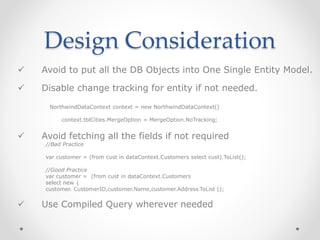
Design Consideration
 Avoid to put all the DB Objects into One Single Entity Model.
 Disable change tracking for entity if not needed.
NorthwindDataContext context = new NorthwindDataContext()
context.tblCities.MergeOption = MergeOption.NoTracking;
 Avoid fetching all the fields if not required
//Bad Practice
var customer = (from cust in dataContext.Customers select cust).ToList();
//Good Practice
var customer = (from cust in dataContext.Customers
select new {
customer. CustomerID,customer.Name,customer.Address}ToList ();
 Use Compiled Query wherever needed
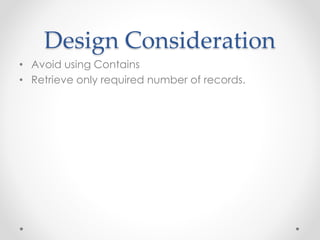
Design Consideration
• Avoid using Contains
• Retrieve only required number of records.
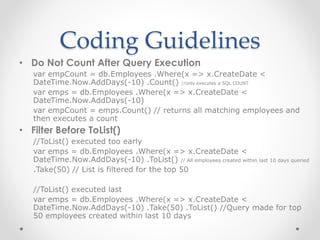
Coding Guidelines
• Do Not Count After Query Execution
var empCount = db.Employees .Where(x => x.CreateDate <
DateTime.Now.AddDays(-10) .Count() //only executes a SQL COUNT
var emps = db.Employees .Where(x => x.CreateDate <
DateTime.Now.AddDays(-10)
var empCount = emps.Count() // returns all matching employees and
then executes a count
• Filter Before ToList()
//ToList() executed too early
var emps = db.Employees .Where(x => x.CreateDate <
DateTime.Now.AddDays(-10) .ToList() // All employees created within last 10 days queried
.Take(50) // List is filtered for the top 50
//ToList() executed last
var emps = db.Employees .Where(x => x.CreateDate <
DateTime.Now.AddDays(-10) .Take(50) .ToList() //Query made for top
50 employees created within last 10 days
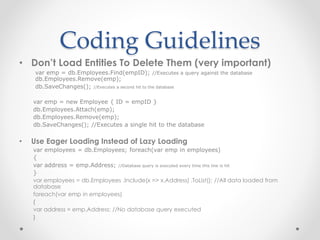
Coding Guidelines
• Don’t Load Entities To Delete Them (very important)
var emp = db.Employees.Find(empID); //Executes a query against the database
db.Employees.Remove(emp);
db.SaveChanges(); //Executes a second hit to the database
var emp = new Employee { ID = empID }
db.Employees.Attach(emp);
db.Employees.Remove(emp);
db.SaveChanges(); //Executes a single hit to the database
• Use Eager Loading Instead of Lazy Loading
var employees = db.Employees; foreach(var emp in employees)
{
var address = emp.Address; //Database query is executed every time this line is hit
}
var employees = db.Employees .Include(x => x.Address) .ToList(); //All data loaded from
database
foreach(var emp in employees)
{
var address = emp.Address; //No database query executed
}
Coding Guidelines
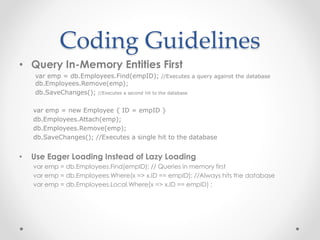
• Query In-Memory Entities First
var emp = db.Employees.Find(empID); //Executes a query against the database
db.Employees.Remove(emp);
db.SaveChanges(); //Executes a second hit to the database
var emp = new Employee { ID = empID }
db.Employees.Attach(emp);
db.Employees.Remove(emp);
db.SaveChanges(); //Executes a single hit to the database
• Use Eager Loading Instead of Lazy Loading
var emp = db.Employees.Find(empID); // Queries in memory first
var emp = db.Employees.Where(x => x.ID == empID); //Always hits the database
var emp = db.Employees.Local.Where(x => x.ID == empID) ;
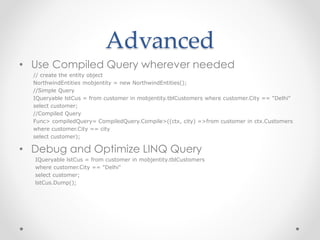
Advanced
• Use Compiled Query wherever needed
// create the entity object
NorthwindEntities mobjentity = new NorthwindEntities();
//Simple Query
IQueryable lstCus = from customer in mobjentity.tblCustomers where customer.City == "Delhi"
select customer;
//Compiled Query
Func> compiledQuery= CompiledQuery.Compile>((ctx, city) =>from customer in ctx.Customers
where customer.City == city
select customer);
• Debug and Optimize LINQ Query
IQueryable lstCus = from customer in mobjentity.tblCustomers
where customer.City == "Delhi"
select customer;
lstCus.Dump();
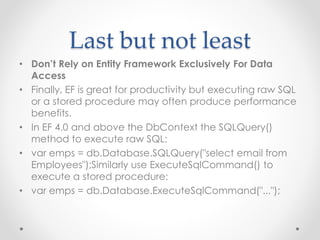
Last but not least
• Don’t Rely on Entity Framework Exclusively For Data
Access
• Finally, EF is great for productivity but executing raw SQL
or a stored procedure may often produce performance
benefits.
• In EF 4.0 and above the DbContext the SQLQuery()
method to execute raw SQL:
• var emps = db.Database.SQLQuery("select email from
Employees");Similarly use ExecuteSqlCommand() to
execute a stored procedure:
• var emps = db.Database.ExecuteSqlCommand("...");
THANKS
&
No question please

Entity framework

  • 1.
  • 2.
    Design Consideration  Avoidto put all the DB Objects into One Single Entity Model.  Disable change tracking for entity if not needed. NorthwindDataContext context = new NorthwindDataContext() context.tblCities.MergeOption = MergeOption.NoTracking;  Avoid fetching all the fields if not required //Bad Practice var customer = (from cust in dataContext.Customers select cust).ToList(); //Good Practice var customer = (from cust in dataContext.Customers select new { customer. CustomerID,customer.Name,customer.Address}ToList ();  Use Compiled Query wherever needed
  • 3.
    Design Consideration • Avoidusing Contains • Retrieve only required number of records.
  • 4.
    Coding Guidelines • DoNot Count After Query Execution var empCount = db.Employees .Where(x => x.CreateDate < DateTime.Now.AddDays(-10) .Count() //only executes a SQL COUNT var emps = db.Employees .Where(x => x.CreateDate < DateTime.Now.AddDays(-10) var empCount = emps.Count() // returns all matching employees and then executes a count • Filter Before ToList() //ToList() executed too early var emps = db.Employees .Where(x => x.CreateDate < DateTime.Now.AddDays(-10) .ToList() // All employees created within last 10 days queried .Take(50) // List is filtered for the top 50 //ToList() executed last var emps = db.Employees .Where(x => x.CreateDate < DateTime.Now.AddDays(-10) .Take(50) .ToList() //Query made for top 50 employees created within last 10 days
  • 5.
    Coding Guidelines • Don’tLoad Entities To Delete Them (very important) var emp = db.Employees.Find(empID); //Executes a query against the database db.Employees.Remove(emp); db.SaveChanges(); //Executes a second hit to the database var emp = new Employee { ID = empID } db.Employees.Attach(emp); db.Employees.Remove(emp); db.SaveChanges(); //Executes a single hit to the database • Use Eager Loading Instead of Lazy Loading var employees = db.Employees; foreach(var emp in employees) { var address = emp.Address; //Database query is executed every time this line is hit } var employees = db.Employees .Include(x => x.Address) .ToList(); //All data loaded from database foreach(var emp in employees) { var address = emp.Address; //No database query executed }
  • 6.
    Coding Guidelines • QueryIn-Memory Entities First var emp = db.Employees.Find(empID); //Executes a query against the database db.Employees.Remove(emp); db.SaveChanges(); //Executes a second hit to the database var emp = new Employee { ID = empID } db.Employees.Attach(emp); db.Employees.Remove(emp); db.SaveChanges(); //Executes a single hit to the database • Use Eager Loading Instead of Lazy Loading var emp = db.Employees.Find(empID); // Queries in memory first var emp = db.Employees.Where(x => x.ID == empID); //Always hits the database var emp = db.Employees.Local.Where(x => x.ID == empID) ;
  • 7.
    Advanced • Use CompiledQuery wherever needed // create the entity object NorthwindEntities mobjentity = new NorthwindEntities(); //Simple Query IQueryable lstCus = from customer in mobjentity.tblCustomers where customer.City == "Delhi" select customer; //Compiled Query Func> compiledQuery= CompiledQuery.Compile>((ctx, city) =>from customer in ctx.Customers where customer.City == city select customer); • Debug and Optimize LINQ Query IQueryable lstCus = from customer in mobjentity.tblCustomers where customer.City == "Delhi" select customer; lstCus.Dump();
  • 8.
    Last but notleast • Don’t Rely on Entity Framework Exclusively For Data Access • Finally, EF is great for productivity but executing raw SQL or a stored procedure may often produce performance benefits. • In EF 4.0 and above the DbContext the SQLQuery() method to execute raw SQL: • var emps = db.Database.SQLQuery("select email from Employees");Similarly use ExecuteSqlCommand() to execute a stored procedure: • var emps = db.Database.ExecuteSqlCommand("...");
  • 9.