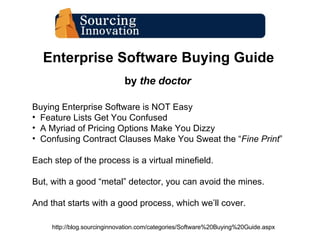
Enterprise Software Buying Guide by  the doctor http://blog.sourcinginnovation.com/categories/Software%20Buying%20Guide.aspx Buying Enterprise Software is NOT Easy Feature Lists Get You Confused A Myriad of Pricing Options Make You Dizzy Confusing Contract Clauses Make You Sweat the “ Fine Print ” Each step of the process is a virtual minefield. But, with a good “metal” detector, you can avoid the mines. And that starts with a good process, which we’ll cover.
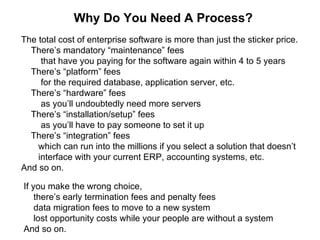
Why Do You Need A Process? The total cost of enterprise software is more than just the sticker price. There’s mandatory “maintenance” fees that have you paying for the software again within 4 to 5 years There’s “platform” fees for the required database, application server, etc. There’s “hardware” fees as you’ll undoubtedly need more servers  There’s “installation/setup” fees as you’ll have to pay someone to set it up There’s “integration” fees which can run into the millions if you select a solution that doesn’t  interface with your current ERP, accounting systems, etc. And so on.  If you make the wrong choice,  there’s early termination fees and penalty fees data migration fees to move to a new system lost opportunity costs while your people are without a system And so on.
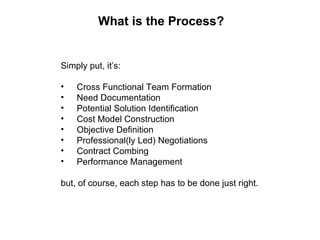
What is the Process? Simply put, it’s: Cross Functional Team Formation Need Documentation Potential Solution Identification Cost Model Construction Objective Definition Professional(ly Led) Negotiations Contract Combing Performance Management but, of course, each step has to be done just right.
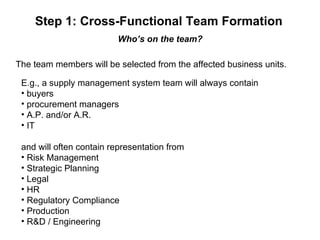
Step 1: Cross-Functional Team Formation Who’s on the team? The team members will be selected from the affected business units. E.g., a supply management system team will always contain buyers procurement managers A.P. and/or A.R. IT and will often contain representation from Risk Management Strategic Planning Legal HR Regulatory Compliance Production R&D / Engineering
Step 2: Need Identification What’s important? Needs documentation is about defining what you need.  It is not: documenting your current systems (they’re inadequate) documenting your current processes (that’s what you do, not the system) using a “feature” checklist from a trade rag (it’s the functionality!) Needs documentation is about asking the right questions. What are my current issues? What do I need the system to do? Who will be using the new system … the most … for what? What data needs to be collected?  What information needs to be derived? Where and how will the system be used? What existing systems need to be integrated? What are our operating environment constraints?
Step 3: Potential Solution Identification Who’s invited to the table? Once you’ve documented your needs, you can search for relevant solutions. Identify an initial vendor pool using  analyst and blogger reviews local associations and colleagues current customer references not just vendor materials and demos. Then ask the right questions, in an RFI, before moving on to an RFP/Q. Be sure to include functional questions relevant to your needs such as the questions outlined in the X-emplification series for  supply management solutions ( http://blog.sourcinginnovation.com/categories/X-emplification.aspx ) as well as financial questions to determine vendor stability, including how is your profit statement looking these days? what’s your ownership structure? (who makes the calls in tough times?) what would happen if you acquired no new customers for a year?
Step 4: Cost Model Construction What’s this solution really going to cost me? Just like the sticker price isn’t the true cost of a car purchase, the  license fee isn’t the true cost of an enterprise software platform. Before you short-list any solution, it’s important to understand, within an order of magnitude (factor of 2) what a solution will cost you, per annum, over its expected lifetime. The only way to do this is to build a total cost of lifetime ownership model that will let you plug in (industry) standard quotes, fees, and operating costs (and refine the costs during negotiations).
Step 4: Cost Model Construction What’s this solution really going to cost me … cont’d? On-Premise Solutions  Incur License Costs Maintenance Costs Server Costs Supporting Software Costs Implementation Costs Integration Costs Training Costs Internal Support Costs Software Upgrade Costs Hardware Upgrade Costs Re-Training Costs ASP Solutions  Incur License & Maintenance Costs  Hosting Costs Major Upgrade Costs Implementation Costs Integration Costs  Training Costs SaaS Solutions  Incur Inclusive License & Hosting Costs Implementation Costs Integration Costs Training Costs
Step 5: Objective Definition What’s my desired outcome? Now that you know what you need and have a reasonable understanding of the state of the market and usual solution costs, you need to define a reasonable objective that specifies: what key functional requirements the solution will completely fulfill what auxiliary functional requirements the solution will partially support the maximum total cost of ownership you will bear   (and, thus, the maximum price you will pay) If you enter into a negotiation with an identified solution blueprint, a support requirement, and a maximum price in mind and are willing to walk away if the vendor will not meet your requirements (provided they are reasonable against the market), you’ll end up in much better shape than if you just try to negotiate down from sticker price. (Even when  buying a car, you should negotiate up from dealer invoice.)
Step 6: Negotiate Professionally What do I need to know? Enterprise software has a lot of margin and “empty calories”. ( http://dealarchitect.typepad.com/deal_architect/2008/07/sap-to-kill-tomorrownow.html ) The “best price” offered by a sales rep is usually not the best price. Some vendors will try to distract you with the “partner ploy”. Others will try to distract you with “competitor failings” to hide their own. They know every stupid salesperson trick in the book. ( http://dealarchitect.typepad.com/deal_architect/2008/12/top-10-stupid-salespeople-tricks---a-rerun.html ) And they won’t be afraid to use the “Big Lie” and say “ yes we have that functionality ” when they clearly don’t.
Step 6: Negotiate Professionally What do I need to do? If the deal is over $1,000,000 make sure it’s led by a professional buyer. If the deal is over $2,000,000 considering bringing in a deal architect, services guide, or an equally experienced professional negotiator in the  enterprise software space … as they can regularly negotiate 20%, 30%, and even 40% below “best and final offer”, they’ll be worth every penny.
Step 7: Comb the Contract What do I need to look for? You can negotiate the best deal and still get screwed if you don’t read the fine print very carefully -- twice.  The following “ gotchas ” are common: even if you bought the perpetual license, you lose the right to use the   software if you stop paying maintenance the mandatory upgrade on the vendor’s schedule the “Free Lunch” module or service you don’t need, built into the price the “Toothless SLA” which is ultimately unenforceable the “Escrow” of millions of lines of incomprehensible undocumented code
Step 8: Manage Performance You mean I’m not done? You can do everything right up to the time you sign the  contract and still have everything go to hell in a handbasket  (and your costs go through the roof) if you don't carefully  manage vendor delivery and support throughout the  contract lifetime. Start by: creating a project management team monitoring uptake tracking utilization metrics identifying (potential) issues early and insuring the vendor resolves them in a timely fashion

Enterprise Software Buying Guide

  • 1.
    Enterprise Software BuyingGuide by the doctor http://blog.sourcinginnovation.com/categories/Software%20Buying%20Guide.aspx Buying Enterprise Software is NOT Easy Feature Lists Get You Confused A Myriad of Pricing Options Make You Dizzy Confusing Contract Clauses Make You Sweat the “ Fine Print ” Each step of the process is a virtual minefield. But, with a good “metal” detector, you can avoid the mines. And that starts with a good process, which we’ll cover.
  • 2.
    Why Do YouNeed A Process? The total cost of enterprise software is more than just the sticker price. There’s mandatory “maintenance” fees that have you paying for the software again within 4 to 5 years There’s “platform” fees for the required database, application server, etc. There’s “hardware” fees as you’ll undoubtedly need more servers There’s “installation/setup” fees as you’ll have to pay someone to set it up There’s “integration” fees which can run into the millions if you select a solution that doesn’t interface with your current ERP, accounting systems, etc. And so on. If you make the wrong choice, there’s early termination fees and penalty fees data migration fees to move to a new system lost opportunity costs while your people are without a system And so on.
  • 3.
    What is theProcess? Simply put, it’s: Cross Functional Team Formation Need Documentation Potential Solution Identification Cost Model Construction Objective Definition Professional(ly Led) Negotiations Contract Combing Performance Management but, of course, each step has to be done just right.
  • 4.
    Step 1: Cross-FunctionalTeam Formation Who’s on the team? The team members will be selected from the affected business units. E.g., a supply management system team will always contain buyers procurement managers A.P. and/or A.R. IT and will often contain representation from Risk Management Strategic Planning Legal HR Regulatory Compliance Production R&D / Engineering
  • 5.
    Step 2: NeedIdentification What’s important? Needs documentation is about defining what you need. It is not: documenting your current systems (they’re inadequate) documenting your current processes (that’s what you do, not the system) using a “feature” checklist from a trade rag (it’s the functionality!) Needs documentation is about asking the right questions. What are my current issues? What do I need the system to do? Who will be using the new system … the most … for what? What data needs to be collected? What information needs to be derived? Where and how will the system be used? What existing systems need to be integrated? What are our operating environment constraints?
  • 6.
    Step 3: PotentialSolution Identification Who’s invited to the table? Once you’ve documented your needs, you can search for relevant solutions. Identify an initial vendor pool using analyst and blogger reviews local associations and colleagues current customer references not just vendor materials and demos. Then ask the right questions, in an RFI, before moving on to an RFP/Q. Be sure to include functional questions relevant to your needs such as the questions outlined in the X-emplification series for supply management solutions ( http://blog.sourcinginnovation.com/categories/X-emplification.aspx ) as well as financial questions to determine vendor stability, including how is your profit statement looking these days? what’s your ownership structure? (who makes the calls in tough times?) what would happen if you acquired no new customers for a year?
  • 7.
    Step 4: CostModel Construction What’s this solution really going to cost me? Just like the sticker price isn’t the true cost of a car purchase, the license fee isn’t the true cost of an enterprise software platform. Before you short-list any solution, it’s important to understand, within an order of magnitude (factor of 2) what a solution will cost you, per annum, over its expected lifetime. The only way to do this is to build a total cost of lifetime ownership model that will let you plug in (industry) standard quotes, fees, and operating costs (and refine the costs during negotiations).
  • 8.
    Step 4: CostModel Construction What’s this solution really going to cost me … cont’d? On-Premise Solutions Incur License Costs Maintenance Costs Server Costs Supporting Software Costs Implementation Costs Integration Costs Training Costs Internal Support Costs Software Upgrade Costs Hardware Upgrade Costs Re-Training Costs ASP Solutions Incur License & Maintenance Costs Hosting Costs Major Upgrade Costs Implementation Costs Integration Costs Training Costs SaaS Solutions Incur Inclusive License & Hosting Costs Implementation Costs Integration Costs Training Costs
  • 9.
    Step 5: ObjectiveDefinition What’s my desired outcome? Now that you know what you need and have a reasonable understanding of the state of the market and usual solution costs, you need to define a reasonable objective that specifies: what key functional requirements the solution will completely fulfill what auxiliary functional requirements the solution will partially support the maximum total cost of ownership you will bear (and, thus, the maximum price you will pay) If you enter into a negotiation with an identified solution blueprint, a support requirement, and a maximum price in mind and are willing to walk away if the vendor will not meet your requirements (provided they are reasonable against the market), you’ll end up in much better shape than if you just try to negotiate down from sticker price. (Even when buying a car, you should negotiate up from dealer invoice.)
  • 10.
    Step 6: NegotiateProfessionally What do I need to know? Enterprise software has a lot of margin and “empty calories”. ( http://dealarchitect.typepad.com/deal_architect/2008/07/sap-to-kill-tomorrownow.html ) The “best price” offered by a sales rep is usually not the best price. Some vendors will try to distract you with the “partner ploy”. Others will try to distract you with “competitor failings” to hide their own. They know every stupid salesperson trick in the book. ( http://dealarchitect.typepad.com/deal_architect/2008/12/top-10-stupid-salespeople-tricks---a-rerun.html ) And they won’t be afraid to use the “Big Lie” and say “ yes we have that functionality ” when they clearly don’t.
  • 11.
    Step 6: NegotiateProfessionally What do I need to do? If the deal is over $1,000,000 make sure it’s led by a professional buyer. If the deal is over $2,000,000 considering bringing in a deal architect, services guide, or an equally experienced professional negotiator in the enterprise software space … as they can regularly negotiate 20%, 30%, and even 40% below “best and final offer”, they’ll be worth every penny.
  • 12.
    Step 7: Combthe Contract What do I need to look for? You can negotiate the best deal and still get screwed if you don’t read the fine print very carefully -- twice. The following “ gotchas ” are common: even if you bought the perpetual license, you lose the right to use the software if you stop paying maintenance the mandatory upgrade on the vendor’s schedule the “Free Lunch” module or service you don’t need, built into the price the “Toothless SLA” which is ultimately unenforceable the “Escrow” of millions of lines of incomprehensible undocumented code
  • 13.
    Step 8: ManagePerformance You mean I’m not done? You can do everything right up to the time you sign the contract and still have everything go to hell in a handbasket (and your costs go through the roof) if you don't carefully manage vendor delivery and support throughout the contract lifetime. Start by: creating a project management team monitoring uptake tracking utilization metrics identifying (potential) issues early and insuring the vendor resolves them in a timely fashion