BEST PRACTICES FOR BRD*
© 2016 Yevgeny Ioffe
*If you do not know what “BRD” means, please stop right here
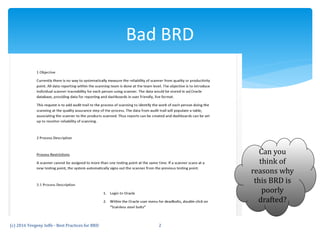
Bad BRD
(c) 2016 Yevgeny Ioffe - Best Practices for BRD 2
Can you
think of
reasons why
this BRD is
poorly
drafted?
 Lack of understanding the purpose of BRD
 Poor training
 Poor mentorship
 Corporate culture: no “show or lead by example”
 Low standards/expectations
 Newly hired employees poorly matched to the
responsibilities/roles
 Poor project/product management
 Poorly defined business requirements gathering processes
 “The more words the better” phenomenon
AND SO ON
How did we get here?
(c) 2016 Yevgeny Ioffe - Best Practices for BRD 3
Poorly drafted BRD results in:
Product not conforming to end users’ expectations
Poor teamwork in your company
More customer service and support
Longer developers’ hours
Higher employee turnover
It actually costs $$$!
(c) 2016 Yevgeny Ioffe - Best Practices for BRD 4
 Focus on simplicity and clarity - the simplest description is the best
 Set terminology to be used throughout the project from hour 0
 Set documentation standards (terminology, outline, graphics to be used, etc.)
 Make transparency and accountability the centerpiece of product development
process
 Set BRD review and revision process
 RESULTS IN:
 faster development cycle
 better software
 reduced overhead and costs
 increased productivity
 happier employees and customers
How to make it good?
(c) 2016 Yevgeny Ioffe - Best Practices for BRD 5
 Include as many graphical mockups/screenshots as
possible (a picture is worth 1000 words), and
associate them with each change/new feature
 Software I’ve found useful for creating
mockups/prototypes
 Axure (www.axure.com)
 Balsamiq (www.balsamiq.com)
 Yes, Photoshop… For a free tool, GIMP (www.gimp.org)
can do
How to make it good? (details)
(c) 2016 Yevgeny Ioffe - Best Practices for BRD 6
 Include a brief description or spec for each
element/action of the new modification or design.
Example:
Current issue: After clicking the “Save” button (see figure
above), the end user is directed to the “Home” screen instead
of to the next step in the table creation process.
Change to be implemented: At clicking the “Save” button,
the system will take user to the next screen titled “Select
Parameters”.
(c) 2016 Yevgeny Ioffe - Best Practices for BRD 7
How to make it good? (details)
 Join a business analyst group – on LinkedIn or in
your area via MeetUp
 Read business analyst books, e.g.
 Writing Effective Use Cases, Alistair Cockburn
 User Stories Applied: For Agile Software Development,
Mike Cohn
 Head First Object-Oriented Analysis & Design, Brett D.
McLaughlin and Gary Pollice
(c) 2016 Yevgeny Ioffe - Best Practices for BRD 8
Where do I learn more?

BRD Best Practices

  • 1.
    BEST PRACTICES FORBRD* © 2016 Yevgeny Ioffe *If you do not know what “BRD” means, please stop right here
  • 2.
    Bad BRD (c) 2016Yevgeny Ioffe - Best Practices for BRD 2 Can you think of reasons why this BRD is poorly drafted?
  • 3.
     Lack ofunderstanding the purpose of BRD  Poor training  Poor mentorship  Corporate culture: no “show or lead by example”  Low standards/expectations  Newly hired employees poorly matched to the responsibilities/roles  Poor project/product management  Poorly defined business requirements gathering processes  “The more words the better” phenomenon AND SO ON How did we get here? (c) 2016 Yevgeny Ioffe - Best Practices for BRD 3
  • 4.
    Poorly drafted BRDresults in: Product not conforming to end users’ expectations Poor teamwork in your company More customer service and support Longer developers’ hours Higher employee turnover It actually costs $$$! (c) 2016 Yevgeny Ioffe - Best Practices for BRD 4
  • 5.
     Focus onsimplicity and clarity - the simplest description is the best  Set terminology to be used throughout the project from hour 0  Set documentation standards (terminology, outline, graphics to be used, etc.)  Make transparency and accountability the centerpiece of product development process  Set BRD review and revision process  RESULTS IN:  faster development cycle  better software  reduced overhead and costs  increased productivity  happier employees and customers How to make it good? (c) 2016 Yevgeny Ioffe - Best Practices for BRD 5
  • 6.
     Include asmany graphical mockups/screenshots as possible (a picture is worth 1000 words), and associate them with each change/new feature  Software I’ve found useful for creating mockups/prototypes  Axure (www.axure.com)  Balsamiq (www.balsamiq.com)  Yes, Photoshop… For a free tool, GIMP (www.gimp.org) can do How to make it good? (details) (c) 2016 Yevgeny Ioffe - Best Practices for BRD 6
  • 7.
     Include abrief description or spec for each element/action of the new modification or design. Example: Current issue: After clicking the “Save” button (see figure above), the end user is directed to the “Home” screen instead of to the next step in the table creation process. Change to be implemented: At clicking the “Save” button, the system will take user to the next screen titled “Select Parameters”. (c) 2016 Yevgeny Ioffe - Best Practices for BRD 7 How to make it good? (details)
  • 8.
     Join abusiness analyst group – on LinkedIn or in your area via MeetUp  Read business analyst books, e.g.  Writing Effective Use Cases, Alistair Cockburn  User Stories Applied: For Agile Software Development, Mike Cohn  Head First Object-Oriented Analysis & Design, Brett D. McLaughlin and Gary Pollice (c) 2016 Yevgeny Ioffe - Best Practices for BRD 8 Where do I learn more?