© 2006-2014 SoftProdigy. All rights reserved.
Reproduction of this publication in any form without prior written permission is forbidden.
Blue Dart Premium Shipping Integration in
WooCommerce
Blue Dart Premium Shipping Integration in
WooCommerce
Plugin Page: Blue Dart Premium Shipping Integration in
WooCommerce
© 2006-2014 SoftProdigy. All rights reserved.
Reproduction of this publication in any form without prior written permission is forbidden.
Store URL: https://www.softprodigy.com
General Information
This document explains the information about Blue Dart Shipping Integration in
Woocommerce. This Plugin allows you to integrate Blue Dart shipment process and check
COD availability on the basis of the Zip Code. This extension will help your customers to
check the “Cash on Delivery” availability option in their regions.
Extension Features
 Plugin saves customer’s time by allowing them to check the COD option on the
product page.
 Plugin automatically generated a PDF file regarding the order placed as soon as the
shipment is done from admin end.
 The Plugin automatically email the PDF generated to the sales department.
 This plugin allows store admin to generate multiple AWB shipment.
 Store admin can generate manifest using the advanced filter.
© 2006-2014 SoftProdigy. All rights reserved.
Reproduction of this publication in any form without prior written permission is forbidden.
Steps to be taken for Installation
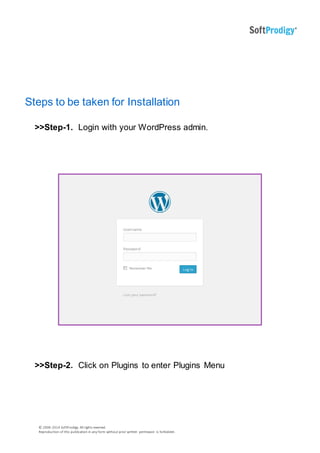
>>Step-1. Login with your WordPress admin.
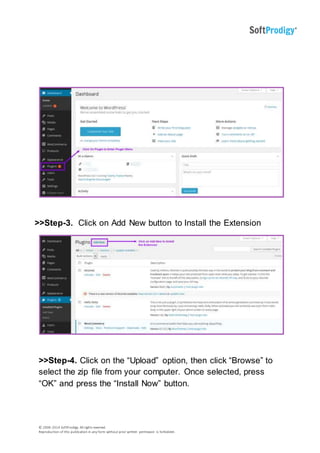
>>Step-2. Click on Plugins to enter Plugins Menu
© 2006-2014 SoftProdigy. All rights reserved.
Reproduction of this publication in any form without prior written permission is forbidden.
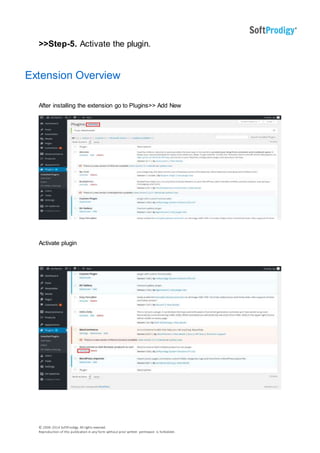
>>Step-3. Click on Add New button to Install the Extension
>>Step-4. Click on the “Upload” option, then click “Browse” to
select the zip file from your computer. Once selected, press
“OK” and press the “Install Now” button.
© 2006-2014 SoftProdigy. All rights reserved.
Reproduction of this publication in any form without prior written permission is forbidden.
>>Step-5. Activate the plugin.
Extension Overview
After installing the extension go to Plugins>> Add New
Activate plugin
© 2006-2014 SoftProdigy. All rights reserved.
Reproduction of this publication in any form without prior written permission is forbidden.
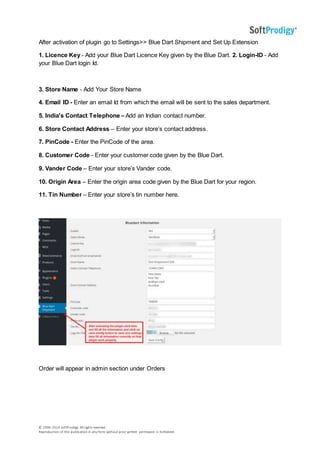
After activation of plugin go to Settings>> Blue Dart Shipment and Set Up Extension
1. Licence Key - Add your Blue Dart Licence Key given by the Blue Dart. 2. Login-ID - Add
your Blue Dart login Id.
3. Store Name - Add Your Store Name
4. Email ID - Enter an email Id from which the email will be sent to the sales department.
5. India's Contact Telephone – Add an Indian contact number.
6. Store Contact Address – Enter your store’s contact address.
7. PinCode - Enter the PinCode of the area.
8. Customer Code - Enter your customer code given by the Blue Dart.
9. Vander Code – Enter your store’s Vander code.
10. Origin Area – Enter the origin area code given by the Blue Dart for your region.
11. Tin Number – Enter your store’s tin number here.
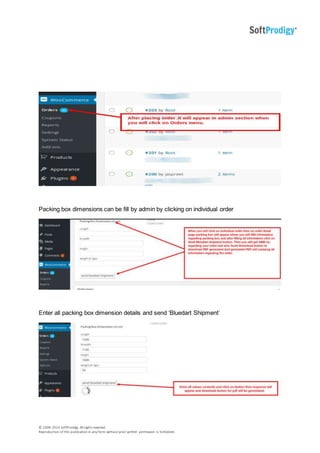
Order will appear in admin section under Orders
© 2006-2014 SoftProdigy. All rights reserved.
Reproduction of this publication in any form without prior written permission is forbidden.
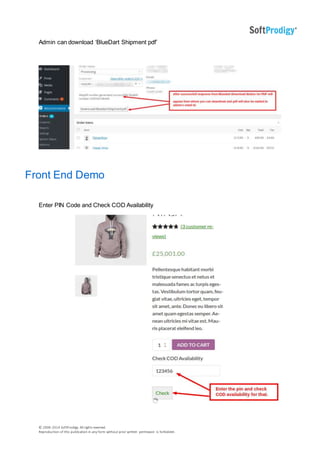
Packing box dimensions can be fill by admin by clicking on individual order
Enter all packing box dimension details and send ‘Bluedart Shipment’
© 2006-2014 SoftProdigy. All rights reserved.
Reproduction of this publication in any form without prior written permission is forbidden.
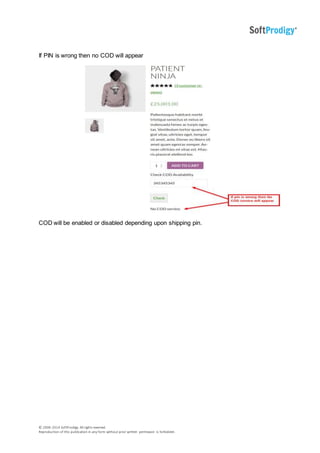
Admin can download ‘BlueDart Shipment pdf’
Front End Demo
Enter PIN Code and Check COD Availability
© 2006-2014 SoftProdigy. All rights reserved.
Reproduction of this publication in any form without prior written permission is forbidden.
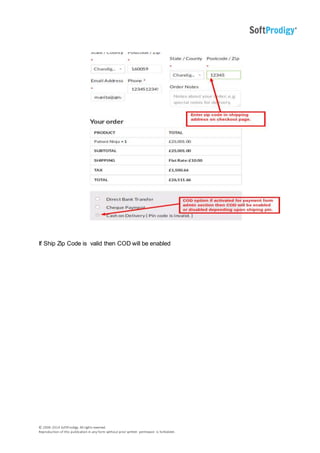
If PIN is wrong then no COD will appear
COD will be enabled or disabled depending upon shipping pin.
© 2006-2014 SoftProdigy. All rights reserved.
Reproduction of this publication in any form without prior written permission is forbidden.
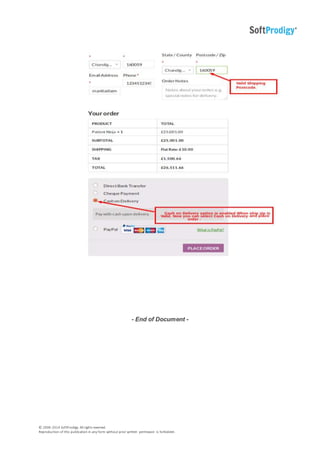
If Ship Zip Code is valid then COD will be enabled
© 2006-2014 SoftProdigy. All rights reserved.
Reproduction of this publication in any form without prior written permission is forbidden.
- End of Document -

Blue dart premium shipping integration

  • 1.
    © 2006-2014 SoftProdigy.All rights reserved. Reproduction of this publication in any form without prior written permission is forbidden. Blue Dart Premium Shipping Integration in WooCommerce Blue Dart Premium Shipping Integration in WooCommerce Plugin Page: Blue Dart Premium Shipping Integration in WooCommerce
  • 2.
    © 2006-2014 SoftProdigy.All rights reserved. Reproduction of this publication in any form without prior written permission is forbidden. Store URL: https://www.softprodigy.com General Information This document explains the information about Blue Dart Shipping Integration in Woocommerce. This Plugin allows you to integrate Blue Dart shipment process and check COD availability on the basis of the Zip Code. This extension will help your customers to check the “Cash on Delivery” availability option in their regions. Extension Features  Plugin saves customer’s time by allowing them to check the COD option on the product page.  Plugin automatically generated a PDF file regarding the order placed as soon as the shipment is done from admin end.  The Plugin automatically email the PDF generated to the sales department.  This plugin allows store admin to generate multiple AWB shipment.  Store admin can generate manifest using the advanced filter.
  • 3.
    © 2006-2014 SoftProdigy.All rights reserved. Reproduction of this publication in any form without prior written permission is forbidden. Steps to be taken for Installation >>Step-1. Login with your WordPress admin. >>Step-2. Click on Plugins to enter Plugins Menu
  • 4.
    © 2006-2014 SoftProdigy.All rights reserved. Reproduction of this publication in any form without prior written permission is forbidden. >>Step-3. Click on Add New button to Install the Extension >>Step-4. Click on the “Upload” option, then click “Browse” to select the zip file from your computer. Once selected, press “OK” and press the “Install Now” button.
  • 5.
    © 2006-2014 SoftProdigy.All rights reserved. Reproduction of this publication in any form without prior written permission is forbidden. >>Step-5. Activate the plugin. Extension Overview After installing the extension go to Plugins>> Add New Activate plugin
  • 6.
    © 2006-2014 SoftProdigy.All rights reserved. Reproduction of this publication in any form without prior written permission is forbidden. After activation of plugin go to Settings>> Blue Dart Shipment and Set Up Extension 1. Licence Key - Add your Blue Dart Licence Key given by the Blue Dart. 2. Login-ID - Add your Blue Dart login Id. 3. Store Name - Add Your Store Name 4. Email ID - Enter an email Id from which the email will be sent to the sales department. 5. India's Contact Telephone – Add an Indian contact number. 6. Store Contact Address – Enter your store’s contact address. 7. PinCode - Enter the PinCode of the area. 8. Customer Code - Enter your customer code given by the Blue Dart. 9. Vander Code – Enter your store’s Vander code. 10. Origin Area – Enter the origin area code given by the Blue Dart for your region. 11. Tin Number – Enter your store’s tin number here. Order will appear in admin section under Orders
  • 7.
    © 2006-2014 SoftProdigy.All rights reserved. Reproduction of this publication in any form without prior written permission is forbidden. Packing box dimensions can be fill by admin by clicking on individual order Enter all packing box dimension details and send ‘Bluedart Shipment’
  • 8.
    © 2006-2014 SoftProdigy.All rights reserved. Reproduction of this publication in any form without prior written permission is forbidden. Admin can download ‘BlueDart Shipment pdf’ Front End Demo Enter PIN Code and Check COD Availability
  • 9.
    © 2006-2014 SoftProdigy.All rights reserved. Reproduction of this publication in any form without prior written permission is forbidden. If PIN is wrong then no COD will appear COD will be enabled or disabled depending upon shipping pin.
  • 10.
    © 2006-2014 SoftProdigy.All rights reserved. Reproduction of this publication in any form without prior written permission is forbidden. If Ship Zip Code is valid then COD will be enabled
  • 11.
    © 2006-2014 SoftProdigy.All rights reserved. Reproduction of this publication in any form without prior written permission is forbidden. - End of Document -