THE SEARCH
ENGINES
Most Essential Learning Competency
Use search engine to conduct a guided
search on a given topic.
(EN7SS-ІІ-c-1.5.3)
This lesson is divided into
two lessons:
• Lesson 1
Introduction to Search Engine
• Lesson 2
Using Search Engine to Locate
Information
Objectives:
 Recognize electronic search engine.
Appreciate the use of electronic
search engine.
Use electronic search engine to
locate specific resources.
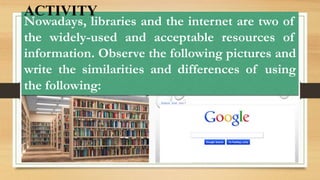
Nowadays, libraries and the internet are two of
the widely-used and acceptable resources of
information. Observe the following pictures and
write the similarities and differences of using
the following:
ACTIVITY
LESSON 1
Introduction to Search Engine
Internet
Is the global system of interconnected
computer networks that uses the Internet
protocol suite ( TCP/IP) to communicate
between networks and devices
Electronic Search Engine
Is a program that searches for and indentifies item
in a database that corresponds to keywords or
characters specified by the user, used especially
for finding particular sites on the World Wide Web.
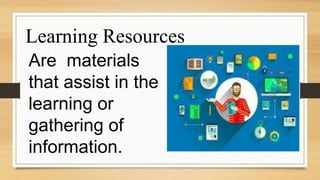
Learning Resources
Are materials
that assist in the
learning or
gathering of
information.
MSN (Microsoft
Network)
-www.msn.com
Is a web portal and related collection of
Internet services and apps for Windows
and mobiles devices, provided by
Microsoft and launched on August 24,
1995, the same date as Windows.
Ask.com (originally known
as Ask Jeeves)
-www.ask.com
Is a question answering- focused e-
business founded in 1996 by
Garret Gruner and David Warthen
in Berkeley, California.
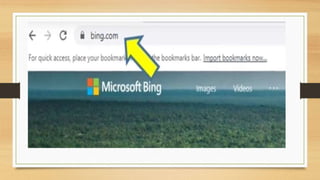
Microsoft Bing (formerly
known as Bing)
-www.bing.com
Is a web search engine owned and operated by
Microsoft. The services has its origin in Microsoft’s
previous search engines: MSN Search. Windows
Live Search and later Live Search. Bing provides a
variety of search services, including web, video,
image and map search products. It is developed
using asp.net.
Yahoo!
-www.yahoo.com
Is an American web services
provider headquartered
in Sunnyvale, California and owned by
Verizon Media.
Yahoo was one of the pioneers of early
Internet era in the 1990s.
YouTube
-www.youtube.com
Is an American
online video-sharing
platform headquartered in San
Bruno, California.
YouTube allows users to upload,
views, rate, share, add to playlist,
report, and subscribe to other users.
It offers a wide variety of user-generated
and corporate
media videos clip, music videos, short and
documentary films, audio, recording, movie
trailer, live streams, and other content such
as video blogging, short original videos,
and educational videos.
Google
-www.youtube.com
Is considered one of the Big Five technology
companies in the U.S. information technology
industry, alongside Amazon, Facebook, Apple
and Microsoft.
Google indexes billions of web pages to allow
users to search for the information they desire
through the use of keywords and operators.
How to use these
different e- search
engines?
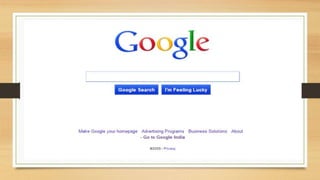
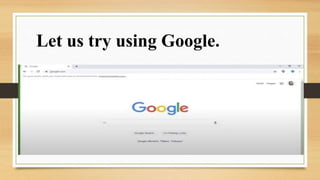
Let us try using Google.
To perform a search, you will
need to navigate to a search
engine in your web browser,
for example google.
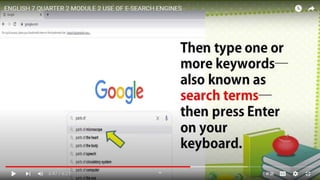
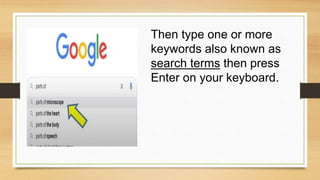
Then type one or more
keywords also known as
search terms then press
Enter on your keyboard.
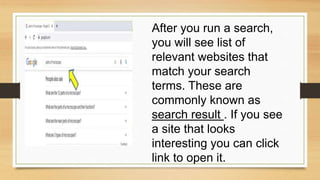
After you run a search,
you will see list of
relevant websites that
match your search
terms. These are
commonly known as
search result . If you see
a site that looks
interesting you can click
link to open it.
Search Suggestions
If you do not find what you are looking for
on the first try, don’t worry! Search engines
are good at finding things online, but they
are not perfect. You will often need to try
different search terms to fine what you are
looking for.
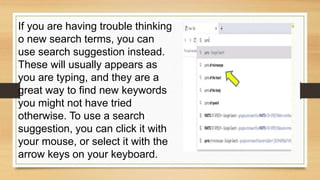
If you are having trouble thinking
o new search terms, you can
use search suggestion instead.
These will usually appears as
you are typing, and they are a
great way to find new keywords
you might not have tried
otherwise. To use a search
suggestion, you can click it with
your mouse, or select it with the
arrow keys on your keyboard.
USE OF E-SEARCH ENGINE
QUIZ
????????
What is the e-search engine shown in the
logo? ________________________
What is the e-search engine shown in the
logo? ________________________
What is the e-search engine shown in the
logo? ________________________
What is the e-search engine shown in the
logo? ________________________
What is the e-search engine shown in the
logo? ________________________
What is the e-search engine shown in the
logo? ________________________
What do you think is the
significance of using electronic
search engine to locate
resources?
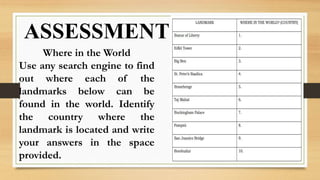
ASSESSMENT
Where in the World
Use any search engine to find
out where each of the
landmarks below can be
found in the world. Identify
the country where the
landmark is located and write
your answers in the space
provided.
English 7 Q2 WK2.pptx

English 7 Q2 WK2.pptx

  • 2.
    THE SEARCH ENGINES Most EssentialLearning Competency Use search engine to conduct a guided search on a given topic. (EN7SS-ІІ-c-1.5.3)
  • 3.
    This lesson isdivided into two lessons: • Lesson 1 Introduction to Search Engine • Lesson 2 Using Search Engine to Locate Information
  • 4.
    Objectives:  Recognize electronicsearch engine. Appreciate the use of electronic search engine. Use electronic search engine to locate specific resources.
  • 5.
    Nowadays, libraries andthe internet are two of the widely-used and acceptable resources of information. Observe the following pictures and write the similarities and differences of using the following: ACTIVITY
  • 6.
  • 7.
    Internet Is the globalsystem of interconnected computer networks that uses the Internet protocol suite ( TCP/IP) to communicate between networks and devices
  • 8.
    Electronic Search Engine Isa program that searches for and indentifies item in a database that corresponds to keywords or characters specified by the user, used especially for finding particular sites on the World Wide Web.
  • 9.
    Learning Resources Are materials thatassist in the learning or gathering of information.
  • 11.
    MSN (Microsoft Network) -www.msn.com Is aweb portal and related collection of Internet services and apps for Windows and mobiles devices, provided by Microsoft and launched on August 24, 1995, the same date as Windows.
  • 12.
    Ask.com (originally known asAsk Jeeves) -www.ask.com Is a question answering- focused e- business founded in 1996 by Garret Gruner and David Warthen in Berkeley, California.
  • 14.
    Microsoft Bing (formerly knownas Bing) -www.bing.com Is a web search engine owned and operated by Microsoft. The services has its origin in Microsoft’s previous search engines: MSN Search. Windows Live Search and later Live Search. Bing provides a variety of search services, including web, video, image and map search products. It is developed using asp.net.
  • 16.
    Yahoo! -www.yahoo.com Is an Americanweb services provider headquartered in Sunnyvale, California and owned by Verizon Media. Yahoo was one of the pioneers of early Internet era in the 1990s.
  • 19.
    YouTube -www.youtube.com Is an American onlinevideo-sharing platform headquartered in San Bruno, California.
  • 20.
    YouTube allows usersto upload, views, rate, share, add to playlist, report, and subscribe to other users. It offers a wide variety of user-generated and corporate media videos clip, music videos, short and documentary films, audio, recording, movie trailer, live streams, and other content such as video blogging, short original videos, and educational videos.
  • 23.
    Google -www.youtube.com Is considered oneof the Big Five technology companies in the U.S. information technology industry, alongside Amazon, Facebook, Apple and Microsoft. Google indexes billions of web pages to allow users to search for the information they desire through the use of keywords and operators.
  • 24.
    How to usethese different e- search engines?
  • 25.
    Let us tryusing Google.
  • 26.
    To perform asearch, you will need to navigate to a search engine in your web browser, for example google.
  • 28.
    Then type oneor more keywords also known as search terms then press Enter on your keyboard.
  • 29.
    After you runa search, you will see list of relevant websites that match your search terms. These are commonly known as search result . If you see a site that looks interesting you can click link to open it.
  • 30.
    Search Suggestions If youdo not find what you are looking for on the first try, don’t worry! Search engines are good at finding things online, but they are not perfect. You will often need to try different search terms to fine what you are looking for.
  • 31.
    If you arehaving trouble thinking o new search terms, you can use search suggestion instead. These will usually appears as you are typing, and they are a great way to find new keywords you might not have tried otherwise. To use a search suggestion, you can click it with your mouse, or select it with the arrow keys on your keyboard.
  • 32.
  • 33.
  • 34.
    What is thee-search engine shown in the logo? ________________________
  • 35.
    What is thee-search engine shown in the logo? ________________________
  • 36.
    What is thee-search engine shown in the logo? ________________________
  • 37.
    What is thee-search engine shown in the logo? ________________________
  • 38.
    What is thee-search engine shown in the logo? ________________________
  • 39.
    What is thee-search engine shown in the logo? ________________________
  • 40.
    What do youthink is the significance of using electronic search engine to locate resources?
  • 41.
    ASSESSMENT Where in theWorld Use any search engine to find out where each of the landmarks below can be found in the world. Identify the country where the landmark is located and write your answers in the space provided.