enterprise.efax.com • (888) 532-9265
eFax Corporate MFP Fax Direct Data Sheet - 1152-57351-05
1
MFP Fax Direct Data Sheet
Moving your enterprise fax infrastructure from in-house fax machines
and servers to the cloud makes sense — from both an efficiency and
productivity standpoint. But does migrating to a cloud fax solution
mean you will no longer be able to send or receive a paper fax?
Not at all.
Integrate Cloud Faxing with Your Multifunction Printers
— and Increase Your Efficiency from Both
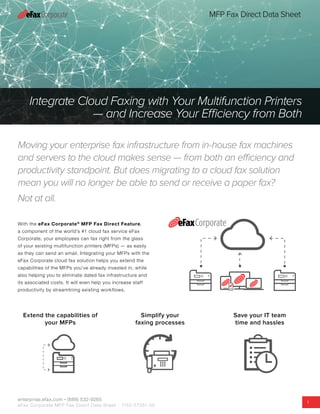
With the eFax Corporate®
MFP Fax Direct Feature,
a component of the world’s #1 cloud fax service eFax
Corporate, your employees can fax right from the glass
of your existing multifunction printers (MFPs) — as easily
as they can send an email. Integrating your MFPs with the
eFax Corporate cloud fax solution helps you extend the
capabilities of the MFPs you’ve already invested in, while
also helping you to eliminate dated fax infrastructure and
its associated costs. It will even help you increase staff
productivity by streamlining existing workflows.
Extend the capabilities of
your MFPs
Simplify your
faxing processes
Save your IT team
time and hassles
enterprise.efax.com • (888) 532-9265
eFax Corporate MFP Fax Direct Data Sheet - 1152-57351-05
2
MFP Fax Direct Data Sheet
Deploy a Cost-Effective Cloud Fax Solution But Still Use Paper Faxes
When Needed.
Eliminate costly fax hardware and headaches for IT!
MFP Fax Direct Feature
We know sometimes you have to use a paper fax, for either
‘wet ink’ signatures or to satisfy a customer, partner, or
vendor. So eFax Corporate makes it easy.
With eFax Corporate your business can outsource your
faxing to a fully hosted cloud service — while maintaining
the ability for your employees to send or receive a paper fax
when necessary.
Your multifunction printer’s fax functionality is fully
integrated into your eFax Corporate cloud fax service — so
you can easily track MFP fax usage across your company
from your eFax admin account, enhancing your audit and
compliance capabilities.
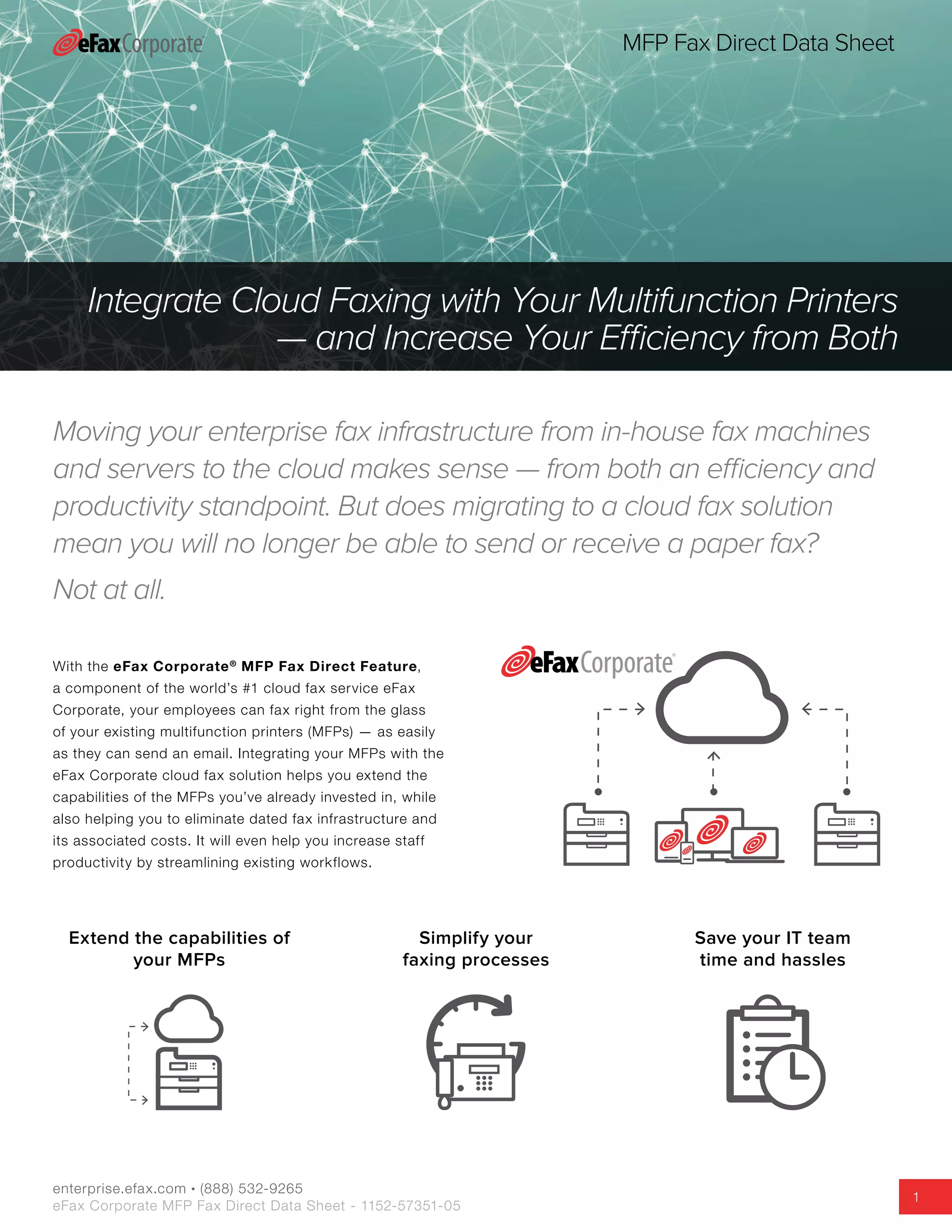
How the eFax Corporate MFP Fax Direct
Feature Works:
1.	 Your employee walks up to your MFP and scans the
document(s) they want to fax.
2.	 Using the MFP’s interface, they attach those scanned
files to an email, select the saved fax number and hit
“send.” By configuring pre-programmed “hot buttons”
in the MFP’s Internet Integrated Fax Services, your
employees can now send paper faxes with the touch of
a button to frequently used fax numbers.1
3.	 The fax is then sent as an email through your MFP
via the eFax Corporate Network with a convenient
confirmation receipt emailed directly to the sender.
1.	Requires MFP with support for integrated Internet fax service.
Multifunction
Printer
User Email
Servers
Internet
Recipient Receives
the fax
Transmission Receipt
Sent to User’s Email
MFPs
IT Administration,
Maintenance and Troubleshooting
Fax Machines
Fax Servers
enterprise.efax.com • (888) 532-9265
eFax Corporate MFP Fax Direct Data Sheet - 1152-57351-05
3
MFP Fax Direct Data Sheet
Your IT Network Without eFax Corporate
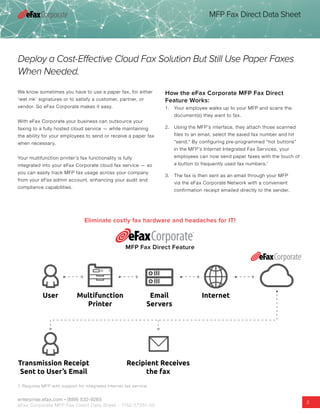
Managing your organization’s fax infrastructure onsite
means handling more than just fax machines and servers
— although those headaches can be enough to consider
upgrading. It also means maintaining dedicated telco lines
for your analog faxes, renewing software licenses for your
fax servers, and fielding employee complaints about failing
desktop fax machines or fax-server issues.
·· Fax machine maintenance and troubleshooting. The
upkeep of dated fax infrastructure – toner, paper, telco
lines and troubleshooting fax errors can slow down your
business and waste your technical support staff’s time.
·· Employee training and technical support. From
faxing from MFPs to managing server issues, on-site fax
infrastructure requires the time and expertise of skilled IT
staff – a valuable resource for every business.
·· Fax Server maintenance. Fax server software updates,
patches, and security and hardware upgrades can require
significant time and IT resouces to complete, diverting
them from forward looking IT projects. In addition, if not
properly maintained with software updates and patches,
any server operating system can be vulnerable to crashes
and security flaws, another potential distraction to your
business.
With onsite fax infrastructure, your business or IT staff must continually manage:
IT Administration,
Maintenance and Troubleshooting
MFPs
enterprise.efax.com • (888) 532-9265
eFax Corporate MFP Fax Direct Data Sheet - 1152-57351-05
4
MFP Fax Direct Data Sheet
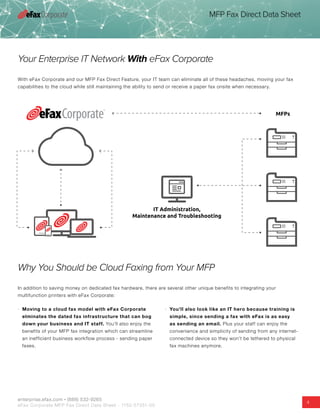
Your Enterprise IT Network With eFax Corporate
With eFax Corporate and our MFP Fax Direct Feature, your IT team can eliminate all of these headaches, moving your fax
capabilities to the cloud while still maintaining the ability to send or receive a paper fax onsite when necessary.
Why You Should be Cloud Faxing from Your MFP
In addition to saving money on dedicated fax hardware, there are several other unique benefits to integrating your
multifunction printers with eFax Corporate:
·· Moving to a cloud fax model with eFax Corporate
elminates the dated fax infrastructure that can bog
down your business and IT staff. You’ll also enjoy the
benefits of your MFP fax integration which can streamline
an inefficient business workflow process - sending paper
faxes.
·· You’ll also look like an IT hero because training is
simple, since sending a fax with eFax is as easy
as sending an email. Plus your staff can enjoy the
convenience and simplicity of sending from any internet-
connected device so they won’t be tethered to physical
fax machines anymore.
enterprise.efax.com • (888) 532-9265
eFax Corporate MFP Fax Direct Data Sheet - 1152-57351-05
5
MFP Fax Direct Data Sheet
About eFax Corporate
eFax®
is the world’s leading online fax solution, with more than 11 million
customers worldwide. eFax lets users receive, review, edit, sign, send
and store faxes by email or through a web interface. eFax offers plans for
individual users and provides corporate solutions. eFax is a brand of the j2
Cloud Connect division of j2 Global®
, Inc. and a registered trademark of j2
Cloud Services™, Inc. and j2 Global Holdings Ltd. Learn more at enterprise.
efax.com.
©2015 j2 Global, Inc., and affiliates. All rights
reserved. eFax is a brand of the j2 Cloud
Connect division of j2 Global®
, Inc. and a
registered trademark of j2 Cloud Services™,
Inc. and j2 Global Holdings Ltd.
Worldwide Headquarters
j2 Global, Inc.
6922 Hollywood Blvd.
Hollywood, CA 90028
Contact US Sales (888) 532-9265
email us at: corporatesales@mail.efax.com
enterprise.efax.com
Follow Us

eFax Corporate Multifunction Printer Fax Direct Datasheet

  • 1.
    enterprise.efax.com • (888)532-9265 eFax Corporate MFP Fax Direct Data Sheet - 1152-57351-05 1 MFP Fax Direct Data Sheet Moving your enterprise fax infrastructure from in-house fax machines and servers to the cloud makes sense — from both an efficiency and productivity standpoint. But does migrating to a cloud fax solution mean you will no longer be able to send or receive a paper fax? Not at all. Integrate Cloud Faxing with Your Multifunction Printers — and Increase Your Efficiency from Both With the eFax Corporate® MFP Fax Direct Feature, a component of the world’s #1 cloud fax service eFax Corporate, your employees can fax right from the glass of your existing multifunction printers (MFPs) — as easily as they can send an email. Integrating your MFPs with the eFax Corporate cloud fax solution helps you extend the capabilities of the MFPs you’ve already invested in, while also helping you to eliminate dated fax infrastructure and its associated costs. It will even help you increase staff productivity by streamlining existing workflows. Extend the capabilities of your MFPs Simplify your faxing processes Save your IT team time and hassles
  • 2.
    enterprise.efax.com • (888)532-9265 eFax Corporate MFP Fax Direct Data Sheet - 1152-57351-05 2 MFP Fax Direct Data Sheet Deploy a Cost-Effective Cloud Fax Solution But Still Use Paper Faxes When Needed. Eliminate costly fax hardware and headaches for IT! MFP Fax Direct Feature We know sometimes you have to use a paper fax, for either ‘wet ink’ signatures or to satisfy a customer, partner, or vendor. So eFax Corporate makes it easy. With eFax Corporate your business can outsource your faxing to a fully hosted cloud service — while maintaining the ability for your employees to send or receive a paper fax when necessary. Your multifunction printer’s fax functionality is fully integrated into your eFax Corporate cloud fax service — so you can easily track MFP fax usage across your company from your eFax admin account, enhancing your audit and compliance capabilities. How the eFax Corporate MFP Fax Direct Feature Works: 1. Your employee walks up to your MFP and scans the document(s) they want to fax. 2. Using the MFP’s interface, they attach those scanned files to an email, select the saved fax number and hit “send.” By configuring pre-programmed “hot buttons” in the MFP’s Internet Integrated Fax Services, your employees can now send paper faxes with the touch of a button to frequently used fax numbers.1 3. The fax is then sent as an email through your MFP via the eFax Corporate Network with a convenient confirmation receipt emailed directly to the sender. 1. Requires MFP with support for integrated Internet fax service. Multifunction Printer User Email Servers Internet Recipient Receives the fax Transmission Receipt Sent to User’s Email
  • 3.
    MFPs IT Administration, Maintenance andTroubleshooting Fax Machines Fax Servers enterprise.efax.com • (888) 532-9265 eFax Corporate MFP Fax Direct Data Sheet - 1152-57351-05 3 MFP Fax Direct Data Sheet Your IT Network Without eFax Corporate Managing your organization’s fax infrastructure onsite means handling more than just fax machines and servers — although those headaches can be enough to consider upgrading. It also means maintaining dedicated telco lines for your analog faxes, renewing software licenses for your fax servers, and fielding employee complaints about failing desktop fax machines or fax-server issues. ·· Fax machine maintenance and troubleshooting. The upkeep of dated fax infrastructure – toner, paper, telco lines and troubleshooting fax errors can slow down your business and waste your technical support staff’s time. ·· Employee training and technical support. From faxing from MFPs to managing server issues, on-site fax infrastructure requires the time and expertise of skilled IT staff – a valuable resource for every business. ·· Fax Server maintenance. Fax server software updates, patches, and security and hardware upgrades can require significant time and IT resouces to complete, diverting them from forward looking IT projects. In addition, if not properly maintained with software updates and patches, any server operating system can be vulnerable to crashes and security flaws, another potential distraction to your business. With onsite fax infrastructure, your business or IT staff must continually manage:
  • 4.
    IT Administration, Maintenance andTroubleshooting MFPs enterprise.efax.com • (888) 532-9265 eFax Corporate MFP Fax Direct Data Sheet - 1152-57351-05 4 MFP Fax Direct Data Sheet Your Enterprise IT Network With eFax Corporate With eFax Corporate and our MFP Fax Direct Feature, your IT team can eliminate all of these headaches, moving your fax capabilities to the cloud while still maintaining the ability to send or receive a paper fax onsite when necessary. Why You Should be Cloud Faxing from Your MFP In addition to saving money on dedicated fax hardware, there are several other unique benefits to integrating your multifunction printers with eFax Corporate: ·· Moving to a cloud fax model with eFax Corporate elminates the dated fax infrastructure that can bog down your business and IT staff. You’ll also enjoy the benefits of your MFP fax integration which can streamline an inefficient business workflow process - sending paper faxes. ·· You’ll also look like an IT hero because training is simple, since sending a fax with eFax is as easy as sending an email. Plus your staff can enjoy the convenience and simplicity of sending from any internet- connected device so they won’t be tethered to physical fax machines anymore.
  • 5.
    enterprise.efax.com • (888)532-9265 eFax Corporate MFP Fax Direct Data Sheet - 1152-57351-05 5 MFP Fax Direct Data Sheet About eFax Corporate eFax® is the world’s leading online fax solution, with more than 11 million customers worldwide. eFax lets users receive, review, edit, sign, send and store faxes by email or through a web interface. eFax offers plans for individual users and provides corporate solutions. eFax is a brand of the j2 Cloud Connect division of j2 Global® , Inc. and a registered trademark of j2 Cloud Services™, Inc. and j2 Global Holdings Ltd. Learn more at enterprise. efax.com. ©2015 j2 Global, Inc., and affiliates. All rights reserved. eFax is a brand of the j2 Cloud Connect division of j2 Global® , Inc. and a registered trademark of j2 Cloud Services™, Inc. and j2 Global Holdings Ltd. Worldwide Headquarters j2 Global, Inc. 6922 Hollywood Blvd. Hollywood, CA 90028 Contact US Sales (888) 532-9265 email us at: corporatesales@mail.efax.com enterprise.efax.com Follow Us