Have you ever
received an
electronic greeting
card? If so, what
kind and what did
you like or dislike
about it?

October 31, 2013
Let’s take a closer look at the
descriptors for problem solving…

Have you ever received
an electronic greeting
On the sheet provided:
card? If so, what kind
• Read the description of each
problem solving type.
anddescriptor in the did you like
what
• Rank the
order of the frequency that
or dislike about it?
you typically teach them.
• # 1 =most frequent and
#10 =least frequent.
2 minutes
By the end of
class, students will be
able to edit animated
GIFs and convert them
to movie clips using
Adobe Flash.
4:00

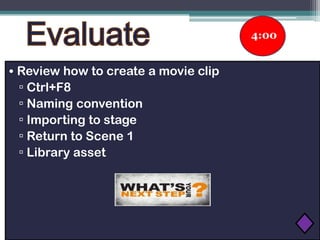
• Review how to create a movie clip
▫ Ctrl+F8
▫ Naming convention
▫ Importing to stage
▫ Return to Scene 1
▫ Library asset
Making Connections

Let’s reflect back on your current project … What types
of graphics did you collect for your E-card?
Making Connections
Making Connections
Making Connections
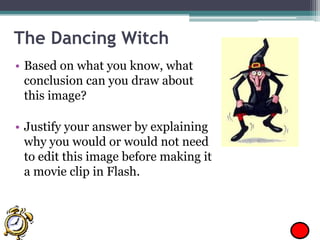
The Dancing Witch
• Based on what you know, what
conclusion can you draw about
this image?
• Justify your answer by explaining
why you would or would not need
to edit this image before making it
a movie clip in Flash.
Development Time
1. Locate the graphic images you already saved.
2. Based on what you have learned, edit your images and
re-save them as a .PNG file using Adobe Fireworks.

3. Within Flash, create a new movie clip for each
animated GIF.
4. (EXTENDED) Copy the new movie clips to your Ecard library. Create a new layer for each and drag
them to the stage. Test your movie.
APPLY New Learning
• Students will edit images used
in Holiday E-Card as needed.
• Students will create a new movie
clip for each animated GIF.
• Students will finalize their Holiday
E-Card in time for Halloween.
By the end of
class, students will be
able to edit animated
GIFs and convert them
to movie clips using
Adobe Flash.
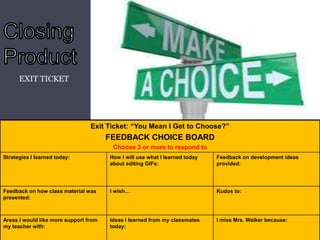
EXIT TICKET

Exit Ticket: “You Mean I Get to Choose?”

FEEDBACK CHOICE BOARD
Choose 3 or more to respond to
Strategies I learned today:

How I will use what I learned today
about editing GIFs:

Feedback on development ideas
provided:

Feedback on how class material was
presented:

I wish…

Kudos to:

Areas I would like more support from
my teacher with:

Ideas I learned from my classmates
today:

I miss Mrs. Walker because:

Editing graphics 10.31.13

  • 1.
    Have you ever receivedan electronic greeting card? If so, what kind and what did you like or dislike about it? October 31, 2013
  • 2.
    Let’s take acloser look at the descriptors for problem solving… Have you ever received an electronic greeting On the sheet provided: card? If so, what kind • Read the description of each problem solving type. anddescriptor in the did you like what • Rank the order of the frequency that or dislike about it? you typically teach them. • # 1 =most frequent and #10 =least frequent. 2 minutes
  • 4.
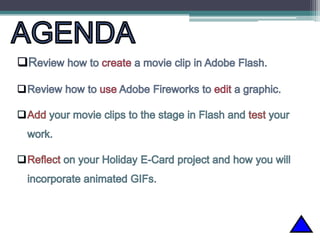
    By the endof class, students will be able to edit animated GIFs and convert them to movie clips using Adobe Flash.
  • 6.
    4:00 • Review howto create a movie clip ▫ Ctrl+F8 ▫ Naming convention ▫ Importing to stage ▫ Return to Scene 1 ▫ Library asset
  • 7.
    Making Connections Let’s reflectback on your current project … What types of graphics did you collect for your E-card?
  • 8.
  • 9.
  • 10.
  • 11.
    The Dancing Witch •Based on what you know, what conclusion can you draw about this image? • Justify your answer by explaining why you would or would not need to edit this image before making it a movie clip in Flash.
  • 12.
    Development Time 1. Locatethe graphic images you already saved. 2. Based on what you have learned, edit your images and re-save them as a .PNG file using Adobe Fireworks. 3. Within Flash, create a new movie clip for each animated GIF. 4. (EXTENDED) Copy the new movie clips to your Ecard library. Create a new layer for each and drag them to the stage. Test your movie.
  • 13.
    APPLY New Learning •Students will edit images used in Holiday E-Card as needed. • Students will create a new movie clip for each animated GIF. • Students will finalize their Holiday E-Card in time for Halloween.
  • 14.
    By the endof class, students will be able to edit animated GIFs and convert them to movie clips using Adobe Flash.
  • 15.
    EXIT TICKET Exit Ticket:“You Mean I Get to Choose?” FEEDBACK CHOICE BOARD Choose 3 or more to respond to Strategies I learned today: How I will use what I learned today about editing GIFs: Feedback on development ideas provided: Feedback on how class material was presented: I wish… Kudos to: Areas I would like more support from my teacher with: Ideas I learned from my classmates today: I miss Mrs. Walker because:

Editor's Notes

  • #3 http://www.amazing-animations.com/
  • #14 Use as a handout.