Portal for the English Teacher. Dr. Reinildes Dias, Ph.D.


                         http://www.123greetings.com/


Sending ecards (electronic cards) can be one the best and easiest ways to break
the ice at the beginning of a new school year, even among students who have
already been together in previous classes. It can also be an engaging and
motivating activity to welcome new students who have just joined the group in a new
school.

There are various websites from which students can send different types of ecards
to one another, as, for example, birthday greeting cards, thank you cards,
invitations, friendship cards, etc.

For the purposes of using ecards as an icebreaker activity, I recommend the ones
that focus on general themes such as “have a great day”, “smile and be happy” or
“just say hi”, amongst others. Check the ones below.
http://www.123greetings.com/general/hi/
http://www.123greetings.com/cute_cards/smile/
http://www.123greetings.com/general/have_a_great_day/


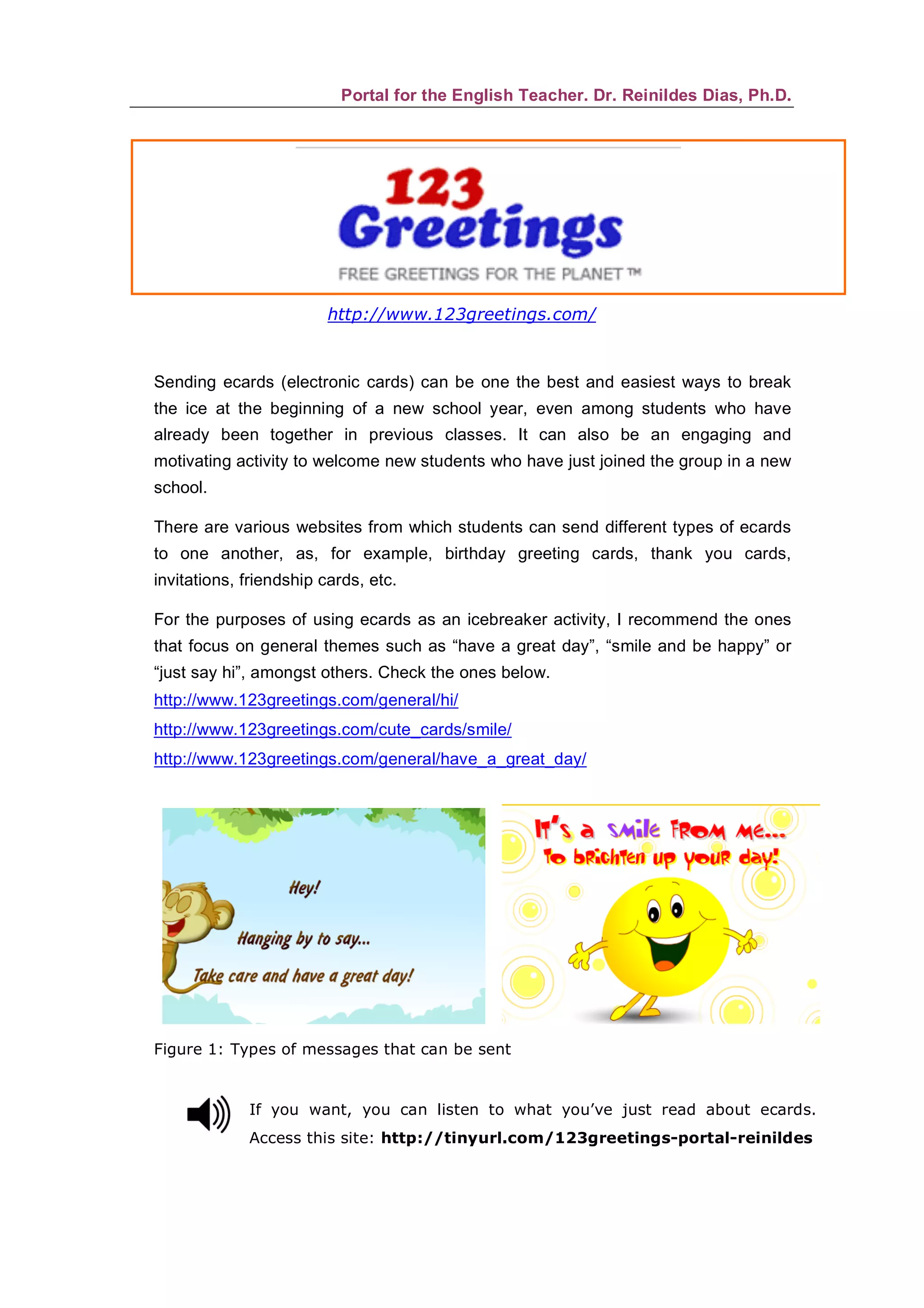
Figure 1: Types of messages that can be sent


             If you want, you can listen to what you’ve just read about ecards.
             Access this site: http://tinyurl.com/123greetings-portal-reinildes
Portal for the English Teacher. Dr. Reinildes Dias, Ph.D.

First things first
  Discuss the idea of exchanging ecards with classmates to get them excited for the
  new school year. Listen to your students’ opinion. Let them express what they feel
  about greeting classmates through ecards. Ask them if they’ve already sent e-
  messages to friends and family before.

  Either in the school lab or as homework, ask the students to visit sites from which
  they can send ecards. The ones above can be recommended. Tell them they are
  free to visit other sites with the same purpose.

  Debate about what they found out on the internet. Did they like the ecards? Who will
  they send ecards to from now on? Which sites would they recommend? Which will
  be among their favorites?

  Then ask students to exchange email addresses in the classroom. A blank page can
  be passed around and each student would write down his/her email address. One or
  two students could assume the responsibility to type all addresses and send them
  via an egroup to the whole class, for instance.


Sending the ecard
  1. Access the site: www.123greetings.com (or any other of your choice).

  2. Choose the theme: Everyday cards: Hi or Cute cards: smile or Cute cards: Hugs.

  3. When the page pops up, choose the card.

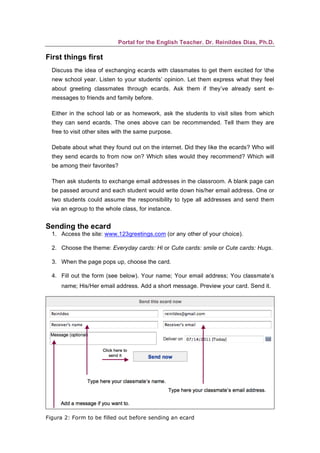
  4. Fill out the form (see below). Your name; Your email address; You classmate’s
     name; His/Her email address. Add a short message. Preview your card. Send it.


Figura 2: Form to be filled out before sending an ecard
Portal for the English Teacher. Dr. Reinildes Dias, Ph.D.


Exchanging ecards can become routine among your students. Encourage them to
send e-messages to different classmates on different occasions Easter, Birthday,
Halloween or even for the fun of it through “thank you cards”; “best friends” or
“congratulations cards”, for instance. Your students will be engaged in true-to-life
situations to learn English meaningfully. Meaningful exchanges of messages will
motivate them to use English for real communicative purposes. Let’s always
remember that they are native speakers of the new language of technology! Let’s
give them the chance to use it at it’s full potential to learn English.


It’s also a good idea to discuss the discourse and linguistic characteristics of the
genre “ecard”. Students should learn how they are created, for whom, for what
purpose etc. Many aspects of this genre can be worked on so students learn how to
write them on their own.

Last but not least: we, English teachers, should encourage students to use English
for communicative purposes. They’ll learn more by exchanging ecards than by doing
“fill in the blanks” exercises that have no meaning for them. Let them speak the
language they need to really communicate with classmates, friends and family. Let
them use their digital skills to learn English. As I always say, less downloads and
more uploads.


Digital tools for learning English! Let’s go for them! Our students
deserve the best! Less downloads and more uploads!

Ecards

  • 1.
    Portal for theEnglish Teacher. Dr. Reinildes Dias, Ph.D. http://www.123greetings.com/ Sending ecards (electronic cards) can be one the best and easiest ways to break the ice at the beginning of a new school year, even among students who have already been together in previous classes. It can also be an engaging and motivating activity to welcome new students who have just joined the group in a new school. There are various websites from which students can send different types of ecards to one another, as, for example, birthday greeting cards, thank you cards, invitations, friendship cards, etc. For the purposes of using ecards as an icebreaker activity, I recommend the ones that focus on general themes such as “have a great day”, “smile and be happy” or “just say hi”, amongst others. Check the ones below. http://www.123greetings.com/general/hi/ http://www.123greetings.com/cute_cards/smile/ http://www.123greetings.com/general/have_a_great_day/ Figure 1: Types of messages that can be sent If you want, you can listen to what you’ve just read about ecards. Access this site: http://tinyurl.com/123greetings-portal-reinildes
  • 2.
    Portal for theEnglish Teacher. Dr. Reinildes Dias, Ph.D. First things first Discuss the idea of exchanging ecards with classmates to get them excited for the new school year. Listen to your students’ opinion. Let them express what they feel about greeting classmates through ecards. Ask them if they’ve already sent e- messages to friends and family before. Either in the school lab or as homework, ask the students to visit sites from which they can send ecards. The ones above can be recommended. Tell them they are free to visit other sites with the same purpose. Debate about what they found out on the internet. Did they like the ecards? Who will they send ecards to from now on? Which sites would they recommend? Which will be among their favorites? Then ask students to exchange email addresses in the classroom. A blank page can be passed around and each student would write down his/her email address. One or two students could assume the responsibility to type all addresses and send them via an egroup to the whole class, for instance. Sending the ecard 1. Access the site: www.123greetings.com (or any other of your choice). 2. Choose the theme: Everyday cards: Hi or Cute cards: smile or Cute cards: Hugs. 3. When the page pops up, choose the card. 4. Fill out the form (see below). Your name; Your email address; You classmate’s name; His/Her email address. Add a short message. Preview your card. Send it. Figura 2: Form to be filled out before sending an ecard
  • 3.
    Portal for theEnglish Teacher. Dr. Reinildes Dias, Ph.D. Exchanging ecards can become routine among your students. Encourage them to send e-messages to different classmates on different occasions Easter, Birthday, Halloween or even for the fun of it through “thank you cards”; “best friends” or “congratulations cards”, for instance. Your students will be engaged in true-to-life situations to learn English meaningfully. Meaningful exchanges of messages will motivate them to use English for real communicative purposes. Let’s always remember that they are native speakers of the new language of technology! Let’s give them the chance to use it at it’s full potential to learn English. It’s also a good idea to discuss the discourse and linguistic characteristics of the genre “ecard”. Students should learn how they are created, for whom, for what purpose etc. Many aspects of this genre can be worked on so students learn how to write them on their own. Last but not least: we, English teachers, should encourage students to use English for communicative purposes. They’ll learn more by exchanging ecards than by doing “fill in the blanks” exercises that have no meaning for them. Let them speak the language they need to really communicate with classmates, friends and family. Let them use their digital skills to learn English. As I always say, less downloads and more uploads. Digital tools for learning English! Let’s go for them! Our students deserve the best! Less downloads and more uploads!