Earning more online Jon Matthews
Content Introduction The Secret! Engagement Fundraising Monitoring Getting started Examples
Learning from Obama 5 million friends on 15 social networking sites – 3 million on Facebook 13 million email list 3 million online donors 8.5 million monthly visits to website 2000 official videos on YouTube 3 million signed up for text messages
Why it worked Clear objectives – raise funds, engage community to fundraise and vote Stimulate action and make things happen – low barriers Engage at all level – posting comments, blogging, recruiting others, drive up commitment by offering more value
Identify super users (give them the tools) Be where people are- drive them to your site Be relevant –listen to what people say On and Offline Be found  Measure everything The right team
VIDEO CLIP
Secrets to earning more online Passion Persistence Partnership
Passion Being passionate about cause Matching the donors need Encouraging people to be passionate about the organisation
Persistence Building up relationships Takes time to nurture
Partnership Within the organisation Between social media On and Offline content
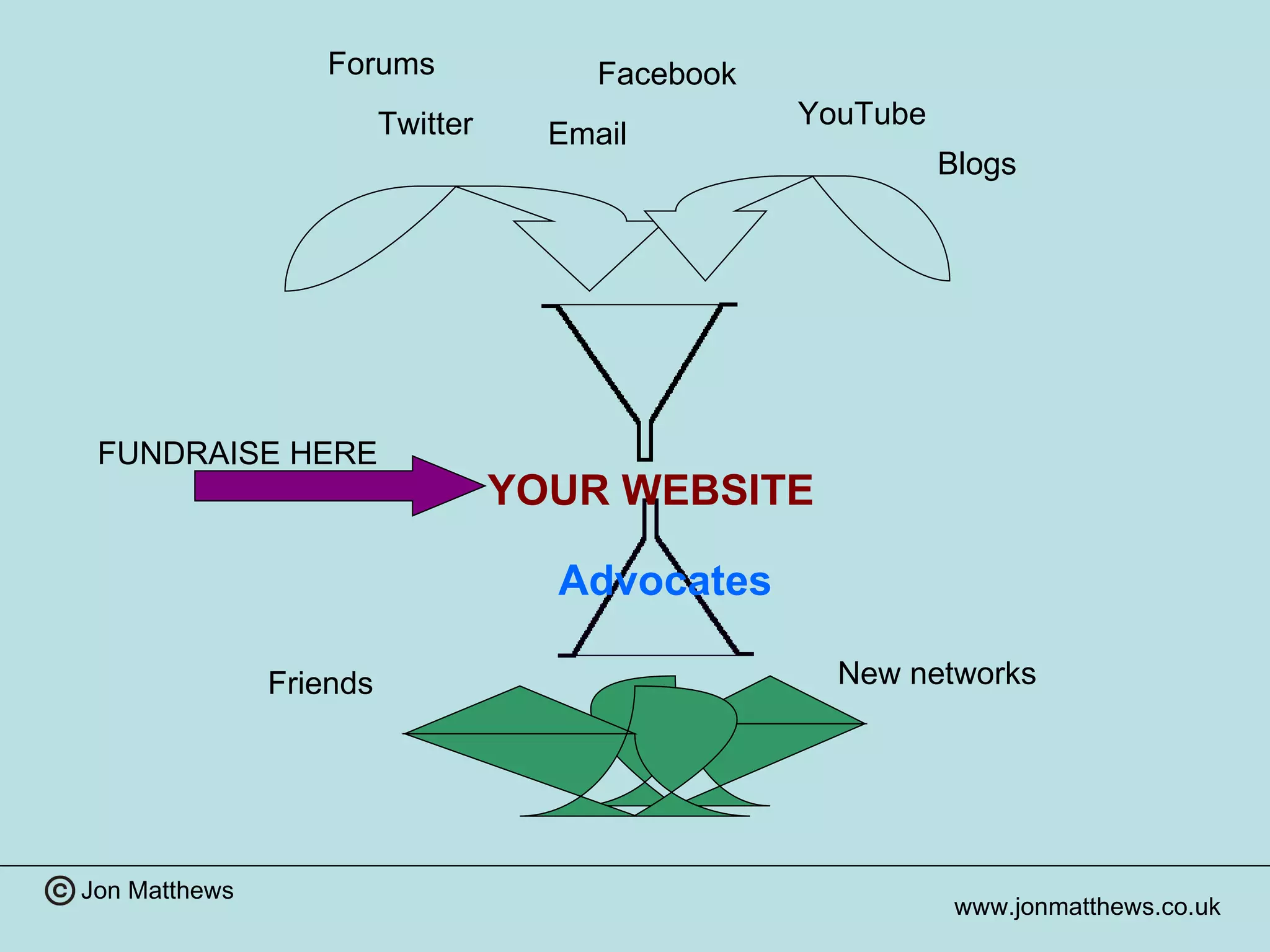
YOUR WEBSITE Facebook Twitter YouTube Email Advocates New networks Friends FUNDRAISE HERE Forums Blogs
Engagement How do you engage people? Give information / News Provide support or a service Communicate with people Receive donations Make people feel good
Where to start? “ One rule:  Follow the donor, be where the donors are   ” – Howard Lake Look whose talking about you already Google  Alerts  Google Blog Search. Social Mention and  Addict o  matic
Facebook Photos Maximise Like button Promote it, encourage supporters to ‘like’ site Build relationships first Respond to people
YouTube Consent of people involved Keep it short 1-2 minutes Viral – needs to be stand alone What difference will you  make – context to video
Twitter Be personal Use it to link to stories and information Interact with followers Breast Cancer Care
Email Long lasting Ask recipient to take 1 action, update people on progress Tailor content to audience Make them personal Remove emails that bounce (mail Chimp) Say thank you
Building relationships Who is on your site? Service users Supporters People seeking information Trustees Professionals Make content appropriate  Donor vs Service user Site /Media personality Facebook / Micro sites / Twitter
All about choice Different people use internet in different Ways Email Twitter Facebook Which to use; all? User choice
Provide Information “ The Internet is a thoughtful person’s media ” Andrew Cates (CEO) Village SOS People  will  research the charity before giving Can give more depth and understanding to issues; back up images with facts, stories Transparency of income and expenditure
Use of intelligence Use what you know about your visitor Landing page Meet users expectations  Why are they visiting Does content match reason for visiting Page ‘log in’ Match content to user
Relationships matter Engage mentally and emotionally  All about community (Beatbullying) Build Maintain Nurture Building relationships Takes time (Beatbullying) On and Off line (Child’s I Foundation)
Get people talking Spark debate Create peer support User generated content Give good quality information  80:20 ‘ Like’ it; The purchaser is the best promoter
Fund raising Build  Relationships  First!
Fund raising Small proportion of sectors income; but growing fast Very economical Drive traffic to site Social media Email Information
Once on site Guide them through site Don’t let them get distracted Single cause sites -Microsites Higher not lower value asks Appeals work best Build up interest Friends asking friends
Monitoring / review Google  Analytics  Facebook insights ( http:// www.facebook.com )  Forums – what are people talking about
Tools Mail Chimp – Email tool Tweetdeck – manages social media
 
Tips on getting started See what others are doing Follow people on Twitter / Facebook What do they do that you like / dislike Don’t try and be everywhere Identify the existing skill level Time commitment from staff / Trustees  Find free resources to help
Design Subtly matters  You / I Photos make eye contact Use of site Consistency Fast loading 3 clicks to information
Control Be prepared to give up some control “ Charities can afford not to be online”  Volunteers give talks to public.. Escalation policy if this go wrong Get conversations off line Ensure members know correct story Anonymous complaints; what are their motives Little evidence
Links FairSay Witness.org RaisingIT Sounddelivery Sue Fidler Howard Lake
Contact Jon Matthews 01597 825359 [email_address] Facebook.com/jmcwales

Earning more online

  • 1.
    Earning more onlineJon Matthews
  • 2.
    Content Introduction TheSecret! Engagement Fundraising Monitoring Getting started Examples
  • 3.
    Learning from Obama5 million friends on 15 social networking sites – 3 million on Facebook 13 million email list 3 million online donors 8.5 million monthly visits to website 2000 official videos on YouTube 3 million signed up for text messages
  • 4.
    Why it workedClear objectives – raise funds, engage community to fundraise and vote Stimulate action and make things happen – low barriers Engage at all level – posting comments, blogging, recruiting others, drive up commitment by offering more value
  • 5.
    Identify super users(give them the tools) Be where people are- drive them to your site Be relevant –listen to what people say On and Offline Be found Measure everything The right team
  • 6.
  • 7.
    Secrets to earningmore online Passion Persistence Partnership
  • 8.
    Passion Being passionateabout cause Matching the donors need Encouraging people to be passionate about the organisation
  • 9.
    Persistence Building uprelationships Takes time to nurture
  • 10.
    Partnership Within theorganisation Between social media On and Offline content
  • 11.
    YOUR WEBSITE FacebookTwitter YouTube Email Advocates New networks Friends FUNDRAISE HERE Forums Blogs
  • 12.
    Engagement How doyou engage people? Give information / News Provide support or a service Communicate with people Receive donations Make people feel good
  • 13.
    Where to start?“ One rule: Follow the donor, be where the donors are ” – Howard Lake Look whose talking about you already Google Alerts Google Blog Search. Social Mention and Addict o matic
  • 14.
    Facebook Photos MaximiseLike button Promote it, encourage supporters to ‘like’ site Build relationships first Respond to people
  • 15.
    YouTube Consent ofpeople involved Keep it short 1-2 minutes Viral – needs to be stand alone What difference will you make – context to video
  • 16.
    Twitter Be personalUse it to link to stories and information Interact with followers Breast Cancer Care
  • 17.
    Email Long lastingAsk recipient to take 1 action, update people on progress Tailor content to audience Make them personal Remove emails that bounce (mail Chimp) Say thank you
  • 18.
    Building relationships Whois on your site? Service users Supporters People seeking information Trustees Professionals Make content appropriate Donor vs Service user Site /Media personality Facebook / Micro sites / Twitter
  • 19.
    All about choiceDifferent people use internet in different Ways Email Twitter Facebook Which to use; all? User choice
  • 20.
    Provide Information “The Internet is a thoughtful person’s media ” Andrew Cates (CEO) Village SOS People will research the charity before giving Can give more depth and understanding to issues; back up images with facts, stories Transparency of income and expenditure
  • 21.
    Use of intelligenceUse what you know about your visitor Landing page Meet users expectations Why are they visiting Does content match reason for visiting Page ‘log in’ Match content to user
  • 22.
    Relationships matter Engagementally and emotionally All about community (Beatbullying) Build Maintain Nurture Building relationships Takes time (Beatbullying) On and Off line (Child’s I Foundation)
  • 23.
    Get people talkingSpark debate Create peer support User generated content Give good quality information 80:20 ‘ Like’ it; The purchaser is the best promoter
  • 24.
    Fund raising Build Relationships First!
  • 25.
    Fund raising Smallproportion of sectors income; but growing fast Very economical Drive traffic to site Social media Email Information
  • 26.
    Once on siteGuide them through site Don’t let them get distracted Single cause sites -Microsites Higher not lower value asks Appeals work best Build up interest Friends asking friends
  • 27.
    Monitoring / reviewGoogle Analytics Facebook insights ( http:// www.facebook.com ) Forums – what are people talking about
  • 28.
    Tools Mail Chimp– Email tool Tweetdeck – manages social media
  • 29.
  • 30.
    Tips on gettingstarted See what others are doing Follow people on Twitter / Facebook What do they do that you like / dislike Don’t try and be everywhere Identify the existing skill level Time commitment from staff / Trustees Find free resources to help
  • 31.
    Design Subtly matters You / I Photos make eye contact Use of site Consistency Fast loading 3 clicks to information
  • 32.
    Control Be preparedto give up some control “ Charities can afford not to be online” Volunteers give talks to public.. Escalation policy if this go wrong Get conversations off line Ensure members know correct story Anonymous complaints; what are their motives Little evidence
  • 33.
    Links FairSay Witness.orgRaisingIT Sounddelivery Sue Fidler Howard Lake
  • 34.
    Contact Jon Matthews01597 825359 [email_address] Facebook.com/jmcwales

Editor's Notes

  • #2 About me
  • #3 Toilets Fire Drill Breaks Finish time
  • #4 380% more online supporters than McCain Number of donations 6 million of 6.5 million donations online in donations under $100 $500 million raised online of $639 total Key messages on video “Yes We Can “music video viewed 14 million times 905% more video views than McCain 3 text messages on election day for supporters
  • #5 Drive up commitment –more opportunities, host events, create groups, making person feel more valuable
  • #6 Identify touch points – what are people already talking about – shows empathy Added social interaction, added value to participants 200,000 offline events organised Bought Adwords 1/3 don’t distinguish organic vs paid ads Learn from measuring – title of email / subject box 15-30% open rate Custom content, Test , Campaign saw increase conversion rate through campaign as result Not an add on – must be integrated; use experts (Used Co founder of Facebook – Chris Hughes
  • #8 Still relevant?
  • #12 Model to fundraise online Use social media to drive people to your site Pick up key people to become advocates who fundraise, talk about you, promote and publicise you Use their networks to spread the word
  • #13 Why do people use your website at present? How did you decide upon the content The key to online fundraising is engagement; making sure your site has something to make people come back , feel part of the organisation
  • #14 To help understand the present interest online about your organisations there are several tool you can use
  • #20 In planning what social media you are going to use think about the donors Internet gives people choice – sign up / cancel, block Where they are Provide information in layers to give greater understanding of issues
  • #21 What information goes on your site Far more effective than single phot Amount are bigger SOS £300 average
  • #22 When arrive on site See the information that they expect to see – donor how to give
  • #31 Getting started Sounddelivery One of the key mistakes people make is not spending time in the planning stage Spend some time doing research – even a few hours can make a difference There are so may SM networks you can be everywhere, pick 1 or 2 Although resources are free there is a staffing commitment Identify the existing staff commitment – Breast Cancer Care Free resources and organisations (at end)
  • #32 Think about your website design, it is important that people who come to your site can use it effectively. Your website is the main place for fundraising SM to engage and drive people to your site
  • #35 About Me Information from PPP